

Le piattaforme di programmazione collaborativa aiutano gli sviluppatori a lavorare sullo stesso codice in tempo reale, che si trovino dall’altra parte del tavolo o dall’altra parte del mondo.
Questi strumenti diventano essenziali quando la condivisione dello schermo non è sufficiente, il controllo delle versioni diventa complicato o si perde tempo cercando di eseguire il debug dei problemi via chat. La modifica in tempo reale, i terminali condivisi e la collaborazione nel browser rendono più semplice risolvere i problemi insieme, senza continui cambi di contesto o confusione.
Ho lavorato con team che utilizzavano questi strumenti per attività che andavano dalle revisioni tra pari all’inserimento dei nuovi collaboratori, fino alle sessioni complete di debugging dell’intero stack. Questa guida si basa su quell’esperienza ed è pensata per aiutarti a scegliere una piattaforma adatta al modo in cui il tuo team scrive e distribuisce il codice.
Perché fidarsi dei nostri consigli sui software
6,700+
Reviews
20
Industry experts
16+
Evaluation factors
14
Years
Il nostro team testa e recensisce software dal 2012. In quanto leader tecnologici noi stessi, sappiamo quanto sia difficile — e importante — scegliere il software giusto.
Per questa guida, abbiamo valutato gli strumenti attraverso test praticie ricerche indipendenti, assegnando un punteggio agli strumenti in base ai nostri criteri di selezione.
Le nostre recensioni riflettono il nostro giudizio editoriale umano, non un discorso di vendita.
Revisori esperti:
- Paulo Gardini MiguelDirettore tecnico
 Tim FisherVP dell'IA
 Gabriel RosasTech Lead e architetto software
 Christhian GruhnTech Lead e architetto della piattaforma

Tabella comparativa delle piattaforme di programmazione collaborativa
Questa tabella comparativa riepiloga i dettagli sui prezzi delle mie migliori piattaforme di programmazione collaborativa:
| Tool | Best For | Trial Info | Price | ||
|---|---|---|---|---|---|
| 1 | Ideale per la gestione delle attività dei team da remoto | No | $10.99/user/month (fatturato annualmente) | Website | |
| 2 | Ideale per la condivisione e l'archiviazione sicura dei file | No | $5/user/month | Website | |
| 3 | Ideale per la condivisione centralizzata delle conoscenze del team | No | $5/utente/mese (fatturazione annuale) | Website | |
| 4 | Ideale per valutazione e formazione sulle capacità di coding | No | $35/user/month | Website | |
| 5 | Ideale per integrare la documentazione del codice con le attività di programmazione | No | $20/user/month | Website | |
| 6 | Ideale per una base di conoscenza tecnica interna | No | $10/user/month | Website | |
| 7 | Ideale per sessioni di programmazione collaborativa dal vivo | No | $9.90/utente/mese (con fatturazione annuale) | Website | |
| 8 | Ideale per brainstorming visivo e mappatura delle idee | No | $8/utente/mese (fatturato annualmente) | Website | |
| 9 | Ideale per la pianificazione dei progetti e l'assegnazione delle risorse tramite IA | No | $8/utente/mese (con fatturazione annuale) | Website | |
| 10 | Ideale per comunicazione e collaborazione fluida tra i membri del team | No | $18.95/utente/mese (fatturato annualmente) | Website |


Recensioni delle migliori piattaforme di programmazione collaborativa
 Ideale per la gestione delle attività dei team da remoto
- No
- $10.99/user/month (fatturato annualmente)
Visit WebsiteCustomer Rating:4.4/5
La sezione 'Le mie attività' di Asana è la tua centrale operativa per visualizzare e dare priorità a tutto il lavoro assegnato a te. Asana è uno strumento di gestione di attività e progetti che aiuta i team a organizzare, monitorare e gestire il proprio lavoro. È fondamentale nelle situazioni di lavoro da remoto, dove coordinare le attività e mantenere la visibilità sui progetti può risultare molto impegnativo.
Perché ho scelto Asana:
Le capacità di Asana nel facilitare la gestione delle attività dei team da remoto sono emerse rapidamente durante il confronto con altri strumenti. Il suo set di funzionalità completo, unito a un'interfaccia intuitiva, lo aiuta a distinguersi tra i concorrenti. Ho scelto Asana perché colma il divario nella comunicazione e nella supervisione dei progetti tipico dei team da remoto, rendendolo il migliore per questo caso d'uso.
Caratteristiche distintive e integrazioni:
Asana offre svariate funzionalità, tra cui visualizzazioni cronologiche, dipendenze tra attività e campi personalizzati per aggiungere dettagli specifici di ogni progetto. Inoltre, mette a disposizione bacheche Kanban per una gestione visiva dei progetti. Asana si integra perfettamente con numerose applicazioni di terze parti come Slack, Google Drive e Zoom, ampliandone l'utilità nei classici contesti di lavoro da remoto.
Pros and Cons
Pros:
- Gestione avanzata delle attività con funzionalità come dipendenze e campi personalizzati
- Opzioni di visualizzazione versatili, tra cui liste, bacheche e timeline
- Ampia gamma di integrazioni con strumenti di terze parti
Cons:
- Può risultare complesso per i nuovi utenti a causa delle molteplici funzionalità.
- Funzionalità limitate nel piano gratuito
- Funzionalità avanzate come carico di lavoro e obiettivi sono disponibili solo nel piano business.
Learn more about Asana: 2Ideale per la condivisione e l'archiviazione sicura dei file
Box
- No
- $5/user/month
Visit WebsiteCustomer Rating:4.3/5
Rimani proattivo con il machine learning di Box Shield e la possibilità di impostare policy che rilevano le minacce. Tieni al sicuro i tuoi file con le funzionalità di sicurezza e conformità cloud-native di Box come controlli granulari sugli accessi, filigranatura e classificazione. Box è uno strumento di archiviazione e collaborazione basato sul cloud che consente agli utenti di archiviare, condividere e accedere ai file online in modo sicuro. Le sue solide funzionalità di sicurezza lo rendono una scelta ideale per le aziende che desiderano condividere in modo protetto file e dati sensibili, risultando particolarmente adatto alla condivisione e archiviazione sicura dei file.
Perché ho scelto Box:
Durante il mio processo di selezione, ho scelto Box per la sua dedizione alla sicurezza dei dati e per la facilità d'uso. È una soluzione di archiviazione essenziale e una piattaforma completa che offre una robusta crittografia dei dati e controlli dettagliati sugli accessi. Box è il migliore per la condivisione e l'archiviazione sicura dei file grazie al suo impegno costante nella protezione dei dati.
Funzionalità e integrazioni principali:
Box offre collaborazione in tempo reale, sincronizzazione automatica dei file e cronologia delle versioni. Ma ciò che lo distingue davvero sono le sue funzionalità di sicurezza, che includono controlli granulari sugli accessi, crittografia avanzata e conformità a diversi standard di privacy globali. Box si integra inoltre perfettamente con molte applicazioni aziendali, tra cui Office 365, G Suite, Salesforce e Slack.
Pros and Cons
Pros:
- Le robuste funzionalità di sicurezza offrono una protezione forte dei dati.
- Si integra con una vasta gamma di applicazioni di terze parti
- Collaborazione in tempo reale sui documenti
Cons:
- L'interfaccia utente può risultare confusionaria per chi utilizza il servizio per la prima volta.
- Il limite della dimensione dei file nel piano di base
- La funzionalità di ricerca potrebbe essere migliorata per maggiore facilità d'uso.
Learn more about Box: Ideale per la condivisione centralizzata delle conoscenze del team
- No
- $5/utente/mese (fatturazione annuale)
Visit WebsiteCustomer Rating:4.3/5
Con Confluence puoi creare qualsiasi cosa, dai piani di progetto alle campagne di marketing fino ai requisiti di prodotto e molto altro. Confluence è una solida piattaforma software collaborativa progettata per centralizzare la condivisione delle conoscenze del team. È uno spazio di lavoro digitale dove i team possono anche creare, condividere e collaborare su progetti in un'unica posizione accessibile.
Perché ho scelto Confluence:
La capacità di Confluence di favorire uno spazio unificato di condivisione della conoscenza ha attirato la mia attenzione durante l'analisi di diverse piattaforme collaborative. Non si tratta solo di creare e modificare documenti, ma del modo in cui Confluence rende la conoscenza accessibile e organizzata per ogni membro del team. Il punto di forza della piattaforma risiede nella sua capacità di colmare le lacune informative all'interno del team, motivo per cui la considero la migliore per la condivisione centralizzata delle conoscenze di gruppo.
Funzionalità principali e integrazioni:
La struttura di pagine e spazi di Confluence aiuta i team a organizzare efficacemente il loro lavoro e le loro conoscenze. La piattaforma offre anche una funzione di ricerca avanzata, garantendo che le informazioni critiche siano sempre disponibili. Dal lato delle integrazioni, Confluence funziona bene con strumenti come Jira, Trello, Slack e molti altri, facilitando un flusso di lavoro fluido con il set di strumenti già in uso.
Pros and Cons
Pros:
- Fornisce una piattaforma centralizzata per la condivisione delle conoscenze del team
- Funzionalità di ricerca avanzata per un rapido accesso alle informazioni
- Eccellente integrazione con altri prodotti Atlassian e numerosi strumenti esterni
Cons:
- La curva di apprendimento potrebbe risultare ripida per gli utenti non tecnici.
- L'interfaccia utente potrebbe beneficiare di un restyling del design.
- Le opzioni di personalizzazione possono sembrare limitate per progetti complessi.
 Ideale per valutazione e formazione sulle capacità di coding
- No
- $35/user/month
Visit WebsiteCustomer Rating:4.4/5
Il generatore di assessment di Coderbyte consente anche agli utenti non tecnici di creare facilmente una valutazione rilevante Coderbyte è una piattaforma basata sul web pensata per aiutare le persone a migliorare le proprie competenze di programmazione attraverso esercizi pratici e test. Grazie a un'ampia raccolta di sfide di coding e corsi preparatori per i colloqui tecnici, è particolarmente utile per la valutazione delle competenze e la formazione.
Perché ho scelto Coderbyte:
Nella scelta di una piattaforma per la valutazione e la formazione sulle competenze di programmazione, Coderbyte mi è sembrata una scelta naturale. Inoltre, la sua libreria completa di sfide di coding per vari livelli di difficoltà la distingue dalle altre. Il fatto che queste sfide siano disponibili in diversi linguaggi di programmazione rafforza la mia convinzione che Coderbyte sia la migliore piattaforma per la valutazione e la formazione sulle capacità di coding.
Caratteristiche principali e integrazioni:
Le funzionalità chiave di Coderbyte includono una vasta gamma di sfide di coding, un editor di codice integrato per la pratica e le soluzioni fornite dalla community. Offre anche soluzioni ufficiali e una guida video per alcune sfide, facilitando una migliore comprensione. Sebbene le integrazioni dirette siano limitate, supporta diversi linguaggi di programmazione, consentendo agli utenti di esercitarsi e imparare nella lingua di loro preferenza.
Pros and Cons
Pros:
- Ampia gamma di sfide di coding
- Supporta molteplici linguaggi di programmazione
- Soluzioni della community e video tutorial disponibili
Cons:
- Integrazioni dirette limitate
- Prezzo iniziale elevato per utenti individuali
- L'interfaccia potrebbe essere migliorata per una migliore esperienza utente.
Learn more about Coderbyte: Ideale per integrare la documentazione del codice con le attività di programmazione
- No
- $20/user/month
Visit WebsiteCustomer Rating:4.4/5
Con Swimm, documenta flussi complessi che si estendono su più file e repository con contenuti ricchi che interagiscono direttamente con il codice e si aggiornano automaticamente quando il tuo codice cambia. Swimm è uno strumento che garantisce che la documentazione rimanga sincronizzata con la tua base di codice. Fornisce un ambiente per scrivere e gestire documenti e consente agli sviluppatori di collegare parti dei loro testi ai relativi frammenti di codice. Questa caratteristica unica rende Swimm uno strumento fantastico per integrare la documentazione del codice con le attività di programmazione.
Perché ho scelto Swimm:
Swimm si è distinto nella selezione degli strumenti di questa lista per il suo approccio innovativo al mantenimento aggiornato della documentazione del codice, una sfida frequente negli ambienti di sviluppo dinamici. Inoltre, apprezzo come Swimm crei una simbiosi tra codice e documentazione, rendendolo la scelta ideale per integrare la documentazione del codice con le attività di programmazione.
Funzionalità principali e integrazioni:
Le caratteristiche fondamentali di Swimm includono anche la sincronizzazione automatica tra documentazione e base di codice, la possibilità di scrivere test unitari nella documentazione e la creazione di materiali didattici interattivi. Per quanto riguarda le integrazioni, Swimm funziona bene con Github, consentendo una connessione fluida con i tuoi repository.
Pros and Cons
Pros:
- Codice e documentazione rimangono sincronizzati.
- La possibilità di scrivere test unitari nella documentazione
- Supporta la creazione di materiali di apprendimento interattivi
Cons:
- Prezzo iniziale più alto rispetto ad alcuni concorrenti
- Un po' complesso da apprendere per i membri del team meno tecnici
- Numero limitato di integrazioni dirette
Learn more about Swimm:

Con Stack Overflow for Teams è possibile l'integrazione con Slack. Stack Internal è una piattaforma interna per la condivisione della conoscenza e la collaborazione, destinata principalmente ai team tecnici. Funziona come uno spazio privato e sicuro in cui i colleghi possono porre domande e ricevere risposte, rendendola uno strumento ideale per creare una base di conoscenza tecnica interna.
Perché ho scelto Stack Internal:
Ho scelto Stack Internal per questo elenco grazie alla sua solida reputazione nel facilitare una condivisione efficiente della conoscenza all'interno dei team tecnici. Inoltre, ciò che la distingue è il suo familiare formato di domande e risposte, al quale tanti sviluppatori e professionisti tecnici sono abituati, aumentando così i tassi di adozione e utilizzo. Per questi motivi, ho stabilito che Stack Internal fosse lo strumento migliore per creare una base di conoscenza tecnica interna.
Caratteristiche e integrazioni di rilievo:
Stack Internal offre funzionalità come l'aggiunta di tag, la ricerca istantanea e un'interfaccia integrata, rendendo la raccolta e il recupero delle conoscenze rapidi ed efficienti. Le sue integrazioni con strumenti di uso quotidiano come Slack e Microsoft Teams garantiscono che gli aggiornamenti e le discussioni essenziali non passino inosservati.
Pros and Cons
Pros:
- Formato familiare di domande e risposte, facile da adottare
- Sistema efficiente di ricerca e aggiunta di tag per recuperare facilmente le informazioni
- Integrazioni preziose con strumenti come Slack e Microsoft Teams
Cons:
- Il costo potrebbe essere proibitivo per i team più piccoli.
- Meno adatto ai team non tecnici
- Nessuna opzione per un piano per singolo utente
Learn more about Stack Internal: Ideale per sessioni di programmazione collaborativa dal vivo
- No
- $9.90/utente/mese (con fatturazione annuale)

Esegui test e fai il debug con il test runner grafico integrato e il debugger, e usa il terminale incorporato mentre Code With Me funge da IDE JetBrains completo per i tuoi progetti remoti. Code With Me è un servizio di JetBrains che consente agli sviluppatori di condividere il progetto nel proprio IDE con altri, facilitando la programmazione congiunta in tempo reale. Si distingue per le sue sessioni di programmazione dal vivo, durante le quali più partecipanti possono osservare e modificare simultaneamente il codice.
Perché ho scelto Code With Me:
Code With Me si è distinto nella selezione degli strumenti per questo elenco perché porta la collaborazione nella programmazione a un livello superiore con le sue sessioni di programmazione dal vivo. La possibilità di condividere un progetto dal proprio IDE in tempo reale lo distingue dagli altri strumenti di collaborazione. Date queste caratteristiche uniche, ho stabilito che Code With Me è la scelta migliore per le sessioni di programmazione collaborativa dal vivo.
Funzionalità e integrazioni distintive:
Le funzionalità fondamentali di Code With Me includono la modifica collaborativa simultanea, la chat vocale e video integrata e una funzione per seguire un partecipante, che consente di visualizzare in tempo reale le azioni di un'altra persona. L'integrazione con IDE popolari come IntelliJ IDEA, PyCharm, WebStorm e altri rappresenta un vantaggio significativo, poiché consente agli sviluppatori di lavorare in un ambiente con cui hanno familiarità.
Pros and Cons
Pros:
- È possibile programmare in collaborazione in tempo reale.
- Chat vocale e video integrata per una comunicazione migliore
- Integrazione con gli IDE JetBrains più diffusi
Cons:
- Potrebbe essere eccessivo per semplici attività collaborative.
- È necessaria una certa curva di apprendimento per utilizzarlo in modo efficace.
- Il prezzo potrebbe rappresentare un ostacolo per i team più piccoli.
Learn more about Code With Me: 8Ideale per brainstorming visivo e mappatura delle idee
Miro
- No
- $8/utente/mese (fatturato annualmente)
Visit WebsiteCustomer Rating:4.8/5
Con Miro è possibile spiegare processi e sistemi complessi attraverso la mappatura e la diagrammazione visiva. Miro è una piattaforma interattiva di lavagna online che potenzia la collaborazione e la creatività del team. Si tratta di una tela digitale dove le squadre possono fare brainstorming, mappare idee e trasformarle in azioni concrete.
Perché ho scelto Miro:
La capacità di Miro di incentivare il brainstorming visivo e la mappatura delle idee si è distinta nel mio processo di selezione. In più, la sua abilità di favorire la creatività e la collaborazione in un ambiente virtuale lo rende unico rispetto a strumenti simili. Miro è particolarmente abile nel trasformare concetti astratti in rappresentazioni visive esplicite, portandomi a considerarlo il migliore per il brainstorming visivo e la mappatura delle idee.
Funzionalità eccezionali e integrazioni:
Miro offre numerosi modelli, come brainstorming, diagrammi di flusso e mappe mentali, facilitando una generazione di idee efficiente. La tela infinita può ospitare idee estese senza restrizioni. Miro si integra inoltre perfettamente con applicazioni come Google Drive, Dropbox, Slack e anche strumenti più specializzati come Jira e Sketch, consentendo un flusso di lavoro coeso.
Pros and Cons
Pros:
- Tela infinita per una generazione e mappatura delle idee senza limiti
- Ampia selezione di modelli per diversi casi d’uso
- Integrazioni senza interruzioni con vari strumenti di produttività
Cons:
- L’interfaccia potrebbe risultare complessa ai nuovi utenti.
- La collaborazione in tempo reale può essere lenta con un gran numero di partecipanti.
- Le funzionalità avanzate sono disponibili solo nei piani di livello superiore
Learn more about Miro: Ideale per la pianificazione dei progetti e l'assegnazione delle risorse tramite IA
- No
- $8/utente/mese (con fatturazione annuale)
Visit WebsiteCustomer Rating:4.6/5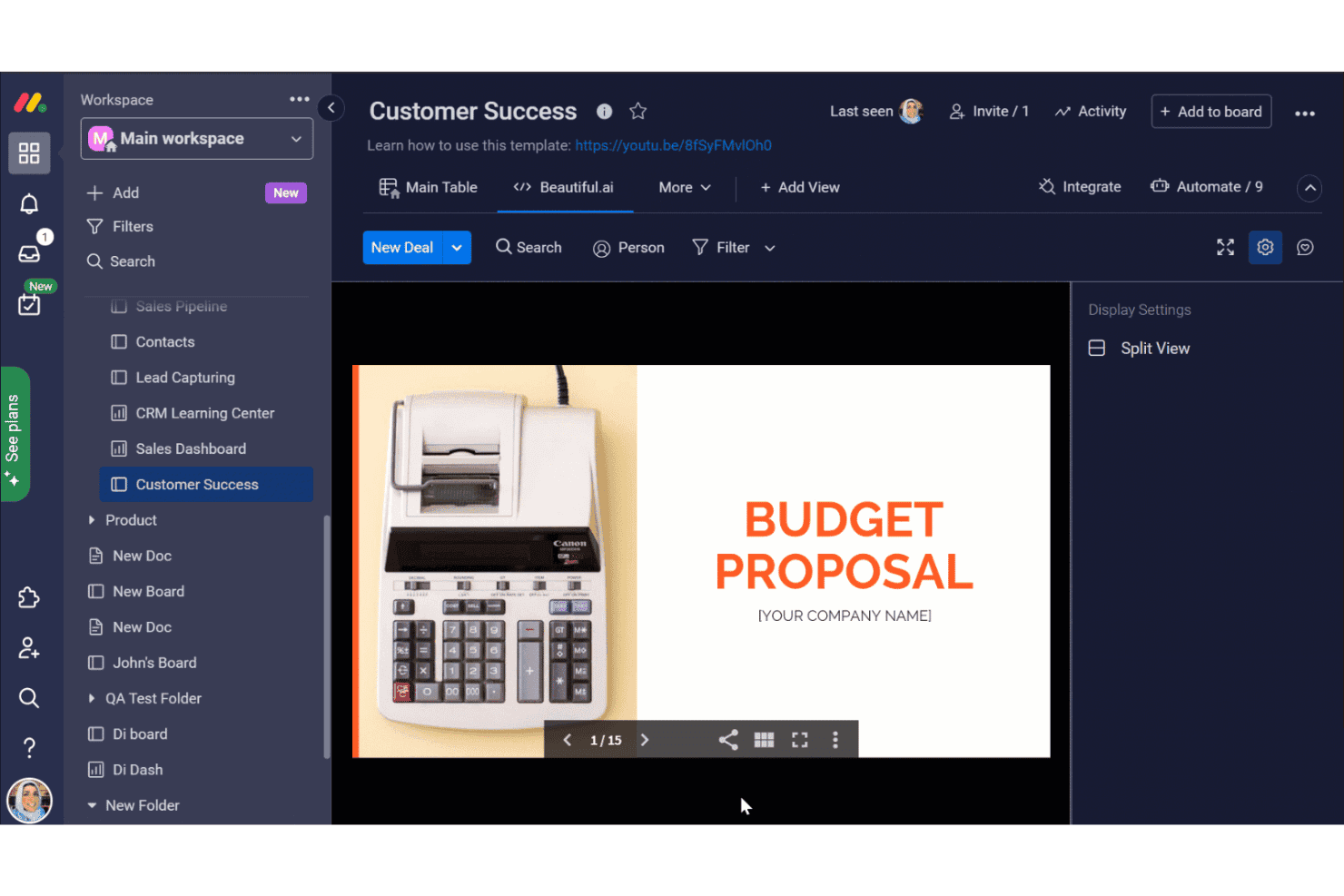
monday.com offre un'integrazione con Beautiful.ai nella sua bacheca Successo clienti, che consente agli utenti di incorporare e visualizzare le presentazioni della proposta di budget direttamente nello spazio di lavoro. Monday AI Workspace è una piattaforma di gestione del lavoro basata sull'IA che combina pianificazione dei progetti, monitoraggio degli sprint, assegnazione delle risorse e integrazioni con gli strumenti di sviluppo, tra cui GitHub e GitLab, in uno spazio di lavoro unificato per i team di ingegneria e interfunzionali.
Per chi è più adatto Monday AI Workspace?
È particolarmente adatto ai team di ingegneria di medie e grandi aziende che necessitano di una pianificazione degli sprint assistita dall'IA e di una visibilità interfunzionale sui progetti, insieme agli strumenti di sviluppo che già utilizzano.
Perché ho scelto Monday AI Workspace
Monday AI Workspace è entrato nella mia lista ristretta perché apprezzo il modo in cui la sua IA gestisce la pianificazione degli sprint e il bilanciamento del carico di lavoro senza interventi manuali. Quando assegno uno sprint, l'IA evidenzia i conflitti di capacità e suggerisce riassegnazioni basate sui dati storici relativi alla velocità del team. Trovo inoltre molto utile il rilevamento dei rischi basato sull'IA: segnala i colli di bottiglia nelle dipendenze prima che compromettano un ciclo di rilascio.
Funzionalità principali di Monday AI Workspace
- Integrazione con GitHub e GitLab: Collega direttamente richieste pull, commit e dettagli dei repository alle bacheche dei progetti per garantire visibilità sui flussi di lavoro.
- Bacheche per la gestione degli sprint: Organizza, assegna priorità e monitora le attività degli sprint con visualizzazioni agili delle bacheche personalizzabili.
- Generatore di automazioni personalizzate: Configura automazioni dei flussi di lavoro che attivano aggiornamenti, notifiche o promemoria in base all'attività della bacheca.
- Mappatura delle dipendenze: Visualizza e gestisci le dipendenze tra le attività per identificare i blocchi e organizzare il lavoro in modo efficiente.
Integrazioni di Monday AI Workspace
Monday AI Workspace offre centinaia di integrazioni, sia integrate sia disponibili nel marketplace, tra cui GitHub, GitLab, Jira, Slack, Microsoft Teams, Google Workspace, Salesforce e Zapier. È disponibile un'API per le integrazioni personalizzate.
Pros and Cons
Pros:
- L'IA assegna le attività in base alla capacità del team
- Visualizzazioni native per la pianificazione degli sprint integrate nelle bacheche
- Visibilità in tempo reale del carico di lavoro tra i team di ingegneria
Cons:
- Non progettato per la modifica del codice in tempo reale
- Nessuna funzione integrata per l'esecuzione del codice o l'uso del terminale
Learn more about monday AI Workspace: 10Ideale per comunicazione e collaborazione fluida tra i membri del team
Nextiva
- No
- $18.95/utente/mese (fatturato annualmente)
Visit WebsiteCustomer Rating:4.5/5
Gli utenti possono gestire facilmente il proprio pipeline di vendita e monitorare le trattative utilizzando la vista pipeline di Nextiva. Importa facilmente i contatti. Registra le informazioni dopo ogni interazione. Nextiva è una piattaforma di comunicazione unificata che combina servizi telefonici VoIP, messaggistica di squadra, videoconferenze e strumenti di gestione dei clienti. Grazie alla sua suite di comunicazione completa che facilita una collaborazione fluida tra i membri del team, si adatta perfettamente alle esigenze di comunicazione e collaborazione del gruppo.
Perché ho scelto Nextiva:
Ho scelto Nextiva per questa lista grazie alla sua funzionalità versatile che copre vari aspetti della comunicazione aziendale. Offre un'ampia gamma di funzionalità che ne determinano la distintività, dal servizio telefonico in cloud alla chat di gruppo, fino agli strumenti per l'assistenza clienti. Per via di questa vasta gamma di capacità di comunicazione e collaborazione, considero Nextiva un ideale strumento di comunicazione per il team.
Funzionalità principali e integrazioni:
Alcuni elementi chiave di Nextiva includono servizi telefonici VoIP, messaggistica di squadra, videoconferenze e strumenti per la gestione delle relazioni con i clienti. Le sue analisi avanzate e i report approfonditi ne rafforzano ulteriormente l'utilità per le imprese. Nextiva si integra bene con strumenti aziendali comunemente utilizzati come Microsoft Teams, Google Workspace, Salesforce e Zendesk.
Pros and Cons
Pros:
- Una suite completa di strumenti di comunicazione
- Analisi e reportistica avanzati
- Integrazione fluida con molte applicazioni aziendali di terze parti
Cons:
- La struttura dei prezzi può risultare complessa per i nuovi utenti.
- Richiede una connessione internet ad alta velocità per prestazioni ottimali
- La configurazione può essere piuttosto complicata per utenti non tecnici.
Learn more about Nextiva:
Altre piattaforme di programmazione collaborativa
Di seguito trovi un elenco di ulteriori piattaforme di programmazione collaborativa che ho selezionato, ma che non sono ancora riuscite a entrare tra le prime 10. Vale la pena dare loro un’occhiata.
- 11LucidsparkIdeale per brainstorming collaborativo in tempo reale
- 12Zoho ProjectsIdeale per la gestione di progetti su larga scala
- 13BOASTOttimo per la gestione aziendale e dei progetti tutto in uno
Recensioni di altre piattaforme di programmazione collaborativa
- Software per lo sviluppo di siti web
- Software per lo sviluppo di app
- Software per lo sviluppo di app mobili
- Piattaforme per lo sviluppo cloud
Come valuto le piattaforme di coding collaborativo
Che io stia valutando strumenti per sessioni di pair programming o per colloqui tecnici dal vivo, suddivido la mia analisi in requisiti di base e i fattori differenzianti che realmente distinguono le piattaforme.
Funzionalità principali (requisiti fondamentali per questa lista)
Quando seleziono gli strumenti per la mia lista, valuto ciascuno su una scala da 0 (non offre la funzionalità) a 5 (eccelle in quest’area) per ognuna delle funzionalità principali elencate sotto. Poi, calcolo il punteggio totale dello strumento in percentuale. Ciascuno deve raggiungere un punteggio minimo totale del 65% per essere preso in considerazione.
- Co-editing in tempo reale: Cerco una modifica multi-cursore fluida dove due o più sviluppatori possono scrivere nello stesso file contemporaneamente, come durante una sessione di pair programming dal vivo con un collega remoto.
- Supporto multi-linguaggio: La piattaforma deve gestire l’evidenziazione della sintassi e l’esecuzione per i linguaggi effettivamente utilizzati dal mio team, da Python e JavaScript a Go o Rust.
- Esecuzione del codice integrata: Verifico se gli sviluppatori possono eseguire e testare il codice direttamente nella sessione, così un team che sta effettuando il debug di un test unitario fallito non deve cambiare contesto su un terminale locale.
- Ambiente di sviluppo condiviso: Qui è importante uno spazio di lavoro cloud-based con filesystem e terminale, soprattutto per inserire nuovi assunti che hanno bisogno, dal primo giorno, di un ambiente di progetto pronto all’uso.
- Integrazione con il controllo di versione: Valuto come ogni piattaforma si connette a provider Git come GitHub, GitLab o Bitbucket per il commit, la creazione di branch e la pubblicazione delle modifiche direttamente dall’editor.
- Comunicazione durante la sessione: Chat, voce o video integrati tengono i collaboratori nella stessa finestra, cosa che trovo essenziale quando devo guidare un collega attraverso un conflitto di merge complesso.
Una volta che ho un elenco di strumenti che soddisfano questi criteri, considero ciò che distingue ciascuna piattaforma.
Fattori differenzianti (cosa rende diversi i fornitori)
Ecco come confronto e metto a fuoco le differenze tra i vari fornitori:
Funzionalità distintive
L’assistenza alla codifica tramite AI è un grande elemento di differenziazione. Cerco piattaforme dove suggerimenti in linea e spiegazioni degli errori accelerano il debugging collaborativo senza interrompere il flusso della sessione. Anche la registrazione delle sessioni conta, soprattutto per i responsabili dell’ingegneria che desiderano rivedere come si è svolta una sessione di mob programming o riprodurre un colloquio tecnico per una commissione di selezione. Per i team che svolgono valutazioni di live coding, strumenti integrati per l’intervista come punteggio dei candidati e banche di domande evitano lo sforzo di integrare piattaforme separate.
Oltre le funzionalità
Per me qui in cima ci sono sicurezza e conformità. Verifico la presenza di SOC 2, supporto SSO/SAML e log di audit, poiché i team acquisti aziendali bloccheranno l’adozione senza questi elementi. Anche l’integrazione nell’ecosistema aziendale pesa molto. Una piattaforma che si integra nel tuo stack esistente — pensa a GitHub per il controllo di versione, Slack per le notifiche, Jira per il collegamento dei ticket — riduce l’attrito del flusso di lavoro. Valuto anche la flessibilità dei prezzi, in particolare se un fornitore offre tier separati per il solo utilizzo durante i colloqui oppure per la collaborazione di tutto il team, così non paghi troppo per funzionalità che non ti servono.
Come scegliere una piattaforma di programmazione collaborativa
È facile perdersi in lunghi elenchi di funzionalità e strutture tariffarie complesse. Per aiutarti a rimanere concentrato mentre affronti il tuo specifico processo di selezione del software, ecco una lista di fattori da tenere a mente:
| Fattore | Cosa considerare |
|---|---|
| FattoreScalabilità | Cosa considerareLa piattaforma può crescere insieme al tuo team? Verifica se supporta un numero crescente di utenti e progetti senza problemi di prestazioni. |
| FattoreIntegrazioni | Cosa considerareSi collega agli altri strumenti che utilizzi? Verifica la compatibilità con il tuo insieme di software esistente, ad esempio con gli strumenti di gestione dei progetti o CI/CD. |
| FattorePossibilità di personalizzazione | Cosa considerarePuoi adattarla ai tuoi flussi di lavoro? Cerca piattaforme che consentano modifiche per adattarsi alle pratiche e alle preferenze specifiche del tuo team di sviluppo. |
| FattoreFacilità d’uso | Cosa considerareLa piattaforma è intuitiva? Assicurati che disponga di un’interfaccia facile da usare, in grado di ridurre i tempi di apprendimento e mantenere produttivo il tuo team. |
| FattoreImplementazione e inserimento | Cosa considerareQuanto è fluida la transizione? Valuta le risorse disponibili per l’inserimento, come i materiali di formazione e l’assistenza clienti durante la configurazione. |
| FattoreCosto | Cosa considerareRientra nel tuo budget? Confronta i piani tariffari, considera i costi aggiuntivi e cerca una soluzione che offra il miglior valore per il tuo investimento. |
| FattoreMisure di sicurezza | Cosa considerareI tuoi progetti sono protetti? Verifica le misure di sicurezza della piattaforma, tra cui la crittografia dei dati e i controlli degli accessi, per mantenere al sicuro il tuo codice. |
Che cos'è una piattaforma di programmazione collaborativa?
Una piattaforma di programmazione collaborativa è uno strumento che consente a più sviluppatori di scrivere, modificare e correggere il codice insieme in tempo reale. Viene utilizzata da ingegneri del software, team da remoto e formatori di programmazione che devono collaborare senza trovarsi nello stesso luogo.
Funzionalità come terminali condivisi, modifica del codice in tempo reale e chat integrata aiutano a risolvere più rapidamente i bug, a revisionare il codice in gruppo e a rimanere allineati. Questi strumenti semplificano la scrittura del codice insieme senza rallentarsi a vicenda.
Funzionalità
Quando scegli una piattaforma di programmazione collaborativa, presta attenzione alle seguenti funzionalità chiave:
- Collaborazione in tempo reale: consente a più sviluppatori di lavorare contemporaneamente sulla stessa base di codice, migliorando la comunicazione e l'efficienza del team.
- Integrazione con il controllo delle versioni: si connette a sistemi di controllo delle versioni come Git, consentendo di tracciare facilmente le modifiche e la cronologia del codice.
- Processo di revisione del codice: facilita la revisione del codice da parte dei colleghi, garantendo qualità e coerenza nell'intera base di codice prima della distribuzione.
- Supporto per più linguaggi: offre compatibilità con diversi linguaggi di programmazione, rendendola versatile per progetti e team differenti.
- Funzionalità dell'ambiente di sviluppo integrato (IDE): offre strumenti di programmazione ed editor integrati per semplificare il processo di sviluppo.
- Programmazione assistita dall'IA: suggerisce completamenti e ottimizzazioni del codice, aiutando gli sviluppatori a scrivere codice più velocemente e con meno errori.
- Flussi di lavoro personalizzabili: consente ai team di adattare la piattaforma alle proprie pratiche di programmazione e alle esigenze specifiche dei progetti.
- Possibilità di modifica offline: consente agli sviluppatori di lavorare sul codice senza una connessione Internet, garantendo la produttività in qualsiasi situazione.
- Misure di sicurezza avanzate: proteggono codice e dati con crittografia e controlli degli accessi, garantendo la sicurezza del progetto.
- Tour interattivi del prodotto: offrono percorsi guidati per i nuovi utenti, semplificando il processo di inserimento e riducendo i tempi di apprendimento.
Vantaggi
L'implementazione di una piattaforma di programmazione collaborativa offre diversi vantaggi al tuo team e alla tua azienda. Eccone alcuni:
- Collaborazione migliorata: le funzionalità di collaborazione in tempo reale consentono al team di lavorare insieme in modo più efficace, riducendo le incomprensioni e aumentando la produttività.
- Maggiore qualità del codice: i processi di revisione del codice garantiscono che tutto il codice venga controllato per verificare l'assenza di errori e la coerenza, portando a software di qualità superiore e più affidabile.
- Maggiore flessibilità: il supporto per più linguaggi consente al team di lavorare su progetti diversi senza essere limitato dai vincoli dei linguaggi di programmazione.
- Flussi di lavoro semplificati: i flussi di lavoro personalizzabili consentono al team di adattare la piattaforma alle esigenze specifiche, migliorando l'efficienza complessiva della gestione dei progetti.
- Sviluppo più rapido: la programmazione assistita dall'IA accelera il processo di programmazione fornendo suggerimenti e automatizzando le attività ripetitive, consentendo al team di concentrarsi sull'innovazione.
- Maggiore sicurezza: le misure di sicurezza avanzate proteggono il codice e i dati, offrendo tranquillità sulla sicurezza del progetto.
- Inserimento semplificato: i tour interattivi del prodotto e le risorse aiutano i nuovi utenti a diventare rapidamente operativi, riducendo i tempi di inattività e aumentando la produttività del team.
Costi e prezzi
La scelta di una piattaforma di programmazione collaborativa richiede la comprensione dei vari modelli e piani tariffari disponibili. I costi variano in base alle funzionalità, alle dimensioni del team, ai componenti aggiuntivi e ad altri fattori. La tabella seguente riassume i piani comuni, i relativi prezzi medi e le funzionalità generalmente incluse nelle soluzioni di piattaforme di programmazione collaborativa:
Tabella di confronto dei piani per una piattaforma di programmazione collaborativa
| Tipo di piano | Prezzo medio | Funzionalità comuni |
|---|---|---|
| Tipo di pianoPiano gratuito | Prezzo medio$0 | Funzionalità comuniCollaborazione di base, spazio di archiviazione limitato e supporto della comunità. |
| Tipo di pianoPiano personale | Prezzo medio$5-$25/utente/mese | Funzionalità comuniStrumenti di collaborazione avanzati, maggiore spazio di archiviazione e integrazioni di base. |
| Tipo di pianoPiano aziendale | Prezzo medio$25-$50/utente/mese | Funzionalità comuniIntegrazioni avanzate, funzionalità di sicurezza potenziate e supporto prioritario. |
| Tipo di pianoPiano per grandi aziende | Prezzo medio$50-$100/utente/mese | Funzionalità comuniSoluzioni personalizzabili, gestione dedicata dell'account e supporto per le aziende. |
Domande più comuni sulla piattaforma di codifica collaborativa (FAQ)
Puoi descrivere la tua esperienza con ambienti di codifica collaborativa o progetti di gruppo?
Nei progetti di codifica collaborativa, i membri del team contribuiscono alla creazione e alla revisione del codice. Lavorare in coppia o in team generalmente porta a un numero inferiore di bug, a una qualità del codice più elevata e a un completamento più rapido dei progetti. Questo approccio sfrutta competenze e prospettive diverse, migliorando il processo di sviluppo complessivo.
Come gestisci i conflitti nella codifica collaborativa?
La gestione dei conflitti richiede un controllo delle versioni efficace e una comunicazione chiara. Strumenti come Git sono utili perché consentono ai membri del team di unire le modifiche e risolvere sistematicamente i conflitti. Anche le riunioni periodiche del team e una documentazione chiara svolgono un ruolo fondamentale nel ridurre al minimo le incomprensioni.
Perché il controllo delle versioni è importante nella codifica collaborativa?
Il controllo delle versioni è fondamentale perché tiene traccia delle modifiche, conserva la cronologia del progetto e consente a più membri del team di lavorare sulla stessa base di codice senza sovrascrivere il lavoro degli altri. Garantisce che le versioni precedenti possano essere ripristinate quando necessario, fornendo una rete di sicurezza ai team di sviluppo.