

10 meilleurs outils de gestion des tests agiles évalués pour 2026

10 Sélection des meilleurs outils de gestion des tests agiles


Se repérer dans l’univers des outils de gestion des tests agiles peut être accablant. Vous souhaitez une solution adaptée aux besoins uniques de votre équipe, sans complications inutiles. D’après mon expérience, choisir le bon outil peut faire ou défaire votre flux de travail.
Les outils de gestion des tests agiles vous aident à suivre, organiser et gérer efficacement votre processus de test. Que vous soyez une petite start-up ou une grande entreprise, ces outils peuvent vous éviter les difficultés liées aux tests manuels et améliorer la collaboration au sein de votre équipe.
Dans cet article, je partagerai mes meilleurs choix en vous proposant une analyse impartiale et soigneusement documentée. Vous découvrirez des informations sur les fonctionnalités, la facilité d’utilisation et les éléments qui distinguent chaque outil, afin de pouvoir choisir en toute confiance celui qui convient le mieux à votre équipe.
Pourquoi faire confiance à nos recommandations de logiciels
Notre équipe teste et évalue des logiciels depuis 2012. En tant que leaders technologiques nous-mêmes, nous savons à quel point il est difficile — et important — de choisir le bon logiciel.
Pour ce guide, nous avons évalué les outils grâce à des tests pratiques et une recherche indépendante, en notant les outils selon nos critères de sélection.
Nos avis reflètent notre jugement éditorial humain, et non un argumentaire de vente.
Réviseurs experts:
Résumé des meilleurs outils de gestion des tests agiles
Ce tableau comparatif résume les informations tarifaires concernant ma sélection des meilleurs outils de gestion des tests agiles afin de vous aider à trouver celui qui correspond le mieux à votre budget et aux besoins de votre entreprise.
| Tool | Best For | Trial Info | Price | ||
|---|---|---|---|---|---|
| 1 | Idéal pour faciliter la collaboration en temps réel entre équipes agiles | Offre gratuite disponible | À partir de $15.42/utilisateur/mois (facturé annuellement) | Website | |
| 2 | Idéal pour la planification manuelle de tests basée sur des listes de contrôle | Essai gratuit de 30 jours | À partir de $49/mois (facturation annuelle) | Website | |
| 3 | Idéal pour la génération de tests basée sur l'IA | Formule gratuite + essai gratuit + démo gratuite disponible | À partir de $12/utilisateur/mois | Website | |
| 4 | Idéal pour la gestion intégrée des exigences et des risques | Essai gratuit de 14 jours | À partir de $36/utilisateur/mois | Website | |
| 5 | Idéal pour les exécutions illimitées de tests en parallèle | Démo gratuite disponible | Tarification sur demande | Website | |
| 6 | Idéal pour développer les tests utilisateurs et le suivi des problèmes à grande échelle | Essai gratuit de 15 jours | À partir de $45/mois | Website | |
| 7 | Idéal pour les workflows Agile et DevOps | Essai gratuit de 14 jours + Démo gratuite | Tarification sur demande | Website | |
| 8 | Idéal pour obtenir une visibilité sur les projets et des rapports de statut de test en temps réel | Démo gratuite + essai gratuit de 14 jours disponible | À partir de $8/utilisateur/mois (facturé annuellement) | Website | |
| 9 | Meilleur outil de gestion des tests pour améliorer la réutilisabilité | Essai gratuit de 15 jours | Tarification sur demande | Website | |
| 10 | Meilleur outil de gestion de cas de test pour la vérification et la validation continues | Essai gratuit de 30 jours | À partir de $12/utilisateur/mois | Website |
Avis sur les meilleurs outils de gestion des tests agiles
Vous trouverez ci-dessous mes résumés détaillés des meilleurs outils de gestion des tests agiles qui ont intégré ma sélection. Mes avis proposent un examen approfondi des principales fonctionnalités, des avantages & inconvénients, des intégrations et des cas d’utilisation idéaux de chaque outil, afin de vous aider à trouver celui qui vous convient le mieux.

Testiny
Idéal pour faciliter la collaboration en temps réel entre équipes agiles
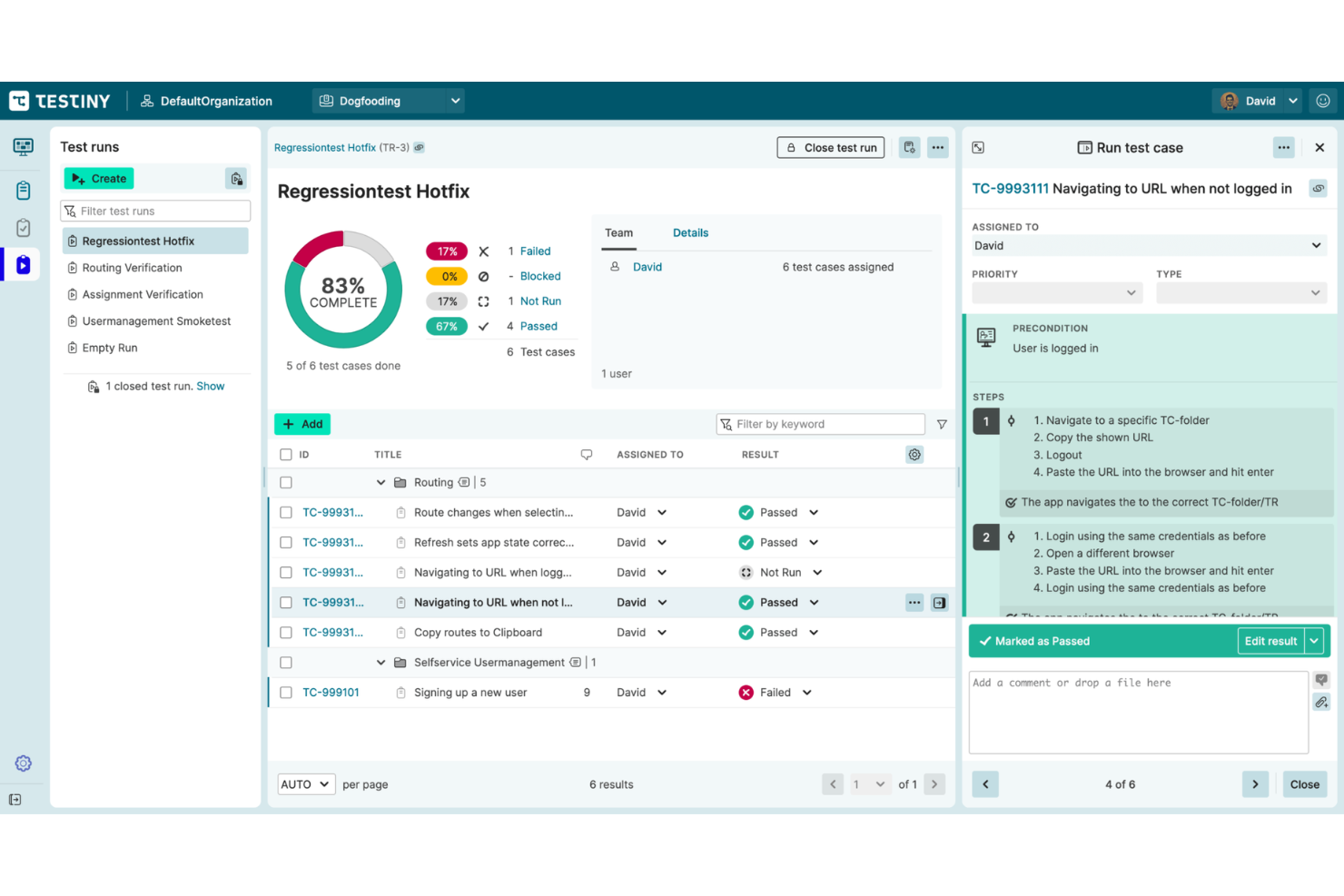
Il s'agit d'un système complet de gestion des tests pour les tests manuels et automatisés. Testiny permet aux équipes agiles de créer, d'exécuter et d'analyser des tests grâce à des fonctionnalités avancées de gestion des tests.
Pourquoi j'ai choisi Testiny : J'ai choisi Testiny en raison de ses fonctionnalités modernes de gestion des cas de test. Avec ce système, vous pouvez facilement créer, modifier et organiser des cas de test à l'aide d'un éditeur conforme aux normes du secteur. Il est possible d'importer des cas de test existants, d'intégrer des frameworks tiers et d'optimiser le processus grâce à des modèles de cas de test personnalisables.
Testiny propose une gestion flexible des campagnes de test. Il vous permet d'organiser les campagnes, d'exécuter vos tests, de créer des rapports personnalisables, d'analyser et de partager les résultats de vos campagnes. Une fonctionnalité de glisser-déposer vous aide à constituer vos campagnes de test de manière flexible. Vous pouvez ajouter ou supprimer des cas de test en toute simplicité.
Fonctionnalités et intégrations remarquables de Testiny
Fonctionnalités remarquables incluent Testiny Runner et la collaboration en temps réel. Il dispose d'un puissant runner qui vous permet d'exécuter des campagnes de tests, de suivre, de revoir et de discuter vos résultats. Cet outil est conçu pour faciliter la collaboration en temps réel entre équipes, quel que soit leur emplacement. Plusieurs responsables de test peuvent travailler simultanément sur le même projet et profiter des mises à jour en temps réel sur tous les navigateurs.
Une autre fonctionnalité intéressante que je ne veux pas oublier est la puissante API REST de Testiny. Les API permettent aux développeurs d'automatiser les tests ou de créer leurs propres extensions.
Intégrations comprennent une intégration native avec Jira ainsi qu'avec d'autres outils tiers. Des intégrations sont disponibles avec GitHub, GitLab, Jenkins, CircleCI, TeamCity et avec des frameworks d'automatisation via l'API REST.
Pros and Cons
Pros:
- Tarification flexible et abordable
- Interface utilisateur rapide
- Très ouvert aux retours et suggestions d'améliorations
Cons:
- Manque de possibilités de personnalisation
- Documentation pas assez détaillée
New Product Updates from Testiny
Testiny Adds Notifications and Webhooks
Testiny adds configurable notifications, team messaging alerts, and custom webhooks for test activity. This gives teams more control over how updates are delivered across their workflows. For more information, visit Testiny’s official site.
 .
.
Testpad
Idéal pour la planification manuelle de tests basée sur des listes de contrôle
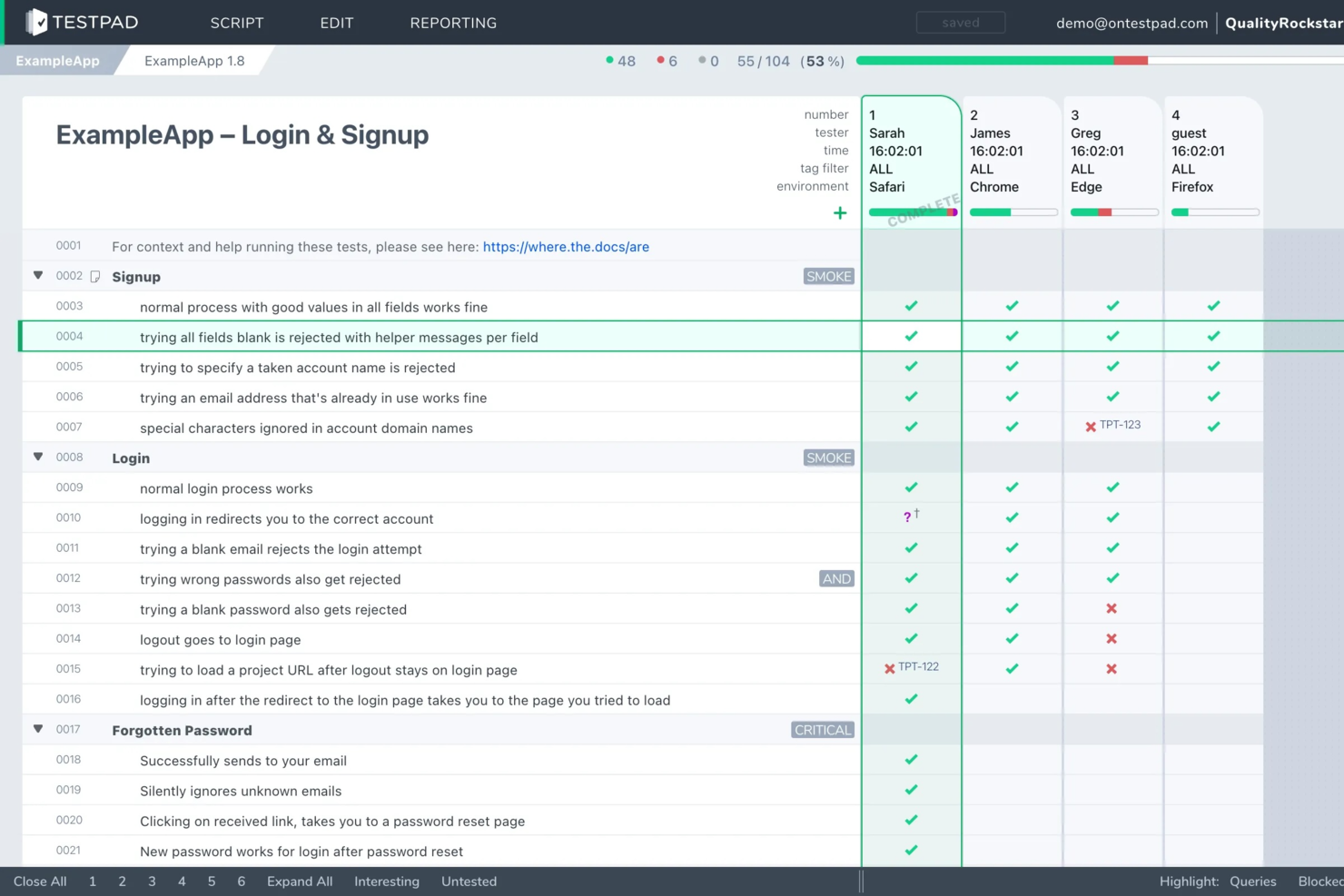
Testpad est un outil de gestion des tests manuels conçu pour les équipes agiles qui souhaitent une approche flexible, basée sur des listes de contrôle, pour planifier et suivre les tests logiciels sans la lourdeur des systèmes traditionnels de gestion de cas de test.
À qui s’adresse Testpad ?
Aux responsables QA et équipes agiles dans les entreprises de logiciels qui recherchent une solution légère et manuelle pour la gestion des tests.
Pourquoi j’ai choisi Testpad
J’ai choisi Testpad comme l’un des meilleurs parce que son approche basée sur les listes de contrôle permet à mon équipe de définir et d’adapter rapidement les plans de tests manuels, sans structures rigides de cas de test. J’apprécie la façon dont nous pouvons organiser les tests sous forme de simples listes de contrôle, ce qui facilite le suivi de la progression et de la couverture lors de sprints rapides. Mon équipe utilise Testpad pour décomposer les fonctionnalités complexes en étapes concrètes, ce qui nous aide à rester concentrés et agiles à chaque cycle de version.
Fonctionnalités clés de Testpad
- Accès testeur invité : Invitez des testeurs externes à participer sans devoir créer de compte.
- Mises à jour en temps réel lors des sessions de test : Visualisez la progression et les modifications en direct pendant les sessions.
- Import/export en masse : Déplacez rapidement les plans et résultats de test vers et hors de la plateforme.
- Tagging et filtrage : Organisez et retrouvez facilement les tests grâce à des étiquettes et des filtres personnalisables.
Intégrations Testpad
Les intégrations incluent GitHub et une API REST pour des intégrations personnalisées avec des pipelines CI/CD.
Pros and Cons
Pros:
- Autorise la participation instantanée de testeurs invités via des liens
- Offre l’import en masse de cas de tests depuis des feuilles de calcul
- Permet un suivi simple et lisible de l’avancée des tests
Cons:
- Pas de matrice de traçabilité des exigences intégrée
- Ne prend pas en charge la paramétrisation des cas de test

Kualitee
Idéal pour la génération de tests basée sur l'IA
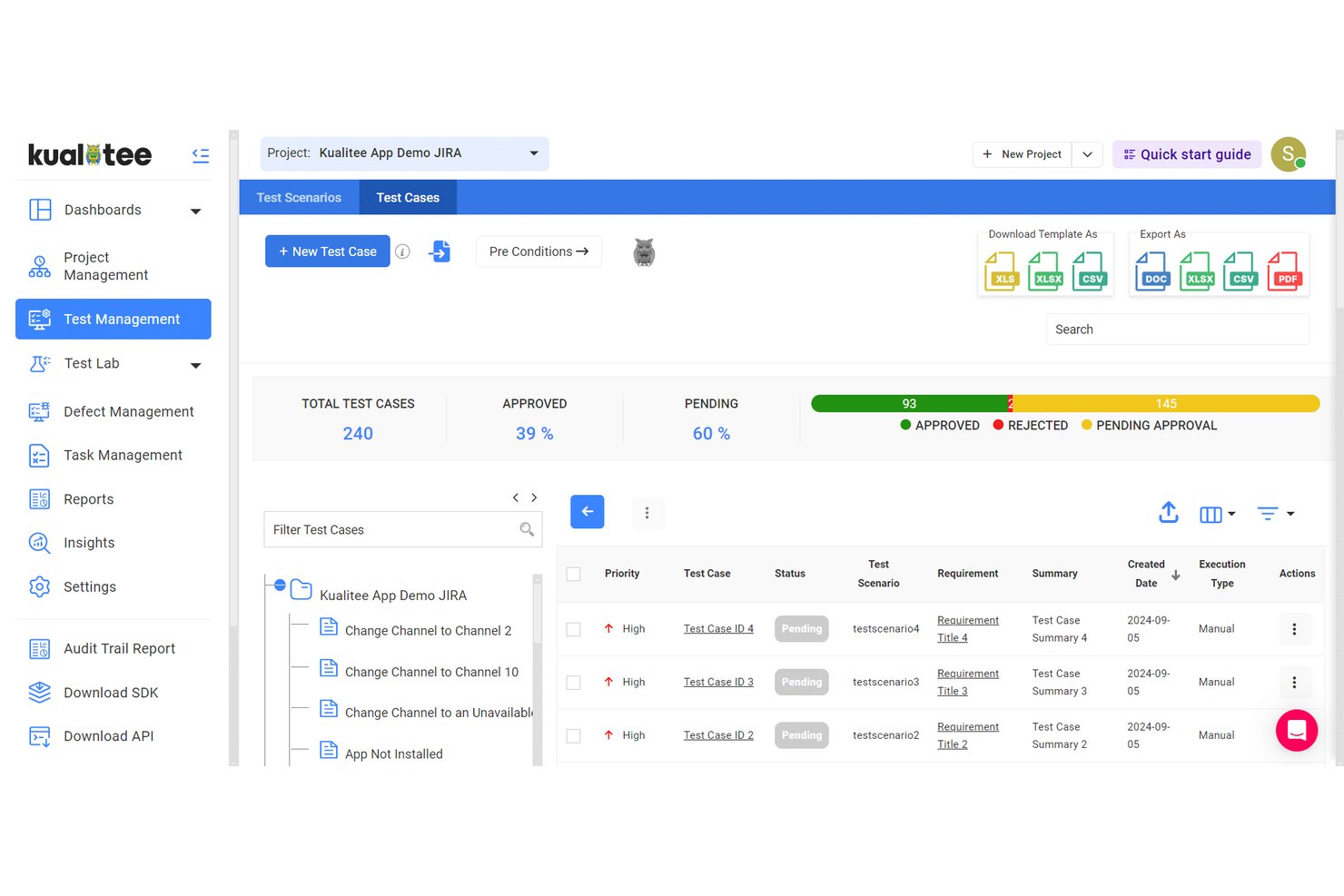
Kualitee est une plateforme de gestion des tests agile conçue pour les équipes QA qui ont besoin d'une gestion de bout en bout des cas de test, d'intégrations avec des outils de gestion de projet agile, de traçabilité des exigences, de coordination des tests automatisés et manuels, ainsi que d'options de reporting détaillées.
Pour qui Kualitee est-il le plus adapté ?
Les responsables QA et les équipes agiles des organisations de taille moyenne à grande qui ont besoin d'une gestion centralisée des tests et d'intégrations poussées avec d'autres outils.
Pourquoi j'ai choisi Kualitee
J'ai choisi Kualitee comme l'un des meilleurs parce qu'il se connecte à un très large éventail d'outils de développement et de test, ce qui permet à mon équipe de synchroniser les tests avec Jira, Azure DevOps et GitHub. Je peux lier des cas de test directement aux éléments du flux de travail agile et voir les mises à jour en temps réel à travers les systèmes.
Fonctionnalités clés de Kualitee
- Gestion des versions des cas de test : Suivi des modifications des cas de test dans le temps et restauration d'anciennes versions si nécessaire.
- Sessions de tests exploratoires : Création de campagnes de tests ad hoc avec documentation et capture des résultats à la volée.
- Matrice de traçabilité des exigences : Visualisation des liens entre exigences, cas de test, exécutions et anomalies.
- Tableaux de bord personnalisables : Création de rapports sur l'avancement des sprints, les indicateurs de défauts et la préparation des livraisons à l'aide de widgets configurables.
Intégrations de Kualitee
Kualitee propose des intégrations natives avec Jira, Azure DevOps, GitHub, Bitbucket, Jenkins, Trello, ClickUp, Redmine et Slack. Une API est disponible pour des intégrations personnalisées.
Pros and Cons
Pros:
- Prend en charge les sessions de test exploratoire avec documentation
- Offre une matrice de traçabilité des exigences jusqu'aux anomalies
- Permet le contrôle de version et la traçabilité des cas de test
Cons:
- La configuration initiale peut demander beaucoup de temps
- L'automatisation avancée nécessite une configuration manuelle de l'API

Idéal pour la gestion intégrée des exigences et des risques
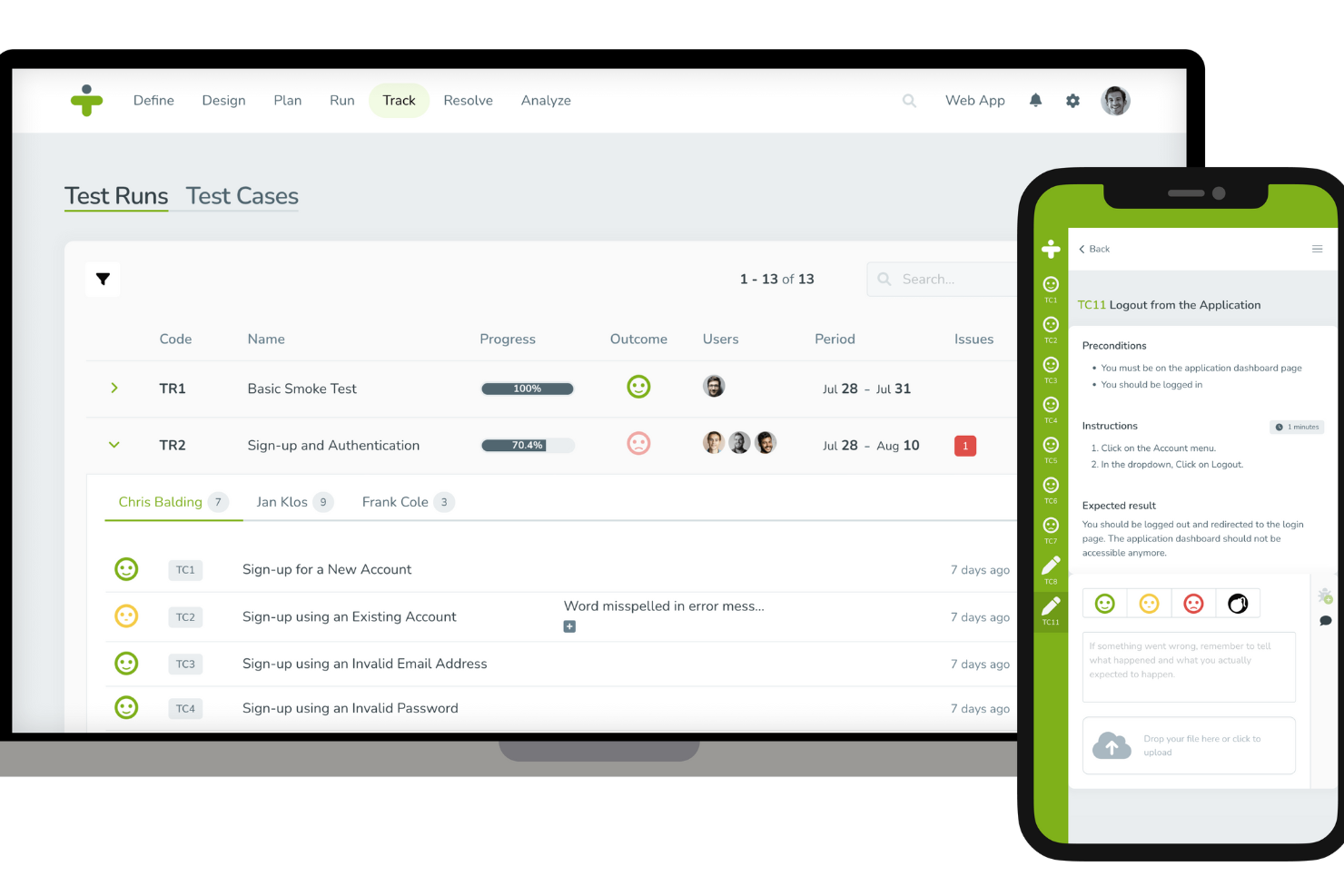
TestMonitor est un logiciel complet de gestion des tests conçu pour améliorer le processus de test logiciel dans divers secteurs. Il propose des fonctionnalités clés telles que la gestion des exigences et des risques, la gestion des cas de test, la planification des jalons et le suivi des problèmes.
Pourquoi j'ai choisi TestMonitor : Il propose une gestion intuitive des cas de test qui simplifie la création, l'organisation et le stockage des cas de test. En plus de ces fonctionnalités principales de gestion des tests, TestMonitor offre également des capacités de gestion des exigences et des risques, ce qui garantit que le logiciel répond aux exigences spécifiées et aide à identifier et à atténuer les risques potentiels tôt dans le cycle de développement, permettant ainsi une approche plus agile.
Fonctionnalités et intégrations remarquables de TestMonitor
Fonctionnalités remarquables comprennent la planification des jalons, le suivi des problèmes, l'exécution et le suivi des tests, ainsi que des capacités de reporting intégrées qui fournissent une vision complète des résultats de test, permettant aux équipes de surveiller les performances et de prendre des décisions basées sur les données.
Les intégrations incluent Jira, ClickUp, DoneDone, Asana, MantisBT, Azure DevOps, TOPdesk, Slack, Zoho Sprints, Trello, GitHub, Jenkins, Forecast, UXsniff, Google Sheets, Microsoft Teams et Zapier.
Pros and Cons
Pros:
- Bons outils de reporting permettant de suivre l'avancement et les résultats des tests
- Adapté aussi bien aux méthodologies de gestion de projets Agiles que traditionnelles
- Création, clonage et gestion efficaces des cas de test
Cons:
- Peut ne pas convenir aux environnements de test très complexes
- Pourrait proposer de meilleures fonctionnalités de notification

QA Wolf
Idéal pour les exécutions illimitées de tests en parallèle
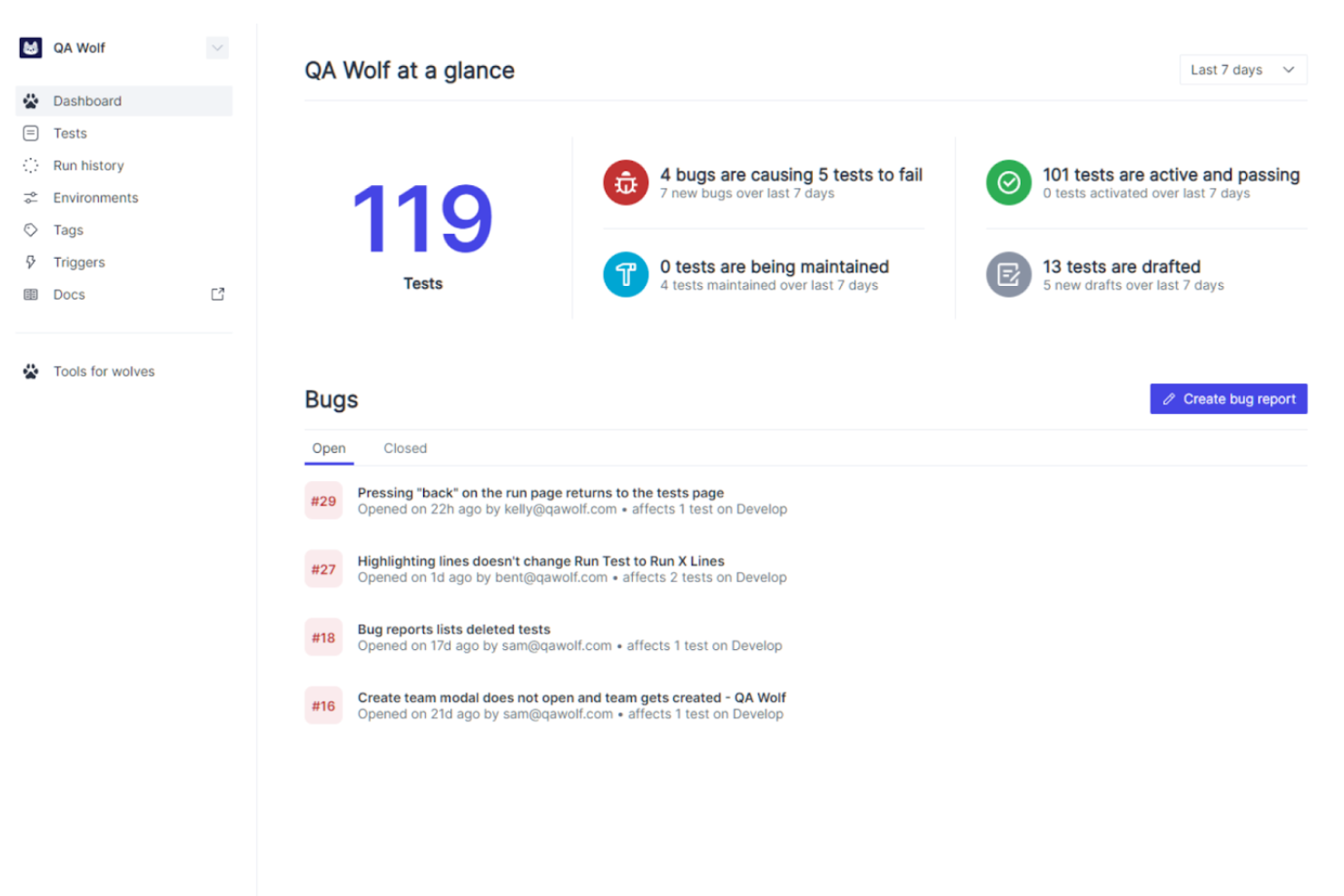
QA Wolf est une plateforme complète d'automatisation des tests qui simplifie et améliore le processus d'assurance qualité pour les applications web. Elle se concentre sur les tests automatisés de bout en bout, garantissant le bon fonctionnement des applications en simulant de réelles interactions utilisateurs. En fournissant des rapports de bugs détaillés et des résultats de tests en temps réel, QA Wolf aide les équipes à maintenir des standards de qualité élevés durant tout le cycle de développement.
Pourquoi j'ai choisi QA Wolf : QA Wolf accompagne le rythme soutenu et itératif du développement agile grâce à des tests et une intégration continus. Sa fonctionnalité d'exécution illimitée de tests en parallèle permet des cycles de test rapides, apportant un retour immédiat sur les modifications de code. Les rapports détaillés et le suivi des bugs offerts par la plateforme permettent d'identifier et de traiter rapidement tout problème, ce qui s'aligne avec le principe agile d'amélioration continue.
Fonctionnalités clés & Intégrations de QA Wolf
Fonctionnalités clés : création et exécution automatisée de tests, ingénieurs QA Wolf dédiés pour maintenir et mettre à jour les tests 24h/24 et 5j/7, rapports complets avec vidéos, captures d'écran et journaux de traces, ainsi que des rapports de bugs vérifiés par des humains.
Intégrations : GitHub, GitLab, Jenkins, CircleCI, Travis CI, Vercel, Slack, Jira, Asana et Microsoft Teams.
Pros and Cons
Pros:
- Tests continus et surveillance assurés par des experts
- Exécutions illimitées de tests en parallèle
- Communication simple et directe avec l'équipe QA Wolf
Cons:
- Moins de flexibilité pour personnaliser votre propre processus de test
- Moins adapté aux équipes souhaitant un contrôle total sur les tests
New Product Updates from QA Wolf

QA Wolf Adds Real Media Testing for iOS Apps
QA Wolf introduces real media testing for iOS apps using camera and microphone inputs. This update improves test reliability for real-world use cases. For more information, visit QA Wolf’s official site.
 .
.
Usersnap
Idéal pour développer les tests utilisateurs et le suivi des problèmes à grande échelle
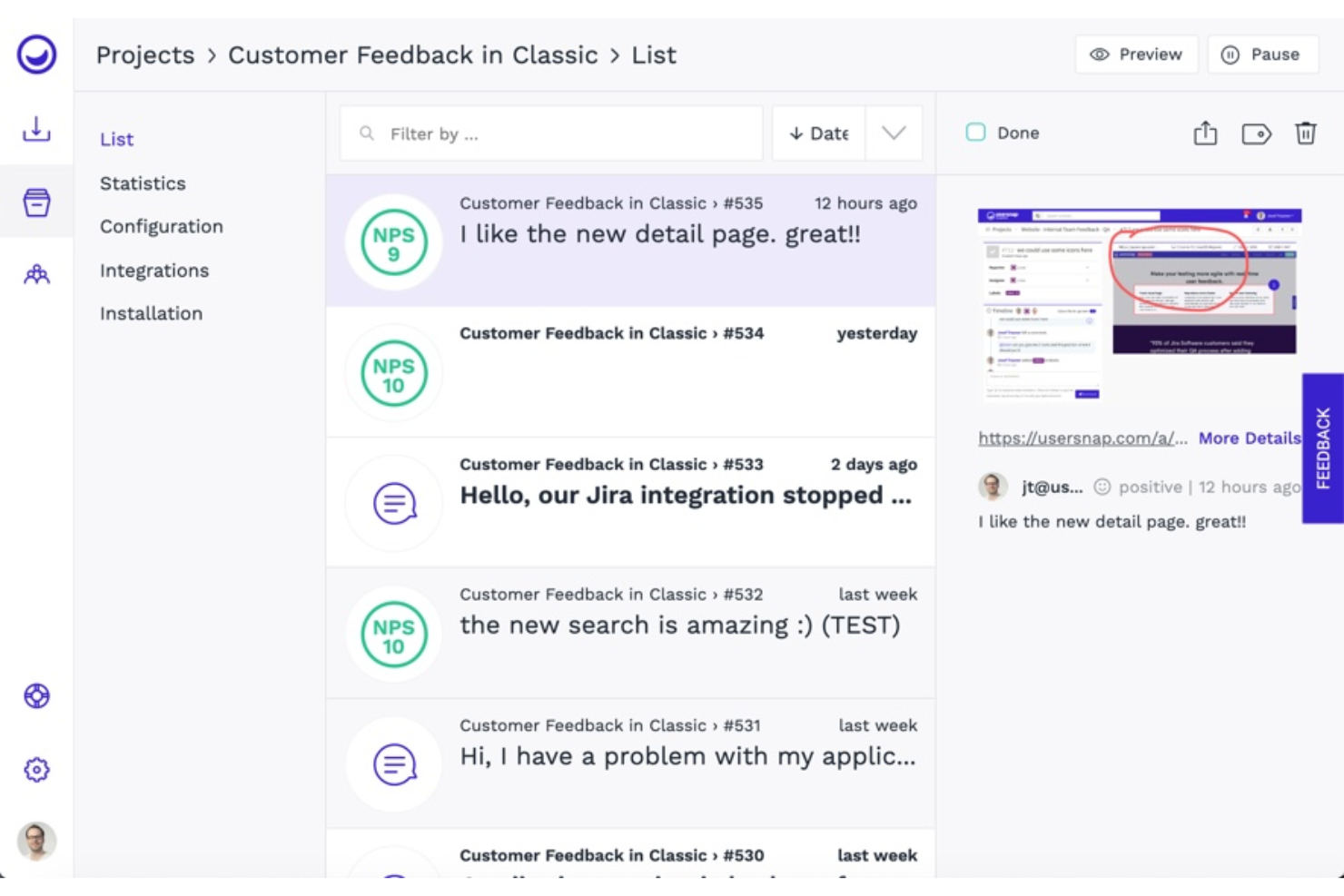
Adopté par plus de 20 000 sites web, Usersnap est un logiciel de retour d'information utilisateur qui vous aide à gérer les tests utilisateurs et le suivi des bugs. Il vous permet de capturer, organiser, répondre et développer les retours utilisateurs, le tout avec une seule solution.
Pourquoi j'ai choisi Usersnap : Ce logiciel vous aide à créer de meilleurs produits grâce à des outils intégrés de feedback qui facilitent la montée en puissance des tests utilisateurs et du suivi des problèmes. J'ai ajouté cet outil à ma liste car il vous permet de prendre en compte la voix de vos clients dans vos décisions liées aux tests produits. Avec Usersnap, vous pouvez envoyer des pop-ups avec NPS, CSAT, CES ou d'autres systèmes d'évaluation pour mesurer la performance de votre produit et savoir ce que vos clients en pensent.
Fonctionnalités et intégrations phares de Usersnap
Fonctionnalités clés : suivi visuel des bugs et validation des fonctionnalités. La fonction de suivi des bugs de Usersnap vous permet de suivre les problèmes en collectant des enregistrements d'écran pour comprendre plus rapidement les difficultés rencontrées par les utilisateurs. La validation des fonctionnalités vous aide à savoir ce qu'il faut améliorer ou développer ensuite en testant de nouveaux produits et en mesurant le ressenti des utilisateurs.
Avec Usersnap, vous pouvez personnaliser les widgets de feedback et les sondages pour correspondre aux besoins de votre équipe ou aux canaux de communication.
Intégrations : Slack, Jira Cloud, Asana, Microsoft Teams, Basecamp, Trello, monday.com, Teamwork, Azure DevOps et GitLab. Usersnap s'intègre également à Zapier, ce qui vous permet de connecter plus de 2 000 intégrations et applications.
Pros and Cons
Pros:
- Collaboration améliorée entre équipes
- Fort niveau de personnalisation
- Équipe de support client réactive
Cons:
- Options de formulaire limitées
- Certaines images ne s'affichent pas correctement

Idéal pour les workflows Agile et DevOps
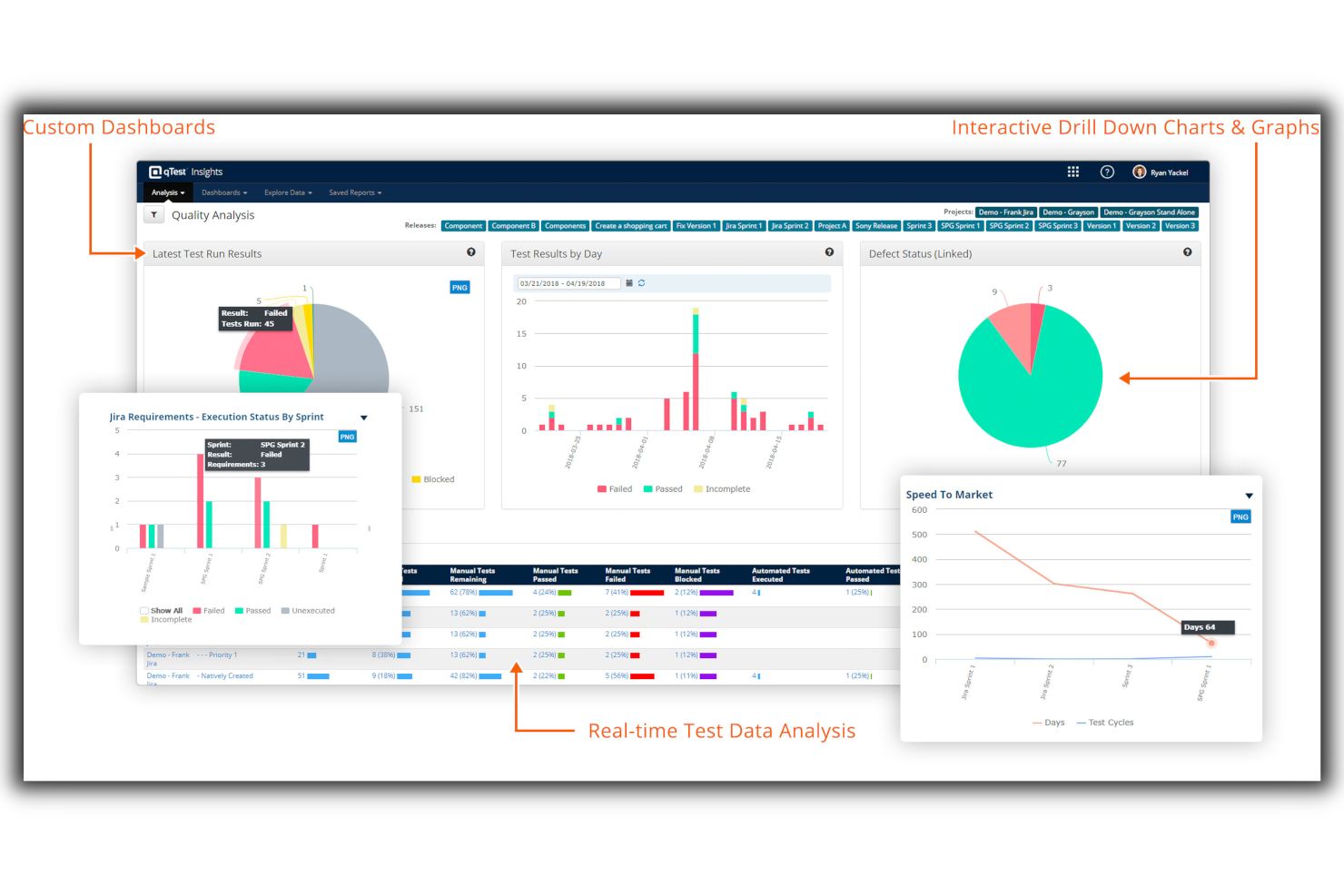
Tricentis qTest est une plateforme unifiée de gestion des tests qui s'adresse aux processus Agile et DevOps, offrant une suite d'outils pour gérer les procédures de test tout au long du cycle de vie du développement logiciel. Elle exploite des analyses de qualité alimentées par l'IA et s'intègre à des plateformes largement utilisées telles que Jira, ce qui en fait une solution adaptée aux organisations souhaitant maintenir des opérations de test efficaces dans des environnements de développement rapides.
Pourquoi j'ai choisi Tricentis qTest : J'ai choisi Tricentis qTest car il propose un ensemble robuste de fonctionnalités adaptées à divers besoins de test, dont la gestion des cas de test et l'automatisation des tests. Ce qui le distingue, ce sont ses solides capacités d'intégration avec des outils de développement et de test largement utilisés, soutenant ainsi efficacement les workflows Agile et DevOps. Je pense que Tricentis qTest est idéal pour les workflows Agile et DevOps grâce à sa visibilité en temps réel, ses fonctionnalités de collaboration et ses capacités de reporting, essentielles pour les environnements de développement logiciel dynamiques et flexibles.
Fonctionnalités et intégrations phares de Tricentis qTest
Fonctionnalités phares : gestion des tests Agile et en cascade, tests exploratoires, automatisation des tests, développement piloté par le comportement, workflows DevOps, tableaux de bord personnalisés, ainsi qu'outils d'analyse et de reporting.
Intégrations : CA Agile Central Rally, Cucumber, Jenkins, Jira, Selenium et Version One.
Pros and Cons
Pros:
- Les utilisateurs le trouvent facile à utiliser
- S'intègre bien avec JIRA
- Permet de créer ou d'importer des cas de test de plusieurs manières
Cons:
- Les mises à jour de l'application peuvent être chronophages
- Des bogues mineurs ont été signalés lors de l'enregistrement des scripts de test

Idéal pour obtenir une visibilité sur les projets et des rapports de statut de test en temps réel
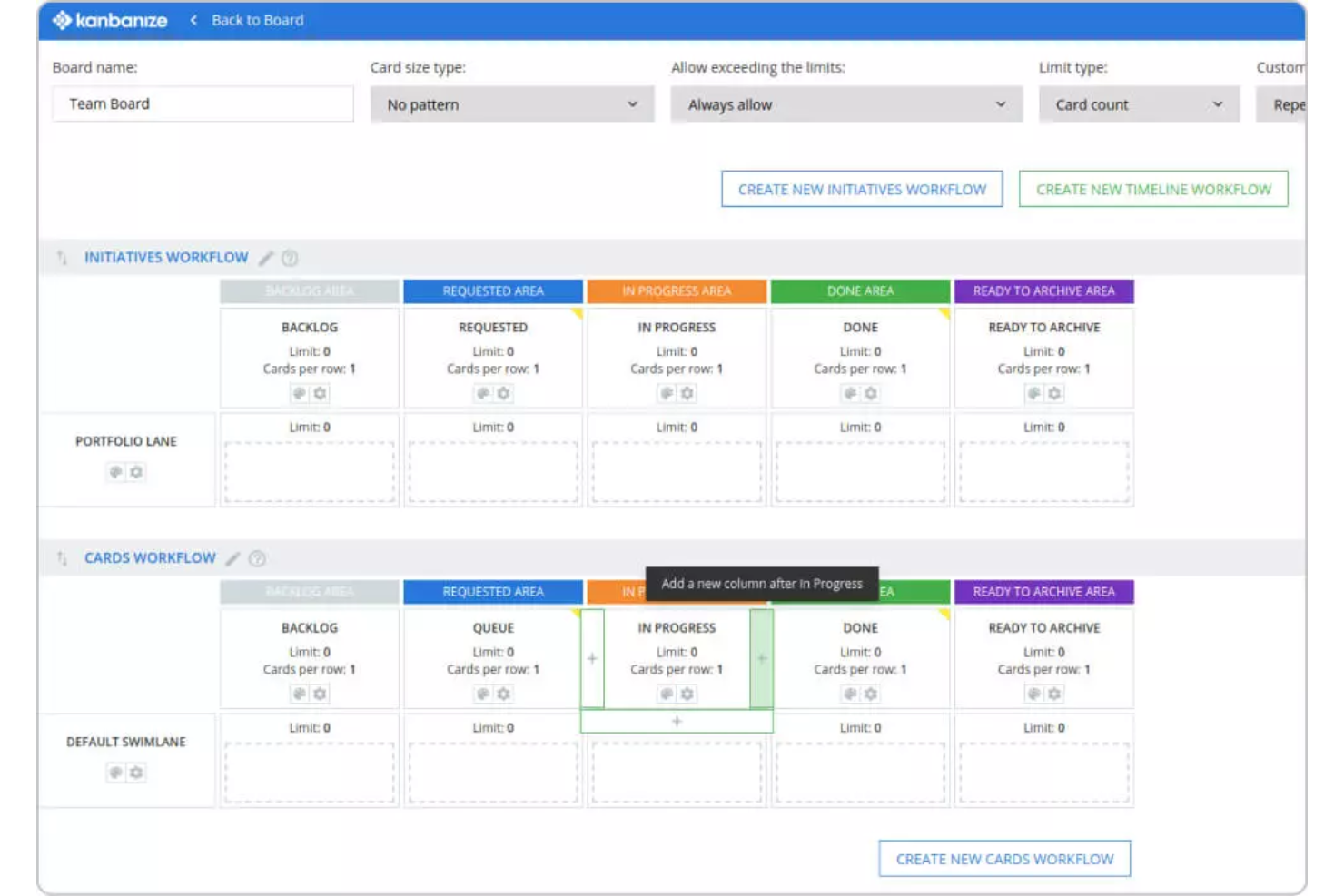
Il s'agit d'une plateforme de gestion de projet agile qui vous permet d'obtenir une visibilité sur toutes les équipes QA. Avec Businessmap, les ingénieurs QA peuvent suivre les tâches et obtenir des rapports d'état précis en temps réel.
Pourquoi j'ai choisi Businessmap : Cette plateforme de gestion des tests est dotée de tableaux Kanban permettant de suivre vos tâches, d'optimiser les flux de travail, d'atténuer les goulets d'étranglement et d'obtenir des rapports précis en temps réel. Vous pouvez visualiser votre flux de travail et profiter d'une transparence totale. Toutes les tâches ou éléments de test sont représentés sous forme de cartes Kanban. Ces cartes aident chaque membre de l'équipe à surveiller le statut de chaque tâche.
Businessmap : Fonctionnalités clés et intégrations
Fonctionnalités clés : gestion du flux de travail, tableaux de bord et rapports. La gestion du flux de travail vous permet de personnaliser vos tableaux Kanban selon les besoins et préférences de votre équipe. Grâce aux tableaux de bord personnalisables et aux outils de reporting, vous pouvez présenter les résultats des tests, créer des rapports centralisés et accéder facilement aux analyses nécessaires pour vous focaliser sur l'essentiel.
De plus, Businessmap propose un outil de recherche avancée pour rechercher et filtrer les éléments de test. Cette fonctionnalité puissante vous permet de filtrer selon une catégorie de recherche spécifique. Vous pouvez obtenir toute information précise depuis votre compte et générer des rapports efficaces grâce à un raffinement et une configuration adaptés des données dont vous avez besoin.
Intégrations : Power BI, Google Data Studio, Tableau, Trello, Microsoft Azure, Okta, Dropbox, GitHub, GitLab et Bitbucket.
Pros and Cons
Pros:
- Simple pour débuter
- Équipe d'assistance réactive
- Facile à mettre en œuvre et à adopter
Cons:
- Certaines configurations ne sont pas intuitives
- Tarifs élevés pour les très petites équipes

QMetry
Meilleur outil de gestion des tests pour améliorer la réutilisabilité
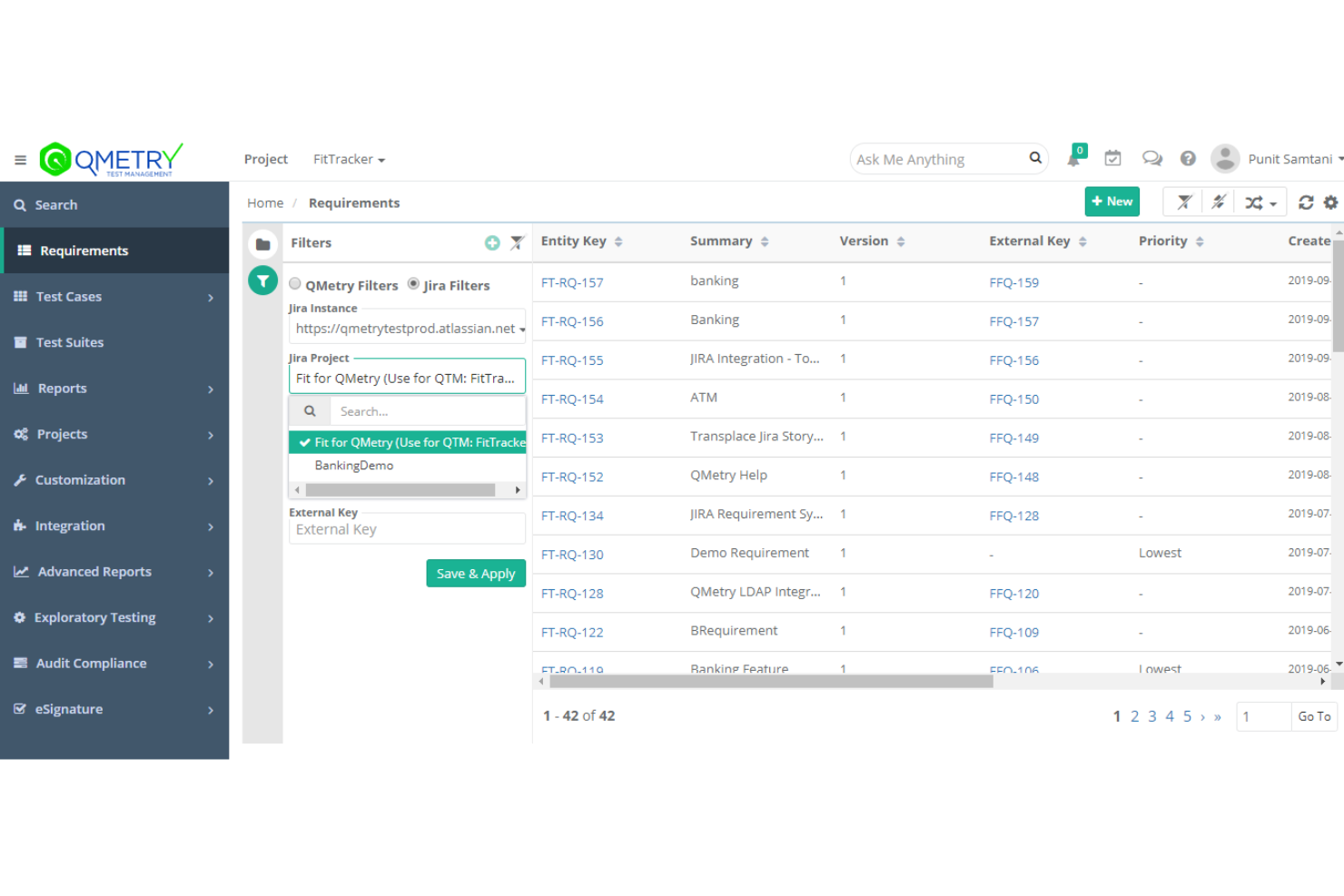
QMetry est une plateforme de gestion de tests d'entreprise qui aide les équipes agiles à planifier, suivre et rendre compte des tests. Elle utilise l'intelligence artificielle pour permettre aux équipes de collaborer sans effort, d'améliorer l'efficacité des tests et d'augmenter la réutilisabilité.
Pourquoi j'ai choisi QMetry : QMetry propose la fonctionnalité QQBot, qui permet l'utilisation de l'IA pour améliorer vos processus de test en éliminant les doublons d'actifs de test et en fournissant des suggestions de couverture prédictive. Cette capacité exceptionnelle augmente la réutilisabilité, réduit le time-to-market et vous permet de faire évoluer facilement vos opérations.
Fonctionnalités et intégrations phares de QMetry
Fonctionnalités phares incluent des fonctionnalités de rédaction intelligente de tests et des analyses en temps réel. Les capacités de création de tests comprennent BDD pour le support de rédaction agile des tests et des fonctionnalités de tests exploratoires. QMetry fournit des rapports et tableaux de bord qui vous permettent d'extraire des informations intelligentes et exploitables pour une prise de décision de haute qualité.
Intégrations incluent Jira, Azure DevOps, GitHub, Git, Jenkins, GitLab, QF-Test, LT Browser, Progress DataDirect, Rally Software, Bamboo et d'autres. Il s'intègre parfaitement aux plateformes d'intégration et de déploiement continus, aux frameworks d'automatisation et aux systèmes de contrôle de version.
Pros and Cons
Pros:
- Commercialisation plus rapide
- Interface utilisateur intuitive
- Montée en charge
Cons:
- Difficulté à échanger des étapes de test
- Certains processus sont déroutants au début

Jile
Meilleur outil de gestion de cas de test pour la vérification et la validation continues
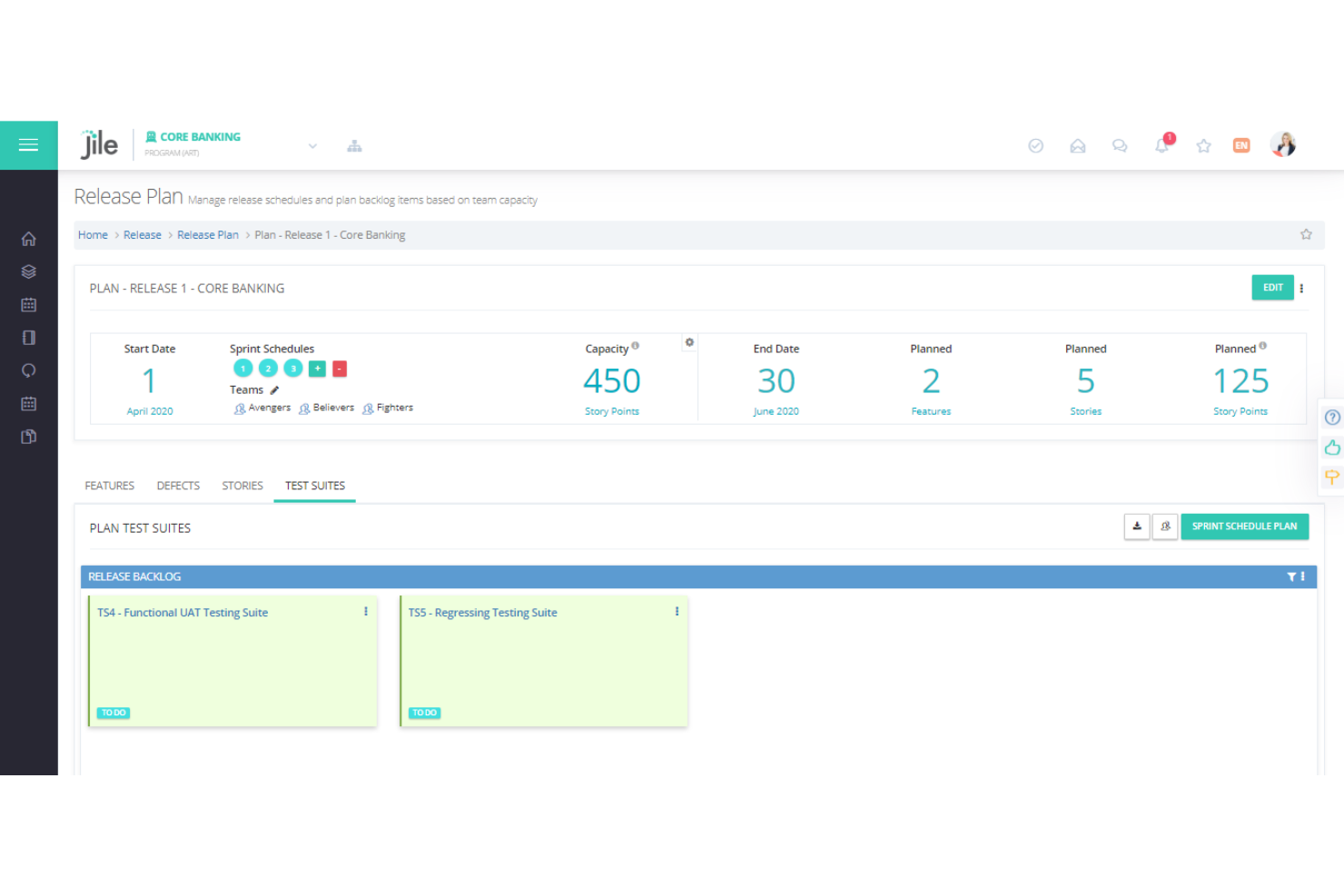
Cet outil fournit les capacités de gestion de tests dont vous avez besoin pour gérer toutes les activités de test, telles que la conception, la planification, l'exécution et le suivi des tests. Jile vous permet de rationaliser la gestion des tests agiles en offrant une suite de fonctionnalités pour la vérification et la validation continues.
Pourquoi j'ai choisi Jile : J'ai choisi Jile car il est spécialement conçu pour aider les équipes agiles à gérer les tests. L'outil propose des tableaux de tests visuels, qui vous aident à exécuter les tests planifiés durant l'itération et à gérer efficacement les résultats de tests. Une autre fonctionnalité intéressante qui distingue l'outil est la présence de tableaux de bord de suivi de la progression des lots et des itérations. Ces tableaux permettent aux utilisateurs de suivre la qualité du produit au niveau des itérations et des lots.
Fonctionnalités et intégrations remarquables de Jile
Fonctionnalités remarquables comprenant une bibliothèque de tests de régression et des tableaux de bord analytiques. La bibliothèque de régression de Jile vous aide à gérer les tests réutilisables et à planifier l'exécution des tests de régression pour les récits et fonctionnalités terminés. Grâce aux tableaux de bord de reporting et d'analyse, vous bénéficiez d'une vue visuelle et interactive des activités de test, d'un accès à des données complètes et d'une visibilité totale. Les tableaux de bord vous permettent également de garder un œil sur l'état des tests, l'avancement des lots et la progression des itérations.
Intégrations comprenant Atlassian Jira, Service Now, Azure DevOps, Salesforce, GitHub, GitLab, Git, Jenkins, Flyway, Cucumber et JUnit.
Pros and Cons
Pros:
- Intégration simple des outils DevOps
- Interface utilisateur intuitive
- Tableaux de bord interactifs
Cons:
- L'onboarding des utilisateurs est parfois un peu difficile
- Personnalisation limitée
Autres outils de gestion des tests agiles
Voici quelques autres options d’outils de gestion des tests agiles qui n’ont pas intégré ma sélection, mais qui méritent tout de même votre attention :
- QAComplete
Idéal pour la gestion de processus d'exécution de tests complexes
- Appium
Idéal pour gérer l'automatisation UI sur de nombreuses plateformes applicatives
- Apache JMeter
Idéal pour la gestion des tests de charge et de performance des applications web
- nTask Issue Tracker
Meilleur outil pour un suivi des problèmes de bout en bout
- SpiraTest
Meilleur outil de gestion de tests pour le suivi des bugs avec reporting en temps réel
- Worksoft
Idéal pour lancer et gérer des tests à distance afin d'intercepter les défaillances
- JunoOne
Meilleur outil agile de gestion des tests pour tracer les tests avec un filtre de recherche intelligent


Comment j'évalue les outils de gestion de tests Agile
Je divise mon évaluation en exigences de base—comme l'exécution de tests liée aux sprints et la traçabilité avec Jira—et les éléments différenciateurs qui distinguent un bon outil de celui qui conviendra vraiment à votre équipe.
Fonctionnalités essentielles (Critères minimaux de cette liste)
Lorsque je sélectionne des outils pour ma liste, j'attribue à chacun une note de 0 (ne propose pas la fonctionnalité) à 5 (excellent dans ce domaine) pour chaque fonctionnalité de base listée ci-dessous. Ensuite, je calcule le score total de l'outil et le convertis en pourcentage. Chaque outil doit atteindre un score total minimum de 65 % pour être pris en considération.
- Gestion des cas de test : J'évalue la façon dont chaque outil organise, versionne et permet la réutilisation des cas de test ; par exemple, si des bibliothèques de pas partagés permettent aux équipes d'éviter de dupliquer les étapes de connexion ou de paiement d'un sprint à l'autre.
- Intégration avec des outils Agile : La synchronisation bidirectionnelle avec des plateformes comme Jira ou Azure DevOps est essentielle ici, notamment la possibilité de lier les cas de test directement aux user stories et de visualiser la couverture sans changer d'onglet.
- Suivi de l'exécution des tests : Je recherche une planification d'exécution adaptée aux sprints, où les responsables QA peuvent attribuer les campagnes, suivre le statut réussi/échoué en temps réel, et consigner les sessions de test exploratoire en parallèle des tests scénarisés.
- Automatisation et support CI/CD : Chaque outil doit pouvoir intégrer les résultats de frameworks comme Selenium, Cypress ou Playwright et se connecter à des pipelines CI/CD tels que Jenkins ou GitLab pour déclencher ou rapporter les exécutions automatisées.
- Traçabilité des exigences : Je vérifie que l'outil cartographie les relations entre stories, cas de test, exécutions et anomalies afin que les équipes puissent repérer les exigences non testées avant une mise en production.
- Rapports Agiles et tableaux de bord : Des vues orientées sprint comme la couverture de test par user story, les tendances relatives à la densité de défauts et les synthèses de préparation à la livraison aident les responsables QA et Scrum Masters à prendre des décisions éclairées de go/no-go.
Une fois que j'ai une liste d'outils répondant à ces critères, j'examine ce qui distingue chaque plateforme.
Facteurs différenciateurs (Ce qui distingue les fournisseurs)
Voici comment je compare et différencie les différents éditeurs :
Fonctionnalités remarquables
Je recherche la création assistée de tests par l'IA permettant de générer des cas de test à partir des user stories, aidant les équipes QA à suivre le rythme de sprints rapides. Le support BDD et Gherkin est un autre point différenciant : les équipes pratiquant le Behavior-Driven Development ont besoin d'une syntaxe native Given-When-Then pour garder les tests lisibles pour les développeurs comme pour les Product Owners. Les fonctionnalités de collaboration avancée comme les commentaires en ligne, les @mentions et les workflows de relecture sont également importantes car elles impliquent la QA plus tôt dans la planification du sprint.
Au-delà des fonctionnalités
La profondeur de l'intégration compte au-delà de la simple connexion à Jira : j'évalue si les outils proposent des API REST ouvertes et des webhooks permettant aux équipes de créer des pipelines personnalisés dans leur chaîne DevOps existante. La sécurité est un autre critère clé, en particulier pour les équipes travaillant dans des secteurs réglementés où la certification SOC 2 ou ISO 27001 et la gestion SSO/SAML font partie des attentes de base. Je vérifie également la rapidité avec laquelle les équipes peuvent démarrer, notamment si le fournisseur prévoit des parcours de migration à partir de plateformes historiques comme HP ALM ou TestRail.
Comment choisir un outil de gestion des tests agiles
Il est facile de se perdre dans de longues listes de fonctionnalités et des structures tarifaires complexes. Pour vous aider à rester concentré tout au long de votre processus unique de sélection de logiciels, voici une liste de critères à garder à l’esprit :
| Facteur | Éléments à prendre en compte |
|---|---|
| Évolutivité | L’outil évoluera-t-il avec votre équipe ? Tenez compte des besoins futurs et de la capacité en matière d’utilisateurs. Assurez-vous qu’il peut gérer une augmentation du volume de données et du nombre d’utilisateurs sans coûts supplémentaires. |
| Intégrations | Vérifiez s’il se connecte à vos outils existants, comme les outils CI/CD, les outils de suivi des bogues et les logiciels de test ALM. Une intégration fluide permet de gagner du temps et de réduire les efforts. |
| Personnalisation | Pouvez-vous adapter l’outil à vos flux de travail ? Recherchez des options permettant de personnaliser les champs, les tableaux de bord et les rapports afin de les adapter à vos processus. |
| Facilité d’utilisation | L’interface est-elle intuitive pour tous les membres de l’équipe ? Une conception simple réduit le temps de formation et améliore la productivité. Testez-la auprès des utilisateurs potentiels. |
| Mise en œuvre et intégration des utilisateurs | Combien de temps faut-il pour être opérationnel ? Privilégiez des processus de configuration rapides et des supports de formation disponibles pour faciliter la transition. |
| Coût | La tarification correspond-elle à votre budget ? Soyez attentif aux frais cachés ou aux coûts liés aux limites d’utilisateurs ou aux fonctionnalités supplémentaires. Comparez avec des outils similaires. |
| Mesures de sécurité | Des mesures de protection des données sont-elles en place ? Vérifiez la conformité aux normes du secteur et assurez-vous du chiffrement et de la mise en place de contrôles d’accès. |
| Disponibilité du support | Lorsque des problèmes surviennent, à quelle vitesse pouvez-vous obtenir de l’aide ? Recherchez une disponibilité 24 h/24 et 7 j/7 ainsi que plusieurs canaux d’assistance, comme le chat et le téléphone. |
Que sont les outils de gestion des tests agiles ?
Les outils de gestion des tests agiles sont des solutions logicielles conçues pour aider les équipes à gérer et à organiser leurs processus de test dans des cadres agiles. Généralement utilisés par les professionnels de l’assurance qualité, les développeurs et les chefs de projet, ces outils apportent de la valeur en améliorant la collaboration et en assurant efficacement le suivi de l’avancement des tests.
La gestion des cas de test, le suivi des bogues et les capacités d’intégration contribuent à organiser les flux de travail, à garantir la qualité et à respecter les délais des projets. Compléter les tests structurés par des outils de test exploratoire peut encore renforcer les efforts d’assurance qualité. Dans l’ensemble, ces outils simplifient le processus de test et améliorent la productivité de l’équipe.
Fonctionnalités
Lors du choix d’outils de gestion des tests agiles, soyez attentif aux fonctionnalités clés suivantes :
- Gestion des cas de test : organise et gère efficacement les cas de test, aidant les équipes à suivre l’avancement et à garantir la couverture.
- Suivi des bogues : identifie, consigne et surveille les bogues, permettant une résolution rapide et le maintien de la qualité logicielle.
- Capacités d’intégration : se connecte à d’autres outils, comme les outils CI/CD et les logiciels de gestion de projet, afin de fluidifier les flux de travail.
- Tableaux de bord personnalisables : permettent aux utilisateurs d’adapter les tableaux de bord à leurs besoins spécifiques et d’obtenir en un coup d’œil des informations pertinentes.
- Collaboration en temps réel : facilite la communication et la coordination entre les membres de l’équipe, améliorant ainsi la productivité.
- Exécution automatisée des tests : exécute automatiquement les tests, réduisant les efforts manuels et accélérant le processus de test.
- Gestion des exigences : suit et gère les exigences afin de garantir leur alignement avec les objectifs et les livrables du projet.
- Analyses fondées sur l’IA : fournit des informations et révèle des tendances grâce à l’IA, aidant les équipes à prendre des décisions éclairées.
- Compatibilité multiplateforme : prend en charge plusieurs plateformes, garantissant que les tests peuvent être exécutés dans différents environnements.
- Mesures de sécurité : offre des mesures de protection des données, comme le chiffrement et les contrôles d’accès, afin de préserver la confidentialité et l’intégrité.
Avantages
La mise en œuvre d’outils de gestion des tests agiles offre plusieurs avantages à votre équipe et à votre entreprise. Voici quelques bénéfices auxquels vous pouvez vous attendre :
- Amélioration de la collaboration : les fonctionnalités de communication en temps réel renforcent le travail d’équipe en veillant à ce que chacun dispose des mêmes informations.
- Résolution efficace des bogues : le suivi des bogues garantit que les problèmes sont consignés et traités rapidement, ce qui améliore la qualité logicielle.
- Gain de temps : l’exécution automatisée des tests réduit le travail manuel et libère du temps pour d’autres tâches.
- Prise de décision améliorée : les analyses fondées sur l’IA fournissent des informations qui aident les équipes à faire des choix éclairés concernant les stratégies de test.
- Flexibilité accrue : les tableaux de bord et les flux de travail personnalisables permettent aux équipes d’adapter l’outil à leurs processus et à leurs besoins.
- Sécurité renforcée : les mesures de sécurité intégrées protègent les données sensibles, préservant ainsi la confiance et la conformité.
- Intégration simplifiée : les connexions faciles avec d’autres outils simplifient les processus et réduisent la nécessité de passer d’une plateforme à l’autre.
Coûts et tarification
La sélection d’outils de gestion agile des tests nécessite de comprendre les différents modèles et forfaits tarifaires disponibles. Les coûts varient en fonction des fonctionnalités, de la taille de l’équipe, des modules complémentaires et d’autres facteurs. Le tableau ci-dessous résume les forfaits courants, leurs prix moyens et les fonctionnalités généralement incluses dans les solutions d’outils de gestion agile des tests :
Tableau comparatif des forfaits pour les outils de gestion agile des tests
| Type de forfait | Prix moyen | Fonctionnalités courantes |
|---|---|---|
| Forfait gratuit | $0 | Gestion de base des cas de test, suivi limité des bogues et assistance communautaire. |
| Forfait individuel | $5-$25/utilisateur/mois | Gestion améliorée des cas de test, intégrations de base et rapports limités. |
| Forfait professionnel | $30-$50/utilisateur/mois | Intégrations avancées, tableaux de bord personnalisables et assistance prioritaire. |
| Forfait entreprise | $60+/utilisateur/mois | Ensemble complet de fonctionnalités, analyses pilotées par l’AI, assistance dédiée et options de sécurité. |
FAQ sur les outils de gestion agile des tests
Voici quelques réponses aux questions courantes sur les outils de gestion agile des tests :
Comment les outils de gestion agile des tests prennent-ils en charge les tests continus ?
Ces outils facilitent les tests continus en automatisant les tâches répétitives, en offrant une collaboration en temps réel et en s’intégrant aux systèmes CI/CD. Ils permettent aux équipes de tester fréquemment et d’obtenir un retour immédiat, ce qui est essentiel au développement agile.
Quelles fonctionnalités de sécurité faut-il rechercher dans les outils de gestion agile des tests ?
Recherchez des fonctionnalités telles que le chiffrement des données, les contrôles d’accès basés sur les rôles et la conformité aux normes du secteur. Elles garantissent que vos données restent sécurisées et accessibles uniquement aux utilisateurs autorisés, protégeant ainsi les informations sensibles du projet.
Les outils de gestion agile des tests peuvent-ils aider les équipes distantes à collaborer ?
Oui, ils incluent souvent des fonctionnalités telles que des tableaux de bord partagés, des mises à jour en temps réel et des outils de communication. Ces fonctionnalités aident les équipes distantes à rester alignées, à suivre l’avancement et à collaborer efficacement malgré les distances géographiques.
Et maintenant :
Si vous êtes en train d’étudier les outils de gestion agile des tests, contactez gratuitement un conseiller SoftwareSelect pour obtenir des recommandations.
Vous remplissez un formulaire et échangez brièvement avec un conseiller qui examine en détail vos besoins. Vous recevrez ensuite une sélection restreinte de logiciels à évaluer. Les conseillers vous accompagneront même tout au long du processus d’achat, notamment lors des négociations tarifaires.