

10 Meilleurs Logiciels de Serveur d’Applications pour Développeurs en 2026

10 Meilleurs logiciels de serveur d'applications - Liste courte
Here's my pick of the 10 best software from the 22 tools reviewed.


Naviguer dans le paysage technologique peut s’avérer déroutant, surtout lorsque votre équipe compte sur un logiciel de serveur d’applications efficace pour gérer des tâches complexes. Vous avez besoin de solutions qui fonctionnent de façon transparente et s’adaptent à vos besoins spécifiques.
D’après mon expérience, trouver le bon logiciel de serveur d’applications permet de surmonter de nombreux défis, tels que la gestion de la charge serveur et le déploiement fluide des applications. Ces outils peuvent améliorer vos performances et assurer la stabilité de vos systèmes.
J’ai testé et analysé une variété d’options pour vous offrir une liste impartiale et étayée des meilleures solutions disponibles. Dans cet article, vous trouverez des informations sur les meilleurs logiciels de serveur d’applications, adaptés à vos besoins uniques. Entrons dans le détail pour trouver la solution la plus adaptée à votre équipe.
Table of Contents
Why Trust Our Software Reviews
We’ve been testing and reviewing software since 2023. As tech leaders ourselves, we know how critical and difficult it is to make the right decision when selecting software.
We invest in deep research to help our audience make better software purchasing decisions. We’ve tested more than 2,000 tools for different tech use cases and written over 1,000 comprehensive software reviews. Learn how we stay transparent & our software review methodology.
Résumé des meilleurs serveurs d'applications
Ce tableau comparatif résume les informations tarifaires de mes meilleurs choix de serveurs d’applications pour vous aider à trouver celui qui correspond à votre budget et aux besoins de votre entreprise.
| Tool | Best For | Trial Info | Price | ||
|---|---|---|---|---|---|
| 1 | Best for speed and built-in security features | Not available | From $14/user/month (billed annually) | Website | |
| 2 | Best for simplifying the management of web servers | Not available | From $10/user/month (billed annually) | Website | |
| 3 | Best for optimized runtime for mission-critical applications | Not available | From $56/user/month (billed annually) | Website | |
| 4 | Best for a reliable and extensible web server software | Free of charge as an open-source tool | Pricing upon request | Website | |
| 5 | Best for an open-source Java Servlet container | Open-source product | Pricing upon request | Website | |
| 6 | Best for high-performance load balancing and content caching | Not available | Pricing upon request | Website | |
| 7 | Best for virtualization and application delivery | Not available | From $15/user/month (min 10 seats, billed annually) | Website | |
| 8 | Best for scalable and manageable application development | Not available | From $400/user/month (billed annually, min 16 seats) | Website | |
| 9 | Best for transactional integrity and resource management | Not available | From $145/user/month (billed annually) + $350 base fee per month | Website | |
| 10 | Best for a lightweight and flexible application server | Not available | From $10/user/month (min 5 seats) | Website |
-

Site24x7
Visit WebsiteThis is an aggregated rating for this tool including ratings from Crozdesk users and ratings from other sites.4.7 -
GitHub Actions
Visit WebsiteThis is an aggregated rating for this tool including ratings from Crozdesk users and ratings from other sites.4.8 -
Docker
Visit WebsiteThis is an aggregated rating for this tool including ratings from Crozdesk users and ratings from other sites.4.6





Avis sur les meilleurs logiciels de serveur d'applications
Vous trouverez ci-dessous mes résumés détaillés des meilleurs logiciels de serveur d’applications retenus dans ma sélection. Mes avis mettent en lumière les fonctionnalités clés, avantages & inconvénients, intégrations, ainsi que les cas d’usage idéaux pour vous aider à faire votre choix.


LiteSpeed Web Server is a high-performance HTTP server known for its fast automation processing capabilities and built-in security measures. These features make it an attractive solution for businesses requiring swift web performance without compromising security.
Why I Picked LiteSpeed Web Server: I chose LiteSpeed Web Server after examining various alternatives for two key reasons: its focus on speed and integrated security features. In comparison to other web servers, LiteSpeed stands out for combining these two critical elements effectively. Therefore, it aligns well with businesses prioritizing speed and security.
Standout Features & Integrations:
LiteSpeed Web Server is renowned for its event-driven architecture that minimizes memory and CPU usage, resulting in speedy processing. It also comes with built-in anti-DDoS features that add a layer of security.
In terms of integrations, the server is compatible with commonly used web applications like WordPress and Magento, and it can replace Apache without requiring any major changes, offering a smoother transition for businesses.
Pros and Cons
Pros:
- Easy transition from Apache due to compatibility
- Built-in anti-DDoS and security features
- High-performance event-driven architecture
Cons:
- Some advanced features may be overkill for small websites
- May require some learning curve for those not familiar with its features
- Pricing is based on an annual billing cycle


Plesk simplifies web server management for hosting service providers and website administrators. It streamlines tasks like website setup, email management, and server maintenance, making them more manageable.
Why I Picked Plesk: I selected Plesk for this list after evaluating various tools for server management. What sets it apart is its user-friendly interface and a wide range of functionalities, making it particularly accessible for those who may not have advanced technical skills. For these reasons, Plesk emerges as the top tool for simplifying the management of web servers.
Standout Features & Integrations:
Plesk has a comprehensive set of features covering domain management, email handling, and security measures like SSL certificate management. It also offers built-in WordPress management, providing a convenient way to manage multiple WordPress instances.
Regarding integrations, Plesk supports various popular web servers like Apache and Nginx, and it can integrate with databases such as MySQL and MariaDB, adding to its versatility.
Pros and Cons
Pros:
- Supports integration with a variety of web servers and databases
- Comprehensive set of features for domain, email, and security management
- User-friendly interface that makes server management accessible
Cons:
- Advanced customization may be limited for specialized needs
- Some features may require purchasing additional extensions
- Billed annually, making initial investment higher

Best for optimized runtime for mission-critical applications

IBM WebSphere Application Server is a platform for hosting web-based applications, focusing on providing a robust and optimized runtime environment. Given its commitment to stability and performance, it is particularly well-suited for mission-critical applications requiring an optimized runtime environment for smooth operations.
Why I Picked IBM WebSphere Application Server: After judging various platforms for running web applications, I chose IBM WebSphere Application Server for its specialized focus on delivering an optimized runtime environment. Its ability to handle mission-critical applications stably and efficiently sets it apart from other options. This makes it the best choice for the specialized use-case of hosting mission-critical applications that demand an optimized runtime.
Standout Features & Integrations:
IBM WebSphere Application Server offers robust security features, including custom user registries and single sign-on capabilities. The platform integrates well with IBM's cloud solutions, and various databases and supports multiple programming languages, providing a versatile application environment.
Pros and Cons
Pros:
- Versatile in terms of integrations and programming language support
- Offers robust security features for mission-critical applications
- Specializes in delivering an optimized runtime environment
Cons:
- Limited cost-effectiveness for simpler web application needs
- Complexity of features may require a steep learning curve
- Pricing can be prohibitive for smaller operations


Apache HTTP Server is an open-source web server software that hosts websites and web applications. Known for its reliability and extensibility, it serves as the foundation for many web services, reinforcing why it's the best choice for reliable and extensible web server software.
Why I Picked Apache HTTP Server: After thoroughly comparing various web server options, I selected Apache HTTP Server for its proven reliability and the extensibility it offers through a wide range of modules. Its open-source nature and extensive community support make it a stand-out choice for web server needs.
It aligns well with the criteria of being reliable and extensible, which are critical for a web server.
Standout Features & Integrations:
Apache HTTP Server provides a wealth of features including customizable error messages, authentication configurations, and URL redirection. It also allows for the integration of various modules for added functionality like security and caching.
The server is compatible with a wide range of operating systems and can be integrated with various databases and scripting languages, making it versatile for many web development scenarios.
Pros and Cons
Pros:
- Extensible through a wide variety of modules
- High reliability backed by a long history and community support.
- Open-source, allowing for extensive customization and community-driven updates.
Cons:
- Not as streamlined for certain tasks as some specialized servers might be
- Potential performance issues under high load if not properly optimized
- Can be complex to configure for beginners

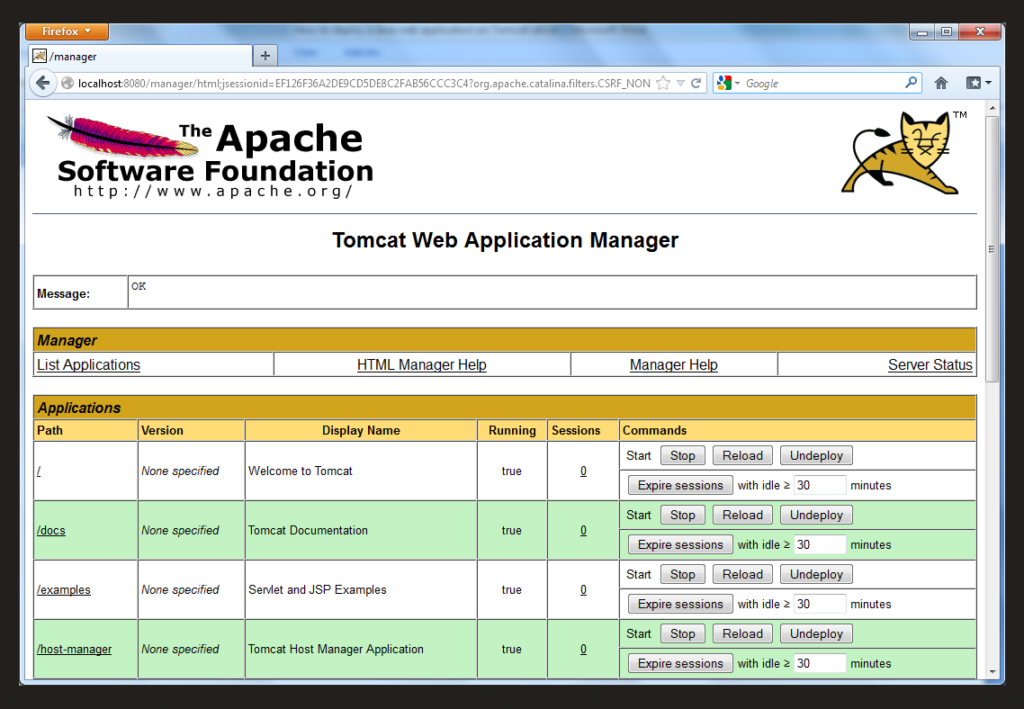
Apache Tomcat is stable, open-source, and has strong community support, making it easy to customize and integrate with other tools. Its reputation and popularity in the industry make it a reliable choice, solidifying my belief that it's the best open-source Java Servlet container.
Why I Picked Apache Tomcat: After evaluating multiple tools for executing Java applications, I picked Apache Tomcat due to its stability, community support, and open-source, which allows for customization and integration with other tools. Its widespread usage and recognition in the industry make it stand out as a reliable choice. This substantiates my belief that it is the best choice for an open-source Java Servlet container.
Standout Features & Integrations:
Apache Tomcat provides essential features for executing Java applications, including a robust HTTP server, Java servlet container, and JSP engine. It also supports Websockets, JNDI, JAAS, and JMX. Tomcat can be integrated with the Apache HTTP Server and various databases, making it easier to use within existing infrastructures.
Pros and Cons
Pros:
- Provides essential features for executing Java applications, including HTTP server, Java servlet container, and JSP engine
- Robust community support and widespread usage in the industry.
- Open-source, which allows for customization and integration with other tools.
Cons:
- Performance may not be as optimized as some commercial alternatives
- May not have all the features provided by commercial servers
- Requires some technical knowledge for configuration and customization


F5 NGINX is renowned for its load balancing and content caching capabilities, providing an environment for applications to run smoothly and efficiently. Its high-performance architecture makes it particularly adept at handling and distributing heavy traffic optimally.
Why I Picked F5 NGINX: I chose F5 NGINX because of its industry-leading load balancing, content caching performance load balancing, and content caching. When determining which server software would cut, NGINX emerged as a clear leader, notably for its specialized features in distributing application load and caching content. That makes it best for organizations looking for a solution focused on these two critical attributes.
Standout Features & Integrations:
F5 NGINX offers robust load-balancing algorithms and an efficient caching system that significantly reduces the latency of application services. Another highlight is its customizable configuration files that give you complete control over its behavior.
For integrations, it pairs well with various monitoring tools like Grafana and data storage options like MySQL, enhancing its utility across different application environments.
Pros and Cons
Pros:
- Supports a wide range of integrations
- Highly customizable configurations
- Specialized in load balancing and caching
Cons:
- Requires some expertise for optimal setup
- Billed annually, not monthly
- More suited for large-scale operations

Best for virtualization and application delivery
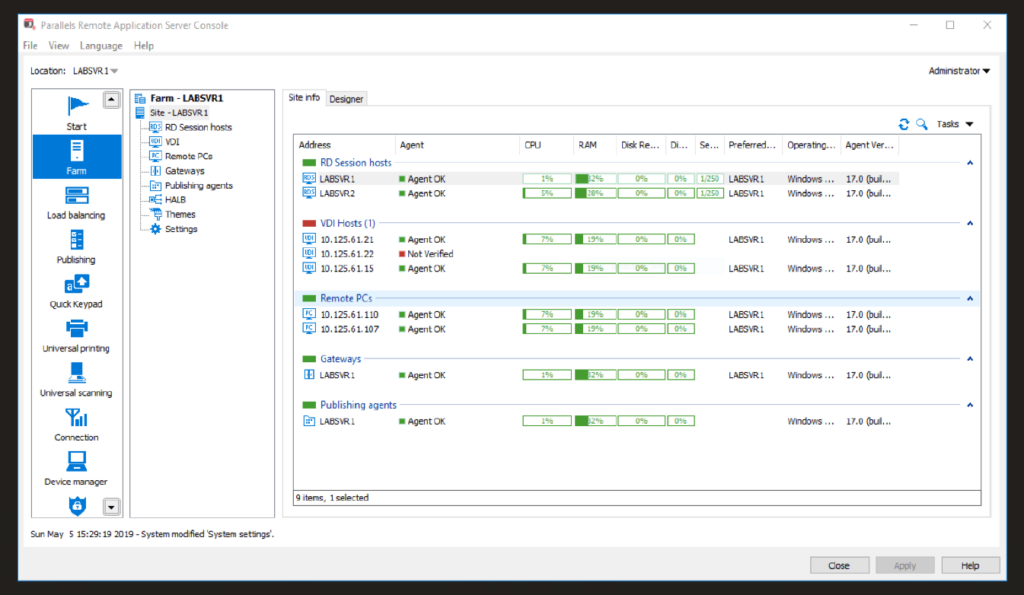
Parallels RAS excels in virtualization, providing robust application delivery solutions. It caters to enterprises that require efficient and streamlined application virtualization, aligning well with high-performance virtualization and application delivery requirements.
Why I Picked Parallels Remote Application Server (RAS): After carefully comparing options, I chose Parallels RAS because it integrates virtualization and application delivery effectively, making it efficient for companies to prioritize both. This aligns with the need for virtualization and application delivery, making it unique.
Standout Features & Integrations:
The software offers client management features, such as centralized client management and auto-configurations, which help streamline virtual environments. Additionally, it provides load balancing and universal printing features that enhance its utility in virtualized settings.
For integrations, Parallels RAS syncs with Windows Servers, including their latest versions, and supports HTML5, allowing for broad compatibility with web pages and applications.
Pros and Cons
Pros:
- Broad compatibility with Windows Servers and HTML5
- Extensive client management features
- Integrated approach to virtualization and application delivery
Cons:
- Could be complex for users without experience in virtualized environments
- Annual billing can be a hurdle for smaller organizations
- Requires a minimum of 10 seats

Best for scalable and manageable application development

Red Hat JBoss Enterprise Application Platform (EAP) is an open-source platform for scalable and manageable enterprise application development. It is particularly adept at handling complex, large-scale applications that require superior management capabilities.
Why I Picked Red Hat JBoss Enterprise Application Platform: I chose Red Hat JBoss EAP after carefully weighing its merits against other platforms in the same category. Its combination of scalability and manageability makes it stand out, which is essential for complex, enterprise-level application development. These features place it as the best fit for scalable and manageable application development.
Standout Features & Integrations:
Red Hat JBoss EAP offers a modular architecture that allows for greater flexibility and efficiency. It supports multiple Java EE standards, giving developers a wide array of tools for application development.
For integrations, Red Hat JBoss EAP works well with other Red Hat products like Red Hat Fuse and Red Hat Data Grid, but it is also compatible with many databases and messaging services, including PostgreSQL and ActiveMQ.
Pros and Cons
Pros:
- Compatible with a wide range of databases and messaging services
- Supports multiple Java EE standards
- Offers modular architecture for flexible, efficient development
Cons:
- Limited benefits if not integrated with other Red Hat products
- May be too complex for small to medium businesses
- High starting price point and minimum seat requirement


IBM CICS (Customer Information Control System) is a transaction server that offers capabilities for efficiently managing multiple types of transactions. Given its robust features around transactional integrity and resource management.
Why I Picked IBM CICS: After comparing and judging different transaction servers, I picked IBM CICS for its unswerving focus on transactional integrity and effective resource management. These characteristics distinguish it from other tools and make it particularly well-suited for businesses with stringent transaction handling and resource allocation requirements.
Standout Features & Integrations:
IBM CICS offers a mixed-language environment, supporting everything from COBOL to Java, allowing versatile application development. It also provides dynamic transaction routing and workload balancing, crucial for businesses dealing with high-volume transactions.
The server seamlessly integrates with IBM's Z/OS and Db2, offering the added advantage of easy compatibility with IBM's ecosystem, and also integrates well with distributed databases.
Pros and Cons
Pros:
- Offers easy compatibility with IBM’s ecosystem
- Supports a mixed-language environment for versatile application development
- Focused on transactional integrity and resource management
Cons:
- Requires specialized expertise for setup and maintenance
- The focus on IBM’s ecosystem may limit integration with non-IBM products
- Pricing could be a barrier for smaller companies


WildFly specializes in being a lightweight yet highly flexible application server built for enterprises seeking agility in their application management. Its lighter architecture aligns perfectly with those looking for flexibility without the added bulk.
Why I Picked WildFly: I chose WildFly for its ability to offer both lightweight and flexible server solutions. When judging the multitude of options, WildFly caught my attention because it provides an ideal balance between agility and functionality. This makes it best for those in need of a server that is both adaptable and easy to manage.
Standout Features & Integrations:
WildFly stands out for its modular approach, which enables rapid deployment and decreased start-up time. It also offers a high level of configurational detail, allowing for greater control over server behavior.
For integrations, WildFly is compatible with various databases like PostgreSQL and MariaDB, and it supports RESTful APIs, making it easier to integrate with modern web applications.
Pros and Cons
Pros:
- Wide range of database and API integrations
- High level of configurational flexibility
- Lightweight and easy to deploy
Cons:
- Limited support for legacy systems
- Learning curve for those unfamiliar with its modular design
- Requires a minimum of 5 seats
Autres logiciels de serveur d'applications
Voici d’autres options de logiciels de serveur d’applications qui ne figurent pas dans ma sélection principale, mais qui méritent aussi d’être découvertes :
- CloudPages
For secure and streamlined cloud management
- Nginx
Good for load balancing and reverse proxy capabilities
- Lighttpd
Good for memory-efficient web serving
- Payara Server
Good for businesses needing microservices support
- ServerAvatar
Good for simplified WordPress hosting management
- Apache Traffic Server
Good for high-volume caching and proxying
- Undertow
Good for lightweight, embeddable web servers
- Apache Geronimo
Good for businesses requiring flexible licensing
- Resin
Good for real-time web applications
- GlassFish
Good for Java EE compatibility
- Tornado Web Server
Good for handling long-lived network connections
- Oracle WebLogic
Good for enterprise-level Java applications


Critères de sélection des logiciels de serveur d’applications
Pour sélectionner les meilleurs logiciels de serveur d’applications dans cette liste, j’ai pris en compte les attentes courantes des acheteurs et leurs problématiques, comme la capacité à évoluer et la facilité d’intégration. J’ai également suivi le cadre d’évaluation suivant, afin de structurer et d’objectiver ma sélection :
Fonctionnalités principales (25% de la note finale)
Pour figurer dans cette liste, chaque solution devait répondre à ces usages fondamentaux :
- Déploiement des applications
- Gestion des ressources serveur
- Garantie de la sécurité des applications
- Traitement des requêtes web
- Répartition de la charge
Fonctionnalités différenciatrices (25% de la note finale)
Pour départager les solutions, j’ai aussi recherché des caractéristiques uniques, telles que :
- Capacités d’intégration cloud
- Outils de surveillance en temps réel
- Options avancées de montée en charge
- Conformité aux normes du secteur
- Compatibilité avec une architecture microservices
Facilité d’utilisation (10% de la note finale)
Pour évaluer l’ergonomie de chaque système, j’ai pris en considération les éléments suivants :
- Interface utilisateur intuitive
- Navigation aisée
- Documentation claire
- Options de personnalisation
- Design réactif
Intégration des nouveaux utilisateurs (10 % du score total)
Pour évaluer l’expérience d’intégration proposée par chaque plateforme, j’ai pris en compte les éléments suivants :
- Disponibilité de vidéos de formation
- Tours interactifs du produit
- Accès à des modèles
- Webinaires et ateliers
- Assistance par chatbot
Support client (10 % du score total)
Pour évaluer les services d’assistance client de chaque éditeur de logiciel, j’ai pris en compte les éléments suivants :
- Disponibilité de l’assistance 24h/24 et 7j/7
- Délai de réponse aux demandes
- Accès à une base de connaissances
- Disponibilité du chat en direct
- Qualité du support technique
Rapport qualité-prix (10 % du score total)
Pour évaluer le rapport qualité-prix de chaque plateforme, j’ai pris en compte les éléments suivants :
- Des tarifs compétitifs
- Structure tarifaire transparente
- Existence de périodes d’essai gratuites
- Coût des fonctionnalités additionnelles
- Comparaison avec des outils similaires
Avis clients (10 % du score total)
Pour évaluer la satisfaction globale des clients, j’ai pris en compte les critères suivants lors de la lecture des retours d’expérience :
- Notes de satisfaction générale
- Fréquence des mises à jour et des améliorations
- Retours des utilisateurs sur la facilité d’utilisation
- Commentaires concernant l’expérience avec le service client
- Retours sur la fiabilité et les performances
Comment choisir un logiciel serveur d’applications
Il est facile de se perdre dans de longues listes de fonctionnalités ou des tarifications complexes. Pour vous aider à rester concentré durant votre processus de sélection, voici une liste de points à garder à l’esprit :
| Critère | À prendre en compte |
|---|---|
| Évolutivité | Le logiciel peut-il accompagner la croissance de votre entreprise ? Privilégiez des outils capables de gérer une charge accrue sans difficulté. Consultez les avis utilisateurs pour connaître les limites. |
| Intégrations | Fonctionne-t-il avec vos systèmes existants ? Assurez-vous qu’il soit compatible avec vos outils actuels pour éviter toute perturbation du flux de travail. |
| Personnalisation | Pouvez-vous adapter le logiciel à vos besoins ? Cherchez de la flexibilité dans les paramètres et configurations. |
| Facilité d’utilisation | L’interface est-elle intuitive ? Testez les démos ou les versions d’essai pour vérifier la rapidité d’adaptation de votre équipe, sans formation intensive. |
| Mise en œuvre et intégration | La transition est-elle fluide ? Considérez le temps et les ressources nécessaires pour débuter. Recherchez un accompagnement à l’onboarding, comme des tutoriels. |
| Coût | Le logiciel correspond-il à votre budget ? Comparez les formules tarifaires et pensez aux coûts à long terme, y compris les éventuels frais cachés. |
| Garantie de sécurité | Des mesures de sécurité robustes sont-elles en place ? Vérifiez le chiffrement, les contrôles d’accès et la conformité aux normes de protection des données. |
| Disponibilité du support | L’aide est-elle accessible ? Évaluez les canaux de support du fournisseur, les délais de réponse et leur capacité à vous assister si besoin. |
Qu’est-ce qu’un logiciel serveur d’applications ?
Un logiciel serveur d’applications est une plateforme qui héberge et gère les applications web, en leur fournissant l’environnement nécessaire à leur exécution. Les professionnels IT, développeurs et administrateurs système utilisent souvent ces outils pour déployer, gérer et maintenir efficacement les applications. Évolutivité, capacités d’intégration et dispositifs de sécurité répondent aux besoins des entreprises, garantissent le bon fonctionnement des opérations et protègent les données. Globalement, ces outils permettent aux entreprises d’offrir des services applicatifs fiables et performants.
Fonctionnalités
Lors du choix d’un logiciel serveur d’applications, surveillez les fonctionnalités clés suivantes :
- Scalabilité : Permet au logiciel de gérer des charges accrues à mesure que votre entreprise se développe, garantissant la performance et la fiabilité continues.
- Capacités d'intégration : Assure la compatibilité avec les systèmes existants, permettant des flux de travail harmonieux et l’échange de données entre plateformes.
- Garanties de sécurité : Fournit des protections essentielles comme le chiffrement et les contrôles d’accès pour sécuriser vos données et assurer leur conformité avec la réglementation.
- Répartition de charge : Distribue le trafic réseau entrant entre plusieurs serveurs afin d’optimiser les ressources et d’éviter les surcharges.
- Personnalisation : Offre une flexibilité des paramètres et des configurations pour adapter le logiciel aux besoins spécifiques de l'entreprise.
- Supervision en temps réel : Permet une observation continue des performances du système et de la santé des applications afin de résoudre rapidement les problèmes.
- Prise en charge des microservices : Facilite le développement et la gestion d'une architecture basée sur les microservices, favorisant un design applicatif modulaire et efficace.
- Interface utilisateur : Propose un design intuitif qui simplifie la navigation et réduit la courbe d’apprentissage des nouveaux utilisateurs.
- Intégration au cloud : Permet le déploiement dans des environnements cloud, offrant évolutivité et flexibilité pour les opérations d'entreprise modernes.
- Support de conformité : Aide à répondre aux normes de conformité propres à chaque secteur, réduisant ainsi le risque juridique et réglementaire.
Avantages
L’implémentation d’un logiciel serveur d’applications apporte de nombreux avantages à votre équipe et à votre entreprise. Voici quelques-uns dont vous pouvez bénéficier :
- Performance améliorée : Les fonctions de répartition de charge et de scalabilité garantissent le bon fonctionnement de vos applications, même en période de forte affluence.
- Sécurité renforcée : Les garanties de sécurité telles que le chiffrement et les contrôles d’accès protègent les données sensibles et assurent la conformité.
- Souplesse accrue : La personnalisation et les capacités d’intégration vous permettent d’adapter le logiciel à vos besoins spécifiques.
- Gestion efficace des ressources : La supervision en temps réel vous aide à surveiller les performances du système et à traiter rapidement les problèmes.
- Déploiement simplifié : L’intégration au cloud et la prise en charge des microservices rendent plus facile et flexible le déploiement des applications.
- Expérience conviviale : Une interface utilisateur intuitive réduit la courbe d'apprentissage et facilite l’utilisation du logiciel par votre équipe.
Coûts & Tarification
Choisir un logiciel serveur d’applications nécessite de comprendre les différents modèles et plans tarifaires disponibles. Les coûts varient en fonction des fonctionnalités, de la taille de l’équipe, des options supplémentaires, et plus encore. Le tableau ci-dessous récapitule les plans courants, leurs prix moyens et les fonctionnalités typiquement incluses dans les solutions de logiciels serveurs d’applications :
Tableau comparatif des plans pour le logiciel serveur d'applications
| Type de plan | Prix moyen | Fonctionnalités courantes |
|---|---|---|
| Plan gratuit | $0 | Déploiement basique, support limité et sécurité minimale. |
| Plan personnel | $5-$25/user/month | Déploiement basique, sécurité renforcée et intégrations limitées. |
| Plan entreprise | $50-$100/user/month | Sécurité avancée, supervision en temps réel et intégration cloud. |
| Plan grande entreprise | $150-$300/user/month | Personnalisabilité totale, support 24/7 et intégrations complètes. |
FAQ sur les logiciels de serveurs d'applications
Voici quelques réponses aux questions courantes sur les logiciels de serveurs d’applications :
En quoi un serveur d'applications diffère-t-il d'un serveur de fichiers ?
Alors qu’un serveur de fichiers stocke les programmes et les données, un serveur d’applications exécute les programmes et traite les données. Cela signifie que le serveur d’applications joue un rôle plus actif dans la gestion et l’interaction avec les opérations sur les données, ce qui le rend essentiel pour les applications dynamiques.
Les serveurs d'applications peuvent-ils prendre en charge une architecture microservices ?
Oui, de nombreux serveurs d’applications prennent en charge l’architecture microservices, ce qui permet de construire et de gérer des applications en tant qu’ensemble de petits services indépendants. Cette approche améliore l’évolutivité et la flexibilité, facilitant le déploiement des mises à jour et la gestion d’applications complexes.
Comment les serveurs d'applications améliorent-ils la sécurité ?
Les serveurs d’applications renforcent la sécurité en mettant en œuvre des mesures telles que le chiffrement, les contrôles d’accès et les protocoles de transmission sécurisée des données. Ces fonctionnalités protègent les informations sensibles contre les accès non autorisés et garantissent la conformité aux normes de protection des données, sécurisant ainsi vos applications et vos données.
Et maintenant :
Si vous êtes en train de rechercher un logiciel de serveur d'applications, contactez gratuitement un conseiller SoftwareSelect pour des recommandations personnalisées.
Il vous suffit de remplir un formulaire, puis d'échanger rapidement pour préciser vos besoins. Ensuite, vous recevrez une présélection de logiciels à examiner. Ils vous accompagneront même durant tout le processus d'achat, y compris lors des négociations de prix.