

Les 10 meilleurs choix de logiciels d’architecture d’entreprise de 2026

Meilleur logiciel d’architecture d’entreprise — sélection


Se repérer dans le monde complexe de l’architecture d’entreprise peut sembler accablant. Vous jonglez avec plusieurs systèmes tout en essayant de vous assurer que tout correspond aux objectifs de votre organisation. C’est là que les logiciels d’architecture d’entreprise interviennent, en vous aidant, vous et votre équipe, à mettre de l’ordre dans ce chaos.
D’après mon expérience, ces outils améliorent non seulement la prise de décision, mais renforcent également la collaboration entre les services. J’ai testé et évalué de manière indépendante diverses solutions logicielles afin de vous proposer une liste impartiale des meilleures options disponibles.
Vous trouverez des informations sur les fonctionnalités, l’expérience utilisateur et les éléments qui distinguent chaque outil. Cet article vise à vous donner les connaissances nécessaires pour choisir le logiciel adapté à vos besoins. Entrons dans le vif du sujet et simplifions votre parcours en architecture d’entreprise.
Pourquoi faire confiance à nos recommandations de logiciels
Notre équipe teste et évalue des logiciels depuis 2012. En tant que leaders technologiques nous-mêmes, nous savons à quel point il est difficile — et important — de choisir le bon logiciel.
Pour ce guide, nous avons évalué les outils grâce à des tests pratiques et une recherche indépendante, en notant les outils selon nos critères de sélection.
Nos avis reflètent notre jugement éditorial humain, et non un argumentaire de vente.
Résumé des meilleurs logiciels d’architecture d’entreprise
Ce tableau comparatif résume les informations tarifaires relatives à ma sélection des meilleurs logiciels d’architecture d’entreprise afin de vous aider à trouver la solution la mieux adaptée à votre budget et aux besoins de votre entreprise.
| Tool | Best For | Trial Info | Price | ||
|---|---|---|---|---|---|
| 1 | Meilleur pour la représentation visuelle des données | Not available | Tarification sur demande | Website | |
| 2 | Idéal pour les outils de création de diagrammes et de modélisation | Démo gratuite + essai gratuit de 30 jours disponible | Tarification sur demande | Website | |
| 3 | Idéal pour la gestion intégrée du portefeuille informatique | Not available | Tarification sur demande | Website | |
| 4 | Idéal pour la gestion SaaS de l'architecture d'entreprise | Not available | Tarification sur demande | Website | |
| 5 | Idéal pour une architecture d'entreprise orientée stratégie | Not available | Tarifs sur demande | Website | |
| 6 | Idéal pour des décisions d'entreprise fondées sur les données | Not available | Tarif sur demande | Website | |
| 7 | Idéal pour des fonctionnalités complètes de référentiel d'architecture d'entreprise | Not available | Prix sur demande | Website | |
| 8 | Idéal pour une architecture d'entreprise collaborative | Not available | Tarification sur demande | Website | |
| 9 | Idéal pour la gouvernance de l’architecture intégrée à la GRC | Démo gratuite disponible | Tarification sur demande | Website | |
| 10 | Idéal pour relier l’architecture à la stratégie et au portefeuille | Démonstration gratuite disponible | Tarification sur demande | Website |
Avis sur les meilleurs logiciels d’architecture d’entreprise
Vous trouverez ci-dessous mes résumés détaillés des meilleurs logiciels d’architecture d’entreprise qui figurent dans ma sélection. Mes avis présentent en détail les fonctionnalités clés, les avantages & inconvénients, les intégrations et les cas d’utilisation idéaux de chaque outil afin de vous aider à trouver celui qui vous convient le mieux.

Ardoq
Meilleur pour la représentation visuelle des données
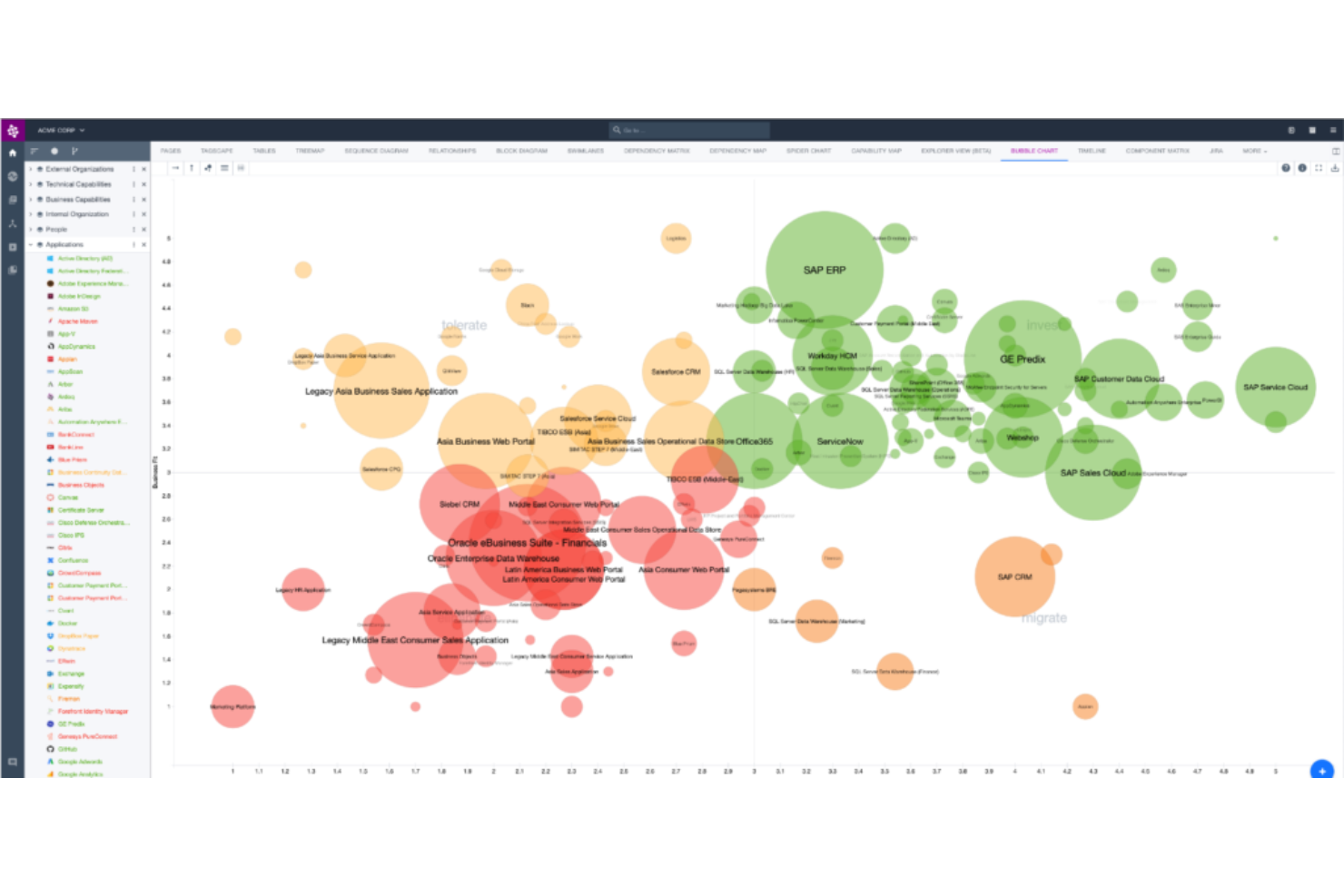
Ardoq sert de plateforme pour les organisations souhaitant représenter visuellement et comprendre leur paysage de données. Il excelle dans la conversion de connexions de données complexes en formats visuels facilement compréhensibles.
Pourquoi j'ai choisi Ardoq :
La recherche du meilleur outil pour la représentation visuelle des données m'a conduit à Ardoq. Il s'est démarqué par son approche innovante de la visualisation des données et la clarté qu'il offre pour cartographier les relations complexes entre données. La façon dont Ardoq facilite la compréhension visuelle des univers de données souligne sa position comme le meilleur choix pour cet usage.
Fonctionnalités clés et intégrations :
Ardoq se distingue par sa base de données graphique dynamique, offrant des visualisations en temps réel. Des fonctionnalités telles que les vues auto-générées et des outils d'analyse de données complets renforcent encore ses capacités. Côté intégrations, Ardoq est compatible avec des plateformes comme Jira, ServiceNow et Microsoft Azure, assurant une connectivité étendue.
Pros and Cons
Pros:
- Base de données graphique dynamique pour la visualisation en temps réel
- Prend en charge les vues auto-générées
- Outils d'analyse de données complets
Cons:
- Peut sembler complexe pour les nouveaux utilisateurs
- Les ensembles de données volumineux peuvent affecter les performances
- Nécessite des mises à jour de données périodiques pour des résultats optimaux

Idéal pour les outils de création de diagrammes et de modélisation
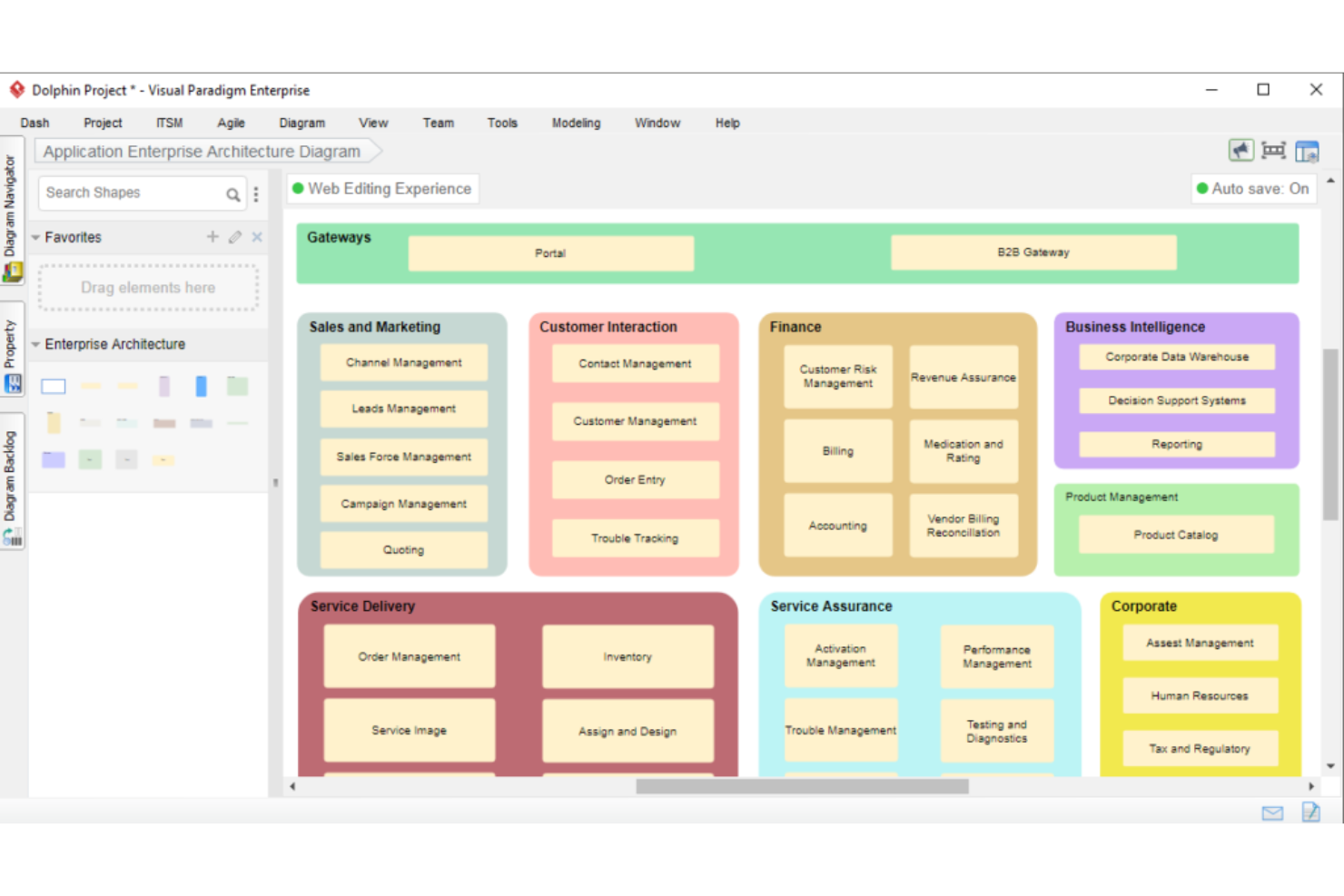
Visual Paradigm est synonyme de puissantes capacités de création de diagrammes et de modélisation. Conçu pour les professionnels attachés à la clarté visuelle, il offre des outils qui rendent l’interprétation de données complexes plus intuitive.
Pourquoi j'ai choisi Visual Paradigm :
Parmi la myriade d’outils de création de diagrammes disponibles, Visual Paradigm a retenu mon attention grâce à sa riche palette de fonctionnalités et son interface conviviale. J’ai opté pour cette plateforme car, à mon avis, elle propose certains des meilleurs outils de création de diagrammes et de modélisation disponibles. Pour ceux qui comptent fortement sur la représentation visuelle des données, Visual Paradigm est le meilleur choix.
Fonctionnalités phares et intégrations :
L’outil est reconnu pour sa vaste gamme d’options de création de diagrammes, allant de UML et BPMN à ArchiMate et ERD. Son interface à glisser-déposer, associée à une approche basée sur des modèles, constitue un réel atout pour les utilisateurs. De plus, Visual Paradigm s’intègre parfaitement à des plateformes de développement telles qu’Eclipse et IntelliJ IDEA, garantissant aux développeurs une intégration fluide de ses capacités.
Pros and Cons
Pros:
- Large diversité d’outils de création de diagrammes et de modélisation
- Interface intuitive à glisser-déposer
- Excellentes intégrations avec les plateformes de développement
Cons:
- Pourrait être trop complet pour les utilisateurs occasionnels
- Les fonctionnalités collaboratives peuvent sembler limitées par rapport à des outils EA dédiés
- Courbe d’apprentissage pour les fonctionnalités avancées

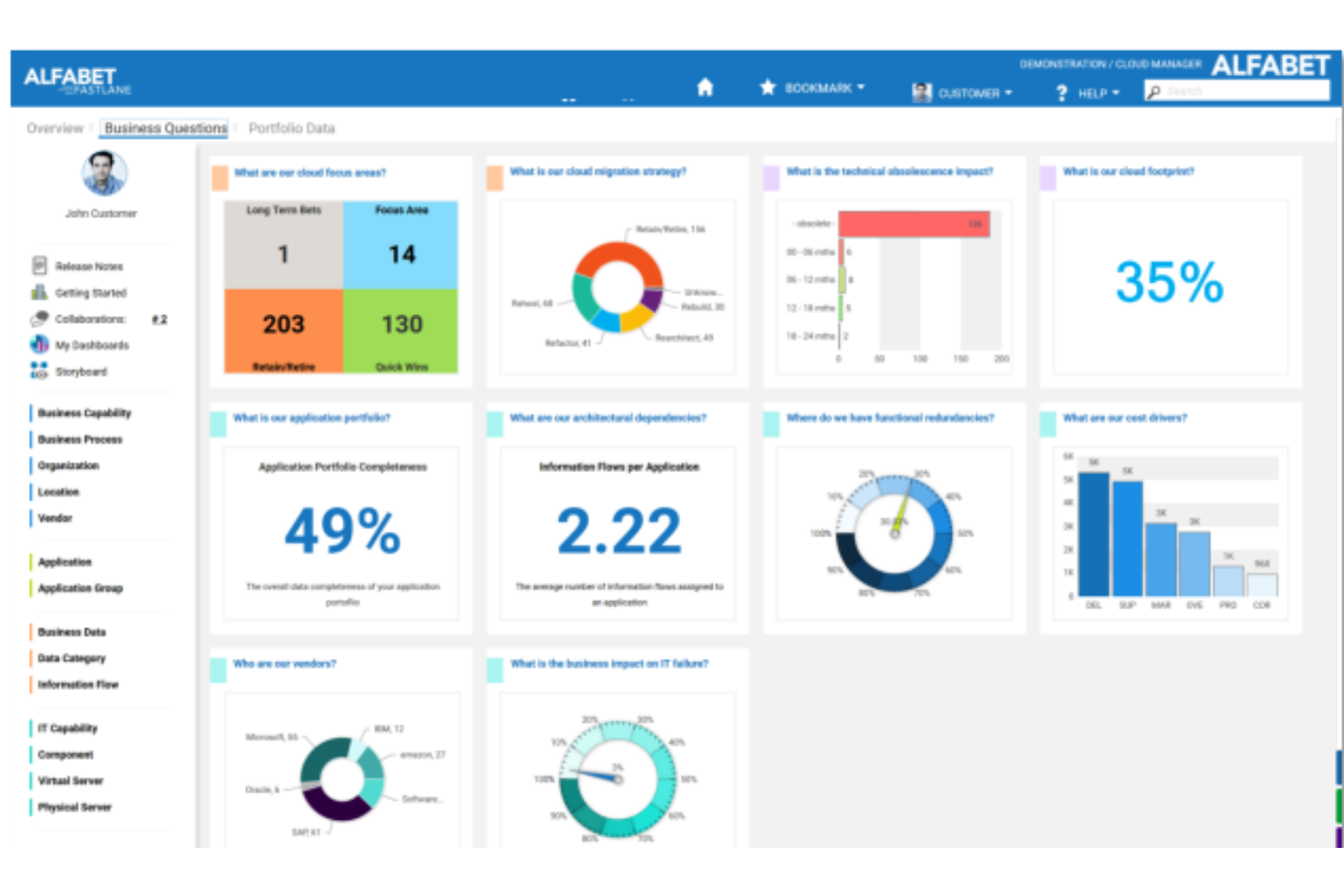
Alfabet de Software AG propose une plateforme robuste conçue pour la gestion du portefeuille informatique. Grâce à une combinaison d’architecture d’entreprise et de gestion stratégique du portefeuille informatique, c’est un atout pour les entreprises qui privilégient une planification informatique complète.
Pourquoi j'ai choisi Alfabet de Software AG :
Lors de la sélection de l’outil adapté à la gestion du portefeuille informatique, l’approche intégrée d’Alfabet de Software AG s’est démarquée. Je l’ai choisi car il offre une vue d’ensemble complète du paysage informatique et de son alignement sur les objectifs métier. Pour les organisations recherchant une solution excellente en gestion intégrée du portefeuille informatique, cet outil est sans égal.
Fonctionnalités et intégrations remarquables :
Alfabet excelle en fournissant une vue unifiée des portefeuilles informatiques, des applications et technologies aux projets et capacités métier. Sa capacité à relier ces portefeuilles aux stratégies d’entreprise, objectifs et moteurs de croissance le distingue. De plus, il s’intègre parfaitement avec les outils populaires de gestion de projet et d’intelligence d’affaires.
Pros and Cons
Pros:
- Gestion complète du portefeuille informatique
- Alignement étroit avec les stratégies d’entreprise
- Intégrations solides avec les outils de gestion de projet et de BI
Cons:
- Peut demander un temps d’apprentissage pour certains utilisateurs
- La personnalisation peut être complexe
- Peut être excessif pour les petites entreprises

Idéal pour la gestion SaaS de l'architecture d'entreprise
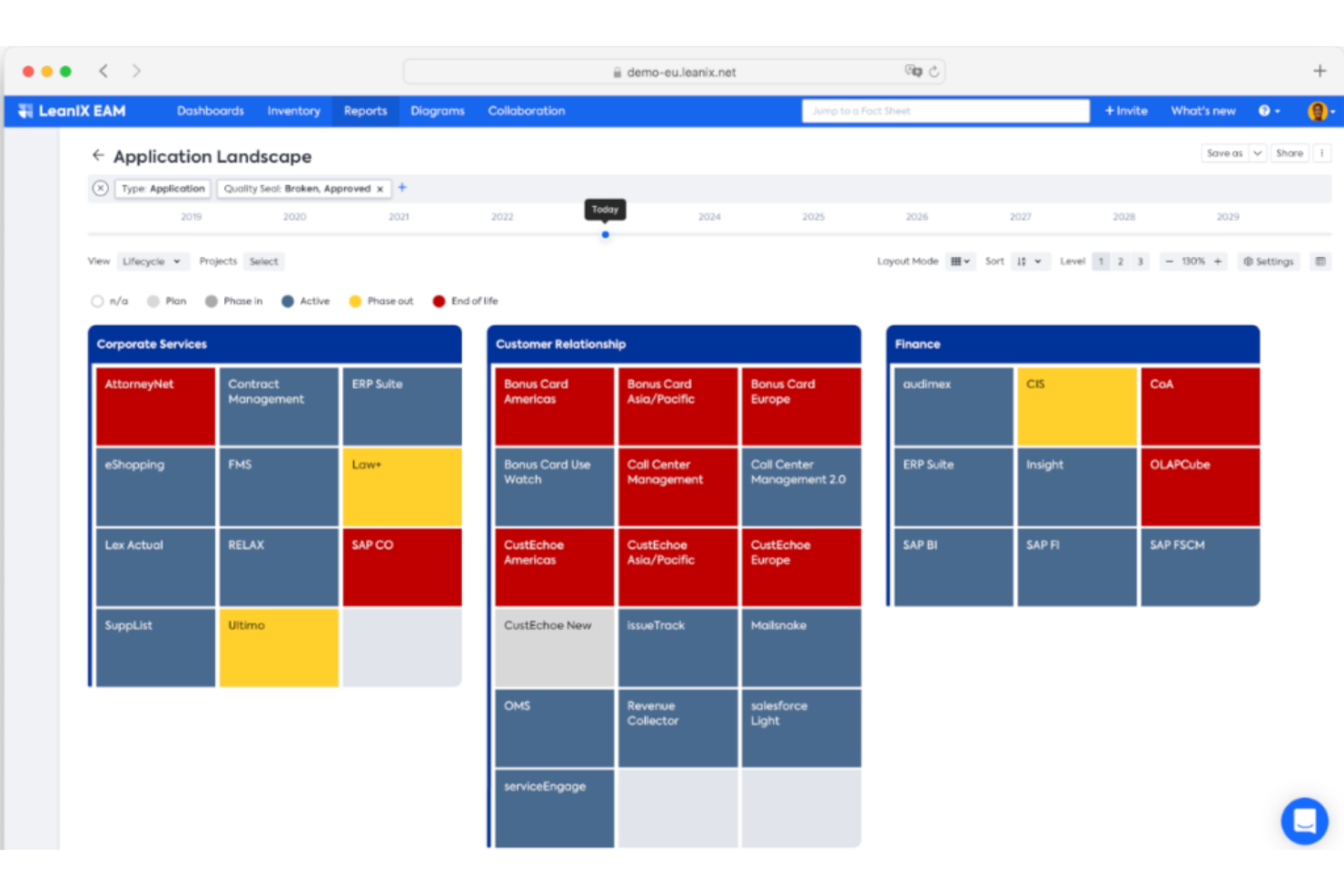
LeanIX propose une solution cloud spécialement conçue pour la gestion de l'architecture d'entreprise. En tant qu'offre SaaS, elle garantit que les processus d'architecture d'entreprise sont rationalisés, accessibles et toujours à jour, sans nécessiter de lourdes installations sur site.
Pourquoi j'ai choisi LeanIX Enterprise Architecture Management :
En comparant et en évaluant la vaste gamme d'outils d'architecture d'entreprise, LeanIX s'est distingué principalement grâce à sa nature SaaS. J'ai constaté que les solutions basées sur le cloud séduisent souvent les organisations cherchant plus d'agilité, et la réputation de LeanIX pour offrir un outil de gestion d'architecture d'entreprise efficace en SaaS confirme son expertise dans ce domaine.
Fonctionnalités et intégrations remarquables :
LeanIX est reconnu pour sa collecte de données en temps réel, ses rapports personnalisables et son utilisation de flux de travail collaboratifs. L'outil dispose également d'intégrations avec des solutions populaires comme ServiceNow, Slack et Microsoft Teams, favorisant ainsi une collaboration accrue.
Pros and Cons
Pros:
- Offre sur le cloud, garantissant un accès et des mises à jour faciles
- Rapports personnalisables adaptés à des besoins spécifiques
- Prend en charge les flux de travail collaboratifs pour la synergie d'équipe
Cons:
- Peut ne pas convenir aux organisations recherchant des solutions sur site
- Structure tarifaire complexe
- Certaines fonctionnalités avancées peuvent nécessiter des intégrations supplémentaires

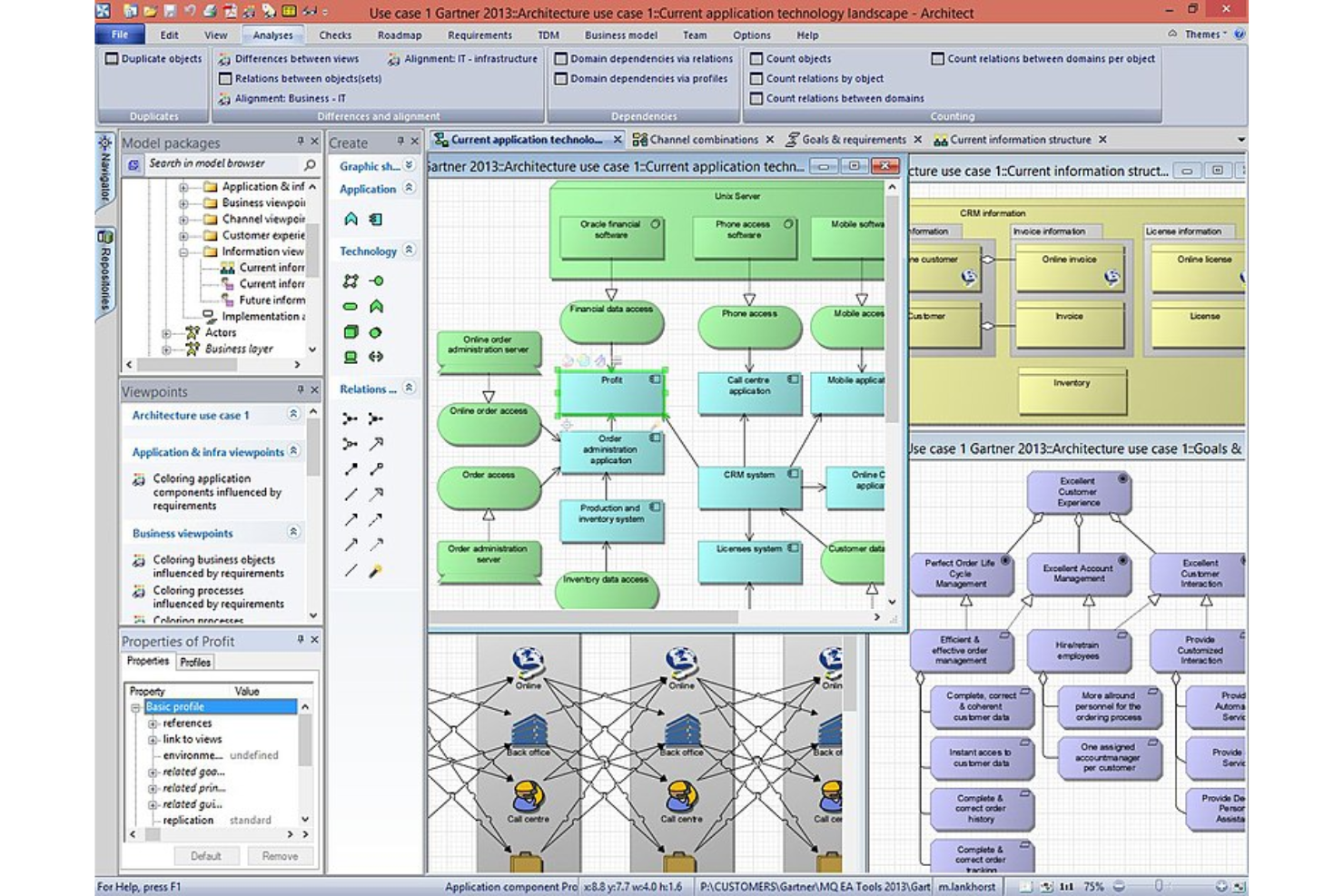
Bizzdesign propose une plateforme complète conçue pour l'architecture d'entreprise, soutenue par des analyses stratégiques. En alignant les activités et l'informatique, elle sert de point d'ancrage pour les organisations souhaitant fonder leurs démarches architecturales sur des objectifs stratégiques.
Pourquoi j'ai choisi Bizzdesign :
Choisir le bon outil dépend souvent de l'adéquation des fonctionnalités avec des besoins spécifiques. Bizzdesign a retenu mon attention en raison de son engagement à combiner la stratégie et l'architecture d'entreprise. Pour les organisations guidées par la stratégie, Bizzdesign propose la bonne combinaison d'outils et d'analyses.
Fonctionnalités et intégrations remarquables :
Bizzdesign se distingue par sa fonctionnalité « stratégie sur une page », permettant une vue d'ensemble des objectifs stratégiques. Associés à ses puissants outils de planification de scénarios, les organisations peuvent visualiser plusieurs trajectoires. Il propose également des intégrations avec les outils ITSM courants, renforçant son utilité dans les environnements orientés IT.
Pros and Cons
Pros:
- Intégration solide de la stratégie
- Outils puissants de planification de scénarios
- Bonne intégration avec les outils ITSM
Cons:
- Peut présenter une courbe d'apprentissage pour certains utilisateurs
- Prix positionné dans le haut de gamme
- La personnalisation peut nécessiter l'avis d'experts

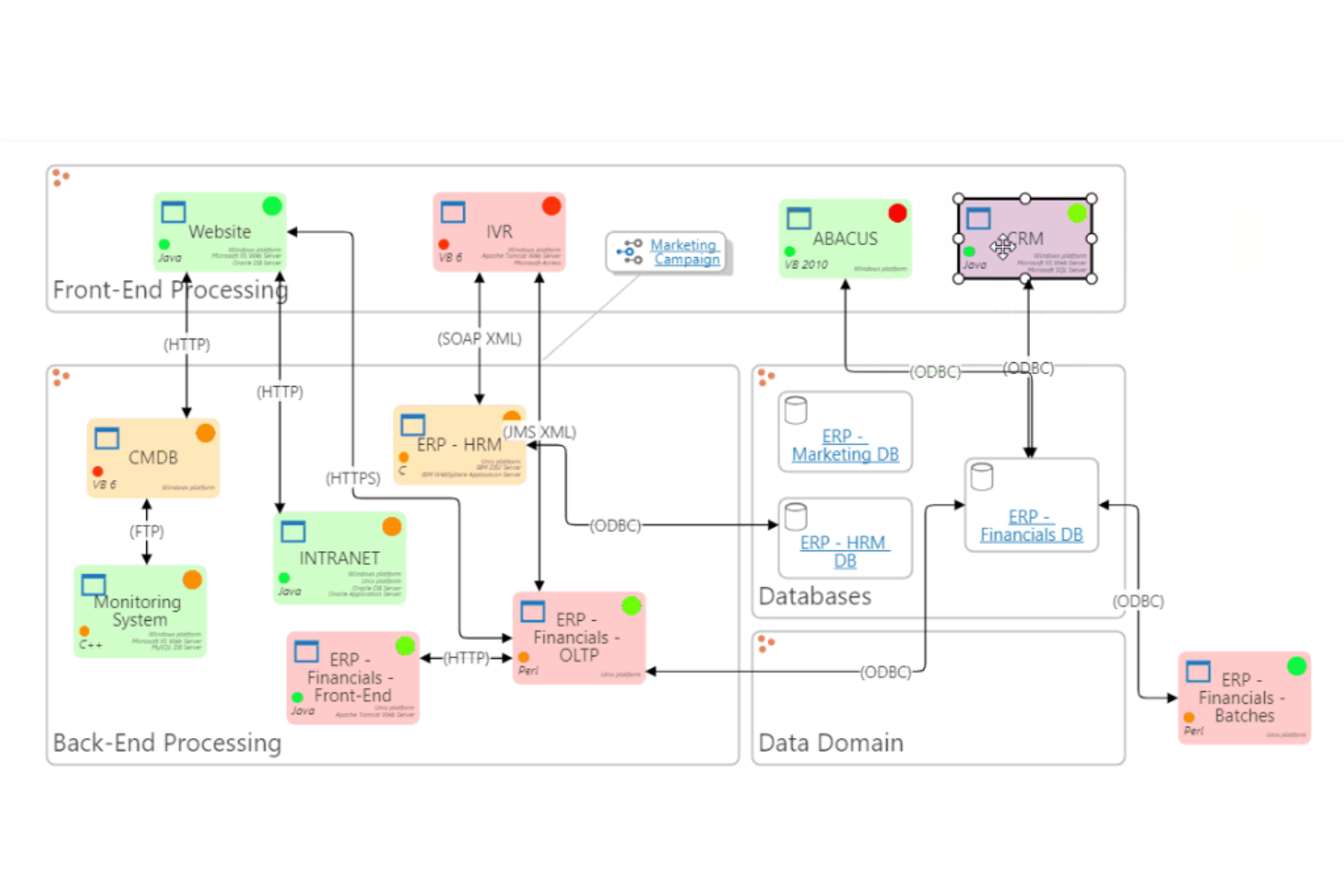
Abacus par Avolution est un outil innovant qui transforme des données d’entreprise complexes en informations exploitables. Son architecture est conçue pour faciliter des décisions éclairées et fondées sur les données, ce qui en fait une solution idéale pour les entreprises qui fondent leurs actions sur l’analyse de données.
Pourquoi j’ai choisi Abacus :
Au cours de ma recherche d’outils exploitant réellement la puissance des données, Abacus s’est imposé comme un choix distinctif. J’ai estimé que ses fonctionnalités axées sur les données, combinées à sa facilité d’utilisation, le distinguaient des autres concurrents. Pour les entreprises qui placent les données au centre de leurs décisions, Abacus semble spécialement conçu.
Fonctionnalités clés et intégrations :
Au cœur de son offre, Abacus se distingue par ses visualisations de données, ses capacités analytiques et son planificateur de feuilles de route. De plus, sa capacité à s’intégrer à une multitude de sources de données garantit une actualisation continue des informations. Les intégrations couvrent des plateformes populaires comme SharePoint, ServiceNow et Google Workspace.
Pros and Cons
Pros:
- Visualisations de données intuitives
- Grande variété d’intégrations de sources de données
- Solides capacités d’analyse
Cons:
- Peut être déroutant pour les débutants en analyse de données
- Une actualisation régulière des données est requise pour des performances optimales
- Certaines fonctionnalités avancées peuvent s’avérer complexes

Idéal pour des fonctionnalités complètes de référentiel d'architecture d'entreprise
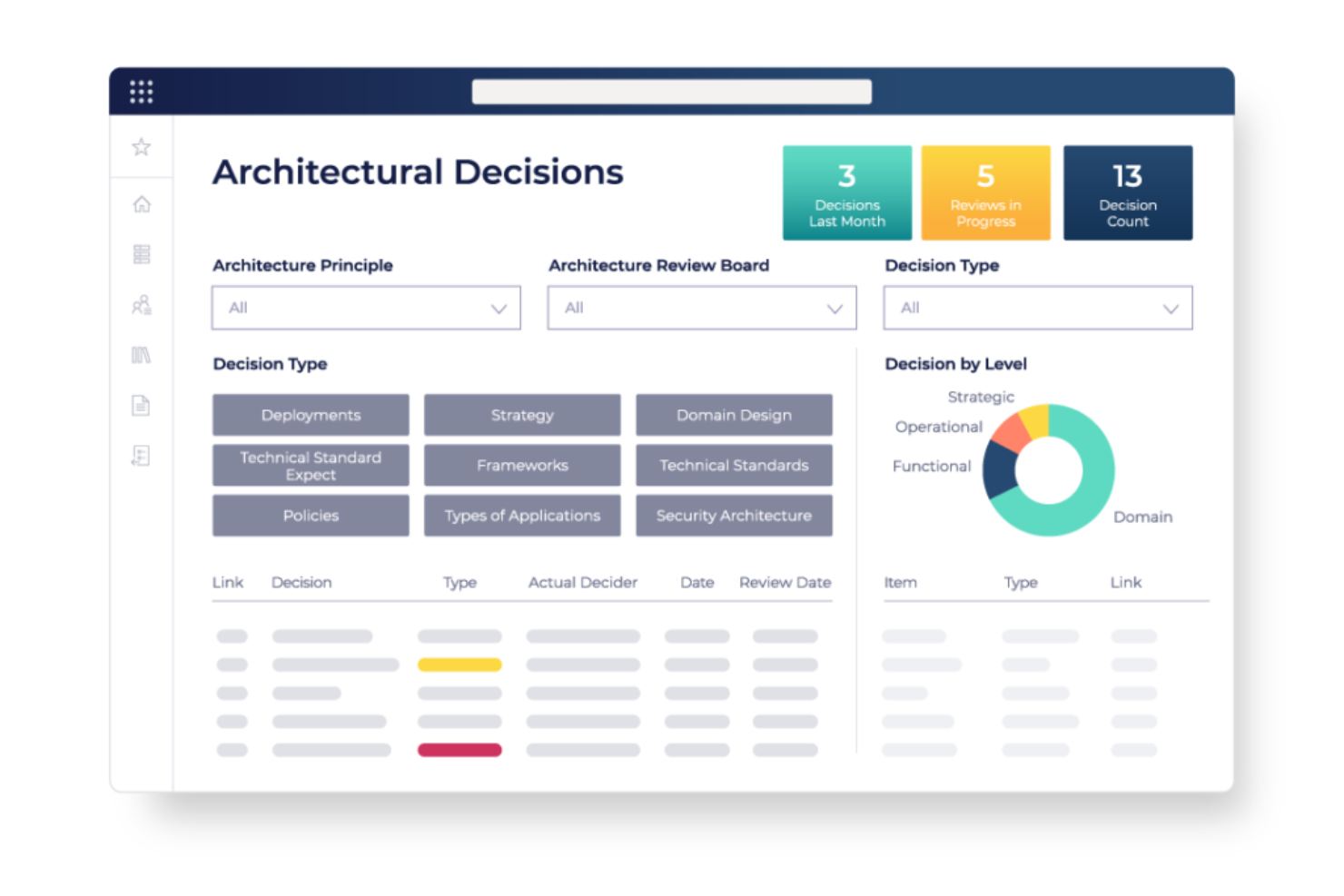
OrbusInfinity, un outil d'Orbus Software, offre une plateforme polyvalente pour l'architecture d'entreprise (EA) avec un fort accent sur les fonctionnalités de référentiel. Cela le rend particulièrement compétent pour gérer, organiser et présenter des ensembles de données EA complexes.
Pourquoi j'ai choisi OrbusInfinity :
Dans mon processus de sélection, j'ai exploré en profondeur la multitude d'outils EA disponibles sur le marché. OrbusInfinity a retenu mon attention grâce à son impressionnant éventail de capacités de référentiel. Les fonctionnalités étendues du logiciel liées aux référentiels EA expliquent pourquoi il convient particulièrement aux organisations ayant besoin de fonctionnalités de référentiel approfondies.
Fonctionnalités clés et intégrations :
Les points forts d'OrbusInfinity résident dans son interface intuitive, ses contrôles d'accès basés sur les rôles et ses outils de visualisation de l'origination des données. En matière d'intégration, il prend en charge des plateformes comme Microsoft Azure, AWS et divers systèmes de bases de données populaires.
Pros and Cons
Pros:
- Fonctionnalités de référentiel robustes
- Outils avancés de visualisation de l'origination des données
- Intégration avec des plateformes populaires
Cons:
- Peut présenter une courbe d'apprentissage pour les non-professionnels de l'architecture d'entreprise
- La configuration initiale peut être complexe
- Forte dépendance aux intégrations pour certaines fonctionnalités


QualiWare X se présente comme une référence pour ceux qui recherchent une plateforme unifiée d'architecture d'entreprise mettant l'accent sur la collaboration. Sa conception garantit que des équipes diverses peuvent travailler ensemble pour élaborer et affiner des stratégies à l'échelle de l'entreprise.
Pourquoi j'ai choisi QualiWare X :
Lors de mon évaluation, QualiWare X s’est imposé comme un leader en matière de collaboration dans le domaine de l’architecture d’entreprise. J’ai sélectionné cet outil car il ne fournit pas uniquement les outils fondamentaux pour l'AE, il les améliore avec des fonctionnalités collaboratives. Dans le domaine du travail d’équipe au sein de l’AE, QualiWare X brille particulièrement.
Caractéristiques remarquables et intégrations :
Au cœur de QualiWare X, on trouve des fonctionnalités telles que la modélisation des processus métier, la planification stratégique et la gestion des risques. De plus, ses fonctionnalités collaboratives telles que les espaces de travail partagés et les mécanismes de retour en temps réel sont véritablement innovants. Il s’intègre aussi aux outils professionnels courants, renforçant ainsi son adaptabilité dans des environnements d’entreprise variés.
Pros and Cons
Pros:
- Fonctionnalités collaboratives puissantes
- Boîte à outils complète pour l'architecture d'entreprise
- Large éventail d'intégrations
Cons:
- Peut être intimidant pour les débutants en AE
- Sa tarification peut ne pas convenir à toutes les entreprises
- Nécessite un bon accompagnement pour un usage optimal

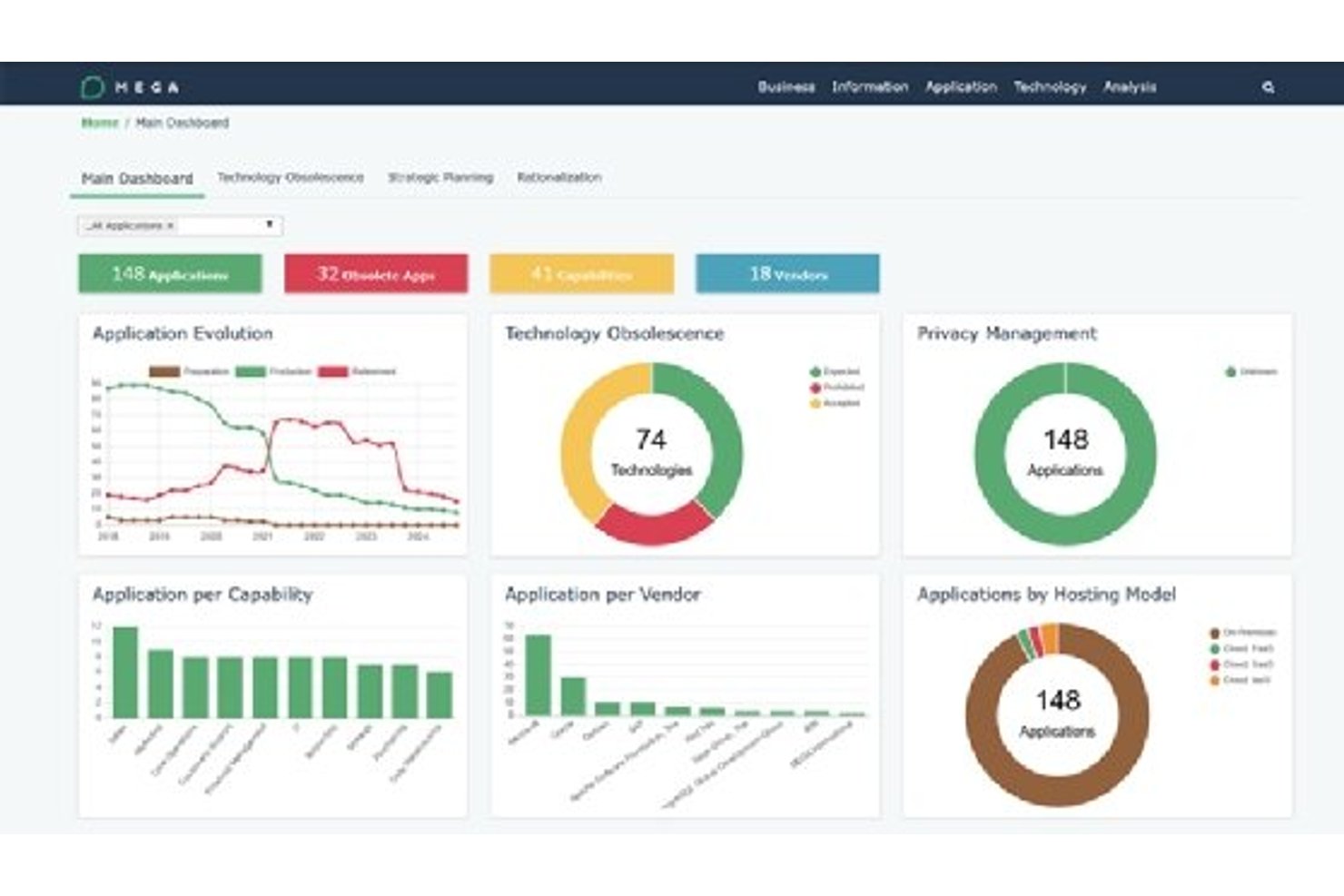
Bizzdesign Hopex est une plateforme d’architecture d’entreprise qui unifie la modélisation des capacités, la gestion du portefeuille applicatif, la cartographie technologique, la gouvernance de l’architecture et la GRC dans un référentiel connecté unique.
À qui Bizzdesign Hopex convient-il le mieux ?
Bizzdesign Hopex convient particulièrement aux architectes d’entreprise et aux responsables du portefeuille informatique des grandes organisations réglementées qui ont besoin d’une plateforme unique reliant la gouvernance de l’architecture, les risques et la conformité.
Pourquoi j’ai choisi Bizzdesign Hopex
J’ai choisi Bizzdesign Hopex parce qu’aucun autre outil de cette liste ne relie aussi étroitement la gouvernance de l’architecture et la GRC au sein d’un référentiel unique. Son module de gouvernance de l’architecture vous offre une traçabilité en temps réel jusqu’aux principes et aux normes, tandis que la couche de contenu de conformité UCF met directement en correspondance plus de 10 000 contrôles issus de plus de 1 000 réglementations avec vos travaux d’architecture. J’apprécie également la fonctionnalité de gestion de la cyber-résilience, qui effectue une analyse d’impact de bout en bout sur les dépendances entre les applications et les données afin que les écarts de conformité soient détectés avant de devenir des constats d’audit.
Fonctionnalités clés de Bizzdesign Hopex
- Module APM piloté par l’IA : Découvre automatiquement les produits logiciels, détecte les applications et les met en correspondance avec les capacités métier sans nécessiter de travail manuel d’inventaire.
- Planification de l’architecture : Relie la stratégie, les activités, les données, la technologie et les investissements au sein d’une feuille de route d’entreprise unique avec un suivi dynamique de l’avancement.
- Modélisation des processus pilotée par l’IA : Génère des diagrammes de processus BPMN directement à partir d’instructions en texte libre à l’aide d’un assistant d’IA intégré.
- Contenu de référentiel de conformité unifié : Fournit plus de 10 000 contrôles préalablement mis en correspondance avec plus de 1 000 réglementations, intégrés directement à votre référentiel d’architecture.
Intégrations de Mega Hopex
Mega Hopex propose des intégrations natives avec ServiceNow, Jira, Azure DevOps, AWS, Google Cloud, Power BI, SQL Server, Oracle et Microsoft 365. Il fournit également des API REST et GraphQL pour les intégrations personnalisées.
Pros and Cons
Pros:
- La traçabilité GRC relie les contrôles à l’architecture
- L’IA découvre les applications et les met en correspondance avec les capacités
- Le métamodèle imposé favorise une gouvernance prête pour l’audit
Cons:
- La complexité de la configuration ralentit l’intégration des administrateurs
- La création de rapports nécessite RFQL plutôt qu’une modification visuelle

Idéal pour relier l’architecture à la stratégie et au portefeuille
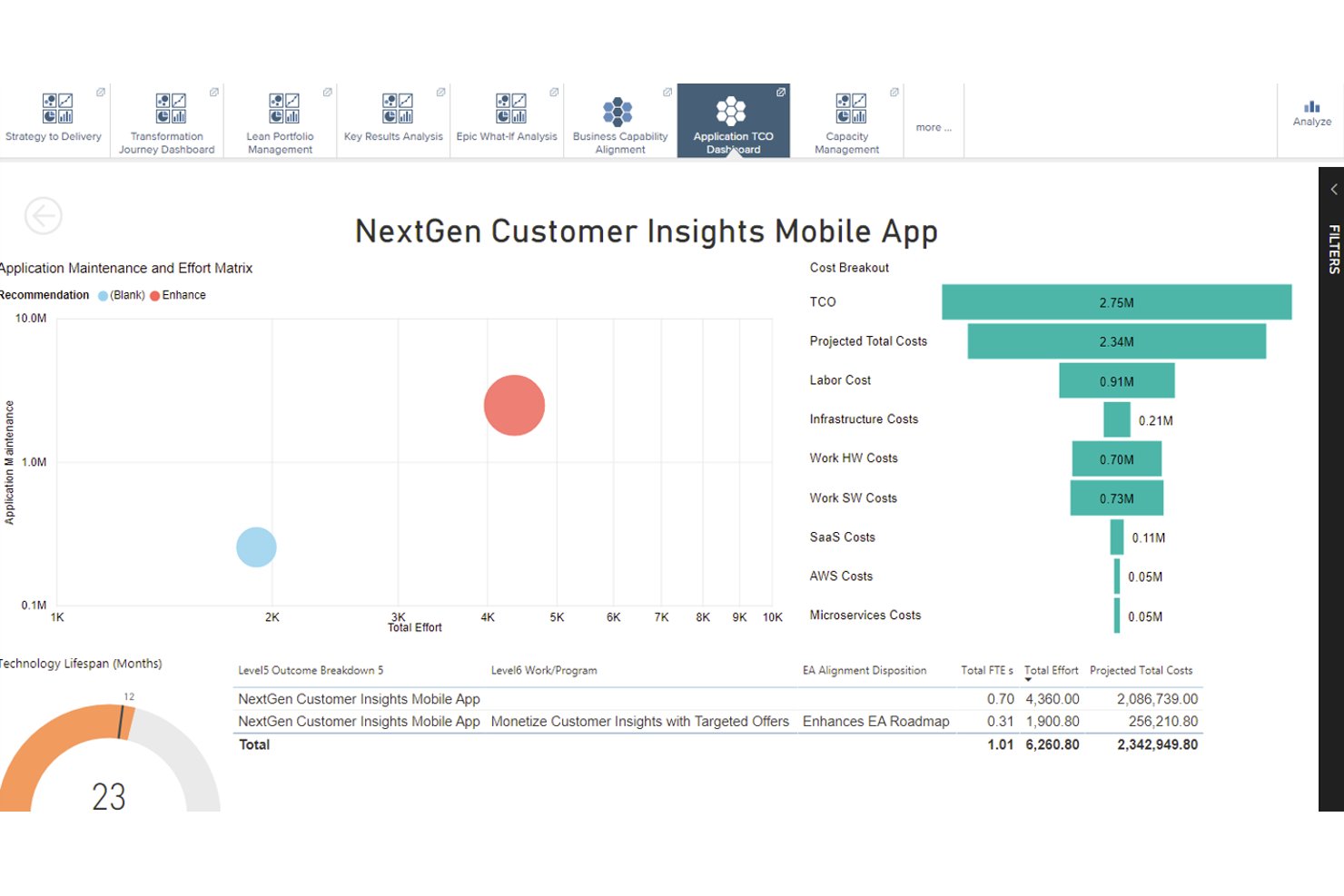
Planview est une plateforme d’architecture d’entreprise qui couvre la gestion du portefeuille applicatif, la modélisation des capacités métier, l’architecture technologique et la planification de scénarios au sein d’un référentiel centralisé et extensible.
À qui s’adressent le mieux les solutions Planview ?
Planview convient particulièrement aux architectes d’entreprise et aux responsables de portefeuilles informatiques des grandes organisations qui doivent relier directement la stratégie métier aux investissements technologiques et aux décisions relatives au portefeuille.
Pourquoi ai-je choisi les solutions Planview ?
Planview figure dans ma sélection grâce à la manière étroite dont la plateforme relie la stratégie métier aux décisions relatives au portefeuille par l’intermédiaire de son référentiel d’architecture. J’apprécie particulièrement la possibilité de mettre directement en correspondance une capacité métier avec les applications et les technologies qui la prennent en charge, puis de relier cette même capacité aux initiatives actives du portefeuille. Le moteur de planification de scénarios est ce qui la distingue véritablement : vous pouvez modéliser différents parcours de transformation et effectuer une analyse des scénarios hypothétiques concernant les arbitrages budgétaires avant tout engagement de livraison.
Principales fonctionnalités des solutions Planview
- Cartographie des capacités métier : Relie directement les capacités métier aux applications, aux technologies et aux processus qui les prennent en charge dans l’ensemble du référentiel d’architecture.
- Cadre de gouvernance adaptatif : Impose des normes de qualité des données et des politiques de conformité architecturale au moyen de flux de travail configurables et de rapports de conformité à la demande.
- Catalogue des normes technologiques : Suit le fournisseur, la version et le statut du cycle de vie des technologies dans l’ensemble du portefeuille afin de faire ressortir la dette technique et les risques d’obsolescence.
- Plus de 150 rapports prêts à l’emploi : Fournit des visualisations prédéfinies, des cartes thermiques des capacités et des tableaux de bord élaborés à partir d’implémentations réelles chez les clients.
Intégrations des solutions Planview
Planview Solutions dispose de six intégrations documentées, notamment avec Flexera, ServiceNow, Archer, Ivanti, SharePoint et Apptio. La plateforme prend également en charge la connectivité personnalisée via des connecteurs et des API pour les données CMDB, cloud, ITSM, PPM et FinOps.
Pros and Cons
Pros:
- Relie les capacités aux investissements du portefeuille
- Modélise les arbitrages de transformation avant la livraison
- Fournit de nombreux rapports d’architecture et cartes thermiques
Cons:
- Nécessite un important travail de collecte de données
- Une interface complexe ralentit l’adoption initiale
Autres logiciels d’architecture d’entreprise
Voici quelques autres options de logiciels d’architecture d’entreprise qui ne figurent pas dans ma sélection, mais qui méritent tout de même d’être examinées :
- Signavio
Idéal pour le support ArchiMate 2.1
- Oracle Enterprise Architecture
Idéal pour des solutions technologiques globales
- SAP PowerDesigner
Idéal pour la modélisation de données et l'alignement d'entreprise
- Progress OpenEdge
Idéal pour le développement d'applications flexible
- SAMU
Idéal pour visualiser les environnements informatiques


Comment j'évalue les logiciels d'architecture d'entreprise
Je divise l'évaluation des outils EA en deux niveaux : les fonctionnalités essentielles que chaque outil doit proposer pour être qualifié, et les éléments différenciateurs qui révèlent quelle option correspond à vos besoins en matière d'architecture et de gestion du portefeuille.
Fonctionnalités de base (Critères incontournables pour cette liste)
Lorsque je sélectionne des outils pour ma liste, j'attribue à chacun une note allant de 0 (ne propose pas la fonctionnalité) à 5 (excelle dans ce domaine) pour chaque fonctionnalité de base listée ci-dessous. Ensuite, je calcule le score total de l'outil en pourcentage. Chaque outil doit obtenir un score total minimum de 65% pour être pris en compte dans ma sélection.
- Gestion du portefeuille d'applications : Je vérifie si un outil vous permet de cataloguer les applications avec les phases de leur cycle de vie, la propriété, les données de coût et les indicateurs d'adéquation métier—suffisamment pour soutenir un réel exercice de rationalisation.
- Modélisation des capacités et de l'entreprise : Un bon outil EA doit permettre de cartographier les capacités métiers et les chaînes de valeur, puis de les relier aux applications support pour que vous puissiez faire le lien de la stratégie à la technologie.
- Cartographie des technologies et de l'infrastructure : J'évalue dans quelle mesure une plateforme documente les piles technologiques et les relations de dépendance, comme l'identification du middleware qui relie un CRM à un entrepôt de données.
- Dépôt architectural et métamodèle : Je recherche un métamodèle configurable qui prend en charge les cadres standards comme TOGAF ou ArchiMate et permet à votre équipe de définir des types d'objets et des relations personnalisés.
- Planification et scénarios prospectifs : Je considère la possibilité de construire des vues de l'état actuel et futur côte à côte et de comparer les scénarios de migration avant de s'engager dans une trajectoire de transformation.
- Visualisation et rapports : Cartes thermiques, diagrammes de dépendance, tableaux de bord adaptés aux parties prenantes : j'évalue si les résultats sont dynamiques et adaptés à la fois au public technique et aux dirigeants.
Une fois que j'ai une liste d'outils répondant à ce critère, j'examine ce qui distingue chaque plateforme.
Facteurs de différenciation (Ce qui distingue les fournisseurs)
Voici comment je compare et différencie les différents fournisseurs :
Fonctionnalités remarquables
L'ingestion automatisée des données est un élément différenciateur majeur. Les outils capables de capter des données en temps réel depuis des CMDB, des plateformes cloud et des systèmes ITSM gardent votre dépôt à jour sans maintenance manuelle. J'évalue aussi les analyses alimentées par l'IA qui peuvent signaler des applications redondantes ou prévoir les risques liés à une migration avant d'engager des ressources. Les outils d'enquête et de collecte collaborative sont également importants : distribuer la collecte de données aux responsables applicatifs des différentes unités métier est la manière la plus réaliste de maintenir un inventaire à grande échelle.
Au-delà des fonctionnalités
L'écosystème d'intégration compte beaucoup ici. Je vérifie la présence de connecteurs préconçus vers des outils comme ServiceNow, Jira et les principaux fournisseurs cloud afin que les données d'architecture s'intègrent dans les processus existants. Le support des cadres de référence est tout aussi crucial : les équipes utilisant TOGAF ou ArchiMate ont besoin d'un alignement natif, sans détours. J'évalue aussi la flexibilité de déploiement, car de nombreuses entreprises exigent un hébergement sur site ou dans un cloud privé afin de répondre aux impératifs internes de sécurité et de localisation des données.
Comment choisir un logiciel d’architecture d’entreprise
Il est facile de se perdre dans de longues listes de fonctionnalités et des structures tarifaires complexes. Pour vous aider à rester concentré pendant votre processus unique de sélection de logiciels, voici une liste des facteurs à prendre en compte :
| Facteur | Points à prendre en compte |
|---|---|
| Évolutivité | Le logiciel évoluera-t-il avec votre entreprise ? Tenez compte de vos besoins futurs et de sa capacité à gérer davantage de données et d’utilisateurs sans difficulté. |
| Intégrations | Se connecte-t-il à vos systèmes actuels ? Recherchez une intégration simple avec vos outils existants afin d’éviter les perturbations de vos flux de travail. |
| Personnalisation | Pouvez-vous adapter le logiciel à vos processus ? Assurez-vous qu’il permet des ajustements pour répondre à vos besoins spécifiques. |
| Facilité d’utilisation | L’interface est-elle intuitive ? Une conception conviviale aidera votre équipe à l’adopter plus rapidement sans nécessiter une formation approfondie. |
| Mise en œuvre et intégration des utilisateurs | Combien de temps faudra-t-il pour démarrer ? Évaluez le temps de configuration et les ressources nécessaires à une transition fluide. |
| Coût | Le prix correspond-il à votre budget ? Prenez en compte le coût total de possession, y compris les frais cachés, et comparez-le à votre plan financier. |
| Mesures de sécurité | Comment protège-t-il vos données ? Assurez-vous qu’il respecte vos normes de sécurité grâce au chiffrement et à la conformité aux réglementations pertinentes. |
| Disponibilité de l’assistance | Obtiendrez-vous de l’aide lorsque vous en aurez besoin ? Vérifiez que des options d’assistance client accessibles, comme le chat en direct ou l’assistance téléphonique, permettent de résoudre rapidement les problèmes. |
Qu’est-ce qu’un logiciel d’architecture d’entreprise ?
Un logiciel d’architecture d’entreprise est un outil qui aide les organisations à planifier et à gérer leur infrastructure informatique et leurs processus métier. Généralement utilisés par les professionnels de l’informatique et les architectes d’entreprise, ces outils créent de la valeur en améliorant l’alignement entre la technologie et les objectifs métier. Les fonctionnalités de modélisation, d’analyse et de génération de rapports contribuent à la prise de décision, à la collaboration et à la planification stratégique. Dans l’ensemble, ces outils favorisent une meilleure efficacité et une plus grande adaptabilité organisationnelles.
Fonctionnalités
Lors de la sélection d’un logiciel d’architecture d’entreprise, prêtez attention aux fonctionnalités clés suivantes :
- Outils de modélisation : Permettent aux utilisateurs de créer des représentations visuelles des processus métier et des systèmes informatiques, facilitant ainsi l’analyse et la planification.
- Capacités d’intégration : Permettent une connexion fluide aux systèmes existants, garantissant un échange de données et une collaboration sans interruption.
- Tableaux de bord personnalisables : Offrent des vues personnalisées des données et des indicateurs, aidant les utilisateurs à se concentrer sur les informations pertinentes.
- Analyses avancées : Fournissent des informations sur les performances organisationnelles et les améliorations potentielles, contribuant à la prise de décisions stratégiques.
- Outils de collaboration : Facilitent la communication et le travail d’équipe entre les services, améliorant ainsi les résultats des projets.
- Gestion des risques : Aident à identifier et à atténuer les risques potentiels, garantissant la continuité et la sécurité de l’activité.
- Génération automatisée de rapports : Simplifie la création de rapports, fait gagner du temps et améliore la précision.
- Mises à jour en temps réel : Garantissent aux utilisateurs l’accès aux informations les plus récentes, favorisant une prise de décision agile.
- Interface conviviale : Simplifie la navigation et réduit la courbe d’apprentissage, favorisant une adoption rapide par les équipes.
- Mesures de sécurité : Protègent les données sensibles grâce au chiffrement et au respect des normes du secteur, garantissant la confidentialité et l’intégrité.
Avantages
La mise en œuvre d’un logiciel d’architecture d’entreprise offre plusieurs avantages à votre équipe et à votre entreprise. Voici quelques-uns de ceux dont vous pouvez bénéficier :
- Meilleur alignement : Garantit la cohérence entre les objectifs technologiques et métier grâce aux outils de modélisation et aux fonctionnalités de planification stratégique.
- Prise de décision améliorée : Fournit des informations grâce aux analyses avancées, aidant les dirigeants à faire des choix éclairés.
- Efficacité accrue : Automatise la génération de rapports et d’autres tâches répétitives, faisant gagner du temps aux équipes et leur permettant de se concentrer sur les activités à fort impact.
- Meilleure collaboration : Facilite le travail d’équipe grâce aux capacités d’intégration et aux outils de collaboration, ce qui contribue à la réussite des projets.
- Réduction des risques : Identifie rapidement les risques potentiels grâce aux fonctionnalités de gestion des risques, contribuant ainsi au maintien de la continuité de l’activité.
- Plus grande adaptabilité : Maintient l’agilité des organisations grâce aux mises à jour en temps réel et aux interfaces conviviales, favorisant des réponses rapides aux changements.
- Sécurité des données : Protège les informations sensibles grâce aux mesures de sécurité, garantissant la conformité et la confidentialité.
Coûts et tarifs
À l’instar des logiciels d’automatisation de la charge de travail, la sélection de solutions d’architecture d’entreprise nécessite de comprendre les différents modèles tarifaires et forfaits disponibles. Les coûts varient en fonction des fonctionnalités, de la taille de l’équipe, des modules complémentaires, etc. Le tableau ci-dessous résume les forfaits courants, leurs prix moyens et les fonctionnalités généralement incluses dans les solutions logicielles d’architecture d’entreprise :
Tableau comparatif des forfaits pour les logiciels d’architecture d’entreprise
| Type de forfait | Prix moyen | Fonctionnalités courantes |
|---|---|---|
| Forfait gratuit | $0 | Outils de modélisation de base, intégrations limitées et assistance de la communauté. |
| Forfait personnel | $10-$30/user/month | Modélisation avancée, davantage d’intégrations, tableaux de bord personnalisés et assistance par e-mail. |
| Forfait professionnel | $30-$60/user/month | Toutes les fonctionnalités du forfait personnel, outils de collaboration, gestion des risques et assistance prioritaire. |
| Forfait entreprise | $60-$100/user/month | Ensemble complet de fonctionnalités, mises à jour en temps réel, gestionnaire de compte dédié et mesures de sécurité renforcées. |
FAQ sur les logiciels d’architecture d’entreprise
Voici quelques réponses aux questions fréquentes sur les logiciels d’architecture d’entreprise :
Les logiciels d’architecture d’entreprise peuvent-ils s’intégrer aux outils existants ?
Oui, la plupart des logiciels d’architecture d’entreprise peuvent s’intégrer aux outils existants. Recherchez un logiciel compatible avec les API ou doté de connecteurs préconfigurés pour les systèmes courants tels que les ERP, les CRM ou les outils de gestion de projet. Cela garantit une circulation fluide des données entre les plateformes, aide votre équipe à maintenir la cohérence des informations et évite les saisies redondantes.
Une formation est-elle nécessaire pour utiliser un logiciel d’architecture d’entreprise ?
Oui, une formation est souvent nécessaire, en particulier pour les systèmes complexes. De nombreux fournisseurs proposent des tutoriels, des webinaires et de la documentation pour vous aider à démarrer. Prévoyez du temps pour permettre à votre équipe d’explorer ces ressources. Certains fournisseurs proposent également des sessions de formation personnalisées, ce qui peut être utile pour les déploiements de grande envergure.
Comment garantir la sécurité des données avec un logiciel d’architecture d’entreprise ?
Pour garantir la sécurité des données, choisissez un logiciel doté de protocoles de chiffrement robustes et conforme aux normes du secteur, telles que le RGPD. Vérifiez si le fournisseur propose régulièrement des mises à jour de sécurité et dispose d’une politique transparente de gestion des données. Vous pouvez également vous renseigner sur ses plans de reprise après sinistre afin de comprendre comment il gère les éventuelles violations de données.
Quels éléments faut-il prendre en compte lors du déploiement à grande échelle d’un logiciel d’architecture d’entreprise ?
Lors du déploiement à grande échelle, tenez compte de la capacité du logiciel à gérer une augmentation du volume de données et du nombre d’utilisateurs. Vérifiez si le fournisseur propose des formules tarifaires évolutives et si des fonctionnalités supplémentaires sont disponibles au fur et à mesure de l’évolution de vos besoins. Il est également important de garantir que les performances restent constantes à mesure que votre entreprise se développe.
Et maintenant :
Si vous êtes en train d’étudier les logiciels d’architecture d’entreprise, contactez gratuitement un conseiller SoftwareSelect pour obtenir des recommandations.
Vous remplissez un formulaire et échangez brièvement avec un conseiller, qui examine en détail vos besoins. Vous recevez ensuite une sélection restreinte de logiciels à évaluer. Les conseillers vous accompagnent même tout au long du processus d’achat, notamment lors des négociations tarifaires.