

10 alternatives à dbt sélectionnées pour 2026

10 Liste restreinte des alternatives à dbt
Here's my pick of the 10 best software from the 21 tools reviewed.


Une bonne alternative à dbt offre à votre équipe une transformation de données basée sur SQL, un contrôle de version et une automatisation des workflows fiables — sans vous enfermer dans une seule approche ou un seul écosystème. Si vous cherchez des alternatives à dbt Core ou dbt Cloud, vous tenez sûrement compte de la flexibilité, des options d'intégration et de la préférence pour un workflow orienté code avec un contrôle de version basé sur GitHub.
Avec autant de plateformes en évolution, il peut être difficile de savoir quelles solutions répondront à vos besoins en modélisation, tests, orchestration et développement collaboratif des données. Cette liste vous aidera à comparer les meilleures alternatives à dbt pour 2026, afin que vous puissiez choisir en toute confiance l’outil le plus adapté aux défis de l’ingénierie analytique de votre équipe.
Qu’est-ce que dbt ?
dbt est un outil d’ingénierie analytique qui permet aux équipes de transformer, tester et documenter les données dans l’entrepôt à l’aide de SQL. Il est couramment utilisé dans les workflows ELT, où les données brutes sont chargées dans l’entrepôt puis transformées par la suite. dbt permet des workflows orientés code avec contrôle de version, intégration CI/CD, modélisation modulaire des données et tests automatisés — ce qui simplifie la gestion de pipelines analytiques complexes.
dbt n’est pas un outil ETL avec interface graphique, mais il utilise YAML pour la configuration et fonctionne en complément des outils ETL dans les data stacks modernes. Il s’intègre aussi aux plateformes cloud comme GCP et aux principaux entrepôts de données. dbt est largement utilisé par les ingénieurs et analystes data qui souhaitent créer des transformations fiables et maintenables directement dans leur environnement d’entrepôt de données.
Résumé des alternatives à dbt
Ce tableau comparatif résume les détails de tarification des principales alternatives à dbt que j’ai sélectionnées afin de vous aider à trouver la solution la mieux adaptée à votre budget et à vos besoins business.
| Tool | Best For | Trial Info | Price | ||
|---|---|---|---|---|---|
| 1 | Best for code-free advanced analytics | Free trial + free demo available | From $250/user/month (billed annually) | Website | |
| 2 | Best for broad connector library support | Free demo available | Pricing upon request | Website | |
| 3 | Best for enterprise-grade workload scalability | Free trial + free demo available | Pricing upon request | Website | |
| 4 | Best for serverless ETL automation | Free plan available | From $0.44/DPU-hour | Website | |
| 5 | Best for low-code pipeline building | 14-day free trial + free demo available | From $1,000/month | Website | |
| 6 | Best for collaborative notebook-based analytics | 30-day free trial available | From $0.55 per DBU/hour | Website | |
| 7 | Best for column-level data lineage visualization | Free demo available | Pricing upon request | Website | |
| 8 | Best for unified data integration and governance | Free demo + free trial available | Pricing upon request | Website | |
| 9 | Best for multi-cloud data stack orchestration | Free demo available | Pricing upon request | Website | |
| 10 | Best for in-platform data transformation | 30-day free trial available | From $2/per credit | Website |
Why Trust Our Software Reviews
We’ve been testing and reviewing software since 2023. As tech leaders ourselves, we know how critical and difficult it is to make the right decision when selecting software.
We invest in deep research to help our audience make better software purchasing decisions. We’ve tested more than 2,000 tools for different tech use cases and written over 1,000 comprehensive software reviews. Learn how we stay transparent & our software review methodology.
-

Site24x7
Visit WebsiteThis is an aggregated rating for this tool including ratings from Crozdesk users and ratings from other sites.4.6 -
GitHub Actions
Visit WebsiteThis is an aggregated rating for this tool including ratings from Crozdesk users and ratings from other sites.4.8 -
Docker
Visit WebsiteThis is an aggregated rating for this tool including ratings from Crozdesk users and ratings from other sites.4.6





Avis sur les alternatives à dbt
Vous trouverez ci-dessous mes synthèses détaillées des alternatives à dbt qui figurent sur ma liste restreinte. Mes avis vous apportent un aperçu détaillé des fonctionnalités, des cas d’usage privilégiés et des intégrations de chaque plateforme afin de vous aider à trouver la solution la mieux adaptée à vos besoins en ingénierie analytique.

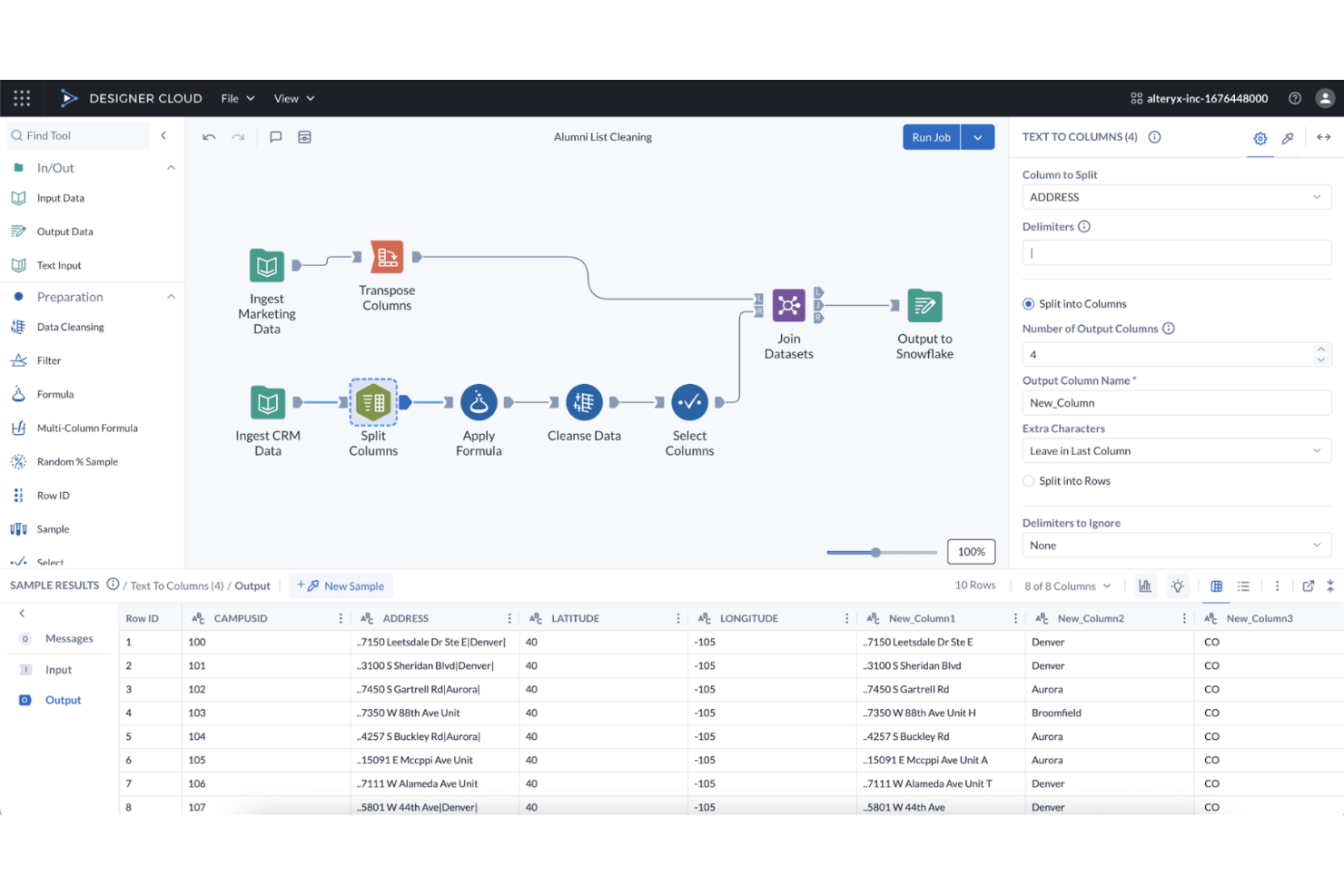
Alteryx stands out for teams that want to build advanced analytics workflows without writing code. It’s especially useful for business analysts and data professionals who need to automate data preparation, blending, and predictive modeling across multiple sources. As a no-code platform with a visual, drag-and-drop interface, it provides a flexible transformation framework for designing complex analytics pipelines without relying on SQL or Python. Unlike SQL-first tools such as dbt or Dataform, Alteryx prioritizes visual workflow design over code-driven data modeling.
Why Alteryx Is a Good dbt Alternative
For teams that want to build advanced analytics workflows without writing code, Alteryx offers a unique approach compared to dbt. I picked Alteryx because its visual workflow designer lets you create, automate, and share complex data transformations and predictive models without needing SQL or Python skills. The platform includes built-in tools for data preparation, blending, and advanced analytics, all accessible through a drag-and-drop interface. This makes Alteryx a strong fit for analytics teams that need to empower non-developers to build and maintain sophisticated analytics pipelines.
Alteryx Key Features
Some other Alteryx features help teams extend and manage their analytics processes:
- Geospatial Analytics Tools: Analyze and visualize spatial data using built-in mapping and location-based functions.
- Data Connectors Library: Access a wide range of data sources, including cloud platforms, databases, and applications.
- Automated Reporting: Generate and schedule reports directly from your analytics workflows.
- Collaboration Workspaces: Share workflows, assets, and results with team members in a centralized environment.
Alteryx Integrations
Integrations include Snowflake, AWS, Databricks, Google Cloud, and more.
Pros and Cons
Pros:
- Workflow sharing enables team collaboration
- Large library supports many connectors
- Built-in tools support advanced analytics
Cons:
- Version control and modularity are limited
- Audit trails and lineage lack granularity

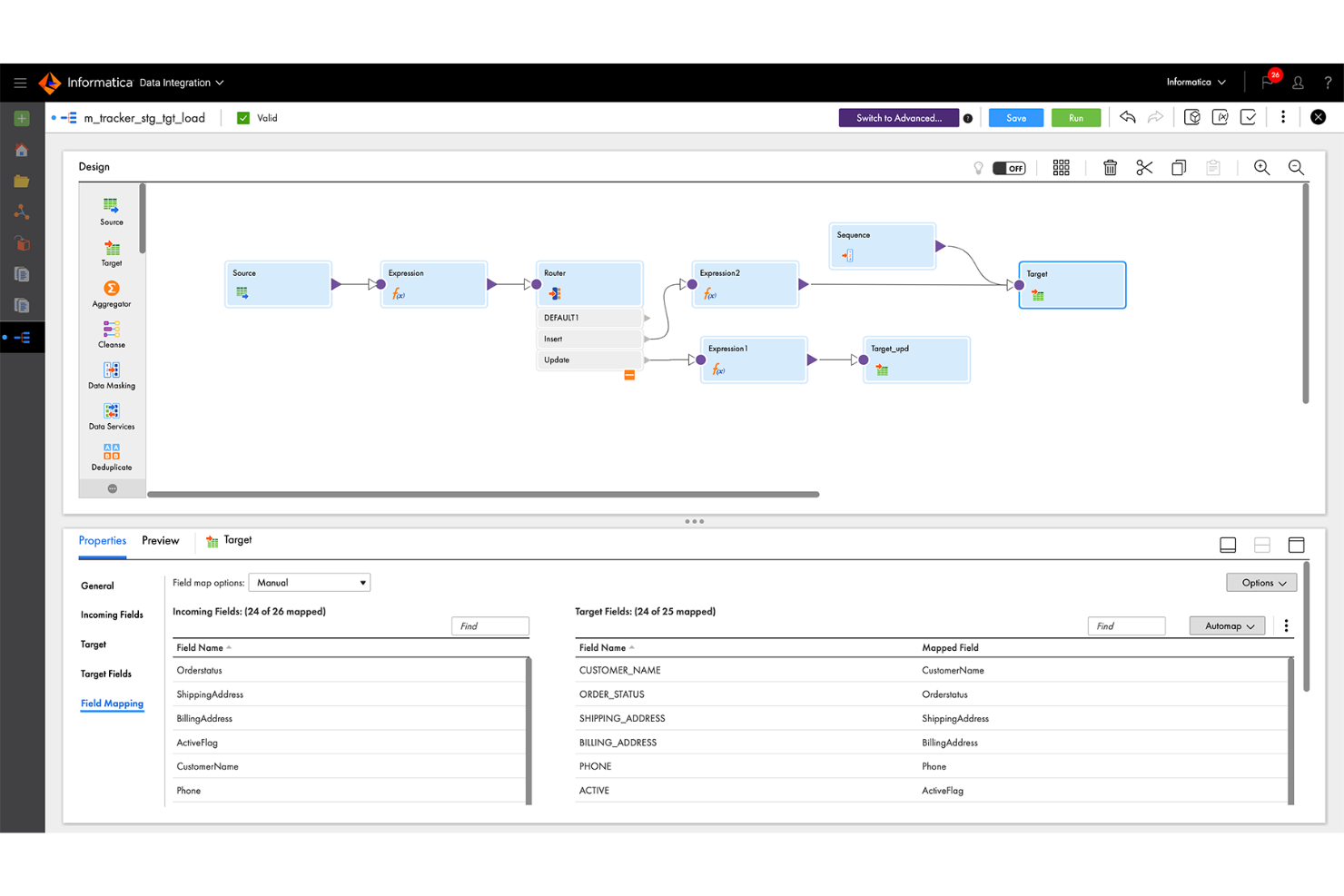
If your team needs to connect to a wide range of data sources, Informatica stands out for its extensive connector library. This platform is a strong fit for enterprises and data engineering teams that manage diverse, distributed data environments. Unlike dbt, Informatica offers native integration with hundreds of databases, applications, and cloud services, making it easier to unify and transform data from almost anywhere.
Why Informatica Is a Good dbt Alternative
For teams that need to connect to a wide variety of data sources, Informatica offers a connector library that’s much broader than what dbt provides. I picked Informatica because it supports native connections to hundreds of databases, SaaS platforms, and on-premises systems. This makes it possible to build analytics pipelines that unify data from legacy, cloud, and hybrid environments without custom development. Informatica’s prebuilt connectors help reduce manual integration work and keep data engineering projects moving forward.
Informatica Key Features
Some other Informatica features help teams manage and optimize their analytics workflows:
- AI-Powered Data Mapping: Automatically map data fields between sources and targets using built-in AI.
- Data Quality Management: Profile, cleanse, and monitor data quality within your pipelines.
- Workflow Orchestration: Design, schedule, and monitor complex data workflows from a central dashboard.
- Role-Based Access Control: Set granular permissions for users and groups to manage data access securely.
Informatica Integrations
Integrations are not publicly listed.
Pros and Cons
Pros:
- Visual design supports complex transformations
- Data quality and profiling included
- Native connectors support diverse sources
Cons:
- Modular code-based workflows are limited
- Large workloads require performance tuning

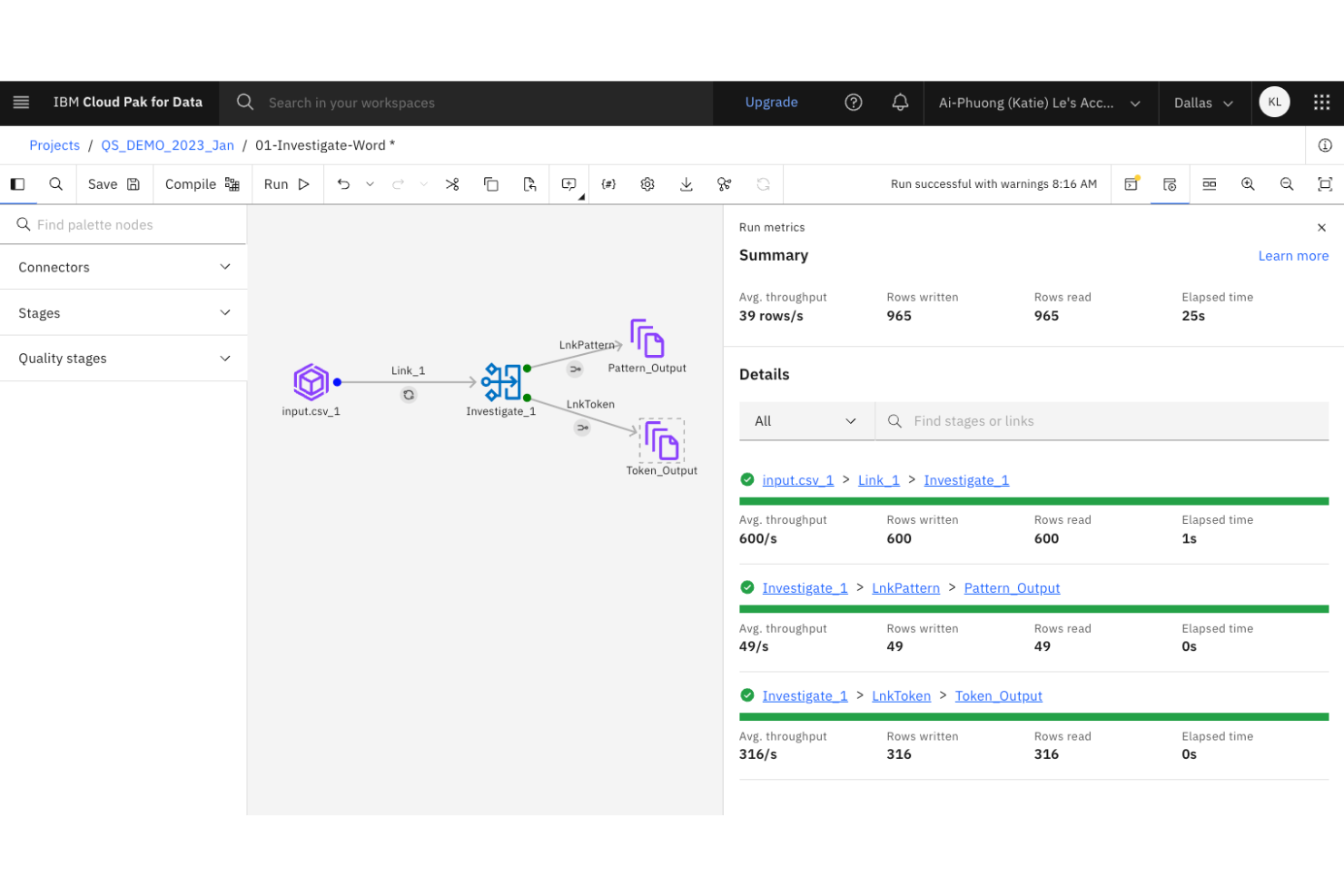
Large organizations with complex data integration needs often turn to IBM DataStage for its enterprise-grade scalability. This platform is designed for IT teams and data engineers who need to orchestrate high-volume, high-complexity data pipelines across hybrid and multi-cloud environments. Unlike dbt, IBM DataStage offers parallel processing and workload balancing features built for demanding enterprise workloads.
Why IBM DataStage Is a Good dbt Alternative
When you need to manage analytics engineering at true enterprise scale, IBM DataStage brings capabilities that go beyond what dbt offers. I picked IBM DataStage because it’s built for orchestrating massive data workloads with parallel processing and workload balancing. The platform also supports hybrid and multi-cloud deployments, which are essential for organizations with distributed data environments. These features make it a strong choice for teams that need to handle high-volume, mission-critical data pipelines.
IBM DataStage Key Features
Some other IBM DataStage features help teams manage complex data engineering projects:
- Graphical Job Design Interface: Build and visualize data pipelines using a drag-and-drop interface.
- Extensive Connectivity: Connect to a wide range of databases, data warehouses, and cloud storage platforms.
- Data Quality Services: Integrate data profiling, cleansing, and validation directly into your workflows.
- Metadata Management: Track, document, and govern data lineage and transformations across your environment.
IBM DataStage Integrations
Integrations are not publicly listed.
Pros and Cons
Pros:
- Built-in tools enable data cleansing
- Hybrid/multi-cloud supports flexible architectures
- Parallel execution handles high-volume data
Cons:
- Modular code-based workflows are limited
- Upgrades require significant downtime

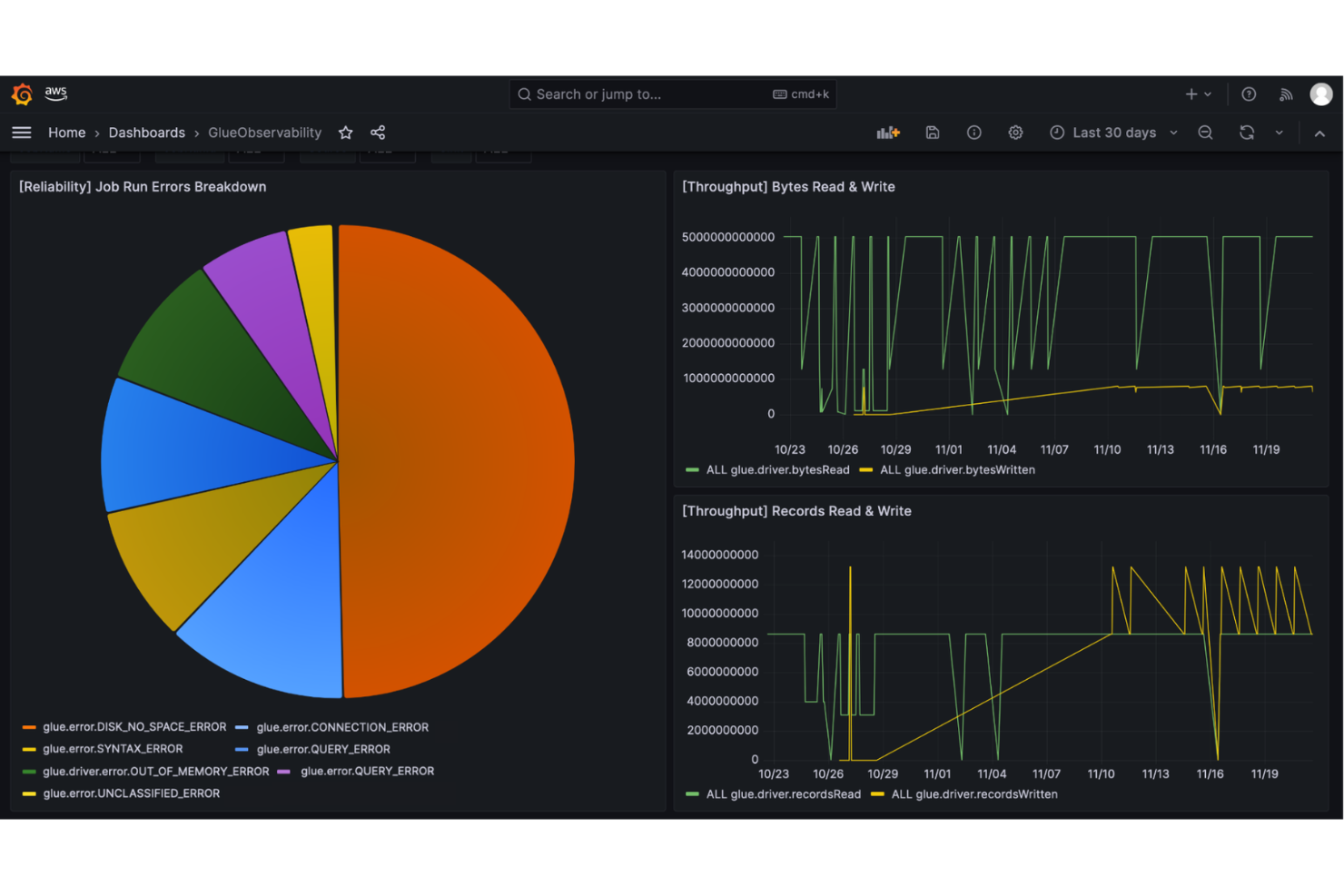
If you’re looking for a fully managed, serverless ETL platform, AWS Glue is designed for automation-focused data teams. It’s a strong fit for organizations already invested in the AWS ecosystem that want to automate data discovery, cataloging, and transformation at scale. Unlike dbt, AWS Glue handles infrastructure management and scaling behind the scenes, letting you focus on building and automating complex ETL workflows.
Why AWS Glue Is a Good dbt Alternative
Unlike dbt, AWS Glue is built for teams that want to automate ETL processes without managing servers or infrastructure. I picked AWS Glue because it automatically provisions resources, scales jobs, and handles job scheduling, which is ideal for high-volume or unpredictable workloads. The tool’s serverless architecture means you can focus on building and orchestrating data pipelines while AWS manages the underlying compute and storage. This makes AWS Glue a strong choice for analytics engineering teams that prioritize automation and scalability in their ETL workflows.
AWS Glue Key Features
Some other AWS Glue features help teams manage and optimize their data engineering workflows:
- Data Catalog: Maintain a central metadata repository for all your data assets.
- Crawlers: Automatically scan and classify data sources to update the data catalog.
- Job Monitoring Dashboard: Track job status, logs, and performance metrics in real time.
- Developer Endpoints: Access interactive development environments for custom ETL script authoring and testing.
AWS Glue Integrations
Integrations include Amazon S3, Amazon Redshift, Amazon RDS, Amazon Aurora, Amazon DynamoDB, Amazon Athena, Amazon EMR, AWS Lambda, Amazon Kinesis, and AWS CloudTrail.
Pros and Cons
Pros:
- Automated cataloging simplifies metadata discovery
- AWS integration simplifies cloud workflows
- Serverless removes infrastructure management
Cons:
- Large workflow troubleshooting is challenging
- Limited non-AWS data source support

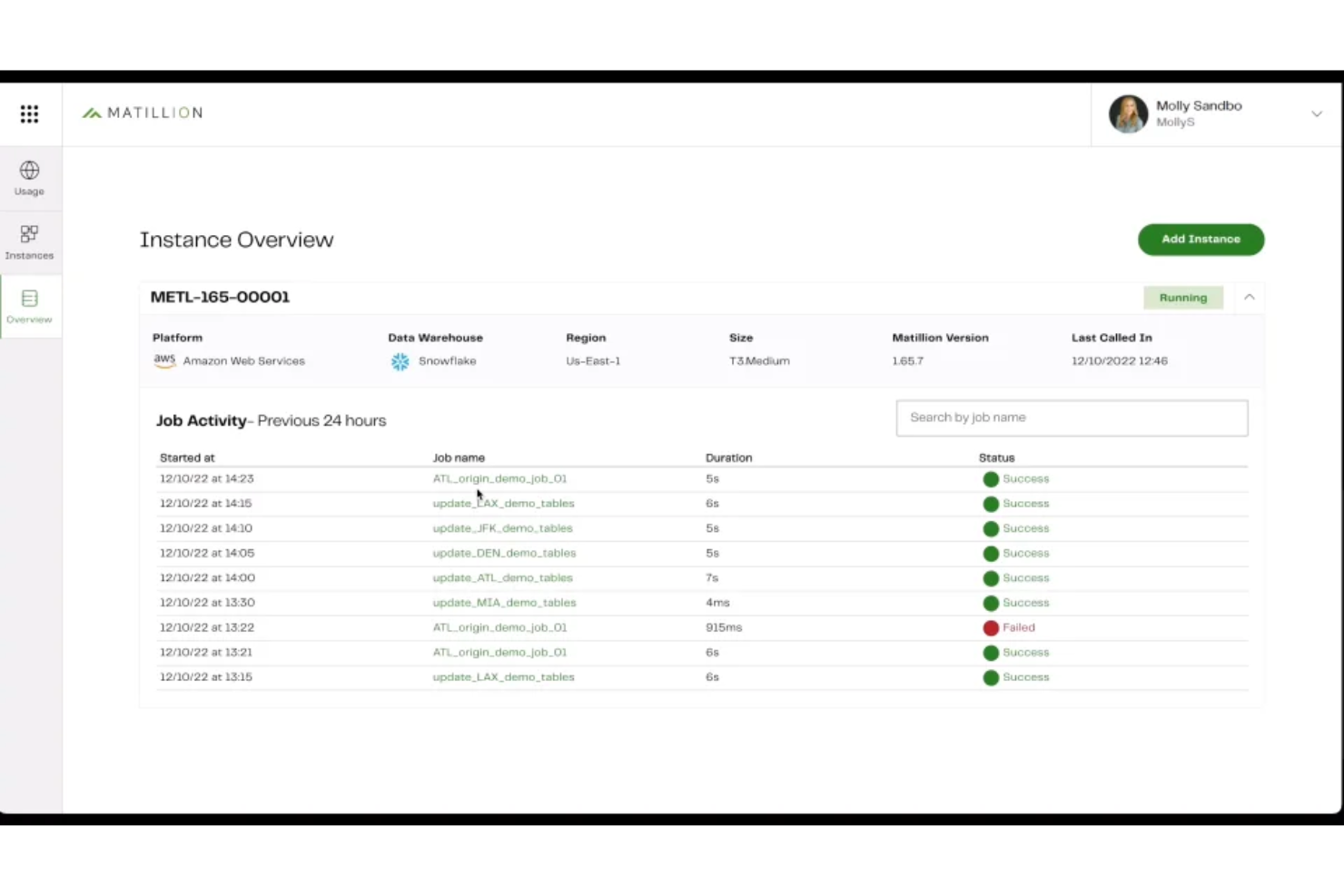
Matillion stands out for teams that want to design and manage data pipelines with minimal coding. Its low-code interface appeals to data engineers and analytics professionals who need to build, orchestrate, and maintain complex workflows without writing extensive SQL or Python. Unlike dbt, Matillion focuses on visual pipeline building and broad connector support, making it easier to integrate and transform data from a wide range of sources.
Why Matillion Is a Good dbt Alternative
For teams that want to build data pipelines without heavy coding, Matillion offers a visual, low-code approach that sets it apart from dbt. I picked Matillion because its drag-and-drop interface lets you design, schedule, and monitor complex workflows without writing extensive SQL or Python. The platform also provides built-in connectors for a wide range of data sources, making it easier to ingest and transform data from cloud and on-premises systems. This makes Matillion a strong choice for analytics engineering teams that prioritize visual workflow design and rapid pipeline development.
Matillion Key Features
Some other features in Matillion help teams manage and optimize their analytics workflows:
- Version Control Integration: Connect your projects to Git repositories for source control and collaboration.
- Job Orchestration: Schedule and automate multi-step data workflows with built-in orchestration tools.
- Environment Management: Create and manage multiple environments for development, testing, and production.
- Data Quality Components: Use built-in components to validate, cleanse, and profile data within your pipelines.
Matillion Integrations
Integrations are not publicly listed.
Pros and Cons
Pros:
- Orchestration tools enable job scheduling
- Built-in connectors support many sources
- Visual builder allows rapid design
Cons:
- Transformation logic lacks transparency
- Advanced version control is limited

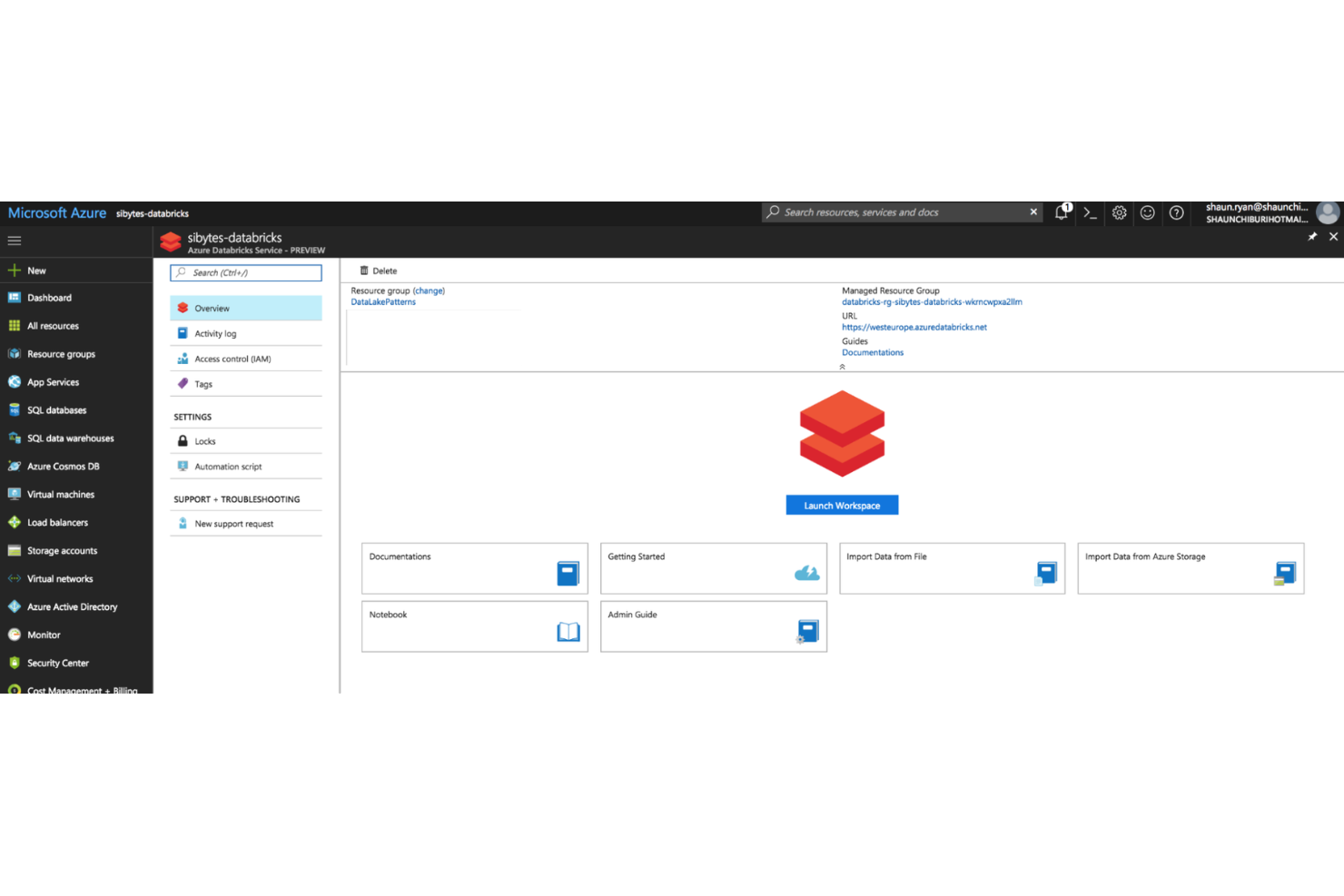
For teams that want to combine analytics engineering with collaborative data science, Azure Databricks offers a unified workspace built around interactive notebooks. It’s especially useful for organizations that need to bring together data engineers, analysts, and data scientists to work on shared projects in real time. Unlike dbt, Azure Databricks supports advanced machine learning workflows and large-scale data processing directly within the same environment, and it integrates smoothly with Azure Data Factory for orchestrating and managing data pipelines across the Azure ecosystem.
Why Azure Databricks Is a Good dbt Alternative
For analytics teams that prioritize real-time collaboration and interactive development, Azure Databricks stands out with its notebook-based approach. I picked Azure Databricks because it lets multiple users work together on shared notebooks, combining SQL, Python, and Scala in a single workflow. The platform also supports version control and inline visualizations, making it easier to iterate on data models and analytics projects. This collaborative environment is especially valuable for organizations that want to bridge the gap between analytics engineering and data science.
Azure Databricks Key Features
Some other Azure Databricks features help teams manage and scale their analytics workflows:
- Delta Lake Integration: Store and manage large-scale data with ACID transaction support.
- Job Scheduling: Automate notebook execution and pipeline orchestration with built-in scheduling tools.
- Cluster Management: Provision, scale, and terminate compute clusters on demand.
- MLflow Integration: Track experiments and manage machine learning models within the same workspace.
Azure Databricks Integrations
Integrations include Amazon S3, Snowflake, Power BI, Tableau, Airflow, and more.
Pros and Cons
Pros:
- MLflow tools simplify experiment tracking
- Supports SQL, Python, and Scala
- Delta Lake enables data versioning
Cons:
- Orchestration features are less mature
- Transformation features are less modular

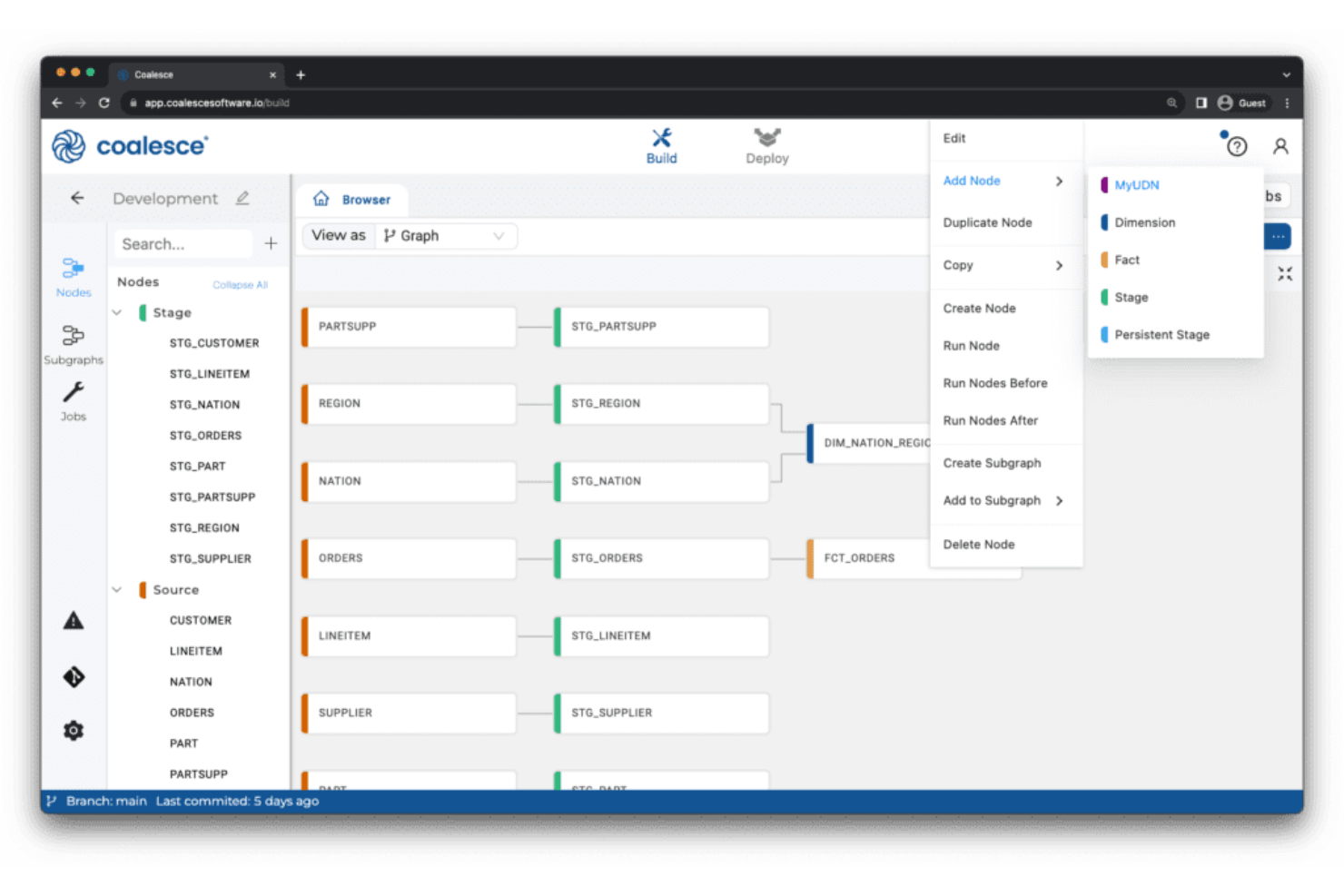
Coalesce offers analytics engineering teams a visual approach to building and managing data transformations. It stands out for its column-level data lineage visualization, making it easier for data engineers and analysts to trace dependencies and understand complex pipelines. If you need granular visibility and control over your data workflows, Coalesce addresses challenges that traditional SQL-based tools like dbt may not.
Why Coalesce Is a Good dbt Alternative
What sets Coalesce apart as a dbt alternative is its focus on column-level data lineage visualization. I picked Coalesce for teams that need to trace data transformations at a granular level, which is often a challenge with dbt’s more code-centric approach. Unlike traditional data build tool (dbt) workflows that can come with a steeper learning curve for non-engineers, Coalesce provides a more visual approach to data orchestration. It offers interactive lineage diagrams and a clear view of your transformation network, letting you see how each column is derived and how changes ripple through your pipeline. This level of transparency helps analytics engineers quickly troubleshoot issues and maintain data quality across complex workflows.
Coalesce Key Features
Some other features in Coalesce support analytics engineering teams looking for more control and flexibility:
- Visual Transformation Builder: Design and edit data transformation workflows using a drag-and-drop interface instead of writing only SQL.
- Automated Documentation: Generate and update technical documentation for your data models as you build and modify them.
- Role-Based Access Controls: Set granular permissions for users and teams to manage who can view or edit specific projects and workflows.
- Template-Driven Development: Use reusable templates to standardize common transformation logic and accelerate project setup.
Coalesce Integrations
Integrations include Snowflake, BigQuery, Databricks, Salesforce, Tableau, and more.
Pros and Cons
Pros:
- Templates ensure project standardization
- RBAC simplifies team permissions
- Column-level lineage diagrams
Cons:
- Limited open-source extensibility
- Fewer community resources than dbt
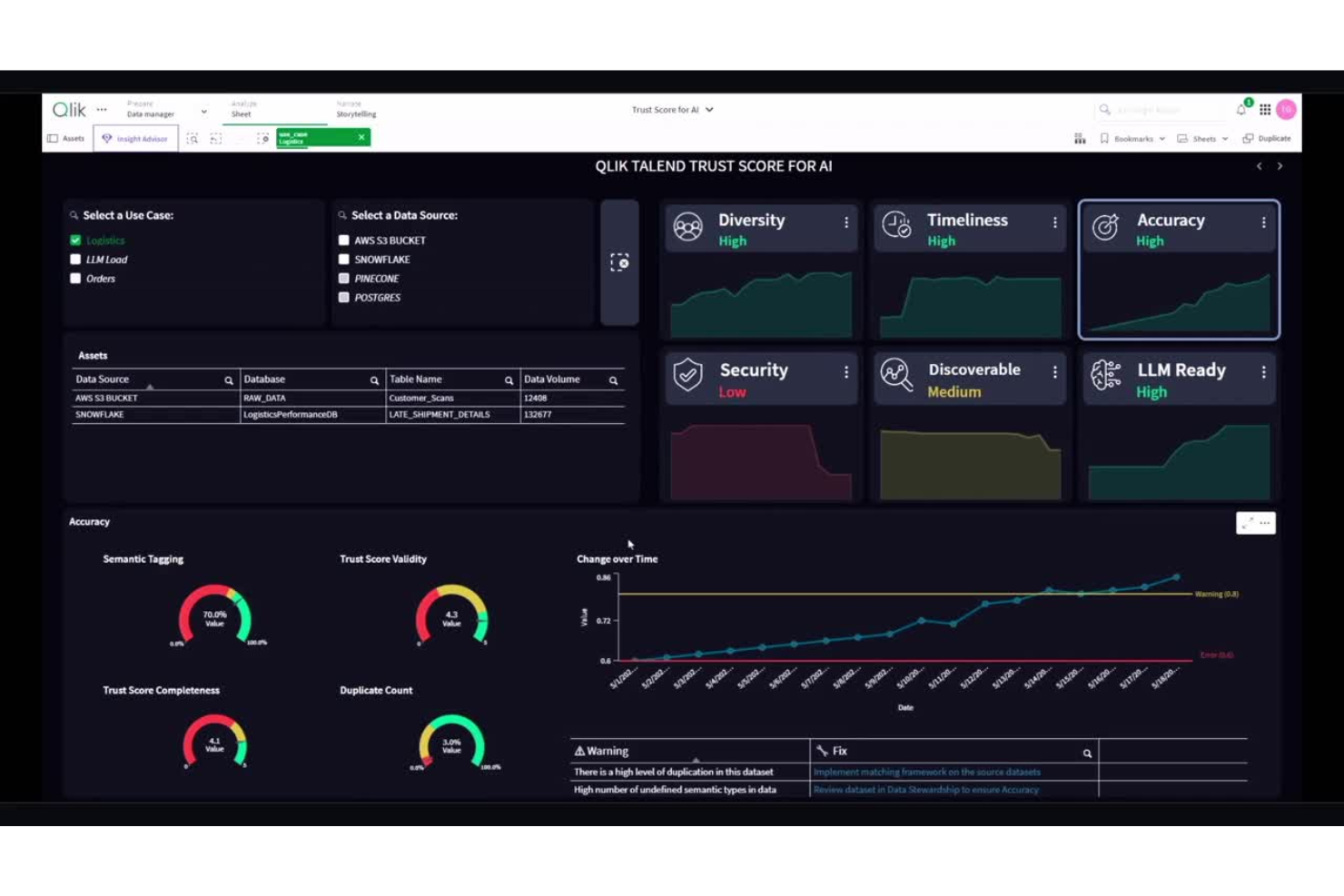
Qlik Talend Cloud brings together data integration and governance in a single platform, making it a strong choice for organizations that need unified control over their analytics pipelines. This solution is especially useful for data teams in regulated industries or enterprises with strict data quality and compliance requirements. Unlike dbt, Qlik Talend Cloud combines data transformation, cataloging, and governance features to help you manage data trust and lineage from end to end.
Why Qlik Talend Cloud Is a Good dbt Alternative
When unified data integration and governance are top priorities, Qlik Talend Cloud offers a more holistic approach than dbt. I picked this tool because it combines data transformation, data quality, and governance in a single platform, which is especially valuable for teams managing sensitive or regulated data. Qlik Talend Cloud includes built-in data cataloging and lineage tracking, so you can trace data movement and ensure compliance across your analytics workflows. Its governance features help maintain data trust and transparency, making it a strong fit for organizations with strict oversight requirements.
Qlik Talend Cloud Key Features
Some other Qlik Talend Cloud features help teams manage and optimize their analytics workflows:
- Visual Pipeline Designer: Build and modify data pipelines using a drag-and-drop interface.
- Prebuilt Data Connectors: Connect to a wide range of cloud and on-premises data sources without custom code.
- Automated Data Profiling: Scan and analyze datasets to detect anomalies and patterns before transformation.
- API Integration Tools: Expose and consume data services through built-in API management features.
Qlik Talend Cloud Integrations
Integrations include Snowflake, AWS, Microsoft Fabric, BigQuery, Databricks and Apache Iceberg.
Pros and Cons
Pros:
- Prebuilt connectors support various sources
- Lineage tracking simplifies compliance audits
- Visual design supports non-coding teams
Cons:
- Large workloads show variable performance
- Advanced logic requires extra configuration

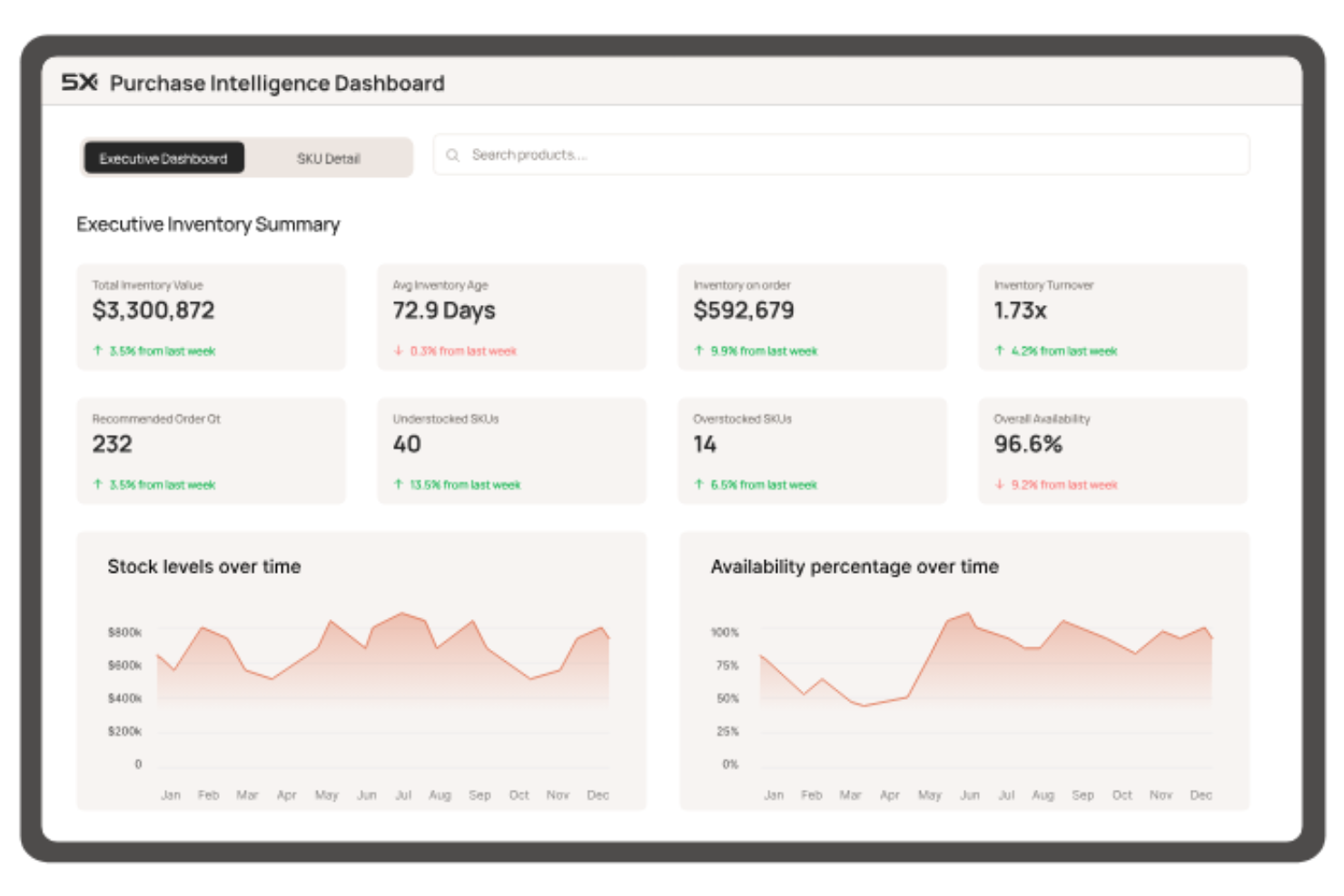
If you’re managing analytics across multiple cloud platforms, 5X offers a unified way to orchestrate your entire data stack. This tool is designed for data teams and businesses that need to coordinate data workflows, governance, and monitoring across different cloud vendors. 5X stands out by letting you centralize control and automate processes in complex, multi-cloud environments—something dbt and other analytics engineering tools don’t natively address.
Why 5X Is a Good dbt Alternative
For teams that need to orchestrate analytics workflows across multiple cloud providers, 5X brings a unique approach that dbt doesn’t cover. I picked 5X because it lets you design, deploy, and monitor your entire data stack from a single platform, regardless of which cloud services you use. The tool offers centralized workflow automation and governance features that help manage data pipelines, security, and compliance across AWS, Google Cloud, Azure, and more. This makes 5X especially valuable for organizations with complex, distributed data environments that need unified control.
5X Key Features
Some other features in 5X help teams manage and optimize their analytics engineering workflows:
- Pre-built Data Stack Templates: Choose from curated templates to quickly deploy common analytics architectures.
- Cost Monitoring Dashboard: Track and visualize cloud spend across all connected data services.
- Data Quality Monitoring: Set up automated checks and alerts for data freshness, completeness, and accuracy.
- User and Role Management: Assign granular permissions and manage access for different team members.
5X Integations
Integrations are not publicly listed.
Pros and Cons
Pros:
- Dashboards track and manage costs
- Templates accelerate new project deployment
- Multi-cloud supports diverse cloud workflows
Cons:
- Platform may be overkill for simple needs
- Fewer open-source components are available

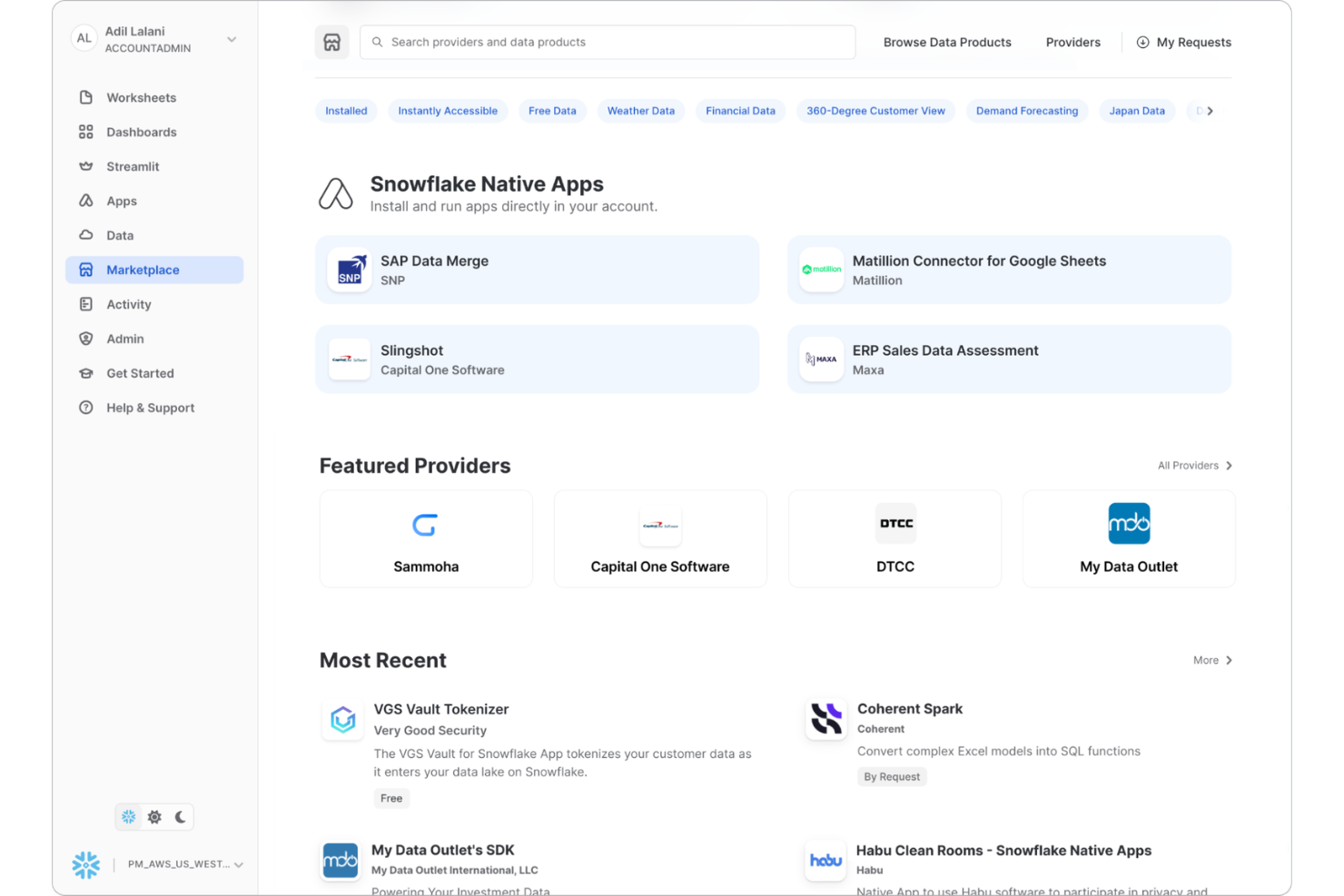
For teams already working within the Snowflake ecosystem, Snowflake Native Apps let you build, deploy, and manage data transformations directly inside your data platform. This approach appeals to data engineers and analytics professionals who want to minimize data movement and keep workflows tightly integrated with their warehouse. Unlike dbt and other external analytics engineering tools, Snowflake Native Apps allow you to leverage Snowflake’s compute, security, and governance features for all your transformation logic.
Why Snowflake Native Apps Is a Good dbt Alternative
If you want to keep all your data transformation logic inside your data warehouse, Snowflake Native Apps offer a direct solution that dbt doesn’t provide. I picked Snowflake Native Apps because they let you build, run, and manage analytics workflows natively within the Snowflake platform, eliminating the need for external orchestration or data movement. You can use Snowflake’s compute resources, security controls, and governance features to handle everything from transformation to deployment. This approach is especially useful for teams that prioritize in-platform processing and want to reduce complexity in their analytics engineering stack.
Snowflake Native Apps Key Features
Some other features in Snowflake Native Apps help teams extend and customize their analytics workflows:
- Native Application Framework: Build and deploy custom applications directly within the Snowflake environment.
- Marketplace Distribution: Publish and share your native apps with other Snowflake users through the Snowflake Marketplace.
- Secure Data Sharing: Share data and application outputs securely with internal or external stakeholders.
- Support for JavaScript and SQL: Develop transformation logic using both SQL and JavaScript for flexible analytics engineering.
Snowflake Native Apps Integrations
Integrations are not publicly listed.
Pros and Cons
Pros:
- Marketplace allows monetizing analytics apps
- Direct Snowflake access ensures scalability
- Native features simplify compliance management
Cons:
- Version control workflows are immature
- Limited to Snowflake data platform
Autres alternatives à dbt
Voici quelques autres alternatives à dbt qui ne figurent pas sur ma liste restreinte, mais qui méritent tout de même d’être considérées :
- Datacoves
For managed development environments
- Hevo
For zero-maintenance data pipelines
- Airbyte
For open-source connector extensibility
- Coupler.io
For direct integration with business apps
- Fivetran
For automated schema migration
- Estuary
For real-time data streaming
- Nexla
For unified data operations management
- Orchestra
For customizable workflow automation
- Datameer
For spreadsheet-style data modeling
- FME
For complex data transformation logic


Critères de sélection pour les alternatives à dbt
Pour sélectionner les meilleures alternatives à dbt de cette liste, j’ai pris en compte les besoins et points de douleur courants rencontrés par les acheteurs lors du choix d’outils d’ingénierie analytique, comme la prise en charge des utilisateurs non-SQL et l’automatisation des workflows de transformation de données complexes. J’ai également utilisé le cadre d’évaluation suivant pour garantir une sélection structurée et impartiale :
Fonctionnalités principales (25 % de la note globale)
Pour figurer dans cette liste, chaque solution devait répondre à ces besoins communs :
- Transformer des données brutes en jeux de données prêts pour l’analyse
- Automatiser l’orchestration des pipelines de données
- Soutenir le contrôle de version des workflows analytiques
- Permettre des contrôles de qualité et de validation des données
- S’intégrer aux principaux entrepôts de données
Fonctionnalités différenciantes (25 % de la note globale)
Pour affiner davantage la sélection, j’ai également recherché des fonctionnalités uniques, telles que :
- Interface de conception de workflow visuel
- Outils intégrés d'apprentissage automatique ou d'analyses prédictives
- Capacités de traitement des données en temps réel
- Analyse avancée de la traçabilité et de l'impact des données
- Prise en charge native des analyses géospatiales
Facilité d'utilisation (10 % du score total)
Pour évaluer la facilité d'utilisation de chaque système, j'ai pris en compte les éléments suivants :
- Navigation intuitive et organisation claire des workflows
- Configuration minimale requise pour commencer à créer des pipelines
- Tableaux de bord et espaces de travail personnalisables
- Accessibilité de la documentation depuis la plateforme
- Conception d'interface réactive et visuellement claire
Onboarding (10 % du score total)
Pour évaluer l'expérience d'intégration de chaque plateforme, j'ai pris en compte les éléments suivants :
- Disponibilité de visites guidées étape par étape du produit
- Accès à des vidéos de formation et à des webinaires
- Modèles prédéfinis pour les tâches d'analyse courantes
- Chatbots ou aides guidées intégrés à l'application
- Outils de migration clairs pour importer des workflows existants
Support client (10 % du score total)
Pour évaluer les services de support client de chaque fournisseur de logiciel, j'ai pris en compte les éléments suivants :
- Multiples canaux d'assistance, incluant chat, e-mail et téléphone
- Disponibilité d'une base de connaissances consultable
- Réactivité et expertise de l'équipe de support
- Accès à des communautés d'utilisateurs ou des forums
- Disponibilité de responsables clients dédiés au succès utilisateur
Rapport qualité/prix (10 % du score total)
Pour évaluer le rapport qualité/prix de chaque plateforme, j'ai pris en compte les éléments suivants :
- Modèles tarifaires transparents et flexibles
- Fonctionnalités incluses dans le tarif de base contre les suppléments
- Possibilité d'adapter les tarifs à la croissance des équipes
- Disponibilité d'une version d'essai gratuite ou d'une démo
- Adéquation du coût à la profondeur des fonctionnalités
Avis clients (10 % du score total)
Pour avoir une idée de la satisfaction globale des clients, j'ai pris en compte les éléments suivants lors de la lecture des avis clients :
- Cohérence des retours positifs sur l'ensemble des plateformes
- Fiabilité et stabilité signalées de l'outil
- Ressenti des utilisateurs sur le support et l'intégration
- Fréquence des mises à jour et des nouvelles fonctionnalités
- Exemples concrets d'impact business
Pourquoi chercher une alternative à dbt ?
Bien que dbt soit un bon choix d'outil d'ingénierie analytique, plusieurs raisons poussent certains utilisateurs à rechercher des solutions alternatives. Vous pourriez chercher une alternative à dbt car…
- Vous avez besoin d'un constructeur de workflow analytique sans code ou à faible code
- Votre équipe ne possède pas de compétences avancées en SQL ou en ingénierie
- Vous souhaitez des outils intégrés d'apprentissage automatique ou d'analyses prédictives
- Vous avez besoin de traitement de données en temps réel ou en streaming
- Vous avez besoin d'une traçabilité des données plus détaillée et d'audits complets
- Votre organisation préfère une interface visuelle pour la conception des pipelines
Si vous vous reconnaissez dans l'une de ces situations, vous êtes au bon endroit. Ma liste contient plusieurs options d'outils d'ingénierie analytique mieux adaptées aux équipes confrontées à ces difficultés avec dbt et qui recherchent des solutions alternatives.
Fonctionnalités clés de dbt
Voici quelques-unes des principales fonctionnalités de dbt pour vous aider à comparer et contraster ce que proposent les solutions alternatives :
- Transformation et modélisation des données basées sur SQL
- Intégration du contrôle de version avec Git
- Tests automatisés et contrôles de la qualité des données
- Structure de projet modulaire pour un code réutilisable
- Génération de documentation pour les modèles et les flux de travail
- Gestion des dépendances et visualisation du DAG
- Prise en charge des principaux entrepôts de données cloud
- Création de modèles incrémentiels pour un traitement efficace
- Interface en ligne de commande et accès via API
- Gestion des environnements pour le développement et la production
Et après :
Si vous êtes en train de rechercher des alternatives à dbt, contactez gratuitement un conseiller SoftwareSelect pour des recommandations personnalisées.
Vous remplissez un formulaire et discutez brièvement afin qu'ils puissent comprendre les spécificités de vos besoins. Ensuite, vous recevrez une liste restreinte de logiciels à examiner. Ils vous accompagneront même tout au long du processus d'achat, y compris lors des négociations de prix.