

Revisión de Intruder: Ventajas, Desventajas, Características y Precios
Intruder destaca por su simplicidad y facilidad de uso, lo que lo convierte en una opción principal para equipos que buscan soluciones efectivas de inteligencia de amenazas y seguridad de aplicaciones con sólidas capacidades de escaneo de vulnerabilidades.

Revisamos herramientas de forma independiente y las comisiones ayudan a financiar nuestras pruebas. Consulta nuestra política de transparencia, nuestra metodología o sugiere una herramienta.
Intruder is a threat intelligence solution built around continuous attack surface monitoring and automated vulnerability scanning. It's a strong fit for IT and security teams that need ongoing visibility into exposed assets and emerging threats without managing a heavy enterprise platform. If you're weighing it against something like Qualys, Intruder is worth a closer look when your team wants continuous, automated external coverage with a cleaner interface and faster time to first scan—rather than a tool that requires significant configuration before it delivers actionable results.
Intruder Evaluation Summary

4.8/5
- From $149/month
- 14-day free trial + free demo available
Por qué confiar en nuestras recomendaciones de software
6,700+
Reviews
20
Industry experts
16+
Evaluation factors
14
Years
Nuestro equipo lleva probando y evaluando software desde 2012. Como líderes tecnológicos, sabemos lo difícil —y lo importante— que es elegir el software adecuado.
Para esta guía, evaluamos las herramientas mediante pruebas prácticas e investigación independiente, puntuando las herramientas según nuestros criterios de selección.
Nuestras reseñas reflejan nuestro criterio editorial humano, no un discurso de ventas.
Revisores expertos:
- Paulo Gardini MiguelDirector técnico
 Tim FisherVP de IA
 Gabriel RosasTech Lead y arquitecto de software
 Christhian GruhnTech Lead y arquitecto de plataforma

Intruder Overview
In my opinion, Intruder is a solid choice for businesses seeking a reliable threat intelligence platform. The accessible interface makes it easy for your team to manage vulnerabilities across cloud infrastructure and endpoints, and the onboarding process is smooth. Intruder excels in risk prioritization and remediation guidance, though its integrations may occasionally falter. It's best suited for midsize IT departments in industries such as finance or healthcare, where application security and web application security are paramount. While Intruder's pricing is competitive, some might find its integration options limited compared to other solutions, such as Tenable Nessus. Overall, Intruder is worth considering for its ease of use and effective risk management.
Pros
- Your team will find the interface intuitive and easy to navigate, even without a dedicated SOC.
- It excels at prioritizing security risks effectively for your work.
- The onboarding process is smooth, helping your team get started quickly.
Cons
- You might find the integration options limited compared to competitors offering broader security auditing functionality.
- Some users report occasional delays in customer support responses.
- Your team may need to rely on other tools for advanced reporting, penetration testing, or pentest-style assessments.
Is Intruder Right For Your Needs?
Who Would be a Good Fit for Intruder?
Intruder is ideal for midsize companies in finance, healthcare, and tech industries. If your IT team needs a tool that prioritizes cyber threats efficiently, Intruder's vulnerability assessment capabilities stand out. It's a great fit for departments focused on cybersecurity, and the intuitive interface helps simplify your work. With straightforward onboarding, your team can quickly adapt and start protecting your organization from data breaches.
- Finance DepartmentsIntruder helps your team prioritize financial data security with effective risk assessment and access controls.
- Healthcare ProvidersIt protects patient data by identifying vulnerabilities quickly in your systems.
- Small to Midsize BusinessesIntruder's ease of use suits your team with limited IT resources.
- Tech StartupsYour startup benefits from a user-friendly interface to manage cybersecurity risks.
- IT Security TeamsIntruder helps your team focus on critical threats with its risk prioritization.
- Government AgenciesIt aids in securing sensitive information with efficient risk management capabilities.
Who Would be a Bad Fit for Intruder?
Intruder might not be suitable for large enterprises needing extensive integration with other systems. If your team relies heavily on advanced reporting features, you may find Intruder lacking. Industries that demand real-time customer support may face challenges due to occasional support delays. For businesses that require a wide range of integrations, Intruder's limited options could be a drawback.
- Large EnterprisesYour team may need more integration options than Intruder provides.
- Data-Driven CompaniesIntruder's advanced reporting capabilities might not meet your demands.
Nuestra metodología de revisión
Cómo probamos y puntuamos las herramientas
Hemos invertido años construyendo, refinando y mejorando nuestro sistema de pruebas y puntuación de software. La rúbrica está diseñada para captar los matices de la selección de software y lo que hace a una herramienta efectiva, enfocándose en aspectos críticos del proceso de toma de decisiones.
A continuación, puedes ver exactamente cómo nuestro sistema de prueba y puntuación funciona a través de siete criterios. Esto nos permite ofrecer una evaluación imparcial del software basada en funcionalidad central, características destacadas, facilidad de uso, incorporación, soporte al cliente, integraciones, reseñas de clientes y relación calidad-precio.
Funcionalidad principal (25% de la puntuación final)
El punto de partida de nuestra evaluación siempre es la funcionalidad central de la herramienta. ¿Tiene las características y funciones básicas que un usuario esperaría encontrar? ¿Alguna de esas funciones principales está limitada a planes de precios superiores? Esperamos que una herramienta esté a la altura de las capacidades básicas de sus competidores.
Características destacadas (25% de la puntuación final)
Luego, evaluamos las características poco comunes y sobresalientes que van más allá de la funcionalidad principal que normalmente se encuentra en herramientas de su tipo. Una puntuación alta refleja características especializadas o únicas que hacen el producto más rápido, eficiente o que ofrecen valor adicional al usuario.
También evaluamos qué tan fácil es integrar con otras herramientas que normalmente forman parte del ecosistema tecnológico para expandir la funcionalidad y utilidad del software. Las herramientas que ofrecen abundantes integraciones nativas, conexiones de terceros y acceso API para crear integraciones personalizadas obtienen la mejor puntuación.
Facilidad de uso (10% de la puntuación final)
Consideramos cuán rápido y sencillo es ejecutar las tareas definidas por la funcionalidad principal usando la herramienta. El software con mejor puntuación está bien diseñado, es intuitivo, ofrece aplicaciones móviles, proporciona plantillas y hace que tareas relativamente complejas parezcan sencillas.
Incorporación (10% de la puntuación final)
Sabemos lo importante que es la adopción rápida por parte del equipo para una nueva plataforma, por lo que evaluamos cuán fácil es aprender y usar una herramienta con entrenamiento mínimo. Evaluamos cuán rápido un miembro del equipo puede configurarla y comenzar a utilizarla sin experiencia previa. Las soluciones con mayor puntuación requieren poco o ningún soporte.
Soporte al cliente (10% de la puntuación final)
Revisamos qué tan rápido y sencillo es resolver dudas y encontrar ayuda por teléfono, chat en vivo o base de conocimientos. Las herramientas y compañías que proporcionan soporte en tiempo real obtienen la mejor puntuación, mientras que los chatbots obtienen la peor.
Reseñas de clientes (10% de la puntuación final)
Además de nuestras pruebas y evaluaciones, consideramos la puntuación neta de promotores por parte de clientes actuales y anteriores. Revisamos la probabilidad de que elijan la herramienta de nuevo para la funcionalidad principal. Una puntuación alta refleja una alta puntuación neta de promotores actuales o pasados.
Relación calidad-precio (10% de la puntuación final)
Por último, considerando todos los demás criterios, revisamos el precio promedio de los planes de nivel básico comparado con las funciones principales y consideramos el valor de los demás criterios de evaluación. El software que ofrezca más, por menos, obtendrá una puntuación mayor.
Core Features
Risk Assessment: Intruder identifies security vulnerabilities in your systems and prioritizes them based on risk level, helping your team focus on the most critical threats first.
Automated Scanning: It automatically scans your network for potential security issues, saving your team time and effort. This ensures that nothing slips through the cracks.
User-Friendly Dashboard: The accessible interface allows your team to easily navigate and manage security tasks, aiding in quick decision-making.
Regular Updates: Intruder keeps your security measures up to date with frequent updates. This helps protect your systems from new threats.
Compliance Reporting: It provides reports to help your team meet industry compliance standards, ensuring your organization adheres to regulations.
Customizable Alerts: You can set alerts to notify your team of specific security events. This keeps everyone informed and ready to act when needed.

Ease of Use
Intruder's interface makes it easy for your team to navigate and manage security tasks. Its dashboard simplifies complex information, allowing you to focus on critical issues quickly. Users appreciate the seamless onboarding process, which minimizes downtime. Compared to other solutions, Intruder's ease of use stands out, ensuring that even teams with limited IT resources can effectively manage threats without a steep learning curve.

Integrations
Intruder integrates with AWS, Azure, GitHub, GitLab, Jira, Slack, Microsoft Teams, Vanta, Drata, and Microsoft Sentinel.
Intruder also provides an API for custom integrations and connects with third-party integration tools.

New Product Updates from Intruder
Intruder Launches On-Demand AI Pentesting for Web Apps
Intruder adds AI pentesting for web apps with on-demand test launches and same-day reporting. This update helps teams assess web application security more quickly between traditional testing cycles. Highlights include:
- On-Demand AI Pentesting: Lets teams launch a web application security assessment within minutes.
- Same-Day Reports: Delivers audit-ready pentest reports on the same day.
- Web App Testing: Evaluates web applications for security weaknesses using AI-powered testing.
Visit Intruder’s official site for more details.
 Opens new window
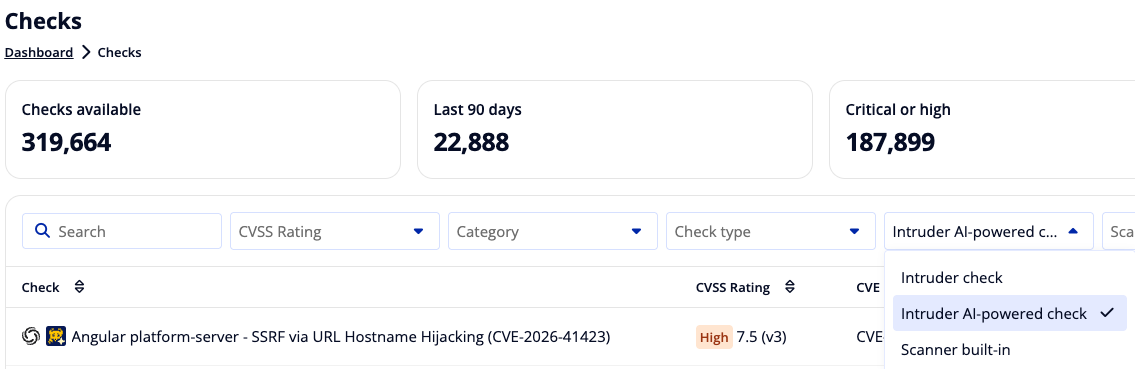
Intruder Adds AI-Driven Vulnerability Management
Intruder has introduced AI-driven vulnerability management for Enterprise customers to expand and speed up detection coverage for newly disclosed threats. The approach aims to reduce the time from disclosure to usable scanning checks, while maintaining quality through human oversight. Highlights include:
- AI-Powered Vulnerability Checks: Automatically generates checks for newly disclosed vulnerabilities.
- Faster Threat Coverage: Creates new vulnerability checks shortly after vulnerabilities are disclosed.
- Active Vulnerability Validation: Uses active checks to confirm actual exposure rather than relying solely on software versions.
Visit Intruder's official site for more details.
 Opens new window
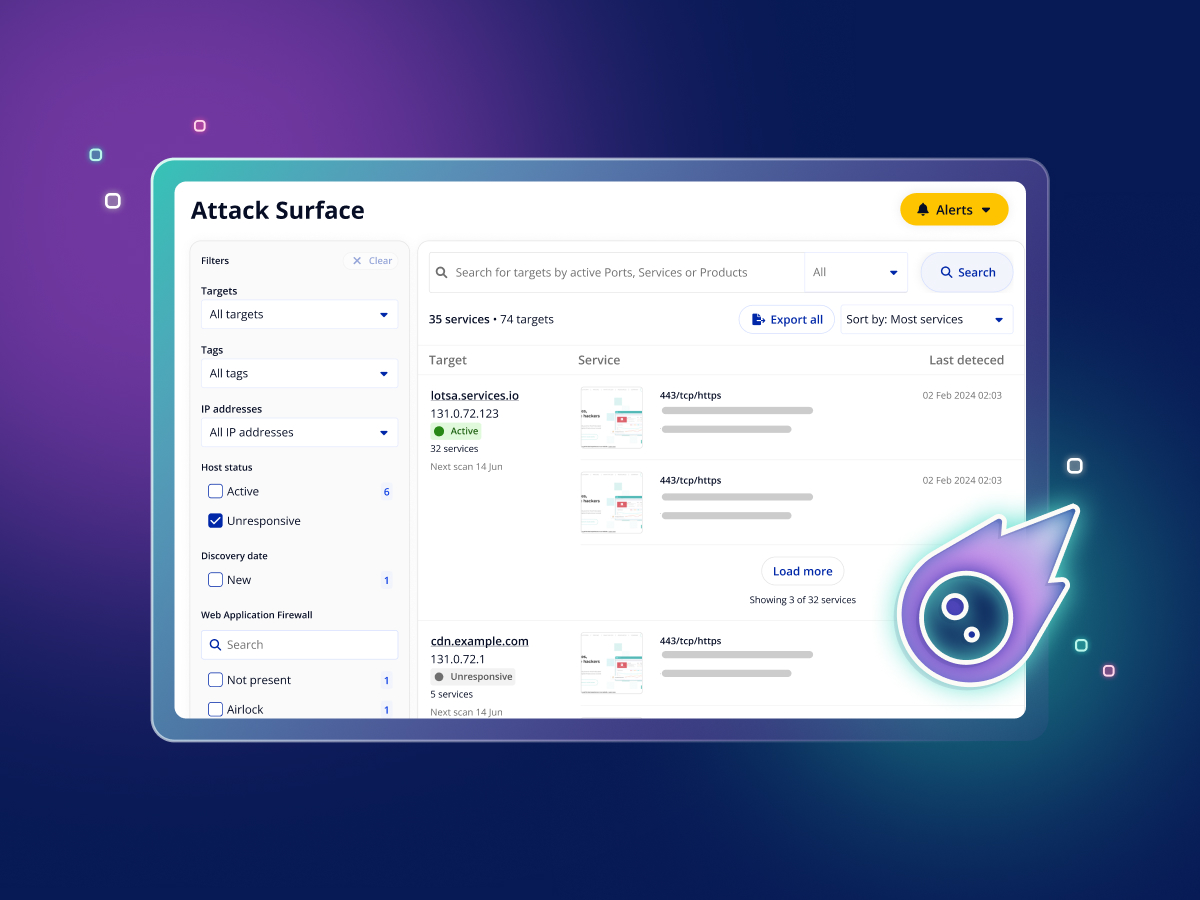
Intruder Launches Attack Surface View for Cloud and Pro
Intruder has introduced Attack Surface View for Cloud and Pro to help teams quickly understand what internet-facing exposure exists across their targets. It centralizes key exposure details so you can spot risky services and forgotten interfaces faster. Highlights include:
- Attack Surface View: Provides a centralized view of exposed ports, services, and software versions across monitored targets.
- Service Screenshots: Shows screenshots of exposed web services to help teams identify what is running.
- Search and Filtering: Lets teams filter by port, service, product, host status, or certificate expiry to find specific exposures faster.
Visit Intruder's official site for more details.
 Opens new window
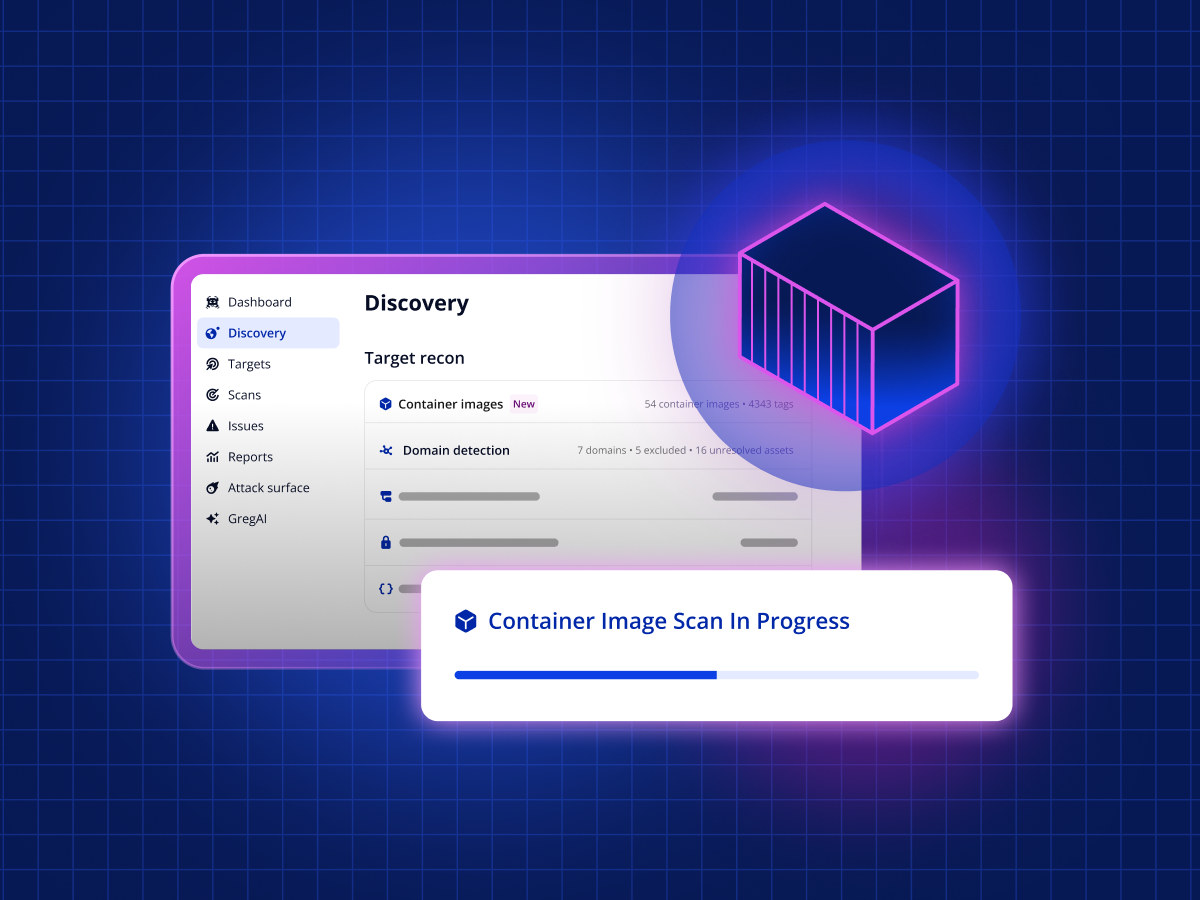
Intruder Unveils Agentless Container Image Scanning
Intruder introduces agentless container image scanning with registry-level integrations across AWS, Azure, and Google Cloud. This update improves security coverage by detecting vulnerabilities before deployment while reducing the need for complex agent setup. Highlights include:
- Agentless Image Scanning: Scan container images without deploying agents to simplify setup and maintenance.
- Pre-Deployment Detection: Identify vulnerabilities before images are deployed to reduce security risks.
- Multi-Cloud Coverage: Automatically discover and scan images across AWS, Azure, and Google Cloud.
- Continuous Monitoring: Rescan images regularly and detect new vulnerabilities as they emerge.
- Prioritized Risk Insights: Focus on critical threats with findings ranked by exploitability and severity.
Visit Intruder’s official site for more details.
Intruder Specs
- 2-Factor Authentication: No
- Access Management: No
- Anti-Virus: No
- API: Yes
- Audit Management: No
- Audit Trail: No
- Batch Permissions & Access: No
- Compliance Tracking: No
- Dashboard: Yes
- Data Export: Yes
- Data Import: No
- DDoS Protection: No
- External Integrations: Yes
- File Sharing: No
- File Transfer: No
- Firewall: No
- Incident Management: No
- Malware Protection: No
- Multi-User: Yes
- Notifications: No
- Password & Access Management: No
- Policy Management: No
- Real-time Alerts: No
- Report & Compliance: Yes
- Risk Assessment: Yes
- Security Migration: No
- Threat Detection: No
- Workflow Management: No


