

Reseña de Google Drive: Ventajas, Desventajas, Características y Precios
Google Drive destaca por su integración perfecta, lo que lo hace ideal para equipos que necesitan colaboración eficiente y fácil acceso a documentos compartidos.

Revisamos herramientas de forma independiente y las comisiones ayudan a financiar nuestras pruebas. Consulta nuestra política de transparencia, nuestra metodología o sugiere una herramienta.
Google Drive is a cloud storage software built around Google Workspace, with integrated document editing, real-time co-editing, and shared drive management built in. It's worth considering if your team already runs on Gmail and Google Docs, or if multiple people need to work in the same files at the same time. Compared to Dropbox, Google Drive gives you native document creation and deeper collaboration tools without needing a separate office suite on top of it.
Google Drive Evaluation Summary
4.7/5
- From CAD $9.20/user/month (billed annually)
- Free plan + 14-day free trial available
Por qué confiar en nuestras recomendaciones de software
6,700+
Reviews
20
Industry experts
16+
Evaluation factors
14
Years
Nuestro equipo lleva probando y evaluando software desde 2012. Como líderes tecnológicos, sabemos lo difícil —y lo importante— que es elegir el software adecuado.
Para esta guía, evaluamos las herramientas mediante pruebas prácticas e investigación independiente, puntuando las herramientas según nuestros criterios de selección.
Nuestras reseñas reflejan nuestro criterio editorial humano, no un discurso de ventas.
Revisores expertos:
- Paulo Gardini MiguelDirector técnico
 Tim FisherVP de IA
 Gabriel RosasTech Lead y arquitecto de software
 Christhian GruhnTech Lead y arquitecto de plataforma

Google Drive Overview
In my opinion, Google Drive stands out as a strong cloud storage software for its smooth integration with Google's suite of tools. It's a good choice for teams that rely on Google Workspace for collaboration. While the onboarding process could be smoother and customer support more accessible, it provides solid core functions. Google Drive is best suited for groups such as educational institutions and remote teams that need efficient file sharing and collaboration. Its pricing is competitive, making it a worthwhile consideration compared to alternatives like Dropbox or OneDrive, especially for those already invested in Google's ecosystem.
Pros
- You can collaborate in real-time with your team on shared documents.
- It offers generous free storage compared to many competitors.
- You can easily access files from any device with an internet connection.
Cons
- Your team might find the offline access features limited.
- It can be difficult to organize files effectively with larger teams.
- You might experience occasional syncing issues with certain file types.
Is Google Drive Right For Your Needs?
Who Would be a Good Fit for Google Drive?
Google Drive is a good fit for educational institutions, marketing teams, and remote workers who need to work together effectively. Its real-time document editing and sharing tools make it ideal for projects requiring teamwork. Drive integrates smoothly with Google Workspace, further enhancing your productivity if you already use the platform. The generous free storage and easy drag and drop uploads are also an advantage for small teams or startups needing cost-effective solutions.
- Educational InstitutionsYou can use Google Drive to easily share resources, sync files, and coordinate on projects with students and faculty across different operating systems.
- Marketing TeamsDrive's real-time collaboration tools let your team work on campaigns together without version control issues, even when handling large file size assets.
- Remote WorkersAccess your Google drive files from anywhere, making it convenient for teams working from different locations.
- Small StartupsTake advantage of the free storage and document sharing tools to manage your resources efficiently.
- Creative AgenciesEffortlessly share large files and creative assets with clients and team members.
- Non-ProfitsManage your documents and work with team members across various locations without worrying about storage costs.
Who Would be a Bad Fit for Google Drive?
Google Drive might not suit large enterprises with complex data security needs. If your work involves handling sensitive information, Drive’s security measures may not meet stringent industry standards. Teams that need detailed file management and advanced workflow automation might find Drive lacking. If your organization relies heavily on non-Google ecosystems, integration challenges could arise, impacting your workflow efficiency.
- Large EnterprisesYour organization might need more powerful data security capabilities than Google Drive offers for sensitive information.
- Financial InstitutionsGoogle Drive's security features might not meet your industry's strict compliance and regulatory requirements.
- Legal DepartmentsYou might find the file management options inadequate for handling and organizing large volumes of legal documents.
- Healthcare ProvidersIf you handle patient data, Google Drive's security may not fully comply with healthcare regulations like HIPAA.
- Manufacturing CompaniesYour team might struggle with limited workflow automation options needed for complex manufacturing processes.
- Non-Google Ecosystem UsersIf your work relies heavily on Microsoft, Apple, or other ecosystems, integration with Google Drive might be cumbersome.
Nuestra metodología de revisión
Cómo probamos y puntuamos las herramientas
Hemos invertido años construyendo, refinando y mejorando nuestro sistema de pruebas y puntuación de software. La rúbrica está diseñada para captar los matices de la selección de software y lo que hace a una herramienta efectiva, enfocándose en aspectos críticos del proceso de toma de decisiones.
A continuación, puedes ver exactamente cómo nuestro sistema de prueba y puntuación funciona a través de siete criterios. Esto nos permite ofrecer una evaluación imparcial del software basada en funcionalidad central, características destacadas, facilidad de uso, incorporación, soporte al cliente, integraciones, reseñas de clientes y relación calidad-precio.
Funcionalidad principal (25% de la puntuación final)
El punto de partida de nuestra evaluación siempre es la funcionalidad central de la herramienta. ¿Tiene las características y funciones básicas que un usuario esperaría encontrar? ¿Alguna de esas funciones principales está limitada a planes de precios superiores? Esperamos que una herramienta esté a la altura de las capacidades básicas de sus competidores.
Características destacadas (25% de la puntuación final)
Luego, evaluamos las características poco comunes y sobresalientes que van más allá de la funcionalidad principal que normalmente se encuentra en herramientas de su tipo. Una puntuación alta refleja características especializadas o únicas que hacen el producto más rápido, eficiente o que ofrecen valor adicional al usuario.
También evaluamos qué tan fácil es integrar con otras herramientas que normalmente forman parte del ecosistema tecnológico para expandir la funcionalidad y utilidad del software. Las herramientas que ofrecen abundantes integraciones nativas, conexiones de terceros y acceso API para crear integraciones personalizadas obtienen la mejor puntuación.
Facilidad de uso (10% de la puntuación final)
Consideramos cuán rápido y sencillo es ejecutar las tareas definidas por la funcionalidad principal usando la herramienta. El software con mejor puntuación está bien diseñado, es intuitivo, ofrece aplicaciones móviles, proporciona plantillas y hace que tareas relativamente complejas parezcan sencillas.
Incorporación (10% de la puntuación final)
Sabemos lo importante que es la adopción rápida por parte del equipo para una nueva plataforma, por lo que evaluamos cuán fácil es aprender y usar una herramienta con entrenamiento mínimo. Evaluamos cuán rápido un miembro del equipo puede configurarla y comenzar a utilizarla sin experiencia previa. Las soluciones con mayor puntuación requieren poco o ningún soporte.
Soporte al cliente (10% de la puntuación final)
Revisamos qué tan rápido y sencillo es resolver dudas y encontrar ayuda por teléfono, chat en vivo o base de conocimientos. Las herramientas y compañías que proporcionan soporte en tiempo real obtienen la mejor puntuación, mientras que los chatbots obtienen la peor.
Reseñas de clientes (10% de la puntuación final)
Además de nuestras pruebas y evaluaciones, consideramos la puntuación neta de promotores por parte de clientes actuales y anteriores. Revisamos la probabilidad de que elijan la herramienta de nuevo para la funcionalidad principal. Una puntuación alta refleja una alta puntuación neta de promotores actuales o pasados.
Relación calidad-precio (10% de la puntuación final)
Por último, considerando todos los demás criterios, revisamos el precio promedio de los planes de nivel básico comparado con las funciones principales y consideramos el valor de los demás criterios de evaluación. El software que ofrezca más, por menos, obtendrá una puntuación mayor.
Core Features
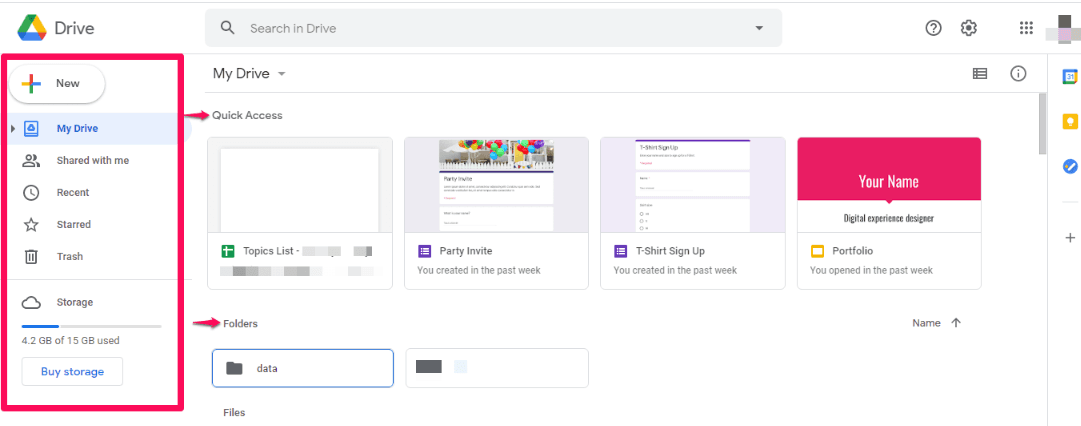
File Storage: Drive offers 15 GB of free storage space for your documents, Google photos, and videos. You can upgrade for more space as needed.
File Sharing: Easily share important files with your team or external partners with just a link. You control access levels to ensure the privacy you need.
Real-Time Collaboration: Work simultaneously on documents with your team. See edits happen live, which makes teamwork effortless.
Document Management: Organize your files into folders and subfolders. Use search to quickly find what you need.
Offline Access: Access and edit your files without an internet connection. Changes sync once you're back online.
Version History: Track changes and revert to previous file versions. This helps when you need to undo edits.

Integrations
Google Drive integrates with Google Sheets, Forms, Docs, Gmail, YouTube, Asana, Slack, Trello, Salesforce, and Zoom.
It also has an API that allows for custom integrations and connects with third-party integration tools.

Google Drive Specs
- 2-Factor Authentication: Yes
- API: Yes
- Chat: Yes
- Dashboard: Yes
- Data Export: Yes
- Data Import: Yes
- Document Comparison: Yes
- External Integrations: Yes
- File Sharing: Yes
- File Transfer: Yes
- History/Version Control: Yes
- Multi-User: Yes
- Network Traffic Monitoring: Yes
- Notifications: Yes
- Project Management: Yes


