

Reseña de Sendmarc: ventajas, desventajas, características principales y guía de precios
I break down how Sendmarc stands out in the DMARC crowd, delivering straightforward compliance and visibility—even for teams who’d rather be focusing on growth than email security.

Revisamos herramientas de forma independiente y las comisiones ayudan a financiar nuestras pruebas. Consulta nuestra política de transparencia, nuestra metodología o sugiere una herramienta.
Sendmarc is a DMARC software for organizations that need to reach full DMARC enforcement, protect their domains from spoofing, and get visibility into who's sending email on their behalf. I'd point you to it if you want a more automated, partner-friendly path to enforcement than the incumbent enterprise platforms, with guided workflows that suit MSPs and internal IT teams managing multiple domains. As a DMARC solution it also covers the adjacent standards—SPF, DKIM, MTA-STS, and TLS-RPT—rather than leaving them for a second vendor.
Sendmarc Evaluation Summary
4.9/5
- Pricing upon request
- 21-day free trial
Por qué confiar en nuestras recomendaciones de software
6,700+
Reviews
20
Industry experts
16+
Evaluation factors
14
Years
Nuestro equipo lleva probando y evaluando software desde 2012. Como líderes tecnológicos, sabemos lo difícil —y lo importante— que es elegir el software adecuado.
Para esta guía, evaluamos las herramientas mediante pruebas prácticas e investigación independiente, puntuando las herramientas según nuestros criterios de selección.
Nuestras reseñas reflejan nuestro criterio editorial humano, no un discurso de ventas.
Revisores expertos:
- Paulo Gardini MiguelDirector técnico
 Tim FisherVP de IA
 Gabriel RosasTech Lead y arquitecto de software
 Christhian GruhnTech Lead y arquitecto de plataforma

Sendmarc Overview
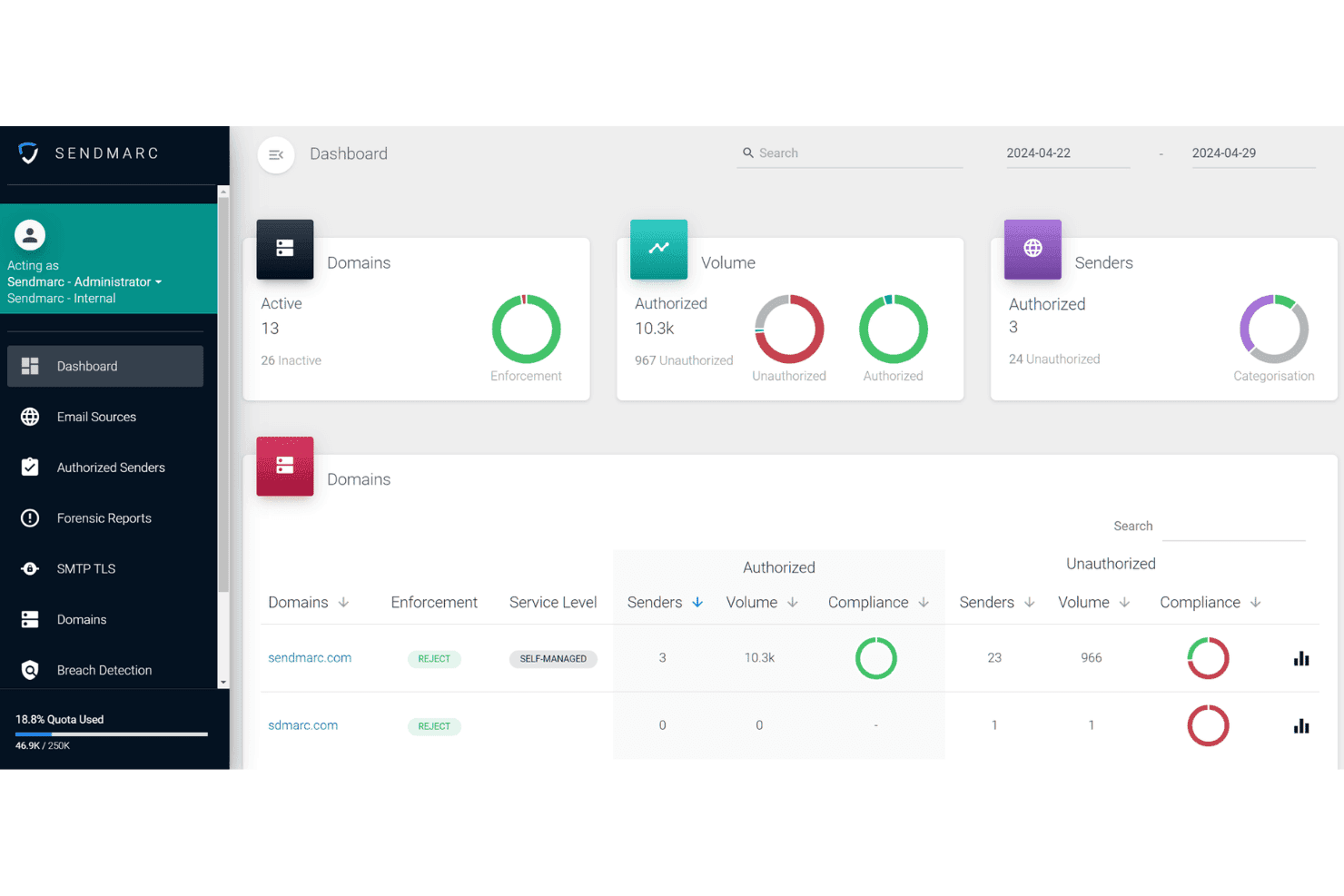
I think Sendmarc stands out if you're judging DMARC tools on automation, support, and MSP features. Its guided onboarding makes it easy to adopt, while automated reporting and troubleshooting help you reach enforcement faster. Expert support is the differentiator here more than raw feature count, and getting to enforcement cleanly tends to help deliverability rather than hurt it. The interface is clean and intuitive—something you can hand to a client or non-technical stakeholder without worries. You might find fewer direct integrations, but if you're choosing for a multi-client environment or want hands-on support, Sendmarc is a solid pick.
Pros
- Automated DMARC enforcement simplifies reaching full compliance.
- Guided workflows help MSPs manage many domains efficiently.
- Hands-on customer support responds quickly and speaks plainly.
Cons
- Thin PSA integration and few direct connections to SIEM or alerting platforms.
- Limited analytics drill-down compared to some competing tools.
- Smaller knowledge base than larger email security providers.
Is Sendmarc Right For Your Needs?
Who Would be a Good Fit for Sendmarc?
Sendmarc makes sense for organizations with complex email environments, public-facing brands, or compliance-driven needs. It works well for IT and security teams who want expert-backed onboarding, responsive support, and detailed reporting. I think companies handling confidential data, multi-domain management, or external partners will see the most value from Sendmarc’s strong DMARC automation, monitoring, and incident response features. If deliverability of transactional and marketing mail matters to revenue, enforcement is the floor rather than the ceiling.
- Financial ServicesSendmarc offers advanced threat protection, audit-friendly reporting, and critical support demanded by highly regulated financial institutions.
- Healthcare OrganizationsIts detailed incident notifications and compliance-driven tools help healthcare teams quickly meet strict security standards and spot email impersonation attempts.
- Mid-Size EnterprisesThe platform scales DMARC enforcement and analytics as companies grow and add domains, making it easier for IT departments to maintain oversight.
- Managed Service ProvidersSendmarc’s multi-client features, bulk management tools, and reseller options help MSPs deliver DMARC protection as a polished, value-added service.
- Retail/Ecommerce BrandsPublic-facing brands benefit from Sendmarc’s strong impersonation detection, sender monitoring, and customizable reports for managing brand reputation.
- Government AgenciesThe combination of guided onboarding, dedicated support, and security controls makes Sendmarc well-suited to agencies prioritizing phishing defense and regulatory compliance.
Who Would be a Bad Fit for Sendmarc?
Sendmarc may not be right for organizations with basic email environments, small teams without technical resources, or those who only need minimal DMARC oversight. Its richer capabilities can feel unnecessary for less complex needs and entry pricing might not appeal to low-risk email users or those focused only on SPF/DKIM setup. If email fraud isn’t a live risk for your brand, a lighter tool will do the job.
- Small StartupsLean teams with one domain and few users often don’t need Sendmarc’s advanced controls and may find its full platform more than they require.
- Nonprofits With Minimal ITResource-limited nonprofits running a single public domain could find Sendmarc’s platform excessive for their simple authentication needs.
- Freelancers/Sole ProprietorsIndividuals or single-person businesses usually require basic DMARC records, not advanced policy management, analytics, or high-touch support.
- Internal-Only IT DepartmentsTeams who restrict all email use to inside the organization may not need outside threat monitoring or DMARC enforcement at Sendmarc’s level.
- Temporary Project GroupsShort-term projects with limited external communication will see little value from ongoing monitoring and policy enforcement tools.
- Educational Clubs/AssociationsStudent groups or academic clubs often don’t need sophisticated DMARC platforms due to low stakes and minimal public-facing risk.
Nuestra metodología de revisión
Cómo probamos y puntuamos las herramientas
Hemos invertido años construyendo, refinando y mejorando nuestro sistema de pruebas y puntuación de software. La rúbrica está diseñada para captar los matices de la selección de software y lo que hace a una herramienta efectiva, enfocándose en aspectos críticos del proceso de toma de decisiones.
A continuación, puedes ver exactamente cómo nuestro sistema de prueba y puntuación funciona a través de siete criterios. Esto nos permite ofrecer una evaluación imparcial del software basada en funcionalidad central, características destacadas, facilidad de uso, incorporación, soporte al cliente, integraciones, reseñas de clientes y relación calidad-precio.
Funcionalidad principal (25% de la puntuación final)
El punto de partida de nuestra evaluación siempre es la funcionalidad central de la herramienta. ¿Tiene las características y funciones básicas que un usuario esperaría encontrar? ¿Alguna de esas funciones principales está limitada a planes de precios superiores? Esperamos que una herramienta esté a la altura de las capacidades básicas de sus competidores.
Características destacadas (25% de la puntuación final)
Luego, evaluamos las características poco comunes y sobresalientes que van más allá de la funcionalidad principal que normalmente se encuentra en herramientas de su tipo. Una puntuación alta refleja características especializadas o únicas que hacen el producto más rápido, eficiente o que ofrecen valor adicional al usuario.
También evaluamos qué tan fácil es integrar con otras herramientas que normalmente forman parte del ecosistema tecnológico para expandir la funcionalidad y utilidad del software. Las herramientas que ofrecen abundantes integraciones nativas, conexiones de terceros y acceso API para crear integraciones personalizadas obtienen la mejor puntuación.
Facilidad de uso (10% de la puntuación final)
Consideramos cuán rápido y sencillo es ejecutar las tareas definidas por la funcionalidad principal usando la herramienta. El software con mejor puntuación está bien diseñado, es intuitivo, ofrece aplicaciones móviles, proporciona plantillas y hace que tareas relativamente complejas parezcan sencillas.
Incorporación (10% de la puntuación final)
Sabemos lo importante que es la adopción rápida por parte del equipo para una nueva plataforma, por lo que evaluamos cuán fácil es aprender y usar una herramienta con entrenamiento mínimo. Evaluamos cuán rápido un miembro del equipo puede configurarla y comenzar a utilizarla sin experiencia previa. Las soluciones con mayor puntuación requieren poco o ningún soporte.
Soporte al cliente (10% de la puntuación final)
Revisamos qué tan rápido y sencillo es resolver dudas y encontrar ayuda por teléfono, chat en vivo o base de conocimientos. Las herramientas y compañías que proporcionan soporte en tiempo real obtienen la mejor puntuación, mientras que los chatbots obtienen la peor.
Reseñas de clientes (10% de la puntuación final)
Además de nuestras pruebas y evaluaciones, consideramos la puntuación neta de promotores por parte de clientes actuales y anteriores. Revisamos la probabilidad de que elijan la herramienta de nuevo para la funcionalidad principal. Una puntuación alta refleja una alta puntuación neta de promotores actuales o pasados.
Relación calidad-precio (10% de la puntuación final)
Por último, considerando todos los demás criterios, revisamos el precio promedio de los planes de nivel básico comparado con las funciones principales y consideramos el valor de los demás criterios de evaluación. El software que ofrezca más, por menos, obtendrá una puntuación mayor.
Core Features
Automated DMARC Record Setup
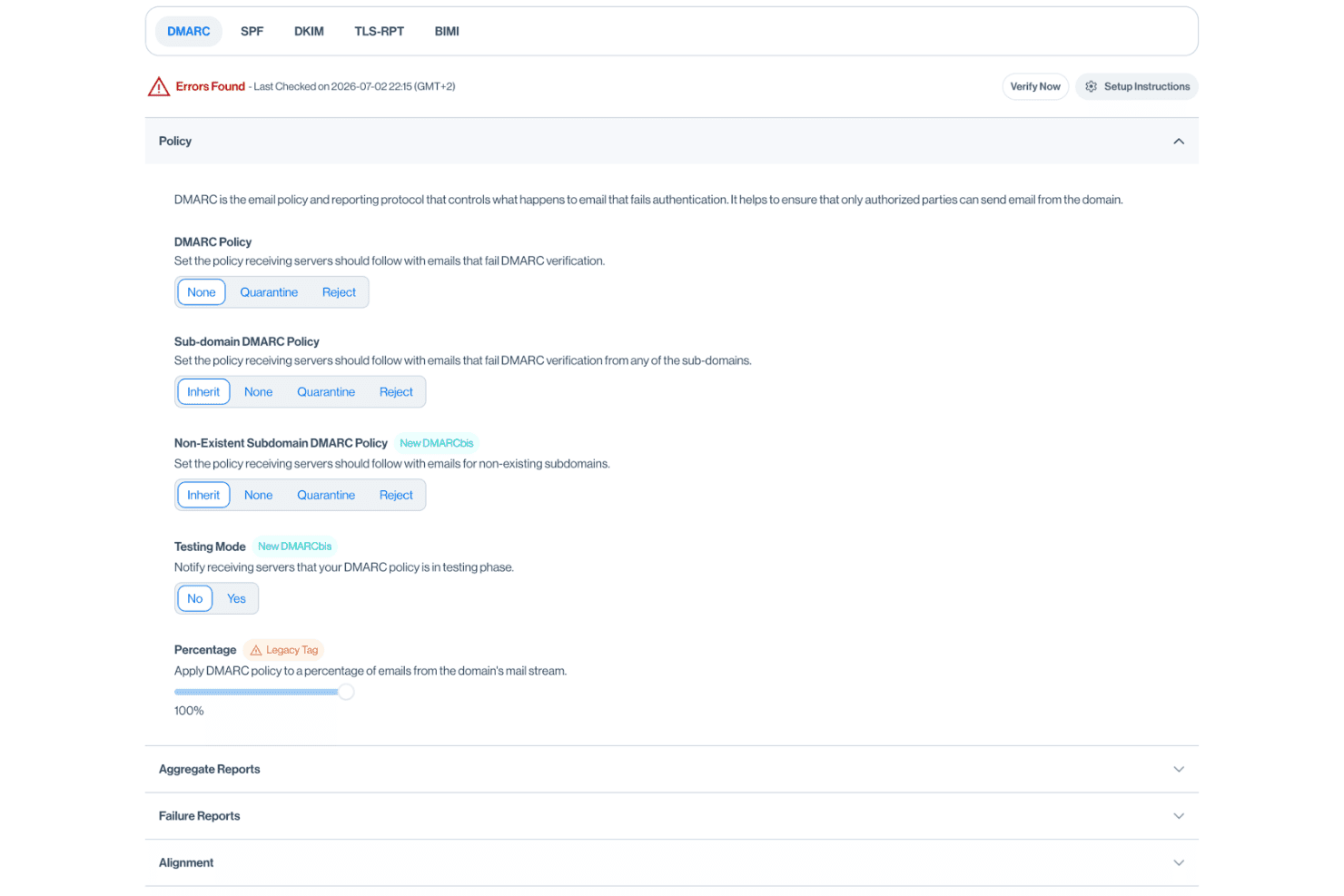
Sendmarc generates and checks DMARC records, including the rua tag that routes aggregate reports. This automation speeds compliance and cuts manual errors.
Threat and Spoofing Detection
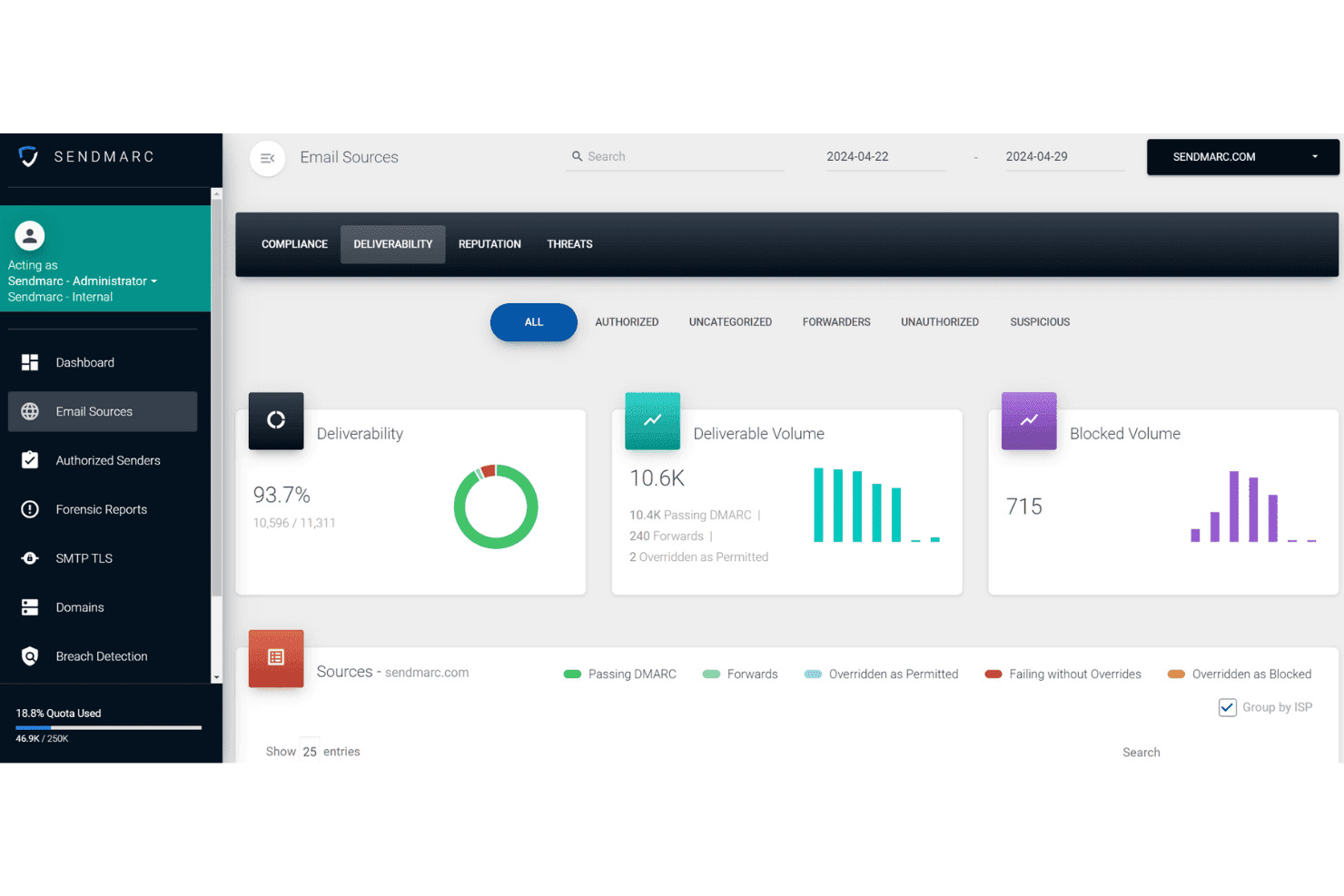
Get alerts when unauthorized sources send email using your domains. Real-time notifications help you stop phishing, spoofing, and email fraud fast.
Guided Enforcement Path
Sendmarc provides a step-by-step workflow to reach DMARC enforcement safely. Teams see exactly what actions to take next, avoiding email disruptions.
Email Source Discovery
The platform maps all legitimate email senders in your environment. SPF flattening keeps you under the ten-lookup limit as that list grows.
Personalized Report Summaries
You get regular DMARC reporting that highlights trends and issues. The summaries break data into plain language for business and IT stakeholders.
Managed Service Provider Dashboard
MSPs get a unified dashboard to monitor multiple client domains. This multi-tenant view lets you handle many customers without jumping between accounts.
Ease of Use
Sendmarc is especially user-friendly, thanks to its straightforward dashboards and clear, step-by-step enforcement workflow. I think IT admins appreciate not needing deep email expertise to set policies or interpret reports. If you're used to leaning on an AI assistant to decode raw DMARC XML, the plain-language summaries here cover much of the same ground. Based on user reviews, the guided onboarding and real-time alerts make for a less stressful DMARC rollout, and the reporting is business-friendly without jargon.
Integrations
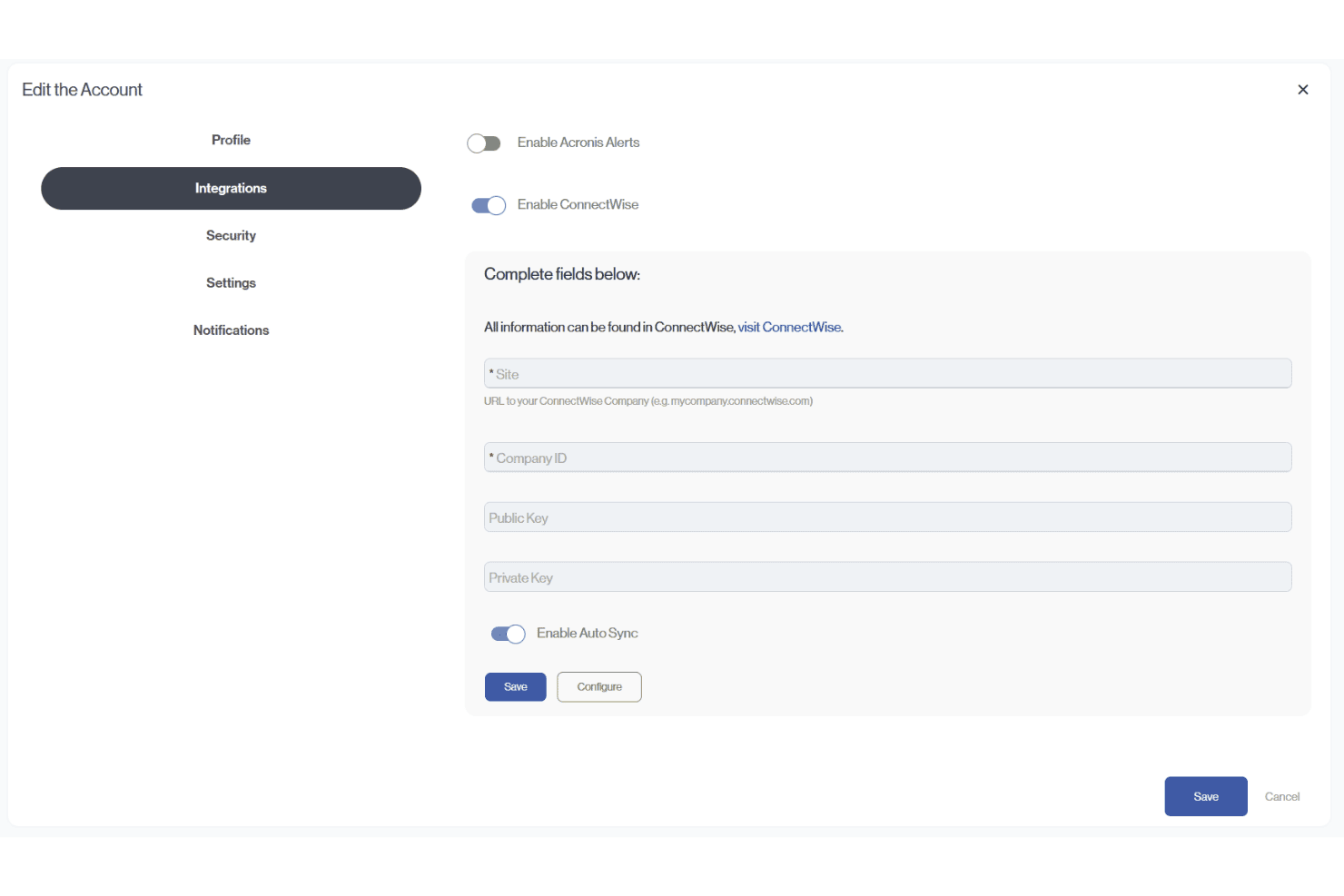
Sendmarc provides documented integrations with Abnormal Security, ConnectWise PSA, Acronis, HaloPSA, and Autotask (Datto/Kaseya). It also supports API-token creation for custom integrations, including connections with third-party platforms.
Sendmarc Specs
- 2-Factor Authentication: Yes
- Access Management: Yes
- Anti-Virus: No
- API: Yes
- Audit Trail: Yes
- Bug Tracking: Yes
- Calendar Management: Yes
- Customer Management: Yes
- Dashboard: Yes
- Data Export: Yes
- Data Import: Yes
- Data Visualization: Yes
- Email Integration: Yes
- External Integrations: Yes
- File Sharing: No
- File Transfer: No
- Firewall: No
- Google Apps Integration: Yes
- Inventory Tracking: Yes
- Malware Protection: Yes
- Multi-User: Yes
- Network Device Performance Monitoring: Yes
- Network Traffic Monitoring: Yes
- Network Visualization: Yes
- Notifications: Yes
- Project Management: Yes
- Remote Access: Yes
- Risk Assessment: Yes
- SAP Integration: Yes
- Scheduling: Yes
- Software Integration: Yes
- Third-Party Plugins/Add-Ons: Yes
- Ticket Management: Yes


