

Al adentrarme en el complejo mundo de la autenticación de usuarios, he llegado a valorar el software de autenticación multifactor. Con el aumento de las filtraciones de datos, es esencial proteger las cuentas en línea más allá de las simples contraseñas. Esto va más allá de la combinación tradicional de nombre de usuario y contraseña, y puede incluir algo que el usuario sabe, algo que posee o algo inherente al usuario.
Estas herramientas no solo garantizan que los usuarios finales obtengan un acceso seguro mediante códigos de acceso y aprovisionamiento de autoservicio, sino que también mejoran el acceso remoto al conectar las identidades de los usuarios basadas en la web de forma más segura. ¿Los problemas principales? Gestionar múltiples autenticaciones de usuarios, la gestión de identidades y accesos (IAM), y garantizar el acceso remoto sin comprometer la seguridad. Sin embargo, con el software adecuado, estos problemas se resuelven y tus cuentas quedan más protegidas frente a las filtraciones.
Por qué confiar en nuestras recomendaciones de software
6,700+
Reviews
20
Industry experts
16+
Evaluation factors
14
Years
Nuestro equipo lleva probando y evaluando software desde 2012. Como líderes tecnológicos, sabemos lo difícil —y lo importante— que es elegir el software adecuado.
Para esta guía, evaluamos las herramientas mediante pruebas prácticas e investigación independiente, puntuando las herramientas según nuestros criterios de selección.
Nuestras reseñas reflejan nuestro criterio editorial humano, no un discurso de ventas.
Revisores expertos:
- Paulo Gardini MiguelDirector técnico
 Tim FisherVP de IA
 Gabriel RosasTech Lead y arquitecto de software
 Christhian GruhnTech Lead y arquitecto de plataforma

Tabla comparativa de software de autenticación multifactor
Esta tabla comparativa resume los detalles de precios de mis principales selecciones de software MFA:
| Tool | Best For | Trial Info | Price | ||
|---|---|---|---|---|---|
| 1 | Ideal para políticas de MFA y confianza del dispositivo impulsadas por RR. HH. | Hay una demostración gratuita disponible | Desde $8/usuario/mes (más una tarifa base mensual) | Website | |
| 2 | Ideal para MFA adaptativa con múltiples factores de autenticación | Versión gratuita disponible (hasta 50 usuarios de dominio) | Desde $595 (500 usuarios de dominio) | Website | |
| 3 | Ideal con controles de acceso privilegiado justo a tiempo | Prueba gratuita de 14 días | Precios bajo consulta | Website | |
| 4 | Ideal para combinar la gestión de contraseñas y MFA | Prueba gratuita de 30 días + plan gratuito disponible | Desde $3/usuario/mes (facturado anualmente) | Website | |
| 5 | Ideal para empresas SaaS que necesitan integración rápida | 30 días de prueba gratuita | Precio a consultar | Website | |
| 6 | Mejor para autenticación multifactor adaptativa | Prueba gratuita de 30 días disponible | Desde $2/usuario/mes | Website | |
| 7 | Ideal para lograr la autenticación sin contraseña | Prueba gratis de 14 días | Desde $8/usuario/mes (facturación anual) | Website | |
| 8 | La mejor para verificación por SMS y llamadas | Desde $15/usuario/mes | Website | ||
| 9 | Mejor para autenticación empresarial escalable | Prueba gratuita disponible | Desde $23/usuario/mes (facturado anualmente) | Website | |
| 10 | Ideal para quienes ya forman parte del entorno Salesforce | Plan gratuito disponible | Desde $25/usuario/mes (facturado anualmente) | Website |


Análisis del mejor software de autenticación multifactor
A continuación encontrarás mis resúmenes detallados de los mejores programas de autenticación multifactor que incluí en mi selección. Mis análisis ofrecen una visión detallada de las funciones principales, ventajas & desventajas, integraciones y casos de uso ideales de cada herramienta para ayudarte a encontrar la más adecuada para ti.
 Ideal para políticas de MFA y confianza del dispositivo impulsadas por RR. HH.
- Hay una demostración gratuita disponible
- Desde $8/usuario/mes (más una tarifa base mensual)
Visit WebsiteCustomer Rating:4.8/5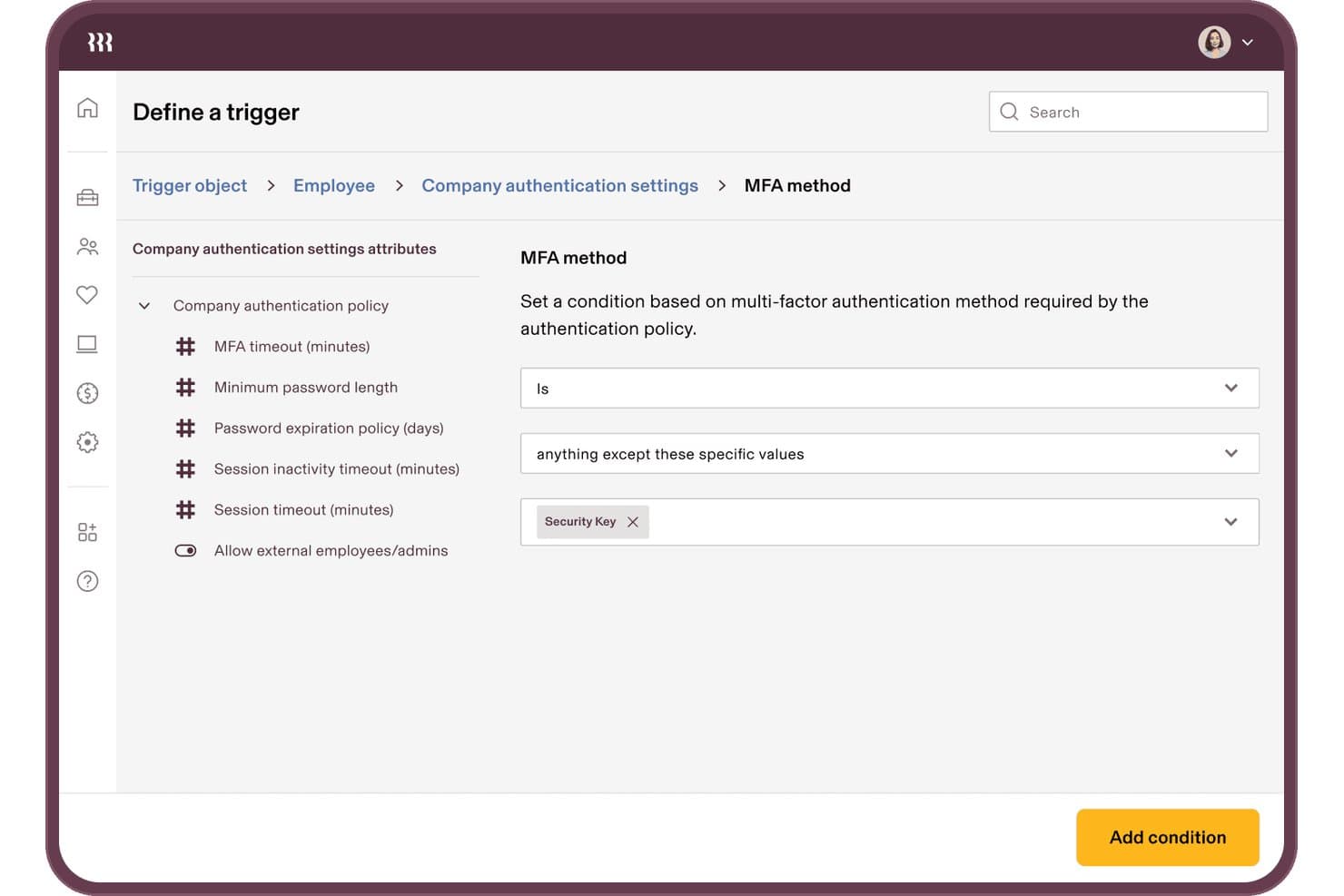
Rippling IT permite a los usuarios establecer condiciones del método de MFA para los activadores de autenticación. Rippling IT es una plataforma de gestión de identidades y accesos impulsada por RR. HH. que integra MFA, SSO, confianza del dispositivo y aprovisionamiento del ciclo de vida en un único sistema conectado directamente a tus datos de RR. HH.
¿Para quién es más adecuado Rippling IT?
Rippling IT es adecuado para empresas medianas que quieren gestionar la MFA, la confianza del dispositivo y el ciclo de vida de los accesos desde una única plataforma conectada a RR. HH.
Por qué elegí Rippling IT
Elegí Rippling IT porque es la única solución de MFA de esta lista que vincula directamente la política de autenticación con tus datos de RR. HH. Cuando alguien cambia de departamento o deja la empresa, su inscripción en la MFA y sus derechos de acceso se actualizan automáticamente, sin necesidad de intervención manual. También me encanta que la confianza del dispositivo esté integrada de forma nativa: Rippling emite sus propios certificados de dispositivo y comprueba la postura en el momento del acceso, de modo que un portátil al que le falte el cifrado de BitLocker se bloquea antes de autenticarse.
Funciones principales de Rippling IT
- Segmentación de políticas mediante supergrupos: Los grupos dinámicos creados a partir de atributos de RR. HH., como el departamento, la ubicación y el cargo, permiten aplicar políticas de MFA exactamente a los usuarios adecuados.
- Pedido y asignación de YubiKey: Pide, envía y asigna claves de hardware a los empleados directamente desde la consola de Rippling, con alertas automáticas si una clave entregada no se utiliza.
- RADIUS en la nube alojado: Los empleados se autentican en la VPN y la red Wi-Fi utilizando sus credenciales de Rippling a través de un servidor RADIUS alojado en la nube.
- Automatización con Workflow Studio: Un creador de automatizaciones sin código permite supervisar la inscripción en la MFA, activar acciones de políticas y gestionar cambios de acceso sin escribir scripts personalizados.
Integraciones de Rippling IT
Rippling IT se integra con Active Directory, Microsoft Entra ID, Google Workspace, Okta y Duo, además de más de 600–800 aplicaciones SaaS disponibles. Es compatible con SAML, OIDC, SCIM, LDAP y RADIUS, e incluye una API pública para integraciones personalizadas.
Pros and Cons
Pros:
- La desvinculación impulsada por RR. HH. actualiza la MFA automáticamente
- La confianza del dispositivo bloquea los terminales que no cumplen los requisitos
- Los supergrupos segmentan las políticas según los atributos de los empleados
Cons:
- La MFA depende de la adopción de la plataforma de Rippling
- La configuración avanzada de políticas requiere un esfuerzo considerable
Learn more about Rippling IT: Ideal para MFA adaptativa con múltiples factores de autenticación
- Versión gratuita disponible (hasta 50 usuarios de dominio)
- Desde $595 (500 usuarios de dominio)
Visit WebsiteCustomer Rating:4.4/5
Los usuarios disponen de múltiples opciones de configuración para establecer métodos de autenticación en ManageEngine ADSelfService Plus. ManageEngine ADSelfService Plus es una solución integral de autogestión de contraseñas y inicio de sesión único (SSO) diseñada para optimizar las operaciones de TI y mejorar la seguridad. Está dirigida a administradores de TI y usuarios finales, proporcionando funcionalidades como la autogestión de contraseñas, autenticación multifactor (MFA) y seguridad de endpoints.
Por qué elegí ManageEngine ADSelfService Plus: ADSelfService Plus admite diversas técnicas de autenticación como biometría, códigos TOTP, notificaciones push y llaves de seguridad, que refuerzan la seguridad al añadir múltiples capas de verificación más allá del tradicional usuario y contraseña. Esta adaptabilidad en los métodos de autenticación permite a las organizaciones personalizar sus protocolos de seguridad para satisfacer necesidades y requisitos de cumplimiento específicos. Además, su función de MFA adaptativa ajusta dinámicamente los requisitos de autenticación según factores de riesgo como la ubicación del usuario y el tipo de dispositivo, ofreciendo una medida de seguridad matizada y consciente del contexto.
Características destacadas e integraciones:
Otras características incluyen el inicio de sesión único (SSO), que se integra perfectamente con aplicaciones tanto locales como en la nube, ofreciendo una experiencia de inicio de sesión unificada y segura en diferentes entornos. La herramienta también dispone de capacidades de autogestión para el restablecimiento de contraseñas, permitiendo a los usuarios restablecer contraseñas y desbloquear cuentas de forma independiente. Las integraciones incluyen Zendesk, Freshdesk, Splunk, syslog y otras aplicaciones de ManageEngine como ManageEngine ADManager Plus y AD360.
Pros and Cons
Pros:
- Restablecimiento de contraseña por autoservicio
- Diversas opciones de MFA
- Amplias funciones de informes para auditorías y cumplimiento
Cons:
- Puede resultar costoso para organizaciones pequeñas
- La versión gratuita tiene funciones limitadas
Learn more about ManageEngine ADSelfService Plus: Ideal con controles de acceso privilegiado justo a tiempo
- Prueba gratuita de 14 días
- Precios bajo consulta
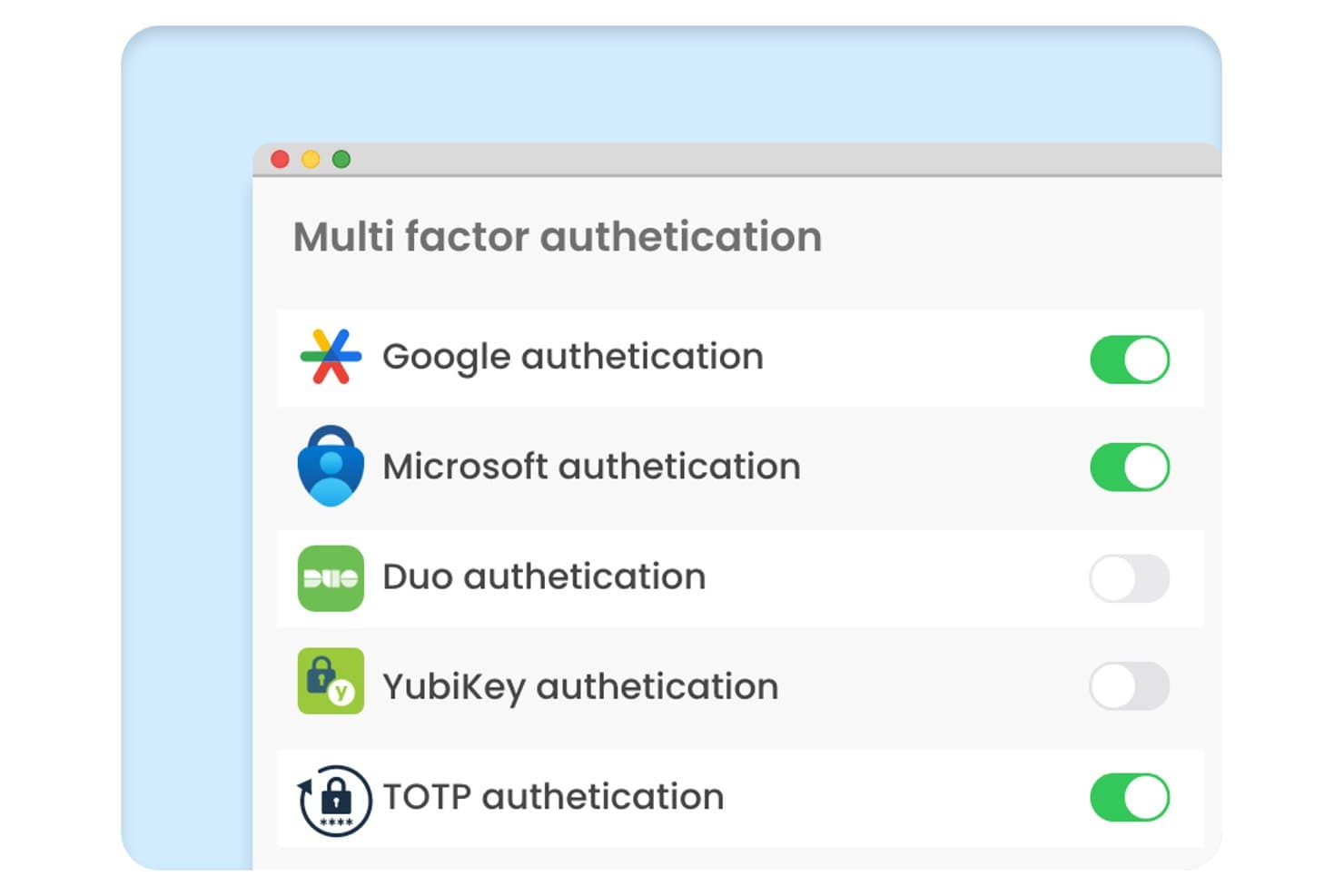
Securden Unified PAM ofrece un panel de configuración de autenticación multifactor con controles de activación y desactivación para los métodos de autenticación de Google, Microsoft, Duo, YubiKey y TOTP. Securden Unified PAM es una plataforma de gestión de accesos privilegiados que aplica la MFA en todas las cuentas privilegiadas, sesiones remotas y terminales mediante el almacenamiento seguro de credenciales, la grabación de sesiones y controles de acceso justo a tiempo.
¿Para quién es más adecuado Securden Unified PAM?
Equipos de seguridad informática y de IAM de organizaciones medianas y empresariales que necesitan una aplicación estricta de la MFA específicamente en cuentas privilegiadas, credenciales de administrador y accesos de proveedores.
Por qué elegí Securden Unified PAM
Elegí Securden Unified PAM porque su modelo de acceso justo a tiempo vincula la aplicación de la MFA directamente con el momento en que se solicita una sesión privilegiada, y no solo con el inicio de sesión. También me gusta cómo la MFA adaptativa se activa en función de anomalías de comportamiento, de modo que la conexión de un administrador de sistemas a un servidor de producción a una hora inusual activa automáticamente una autenticación reforzada. Además, la plataforma genera códigos TOTP directamente para las cuentas administradas, lo que cierra la brecha de la MFA en las credenciales compartidas que normalmente quedan desprotegidas.
Características principales de Securden Unified PAM
- Detección centralizada de cuentas privilegiadas: Analiza automáticamente su entorno para identificar credenciales y cuentas privilegiadas no administradas.
- Control de acceso basado en roles: Permite asignar permisos detallados mediante roles de usuario y grupos de seguridad personalizados.
- Grabación de sesiones privilegiadas: Graba todas las sesiones privilegiadas para auditorías forenses y el cumplimiento normativo.
- Integraciones con SIEM e ITSM: Se conecta con plataformas como Splunk, IBM QRadar y ServiceNow para ofrecer una supervisión unificada y respuesta ante incidentes.
Integraciones de Securden Unified PAM
Securden Unified PAM ofrece integraciones nativas con Active Directory, Microsoft Entra ID, Okta, OneLogin, Ping Identity, Splunk, IBM QRadar y ServiceNow. También dispone de una API para integraciones personalizadas.
Pros and Cons
Pros:
- El acceso justo a tiempo reduce la exposición a privilegios permanentes
- La MFA se aplica de forma nativa a las credenciales de administrador compartidas
- La detección de anomalías de comportamiento activa una autenticación reforzada
Cons:
- La complejidad de la configuración aumenta en implementaciones a gran escala
- Los paneles de informes ofrecen pocas opciones de personalización visual
Learn more about Securden Unified PAM: Ideal para combinar la gestión de contraseñas y MFA
- Prueba gratuita de 30 días + plan gratuito disponible
- Desde $3/usuario/mes (facturado anualmente)
Visit WebsiteCustomer Rating:4.6/5
Imagen 10: Interfaz de autenticación sin contraseña de LastPass LastPass funciona como una herramienta integral diseñada tanto para gestionar contraseñas de forma segura como para ofrecer autenticación multifactor (MFA). Ha combinado de manera inteligente estas dos características esenciales, lo que la convierte en una opción ideal para quienes priorizan tanto la gestión de contraseñas como una autenticación mejorada.
Por qué elegí LastPass: Durante mi proceso de selección, LastPass destacó claramente por su doble capacidad: gestionar contraseñas y ofrecer también MFA. Al compararla con otras herramientas, su enfoque integral de la seguridad es lo que encontré único. Mi valoración es que, para individuos o empresas que ven el valor de unir la gestión de contraseñas con MFA, LastPass es una elección adecuada.
Características destacadas e integraciones:
LastPass proporciona una bóveda segura para almacenar contraseñas, notas y otras credenciales, todas las cuales se cifran localmente en el dispositivo del usuario. Además, su funcionalidad de MFA es robusta, integrando factores biométricos y contextuales para una mejor seguridad. En cuanto a integraciones, LastPass puede acoplarse con numerosos navegadores web, plataformas y cuenta con extensiones que aseguran que su funcionalidad sea fácilmente accesible en todos los dispositivos.
Pros and Cons
Pros:
- Combina la gestión de contraseñas y MFA en una sola plataforma
- El cifrado local garantiza que los datos del usuario permanezcan privados
- Amplia gama de integraciones con navegadores y plataformas
Cons:
- La facturación anual puede no resultar atractiva para todos los usuarios
- La interfaz de usuario puede resultar difícil para personas sin conocimientos técnicos
- Algunas funciones avanzadas solo están disponibles en los niveles de mayor precio
Learn more about LastPass: Ideal para empresas SaaS que necesitan integración rápida
- 30 días de prueba gratuita
- Precio a consultar
Visit WebsiteCustomer Rating:4.8/5
Imagen 6: Vista general del estilo del constructor de autenticación de Frontegg Frontegg es una plataforma diseñada para potenciar a las empresas SaaS con funcionalidades preconstruidas y totalmente personalizables para mejorar sus aplicaciones. Este enfoque acelera significativamente los procesos de integración, lo que resulta especialmente ventajoso para las empresas SaaS que buscan incorporar rápidamente funciones esenciales.
Por qué elegí Frontegg: Durante el proceso de determinar las herramientas más valiosas para esta lista, Frontegg captó mi atención por su enfoque específico hacia las empresas SaaS. Su capacidad para ofrecer una integración rápida realmente la diferencia de otras plataformas. Consideré que Frontegg es, de hecho, la mejor opción para las entidades SaaS que requieren una integración ágil de características.
Características destacadas e integraciones:
Frontegg ofrece un conjunto de funcionalidades SaaS preconstruidas, que abarcan desde la gestión de usuarios y notificaciones, hasta capacidades de seguridad y auditoría. Su enfoque permite a las empresas omitir largos procesos de desarrollo y acceder inmediatamente a características ya probadas. Además, las integraciones de Frontegg con plataformas populares como Slack, Azure y AWS garantizan que sus funcionalidades puedan complementar fácilmente los entornos tecnológicos existentes.
Pros and Cons
Pros:
- Soluciones hechas a medida específicamente para empresas SaaS
- Funcionalidades preconstruidas eliminan largos tiempos de desarrollo
- Amplias opciones de integración con las principales plataformas
Cons:
- Puede no ser adecuado para empresas que no sean SaaS
- La personalización puede implicar una curva de aprendizaje para algunos
- La transparencia en los precios podría mejorar
Learn more about Frontegg: Mejor para autenticación multifactor adaptativa
- Prueba gratuita de 30 días disponible
- Desde $2/usuario/mes
Visit WebsiteCustomer Rating:4.5/5
Panel de miniOrange IDP que muestra la gestión centralizada de identidades, configuración de SSO y el ajuste de autenticación multifactor desde una única consola de administración. Para quienes buscan una solución de autenticación multifactor que combine seguridad y facilidad de uso, miniOrange IDP ofrece una opción atractiva. Está dirigido a empresas de diversos sectores que desean reforzar sus medidas de seguridad sin complicar el acceso de los usuarios. Al integrar métodos de verificación adicionales, miniOrange IDP ayuda a las organizaciones a proteger información sensible mientras mantiene una experiencia de inicio de sesión amigable para el usuario.
Por qué elegí miniOrange IDP
Elegí miniOrange IDP por su autenticación multifactor adaptativa, la cual ajusta de manera inteligente las medidas de seguridad según el comportamiento del usuario y los niveles de riesgo. Esta función garantiza que tu equipo permanezca seguro sin interrupciones innecesarias. Además, la amplia capacidad de integración de la plataforma con más de 6000 aplicaciones la convierte en una opción versátil para empresas que buscan optimizar la gestión de accesos. El panel centralizado de miniOrange IDP permite a los administradores gestionar eficientemente el acceso de los usuarios y supervisar las políticas de seguridad, abordando inquietudes comunes en la gestión de entornos de usuarios diversos.
Características clave de miniOrange IDP
Además de su autenticación multifactor adaptativa y capacidades de integración, también encontré útiles las siguientes características:
- Múltiples métodos de MFA: Soporta notificaciones push, OTP vía SMS y correo electrónico, Google Authenticator, tokens de hardware, biometría y preguntas de seguridad.
- Autenticación sin contraseña: Permite el inicio de sesión sin contraseña utilizando FIDO2, biometría y métodos de autenticación por push.
- Políticas de acceso condicional: Aplica requisitos de autenticación basados en el comportamiento del usuario, dispositivo, ubicación y nivel de riesgo.
- Opciones de autoservicio: Permite a los usuarios restablecer contraseñas y configurar sus propios métodos de MFA, lo que puede ayudar a reducir las solicitudes al soporte de TI.
- Protección de dispositivos y VPN: Protege el acceso a VPN, así como los inicios de sesión de Windows, macOS y Linux.
Integraciones de miniOrange IDP
Las integraciones incluyen Microsoft 365, Google Workspace, AWS, Salesforce, Slack, Zoom, ServiceNow, Atlassian, GitHub, Dropbox y WordPress. La plataforma soporta integración con más de 6,000 aplicaciones en la nube, locales y legacy. También se dispone de una API para integraciones personalizadas o aplicaciones propietarias.
Pros and Cons
Pros:
- Soluciones robustas de MFA adaptativo y funciones de seguridad
- Panel centralizado para la gestión de usuarios y políticas
- Admite inicios de sesión personalizables y con marca propia
Cons:
- Políticas de reembolso restrictivas
- La configuración inicial puede ser compleja, especialmente para organizaciones pequeñas
Learn more about miniOrange: Ideal para lograr la autenticación sin contraseña
- Prueba gratis de 14 días
- Desde $8/usuario/mes (facturación anual)
Visit WebsiteCustomer Rating:4.4/5
Imagen 4: Vista previa del panel de Uniqkey Uniqkey es una solución de autenticación robusta diseñada para ofrecer a los usuarios la comodidad y seguridad de la autenticación sin contraseña. Uniqkey se destaca como una opción formidable para facilitar esta transición, especialmente para quienes priorizan las soluciones sin contraseñas.
Por qué elegí Uniqkey: En el proceso de determinar las mejores herramientas para esta lista, Uniqkey llamó mi atención por su dedicación a un entorno sin contraseñas. Su enfoque en un área tan específica y crucial de la ciberseguridad la hace diferente de muchas otras que comparé. La consideré la mejor herramienta para quienes buscan conseguir una autenticación sin contraseña, dada su orientación especializada y eficacia en este ámbito.
Funciones destacadas e integraciones:
La principal fortaleza de Uniqkey es su autenticación adaptativa, que analiza factores de riesgo en tiempo real para determinar el nivel necesario de verificación. Además, ofrece opciones de verificación biométrica y una bóveda segura de contraseñas para aquellos usuarios que aún deban gestionar algunas claves. En cuanto a integraciones, Uniqkey es compatible con una variedad de sistemas empresariales, lo que garantiza que las empresas puedan incorporarla sin causar interrupciones en los flujos de trabajo existentes.
Pros and Cons
Pros:
- Dedicada a un entorno sin contraseñas
- Autenticación adaptativa basada en riesgos en tiempo real
- Bóveda segura para contraseñas residuales
Cons:
- Puede suponer una curva de aprendizaje para quienes son nuevos en los sistemas sin contraseñas
- Limitada a ciertas plataformas y dispositivos
- Relativamente nueva en el mercado, lo que puede preocupar a usuarios que buscan marcas consolidadas
Learn more about Uniqkey: La mejor para verificación por SMS y llamadas
- Desde $15/usuario/mes
Visit WebsiteCustomer Rating:4.6/5
Imagen 2: Ejemplo de panel de control de RingCaptcha RingCaptcha se presenta como una herramienta especializada orientada a garantizar una verificación de usuarios fiable a través de SMS y llamadas de voz. Dado que las empresas de hoy buscan medidas de seguridad más estrictas, especialmente durante el proceso de incorporación de usuarios, RingCaptcha aparece como líder gracias a su enfoque en la verificación móvil, lo que la posiciona perfectamente como la mejor en verificación por SMS y llamadas.
Por qué elegí RingCaptcha: Durante el proceso de selección de las herramientas adecuadas para esta lista, RingCaptcha captó mi atención por su marcada especificidad y eficacia en la verificación basada en móviles. Su especialización en la verificación por SMS y llamadas la hizo destacar. Esta dedicación a la verificación móvil es la razón por la que determiné que es la mejor opción para empresas que dependen en gran medida de estos métodos.
Funciones destacadas e integraciones:
El núcleo de RingCaptcha reside en su rápida entrega de SMS, sólida verificación mediante llamadas de voz y su panel de control fácil de usar para monitorear y gestionar las verificaciones. En cuanto a la integración, RingCaptcha es versátil, integrándose sin problemas con plataformas como Shopify, WordPress y WooCommerce, lo que garantiza un mayor alcance y aplicabilidad para distintos modelos de negocio.
Pros and Cons
Pros:
- Especializada en verificaciones por SMS y llamadas de voz
- Rápido mecanismo de entrega de SMS
- Panel de control centrado en el usuario para seguimiento
Cons:
- Puede ser demasiado específica para empresas que necesitan métodos de verificación variados
- Precio más elevado en comparación con algunos competidores
- Funcionalidades limitadas más allá de la verificación móvil
Learn more about RingCaptcha: Mejor para autenticación empresarial escalable
- Prueba gratuita disponible
- Desde $23/usuario/mes (facturado anualmente)

Imagen 1: Software de autenticación multifactor Auth0 Auth0 es una plataforma líder en gestión de identidades diseñada para simplificar la autenticación y autorización para empresas de todos los tamaños. Especialmente adaptada para grandes empresas, garantiza que a medida que los negocios crecen, sus medidas de seguridad escalen junto con ellos, lo que la convierte en una de las mejores opciones para la autenticación empresarial escalable.
Por qué elegí Auth0: Cuando seleccioné una herramienta de autenticación, Auth0 apareció constantemente al frente de las opciones. Su reputación de robustez y adaptabilidad en el ámbito de la gestión de identidades la distingue de sus competidores. Al compararla con otras herramientas, su escalabilidad, especialmente para grandes corporaciones, consolidó su posición como la mejor para autenticación empresarial escalable en mi opinión.
Características destacadas e integraciones:
Entre sus numerosas características, el inicio de sesión único (Single Sign-On), la autenticación multifactor adaptativa y su panel de administración fácil de usar son especialmente destacables. Respecto a las integraciones, Auth0 sobresale por su compatibilidad con diversas plataformas como AWS, Slack, Salesforce y Zendesk, asegurando que las empresas tengan un flujo de trabajo cohesivo e integrado.
Pros and Cons
Pros:
- Adaptable a varios tamaños de empresa
- Amplia gama de integraciones de terceros
- Herramientas de seguridad completas
Cons:
- La complejidad potencial puede ser un reto para empresas más pequeñas
- Algunas personalizaciones pueden requerir conocimientos técnicos
- El precio inicial puede ser elevado para algunos presupuestos
Learn more about Auth0: Ideal para quienes ya forman parte del entorno Salesforce
- Plan gratuito disponible
- Desde $25/usuario/mes (facturado anualmente)

Imagen 5: Asistente de Autenticación Multifactor de la Plataforma Salesforce La Plataforma Salesforce ofrece una amplia gama de herramientas y servicios diseñados para permitir a las empresas crear y escalar aplicaciones rápidamente. Está especialmente orientada a compañías y equipos que ya están inmersos en el ecosistema de Salesforce.
Por qué elegí la Plataforma Salesforce: Al seleccionar herramientas para esta lista, me incliné por la Plataforma Salesforce debido a sus grandes capacidades de integración y a las soluciones integrales que ofrece. Esta plataforma proporciona el enfoque más alineado y sinérgico. Por eso creo que es la mejor para quienes ya forman parte del entorno Salesforce.
Características destacadas e integraciones:
La Plataforma Salesforce se distingue por sus capacidades de desarrollo con poco código, lo que permite a las empresas crear aplicaciones de manera ágil. También cuenta con analítica impulsada por inteligencia artificial y un sólido modelo de seguridad para proteger datos sensibles. En cuanto a integraciones, la plataforma funciona naturalmente bien con otras soluciones de Salesforce como Sales Cloud, Service Cloud y Marketing Cloud, asegurando una experiencia cohesiva para los usuarios.
Pros and Cons
Pros:
- Integración profunda con otros productos de Salesforce
- El desarrollo con poco código agiliza la creación de aplicaciones
- Fuertes características de seguridad
Cons:
- Puede resultar abrumador para quienes son nuevos en Salesforce
- El precio puede aumentar a medida que se agregan más funcionalidades
- Requiere inversión en aprendizaje y capacitación para un uso óptimo
Learn more about Salesforce Platform:
Otro software de autenticación multifactor
A continuación se incluye una lista de programas adicionales de autenticación multifactor que seleccioné, pero que no llegaron a estar entre los 12 primeros. Sin duda, merece la pena echarles un vistazo.
- 11IBM Security VerifyLa mejor opción para empresas en escenarios de nube híbrida
- 12Microsoft AuthenticatorMejor para usuarios dentro del ecosistema de Microsoft
- 13Google AuthenticatorIdeal para usuarios de la suite de servicios de Google
- 14Twilio Verify APIIdeal para desarrolladores que necesitan procesos de verificación personalizables
- 15WatchGuard AuthPointLa mejor opción para garantizar la seguridad basada en dispositivos móviles
- 16ManageEngine ADManager PlusIdeal para métodos de autenticación diversos
Cómo evalúo el software de autenticación multifactor
Divido mi evaluación en dos capas: las capacidades básicas que toda herramienta debe ofrecer, como soporte multifactor e integración con IdP, y los diferenciadores que importan para entornos de TI específicos y necesidades de cumplimiento.
Funcionalidad central (criterios indispensables para esta lista)
Cuando selecciono herramientas para mi lista, califico cada una en una escala del 0 (no ofrece la funcionalidad) al 5 (destaca en esta área) para cada funcionalidad principal que aparece a continuación. Después, calculo el puntaje total de la herramienta y lo convierto en un porcentaje. Cada herramienta debe alcanzar una puntuación total mínima del 75% para ser considerada para la inclusión.
- Múltiples factores de autenticación: Verifico si una herramienta admite una amplia variedad de factores secundarios: notificaciones push, TOTP, llaves FIDO2, biometría y SMS, para que los equipos puedan elegir el tipo de factor según el nivel de riesgo.
- Integración con directorios & IdP: Cada herramienta debe conectarse a fuentes de identidad como Active Directory, Entra ID, Okta y Google Workspace, para que el alta y la baja de usuarios estén vinculadas a su ciclo de vida existente.
- Cobertura de aplicaciones y protocolos: Evalúo cuántas aplicaciones y protocolos protege una herramienta, desde aplicaciones SaaS mediante SAML/OIDC hasta VPN, RDP y sesiones SSH por RADIUS o conectores nativos.
- Políticas adaptativas y basadas en riesgo: Las reglas contextuales son clave: busco herramientas que ajusten los retos de autenticación según el estado del dispositivo, la ubicación de red o el comportamiento de acceso, en lugar de aplicar desafíos generales.
- Gestión de políticas para administradores: Una consola centralizada donde puedas definir políticas por grupo de usuarios, aplicación o tipo de dispositivo facilita la administración diaria a gran escala.
- Registro de auditoría e informes: Busco registros de autenticación exportables e informes de cumplimiento preconstruidos alineados a marcos como SOC 2, PCI-DSS o HIPAA, además de reenvío a SIEM para una visibilidad en tiempo real.
Una vez tengo una lista de herramientas que cumplen con los criterios, considero qué distingue a cada plataforma.
Factores diferenciadores (lo que distingue a los proveedores)
Así es como comparo y contrasto a los diferentes proveedores:
Características destacadas
El inicio de sesión sin contraseña mediante FIDO2 o biometría es un diferenciador importante—elimina el riesgo de phishing y reduce los tickets de restablecimiento de contraseña en el soporte técnico. También evalúo las capacidades de confianza en dispositivos, donde la herramienta verifica la salud del endpoint, como el estado de cifrado o la presencia de EDR, antes de conceder acceso. Para equipos DevOps, la disponibilidad de API y SDK es esencial. Integrar MFA en aplicaciones personalizadas o en pipelines CI/CD requiere endpoints REST bien documentados y librerías cliente que herramientas como Duo y Okta proporcionan.
Más allá de las funcionalidades
Las certificaciones de cumplimiento como SOC 2 Tipo II y FedRAMP me indican que un proveedor toma en serio su propia seguridad; esto es relevante cuando la propia herramienta es la puerta de entrada a tu entorno. La flexibilidad de despliegue es otro factor que valoro, ya que los equipos en industrias reguladas suelen requerir opciones locales o entornos aislados además de la nube. También reviso la profundidad del ecosistema, comprobando integraciones preconstruidas con SIEM como Splunk, MDM como Jamf y herramientas PAM como CyberArk, porque el MFA raramente opera de forma aislada del resto de tu infraestructura de seguridad.
Cómo elegir un software de autenticación multifactor
Es fácil perderse entre largas listas de funciones y complejas estructuras de precios. Para ayudarte a mantener la concentración mientras avanzas en tu proceso único de selección de software, aquí tienes una lista de factores que debes tener en cuenta:
| Factor | Qué tener en cuenta |
|---|---|
| FactorEscalabilidad | Qué tener en cuenta¿Crecerá el software junto con tu equipo? Ten en cuenta los límites de usuarios y las capacidades de expansión. Asegúrate de que admita el crecimiento futuro sin necesidad de una renovación completa ni de costosas actualizaciones. |
| FactorIntegraciones | Qué tener en cuenta¿Funciona con tus herramientas actuales? Comprueba la compatibilidad con tus sistemas actuales, como el CRM, los clientes de correo electrónico o los servicios en la nube, para evitar interrupciones en los flujos de trabajo. |
| FactorPersonalización | Qué tener en cuenta¿Puedes adaptarlo a tus necesidades? Busca opciones para ajustar la configuración, las políticas y las interfaces de usuario con el fin de adaptarlas a tus requisitos específicos. Evita las soluciones rígidas que te obliguen a adoptar un enfoque único para todos. |
| FactorFacilidad de uso | Qué tener en cuenta¿Tu equipo aprenderá a utilizarlo rápidamente? Evalúa el diseño de la interfaz y la experiencia de usuario. Un sistema complicado podría ralentizar su adopción y frustrar a los usuarios. |
| FactorImplementación e incorporación | Qué tener en cuenta¿Qué tan fluida es la transición? Examina la asistencia para la configuración, como guías, recursos de formación y ayuda específica para la incorporación, para garantizar un cambio sencillo desde tu sistema actual. |
| FactorCoste | Qué tener en cuenta¿Se ajusta a tu presupuesto? Evalúa el modelo de precios, incluidas las tarifas ocultas, los complementos y los costes a largo plazo. Compáralo con las limitaciones de tu presupuesto para encontrar el equilibrio adecuado entre coste y funcionalidad. |
| FactorMedidas de seguridad | Qué tener en cuenta¿Están protegidos tus datos y las identidades de los usuarios? Verifica los estándares de cifrado, las prácticas de almacenamiento de datos y el cumplimiento de protocolos de seguridad como el RGPD o HIPAA. |
| FactorRequisitos de cumplimiento | Qué tener en cuenta¿Cumple los estándares del sector? Asegúrate de que el software se ajuste a los requisitos legales y normativos pertinentes para tu sector, como PCI-DSS para el procesamiento de pagos. |
¿Qué es el software de autenticación multifactor?
El software de autenticación multifactor proporciona una capa adicional de seguridad al exigir a los usuarios que proporcionen dos o más métodos de verificación antes de conceder acceso a una cuenta o sistema. Este software ofrece múltiples factores de autenticación, desde OTPs para Windows, Linux y MAC/macOS hasta la autenticación biométrica para aplicaciones móviles en Android y Apple iOS. Estas herramientas ofrecen notificaciones push, aplicaciones de autenticación y tokens de software que funcionan fácilmente con el directorio activo.
Las organizaciones y los particulares utilizan estas herramientas para reforzar la seguridad, especialmente en una época en la que las ciberamenazas son frecuentes. Este enfoque minimiza el riesgo de acceso no autorizado, incluso si actores maliciosos obtienen la contraseña de un usuario, y garantiza que los datos y sistemas confidenciales permanezcan protegidos.
Características
Estas son las características principales que debería tener cualquier buen software de MFA:
- Autenticación de dos factores: Proporciona una capa de seguridad adicional al exigir una segunda forma de verificación, como un mensaje de texto o un código enviado por correo electrónico.
- Capacidades de integración: Permite una conexión fluida con sistemas existentes, como CRM y clientes de correo electrónico, para evitar interrupciones en los flujos de trabajo.
- Autenticación biométrica: Utiliza huellas dactilares o reconocimiento facial para verificar la identidad, lo que ofrece una experiencia de usuario más segura y cómoda.
- Autenticación basada en riesgos: Adapta las medidas de seguridad en función del comportamiento y la ubicación del usuario para mejorar la protección sin comprometer la facilidad de uso.
- Autenticación sin contraseña: Elimina la necesidad de utilizar contraseñas, reduciendo el riesgo de filtraciones debido a credenciales débiles o robadas.
- Políticas de usuario personalizables: Permiten crear protocolos de seguridad adaptados para satisfacer las necesidades específicas de la organización y los requisitos de cumplimiento.
- Supervisión en tiempo real: Proporciona alertas e información instantáneas sobre los intentos de acceso no autorizado, lo que permite responder rápidamente a posibles amenazas.
- Seguimiento de la ubicación geográfica: Supervisa las ubicaciones de los usuarios para impedir el acceso desde regiones sospechosas o no autorizadas.
- Interfaz fácil de usar: Garantiza la facilidad de uso mediante un diseño intuitivo, reduciendo el tiempo de formación y mejorando la adopción por parte de los usuarios.
- Compatibilidad con el cumplimiento: Se ajusta a estándares del sector como el RGPD y HIPAA, garantizando el cumplimiento legal y normativo.
Beneficios
La implementación de un software de MFA ofrece varias ventajas para tu equipo y tu empresa. Estas son algunas de las que puedes esperar:
- Seguridad mejorada: Proporciona capas adicionales de protección mediante funciones como la autenticación de dos factores y biométrica para reducir el acceso no autorizado.
- Menor riesgo de filtraciones: Minimiza las probabilidades de que se produzcan filtraciones de datos mediante el uso de autenticación sin contraseña y supervisión en tiempo real para detectar actividades sospechosas.
- Mejor cumplimiento normativo: Ayuda a cumplir las normativas del sector mediante funciones de cumplimiento, garantizando que su organización respete los estándares legales.
- Mayor confianza de los usuarios: Genera confianza entre los usuarios al proteger la información confidencial y los datos personales.
- Gestión flexible del acceso: Ofrece políticas de usuario personalizables, lo que permite adaptar las medidas de seguridad a sus necesidades específicas.
- Respuesta eficaz ante amenazas: Permite actuar rápidamente ante posibles amenazas mediante alertas instantáneas y seguimiento de la geolocalización.
- Experiencia de usuario simplificada: Garantiza facilidad de uso mediante una interfaz intuitiva, lo que facilita que su equipo adopte y utilice el software de forma eficaz.
Costes y precios
Seleccionar un software de autenticación multifactor requiere comprender los distintos modelos de precios y planes disponibles. Los costes varían en función de las funciones, el tamaño del equipo, los complementos y otros factores. La siguiente tabla resume los planes habituales, sus precios medios y las funciones que suelen incluir las soluciones de MFA:
Tabla comparativa de planes de software de autenticación multifactor
| Tipo de plan | Precio medio | Funciones habituales |
|---|---|---|
| Tipo de planPlan gratuito | Precio medio$0 | Funciones habitualesAutenticación básica de dos factores, integraciones limitadas y asistencia de la comunidad. |
| Tipo de planPlan personal | Precio medio$5-$10/usuario/mes | Funciones habitualesAutenticación de dos factores, asistencia por correo electrónico e integraciones básicas con aplicaciones. |
| Tipo de planPlan empresarial | Precio medio$15-$25/usuario/mes | Funciones habitualesCompatibilidad con varios dispositivos, integraciones avanzadas, autenticación basada en riesgos y asistencia prioritaria. |
| Tipo de planPlan corporativo | Precio medio$30-$50/usuario/mes | Funciones habitualesPolíticas personalizables, autenticación biométrica, un gestor de cuenta dedicado y asistencia para el cumplimiento normativo. |
Preguntas frecuentes
Estas son algunas respuestas a preguntas frecuentes sobre el software de MFA:
¿Se puede utilizar el software de autenticación multifactor con tokens de hardware?
Sí, muchas soluciones de autenticación multifactor admiten tokens de hardware como capa adicional de seguridad. Esta función resulta útil si su equipo prefiere dispositivos físicos en lugar de métodos digitales. Asegúrese de que el software que está considerando sea compatible con los tokens que pretende utilizar.
¿Qué debo hacer si no recibo los códigos de verificación?
Si no recibe los códigos de verificación por mensaje de texto, podría deberse a problemas del operador o a aplicaciones de seguridad. Cambiar a una aplicación de autenticación puede mejorar la fiabilidad. Compruebe si su software ofrece métodos de verificación alternativos para evitar interrupciones en el acceso.
¿Se almacenan los datos de los usuarios en la nube?
El tratamiento de los datos de los usuarios varía según el proveedor. Algunas soluciones almacenan los datos en las instalaciones, mientras que otras utilizan la nube. Es importante saber dónde se almacenan sus datos y cómo se protegen. Busque un software que ofrezca comunicaciones seguras para las solicitudes de autenticación.
¿Qué opciones de asistencia hay disponibles para resolver problemas?
La mayoría de los proveedores ofrecen diversas opciones de asistencia, incluidos pasos para resolver problemas habituales y ayuda directa. Busque un software que proporcione documentación detallada, foros de usuarios y canales de asistencia directa, como el chat o el teléfono, para obtener ayuda rápida.
¿Qué software es conocido por ser el más asequible?
Aunque los precios exactos pueden cambiar, OneLogin y Azure Multi-Factor Authentication han sido históricamente algunas de las opciones más asequibles del mercado.
¿Qué software tiende a ser el más caro?
Las soluciones premium como CyberArk Identity y Thales SafeNet Trusted Access suelen tener un precio más elevado debido a sus funciones avanzadas y capacidades de nivel empresarial.