

Gestionar el acceso de los usuarios puede ser un quebradero de cabeza para cualquier equipo tecnológico. Hay que asegurarse de que todo el mundo tenga los permisos adecuados sin comprometer la seguridad. Ahí es donde entra en juego el software de aprovisionamiento de usuarios. Te ayuda a automatizar y simplificar la gestión de usuarios, ahorrando tiempo a tu equipo y reduciendo los errores.
Por mi experiencia probando y analizando estas herramientas, he encontrado algunas opciones destacadas que pueden facilitarte la vida. Yo he hecho la investigación para que tú no tengas que hacerlo. Esta lista te guiará por los mejores programas de aprovisionamiento de usuarios disponibles y destacará sus características, ventajas y desventajas.
Obtendrás una visión imparcial de cada herramienta, lo que te ayudará a elegir la mejor opción para las necesidades de tu equipo. Adentrémonos en el mundo del software de aprovisionamiento de usuarios y encontremos la opción adecuada para ti.
Por qué confiar en nuestras recomendaciones de software
6,700+
Reviews
20
Industry experts
16+
Evaluation factors
14
Years
Nuestro equipo lleva probando y evaluando software desde 2012. Como líderes tecnológicos, sabemos lo difícil —y lo importante— que es elegir el software adecuado.
Para esta guía, evaluamos las herramientas mediante pruebas prácticas e investigación independiente, puntuando las herramientas según nuestros criterios de selección.
Nuestras reseñas reflejan nuestro criterio editorial humano, no un discurso de ventas.
Revisores expertos:
- Paulo Gardini MiguelDirector técnico
 Tim FisherVP de IA
 Gabriel RosasTech Lead y arquitecto de software
 Christhian GruhnTech Lead y arquitecto de plataforma

Tabla comparativa: programas de aprovisionamiento de usuarios
Esta tabla comparativa resume los detalles de precios de mis principales selecciones de programas de aprovisionamiento de usuarios.
| Tool | Best For | Trial Info | Price | ||
|---|---|---|---|---|---|
| 1 | Ideal para el aprovisionamiento automatizado de usuarios | Prueba gratuita disponible | Desde $8/usuario/mes (facturado anualmente) | Website | |
| 2 | La mejor opción para la provisión global de usuarios para activos físicos | Demostración gratuita disponible | desde $5/persona/mes | Website | |
| 3 | Mejor para una gestión optimizada de Active Directory | Prueba gratuita de 30 días | Desde $7/usuario/mes (mínimo 5 usuarios). | Website | |
| 4 | Ideal para conectores preconstruidos de aplicaciones y sistemas | Prueba gratuita de 30 días | Precios a consultar | Website | |
| 5 | Mejor en capacidades de directorio como servicio | Prueba gratuita de 30 días + demo gratuita disponible | Precio bajo solicitud. | Website | |
| 6 | Ideal para autenticación basada en riesgos | Precio a consultar. | Website | ||
| 7 | La mejor para una verificación de identidad empresarial segura | Prueba gratuita de 30 días disponible | Precio bajo consulta. | Website | |
| 8 | Mejor para la autenticación adaptativa de la fuerza laboral | Prueba gratuita de 30 días + demo gratuita disponible | Precios bajo solicitud. | Website | |
| 9 | Mejor opción para gestión de identidades y acceso de código abierto | Precio a consultar. | Website | ||
| 10 | Mejor para la gestión de operaciones SaaS | Prueba gratuita de 21 días + demo gratuita disponible | Precios a consultar. | Website |


Análisis de los mejores programas de aprovisionamiento de usuarios
A continuación encontrarás mis resúmenes detallados de los mejores programas de aprovisionamiento de usuarios que llegaron a mi lista. Mis análisis ofrecen una visión detallada de las características clave, ventajas y desventajas, integraciones y casos de uso ideales de cada herramienta para ayudarte a encontrar la mejor opción para ti.
 Ideal para el aprovisionamiento automatizado de usuarios
- Prueba gratuita disponible
- Desde $8/usuario/mes (facturado anualmente)
Visit WebsiteCustomer Rating:4.8/5
Rippling IT te permite enviar solicitudes de aprovisionamiento de usuarios para nuevos empleados, incluido el acceso a varias aplicaciones. Rippling IT es una plataforma integral diseñada para ayudar a las empresas a gestionar su infraestructura de TI de manera eficiente, con herramientas para la gestión de dispositivos, gestión de identidad y acceso, y administración de inventario. Amy Mortlock, vicepresidenta de marketing en ShadowDragon, compartió: “La gestión automatizada de dispositivos es impresionante. Cuando alguien se une, se va o cambia de puesto, Rippling gestiona automáticamente la configuración del dispositivo, la instalación de software y los ajustes de seguridad—no se requiere trabajo manual de TI.”
Por qué elegí Rippling IT: Ofrece aprovisionamiento automatizado de usuarios. Cuando contratas a un nuevo empleado, el sistema configura automáticamente sus cuentas de usuario en todas las aplicaciones necesarias según los roles y departamentos predefinidos. Por ejemplo, si incorporas a un nuevo representante de ventas, Rippling creará sus cuentas y les otorgará acceso a todas las aplicaciones designadas para ventas sin intervención manual.
Características destacadas e integraciones:
Otras funciones incluyen la configuración específica de aplicaciones, que te permite establecer reglas de aprovisionamiento adaptadas a cada aplicación. Esto significa que los distintos roles dentro de tu empresa pueden tener acceso personalizado a las herramientas que necesitan. La plataforma también ofrece rastros de auditoría detallados e informes, proporcionando visibilidad sobre las actividades de los usuarios y ayudando en los esfuerzos de cumplimiento. Algunas integraciones incluyen Slack, Microsoft Teams, Zoom, Asana, Jira, Salesforce, Hubspot, Google Workspace, Microsoft 365, GitHub, Datadog y Checkr.
Pros and Cons
Pros:
- Automatización de flujos de trabajo personalizables
- Soporte para incorporación y salida de empleados y sus dispositivos
- Capacidades de bloqueo y borrado remoto de dispositivos
Cons:
- No todas las funciones pueden ser necesarias para operaciones más pequeñas
- Puede ser complejo de configurar inicialmente
Learn more about Rippling IT: La mejor opción para la provisión global de usuarios para activos físicos
- Demostración gratuita disponible
- desde $5/persona/mes
Visit WebsiteCustomer Rating:4.9/5
Deel ofrece provisión de activos físicos en más de 130 países, ideal para fuerzas laborales globales. Deel es un líder mundial en nóminas, recursos humanos y gestión de TI, que ofrece una amplia gama de soluciones para que las empresas gestionen equipos distribuidos en más de 130 países. Con un fuerte enfoque en el apoyo a operaciones globales, Deel proporciona herramientas para gestionar desde la entrega de equipos hasta la administración de la fuerza laboral, garantizando el cumplimiento normativo.
Por qué elegí Deel: Deel IT automatiza flujos de trabajo clave como la incorporación y baja de empleados, permitiendo a las empresas equipar nuevas contrataciones con dispositivos preconfigurados, que incluyen todas las aplicaciones y ajustes de seguridad necesarios. El alcance global de la plataforma asegura que la provisión de activos físicos no esté limitada por barreras geográficas: el equipamiento y las cuentas de usuario pueden activarse rápidamente, sin importar dónde se encuentre el empleado.
Funciones y integraciones destacadas:
Otras funciones destacadas incluyen su soporte global 24/7 y la visibilidad en tiempo real de todos los activos de TI, lo que permite a las empresas realizar seguimiento, actualizar y gestionar dispositivos en diferentes regiones de forma eficiente. La plataforma también admite la recuperación y reutilización de equipos, asegurando un uso óptimo de los recursos físicos. Deel se integra con sistemas como Apple Business Manager, Windows Autopilot, Okta, BambooHR, Rippling y Workday.
Pros and Cons
Pros:
- Admite el despliegue de equipos en más de 130 países
- Ayuda a automatizar los flujos de trabajo de activos
- Permite combinar recursos humanos y gestión de activos TI en uno solo
Cons:
- Puede que no sea ideal para equipos con necesidades de activos TI muy complejas
- No ofrece funciones más allá de la gestión de dispositivos, como la gestión de redes y servidores
Learn more about Deel IT: Mejor para una gestión optimizada de Active Directory
- Prueba gratuita de 30 días
- Desde $7/usuario/mes (mínimo 5 usuarios).
Visit WebsiteCustomer Rating:4.2/5
Una foto centrada en la pestaña de informes de la herramienta de aprovisionamiento de usuarios ManageEngine ADManager Plus. ManageEngine ADManager Plus ofrece una plataforma extensa diseñada para gestionar y mantener dominios de Active Directory de manera eficiente. Al centrarse en hacer que las operaciones de Active Directory sean más intuitivas, encaja directamente con nuestra razón para considerarla la mejor herramienta para una gestión optimizada de Active Directory.
Por qué elegí ManageEngine ADManager Plus: Elegí ManageEngine ADManager Plus tras comparar varias herramientas para la gestión de Active Directory. Su enfoque en proporcionar una experiencia de usuario simplificada y características completas la hicieron destacar. Al evaluar su capacidad para simplificar tareas complejas de Active Directory, quedó claro que realmente es la mejor opción para quienes buscan una herramienta que ofrezca un enfoque directo a la gestión de Active Directory.
Características y integraciones destacadas:
ManageEngine ADManager Plus cuenta con una variedad de funciones que atienden tanto a administradores novatos como expertos. Sus capacidades de gestión masiva de usuarios, junto con los informes detallados, hacen que las operaciones diarias sean eficientes. Además, dispone de integraciones clave con diversas aplicaciones y sistemas locales, permitiendo una experiencia de gestión de TI más unificada.
Pros and Cons
Pros:
- Capacidades completas de gestión de Active Directory
- Sistema de informes integrado
- Ofrece un portal de autoservicio para los usuarios finales
Cons:
- Curva de aprendizaje más pronunciada para principiantes
- La interfaz de usuario podría ser más moderna
- Carece de algunas funciones avanzadas de automatización
Learn more about ManageEngine ADManager Plus: Ideal para conectores preconstruidos de aplicaciones y sistemas
- Prueba gratuita de 30 días
- Precios a consultar
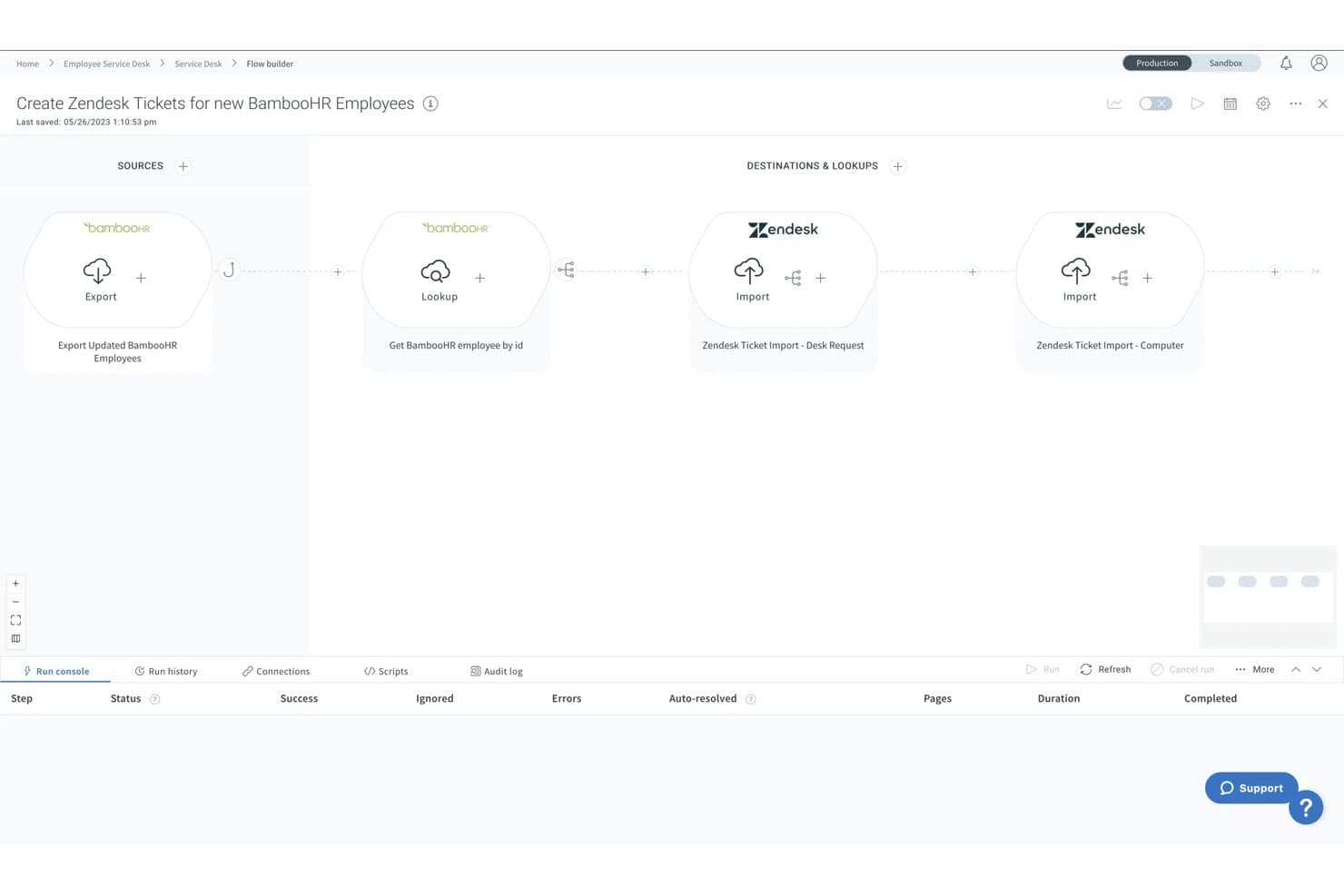
Celigo ofrece un constructor visual de flujos que automatiza los flujos de provisión de usuarios. Celigo es una plataforma iPaaS que automatiza la provisión y desaprovisionamiento de usuarios conectando plataformas HRIS, directorios y aplicaciones SaaS mediante conectores preconstruidos y automatización de flujos de trabajo configurables.
¿Para quién es mejor Celigo?
Equipos de TI en organizaciones medianas y grandes que gestionan la provisión de usuarios en un stack amplio y mixto de plataformas SaaS, ERP y HRIS.
Por qué elegí Celigo
Celigo se gana un lugar en mi lista por la forma en que maneja la provisión para aplicaciones de nicho que no admiten SCIM. Con más de 1,000 conectores preconstruidos, puedo ampliar la provisión a NetSuite, ERPs personalizados o aplicaciones SaaS especializadas a las que una herramienta IAM dedicada simplemente no puede llegar. También confío en sus flujos de incorporación/desincorporación preconstruidos para SuccessFactors, que desaprovisionan automáticamente a los usuarios en todas las aplicaciones conectadas cuando una persona se marca como inactiva en RRHH.
Características clave de Celigo
- Registro de auditoría y panel de gestión de errores: Supervisa toda la actividad de provisión y destaca fallos de sincronización con datos detallados para la resolución de problemas.
- Controles de acceso de usuario basados en roles: Asigna permisos granulares a los usuarios de Celigo que gestionan flujos e integraciones.
- Integraciones nativas con SAML y SSO: Admite autenticación segura con SAML, Okta y otros proveedores de identidad para los usuarios de la plataforma.
- Constructor de flujos personalizado con editor JavaScript: Permite a los equipos de TI crear flujos de provisión condicionales y mapeos de datos sin salir de la interfaz gráfica.
Integraciones de Celigo
Celigo ofrece más de 1,000 integraciones nativas, incluyendo NetSuite, SAP SuccessFactors, Workday, BambooHR, Okta, ServiceNow, Jira, Zendesk, Salesforce y Microsoft 365. Hay una API disponible para integraciones personalizadas.
Pros and Cons
Pros:
- Cubre brechas de provisión en aplicaciones sin SCIM
- Los flujos preconfigurados de incorporación en RRHH reducen el tiempo de configuración
- La lógica de flujos condicionales maneja provisiones complejas
Cons:
- No está diseñado específicamente para la gobernanza de identidad
- La depuración de errores requiere experiencia técnica
Learn more about Celigo: Mejor en capacidades de directorio como servicio
- Prueba gratuita de 30 días + demo gratuita disponible
- Precio bajo solicitud.
Visit WebsiteCustomer Rating:4.6/5
Una captura de pantalla centrada en la pestaña de usuarios de la herramienta de aprovisionamiento de usuarios JumpCloud. JumpCloud proporciona una plataforma centralizada para gestionar identidades de usuarios en diversos recursos de TI. Las empresas pueden lograr una gestión unificada de identidades gracias a sus capacidades de directorio como servicio, lo que permite atender solicitudes de acceso complejas en los entornos de TI heterogéneos actuales.
Por qué elegí JumpCloud: En el amplio panorama de herramientas de TI, seleccionar la adecuada a menudo se reduce a necesidades específicas y características destacadas. Al determinar la mejor opción para servicios de directorio, JumpCloud surgió de inmediato como uno de los principales candidatos debido a sus sólidas capacidades para gestionar identidades de usuario. Elegí esta herramienta porque combina eficazmente procesos de usuario automatizados con funciones avanzadas de directorio, destacándose como la mejor en capacidades de directorio como servicio.
Características destacadas e integraciones:
JumpCloud sobresale en la gestión y automatización de identidades de usuario, garantizando que las solicitudes de acceso se procesen de manera eficiente. La completa API de la plataforma amplía aún más sus funciones de directorio, facilitando integraciones complejas y flujos de trabajo personalizados. En cuanto a las integraciones, JumpCloud ha establecido alianzas con diversas plataformas de TI, permitiendo que las empresas mantengan la coherencia en la gestión de identidades a través de ecosistemas variados.
Pros and Cons
Pros:
- Gestión integral de identidades de usuario
- API avanzada para integraciones y flujos de trabajo personalizados
- Gestión eficiente de solicitudes de acceso
Cons:
- Puede resultar abrumador para organizaciones pequeñas
- Algunas funciones avanzadas podrían requerir experiencia técnica
- Las integraciones, aunque amplias, pueden no cubrir herramientas de nicho de ciertas industrias
Learn more about JumpCloud:

Una captura de pantalla que muestra la pestaña de aplicaciones de IBM Security Verify. IBM Security Verify es una solución integral de gestión de accesos que enfatiza la autenticación basada en riesgos, asegurando que los usuarios obtengan acceso según los riesgos contextuales. Este enfoque equilibra la seguridad y la comodidad del usuario, alineándose perfectamente con las crecientes demandas de los negocios digitales modernos.
Por qué elegí IBM Security Verify: Al elegir y comparar varias herramientas, IBM Security Verify captó particularmente mi atención debido a su enfoque único de autenticación. El énfasis de la herramienta en un método basado en riesgos, que es diferente de las estrategias de autenticación tradicionales, despertó mi interés. Por lo tanto, opino que para las organizaciones que buscan orientarse hacia un sistema de autenticación más contextual y dinámico, IBM Security Verify es la mejor opción para autenticación basada en riesgos.
Funciones destacadas e integraciones:
IBM Security Verify es una herramienta de aprovisionamiento de cuentas y una solución de identidad completa. Su mecanismo de autenticación basado en riesgos evalúa numerosos parámetros antes de conceder el acceso, añadiendo una capa extra de seguridad. En cuanto a las integraciones, IBM Security Verify es compatible con varias aplicaciones y sistemas empresariales, asegurando prácticas de identidad consistentes independientemente de la plataforma subyacente.
Pros and Cons
Pros:
- Autenticación avanzada basada en riesgos para mayor seguridad.
- Herramienta integral de aprovisionamiento de usuarios que asegura una gestión eficiente de cuentas.
- Amplia compatibilidad con numerosas aplicaciones y sistemas empresariales.
Cons:
- Puede percibirse como complejo para organizaciones más pequeñas
- La integración con ciertos sistemas heredados puede requerir esfuerzos adicionales
- Como ocurre con muchas soluciones de IBM, puede tener una curva de aprendizaje más pronunciada para algunos usuarios
Learn more about IBM Security Verify: La mejor para una verificación de identidad empresarial segura
- Prueba gratuita de 30 días disponible
- Precio bajo consulta.

Una foto que muestra el centro de administración construido para la herramienta Microsoft Entra ID. Microsoft Entra ID es una herramienta diseñada para proporcionar a las empresas un mecanismo sólido para la verificación de identidad. A medida que las empresas crecen y navegan por entornos híbridos complejos, una verificación de identidad segura y confiable se vuelve indispensable. Microsoft Entra ID se enfoca precisamente en esto, garantizando que las identidades empresariales se verifiquen con la máxima seguridad.
Por qué elegí Microsoft Entra ID: Elegí Microsoft Entra ID como mi primera opción para herramientas de verificación de identidad. Es ideal para el sector empresarial, especialmente para aquellos con entornos híbridos. Tras compararla con otras opciones, descubrí que sobresale al proporcionar una verificación de identidad segura. Esto facilita que el departamento de TI pueda gestionar y autenticar usuarios con confianza.
Características destacadas e integraciones:
Microsoft Entra ID presume de funciones que están diseñadas para las infraestructuras empresariales complejas actuales. Es altamente adaptable a entornos híbridos, lo que garantiza verificaciones de identidad absolutas tanto en plataformas locales como en la nube. Además, su profunda integración con Microsoft 365 permite que las empresas mantengan un método de verificación de identidad coherente a lo largo de la suite de aplicaciones de Microsoft.
Pros and Cons
Pros:
- Diseñada para empresas, abordando desafíos específicos que enfrentan en la verificación de identidad.
- Amplia funcionalidad en entornos híbridos, equilibrando tanto en local como en la nube.
- La profunda integración con Microsoft 365 garantiza una experiencia fluida para el departamento de TI.
Cons:
- Puede percibirse como demasiado compleja para pequeñas empresas sin infraestructuras híbridas
- Las empresas que no estén invirtiendo en el ecosistema de Microsoft pueden considerar algunas funciones redundantes
- La complejidad puede requerir personal de TI dedicado para la configuración y el mantenimiento
Learn more about Microsoft Entra ID: Mejor para la autenticación adaptativa de la fuerza laboral
- Prueba gratuita de 30 días + demo gratuita disponible
- Precios bajo solicitud.

Una muestra de la vista móvil y de escritorio de la interfaz de Okta Workforce Identity. Okta Workforce Identity es una reconocida herramienta en el ámbito de la ciberseguridad que se centra en proporcionar sólidas soluciones de identidad para la fuerza laboral moderna. Su principal enfoque es la autenticación adaptativa, ajustando los requisitos de acceso según los distintos contextos y escenarios de los usuarios, lo cual es esencial en el entorno laboral diverso y dinámico de hoy en día.
Por qué elegí Okta Workforce Identity: He comprobado que Okta Workforce Identity es una opción destacada para la autenticación adaptativa. Esta herramienta sobresale gracias a su capacidad para ajustar los protocolos de acceso en función del comportamiento y el contexto del usuario. Tras comparar varias opciones, estoy seguro de que Okta Workforce Identity es la solución ideal para la autenticación adaptativa de la fuerza laboral. Es especialmente útil para empresas con dinámicas y requisitos de seguridad en constante cambio.
Funciones e integraciones destacadas:
Okta Workforce Identity es mucho más que una herramienta de autenticación. Ofrece funciones avanzadas de informes de cumplimiento, ayudando a las empresas a satisfacer sus requerimientos de cumplimiento sin complicaciones. Además, Okta se integra con una multitud de aplicaciones empresariales, aumentando su adaptabilidad y garantizando prácticas de identidad consistentes en diferentes plataformas.
Pros and Cons
Pros:
- La autenticación adaptativa integral cubre las distintas necesidades de la fuerza laboral.
- Los informes de cumplimiento detallados ayudan a las empresas a cumplir con requisitos regulatorios exigentes.
- Amplias integraciones con una gran variedad de herramientas empresariales, lo que la hace versátil en entornos de TI diversos.
Cons:
- Puede considerarse excesiva para empresas muy pequeñas
- Algunas funciones avanzadas pueden requerir una curva de aprendizaje más pronunciada
- Al ser una herramienta integral, la configuración y puesta en marcha puede ser extensa
Learn more about Okta Workforce Identity: Mejor opción para gestión de identidades y acceso de código abierto
- Precio a consultar.

Una foto enfocada en los diferentes paneles de control de la herramienta WSO2 Identity Server. WSO2 Identity Server ofrece una solución integral para la gestión de identidades, garantizando acceso en tiempo real y seguro a aplicaciones y servicios. Como plataforma de código abierto, responde a organizaciones que priorizan la flexibilidad, la personalización y la transparencia en sus estrategias de gestión de identidades y acceso.
Por qué elegí WSO2 Identity Server: Después de evaluar varias herramientas, descubrí que el WSO2 Identity Server de código abierto era la mejor opción para la gestión de identidades y accesos. Su transparencia y flexibilidad lo convierten en la mejor elección.
Características destacadas e integraciones:
WSO2 Identity Server se destaca por su proceso de aprovisionamiento eficiente, asegurando una gestión oportuna y precisa de los datos de usuario. La plataforma admite mecanismos de inicio de sesión único (SSO) y autenticación multifactor (MFA), reforzando su compromiso con el acceso seguro. En cuanto a integraciones, WSO2 se conecta con una variedad de herramientas empresariales, asegurando una gestión de identidades consistente en diferentes sistemas de negocio.
Pros and Cons
Pros:
- El carácter de código abierto garantiza transparencia y opciones de personalización.
- Un proceso de aprovisionamiento eficiente mejora la experiencia de gestión de datos de usuario.
- Las integraciones de amplio alcance garantizan prácticas uniformes de identidad entre herramientas.
Cons:
- Puede presentar una curva de aprendizaje más pronunciada para quienes no están familiarizados con plataformas de código abierto
- Requiere recursos dedicados para una personalización y despliegue óptimos
- Puede haber complejidades al integrarse con sistemas propietarios
Learn more about WSO2 Identity Server: Mejor para la gestión de operaciones SaaS
- Prueba gratuita de 21 días + demo gratuita disponible
- Precios a consultar.

Una captura de pantalla centrada en el panel de BetterCloud. BetterCloud es una plataforma basada en la nube diseñada especialmente para profesionales de TI, que ofrece herramientas extensas de gestión de SaaS para garantizar operaciones eficientes y seguras. Su excelencia en la supervisión de múltiples entornos de SaaS se relaciona directamente con nuestra anterior declaración sobre su destreza en la gestión de operaciones SaaS.
Por qué elegí BetterCloud: Al seleccionar herramientas para la lista, BetterCloud llamó mi atención por su enfoque único en la gestión de ecosistemas SaaS diversos. Al comparar varias plataformas, quedó claro que BetterCloud tenía una ventaja distintiva, especialmente en la centralización de la administración de aplicaciones SaaS. Dada su habilidad para ofrecer controles granulares sobre varias apps SaaS, es la mejor opción para aquellos interesados en una gestión robusta de operaciones SaaS.
Características destacadas e integraciones:
BetterCloud destaca con funciones como registros de auditoría avanzados, autenticación multifactor y desprovisión automatizada para asegurar y optimizar las aplicaciones SaaS. Además, proporciona integraciones clave con aplicaciones SaaS prominentes como Slack, Google Workspace y Dropbox, logrando que el proceso de gestión sea coherente e integrado.
Pros and Cons
Pros:
- Herramientas completas de gestión SaaS basadas en la nube
- Incorpora autenticación multifactor para mayor seguridad
- Desprovisión eficiente de cuentas de usuario
Cons:
- Puede ser complejo para principiantes
- Puede ser excesivo para pequeñas empresas
- La estructura de precios podría ser más transparente
Learn more about BetterCloud:
Otros programas de aprovisionamiento de usuarios
Estas son algunas opciones adicionales de programas de aprovisionamiento de usuarios que no llegaron a mi lista, pero que aun así merece la pena consultar:
- 11LumosMejor para soluciones de TI energéticamente eficientes
- 12ConductorOneMejor para la orquestación de derechos de acceso
- 13GroupID By ImanamiMejor para el ciclo de vida y automatización de grupos
- 14RipplingMejor para automatización integrada de RR. HH. y TI
Cómo evalúo el software de aprovisionamiento de usuarios
Divido mi evaluación en criterios básicos—como disparadores automáticos de ciclo de vida y compatibilidad con SCIM—y diferenciadores que distinguen a las herramientas para entornos complejos con múltiples aplicaciones.
Funcionalidad básica (requisitos indispensables para esta lista)
Al seleccionar herramientas para mi lista, califico cada una en una escala del 0 (no ofrece la funcionalidad) al 5 (destaca en esta área) según cada funcionalidad básica listada a continuación. Luego, convierto la puntuación total de la herramienta en un porcentaje. Cada herramienta debe alcanzar una puntuación total mínima del 65% para ser considerada para su inclusión.
- Gestión automática del ciclo de vida de cuentas: Verifico si la herramienta puede activar acciones de creación, actualización y desaprovisionamiento automáticamente cuando alguien se une, cambia de equipo o sale de la organización.
- Integraciones con aplicaciones y directorios: El catálogo de conectores es importante. Evalúo cuántas aplicaciones SaaS y directorios como Active Directory o Google Workspace se sincronizan nativamente desde el inicio.
- Control de acceso basado en roles: Reviso cómo se asignan los roles a los permisos de aplicaciones, por ejemplo, si una nueva incorporación al equipo de ventas obtiene automáticamente acceso al CRM y marcador telefónico según el grupo al que pertenece.
- Aprovisionamiento basado en HRIS: Una buena herramienta debe tomar como fuente maestra tu sistema HRIS, de modo que un cambio de estado en Workday o BambooHR active los flujos de trabajo de aprovisionamiento.
- Compatibilidad con SCIM y estándares: Evalúo si cada plataforma es compatible con SCIM 2.0, SAML y OIDC para un aprovisionamiento interoperable entre aplicaciones que cumplen con los estándares.
- Registros de auditoría y reportes: Todo evento de aprovisionamiento debe poder buscarse y exportarse. Busco herramientas que registren quién obtuvo acceso, cuándo y quién lo aprobó.
Una vez que tengo una lista de herramientas que cumplen con los criterios, considero qué distingue a cada plataforma.
Factores diferenciadores (qué distingue a los proveedores)
Así es como comparo y contrasto a los distintos proveedores:
Características destacadas
Los portales de autoservicio para solicitud de acceso ahorran al equipo de TI la gestión de tickets repetitivos cada vez que alguien necesita una nueva aplicación. También busco campañas de certificación de accesos, donde los responsables revisan periódicamente y revocan permisos para mantener un entorno limpio entre auditorías. Un constructor de flujos de trabajo sin código es otro diferenciador que valoro, especialmente para los equipos que necesitan diseñar cadenas de aprobación de varios pasos o lógica de aprovisionamiento condicional sin escribir scripts.
Más allá de las características
Las certificaciones de cumplimiento son importantes aquí. Verifico si el proveedor cuenta, como mínimo, con SOC 2 Tipo II e ISO 27001, ya que las herramientas de aprovisionamiento gestionan datos de identidad sensibles en toda tu infraestructura. También considero la profundidad del ecosistema: las herramientas que se integran con tus plataformas de SSO, MFA y SIEM existentes reducen huecos de arquitectura. Además, evalúo el tiempo hasta generar valor, en especial lo rápido que puedes completar la sincronización inicial de directorios, mapear atributos y poner en marcha los primeros flujos de aprovisionamiento.
Cómo elegir un programa de aprovisionamiento de usuarios
Es fácil perderse entre largas listas de funciones y estructuras de precios complejas. Para ayudarte a mantener la concentración mientras realizas tu proceso único de selección de software, aquí tienes una lista de factores que debes tener en cuenta:
| Factor | Qué debes tener en cuenta |
|---|---|
| FactorEscalabilidad | Qué debes tener en cuenta¿Puede el software crecer junto con tu organización? Ten en cuenta las necesidades futuras y si la herramienta puede gestionar un aumento de usuarios sin costes adicionales ni problemas de rendimiento. |
| FactorIntegraciones | Qué debes tener en cuenta¿Se conecta con tus sistemas actuales? Comprueba la compatibilidad con tu conjunto tecnológico actual para evitar soluciones alternativas costosas o limitaciones. |
| FactorPersonalización | Qué debes tener en cuenta¿Puedes adaptar la herramienta para que se ajuste a tus flujos de trabajo? Evalúa la facilidad para modificar los ajustes y permisos de modo que coincidan con tus procesos. |
| FactorFacilidad de uso | Qué debes tener en cuenta¿La interfaz es intuitiva para tu equipo? Asegúrate de que no requiera una formación exhaustiva ni ralentice las operaciones diarias. |
| FactorImplementación e incorporación | Qué debes tener en cuenta¿Con qué rapidez puedes empezar? Examina el proceso de configuración, los recursos necesarios y la asistencia durante la incorporación para evitar retrasos. |
| FactorCoste | Qué debes tener en cuenta¿Cómo se ajustan los precios a tu presupuesto? Compara los costes con las funciones y la escalabilidad. Presta atención a las tarifas ocultas o a los modelos de precios inflexibles. |
| FactorMedidas de seguridad | Qué debes tener en cuenta¿Existen medidas de protección de datos? Evalúa el cifrado, los controles de acceso y el cumplimiento de las normas del sector para proteger la información confidencial. |
| FactorDisponibilidad de asistencia | Qué debes tener en cuenta¿Qué asistencia ofrece el proveedor? Comprueba la disponibilidad las 24 horas, los tiempos de respuesta y la calidad de recursos como guías o foros de la comunidad para recibir ayuda cuando surjan problemas. |
¿Qué es el software de aprovisionamiento de usuarios?
El software de aprovisionamiento de usuarios es una herramienta que ayuda a las empresas a controlar quién puede acceder a sus sistemas, aplicaciones y datos. Mantiene todo organizado al garantizar que cada persona tenga el acceso adecuado para su función.
En lugar de añadir o eliminar usuarios manualmente, el software se encarga de ello automáticamente cuando alguien se incorpora, cambia de puesto o abandona la empresa. Esto mantiene el acceso actualizado y ayuda a evitar errores.
Funciones
Al seleccionar un software de aprovisionamiento de usuarios, presta atención a las siguientes funciones clave:
- Creación automatizada de usuarios: Configura automáticamente las cuentas de los nuevos usuarios, ahorrando tiempo y reduciendo los errores durante el proceso de incorporación.
- Gestión de accesos: Controla los permisos y niveles de acceso de los usuarios para garantizar la seguridad y el cumplimiento normativo.
- Informes de cumplimiento: Genera informes para ayudar a las organizaciones a cumplir los requisitos normativos y las necesidades de auditoría.
- Federación de identidades: Conecta varios sistemas de identidad, permitiendo un acceso fluido a través de distintas plataformas.
- Inicio de sesión único (SSO): Permite a los usuarios acceder a varias aplicaciones con un único conjunto de credenciales, simplificando los procesos de inicio de sesión.
- Autenticación multifactor: Añade una capa adicional de seguridad al requerir una verificación adicional más allá de las contraseñas.
- Gestión basada en políticas: Aplica reglas para las cuentas de usuario y las pertenencias a grupos con el fin de mantener la higiene del directorio.
- Registros de auditoría: Realiza un seguimiento de las actividades y los cambios de los usuarios para ofrecer transparencia y ayudar a resolver problemas.
- Flujos de trabajo personalizables: Permite a las organizaciones adaptar el software a sus procesos y necesidades específicos.
- Capacidades de integración: Se conecta con sistemas y aplicaciones existentes para mejorar la funcionalidad y la eficiencia.
Ventajas
La implementación de un software de aprovisionamiento de usuarios ofrece varias ventajas para tu equipo y tu empresa. Estas son algunas de las que puedes esperar:
- Ahorro de tiempo: Automatiza la configuración de usuarios y la gestión de accesos, reduciendo el trabajo manual y acelerando el proceso de incorporación.
- Mayor seguridad: Funciones como la autenticación multifactor y los controles de acceso ayudan a proteger los datos confidenciales frente a accesos no autorizados.
- Garantía de cumplimiento: Genera informes de cumplimiento y registros de auditoría, lo que facilita el cumplimiento de los requisitos normativos.
- Mayor precisión: La automatización reduce los errores en el aprovisionamiento de usuarios, garantizando niveles de acceso y permisos correctos.
- Eficiencia operativa: Las capacidades de integración permiten que el software funcione junto con los sistemas existentes, mejorando el flujo de trabajo general.
- Escalabilidad: Ayuda a las organizaciones en crecimiento a gestionar un mayor número de usuarios sin una carga administrativa adicional.
- Gestión simplificada: Centraliza la gestión de usuarios, facilitando la supervisión y el ajuste de los roles y permisos de los usuarios.
Costes y precios
Seleccionar un software de aprovisionamiento de usuarios requiere comprender los distintos modelos de precios y planes disponibles. Los costes varían en función de las funciones, el tamaño del equipo, los complementos y otros factores. La tabla siguiente resume los planes habituales, sus precios medios y las funciones que suelen incluir las soluciones de software de aprovisionamiento de usuarios:
Tabla comparativa de planes de software de aprovisionamiento de usuarios
| Tipo de plan | Precio medio | Funciones habituales |
|---|---|---|
| Tipo de planPlan gratuito | Precio medio$0 | Funciones habitualesGestión básica de usuarios, integraciones limitadas y asistencia de la comunidad. |
| Tipo de planPlan personal | Precio medio$5-$25/usuario/mes | Funciones habitualesAprovisionamiento de usuarios, informes básicos y asistencia por correo electrónico. |
| Tipo de planPlan empresarial | Precio medio$25-$50/usuario/mes | Funciones habitualesIntegraciones avanzadas, informes de cumplimiento y asistencia telefónica. |
| Tipo de planPlan para empresas | Precio medio$50-$100/usuario/mes | Funciones habitualesFlujos de trabajo personalizados, gestor de cuenta dedicado y servicios de asistencia prémium. |
Preguntas frecuentes sobre el software de aprovisionamiento de usuarios
Estas son algunas respuestas a preguntas frecuentes sobre el software de aprovisionamiento de usuarios:
¿Cuál es la diferencia entre el aprovisionamiento y el desaprovisionamiento de usuarios?
El aprovisionamiento de usuarios implica configurar las cuentas y los permisos cuando alguien se incorpora a su organización. El desaprovisionamiento es el proceso de eliminar el acceso cuando esa persona se marcha. Ambos son esenciales para mantener la seguridad. Automatizar estas tareas ahorra tiempo y reduce los errores, garantizando que los usuarios tengan el acceso adecuado cuando lo necesiten y ninguno cuando ya no lo necesiten.
¿Puede el software de aprovisionamiento de usuarios integrarse con los sistemas de TI existentes?
Sí, la mayoría del software de aprovisionamiento de usuarios puede integrarse con los sistemas de TI existentes. Esto incluye directorios como Active Directory y servicios en la nube como Google Workspace. La integración ayuda a mantener la coherencia entre las plataformas y reduce la necesidad de realizar actualizaciones manuales. Compruebe la compatibilidad con sus sistemas actuales antes de realizar la compra para evitar problemas.
¿Cómo mejora la seguridad el software de aprovisionamiento de usuarios?
El software de aprovisionamiento de usuarios mejora la seguridad al automatizar los controles de acceso y garantizar el cumplimiento. Ayuda a aplicar políticas de seguridad, como las actualizaciones de contraseñas y la autenticación multifactor. Al mantener datos y permisos de usuario precisos, minimiza el riesgo de acceso no autorizado. Las auditorías y los informes periódicos respaldan aún más las iniciativas de seguridad.
¿Se necesita formación para utilizar el software de aprovisionamiento de usuarios?
Sí, normalmente se necesita cierta formación para utilizar eficazmente el software de aprovisionamiento de usuarios. El nivel de formación depende de la complejidad de la herramienta. Muchos proveedores ofrecen recursos de formación, como vídeos, seminarios web y documentación. Invertir tiempo en formación ayuda a que usted y su equipo aprovechen plenamente las capacidades del software, garantizando una implementación más fluida.