

El software MBaaS te ofrece una forma rápida y eficiente de crear aplicaciones al encargarse de la infraestructura del backend por ti, permitiéndote centrarte en las funciones que más les importan a tus usuarios. Estas herramientas gestionan bases de datos, autenticación y notificaciones push, lo que facilita mucho tu trabajo como desarrollador.
Después de probar y analizar las principales opciones de MBaaS, te guiaré por las mejores alternativas para mejorar la productividad de tu equipo y ayudarte a elegir la adecuada para tu próximo proyecto.
Por qué confiar en nuestras recomendaciones de software
6,700+
Reviews
20
Industry experts
16+
Evaluation factors
14
Years
Nuestro equipo lleva probando y evaluando software desde 2012. Como líderes tecnológicos, sabemos lo difícil —y lo importante— que es elegir el software adecuado.
Para esta guía, evaluamos las herramientas mediante pruebas prácticas e investigación independiente, puntuando las herramientas según nuestros criterios de selección.
Nuestras reseñas reflejan nuestro criterio editorial humano, no un discurso de ventas.
Revisores expertos:
- Paulo Gardini MiguelDirector técnico
 Tim FisherVP de IA
 Gabriel RosasTech Lead y arquitecto de software
 Christhian GruhnTech Lead y arquitecto de plataforma

Resumen del mejor software MBaaS
| Tool | Best For | Trial Info | Price | ||
|---|---|---|---|---|---|
| 1 | Ideal para una fácil escalabilidad y autenticación de usuarios | Plan gratuito disponible | La estructura de precios de Firebase comienza con un nivel gratuito para aplicaciones de pequeña escala. El plan de pago, Firebase Blaze, funciona según el modelo de pago por uso y los costes pueden variar en función del uso. Por lo tanto, el precio por usuario al mes no es fijo y podría comenzar desde unos pocos centavos hasta varios dólares, dependiendo de los recursos utilizados. | Website | |
| 2 | Ideal para servicios de backend escalables | Plan gratuito disponible | Desde $15/mes (facturado anualmente) | Website | |
| 3 | Ideal para el desarrollo sin código y alojamiento en la nube | Plan gratuito disponible | Backendless ofrece una interfaz visual de desarrollo para crear la lógica del backend sin programar. También proporciona una base de datos fácil de usar, gestión de usuarios y funciones de código en la nube. En cuanto a integraciones, funciona bien con una variedad de frameworks frontend como Angular, React y Vue, lo que puede ayudar a los desarrolladores a agilizar el proceso general de desarrollo. | Website | |
| 4 | Ideal para la creación rápida de prototipos con servicios de AWS | Hay un plan gratuito disponible | AWS Amplify utiliza un modelo de precios de pago por uso. Los cargos dependen de los servicios específicos utilizados. Por ejemplo, los precios de alojamiento comienzan desde $0.023 por GB servido. | Website | |
| 5 | Ideal para el desarrollo multiplataforma y la integración | El precio de Azure Mobile App Service comienza desde $14/usuario/mes para el nivel Básico (facturado anualmente). Este precio no incluye costos adicionales por servicios adicionales. | Website | ||
| 6 | Mejor para el desarrollo de aplicaciones móviles empresariales y la gestión de datos | El precio de Oracle Mobile Hub comienza en $101.00 por mes (facturado anualmente). Esto incluye 20,000 llamadas a la API por mes y 10GB de almacenamiento. | Website | ||
| 7 | Ideal para necesidades de desarrollo móvil de código abierto | Parse es una plataforma de código abierto y, por tanto, es gratuita. | Website | ||
| 8 | La mejor para sincronización de datos en tiempo real | Descarga gratuita + demo gratuita disponible | Precios bajo solicitud | Website | |
| 9 | Ideal para soluciones integrales de servicios de servidor | Plan gratuito disponible | Desde $5/mes | Website | |
| 10 | Ideal para modernizar aplicaciones heredadas | No disponible | Precio bajo consulta | Website |


Reseñas del mejor software MBaaS
Aquí tienes un vistazo al mejor software MBaaS. Destacaré las características que ofrece cada herramienta y los motivos por los que merecen estar en esta lista.
 Ideal para una fácil escalabilidad y autenticación de usuarios
- Plan gratuito disponible
- La estructura de precios de Firebase comienza con un nivel gratuito para aplicaciones de pequeña escala. El plan de pago, Firebase Blaze, funciona según el modelo de pago por uso y los costes pueden variar en función del uso. Por lo tanto, el precio por usuario al mes no es fijo y podría comenzar desde unos pocos centavos hasta varios dólares, dependiendo de los recursos utilizados.
Visit WebsiteCustomer Rating:4.5/5This rating combines scores from multiple user review sites to reflect overall customer sentiment about the product.
Aquí está el panel de control de analíticas de Firebase. Firebase es una plataforma líder de backend como servicio para el desarrollo de aplicaciones serverless en Android, iOS y web. Los principales puntos fuertes de la plataforma son su escalabilidad y una sólida autenticación de usuarios, lo que la convierte en una de las opciones preferidas para estas necesidades específicas.
Por qué elegí Firebase:
Al seleccionar Firebase, me llamó especialmente la atención su completo conjunto de servicios, sobre todo su base de datos en tiempo real y las funcionalidades de autenticación de usuarios. Estas características diferencian a Firebase, y sus capacidades para escalar fácilmente ante el aumento de la demanda de usuarios no tienen rival en el sector.
Por lo tanto, llegué a la conclusión de que Firebase es la opción ideal para los desarrolladores que necesitan priorizar la escalabilidad y una autenticación de usuarios eficiente en sus aplicaciones.
Funciones y integraciones destacadas:
Firebase ofrece una variedad de funciones como una base de datos en tiempo real, Firestore para estructuras de datos más complejas, Firebase Authentication, Cloud Messaging y Firebase Storage para almacenar contenido generado por los usuarios.
Además, Firebase proporciona integraciones importantes con otros servicios de Google como Google Analytics, Cloud Storage y AdMob, que pueden mejorar aún más el desarrollo de apps y la experiencia del usuario.
Pros and Cons
Pros:
- Fácil de usar y con buena documentación
- Completo conjunto de servicios en una sola plataforma
- Capacidades de base de datos en tiempo real
Cons:
- Capacidades de consulta limitadas en su base de datos en tiempo real
- El coste puede aumentar rápidamente en el plan de pago por uso con un mayor uso
- Puede ser difícil migrar debido a la naturaleza propietaria del servicio
 Ideal para servicios de backend escalables
- Plan gratuito disponible
- Desde $15/mes (facturado anualmente)
Visit WebsiteCustomer Rating:4.6/5This rating combines scores from multiple user review sites to reflect overall customer sentiment about the product.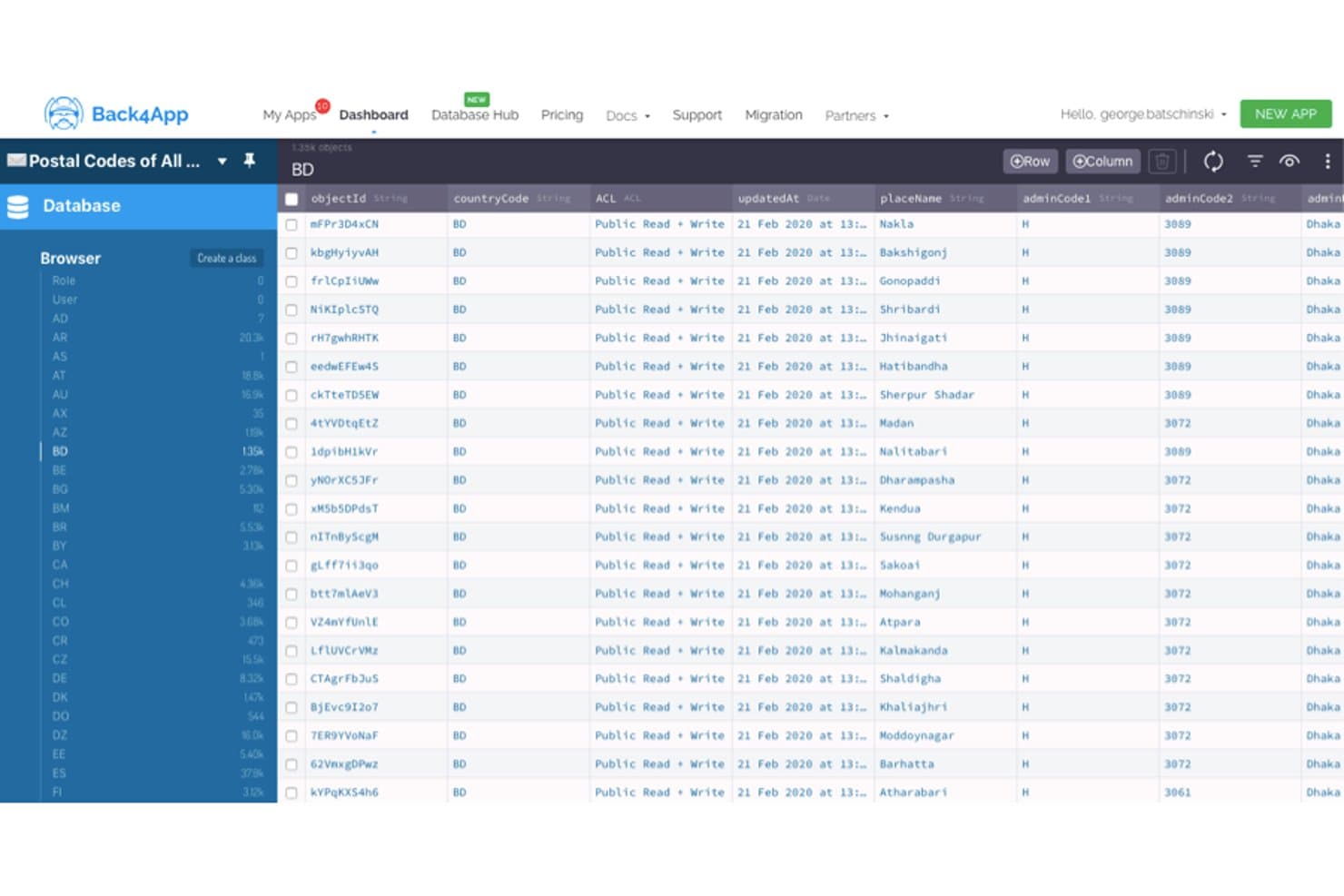
Back4App muestra datos de códigos postales en un navegador de bases de datos similar a una hoja de cálculo. Basado en el marco de trabajo de código abierto Parse Server, Back4App es una plataforma MBaaS administrada con SDK nativos para iOS, Android, Flutter y marcos de trabajo de JavaScript, además de autenticación integrada, sincronización de datos en tiempo real, notificaciones push y funciones de nube sin servidor.
¿Para quién es más adecuado Back4App?
Back4App es adecuado para startups centradas en dispositivos móviles y desarrolladores independientes que necesitan un backend listo para usar sin contratar un equipo dedicado de infraestructura.
Por qué elegí Back4App
Back4App merece estar en mi lista de opciones principales porque su infraestructura por niveles escala sin problemas desde un prototipo gratuito hasta un clúster dedicado con 10 CPU, sin obligar a reescribir el backend en cada etapa. Me impresionan especialmente las consultas en vivo mediante WebSocket, que mantienen los datos del cliente sincronizados al instante entre aplicaciones de iOS, Android y Flutter sin ninguna lógica de consulta periódica. Combinado con el escalado automático y la implementación multirregional en AWS, DigitalOcean y MongoDB Atlas, es una opción realmente sólida para backends que necesitan crecer rápidamente.
Características principales de Back4App
- Autenticación mediante inicio de sesión social: Compatibilidad integrada para iniciar sesión con Google, GitHub, Apple y Facebook, con RBAC y ACL a nivel de objeto.
- Trabajos programados de código en la nube: Funciones sin servidor de Node.js que se ejecutan según un horario definido, con acceso completo a paquetes npm y activadores de eventos de la base de datos.
- API REST y GraphQL automáticas: Cada clase de base de datos que creas genera al instante un endpoint REST y otro de GraphQL con CRUD completo, filtrado y paginación.
- Almacenamiento de archivos mediante CDN global: Las imágenes, los vídeos y los recursos de gran tamaño se sirven a través de una CDN integrada con optimización automática de imágenes y cargas directas mediante SDK.
Integraciones de Back4App
Back4App cuenta con integraciones documentadas con Stripe, Mailgun, Cursor, VS Code, Windsurf y Claude. Ofrece API REST/GraphQL y webhooks para Slack, endpoints personalizados y Zapier.
Pros and Cons
Pros:
- La base de código abierto de Parse facilita la migración
- Las consultas en vivo permiten la sincronización móvil en tiempo real
- La cobertura de SDK nativos abarca las principales tecnologías móviles
Cons:
- El nivel gratuito limita las pruebas serias del backend
- Las carencias en la documentación complican los flujos de trabajo de la CLI
Learn more about Back4App: Ideal para el desarrollo sin código y alojamiento en la nube
- Plan gratuito disponible
- Backendless ofrece una interfaz visual de desarrollo para crear la lógica del backend sin programar. También proporciona una base de datos fácil de usar, gestión de usuarios y funciones de código en la nube. En cuanto a integraciones, funciona bien con una variedad de frameworks frontend como Angular, React y Vue, lo que puede ayudar a los desarrolladores a agilizar el proceso general de desarrollo.
Visit WebsiteCustomer Rating:4.4/5This rating combines scores from multiple user review sites to reflect overall customer sentiment about the product.
Aquí está la función de gestión de datos en Backendless. Backendless es una plataforma backend como servicio (BaaS) que permite a los desarrolladores crear aplicaciones sin necesidad de gestionar la codificación del backend. Su naturaleza sin código, combinada con sólidas instalaciones de alojamiento en la nube, la convierte en una opción ideal para desarrolladores que desean centrarse más en el frontend y menos en las preocupaciones del lado del servidor.
Por qué elegí Backendless:
Al decidir sobre una herramienta para esta lista, seleccioné Backendless debido a sus importantes ventajas en el desarrollo sin código y alojamiento en la nube. Es una propuesta única que destaca porque permite a los desarrolladores acelerar sus proyectos sin enredarse en complejidades del backend.
Características destacadas e integraciones:
Backendless ofrece una interfaz visual de desarrollo para crear la lógica del backend sin programar. También proporciona una base de datos fácil de usar, gestión de usuarios y funciones de código en la nube. En cuanto a integraciones, funciona bien con una variedad de frameworks frontend como Angular, React y Vue, lo que puede ayudar a los desarrolladores a agilizar el proceso general de desarrollo.
Pros and Cons
Pros:
- Ofrece desarrollo backend sin código
- Alojamiento en la nube robusto y confiable
- Integración fluida con frameworks frontend populares
Cons:
- La interfaz de usuario puede ser intimidante para principiantes
- Las limitaciones del plan gratuito pueden dificultar proyectos grandes
- Costos adicionales por uso fuera de los límites incluidos
Learn more about Backendless: Ideal para la creación rápida de prototipos con servicios de AWS
- Hay un plan gratuito disponible
- AWS Amplify utiliza un modelo de precios de pago por uso. Los cargos dependen de los servicios específicos utilizados. Por ejemplo, los precios de alojamiento comienzan desde $0.023 por GB servido.

Aquí se muestra la función de modelado de datos de AWS Amplify. AWS Amplify es una plataforma de desarrollo proporcionada por Amazon Web Services (AWS) que permite a los desarrolladores crear y desplegar aplicaciones móviles y web escalables rápidamente. Su profunda integración con otros servicios de AWS y su enfoque en la creación rápida de prototipos la posicionan como una de las principales opciones para crear prototipos en un entorno AWS.
Por qué elegí AWS Amplify:
Elegí AWS Amplify para esta lista por su excelente soporte para la creación rápida de prototipos dentro del ecosistema AWS. Su capacidad para aprovechar una gran variedad de servicios de AWS, incluyendo autenticación, APIs, almacenamiento y analítica, la distingue de otras herramientas. Esto hace que AWS Amplify sea ideal para desarrolladores que ya están inmersos o que se están trasladando al entorno AWS.
Características destacadas e integraciones:
AWS Amplify cuenta con un entorno rico en funciones que incluye Autenticación, APIs GraphQL y REST, analítica y más, todo enfocado en facilitar el desarrollo rápido de prototipos. Se integra muy bien con una amplia variedad de servicios de AWS, como AWS Lambda para funciones sin servidor y Amazon S3 para almacenamiento, creando una experiencia de desarrollo integral.
Pros and Cons
Pros:
- Excelente para la creación rápida de prototipos
- Profunda integración con otros servicios de AWS
- Proporciona funciones sin servidor
Cons:
- La estructura de precios puede ser compleja debido al modelo de pago por uso
- Curva de aprendizaje más pronunciada para desarrolladores nuevos en AWS
- Puede ser excesivo para proyectos pequeños que no requieren servicios de AWS
Learn more about AWS Amplify: Ideal para el desarrollo multiplataforma y la integración
- El precio de Azure Mobile App Service comienza desde $14/usuario/mes para el nivel Básico (facturado anualmente). Este precio no incluye costos adicionales por servicios adicionales.

Aquí está la captura de pantalla del panel de monitoreo en Microsoft Azure Mobile App Service. Microsoft Azure Mobile App Service es una plataforma integral en la nube que permite a los desarrolladores crear, probar, desplegar y administrar aplicaciones para cualquier plataforma, incluyendo iOS, Android y Windows.
Dada su sólida compatibilidad multiplataforma y sus amplias capacidades de integración, se convierte en una solución de referencia para los desarrolladores que priorizan estos aspectos en sus proyectos.
Por qué elegí Microsoft Azure Mobile App Service:
Al analizar varias herramientas, elegí Azure Mobile App Service debido a sus amplias capacidades, especialmente en términos de desarrollo multiplataforma e integración de servicios. Lo que lo distingue es su fuerte compromiso con la compatibilidad y la integración con otros servicios, lo que lo convierte en una excelente opción para los desarrolladores que necesitan una herramienta sobresaliente en estos aspectos.
Características y integraciones destacadas:
Azure Mobile App Service cuenta con características como la capacidad de crear y desplegar para cualquier plataforma utilizando una variedad de lenguajes de desarrollo web, incluidos .NET, Node.js, Java, Python o PHP. También incluye servicios integrados como notificaciones push, autenticación de usuarios, sincronización offline y autoescalado.
La herramienta ofrece integraciones clave con muchos otros servicios de Azure, incluyendo Azure DevOps para CI/CD, Azure Functions para computación sin servidor y Azure Logic Apps para la orquestación de flujos de trabajo.
Pros and Cons
Pros:
- Soporte integral para diferentes lenguajes de programación
- Capacidades de integración sólidas con otros servicios de Azure
- Escalabilidad y fiabilidad extensas
Cons:
- Puede ser complejo para principiantes debido a la amplia gama de servicios
- Los costos pueden aumentar rápidamente con servicios adicionales
- Se requiere una curva de aprendizaje para aprovechar al máximo sus capacidades
Learn more about Microsoft Azure Mobile App Service: Mejor para el desarrollo de aplicaciones móviles empresariales y la gestión de datos
- El precio de Oracle Mobile Hub comienza en $101.00 por mes (facturado anualmente). Esto incluye 20,000 llamadas a la API por mes y 10GB de almacenamiento.

Aquí está la función de colecciones de backend móvil en la aplicación móvil de Oracle. Oracle Mobile Hub es una oferta basada en la nube de backend móvil como servicio (MBaaS) de Oracle. Permite a las empresas desarrollar, probar, conectar y gestionar eficazmente sus aplicaciones móviles y los datos asociados.
Es la herramienta de elección para el desarrollo de aplicaciones móviles empresariales y la gestión de datos debido a sus amplias funcionalidades y las reconocidas capacidades de gestión de datos de Oracle.
Por qué elegí Oracle Mobile Hub:
Al decidirme por Oracle Mobile Hub, lo primero que me llamó la atención fue su amplio conjunto de herramientas y funcionalidades diseñadas para las necesidades empresariales. Además, gracias a la amplia experiencia de Oracle en la gestión de datos, la plataforma destaca a la hora de manejar requerimientos complejos de datos dentro de un ecosistema de aplicaciones móviles.
Por eso creo que Oracle Mobile Hub es la mejor opción para el desarrollo de aplicaciones móviles empresariales y la gestión de datos.
Características destacadas e integraciones:
Oracle Mobile Hub proporciona potentes herramientas de desarrollo de aplicaciones como API Catalog, que simplifica el proceso de integración con otros sistemas. Otras características notables incluyen Mobile Analytics, que ofrece información sobre el uso y el rendimiento de la aplicación. Se integra con otros servicios de Oracle como Oracle Database y Oracle Identity Management, asegurando una solución empresarial integral.
Pros and Cons
Pros:
- Conjunto de herramientas completo para el desarrollo de aplicaciones móviles empresariales
- Fuertes integraciones con otros servicios de Oracle
- Buen soporte para la gestión de datos
Cons:
- Más caro que otras plataformas
- Puede ser complejo para aplicaciones de pequeña escala
- Integraciones limitadas con terceros
Learn more about Oracle Mobile Hub: Ideal para necesidades de desarrollo móvil de código abierto
- Parse es una plataforma de código abierto y, por tanto, es gratuita.

Captura de pantalla del panel de Parse, que te ofrece una vista rápida del almacenamiento de tus datos IoT. Parse es una plataforma Backend como Servicio (BaaS) de código abierto altamente flexible, especialmente adecuada para el desarrollo de aplicaciones móviles. Con su amplia gama de capacidades, los desarrolladores pueden crear, alojar y mantener aplicaciones de manera más eficiente, lo que la convierte en una opción adecuada para necesidades de desarrollo móvil de código abierto.
Por qué elegí Parse:
Elegí Parse por su destacada naturaleza de código abierto y su enfoque en el desarrollo móvil. Al comparar diferentes herramientas MBaaS, Parse sobresalió por sus amplias opciones de personalización y su sólida comunidad de desarrolladores. Es esta flexibilidad y soporte lo que posiciona a Parse como una opción principal para quienes tienen requerimientos de desarrollo móvil de código abierto.
Características destacadas e integraciones:
Las características clave de Parse incluyen un panel de control fácil de usar, funciones de código en la nube y una base de datos en tiempo real. Estas funciones facilitan un desarrollo y gestión eficientes de aplicaciones.
En cuanto a integraciones, Parse ofrece kits de desarrollo de software (SDK) para muchas plataformas, incluyendo iOS, Android, JavaScript, Flutter y más, lo que facilita el desarrollo de aplicaciones multiplataforma.
Pros and Cons
Pros:
- Código abierto con amplias opciones de personalización
- Amplios SDKs específicos para cada plataforma
- Comunidad de desarrolladores sólida
Cons:
- Puede requerir más habilidades de desarrollo que las soluciones BaaS gestionadas
- Ausencia de soporte directo al cliente
- Algunas funciones avanzadas pueden requerir una configuración compleja
Learn more about Parse: La mejor para sincronización de datos en tiempo real
- Descarga gratuita + demo gratuita disponible
- Precios bajo solicitud

Aquí está la función de índice IoT de Kuzzle, que contiene información del dispositivo, estado del dispositivo y colecciones de actualizaciones. Kuzzle es una solución de backend IoT escalable y de código abierto, así como una MBaaS, reconocida por sus capacidades en tiempo real. Ofrece a los desarrolladores un conjunto de herramientas flexible para gestionar estructuras de datos complejas y garantizar una sincronización efectiva entre diferentes sistemas en tiempo real.
Por qué elegí Kuzzle:
Elegí Kuzzle por su manejo excepcional de la sincronización de datos en tiempo real. Tras mi comparación exhaustiva, destaca por ser de código abierto y por su enfoque en la gestión de datos en tiempo real. El aspecto en tiempo real es fundamental en las aplicaciones móviles actuales, y la capacidad de Kuzzle para gestionar esto sin esfuerzo lo convierte en la mejor opción para estos casos de uso.
Características destacadas e integraciones:
Kuzzle viene equipado con funciones como geovallas, mensajería pub/sub y gestión de bases de datos en tiempo real. Sus reglas de validación de datos y el control de acceso basado en roles mejoran la seguridad y el cumplimiento. En cuanto a integraciones, Kuzzle admite conexiones con diversas bases de datos, incluidas PostgreSQL, Elasticsearch y Redis, aumentando la flexibilidad en la gestión y el análisis de datos.
Pros and Cons
Pros:
- Excelente sincronización de datos en tiempo real
- La plataforma de código abierto permite la personalización
- Variedad de integraciones de bases de datos compatibles
Cons:
- Los detalles de precios no son transparentes
- Puede ser demasiado complejo para aplicaciones simples
- Requiere conocimientos técnicos para la configuración y gestión
Learn more about Kuzzle: Ideal para soluciones integrales de servicios de servidor
- Plan gratuito disponible
- Desde $5/mes
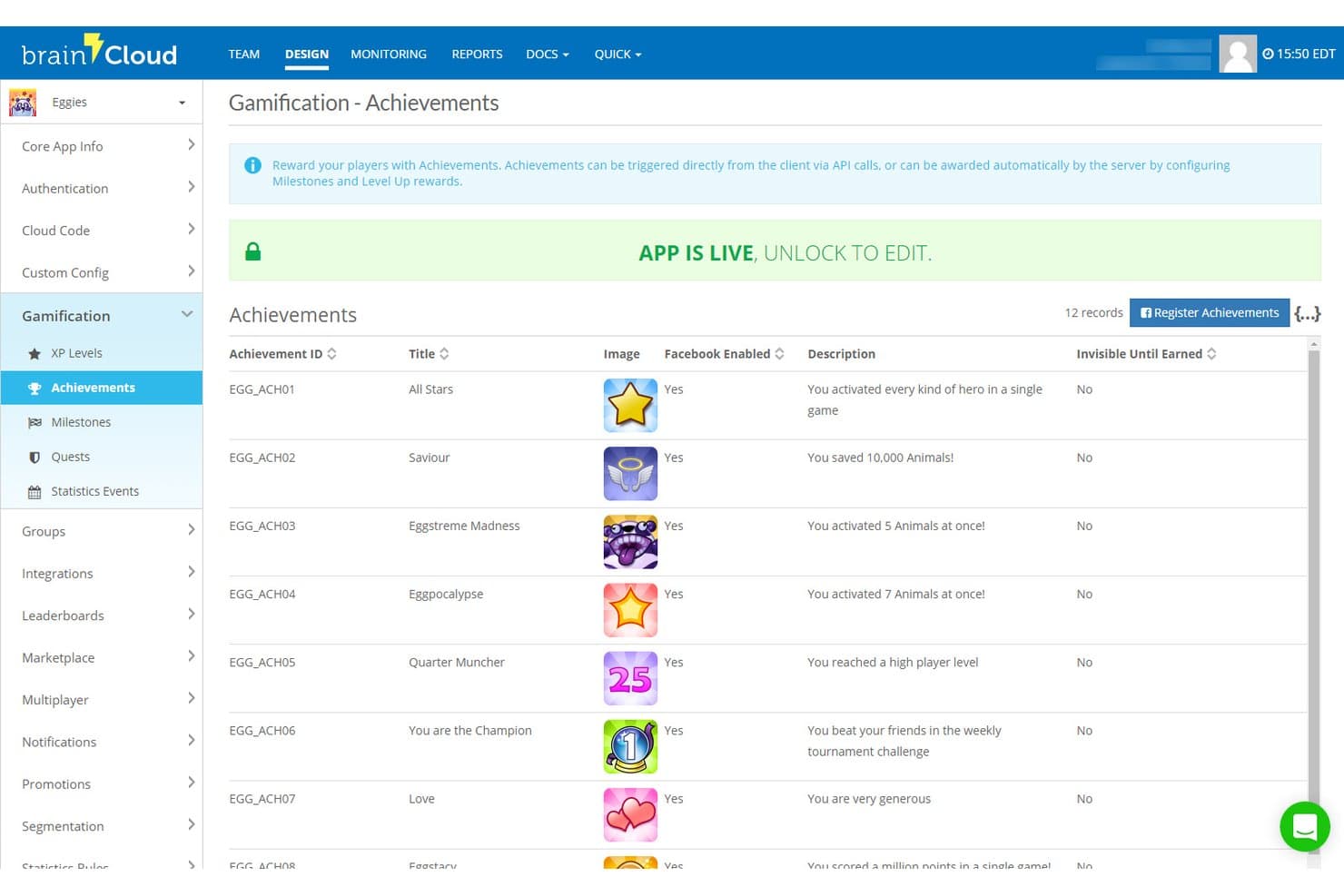
brainCloud permite a los usuarios gestionar logros dentro del juego con descripciones e integración con Facebook. brainCloud es una plataforma MBaaS creada para juegos y aplicaciones interactivas que ofrece autenticación de usuarios, almacenamiento de datos en la nube, código en la nube sin servidor, infraestructura multijugador en tiempo real, notificaciones push y herramientas de operaciones en vivo mediante una variedad de SDK de motores de juegos.
¿Para quién es más adecuado brainCloud?
brainCloud es una opción excelente para estudios de videojuegos y equipos de aplicaciones interactivas que necesitan funciones avanzadas de operaciones en vivo, multijugador y servicios de servidor sin tener que crearlos desde cero.
Por qué elegí brainCloud
Elegí brainCloud como una de las mejores opciones porque su catálogo de funciones de servidor es excepcionalmente amplio para una plataforma MBaaS gestionada. Me impresiona especialmente la forma en que el código en la nube gestiona rutinas de JavaScript versionadas y programables, con enlaces a API y acceso a servicios web externos, de modo que no es necesario integrar herramientas independientes sin servidor para ejecutar la lógica del juego o las campañas de operaciones en vivo. Su capa de entidades personalizadas admite indexación personalizada, fragmentación y millones de registros, lo que, en mi opinión, la convierte en una opción realmente sólida para equipos que crean aplicaciones interactivas con un uso intensivo de datos a gran escala.
Características principales de brainCloud
- Infraestructura multijugador en tiempo real: Los servidores Room y Relay admiten hasta 40 jugadores por sesión, con escalado elástico en varias regiones para juegos en tiempo real, por turnos y asíncronos.
- Herramientas para campañas de operaciones en vivo: Programa promociones automatizadas, ventas segmentadas y códigos de canje que se activan sin requerir una actualización de la aplicación.
- Motor de segmentación de usuarios: Agrupa a los jugadores por comportamiento, actividad o criterios personalizados para orientar notificaciones push, promociones y consultas analíticas.
- Tablas de clasificación y torneos: Tablas de clasificación nativas con soporte para torneos basados en divisiones, puntuación configurable y gestión de rotaciones integrada.
Integraciones de brainCloud
brainCloud cuenta con integraciones documentadas con Segment.com, Kafka, EdgeGap, Amazon GameLift, i3D Flex Metal, SendGrid y WebPurify. También proporciona API y código en la nube para integraciones personalizadas.
Pros and Cons
Pros:
- Amplio soporte de identidades con combinación de cuentas
- El código en la nube versionado admite rutinas programadas
- La sincronización multijugador cubre modos en tiempo real y asíncronos
Cons:
- El enfoque en motores de juegos limita su atractivo para aplicaciones generales
- La documentación puede dificultar la implementación inicial
Learn more about brainCloud:
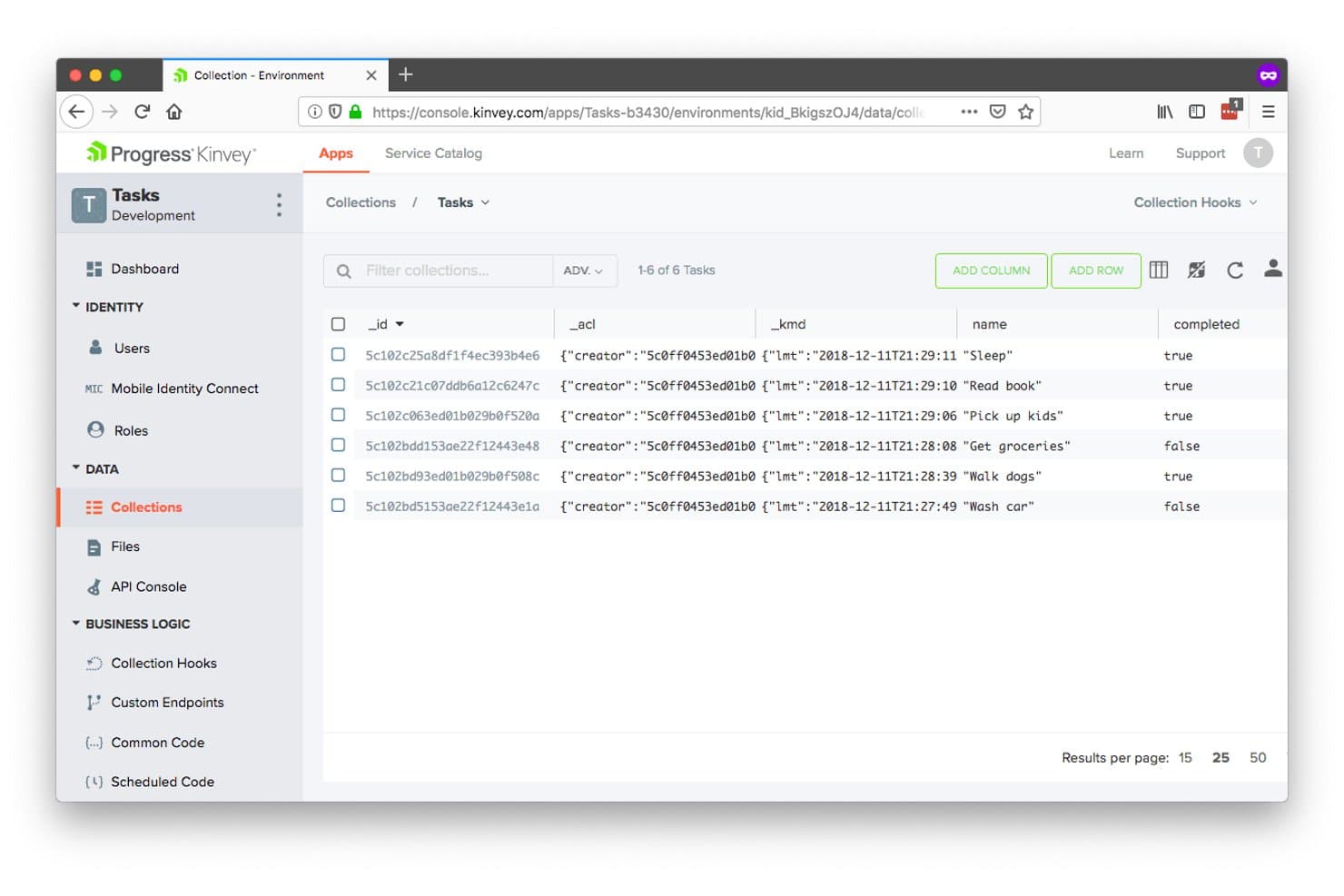
Kinvey permite a los usuarios gestionar visualmente las colecciones de datos del servidor. Kinvey es una plataforma de servidor móvil como servicio (MBaaS) de Progress que proporciona almacenamiento de datos administrado, autenticación de usuarios, funciones en la nube sin servidor, notificaciones push y sincronización de datos en tiempo real, con una capa patentada de integración de datos que expone sistemas heredados y locales como API modernas.
¿Para quién es más adecuada Kinvey?
Kinvey es adecuada para equipos de desarrollo móvil empresarial que necesitan exponer sistemas heredados locales como API modernas sin cambiar de plataforma la infraestructura existente.
Por qué elegí Kinvey
He incluido Kinvey entre mis principales opciones porque su capa patentada de integración de datos hace algo que la mayoría de las plataformas MBaaS simplemente no hacen: expone sistemas heredados locales como API REST modernas sin cambiar de plataforma ni replicar los datos. Si tu equipo mantiene un sistema ERP o EHR con el que necesitan comunicarse las aplicaciones móviles, el enfoque de Kinvey de 'Modernización instantánea de datos' conecta directamente esa infraestructura existente. También me gusta su función 'Conexión de identidad móvil', que federa proveedores de identidad empresariales como Active Directory y SAML en flujos de autenticación móvil sin necesidad de trabajo personalizado en el servidor.
Características principales de Kinvey
- Kinvey Studio: Un entorno visual de desarrollo de bajo código para crear aplicaciones móviles, web y de chat conversacional, con generación de código bidireccional para desarrolladores profesionales.
- Kinvey DataStore: Un almacén de datos NoSQL administrado, con API de CRUD y consultas optimizadas para móviles, destinado al acceso a datos estructurados desde aplicaciones de iOS, Android y web.
- Sincronización de datos sin conexión: La sincronización incremental a nivel del SDK permite que las aplicaciones móviles sin conexión sincronicen grandes conjuntos de datos, de cientos de miles de registros, con la nube sin actualizaciones completas.
- Notificaciones push: Entrega integrada de notificaciones push para aplicaciones de iOS y Android, configurable directamente mediante el SDK de Kinvey sin necesidad de configuraciones de terceros.
Integraciones de Kinvey
Kinvey se conecta con Salesforce, SAP, Microsoft, Oracle y sistemas EHR, además de proveedores de identidad como Active Directory, OpenID y SAML. Sus API REST y la conectividad DataDirect permiten el acceso personalizado a fuentes de datos heredadas y locales.
Pros and Cons
Pros:
- Moderniza sistemas heredados sin cambiar de plataforma
- Admite grandes conjuntos de datos sin conexión con sincronización incremental
- Ofrece una amplia cobertura de marcos de trabajo móviles
Cons:
- El estado actual del soporte sigue siendo incierto
- El diseño centrado en REST está por detrás de las plataformas GraphQL más recientes
Learn more about Kinvey:
Otros software MBaaS
A continuación tienes una lista de otros software MBaaS que seleccioné, pero que no llegaron al top 12. Sin duda merece la pena echarles un vistazo.
- 11KumulosLa mejor para análisis integral del rendimiento de aplicaciones
- 12GameSparksMejor para el desarrollo de backends de videojuegos
- 13Apps PanelLa mejor para integrar funciones nativas rápidamente
- 14Appgyver ComposerIdeal para el desarrollo de aplicaciones con poco código
- 15AppDragIdeal para desarrollo visual y alojamiento en la nube
- 16BaasBoxMejor para almacenamiento y recuperación segura de datos
Wie ich MBaaS-Software bewerte
Ich bewerte MBaaS-Tools in zwei Ebenen: die grundlegenden Backend-Funktionen, ohne die eine mobile App nicht auskommen kann – Authentifizierung, SDKs, Echtzeit-Synchronisation – und die Alleinstellungsmerkmale, die für Ihr spezifisches Team und Tech-Stack relevant sind.
Kernfunktionen (Mindestanforderungen für diese Liste)
Wenn ich Tools für meine Liste auswähle, bewerte ich jedes einzelne auf einer Skala von 0 (bietet die Funktion nicht) bis 5 (überzeugt in diesem Bereich) für jede der unten aufgeführten Kernfunktionen. Anschließend berechne ich aus der Gesamtsumme eine prozentuale Punktzahl. Jedes Tool muss mindestens eine Gesamtpunktzahl von 65 % erreichen, um in Betracht gezogen zu werden.
- Mobile SDKs & Plattform-Abdeckung: Ich prüfe, ob es native SDKs für iOS, Android und plattformübergreifende Frameworks wie Flutter oder React Native gibt, da die meisten Teams auf mehreren Plattformen gleichzeitig veröffentlichen.
- Dienste zur Benutzer-Authentifizierung: Vorinstallierte Authentifizierungsflüsse sind wichtig – ich schaue mir die Unterstützung für Social Login, Optionen für Multi-Faktor-Authentifizierung und die Verwaltung von Identitätsanbietern an, damit Ihr Team nicht OAuth von Grund auf integrieren muss.
- Cloud-Datenspeicherung & APIs: Ich bewerte die verwaltete Datenbankschicht, einschließlich mobiler APIs für gängige Operationen wie Abfragen, Filterung und Paginierung.
- Zustellung von Push-Benachrichtigungen: Die Möglichkeit, segmentierte, zielgerichtete Push-Benachrichtigungen über iOS und Android hinweg von einem Backend aus zu versenden, ist für mich ein Muss in jedem MBaaS.
- Serverlose Cloud-Funktionen: Ich prüfe, ob die Plattform benutzerdefinierte serverseitige Logik unterstützt, die durch Datenbankänderungen, Authentifizierungsereignisse oder HTTP-Aufrufe ausgelöst wird – etwa für das Versenden einer Willkommens-E-Mail nach der Registrierung.
- Echtzeit-Daten-Synchronisation: Bei Apps wie Chats, Live-Dashboards oder kollaborativen Tools bewerte ich, wie die Plattform Echtzeit-Listener und die Offline-Datenspeicherung auf dem Gerät umsetzt.
Sobald ich eine Liste von Tools habe, die diese Kriterien erfüllen, schaue ich mir die Alleinstellungsmerkmale der einzelnen Plattformen an.
Unterscheidende Faktoren (Was Anbieter voneinander abhebt)
So vergleiche und unterscheide ich verschiedene Anbieter:
Herausragende Funktionen
Remote-Konfiguration und Feature-Flags ermöglichen es Ihrem Team, Funktionen umzuschalten oder Änderungen auszurollen, ohne auf Freigaben im App Store zu warten – ein großer Vorteil, wenn Sie eine fehlerhafte Funktion schnell entfernen müssen. Ich achte auch darauf, ob eine Plattform eine GraphQL-API-Schicht anbietet, die mobilen Clients mehr Kontrolle über die Form und Größe der Datenantworten gibt. Für Apps mit globaler Nutzerbasis helfen Multi-Region-Optionen dabei, die Latenz zu reduzieren und Anforderungen an die Datenresidenz einzuhalten.
Mehr als nur Features
Vendor Lock-in ist im MBaaS-Bereich ein echtes Risiko. Ich prüfe, ob eine Plattform Datenexport-Möglichkeiten, Self-Hosting-Optionen oder den Einsatz offener Standards wie REST und OAuth bietet – denn das Migrieren von Auth-Nutzern und Cloud-Funktionen mitten im Projekt ist mühsam. Auch die Preisstruktur zählt, insbesondere, wie die Kosten mit der Zahl der monatlich aktiven Nutzer skalieren. Ein großzügiges kostenloses Kontingent ist beim Prototyping hilfreich, trotzdem achte ich darauf, ob das Wachstums-Pricing berechenbar bleibt. Die Entwickler-Erfahrung rundet das Bild ab: Gute SDK-Dokumentation, CLI-Tools und lokale Emulatoren machen einen messbaren Unterschied bei der Einarbeitung.
Cómo elegir software MBaaS
Es fácil perderse entre interminables listas de funciones y estructuras de precios complicadas. Para ayudarte a mantener el foco durante tu proceso de selección de software, aquí tienes una lista de factores a tener en cuenta:
| Factor | Qué tener en cuenta |
|---|---|
| FactorEscalabilidad | Qué tener en cuenta¿Puede el software crecer con tu negocio? Busca opciones que gestionen el aumento de datos y usuarios sin problemas de rendimiento ni costes adicionales. |
| FactorIntegraciones | Qué tener en cuenta¿Se conecta con tus herramientas actuales? Asegúrate de la compatibilidad con tu pila tecnológica para no interrumpir tu flujo de trabajo. |
| FactorPersonalización | Qué tener en cuenta¿Puedes adaptarlo a tus necesidades? Verifica si la plataforma permite funciones o flujos personalizados que se ajusten a tus procesos empresariales. |
| FactorFacilidad de uso | Qué tener en cuenta¿Es fácil de usar para tu equipo? Considera la curva de aprendizaje y si la interfaz se adapta al nivel de conocimientos de tu equipo. |
| FactorPuesta en marcha e incorporación | Qué tener en cuenta¿Qué tan rápido puedes empezar? Evalúa el proceso de configuración y la disponibilidad de recursos formativos para garantizar una transición fluida. |
| FactorCosto | Qué tener en cuenta¿Se ajusta a tu presupuesto? Compara los planes de precios, incluidos los costes ocultos, y considera los costes a largo plazo frente a los beneficios. |
| FactorGarantías de seguridad | Qué tener en cuenta¿Están protegidos tus datos y usuarios? Busca certificaciones de seguridad y características como cifrado y controles de acceso. |
| FactorDisponibilidad de soporte | Qué tener en cuenta¿Puedes recibir ayuda cuando la necesites? Verifica los canales de soporte del proveedor, los tiempos de respuesta y la disponibilidad para garantizar una asistencia confiable. |
¿Qué es el software MBaaS?
El software MBaaS es una plataforma que gestiona la infraestructura backend para aplicaciones móviles y web. Los desarrolladores y profesionales de TI utilizan habitualmente estas herramientas para acelerar el desarrollo y reducir la carga de la gestión del backend. Funcionalidades como el almacenamiento de datos, la autenticación de usuarios y las notificaciones push ayudan con la escalabilidad, integración y facilidad de uso. En general, las herramientas MBaaS simplifican el desarrollo de aplicaciones y aumentan la productividad.
Características
Al seleccionar un software MBaaS, preste atención a las siguientes características clave:
- Almacenamiento de datos: Proporciona soluciones de almacenamiento seguras y escalables para los datos de la aplicación, lo que ayuda a gestionar la información de los usuarios de forma eficiente.
- Autenticación de usuarios: Ofrece herramientas para gestionar los procesos de registro e inicio de sesión de usuarios, asegurando un control de acceso seguro.
- Notificaciones push: Permite enviar alertas en tiempo real a los usuarios, mejorando el compromiso y la comunicación.
- Software de analítica móvil con informes: Ofrece información sobre el rendimiento de la app y el comportamiento de los usuarios, facilitando decisiones basadas en datos.
- Capacidades de integración: Permite la conexión fluida con herramientas y plataformas existentes, asegurando la continuidad de los flujos de trabajo.
- Flujos de trabajo personalizables: Ofrece flexibilidad para adaptar procesos y características a las necesidades específicas del negocio.
- Sincronización de datos en tiempo real: Garantiza la coherencia de los datos entre dispositivos, proporcionando una experiencia de usuario unificada.
- Características de seguridad: Incluye cifrado y controles de acceso para proteger los datos de la aplicación y la privacidad de los usuarios.
- Escalabilidad: Admite el crecimiento de datos y usuarios sin afectar el rendimiento ni incurrir en costes adicionales.
- Herramientas para desarrolladores: Proporciona APIs y SDKs para facilitar el desarrollo y la integración, acelerando el proceso de creación de apps.
Beneficios
Implementar un software MBaaS ofrece varios beneficios para su equipo y su empresa. Aquí algunos de los que puede esperar:
- Desarrollo más rápido: Acelera la creación de aplicaciones al gestionar la infraestructura backend, permitiendo a los desarrolladores centrarse en las funciones front-end.
- Ahorro de costes: Reduce los gastos de infraestructura al proporcionar almacenamiento y capacidad de procesamiento escalable según se requiera.
- Seguridad mejorada: Protege los datos de los usuarios con funciones de seguridad integradas como cifrado y controles de acceso.
- Mejor compromiso de los usuarios: Favorece la comunicación con notificaciones push y la sincronización de datos en tiempo real, manteniendo a los usuarios informados y conectados.
- Escalabilidad: Crece junto a su negocio, gestionando aumentos de usuarios y datos sin afectar al rendimiento.
- Información basada en datos: Ofrece herramientas analíticas para monitorizar el rendimiento de la aplicación y el comportamiento de los usuarios, respaldando la toma de decisiones informada.
- Integración sencilla: Se conecta con herramientas y plataformas existentes, asegurando flujos de trabajo fluidos y minimizando interrupciones.
Costos y Precios
Seleccionar un software MBaaS requiere comprender los diferentes modelos y planes de precios disponibles. Los costos varían en función de las características, el tamaño del equipo, complementos y más. La siguiente tabla resume los planes más comunes, sus precios promedio y las características típicas incluidas en las soluciones de software MBaaS:
Tabla comparativa de planes para software MBaaS
| Tipo de plan | Precio promedio | Características comunes |
|---|---|---|
| Tipo de planPlan gratuito | Precio promedio$0 | Características comunesAlmacenamiento básico de datos, llamadas API limitadas y soporte comunitario. |
| Tipo de planPlan personal | Precio promedio$10-$30/user/month | Características comunesAlmacenamiento de datos mejorado, autenticación de usuarios, notificaciones push y soporte por correo electrónico. |
| Tipo de planPlan empresarial | Precio promedio$50-$100/user/month | Características comunesAnalítica avanzada, sincronización de datos en tiempo real, integraciones y soporte prioritario. |
| Tipo de planPlan corporativo | Precio promedio$150+/user/month | Características comunesFlujos de trabajo personalizables, gestor de cuenta dedicado, controles de seguridad y garantías SLA. |
Preguntas frecuentes sobre software MBaaS
Aquí tienes respuestas a preguntas comunes sobre el software MBaaS:
¿Es posible integrar MBaaS con sistemas existentes?
La mayoría de las plataformas MBaaS ofrecen capacidades de integración mediante APIs, lo que te permite conectar con herramientas y servicios existentes. Esto asegura que tus flujos de trabajo se mantengan intactos y puedas aprovechar inversiones previas. Verifica la compatibilidad con tu infraestructura tecnológica actual antes de tomar una decisión.
¿Cómo se compara el software MBaaS con el desarrollo backend a medida?
El software MBaaS ofrece una implementación más rápida, funciones preconstruidas y menores costos iniciales en comparación con el desarrollo backend personalizado. Los backends personalizados brindan mayor control para requisitos complejos, pero requieren experiencia especializada y mantenimiento continuo. Muchos equipos eligen software para un desarrollo ágil, mientras que recurren a desarrollos personalizados para necesidades únicas.
¿Es posible migrar entre diferentes proveedores de software MBaaS?
La migración entre diferentes proveedores de software MBaaS puede ser desafiante, dependiendo de la integración con características y APIs específicas del proveedor. Para facilitar eventuales migraciones, utiliza capas de abstracción al implementar el software. Algunas plataformas ofrecen herramientas de migración para ayudar a transferir datos desde servicios de la competencia.
¿Cómo pueden las empresas garantizar el cumplimiento de datos al usar software MBaaS?
Las empresas deben verificar que los proveedores de software cuenten con certificaciones de cumplimiento relevantes para su sector (GDPR, HIPAA, SOC2). Implementa políticas de gobierno de datos que vayan acordes con las capacidades de tu plataforma MBaaS elegida. Muchas soluciones empresariales de software MBaaS ofrecen opciones de residencia de datos, controles de cifrado y registros de auditoría para ayudar a cumplir con los requisitos de cumplimiento.
¿Qué sigue?
Si estás investigando software MBaaS, conéctate con un asesor de SoftwareSelect para obtener recomendaciones gratuitas.
Solo tienes que completar un formulario y mantener una breve charla donde analizarán las especificaciones de tus necesidades. Luego, recibirás una lista corta de software para revisar. Incluso te acompañarán durante todo el proceso de compra, incluyendo negociaciones de precios.