

Con tantas herramientas diferentes de pruebas continuas disponibles, es difícil decidir cuál es la adecuada para ti. Sabes que quieres automatizar la ejecución de pruebas en cada etapa del desarrollo, pero necesitas determinar qué herramienta es la mejor. ¡Yo te ayudo! En esta publicación te ayudaré a tomar una decisión fácilmente, compartiendo mis experiencias personales utilizando docenas de programas de pruebas continuas diferentes con diversos equipos y proyectos, junto con mis selecciones de las mejores herramientas de pruebas continuas.
Por qué confiar en nuestras recomendaciones de software
6,700+
Reviews
20
Industry experts
16+
Evaluation factors
14
Years
Nuestro equipo lleva probando y evaluando software desde 2012. Como líderes tecnológicos, sabemos lo difícil —y lo importante— que es elegir el software adecuado.
Para esta guía, evaluamos las herramientas mediante pruebas prácticas e investigación independiente, puntuando las herramientas según nuestros criterios de selección.
Nuestras reseñas reflejan nuestro criterio editorial humano, no un discurso de ventas.
Revisores expertos:
- Paulo Gardini MiguelDirector técnico
 Tim FisherVP de IA
 Gabriel RosasTech Lead y arquitecto de software
 Christhian GruhnTech Lead y arquitecto de plataforma

Tabla comparativa de herramientas de pruebas continuas
Esta tabla comparativa resume los detalles de precios de mi selección de las mejores herramientas de pruebas continuas:
| Tool | Best For | Trial Info | Price | ||
|---|---|---|---|---|---|
| 1 | Ideal para pruebas agénticas del ciclo de vida del desarrollo de software con transferencia a agentes de programación | Plan gratuito + prueba gratuita disponibles | Desde $20/mes | Website | |
| 2 | La mejor herramienta de pruebas continuas para ejecutar pruebas sin mantenimiento | Demostración gratuita disponible | Precio bajo solicitud | Website | |
| 3 | Ideal para pruebas automatizadas de IU en entornos de escritorio y web | Prueba gratuita de 14 días | Desde $3,598/año (facturado anualmente) | Website | |
| 4 | Ideal para probar aplicaciones móviles reforzadas y listas para producción | Demostración gratuita disponible | Precio bajo solicitud | Website | |
| 5 | La mejor opción para la regresión entre navegadores impulsada por IA visual | Prueba gratuita de 14 días + demostración gratuita disponible | Precios bajo solicitud | Website | |
| 6 | La mejor opción para pruebas entre navegadores y en dispositivos reales a gran escala | Prueba gratuita disponible | Desde $29/usuario/mes (facturado anualmente) | Website | |
| 7 | Ideal para pruebas con autocorrección e información de producción | Prueba gratuita de 30 días + demostración gratuita disponible | Desde $84/usuario/mes (facturado anualmente) | Website | |
| 8 | La mejor opción para la ejecución en paralelo en distintas versiones de sistemas operativos | Prueba gratuita de 28 días + demostración gratuita disponible | Desde $39/mes (facturado anualmente) | Website | |
| 9 | La mejor herramienta de pruebas de software automatizadas para Salesforce | Prueba gratuita de 14 días + demostración gratuita disponible | Precios disponibles previa solicitud | Website | |
| 10 | Ideal para nubes empresariales de dispositivos con alta seguridad | Demostración gratuita disponible | Precio disponible previa solicitud | Website |


Reseñas de las mejores herramientas de pruebas continuas
Aquí tienes una breve descripción de cada programa de pruebas continuas que destaca el mejor caso de uso de cada herramienta, sus características más destacadas y algunas ventajas y desventajas. También he incluido capturas de pantalla para ofrecerte una visión general de su interfaz de usuario.
 Ideal para pruebas agénticas del ciclo de vida del desarrollo de software con transferencia a agentes de programación
- Plan gratuito + prueba gratuita disponibles
- Desde $20/mes
Visit WebsiteCustomer Rating:4.7/5
Functionize permite a los usuarios ejecutar y revisar pruebas en distintos navegadores y dispositivos. Functionize es una plataforma de pruebas continuas nativa de IA que crea, ejecuta, mantiene y diagnostica pruebas de forma autónoma en flujos de trabajo de interfaz de usuario web, API, bases de datos, pruebas visuales y aplicaciones empresariales.
¿Para quién es más adecuado Functionize?
Functionize es una opción ideal para equipos de control de calidad y DevOps que trabajan en entornos de desarrollo nativos de IA, donde los agentes de programación como Cursor o Claude Code ya forman parte del flujo de trabajo.
Por qué elegí Functionize
Functionize ocupa un lugar destacado en mi lista de opciones por su integración en los flujos de trabajo del ciclo de vida del desarrollo de software agéntico, específicamente por el servidor MCP, que permite a los agentes de programación como Cursor o Claude Code transferir el trabajo directamente a Functionize Studio en cuanto terminan de generar el código. También utilizo el agente de diagnóstico, que realiza un análisis automatizado de la causa raíz y distingue los defectos reales de la inestabilidad de las pruebas sin requerir una clasificación manual. El agente de creación completa esta propuesta al convertir automáticamente historias de usuario en lenguaje natural en casos de prueba ejecutables.
Características principales de Functionize
- Pruebas de API entre protocolos: Ejecuta pruebas en REST, SOAP, GraphQL, gRPC, WebSockets, Kafka y MQ desde una única plataforma.
- Autorreparación SmartFix: Detecta y repara automáticamente los pasos de prueba dañados cuando se producen cambios en la interfaz de usuario, reduciendo el esfuerzo de mantenimiento hasta en un 90%.
- Pruebas basadas en datos: Carga un archivo CSV y Studio recorre cada fila, asignando las columnas de datos directamente a los pasos de prueba.
- Creación de túneles seguros con QuickConnect: Abre túneles por sesión a aplicaciones internas o privadas sin requerir una VPN ni puertos de entrada abiertos.
Integraciones de Functionize
Functionize ofrece integraciones documentadas con GitHub, Jenkins, Azure DevOps, CircleCI, AWS CodePipeline, Spinnaker, Jira, TestRail, Xray y Zephyr Squad. También admite activadores mediante webhooks y API, además de transferencias MCP con Cursor, Windsurf y Claude Code.
Pros and Cons
Pros:
- Los agentes de IA generan y autorreparan las pruebas automáticamente
- Compatibilidad amplia con flujos de trabajo agénticos del ciclo de vida del desarrollo de software
- La cobertura incluye web, API, voz y bases de datos
Cons:
- Compatibilidad limitada con pruebas nativas de aplicaciones móviles
- La documentación de las integraciones indica que estarán disponibles próximamente
Learn more about Functionize: La mejor herramienta de pruebas continuas para ejecutar pruebas sin mantenimiento
- Demostración gratuita disponible
- Precio bajo solicitud
Visit WebsiteCustomer Rating:4.4/5
Testsigma utiliza IA para generar y ejecutar casos de prueba automáticamente de forma continua. Testsigma es una plataforma de pruebas continuas nativa de IA que cubre pruebas web, móviles, de API, Salesforce y de escritorio mediante una interfaz de lenguaje natural sin código respaldada por Selenium y Appium.
¿Para quién es mejor Testsigma?
Testsigma es una opción excelente para los equipos de lanzamiento y control de calidad que necesitan generación de pruebas basada en IA, ejecución con autocorrección y puntuación de confianza de lanzamiento en una sola plataforma sin código.
Por qué elegí Testsigma
Testsigma ocupa un lugar en mi lista de opciones principales por la forma en que gestiona la puntuación de confianza de lanzamiento, una función que convierte los resultados de las pruebas en una señal cuantificada de avanzar o no avanzar antes de que cualquier implementación siga adelante. Me gusta que el agente Atto Analyzer no solo detecte los fallos, sino que los clasifique como defectos reales, cambios en la interfaz de usuario o pruebas inestables, para que tu equipo no persiga ruido antes de un lanzamiento. Junto con la reparación de localizadores en tiempo real del agente Healer, Testsigma mantiene estables las suites de pruebas sin intervención manual entre sprints.
Características principales de Testsigma
- Creación de pruebas sin código mediante lenguaje natural: Escribe casos de prueba en lenguaje sencillo sin conocimientos de programación, utilizando una interfaz de lenguaje natural basada en Selenium y Appium.
- Nube de dispositivos reales: Ejecuta pruebas en más de 3.000 combinaciones de navegadores y sistemas operativos reales, así como en dispositivos móviles, incluidos más de 800 dispositivos iOS y Android.
- Integración con canalizaciones CI/CD: Conecta de forma nativa con Jenkins, GitHub Actions, Azure DevOps, CircleCI y otras cinco plataformas CI/CD mediante activadores de pruebas basados en eventos.
- Gestión de pruebas nativa de IA: Gestiona casos de prueba manuales y automatizados en un solo módulo, con sincronización bidireccional con Jira, trazabilidad de requisitos y control de versiones de pruebas.
Integraciones de Testsigma
Testsigma ofrece más de 30 integraciones nativas en Pro y más de 40 en Enterprise, incluidas Jenkins, GitHub Actions, Azure DevOps, CircleCI, Jira, Linear, Slack, Microsoft Teams, BrowserStack y Sauce Labs. También proporciona API para integraciones CI/CD personalizadas.
Pros and Cons
Pros:
- Puntuación de confianza de lanzamiento para tomar decisiones de avanzar o no avanzar
- Agentes de IA para la creación y el mantenimiento de pruebas
- Plataforma sin código unificada para todos los tipos de pruebas
Cons:
- No ofrece compatibilidad nativa con Cypress ni Playwright
- Los localizadores generados automáticamente pueden ser poco fiables
Learn more about Testsigma: Ideal para pruebas automatizadas de IU en entornos de escritorio y web
- Prueba gratuita de 14 días
- Desde $3,598/año (facturado anualmente)

TestComplete permite a los usuarios insertar y gestionar operaciones de prueba mediante menús contextuales. TestComplete es una plataforma de automatización de pruebas de IU de SmartBear que admite pruebas mediante scripts, basadas en palabras clave y sin código en aplicaciones de escritorio, web y móviles, con autorreparación integrada mediante IA y ejecución paralela entre entornos.
¿Para quién es más adecuado TestComplete?
TestComplete es una opción excelente para ingenieros de automatización de control de calidad en grandes empresas que necesitan probar IU de escritorio y web complejas en tipos de aplicaciones tanto antiguas como modernas.
Por qué elegí TestComplete
TestComplete ocupa un lugar en mi lista de opciones principales porque gestiona pruebas automatizadas de IU en entornos de escritorio, web y móviles con una profundidad difícil de igualar cuando se trabaja simultáneamente con pilas de aplicaciones antiguas y modernas. Me impresionan especialmente sus pruebas con autorreparación mediante IA, que detectan y corrigen automáticamente las referencias de objetos dañadas cuando cambian los elementos de la IU, con una tasa de éxito declarada del 95 %. También me gusta que su reconocimiento de objetos sea compatible con una variedad excepcionalmente amplia de marcos de IU, desde Oracle Forms y SAP hasta React y Electron, por lo que no es necesario mantener herramientas separadas para distintos tipos de aplicaciones.
Características principales de TestComplete
- Compatibilidad con BDD/Cucumber: Escriba escenarios de prueba de forma nativa con la sintaxis de Gherkin, sin complementos adicionales, para alinear los casos de prueba con los requisitos empresariales.
- Pruebas basadas en datos: Ejecute automáticamente la misma lógica de prueba en varios conjuntos de datos, cubriendo una gama más amplia de escenarios de entrada sin duplicar los scripts de prueba.
- Conjunto de red para ejecución distribuida: Coordine y ejecute pruebas simultáneamente en varias máquinas remotas, reduciendo el tiempo total de ejecución de pruebas en conjuntos de gran tamaño.
- Integración con LoadNinja: Convierta las pruebas funcionales de IU existentes en pruebas de carga dentro de un único flujo de trabajo, sin crear desde cero scripts de pruebas de carga independientes.
Integraciones de TestComplete
TestComplete ofrece integraciones nativas con Jenkins, Azure DevOps, GitHub Actions, GitLab, TeamCity, Bamboo, Jira, Bitbucket, Zephyr Enterprise y BitBar. Su CLI, API REST y arquitectura abierta de complementos admiten flujos de trabajo de CI/CD personalizados.
Pros and Cons
Pros:
- Gestiona pruebas de aplicaciones antiguas y modernas
- La autorreparación mediante IA identifica los cambios en la IU
- Admite la creación de pruebas sin código y mediante scripts
Cons:
- Requiere Windows para ejecutar todas las pruebas
- Carece de una gestión de pruebas integral integrada
Learn more about TestComplete: Ideal para probar aplicaciones móviles reforzadas y listas para producción
- Demostración gratuita disponible
- Precio bajo solicitud

Digital.ai Continuous Testing ofrece paneles de análisis integrados para obtener información sobre las pruebas. Digital.ai Continuous Testing es una plataforma de pruebas móviles y web que admite pruebas funcionales, de rendimiento y de accesibilidad en dispositivos reales, dispositivos virtuales y navegadores en la nube, con creación de pruebas basada en IA, pruebas con autocorrección y amplia compatibilidad con frameworks, incluidos Appium, Espresso, XCUITest, Playwright y Cypress.
¿Para quién es más adecuado Digital.ai Continuous Testing?
Digital.ai Continuous Testing es una opción excelente para equipos empresariales de control de calidad móvil y DevOps que necesitan probar aplicaciones reforzadas en materia de seguridad y listas para producción a gran escala en dispositivos reales.
Por qué elegí Digital.ai Continuous Testing
Digital.ai Continuous Testing ocupa un lugar en mi lista de opciones principales porque es la única plataforma de pruebas que permite ejecutar pruebas automatizadas directamente en aplicaciones reforzadas para producción, incluidas aquellas protegidas mediante ofuscación, RASP y endurecimiento binario a través de su integración con Arxan, sin mantener una compilación independiente sin protección. También me gusta que las pruebas funcionales, de rendimiento y de accesibilidad se ejecuten en una sola pasada con informes unificados. Este modelo de ejecución tres en uno reduce los ciclos de regresión de días a horas en dispositivos reales y virtuales de forma simultánea.
Características principales de Digital.ai Continuous Testing
- Pruebas con autocorrección: Las pruebas se actualizan automáticamente cuando cambian los elementos de la interfaz de usuario, lo que reduce el tiempo que tu equipo dedica al mantenimiento de las pruebas después de cada lanzamiento de la aplicación.
- Puertas de calidad del agente inteligente: Un agente automatizado se integra directamente en tu canalización de CI/CD para activar la ejecución de pruebas con cada confirmación de código y bloquear las implementaciones cuando fallan las pruebas.
- Nube de dispositivos reales con simulación de red: Ejecuta pruebas en dispositivos iOS y Android reales distribuidos en 7 centros de datos globales, con compatibilidad con condiciones de limitación de red 3G, 4G, 5G y sin conexión.
- Generación de scripts con el Estudio móvil: Una herramienta basada en la interfaz de usuario que genera automáticamente código de automatización a partir de interacciones grabadas, lo que permite a personas que no son ingenieras crear scripts de prueba sin escribir código manualmente.
Integraciones de Digital.ai Continuous Testing
Digital.ai Continuous Testing se integra con Jenkins, GitHub Actions, GitLab CI, Azure DevOps, Bitbucket, TeamCity, CircleCI, Jira, Microsoft Teams, Slack, Dynatrace y Datadog. El agente inteligente admite puertas de calidad de CI/CD, mientras que las integraciones de MCP conectan agentes de codificación de IA.
Pros and Cons
Pros:
- Prueba directamente aplicaciones móviles reforzadas y listas para producción
- Las pruebas en paralelo reducen drásticamente el tiempo del ciclo de regresión
- Pruebas funcionales, de rendimiento y de accesibilidad en conjunto
Cons:
- Se han informado retrasos en la cola de dispositivos durante las horas punta
- La interfaz puede parecer desordenada después de las actualizaciones
Learn more about Digital.ai Continuous Testing: La mejor opción para la regresión entre navegadores impulsada por IA visual
- Prueba gratuita de 14 días + demostración gratuita disponible
- Precios bajo solicitud

Applitools registra las ejecuciones de pruebas, los resultados de pantalla y los problemas sin resolver en un único panel de control. Applitools es una plataforma de pruebas visuales y funcionales de interfaces de usuario que utiliza análisis de imágenes impulsado por IA y un motor de renderizado entre navegadores para automatizar pruebas de regresión visual, accesibilidad, entre dispositivos, de API y de componentes en más de 30 SDK de frameworks.
¿Para quién es más adecuado Applitools?
Applitools es una opción excelente para ingenieros de automatización de control de calidad y equipos de lanzamiento que gestionan la cobertura de pruebas en múltiples navegadores y dispositivos en bases de código grandes y de rápida evolución.
Por qué elegí Applitools
Applitools merece estar en mi lista de opciones porque su motor de IA visual hace algo que las herramientas de comparación de píxeles sencillamente no pueden: distingue las regresiones reales de la interfaz de usuario del ruido de renderizado, lo que significa que muchas menos alertas falsas saturan la cola de revisión. Me impresiona especialmente Ultrafast Grid, que captura una única instantánea del DOM y la vuelve a renderizar en paralelo en docenas de combinaciones de navegadores y sistemas operativos, reduciendo drásticamente los ciclos de retroalimentación entre navegadores. La gestión de líneas base adaptada a ramas también destaca, ya que alinea las líneas base visuales directamente con las ramas de Git, de modo que las regresiones de una rama de funcionalidades nunca contaminan la línea base principal.
Características principales de Applitools
- Localizadores de pruebas autorreparables: La IA visual identifica los elementos de la interfaz por su apariencia en lugar de por los atributos del DOM, por lo que las pruebas siguen ejecutándose incluso cuando cambian los nombres de las clases, los ID o la estructura de la página.
- Creación de pruebas basada en NLP: Escriba los pasos de prueba en lenguaje sencillo y el modelo de lenguaje determinista de Applitools los convierte en acciones de prueba ejecutables y reproducibles.
- Pruebas de componentes de Storybook: Pruebe componentes individuales de la interfaz de usuario de forma aislada directamente dentro de Storybook, detectando regresiones antes de que lleguen a entornos integrados.
- Análisis de la causa raíz: El analizador de defectos visuales vincula automáticamente los fallos de la interfaz de usuario con cambios de código específicos, identificando qué se rompió y dónde sin necesidad de investigación manual.
Integraciones de Applitools
Applitools ofrece más de 60 integraciones, incluidas Jenkins, GitHub Actions, GitLab CI/CD, Azure DevOps, CircleCI, Jira, Slack, GitHub, GitLab y Bitbucket. Los activadores de API y webhook admiten flujos de trabajo de CI/CD personalizados.
Pros and Cons
Pros:
- La IA visual reduce considerablemente las alertas falsas
- El motor de pruebas determinista elimina los fallos intermitentes
- Los localizadores autorreparables sobreviven a los cambios en el código de la interfaz de usuario
Cons:
- Los cambios visuales marcados requieren revisión manual
- La configuración inicial puede ser compleja para los equipos
Learn more about Applitools: La mejor opción para pruebas entre navegadores y en dispositivos reales a gran escala
- Prueba gratuita disponible
- Desde $29/usuario/mes (facturado anualmente)
Visit WebsiteCustomer Rating:4.5/5
BrowserStack destaca la optimización de compilaciones para ahorrar aproximadamente 1 hora por ejecución de prueba. BrowserStack es una plataforma de pruebas continuas basada en la nube que abarca pruebas automatizadas entre navegadores, pruebas móviles en dispositivos reales, regresión visual, accesibilidad y pruebas de carga en miles de combinaciones de navegadores, sistemas operativos y dispositivos.
¿Para quién es más adecuado BrowserStack?
BrowserStack es una opción excelente para los equipos empresariales de control de calidad y DevOps que ejecutan conjuntos de pruebas de gran volumen en una amplia variedad de navegadores, sistemas operativos y dispositivos móviles reales.
Por qué elegí BrowserStack
BrowserStack ocupa un lugar en mi lista de opciones porque ninguna otra plataforma iguala su escala para las pruebas entre navegadores y en dispositivos reales. Estoy hablando de más de 3.500 combinaciones de navegadores y sistemas operativos, junto con más de 35.000 dispositivos físicos reales, no emuladores. Su agente de selección de pruebas ejecuta únicamente las pruebas afectadas por un cambio de código determinado, lo que mantiene ajustados los tiempos de las canalizaciones incluso cuando el conjunto de pruebas crece. El agente de autocorrección repara automáticamente los localizadores rotos durante la ejecución, por lo que las ejecuciones paralelas de gran tamaño no se detienen por pequeños cambios en el DOM.
Características principales de BrowserStack
- Análisis de fallos basado en IA: La observabilidad de pruebas clasifica automáticamente los fallos en defectos del producto, problemas de automatización y problemas del entorno para reducir el tiempo de triaje hasta en un 95 %.
- Complemento del IDE para acompañamiento de pruebas: Una herramienta de IA integrada en VS Code que permite crear, ejecutar, depurar y mantener pruebas directamente en el IDE mediante lenguaje natural.
- Automatización sin código: Un grabador basado en IA que permite a los evaluadores no técnicos crear y ejecutar pruebas automatizadas en navegadores y dispositivos reales en cuestión de minutos.
- Puertas de calidad: Umbrales configurables de aprobación o rechazo que bloquean o aprueban automáticamente las fusiones de solicitudes de extracción en función de la estabilidad de las pruebas, las tasas de fallos y las puntuaciones de intermitencia.
Integraciones de BrowserStack
BrowserStack ofrece más de 18 integraciones nativas de CI/CD, incluidas Jenkins, GitHub Actions, GitLab CI/CD, Azure Pipelines, CircleCI, Bitbucket Pipelines y Buildkite. También se integra con GitHub, GitLab, Bitbucket, Jira, Slack y Microsoft Teams, con una API REST y webhooks para conexiones personalizadas.
Pros and Cons
Pros:
- Ejecuta pruebas en más de 35.000 dispositivos reales
- Los agentes de IA aceleran el triaje y la creación de pruebas
- Amplia compatibilidad con todos los principales marcos de pruebas
Cons:
- Las sesiones en dispositivos reales a veces experimentan latencia
- El coste de las pruebas automatizadas aumenta rápidamente con el uso
Learn more about BrowserStack: Ideal para pruebas con autocorrección e información de producción
- Prueba gratuita de 30 días + demostración gratuita disponible
- Desde $84/usuario/mes (facturado anualmente)
Visit WebsiteCustomer Rating:4.4/5
Katalon Studio permite a los usuarios insertar palabras clave de interfaz de usuario web mediante el menú contextual del botón derecho. Katalon Studio es una plataforma de pruebas continuas que abarca la automatización de pruebas web, móviles, de API y de escritorio, y combina la creación de pruebas basada en IA, los localizadores con autocorrección, la ejecución en la nube y el análisis del tráfico de producción en un único conjunto de herramientas unificado.
¿Para quién es más adecuado Katalon Studio?
Katalon Studio es una opción excelente para los equipos de control de calidad que necesitan una única plataforma que cubra la creación, ejecución y gestión de pruebas, así como el análisis del tráfico de producción, sin tener que integrar varias herramientas.
Por qué elegí Katalon Studio
Katalon Studio ocupa un lugar en mi lista de opciones porque es la única herramienta que he visto que cierra el ciclo entre el tráfico de producción y la cobertura de regresión. TrueTest incorpora los recorridos reales de los usuarios desde producción, los compara con el conjunto de pruebas existente y genera automáticamente pruebas ejecutables para cualquier ruta no cubierta. Si a esto le sumamos los localizadores con autocorrección basados en IA tanto para web como para móviles, las pruebas dejan de fallar cada vez que cambia un localizador.
Funciones clave de Katalon Studio
- Asistente de codificación con IA StudioAssist: Un asistente de IA integrado en el editor de scripts que genera scripts de prueba, explica el código y sugiere correcciones utilizando el proveedor de LLM que elijas (OpenAI, Gemini, Claude y otros).
- Nube de dispositivos reales TestCloud: Ejecuta pruebas en dispositivos iOS y Android reales, con compatibilidad para la limitación del ancho de banda de red, la simulación de GPS, la simulación biométrica y la inyección de cámara, sin necesidad de mantener un laboratorio físico de dispositivos.
- Motor de ejecución de Katalon en tiempo de ejecución (KRE): Un motor de ejecución CLI sin interfaz gráfica que permite activar ejecuciones de pruebas directamente desde canalizaciones de CI/CD en Jenkins, GitHub Actions, Azure DevOps, CircleCI y más de otras 7 plataformas.
- Detección de pruebas inestables: TestOps identifica automáticamente las pruebas con resultados incoherentes de aprobación o fallo entre ejecuciones y las muestra en paneles para que el equipo pueda priorizar las correcciones.
Integraciones de Katalon Studio
Katalon Studio ofrece integraciones nativas con Jenkins, GitHub Actions, GitLab CI, Azure DevOps, Jira, TestRail, Xray, Zephyr, BrowserStack y Sauce Labs. También admite integraciones con plataformas adicionales de CI/CD, ALM, nubes de dispositivos y pruebas.
Pros and Cons
Pros:
- Localizadores con autocorrección basados en IA para web y móviles
- Análisis de la cobertura de producción con información de TrueTest
- Nube de dispositivos reales y paralelización de navegadores
Cons:
- La ejecución de CI/CD está restringida a un complemento de pago
- Los conjuntos de pruebas grandes pueden causar problemas de rendimiento
Learn more about Katalon Studio: La mejor opción para la ejecución en paralelo en distintas versiones de sistemas operativos
- Prueba gratuita de 28 días + demostración gratuita disponible
- Desde $39/mes (facturado anualmente)
Visit WebsiteCustomer Rating:4.3/5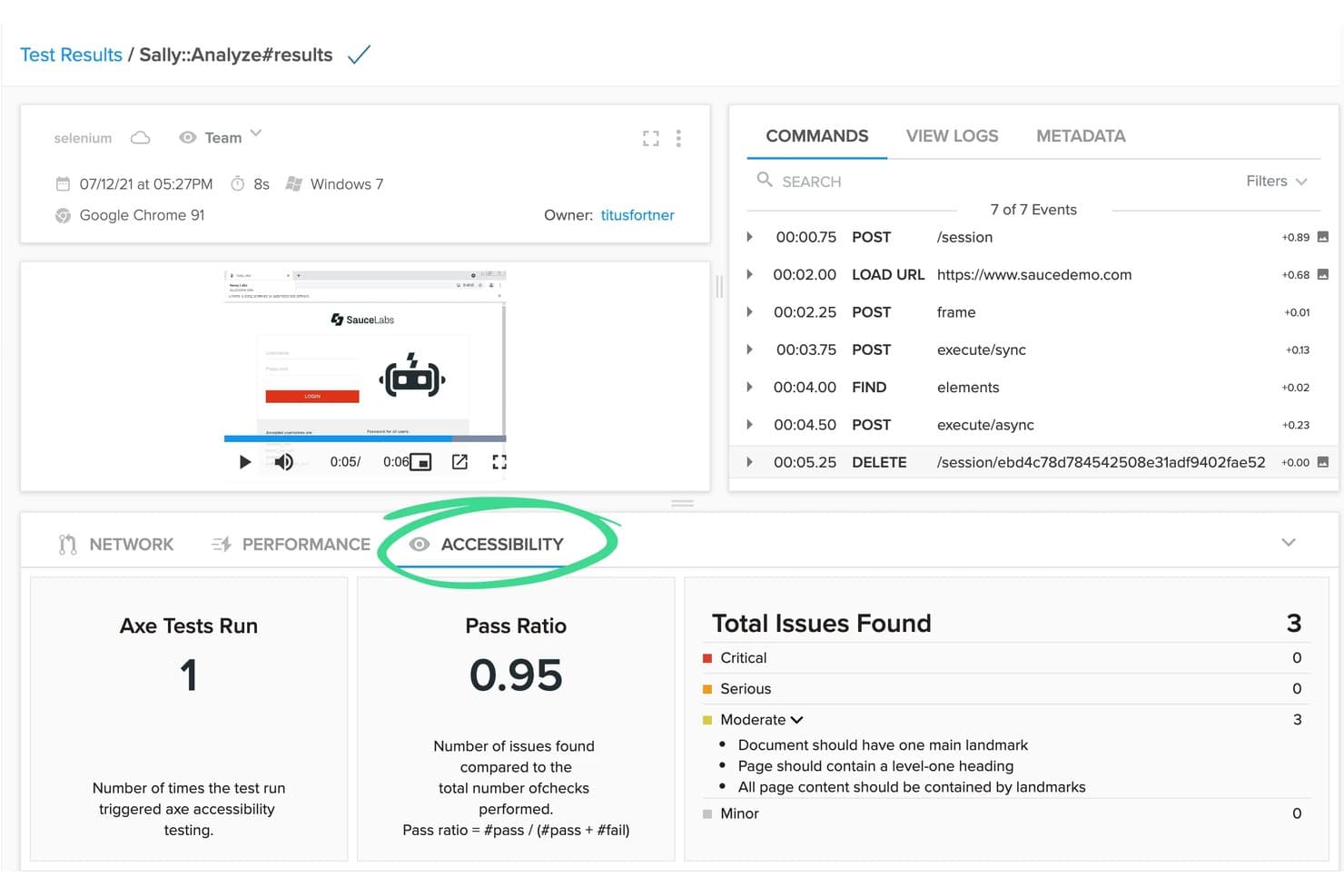
Sauce Labs muestra los resultados de las pruebas de accesibilidad junto con las ejecuciones de pruebas automatizadas. Sauce Labs es una plataforma de pruebas continuas basada en el marco AURA que admite la ejecución de pruebas automatizadas, visuales, de API y móviles en dispositivos reales, emuladores y entornos de navegador/sistema operativo.
¿Para quién es más adecuado Sauce Labs?
Sauce Labs es una excelente opción para equipos de control de calidad y DevOps de empresas medianas y grandes que necesitan ejecutar pruebas automatizadas simultáneamente en una amplia variedad de dispositivos reales, navegadores y sistemas operativos.
Por qué elegí Sauce Labs
Sauce Labs ocupa un lugar en mi lista de opciones principales por la enorme escala de sus capacidades de ejecución en paralelo en dispositivos reales y entornos de sistemas operativos. Estoy hablando de más de 10,000 dispositivos reales y más de 8,000 combinaciones de navegador/sistema operativo ejecutándose simultáneamente, lo que significa que un conjunto de pruebas que tardaría horas de forma secuencial puede finalizar en minutos. También me gustan las pruebas de autocuración basadas en IA de la plataforma AURA, que se adaptan automáticamente a los cambios de la interfaz de usuario para que las ejecuciones en paralelo no fallen en cuanto cambia un selector.
Funciones principales de Sauce Labs
- Informes de errores de Sauce: Herramienta de detección y deduplicación de fallos en tiempo real que realiza un seguimiento de los errores durante todo el SDLC y muestra diagnósticos prácticos para resolverlos más rápidamente.
- Sauce VisualCatch: Pruebas de regresión visual que detectan pronto los cambios no deseados en la interfaz de usuario al comparar capturas de pantalla entre compilaciones antes de que lleguen a producción.
- Sauce Connect Proxy: Solución de tunelización segura que permite ejecutar pruebas automatizadas en aplicaciones alojadas detrás de firewalls sin exponer la infraestructura interna.
- saucectl CLI: Ejecutor de pruebas de línea de comandos que se integra directamente con las canalizaciones de CI/CD para activar y orquestar ejecuciones de pruebas en los entornos de Sauce Labs con cada confirmación o evento de compilación.
Integraciones de Sauce Labs
Sauce Labs ofrece integraciones nativas con más de 11 plataformas de CI/CD, incluidas GitHub Actions, GitLab, Jenkins, Azure DevOps, CircleCI, Bitbucket, Codefresh, TeamCity y Harness. Las API REST, los webhooks y la compatibilidad con Sauce Connect Proxy permiten realizar integraciones personalizadas y establecer una conectividad segura con las canalizaciones.
Pros and Cons
Pros:
- Ejecuta pruebas en paralelo en miles de dispositivos
- Creación de pruebas y autocuración basadas en IA
- Compatibilidad demostrada con necesidades empresariales complejas
Cons:
- Funciones avanzadas de IA limitadas al nivel empresarial
- Retrasos en las sesiones de prueba fuera de EE. UU. y la UE
Learn more about Sauce Labs: La mejor herramienta de pruebas de software automatizadas para Salesforce
- Prueba gratuita de 14 días + demostración gratuita disponible
- Precios disponibles previa solicitud

Tricentis Tosca automatiza la creación de pruebas y realiza un seguimiento de los resultados de las ejecuciones de pruebas continuas. Tricentis Tosca es una plataforma de pruebas continuas basada en modelos que automatiza pruebas funcionales, de regresión, de API, de interfaz de usuario y móviles en más de 160 tecnologías, con creación de pruebas sin código y un motor de generación de pruebas impulsado por IA.
¿Para quién es más adecuada Tricentis Tosca?
Tosca es una opción excelente para equipos de control de calidad empresariales que prueban entornos de Salesforce, SAP u Oracle y necesitan automatización sin código sin sacrificar la profundidad de cobertura.
Por qué elegí Tricentis Tosca
Tricentis Tosca ocupa un lugar en mi lista de herramientas seleccionadas porque ninguna otra herramienta de pruebas continuas iguala su profundidad para entornos de Salesforce. La función propietaria Salesforce Scan crea un modelo de automatización completo de una organización de Salesforce en menos de 60 segundos, algo realmente difícil de replicar con marcos de trabajo de propósito general. También confío en su IA agéntica para generar casos de prueba completos de extremo a extremo a partir de descripciones en lenguaje natural, lo que permite a las personas que no programan contribuir a la cobertura de pruebas sin escribir una sola línea de código.
Características principales de Tricentis Tosca
- Elastic Execution Grid: Proporciona agentes bajo demanda en la nube y locales para ejecutar miles de pruebas simultáneas en los principales navegadores, iOS y Android al mismo tiempo.
- Simulación de API mediante servicios virtuales: Sustituye microservicios no disponibles en los protocolos HTTP, Kafka, RabbitMQ y MQ para que los equipos puedan realizar pruebas sin dependencias activas.
- Inteligencia basada en riesgos: Prioriza la ejecución de pruebas en las funciones críticas para el negocio y muestra datos sobre el impacto de los cambios para respaldar las decisiones de lanzamiento de continuar o no continuar.
- Gestión de datos de prueba: Crea y proporciona automáticamente datos de prueba con estado bajo demanda utilizando conjuntos de datos sintéticos, enmascarados o importados directamente dentro de la plataforma en la nube.
Integraciones de Tricentis Tosca
Tricentis Tosca ofrece integraciones con Jenkins, Azure DevOps, GitHub Actions, GitLab, Jira, qTest, NeoLoad y LiveCompare. Su API, CLI y Tosca Execution Client admiten flujos de trabajo personalizados de CI/CD.
Pros and Cons
Pros:
- Genera pruebas de extremo a extremo a partir de lenguaje natural
- Amplia cobertura de automatización para Salesforce y SAP
- Simula API y microservicios no disponibles
Cons:
- No es adecuada para equipos de desarrollo orientados al código
- La integración con herramientas de código abierto es limitada
Learn more about Tricentis Tosca: Ideal para nubes empresariales de dispositivos con alta seguridad
- Demostración gratuita disponible
- Precio disponible previa solicitud

Perforce Perfecto realiza un seguimiento histórico de las tasas de pruebas aprobadas, fallidas y bloqueadas. Perfecto es una plataforma de pruebas continuas de Perforce que combina pruebas en la nube con dispositivos reales, creación y autocorrección de pruebas impulsadas por AI, ejecución paralela en distintos navegadores y dispositivos, e integración profunda con canalizaciones de CI/CD para aplicaciones web, móviles y de escritorio.
¿Para quién es más adecuado Perfecto?
Perfecto es una opción muy adecuada para equipos empresariales de control de calidad y DevOps en sectores regulados que necesitan una nube segura y escalable de dispositivos reales con una integración profunda con CI/CD.
Por qué elegí Perfecto
Perfecto ocupa un lugar en mi lista de opciones principales por la escala y seguridad de su nube de dispositivos reales, algo realmente difícil de igualar en el ámbito empresarial. Hablamos de más de 10.000 dispositivos físicos reales distribuidos en 11 centros de datos globales, respaldados por un SLA de disponibilidad del 99,999 % y certificados conforme a las normas SOC 2, ISO 27001 y PCI. En sectores regulados donde no se puede escatimar en la gestión de datos, la opción de implementación en una nube privada mantiene los datos de prueba confidenciales completamente aislados. La autocorrección mediante AI y el análisis de causa raíz, sumados a esa infraestructura, implican menos tiempo dedicado a perseguir pruebas inestables y más tiempo para lanzar productos.
Características principales de Perfecto
- Análisis de causa raíz mediante AI: Clasifica automáticamente los fallos de las pruebas en las capas de interfaz de usuario, API, datos y dispositivos al comparar las ejecuciones fallidas con las últimas ejecuciones correctas para agrupar los problemas relacionados.
- Creación de pruebas sin scripts: Permite crear pruebas utilizando lenguaje natural en inglés cotidiano mediante el marco de trabajo Quantum, sin necesidad de código, localizadores ni conocimientos del marco.
- Capacidad de ampliación temporal: Escala temporalmente la capacidad de ejecución paralela por encima de la incluida en la licencia base durante los periodos de lanzamiento de mayor actividad, sin requerir una actualización permanente del plan.
- Pruebas de accesibilidad: Incluye comprobaciones integradas del cumplimiento de WCAG, la Sección 508 y la ADA en aplicaciones web y móviles, incluida la validación de VoiceOver en iOS y TalkBack en Android.
Integraciones de Perforce Perfecto
Perfecto ofrece más de 50 integraciones, incluidas Jenkins, GitHub Actions, GitLab CI/CD, Azure DevOps, CircleCI, TeamCity, Jira, Xray, Helix ALM y Slack. Las API REST admiten activadores de pruebas personalizados, generación de informes y flujos de trabajo de CI/CD.
Pros and Cons
Pros:
- Nube de dispositivos reales con centros de datos globales
- Creación de pruebas mediante AI y autocorrección automática
- Pruebas paralelas en distintos navegadores, dispositivos y plataformas
Cons:
- No incluye funciones nativas de pruebas de seguridad
- Tiempos de espera para dispositivos populares de la nube compartida
Learn more about Perforce Perfecto:
Otras herramientas de pruebas continuas
Estas son algunas opciones más interesantes que no llegaron a la lista de las mejores herramientas de pruebas continuas:
- 11OpenText Functional TestingLa mejor opción para la automatización de pruebas de SAP, Oracle y sistemas centrales
- 12DatadogEl mejor software de pruebas continuas sin código
- 13testRigorIdeal para crear pruebas en lenguaje sencillo en CI/CD
- 14MablIdeal para el análisis de fallos de pruebas nativas de IA
- 15QA WolfIdeal para la supervisión de errores verificados por personas las 24 horas
- 16ACCELQIdeal para la automatización de pruebas de pila completa sin código
- 17BlazeMeterIdeal para pruebas de carga agnósticas respecto a los marcos de código abierto
- 18LeapworkIdeal para la automatización de pruebas de la pila de aplicaciones empresariales
- 19SeleniumIdeal para automatizar navegadores web en cualquier idioma
Cómo evalúo las herramientas de pruebas continuas
Divido mi evaluación en dos capas: los requisitos básicos que una herramienta debe cumplir para calificar y los diferenciadores que separan a las excelentes de las buenas cuando las pruebas bloquean un despliegue a medianoche.
Funcionalidad básica (requisitos fundamentales para esta lista)
Cuando selecciono herramientas para mi lista, califico cada una en una escala del 0 (no ofrece la funcionalidad) al 5 (sobresale en esta área) para cada funcionalidad básica que se indica a continuación. Luego, calculo la puntuación total de la herramienta como un porcentaje. Cada herramienta debe alcanzar una puntuación total mínima del 75% para ser considerada para su inclusión.
- Integración con pipeline CI/CD: Verifico la existencia de complementos o conectores nativos con herramientas como Jenkins, GitLab CI, GitHub Actions y Azure DevOps para que las pruebas se ejecuten automáticamente en cada commit.
- Ejecución automática de pruebas: Cada herramienta debe ejecutar pruebas funcionales, de regresión, API y UI en eventos de construcción sin pasos manuales—cubriendo todo el alcance de una pipeline típica de lanzamiento.
- Pruebas paralelas y multiambiente: Evalúo si es posible ejecutar suites de pruebas simultáneamente en diferentes navegadores, versiones de sistemas operativos y dispositivos para acortar los ciclos de retroalimentación durante los sprints.
- Informes y analítica de pruebas: Los tableros en tiempo real, registros de fallas y análisis de tendencias son cruciales aquí—busco el nivel de detalle que ayuda a un líder de QA a detectar una prueba inestable a las 2 a.m.
- Soporte multiplataforma y de lenguajes: Las herramientas deben funcionar con frameworks ampliamente adoptados como Selenium, Cypress, Playwright y Appium en los lenguajes que tu equipo de desarrollo ya utiliza.
- Control de versiones y gestión de pruebas: Analizo qué tan bien se alinean las pruebas con los flujos de trabajo de Git—ejecución consciente de ramas, versiones de casos de prueba y trazabilidad hasta cambios de código específicos.
Una vez tengo una lista de herramientas que cumplen con estos criterios, considero qué distingue a cada plataforma.
Factores diferenciadores (qué distingue a los proveedores)
Así es como comparo y contrasto los distintos proveedores:
Características destacadas
La creación de pruebas asistida por IA es un gran diferenciador. Las herramientas que corrigen automáticamente los localizadores cuando cambia una interfaz de usuario ahorran horas de mantenimiento de scripts tras cada sprint. También evalúo el acceso a la nube de dispositivos reales, lo cual es importante cuando tu aplicación móvil debe funcionar en cientos de combinaciones de dispositivos y sistemas operativos sin un laboratorio físico. El análisis predictivo del impacto de las pruebas es otra característica que busco. Utiliza datos de cambios de código para ejecutar solo las pruebas relevantes, lo que puede reducir drásticamente el tiempo del pipeline en un monorepo grande.
Más allá de las características
La escalabilidad es una de las primeras cosas que evalúo. Una herramienta que hoy maneja 50 pruebas en paralelo debe poder escalar automáticamente cuando tu equipo se duplique y la cadencia de lanzamientos se acelere. La seguridad y el cumplimiento también importan—verifico la existencia de certificación SOC 2, SSO/SAML y controles de acceso basados en roles, especialmente para equipos en industrias reguladas como fintech o salud. Finalmente, considero la profundidad del ecosistema. Una herramienta que se conecta con tu gestor de incidencias, plataforma APM y herramientas de chat mantiene los resultados de las pruebas visibles a lo largo de todo el flujo de trabajo de lanzamiento.
Cómo elegir una herramienta de pruebas continuas
Es fácil perderse entre largas listas de funciones y complejas estructuras de precios. Para ayudarte a mantener la atención mientras avanzas en tu proceso único de selección de software, aquí tienes una lista de factores que debes tener en cuenta:
| Factor | Qué debes tener en cuenta |
|---|---|
| FactorEscalabilidad | Qué debes tener en cuenta¿Puede la herramienta crecer junto con tu equipo? Ten en cuenta el número de usuarios y casos de prueba que puede gestionar. Busca opciones que ofrezcan un escalado sencillo sin aumentos significativos de costes. |
| FactorIntegraciones | Qué debes tener en cuenta¿Funciona con tus herramientas actuales? Comprueba la compatibilidad con tus canalizaciones de CI/CD, sistemas de control de versiones y otros programas esenciales para evitar interrupciones en el flujo de trabajo. |
| FactorPersonalización | Qué debes tener en cuenta¿Puedes adaptarla para que encaje con tus procesos? Busca opciones que te permitan ajustar la configuración, los flujos de trabajo y los informes para adaptarlos a las necesidades de tu equipo. |
| FactorFacilidad de uso | Qué debes tener en cuenta¿Es sencilla la interfaz? Asegúrate de que los miembros del equipo puedan utilizarla sin una formación exhaustiva. Una herramienta complicada podría dificultar su adopción y reducir la productividad. |
| FactorImplementación e incorporación | Qué debes tener en cuenta¿Con qué rapidez puedes empezar? Evalúa los recursos necesarios para la configuración, incluido el tiempo, la formación y la asistencia. Una incorporación rápida se traduce en un retorno de la inversión más rápido. |
| FactorCoste | Qué debes tener en cuenta¿Se ajusta a tu presupuesto? Compara los modelos de suscripción y las tarifas ocultas. Equilibra el coste con las funciones y la escalabilidad que necesitas. |
| FactorMedidas de seguridad | Qué debes tener en cuenta¿Cómo protege tus datos? Evalúa los estándares de cifrado, los controles de acceso y el cumplimiento de la normativa de protección de datos. |
| FactorDisponibilidad de asistencia | Qué debes tener en cuenta¿Hay ayuda disponible cuando la necesitas? Busca proveedores que ofrezcan asistencia las 24 horas, los 7 días de la semana, a través de varios canales. Una asistencia rápida y eficaz puede ahorrarte tiempo y frustraciones. |
¿Qué son las herramientas de pruebas continuas?
Las herramientas de pruebas continuas son soluciones de software que automatizan la ejecución de pruebas en el ciclo de vida del desarrollo de software. Los desarrolladores, ingenieros de control de calidad y profesionales de DevOps suelen utilizar estas herramientas para detectar errores en una fase temprana y garantizar la calidad de sus proyectos.
La automatización, la integración con las canalizaciones de CI/CD y las herramientas de pruebas en la nube en tiempo real ayudan a los equipos a mantener la eficiencia y mejorar la calidad del software. En general, estas herramientas ahorran tiempo y reducen los errores al validar continuamente los cambios en el código.
Características
Al seleccionar herramientas de pruebas continuas, presta atención a las siguientes características clave:
- Automatización: Automatiza las tareas repetitivas, reduce el esfuerzo manual y acelera el proceso de pruebas.
- Integración con CI/CD: Se conecta sin problemas con las canalizaciones existentes para garantizar comprobaciones de calidad continuas con cada cambio en el código.
- Informes en tiempo real: Proporciona comentarios instantáneos sobre los resultados de las pruebas, ayudando a los equipos a identificar y resolver rápidamente los problemas.
- Gestión de entornos de pruebas: Simplifica la configuración y la gestión de los entornos de pruebas, garantizando la coherencia entre las ejecuciones de pruebas.
- Compatibilidad multiplataforma: Permite realizar pruebas en diversas plataformas y dispositivos, garantizando una amplia compatibilidad y cobertura.
- Flujos de trabajo personalizables: Permite a los equipos adaptar los procesos y los informes a sus necesidades y flujos de trabajo específicos.
- Información basada en IA: Utiliza la inteligencia artificial para analizar los datos de las pruebas y proporcionar información útil para mejorar.
- Funciones de seguridad: Garantiza la protección de los datos mediante el cifrado y el cumplimiento de las normativas de protección de datos.
- Interfaz fácil de usar: Ofrece un diseño intuitivo que facilita a los usuarios la navegación y el manejo eficiente de la herramienta.
- Escalabilidad: Admite el crecimiento de tu equipo y tus proyectos, acomodando un número cada vez mayor de usuarios y casos de prueba.
Beneficios
La implementación de herramientas de pruebas continuas ofrece varias ventajas para tu equipo y tu empresa. Estas son algunas de las que puedes esperar:
- Detección temprana de errores: Identifica los problemas en una fase temprana del proceso de desarrollo, reduciendo el coste y el esfuerzo necesarios para corregirlos más adelante.
- Ciclos de lanzamiento más rápidos: Automatiza los procesos de pruebas, lo que permite a tu equipo publicar actualizaciones y nuevas funciones con mayor rapidez.
- Mejora de la calidad del software: Garantiza una cobertura exhaustiva de las pruebas, lo que da lugar a productos de software más fiables y estables.
- Mejor colaboración del equipo: Se integra con los flujos de trabajo existentes, facilitando que desarrolladores, evaluadores y personal de operaciones trabajen juntos de forma eficiente.
- Eficiencia de los recursos: Reduce la carga de trabajo manual de tu equipo, permitiéndole centrarse en tareas más estratégicas y en la innovación.
- Compatibilidad con la escalabilidad: Se adapta a las necesidades crecientes de los proyectos y permite gestionar cargas de trabajo mayores sin comprometer el rendimiento.
- Toma de decisiones informada: Proporciona informes detallados e información útil, lo que permite a tu equipo tomar decisiones basadas en datos y establecer prioridades de forma eficaz.
Costes & precios
La selección de herramientas de pruebas continuas requiere comprender los distintos modelos de precios y planes disponibles. Los costes varían en función de las características, el tamaño del equipo, los complementos y otros factores. La siguiente tabla resume los planes habituales, sus precios medios y las funciones típicas incluidas en las soluciones de herramientas de pruebas continuas:
Tabla comparativa de planes para herramientas de pruebas continuas
| Tipo de plan | Precio medio | Funciones habituales |
|---|---|---|
| Tipo de planPlan gratuito | Precio medio$0 | Funciones habitualesAutomatización básica de pruebas, opciones de integración limitadas y asistencia de la comunidad. |
| Tipo de planPlan personal | Precio medio$10-$30/usuario/mes | Funciones habitualesFunciones mejoradas de automatización, herramientas básicas de generación de informes y asistencia por correo electrónico. |
| Tipo de planPlan empresarial | Precio medio$40-$80/usuario/mes | Funciones habitualesInformes avanzados, integración con CI/CD, pruebas móviles y asistencia prioritaria. |
| Tipo de planPlan para empresas | Precio medio$100+/usuario/mes | Funciones habitualesSoluciones personalizables, gestión de cuentas específica, capacidades completas de integración y asistencia 24/7. |
Preguntas frecuentes sobre herramientas de pruebas continuas
Estas son algunas respuestas a preguntas frecuentes sobre las herramientas de pruebas continuas:
¿Quién utiliza las herramientas de pruebas continuas?
Los evaluadores de software, los equipos de control de calidad y los equipos de DevOps utilizan soluciones de pruebas continuas para gestionar sus procesos de pruebas de software y acelerar el proceso de entrega.
¿Qué tipos de pruebas admiten estas herramientas?
La mayoría de las herramientas de pruebas de DevOps admiten pruebas unitarias, de integración y de regresión desde el principio. Algunas también incluyen funciones para realizar pruebas de extremo a extremo, funcionales o de API. El abanico de tipos de pruebas compatibles suele depender de la arquitectura de la herramienta y de cómo se integra en el flujo de trabajo de desarrollo.
¿Funcionan con plataformas de CI/CD?
Sí, la mayoría de las herramientas de pruebas continuas están diseñadas para integrarse sin problemas con plataformas de CI/CD como Jenkins, GitHub Actions o GitLab. Algunas herramientas proporcionan complementos integrados para una configuración y automatización rápidas. Otras pueden requerir una configuración manual o una integración basada en API, según el canal de procesamiento.
¿Estas herramientas están basadas en la nube o son locales?
Depende de la herramienta. Algunas son totalmente nativas de la nube y ofrecen acceso mediante el navegador con una configuración mínima, mientras que otras están diseñadas para implementaciones locales o híbridas. La opción adecuada suele depender de las necesidades de infraestructura y del nivel de control o personalización que requiera el equipo.
¿Pueden estas herramientas ejecutarse en varios entornos?
Sí, la mayoría de las herramientas pueden ejecutar pruebas en varios entornos, como desarrollo, puesta en escena y control de calidad. Esto permite a los equipos validar los cambios antes de implementarlos en producción. Probablemente tendrás que configurar ajustes específicos del entorno, como variables o dependencias.
¿Qué tipo de informes ofrecen estas herramientas?
Las herramientas suelen generar registros, resultados detallados de las pruebas y paneles de rendimiento. El nivel de información y las opciones de exportación varían: algunas proporcionan datos sin procesar y otras ofrecen resúmenes visuales e informes de tendencias.