

10 alternativas a DBeaver para la gestión de bases de datos en 2026

Lista de alternativas a DBeaver


Una alternativa sólida a DBeaver ofrece una amplia compatibilidad con bases de datos, herramientas de consulta flexibles y una experiencia de usuario que permite gestionar tanto las tareas rutinarias como la resolución de problemas complejos. Aunque DBeaver es una herramienta de código abierto popular para la gestión de bases de datos, muchos equipos evalúan herramientas de bases de datos tanto de código abierto como comerciales cuando buscan alternativas.
Según tu flujo de trabajo, es posible que necesites una mejor compatibilidad con determinadas plataformas de bases de datos, funciones más avanzadas de edición de SQL o un tipo de interfaz diferente para gestionar varias bases de datos. Algunos desarrolladores prefieren clientes SQL ligeros, mientras que otros buscan un IDE de bases de datos completo con automatización avanzada, diseño de esquemas o herramientas de análisis del rendimiento.
Esta lista incluye una combinación de alternativas a DBeaver de código abierto y comerciales, lo que te permite comparar distintas herramientas de gestión de bases de datos en función de su compatibilidad, facilidad de uso y profundidad de funciones para encontrar la mejor opción para tu flujo de trabajo.
¿Qué es DBeaver?
DBeaver es una herramienta de código abierto para la gestión de bases de datos que es compatible con una amplia variedad de bases de datos relacionales y no relacionales. Ofrece una interfaz unificada para conectarse a bases de datos, realizar consultas y gestionarlas, incluidas MySQL, PostgreSQL, Oracle, SQL Server y muchas más.
DBeaver es popular entre administradores de bases de datos, desarrolladores y analistas gracias a su compatibilidad multiplataforma, su generador visual de consultas y sus funciones, que simplifican las tareas rutinarias de las bases de datos.
Tabla comparativa de alternativas a DBeaver
Esta tabla comparativa resume los detalles de precios de mi selección de las mejores alternativas a DBeaver:
| Tool | Best For | Trial Info | Price | ||
|---|---|---|---|---|---|
| 1 | Ideal para el diseño de interfaces de usuario intuitivas | Prueba gratuita disponible | Desde $79/mes | Website | |
| 2 | Ideal para la finalización inteligente de código | Prueba gratuita de 30 días + plan gratuito + demostración gratuita disponible | Desde $10.90/mes (facturado anualmente) | Website | |
| 3 | Mejor con la integración de Microsoft SQL Server | Plan gratuito disponible | Uso gratuito | Website | |
| 4 | Ideal para la gestión ligera de MySQL | Plan gratuito disponible | Gratis | Website | |
| 5 | Ideal para el diseño visual de esquemas | Plan gratuito disponible | Desde $19.6/usuario/mes | Website | |
| 6 | Ideal para la extensibilidad mediante complementos | Plan gratuito disponible | Gratis | Website | |
| 7 | Ideal para funciones de automatización de bases de datos | Prueba gratuita disponible | Precios bajo solicitud | Website | |
| 8 | Ideal para la gestión multiplataforma de bases de datos | Prueba gratuita de 14 días | Desde $1,599/usuario (licencia perpetua) | Website | |
| 9 | Ideal para la edición colaborativa de SQL | Plan gratuito disponible y prueba gratuita de 14 días | Desde $9/usuario/mes (facturado anualmente) | Website | |
| 10 | Ideal para conexiones con múltiples bases de datos | Plan gratuito disponible y prueba gratuita de 30 días | Desde $12/mes | Website |
Por qué confiar en nuestras recomendaciones de software
Nuestro equipo lleva probando y evaluando software desde 2012. Como líderes tecnológicos, sabemos lo difícil —y lo importante— que es elegir el software adecuado.
Para esta guía, evaluamos las herramientas mediante pruebas prácticas e investigación independiente, puntuando las herramientas según nuestros criterios de selección.
Nuestras reseñas reflejan nuestro criterio editorial humano, no un discurso de ventas.
Revisores expertos:
Las mejores alternativas a DBeaver analizadas
A continuación encontrarás mis resúmenes detallados de las mejores alternativas a DBeaver que han entrado en mi lista. Mis análisis ofrecen una visión detallada de las funciones, capacidades y mejores casos de uso de cada herramienta para ayudarte a encontrar la más adecuada para ti.

Ideal para el diseño de interfaces de usuario intuitivas
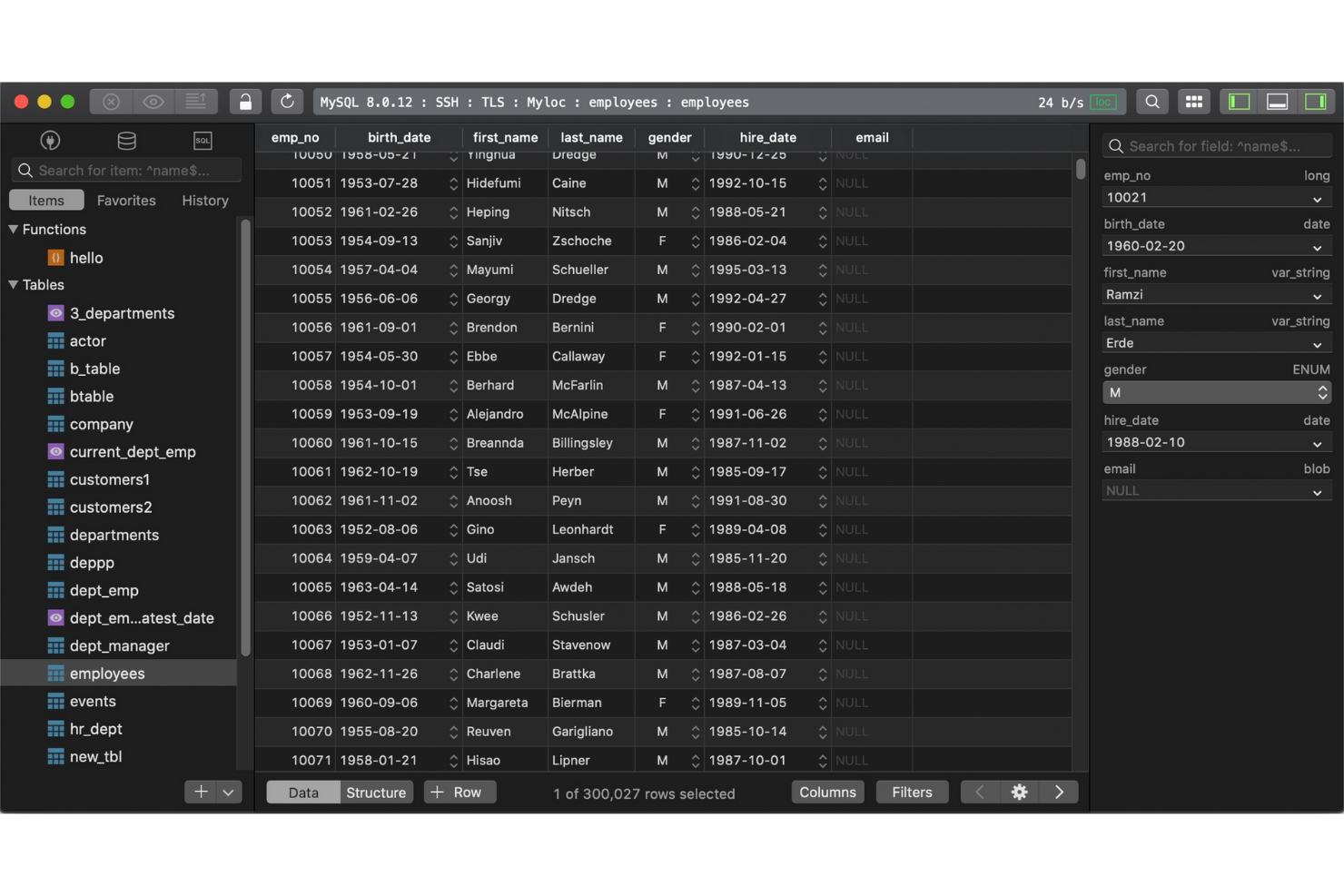
Si buscas una herramienta de gestión de bases de datos centrada en la velocidad y la simplicidad, vale la pena considerar TablePlus. Está diseñada para especialistas de TI y desarrolladores que desean una interfaz limpia y moderna para gestionar múltiples bases de datos sin elementos innecesarios. TablePlus se diferencia de DBeaver y de la mayoría de las opciones de código abierto al priorizar la navegación intuitiva y el acceso rápido a las funciones esenciales, lo que facilita la gestión de las tareas rutinarias de las bases de datos.
Por qué TablePlus es una buena alternativa a DBeaver
Para los equipos de TI que desean una herramienta de gestión de bases de datos rápida y visualmente optimizada, TablePlus es una opción sólida. La elegí porque su interfaz está diseñada para minimizar las distracciones, con pestañas personalizables y un modo de enfoque que te ayuda a concentrarte en la tarea en cuestión. TablePlus también ofrece edición en línea y vistas previas instantáneas de los resultados, para que puedas realizar cambios y ver los resultados sin pasos adicionales. Estas funciones la hacen atractiva para los usuarios que valoran un espacio de trabajo limpio y flujos de trabajo eficientes por encima de los diseños más complejos con varios paneles que se encuentran en DBeaver.
Funciones principales de TablePlus
Otras funciones que hacen atractivo a TablePlus son:
- Compatibilidad con múltiples bases de datos: Conéctate y gestiona MySQL, PostgreSQL, SQLite, SQL Server y más desde una sola aplicación.
- Cifrado SSH y TLS integrado: Protege tus conexiones a bases de datos con compatibilidad integrada con SSH y TLS.
- Filtrado y búsqueda avanzados: Localiza rápidamente tablas, registros o consultas mediante potentes herramientas de búsqueda y filtrado.
- Sistema de complementos: Amplía la funcionalidad de TablePlus con una biblioteca en crecimiento de complementos aportados por los usuarios.
Integraciones de TablePlus
Entre las integraciones se incluyen MySQL, PostgreSQL, Microsoft SQL Server, SQLite, Redis, MariaDB, Amazon Redshift, MongoDB, CockroachDB y Oracle.
Pros and Cons
Pros:
- Interfaz fácil de usar diseñada para una navegación rápida por las bases de datos
- Admite múltiples bases de datos relacionales desde un solo espacio de trabajo
- Conexiones seguras con cifrado SSH y TLS integrado
Cons:
- Funcionalidad limitada para el modelado de bases de datos y los diagramas ER
- Ecosistema de complementos más reducido que el de muchas herramientas de gestión de bases de datos


Desarrollado por JetBrains, DataGrip es una herramienta de gestión de bases de datos creada para especialistas en TI y desarrolladores que desean asistencia avanzada para el código. Se diferencia de DBeaver y de otras opciones de código abierto al ofrecer finalización inteligente de código, sugerencias adaptadas al contexto y análisis en tiempo real para consultas SQL. DataGrip resulta especialmente útil para equipos que necesitan escribir, refactorizar y solucionar problemas en código complejo de bases de datos en varias plataformas.
Por qué DataGrip es una buena alternativa a DBeaver
Si buscas una herramienta de gestión de bases de datos que destaque por la finalización de código, vale la pena considerar DataGrip. Lo elegí porque su motor de finalización inteligente de código comprende la estructura y el contexto de la base de datos, y ofrece sugerencias precisas mientras escribes SQL. DataGrip también resalta los errores en tiempo real y proporciona soluciones rápidas, lo que ayuda a reducir los errores y acelerar el desarrollo de consultas. Estas funciones lo convierten en una opción sólida para los especialistas en TI que desean escribir y mantener código SQL complejo con menos interrupciones.
Características principales de DataGrip
Otras características que hacen atractivo a DataGrip incluyen:
- Integración con sistemas de control de versiones: Conéctate directamente con Git, Mercurial y otros sistemas de control de versiones desde la interfaz.
- Vistas de datos personalizables: Crea y guarda vistas de tablas personalizadas para organizar y analizar los datos de forma más eficiente.
- Compatibilidad con varias bases de datos: Gestiona MySQL, PostgreSQL, Oracle, SQL Server y otras bases de datos en un mismo espacio de trabajo.
- Navegación por el esquema: Salta rápidamente entre tablas, vistas y procedimientos mediante un panel de navegación intuitivo.
Integraciones de DataGrip
Las integraciones incluyen PostgreSQL, MySQL, Oracle, Microsoft SQL Server, MongoDB, Redis, Azure SQL, Amazon Redshift, Amazon DynamoDB y SQLite.
Pros and Cons
Pros:
- Finalización inteligente de código SQL basada en la estructura de la base de datos
- Detección de errores en consultas en tiempo real y herramientas de refactorización
- Integración nativa con flujos de trabajo de control de versiones
Cons:
- Mayor consumo de recursos del sistema que los clientes SQL ligeros
- Requiere una licencia de pago y no ofrece un nivel gratuito

Mejor con la integración de Microsoft SQL Server
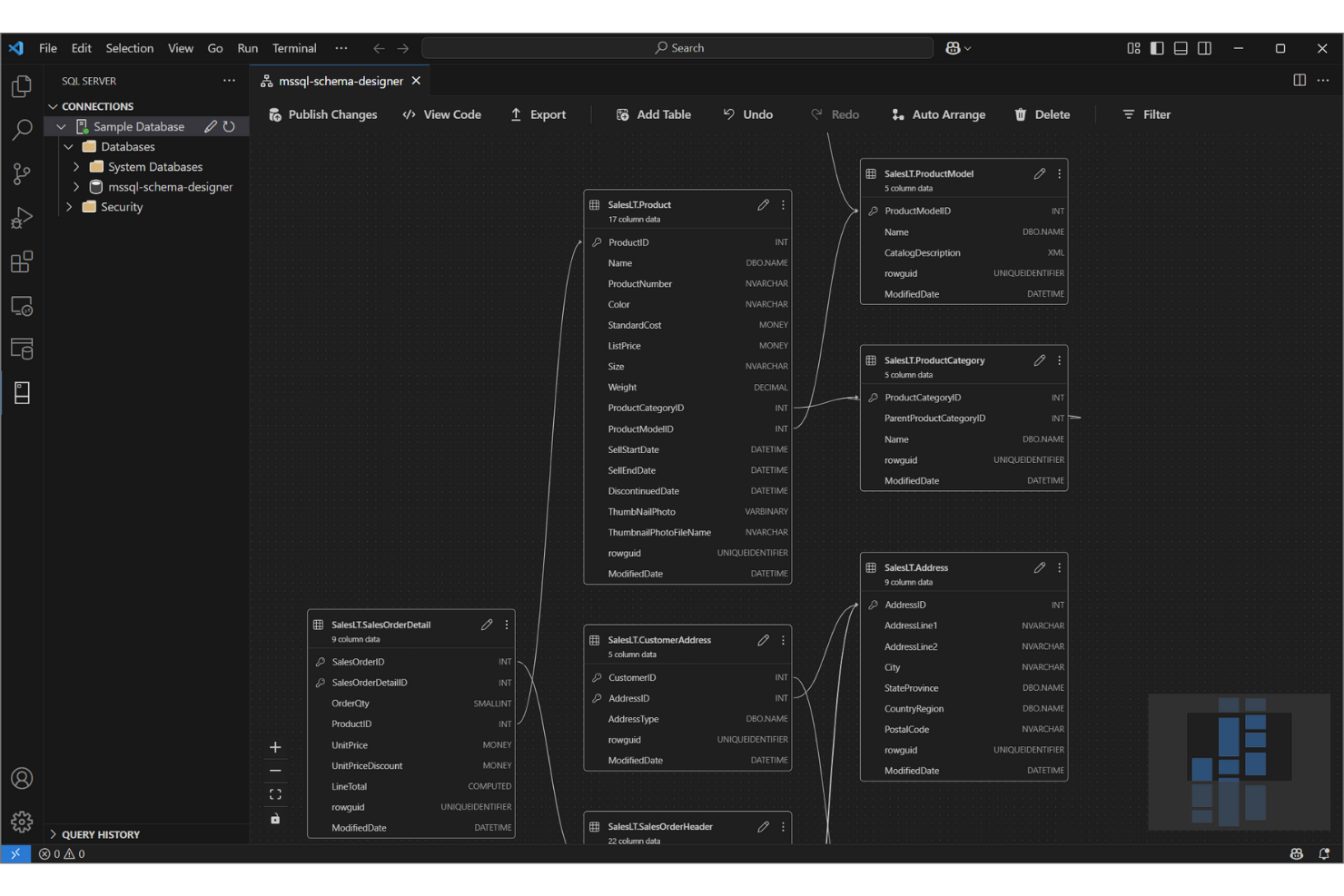
Para los equipos de TI que trabajan intensivamente con Microsoft SQL Server, SQL Server Management Studio (SSMS) ofrece un entorno diseñado específicamente para administrar, configurar y desarrollar bases de datos de SQL Server. A diferencia de DBeaver y otras herramientas de código abierto, SSMS proporciona una integración profunda con el ecosistema de bases de datos de Microsoft, incluidas funciones de seguridad avanzada, optimización del rendimiento y automatización. Es especialmente útil para administradores de bases de datos y desarrolladores que necesitan acceso directo a herramientas y flujos de trabajo específicos de SQL Server.
Por qué Microsoft SQL Server Management Studio es una buena alternativa a DBeaver
Cuando necesitas una herramienta estrechamente integrada con Microsoft SQL Server, SQL Server Management Studio destaca. Lo elegí porque ofrece acceso directo a funciones avanzadas de SQL Server, como la administración de trabajos del agente, la duplicación de bases de datos y las herramientas integradas de optimización del rendimiento.
SSMS también admite la creación de scripts y la automatización mediante SQL Server Agent y PowerShell, lo que resulta valioso para los especialistas de TI que administran entornos de SQL Server grandes o complejos. Estas capacidades lo convierten en una opción sólida para los equipos que desean aprovechar al máximo la plataforma de bases de datos de Microsoft.
Funciones principales de Microsoft SQL Server Management Studio
Entre las otras funciones que hacen que SSMS sea valioso para los profesionales de bases de datos se incluyen:
- Diseñador gráfico de consultas: Crea y visualiza consultas complejas sin escribir SQL manualmente.
- Diagramación de bases de datos: Crea y edita diagramas de bases de datos para representar las relaciones del esquema.
- Asistentes de exportación e importación: Mueve datos entre SQL Server y otras fuentes mediante asistentes paso a paso.
- Administración de seguridad integrada: Configura y administra roles de usuario, permisos y directivas de seguridad directamente desde la herramienta.
Integraciones de Microsoft SQL Server Management Studio
Las integraciones incluyen SQL Server, Azure SQL Database, Azure SQL Managed Instance, la base de datos SQL de Microsoft Fabric, Azure Synapse Analytics, Azure Data Studio, PowerShell, Visual Studio, Active Directory y Microsoft Purview.
Pros and Cons
Pros:
- Integración profunda con las funciones de administración de Microsoft SQL Server
- Herramientas integradas de optimización de consultas y monitorización del rendimiento
- Herramienta gratuita de administración de bases de datos para entornos de SQL Server
Cons:
- Compatibilidad limitada con sistemas de bases de datos que no son de Microsoft
- La interfaz parece anticuada en comparación con las herramientas de bases de datos modernas

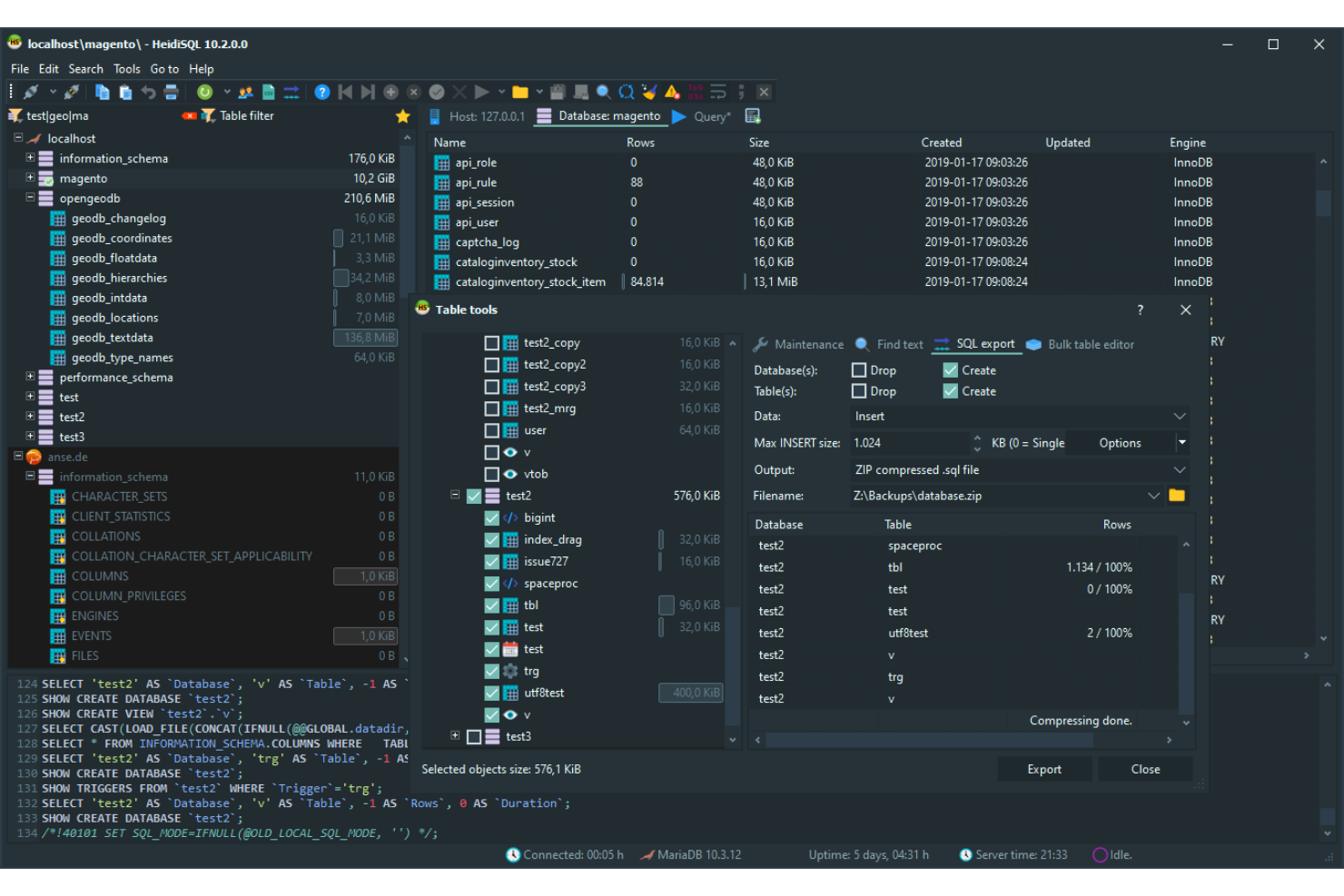
HeidiSQL destaca para especialistas de TI y administradores de bases de datos que buscan una solución ligera y sencilla para gestionar bases de datos MySQL y MariaDB. Es especialmente útil para equipos que necesitan conexiones rápidas, exportaciones de datos simples y ejecución directa de consultas sin la sobrecarga de herramientas más grandes como DBeaver. El enfoque de HeidiSQL en la velocidad y el uso mínimo de recursos lo convierte en una opción práctica para quienes trabajan con bases de datos pequeñas o en sistemas con recursos limitados.
Por qué HeidiSQL es una buena alternativa a DBeaver
Si buscas una herramienta ligera y centrada en lo esencial, HeidiSQL es una opción sólida para la gestión de MySQL. La elegí porque se inicia rápidamente, utiliza pocos recursos del sistema y proporciona acceso directo a bases de datos MySQL y MariaDB sin sobrecarga adicional.
Funciones como la exportación de datos por lotes, la edición directa de tablas y la ejecución rápida de consultas la hacen ideal para especialistas de TI que quieren acceder a sus bases de datos y salir de ellas de forma eficiente. Para los equipos que no necesitan la compatibilidad con varias bases de datos ni las herramientas avanzadas de visualización de DBeaver, el enfoque simplificado de HeidiSQL resulta práctico.
Características principales de HeidiSQL
Entre las características adicionales que hacen atractiva a HeidiSQL se incluyen:
- Administrador de sesiones: Organiza y guarda en un solo lugar la configuración de conexión de varios servidores.
- Editor de privilegios de usuario: Gestiona las cuentas de usuario y los permisos de la base de datos mediante una interfaz gráfica.
- Herramientas de importación y exportación: Mueve datos entre archivos SQL, CSV y otros formatos mediante asistentes integrados.
- Fragmentos de consultas personalizados: Guarda y reutiliza fragmentos de código SQL utilizados con frecuencia para escribir consultas más rápidamente.
Integraciones de HeidiSQL
Las integraciones incluyen MySQL, MariaDB, Microsoft SQL Server, PostgreSQL, SQLite, Interbase y Firebird.
Pros and Cons
Pros:
- Herramienta ligera de gestión de bases de datos con requisitos mínimos del sistema
- Cliente SQL de código abierto para gestionar bases de datos MySQL y MariaDB
- Importación, exportación y edición de tablas rápidas para bases de datos relacionales
Cons:
- Cliente SQL exclusivo para Windows, sin versión nativa para macOS o Linux
- Compatibilidad limitada con plataformas de bases de datos NoSQL

DbSchema
Ideal para el diseño visual de esquemas
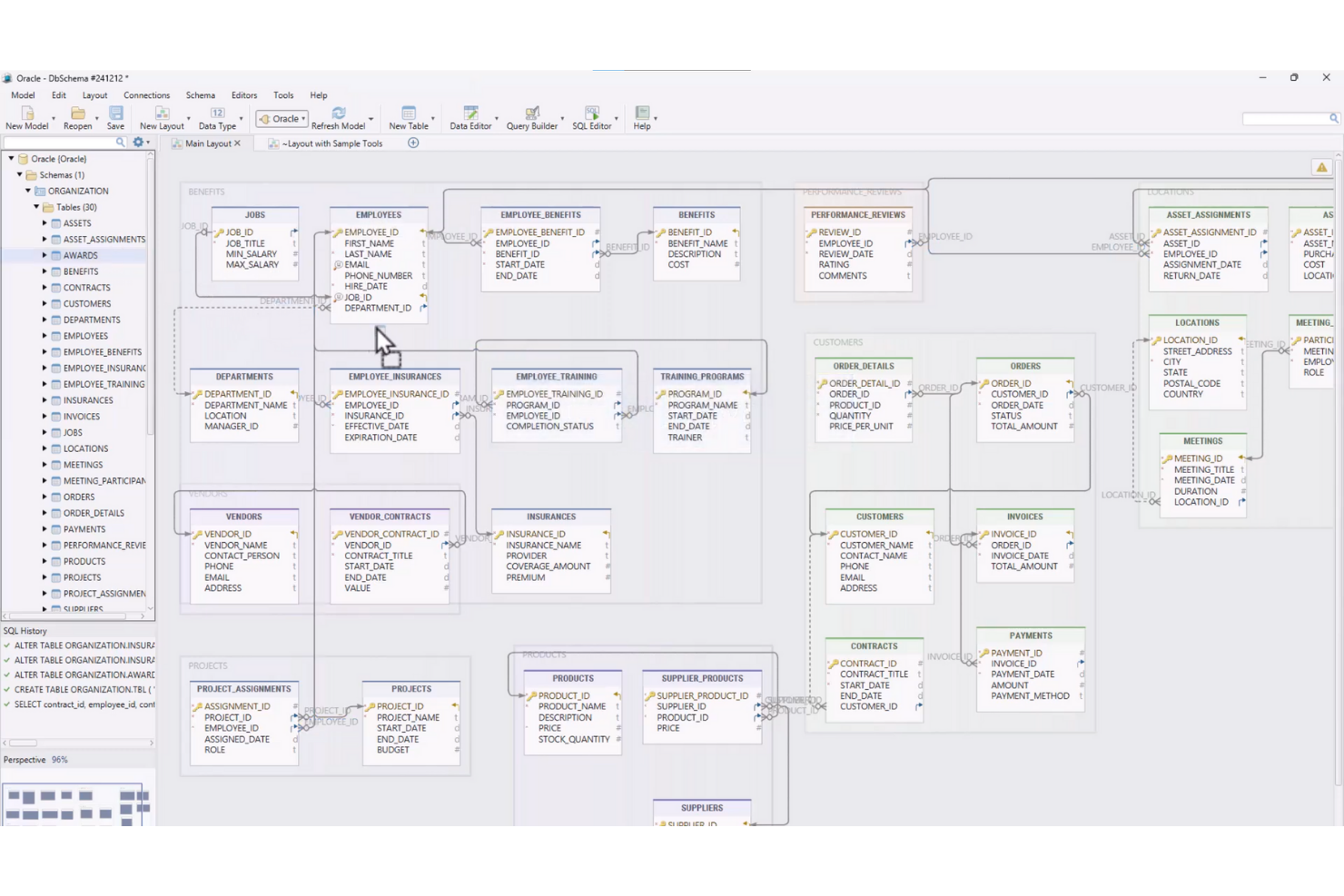
Si tu equipo necesita capacidades avanzadas de diseño visual de esquemas, DbSchema ofrece un enfoque único para el modelado y la gestión de bases de datos. Es especialmente útil para especialistas de TI y arquitectos de datos que desean diseñar, documentar e implementar visualmente estructuras de bases de datos complejas en múltiples plataformas. A diferencia de DBeaver y otras herramientas de código abierto, DbSchema hace hincapié en los diagramas interactivos y la gestión colaborativa de esquemas, lo que facilita el manejo de bases de datos grandes o distribuidas.
Por qué DbSchema es una buena alternativa a DBeaver
Para los equipos que priorizan el diseño visual de esquemas, DbSchema ofrece un conjunto de funciones que va más allá de lo que proporciona DBeaver. Lo elegí porque sus diagramas ER interactivos permiten diseñar, documentar y modificar visualmente las estructuras de las bases de datos, incluso antes de conectarse a una base de datos activa.
DbSchema también admite la sincronización y el control de versiones de esquemas, lo que ayuda a gestionar los cambios en entornos distribuidos. Estas capacidades lo convierten en una opción adecuada para especialistas de TI que necesitan colaborar en proyectos complejos de bases de datos y mantener una documentación clara.
Características principales de DbSchema
Además de sus ventajas en el diseño visual de esquemas, también considero que merece la pena destacar estas funciones:
- Explorador de datos relacionales: Explora y edita datos en tablas relacionadas mediante una interfaz interactiva.
- Editor SQL con autocompletado: Escribe y ejecuta consultas SQL con resaltado de sintaxis y completado de código.
- Generador de datos: Crea conjuntos de datos de ejemplo para pruebas y desarrollo directamente dentro de la herramienta.
- Diseño de esquemas sin conexión: Diseña y modifica esquemas de bases de datos sin necesidad de una conexión a una base de datos activa.
Integraciones de DbSchema
Las integraciones incluyen MySQL, PostgreSQL, MongoDB, SQL Server, Oracle, SQLite, Amazon Redshift, Google BigQuery, Snowflake y Cassandra.
Pros and Cons
Pros:
- Herramienta de diseño visual de esquemas para modelar y documentar bases de datos relacionales
- Herramienta de gestión de bases de datos compatible con plataformas de bases de datos relacionales y NoSQL
- Herramientas de sincronización de esquemas para gestionar cambios en bases de datos entre entornos
Cons:
- Requiere una licencia de pago para disponer de todas las funciones
- Interfaz menos moderna que la de algunas herramientas de gestión de bases de datos

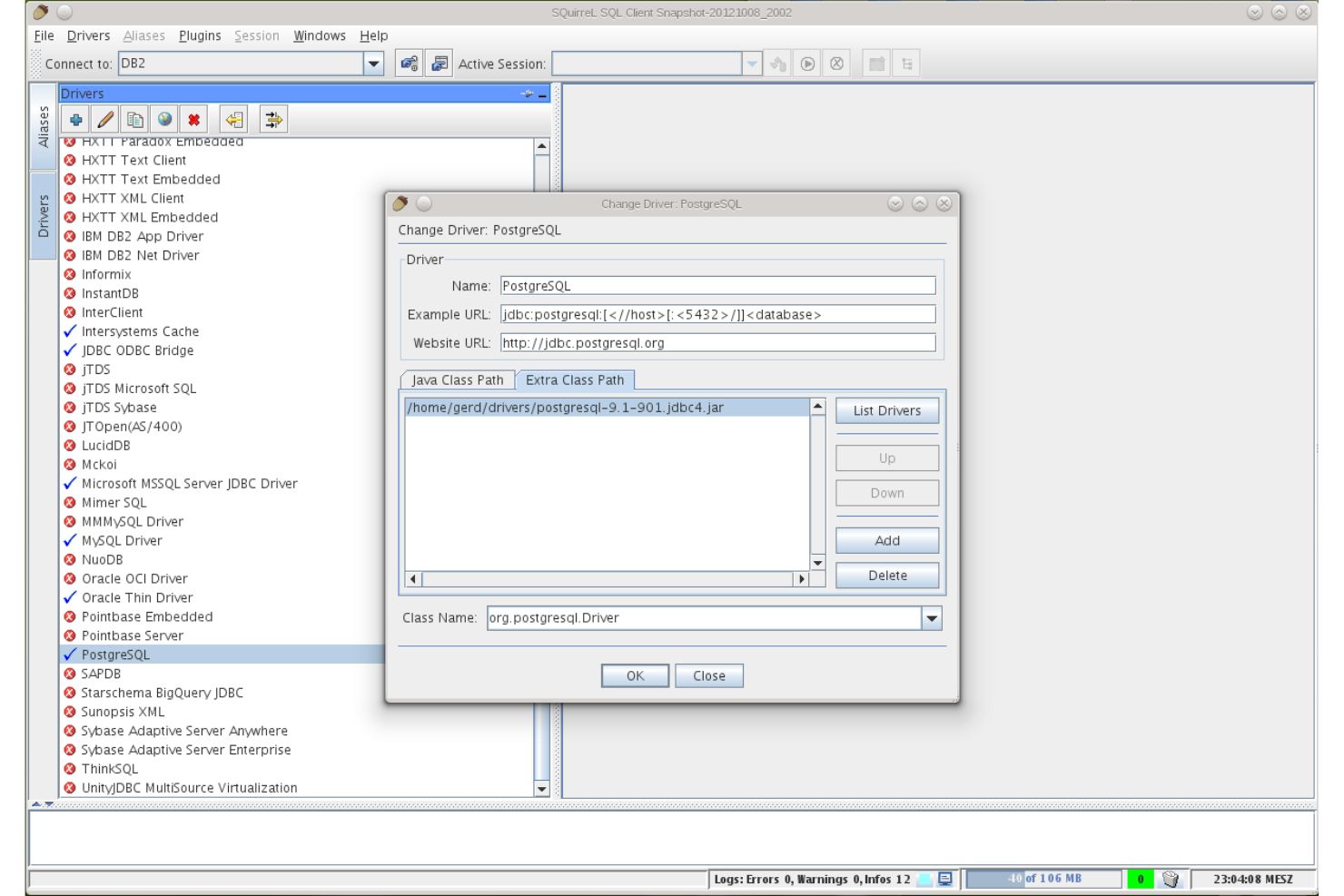
SQuirreL SQL es una excelente opción para equipos de TI y profesionales de bases de datos que buscan un cliente SQL de código abierto y altamente personalizable. Su arquitectura basada en complementos permite adaptar la herramienta a flujos de trabajo específicos, tipos de bases de datos o funciones avanzadas que no están disponibles de forma predeterminada en DBeaver. Si necesita un entorno flexible que se adapte a necesidades únicas o cambiantes de gestión de bases de datos, SQuirreL SQL ofrece un nivel de extensibilidad que destaca.
Por qué SQuirreL SQL es una buena alternativa a DBeaver
Para los equipos que quieren adaptar su herramienta de gestión de bases de datos a necesidades específicas, la extensibilidad mediante complementos de SQuirreL SQL es una gran ventaja. Lo elegí porque permite añadir o eliminar complementos para admitir nuevos tipos de bases de datos, scripts avanzados o mejoras personalizadas del flujo de trabajo a medida que cambia su entorno. El administrador de complementos integrado facilita descubrir, instalar y actualizar extensiones sin configuración manual. Si busca una herramienta que crezca y se adapte junto con su entorno de bases de datos, el enfoque modular de SQuirreL SQL es difícil de igualar.
Funciones principales de SQuirreL SQL
Además de su sistema de complementos extensible, también consideré que vale la pena destacar estas funciones:
- Editor SQL con resaltado de sintaxis: Escriba y edite consultas SQL con sintaxis codificada por colores para mejorar la legibilidad.
- Gráficos de sesiones: Visualice las sesiones de la base de datos y sus relaciones mediante herramientas gráficas integradas.
- Administrador de marcadores: Guarde y organice las instrucciones SQL utilizadas con frecuencia para acceder a ellas rápidamente.
- Editor de datos de tablas: Edite el contenido de las tablas directamente en la interfaz sin ejecutar consultas manuales.
Integraciones de SQuirreL SQL
Las integraciones incluyen MySQL, PostgreSQL, Oracle, Microsoft SQL Server, SQLite, Firebird, Sybase, DB2, HSQLDB y Apache Derby.
Pros and Cons
Pros:
- Cliente SQL personalizable con una arquitectura de complementos extensible
- Herramienta de gestión de bases de datos compatible con múltiples bases de datos relacionales mediante JDBC
- Cliente SQL de código abierto con una comunidad activa de desarrolladores
Cons:
- El diseño de la interfaz parece anticuado en comparación con las herramientas de bases de datos modernas
- Funciones integradas limitadas de diseño y visualización de esquemas

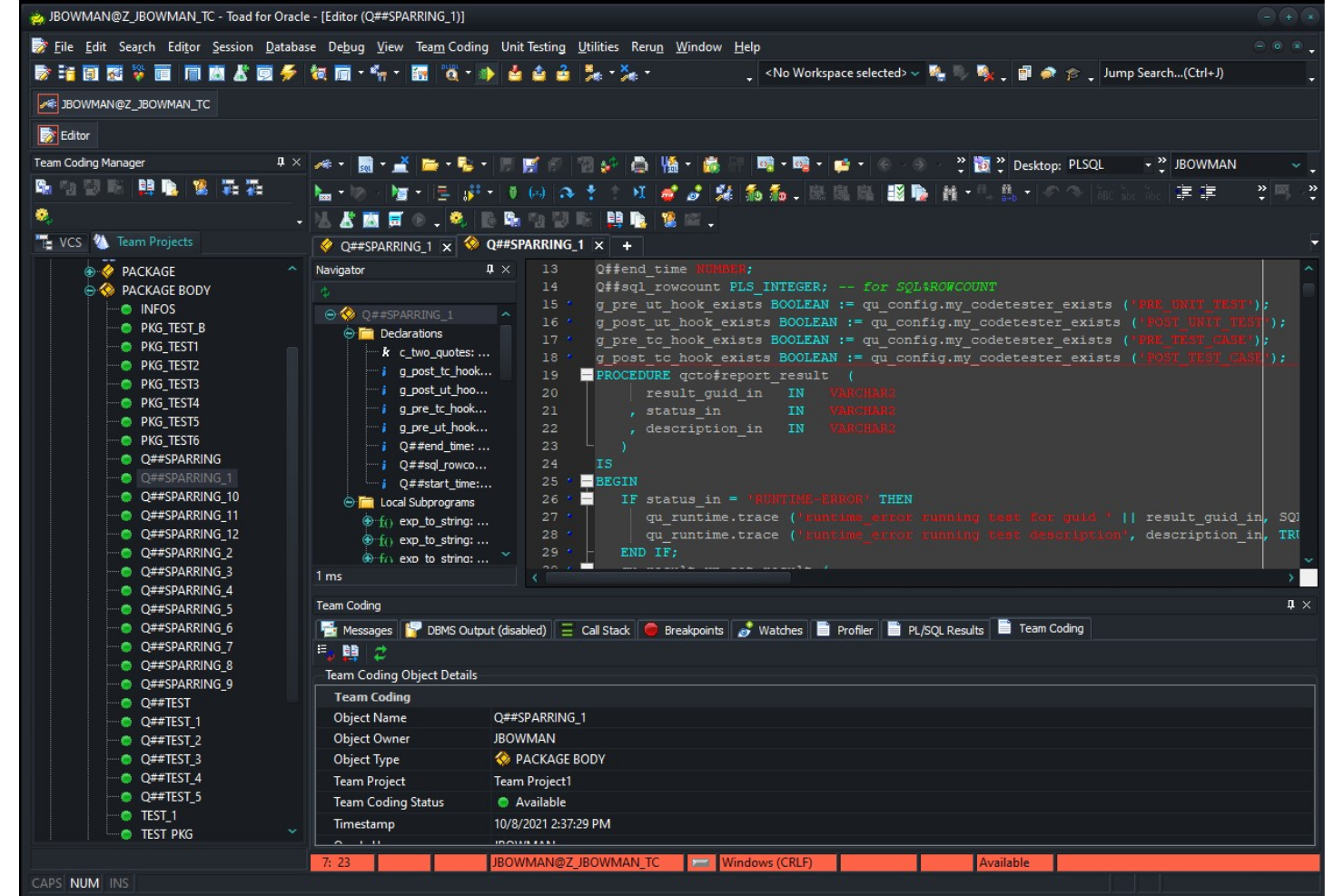
Toad destaca para los especialistas en TI y administradores de bases de datos que necesitan automatización avanzada en sus flujos de trabajo de gestión de bases de datos. A diferencia de la mayoría de las herramientas de código abierto, Toad ofrece automatización integrada para tareas rutinarias, revisiones de código y optimización del rendimiento. Si tu equipo gestiona entornos complejos o de gran volumen, las funciones de automatización de Toad pueden ayudar a reducir el esfuerzo manual y mejorar la coherencia.
Por qué Toad es una buena alternativa a DBeaver
Si buscas una herramienta de gestión de bases de datos que priorice la automatización, vale la pena considerar Toad. Elegí Toad porque permite programar y automatizar tareas repetitivas, como copias de seguridad de bases de datos, análisis de código y comparaciones de datos, directamente desde la plataforma.
Su función de diseño de automatización te permite crear y gestionar flujos de trabajo complejos sin intervención manual. Para los equipos que desean minimizar el mantenimiento manual de las bases de datos y aplicar procesos coherentes, las capacidades de automatización de Toad lo distinguen de la mayoría de las opciones de código abierto.
Funciones principales de Toad
Otras funciones que me llamaron la atención incluyen:
- Depurador de código: Recorre paso a paso los procedimientos almacenados y los scripts para identificar y resolver errores.
- Comparación de esquemas: Compara y sincroniza esquemas de bases de datos en diferentes entornos.
- Herramientas de optimización de SQL: Analiza y ajusta las consultas SQL para mejorar el rendimiento.
- Modelado de datos: Diseña y visualiza estructuras de bases de datos con herramientas de modelado integradas.
Integraciones de Toad
Las integraciones incluyen Oracle, IBM DB2, Microsoft SQL Server, MySQL, PostgreSQL, SAP ASE, Amazon Redshift, Snowflake, MongoDB y SQLite.
Pros and Cons
Pros:
- Herramienta de gestión de bases de datos con automatización para tareas repetitivas de bases de datos
- Herramientas avanzadas de depuración y optimización del rendimiento de consultas SQL
- Funciones de comparación de esquemas para gestionar cambios en las bases de datos
Cons:
- El precio requiere una consulta directa al proveedor
- Mayor uso de recursos del sistema en entornos de bases de datos grandes

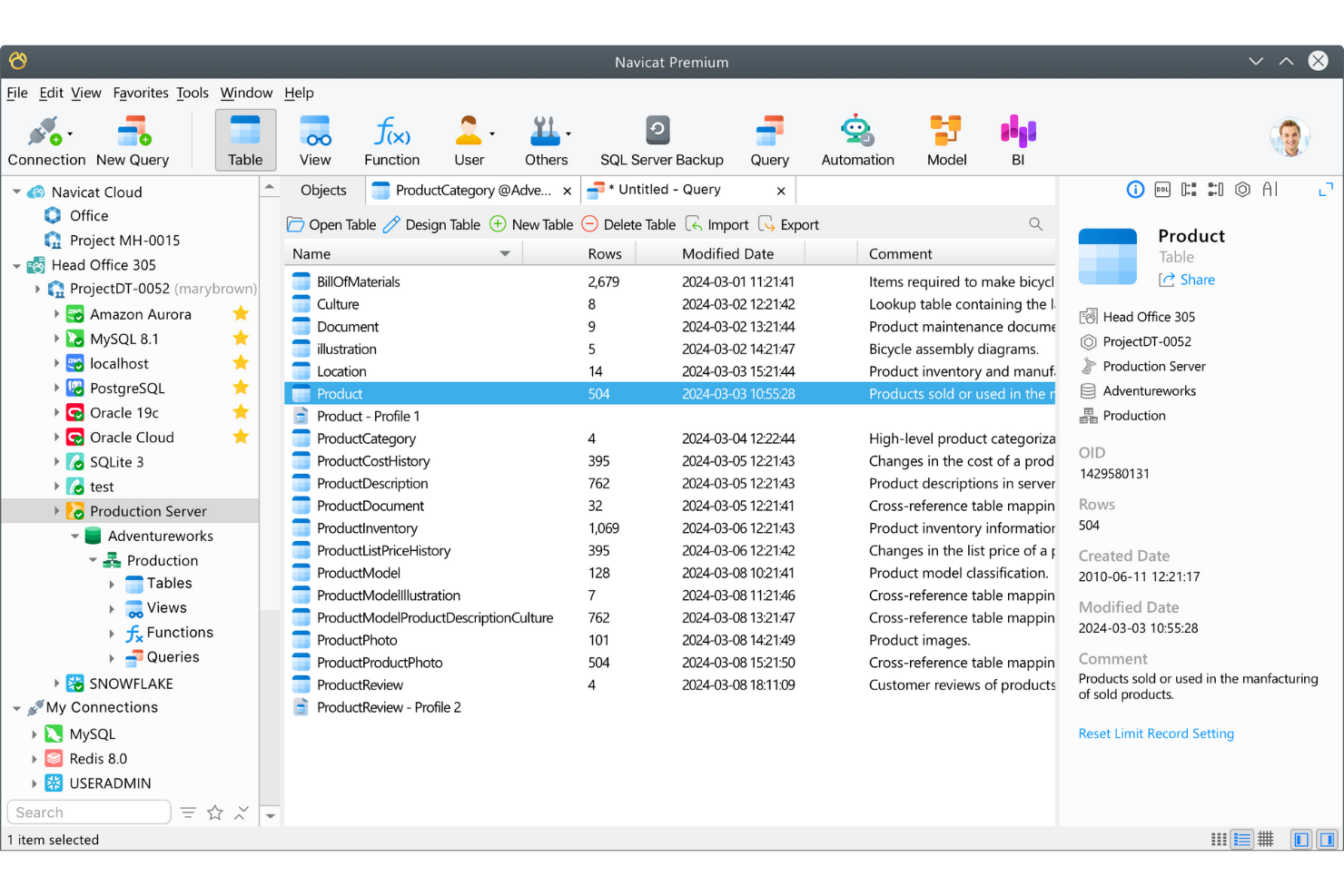
Para los equipos de TI que gestionan varios tipos de bases de datos en diferentes plataformas, Navicat Premium ofrece un espacio de trabajo unificado para conectarse a diversas bases de datos y trabajar con ellas. A diferencia de DBeaver y de la mayoría de las herramientas de código abierto, permite conexiones simultáneas a MySQL, PostgreSQL, Oracle, SQL Server y otras bases de datos desde una sola interfaz. Esto lo hace especialmente útil para organizaciones que gestionan entornos híbridos o multinube y necesitan optimizar las operaciones entre bases de datos.
Por qué Navicat Premium es una buena alternativa a DBeaver
Navicat Premium destaca para los equipos que necesitan gestionar varios tipos de bases de datos desde una sola aplicación. Lo elegí porque permite conectarse a MySQL, PostgreSQL, Oracle, SQL Server y otras bases de datos, y trabajar con ellas al mismo tiempo, todo desde una única interfaz.
Su diseño multiplataforma permite ejecutarlo en Windows, macOS o Linux sin perder funcionalidades. Esto lo convierte en una opción sólida para los especialistas de TI que necesitan coordinar datos y flujos de trabajo en entornos híbridos o multinube.
Características principales de Navicat Premium
Otras características que distinguen a Navicat Premium incluyen:
- Herramienta de modelado de datos: Diseña y visualiza estructuras de bases de datos mediante un editor integrado de diagramas ER.
- Copias de seguridad y programación automatizadas: Configura copias de seguridad periódicas de las bases de datos y automatiza las tareas rutinarias de mantenimiento.
- Sincronización de datos: Compara y sincroniza datos entre diferentes bases de datos o servidores.
- Biblioteca de fragmentos de código SQL: Almacena y reutiliza fragmentos de código SQL utilizados con frecuencia para crear consultas más rápidamente.
Integraciones de Navicat Premium
Las integraciones incluyen MySQL, PostgreSQL, SQL Server, Oracle, SQLite, MariaDB, MongoDB, Redis, Snowflake y Amazon RDS.
Pros and Cons
Pros:
- Herramienta multiplataforma de gestión de bases de datos compatible con varios tipos de bases de datos
- Diseñador integrado de diagramas ER y funciones de modelado de datos
- Herramientas de sincronización de datos para gestionar entornos con varias bases de datos
Cons:
- Coste de licencia elevado en comparación con muchas alternativas a DBeaver
- Plataforma de código cerrado con opciones limitadas de personalización por parte de la comunidad

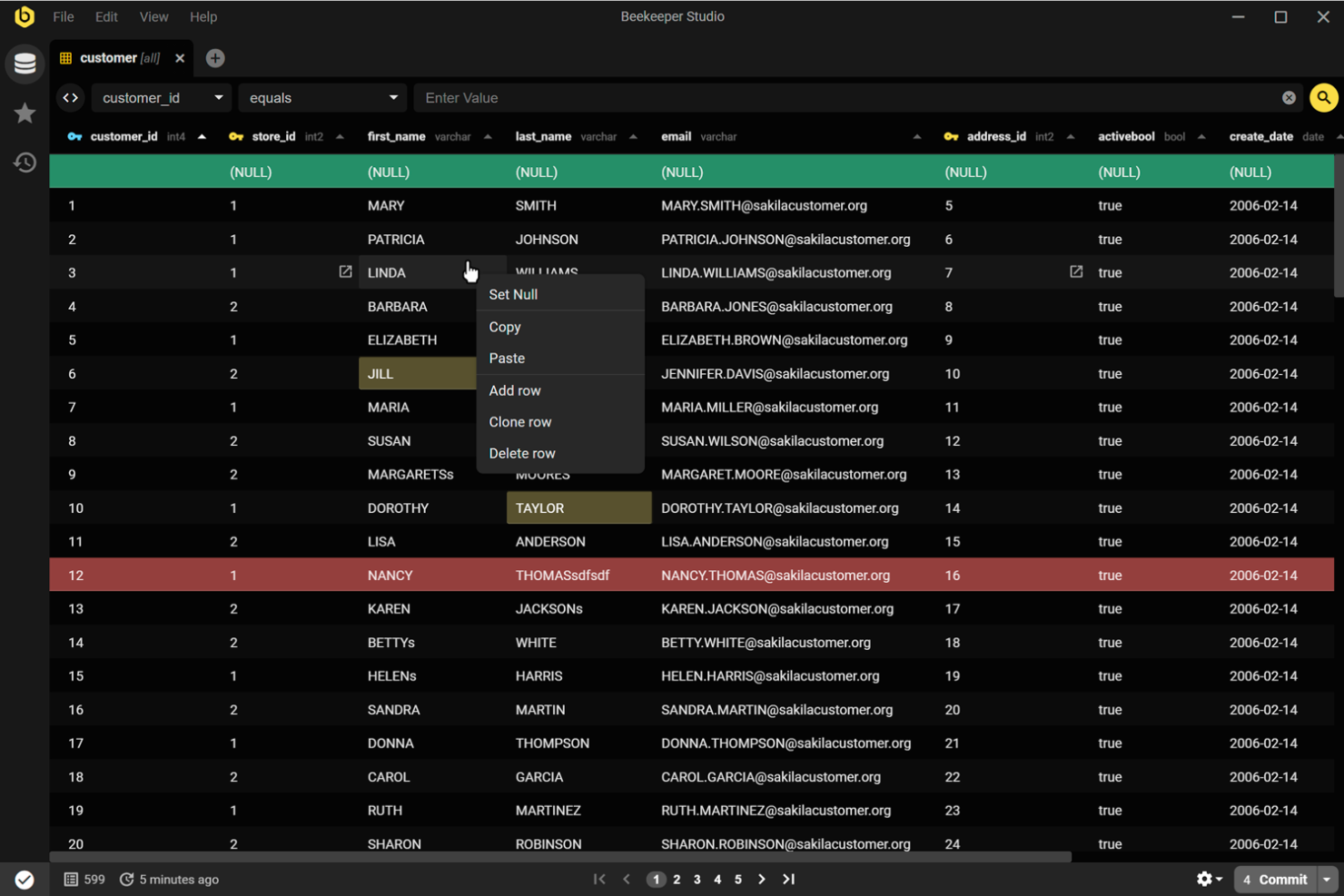
Beekeeper Studio es una herramienta de código abierto para la gestión de bases de datos, diseñada para equipos que necesitan colaborar en tiempo real en consultas SQL. Destaca por sus funciones integradas para compartir consultas y editar sesiones, lo que la convierte en una opción sólida para equipos de datos y desarrolladores que trabajan juntos en proyectos de bases de datos. Si buscas una herramienta que priorice los flujos de trabajo colaborativos sobre la gestión individual de bases de datos, Beekeeper Studio ofrece un enfoque único en comparación con DBeaver.
Por qué Beekeeper Studio es una buena alternativa a DBeaver
Lo que diferencia a Beekeeper Studio de DBeaver es su enfoque en la edición colaborativa de SQL. La elegiría para equipos que necesitan compartir consultas y trabajar juntos en tiempo real, algo que DBeaver no admite de forma nativa. Funciones como el uso compartido de consultas en directo y la edición basada en sesiones facilitan que varios usuarios contribuyan al mismo proyecto de base de datos. Este enfoque ayuda a los equipos a evitar conflictos de versiones y mantiene a todos coordinados durante el desarrollo de bases de datos.
Funciones principales de Beekeeper Studio
Otras funciones de Beekeeper Studio la convierten en una opción flexible para profesionales de bases de datos:
- Editor de consultas basado en pestañas: Trabaja con varias consultas a la vez mediante una interfaz con pestañas que mantiene tu espacio de trabajo organizado.
- Cifrado de conexiones: Protege tus conexiones de bases de datos con opciones integradas de SSL y tunelización SSH.
- Compatibilidad multiplataforma: Ejecuta Beekeeper Studio en Windows, macOS y Linux sin problemas de compatibilidad.
- Edición de datos de tablas: Edita los datos de las tablas directamente en la interfaz, con compatibilidad para la edición en línea y las actualizaciones masivas.
Integraciones de Beekeeper Studio
Las integraciones incluyen MySQL, PostgreSQL, SQLite, SQL Server, MongoDB, Oracle, MariaDB, Amazon Redshift, Google BigQuery y Redis.
Pros and Cons
Pros:
- Uso compartido de consultas y flujos de trabajo de equipo optimizados
- Herramienta de código abierto para la gestión de bases de datos con una comunidad activa que desarrolla el proyecto en GitHub
- Interfaz fácil de usar para gestionar consultas y editar datos de tablas
Cons:
- Menos funciones avanzadas de administración de bases de datos que algunas alternativas a DBeaver
- Capacidades limitadas para diagramas entidad-relación y diseño visual de esquemas
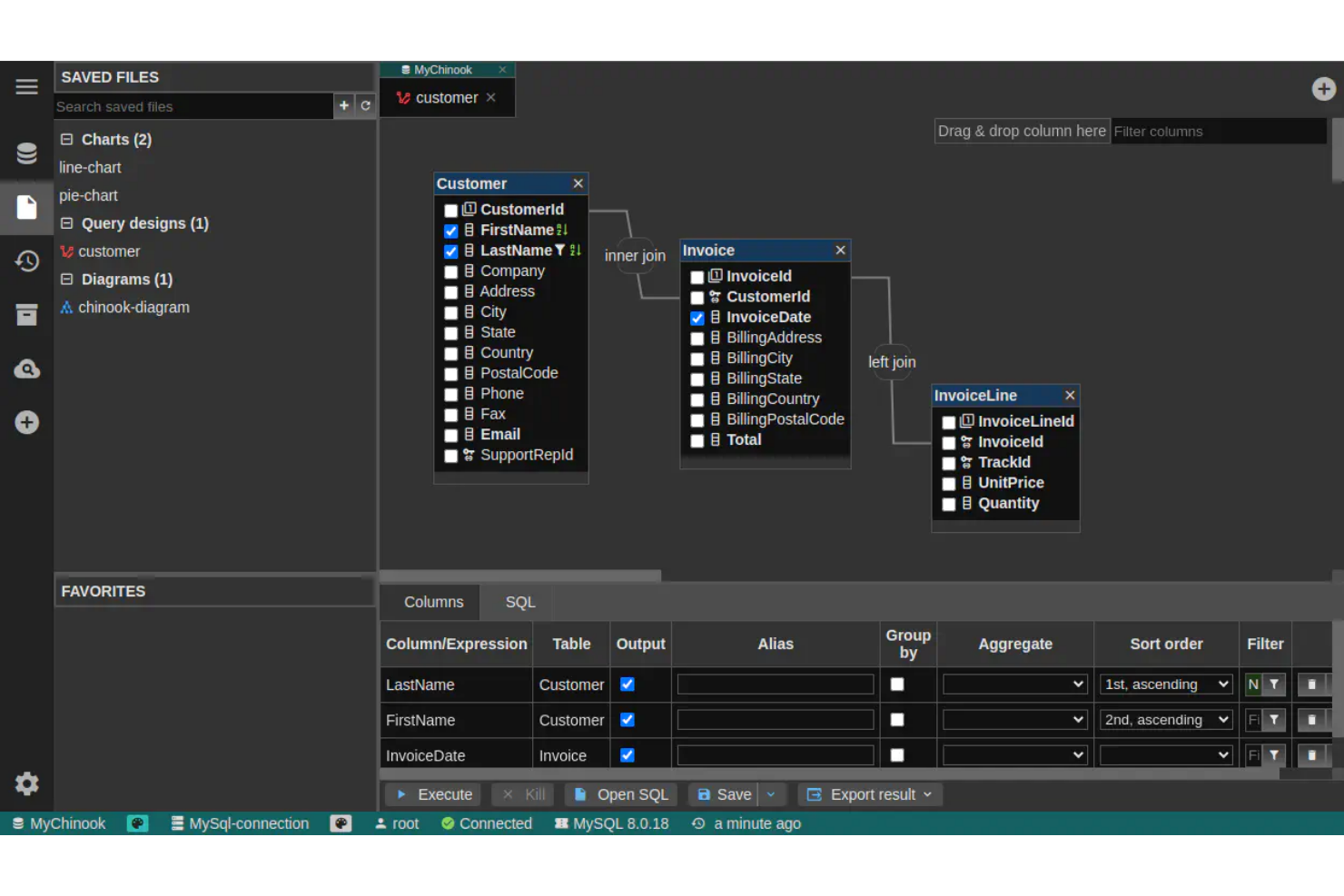
DbGate está diseñado para profesionales de bases de datos que necesitan administrar y consultar varios tipos de bases de datos desde una única interfaz. A diferencia de DBeaver, hace hincapié en las conexiones fluidas entre bases de datos SQL y NoSQL, lo que lo convierte en una opción adecuada para equipos que gestionan diversas fuentes de datos. Si tu flujo de trabajo implica cambiar entre distintos motores de bases de datos, DbGate ayuda a centralizar y simplificar ese proceso.
Por qué DbGate es una buena alternativa a DBeaver
DbGate destaca por su capacidad para conectarse a varios motores de bases de datos dentro de un único espacio de trabajo. Lo elegí para usuarios que necesitan administrar bases de datos SQL y NoSQL una al lado de la otra, algo especialmente útil para equipos que trabajan con entornos de datos mixtos.
Funciones como la edición unificada de consultas y la transferencia de datos entre bases de datos facilitan la gestión de flujos de trabajo complejos con múltiples bases de datos. Este enfoque ayuda a evitar la molestia de cambiar entre distintas herramientas para cada tipo de base de datos.
Características principales de DbGate
Además de sus capacidades de conexión con múltiples bases de datos, DbGate ofrece varias funciones útiles:
- Diseñador visual de consultas: Crea y modifica consultas SQL mediante una interfaz de arrastrar y soltar.
- Herramientas de importación y exportación de datos: Mueve datos entre bases de datos o formatos de archivo como CSV y Excel.
- Sistema de complementos: Amplía la funcionalidad principal con complementos para tipos de bases de datos o funciones adicionales.
- Editor de datos de tablas: Edita directamente el contenido de las tablas en la aplicación con compatibilidad para cambios en línea.
Integraciones de DbGate
Las integraciones incluyen MySQL, PostgreSQL, Oracle, SQL Server, MongoDB, SQLite, CockroachDB, MariaDB, Redis y CosmosDB.
Pros and Cons
Pros:
- Admite conexiones con bases de datos SQL y NoSQL en un único espacio de trabajo
- Herramienta de código abierto para la gestión de bases de datos con una arquitectura de complementos extensible
- El generador visual de consultas simplifica la creación de consultas SQL
Cons:
- Documentación y recursos de la comunidad menos desarrollados
- Las funciones de visualización de esquemas y diagramas ER son limitadas
Otras alternativas a DBeaver
Estas son algunas alternativas adicionales a DBeaver que no han entrado en mi lista, pero que merece la pena conocer:
- SQL Workbench/J
Ideal para flujos de trabajo SQL basados en scripts
- DbVisualizer
Ideal para la creación visual avanzada de consultas
- pgAdmin
Ideal para una administración exhaustiva de PostgreSQL


Cómo evalúo las alternativas a DBeaver
Evalúo estas herramientas en dos niveles: requisitos básicos que toda opción debe cumplir—soporte para múltiples bases de datos, túneles SSH, exploración de esquemas—y diferenciadores que distinguen a las mejores.
Funcionalidad principal (criterios indispensables para esta lista)
Al seleccionar herramientas para mi lista, califico cada una en una escala del 0 (no ofrece la funcionalidad) al 5 (destaca en esta área) para cada funcionalidad principal mencionada a continuación. Luego, calculo la puntuación total de la herramienta como un porcentaje. Cada herramienta debe lograr una puntuación total mínima del 75% para ser considerada para la inclusión.
- Soporte para múltiples bases de datos: Verifico cuántos motores cubre una herramienta—desde PostgreSQL y MySQL hasta MongoDB, Snowflake y Redshift—para que puedas trabajar a lo largo de toda tu pila tecnológica.
- Editor SQL con IntelliSense: Un buen editor SQL necesita autocompletado contextual, resaltado de sintaxis y formateo. Reviso qué tan bien maneja consultas complejas en diferentes dialectos SQL.
- Navegación y edición de datos: Evalúo si puedes filtrar, ordenar y editar datos de tablas directamente en una vista de cuadrícula, útil cuando necesitas revisar registros o corregir una fila problemática rápidamente.
- Visualización de esquemas y DER: Poder explorar árboles de objetos y generar diagramas ER es importante cuando llegas a una base de datos desconocida o auditas relaciones entre tablas.
- Capacidades de importación/exportación de datos: Busco soporte para formatos comunes como CSV, JSON, SQL y XML, además de transferencia entre bases de datos para tareas como migrar datos entre entornos de pruebas y producción.
- Gestión segura de conexiones: Las herramientas deben soportar túneles SSH, SSL/TLS y almacenamiento cifrado de credenciales. Evalúo cómo cada herramienta gestiona las conexiones guardadas en múltiples entornos.
Una vez que tengo una lista de herramientas que cumplen estos criterios, considero qué distingue a cada plataforma.
Factores diferenciadores (qué distingue a los proveedores)
Así es como comparo y contrasto distintos proveedores:
Características destacadas
La asistencia con consultas basada en IA es un gran diferenciador; reviso si una herramienta puede generar SQL a partir de lenguaje natural o sugerir optimizaciones, lo cual ahorra tiempo real al escribir combinaciones complejas en esquemas desconocidos. Las funciones de colaboración en equipo también son importantes, especialmente las bibliotecas de consultas compartidas y la posibilidad de compartir conexiones, ya que la mayoría del trabajo en bases de datos implica transferencias entre desarrolladores y DBAs. Para equipos distribuidos, evalúo si una herramienta ofrece acceso nativo en la nube o basado en navegador para que los ingenieros puedan conectarse sin instalaciones locales.
Más allá de las características
El tipo de licencia importa mucho en este ámbito. Verifico si la herramienta ofrece una versión gratuita o de código abierto, ya que muchos DBAs y desarrolladores necesitan acceso inmediato sin procesos de compras. La flexibilidad de despliegue es otro factor clave: algunos equipos necesitan instalaciones en local o autogestionadas para cumplir políticas internas de seguridad, mientras que otros prefieren SaaS. También evalúo las integraciones con el ecosistema, especialmente con Git para control de versiones de cambios en esquemas y pipelines de CI/CD, ya que la gestión de bases de datos rara vez está aislada del flujo de trabajo DevOps.
¿Por qué buscar una alternativa a DBeaver?
Aunque DBeaver es una herramienta de código abierto capaz para la gestión de bases de datos, no se adapta a todos los flujos de trabajo. Algunos equipos prefieren un cliente SQL o IDE diferente en función de las bases de datos con las que trabajan, su infraestructura o el tipo de tareas de gestión de bases de datos que realizan.
Es posible que busques una alternativa a DBeaver porque:
- Necesitas secuencias de comandos avanzadas, automatización o flujos de trabajo SQL desde la línea de comandos
- Quieres un IDE SQL más ligero y con menos requisitos del sistema
- Prefieres una aplicación de escritorio nativa para macOS o Linux
- Necesitas una compatibilidad más sólida con bases de datos específicas, como MSSQL, Postgres u Oracle
- Tu equipo depende de una interfaz web de gestión de bases de datos para el acceso remoto
- Quieres un cliente de bases de datos especializado para el frontend, diseñado para desarrolladores
- Necesitas herramientas que se integren con flujos de trabajo basados en API o entornos DBaaS
Algunos equipos también prefieren herramientas con una sólida edición comunitaria o un ecosistema de código abierto, mientras que otros priorizan entornos de desarrollo SQL orientados a empresas.
Si alguno de estos escenarios te resulta familiar, explorar alternativas puede ayudarte a encontrar una herramienta de gestión de bases de datos que se adapte mejor a tu flujo de trabajo, infraestructura o entorno de desarrollo preferido.
Características principales de DBeaver
Estas son algunas de las características principales de DBeaver, para ayudarte a contrastar y comparar lo que ofrecen las soluciones alternativas:
- Gestión de conexiones con varias bases de datos
- Diagrama ER visual y diseñador de esquemas
- Editor SQL con resaltado de sintaxis y autocompletado
- Importación y exportación de datos en varios formatos
- Edición y filtrado de datos de tablas
- Herramientas integradas de administración de bases de datos
- Compatibilidad con bases de datos compatibles con JDBC
- Visualización avanzada de datos y creación de gráficos
- Historial de ejecución de SQL y marcadores de consultas
- Arquitectura de complementos para ampliar la funcionalidad
Qué hacer a continuación:
Si estás investigando alternativas a DBeaver, ponte en contacto con un asesor de SoftwareSelect para obtener recomendaciones gratuitas.
Rellenarás un formulario y mantendrás una breve conversación en la que analizarán los detalles específicos de tus necesidades. Después recibirás una lista de programas para revisar. Incluso te ayudarán durante todo el proceso de compra, incluidas las negociaciones de precios.