

Las mejores alternativas a Automox ofrecen una gestión de dispositivos finales nativa de la nube, con una automatización fiable de los parches, una amplia compatibilidad con sistemas operativos y sólidos controles de seguridad. Si estás buscando alternativas a Automox, probablemente necesites una plataforma capaz de gestionar entornos complejos y distribuidos sin añadir costes operativos ni riesgos.
Con unas amenazas en constante evolución y unos equipos de TI con recursos limitados, elegir la solución adecuada es esencial para mantener la disponibilidad, el cumplimiento normativo y el control. Esta lista te ayudará a comparar las principales opciones para que encuentres una herramienta que se adapte a las necesidades de tu organización y mantenga tus dispositivos finales seguros.
¿Qué es Automox?
Automox es una plataforma de gestión de dispositivos finales nativa de la nube diseñada para automatizar la aplicación de parches, la configuración y las actualizaciones de seguridad en varios sistemas operativos. Los equipos de TI utilizan Automox para gestionar y proteger los dispositivos finales desde un único panel, independientemente de su ubicación. La plataforma es compatible con dispositivos Windows, macOS y Linux, lo que ayuda a las organizaciones a reducir las vulnerabilidades y mantener el cumplimiento normativo. Automox destaca por su escalabilidad, su acceso remoto seguro y su capacidad para simplificar las tareas rutinarias de mantenimiento de dispositivos finales.
Tabla comparativa: alternativas a Automox
Esta tabla comparativa resume los detalles de precios de mis principales alternativas a Automox seleccionadas.
| Tool | Best For | Trial Info | Price | ||
|---|---|---|---|---|---|
| 1 | Ideal para la automatización del ciclo de vida de dispositivos basada en RR. HH. | Prueba gratuita de 14 días | Desde $8/usuario/mes | Website | |
| 2 | Ideal para la aplicación de parches remotos en endpoints distribuidos | Plan gratuito disponible | Precio bajo solicitud | Website | |
| 3 | Ideal para la gestión de dispositivos e identidades multiplataforma | Prueba gratuita de 30 días + demo gratuita disponible | Precios a consultar | Website | |
| 4 | Ideal para la automatización de parches multi-OS a través de redes | Prueba gratuita de 30 días | Desde $245/mes (facturado anualmente) | Website | |
| 5 | Mejor para el parcheo a gran escala en empresas complejas | Prueba gratuita disponible | Precio a consultar | Website | |
| 6 | Mejor integración con entornos de Microsoft 365 | Prueba gratuita de 30 días disponible | Desde $4/usuario/mes (facturación anual) | Website | |
| 7 | Ideal para parchado centralizado en entornos Windows | Prueba gratuita de 30 días | Precios bajo solicitud | Website | |
| 8 | Inmejorable para flujos de trabajo personalizables de despliegue de software | Prueba gratuita de 14 días | Precio a consultar | Website | |
| 9 | Ideal para el parcheo granular de servidores Windows | Demo gratuita disponible | Precio bajo solicitud | Website | |
| 10 | Ideal para la gestión unificada de tipos de dispositivos diversos | Demo gratuita disponible | Precio bajo consulta | Website |


Por qué confiar en nuestras recomendaciones de software
6,700+
Reviews
20
Industry experts
16+
Evaluation factors
14
Years
Nuestro equipo lleva probando y evaluando software desde 2012. Como líderes tecnológicos, sabemos lo difícil —y lo importante— que es elegir el software adecuado.
Para esta guía, evaluamos las herramientas mediante pruebas prácticas e investigación independiente, puntuando las herramientas según nuestros criterios de selección.
Nuestras reseñas reflejan nuestro criterio editorial humano, no un discurso de ventas.
Revisores expertos:
- Paulo Gardini MiguelDirector técnico
 Tim FisherVP de IA
 Gabriel RosasTech Lead y arquitecto de software
 Christhian GruhnTech Lead y arquitecto de plataforma

Análisis de las mejores alternativas a Automox
A continuación encontrarás mis resúmenes detallados de las mejores alternativas a Automox que han entrado en mi lista de seleccionadas. Mis análisis ofrecen una visión detallada de las funciones, capacidades y casos de uso más adecuados de cada plataforma para ayudarte a encontrar la mejor opción para ti.
 Ideal para la automatización del ciclo de vida de dispositivos basada en RR. HH.
- Prueba gratuita de 14 días
- Desde $8/usuario/mes
Visit WebsiteCustomer Rating:4.8/5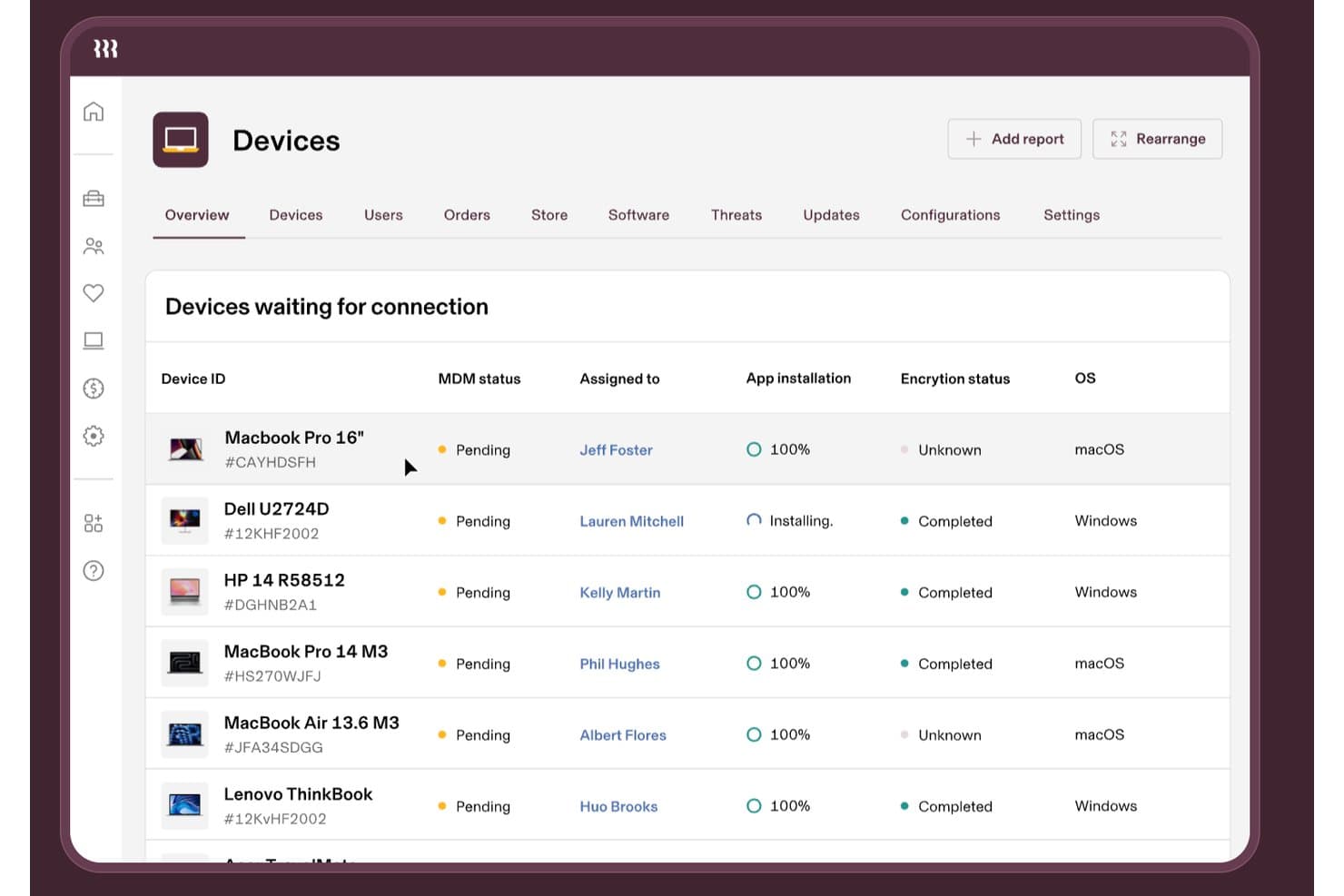
Rippling IT realiza un seguimiento del estado MDM de los dispositivos, el cifrado y las instalaciones de aplicaciones. Rippling IT es un software de gestión de dispositivos para equipos de TI y RR. HH. que centraliza el aprovisionamiento de dispositivos, el acceso a aplicaciones, los controles de seguridad y la desvinculación en una plantilla distribuida.
¿Para quién es mejor Rippling IT?
Equipos de TI y RR. HH. de empresas distribuidas que necesitan que los cambios en los empleados activen el aprovisionamiento de dispositivos, las actualizaciones de acceso y las tareas de desvinculación.
Por qué Rippling IT es una de las mejores alternativas a Automox
Elegí Rippling IT porque su automatización del ciclo de vida de los dispositivos basada en RR. HH. conecta los cambios en los empleados con las acciones de TI. Mi equipo lo utiliza para activar el aprovisionamiento de dispositivos, las actualizaciones de acceso a aplicaciones, los controles de seguridad y las tareas de desvinculación desde un único flujo de trabajo. Esto nos ayuda a gestionar los cambios en los endpoints cuando los empleados se incorporan, cambian de puesto o se marchan.
Características principales de Rippling IT
- Gestión multiplataforma: Gestiona endpoints macOS, Windows, iOS y iPadOS.
- Inventario de dispositivos: Consulta números de serie, versiones del sistema operativo, estado de la batería y uso del disco.
- Perfiles de configuración: Implementa configuraciones de Wi-Fi, firewall, impresoras e inicio de sesión.
- Scripts para endpoints: Ejecuta scripts programados de Bash o PowerShell en dispositivos gestionados.
Integraciones de Rippling IT
Rippling ofrece más de 600 integraciones listas para usar, incluidas Okta, Microsoft Entra ID, Slack, Zendesk y Cylance. También proporciona kits de desarrollo y una tienda de aplicaciones para integraciones personalizadas.
Pros and Cons
Pros:
- Los cambios en RR. HH. activan flujos de trabajo del ciclo de vida de los dispositivos
- Admite macOS, Windows, iOS y iPadOS
- Proporciona inventario, perfiles y scripts para endpoints
Cons:
- Menos centrado en la automatización de parches de terceros
- Algunos administradores informan de experiencias difíciles con MDM
Learn more about Rippling IT: Ideal para la aplicación de parches remotos en endpoints distribuidos
- Plan gratuito disponible
- Precio bajo solicitud
Visit WebsiteCustomer Rating:4.9/5
Action1 ofrece un panel de gestión de endpoints que muestra los dispositivos gestionados con su estado. Action1 es una plataforma SaaS de gestión de parches diseñada para equipos de TI que gestionan endpoints distribuidos o remotos. Es especialmente útil para organizaciones que necesitan mantener la seguridad y el cumplimiento en dispositivos fuera de las redes tradicionales de oficinas. Si buscas una solución que simplifique la aplicación de parches de forma remota sin requerir infraestructura local, Action1 merece ser considerada.
¿Para quién es mejor Action1?
Action1 es una excelente opción para equipos de TI en empresas medianas y proveedores de servicios gestionados (MSP) que necesitan gestionar la aplicación de parches en endpoints remotos o distribuidos en múltiples ubicaciones.
Por qué Action1 es una buena alternativa a Automox
Lo que distingue a Action1 como alternativa de Automox es su enfoque en la aplicación de parches remotos para endpoints distribuidos. La elegí porque permite a los equipos de TI desplegar y gestionar parches en dispositivos que no están conectados a una red corporativa, lo cual es esencial para equipos de trabajo remotos e híbridos. El diseño nativo en la nube de la plataforma significa que no necesitas servidores locales ni VPN para mantener los endpoints seguros y en cumplimiento. Si gestionas endpoints en varias ubicaciones o para clientes con personal remoto, las capacidades de parches remotos de Action1 la hacen una opción sólida.
Funciones clave de Action1
Otras características destacadas para equipos de TI que consideran Action1 incluyen:
- Políticas automatizadas de aprobación de parches: Establece reglas para aprobar o rechazar parches automáticamente según la gravedad, el proveedor o el producto.
- Inventario de endpoints en tiempo real: Consulta detalles actualizados de hardware y software para cada dispositivo gestionado en tu entorno.
- Controles de acceso basados en roles: Asigna permisos granulares a usuarios y grupos para controlar quién puede gestionar, desplegar o visualizar parches.
- Registros de auditoría detallados: Haz seguimiento de todas las acciones de parcheo y cambios para auditorías de cumplimiento y seguridad.
Integraciones de Action1
Las integraciones incluyen Microsoft Entra ID, Okta, Duo, Microsoft Intune y más.
Pros and Cons
Pros:
- Gratuito hasta 200 endpoints
- Informes de cumplimiento de parches en tiempo real
- Flujos de trabajo automatizados para aprobación de parches
Cons:
- La velocidad de despliegue de parches puede ser lenta en ocasiones
- Las exportaciones de informes carecen de personalización avanzada
Learn more about Action1: Ideal para la gestión de dispositivos e identidades multiplataforma
- Prueba gratuita de 30 días + demo gratuita disponible
- Precios a consultar
Visit WebsiteCustomer Rating:4.6/5
JumpCloud ofrece un panel que muestra estadísticas de usuarios, dispositivos y aplicaciones con notificaciones accionables. JumpCloud ofrece una plataforma unificada para gestionar dispositivos e identidades de usuarios en entornos Windows, macOS y Linux. Es una opción sólida para los equipos de TI que necesitan aplicar políticas de seguridad y controlar el acceso desde una única consola basada en la nube. Si buscas simplificar la gestión de endpoints y de identidades en varios sistemas operativos, JumpCloud resuelve ambas necesidades en una sola solución.
¿Para quién es JumpCloud?
JumpCloud es ideal para equipos de TI en empresas medianas que necesitan gestionar dispositivos e identidades de usuarios en múltiples sistemas operativos desde una única plataforma en la nube.
Por qué JumpCloud es una buena alternativa a Automox
Elegí JumpCloud porque combina la gestión de dispositivos y la gestión de identidades en una sola plataforma nativa en la nube, algo que Automox no ofrece de forma nativa. Con JumpCloud, puedes gestionar dispositivos Windows, macOS y Linux junto con los controles de acceso de usuarios desde un solo panel. Además, valoro mucho sus servicios de directorio, que permiten aplicar políticas de seguridad y gestionar la autenticación sin depender de herramientas independientes. Para los equipos de TI que buscan un control unificado tanto de endpoints como de identidades de usuarios, JumpCloud ofrece una alternativa práctica a Automox.
Características clave de JumpCloud
Otras funciones que hacen de JumpCloud una excelente opción para la gestión de endpoints nativa en la nube incluyen:
- Políticas de seguridad Zero Trust: Aplica requisitos de autenticación de usuarios y dispositivos en función de evaluaciones de riesgo en tiempo real.
- Automatización de gestión de parches: Programa y despliega actualizaciones del sistema operativo y aplicaciones en todos los dispositivos gestionados.
- Ejecución remota de comandos: Ejecuta scripts y comandos en los endpoints sin necesidad de una conexión VPN.
- Informes y auditoría: Genera registros y reportes detallados sobre el estado de los dispositivos, la actividad de los usuarios y el cumplimiento de políticas.
Integraciones de JumpCloud
Las integraciones incluyen Google Workspace, Microsoft 365, Okta, Salesforce, Slack, Dropbox, Atlassian, Zendesk y más.
Pros and Cons
Pros:
- Gestiona dispositivos e identidades en una sola plataforma
- Ofrece funciones integradas de directorio y SSO
- Aplica políticas de seguridad Zero Trust de forma nativa
Cons:
- Menos integraciones con terceros
- Las funciones de gestión de dispositivos móviles son básicas
Learn more about JumpCloud: Ideal para la automatización de parches multi-OS a través de redes
- Prueba gratuita de 30 días
- Desde $245/mes (facturado anualmente)
Visit WebsiteCustomer Rating:4.4/5
ManageEngine Patch Manager Plus muestra el panel de Todas las Configuraciones de Parcheo con el seguimiento del estado de la implementación. ManageEngine Patch Manager Plus está diseñado para equipos que ofrecen servicios de TI y que necesitan una gestión centralizada de parches en sistemas operativos diversos. Destaca especialmente en organizaciones que gestionan endpoints locales y remotos en entornos con sistemas operativos mixtos. Si buscas control granular y automatización más allá de lo que ofrecen la mayoría de las plataformas nativas en la nube, esta herramienta merece ser considerada.
¿Para quién es mejor ManageEngine Patch Manager Plus?
Los administradores de TI en organizaciones medianas y grandes que gestionan entornos mixtos de Windows, macOS y Linux en múltiples ubicaciones encontrarán esta plataforma especialmente útil.
Por qué ManageEngine Patch Manager Plus es una buena alternativa a Automox
Para equipos que necesitan automatizar el parcheo en redes de Windows, macOS y Linux, Patch Manager Plus ofrece un sólido soporte para múltiples sistemas operativos. Lo seleccioné porque te permite programar, probar y desplegar parches en endpoints tanto dentro como fuera de la red corporativa. El módulo de escaneo automatizado de parches y los flujos de trabajo de implementación ayudan a reducir el esfuerzo manual y las actualizaciones omitidas. Su capacidad para manejar dispositivos remotos y distribuidos lo convierte en una opción práctica para organizaciones con entornos híbridos y complejos.
Funciones clave de ManageEngine Patch Manager Plus
Otras funciones destacadas para equipos que consideren Patch Manager Plus incluyen:
- Parcheo de aplicaciones de terceros: Permite aplicar parches a una amplia gama de aplicaciones de terceros junto con los sistemas operativos, desde el mismo panel de control.
- Pruebas automatizadas de parches: Prueba los parches en un entorno controlado antes de su implementación para minimizar interrupciones y problemas de compatibilidad.
- Políticas de despliegue personalizadas: Crea y aplica políticas de parches personalizadas en función del departamento, ubicación o grupo de dispositivos.
- Informes detallados de cumplimiento: Genera informes sobre el estado de los parches, niveles de cumplimiento y registros de auditoría para necesidades regulatorias.
Integraciones de ManageEngine Patch Manager Plus
Las integraciones incluyen Tenable Vulnerability Management, Tenable Security Center, Rapid7, CrowdStrike Falcon Spotlight y más.
Pros and Cons
Pros:
- Admite el parcheo de Windows, macOS y Linux
- Incluye gestión de parches para aplicaciones de terceros
- Ofrece una programación y políticas de despliegue granulares
Cons:
- No dispone de paneles en tiempo real del estado de los parches
- La configuración de parcheo remoto puede ser compleja
Learn more about ManageEngine Patch Manager Plus: Mejor para el parcheo a gran escala en empresas complejas
- Prueba gratuita disponible
- Precio a consultar
Visit WebsiteCustomer Rating:4.4/5
HCL BigFix ofrece un panel Fixlet Explorer que muestra métricas de vulnerabilidad. HCL BigFix es una plataforma de gestión y parcheo de endpoints diseñada para organizaciones con entornos de TI complejos y distribuidos. Es una opción sólida para empresas que necesitan administrar miles de endpoints a través de múltiples sistemas operativos y ubicaciones. Si buscas una solución capaz de gestionar el parcheo y la conformidad a gran escala en flotas de dispositivos diversas, BigFix ofrece capacidades que superan a muchos competidores nativos en la nube.
¿Para quién es mejor HCL BigFix?
HCL BigFix es adecuado para grandes empresas y organizaciones del sector público que necesitan gestionar y proteger endpoints en entornos complejos y multiplataforma.
Por qué HCL BigFix es una buena alternativa a Automox
Para organizaciones que enfrentan el desafío de parchear miles de endpoints en entornos distribuidos y complejos, HCL BigFix destaca. Lo elegí porque permite la gestión de parches para Windows, macOS, Linux y UNIX, todo desde una sola consola, algo poco común entre los competidores nativos en la nube. La visibilidad en tiempo real y la remediación automatizada de BigFix ayudan a los equipos de TI a mantener seguras y conformes grandes flotas de dispositivos heterogéneos. Su capacidad de escalar en redes globales lo convierte en una valiosa solución de gestión de TI para empresas con exigentes requisitos de cumplimiento.
Características clave de HCL BigFix
Otras características que hacen de HCL BigFix una opción sólida para la gestión empresarial de endpoints incluyen:
- Aplicación personalizada de políticas: Crea y aplica políticas personalizadas de seguridad y configuración en todos los endpoints gestionados.
- Control de acceso basado en roles: Asigna permisos granulares a diferentes roles de TI para una delegación y supervisión seguras.
- Distribución automatizada de software: Distribuye y actualiza paquetes de software en los endpoints automáticamente según cronogramas o desencadenantes definidos.
- Informes integrados de cumplimiento: Genera informes detallados de cumplimiento para soportar auditorías y requisitos regulatorios directamente desde la plataforma.
Integraciones de HCL BigFix
Las integraciones incluyen HCL AppScan, HCL iControl, HCL Connections, HCL Domino, HCL Notes, HCL SafeLinx y más.
Pros and Cons
Pros:
- Visibilidad y reportes en tiempo real de los endpoints
- Aplicación personalizada de políticas para necesidades de cumplimiento
- Escala para gestionar cientos de miles de endpoints
Cons:
- Configuración compleja para implementaciones en varios sitios
- Características limitadas de nativa en la nube
Learn more about HCL BigFix: Mejor integración con entornos de Microsoft 365
- Prueba gratuita de 30 días disponible
- Desde $4/usuario/mes (facturación anual)

Microsoft Intune ofrece capacidades de gestión de endpoints, incluyendo registro de dispositivos, gestión de identidades y más. Microsoft Intune es una plataforma de gestión de endpoints basada en la nube diseñada para organizaciones que dependen de Microsoft 365 y Azure. Es una opción sólida para equipos de TI que necesitan capacidades de MDM para dispositivos Windows, macOS, iOS y Android en entornos donde la integración con Microsoft es prioritaria. Si buscas un enfoque todo en uno para la aplicación unificada de políticas dentro de un ecosistema centrado en Microsoft, Intune responde directamente a esas necesidades.
¿Para quién es mejor Microsoft Intune?
Los equipos de TI en organizaciones medianas y grandes que estandarizan el uso de Microsoft 365 y Azure para la gestión de productividad y seguridad obtendrán el mayor valor de Intune.
Por qué Microsoft Intune es una buena alternativa a Automox
Elegí Microsoft Intune porque ofrece una integración profunda y nativa con entornos de Microsoft 365, lo que es prioritario para muchas organizaciones que ya han invertido en el ecosistema de Microsoft. Intune te permite gestionar el cumplimiento de dispositivos, el despliegue de aplicaciones y las políticas de seguridad directamente junto a tus recursos de Microsoft 365 y Azure. Esta estrecha integración centraliza la gestión de identidades y el acceso condicional, haciendo que sea más sencillo aplicar estándares de seguridad en todos los endpoints. Para los equipos que desean una gestión unificada de endpoints sin salir del conjunto de soluciones de Microsoft, Intune es la mejor alternativa a Automox.
Funciones clave de Microsoft Intune
Otras funciones que destacan para los equipos de TI que consideran Microsoft Intune incluyen:
- Borrado remoto de dispositivos: Borra datos de manera remota en dispositivos perdidos o comprometidos para proteger información sensible.
- Control de acceso basado en roles: Asigna permisos granulares al personal de TI según su función o responsabilidad.
- Gestión de aplicaciones móviles: Administra y protege aplicaciones corporativas en dispositivos gestionados y no gestionados.
- Actualizaciones automáticas del sistema operativo: Programa y aplica actualizaciones del sistema operativo en todos los endpoints inscritos.
Integraciones de Microsoft Intune
Las integraciones incluyen Microsoft 365, Microsoft Entra ID, OneDrive, SharePoint, Exchange y más.
Pros and Cons
Pros:
- Integración profunda con servicios de Microsoft 365
- Acceso condicional y políticas de cumplimiento integradas
- Registro automático de dispositivos para Azure AD
Cons:
- Gestión limitada de parches para aplicaciones de terceros
- Las funciones de informes carecen de opciones de personalización
Learn more about Microsoft Intune: Ideal para parchado centralizado en entornos Windows
- Prueba gratuita de 30 días
- Precios bajo solicitud

SolarWinds Patch Manager muestra el inventario de equipos, el estado de los parches y los resúmenes de actualizaciones. SolarWinds Patch Manager está diseñado para profesionales de TI que necesitan gestionar el parchado en grandes entornos Windows. Resulta atractivo para organizaciones que dependen de tecnologías de Microsoft y desean un control detallado sobre la implementación y el cumplimiento de parches. Si buscas una solución de gestión de parches que se integre con Windows Server Update Services y Microsoft System Center, esta herramienta responde directamente a esas necesidades.
¿Para quién es ideal SolarWinds Patch Manager?
SolarWinds Patch Manager es una opción sólida para administradores de TI en organizaciones medianas y grandes que gestionan principalmente infraestructura de TI basada en Windows.
Por qué SolarWinds Patch Manager es una buena alternativa a Automox
Para las organizaciones que necesitan un parchado centralizado en entornos Windows, SolarWinds Patch Manager destaca como una solución especializada. Lo elegí porque se integra directamente con Windows Server Update Services y Microsoft System Center, brindándote un control detallado sobre la implementación y programación de parches. La herramienta también ofrece informes detallados sobre el cumplimiento de parches, lo que ayuda a los equipos de TI a cumplir con los requisitos de auditoría y normativos. Si tu entorno está fuertemente ligado a tecnologías de Microsoft, SolarWinds Patch Manager ofrece funciones específicas que Automox no proporciona de forma nativa.
Características clave de SolarWinds Patch Manager
Otras funciones que hacen útil a SolarWinds Patch Manager para la gestión de TI incluyen:
- Parchado de aplicaciones de terceros: Aplica parches a una amplia gama de aplicaciones que no son de Microsoft junto con las actualizaciones de Windows.
- Flujos de trabajo de aprobación de parches automatizados: Configura reglas para aprobar o rechazar automáticamente parches específicos.
- Alertas personalizables: Recibe notificaciones sobre errores en el parchado, actualizaciones pendientes o problemas de cumplimiento.
- Control de acceso basado en roles: Asigna permisos detallados a diferentes usuarios o equipos dentro de la plataforma.
Integraciones de SolarWinds Patch Manager
Las integraciones incluyen Microsoft WSUS, Microsoft SCCM, SolarWinds Network Performance Monitor y más.
Pros and Cons
Pros:
- Se integra nativamente con WSUS y SCCM
- Permite aplicar parches a máquinas virtuales y desconectadas
- Ofrece flujos de trabajo automatizados para la aprobación de parches
Cons:
- Soporte limitado para sistemas operativos que no sean Windows
- No tiene un agente nativo en la nube para endpoints remotos
Learn more about SolarWinds Patch Manager: Inmejorable para flujos de trabajo personalizables de despliegue de software
- Prueba gratuita de 14 días
- Precio a consultar

PDQ Deploy muestra una tabla detallada de inventario de dispositivos. PDQ Deploy es una herramienta de automatización de despliegue diseñada para profesionales de TI que necesitan control granular sobre la distribución de software. Es especialmente útil para organizaciones con requisitos de despliegue complejos o personalizados en entornos Windows. Si buscas una solución que admita scripting avanzado y horarios de despliegue flexibles, PDQ Deploy ofrece capacidades que superan a muchas plataformas de gestión de endpoints nativas en la nube.
¿Para quién es mejor PDQ Deploy?
PDQ Deploy es una sólida solución de parcheo para administradores de TI en organizaciones medianas que necesitan automatizar y personalizar los despliegues de software en dispositivos Windows.
Por qué PDQ Deploy es una buena alternativa a Automox
Lo que hace de PDQ Deploy una fuerte alternativa a Automox es su enfoque en flujos de trabajo personalizables para el despliegue de software. Lo elegí porque te permite crear paquetes de despliegue detallados utilizando scripts, variables y procesos de múltiples pasos, lo que es ideal para organizaciones con necesidades únicas o complejas. Puedes programar despliegues, configurar desencadenadores y controlar la implementación de actualizaciones con un alto grado de precisión. Para los equipos de TI que necesitan más que un simple parcheo y quieren adaptar los despliegues a su entorno, PDQ Deploy ofrece una flexibilidad que muchas plataformas nativas en la nube no igualan.
Características clave de PDQ Deploy
Otras características que distinguen a PDQ Deploy para los equipos de TI que gestionan endpoints:
- Consola centralizada de despliegue: Gestiona todas las tareas de despliegue y monitoriza el progreso desde un panel único.
- Biblioteca de software preconstruida: Accede a un catálogo de paquetes de aplicaciones listos para desplegar de software común.
- Seguimiento del historial de despliegue: Revisa registros detallados de los despliegues pasados para auditoría y resolución de problemas.
- Control de acceso basado en roles: Asigna permisos a usuarios o grupos para controlar quién puede crear, programar o aprobar despliegues.
Integraciones de PDQ Deploy
Las integraciones incluyen PDQ Inventory, PowerShell, instaladores MSI, Windows Task Scheduler y más.
Pros and Cons
Pros:
- Control altamente granular sobre los pasos de despliegue
- Amplio soporte de scripting para tareas personalizadas
- Gran biblioteca de paquetes de software preconstruidos
Cons:
- Solo para Windows, sin soporte para macOS o Linux
- Sin gestión de parches integrada para actualizaciones del sistema operativo
Learn more about PDQ Deploy: Ideal para el parcheo granular de servidores Windows
- Demo gratuita disponible
- Precio bajo solicitud

El panel Patch Intelligence de Ivanti Neurons muestra métricas de cumplimiento SLA y una lista detallada de actualizaciones de seguridad pendientes. Ivanti Security Controls está diseñado para equipos de TI que necesitan un control avanzado sobre la gestión de parches y la seguridad de los endpoints. Es ideal para organizaciones con entornos complejos de servidores Windows y estrictos requisitos de cumplimiento. Si buscas una solución que vaya más allá del parcheo básico y ofrezca visibilidad detallada de las vulnerabilidades, Ivanti Security Controls merece ser considerado.
¿Para quién es mejor Ivanti Security Controls?
Ivanti Security Controls es una excelente opción para administradores de TI en empresas medianas y grandes que gestionan infraestructuras complejas de servidores Windows.
Por qué Ivanti Security Controls es una buena alternativa a Automox
Cuando necesitas un control preciso sobre el parcheo de servidores Windows, Ivanti Security Controls se destaca entre las alternativas a Automox. Lo elegí porque permite dirigir los parches a nivel del sistema operativo, aplicaciones de terceros e incluso máquinas virtuales, con una programación y flujos de aprobación detallados. La plataforma también ofrece escaneo sin agente y basado en agente para mejorar tu proceso de gestión de parches sin cargas adicionales. Para los equipos de TI que requieren una implementación de parches granular y visibilidad sobre el estado de los parches en infraestructuras complejas, Ivanti Security Controls ofrece capacidades que van más allá de la gestión básica de endpoints.
Características clave de Ivanti Security Controls
Otras características que vale la pena destacar para los equipos de TI que consideren Ivanti Security Controls incluyen:
- Repositorio de contenido de parches: Acceso a una biblioteca de parches actualizada regularmente para aplicaciones de Microsoft y de terceros.
- Control de acceso basado en roles: Asigna permisos granulares a diferentes miembros del personal de TI según sus responsabilidades.
- Evaluación de vulnerabilidades: Escanea los endpoints para identificar parches faltantes y vulnerabilidades de seguridad antes de la implementación.
- Automatización con PowerShell: Utiliza scripts de PowerShell integrados para automatizar tareas repetitivas de gestión de parches y de seguridad.
Integraciones de Ivanti Security Controls
Las integraciones incluyen Microsoft SCCM, VMware, Red Hat Satellite, ServiceNow, Qualys, Tenable, Rapid7, Splunk y más.
Pros and Cons
Pros:
- Soporta flujos de trabajo de parcheo sin agente y basado en agente
- Ofrece direccionamiento granular de parches para servidores Windows
- Incluye herramientas integradas de evaluación de vulnerabilidades
Cons:
- Soporte limitado para endpoints macOS y Linux
- La interfaz puede resultar anticuada y poco intuitiva
Learn more about Ivanti Security Controls: Ideal para la gestión unificada de tipos de dispositivos diversos
- Demo gratuita disponible
- Precio bajo consulta

El panel de Workspace ONE UEM muestra métricas de implementación de parches en Windows. Workspace ONE UEM es una plataforma de gestión unificada de endpoints diseñada para organizaciones que gestionan una amplia gama de tipos de dispositivos y sistemas operativos. Es una opción sólida para los equipos de TI en empresas o industrias reguladas que necesitan un control centralizado sobre dispositivos móviles, de escritorio y endpoints IoT. Si buscas una solución que reúna la gestión de dispositivos, la seguridad y el cumplimiento normativo en un solo lugar, Workspace ONE UEM es una opción que vale la pena considerar.
¿Para quién es mejor Workspace ONE UEM?
Workspace ONE UEM es ideal para grandes empresas e industrias reguladas que necesitan gestionar de forma centralizada dispositivos diversos en múltiples plataformas.
Por qué Workspace ONE UEM es una buena alternativa a Automox
Cuando necesitas una gestión unificada para una mezcla de tipos de dispositivos, Workspace ONE UEM destaca entre las alternativas a Automox. Lo elijo porque permite la aplicación centralizada de políticas y la gestión del ciclo de vida para Windows, macOS, Linux, iOS, Android e incluso dispositivos IoT desde una sola consola. La plataforma también ofrece controles de cumplimiento granulares y monitorización en tiempo real, fundamentales para organizaciones con entornos de endpoints complejos. Si tu equipo administra una flota diversa y necesita consistencia en la ciberseguridad y configuración en todos los endpoints, Workspace ONE UEM responde a esa necesidad.
Funciones clave de Workspace ONE UEM
Otras funciones que vale la pena destacar para los equipos de TI que consideren Workspace ONE UEM incluyen:
- Borrado remoto de dispositivos: Borra remotamente los datos de dispositivos perdidos o comprometidos para proteger la información sensible.
- Implementación y gestión de aplicaciones: Distribuye, actualiza y administra aplicaciones en todos los endpoints desde un panel unificado.
- Políticas de acceso condicional: Establece reglas que controlan el acceso de dispositivos y usuarios a los recursos corporativos según el estado de cumplimiento.
- Actualización automática del sistema operativo: Programa y automatiza las actualizaciones de los sistemas operativos para varios tipos de dispositivos para mantener la seguridad y el cumplimiento normativo.
Integraciones de Workspace ONE UEM
Las integraciones incluyen ServiceNow, CrowdStrike, NVIDIA, IGEL, Workspace ONE Assist y más.
Pros and Cons
Pros:
- Brinda políticas granulares de cumplimiento y seguridad
- Ofrece funciones de borrado y bloqueo remoto de dispositivos
- Se integra con principales plataformas de identidad y seguridad
Cons:
- La interfaz puede ser compleja para administradores nuevos
- Gestión de parches limitada para plataformas que no son Windows
Learn more about Workspace ONE UEM:
Otras alternativas a Automox
Estas son algunas alternativas adicionales a Automox que no han entrado en mi lista de seleccionadas, pero que siguen mereciendo una revisión:
- 11Tanium PatchMejor opción para visibilidad y control en tiempo real de endpoints
- 12baramundi Patch ManagementMejor para la gestión integrada de parches y activos
- 13NinjaOneIdeal para despliegue rápido en MSP y equipos de TI
- 14SecOps SolutionIdeal para la gestión de parches orientada al cumplimiento
Wie ich Automox-Alternativen bewerte
Ich betrachte Automox-Alternativen in zwei Ebenen: grundlegende, plattformübergreifende Patch- und Automatisierungsfunktionen als Muss, dann Unterscheidungsmerkmale wie MSP-Mandantenfähigkeit, CVE-Workflows und Compliance-Tools.
Kernfunktionen (Grundvoraussetzungen für diese Liste)
Wenn ich Tools für meine Liste auswähle, bewerte ich jedes einzelne auf einer Skala von 0 (bietet die Funktionalität nicht) bis 5 (überzeugt in diesem Bereich) für jede unten aufgeführte Kernfunktionalität. Anschließend berechne ich die Gesamtpunktzahl des Tools als Prozentsatz. Jedes Tool muss eine Gesamtpunktzahl von mindestens 65 % erreichen, um berücksichtigt zu werden.
- Plattformübergreifendes Patch-Management: Ich überprüfe, ob jedes Tool Windows-, macOS- und Linux-Endpunkte patcht und wie umfangreich sein Katalog für Drittanbieter-Anwendungen für Apps wie Zoom, Chrome und Adobe ist.
- Cloud-native Architektur: Das Tool sollte Endpunkte über das Internet mit einem leichten Agenten verwalten, damit externe Teams weder VPN noch einen lokalen Relay-Server benötigen, um Updates zu erhalten.
- Policy-basierte Automatisierung: Ich bewerte, wie fein granular Patch-Zeitpläne erstellt werden können, ob Geräte nach Kriterien wie Betriebssystem oder Abteilung gruppiert werden können und ob eine automatische Behebung ausgelöst werden kann, wenn ein Gerät aus der Compliance fällt.
- Softwarebereitstellung: Jede Plattform sollte ermöglichen, Softwarepakete über die gesamte Flotte auszurollen, zu aktualisieren oder zu entfernen—sei es, um eine neue Browserversion zu verteilen oder unerwünschte Apps stillschweigend zu deinstallieren.
- Endpunktkonfigurationsmanagement: Ich prüfe, ob das Tool benutzerdefinierte Skriptausführung und die Durchsetzung von Systemeinstellungen unterstützt, etwa das Deaktivieren von USB-Ports oder das systemweite Verschärfen von Firewall-Regeln.
- Berichtswesen & Compliance-Transparenz: Dashboards und Berichte sollten Patch-Status, fehlende Updates und die Compliance-Lage der Geräte so transparent darstellen, dass sie direkt an Auditoren oder die Geschäftsleitung weitergegeben werden können.
Wenn ich eine Liste von Tools habe, die diese Kriterien erfüllen, schaue ich, wodurch sich jede Plattform abhebt.
Unterscheidungsmerkmale (Was Anbieter einzigartig macht)
So vergleiche und kontrastiere ich verschiedene Anbieter:
Herausragende Funktionen
Ich prüfe, ob ein Tool sich direkt mit Schwachstellenscannern wie Tenable oder Qualys verbindet, sodass Ihr Team von der CVE-Erkennung bis zur Patch-Bereitstellung wechseln kann, ohne die Konsole zu wechseln. Die Unterstützung von benutzerdefinierten Skripten ist ebenfalls wichtig—vorgefertigte Skriptbibliotheken sparen Stunden, wenn Sie beispielsweise lokale Admin-Passwörter über Hunderte Endpunkte über Nacht rotieren müssen. Ein Self-Service-App-Portal ist ein weiteres erwähnenswertes Unterscheidungsmerkmal, da Endbenutzer so genehmigte Software eigenständig installieren können und wiederkehrende IT-Tickets reduziert werden.
Über Funktionen hinaus
MSP- und Mandantenfähigkeit sind wichtige Überlegungen. Wenn Sie Endpunkte für mehrere Kunden verwalten, benötigen Sie isolierte Mandantenansichten, rollenbasierte Zugriffssteuerung und mandantenspezifisches Berichtswesen aus einer Oberfläche. Compliance-Zertifizierungen wiegen ebenfalls schwer—ich prüfe auf SOC 2 Typ II und integrierte Abbildung auf Rahmenwerke wie CIS oder NIST, besonders wenn Ihr Unternehmen regelmäßig Audits unterliegt. Die Integrationstiefe rundet das Bild ab. Ein Tool, das sich nativ mit Ihrer ITSM-Plattform und Identitätslösung verbindet, bedeutet weniger manuelle Übergaben zwischen Patch-Management, Ticketing und Zugriffsverwaltung.
¿Por qué buscar una alternativa a Automox?
Aunque Automox es una buena opción como plataforma de gestión de dispositivos finales nativa de la nube, hay varios motivos por los que algunos usuarios buscan soluciones alternativas. Es posible que estés buscando una alternativa a Automox porque…
- Necesitas compatibilidad con sistemas operativos antiguos o distintos de Windows
- Quieres opciones más específicas para programar la aplicación de parches
- Necesitas una implementación local en lugar de una solución exclusivamente en la nube
- Buscas una integración más profunda con las herramientas de Microsoft
- Buscas informes de cumplimiento más avanzados
- Necesitas una solución disponible en regiones restringidas
Si alguna de estas situaciones te resulta familiar, has llegado al lugar adecuado. Mi lista incluye varias opciones de plataformas de gestión de dispositivos finales nativas de la nube más adecuadas para los equipos que afrontan estos desafíos con Automox y buscan soluciones alternativas.
Funciones
Estas son algunas de las funciones principales de Automox, que te ayudarán a contrastar y comparar lo que ofrecen las soluciones alternativas:
- Gestión de parches multiplataforma: Automox permite implementar parches en dispositivos Windows, macOS y Linux desde una única consola basada en la nube, lo que facilita la gestión de flotas de dispositivos diversas.
- Aplicación automatizada de políticas: Configure políticas personalizadas para automatizar la implementación de parches, las actualizaciones de software y los cambios de configuración en todos los dispositivos finales, reduciendo la intervención manual.
- Visibilidad de los dispositivos en tiempo real: Supervise en tiempo real el estado de cada dispositivo final gestionado, incluido el cumplimiento de los parches, el historial de actualizaciones y las métricas de estado del dispositivo.
- Gestión remota de dispositivos: Gestione y actualice los dispositivos finales independientemente de su ubicación, proporcionando soporte a fuerzas de trabajo remotas e híbridas sin necesidad de acceso mediante VPN.
- Aplicación de parches a aplicaciones de terceros: Aplique parches a una amplia variedad de aplicaciones que no forman parte del sistema operativo, como navegadores y herramientas de productividad, para reducir las vulnerabilidades más allá de los propios sistemas operativos.
- Compatibilidad con scripts personalizados: Utilice scripts de PowerShell, Bash o Shell para automatizar tareas complejas, corregir problemas o aplicar configuraciones en todos los dispositivos finales.
- Control de acceso basado en roles: Asigne permisos detallados a usuarios y grupos, garantizando que solo el personal autorizado pueda realizar acciones sensibles o acceder a datos críticos.
- Acceso mediante API: Integre Automox con otras herramientas de TI y seguridad mediante su API RESTful, lo que permite automatizar flujos de trabajo y compartir datos entre plataformas.
- Informes detallados de cumplimiento: Genere informes sobre el estado de los parches, el cumplimiento de las políticas y las acciones de corrección para respaldar auditorías y requisitos normativos.
- Arquitectura nativa de la nube: Gestione los dispositivos finales sin infraestructura local, aprovechando una plataforma en la nube escalable y segura para obtener un control centralizado.