

Una alternativa sólida a Basecamp ofrece a tu equipo funciones flexibles de gestión de proyectos, herramientas de colaboración fiables y opciones de personalización que se adaptan a vuestro flujo de trabajo. Si buscas un sustituto porque la estructura, las integraciones o el precio de Basecamp ya no satisfacen tus necesidades, no eres el único.
Muchos especialistas en TI y responsables de proyectos buscan herramientas capaces de gestionar proyectos complejos, admitir la automatización y ofrecer un control más detallado sobre las tareas y los informes. Esta lista te ayudará a comparar las principales alternativas a Basecamp para 2026, para que encuentres una solución que se ajuste a las necesidades de tu equipo y mantenga tus proyectos encaminados.
¿Qué es Basecamp?
Basecamp es un software de gestión de proyectos que ayuda a los equipos a organizar tareas, compartir archivos y comunicarse en un mismo lugar. Combina listas de tareas, tablones de mensajes, calendarios y almacenamiento de documentos para facilitar la colaboración en proyectos.
Empresas de todos los tamaños utilizan Basecamp para coordinar el trabajo, supervisar el progreso y centralizar la información de los proyectos. Su interfaz sencilla y su enfoque en la comunicación del equipo lo convierten en una opción popular para gestionar tanto proyectos internos como de clientes.
Tabla comparativa de alternativas a Basecamp
Esta tabla comparativa resume los detalles de precios de mis alternativas seleccionadas a Basecamp:
| Tool | Best For | Trial Info | Price | ||
|---|---|---|---|---|---|
| 1 | Ideal para paneles totalmente personalizables | Plan gratuito disponible | Desde $7/usuario/mes (facturado anualmente) | Website | |
| 2 | Ideal para la automatización de flujos de trabajo entre equipos | Plan gratuito disponible | Desde $10.99/usuario/mes (facturado anualmente) | Website | |
| 3 | Ideal para centralizar las conversaciones del equipo | Prueba gratuita de 14 días + demo gratuita disponible | Desde $45/mes (facturado anualmente) | Website | |
| 4 | Ideal para equipos que necesitan una gestión de proyectos autoalojada | Prueba gratuita de 14 días + plan gratuito disponible | Desde $7.25/usuario/mes (facturado anualmente) | Website | |
| 5 | La mejor opción para la gestión de proyectos orientada a clientes | Prueba gratuita de 14 días + demostración gratuita disponible | Desde $9.99/usuario/mes (facturado anualmente) | Website | |
| 6 | Ideal para hojas de ruta basadas en hitos | Plan gratuito + demostración gratuita disponible + prueba gratuita de 14 días | Desde $39/usuario/mes (facturado anualmente) | Website | |
| 7 | Ideal para automatizaciones de proyectos impulsadas por IA | Plan gratuito disponible | Desde $9/usuario/mes (facturado anualmente) | Website | |
| 8 | Ideal para planificar tareas con formato de hoja de cálculo | Prueba gratuita de 30 días | Desde $9/usuario/mes (facturado anualmente) | Website | |
| 9 | Ideal para la integración nativa del correo electrónico | Prueba gratuita de 14 días + plan gratuito + demostración gratuita disponible | Desde $5/usuario/mes (facturado anualmente) | Website | |
| 10 | Ideal para herramientas avanzadas de generación de informes | Prueba gratuita de 14 días + plan gratuito disponible | Desde $10/usuario/mes (facturado anualmente) | Website |


Por qué confiar en nuestras recomendaciones de software
6,700+
Reviews
20
Industry experts
16+
Evaluation factors
14
Years
Nuestro equipo lleva probando y evaluando software desde 2012. Como líderes tecnológicos, sabemos lo difícil —y lo importante— que es elegir el software adecuado.
Para esta guía, evaluamos las herramientas mediante pruebas prácticas e investigación independiente, puntuando las herramientas según nuestros criterios de selección.
Nuestras reseñas reflejan nuestro criterio editorial humano, no un discurso de ventas.
Revisores expertos:
- Paulo Gardini MiguelDirector técnico
 Tim FisherVP de IA
 Gabriel RosasTech Lead y arquitecto de software
 Christhian GruhnTech Lead y arquitecto de plataforma

Opiniones sobre alternativas a Basecamp
A continuación encontrarás mis resúmenes detallados de las alternativas a Basecamp que han entrado en mi selección. Mis reseñas ofrecen un análisis detallado de las funciones, los casos de uso más adecuados y las integraciones de cada plataforma para ayudarte a encontrar la mejor opción para ti.
 Ideal para paneles totalmente personalizables
- Plan gratuito disponible
- Desde $7/usuario/mes (facturado anualmente)
Visit WebsiteCustomer Rating:4.6/5
ClickUp es una herramienta de gestión de proyectos todo en uno diseñada para gestionar tareas, hacer seguimiento del tiempo y fomentar el trabajo en equipo ClickUp destaca para los equipos que quieren crear paneles adaptados a sus necesidades exactas. Los departamentos de TI y los gestores de proyectos que necesitan un control detallado sobre los datos y los informes de los proyectos apreciarán sus widgets flexibles para paneles. A diferencia de Basecamp, ClickUp permite visualizar y hacer un seguimiento de casi cualquier métrica o flujo de trabajo en un solo lugar.
Por qué ClickUp es una buena alternativa a Basecamp
ClickUp te da la libertad de diseñar paneles que se adapten a los flujos de trabajo y las necesidades de informes específicos de tu equipo. Elegí ClickUp porque su creador de paneles permite añadir widgets personalizados para tareas, seguimiento del tiempo, objetivos y carga de trabajo, todo en una sola vista.
Puedes combinar gráficos, listas y visualizaciones para supervisar exactamente lo que importa en tus proyectos. Para los equipos que quieren tener más control sobre cómo ven y gestionan el trabajo, la personalización de los paneles de ClickUp va mucho más allá de lo que ofrece Basecamp.
Funciones principales de ClickUp
Otras funciones de ClickUp lo convierten en una opción flexible para los equipos de gestión de proyectos:
- Múltiples vistas de proyectos: Cambia entre las vistas de lista, tablero, Gantt, calendario y mapa mental para gestionar las tareas de la forma que mejor se adapte a tu equipo.
- Automatización de tareas: Configura acciones automatizadas para procesos recurrentes, como asignar tareas o actualizar estados en función de activadores.
- Documentos y wikis: Crea, edita y comparte documentos y bases de conocimiento directamente dentro de tu espacio de trabajo.
- Seguimiento de objetivos: Establece objetivos medibles y vincúlalos a tareas o proyectos para supervisar el progreso en tiempo real.
Integraciones de ClickUp
Entre las integraciones se incluyen Slack, Google Drive, Zoom, Microsoft Teams, Dropbox, GitHub, Evernote, Salesforce, Trello, Outlook y muchas más.
Pros and Cons
Pros:
- Los paneles personalizados permiten a los equipos hacer un seguimiento de las métricas del proyecto a su manera
- Varias vistas de proyectos son compatibles con flujos de trabajo ágiles, en cascada e híbridos.
- Los documentos y wikis integrados mantienen el conocimiento del proyecto en un solo lugar
Cons:
- Los permisos y las opciones para compartir pueden resultar confusos para los nuevos usuarios
- La interfaz repleta de funciones puede resultar desordenada para los equipos pequeños
Learn more about ClickUp: Ideal para la automatización de flujos de trabajo entre equipos
- Plan gratuito disponible
- Desde $10.99/usuario/mes (facturado anualmente)
Visit WebsiteCustomer Rating:4.4/5
Asana es una herramienta de gestión de proyectos para organizar tareas y realizar un seguimiento del progreso del equipo Asana ofrece a los equipos una forma flexible de gestionar proyectos con automatización y flujos de trabajo interfuncionales. Los especialistas de TI y los responsables de proyectos que necesitan coordinar tareas complejas entre departamentos encontrarán especialmente útiles sus funciones de automatización. Si buscas más opciones de personalización e integración de las que ofrece Basecamp, Asana destaca por su diseño de flujos de trabajo adaptable.
Por qué Asana es una buena alternativa a Basecamp
Lo que distingue a Asana como alternativa a Basecamp es su enfoque en la automatización de flujos de trabajo entre equipos. Elegí Asana para esta lista porque permite automatizar tareas repetitivas y configurar reglas personalizadas que activan acciones según la actividad del proyecto.
Su creador de flujos de trabajo permite diseñar procesos que abarcan varios departamentos, lo que facilita la coordinación de proyectos complejos. Para los equipos que necesitan algo más que simples listas de tareas, las funciones de automatización de Asana ayudan a reducir el trabajo manual y a mantener los proyectos en marcha.
Funciones principales de Asana
Otras funciones de Asana la convierten en una opción versátil para los equipos de gestión de proyectos:
- Vista de cronograma: Visualiza los cronogramas y las dependencias de los proyectos con un cronograma de estilo Gantt que te ayuda a organizar las tareas y los plazos.
- Gestión de la carga de trabajo: Supervisa la capacidad del equipo y equilibra las asignaciones para evitar sobrecargar a cualquier miembro del equipo.
- Dependencias de tareas: Configura fácilmente relaciones entre tareas para que los equipos sepan qué debe completarse antes de iniciar el siguiente paso.
- Campos personalizados: Añade campos de datos personalizados a las tareas y los proyectos, lo que te permite realizar un seguimiento de la información específica del flujo de trabajo de tu equipo.
Integraciones de Asana
Las integraciones incluyen Slack, Microsoft Teams, Google Drive, Zoom, Salesforce, Dropbox, Jira, Tableau y Zendesk.
Pros and Cons
Pros:
- La automatización de flujos de trabajo reduce la gestión manual de tareas para los equipos
- Las reglas y los activadores personalizados permiten admitir procesos complejos entre equipos
- Las vistas de cronograma y carga de trabajo ayudan a visualizar los cronogramas de los proyectos y la capacidad del equipo
Cons:
- El volumen de notificaciones puede resultar abrumador en proyectos grandes
- Las funciones avanzadas de automatización solo están disponibles en los planes de nivel superior
Learn more about Asana: Ideal para centralizar las conversaciones del equipo
- Prueba gratuita de 14 días + demo gratuita disponible
- Desde $45/mes (facturado anualmente)
Visit WebsiteCustomer Rating:4.5/5
ProofHub es un software de gestión de proyectos para la planificación, la colaboración y la entrega Si tu equipo necesita un único lugar para organizar las conversaciones, ProofHub coloca las herramientas de debate en primer plano. Esta plataforma es una buena opción para agencias, equipos creativos y grupos interfuncionales que quieren mantener los chats de proyectos, los comentarios y las decisiones en un único espacio con función de búsqueda. A diferencia de Basecamp, ProofHub ofrece paneles de debate exclusivos y conversaciones organizadas por hilos para ayudar a los equipos a evitar una comunicación dispersa.
Por qué ProofHub es una buena alternativa a Basecamp
Cuando quieres mantener organizadas y accesibles todas las conversaciones del equipo, ProofHub destaca por sus herramientas de comunicación centralizadas. Me gusta que puedas crear paneles de debate específicos para cada proyecto o tema, lo que facilita mantener las conversaciones centradas y con función de búsqueda.
ProofHub también admite respuestas organizadas por hilos y comentarios contextuales, para que los equipos puedan hacer un seguimiento de los comentarios y las decisiones sin perder el contexto. Si tus proyectos implican mucho intercambio de mensajes o requieren una documentación clara de las conversaciones, ProofHub ofrece más estructura que los paneles de mensajes de Basecamp.
Funciones de ProofHub
Otras funciones de ProofHub ayudan a los equipos a gestionar proyectos y recursos de forma más eficaz:
- Gestión de tareas: Asigna tareas, establece plazos y realiza un seguimiento del progreso mediante paneles y listas visuales.
- Diagramas de Gantt: Planifica los plazos de los proyectos y ajusta los calendarios mediante diagramas de Gantt interactivos.
- Seguimiento del tiempo: Registra las horas facturables y no facturables directamente dentro de cada proyecto.
- Compartición y revisión de archivos: Sube, comparte y anota archivos para facilitar los comentarios y las aprobaciones colaborativas.
Integraciones de ProofHub
Las integraciones incluyen Google Drive, Dropbox, Box, OneDrive, FreshBooks, QuickBooks, Xero, Slack, iCal y Outlook.
Pros and Cons
Pros:
- Los paneles de debate mantienen las conversaciones de los proyectos organizadas y con función de búsqueda
- Las herramientas de revisión integradas permiten realizar comentarios visuales sobre los archivos compartidos
- El seguimiento del tiempo está incluido para controlar las horas facturables y no facturables
Cons:
- No hay automatización integrada para tareas o flujos de trabajo recurrentes
- Las integraciones nativas con herramientas de terceros son muy limitadas
Learn more about ProofHub: Ideal para equipos que necesitan una gestión de proyectos autoalojada
- Prueba gratuita de 14 días + plan gratuito disponible
- Desde $7.25/usuario/mes (facturado anualmente)
Visit WebsiteCustomer Rating:4.5/5
OpenProject es una herramienta de gestión de proyectos de código abierto centrada en la planificación y la colaboración seguras Las organizaciones que necesitan un control total sobre los datos de sus proyectos suelen recurrir a OpenProject por sus opciones de implementación autoalojada. Esta plataforma es una excelente opción para equipos de TI, organismos gubernamentales y empresas centradas en la privacidad que requieren una gestión de proyectos local. A diferencia de Basecamp, OpenProject te ofrece la flexibilidad de alojar tu propia instancia y cumplir estrictos requisitos de seguridad o conformidad.
Por qué OpenProject es una buena alternativa a Basecamp
Para los equipos que necesitan conservar los datos confidenciales de sus proyectos en su propia infraestructura, OpenProject destaca por sus opciones de implementación autoalojada. Me parece muy útil que puedas instalar y gestionar la plataforma en tus propios servidores, algo esencial para las organizaciones con estrictos requisitos de privacidad de datos o normativos.
OpenProject también admite permisos de usuario avanzados y copias de seguridad locales, lo que te proporciona un mayor control sobre el acceso y la conservación de los datos. Si buscas una alternativa a Basecamp que te permita estar al mando de tu entorno de proyectos, OpenProject es una excelente opción.
Funciones principales de OpenProject
Otras funciones de OpenProject ayudan a los equipos a gestionar proyectos complejos y colaborar de forma más eficaz:
- Tableros ágiles: Organiza las tareas y realiza un seguimiento del progreso mediante tableros Kanban y Scrum.
- Diagramas de Gantt: Planifica y visualiza los plazos de los proyectos con diagramas de Gantt interactivos.
- Wiki y documentación: Crea y mantén la documentación del proyecto directamente dentro de la plataforma.
- Seguimiento del tiempo y los costes: Registra las horas y controla los presupuestos de los proyectos con herramientas de seguimiento integradas.
Integraciones de OpenProject
Entre las integraciones se incluyen Slack, GitHub, GitLab, Bitbucket, Jenkins, Jira, Redmine, Excel, Microsoft Project y CSV.
Pros and Cons
Pros:
- La implementación autoalojada admite estrictas necesidades de privacidad y conformidad de datos
- Los permisos avanzados basados en roles permiten un control detallado del acceso de los usuarios
- Las herramientas integradas de wiki y documentación centralizan el conocimiento del proyecto
Cons:
- La configuración inicial y el mantenimiento del servidor requieren conocimientos técnicos
- Menos integraciones nativas en comparación con las herramientas de gestión de proyectos basadas en la nube
Learn more about OpenProject: La mejor opción para la gestión de proyectos orientada a clientes
- Prueba gratuita de 14 días + demostración gratuita disponible
- Desde $9.99/usuario/mes (facturado anualmente)
Visit WebsiteCustomer Rating:4.5/5
Teamwork es un software de gestión de proyectos para la colaboración en equipo y el trabajo con clientes Las agencias y los equipos de servicios que buscan un software de gestión de proyectos diseñado para la colaboración con clientes suelen recurrir a Teamwork. La plataforma está diseñada para ayudarte a gestionar proyectos de clientes, registrar el tiempo facturable y compartir actualizaciones del progreso con partes interesadas externas. A diferencia de Basecamp, Teamwork incluye permisos específicos para clientes y funciones de facturación que facilitan la entrega transparente del trabajo.
Por qué Teamwork es una buena alternativa a Basecamp
Para los equipos que trabajan directamente con clientes, Teamwork ofrece funciones que van más allá de lo que proporciona Basecamp. Me gusta que puedas establecer permisos específicos para clientes, de modo que estos solo vean lo que quieres que vean.
Las herramientas integradas de registro de tiempo y facturación te ayudan a gestionar el trabajo facturable y a mantener organizados los proyectos de los clientes de principio a fin. Si tus proyectos requieren actualizaciones frecuentes para los clientes y colaboración con ellos, los controles orientados al cliente de Teamwork lo convierten en una sólida alternativa a Basecamp.
Características principales de Teamwork
Otras funciones de Teamwork te ayudan a gestionar proyectos y colaborar con tu equipo:
- Dependencias de tareas: Configura relaciones entre tareas para controlar el flujo del proyecto y evitar cuellos de botella.
- Diagramas de Gantt: Visualiza los plazos del proyecto y ajusta los calendarios con herramientas de arrastrar y soltar.
- Cuadernos: Guarda notas de reuniones, documentación del proyecto y materiales de referencia en un solo lugar.
- Plantillas de proyectos: Crea y reutiliza plantillas para estandarizar la configuración de los proyectos y ahorrar tiempo.
Integraciones de Teamwork
Las integraciones incluyen Slack, Microsoft Teams, Google Drive, Dropbox, HubSpot, QuickBooks, Xero, Zapier, Harvest y Zendesk.
Pros and Cons
Pros:
- Los usuarios clientes pueden acceder a los proyectos con configuraciones de permisos personalizables
- El registro de tiempo integrado permite una facturación precisa
- Los diagramas de Gantt y las dependencias de tareas ayudan a gestionar cronogramas de proyectos complejos
Cons:
- Los límites de almacenamiento de archivos pueden requerir una actualización para proyectos grandes de clientes
- La aplicación móvil carece de algunas funciones de escritorio, como los diagramas de Gantt
Learn more about Teamwork: Ideal para hojas de ruta basadas en hitos
- Plan gratuito + demostración gratuita disponible + prueba gratuita de 14 días
- Desde $39/usuario/mes (facturado anualmente)
Visit WebsiteCustomer Rating:4.7/5
Nifty es una herramienta de gestión de proyectos con colaboración en tiempo real y seguimiento del progreso Los equipos que necesitan organizar proyectos en torno a hitos claros suelen recurrir a Nifty por su enfoque centrado en las hojas de ruta. Esta plataforma es especialmente útil para gerentes de producto, equipos de marketing y agencias que quieren visualizar el progreso y mantener a todos alineados con los entregables clave. A diferencia de Basecamp, Nifty coloca los hitos en el centro de la planificación de proyectos, lo que facilita el seguimiento de objetivos y dependencias.
Por qué Nifty es una buena alternativa a Basecamp
Si tu equipo necesita gestionar proyectos con un fuerte enfoque en los hitos, Nifty ofrece una estructura difícil de encontrar en Basecamp. Me gusta que las hojas de ruta de Nifty, basadas en hitos, permitan dividir los proyectos en fases y realizar un seguimiento visual del progreso hacia los objetivos clave.
La plataforma también vincula las tareas y los debates directamente con los hitos, para que todos puedan ver cómo el trabajo diario se relaciona con objetivos más amplios. Para los equipos que quieren mantener los entregables en primer plano, el enfoque de Nifty facilita la alineación del trabajo con los resultados.
Funciones principales de Nifty
Otras funciones de Nifty ayudan a los equipos a coordinar y entregar proyectos de forma más eficiente:
- Informes de progreso automatizados: Genera actualizaciones en tiempo real sobre el estado del proyecto sin introducir datos manualmente.
- Gestión de documentos: Almacena, comparte y colabora en archivos directamente dentro de cada proyecto.
- Seguimiento del tiempo: Registra horas y supervisa la carga de trabajo del equipo desde la plataforma.
- Vistas de tareas personalizadas: Cambia entre diseños Kanban, de lista, de calendario y de carriles para adaptarlos a tu flujo de trabajo.
Integraciones de Nifty
Las integraciones incluyen Google Drive, Slack, Zoom, Microsoft Teams, Dropbox, GitHub, Trello, Asana, Jira y Evernote.
Pros and Cons
Pros:
- El seguimiento de hitos mantiene los objetivos del proyecto visibles y facilita su ejecución
- La gestión de documentos integrada centraliza los archivos y los recursos del proyecto
- Los informes de progreso automatizados reducen el trabajo manual de actualización del estado
Cons:
- Las opciones de informes avanzados son menos personalizables que las de algunos competidores
- Los permisos de acceso de invitados son menos detallados que en Basecamp
Learn more about Nifty: Ideal para automatizaciones de proyectos impulsadas por IA
- Plan gratuito disponible
- Desde $9/usuario/mes (facturado anualmente)
Visit WebsiteCustomer Rating:4.6/5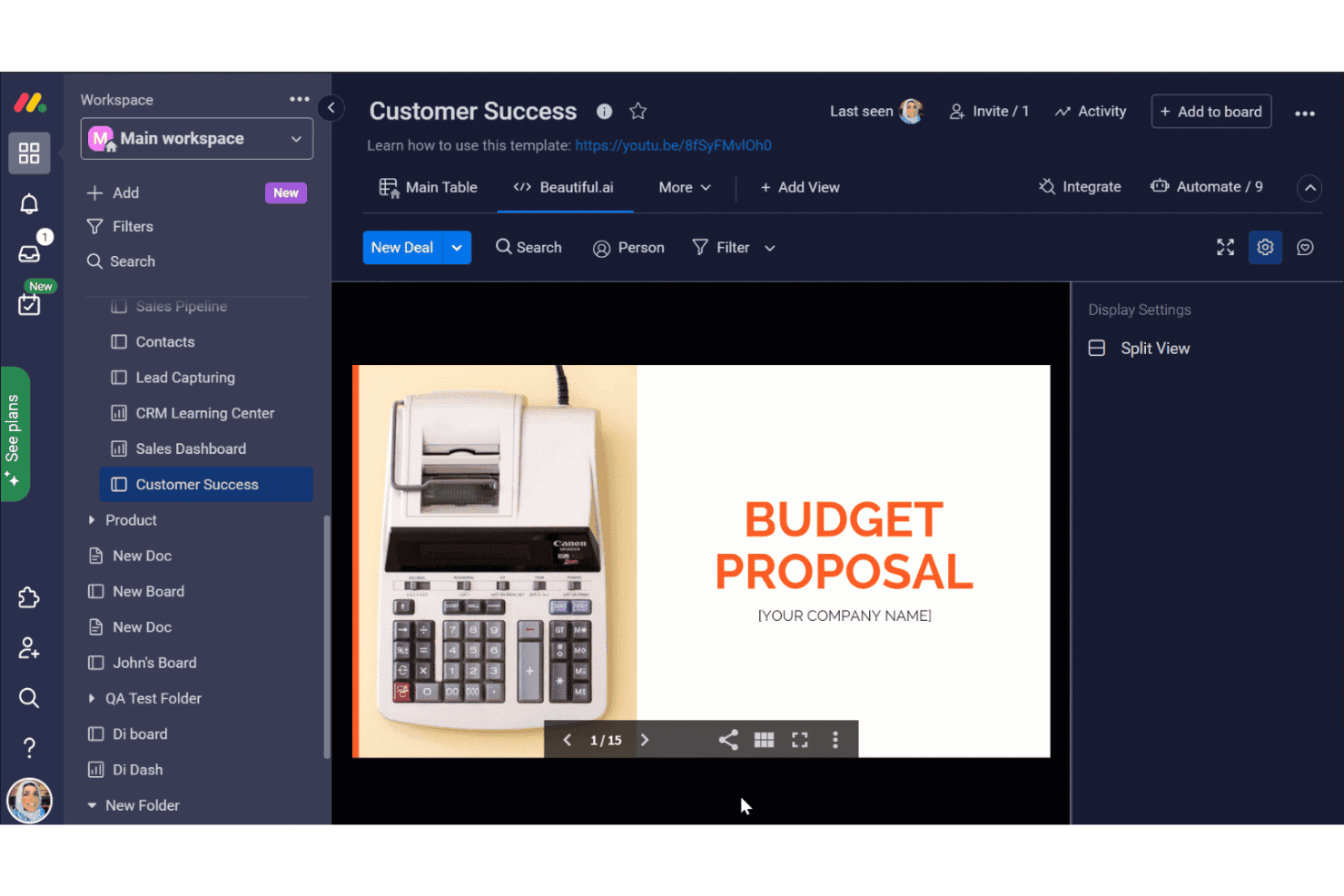
monday.com ofrece un panel de Éxito del cliente con una vista integrada de Beautiful.ai que muestra una presentación de Propuesta presupuestaria dentro de su AI Workspace. monday AI Workspace es una plataforma flexible de gestión del trabajo creada para equipos técnicos que necesitan más que las funciones básicas de Basecamp: combina automatizaciones impulsadas por IA, planificación de sprints y seguimiento de proyectos interfuncionales en un solo lugar.
¿Para quién es más adecuado monday AI Workspace?
Es una opción excelente para equipos de TI e ingeniería medianos y grandes que gestionan múltiples proyectos simultáneos entre distintas funciones.
Por qué monday AI Workspace es una buena alternativa a Basecamp
Elegí monday AI Workspace porque su creador de flujos de trabajo con IA hace algo que no había visto en ningún otro lugar: crea secuencias de automatización de varios pasos a partir de una descripción de tu proceso en lenguaje natural. Después, las columnas de IA pueden categorizar tareas automáticamente, resumir actualizaciones o extraer elementos de acción, reduciendo el trabajo administrativo manual que mi equipo solía realizar después de cada sprint. La IA también señala las sobreasignaciones de recursos antes de que se conviertan en plazos incumplidos.
Características principales de monday AI Workspace
- Herramientas de gestión de sprints: Organiza de forma nativa las listas de pendientes, los sprints y las versiones para los ciclos de desarrollo ágil.
- Paneles de cartera y carga de trabajo: Visualiza en tiempo real el progreso de los proyectos, la carga de trabajo del equipo y el estado de varios proyectos.
- Integración nativa con GitHub: Conecta directamente el control de versiones y los flujos de trabajo de desarrollo con los paneles de proyectos.
- Controles de permisos detallados: Configura roles de usuario detallados, acceso en varios niveles y permisos para invitados en múltiples proyectos.
Integraciones de monday AI Workspace
monday AI Workspace ofrece cientos de integraciones nativas y aplicaciones del mercado, entre ellas Slack, GitHub, Google Workspace, Microsoft Teams, Jira, Zoom, Dropbox, Salesforce, HubSpot y Outlook. También es compatible con Zapier y proporciona una API para integraciones personalizadas.
Pros and Cons
Pros:
- La IA automatiza flujos de trabajo de varios pasos a partir de texto sin formato
- Gestión nativa de sprints ágiles y listas de pendientes
- Vistas altamente personalizables, incluidos diagramas de Gantt y cronogramas
Cons:
- Se aplican límites de automatización en los planes de niveles inferiores
- Puede parecer demasiado complejo para proyectos sencillos
Learn more about monday AI Workspace: Ideal para planificar tareas con formato de hoja de cálculo
- Prueba gratuita de 30 días
- Desde $9/usuario/mes (facturado anualmente)
Visit WebsiteCustomer Rating:4.5/5
Smartsheet es una herramienta colaborativa de gestión del trabajo para planificar, realizar un seguimiento y automatizar flujos de trabajo Si tu equipo prefiere planificar proyectos en un formato de hoja de cálculo familiar, Smartsheet ofrece una alternativa flexible a las herramientas tradicionales de gestión de proyectos. Es especialmente útil para los responsables de operaciones, profesionales de TI y directores de proyectos que necesitan realizar un seguimiento de tareas, dependencias y recursos en una vista basada en cuadrícula. Smartsheet se diferencia de Basecamp al admitir fórmulas, formato condicional y flujos de trabajo automatizados directamente en sus hojas.
Por qué Smartsheet es una buena alternativa a Basecamp
A diferencia de Basecamp, Smartsheet ofrece una interfaz con formato de hoja de cálculo ideal para equipos que desean un control detallado de los datos de sus proyectos. Me gusta que puedas utilizar fórmulas, filtros y formato condicional para organizar y analizar tareas como lo harías en Excel. Smartsheet también permite automatizar procesos repetitivos con herramientas integradas de automatización de flujos de trabajo.
Si tus proyectos requieren un seguimiento detallado y una gestión de datos personalizada, Smartsheet ofrece una flexibilidad que Basecamp no iguala.
Funciones principales de Smartsheet
Otras funciones de Smartsheet ayudan a los equipos a coordinar y gestionar proyectos a gran escala:
- Vista de tarjetas: Cambia a un tablero de estilo kanban para gestionar tareas visualmente y realizar un seguimiento de los flujos de trabajo.
- Gestión de recursos: Asigna miembros del equipo a tareas y supervisa la carga de trabajo en varios proyectos.
- Solicitudes de actualización: Envía solicitudes automatizadas de actualizaciones de tareas o aprobaciones para mantener la información al día.
- Archivos adjuntos: Adjunta archivos directamente a las filas para acceder fácilmente a los documentos y materiales de referencia del proyecto.
Integraciones de Smartsheet
Entre las integraciones se incluyen Microsoft Teams, Slack, Google Workspace, Dropbox, Salesforce, Box, Jira, DocuSign, Tableau y ServiceNow.
Pros and Cons
Pros:
- La interfaz con formato de hoja de cálculo admite fórmulas avanzadas y formato condicional
- La vista de tarjetas permite gestionar proyectos y tareas con un estilo kanban
- Los flujos de trabajo automatizados reducen las actualizaciones manuales y las tareas repetitivas
Cons:
- El almacenamiento de archivos por usuario es limitado en los planes de nivel inferior
- La aplicación móvil no ofrece algunas funciones avanzadas de edición de hojas
Learn more about Smartsheet: 9Ideal para la integración nativa del correo electrónico
Hive
- Prueba gratuita de 14 días + plan gratuito + demostración gratuita disponible
- Desde $5/usuario/mes (facturado anualmente)
Visit WebsiteCustomer Rating:4.5/5
Hive es una herramienta de gestión de proyectos con seguimiento de tareas y productividad impulsada por IA Los equipos que dependen del correo electrónico para las actualizaciones de proyectos y la asignación de tareas encontrarán especialmente útil la integración nativa del correo electrónico de Hive. Esta plataforma está diseñada para equipos de marketing, servicios al cliente y cualquier grupo que necesite gestionar proyectos y comunicaciones por correo electrónico en un solo lugar. A diferencia de Basecamp, Hive permite enviar, recibir y realizar un seguimiento de los correos electrónicos directamente desde el espacio de trabajo del proyecto, lo que reduce la necesidad de cambiar entre herramientas.
Por qué Hive es una buena alternativa a Basecamp
Si tu equipo dedica mucho tiempo a gestionar proyectos mediante el correo electrónico, Hive ofrece una ventaja única con su integración de correo electrónico integrada. Me gusta que puedas enviar y recibir correos electrónicos directamente desde las tareas, de modo que toda la comunicación relacionada permanezca vinculada al trabajo en sí.
Hive también permite convertir los correos electrónicos en tareas prácticas sin salir de la plataforma, lo que ayuda a los equipos a evitar que se pierdan solicitudes o actualizaciones importantes. Para quienes desean conectar la gestión de proyectos con el correo electrónico, Hive ofrece un nivel de conectividad que Basecamp no iguala.
Características principales de Hive
Otras características de Hive ayudan a los equipos a coordinar y realizar un seguimiento del trabajo en varios proyectos:
- Vista de diagrama de Gantt: Visualiza los cronogramas y las dependencias de los proyectos con diagramas de Gantt interactivos.
- Seguimiento del tiempo: Registra el tiempo dedicado a las tareas directamente dentro de la plataforma.
- Flujos de trabajo automatizados: Configura automatizaciones personalizadas para gestionar acciones repetitivas de los proyectos.
- Mensajería dentro de la aplicación: Comunícate con los miembros del equipo en tiempo real sin salir del espacio de trabajo.
Integraciones de Hive
Las integraciones incluyen Slack, Google Drive, Zoom, Microsoft Teams, Dropbox, Salesforce, Jira, Trello, HubSpot y OneDrive.
Pros and Cons
Pros:
- La integración nativa del correo electrónico permite gestionar los correos dentro de las tareas del proyecto
- Las múltiples vistas de proyectos incluyen Gantt, Kanban, calendario y tabla
- El seguimiento del tiempo integrado ayuda a controlar las horas dedicadas a cada tarea
Cons:
- Algunas integraciones requieren configuración adicional o conectores de terceros
- En proyectos grandes o complejos pueden producirse problemas ocasionales de rendimiento
Learn more about Hive: 10Ideal para herramientas avanzadas de generación de informes
Wrike
- Prueba gratuita de 14 días + plan gratuito disponible
- Desde $10/usuario/mes (facturado anualmente)
Visit WebsiteCustomer Rating:4.3/5
Wrike es una plataforma empresarial de gestión de proyectos para la colaboración y el control de flujos de trabajo Wrike destaca para los equipos que necesitan informes y análisis avanzados integrados en su flujo de trabajo de gestión de proyectos. Los departamentos de TI, los gerentes de proyectos y los equipos de operaciones suelen recurrir a Wrike cuando necesitan realizar un seguimiento de las métricas de rendimiento y generar informes personalizados en varios proyectos. A diferencia de Basecamp, Wrike ofrece paneles detallados y análisis en tiempo real que te ayudan a supervisar el progreso y detectar problemas con antelación.
Por qué Wrike es una buena alternativa a Basecamp
Si tu equipo necesita algo más que listas de tareas básicas, las herramientas avanzadas de generación de informes de Wrike lo distinguen de Basecamp. Elegí Wrike porque te permite crear paneles personalizados, realizar un seguimiento de los KPI y generar informes detallados sobre el estado de los proyectos y la asignación de recursos.
Los widgets de análisis y las visualizaciones de datos en tiempo real te ayudan a detectar tendencias y abordar los problemas antes de que se conviertan en dificultades. Para los equipos que dependen de la toma de decisiones basada en datos, Wrike ofrece capacidades de generación de informes que van mucho más allá de lo que proporciona Basecamp.
Características principales de Wrike
Otras características de Wrike ayudan a los equipos a coordinarse y entregar proyectos de manera eficiente:
- Formularios de solicitud: Recopila solicitudes de proyectos y asígnalas automáticamente al equipo o flujo de trabajo adecuado.
- Seguimiento del tiempo: Registra las horas directamente en las tareas para supervisar el esfuerzo y los costes del proyecto.
- Revisión de documentos: Revisa, comenta y aprueba archivos dentro de la plataforma para agilizar los ciclos de comentarios.
- Gestión de recursos: Asigna miembros del equipo a proyectos y visualiza la carga de trabajo en varias iniciativas.
Integraciones de Wrike
Las integraciones incluyen Salesforce, Microsoft Teams, Slack, Google Drive, Dropbox, Adobe Creative Cloud, Jira, Box, Tableau, Zendesk y más.
Pros and Cons
Pros:
- Los paneles personalizados te permiten realizar un seguimiento de las métricas del proyecto en tiempo real
- El seguimiento del tiempo integrado ayuda a supervisar las horas facturables y no facturables
- Los formularios de solicitud automatizan la recepción y asignación de tareas para los equipos
Cons:
- La configuración inicial y la configuración del flujo de trabajo pueden llevar tiempo para los usuarios nuevos
- La generación de informes y los análisis avanzados requieren planes de pago de nivel superior
Learn more about Wrike:
Otras alternativas a Basecamp
Estas son algunas opciones adicionales como alternativa a Basecamp que no han entrado en mi selección, pero que merece la pena tener en cuenta:
- 11Zoho ProjectsLa mejor opción con seguimiento del tiempo integrado
- 12GoodDayIdeal para la gestión integrada de objetivos
- 13JiraIdeal para equipos de desarrollo de software ágil
Cómo evalúo las alternativas a Basecamp
Divido mi evaluación en dos capas: las capacidades básicas que una herramienta debe tener para reemplazar los tableros de mensajes, tareas y documentos de Basecamp, y los diferenciadores que hacen destacar a las mejores opciones.
Funcionalidad principal (Requisitos básicos para esta lista)
Cuando selecciono herramientas para mi lista, califico cada una en una escala de 0 (no ofrece la funcionalidad) a 5 (sobresale en este aspecto) para cada función principal que se detalla a continuación. Luego, calculo el puntaje total de la herramienta en porcentaje. Cada herramienta debe lograr un puntaje total mínimo de 75% para ser considerada en la selección.
- Gestión de tareas y proyectos: Verifico si puedes crear tareas con subtareas, asignaciones y fechas límite en varias vistas como tableros, líneas de tiempo o diagramas de Gantt para planificar sprints o lanzamientos.
- Colaboración y mensajería en equipo: Basecamp centra la comunicación en tableros de mensajes y chat campfire, así que busco mensajería asincrónica y en tiempo real comparable vinculada a los proyectos.
- Compartir archivos y almacenamiento de documentos: Cada herramienta debe permitir a los equipos adjuntar archivos a tareas y almacenar documentos compartidos o wikis en una ubicación central, de manera similar a cómo Basecamp organiza archivos y documentos por proyecto.
- Integraciones con herramientas para desarrolladores: Evalúo las conexiones nativas con herramientas como GitHub, GitLab, Slack y plataformas CI/CD para que tus flujos de trabajo de desarrollo y TI se mantengan conectados sin actualizaciones manuales.
- Seguimiento de progreso e informes: Aquí importan los paneles, hitos y vistas de carga de trabajo. Busco la capacidad para monitorear la salud del proyecto de un vistazo a lo largo de los ciclos activos de desarrollo.
- Múltiples proyectos y controles de acceso: Gestionar varios proyectos simultáneamente con permisos basados en roles y acceso de invitados es esencial, especialmente cuando contratistas externos o clientes necesitan visibilidad.
Una vez que tengo una lista de herramientas que cumplen estos criterios, considero qué hace destacar a cada plataforma.
Factores diferenciadores (qué distingue a los proveedores)
Así es como comparo y contrasto diferentes proveedores:
Características sobresalientes
Para equipos de desarrollo y TI, analizo de cerca el soporte nativo para metodologías ágiles: la planificación de sprints, los backlogs y los gráficos de evolución marcan una gran diferencia cuando trabajas en ciclos de lanzamiento de dos semanas. También son importantes las automatizaciones de flujo de trabajo: herramientas como ClickUp y monday.com permiten asignar tareas automáticamente o cambiar estados según disparadores, lo que reduce tareas repetitivas. Además, evalúo la flexibilidad de las vistas y los campos personalizados, ya que los equipos de infraestructura y los grupos de desarrollo rara vez organizan el trabajo de la misma manera.
Más allá de las características
La estructura de precios es un diferenciador importante aquí. El modelo de tarifa plana de Basecamp es inusual, así que reviso si el precio por usuario se mantiene razonable a medida que tu equipo de ingeniería crece. La seguridad y el cumplimiento también merecen atención: SOC 2, SSO y la provisión de SCIM son relevantes cuando tu equipo de TI gestiona sistemas sensibles o trabaja en entornos regulados. También evalúo la profundidad de las integraciones, especialmente la sincronización bidireccional con GitHub, GitLab o Bitbucket, ya que una herramienta que no puede conectarse a tu stack de desarrollo existente crea más trabajo que el que elimina.
¿Por qué buscar una alternativa a Basecamp?
Aunque Basecamp es una herramienta de planificación popular, conocida por su facilidad de uso y su corta curva de aprendizaje, hay varios motivos por los que algunos equipos buscan soluciones alternativas. Es posible que busques una alternativa a Basecamp porque…
- Necesitas funciones más avanzadas, como dependencias entre tareas, subtareas y flujos de trabajo de proyectos estructurados
- Tu equipo necesita seguimiento del tiempo o gestión de recursos integrados
- Quieres capacidades más completas de elaboración de informes y análisis
- Necesitas permisos de usuario y acceso de invitados más flexibles
- Tu organización depende de un ecosistema de integraciones más amplio que el compatible con Basecamp
- Buscas una solución que se adapte mejor al crecimiento más allá de equipos pequeños y proyectos sencillos
Basecamp funciona bien para la colaboración sencilla, pero no ofrece paneles Kanban nativos con personalización avanzada ni herramientas detalladas para gestionar listas de tareas pendientes. Si para tu equipo es esencial gestionar fechas de vencimiento complejas, flujos de trabajo por capas o procesos automatizados, es posible que necesites un software diseñado para una planificación de proyectos más estructurada.
Si alguna de estas situaciones te resulta familiar, has llegado al lugar adecuado. Mi lista contiene varias opciones de software de gestión de proyectos más adecuadas para los equipos que se enfrentan a estos desafíos con Basecamp y buscan soluciones alternativas.
Características principales de Basecamp
Estas son algunas de las características principales de Basecamp, que te ayudarán a contrastar y comparar lo que ofrecen las soluciones alternativas:
- Listas de tareas para asignar y realizar un seguimiento de las tareas
- Tableros de mensajes para los debates del equipo
- Chat grupal en tiempo real con Campfire
- Calendarios compartidos e integración con calendarios
- Almacenamiento de archivos y documentos en un solo lugar
- Preguntas automáticas de seguimiento para conocer las novedades del equipo
- Acceso de clientes con permisos personalizables
- Páginas de inicio de proyectos centralizadas para obtener una visión general rápida
- Gráficos de colinas para visualizar el progreso del proyecto