

¿Estás cansado de revisar montañas de datos sin obtener información clara? El software de minería de procesos podría ser la respuesta. Te ayuda a descubrir ineficiencias y cuellos de botella en tus operaciones, ahorrando tiempo y recursos.
Por mi experiencia probando y analizando software, he comprobado que las herramientas adecuadas pueden transformar la forma en que tu equipo aborda la gestión de procesos. Te guiaré por las principales soluciones de minería de procesos y compartiré información imparcial para ayudarte a tomar decisiones fundamentadas.
Descubrirás cómo estas herramientas pueden adaptarse a tus necesidades específicas, tanto si trabajas en una pequeña empresa emergente como en una gran compañía. Sigue leyendo para conocer en profundidad sus funciones, ventajas y desventajas, así como los aspectos que hacen destacar a cada opción.
Por qué confiar en nuestras recomendaciones de software
6,700+
Reviews
20
Industry experts
16+
Evaluation factors
14
Years
Nuestro equipo lleva probando y evaluando software desde 2012. Como líderes tecnológicos, sabemos lo difícil —y lo importante— que es elegir el software adecuado.
Para esta guía, evaluamos las herramientas mediante pruebas prácticas e investigación independiente, puntuando las herramientas según nuestros criterios de selección.
Nuestras reseñas reflejan nuestro criterio editorial humano, no un discurso de ventas.
Revisores expertos:
- Paulo Gardini MiguelDirector técnico
 Tim FisherVP de IA
 Gabriel RosasTech Lead y arquitecto de software
 Christhian GruhnTech Lead y arquitecto de plataforma

Tabla comparativa de software de minería de procesos
Esta tabla comparativa resume los detalles de precios de mis principales selecciones de software de minería de procesos:
| Tool | Best For | Trial Info | Price | ||
|---|---|---|---|---|---|
| 1 | Ideal para descubrir oportunidades de automatización | Demostración gratuita disponible | Precios bajo solicitud | Website | |
| 2 | La mejor para armonizar RPA y minería de procesos | Prueba gratuita de 60 días + demo gratis disponible | Desde $90/usuario/mes | Website | |
| 3 | El mejor para obtener conocimientos de procesos impulsados por IA | Demo gratuita disponible | Desde $100/usuario/mes | Website | |
| 4 | La mejor para conectar operaciones con experiencias del cliente | Prueba gratuita + demo gratis disponible | Desde $200/usuario/mes | Website | |
| 5 | La mejor para análisis de causas raíz | Demo gratuita disponible | Desde $90/usuario/mes (facturación anual) | Website | |
| 6 | Mejor para integrar información financiera | Precio bajo solicitud | Website | ||
| 7 | La mejor para escalabilidad e integración empresarial | Desde $150/usuario/mes (mínimo 10 licencias) | Website | ||
| 8 | La mejor para combinar RPA con análisis de procesos | Desde $750/usuario/mes (facturado anualmente) | Website | ||
| 9 | Mejor para el rendimiento de procesos en tiempo real | Desde $120/usuario/mes | Website | ||
| 10 | Mejor para el descubrimiento rápido de procesos | Desde $99/usuario/mes (facturado anualmente) | Website |


Análisis de los mejores programas de minería de procesos
A continuación encontrarás mis resúmenes detallados de los mejores programas de minería de procesos que llegaron a mi lista de selección. Mis análisis ofrecen una visión detallada de las funciones principales, ventajas & desventajas, integraciones y casos de uso ideales de cada herramienta para ayudarte a encontrar la más adecuada para ti.
 Ideal para descubrir oportunidades de automatización
- Demostración gratuita disponible
- Precios bajo solicitud
Visit WebsiteCustomer Rating:5/5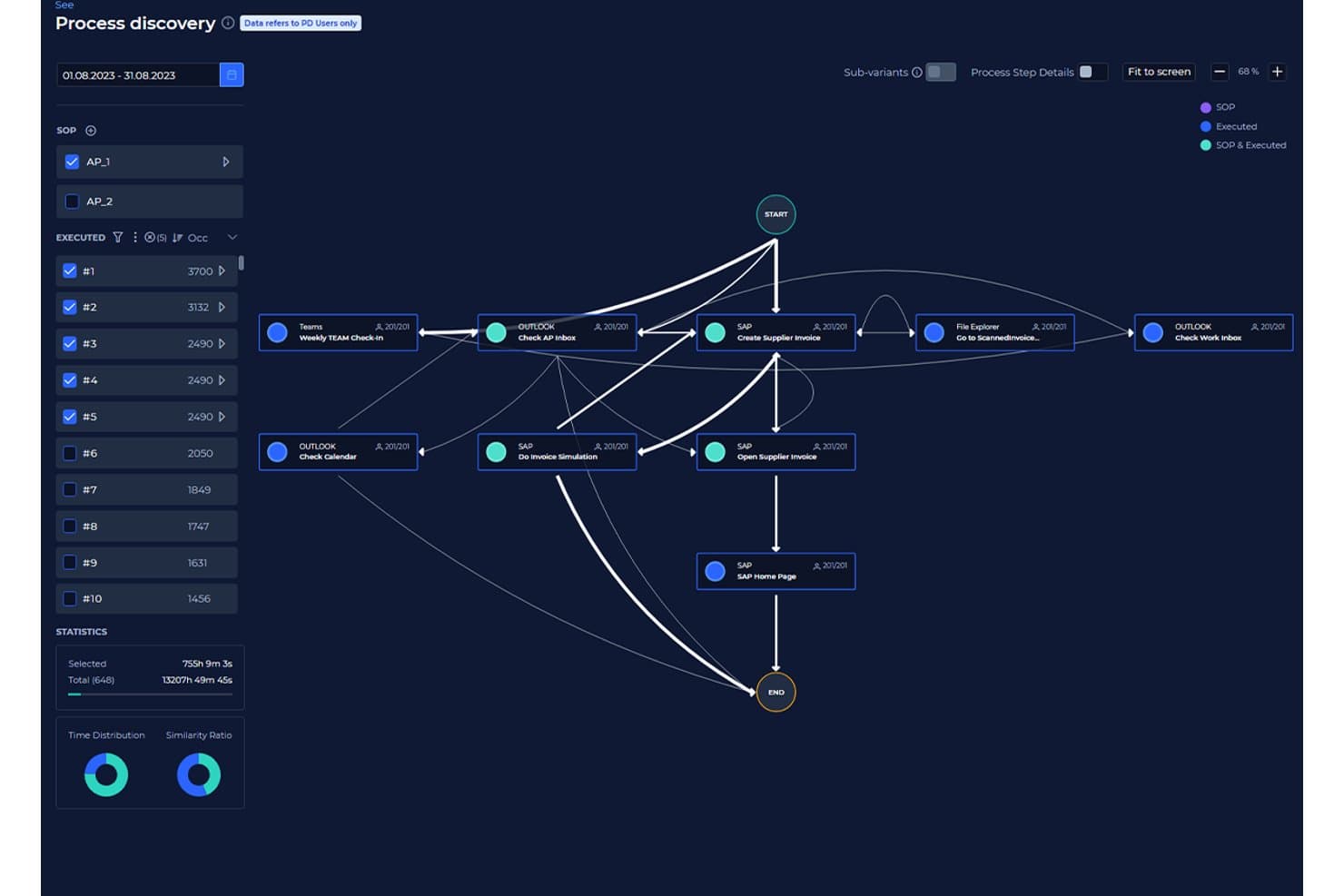
KYP.ai visualiza los flujos de procesos para descubrir patrones de ejecución. KYP.ai es una plataforma de inteligencia de procesos que captura la actividad a nivel de escritorio en aplicaciones y sistemas para reconstruir flujos de procesos, identificar ineficiencias y generar código de automatización listo para producción, sin depender de la extracción tradicional de registros de eventos.
¿Para quién es más adecuado KYP.ai?
KYP.ai es una opción adecuada para los equipos de operaciones y automatización de empresas de BPO, servicios empresariales y BFSI que necesitan identificar y priorizar oportunidades de automatización en los flujos de trabajo de escritorio.
Por qué elegí KYP.ai
Elegí KYP.ai porque detecta oportunidades de automatización que las herramientas tradicionales de minería de procesos pasan completamente por alto. La mayoría de las herramientas basadas en registros de eventos no pueden ver lo que ocurre en hojas de cálculo, cadenas de correos electrónicos o transferencias manuales entre sistemas, pero KYP.ai captura todo ello a nivel de escritorio. Me gusta especialmente que no solo identifica ineficiencias, sino que también calcula el ROI de la automatización por tipo de tarea y luego genera código de agentes listo para producción para plataformas como UiPath y Copilot Studio, por lo que no existe una brecha entre el descubrimiento y la ejecución.
Características principales de KYP.ai
- Vista empresarial de 360°: Agrega datos en tiempo real de escritorios, aplicaciones y sistemas para ofrecer una visión unificada de la actividad de la organización.
- Seguimiento de conformidad y cumplimiento: Captura los pasos normativos y señala automáticamente las desviaciones con respecto a los estándares de la empresa o los SLA.
- Panel de análisis del rendimiento: Proporciona duraciones de tareas, distribuciones de carga de trabajo e informes sobre cuellos de botella con opciones interactivas de filtrado.
- Base de datos de integraciones: Combina datos de sistemas empresariales, herramientas de BI y plataformas de fuerza laboral para mejorar la visibilidad de los procesos.
Integraciones de KYP.ai
KYP.ai ofrece integraciones mediante su API y su base de datos de integraciones, lo que permite conectarse con plataformas como PowerBI, UiPath, SAP Joule y Copilot Studio. También hay una API disponible para integraciones personalizadas.
Pros and Cons
Pros:
- Captura la actividad de escritorio que la minería de registros tradicional no detecta
- Genera automáticamente código de automatización listo para su implementación
- Cuantificación integrada del ROI por proceso y tarea
Cons:
- No cuenta con conectores de ITSM o ServiceNow prediseñados
- Pocas reseñas públicas de usuarios para realizar comparaciones con otros productos
Learn more about KYP.ai: La mejor para armonizar RPA y minería de procesos
- Prueba gratuita de 60 días + demo gratis disponible
- Desde $90/usuario/mes
Visit WebsiteCustomer Rating:4.6/5
Funcionalidad de arrastrar y soltar del software de minería de procesos de UiPath UiPath sobresale por su compromiso de unir la Automatización Robótica de Procesos (RPA) y la minería de procesos en una sola plataforma. Esta armonización asegura que las organizaciones puedan automatizar tareas mientras obtienen simultáneamente información sobre sus procesos.
Por qué elegí UiPath: UiPath me llamó la atención debido a su exclusiva combinación de RPA y minería de procesos. Al evaluar las ofertas de varias herramientas, determiné que UiPath proporcionaba una mezcla armoniosa que no se encuentra comúnmente en otros lugares. Es esta sincronización entre automatización e información lo que me convenció de que es 'la mejor para armonizar RPA y minería de procesos'.
Características destacadas e integraciones:
El Orchestrator está en el centro de la oferta de UiPath; es una plataforma que coordina robots de software asegurando que se implementen donde más se necesitan. Además, UiPath Studio permite a los usuarios crear flujos de trabajo personalizados. En cuanto a integraciones, UiPath es compatible con una amplia variedad de aplicaciones, incluidas SAP, Oracle y Salesforce.
Pros and Cons
Pros:
- Una fusión única de RPA y minería de procesos
- Plataforma Orchestrator para un despliegue eficiente de bots
- Creación de flujos de trabajo personalizados con UiPath Studio
Cons:
- Curva de aprendizaje más pronunciada para quienes son nuevos en RPA
- Puede resultar excesivo para operaciones a pequeña escala
- El modelo de licencias puede ser complejo para algunos usuarios
Learn more about UiPath: El mejor para obtener conocimientos de procesos impulsados por IA
- Demo gratuita disponible
- Desde $100/usuario/mes
Visit WebsiteCustomer Rating:4.5/5
Capacidades de evaluación comparativa del software de minería de procesos de Celonis Celonis se destaca como un faro para las organizaciones que apuestan por el futuro, aprovechando el poder de la IA para obtener conocimientos profundos de sus procesos. El núcleo de IA de Celonis lo diferencia, impulsando decisiones de procesos más inteligentes y estrategias orientadas al futuro.
Por qué elegí Celonis: La decisión de incluir Celonis surgió de su sólido análisis basado en IA. Entre la multitud de herramientas disponibles, Celonis destacó especialmente por su núcleo de IA, que considero fundamental para las empresas que quieren estar preparadas para el futuro. Este enfoque centrado en la IA fue lo que me llevó a considerarlo como 'el mejor para obtener conocimientos de procesos impulsados por IA'.
Funciones destacadas e integraciones:
En el corazón de Celonis se encuentra su motor de IA que impulsa análisis profundos de procesos, permitiendo que las empresas optimicen en cada paso. La plataforma también admite simulaciones de procesos, lo que permite probar escenarios hipotéticos. En cuanto a integraciones, Celonis es versátil e interactúa con una multitud de fuentes de datos, desde ERPs hasta CRMs.
Pros and Cons
Pros:
- Motor de IA para conocimientos profundos y predictivos
- Simulación de procesos para la planificación estratégica
- Amplias capacidades de integración con diversas fuentes de datos
Cons:
- Puede requerir un cambio de mentalidad para aprovechar plenamente los beneficios de la IA
- Las funciones avanzadas pueden ser abrumadoras para principiantes
- Precio elevado para empresas más pequeñas
Learn more about Celonis: 4La mejor para conectar operaciones con experiencias del cliente
Pega
- Prueba gratuita + demo gratis disponible
- Desde $200/usuario/mes
Visit WebsiteCustomer Rating:4.3/5
Función de centro de personas del software de minería de procesos App Studio de Pega Pega Platform se destaca no solo como una herramienta de minería de procesos sino como una plataforma integral que conecta los procesos operativos con las experiencias del cliente. Cuando el objetivo es ver cómo las operaciones de backend afectan las interacciones del cliente en el front-end, Pega es la opción ideal.
Por qué elegí la Pega Platform: Mi elección de Pega estuvo influenciada por su enfoque único al integrar los procesos operativos con la experiencia del cliente. A diferencia de muchas otras herramientas, Pega ofrece un puente entre las operaciones de back-end y los puntos de contacto con el cliente en el front-end. Este enfoque dual me llevó a seleccionarla como 'la mejor para conectar operaciones con experiencias del cliente'.
Características destacadas e integraciones:
Pega conecta la gestión de procesos de negocio (BPM), la gestión de casos y el análisis en tiempo real. Este trío garantiza que las empresas puedan ajustar los procesos basándose en los comentarios de los clientes en tiempo real. En cuanto a integraciones, Pega cuenta con conectores integrados para las principales herramientas de CRM, ERP y almacenamiento de datos.
Pros and Cons
Pros:
- Vista sincrónica de operaciones y experiencia del cliente
- Analítica en tiempo real para una toma de decisiones rápida
- Conectores integrados para herramientas empresariales líderes
Cons:
- Precio más alto en comparación con algunos competidores
- Puede ser abrumador debido a su gran cantidad de funciones
- Requiere capacitación dedicada para maximizar su potencial
Learn more about Pega : La mejor para análisis de causas raíz
- Demo gratuita disponible
- Desde $90/usuario/mes (facturación anual)
Visit WebsiteCustomer Rating:4.5/5
Panel líder del mercado del software de minería de procesos QPR ProcessAnalyzer QPR ProcessAnalyzer se presenta como una herramienta que no solo muestra los procesos, sino que profundiza en el 'por qué' detrás de los comportamientos de los procesos. Para las organizaciones que buscan comprender las causas raíz de las variaciones en los procesos, QPR ofrece conocimientos invaluables.
Por qué elegí QPR ProcessAnalyzer: Al comparar herramientas, la capacidad de QPR ProcessAnalyzer para el análisis de causas raíz resultó evidente. Muchas herramientas pueden mostrar 'qué' está sucediendo, pero pocas pueden identificar de manera consistente 'por qué' sucede. Esta fortaleza en la determinación de causas raíz fue la razón por la que la destaqué como 'la mejor para análisis de causas raíz'.
Características destacadas e integraciones:
La herramienta está equipada con funciones de diagnóstico avanzadas, haciendo que el análisis de causas raíz sea preciso. También admite predicciones basadas en IA para resultados de procesos. En lo que respecta a integraciones, QPR se sincroniza fácilmente con los principales ERPs y almacenes de datos.
Pros and Cons
Pros:
- Precisión en el análisis de causas raíz
- Predicciones basadas en IA para una visión mejorada
- Integración eficiente con los principales ERPs
Cons:
- Puede haber una curva de aprendizaje para usuarios no técnicos
- Las predicciones de IA requieren conjuntos de datos limpios para su precisión
- Algunas funciones pueden ser redundantes para implementaciones pequeñas
Learn more about QPR ProcessAnalyzer:

Informes y panel de minería de esfuerzos de PwC La solución de minería de procesos de PwC es mucho más que una herramienta de visualización; cierra la brecha entre los procesos y la información financiera. Esta combinación de datos de procesos con análisis financieros hace que PwC sea inigualable cuando se trata de minería de procesos centrada en lo financiero.
Por qué elegí PwC: En mi análisis comparativo, noté una carencia: pocas herramientas conectan eficazmente la minería de procesos con la información financiera. PwC llenó este vacío a la perfección. Elegí PwC como 'mejor para integrar información financiera' debido a su capacidad para fusionar datos de procesos con métricas financieras, ofreciendo una visión holística de las operaciones empresariales.
Características destacadas e integraciones:
PwC ofrece características que conectan los procesos operativos directamente con los indicadores de rendimiento financiero. Además, cuenta con herramientas de evaluación de riesgos que vinculan los riesgos financieros con los procesos. En cuanto a integraciones, la herramienta de PwC se integra con la mayoría de los sistemas financieros empresariales y ERPs.
Pros and Cons
Pros:
- Integración profunda de datos de procesos con información financiera
- Funciones de evaluación de riesgos vinculadas a métricas financieras
- Amplia compatibilidad con sistemas financieros
Cons:
- Puede ser demasiado avanzado para empresas pequeñas
- La interfaz puede ser compleja para principiantes
- El modelo de precios puede ser alto para algunos
Learn more about PwC: La mejor para escalabilidad e integración empresarial
- Desde $150/usuario/mes (mínimo 10 licencias)

Tablero de descubrimiento de procesos del software de minería de procesos de IBM IBM Process Mining ofrece a las empresas una solución robusta para analizar, monitorear y optimizar sus operaciones. Diseñada para grandes empresas, esta herramienta destaca por su escalabilidad y sus profundas capacidades de integración.
Por qué elegí IBM Process Mining:
Al seleccionar herramientas, la escalabilidad y las capacidades de integración de IBM Process Mining me llamaron la atención. Dada la reputación de IBM en el ámbito empresarial, no es de extrañar que cuenten con una herramienta diseñada con la escalabilidad como eje principal.
Es este enfoque en las operaciones a gran escala y la compatibilidad empresarial lo que me llevó a pensar que es 'la mejor para la escalabilidad y la integración empresarial.'
Características y integraciones destacadas:
La herramienta de IBM proporciona una visión integral de las operaciones empresariales, ofreciendo información basada en métricas. También incluye una función de simulación que permite analizar escenarios hipotéticos. La plataforma se integra con el amplio ecosistema de IBM, pero también ofrece conectores con otras soluciones de software de nivel empresarial.
Pros and Cons
Pros:
- Diseñada pensando en grandes empresas
- Información basada en métricas para decisiones fundamentadas en datos
- Amplias capacidades de integración con software empresarial
Cons:
- Puede resultar abrumador para pequeñas empresas
- Requiere un conocimiento profundo para aprovechar todo su potencial
- El costo puede ser prohibitivo para algunas organizaciones
Learn more about IBM Process Mining: La mejor para combinar RPA con análisis de procesos
- Desde $750/usuario/mes (facturado anualmente)

Panel de estadísticas de los bots de Automation Anywhere Automation Anywhere fusiona los ámbitos de Robotic Process Automation (RPA) con la dimensión analítica, presentando una herramienta integral para las empresas que buscan automatizar y analizar simultáneamente. Su doble capacidad sirve a las organizaciones que priorizan tanto la automatización como las perspectivas derivadas de sus procesos.
Por qué elegí Automation Anywhere: Al deliberar sobre herramientas con el potencial de no solo automatizar sino también ofrecer información sobre los procesos, Automation Anywhere se posicionó en la cima de mi lista. La mayoría de las herramientas se especializan en uno u otro aspecto, pero Automation Anywhere combina exitosamente ambos, lo cual es poco común. Basado en este enfoque integrado, la etiqueté como 'la mejor para combinar RPA con análisis de procesos'.
Características destacadas e integraciones:
La fortaleza de la herramienta reside en su función Bot Insight, que presenta análisis en tiempo real directamente desde los bots. Además, la plataforma IQ Bot emplea IA para aprender de los usuarios humanos y tomar decisiones basadas en ese aprendizaje. En cuanto a integración, Automation Anywhere se conecta fácilmente con la mayoría del software empresarial, desde ERPs hasta CRMs.
Pros and Cons
Pros:
- Doble capacidad de RPA y análisis de procesos
- Información en tiempo real a través de la función Bot Insight
- Aprendizaje adaptativo de IA con IQ Bot
Cons:
- Curva de aprendizaje más pronunciada para principiantes
- Alto precio para pequeñas empresas
- Las funciones integrales pueden ser abrumadoras
Learn more about Automation Anywhere - RPA | Robotic Process Automation: Mejor para el rendimiento de procesos en tiempo real
- Desde $120/usuario/mes

Función de superposición de modelos de procesos en el software de minería de procesos ARIS ARIS Process Mining examina los procesos, detectando ineficiencias y ofreciendo visibilidad en tiempo real sobre el rendimiento de los procesos. Su compromiso con los conocimientos en tiempo real garantiza que las organizaciones siempre tengan una visión actualizada de sus operaciones.
Por qué elegí ARIS Process Mining: Elegí ARIS por su innegable énfasis en la analítica de procesos en tiempo real. En mi opinión, disponer de una visibilidad inmediata de los procesos es invaluable. Por ello, al ver la dedicación de ARIS para ofrecer información en tiempo real, consideré que merecía la etiqueta 'mejor para el rendimiento de procesos en tiempo real'.
Características destacadas e integraciones:
ARIS destaca por su descubrimiento de procesos en tiempo real, lo que permite a las empresas comprender y adaptar procesos al instante. Su comprobación de conformidad asegura que los procesos se ajusten a los modelos predefinidos. En cuanto a integraciones, ARIS se conecta de forma eficiente con los principales sistemas ERP y otras fuentes de datos.
Pros and Cons
Pros:
- Visibilidad inmediata del rendimiento de procesos
- Comprobación de conformidad frente a modelos establecidos
- Integración eficiente con los principales sistemas ERP
Cons:
- Requiere una formación adecuada para su uso completo
- Puede ser complejo para usuarios no técnicos
- Algunas funciones pueden ser excesivas para operaciones más simples
Learn more about ARIS Process Mining: Mejor para el descubrimiento rápido de procesos
- Desde $99/usuario/mes (facturado anualmente)

Dashboard de prueba de Disco Disco de Fluxicon es una herramienta ágil diseñada para sumergirse rápidamente en tus datos y mostrar procesos con un tiempo de configuración mínimo. Su velocidad y eficiencia la convierten en la opción principal para las organizaciones que buscan un descubrimiento de procesos rápido.
Por qué elegí Disco de Fluxicon: Al deliberar sobre qué herramienta serviría mejor a las empresas que buscan resultados rápidos, Disco destacó. Su eficacia al analizar grandes conjuntos de datos rápidamente sin comprometer la precisión es notable. Lo catalogué como 'mejor para el descubrimiento rápido de procesos' porque su agilidad permite a las empresas obtener información accionable en tiempo récord.
Características destacadas e integraciones:
Disco sobresale por su velocidad, capaz de analizar grandes conjuntos de datos en cuestión de momentos. Sus herramientas de visualización son intuitivas, lo que hace que la interpretación sea sencilla. En cuanto a integraciones, Disco admite una variedad de formatos de datos y se conecta fácilmente con los principales ERP y sistemas de TI.
Pros and Cons
Pros:
- Velocidad excepcional en el análisis de datos de procesos
- Herramientas de visualización intuitivas para una interpretación rápida
- Admite múltiples formatos de datos para facilitar la integración
Cons:
- Carece de algunas herramientas de análisis profundo que tienen los competidores
- El precio puede ser una barrera para las empresas más pequeñas
- La facturación anual puede no ser preferible para todas las organizaciones
Learn more about Disco by Fluxicon:
Otros programas de minería de procesos
Estas son algunas opciones adicionales de software de minería de procesos que no llegaron a mi lista de selección, pero que aún merece la pena revisar:
- 11iGrafx Process Explorer 360Mejor para la visualización integral de procesos
- 12ApromoreIdeal para la analítica de procesos de código abierto
- 13MinitMejor para obtener información detallada sobre los procesos
- 14Scout PlatformBueno para automatizar el descubrimiento de procesos
Cómo evalúo el software de Process Mining
Divido mi evaluación en criterios fundamentales —como si una herramienta puede ingerir registros de eventos de SAP o ServiceNow— y diferenciadores que separan las mejores opciones del resto.
Funcionalidad principal (Requisitos básicos para esta lista)
Cuando selecciono herramientas para mi lista, califico cada una en una escala de 0 (no ofrece la funcionalidad) a 5 (destaca en esta área) para cada funcionalidad principal listada a continuación. Luego, calculo la puntuación total de la herramienta en porcentaje. Cada herramienta debe alcanzar una puntuación mínima total del 65% para ser considerada para su inclusión.
- Ingesta de registros de eventos: Analizo de qué formatos y sistemas fuente cada herramienta puede extraer datos de eventos—como importar registros de ciclo de vida de tickets desde ServiceNow o registros de orden-a-cobro desde SAP.
- Descubrimiento automático de procesos: Cada herramienta debe generar mapas de procesos visuales directamente desde los registros en crudo, así que evalúo cuán bien reconstruye los caminos reales de ejecución sin modelado manual.
- Verificación de conformidad: Verifico si la herramienta puede superponer los procesos descubiertos sobre un modelo de referencia y marcar desviaciones, como aprobaciones omitidas en un flujo de gestión de cambios.
- Analítica de rendimiento: Los tableros deben mostrar indicadores clave como tiempos de ciclo, ubicación de cuellos de botella y rendimiento a través de variantes de proceso—no solo conteos estáticos de casos.
- Análisis de causa raíz y variantes: Es importante profundizar en por qué ciertos tickets de incidente tardan tres veces más, así que evalúo cómo cada herramienta te permite filtrar variantes y aislar factores contribuyentes.
- Integraciones y conectores de sistemas: Busco conectores preconstruidos para los sistemas empresariales que usan los equipos de TI—SAP, Oracle, Salesforce, Jira, ServiceNow—y si las API abiertas soportan fuentes personalizadas.
Una vez que tengo una lista de herramientas que cumplen con estos criterios, considero qué distingue a cada plataforma.
Factores diferenciadores (Qué distingue a los proveedores)
Así es como comparo y contrasto a los diferentes proveedores:
Características destacadas
El task mining es un gran diferenciador—busco herramientas que capturen interacciones de usuario a nivel de escritorio para cubrir vacíos que los registros del sistema no alcanzan, como la entrada manual de datos entre dos aplicaciones desconectadas. La simulación de procesos también es relevante, porque modelar un cambio propuesto antes de implementarlo en producción es mejor que adivinar. También evalúo qué tan bien una plataforma transfiere los hallazgos a herramientas de automatización como UiPath o Power Automate, ya que descubrir un cuello de botella solo es útil si puedes actuar en consecuencia.
Más allá de las características
Las certificaciones de seguridad y cumplimiento como SOC 2 e ISO 27001 importan cuando tus datos de procesos incluyen registros ITSM sensibles o información de clientes—reviso qué ofrece cada proveedor para enmascaramiento de datos y acceso basado en roles. La velocidad de implementación es otro factor que considero, especialmente si una plataforma incluye aceleradores preconstruidos para flujos de trabajo comunes de TI como la gestión de incidentes. También tomo en cuenta la flexibilidad de despliegue, ya que algunas organizaciones necesitan opciones on-premise para cumplir con políticas internas de residencia de datos.
Cómo elegir un programa de minería de procesos
Es fácil perderse entre largas listas de funciones y complejas estructuras de precios. Para ayudarte a mantener la atención mientras avanzas en tu proceso único de selección de software, aquí tienes una lista de factores que debes tener en cuenta:
| Factor | Qué tener en cuenta |
|---|---|
| FactorEscalabilidad | Qué tener en cuenta¿El software crecerá junto con tu empresa? Comprueba si puede gestionar un mayor volumen de datos y carga de usuarios sin problemas de rendimiento. |
| FactorIntegraciones | Qué tener en cuenta¿Se conecta con tus sistemas existentes? Busca una integración sencilla con herramientas como ERP, CRM y bases de datos. |
| FactorPersonalización | Qué tener en cuenta¿Puedes adaptarlo a tus procesos? Asegúrate de que el software permita ajustar los flujos de trabajo para satisfacer tus necesidades. |
| FactorFacilidad de uso | Qué tener en cuenta¿Es fácil de usar para tu equipo? Ten en cuenta la curva de aprendizaje y si la interfaz es lo bastante intuitiva para el uso diario. |
| FactorImplementación e incorporación | Qué tener en cuenta¿Cuánto tiempo tardará en configurarse? Evalúa el tiempo y los recursos necesarios para la implementación, incluida la formación y la asistencia. |
| FactorCoste | Qué tener en cuenta¿Se ajusta a tu presupuesto? Compara las tarifas de suscripción y los costes adicionales, y comprueba si hay una prueba gratuita o una demostración disponible. |
| FactorMedidas de seguridad | Qué tener en cuenta¿Están protegidos tus datos? Busca cifrado, cumplimiento de la normativa de protección de datos y certificaciones de seguridad del proveedor. |
| FactorDisponibilidad de asistencia | Qué tener en cuenta¿Puedes obtener ayuda cuando la necesitas? Comprueba si hay asistencia las 24 horas, los 7 días de la semana, los tiempos de respuesta y la calidad de las opciones de atención al cliente disponibles. |
¿Qué es el software de minería de procesos?
El software de minería de procesos es una herramienta que analiza los procesos empresariales para identificar ineficiencias y cuellos de botella. Profesionales como analistas de negocio, responsables de procesos y especialistas de TI suelen utilizar estas herramientas para obtener información y mejorar las operaciones. Las funciones de visualización de datos, descubrimiento de procesos y análisis del rendimiento ayudan a comprender los flujos de trabajo y optimizar los procesos. En general, estas herramientas proporcionan información valiosa que permite conseguir operaciones más eficientes y rentables.
Funciones
Al seleccionar un software de minería de procesos, presta atención a las siguientes funciones clave:
- Descubrimiento de procesos: Mapea automáticamente los procesos empresariales para facilitar su comprensión y análisis.
- Comprobación de conformidad: Compara los procesos actuales con los modelos deseados para identificar desviaciones.
- Análisis del rendimiento: Evalúa la eficiencia y la velocidad de los procesos para localizar cuellos de botella.
- Visualización de datos: Ofrece gráficos y diagramas claros e interactivos para facilitar la comprensión de los datos.
- Capacidades de integración: Se conecta sin problemas con sistemas empresariales existentes, como ERP y CRM.
- Paneles personalizables: Permiten a los usuarios adaptar las vistas y los informes para satisfacer necesidades empresariales específicas.
- Análisis predictivo: Proporciona previsiones e información para ayudar a anticipar los resultados futuros de los procesos.
- Supervisión en tiempo real: Ofrece actualizaciones en directo para realizar un seguimiento de los procesos mientras suceden y obtener información inmediata.
- Información basada en IA: Utiliza inteligencia artificial para ofrecer análisis más profundos y recomendaciones.
- Medidas de seguridad: Garantiza la protección de los datos mediante cifrado y el cumplimiento de la normativa.
Ventajas
La implementación de un software de minería de procesos ofrece varias ventajas para tu equipo y tu empresa. Estas son algunas de las que puedes esperar:
- Mayor eficiencia: Identifica cuellos de botella e ineficiencias, lo que ayuda a acelerar los procesos.
- Mejor toma de decisiones: Ofrece información y visualización de datos para respaldar decisiones fundamentadas.
- Mayor cumplimiento normativo: Garantiza que los procesos se ajusten a la normativa mediante la comprobación de conformidad.
- Ahorro de costes: Reduce el desperdicio y optimiza el uso de los recursos mediante el análisis del rendimiento.
- Mayor transparencia: Proporciona una visibilidad clara de los procesos mediante la supervisión en tiempo real.
- Información predictiva: Ayuda a anticipar tendencias y resultados futuros mediante el análisis predictivo.
- Personalización: Adapta los paneles y los informes a necesidades empresariales específicas, mejorando la usabilidad.
Costes y precios
Seleccionar un software de minería de procesos requiere comprender los distintos modelos de precios y planes disponibles. Los costes varían en función de las funciones, el tamaño del equipo, los complementos y otros factores. La tabla siguiente resume los planes habituales, sus precios medios y las funciones que suelen incluir las soluciones de software de minería de procesos:
Tabla comparativa de planes de software de minería de procesos
| Tipo de plan | Precio medio | Características habituales |
|---|---|---|
| Tipo de planPlan gratuito | Precio medio$0 | Características habitualesDescubrimiento básico de procesos, visualización de datos limitada y asistencia de la comunidad. |
| Tipo de planPlan personal | Precio medio$10-$50/usuario/mes | Características habitualesDescubrimiento de procesos, análisis del rendimiento e integración básica de datos. |
| Tipo de planPlan empresarial | Precio medio$50-$150/usuario/mes | Características habitualesVisualización avanzada de datos, supervisión en tiempo real y paneles personalizables. |
| Tipo de planPlan corporativo | Precio medio$150+/usuario/mes | Características habitualesAnálisis predictivo, información basada en IA, asistencia prioritaria y capacidades completas de integración. |
Preguntas frecuentes sobre el software de minería de procesos
Estas son algunas respuestas a preguntas frecuentes sobre el software de minería de procesos:
¿Cuáles son los retos habituales al implementar un software de minería de procesos?
Entre los retos habituales se incluyen los problemas de calidad de los datos, la complejidad de la integración y la resistencia al cambio dentro de los equipos. Es fundamental garantizar una recopilación de datos precisa y comunicar claramente a tu equipo las ventajas de la minería de procesos para superar estos obstáculos.
¿Cómo facilita el cumplimiento normativo el software de minería de procesos?
El software de minería de procesos facilita el cumplimiento normativo mediante funciones de comprobación de conformidad. Estas funciones permiten comparar los procesos actuales con las normas reguladoras, lo que ayuda a identificar y corregir cualquier desviación para mantener el cumplimiento de las normativas del sector.
¿Es posible personalizar el software de minería de procesos para adaptarlo a necesidades específicas?
Muchas herramientas de minería de procesos ofrecen opciones de personalización, como paneles e informes ajustables. Esto permite adaptar el software a tus procesos y requisitos empresariales específicos, garantizando que satisfaga eficazmente tus necesidades operativas concretas.