

Setyl Test 2026: Vorteile, Nachteile, Funktionen & Preise

Wir bewerten Tools unabhängig; Provisionen helfen, unsere Tests zu finanzieren. Siehe unsere Transparenzrichtlinie und unsere Methodik.
Losing track of laptops, hunting down software licenses, and relying on messy spreadsheets can waste time and money. Setyl is an IT asset management software that tackles those problems by giving you a clear view of every device, license, and user. It’s a strong fit for midsize organizations across various industries, like finance, professional services, and tech, where assets move often and accountability matters. In this review, I’ll cover Setyl’s features, pros and cons, best and worst use cases, pricing, and more—so you can see if it makes your daily IT work easier and your team more efficient and accurate.
Setyl Evaluation Summary

4.9/5
- From $300/month
- Free demo available
Warum Sie unseren Software-Empfehlungen vertrauen können
6,700+
Reviews
20
Industry experts
16+
Evaluation factors
14
Years
Unser Team testet und bewertet Software seit 2012. Als Tech-Führungskräfte wissen wir selbst, wie schwierig – und wichtig – es ist, die richtige Software auszuwählen.
Für diesen Leitfaden haben wir Tools mithilfe von praktischen Tests und unabhängiger Recherche bewertet und dabei unsere Bewertungskriterien angewendet.
Unsere Bewertungen spiegeln unser menschliches redaktionelles Urteilsvermögen wider, keine Verkaufsstrategie.
Expertenprüfer:
- Paulo Gardini MiguelTech-Direktor
 Tim FisherVP für KI
 Gabriel RosasTech Lead & Software-Architekt
 Christhian GruhnTech Lead & Plattform-Architekt

Setyl Overview
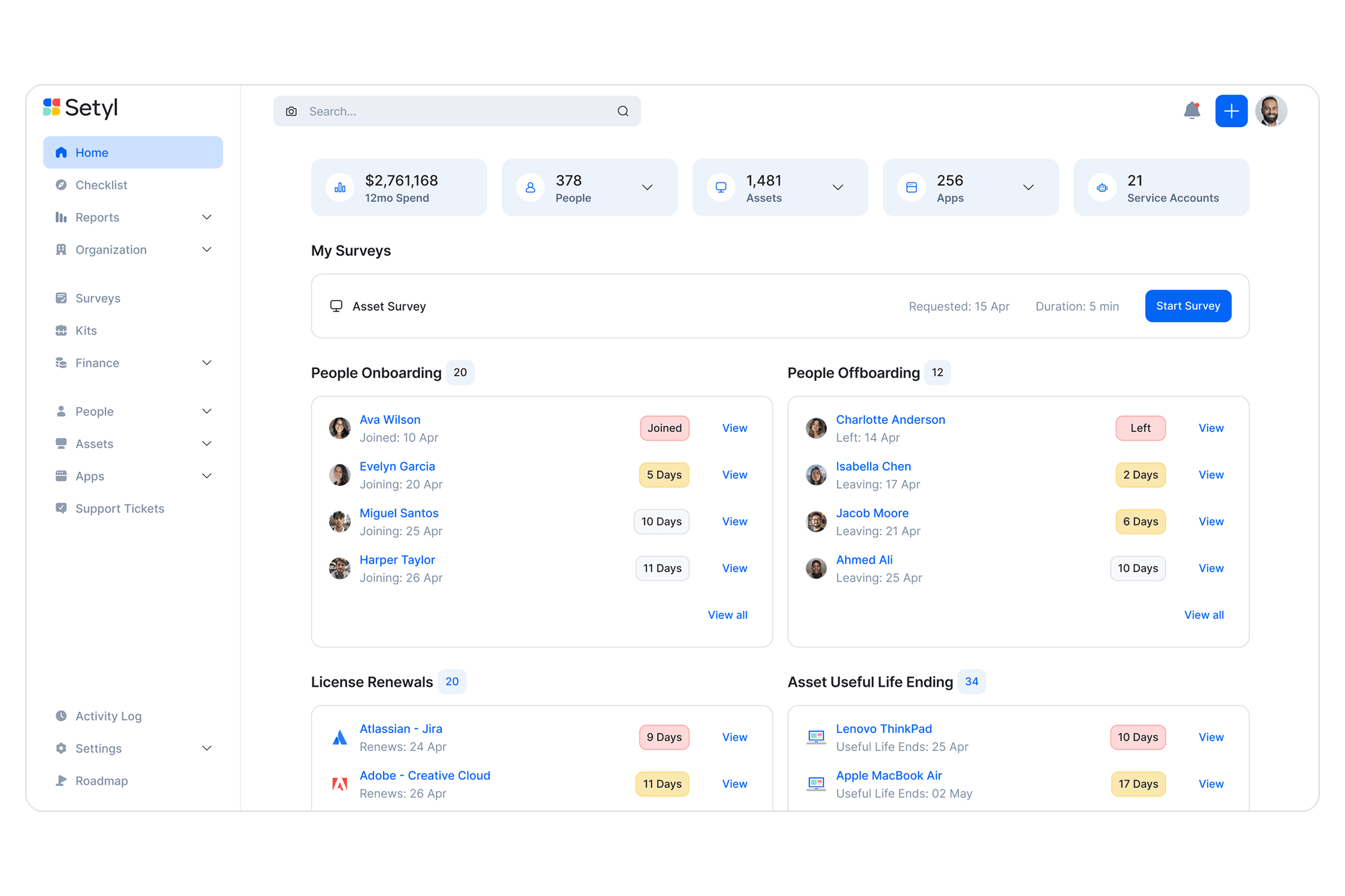
Setyl gives IT teams a clear way to manage hardware, software, and users in one place, which makes day-to-day tracking easier. It focuses on ease of use, so even non-technical staff can pick it up quickly. Overall, it's suitable for teams that are looking to upgrade from basic tracking tools and spreadsheets, but are not quite ready for highly complex enterprise solutions.
Pros
- You can easily track and manage a large number of IT assets in one place.
- You can track the full history of each asset, which makes audits easier.
- Alerts help you catch expiring warranties or licenses before they lapse.
Cons
- Reports feel limited if you need deep, custom insights.
- Visual customization is limited if you want tailored dashboards.
- Doesn’t offer the complex functionalities that may be needed for large enterprise organizations
Is Setyl Right For Your Needs?
Who Would be a Good Fit for Setyl?
Setyl is best suited for midsize organizations that need clear visibility and control across both hardware and software assets without the complexity of legacy enterprise systems. It’s ideal for IT, finance, and operations leaders who want to streamline workflows, automate onboarding and offboarding, and maintain compliance as teams and technology stacks grow. Companies in tech, professional services, and finance particularly benefit from Setyl’s unified approach to asset, license, and spend management.
- Tech & Professional Services FirmsIdeal for fast-scaling teams managing distributed staff, shared software, and multiple client environments.
- Finance TeamsSpend visibility, renewal tracking, and license utilization metrics help control budgets.
- Midsize OrganizationsBuilt for midsize companies that need comprehensive visibility without the overhead of legacy systems.
- Remote/Hybrid TeamsYou can track devices and licenses even when teams span different locations.
- IT & Security TeamsYou’ll have audit trails, compliance readiness, and insights into shadow IT.
- HR/Ops DepartmentsYou can tie onboarding/offboarding workflows to asset allocations, reducing gaps.
Who Would be a Bad Fit for Setyl?
Setyl may not be the right choice for organizations at the extreme ends of the spectrum—either too small to need structured IT management or so large and regulated that they require fully customized, certified enterprise systems. Highly specialized industries like engineering, defense, or large-scale financial institutions may also find their requirements exceed Setyl’s current focus and flexibility.
- Massive EnterprisesYou’ll likely outgrow its depth and need enterprise-grade custom workflows.
- Enterprises with On-Prem RequirementsSetyl currently only offers a cloud-based solution.
- Defense/Government OrganizationsStrict controls and certifications may exceed what Setyl supports today.
- Heavy Engineering and Industrial OperationsManaging complex machinery, maintenance schedules, and physical plant assets typically requires niche industry tools.
- Very Small BusinessesTeams with only a few employees and devices will find Setyl more powerful than necessary for their scale.
- Custom Platform DevelopersIf you need highly specialized asset modeling or custom-built workflows, Setyl’s structured framework may feel restrictive.
Unsere Bewertungsmethodik
Wie wir Werkzeuge testen & bewerten
Wir haben Jahre damit verbracht, unser System zur Softwareprüfung und -bewertung aufzubauen, zu verfeinern und zu verbessern. Das Bewertungsraster ist darauf ausgelegt, die Feinheiten der Softwareauswahl und Effektivität eines Tools einzufangen, wobei wir uns auf kritische Aspekte des Entscheidungsprozesses konzentrieren.
Nachfolgend sehen Sie genau, wie unser Test- und Bewertungssystem anhand von sieben Kriterien funktioniert. Es ermöglicht uns eine unparteiische Bewertung der Software basierend auf Grundfunktionalität, besonderen Funktionen, Benutzerfreundlichkeit, Onboarding, Kundensupport, Integrationen, Kundenbewertungen und Preis-Leistungs-Verhältnis.
Grundfunktionalität (25 % der Endbewertung)
Der Ausgangspunkt unserer Bewertung ist immer die Grundfunktionalität des Werkzeugs. Verfügt es über die grundlegenden Funktionen und Merkmale, die ein Benutzer erwarten würde? Sind grundlegende Funktionen auf höherpreisige Tarife beschränkt? Im Kern erwarten wir, dass ein Tool den Basisfähigkeiten seiner Konkurrenten standhält.
Besondere Features (25 % der Endbewertung)
Anschließend bewerten wir ungewöhnliche, herausragende Funktionen, die über die typische Grundfunktionalität von Tools dieser Art hinausgehen. Eine hohe Bewertung zeigt spezialisierte oder einzigartige Eigenschaften, die das Produkt schneller, effizienter oder für den Nutzer wertvoller machen.
Wir bewerten außerdem, wie einfach sich das Tool mit anderen üblichen Werkzeugen im Technologie-Stack integrieren lässt, um die Funktionalität und den Nutzen der Software zu erweitern. Tools mit vielen nativen Integrationen, Drittanbieter-Anbindungen und API-Zugang zur Erstellung kundenspezifischer Integrationen erhalten die besten Bewertungen.
Benutzerfreundlichkeit (10 % der Endbewertung)
Wir betrachten, wie schnell und einfach Aufgaben aus dem Bereich der Grundfunktionalität mit dem Tool erledigt werden können. Gut bewertete Software ist durchdacht gestaltet, intuitiv bedienbar, bietet mobile Apps, Vorlagen und lässt relativ komplexe Aufgaben einfach erscheinen.
Onboarding (10 % der Endbewertung)
Wir wissen, wie wichtig die schnelle Einführung eines neuen Tools für das Team ist, daher bewerten wir, wie leicht sich ein Werkzeug mit minimalem Training erlernen und nutzen lässt. Wir bewerten, wie schnell ein Teammitglied ohne Vorerfahrung anfangen kann. Hoch bewertete Lösungen benötigen wenig bis gar keine Unterstützung.
Kundensupport (10 % der Endbewertung)
Wir prüfen, wie schnell und einfach man bei Problemen Hilfe per Telefon, Live-Chat oder Wissensdatenbank erhält. Tools und Anbieter mit Echtzeit-Support werden besser bewertet, während Chatbots schlechter abschneiden.
Kundenbewertungen (10 % der Endbewertung)
Neben unserer eigenen Prüfung beziehen wir den Net Promoter Score aktueller und ehemaliger Kunden mit ein. Wir bewerten, wie wahrscheinlich es ist, dass sie sich erneut für das Werkzeug entscheiden würden. Hoch bewertete Software weist einen hohen Net Promoter Score auf.
Preis-Leistungs-Verhältnis (10 % der Endbewertung)
Abschließend vergleichen wir unter Berücksichtigung aller Kriterien den durchschnittlichen Preis der Einstiegspakete mit den Grundfunktionen und bewerten den Mehrwert aus den anderen Bewertungsbereichen. Software, die mehr fürs gleiche Geld bietet, schneidet besser ab.
Core Features
Hardware and Software Asset Tracking
You can log every laptop, phone, or piece of software and see who has it at any time. It keeps a full history, so you never lose track.
User Management
You can assign assets to people and know who’s responsible. This makes onboarding, offboarding, and accountability easy.
Lifecycle Tracking
You can follow assets from purchase to disposal. This helps you plan upgrades and avoid surprise failures.
Warranty & License Alerts
You’ll get reminders before contracts expire. That way you don’t overspend or miss renewals.
Reporting & Audits
You can record and track all compliance information, ensuring you are always audit-ready. It saves you from digging through spreadsheets.
Multi-Site Visibility
You can manage assets across offices or regions in one view. It keeps everything consistent, no matter the location.

Ease of Use
Setyl’s layout is clean and intuitive, so you and your team can pick it up quickly without tons of training. Tasks like assigning assets or pulling reports feel straightforward, and you don’t get lost in cluttered menus. Some advanced settings take a little practice, but overall, it makes tracking assets less of a chore and more of a routine you can trust.
Integrations
Setyl integrates natively with Intune, Jamf, Iru (Kandji), Landsweeper, Meraki, Zendesk, Jira Service Management, Okta, Microsoft 365, Google Workspace, Slack, Zoom, NetSuite, Xero, and BambooHR.
Setyl also provides an API and connects with third-party integration tools like Zapier.

Setyl Specs
- 2-Factor Authentication: Yes
- API: Yes
- Asset Tagging: Yes
- Dashboard: Yes
- Data Export: Yes
- Data Import: Yes
- Data Visualization: Yes
- Database: Yes
- Document Management: Yes
- External Integrations: Yes
- Hardware Integration: No
- Hardware Modernization: No
- Inventory Tracking: Yes
- Multi-User: Yes
- Network Device Performance Monitoring: No
- Network Traffic Monitoring: No
- Network Visualization: Yes
- Notifications: Yes
- Scheduling: Yes
- Status Notifications: Yes
- Third-Party Plugins/Add-Ons: Yes
- Workflow Management: Yes


