


PDQ Connect vs. NinjaOne: Vergleich und Expertenbewertungen für 2026
Sehen Sie, wie PDQ Connect und NinjaOne im echten Patch-Management abschneiden – mein Vergleich zeigt Stärken, Schwächen und welche Lösung wirklich zu Ihrem Workflow im 2026 passt.

Wir bewerten Tools unabhängig; Provisionen helfen, unsere Tests zu finanzieren. Siehe unsere Transparenzrichtlinie und unsere Methodik.
Keeping systems up to date shouldn’t feel like a headache, but for many IT teams, patch management turns into a constant cycle of urgent fixes, missed updates, and mounting security concerns.
Choosing the right patch management software can make or break your routine. You’re likely wrestling with automation, security, and ease of use—which is where both PDQ Connect and NinjaOne promise answers, though each brings a different approach.
In this article, you’ll get a clear, side-by-side comparison of these two tools. I’ll walk you through pros and cons, use cases, pricing, security, and usability, so you can make the right call for your team.
PDQ Connect

4.6/5
- Free trial + demo available
- From $12/device/year
NinjaOne
4.7/5
- 14-day free trial + free demo available
- Pricing upon request
Warum Sie unseren Software-Empfehlungen vertrauen können
6,700+
Reviews
20
Industry experts
16+
Evaluation factors
14
Years
Unser Team testet und bewertet Software seit 2012. Als Tech-Führungskräfte wissen wir selbst, wie schwierig – und wichtig – es ist, die richtige Software auszuwählen.
Für diesen Leitfaden haben wir Tools mithilfe von praktischen Tests und unabhängiger Recherche bewertet und dabei unsere Bewertungskriterien angewendet.
Unsere Bewertungen spiegeln unser menschliches redaktionelles Urteilsvermögen wider, keine Verkaufsstrategie.
Expertenprüfer:
- Paulo Gardini MiguelTech-Direktor
 Tim FisherVP für KI
 Gabriel RosasTech Lead & Software-Architekt
 Christhian GruhnTech Lead & Plattform-Architekt

| PDQ Connect | NinjaOne | |
|---|---|---|
| Free Trial | Free trial + demo available | 14-day free trial + free demo available |
| Pricing | From $12/device/year | Pricing upon request |
PDQ Connect vs. NinjaOne: Preise & Versteckte Kosten
PDQ Connect bietet gestaffelte Preise pro Gerät mit Optionen, die sich mit zusätzlichen Funktionen und Endpunkten flexibel anpassen lassen. Es fallen zwar keine Gebühren für Onboarding oder Einrichtung an, dennoch sollten Sie auf Kosten achten, wenn Ihr Team zusätzliche Integrationen oder Premium-Support benötigt. NinjaOne setzt auf ein angebotsbasiertes Abonnementmodell, das in der Regel auf der Anzahl der verwalteten Endpunkte basiert. Erweiterungsmodule und manche Funktionen sind kostenpflichtige Zusatzoptionen oder nur in höheren Tarifen bzw. mit gesonderten Lizenzen verfügbar – individuelle Preise können die Kalkulation je nach Geräte-Mix und Anforderungen Ihrer Organisation komplex machen.
Die Wahl der passenden Preisstruktur geht über die Grundkosten hinaus. Ich empfehle, alle verwalteten Assets, den erwarteten Nutzungsumfang, Supportbedarf und mögliches Wachstum in einer klaren Liste zu dokumentieren. Fordern Sie von jedem Anbieter ein individuelles Angebot basierend auf Ihrer Systemlandschaft und den erforderlichen Funktionen an. Berücksichtigen Sie dabei sowohl direkte Abonnementgebühren als auch indirekte Kosten wie Add-ons oder Support. So umgehen Sie versteckte Ausgaben und stellen sicher, dass die Lösung technisch und operativ zu Ihren Anforderungen passt.
| PDQ Connect | NinjaOne | |
|---|---|---|
| 2-Factor Authentication | Yes | Yes |
| Anti-Virus | Yes | Yes |
| API | Yes | Yes |
| Bug Tracking | No | Yes |
| Customer Management | No | Yes |
| Data Export | Yes | Yes |
| Data Import | Yes | Yes |
| Email Integration | No | Yes |
| External Integrations | Yes | Yes |
| Malware Protection | Yes | Yes |
| Multi-User | Yes | Yes |
| Notifications | Yes | Yes |
| Project Management | No | Yes |
| SAP Integration | No | Yes |
| Ticket Management | Yes | Yes |
| Integration | PDQ Connect | NinjaOne |
|---|---|---|
| IntegrationActive Directory | PDQ Connect✅ | NinjaOne✅ |
| IntegrationMicrosoft Intune | PDQ Connect❌ | NinjaOne✅ |
| IntegrationServiceNow | PDQ Connect❌ | NinjaOne✅ |
| IntegrationSlack | PDQ Connect❌ | NinjaOne✅ |
| IntegrationConnectWise | PDQ Connect❌ | NinjaOne✅ |
| IntegrationAutotask | PDQ Connect❌ | NinjaOne✅ |
| IntegrationFreshdesk | PDQ Connect✅ | NinjaOne❌ |
| IntegrationJira | PDQ Connect✅ | NinjaOne❌ |
| IntegrationAPI | PDQ Connect✅ | NinjaOne✅ |
| IntegrationZapier | PDQ Connect✅ | NinjaOne❌ |
NinjaOne bietet eine größere Bandbreite nativer Integrationen für IT-Service-Management, Kommunikation und Virtualisierung, während PDQ Connect den Fokus auf Einfachheit legt, jedoch Zapier für flexible Automatisierungen bereitstellt. Beide Lösungen stellen eine API zur Verfügung – Teams mit Bedarf an individuellen Anpassungen oder Abläufen für das Patch-Management finden also flexible Möglichkeiten.
| Faktor | PDQ Connect | NinjaOne |
|---|---|---|
| FaktorDatenverschlüsselung | PDQ ConnectVerwendet End-to-End-Verschlüsselung für Daten bei Übertragung und Speicherung. | NinjaOneSetzt starke Verschlüsselung für Daten bei Übertragung und Speicherung ein. |
| FaktorZugriffskontrollen | PDQ ConnectBietet granulare Benutzerrollen und Berechtigungseinstellungen. | NinjaOneBietet detaillierten rollenbasierten Zugriff und Prüfprotokolle. |
| FaktorRegulatorische Compliance | PDQ ConnectSOC 2-konform und unterstützt sichere Abläufe. | NinjaOneUnterstützt SOC 2 sowie HIPAA-Compliance mit zusätzlicher Dokumentation. |
| FaktorPatch-Validierung | PDQ ConnectÜberprüft die Authentizität von Patches vor Bereitstellung. | NinjaOneBietet automatisierte Patch-Tests und Rücksetzoptionen. |
| FaktorUptime-Garantien | PDQ ConnectStellt durch Cloud-Architektur eine hohe Verfügbarkeit bereit. | NinjaOneVeröffentlicht eine 24/7-Verfügbarkeit mit globalem Infrastrukturmonitoring. |
NinjaOne wirkt ausgereifter für Organisationen mit erhöhten Compliance-Anforderungen, während PDQ Connect mit unkomplizierter Sicherheit und zuverlässiger Bereitstellung von Patches überzeugt. Aus meiner Erfahrung punkten die umfangreiche Dokumentation und die Audit-Möglichkeiten von NinjaOne besonders in regulierten Branchen. PDQ Connect hingegen ist ideal für Teams, die Wert auf einfache und effiziente Patch-Workflows legen.
| Faktor | PDQ Connect | NinjaOne |
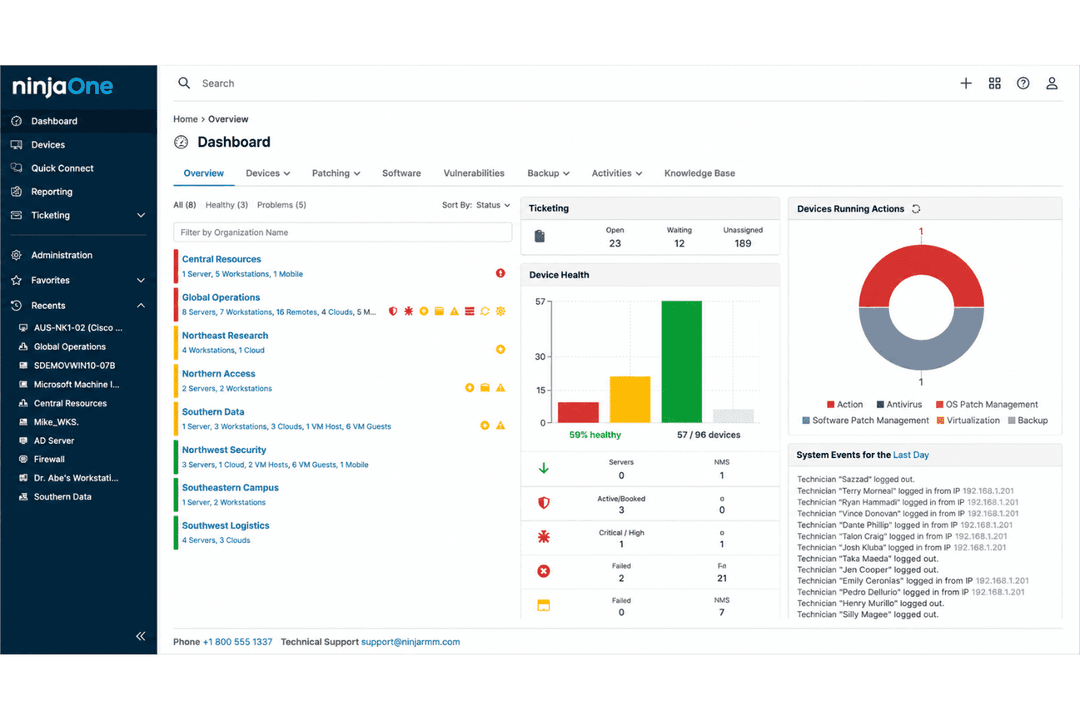
| Benutzeroberfläche | Übersichtliches, intuitives Dashboard mit Fokus auf Patch-Aufgaben. | Moderne, einheitliche Oberfläche mit anpassbaren Widgets. |
| Onboarding | Schneller Einstieg mit einfacher Einrichtung und geführten Workflows. | Umfassendes Onboarding mit Schulungsmaterialien und Tooltips. |
| Support | E-Mail-Support und aktive Community-Foren. | 24/7 Live-Chat, Telefon und ein informationsreiches Hilfezentrum. |
| Automatisierung | Einfach konfigurierbare Zeitpläne, aber weniger Automatisierungsoptionen. | Flexible Automatisierungen für Patchen, Benachrichtigungen und eigene Skripte. |
| Dokumentation | Fokussierte, prägnante Wissensdatenbank für zentrale Aufgaben. | Umfangreiche Dokumentation mit Schritt-für-Schritt-Anleitungen und Videos. |
Beide Tools sind leicht zu erlernen, aber NinjaOne bietet noch mehr Automatisierungsoptionen und einen umfassenderen Support. Meiner Meinung nach ist PDQ Connect ideal, wenn Sie eine minimalistische Oberfläche und eine schnelle Einführung wünschen, während NinjaOne für Teams gedacht ist, die zusätzliche Anpassungsmöglichkeiten und mehr Anleitung schätzen.
PDQ Connect
- Automates Windows and macOS patch deployment with granular scheduling controls.
- Inventory scanning helps pinpoint unpatched or missing software.
- No remote agent required for updates on most devices.
- Limited support for Linux and mobile environments.
- RMM options are basic compared to other all-in-one platforms.
- No dedicated onboarding support.
NinjaOne
- Deploys fast and delivers detailed endpoint visibility with no on-premise infrastructure to purchase, configure, and manage.
- Pulls patching, backup, remote access, and ticketing into one console.
- Automates patching with CVE and CVSS context, stability scoring, and dependable scripting.
- Built-in reporting is thin for client-facing work.
- Mobile device management is less robust than desktop support.
- The service desk and PSA are sized for SMB teams rather than enterprise ITSM or high-end MSP workflows.
PDQ Connect
- Financial InstitutionsFinancial institutions can use PDQ Connect to support compliance and maintain visibility across endpoints.
- K–12 EducationSchools benefit from agentless updates, prebuilt packages, and batch deployment across many Windows PCs.
- Managed Service ProvidersService providers use PDQ's scripting options and reporting for efficient multi-client patch management.
- Healthcare ClinicsAgentless patching and minimal infrastructure keep compliance easy for smaller clinics with mostly Windows devices.
- Distributed WorkforcesRemote deployment supports offsite or hybrid employees without complex VPN or agent installs.
- SMBs With WindowsSmall and midsize businesses running mostly Windows get fast setup and coverage without advanced requirements.
NinjaOne
- Managed Service ProvidersNinjaOne’s multi-tenant architecture and remote support streamline managing multiple client environments from a single dashboard.
- Small to Midsize BusinessesDevice-based pricing and easy deployment provide SMBs effective IT management without extra complexity.
- Healthcare IT DepartmentsPatch management and compliance reporting features help healthcare teams meet standards and secure sensitive data.
- Education InstitutionsRemote monitoring and access ease support for student and faculty devices across multiple sites.
- Hybrid Workforce SupportPolicy management, help desk, and remote access empower teams supporting remote and distributed users.
- Enterprise IT TeamsMulti-tenant architecture and automation scale to support large, distributed fleets and high endpoint volume.
Wer sollte PDQ Connect nutzen und wer NinjaOne?
PDQ Connect eignet sich für kleine und mittlere IT-Teams oder kostenbewusste Organisationen, die unkompliziertes, schnörkelloses Patchen wünschen, ohne Zeit für Zusatzfunktionen aufzuwenden. NinjaOne ist ideal für MSPs, regulierte Branchen und größere Unternehmen, die eine umfassende Endpoint-Verwaltung, vollständige Prüfpfade und integrierte IT-Operationen benötigen. Wenn Ihnen Geschwindigkeit und Einfachheit wichtig sind, liefert PDQ Connect; wenn Ihr Team Automatisierung, Integration und fortgeschrittene Steuerung verlangt, ist NinjaOne die beste Wahl.
| PDQ Connect | NinjaOne | |
|---|---|---|
| Automation | PDQ Connect Basic scheduling for patch jobs and scripts. | NinjaOne Advanced automation for patching, alerts, and workflows. |
| Compliance Tools | PDQ Connect SOC 2 compliant, less focus on regulated industries. | NinjaOne Advanced reporting, audit trails, and HIPAA/SOC 2 support. |
| Integrations | PDQ Connect Fewer integrations, includes Zapier for flexibility. | NinjaOne Broad integrations, especially for ITSM and RMM tools. |
| Pricing Model | PDQ Connect Simple seat-based pricing with limited add-ons. | NinjaOne Custom endpoint-based pricing with modular add-on options. |
| User Interface | PDQ Connect Clean, minimal dashboard focused on patching. | NinjaOne Highly customizable dashboard with widgets and integrations. |
| Cloud-Based Management | Both deliver a cloud-based experience, letting you manage patching and monitoring from anywhere. |
|---|---|
| Patch Automation | Both automate patch deployment to endpoints, reducing manual work and risk of missed updates. |
| Reporting | Both provide detailed reporting on patch status, failed updates, and compliance across managed devices. |
| User Access Controls | Each tool offers defined user roles and permissions for managing who can deploy or approve patches. |
| Windows Support | Each product is built for robust Windows patching, handling updates across Windows endpoints natively. |