

HeadSpin Testbericht 2026: Vorteile, Nachteile, Funktionen und Preisgestaltung erklärt
Dieser HeadSpin Testbericht untersucht die Testfunktionen, Stärken, Schwächen und Preise, um herauszufinden, ob es das richtige Testmanagement-Tool für Ihr Team ist.

Wir bewerten Tools unabhängig; Provisionen helfen, unsere Tests zu finanzieren. Siehe unsere Transparenzrichtlinie und unsere Methodik.
HeadSpin is a test management software built for teams who need to test mobile and web apps on real devices under real-world network conditions. It uses AI to surface performance issues tied to actual user experience data across a globally distributed device network. I'd consider it over BrowserStack if you need more than device and browser compatibility coverage—HeadSpin goes deeper into performance diagnostics, giving you actionable data on what's degrading the user experience and exactly where it's happening.
HeadSpin Evaluation Summary

4.6/5
- From $39/month (billed annually)
- Free demo available
Warum Sie unseren Software-Empfehlungen vertrauen können
6,700+
Reviews
20
Industry experts
16+
Evaluation factors
14
Years
Unser Team testet und bewertet Software seit 2012. Als Tech-Führungskräfte wissen wir selbst, wie schwierig – und wichtig – es ist, die richtige Software auszuwählen.
Für diesen Leitfaden haben wir Tools mithilfe von praktischen Tests und unabhängiger Recherche bewertet und dabei unsere Bewertungskriterien angewendet.
Unsere Bewertungen spiegeln unser menschliches redaktionelles Urteilsvermögen wider, keine Verkaufsstrategie.
Expertenprüfer:
- Paulo Gardini MiguelTech-Direktor
 Tim FisherVP für KI
 Gabriel RosasTech Lead & Software-Architekt
 Christhian GruhnTech Lead & Plattform-Architekt

HeadSpin Overview
When judging test management options, I think HeadSpin stands out if you want device diversity, integrated performance analytics, and AI-driven insights in one place. Its deep integrations, detailed reporting, and real-world network testing set it apart, especially for mobile and IoT QA. Pricing is on the higher side, and onboarding can challenge new users, but teams prioritizing advanced analytics and global coverage will appreciate what HeadSpin offers.
For fast-paced environments and businesses with a distributed qa footprint, I’d select HeadSpin over more basic testing platforms.
Pros
- Offers real device cloud for global testing coverage.
- Detailed performance and user experience analytics are included.
- Supports automation for mobile, web, and IoT testing.
Cons
- Pricing can be higher than many alternatives.
- UI can feel cluttered when running complex tests.
- API documentation lacks depth for custom workflows.
Is HeadSpin Right For Your Needs?
Who Would be a Good Fit for HeadSpin?
HeadSpin is best suited for organizations that need real-world device testing, advanced analytics, or global test coverage with strict reliability requirements. It serves industries where mobile performance and cross-device quality directly affect user satisfaction.
Teams with significant QA workloads and those handling high-frequency, production-grade releases typically get the most value from its deep diagnostics and AI-driven insights.
- Mobile App DevelopersMobile teams needing global device access and real-world user scenario simulation will benefit from HeadSpin’s robust device lab and session recording capabilities.
- Telecom ProvidersTelecom companies can use HeadSpin’s network simulation and cross-region device testing to optimize apps for varying connectivity environments.
- Financial ServicesBanks and fintech companies value HeadSpin’s security-focused diagnostics and analytics when testing secure, transaction-heavy mobile apps.
- Enterprise QA TeamsLarge-scale QA operations that require automated regression, device health tracking, and cross-platform transparency thrive with HeadSpin’s workflow automation.
- IoT Solution ProvidersCompanies testing IoT devices benefit from HeadSpin’s ability to simulate user journeys and troubleshoot device-to-app interactions.
- Media & Streaming FirmsVideo and content streaming platforms use HeadSpin’s performance analytics to ensure high-quality playback across many devices and networks.
Who Would be a Bad Fit for HeadSpin?
Smaller businesses or teams with limited automation needs, basic QA requirements, or a narrow device focus may find HeadSpin’s pricing and complexity excessive. It may also overwhelm organizations that don’t need cross-geography, multi-device functionality or prefer simpler test management software. Light use cases rarely justify the investment required to take full advantage of HeadSpin’s platform depth.
- Small StartupsTeams with light QA needs or limited budgets won’t maximize HeadSpin’s advanced analytics or device cloud features.
- Manual Test TeamsBusinesses relying mostly on manual testing won’t benefit from the automation and AI workflow tools HeadSpin provides.
- Single-Platform TeamsCompanies building for just one platform or device type don’t need HeadSpin’s cross-platform device infrastructure.
- Local Service ProvidersOrganizations operating in a single geographic region rarely make use of HeadSpin’s global device labs or network condition simulation.
- Education & NonprofitsSectors where simple compliance or low-complexity flows are priority may find the cost and features misaligned.
- Freelance TestersIndependent QA consultants or small agencies may be overwhelmed or priced out by the enterprise-focused capabilities.
Unsere Bewertungsmethodik
Wie wir Werkzeuge testen & bewerten
Wir haben Jahre damit verbracht, unser System zur Softwareprüfung und -bewertung aufzubauen, zu verfeinern und zu verbessern. Das Bewertungsraster ist darauf ausgelegt, die Feinheiten der Softwareauswahl und Effektivität eines Tools einzufangen, wobei wir uns auf kritische Aspekte des Entscheidungsprozesses konzentrieren.
Nachfolgend sehen Sie genau, wie unser Test- und Bewertungssystem anhand von sieben Kriterien funktioniert. Es ermöglicht uns eine unparteiische Bewertung der Software basierend auf Grundfunktionalität, besonderen Funktionen, Benutzerfreundlichkeit, Onboarding, Kundensupport, Integrationen, Kundenbewertungen und Preis-Leistungs-Verhältnis.
Grundfunktionalität (25 % der Endbewertung)
Der Ausgangspunkt unserer Bewertung ist immer die Grundfunktionalität des Werkzeugs. Verfügt es über die grundlegenden Funktionen und Merkmale, die ein Benutzer erwarten würde? Sind grundlegende Funktionen auf höherpreisige Tarife beschränkt? Im Kern erwarten wir, dass ein Tool den Basisfähigkeiten seiner Konkurrenten standhält.
Besondere Features (25 % der Endbewertung)
Anschließend bewerten wir ungewöhnliche, herausragende Funktionen, die über die typische Grundfunktionalität von Tools dieser Art hinausgehen. Eine hohe Bewertung zeigt spezialisierte oder einzigartige Eigenschaften, die das Produkt schneller, effizienter oder für den Nutzer wertvoller machen.
Wir bewerten außerdem, wie einfach sich das Tool mit anderen üblichen Werkzeugen im Technologie-Stack integrieren lässt, um die Funktionalität und den Nutzen der Software zu erweitern. Tools mit vielen nativen Integrationen, Drittanbieter-Anbindungen und API-Zugang zur Erstellung kundenspezifischer Integrationen erhalten die besten Bewertungen.
Benutzerfreundlichkeit (10 % der Endbewertung)
Wir betrachten, wie schnell und einfach Aufgaben aus dem Bereich der Grundfunktionalität mit dem Tool erledigt werden können. Gut bewertete Software ist durchdacht gestaltet, intuitiv bedienbar, bietet mobile Apps, Vorlagen und lässt relativ komplexe Aufgaben einfach erscheinen.
Onboarding (10 % der Endbewertung)
Wir wissen, wie wichtig die schnelle Einführung eines neuen Tools für das Team ist, daher bewerten wir, wie leicht sich ein Werkzeug mit minimalem Training erlernen und nutzen lässt. Wir bewerten, wie schnell ein Teammitglied ohne Vorerfahrung anfangen kann. Hoch bewertete Lösungen benötigen wenig bis gar keine Unterstützung.
Kundensupport (10 % der Endbewertung)
Wir prüfen, wie schnell und einfach man bei Problemen Hilfe per Telefon, Live-Chat oder Wissensdatenbank erhält. Tools und Anbieter mit Echtzeit-Support werden besser bewertet, während Chatbots schlechter abschneiden.
Kundenbewertungen (10 % der Endbewertung)
Neben unserer eigenen Prüfung beziehen wir den Net Promoter Score aktueller und ehemaliger Kunden mit ein. Wir bewerten, wie wahrscheinlich es ist, dass sie sich erneut für das Werkzeug entscheiden würden. Hoch bewertete Software weist einen hohen Net Promoter Score auf.
Preis-Leistungs-Verhältnis (10 % der Endbewertung)
Abschließend vergleichen wir unter Berücksichtigung aller Kriterien den durchschnittlichen Preis der Einstiegspakete mit den Grundfunktionen und bewerten den Mehrwert aus den anderen Bewertungsbereichen. Software, die mehr fürs gleiche Geld bietet, schneidet besser ab.
Core Features
Real Device Cloud
Test across a vast network of real mobile devices and browsers. This ensures true-to-life results in various geographies.
Automated Test Execution
Schedule and run tests automatically across devices and platforms. Save time and eliminate manual intervention for release cycles.
Performance Analytics
Receive in-depth analytics on app performance, responsiveness, and stability. Visualize network, device, and user metrics in one dashboard.
Session Recording and Replay
Capture, replay, and debug test sessions with granular logs. Pinpoint issues by retracing steps on actual devices.
AI-Driven Issue Detection
Get automatic insights into failures and performance bottlenecks with AI. The platform prioritizes issues so you know what to tackle first.
Network Condition Simulation
Test how apps behave under different network scenarios, like 3G or LTE. Identify and solve connectivity problems before users experience them.

Ease of Use
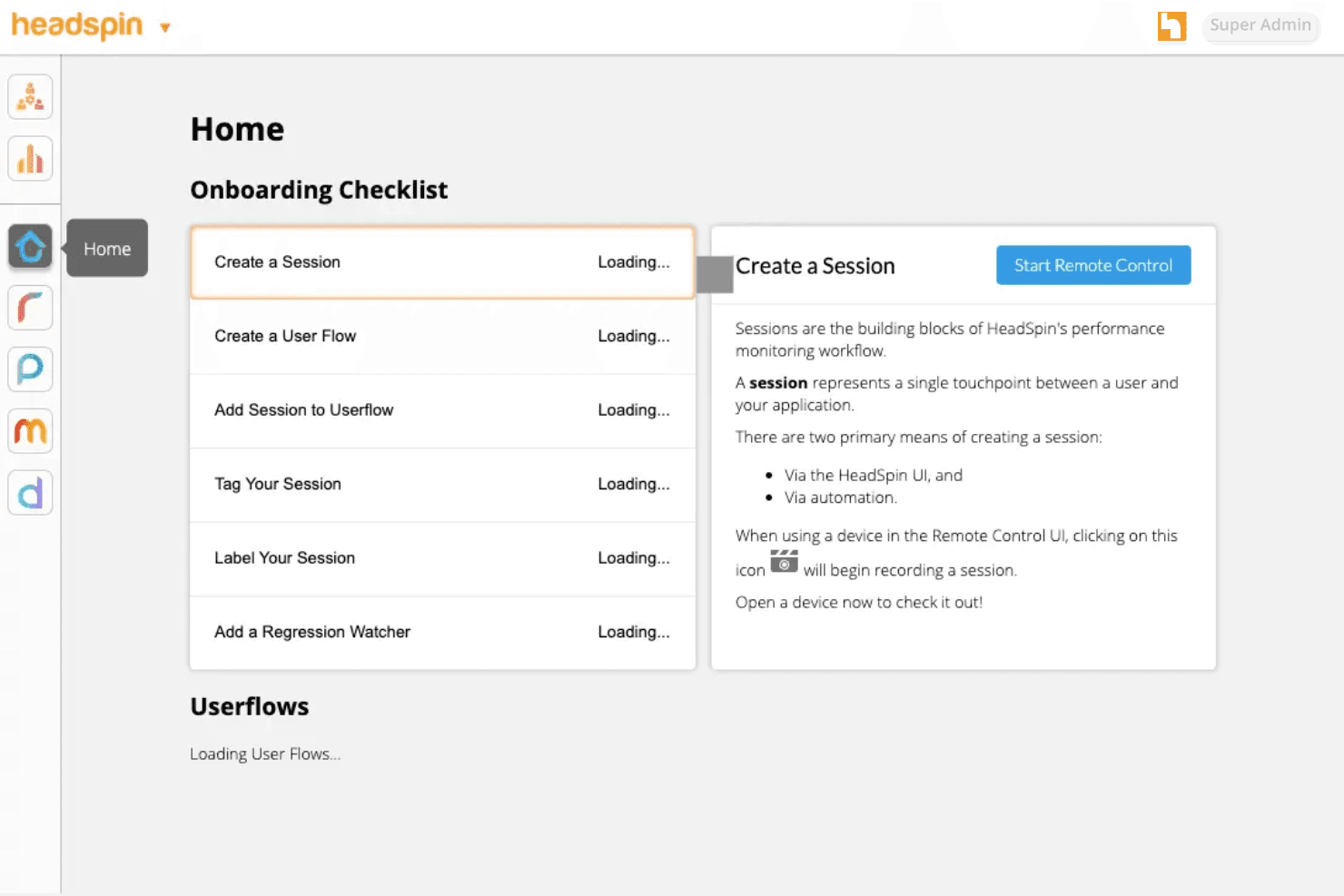
HeadSpin’s dashboard provides unmatched device and test visibility, but its complex feature set can overwhelm new users. In my experience, navigating advanced performance analytics and filtering logs takes extra effort.
Power users appreciate the depth for debugging, while teams without dedicated QA engineers may need more ramp-up time before it feels intuitive.
Integrations
HeadSpin integrates with Appium, Selenium, Jenkins, Jira, GitHub, GitLab, Azure, Slack, CircleCI, and Tricentis Tosca, among others.
HeadSpin also offers a comprehensive API and supports custom integrations for advanced workflows.

HeadSpin Specs
- A/B Testing: Yes
- API: Yes
- Automated Testing: Yes
- Browser Compatibility Testing: Yes
- Bug Tracking: No
- Calendar Management: No
- CI/CD Integration: Yes
- Dashboard: Yes
- Data Export: Yes
- Data Import: Yes
- Data Visualization: Yes
- Developer Tools: Yes
- External Integrations: Yes
- History/Version Control: No
- Manual Testing: Yes
- Multi-User: Yes
- Notifications: Yes
- Performance Testing: Yes
- Regression Testing: Yes
- Scheduling: No
- Status Notifications: No
- Third-Party Plugins/Add-Ons: Yes


