

Corgea Testbericht: Vorteile, Nachteile, Funktionen & Preise
Sie haben mit einem wachsenden Rückstau von Sicherheitswarnungen zu kämpfen und fragen sich, ob Corgea die AppSec-Plattform ist, die Schwachstellen tatsächlich für Sie beheben kann? In diesem Testbericht werden die Funktionen, Stärken und Schwächen aufgeschlüsselt, sodass Sie schnell entscheiden können, ob sie zu den Arbeitsabläufen und Sicherheitszielen Ihres Teams passt.

Wir bewerten Tools unabhängig; Provisionen helfen, unsere Tests zu finanzieren. Siehe unsere Transparenzrichtlinie und unsere Methodik.
Security alerts keep piling up, developers keep shipping, and the gap between finding vulnerabilities and fixing them keeps getting wider.
Many AppSec platforms promise to detect and fix issues automatically, but it makes sense to pause and take a closer look at specific features before committing time and budget.
In this Corgea review, I break down how the platform works, what problems it solves, and where it fits compared to other tools so you can decide if it is worth adopting.
Corgea Evaluation Summary

0/5
- From $34/developer/month
- Free plan available
Warum Sie unseren Software-Empfehlungen vertrauen können
6,700+
Reviews
20
Industry experts
16+
Evaluation factors
14
Years
Unser Team testet und bewertet Software seit 2012. Als Tech-Führungskräfte wissen wir selbst, wie schwierig – und wichtig – es ist, die richtige Software auszuwählen.
Für diesen Leitfaden haben wir Tools mithilfe von praktischen Tests und unabhängiger Recherche bewertet und dabei unsere Bewertungskriterien angewendet.
Unsere Bewertungen spiegeln unser menschliches redaktionelles Urteilsvermögen wider, keine Verkaufsstrategie.
Expertenprüfer:
- Paulo Gardini MiguelTech-Direktor
 Tim FisherVP für KI
 Gabriel RosasTech Lead & Software-Architekt
 Christhian GruhnTech Lead & Plattform-Architekt

Corgea Overview
Corgea is an AI-driven application security platform that helps development and security teams detect, prioritize, and fix vulnerabilities.
Rather than operating as a standalone security tool, Corgea integrates with repositories, CI pipelines, and developer environments to continuously scan code, identify real risks, and generate remediation suggestions.
By combining automated scanning, alert prioritization, and AI-generated fixes, the platform reduces manual security work. It helps teams ship secure code faster without slowing development.
One area where Corgea stands out is its ability to detect complex application-layer vulnerabilities, including business logic and authorization issues, while providing contextual analysis that helps reduce unnecessary security alerts.
Pros
- AI-generated security fixes help reduce manual remediation work.
- Strong automation helps streamline vulnerability detection, prioritize actionable findings, and reduce time spent reviewing low-value alerts.
- Built to integrate into developer workflows and existing toolchains.
Cons
- Primarily designed for technical teams.
- Newer vendor with a limited track record.
- Reporting and analytics are limited to higher-tier plans, so teams that need deeper visibility may have to upgrade sooner.
Is Corgea Right For Your Needs?
Who Would be a Good Fit for Corgea?
Corgea is built for modern software teams that want security built into their development workflow without slowing releases. If your team ships frequently and relies on CI/CD, Corgea helps automate vulnerability detection, triage, and remediation so security can scale alongside development.
- Fast-Moving Software Development TeamsFrequent release teams benefit from continuous scanning and auto-fix, which detect vulnerabilities and generate remediation pull requests automatically.
- DevOps and CI/CD-Driven WorkflowsTeams using GitHub, GitLab, Jenkins, or Azure DevOps benefit from native integrations that run security checks directly in pipelines and pull requests.
- Teams With Large Security BacklogsAuto-triage helps engineering and security teams prioritize real risks and reduce false positives.
- Companies Using Open-Source DependenciesTeams that rely on third-party libraries benefit from OSS dependency scanning that detects vulnerable packages early.
- Organizations Handling Sensitive DataBusinesses working with personal or healthcare data benefit from using PII/PHI and secret scanning to detect exposed sensitive information.
- Security Teams Supporting Developer ProductivityPolicies and automated remediation help AppSec and DevSecOps teams enforce security standards with minimal manual effort.
Who Would be a Bad Fit for Corgea?
Corgea targets modern development teams with active CI/CD workflows and dedicated engineering resources. If your organization doesn’t regularly ship software, lacks technical infrastructure, or needs highly specialized enterprise security tooling, Corgea is unlikely to be a strong fit.
- Non-Software or Offline BusinessesOrganizations that don’t build or maintain software won’t benefit from Corgea’s code scanning and CI/CD integrations, which are built specifically for development workflows.
- Teams Without CI/CD or Version Control WorkflowsCorgea relies on pipeline and repository integrations, so teams not using tools like GitHub, GitLab, or CI/CD pipelines won’t fully benefit from the platform.
- Very Small Teams With Minimal Security NeedsSmall teams with simple applications may find Corgea’s automation and advanced scanning features unnecessary compared to lighter security tools.
- Organizations Needing Deep Security CustomizationTeams requiring highly specialized or heavily customized security tooling may find Corgea’s policy and customization options too limited.
- Non-Technical or Business-Only TeamsCorgea is built for developers and security engineers, so teams without technical expertise may struggle to use the platform effectively.
Unsere Bewertungsmethodik
Wie wir Werkzeuge testen & bewerten
Wir haben Jahre damit verbracht, unser System zur Softwareprüfung und -bewertung aufzubauen, zu verfeinern und zu verbessern. Das Bewertungsraster ist darauf ausgelegt, die Feinheiten der Softwareauswahl und Effektivität eines Tools einzufangen, wobei wir uns auf kritische Aspekte des Entscheidungsprozesses konzentrieren.
Nachfolgend sehen Sie genau, wie unser Test- und Bewertungssystem anhand von sieben Kriterien funktioniert. Es ermöglicht uns eine unparteiische Bewertung der Software basierend auf Grundfunktionalität, besonderen Funktionen, Benutzerfreundlichkeit, Onboarding, Kundensupport, Integrationen, Kundenbewertungen und Preis-Leistungs-Verhältnis.
Grundfunktionalität (25 % der Endbewertung)
Der Ausgangspunkt unserer Bewertung ist immer die Grundfunktionalität des Werkzeugs. Verfügt es über die grundlegenden Funktionen und Merkmale, die ein Benutzer erwarten würde? Sind grundlegende Funktionen auf höherpreisige Tarife beschränkt? Im Kern erwarten wir, dass ein Tool den Basisfähigkeiten seiner Konkurrenten standhält.
Besondere Features (25 % der Endbewertung)
Anschließend bewerten wir ungewöhnliche, herausragende Funktionen, die über die typische Grundfunktionalität von Tools dieser Art hinausgehen. Eine hohe Bewertung zeigt spezialisierte oder einzigartige Eigenschaften, die das Produkt schneller, effizienter oder für den Nutzer wertvoller machen.
Wir bewerten außerdem, wie einfach sich das Tool mit anderen üblichen Werkzeugen im Technologie-Stack integrieren lässt, um die Funktionalität und den Nutzen der Software zu erweitern. Tools mit vielen nativen Integrationen, Drittanbieter-Anbindungen und API-Zugang zur Erstellung kundenspezifischer Integrationen erhalten die besten Bewertungen.
Benutzerfreundlichkeit (10 % der Endbewertung)
Wir betrachten, wie schnell und einfach Aufgaben aus dem Bereich der Grundfunktionalität mit dem Tool erledigt werden können. Gut bewertete Software ist durchdacht gestaltet, intuitiv bedienbar, bietet mobile Apps, Vorlagen und lässt relativ komplexe Aufgaben einfach erscheinen.
Onboarding (10 % der Endbewertung)
Wir wissen, wie wichtig die schnelle Einführung eines neuen Tools für das Team ist, daher bewerten wir, wie leicht sich ein Werkzeug mit minimalem Training erlernen und nutzen lässt. Wir bewerten, wie schnell ein Teammitglied ohne Vorerfahrung anfangen kann. Hoch bewertete Lösungen benötigen wenig bis gar keine Unterstützung.
Kundensupport (10 % der Endbewertung)
Wir prüfen, wie schnell und einfach man bei Problemen Hilfe per Telefon, Live-Chat oder Wissensdatenbank erhält. Tools und Anbieter mit Echtzeit-Support werden besser bewertet, während Chatbots schlechter abschneiden.
Kundenbewertungen (10 % der Endbewertung)
Neben unserer eigenen Prüfung beziehen wir den Net Promoter Score aktueller und ehemaliger Kunden mit ein. Wir bewerten, wie wahrscheinlich es ist, dass sie sich erneut für das Werkzeug entscheiden würden. Hoch bewertete Software weist einen hohen Net Promoter Score auf.
Preis-Leistungs-Verhältnis (10 % der Endbewertung)
Abschließend vergleichen wir unter Berücksichtigung aller Kriterien den durchschnittlichen Preis der Einstiegspakete mit den Grundfunktionen und bewerten den Mehrwert aus den anderen Bewertungsbereichen. Software, die mehr fürs gleiche Geld bietet, schneidet besser ab.
Core Features
AI Application Security Scanning
This capability forms the foundation of the platform. Every other feature depends on accurate detection, so strong scanning enables Corgea to provide meaningful triage and remediation.
OSS Dependency Scanning
Modern applications rely heavily on open source software. Supply chain security reduces real-world risk and prevents attacks from compromised packages.
Secret Detection
Credential exposure remains one of the most common causes of breaches. Detecting secrets in code prevents credential leaks and security incidents.
Malware Detection
Corgea scans code and dependencies to detect malicious or injected code that could compromise applications, infrastructure, or development environments.
AI Auto Triage
Security teams often struggle with large volumes of alerts. Reducing noise and highlighting real risks lets teams move faster and make better decisions.
AI Auto Fix
Many security tools stop at detection. Corgea closes the gap between finding vulnerabilities and fixing them.

Standout Features
In Editor Security Fixes
Corgea provides a Visual Studio Code extension that allows developers to review and apply security fixes directly inside their editor while they write code.
Source and Sink Analysis
This deeper context helps Corgea identify complex security issues, including business logic flaws and authorization vulnerabilities that traditional pattern-based scanners can miss. By analyzing how data moves through an application, the platform provides more relevant findings and helps reduce alert noise so teams can focus on issues that matter most.

Ease of Use
Corgea fits directly into existing developer workflows, making it easy to adopt without major process changes.
You can connect repositories, run scans through CI pipelines, and receive fixes directly in pull requests, so security becomes part of your normal development cycle instead of a separate task.
With CLI and API support for automation, teams can integrate scanning and remediation quickly and keep development moving without extra overhead.

Onboarding
Corgea provides a quickstart guide that lets teams connect their repositories and begin scanning in minutes.
Documentation states you can get started in less than five minutes by installing the GitHub app and connecting your code. The documentation also walks teams through configuration, customization, applying fixes, and managing team access, giving users a clear step-by-step path from setup to ongoing use.
With built-in guides, tutorials, and API documentation available for deeper integrations and automation, teams have multiple resources to support both initial setup and long term adoption.

Customer Support
Corgea provides support through a contact form for direct inquiries and a knowledge hub with documentation, guides, and resources to help teams troubleshoot and learn independently. The platform also offers custom demos that explain workflows and features during evaluation.

Integrations
Corgea offers native integrations with developer tools and workflows, including GitHub, GitLab, Azure DevOps, Jenkins, Visual Studio Code, Visual Studio, and a CLI for automation.
It also connects with tools like Jira, Slack, Zapier, and SAML-based identity providers, helping teams embed security directly into repositories, pipelines, chat, and ticketing systems.
An API is available for teams that want to build custom integrations or automate security workflows further.

Value for Money
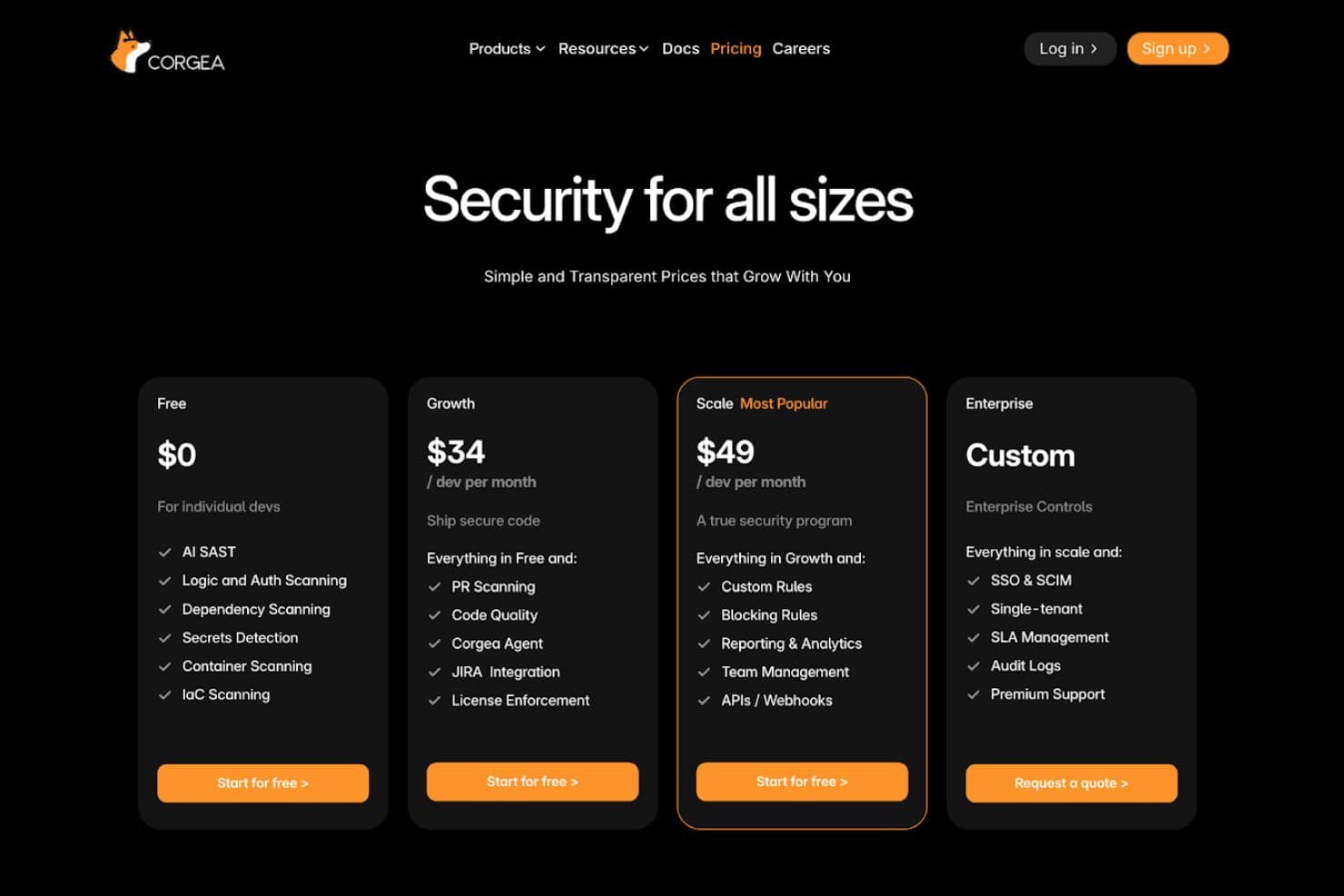
Corgea uses a tiered pricing model that lets teams start with core security scanning and expand into automation, integrations, and enterprise governance as they grow.
- Free: Includes AI SAST, logic and auth scanning, dependency scanning, secrets detection, container scanning, and IaC scanning for individual developers and small teams.
- Growth: Adds pull request scanning, code quality checks, Jira integration, and license enforcement to support team workflows.
- Scale: Introduces custom rules, blocking rules, reporting and analytics, team management, APIs, and webhooks for a more complete security program.
- Enterprise: Provides SSO, SCIM, single tenant deployment, SLA management, audit logs, and premium support for enterprise environments.
This structure makes it easy to begin with essential features and upgrade as security and compliance needs increase.
Corgea Specs
- 2-Factor Authentication: No
- Access Management: No
- Anti-Virus: No
- API: Yes
- Audit Management: No
- Audit Trail: No
- Batch Permissions & Access: No
- Compliance Tracking: No
- Dashboard: Yes
- Data Export: Yes
- Data Import: Yes
- DDoS Protection: No
- External Integrations: Yes
- File Sharing: No
- File Transfer: No
- Firewall: No
- Incident Management: Yes
- Malware Protection: No
- Multi-User: Yes
- Notifications: Yes
- Password & Access Management: No
- Policy Management: Yes
- Real-time Alerts: Yes
- Report & Compliance: Yes
- Risk Assessment: Yes
- Security Migration: No
- Threat Detection: No
- Workflow Management: Yes
Corgea FAQs
Corgea Company Overview & History
Corgea, founded by Ahmad Sadeddin, is a San Francisco-based cybersecurity startup founded in 2023 that builds an AI-driven platform to automate vulnerability detection, triage, and remediation for modern development teams.
The company focuses on helping developers secure applications more efficiently by reducing false positives and accelerating remediation workflows.
Corgea Major Milestones
- 2023: Corgea was founded in California.
- 2024: Raised USD 2.6 million in seed funding from prominent investors.