

10 beste Werkzeuge für Benutzerfreundlichkeitstests für echtes Feedback im Jahr 2026

Die besten Tools für Gebrauchstauglichkeitstests – Shortlist


Bei der Navigation durch die Welt der SaaS-Entwicklung stehen Sie ständig unter dem Druck, Software bereitzustellen, die den Erwartungen der Benutzer entspricht. Tools für Gebrauchstauglichkeitstests können Ihnen dabei helfen, Probleme zu erkennen, bevor sie zu echten Schwierigkeiten werden.
Ich teste und überprüfe seit Jahren unabhängig Software. Mein Ziel ist es, Ihnen eine klare und unvoreingenommene Bewertung der besten verfügbaren Tools für Gebrauchstauglichkeitstests zu geben.
In diesem Artikel finden Sie meine Top-Auswahl. Jedes Tool wurde aufgrund seiner besonderen Stärken ausgewählt. Ganz gleich, ob Sie Teil eines kleinen Teams oder einer großen Organisation sind – hier ist für jeden etwas dabei.
Sehen wir uns an, wie diese Tools Ihren Entwicklungsprozess verbessern und Ihre Software intuitiver und benutzerfreundlicher machen können.
Warum Sie unseren Software-Empfehlungen vertrauen können
Unser Team testet und bewertet Software seit 2012. Als Tech-Führungskräfte wissen wir selbst, wie schwierig – und wichtig – es ist, die richtige Software auszuwählen.
Für diesen Leitfaden haben wir Tools mithilfe von praktischen Tests und unabhängiger Recherche bewertet und dabei unsere Bewertungskriterien angewendet.
Unsere Bewertungen spiegeln unser menschliches redaktionelles Urteilsvermögen wider, keine Verkaufsstrategie.
Expertenprüfer:
Zusammenfassung der besten Tools für Gebrauchstauglichkeitstests
Diese Vergleichstabelle fasst die Preisdetails meiner Top-Auswahl an Tools für Gebrauchstauglichkeitstests zusammen, damit Sie das beste Tool für Ihr Budget und Ihre geschäftlichen Anforderungen finden.
| Tool | Best For | Trial Info | Price | ||
|---|---|---|---|---|---|
| 1 | Am besten mit Gastzugang für externe Tester | 30-tägige kostenlose Testversion | Ab $49/Monat (jährlich abgerechnet) | Website | |
| 2 | Am besten geeignet für tiefgehende menschliche Einblicke | Kostenlose Demo verfügbar | Preise auf Anfrage erhältlich | Website | |
| 3 | Beste Usability-Testlösung für den Zugang zu gezielten Nutzergruppen | Not available | Preise auf Anfrage | Website | |
| 4 | Bestes Usability-Testtool für internationale Perspektiven | Kostenlose Demo verfügbar | Ab $34/Sitzung | Website | |
| 5 | Am besten geeignet für KI-basierte Testautomatisierung | Kostenloser Open Source-Zugang verfügbar + 14-tägige kostenlose Testversion | Preise auf Anfrage | Website | |
| 6 | Bestes Usability-Test-Tool für detaillierte visuelle Berichte | 30-tägige kostenlose Testphase verfügbar | Ab $29/Monat | Website | |
| 7 | Am besten für A/B-Tests und Experimente geeignet | Kostenlose Demo verfügbar | Preise auf Anfrage | Website | |
| 8 | Am besten für kleine Unternehmen und Startups | Kostenlose Demo verfügbar | Ab $30/Testperson | Website | |
| 9 | Am besten für unmoderiertes Remote-User-Testing | Not available | Ab $0/Monat | Website | |
| 10 | Am besten geeignet für den Einsatz über den gesamten Produktlebenszyklus | Kostenloser Tarif verfügbar | Ab $99/Monat | Website |
Bewertungen der besten Tools für Gebrauchstauglichkeitstests
Nachfolgend finden Sie meine ausführlichen Zusammenfassungen der besten Tools für Gebrauchstauglichkeitstests, die es auf meine Shortlist geschafft haben. Meine Bewertungen bieten einen detaillierten Überblick über die wichtigsten Funktionen, Vor- \u0026 Nachteile, Integrationen und idealen Anwendungsfälle jedes Tools, damit Sie das beste für sich finden.

Testpad
Am besten mit Gastzugang für externe Tester

Testpad ist ein checklistenbasiertes Usability-Testing-Tool, das für Teams entwickelt wurde, die eine flexible und kollaborative Möglichkeit suchen, manuelle Testfälle zu verwalten und Feedback sowohl von technischen als auch nicht-technischen Testern zu vereinfachen.
Für wen ist Testpad am besten geeignet?
Testpad eignet sich für QA-Teams, Produktmanager und Agenturen, die einen flexiblen, kollaborativen Ansatz für manuelle Usability-Tests über verschiedene Projekte hinweg benötigen.
Warum ich Testpad ausgewählt habe
Ich habe Testpad als eines der besten ausgewählt, weil ich externe Tester als Gäste einladen kann, ohne dass sie vollständige Konten erstellen müssen. Mein Team nutzt diese Funktion, um Kunden oder externe QA-Mitarbeiter zu Usability-Sessions einzuladen, damit sie direkt im Tool Tests durchführen und Feedback geben können. Dieses Setup hält unseren Workflow sicher und organisiert und erleichtert die Zusammenarbeit mit Personen außerhalb unseres Kernteams.
Testpad Hauptfunktionen
- Checklistenbasiertes Testmanagement: Organisieren Sie Usability-Tests als flexible Checklisten für einfache Planung und Durchführung.
- Tastaturbasierte Navigation: Schnelles Durchlaufen von Testfällen und Ergebnismarkierung mithilfe von Tastaturkürzeln.
- Echtzeit-Zusammenarbeit: Mehrere Nutzer können am selben Testplan arbeiten und sofortige Aktualisierungen sehen.
- Anpassbare Testvorlagen: Erstellen und wiederverwenden Sie Vorlagen, die auf die Usability-Testbedürfnisse Ihres Teams zugeschnitten sind.
Testpad Integrationen
Integrationen sind über die API für individuelle Workflows und CI/CD-Pipeline-Anbindungen verfügbar. Native Integrationen werden derzeit nicht gelistet.
Pros and Cons
Pros:
- Echtzeit-Fortschrittsverfolgung für verteilte Teams
- Checklistenformat eignet sich für explorative Usability-Sessions
- API ermöglicht Automatisierung mit CI/CD-Tools
Cons:
- Keine integrierten Funktionen zur Teilnehmergewinnung
- Begrenzte native Integrationen mit Drittanbieter-Apps

Am besten geeignet für tiefgehende menschliche Einblicke
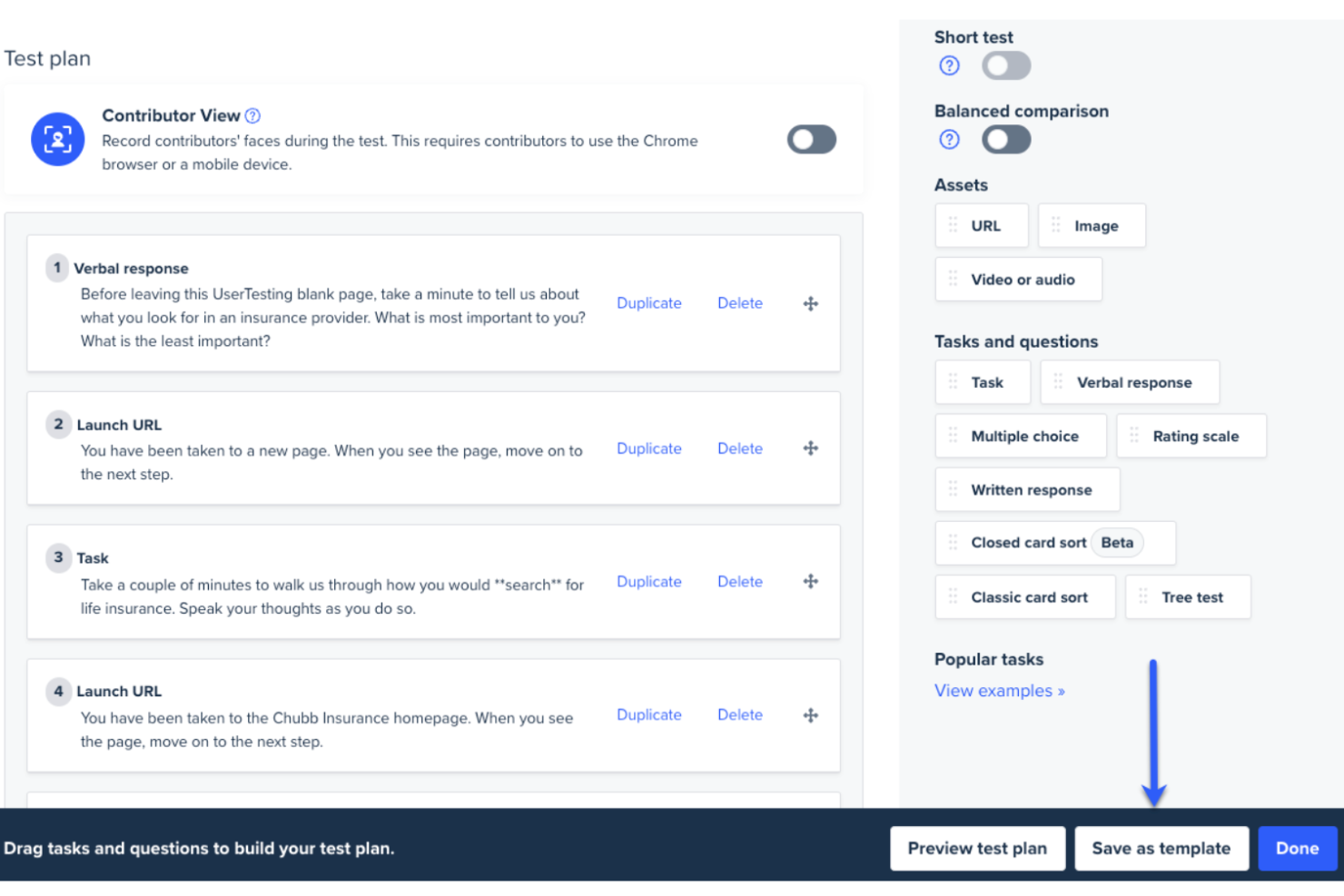
UserTesting ist eine videobasierte Plattform, die Echtzeit-Feedback aus erster Hand zu Tests bietet.
Warum ich UserTesting gewählt habe: UserTesting bietet einen Drag-and-Drop-Test-Builder, eine umfangreiche Vorlagenbibliothek und eine leistungsstarke Testverteilung. Damit können Sie genau den Test erstellen, der Ihren Anforderungen entspricht, und ihn den für Sie wichtigsten Teilnehmern zugänglich machen. Zu den Testmöglichkeiten gehören Card Sorting, Tree Testing, Clickstream-Tracking und Live-Interviews.
Sie können die Daten, die Sie aus Ihren Tests zurückerhalten, mit Datenvisualisierung, Transkripten und Highlight-Reels analysieren. Aufgaben wie Qualitätskontrolle der Teilnehmer werden von KI übernommen, wodurch zeitraubende Abläufe beschleunigt werden, die sonst den Testprozess verlangsamen könnten.
UserTesting: Herausragende Funktionen und Integrationen
Funktionen umfassen Test-Builder, Vorlagenbibliothek, Card Sorting, Tree Testing, Clickstream-Tracking, Live-Interviews, Live-Conversion und Sentiment-Analyse.
Integrationen umfassen Jira, Slack und Trello.
UserTesting Preisgestaltung
Die Preisgestaltung von UserTesting ist auf Anfrage erhältlich.
Pros and Cons
Pros:
- Ausgezeichneter Kundensupport
- Leicht auffindbare Testergebnisse
- Sehr detailliertes Teilnehmer-Screening
Cons:
- Nicht geeignet für kleine und mittlere Unternehmen
Testlio
Beste Usability-Testlösung für den Zugang zu gezielten Nutzergruppen
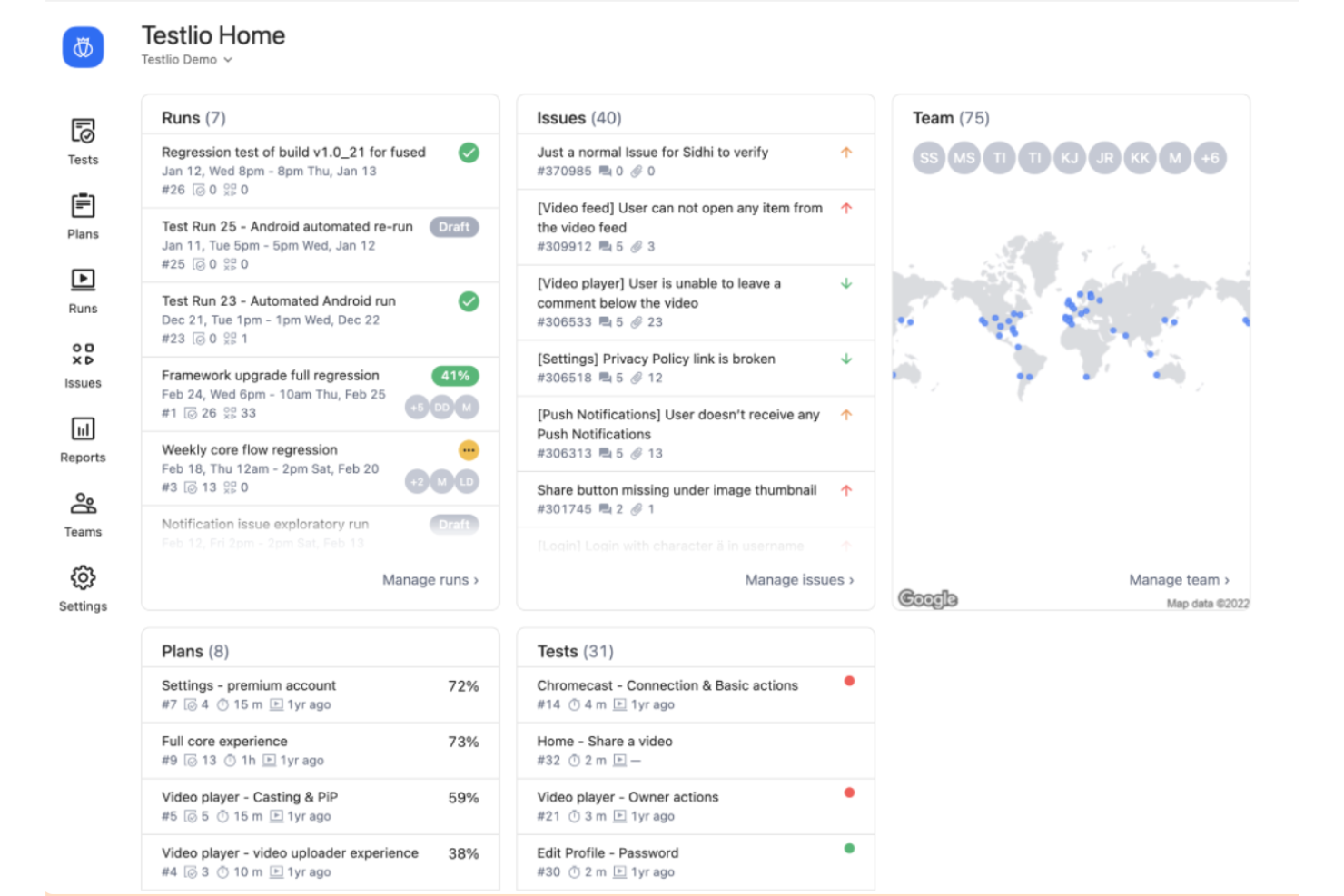
Testlio arbeitet mit einem Netzwerk aus freiberuflichen Testern und Qualitätssicherungsingenieuren, um eine umfassende Fehlererkennung zu gewährleisten.
Warum ich Testlio ausgewählt habe: Testlio hat mehr als 10 Millionen Kundentests in über 150 Ländern durchgeführt. Basierend auf Ihren spezifischen Kriterien stellt Testlio ein gezieltes Panel von Testern zusammen. Demografische Merkmale, Standort und psychografische Daten werden genutzt, um sicherzustellen, dass die Auswahl exakt passt und die gewünschten Einblicke ermöglicht.
Testlio arbeitet nach dem Prinzip des Netzwerktestens, sodass Kunden ihre Testaktivitäten schnell skalieren können, ohne Kompromisse bei der Qualität einzugehen. Das Kundendienstteam unterstützt Sie bei der Umsetzung Ihrer Teststrategie und begleitet Sie von der Planung bis zum Abschluss. Das Full-Service-Angebot für moderiertes Usability-Testing hilft Ihnen, Teilnehmer zu rekrutieren, Daten zu analysieren, Workflows zu steuern und Ihre Erkenntnisse umzusetzen.
Testlio: Herausragende Funktionen und Integrationen
Funktionen umfassen Mobile App Testing, funktionales Testen, Lokalisierungstests, automatisiertes Testing, Livestream-Testing, Usability-Tests, exploratives Testen, Zahlungsabwicklungstests und Standorttests.
Integrationen umfassen Projektmanagement-Tools wie Asana und Jira sowie IDEs wie Visual Studio.
Testlio Preisgestaltung
Testlio bietet auf Anfrage eine maßgeschneiderte Preisgestaltung an.
Pros and Cons
Pros:
- Flexibel und anpassungsfähig
- Tiefgehende Testabdeckung
- Umfassender Support
Cons:
- Keine transparente Preisgestaltung

Bestes Usability-Testtool für internationale Perspektiven
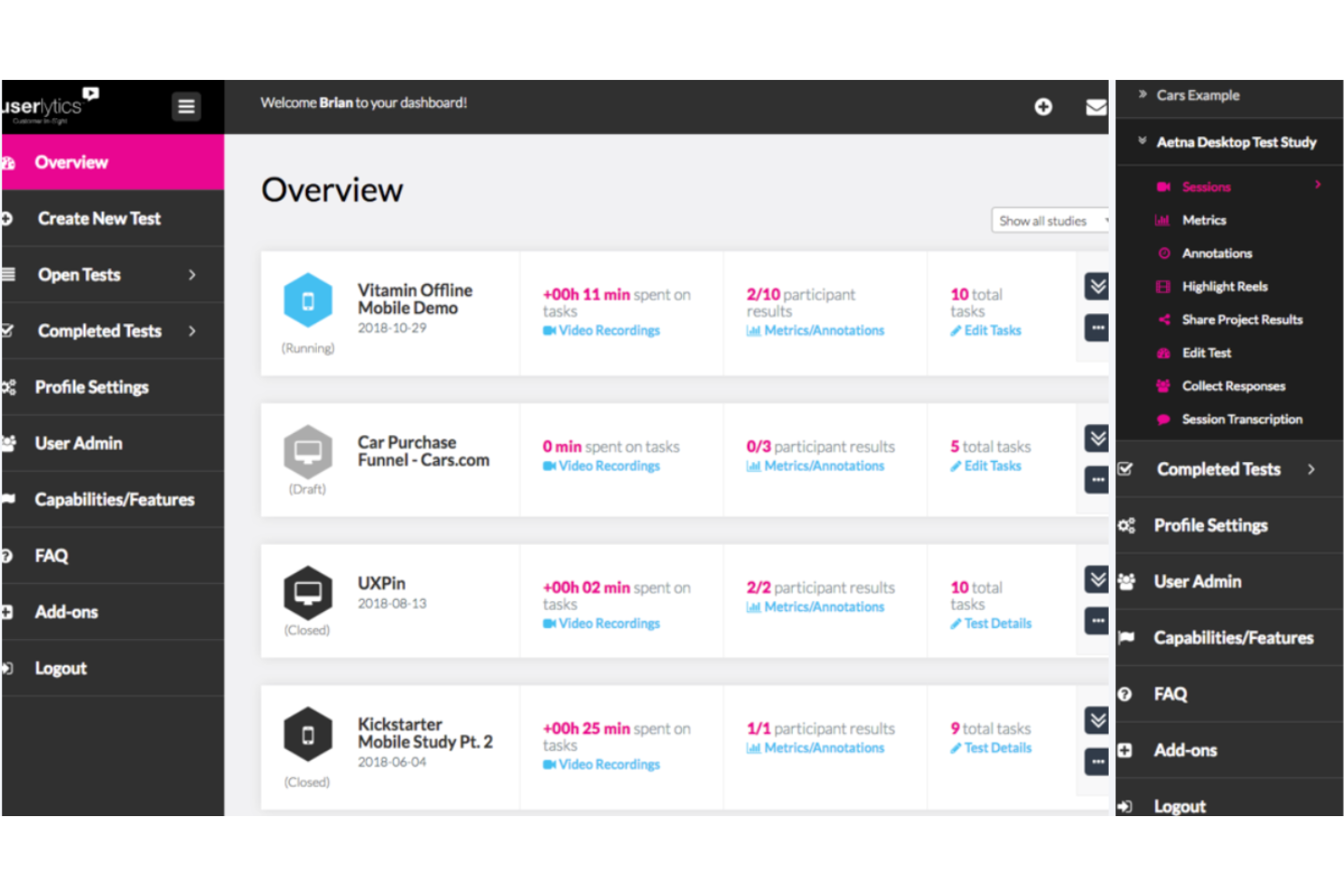
Userlytics ist ein Usability-Testtool mit einem globalen Panel von mehr als 1,5 Millionen Testern.
Warum ich Userlytics gewählt habe: Das Testpanel von Userlytics besteht aus Mitgliedern aus mehr als 150 Ländern weltweit, die mehrere Sprachen sprechen. Der Zugriff auf ein so vielfältiges Panel verringert das Risiko unbewusster Voreingenommenheit und kann wertvolle Einblicke in kulturelle Sensibilitäten liefern, die Ihre Produktentscheidungen beeinflussen können.
Gleichzeitig macht es Userlytics einfach, Ihre Suche einzugrenzen und genau Ihre Zielgruppe zu finden. Sie können am Anfang Ihres Tests benutzerdefinierte Screeningfragen hinzufügen, um sicherzustellen, dass die Testteilnehmer Ihrer gewünschten Zielgruppe entsprechen. Das Panel besteht aus Personen aus mehreren Nischenbranchen und Rollen, einschließlich Neurochirurgen, Führungskräften auf Vorstandsebene, Architekten und Vertriebsmitarbeitern, um nur einige zu nennen.
Herausragende Funktionen und Integrationen von Userlytics
Funktionen umfassen A/B-Tests, Zielgruppenansprache, Analysen, Kalendermanagement, Markenmanagement, Datenexport und Datenvisualisierung.
Integrationen werden auf der Website von Userlytics nicht aufgeführt.
Userlytics Preise
Die Preise für das Userlytics-Enterprise-Paket sind auf Anfrage erhältlich. DIY-Pläne beginnen bei $499/Monat (jährliche Abrechnung). Eine kostenlose Demo ist verfügbar.
Pros and Cons
Pros:
- Einfaches Finden von Teilnehmern aus Nischengruppen
- Globale Perspektiven
- Riesiges Testpanel
Cons:
- Fehlende Automatisierung beim Randomisieren quantitativer Tests

Am besten geeignet für KI-basierte Testautomatisierung
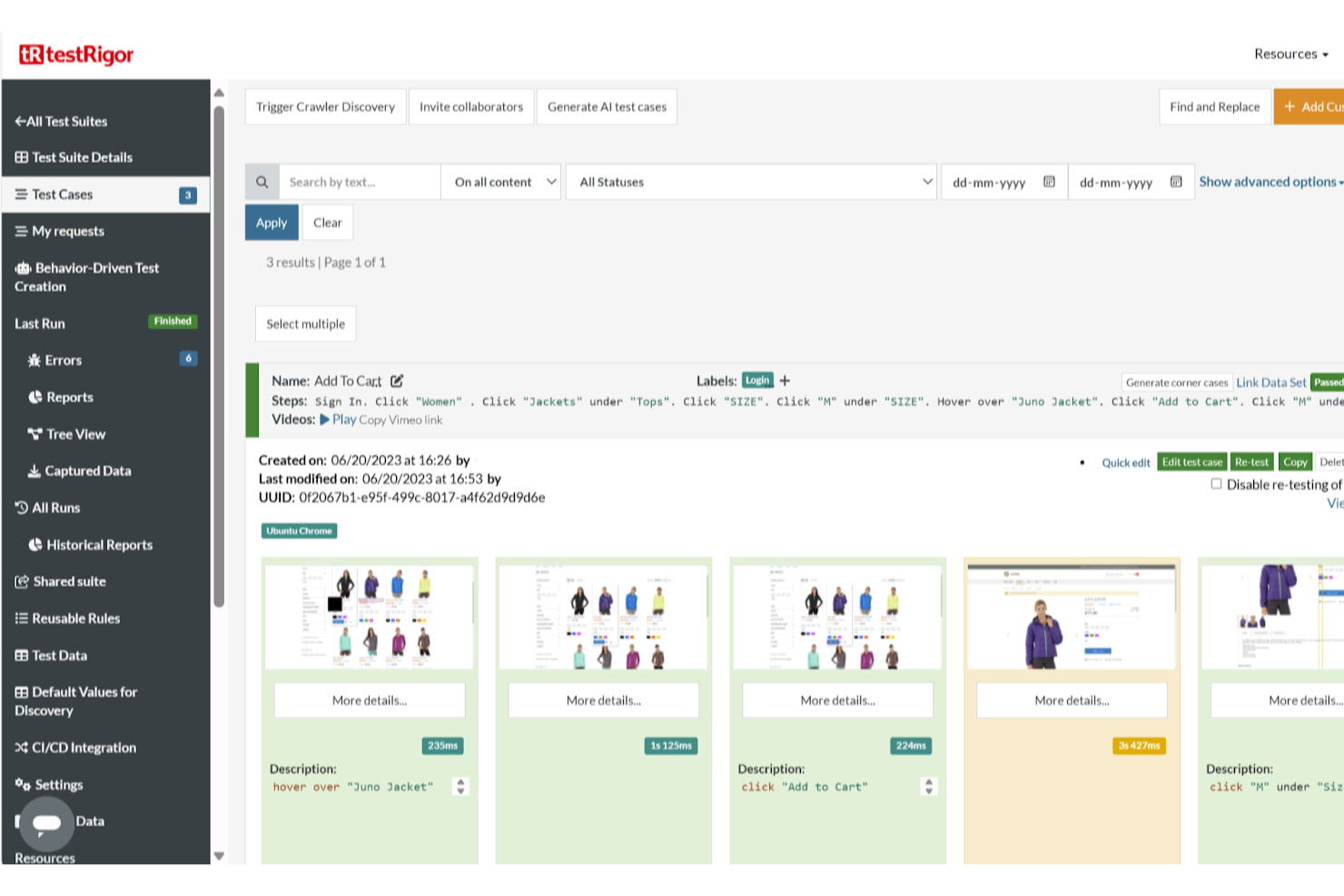
testRigor ist ein KI-gestütztes Testautomatisierungstool, das Softwaretests vereinfacht, indem es Benutzern ermöglicht, Tests mit einfachen englischen Anweisungen zu erstellen.
Warum ich testRigor gewählt habe: Sie und Ihr Team können automatisierte Tests aus dokumentierten Fällen erstellen, ohne eine einzige Zeile Code schreiben zu müssen, was den Testprozess beschleunigt. Die KI-basierte Self-Healing-Funktion sorgt dafür, dass sich die Tests automatisch an UI-Änderungen anpassen und reduziert so den täglichen Pflegeaufwand für Ihre Tests. Diese Funktion ist besonders in Umgebungen mit häufigen UI-Updates von Vorteil, da das Risiko von Testausfällen durch kleinere Änderungen minimiert wird.
Zusätzlich unterstützt die Plattform plattformübergreifende Tests, sodass Sie Web-, Mobile- und Desktop-Anwendungen testen können. Das bedeutet, dass Ihr Team eine konsistente Performance auf verschiedenen Geräten und Browsern sicherstellen kann, ohne für jede Plattform eigene Testscripte erstellen zu müssen.
Herausragende Funktionen und Integrationen von testRigor
Funktionen umfassen automatisierte Testwartung, natürliche Sprachverarbeitung, Cross-Browser-Tests, Mobile-Tests, API-Tests, Integration mit CI/CD-Tools, parallele Testausführung, visuelles Testen, datengetriebene Tests, Testmanagement, Testanalysen, KI-gestützte Testoptimierung und Testplanung.
Integrationen umfassen Jira, TestRail, Zephyr, XRay, ReportPortal, Google Cloud Build, SauceLabs, LambdaTest, BrowserStack, Gitlab, Github Actions, Jenkins, Spinnaker, AWS CodePipeline, Travis und CircleCI.
Pros and Cons
Pros:
- Bietet detaillierte Analysen zu den Testergebnissen
- Test Erstellung in einfachem Englisch
- Unterstützt Tests auf einer breiten Palette von Plattformen
Cons:
- Wirksamkeit kann je nach Komplexität der Testszenarien variieren
- Für Teams mit sehr hohem Anpassungsbedarf eventuell ungeeignet

Bestes Usability-Test-Tool für detaillierte visuelle Berichte
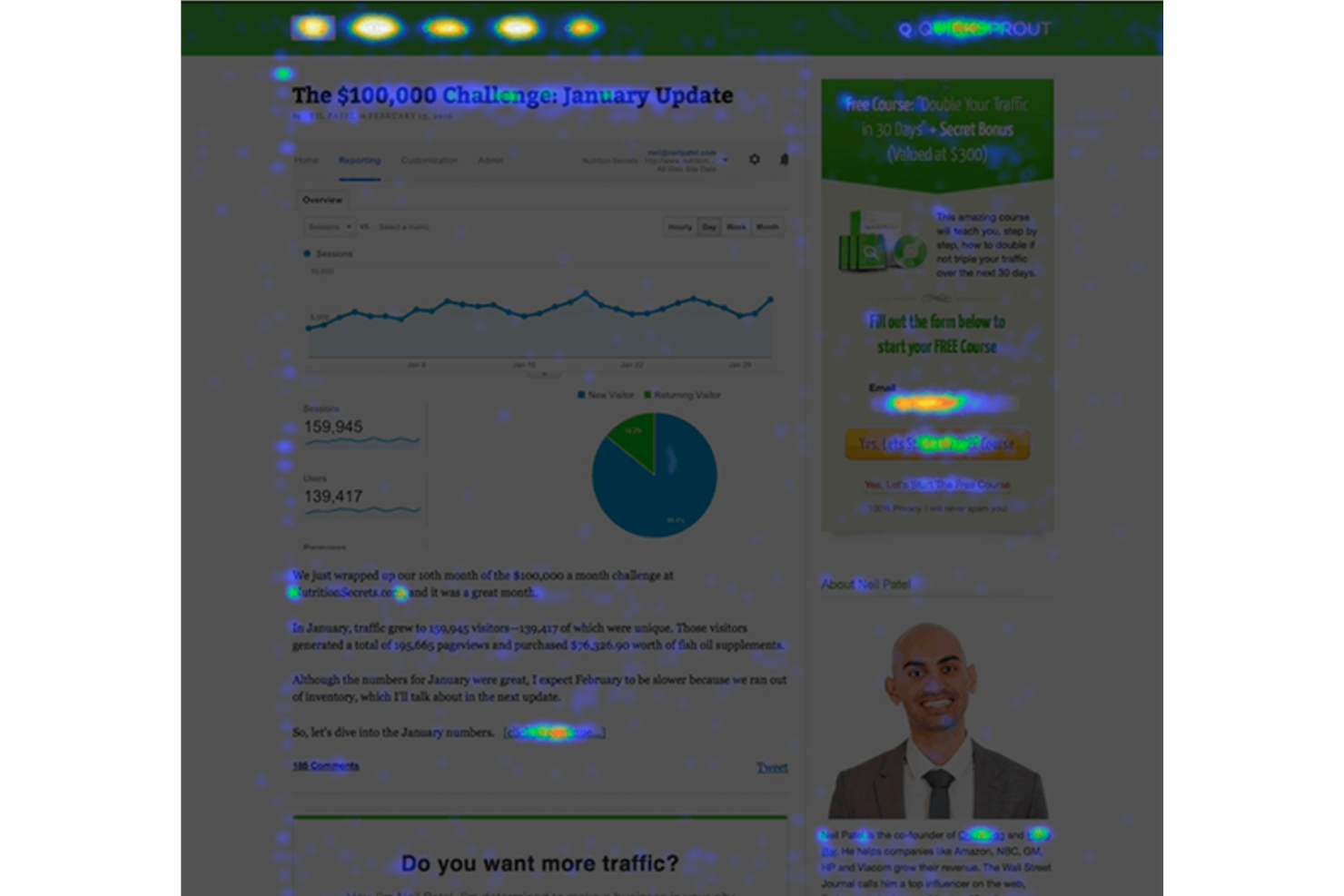
Crazy Egg ist ein Tool für Usability-Tests, das detaillierte visuelle Berichte über das Nutzerverhalten liefert.
Warum ich Crazy Egg ausgewählt habe: Crazy Egg bietet eine Vielzahl visueller Berichte, darunter Heatmaps (Klickaktivität), Scrollmaps (Scrolltiefe), Confetti (Einzelne Klicks), Overlay (Klicks über die gesamte Website) und Listen (numerische Berichte zu Klicks). Mit diesen Tools können Sie Google Analytics Daten, Interaktionen mit E-Mail- und Werbekampagnen besser verstehen und Konversionsraten durch optimierte CTA-Platzierung steigern.
Crazy Egg zeichnet außerdem vollständige Nutzersitzungen auf, sodass Sie Fehlerquellen und Frustpunkte für Nutzer identifizieren können. Sie können diese Aufzeichnungen nach Quelle filtern und dann weiter unterteilen, z. B. nach Mobilgeräten und neuen Besuchern. Das A/B-Testing-Tool ist benutzerfreundlich und leitet den Traffic automatisch an die erfolgreiche Variante weiter.
Crazy Egg: Herausragende Funktionen und Integrationen
Funktionen umfassen Heatmaps, A/B-Tests, Fehlertracking, Umfragen, Kommentarfunktionen, Traffic-Analyse, Scrollmaps und Overlay-Berichte.
Integrationen sind umfangreich und beinhalten Wordpress, Google Tag Manager, Shopify, Wix, Squarespace, Drupal, Magento, Joomla und Segment.
Crazy Egg Preise
Die Crazy Egg Tarife beginnen bei $29/Monat und eine 30-tägige kostenlose Testphase ist verfügbar
Pros and Cons
Pros:
- Einfache Installation
- Heatmaps für jede Landingpage
- Exzellente mobile Unterstützung
Cons:
- Einige Einschränkungen beim A/B-Testing

Am besten für A/B-Tests und Experimente geeignet
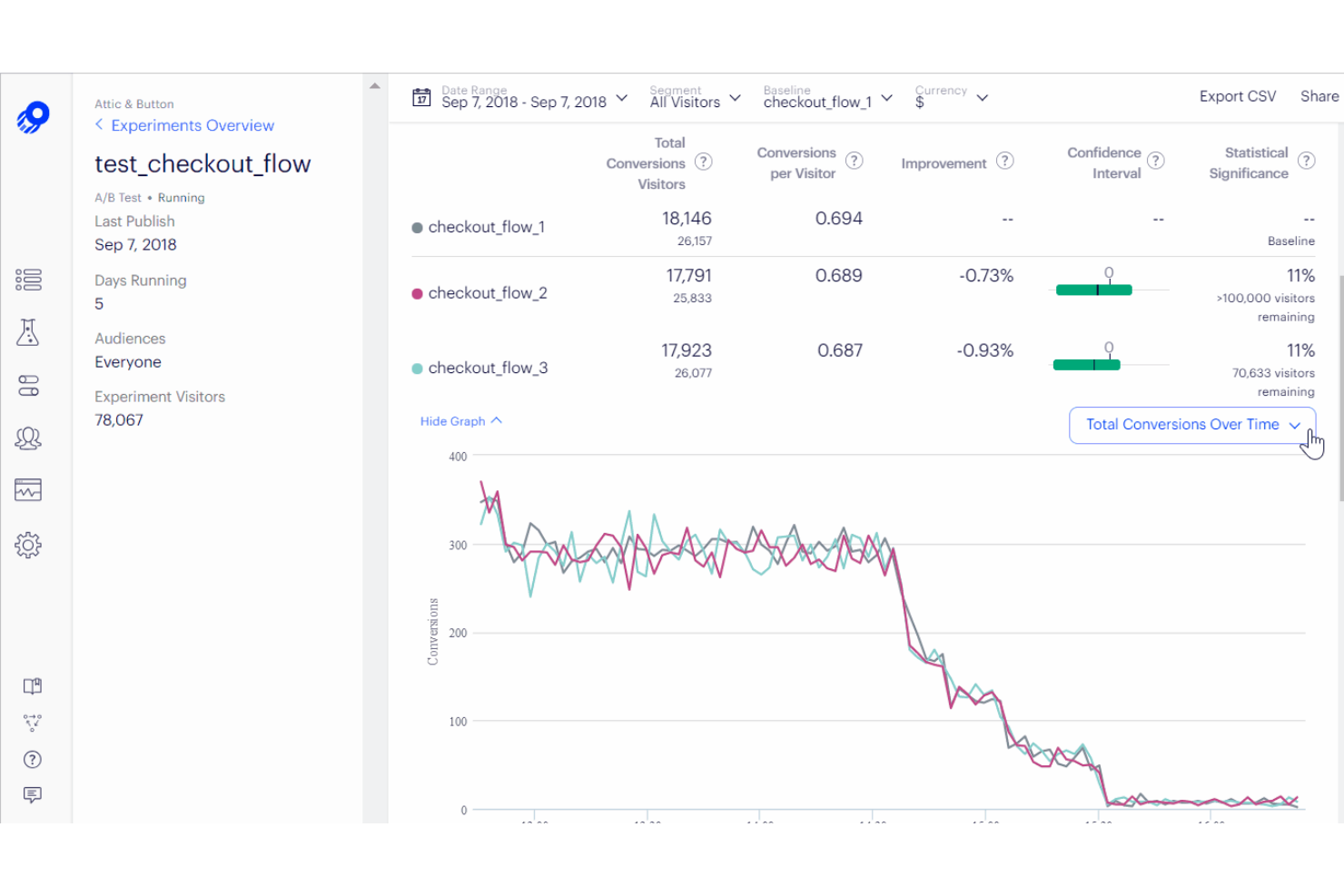
Optimizely ist eine beliebte Software, mit der sich Usability-Tests schnell und effektiv durchführen lassen. Sie stellt sicher, dass die Benutzeroberfläche Ihrer Anwendung benutzerfreundlich und intuitiv ist, indem sie wichtige Daten darüber sammelt, wie Benutzer mit ihr interagieren.
Warum ich Optimizely gewählt habe: Optimizely verfügt über eine breite Palette an Funktionen, die es ideal für Usability-Tests machen. Mit dem einfach zu bedienenden Drag-and-Drop-Editor können Sie Varianten Ihrer Website oder App erstellen, ohne jede Änderung einzeln programmieren zu müssen. Außerdem stellt es Echtzeit-Analysen bereit, sodass Sie sehen können, welche Versionen besser abschneiden, und entsprechend anpassen und optimieren. Darüber hinaus ermöglichen die A/B-Split-Testing-Funktionen, verschiedene Elemente gegeneinander zu testen, um herauszufinden, was bei Ihrer Zielgruppe am besten funktioniert.
Herausragende Funktionen und Integrationen
Funktionen umfassen A/B-Testing, Datenimport & -export, externe Integrationen, Analysen, Conversion-Tracking, Multi-Site, Empfehlungs-Tracking, API, Dashboard, Multi-User-Unterstützung und Zeitplanung.
Integrationen umfassen Aprimo DAM Connector, TradeCentric Connector, Baymard Premium, Shopify Plus, Openpay, FullStory, WordPress, Instagram und mehr.
Optimizely Preise
Preisdetails zu Optimizely sind auf Anfrage erhältlich. Es wird außerdem eine kostenlose Demo angeboten.
Pros and Cons
Pros:
- Benutzerfreundliche Oberfläche
- Personalisierbares Benutzer-Testing-Erlebnis
- Ermöglicht A/B-Tests für Nutzer
Cons:
- Kann für kleine und mittlere Unternehmen teuer sein
- Begrenzter Teilnehmerpool

Userfeel
Am besten für kleine Unternehmen und Startups
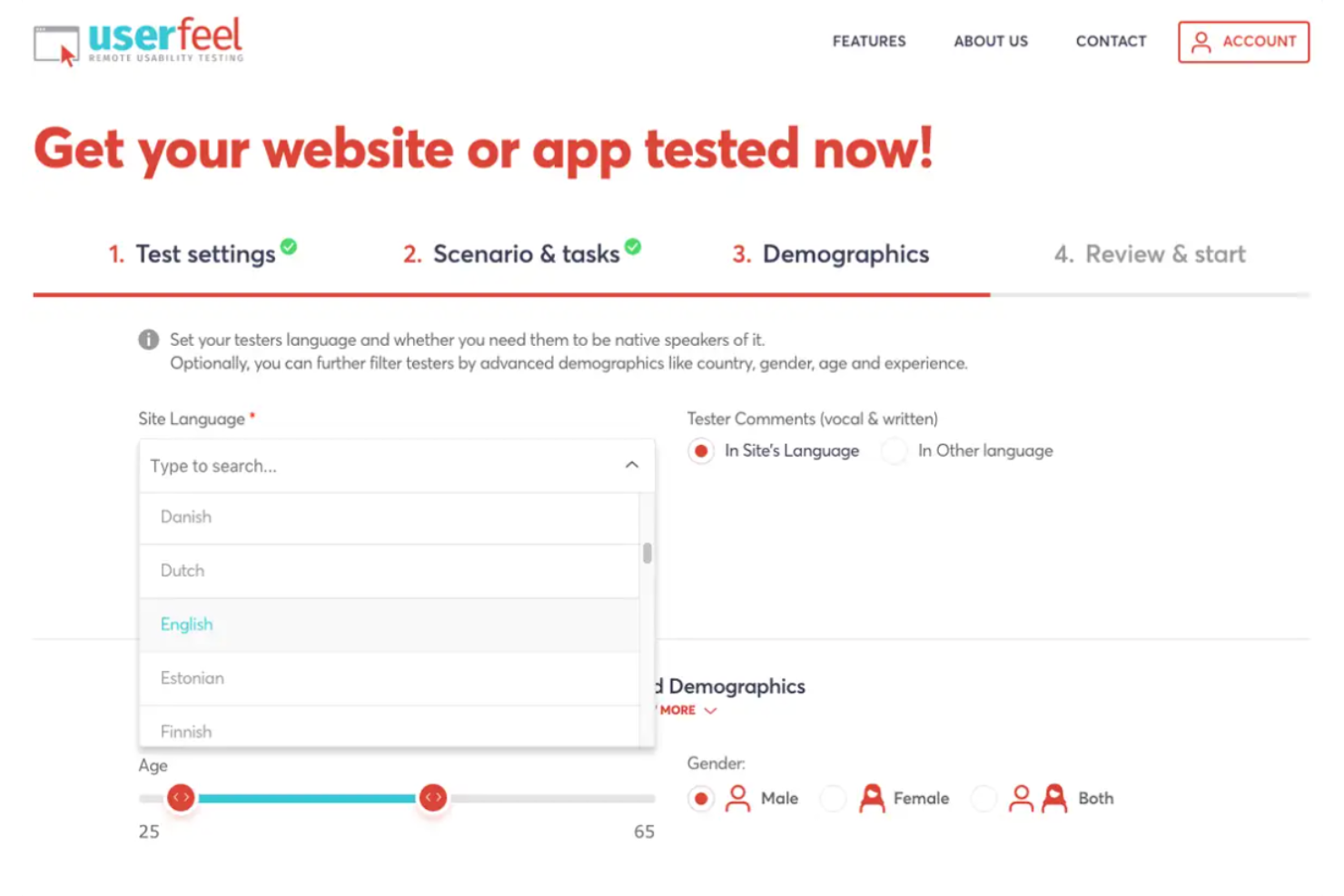
Userfeel ist eine Usability-Testing-Plattform ohne monatliche Abonnementgebühren und ohne Einschränkung bei Filterfragen. Sie bieten die Rekrutierung von Teilnehmern, Video- und Audioaufzeichnungen von Sitzungen sowie die Möglichkeit, Highlight-Videos mit Ihrem Team zur Zusammenarbeit zu teilen.
Warum ich Userfeel gewählt habe: Mit Userfeel können Sie schnell und einfach Usability-Tests durchführen, um sicherzustellen, dass Ihr Produkt die Bedürfnisse Ihrer Nutzer erfüllt. Die benutzerfreundliche Plattform ermöglicht es Ihnen, Umfragen zu erstellen, Screenshots festzuhalten, Videos aufzuzeichnen und sogar Live-Nutzersitzungen zu beobachten. Userfeel macht es Ihnen außerdem leicht, die gesammelten Daten zu analysieren, sodass Sie fundierte Entscheidungen zur Verbesserung Ihrer Website oder App treffen können.
Hervorstechende Funktionen und Integrationen
Funktionen umfassen unmoderierte & moderierte Tests, mehrsprachige Unterstützung, Filterfragen, Geräteunabhängigkeit, Aufgaben und Bewertungen, Notizen im Video, Highlight-Videos, Spracherkennung und SUS-Bewertungen.
Integrationen sind auf der Website von Userfeel nicht aufgeführt.
Userfeel Preise
Userfeel kostet $30 pro Tester. Eine kostenlose Demo ist verfügbar.
Pros and Cons
Pros:
- Erzeugt Feedback zu Navigation, Layout und Inhalten
- Zeichnet den Bildschirm und die Audioausgabe der Nutzer auf
- Führen Sie Nutzertests aus der Ferne durch
Cons:
- Unterstützt nur Remote-Tests, keine moderierten Usability-Tests
- Begrenzter Pool an Teilnehmern

Am besten für unmoderiertes Remote-User-Testing
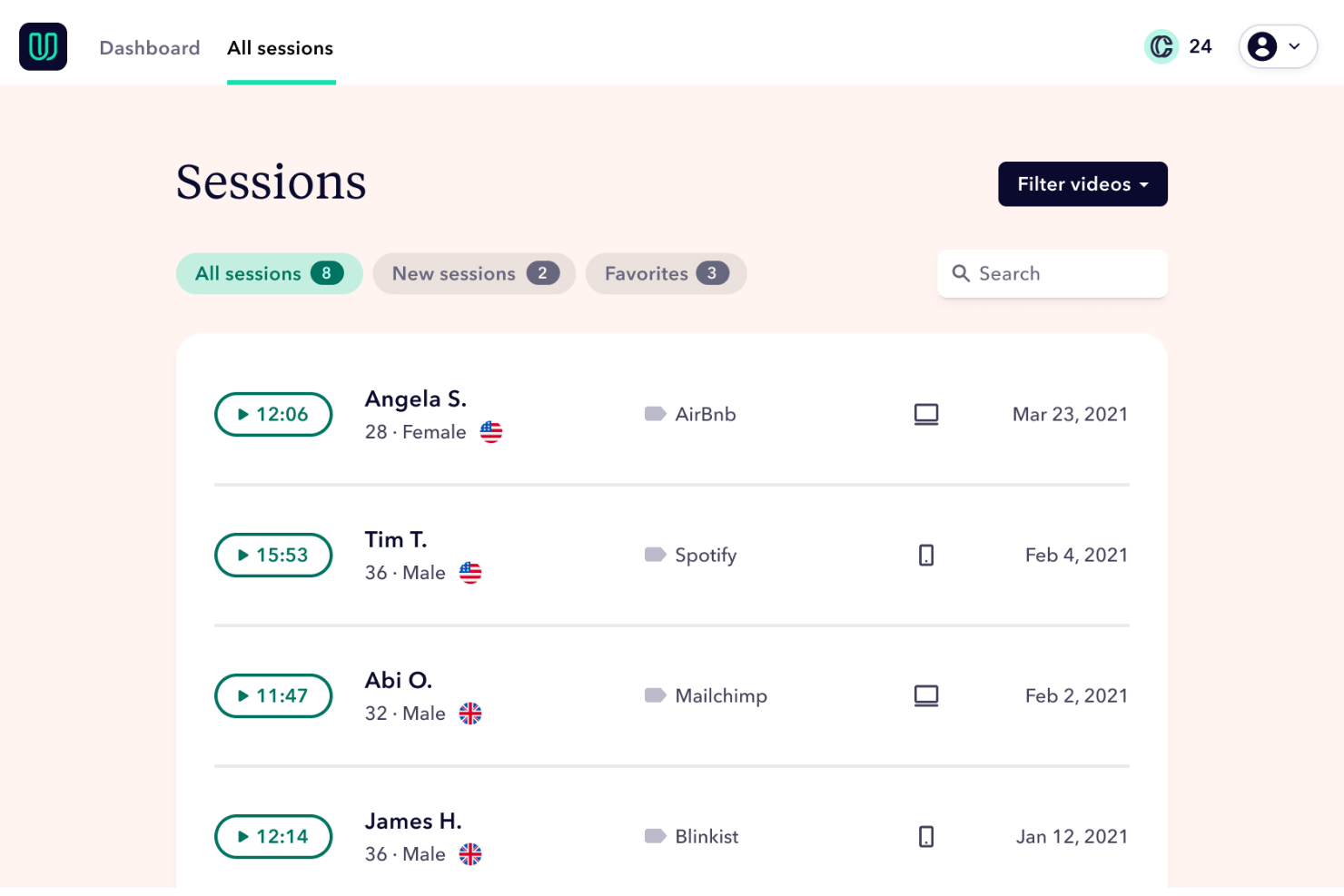
Userbrain bietet schnelle und kostengünstige Usability-Tests für Produktprototypen und Websites.
Warum ich Userbrain ausgewählt habe: Userbrain nimmt Ihnen die zeitraubendsten Aufgaben im Usability-Testprozess ab. Sie rekrutieren echte Nutzer aus ihrem Pool, planen die Testzeiten und führen für Sie die unmoderierten Usability-Tests durch. Wenn Sie lieber mit Ihren eigenen Testpersonen arbeiten möchten, unterstützt Userbrain Sie, indem es einen Link bereitstellt, der per SMS oder E-Mail versendet werden kann.
Userbrain unterstützt Bildschirmaufnahmen, Videoaufzeichnungen und Audio-Kommentare, sodass Sie ein umfassendes Verständnis eventueller Usability-Probleme auf Basis der Endnutzer-Erfahrung erhalten. Mit dem User-Testing-Tool können Entwickler unter anderem Wireframes, Live-Websites und Prototypen auf verschiedenen Geräten testen.
Besondere Funktionen und Integrationen von Userbrain
Funktionen umfassen unmoderierte Usability-Tests, Messaging, Zielgruppen-Targeting, Website-Usability-Tests, anpassbare Berichte, A/B-Tests und Bildschirmaufnahmen.
Integrationen sind begrenzt, beinhalten jedoch Google Analytics 360.
Userbrain Preisgestaltung
Die Preise für Userbrain beginnen bei $99/Monat, und es gibt eine 14-tägige kostenlose Testphase.
Pros and Cons
Pros:
- Zuverlässiger Kundensupport
- Schnelle Rückmeldung der Teilnehmer
- Hervorragende Aufnahmequalität
Cons:
- Keine Erstattung für ungeeignete Tester möglich

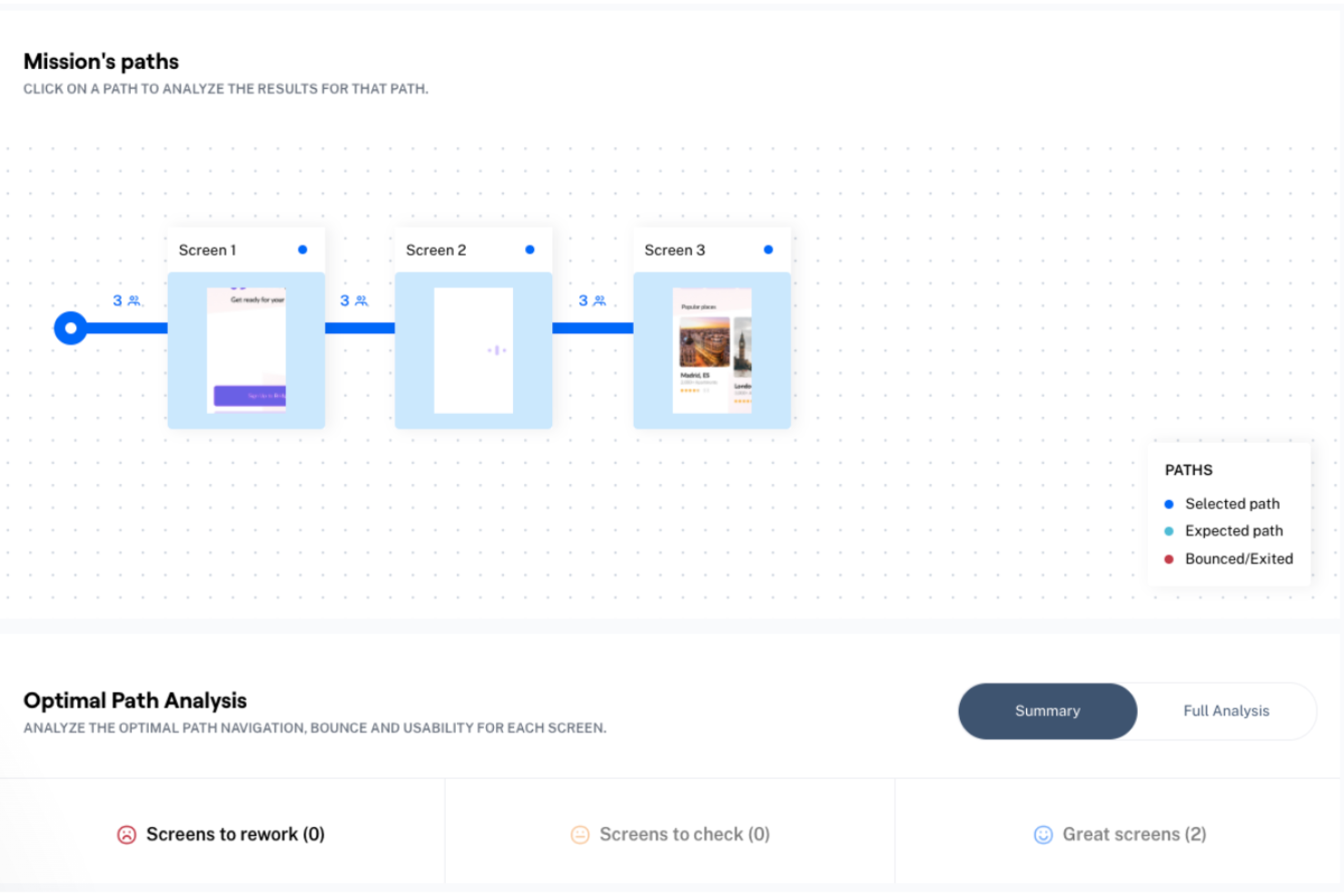
Maze ist ein Usability-Testing-Tool, mit dem Sie die Benutzererfahrung über den gesamten Produktlebenszyklus hinweg testen können.
Warum ich Maze ausgewählt habe: Maze liefert Nutzerforschung, die von der Produktentdeckung über das Design bis darüber hinaus reicht. Die Usability-Testing-Tools sind darauf ausgelegt, kontinuierlich eingesetzt zu werden, sodass Sie agil bleiben und sich an die in Echtzeit erhaltenen Nutzererkenntnisse anpassen können. Die Tests können dabei so dynamisch oder einfach sein, wie Sie es benötigen, und bieten Funktionen wie Card Sorting, offene Fragen und Fünf-Sekunden-Tests.
Da Maze geräteunabhängig und browserbasiert ist, können Testteilnehmer auf die für sie passende Weise teilnehmen. Detaillierte Berichte umfassen unter anderem Absprungraten, Fehlklicks und Heatmaps, und umfangreiche Filter ermöglichen es Ihnen, sich bei der Datenanalyse auf das Wesentliche zu konzentrieren.
Herausragende Funktionen und Integrationen von Maze
Funktionen umfassen Prototyp-Tests, Card Sorting, Tree Testing, Videoaufzeichnungen, Fünf-Sekunden-Tests, Teilnehmerverwaltung und Umfragen.
Integrationen bieten Anbindungen an viele der populärsten Design-Tools wie Adobe XD, Figma, InVision, Marvel und Sketch.
Maze Preisgestaltung
Maze bietet einen kostenlosen Tarif für Einzelpersonen und kleine Teams. Danach starten die Preise bei $75/Monat, jährlich abgerechnet.
Pros and Cons
Pros:
- Detaillierte Berichte
- Gut organisierte Analysen
- Kontinuierliches Testing
Cons:
- Einige Vorlagen sind schwer anzupassen
Weitere Tools für Gebrauchstauglichkeitstests
Hier finden Sie einige weitere Optionen für Tools für Gebrauchstauglichkeitstests, die es zwar nicht auf meine Shortlist geschafft haben, die sich aber dennoch lohnen:
- Lookback
Am besten geeignet für persönliche Interaktion mit Teilnehmenden
- Loop 11
Am besten geeignet für Einfachheit und Benutzerfreundlichkeit
- Great Question
Es Usability-Testing-Tool für Datenschutz und Sicherheit
- Datadog
Am besten geeignet für Drittanbieter-Integrationen


So bewerte ich Usability-Testing-Tools
Ich bewerte jedes Tool anhand von Basiskriterien – aufgabenbasiertes Testen, Sitzungsaufzeichnung und Verhaltensanalysen – und gewichte dann Unterscheidungsmerkmale wie Panel-Qualität, Prototyp-Integrationen und KI-gestützte Auswertung.
Kernfunktionen (Grundvoraussetzungen für diese Liste)
Wenn ich Tools für meine Liste auswähle, bewerte ich jedes auf einer Skala von 0 (bietet die Funktion nicht) bis 5 (hervorragend in diesem Bereich) für jede der unten aufgeführten Kernfunktionen. Anschließend berechne ich den Gesamtwert des Tools in Prozent. Jedes Tool muss eine Mindestgesamtpunktzahl von 65% erreichen, um berücksichtigt zu werden.
- Test-Erstellung & Aufgaben-Design: Ich achte auf flexible Studien-Builder, die verschiedene Testarten unterstützen – Tree-Tests, Kartenabfragen, First-Click-Aufgaben – mit Verzweigungslogik und wiederverwendbaren Vorlagen.
- Moderiertes & Unmoderiertes Testen: Jedes Tool sollte sowohl Live-Moderationen als auch selbstgesteuerte unmoderierte Tests über Web, Mobile und interaktive Prototypen hinweg ermöglichen.
- Sitzungsaufzeichnung & Wiedergabe: Ich bewerte, wie gut Sitzungen Bildschirm, Audio und Webcam festhalten sowie ob Reviewer Momente markieren, Highlights ausschneiden und Transkripte durchsuchen können.
- Verhaltensanalysen: Heatmaps, Klickpfade, Aufgabenabschlussraten und Zeit-auf-Aufgabe-Messwerte sind hier wichtig – vor allem, wenn Teams Usability-Werte über Design-Iterationen hinweg vergleichen müssen.
- Teilnehmer-Rekrutierung & Panels: Integrierte Panels mit demografischen und verhaltensorientierten Filtern sparen erheblich Zeit bei der Recherche, deshalb prüfe ich Panelgröße, Targeting-Tiefe und Recruiting-Geschwindigkeit.
- Insights-Reporting & Teilen: Das Tool sollte ermöglichen, teilbare Berichte oder Highlight-Reels zu erstellen, auf die Produktmanager und Entwickler direkt zugreifen können, ohne vollständige Sitzungsvideos anschauen zu müssen.
Sobald ich eine Liste von Tools habe, die diese Kriterien erfüllen, betrachte ich die Alleinstellungsmerkmale der einzelnen Plattformen.
Unterscheidungsmerkmale (Was Anbieter voneinander abhebt)
So vergleiche und unterscheide ich verschiedene Anbieter:
Hervorstechende Funktionen
Native Prototyp-Integrationen mit Tools wie Figma oder Adobe XD ermöglichen es Designern, interaktive Mockups direkt in einen Test zu übernehmen, ohne Assets exportieren zu müssen – das spart in jeder Studie einen Vorbereitungsdurchgang. Ich achte zudem auf ein zentrales Forschungs-Repository, in dem vergangene Sitzungen, Ausschnitte und markierte Erkenntnisse an einem durchsuchbaren Ort gespeichert werden. Teams, die viele Studien durchführen, verlieren wertvolle Erkenntnisse, wenn diese verstreut auf verschiedene Ordner liegen. KI-gestützte Auswertung ist ein weiteres Unterscheidungsmerkmal, insbesondere wenn sie automatisch Transkripte erstellt, Themen erkennt und Schlüsselmomente aus dutzenden Sitzungen identifiziert.
Mehr als nur Funktionen
Ich prüfe, wie gut sich jedes Tool in den breiteren Produktentwicklungs-Stack integriert – Jira-, Linear-, Slack- und Notion-Integrationen sind wichtig, weil Usability-Erkenntnisse dort landen müssen, wo Entwickler und PMs arbeiten. Sicherheit und Compliance sind genauso entscheidend; für Teams in regulierten Branchen sollte Zertifizierung nach SOC 2 Typ II, DSGVO-konforme Einwilligungsprozesse und Schwärzung persönlicher Daten gegeben sein. Auch die Preisstruktur bestimmt die Eignung. Manche Tools rechnen pro Benutzer ab, andere pro Studie oder Teilnehmer-Credit, und das passende Modell hängt davon ab, ob ein kleines Designteam oder ein komplettes Research-Operations-Team Studien durchführt.
So wählen Sie Tools für Gebrauchstauglichkeitstests aus
Es ist leicht, sich in langen Funktionslisten und komplexen Preisstrukturen zu verlieren. Damit Sie bei der Bearbeitung Ihres individuellen Softwareauswahlprozesses den Überblick behalten, finden Sie hier eine Checkliste mit Faktoren, die Sie berücksichtigen sollten:
| Faktor | Was zu beachten ist |
|---|---|
| Skalierbarkeit | Wächst das Tool mit den Anforderungen Ihres Teams? Berücksichtigen Sie Benutzerlimits, die Kapazität zur Datenverarbeitung und mögliche zusätzliche Kosten für die Skalierung. |
| Integrationen | Funktioniert es mit Ihren aktuellen Systemen? Achten Sie auf die Kompatibilität mit Ihrem bestehenden Software-Stack, um zusätzliche Umgehungslösungen oder manuelle Datenübertragungen zu vermeiden. |
| Anpassbarkeit | Können Sie das Tool an Ihre Arbeitsabläufe anpassen? Prüfen Sie, ob Sie Dashboards, Berichte und Benutzeroberflächen an die Prozesse Ihres Teams anpassen können. |
| Benutzerfreundlichkeit | Ist das Tool für Ihr Team intuitiv bedienbar? Beurteilen Sie die Lernkurve und ob Ihr Team es ohne umfangreiche Schulungen effektiv nutzen kann. |
| Implementierung und Einführung | Wie schnell können Sie starten? Berücksichtigen Sie den für die Einrichtung benötigten Zeitaufwand und die erforderlichen Ressourcen, einschließlich Schulungsmaterialien und Unterstützung während der Übergangsphase. |
| Kosten | Passt die Preisgestaltung in Ihr Budget? Vergleichen Sie die Kosten mit Ihrem Budget, einschließlich versteckter Gebühren oder Kosten für zusätzliche Funktionen oder Benutzer. |
| Sicherheitsvorkehrungen | Sind Ihre Daten geschützt? Überprüfen Sie die Sicherheitsmaßnahmen des Tools, etwa Verschlüsselung und die Einhaltung der für Ihre Branche relevanten Datenschutzbestimmungen. |
| Verfügbarkeit des Supports | Können Sie bei Bedarf Hilfe erhalten? Achten Sie auf die Verfügbarkeit von Kundensupport-Kanälen, Reaktionszeiten und die Qualität des Supports auf Grundlage der Erfahrungen von Benutzern. |
Was sind Tools für Tests der Gebrauchstauglichkeit?
Tools für Tests der Gebrauchstauglichkeit sind Softwarelösungen, mit denen sich bewerten lässt, wie echte Benutzer mit einem Produkt oder einer Website interagieren. Fachleute wie UX-Designer, Produktmanager und Entwickler nutzen diese Tools, um die Benutzererfahrung durch das Erkennen von Problemen bei der Benutzerfreundlichkeit zu verbessern. Funktionen wie Benutzerumfragen, Sitzungsaufzeichnungen und Heatmaps helfen dabei, umsetzbare Erkenntnisse zu gewinnen und die Benutzerzufriedenheit zu steigern. Insgesamt liefern diese Tools wertvolles Feedback, um Produkte benutzerfreundlicher und effektiver zu gestalten.
Funktionen
Achten Sie bei der Auswahl von Tools für Tests der Gebrauchstauglichkeit auf die folgenden wichtigen Funktionen:
- Benutzerumfragen: Sammeln Sie direktes Feedback von Benutzern, um ihre Erfahrungen zu verstehen und Verbesserungsbereiche zu erkennen.
- Sitzungsaufzeichnungen: Erfassen Sie Interaktionen echter Benutzer, um ihr Verhalten zu analysieren und Probleme bei der Benutzerfreundlichkeit zu erkennen.
- Heatmaps: Visualisieren Sie die Benutzeraktivität auf Ihrer Website, um zu sehen, welchen Bereichen die meiste Aufmerksamkeit gilt und welche ignoriert werden.
- A/B-Tests: Testen Sie verschiedene Versionen einer Seite oder Funktion, um zu ermitteln, welche bei den Benutzern besser abschneidet.
- Benutzerinterviews: Führen Sie Interviews durch, um tiefere Einblicke in die Bedürfnisse und Präferenzen der Benutzer zu gewinnen.
- Anpassbare Dashboards: Passen Sie Dashboards so an, dass sie die für die Anforderungen Ihres Teams relevantesten Daten anzeigen.
- Zusammenarbeit in Echtzeit: Ermöglichen Sie Teammitgliedern, gemeinsam zu arbeiten und Erkenntnisse zu teilen, während sie Benutzerdaten analysieren.
- Integrationsmöglichkeiten: Verbinden Sie das Tool mit Ihrem bestehenden Software-Stack, um einen nahtlosen Datenfluss und erweiterte Funktionen zu ermöglichen.
- KI-gestützte Erkenntnisse: Nutzen Sie künstliche Intelligenz, um Muster automatisch zu erkennen und auf Grundlage der Benutzerdaten Verbesserungen vorzuschlagen.
- Sicherheitsmaßnahmen: Gewährleisten Sie den Datenschutz durch Verschlüsselung und die Einhaltung relevanter Datenschutzbestimmungen.
Vorteile
Die Implementierung von Tools für Tests der Gebrauchstauglichkeit bietet Ihrem Team und Ihrem Unternehmen mehrere Vorteile. Hier sind einige, auf die Sie sich freuen können:
- Verbesserte Benutzererfahrung: Durch die Analyse von Sitzungsaufzeichnungen und Heatmaps können Sie Probleme bei der Benutzerfreundlichkeit erkennen und beheben und Ihr Produkt dadurch benutzerfreundlicher gestalten.
- Fundierte Entscheidungsfindung: A/B-Tests und Benutzerumfragen liefern datengestützte Erkenntnisse, die Ihnen helfen, bessere Entscheidungen zu Design und Funktionalität zu treffen.
- Höhere Benutzerzufriedenheit: Benutzerinterviews und Feedback helfen Ihnen, die Bedürfnisse der Benutzer zu verstehen, und führen zu einem Produkt, das Ihre Zielgruppe stärker anspricht.
- Verbesserte Zusammenarbeit: Funktionen für die Zusammenarbeit in Echtzeit ermöglichen es Ihrem Team, effizient zusammenzuarbeiten, Erkenntnisse zu teilen und schneller Entscheidungen zu treffen.
- Kosteneinsparungen: Indem Sie durch Tests der Gebrauchstauglichkeit Probleme frühzeitig erkennen, können Sie später kostspielige Neugestaltungen und Entwicklungsänderungen vermeiden.
- Datengestützte Verbesserungen: KI-gestützte Erkenntnisse schlagen auf Grundlage von Mustern im Benutzerverhalten automatisch Möglichkeiten zur Verbesserung Ihres Produkts vor.
- Bessere Integration: Integrationsmöglichkeiten stellen sicher, dass Tools für Tests der Gebrauchstauglichkeit gut mit Ihren bestehenden Systemen zusammenarbeiten und einen einheitlicheren Arbeitsablauf ermöglichen.
Kosten und Preisgestaltung
Die Auswahl von Usability-Testing-Tools erfordert ein Verständnis der verschiedenen verfügbaren Preismodelle und Tarife. Die Kosten variieren je nach Funktionen, Teamgröße, Zusatzoptionen und weiteren Faktoren. Die folgende Tabelle fasst gängige Tarife, ihre durchschnittlichen Preise und typische enthaltene Funktionen von Lösungen für Usability-Testing-Tools zusammen:
Vergleichstabelle der Tarife für Usability-Testing-Tools
| Tariftyp | Durchschnittlicher Preis | Übliche Funktionen |
|---|---|---|
| Kostenloser Tarif | $0 | Grundlegende Nutzerumfragen, begrenzte Sitzungsaufzeichnungen und einfache Heatmaps. |
| Persönlicher Tarif | $10-$30/Nutzer/Monat | Erweiterte Nutzerumfragen, Sitzungsaufzeichnungen, Heatmaps und grundlegende A/B-Tests. |
| Geschäftstarif | $50-$100/Nutzer/Monat | Anpassbare Dashboards, Zusammenarbeit in Echtzeit, erweiterte A/B-Tests und Integrationsoptionen. |
| Unternehmenstarif | $150+/Nutzer/Monat | KI-gestützte Erkenntnisse, mehrsprachige Unterstützung, umfangreiche Integrationen und dedizierter Kundensupport. |
Häufig gestellte Fragen zu Usability-Testing-Tools
Hier finden Sie Antworten auf häufige Fragen zu Usability-Testing-Tools:
Wie gehen Usability-Testing-Tools mit dem Datenschutz um?
Ja, die meisten Usability-Testing-Tools nehmen den Datenschutz ernst. Sie bieten häufig Funktionen wie die Anonymisierung von Daten und erfüllen Vorschriften wie die DSGVO. Achten Sie bei der Auswahl eines Tools darauf, dass es klare Datenschutzrichtlinien hat und Optionen für die Datenverschlüsselung bietet. Es ist entscheidend zu verstehen, wie das Tool Nutzerdaten speichert und verarbeitet, um die Einhaltung der Vorschriften zu gewährleisten und Nutzerinformationen zu schützen.
Können Usability-Testing-Tools in andere Software integriert werden?
Ja, viele Usability-Testing-Tools bieten Integrationsmöglichkeiten. Sie können mit Analyseplattformen, CRM-Systemen und Projektmanagementsoftware verbunden werden, um einen umfassenden Überblick über Nutzerinteraktionen zu bieten. Beispielsweise kann die Integration eines Webanalysetools wie Google Analytics tiefere Einblicke in das Nutzerverhalten ermöglichen. Prüfen Sie die Integrationsoptionen des Tools, um sicherzustellen, dass es gut zu Ihrer bestehenden technischen Umgebung passt.
Wie lange dauert es, bis Ergebnisse von Usability-Testing-Tools sichtbar werden?
Wie lange es dauert, bis Ergebnisse sichtbar werden, ist unterschiedlich. Erste schnelle Verbesserungsmöglichkeiten aus Sitzungsaufzeichnungen oder Heatmaps können Sie möglicherweise innerhalb weniger Tage erkennen. Für detailliertere Erkenntnisse, etwa aus A/B-Tests, kann es jedoch Wochen dauern. Es ist wichtig, klare Ziele und Zeitpläne festzulegen und Anpassungen auf Grundlage des Nutzerfeedbacks zu ermöglichen. Durch die regelmäßige Auswertung der Daten können Sie fundierte Entscheidungen treffen und die Nutzererfahrung im Laufe der Zeit verbessern.
Wann sollte ich Usability-Testing-Tools statt einfacherer Methoden wie informeller Tests einsetzen?
Wenn Sie sich in der Entscheidungsphase für den Kauf oder die Erprobung von Tools befinden, besteht wahrscheinlich ein wiederkehrender Bedarf – mehrere Testsitzungen, verschiedene Nutzersegmente oder komplexe Arbeitsabläufe. Für einmalige oder sehr frühe grobe Tests können einfachere Methoden ausreichen. Wenn Sie jedoch planen, Tests zu wiederholen, viele Nutzer zu testen oder Kennzahlen und Berichte benötigen, ist ein spezialisiertes Tool sinnvoller.
Wie geht es weiter:
Wenn Sie gerade Usability-Testing-Tools recherchieren, kontaktieren Sie kostenlos einen SoftwareSelect-Berater und erhalten Sie Empfehlungen.
Sie füllen ein Formular aus und führen ein kurzes Gespräch, in dem Ihre konkreten Anforderungen besprochen werden. Anschließend erhalten Sie eine Auswahlliste von Softwarelösungen zur Prüfung. Sie werden sogar während des gesamten Kaufprozesses unterstützt, einschließlich der Preisverhandlungen.