

20 Beste Tools für Penetrationstests von Webanwendungen im Jahr 2026

Die besten Tools für Penetrationstests von Webanwendungen – Shortlist
Hier ist meine Shortlist der besten Tools für Penetrationstests von Webanwendungen:


Die besten Tools für Penetrationstests von Webanwendungen helfen Teams, Schwachstellen frühzeitig aufzudecken, Sicherheitskontrollen zu validieren und sensible Daten über komplexe Anwendungen hinweg zu schützen. Wenn Fehlkonfigurationen Prüfungen durchrutschen, automatisierte Scanner risikoreiche Probleme übersehen oder Lücken zwischen manuellen Tests und CI/CD-Pipelines entstehen, bleiben Sicherheitslücken unbemerkt und werden später teuer in der Behebung.
Die richtige Plattform für Penetrationstests liefert Sicherheitsteams präzise Ergebnisse, klare Berichte und Arbeitsabläufe, die sich nahtlos in bestehende Entwicklungsprozesse integrieren. Als Chief Technology Officer mit über 20 Jahren Erfahrung im Testen und Implementieren von Sicherheitstools in aktiven Webumgebungen habe ich die besten Lösungen nach Genauigkeit, Integrationsqualität und Benutzerfreundlichkeit bewertet. Jede Rezension behandelt Funktionen, Vor- und Nachteile sowie ideale Anwendungsfälle, um Ihrem Team die Auswahl des besten Tools für Penetrationstests zu erleichtern – für stärkere und zuverlässigere Anwendungssicherheit.
Why Trust Our Software Reviews
We’ve been testing and reviewing software since 2023. As tech leaders ourselves, we know how critical and difficult it is to make the right decision when selecting software.
We invest in deep research to help our audience make better software purchasing decisions. We’ve tested more than 2,000 tools for different tech use cases and written over 1,000 comprehensive software reviews. Learn how we stay transparent & our software review methodology.
Zusammenfassung der besten Tools für Penetrationstests von Webanwendungen
Diese Vergleichstabelle fasst die Preisinformationen meiner Top-Auswahl an WAPT-Tools zusammen, damit Sie das beste Tool für Ihr Budget und Ihre geschäftlichen Anforderungen finden können.
| Tool | Best For | Trial Info | Price | ||
|---|---|---|---|---|---|
| 1 | Best for proactive, automated penetration testing | 14-day free trial + free demo available | From $149/month | Website | |
| 2 | Best for continuous vulnerability scanning & pentesting for 9300+ test cases | Free demo available | From $69/month | Website | |
| 3 | Best for hybrid AI + human pentesting | Free plan available | From $200/month | Website | |
| 4 | Best for business logic vulnerability detection | Free demo available | Pricing upon request | Website | |
| 5 | Best for AI pentests | Free plan available + free demo | From $350/month | Website | |
| 6 | Best for configuring scan profiles | Free demo available | Pricing upon request | Website | |
| 7 | Best for DeepScan technology in complex web applications | Free demo available | Pricing upon request | Website | |
| 8 | Network protocol analyzer that is fully open source, and tracks your network and traffic for cyber security | Free download available | Free to use (open source) | Website | |
| 9 | Best fully managed web application firewall (WAF) solution | 14-day free trial + free demo | From $99/month | Website | |
| 10 | Best for real-time performance monitoring | Free trial + free demo available | Pricing upon request | Website | |
| 11 | Best for thread-based parallel testing | Free demo available | From $29/month | Website | |
| 12 | provides a passive scan feature | Free plan available | From $475/user/year | Website | |
| 13 | Best for external asset discovery | Not available | Website | ||
| 14 | Best for developers | Not available | Website | ||
| 15 | Easy to use credential and non credential scans | 7-day free trial + free demo | From $4,390/license/year | Website | |
| 16 | Lightweight solution to web application penetration testing | Not available | Free to use | Website | |
| 17 | Penetration testing tool and password cracker which allows you to test the strength of your passwords | Not available | Website | ||
| 18 | Automate manual tests and streamline your process | Free plan available | Pricing available upon request | Website | |
| 19 | Focuses on being the “middleman proxy” between browser and application | Not available | Free to use | Website | |
| 20 | Best for replicating multi-staged attacks | Free trial available + free demo | From $9,450/user/year | Website |


-

Site24x7
Visit WebsiteThis is an aggregated rating for this tool including ratings from Crozdesk users and ratings from other sites.4.7 -
GitHub Actions
Visit WebsiteThis is an aggregated rating for this tool including ratings from Crozdesk users and ratings from other sites.4.8 -
Docker
Visit WebsiteThis is an aggregated rating for this tool including ratings from Crozdesk users and ratings from other sites.4.6





Bewertungen der besten Tools für Penetrationstests von Webanwendungen
Im Folgenden finden Sie meine ausführlichen Zusammenfassungen der besten Tools für Penetrationstests von Webanwendungen, die es auf meine Shortlist geschafft haben. Meine Bewertungen bieten einen detaillierten Einblick in die wichtigsten Funktionen, Vor- und Nachteile, Integrationen und idealen Anwendungsfälle jedes Tools, damit Sie das passende Tool für sich finden.


Intruder is a vulnerability management tool designed to help businesses identify and address security weaknesses across their digital infrastructure. It provides continuous network monitoring, automated vulnerability scanning, and proactive threat response, which collectively contribute to a more secure IT environment for companies aiming to minimize their attack surface.
I chose this platform for my list because of its automation capabilities. It uses underlying vulnerability scanners to take a proactive approach to vulnerability management. This automated scanning feature allows for regular and systematic vulnerability assessments of digital assets with minimal manual effort. Meanwhile, the tool's continuous monitoring and real-time threat monitoring capabilities ensure that security statuses are always current, adapting to new threats and environmental changes.
The software integrates natively with Slack, Microsoft Teams, Jira, Github, and Gitlab. Other integrations can be accessed through Zapier and API.
Paid plans start from $196 per month, per application. A 14-day free trial is also available.
New Product Updates from Intruder
Intruder GregAI Adds Persistent Chat History
Intruder introduces persistent chat history with GregAI, enhancing user experience by maintaining conversation threads even after closing the chat. For more information, visit Intruder's official site.
 .
.
Best for continuous vulnerability scanning & pentesting for 9300+ test cases
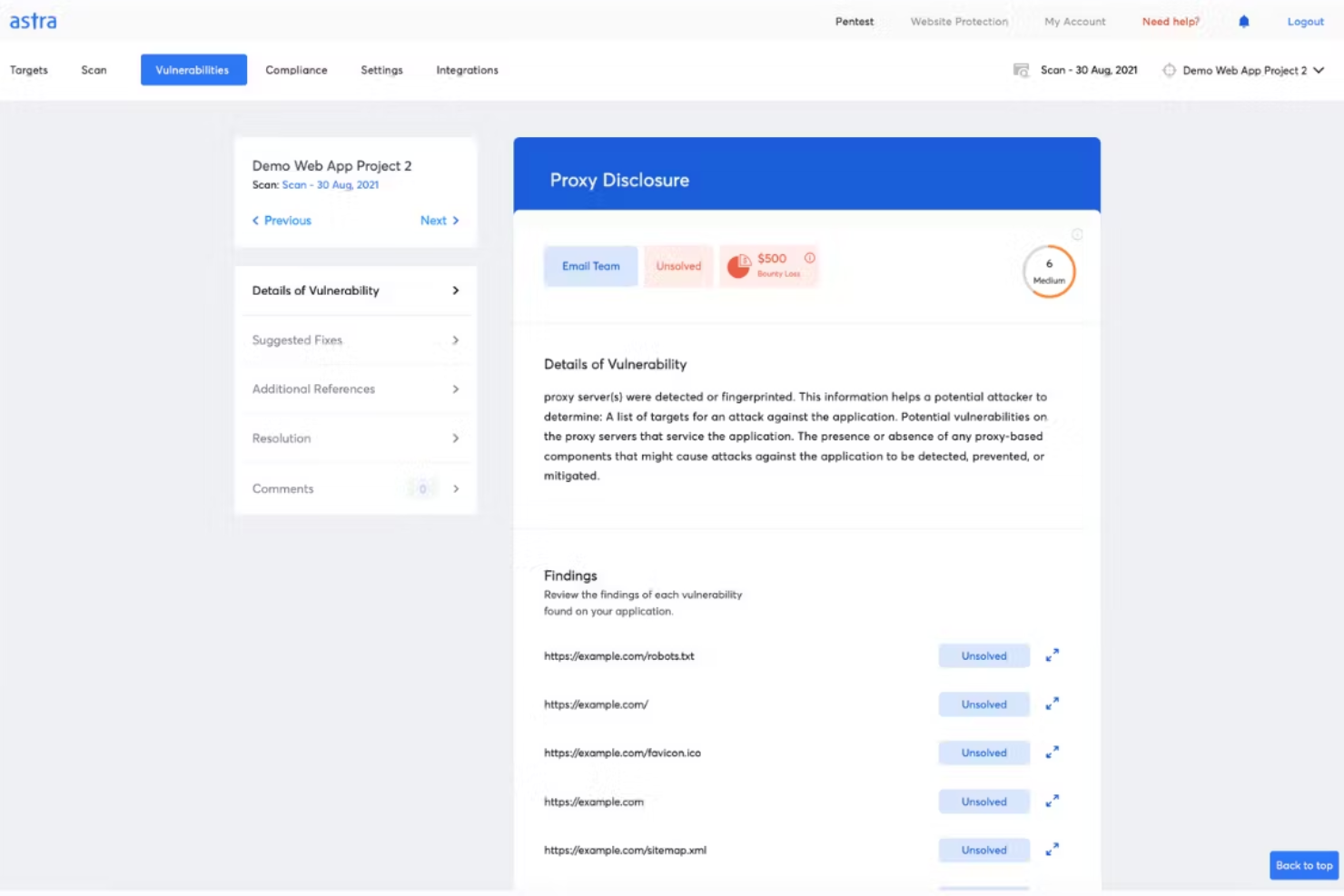
Astra Pentest is a developer-friendly pentest platform featuring an automated vulnerability scanner and manual pentesting by security experts to ensure zero false positives. The platform's vulnerability scanner runs 9300+ test cases covering OWASP, SANS, ISO, SOC, and other standards. This AI-powered business logic test cases feature ensures deep security testing coverage. Additionally, the AI-powered conversational chatbot gives engineers contextual insights on fixing vulnerabilities.
Astra's pentest platform provides a collaborative dashboard that allows team members and security experts to work together efficiently, and it offers a publicly verifiable security certificate to help build trust with customers and partners. The platform also provides real-time support from security experts and emphasizes continuous scanning, which enables ongoing monitoring and detection of security issues.
Furthermore, like the vulnerability scanner, the penetration testing tool covers a wide range of security standards and offers compliance testing for regulations such as ISO 27001, HIPAA, SOC2, and GDPR. The software can also scan progressive web apps, single-page apps, and behind logged-in pages. Integrations include GitHub, GitLab, Slack, Jira, and more.
Paid plans start at $199/month for the Scanner package and they have a free demo available.


Zeropath is an AI-native application security platform designed to meet the needs of security-conscious companies aiming to enhance their web application security processes. By offering advanced tools like Static Application Security Testing (SAST) and automated vulnerability remediation, Zeropath empowers your team to detect and address vulnerabilities efficiently.
Why I Picked Zeropath
I picked ZeroPath because it brings together continuous AI-driven testing and human-led attack analysis, which is ideal if you’re looking for a web application penetration testing tool that goes beyond surface-level checks. You get automated reconnaissance and vulnerability discovery that runs 24/7, giving your team visibility into security gaps as soon as they emerge. Expert pentesters then validate findings and explore complex attack chains, so you’re not left wondering which issues are real or exploitable. This combination lets your team prioritize meaningful vulnerabilities and act on them with confidence.
Zeropath Key Features
In addition to its continuous AI + human testing approach, your team can also take advantage of:
- Automated Vulnerability Remediation: This feature provides automated fixes for identified vulnerabilities, streamlining the resolution process for your development team.
- Real-Time Feedback: Zeropath delivers immediate insights into security issues as they arise, allowing your team to address them promptly.
- Automatic retesting of fixes: Once your team applies a patch, ZeroPath validates the fix to confirm the issue is resolved.
- SARIF Comparison: This feature allows for detailed analysis and comparison of security reports, enhancing your team's ability to track and manage vulnerabilities.
- Real-time vulnerability detection: The platform alerts you as soon as new weaknesses appear in changing application environments.
Zeropath Integrations
Integrations include GitHub, GitLab, Azure DevOps, and Bitbucket.
Pros and Cons
Pros:
- Proof-of-concept exploits clarify real-world risk for teams
- AI reconnaissance expands coverage of hidden attack surfaces
- Continuous monitoring catches new vulnerabilities around the clock
Cons:
- You may need time to adjust your workflow around its automation
- Not ideal for teams wanting only traditional point-in-time tests


Escape is a web application penetration testing tool designed for organizations needing to address modern digital security challenges. It specializes in detecting business logic vulnerabilities that traditional scanners often miss, making it particularly suited for industries like finance, healthcare, and technology. By integrating into existing tech stacks, Escape helps ensure continuous security validation, aligning with the fast-paced deployment cycles of contemporary applications.
Why I Picked Escape
I picked Escape because it excels at identifying complex business-logic vulnerabilities through AI-powered Dynamic Application Security Testing (DAST), setting it apart from traditional tools. This focus on business logic security is crucial for organizations facing sophisticated cyber threats. Additionally, Escape’s integration with CI/CD pipelines ensures that security testing keeps pace with rapid development cycles, providing real-time insights and actionable remediation advice. These features make Escape a compelling choice for teams aiming to enhance their security posture without slowing down innovation.
Escape Key Features
In addition to business logic testing capabilities, Escape offers:
- API Discovery: Automatically identifies and documents APIs within your application, ensuring comprehensive security coverage.
- GraphQL Security Testing: Provides specialized testing for GraphQL APIs, addressing unique vulnerabilities associated with this technology.
- Compliance Reporting: Generates detailed reports to help meet industry compliance standards, simplifying the audit process.
- Sensitive Data Leak Detection: Identifies potential data leaks within your applications, helping to safeguard sensitive information.
Escape Integrations
Escape integrates with modern tech stacks, including CI/CD platforms, to provide seamless security validation. Native integrations include GitHub, GitLab, Jenkins, JIRA, Slack, Bitbucket, Azure DevOps, AWS, Docker, and Kubernetes.
Pros and Cons
Pros:
- Strong API vulnerability detection, including coverage for REST and GraphQL endpoints
- Advanced scanning technology that finds a wide range of security issues
- Continuous scanning and verification that support ongoing security monitoring
Cons:
- Requires technical familiarity to use advanced features effectively
- Platform upgrades can take time to apply and adapt to


Aikido Security’s Attack module delivers autonomous AI penetration testing that mirrors real attacker behavior, providing validated results in hours instead of weeks. It can be used as a standalone pentesting tool or as part of the broader Aikido platform, which also includes modules for code, cloud, and runtime protection. Together, these tools give teams continuous visibility into vulnerabilities across their entire environment.
Aikido Security also includes robust DAST capabilities for black-box testing. It examines your web applications and APIs from the outside without needing access to source code, helping you simulate real-world attacks and uncover potential weaknesses. This approach gives your team a clearer view of external risks and what needs to be fixed to strengthen your defenses.
Another helpful feature is authenticated DAST scanning. By logging in as a user before testing, Aikido can assess a greater portion of the application, identifying vulnerabilities that unauthenticated scans may miss. The platform also provides static application security testing (SAST) to detect issues such as SQL injection and cross-site scripting directly in your codebase.
New Product Updates from Aikido Security

Aikido Adds Lovable Integration for Pentesting
Aikido introduces integration with Lovable and integrated pentesting. This update helps teams detect and fix security issues before deployment. For more information, visit Aikido Security's official site.


Invicti offers a security platform that not only identifies vulnerabilities but also validates and prioritizes them, ensuring your digital assets remain protected. Designed for businesses ranging from IT and financial services to healthcare and government sectors, it addresses the challenge of safeguarding web applications and APIs against potential exploits. By integrating seamlessly into your development pipeline, Invicti helps maintain a robust security posture without disrupting your workflow.
Why I Picked Invicti
I picked Invicti for its exceptional capability in configuring pre-set scan profiles, a feature that stands out in the realm of web application penetration testing tools. This functionality allows you to customize and automate scanning processes, ensuring that security checks are both comprehensive and consistent. The platform also includes dynamic application security testing (DAST) with a high accuracy rate, which is crucial for pinpointing vulnerabilities effectively. Additionally, its seamless integration with CI/CD pipelines means you can maintain security without slowing down your development cycle.
Invicti Key Features
In addition to its pre-set scan profiles, Invicti offers several key features that enhance your security management:
- DAST Engine: Provides a high accuracy rate of 99.98% using AI innovations to quickly identify vulnerabilities.
- Software Composition Analysis (SCA): Identifies vulnerabilities in open-source components, allowing you to address risks in your software supply chain.
- Container Security: Offers scanning for container images to detect vulnerabilities before deployment.
- Role-Based Access Control: Ensures that only authorized personnel have access to critical security functions, enhancing data protection.
Invicti Integrations
Integrations include Bitbucket, Azure API Management, Mend.io, Amazon API Gateway, Kubernetes, Apigee API Hub, MuleSoft Anypoint Exchange, Azure Boards, FogBugz, and Bugzilla.
New Product Updates from Invicti
Invicti Enterprise Adds WebLogic Support and Security Enhancements
The latest Invicti Enterprise v25.10.0 release introduces WebLogic support for Java Shark sensors and improved secrets management through SEM integrations. It also refines API consistency and strengthens overall platform stability. For more information, visit Invicti's official site.
 .
.

Acunetix is a comprehensive web application and API security scanner designed to help organizations automate their application security testing. It offers a robust suite of features, including API discovery and security, which allows users to find and test APIs without disrupting development workflows.
Acunetix uses DeepScan Technology, which allows the tool to fully automate the crawling of complex custom HTML5 websites and web applications, including client-side single-page applications (SPAs). This technology enables Acunetix to interact with JavaScript-rich web applications just like a real user would, ensuring that even the most intricate parts of a web application are thoroughly tested.
Another significant feature is the Login Sequence Recorder (LSR), which simplifies the process of authenticated web application testing. This tool allows users to record a series of actions and/or restrictions and replay them to authenticate a page, making it easier to test web applications that require login credentials.
Integrations include Azure Boards, BitBucket, Bugzilla, DefectDojo, FogBugz, Freshservice, GitHub, GitLab Issues, Invicti Standard, Jazz Team Server, Jira, and Kafka.
Pricing is available upon request.

Network protocol analyzer that is fully open source, and tracks your network and traffic for cyber security

Wireshark is a powerful open source network packet sniffer equipped for the deep inspection of hundreds of different protocols, with more being added all the time. Wireshark runs on multiple platforms, including Windows, macOS, Linux, Solaris, NetBSD, FreeBSD, and many others.Wireshark can read live data from Ethernet, IEEE 802.11, PPP/HDLC, ATM, Bluetooth, USB, Token Ring, Frame Relay, FDDI, and others in a wide range of file formats. Data can easily be exported, compressed and decompressed for offline analysis, and the platform also has a user-friendly built-in network protocol debugging environment.Wireshark integrates with a wide range of tools, including network software emulators like GNS3.Wireshark is open source and free to use.


AppTrana is a web application firewall (WAF) used for penetration testing, behavioral-based DDoS protection, mitigating bot attacks, and defending against the OWASP top 10 vulnerabilities. AppTrana is employed by security-conscious companies across myriad industries, such as Axis Bank, Jet Aviation, Niva Health Insurance, and TRL Transport.
AppTrana is a fully managed security solution, which means that their web security expert team takes on the analyzing and updating of security policies so you don't have to. Higher-level accounts will get a named account manager to assist them; the highest subscription level comes with quarterly service reviews (highly recommended!).
Key features include unlimited application security scanning, manual pen-testing of applications, managed CDN, false positive monitoring, custom SSL certificates, and risk-based API Protection. Their website is packed full of detailed feature explanations as well as a blog, learning center, whitepapers, infographics, and datasheets, so I highly recommend you take a look around for yourself.
AppTrana costs from $99/month/app and comes with a free 14-day trial.

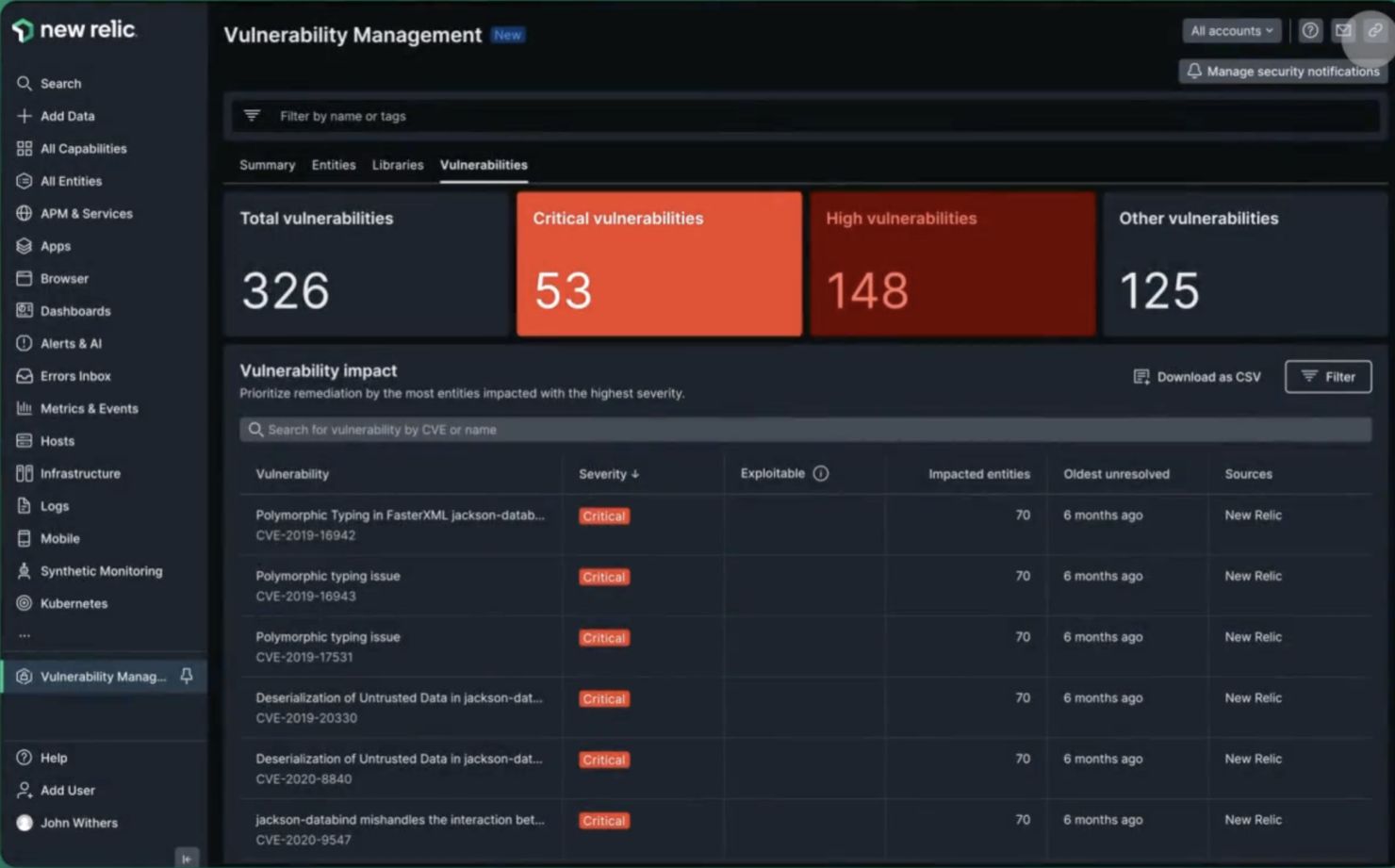
New Relic is a real-time monitoring tool designed to help you track application performance, identify bottlenecks, and resolve issues before they become problems. Steve Morris, Founder and CEO at NEWMEDIA.COM, explained: “At petascale, ingest costs can sneak up and bite you in the a**. Using drop filter rules and the NerdGraph API, we eliminated duplicate log payloads and muddy chatter from some of our wackier metrics.”
The platform includes real-time performance monitoring that lets you see exactly how an app is performing in real time so you can spot any issues as they happen and fix them straight away. It also includes detailed analytics, which allow you to drill down into an app's performance data to find out exactly what's going on. And it's all presented in a really easy-to-understand way.
Key features include backend monitoring, Kubernetes monitoring, mobile monitoring, model performance monitoring, infrastructure monitoring, log management, error tracking, network monitoring, vulnerability management, and browser monitoring.
Integrations include over 500 apps, like AWS, Google Cloud, and Microsoft Azure; CI/CD tools like Jenkins, CircleCI, and Travis CI; communication tools like Slack and PagerDuty; and other monitoring and analytics tools like Grafana, Datadog, and Splunk. It also has an API you can use to build custom integrations.
New Relic costs from $49/user/month and offers a free plan for 1 user and 100 GB/month of data ingest.


Medusa is a swift, modular tool designed for brute-forcing login credentials, making it an essential asset for web application penetration testing. Available as an open-source project on GitHub, it offers a valuable means to evaluate the security of web applications.
Why I picked Medusa: One of the reasons I picked Medusa is its capability for thread-based parallel testing. This feature allows you to run multiple brute-force attempts simultaneously, which can significantly speed up the testing process. With Medusa, you can test multiple hosts, users, or passwords concurrently, making it a time-efficient tool for web application security assessments.
Another compelling reason is its modular design, which lets you extend the tool to suit various services. Medusa supports a wide range of protocols, including SMB, HTTP, and SSH, among others. This versatility allows you to tailor your penetration testing efforts based on the specific needs of your web application environment, ensuring a comprehensive security evaluation.
Medusa Standout Features and Integrations:
Features include flexible user input, allowing you to specify target information through single entries or files, giving you the adaptability needed for different scenarios. The tool supports multiple protocols, which means you can test various services requiring remote authentication. Additionally, Medusa's open-source nature means you can access and modify the source code to fit your specific penetration testing needs.
Integrations include SMB, HTTP, MS-SQL, POP3, RDP, SSHv2, Telnet, VNC, MySQL, PostgreSQL, LDAP, and IMAP.
Pros and Cons
Pros:
- Quickly deployable with minimal setup commands
- Thread-based parallel testing enhances speed and effectiveness
- Supports multiple protocols, making it versatile for various testing scenarios
Cons:
- Simple storefronts require design skills for more polished appearances
- Basic out-of-the-box features may not meet all user needs


Burp Suite is a penetration testing tool that allows you to improve your cyber security protocols with the use of a fully fleshed out toolkit. The tool boasts an array of features such as the Burp Intruder which allows you to automate customized cyber attacks against your applications, and Burp Repeater which allows you to manipulate and reissue individual HTTP requests manually.
Burp Scanner also has a passive scanning feature, which allows you to divide the checks performed into active and passive checks. This allows you to set the targets and scopes, and cover areas that are easily missed. The tool also allows you to conduct active scans, ensuring that the entirety of your application is covered.
Burp Suite integrates with tools such as Jenkins and TeamCity.
The cost of Burp Suite starts at $6,995 per year. The tool also offers a free trial.


Amass is a penetration testing tool that allows you to perform network mapping of cyber attack surfaces, known as Attack Surface Management (ASM). This feature provides continuous monitoring of your changing attack surface, allowing you to ensure your application is covered for various cyber attacks. The tool also provides reporting of the results of these penetration tests.
Amass provides features such as external asset discovery, which allows you to identify and locate active and inactive assets that are unknown to your organization. With the feature, you can monitor the security of your application round-the-clock, and improve your team’s vulnerability management.
Amass is fully open source and free to use.


Gobuster is a penetration testing tool that is accessible via Github, which allows you to conduct scanning across your web application, and brute force your URIs, DNS subdomains and Virtual Host names on target web servers which allows you to identify unprotected scripts and old configuration files.
Gobuster is hosted on GitHub and can be installed using your terminal. The tool provides the ability to conduct recon tests, which allows you to delve into the depths of your web application and detect vulnerabilities. The tool then provides a thorough report so you can review your code effectively.
Gobuster is fully open source and free to use.


Nessus is a web application penetration testing tool that allows you to complete vulnerability assessments of your web application. The tool allows you to easily identify and fix vulnerabilities, including software flaws, malware and missing patches. Nessus can operate across a variety of systems and devices.
Nessus provides the ability to perform credential and non credential scans, allowing you to find more depth vulnerabilities. This ensures that you have full test coverage, and are catching every security flaw within your application. The tool also covers network devices such as endpoints, servers and virtualization platforms.
Nessus integrates with tools such as Google Cloud, Microsoft Azure and ServiceNow.
The cost of Nessus starts at $4,719.13 USD per year. The tool also offers a 7-day free trial.


NMap is a web application penetration testing tool that offers a comprehensive platform, allowing you to execute penetration tests and scan your network for vulnerabilities within your applications to the full extent. The tool allows you to configure your port ranges, IPs and protocols to your own needs, and also allows for scanning of multiple IPs for open ports.
NMap boasts a lightweight application that is easy to start up, which is ideal for a team that has less experienced members. The tool’s organized user interface allows you and your team to easily navigate your penetration tests and reporting, and runs on all operating systems and binary packages are available for Mac OS X, Windows and Linux.
NMap is fully open source and free to use.

Penetration testing tool and password cracker which allows you to test the strength of your passwords

John the Ripper is an opensource tool for auditing password security and recovering passwords available in more than 20 languages.While it’s mostly used for cracking Unix passwords, John the Ripper supports a wide range of other operating systems’ and web apps’ password hash and cypher types, including Windows LM, macOS, database servers, filesystems and disks, encrypted private keys, groupware, archives, document files, and more. While John the Ripper is open source and free to use, a more robust commercial John the Ripper Pro product is available for specific operating systems in the form of “native” packages for each target OS.

Metasploit is a web application penetration testing tool that identifies system weaknesses and attempts to exploit them, allowing you to isolate and demonstrate the weakness, and allow for remediations. The tool also works across multiple computer systems such as Windows, Linux and Mac OS X, and can be used across devices.
Metasploit provides the ability to automate manual tests and exploits, allowing you to minimize your team’s time spent on creating manual tests and scans. The tool boasts a large exploit database with new additions regularly, and is extremely intuitive, making it easy for you and your team to implement. Metaspolit also has a large community support system.
Metasploit integrates with tools such as Kali Linux and Dradis.
The cost of Metasploit starts at $2,000 per year. The tool also offers a free version.

Focuses on being the “middleman proxy” between browser and application

Zed Attack Proxy (ZAP) is a web application security scanner that allows you to execute penetration tests. The tool is used to prevent hostile attacks on your web application, and can be used on various platforms such as Mac OS x and Docker. ZAP is extendable and flexible, allowing users who are new to security testing to easily implement it within their workflow.
Zed Attack Proxy is positioned between your browser and your application to act as a “middleman proxy”. From this position, the tool intercepts messages sent between the browser and application, and those messages are examined for vulnerabilities. The tool then, if required, will adjust the contents of the messages, and pass them on to their destination.
ZAP integrates with tools such as Docker, CyCognito and Nucleus.
Zed Attack Proxy is fully open source and free to use.


Core Impact is a comprehensive web application penetration testing tool that allows you to exploit weaknesses in the security of your applications, and increase productivity. The tool provides an easy and clean user interface, as well as the ability to execute rapid penetration tests. This allows you to discover, test and report more efficiently.
Core Impact provides a feature for replicating multi-staged attacks, which allows you to pivot your pen tests across various systems, devices and applications. The feature allows you to configure various tests and execute them all at once. Another feature of Core Impact is the ability to install an agent on the server through SSH and SMB, making white box testing more effective.
The cost of Core Impact starts at $9,450 USD per year for the Basic package. The tool also offers a free trial.
Weitere Tools für Penetrationstests von Webanwendungen
Hier sind einige zusätzliche Tools für Penetrationstests von Webanwendungen, die es nicht auf meine Shortlist geschafft haben, aber dennoch einen Blick wert sind:
- SQLMap
For SQL injection techniques
- Pcloudy
For functional experience testing
- Wfuzz
For uncovering hidden vulnerabilities
- Web site software development
For data security emphasis


Auswahlkriterien für Tools zu Penetrationstests von Webanwendungen
Bei der Auswahl der besten Tools für Penetrationstests von Webanwendungen habe ich gängige Bedürfnisse und Probleme von Käufern berücksichtigt, wie das Aufdecken von Schwachstellen und die Sicherung von Daten. Außerdem habe ich das folgende Evaluierungsraster genutzt, um meine Einschätzung strukturiert und fair zu gestalten:
Kernfunktionen (25% der Gesamtbewertung)
Um in diese Liste aufgenommen zu werden, musste jede Lösung die folgenden gängigen Anwendungsfälle abdecken:
- Erkennung von Sicherheitslücken
- Automatisierte Scans bereitstellen
- Detaillierte Berichte generieren
- Unterstützung mehrerer Webtechnologien
- Echtzeit-Benachrichtigungen anbieten
Weitere herausragende Funktionen (25% der Gesamtbewertung)
Um die Auswahl weiter einzugrenzen, habe ich auch auf besondere Eigenschaften geachtet, etwa:
- Integration von maschinellem Lernen
- Individuell anpassbare Dashboards
- Unterstützung mehrerer Sprachen
- Cloud-basierte Bereitstellung
- Erweiterte Bedrohungsinformationen
Benutzerfreundlichkeit (10% der Gesamtbewertung)
Um die Benutzerfreundlichkeit der einzelnen Systeme besser einschätzen zu können, habe ich Folgendes berücksichtigt:
- Intuitive Benutzeroberfläche
- Einfache Navigation
- Anpassbare Benutzereinstellungen
- Minimale Einarbeitungszeit
- Responsives Design
Onboarding (10 % der Gesamtbewertung)
Um die Onboarding-Erfahrung jeder Plattform zu bewerten, habe ich Folgendes berücksichtigt:
- Verfügbarkeit von Trainingsvideos
- Interaktive Produkttouren
- Zugang zu Webinaren
- Verwendung von Vorlagen für die Einrichtung
- Chatbot-Unterstützung
Kundensupport (10 % der Gesamtbewertung)
Um die Kundensupportdienste jedes Softwareanbieters zu bewerten, habe ich Folgendes berücksichtigt:
- 24/7 Erreichbarkeit
- Mehrere Support-Kanäle
- Reaktionszeit
- Zugang zu einer Wissensdatenbank
- Verfügbarkeit von dedizierten Account-Managern
Preis-Leistungs-Verhältnis (10 % der Gesamtbewertung)
Um das Preis-Leistungs-Verhältnis jeder Plattform zu bewerten, habe ich Folgendes berücksichtigt:
- Konkurrenzfähige Preisgestaltung
- Verfügbarkeit von kostenlosen Testphasen
- Transparente Preisgestaltung
- Flexible Abonnementmodelle
- Rabatte bei Großabnahmen
Kundenbewertungen (10 % der Gesamtbewertung)
Um einen Eindruck von der allgemeinen Kundenzufriedenheit zu bekommen, habe ich bei der Auswertung von Kundenbewertungen Folgendes berücksichtigt:
- Allgemeine Zufriedenheitsbewertung
- Feedback zur Benutzerfreundlichkeit
- Bemerkungen zur Effektivität der Funktionen
- Rückmeldungen zum Support-Service
- Zufriedenheit mit der Preisgestaltung
Wie wählt man ein Tool für Webanwendungspenetrationstests aus?
Es ist leicht, sich in langen Funktionslisten und komplexen Preisstrukturen zu verlieren. Um Ihnen zu helfen, während Ihres individuellen Softwareauswahlprozesses den Überblick zu behalten, finden Sie hier eine Checkliste mit Faktoren, die Sie berücksichtigen sollten:
| Faktor | Worauf achten? |
|---|---|
| Skalierbarkeit | Wächst das Tool mit Ihren steigenden Anforderungen? Berücksichtigen Sie die Anzahl der Benutzer und Anwendungen, die ohne Performance-Einbußen verwaltet werden können. |
| Integrationen | Lässt sich das Tool in Ihre bestehenden Systeme integrieren? Achten Sie auf die Kompatibilität mit anderen Sicherheitstools und Entwicklungsplattformen, die Sie bereits nutzen. |
| Anpassungsfähigkeit | Können Sie das Tool an Ihre spezifischen Arbeitsabläufe anpassen? Prüfen Sie, ob anpassbare Dashboards und Berichte möglich sind. |
| Benutzerfreundlichkeit | Ist das Tool benutzerfreundlich für Ihr Team? Bewerten Sie die Einarbeitungszeit und den notwendigen Schulungs- bzw. Technikaufwand. |
| Implementierung und Onboarding | Wie lange dauert es, bis Sie starten können? Berücksichtigen Sie die Komplexität der Einrichtung und prüfen Sie, ob Ressourcen wie Tutorials und Support während der Implementierung verfügbar sind. |
| Kosten | Passt die Preisgestaltung in Ihr Budget? Vergleichen Sie die Kosten mit den gebotenen Funktionen und achten Sie auf versteckte Gebühren oder langfristige Verträge. |
| Sicherheitsmaßnahmen | Sind starke Sicherheitsmaßnahmen vorhanden? Stellen Sie sicher, dass das Tool Ihren Sicherheitsstandards entspricht und Datenschutzfunktionen bietet. |
| Compliance-Anforderungen | Erfüllt das Tool branchenspezifische Compliance-Anforderungen? Prüfen Sie, ob das Tool notwendige Vorschriften wie die DSGVO oder PCI-DSS für Ihren spezifischen Sektor unterstützt. |
Was sind Tools für Webanwendungspenetrationstests?
Tools für Webanwendungspenetrationstests identifizieren Sicherheitslücken in Webanwendungen. Sicherheitsfachleute und Entwickler nutzen diese Tools üblicherweise, um sensible Daten zu schützen und die Anwendungssicherheit sicherzustellen.
Automatisierte Scans, Echtzeit-Benachrichtigungen und detaillierte Berichtsoptionen helfen dabei, Bedrohungen zu erkennen und Sicherheitsstandards einzuhalten. Insgesamt sind diese Tools unerlässlich, um Webanwendungen vor potenziellen Angriffen zu schützen.
Funktionen
Beim Auswählen von Tools für Webanwendungspenetrationstests sollten Sie insbesondere auf folgende Schlüsselfunktionen achten:
- Umfassendes Schwachstellenscanning: Diese Funktion scannt Ihre Webanwendungen automatisch auf eine breite Palette von Sicherheitslücken wie SQL-Injection, Cross-Site-Scripting und falsch konfigurierte Sicherheitseinstellungen. So können versteckte Bedrohungen frühzeitig erkannt werden, statt ständig hinter Sicherheitsproblemen herzulaufen.
- Authentifizierungsprüfung: Hierbei wird überprüft, ob Anmelde- und Sitzungsverwaltungsmechanismen Ihrer Anwendung sicher sind. Durch die Simulation verschiedener Angriffsarten erfahren Sie, ob Anmeldedaten, Sitzungen und Berechtigungen sicher sind oder verbessert werden müssen.
- Berichtswesen und Analysen: Klare, detaillierte Berichte fassen die Scan-Ergebnisse so zusammen, dass Sie tatsächlich darauf reagieren können. Diese Tools sortieren Schwachstellen nach Schweregrad, bieten Lösungsvorschläge und ermöglichen häufig den Export der Ergebnisse, um sie im Team zu teilen (oder die eigenen Erfolge zu präsentieren).
- Anpassbare Testfälle: Sie können eigene Testszenarien erstellen oder bestehende anpassen, um individuelle Risiken in Ihrer Umgebung gezielt anzugehen. So behalten Sie die Kontrolle und stecken nicht in einem "One-Size-Fits-All"-Ansatz fest.
- Integrationsmöglichkeiten: Diese Tools können mit anderen Sicherheits- oder Entwicklungsplattformen wie CI/CD-Pipelines, Ticket-Systemen oder Sicherheitsdashboards verbunden werden. Das sorgt für einen reibungslosen Workflow, ohne ständig zwischen Tabs wechseln zu müssen.
- Crawling und Entdeckung: Das Tool durchsucht die gesamte Webanwendung und erfasst auch versteckte oder nicht-öffentliche Inhalte. So wird kein Bereich Ihrer App übersehen, der gesichert werden sollte.
- Reduzierung von Fehlalarmen: Niemand möchte Zeit mit falschen Bedrohungen verschwenden. Gute Tools mit effektiver Fehlalarm-Reduzierung helfen Ihnen, sich auf echte Sicherheitsprobleme zu konzentrieren, statt "Geister" zu jagen.
- Compliance-Prüfungen: Viele Tools überprüfen Ihre Webanwendungen auf Konformität mit Standards wie OWASP Top 10 oder PCI DSS. Das hilft Ihnen, branchenspezifische Anforderungen zu erfüllen und sowohl Prüfer als auch Kunden zufriedenzustellen.
Gemeinsame KI-Funktionen von Web Application Penetration Testing Tools
Über die oben aufgeführten Standardfunktionen der Web Application Penetration Testing Tools hinaus, integrieren viele dieser Lösungen KI mit Features wie:
- Automatisierte Bedrohungserkennung: Hier lernt die KI aus früheren Scans und neuen Bedrohungsdaten, um Sicherheitsprobleme zu erkennen, die bei regulären Scans unentdeckt bleiben könnten. Das System wird immer intelligenter, sodass Sie nicht jede komplexe Schwachstelle selbst finden müssen.
- Intelligente Priorisierung: Die KI analysiert Scan-Daten, prognostiziert den tatsächlichen Einfluss von Schwachstellen und priorisiert sie nach Risiko. Sie erhalten umsetzbare Empfehlungen, welche Probleme zuerst angegangen werden sollten – statt nur einer langen Liste von Sicherheitslücken.
- Adaptives Crawling: KI-basierte Crawler lernen die Struktur selbst komplexer oder dynamischer Webseiten kennen und entdecken versteckte Wege oder Inhalte effektiver als traditionelle Tools. So werden bei der Sicherheitsüberprüfung weniger Bereiche übersehen.
- Kontextabhängige Angriffssimulation: Mit KI passen diese Tools simulierte Angriffe an die individuellen Eigenschaften und das Nutzerverhalten Ihrer Anwendung an und liefern realistischere Einschätzungen zur tatsächlichen Gefährdungslage.
- Anomalie-Erkennung: KI überwacht Ihre Webanwendung auf abweichendes Verhalten – wie ungewöhnliche Anmeldevorgänge oder unerwartete Datenanfragen – und meldet sie zur Überprüfung. Sie erhalten frühzeitige Warnungen vor atypischen Bedrohungen, bevor es zum Ernstfall kommt.
Vorteile
Der Einsatz von Web Application Penetration Testing Tools bietet Ihrem Team und Ihrem Unternehmen mehrere Vorteile. Hier sind einige, auf die Sie sich freuen können:
- Verbesserte Sicherheit: Durch automatisiertes Scannen zur Erkennung von Schwachstellen kann Ihr Team Bedrohungen beheben, bevor sie zu ernsten Problemen werden.
- Zeitersparnis: Echtzeit-Benachrichtigungen und automatisierte Prozesse sparen Ihrem Team Zeit, sodass es sich auf andere wichtige Aufgaben konzentrieren kann.
- Stärkere Compliance: Unterstützung bei der Einhaltung von Vorschriften sorgt dafür, dass Ihr Unternehmen branchenspezifische Vorgaben erfüllt und rechtliche Risiken reduziert werden.
- Fundierte Entscheidungsfindung: Detaillierte Berichte liefern Einblicke, die dabei helfen, Sicherheitsmaßnahmen zu priorisieren und Ressourcen effektiv einzusetzen.
- Individuell anpassbares Erlebnis: Anpassbare Dashboards ermöglichen den Anwendern, sich auf relevante Daten zu konzentrieren und steigern so Workflow-Effizienz und Nutzerzufriedenheit.
- Benutzerfreundlichkeit: Eine einfache, übersichtliche Benutzeroberfläche erleichtert die Einführung und Nutzung der Tools durch Ihr Team.
Kosten & Preise
Bei der Auswahl von Web Application Penetration Testing Tools ist es wichtig, die verschiedenen Preismodelle und -pläne zu verstehen. Die Kosten variieren je nach Funktionsumfang, Teamgröße, Zusatzoptionen und mehr. Die folgende Tabelle fasst gängige Modelle, Durchschnittspreise und typische enthaltene Features von Web Application Penetration Testing Tools-Lösungen zusammen:
Tabellarischer Vergleich der Pläne für Web Application Penetration Testing Tools
| Plantyp | Durchschnittspreis | Häufige Funktionen |
|---|---|---|
| Gratis-Plan | $0 | Grundlegende Scan-Funktionen, eingeschränkte Berichterstattung und Community-Support. |
| Persönlicher Plan | $10-$30/Nutzer/Monat | Automatisiertes Scannen, Echtzeit-Benachrichtigungen, anpassbare Dashboards und E-Mail-Support. |
| Business-Plan | $50-$100/Nutzer/Monat | Detaillierte Berichterstattung, Integrationsmöglichkeiten, Unterstützung bei Compliance und telefonischer Support. |
| Enterprise-Plan | $150-$300/Nutzer/Monat | Erweiterte Bedrohungsinformationen, persönlicher Ansprechpartner, vollständige Anpassung und 24/7-Support. |
Häufig gestellte Fragen zu Web Application Penetration Testing Tools
Hier finden Sie Antworten auf häufig gestellte Fragen zu WAPT-Tools:
Wie oft sollte ein Penetrationstest für Webanwendungen durchgeführt werden?
Es wird empfohlen, Penetrationstests mindestens einmal jährlich oder bei wesentlichen Änderungen an der Anwendung durchzuführen. Regelmäßige Tests helfen dabei, neue Schwachstellen zu erkennen, die durch Updates oder Änderungen in der Anwendungsumgebung entstehen können.
Können Penetrationstest-Tools manuelles Testen ersetzen?
Nein, Penetrationstest-Tools ergänzen das manuelle Testen, ersetzen es jedoch nicht. Automatisierte Tools können bekannte Schwachstellen schnell identifizieren, aber manuelles Testen ist unerlässlich, um komplexe Logikfehler und kontextbezogene Sicherheitsprobleme zu erkennen, die menschliches Fachwissen erfordern.
Wie wird sichergestellt, dass die Ergebnisse des Penetrationstests bearbeitet werden?
Nach dem Test sollten Schwachstellen nach Risikolevel priorisiert behoben werden. Erstellen Sie einen Maßnahmenplan mit klaren Zeitvorgaben und Verantwortlichkeiten. Aktualisieren Sie Ihre Sicherheitspraktiken regelmäßig und führen Sie Nachtests durch, um zu bestätigen, dass die Probleme behoben wurden.
Wie geht es weiter:
Wenn Sie gerade nach Tools für Penetrationstests von Webanwendungen recherchieren, verbinden Sie sich mit einem SoftwareSelect-Berater für kostenlose Empfehlungen.
Sie füllen ein Formular aus und führen ein kurzes Gespräch, in dem Ihre genauen Anforderungen geklärt werden. Anschließend erhalten Sie eine Vorauswahl passender Software. Bei Bedarf werden Sie während des gesamten Kaufprozesses unterstützt – inklusive Preisverhandlungen.