
10 Beste Notion-Alternativen im Test 2026

10 Beste Notion-Alternativen – Kurzliste
Hier ist meine Kurzliste der besten Notion-Alternativen:


Empfinden Sie Notion als etwas zu einschränkend für die speziellen Anforderungen Ihres Teams? Damit sind Sie nicht allein. Viele Technikexperten suchen nach Alternativen, die besser zu ihren individuellen Arbeitsabläufen und Zusammenarbeitsstilen passen.
Meiner Erfahrung nach sollten Produktivitäts- und Kollaborationstools sich Ihrem Unternehmen anpassen – nicht umgekehrt. Deshalb habe ich unabhängig verschiedene Notion-Alternativen getestet und bewertet.
Ich führe Sie durch die besten verfügbaren Optionen und zeige auf, was jede einzelne besonders macht. Egal, ob Sie mehr Datenschutz, Offline-Zugang oder eine intuitivere Bedienung wünschen – ich habe für Sie die passende Lösung parat.
Am Ende haben Sie ein klares Bild davon, welches Tool am besten zu Ihrem Team passen könnte. Lassen Sie uns gemeinsam Ihre Optionen erkunden.
Was ist Notion?
Notion ist ein Produktivitäts- und Collaboration-Tool, das Teams dabei unterstützt, ihre Arbeit zu organisieren und komplexe Projekte effizient zu verwalten. Es ist besonders bei Fachkräften wie Projektmanagern, Autoren und Designern beliebt, die eine flexible Plattform benötigen, um Inhalte zu erstellen und zu teilen.
Funktionen wie Aufgabenverwaltung, Notizen und Datenbankfähigkeiten helfen Ihrem Team, organisiert zu bleiben und effektiv zusammenzuarbeiten. Insgesamt bietet Notion eine vielseitige Lösung, um verschiedenste Aspekte Ihres Arbeitsalltags an einem Ort zu verwalten.
Beste Notion-Alternativen – Zusammenfassung
Diese Vergleichstabelle fasst die Preisinformationen meiner Top-Auswahl an Notion-Alternativen zusammen, damit Sie die beste Lösung für Ihr Budget und Ihre geschäftlichen Anforderungen finden.
| Tool | Best For | Trial Info | Price | ||
|---|---|---|---|---|---|
| 1 | Best for combined docs, databases, and automation | Free plan + free demo available | From $10//month (billed annually) | Website | |
| 2 | Best offline Markdown knowledge graph | Not available | From $4/month (billed annually) | Website | |
| 3 | Best for auto-organized notes with AI recall | Free plan available | From $12/user/month | Website | |
| 4 | Best self-hosted collaborative workspace | Free plan available | From $6.75/month (billed annually) | Website | |
| 5 | Best for structured thinking using supertags | 14-day free trial + free plan available | From $8/month | Website | |
| 6 | Best for open-source flexibility you can control | Free plan available | From $10/user/month (billed annually) | Website | |
| 7 | Best document publishing for Apple users | Free plan available | From $4.80/month (billed annually) | Website | |
| 8 | Best for local, outline-based note-taking | Free demo available | Free forever plan | Website | |
| 9 | Best for local-first, encrypted personal OS | Free plan available | From $4/month (billed annually) | Website | |
| 10 | Best for object-based thinking for creatives | 14-day free trial + free plan available | From $9.99/month (billed annually) | Website |
Why Trust Our Software Reviews
-

Site24x7
Visit WebsiteThis is an aggregated rating for this tool including ratings from Crozdesk users and ratings from other sites.4.6 -
GitHub Actions
Visit WebsiteThis is an aggregated rating for this tool including ratings from Crozdesk users and ratings from other sites.4.8 -
Docker
Visit WebsiteThis is an aggregated rating for this tool including ratings from Crozdesk users and ratings from other sites.4.6





Beste Notion-Alternativen – Bewertungen
Nachfolgend finden Sie meine detaillierten Zusammenfassungen der besten Notion-Alternativen aus meiner Shortlist. In meinen Bewertungen gehe ich auf die wichtigsten Funktionen, Vor- und Nachteile, Integrationsmöglichkeiten sowie ideale Einsatzbereiche jeder Lösung ein, damit Sie das richtige Tool für Ihre Anforderungen finden.


Coda is a versatile document editor and collaboration tool designed for teams that need to integrate documents, spreadsheets, and apps in one place. It serves project managers, developers, and teams looking to improve operational efficiency and collaboration.
Why it's a good Notion alternative: Coda's strength lies in combining documents and spreadsheets into a single platform, allowing your team to work more cohesively. Its interactive elements, such as buttons and tables, enable you to create dynamic documents that go beyond static text. Coda's customizable templates and building blocks let you tailor your workspace to your team's specific needs. With cross-functional capabilities, Coda can handle everything from project management to complex data analysis.
Standout Features and Integrations:
Features include the ability to create interactive documents with buttons, which can automate tasks and improve workflow efficiency. The platform supports building complex tables that function like databases, providing powerful data management options. Coda's drag-and-drop interface allows you to customize documents, making it adaptable to your team's needs.
Integrations include Slack, Google Calendar, Jira, GitHub, Figma, Zapier, Salesforce, and more.
Pros and Cons
Pros:
- Connects to over 1000 apps via Zapier
- Customizable templates
- Versatile document and spreadsheet integration
Cons:
- Advanced features need technical knowledge
- Spreadsheet import issues


Obsidian is a note-taking app and knowledge management tool designed for individuals and teams who need a flexible, offline-capable solution. It serves writers, researchers, and professionals who require a tool to organize and connect their ideas efficiently.
Why it's a good Notion alternative: Obsidian's offline accessibility makes it ideal for users who need to work without an internet connection. Its local-first approach ensures data privacy and control, appealing to privacy-conscious users. Features such as Markdown support and backlinking can strengthen your ability to create a personal knowledge base or second brain. Obsidian's focus on customization allows you to tailor the experience to your specific workflow needs.
Standout Features and Integrations:
Features include a graph view for visualizing connections between notes, a plugin system to extend functionality, and Markdown support for easy formatting. These features help you organize and explore your ideas in a way that suits your workflow. The ability to create bidirectional links allows for a more interconnected note-taking experience.
Integrations include Readwise, Zotero, Notion, Evernote, Bear, Roam Research, TiddlyWiki, Google Calendar, and more.
Pros and Cons
Pros:
- Extensive community plugin library
- Strong privacy and local data control
- Offline accessibility
Cons:
- Significant time required for customization
- No native two-way app integrations


Mem is an AI-powered note-taking and knowledge management tool designed for individuals and teams looking to organize information efficiently. It caters to professionals who need a smart way to capture, retrieve, and connect their ideas and notes.
Why it's a good Notion alternative: Mem uses AI to automatically organize your notes, making it easy to find information when you need it. Its smart search capabilities let you retrieve information quickly without manual tagging. The tool's ability to learn from your usage patterns helps it suggest relevant information and connections. This AI-driven approach provides a dynamic way to manage knowledge and deliver better productivity.
Standout Features and Integrations:
Features include automatic note organization, which reduces the need for manual sorting and tagging. The platform's smart search function allows you to find information quickly, improving efficiency. Mem also suggests relevant connections based on your usage patterns, helping you discover insights you might have missed.
Integrations include Slack, Google Calendar, Microsoft Teams, Trello, Asana, Evernote, Notion, Google Drive, Dropbox, and more.
Pros and Cons
Pros:
- Automatic linking and contextual connections
- Smart search capabilities
- AI-powered note organization and recall
Cons:
- Relies on AI accuracy
- Dependent on Zapier for many integrations


AFFiNE is an all-in-one knowledge management system designed for professionals wanting a secure, private workspace. It caters to teams and individuals who require tools for writing, drawing, and planning without compromising data privacy.
Why it's a good Notion alternative: AFFiNE prioritizes privacy with its local-first data storage, ensuring you're in control of your information. Its edgeless whiteboard allows for limitless collaboration and creativity. Its AI features help you write, draw, and plan more efficiently. AFFiNE's open-source nature fosters trust and collaboration among users.
Standout Features and Integrations:
Features include a unified team document space to consolidate all your workflow needs in one place. It supports building content, such as blocks, which lets your ideas flow naturally. The platform also offers ready-to-use templates to rapidly kickstart any project.
Integrations include GitHub, Discord, YouTube, X (Twitter), Web Clipper, and more.
Pros and Cons
Pros:
- Built-in web clipper for fast content capture
- Open-source and self-hosting friendly
- Visual canvas with rich media embeds
Cons:
- Some cloud sync and collaboration issues
- Limited export options


Tana is an AI-powered knowledge management tool designed for individuals and teams looking to boost productivity by converting notes into actionable tasks and projects. It serves professionals in various industries, including tech, who need a dynamic way to organize and access information.
Why it's a good Notion alternative: Tana offers unique AI-driven features, such as supertags for easy categorization and custom feeds for organizing information efficiently. Its voice memo capabilities allow you to convert spoken ideas into written content. The connected knowledge graph structure helps you visualize relationships between tasks and notes, making it easier to manage complex information. Tana's AI assistance improves workflow efficiency, making it a valuable tool for dynamic project management.
Standout Features and Integrations:
Features include built-in image generation, allowing you to create visual content directly from your notes. The tool offers customizable templates for various formats, giving you flexibility in organizing your workspace. Tana also provides voice recording and transcription capabilities, which help you capture important information, including to-do lists, during meetings.
Integrations include Google Calendar, Microsoft Teams, OpenAI, Gemini, Zoom, Notion, Google Meet, and more.
Pros and Cons
Pros:
- Voice memo capabilities
- Supertags for easy categorization
- AI-driven task management
Cons:
- Overkill for simple tasks
- Lacks native Slack or Teams integration

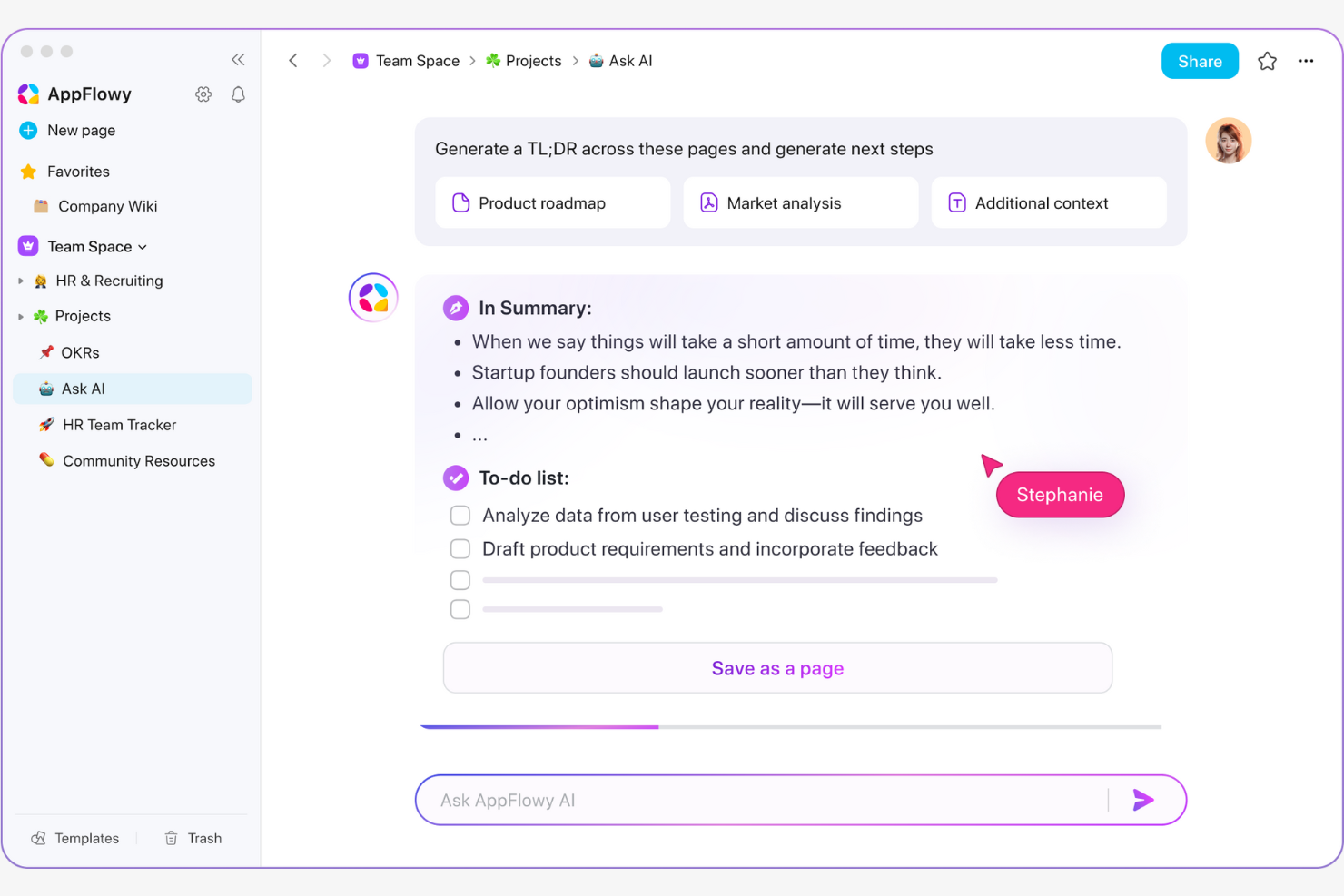
AppFlowy is an open-source productivity tool designed for users who value customization and transparency. It caters to developers, tech enthusiasts, and teams that require a flexible platform for managing tasks and projects.
Why it's a good Notion alternative: AppFlowy offers the flexibility of an open-source platform, allowing you to modify and extend its capabilities to fit your specific needs. Its transparency ensures you have complete control over your data and how the tool functions. With a focus on customization, AppFlowy lets you create a workspace tailored to your workflow.
Standout Features and Integrations:
Features include a modular design that allows you to add or remove components as needed, giving your team the flexibility to customize their workspace. The platform supports Markdown, which makes content formatting straightforward and efficient. AppFlowy's real-time collaboration tools improve your team's capacity to work together on projects.
Integrations include Zapier, Android, GitHub, GitLab, Slack, Notion, Google Drive, Microsoft OneDrive, and more.
Pros and Cons
Pros:
- Native Android app with device sync
- Full control over data
- Open-source and privacy-first architecture
Cons:
- Self-hosting and setup can be technically challenging
- Fewer team collaboration features


Craft is a document creation and collaboration tool aimed at teams and individuals who need a visually appealing, intuitive platform for organizing information. It serves writers, designers, and teams looking to create beautiful documents and optimize their workflows.
Why it's a good Notion alternative: Craft offers a user-friendly interface that makes it easy to create and organize documents without a steep learning curve. Its focus on design makes it easy to produce visually appealing content. The tool's ability to handle various media types, including images and videos, improves the richness of your documents. Craft's clean layout and intuitive navigation help you focus on your work without distractions.
Standout Features and Integrations:
Features include real-time collaboration, which allows your team to work together efficiently. The platform enables you to improve your content and create documents with various media types, including text, images, and videos. Craft also offers customizable templates that help you get started quickly and maintain consistency across your projects.
Integrations include GitHub, Slack, Google Drive, Dropbox, Asana, Trello, Notion, Evernote, Apple Calendar, and more.
Pros and Cons
Pros:
- Real-time collaboration
- Apple ecosystem compatibility
- Intuitive and attractive user interface
Cons:
- May lack deep customization
- Limited database and project management features


Logseq is an open-source knowledge management and collaboration tool designed for users who prioritize privacy and data control. It serves researchers, writers, and professionals who need a flexible platform for organizing thoughts and managing projects.
Why it's a good Notion alternative: Logseq offers privacy-first note-taking with local data storage, ensuring your information remains secure and under your control. Its Markdown support makes it easy to format and organize notes. The tool's graph view helps you visualize the relationships between different pieces of information. With its open-source nature, Logseq provides the flexibility to customize the tool according to your needs.
Standout Features and Integrations:
Features include an outliner for structuring your notes hierarchically, which helps you organize complex information. The tool supports bi-directional links, enabling you to create a network of interconnected ideas. Logseq also offers a journal feature that helps you keep track of daily notes and thoughts.
Integrations include Obsidian, Roam Research, Notion, Zotero, GitHub, Google Calendar, and more.
Pros and Cons
Pros:
- Powerful daily journaling and linking
- Supports Markdown formatting
- Privacy-first foundation and open-source customization
Cons:
- Some syncing issues
- Limited mobile experience


Anytype is a knowledge management tool that caters to individuals and teams seeking a secure, offline-first workspace. It helps users organize, manage, and share information in a private and controlled environment.
Why it's a good Notion alternative: Anytype's focus on local-first data storage keeps your data on your device and strengthens privacy. Its offline capabilities ensure you can access your information anytime, even without internet connectivity. The platform's end-to-end encryption keeps your data secure from unauthorized access. With customizable templates and a clean interface, Anytype lets you tailor your workspace to fit your needs.
Standout Features and Integrations:
Features include a graph view for visualizing relationships in your data, helping you see connections clearly. The platform allows you to create and manage various types of content, such as notes, tasks, and projects. With its customizable templates, you can quickly set up and organize a workspace to suit your workflow.
Integrations are limited as Anytype currently prioritizes privacy and local-first architecture.
Pros and Cons
Pros:
- Customizable linked database system
- End-to-end, local-first encryption
- Offline-first platform with optional sync
Cons:
- No live sync with external apps
- Missing native third-party integrations


Capacities is a knowledge management and creative workspace tool designed for professionals who want to organize their thoughts and ideas more intuitively. It caters to writers, researchers, developers, and creatives seeking a flexible platform for connecting and expanding their ideas.
Why it's a good Notion alternative: Capacities offers a unique approach with an object-based system that allows you to organize information like a network rather than in rigid folders. This helps reflect how your brain naturally connects ideas. The platform's focus on creativity makes it ideal for those who need a dynamic environment for brainstorming and exploring thoughts. With its emphasis on visualizing relationships, Capacities excels at helping you make sense of complex topics to spark new ideas.
Standout Features and Integrations:
Features include a visual workspace that lets you see connections between different pieces of information, making it easier to track your thoughts. The object-based approach allows you to manage various content types, including ideas, books, and meetings, within the same space. Capacities also offer a distraction-free environment, which helps you focus on creating and organizing your knowledge.
Integrations include Microsoft 365, Google Calendar, WhatsApp, Telegram, Readwise, Kindle, and more.
Pros and Cons
Pros:
- Visualizes connections
- Flexible linked data views
- Object-first knowledge organization
Cons:
- Lacking collaboration options
- No native task imports from major tools
Weitere Notion-Alternativen
Hier sind weitere Notion-Alternativen, die es nicht auf meine Shortlist geschafft haben, aber dennoch einen Blick wert sind:
- Docmost
Role-based document access for enterprises
- ClickUp
For all-in-one task and project management
- Airtable
For database-style organization
- Wrike
For scalable project management
- monday.com
For customizable workflows
- Slite
Searchable knowledge base for remote teams
- Teamhood
For visual project management
- Asana
For task-focused teams
- Basecamp
For small business projects
- Confluence
For collaboration documentation
- Nuclino
For instant collaboration with live editing
- XWiki
For enterprise wiki solutions
- BookStack
For book-style documentation
- Guru
For knowledge management
- Wiki.js
For open-source wiki creation
- Joplin
For Markdown note-taking
- SiYuan
For offline note-taking


Auswahlkriterien für Notion-Alternativen
Bei der Auswahl der besten Notion-Alternativen für diese Liste habe ich auf die gängigen Bedürfnisse und Herausforderungen von Käufern im Bereich Produktivitäts- und Zusammenarbeitstools geachtet – wie Anpassungsfähigkeit und einfache Integration. Außerdem habe ich nachfolgende Kriterien verwendet, um meine Bewertung strukturiert und fair zu gestalten:
Kernfunktionen (25% der Gesamtbewertung)
Um in diese Liste aufgenommen zu werden, musste jede Lösung folgende Anwendungsfälle abdecken:
- Aufgabenverwaltung
- Notizenerstellung
- Dokumentenzusammenarbeit
- Projektverfolgung
- Datenvisualisierung
Zusätzliche besondere Funktionen (25% der Gesamtbewertung)
Für einen weiteren Vergleich habe ich auch nach besonderen Eigenschaften gesucht, wie beispielsweise:
- KI-gestützte Organisation
- Individuell anpassbare Vorlagen
- Offline-Nutzung
- Datenverschlüsselung
- Visuelle Projektplanung
Benutzerfreundlichkeit (10% der Gesamtbewertung)
Um einen Eindruck von der Bedienbarkeit der jeweiligen Systeme zu erhalten, habe ich folgende Kriterien betrachtet:
- Intuitive Benutzeroberfläche
- Einfache Navigation
- Zugänglichkeit auf allen Geräten
- Geschwindigkeit und Performance
- Nutzerfeedback und Anpassungsfähigkeit
Onboarding (10 % der Gesamtbewertung)
Um das Onboarding-Erlebnis jeder Plattform zu bewerten, habe ich Folgendes berücksichtigt:
- Verfügbarkeit von Schulungsvideos
- Interaktive Produkttouren
- Vorgefertigte Vorlagen
- Zugriff auf Webinare
- Onboarding-Support-Chatbots
Kundensupport (10 % der Gesamtbewertung)
Um die Kundensupport-Leistungen jedes Softwareanbieters zu beurteilen, habe ich Folgendes berücksichtigt:
- Verfügbarkeit eines Live-Chats
- Reaktionszeit auf Anfragen
- Zugang zu einer Wissensdatenbank
- Verfügbarkeit telefonischer Unterstützung
- Qualität der Hilfedokumentation
Preis-Leistungs-Verhältnis (10 % der Gesamtbewertung)
Um das Preis-Leistungs-Verhältnis jeder Plattform zu bewerten, habe ich Folgendes berücksichtigt:
- Preise im Vergleich zu den angebotenen Funktionen
- Verfügbarkeit von kostenlosen Tarifen
- Flexibilität bei den Preismodellen
- Kosten für zusätzliche Funktionen
- Rabatte für langfristige Verträge
Kundenbewertungen (10 % der Gesamtbewertung)
Um einen Eindruck von der allgemeinen Kundenzufriedenheit zu bekommen, habe ich in Kundenbewertungen auf Folgendes geachtet:
- Allgemeine Zufriedenheitsbewertungen
- Häufig genannte Vorteile und Nachteile
- Häufigkeit von Updates und Verbesserungen
- Feedback zu den Erfahrungen mit dem Kundenservice
- Empfehlungen und Befürwortungen von Nutzern
Warum nach einer Notion-Alternative suchen?
Obwohl viele Menschen, die Notion nutzen, es als gute Wahl für Produktivität und Zusammenarbeit ansehen, gibt es einige Gründe, warum Nutzer nach Alternativen suchen. Möglicherweise suchen Sie nach einer Notion-Alternative, weil…
- Sie erweiterte Projektmanagement-Funktionen benötigen
- Ihr Team Offline-Zugriff benötigt
- Sie mehr Datenschutz und Kontrolle wünschen
- Ihr Workflow mehr Anpassungsmöglichkeiten braucht
- Sie nach einem Tool mit einfacherer Einarbeitung suchen
- Ihr Team eine bessere Funktionalität der mobilen App benötigt
Trifft einer dieser Punkte auf Sie zu, sind Sie hier genau richtig. Meine Liste enthält verschiedene Optionen für Produktivitäts- und Kollaborations-Tools, die besser auf Teams zugeschnitten sind, die bei Notion auf diese Herausforderungen stoßen und nach Alternativen suchen.
Wichtige Notion-Funktionen
Hier sind einige der wichtigsten Funktionen von Notion, damit Sie vergleichen und gegenüberstellen können, was alternative Lösungen bieten:
- Notion AI: Automatisiert das Schreiben und Aufgabenmanagement, um Ihnen Zeit zu sparen.
- Enterprise-Suche: Sofortiger Zugriff auf Informationen im gesamten Arbeitsbereich.
- AI-Meeting-Notizen: Automatische Erstellung von Besprechungsnotizen, um Ihr Team auf dem gleichen Stand zu halten.
- Dokumente: Benutzerfreundliches Erstellen von Dokumenten für Ihre Projekte.
- Wissensdatenbank: Zentralisierung von Informationen und Ressourcen für einen einfachen Zugriff.
- Projekte: Werkzeuge zur effektiven Verwaltung und Verfolgung von Projekten.
- Vorlagen: Wählen Sie aus über 10.000 Vorlagen, um die Effizienz Ihres Workflows zu steigern.
- Zusammenarbeit: Unterstützung der Teamarbeit mit Teilen- und Kommentieren-Funktionen.
- Anpassung: Erstellung von Inhalten mit flexiblen Seitenoptionen und Anordnungsmöglichkeiten.
- Mobile und Desktop-Apps: Bequemer Zugriff über verschiedene Geräte.
Wie geht es weiter:
Wenn Sie gerade Produktivitäts- und Kollaborations-Tools recherchieren, nehmen Sie Kontakt mit einem SoftwareSelect-Berater auf und erhalten Sie kostenlose Empfehlungen.
Sie füllen ein Formular aus und führen ein kurzes Gespräch, in dem Ihre Anforderungen im Detail besprochen werden. Anschließend erhalten Sie eine Shortlist passender Softwarelösungen zur Überprüfung. Der Berater begleitet Sie sogar während des gesamten Kaufprozesses – einschließlich Preisverhandlungen.