

10 Beste Kostenlose Bug-Tracking-Software im Test für 2026

10 Beste kostenlose Bug-Tracking-Software im Überblick
Here's my pick of the 10 best software from the 20 tools reviewed.


Bugs effektiv zu verwalten ist unerlässlich, um zuverlässige Software zu liefern – aber es kann frustrierend sein, ein Bug-Tracking-Tool zu finden, das zu deinen Anforderungen passt und gleichzeitig das Budget nicht sprengt. Kostenlose Optionen bringen oft Kompromisse mit sich, sei es durch fehlende Funktionen, begrenzte Integrationen oder Skalierbarkeitsprobleme, die das Wachstum deines Entwicklungsteams erschweren. Ohne ein zuverlässiges Tracking-System können kleine Fehler übersehen werden, was zu Verzögerungen, frustrierten Anwendern und technischem Ballast führt, der mit der Zeit nur schwerer zu bewältigen ist.
Ich habe eine Reihe von kostenlosen und quelloffenen Bug-Tracking-Tools ausprobiert und getestet, wie gut sie Issue Tracking, Workflow-Integration und Teamzusammenarbeit unterstützen. In diesem Leitfaden stelle ich die besten kostenlosen Optionen vor, gehe auf ihre Stärken, Schwächen und die idealen Teams dafür ein – damit du eine Lösung findest, die zu deinem Workflow passt und keine unnötigen Kompromisse erfordert.
Why Trust Our Software Reviews
We’ve been testing and reviewing software since 2023. As tech leaders ourselves, we know how critical and difficult it is to make the right decision when selecting software.
We invest in deep research to help our audience make better software purchasing decisions. We’ve tested more than 2,000 tools for different tech use cases and written over 1,000 comprehensive software reviews. Learn how we stay transparent & our software review methodology.
Die 10 besten kostenlosen Bug-Tracking-Software im Vergleich
| Tool | Best For | Trial Info | Price | ||
|---|---|---|---|---|---|
| 1 | Best for quick visual bug reporting | Free plan available | From $7/user/month | Website | |
| 2 | Best for error monitoring and session replay | Free plan + free demo available | From $26/month (billed annually) | Website | |
| 3 | Best for instant replays of bugs | Free plan available | From $10/user/month | Website | |
| 4 | Best for consolidating error notifications | Free trial + free demo available | Pricing upon request | Website | |
| 5 | Best bug tracking software for mobile apps | 14-day free trial + free demo available | From $249/month (billed annually) | Website | |
| 6 | Best for cross-functional work tracking | Free plan available | From $10.99/user/month (billed annually) | Website | |
| 7 | Best no-code free bug tracking software | Free trial available | From $100/month | Website | |
| 8 | Best for a distributed workforce | Free plan available | From $4/user/month (billed annually) | Website | |
| 9 | Best for streamlining tasks and creating configurable bug reports | Free plan + free demo available | From $4.50/user/month (billed annually) | Website | |
| 10 | Best for fostering collaboration among technical teams | Free plan available | From $10/user/month (billed annually) | Website |
-

Site24x7
Visit WebsiteThis is an aggregated rating for this tool including ratings from Crozdesk users and ratings from other sites.4.7 -
GitHub Actions
Visit WebsiteThis is an aggregated rating for this tool including ratings from Crozdesk users and ratings from other sites.4.8 -
Docker
Visit WebsiteThis is an aggregated rating for this tool including ratings from Crozdesk users and ratings from other sites.4.6





Bewertungen der besten kostenlosen Bug-Tracking-Software
Hier ist meine Liste der besten kostenlosen Bug-Tracking-Software – inklusive einiger Bonus-Optionen.


Userback provides a powerful yet simple way to collect visual bug reports and user feedback, helping teams quickly identify and resolve issues. It’s especially useful for distributed and remote teams that need fast, visual input from users. The tool offers an embeddable feedback widget, browser extension, and a Kanban-style feedback board, allowing teams to efficiently manage and prioritize bugs in real-time.
Why I picked Userback: I picked Userback because it makes it easy for both technical and non-technical users to report bugs visually. With Userback, users can annotate screenshots, record videos, and submit detailed reports directly from the website. These visual reports, combined with automatic session replays and console logs, provide all the context developers need to resolve bugs quickly. The tool’s simple feedback collection and session replay features make it ideal for fast-paced teams.
Userback Standout Features and Integrations
Standout features: Userback allows you to capture visual feedback through annotated screenshots and video recordings, providing detailed bug reports in seconds. The session replay feature gives developers a complete view of the user’s journey leading up to the issue, which is key for understanding complex bugs. Userback also includes a Kanban-style board that helps teams track feedback and manage resolutions efficiently.
Userback's feedback automation saves time by auto-assigning reports and setting priorities. Although the free plan limits feedback access to seven days, it still offers a fast, practical solution for quick-turnaround projects.
Integrations include Jira, Asana, Wrike, Webhook, Slack, Microsoft Teams, Notion, Trello, GitHub, monday.com, GitLab, Intercom, Zendesk, ClickUp, WordPress, Linear, Basecamp, Azure DevOps, and Zapier.
Pros and Cons
Pros:
- Supports visual feedback with screenshots, annotations, and video
- Offers public roadmaps and feature voting
- Centralized dashboard for organizing and prioritizing feedback
Cons:
- Performance can be affected in certain web environments
- Occasional issues with data export and reporting
New Product Updates from Userback
Userback MCP Integrates AI Tools
Userback introduces MCP integration with AI and developer tools like ChatGPT, Claude, and VS Code. This update enables teams to access, manage, and act on feedback directly within their existing workflows. For more information, visit Userback’s official site.
 .
.
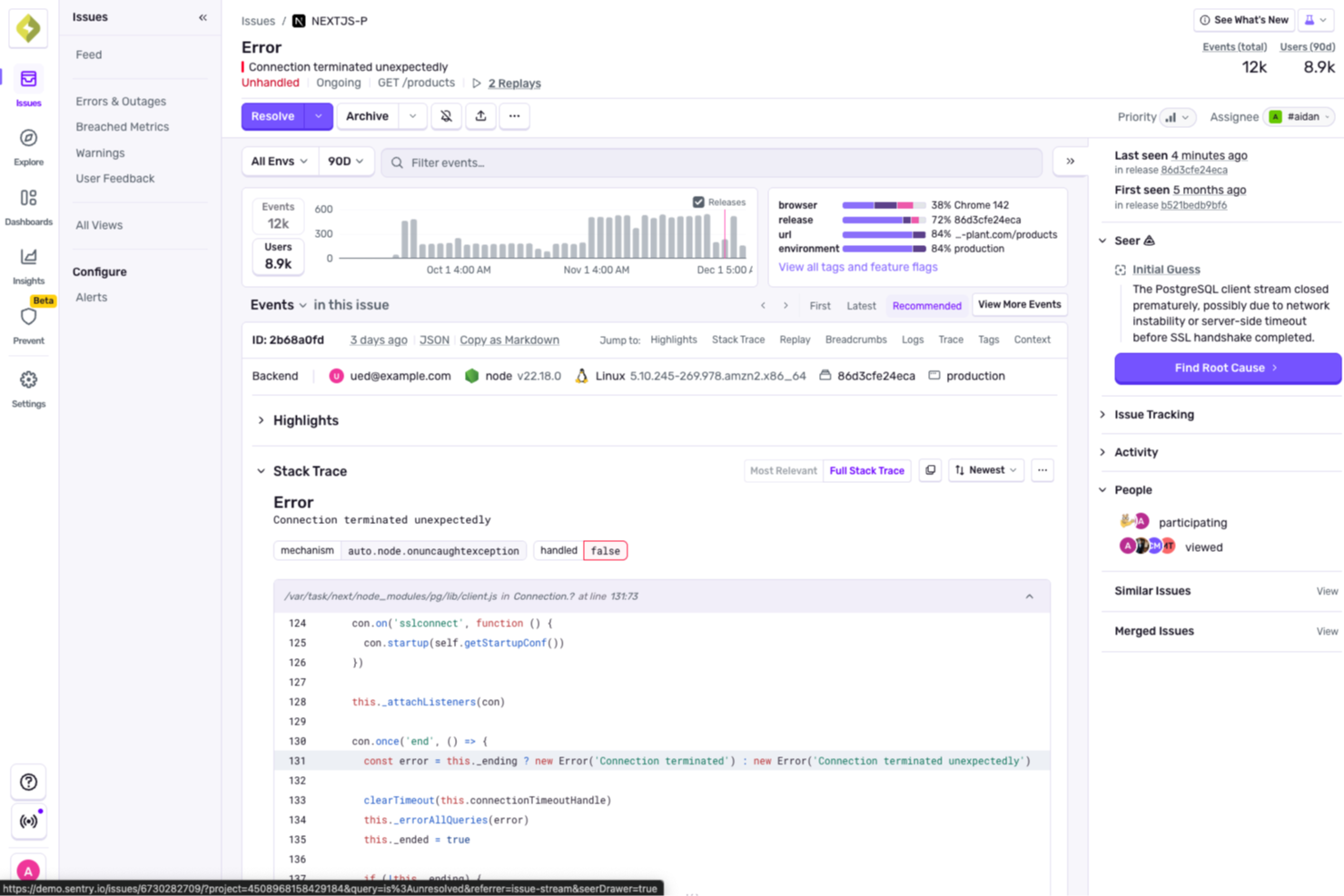
For developers and teams looking for a free bug tracking solution, Sentry is a practical option built around real-world development needs. It includes a solid set of tools for error monitoring and application performance management, which makes it well-suited for web and mobile development, gaming, and e-commerce. By helping you resolve bugs efficiently and improve code quality, Sentry tackles the ongoing challenge of maintaining software reliability and keeping users satisfied.
Why I Picked Sentry
I chose Sentry because of its ability to automatically identify and analyze the root causes of errors, which is essential in a free bug tracking tool. Its error monitoring and session replay features let you trace issues back to their source, so you can fix them before they affect users. Sentry also includes AI-driven debugging designed to support predictive error prevention, allowing your team to spend more time building and less time troubleshooting.
Sentry Key Features
In addition to its error monitoring strengths, Sentry provides several other valuable features for free bug tracking:
- Session Replay: Visualize user interactions and reproduce bugs for more effective debugging.
- AI Code Review: Utilize AI to automatically analyze code changes and predict potential issues.
- Automatic Release Tracking: Map incidents directly to releases for streamlined issue management.
- Multiple SDK Support: Integrate Sentry with various programming languages like JavaScript, Python, and React for versatile application use.
Sentry Integrations
Integrations include GitHub, Slack, Jira, Bitbucket, GitLab, Trello, Asana, PagerDuty, Microsoft Teams, and Discord.
Pros and Cons
Pros:
- Automatic release tracking support
- Built-in session replay tools
- Real-time error monitoring
Cons:
- Some features are limited by a paywall
- Limited data retention period
New Product Updates from Sentry

Sentry Enhances Alerting Across Uptime and Metrics
Sentry introduces expanded alert configuration for Uptime Monitors and adds alerting support to its Metrics open beta. These updates improve issue detection by enabling more flexible monitoring conditions and proactive alerts. For more information, visit Sentry’s official site.
 .
.

Jam is a bug-tracking tool that simplifies the process of reporting and capturing bugs by allowing users to report bugs with a single click. It compiles all the necessary information that engineers need to fix issues, including device and browser details, console logs, network logs, repro steps, and backend tracing.
Why I picked Jam: The tool can capture events that have just occurred on the user's screen, providing an instant replay of the bug. It then automatically records the steps to reproduce a bug, which helps users understand what happened without the need to manually replicate the issue and write down the steps.
Furthermore, users can annotate, blur, edit, and share the captured bug reports. This functionality allows for clear communication and collaboration among team members.
Jam Standout Features and Integrations
Standout features: Aside from the instant replay and automatic recording of bugs, Jam offers a voice recording feature for real-time explanations with video recordings. The tool even supports mobile view inspections. Jam also has JamGPT, an AI debugging assistant, to help engineers receiving bug reports fix code more efficiently.
Integrations include Asana, ClickUp, Figma, GitHub, Jira, Linear, Notion, Sentry, Slack, and more.
Pros and Cons
Pros:
- AI debugging assistant
- One-click screen captures
- Instant replay of bugs
Cons:
- Session recordings limited to two minutes
- May lack advanced features


New Relic is an observability platform that assists engineers in monitoring, debugging, and enhancing their technology stack. It provides a suite of tools including application performance monitoring (APM), serverless monitoring, security features, digital experience monitoring, and artificial intelligence.
Why I picked New Relic: One of the standout features of New Relic is its errors inbox, which consolidates error notifications from across the entire stack into a single, manageable location. This feature allows developers to proactively detect, triage, and resolve errors before they impact end-users.
By grouping similar errors and providing detailed context, such as stack traces and error attributes, the errors inbox facilitates quicker root cause analysis and resolution.
New Relic Standout Features and Integrations
Standout features: Other features offered by New Relic include artificial intelligence to provide actionable insights and automate routine tasks, enhancing operational efficiency. APM 360 offers comprehensive application performance monitoring, ensuring applications run smoothly and efficiently. Furthermore, infrastructure monitoring provides detailed insights into the performance and health of infrastructure components,
Integrations include Amazon Web Services, Microsoft Azure, Google Cloud Platform, Kubernetes, Prometheus, NGINX, MySQL, Redis, Apache, and RabbitMQ.
Pros and Cons
Pros:
- Provides robust alerting and notification features
- Users can create customizable dashboards to visualize data
- Real-time tracking and monitoring of applications
Cons:
- Initial configuration can be complex and time-consuming
- May be pricey for small businesses


Instabug is a bug management solution that empowers you to monitor, prioritize, and resolve bugs throughout the entire product development phase. It provides detailed bug reports with the important information you need to fix the issues.
Why I picked Instabug: It offers a mobile app bug tracking solution that lets you receive bug reports and feedback from testers and your users. The software allows you to get reports from testers during development; this helps you to get rid of defects that can impact your product after launch. Instabug takes the game to the next level by letting you receive performance feedback from users when your app is live.
Instabug Standout Features and Integrations
Standout features: Instabug has an in-app bug reporting feature that allows testers and users to seamlessly send feedback or report bugs by simply shaking their devices. From the app, they can send annotated screenshots, screen recordings, or voice notes to explain their experience with your app.
You can reply to users and automate your workflow with third-party integrations. Through in-app chats, you can communicate effectively with customers — request more information from users or inform them that an issue has been resolved.
Integrations include GitHub, Jira, Slack, Asana, Zendesk, Pivotal, Trello, Freshdesk, Basecamp, Zapier, and FrontApp.
Pros and Cons
Pros:
- Comprehensive bug reporting
- Seamless in-app communication
- Get detailed logs and metadata
Cons:
- More customizations needed
- Customer support response time needs to be improved


Asana provides everything you need to track your debugging tasks and keep your team organized and focused on the major goal. The tool is great for companies with remote and distributed teams; it provides task management and collaboration capabilities that help teams work together effectively.
Why I picked Asana: I’m recommending Asana as one of the best defect tracking tools because it’s designed to help you manage complex bug tracking tasks easily. It features a list view, which lets you organize and assign tasks. With lists, each team knows exactly the tasks to accomplish, what is expected of them, and when to complete tasks. Asana streamlines everything and provides the clarity needed to keep track of your debugging activities.
Asana Standout Features and Integrations
Standout features: Asana allows you to streamline your reports and get real-time insights into what your teams are doing. Asana Boards make things a lot easier by helping you focus on tasks currently in the pipeline. Boards help you get a detailed overview of what’s going on and let you know where there are frictions in your workflow.
Asana stands out with its workflow automation capabilities. You can put routine activities like assigning tasks and setting due dates on autopilot, which provides the space you need to focus on other important tasks.
Integrations include Salesforce, Gmail, OneDrive, Zapier, Tableau, Sharepoint, Outlook, Office 365, Box, and Instagantt.
Pros and Cons
Pros:
- Great reporting
- Automation capabilities
- Easy to use
Cons:
- More workflow customization needed
- More guides for new users are required


Caspio gives you access to drag-and-drop features you can rely on to manage and track your QA processes with ease. It allows you to build forms, reports, dashboards, and other things to track defects and deliver high-performance products.
Why I picked Caspio: It’s great for users that need a scalable tool that facilitates collaboration. Caspio allows users to collaborate on tasks effectively. It allows you to build interactive reports, which makes keeping tabs on your debugging tasks a lot easier. You can customize your bug reports to suit your requirements and present data in ways that are convenient for your team.
Caspio Standout Features and Integrations
Standout features that set Caspio apart include advanced charts and dashboards and workflow automation. There is an extensive chart library that enables you to create beautiful charts for visualizing data. Caspio’s dashboards come with user-driven filtering and drill-down features that empower you to make decisions based on real-time insights.
With Caspio, assigning tasks and tracking progress is a lot faster. This is due to its workflow automation capabilities. The tool lets you streamline operations by automating routine tasks.
Integrations: Caspio allows you to integrate with a wide range of tools, including Google Drive, Zapier, Microsoft 365, Box, Sogolytics, Twilio, Stova, FastField, LeadMaster, and APIANT.
Pros and Cons
Pros:
- Flexible and customizable
- Free training
- 24/7 support and expert services
Cons:
- More tutorials needed
- A bit difficult for new users


GoodDay is a modern work management platform. It provides a range of work management capabilities that let you stay in control of your defect tracking processes. Its key capabilities include process management, team collaboration, task management, time tracking, analytics, and data management.
Why I picked GoodDay: I added this tool to the list because it makes the remote work model easier to implement. It comes with collaboration capabilities that remote workers need to work together as one productive team. With GoodDay, you can plan and collaborate on one platform.
GoodDay offers task management features that help you manage your bug tracking tasks effectively. You can assign tasks, share task attachments, add custom fields, organize tasks with tags, and track the progress of your tasks. In a nutshell, the tool provides everything you need to track bugs and ensure issues are resolved properly with no confusion.
GoodDay Standout Features and Integrations
Standout features include time management, data management, and advanced reporting and analytics. It offers a range of data management features to help you make good use of the information you gather in the course of QA. You can do bulk editing, create copies of existing items, drag and drop work items, filter information, and sort data according to your needs.
With the time management capability, you can easily keep track of time spent on your work items. The key time management features include a task timer, work schedules, daily timesheets, weekly timesheets, and project time reports.
Integrations include Google Drive, Dropbox, Google Calendar, Slack, Gmail, GitHub, Kanban Tool, Google Docs, and Google Workspace.
Pros and Cons
Pros:
- Good support
- Flexible workflow
- Seamless integrations
Cons:
- Some processes or settings are complicated
- UI needs more colorful updates


YouTrack provides an all-in-one solution that allows you to track your debugging tasks, manage your team, and collaborate to deliver the best product possible. This tool enables you to streamline work and increase the productivity of your team.
Why I picked YouTrack: It has bug management features, enabling you to know where the problem lies, create bug reports, and track feature requests on time. In addition to building bug reports, YouTrack allows you to set their priority and assign them to team members. You can link issues to test cases by integrating with tools such as TestLink, TestRail, and TestLodge.
It also makes managing feature requests very easy. YouTrack lets you keep tabs on upcoming feature requests, prioritize feature rollouts, and use communication features to keep stakeholders in the loop.
YouTrack Standout Features and Integrations
Standout features include agile boards, a knowledge base, a Gantt chart, advanced reporting, and time tracking. YouTrack comes with up to 20 configurable reports to enable you to monitor, manage, and be in control of what your team is doing.
It provides Scrum and Kanban board presets. You can also build boards to suit the bug tracking process your team has in place. With the interactive Gantt charts, you can schedule and prioritize tasks, set expectations, and keep an eye on everything with maximum precision.
Integrations include Slack, GitHub, Jira, Zendesk Suite, Confluence, IntelliJ IDEA, Bitbucket, GitLab, Cisco Jabber, and Albato.
Pros and Cons
Pros:
- Easy to use
- Very customizable
- It has a lot of features
Cons:
- UI can be confusing and clunky for beginners
- There are not many YouTrack tutorials


This tool helps your team collaborate securely and effectively. Mattermost is designed to help technical teams with stringent security and privacy requirements to get things done with a suite of secure, workflow-centric collaboration tools.
Why I picked Mattermost: I added Mattermost to my list due to its advanced collaboration features. It allows your team to work together effectively with real-time communication, file sharing, code snippet sharing, and in-line code syntax highlighting. You can easily switch from chat to audio calls and screenshare on the same tool.
Mattermost enables you to catch bugs before you launch your software by improving visibility across dev and ops during the QA process. It has advanced security features that enable you to stay compliant with full data control.
Mattermost Standout Features and Integrations
Standout features: Mattermost comes with purpose-built workflow automation, which empowers you to get things done faster with few resources. Its seamless custom integrations with popular tools improve the workflow automation potential of this software and give you the flexibility to connect to your favorite tools.
In addition, the tools help you save costs by providing the tracking capabilities you need to avoid costly outages and downtime.
Integrations: Mattermost is extensible and customizable with tool integrations. Key integrations include GitHub, ServiceNow, GitLab, Bitbucket, Jira, CircleCI, Confluence, Opsgenie, ToDO, and Zendesk App.
Pros and Cons
Pros:
- Very secure
- Highly extensible
- Full control over your data
Cons:
- Some glitches in the mobile app
- Notifications should be improved
Weitere Optionen
Hier ist eine weitere Liste kostenloser Bug-Tracking-Software zum Ausprobieren:
- Rollbar
For proactively discovering and resolving errors in real time
- MantisBT
For collaborating with team members
- Bugzilla
For scheduling reports and presenting bug lists in multiple formats
- CaseCamp
For effective time management
- Backlog
For creating and organizing customized workflows
- monday dev
For bug tracking templates
- TestMu AI
Issue tracking system for mobile software development teams
- BugHerd
For anyone involved in the website development process and QA
- Zoho BugTracker
Issue tracker for getting instant notifications and informative bug reports
- Jira
Bug tracking system for agile development teams


Weitere Test-Software
Wenn du mehr über Softwareentwicklung und Testing erfahren möchtest, schau dir die folgenden Artikel an.
- Beste Tools für automatisiertes Testing
- Beste Cloud-Test-Tools
- Beste SaaS-Testing-Tools
- Beste Versionskontroll-Tools
Auswahlkriterien für kostenlose Bug-Tracking-Software
Hier ist eine kurze Übersicht der wichtigsten Auswahl- und Bewertungskriterien, die ich für meine Liste der besten kostenlosen Bug-Tracking-Software in diesem Artikel verwendet habe:
Kernfunktionalitäten
Folgende grundlegende Funktionen habe ich bei der Bewertung von Defect-Tracking-Tools für diesen Artikel berücksichtigt:
- Automatische Fehlererkennung
- Automatisierter Workflow
- Issue-Management
- Anpassbarer Workflow
Schlüsselfunktionen
Ich habe Tools ausgewählt, die folgende wichtige Funktionen bieten:
- Zusammenarbeit: Eine Funktion, die es Teammitgliedern ermöglicht, gemeinsam in Echtzeit zu arbeiten und Ressourcen zu teilen. Besonders für remote arbeitende Teams ist dies von Vorteil, da sie so jederzeit gemeinsam und ohne den Überblick zu verlieren, an Aufgaben arbeiten können.
- Reporting: Mit dieser Funktion kannst du erledigte und offene Bugs auf eine übersichtliche Weise dokumentieren und verfolgen.
- Interaktive Dashboards: Interaktive Dashboards bereiten Daten in leicht verständlicher Form auf. Teammitglieder und Stakeholder können mit Dashboards interagieren und Erkenntnisse aus den Debugging-Daten gewinnen.
- Zeiterfassung: Mit dieser Funktion kannst du nachvollziehen, wie lange Mitarbeitende für die ihnen zugewiesenen Aufgaben benötigen.
Benutzerfreundlichkeit
Ganz gleich, wie leistungsfähig ein Tool ist, es wird kaum hilfreich sein, wenn die Benutzer Schwierigkeiten haben, die Funktionen anzuwenden. Ich habe kostenlose Bug-Tracking-Tools ausgewählt, die benutzerfreundlich sind. Daher sind alle Tools auf der Liste einfach zu bedienen. Sie benötigen keine wochenlangen Tutorials, um loszulegen. Es ist leicht zu verstehen, wie die Lösungen funktionieren, und Sie können sofort mit Ihren Defect-Management-Projekten beginnen.
Software-Integrationen
Wenn Sie andere Tools in Ihr zentrales Softwareentwicklungsprogramm integrieren, können Sie über einen einheitlichen Arbeitsablauf auf Ihr gesamtes Toolset zugreifen. So entfällt das ständige Wechseln zwischen verschiedenen Tools beim Bug-Tracking. Aus diesem Grund habe ich nach Tools gesucht, die sich mit einer Vielzahl von Entwicklungs-, QA- und Produktivitätstools integrieren lassen.
Preisgestaltung
Bei der Preisgestaltung habe ich drei wichtige Faktoren berücksichtigt: Erschwinglichkeit, Flexibilität und Transparenz. In meiner Liste der besten kostenlosen Bug-Tracking-Software finden Sie garantiert Tools, die zu Ihren QA- oder Entwicklungsprojekten passen.
Wie man kostenlose Bug-Tracking-Software auswählt
Komplexe Funktionslisten und Preisstrukturen können es schwierig machen, herauszufinden, was Sie tatsächlich von einer kostenlosen Bug-Tracking-Software erhalten. Damit Sie beim Auswahlprozess den Überblick behalten, sollten Sie folgende Faktoren berücksichtigen:
| Faktor | Worauf achten? |
|---|---|
| Umfang des kostenlosen Angebots | Prüfen Sie, was im kostenlosen Tarif enthalten ist. Überzeugen Sie sich, dass es Ihren Grundbedarf erfüllt, ohne zu früh zu einem Upgrade zu zwingen. Achten Sie auf Funktionen wie unbegrenzte Benutzer oder Projekte. |
| Skalierbarkeit | Überlegen Sie, ob die Software mit Ihrem Team wachsen kann. Sie sollte steigende Datenmengen und Nutzerzahlen problemlos bewältigen. |
| Integrationen | Stellen Sie sicher, dass sie sich mit Tools integrieren lässt, die Ihr Team bereits nutzt, wie GitHub oder Slack. Das spart Zeit und hält die Arbeitsabläufe effizient. |
| Benutzerfreundlichkeit | Suchen Sie nach intuitiven Oberflächen und möglichst wenig Einrichtungsaufwand. Ihr Team sollte keine umfangreichen Schulungen benötigen, um zu starten. |
| Anpassbarkeit | Prüfen Sie, ob Sie Arbeitsabläufe an die Prozesse Ihres Teams anpassen können. Benutzerdefinierte Felder oder Dashboards können die Produktivität steigern. |
| Support-Optionen | Sehen Sie sich die verfügbaren Support-Kanäle wie Chat oder E-Mail an. Reaktionsschneller Support hilft, Probleme schnell zu lösen und Ausfallzeiten zu minimieren. |
| Sicherheit | Stellen Sie sicher, dass die Software branchenübliche Standards erfüllt. Achten Sie auf Datenverschlüsselung und regelmäßige Sicherheitsupdates zum Schutz Ihrer Informationen. |
| Leistung | Bewerten Sie, wie die Software unter Belastung arbeitet. Sie sollte auch bei gleichzeitigen Zugriffen vieler Nutzer schnell und reaktionsschnell bleiben. |
Was ist kostenlose Bug-Tracking-Software?
Kostenlose Bug-Tracking-Software ist ein Tool, mit dem Teams Softwarefehler kostenfrei über Issue-Tracking-Software erfassen, verwalten und verfolgen können. Diese Tools ermöglichen eine systematische Organisation und Priorisierung von Softwaredefekten und erleichtern deren Behebung. Sie sind ein essenzieller Bestandteil im Softwareentwicklungsprozess, um die Qualität und Zuverlässigkeit von Softwareprojekten zu gewährleisten.
Funktionen kostenloser Bug-Tracking-Software
Schauen wir uns die Funktionen an, die typischerweise in Bug-Tracking-Software zu finden sind, und welche in kostenlosen bzw. kostenpflichtigen Tarifen enthalten sind.
Typischerweise kostenlose Funktionen bei Bug-Tracking-Software
- Fehlerverfolgung: Teams können Bugs erfassen und überwachen, sodass alle Probleme zeitnah bearbeitet werden.
- Aufgabenverteilung: Teammitglieder können bestimmte Fehler der richtigen Person zuweisen, was Verantwortlichkeit und effiziente Lösung fördert.
- Echtzeit-Benachrichtigungen: Das Team bleibt über Änderungen oder neue Fehler informiert, sodass jeder schnell reagieren kann.
- Einfache Berichte: Es gibt einfache Berichte zum Fehlerstatus und -fortschritt, damit Teams ihre Arbeitsabläufe und Leistung nachvollziehen können.
- Benutzerverwaltung: Ermöglicht das Hinzufügen und Verwalten mehrerer Nutzer, was für Teamarbeit und Projektmanagement unerlässlich ist.
- Suchfunktion: Hilft Nutzern, bestimmte Fehler oder Probleme schnell zu finden, was Zeit spart und die Effizienz verbessert.
- Anpassbare Workflows: Bietet Flexibilität bei der Verwaltung des Bug-Tracking-Prozesses, sodass das Tool auf spezifische Anforderungen zugeschnitten werden kann.
Typischerweise kostenpflichtige Funktionen bei Bug-Tracking-Software
- Erweiterte Analysen: Bietet tiefgehende Einblicke in Fehlertrends und Teamleistung und unterstützt so strategische Entscheidungen.
- Integration mit Versionskontrollsystemen: Ermöglicht nahtlose Verknüpfungen mit Tools wie GitHub oder GitLab und steigert so die Effizienz der Arbeitsabläufe.
- Automatisierte Fehlerverfolgung: Setzt Automatisierung zur Identifizierung und Protokollierung von Fehlern ein, reduziert manuellen Aufwand und erhöht die Genauigkeit.
- Individuelle Dashboards: Bietet personalisierte Ansichten und Kennzahlen, damit Teams sich auf die relevantesten Informationen konzentrieren können.
- Rollenbasierte Zugriffskontrolle: Stellt sicher, dass Benutzer die entsprechenden Berechtigungen haben, erhöht die Sicherheit und verwaltet Zugriffe effizient.
- Prioritätensetzung: Ermöglicht es Teams, Fehler nach Auswirkung oder Dringlichkeit zu priorisieren, sodass kritische Probleme zuerst gelöst werden.
- Erweiterte Suchfunktionen: Bietet verbesserte Filter- und Suchoptionen, um große Datenmengen leichter durchsuchen zu können.
Vorteile von kostenloser Bug-Tracking-Software
Die Einführung kostenloser Bug-Tracking-Software bringt zahlreiche Vorteile für Ihr Team und Ihr Unternehmen. Hier sind einige, auf die Sie sich freuen können:
- Kosteneinsparungen: Kostenlose Versionen eliminieren Abo-Gebühren, sodass Teams Ressourcen anderweitig einsetzen können und dennoch Bugs effektiv verwalten.
- Verbesserte Zusammenarbeit: Funktionen wie Aufgabenverteilung und Benutzerverwaltung helfen Teams, effizient zusammenzuarbeiten und Klarheit über Verantwortlichkeiten zu schaffen.
- Erhöhte Transparenz: Echtzeit-Benachrichtigungen und grundlegende Berichte halten Teams über den Bug-Status und Fortschritte informiert und sorgen für mehr Transparenz.
- Flexibilität: Anpassbare Workflows ermöglichen es Teams, das Tool an die eigenen Prozesse anzupassen und es leichter in bestehende Abläufe zu integrieren.
- Schnellere Problemlösung: Fehlerverfolgung und Suchfunktionen helfen Teams, Bugs schnell zu identifizieren und zu beheben, wodurch Ausfallzeiten reduziert und die Softwarequalität verbessert werden.
- Skalierbarkeit für kleine Teams: Kostenlose Pläne unterstützen oft unbegrenzt viele Nutzer und eignen sich somit für wachsende Teams, die komplexere Projekte verwalten müssen.
- Benutzerfreundlichkeit: Intuitive Oberflächen und minimale Konfiguration ermöglichen einen schnellen Einstieg ohne umfangreiche Schulungen.
Kosten und Preise von kostenloser Bug-Tracking-Software
Ich weiß, dass Sie diesen Artikel aufgesucht haben, um die besten kostenlosen Bug-Tracking-Software-Optionen zu finden. Da jedoch kostenfreie Pläne nur eingeschränkte Funktionen bieten, besteht eine große Wahrscheinlichkeit, dass Sie Ihren Plan in Zukunft upgraden müssen.
Die folgende Tabelle fasst gängige Pläne, deren durchschnittliche Preise und typische Features zusammen, die Bug-Tracking-Software-Lösungen enthalten:
Vergleichstabelle für Bug-Tracking-Software
| Plan-Typ | Durchschnittlicher Preis | Gängige Funktionen |
|---|---|---|
| Kostenloser Plan | $0 | Grundlegende Fehlerverfolgung, Aufgabenverteilung, Echtzeit-Benachrichtigungen und Benutzerverwaltung. |
| Persönlicher Plan | $5-$15/user/month | Erweiterte Suche, anpassbare Workflows und Prioritätensetzung. |
| Business-Plan | $20-$40/user/month | Integration mit Versionskontrollsystemen, erweiterte Analysen und individuelle Dashboards. |
| Enterprise-Plan | $50-$100/user/month | Rollenbasierte Zugriffskontrolle, automatisierte Fehlerverfolgung und erweiterte Sicherheitsfunktionen. |
Häufig gestellte Fragen
Einige wichtige Fragen, die Menschen zu kostenloser Defektverfolgungssoftware stellen:
Was sind die Vorteile von kostenloser Bug-Tracking-Software?
Die Vorteile von kostenloser Fehlerverwaltungssoftware umfassen ein besseres Zeitmanagement, eine bessere Arbeitslastverwaltung, verbesserte Produktqualität, höhere Kundenzufriedenheit und geringere Betriebskosten.
Wer verwendet kostenlose Bug-Tracking-Software?
Entwickler, Qualitätssicherungsprofis (QA), Projektmanager und Projektbeteiligte können kostenlose Defektmanagement-Software nutzen. Während Entwickler und QA-Ingenieure Fehlerverfolgungstools einsetzen, um Bugs zu finden und zu beseitigen, verwenden Projektmanager und Stakeholder sie, um ihre QA-Projekte zu verwalten oder zu überwachen.
Wie behält man Bugs im Überblick?
Der beste Weg, Bugs zu verfolgen, ist die Verwendung eines Bug-Management-Systems. Eine Defektverfolgungslösung hilft dir, Fehler über den gesamten Produktlebenszyklus hinweg zu verwalten. Das Tool ermöglicht es kleinen und großen Teams, Probleme schneller und effektiver zu beheben, indem es Routineaufgaben automatisiert, die viel Zeit in Anspruch nehmen.
Wie geht es weiter?
Wenn Sie gerade dabei sind, kostenlose Bug-Tracking-Software zu recherchieren, vereinbaren Sie ein Gespräch mit einem SoftwareSelect-Berater und erhalten Sie kostenlose Empfehlungen.
Sie füllen einfach ein Formular aus und führen ein kurzes Gespräch, in dem sie Ihre Bedürfnisse genau ermitteln. Danach erhalten Sie eine Auswahl an Software, die Sie prüfen können. Sie begleiten Sie sogar durch den gesamten Kaufprozess, einschließlich Preisverhandlungen.