

10 beste Explorative Testing Tools im Test für 2026

10 Beste Exploratory Testing Tools Übersicht
Here's my pick of the 10 best software from the 15 tools reviewed.


Da es so viele verschiedene Exploratory Testing Tools gibt, ist es nicht einfach, das richtige für sich zu finden. Du möchtest die Funktionen deiner Software erkunden und über einen explorativen Ansatz Fehler identifizieren, bist dir aber unsicher, welches Tool dafür am besten geeignet ist? Ich helfe dir weiter!
In diesem Beitrag mache ich dir die Entscheidung leichter: Ich teile meine persönlichen Erfahrungen aus der Arbeit mit dutzenden unterschiedlichen Exploratory Testing Tools in verschiedenen Teams und Projekten – und präsentiere meine Favoriten unter den besten Exploratory Testing Tools.
Why Trust Our Software Reviews
We’ve been testing and reviewing software since 2023. As tech leaders ourselves, we know how critical and difficult it is to make the right decision when selecting software.
We invest in deep research to help our audience make better software purchasing decisions. We’ve tested more than 2,000 tools for different tech use cases and written over 1,000 comprehensive software reviews. Learn how we stay transparent & our software review methodology.
Bestenliste Exploratory Testing Tools Kurzüberblick
| Tool | Best For | Trial Info | Price | ||
|---|---|---|---|---|---|
| 1 | Am besten geeignet für checklistenbasierte manuelle Testplanung | 30-tägige kostenlose Testphase | Ab $49/Monat (jährliche Abrechnung) | Website | |
| 2 | Am besten geeignet für KI-gesteuerte Testentwicklung | 14-tägige kostenlose Testversion | Ab $212/Monat | Website | |
| 3 | Am besten geeignet zur Eliminierung instabiler Tests | Keine kostenlose Testversion verfügbar | Preise auf Anfrage | Website | |
| 4 | Am besten geeignet für die Zusammenarbeit mit entfernten Teammitgliedern | Kostenlose Testversion verfügbar | Ab $27/Benutzer/Monat | Website | |
| 5 | Am besten für agile Teams, die Exzellenz beim explorativen Testen anstreben | 30-tägige kostenlose Testphase | Ab $8.33/Nutzer/Monat (jährlich abgerechnet) | Website | |
| 6 | Bestes exploratives Testsystem für Desktop- und Webanwendungen | Kostenlose Testversion verfügbar | Preise auf Anfrage | Website | |
| 7 | Am besten für vollständige Transparenz (End-to-End-Sichtbarkeit) | 30-tägige kostenlose Testversion | Ab $10/10 Benutzer/Monat | Website | |
| 8 | Bestes exploratives Testsystem für Echtzeit-Überwachung von Tests | 30-tägige kostenlose Testphase + Demo verfügbar | Ab $30/Nutzer/Monat | Website | |
| 9 | Am besten geeignet zum automatischen Nachverfolgen von Aktionen und nahtlosen Speichern Ihrer Aufzeichnungen | Not available | Kostenlos nutzbar | Website | |
| 10 | Am besten geeignet für Tests auf verschiedenen Geräten, Betriebssystemen und Browsern | Kostenlose Demo verfügbar | Ab $2.000/Monat | Website |
-

Site24x7
Visit WebsiteThis is an aggregated rating for this tool including ratings from Crozdesk users and ratings from other sites.4.7 -
GitHub Actions
Visit WebsiteThis is an aggregated rating for this tool including ratings from Crozdesk users and ratings from other sites.4.8 -
Docker
Visit WebsiteThis is an aggregated rating for this tool including ratings from Crozdesk users and ratings from other sites.4.6





Bewertungen der besten Exploratory Testing Tools
Hier findest du eine kurze Beschreibung jedes Exploratory Testing Tools mit Schwerpunkt auf deren wichtigsten Einsatzbereichen, besonderen Funktionen sowie einigen Vor- und Nachteilen. Außerdem gibt es Screenshots, damit du einen Eindruck vom User Interface erhältst.

Testpad
Am besten geeignet für checklistenbasierte manuelle Testplanung
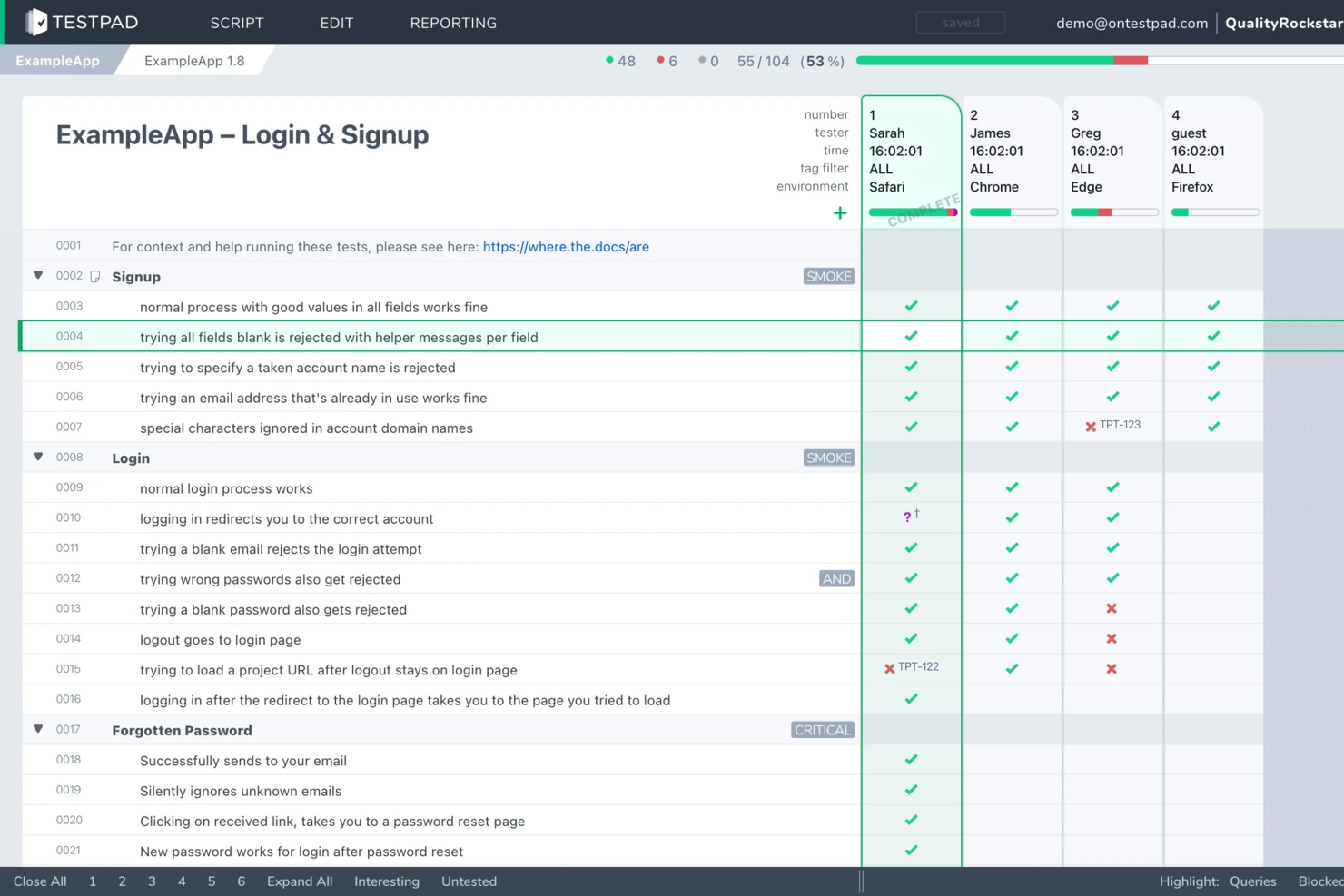
Testpad ist eine manuelle Testplattform, die für QA-Teams und Softwaretester entwickelt wurde, die einen flexiblen, checklistenbasierten Ansatz für exploratives Testen ohne den Aufwand traditioneller Testfallverwaltung suchen.
Für wen ist Testpad am besten geeignet?
QA-Leads und Softwaretester in kleinen bis mittelgroßen Teams, die ein leichtgewichtiges, flexibles Tool zur Verwaltung manueller, explorativer Tests möchten.
Warum ich mich für Testpad entschieden habe
Ich habe Testpad als eines der besten ausgewählt, weil der checklistenbasierte Ansatz es mir ermöglicht, Explorationsideen schnell zu skizzieren, ohne an starre Testfallstrukturen gebunden zu sein. Mir gefällt, dass ich Tests als einfache Checklisten organisieren kann, was die Anpassung und Umpriorisierung während einer Session erleichtert. Mein Team nutzt Testpad zur gemeinsamen Arbeit an sich entwickelnden Testplänen, wodurch wir unser exploratives Testen fokussiert und umsetzbar halten.
Testpad Hauptfunktionen
- Gastzugang für Tester: Externe Tester können über teilbare Links eingeladen werden, ohne dass eine Kontoerstellung erforderlich ist.
- Echtzeit-Tracking des Testfortschritts: Sehen Sie Live-Updates, während Tester während einer Session Punkte abhaken.
- Bulk-Import von Testideen: Große Mengen an Testschritten oder Ideen können schnell per CSV oder einfachem Text hinzugefügt werden.
- Kommentare zu Testschritten: Notizen oder Feedback können direkt an einzelne Checklistenpunkte zur besseren Zusammenarbeit im Team hinzugefügt werden.
Testpad Integrationen
Zu den Integrationen gehören GitHub, NVIDIA, Bell, Digital Genius, Foxhole QA, Legrand, Ideas2Executables, TestLauncher, OpenROV und Numed Healthcare. Eine API steht ebenfalls für benutzerdefinierte Integrationen zur Verfügung.
Pros and Cons
Pros:
- Unterstützt checklistenbasiertes, exploratives Testplanen
- Kommentare auf Schritt-Ebene für detailliertes Feedback
- Bulk-Import von Testideen per CSV
Cons:
- Kein integriertes Bug-Tracking oder Ticket-System
- Keine Funktion für automatisierte Testausführung

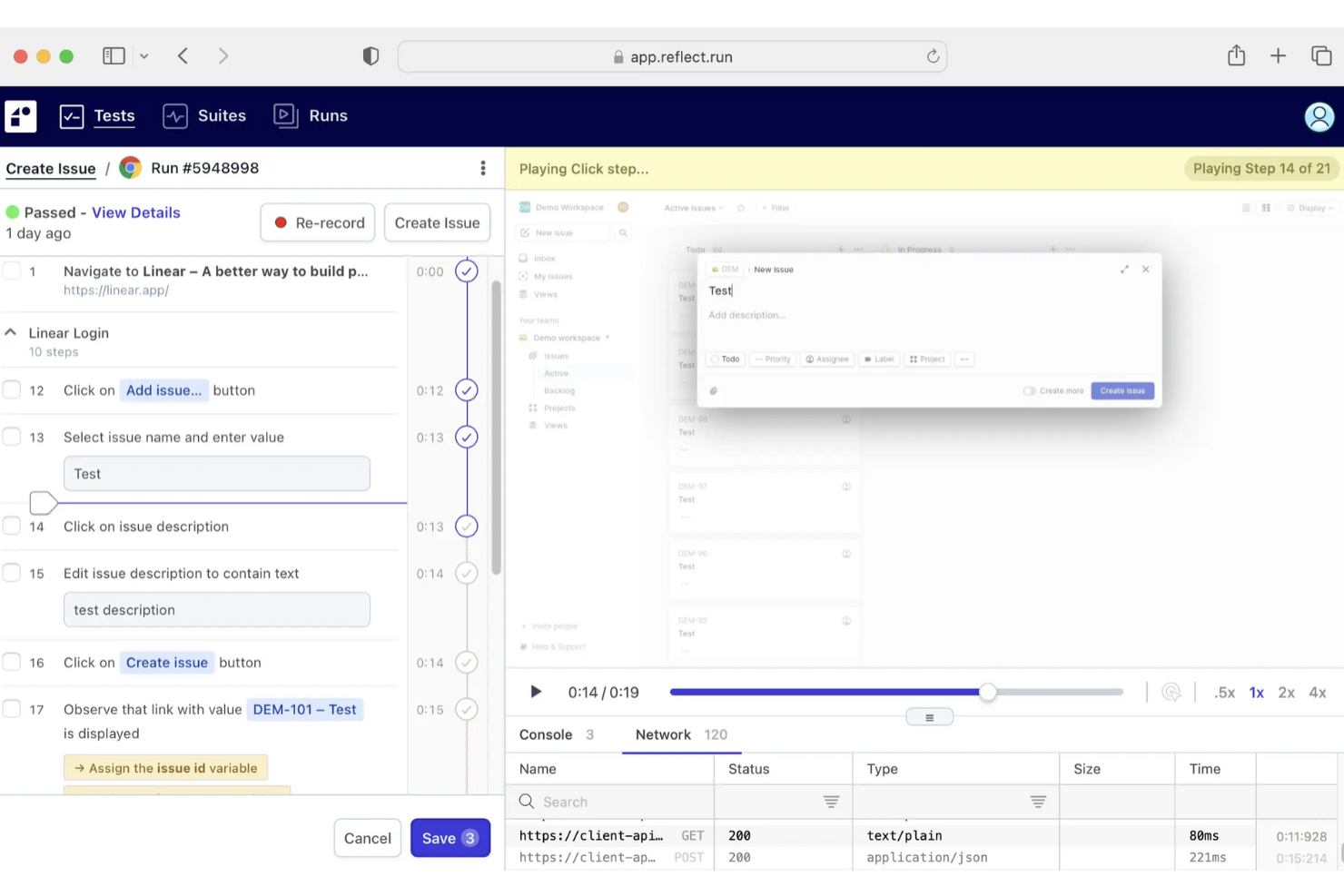
Reflect ist ein KI-gestütztes exploratives Testwerkzeug, mit dem Sie End-to-End-Tests erstellen und pflegen können, ohne eine einzige Zeile Code zu schreiben. Es macht CSS-Selektoren oder XPath-Lokatoren überflüssig, indem es natürliche Sprachbefehle verwendet. So lassen sich funktionale, visuelle und API-Tests schnell und effizient erstellen. Reflect passt sich automatisch an UI-Änderungen an, wodurch brüchige Testscripte vermieden und der Wartungsaufwand reduziert wird.
Warum ich Reflect gewählt habe: Ich habe Reflect ausgewählt, weil Sie Tests einfach in Klartext-Englisch formulieren können und die KI den Rest übernimmt – kein Scripting, keine Selektoren, keine aufwändige Einrichtung. Der Einstieg ist schnell, die Wartung noch schneller: Tests werden bei UI-Änderungen automatisch aktualisiert. Sie können visuelle und API-Tests in einem Ablauf kombinieren, mit Screenshots und Videoaufzeichnungen debuggen und Warnungen in Echtzeit erhalten. Durch die Einbindung von Reflect in Ihre CI/CD-Pipeline und Ihre GitHub-Pull-Requests testen Sie immer genau dort, wo es am wichtigsten ist.
Herausragende Funktionen und Integrationen von Reflect
Besondere Funktionen: Reflect ermöglicht eine schnelle Testentwicklung mithilfe von KI-Eingaben und Aktionsaufzeichnung. Es unterstützt visuelles Regressionstest, um UI-Probleme zu erkennen, API-Tests für Backend-Validierung sowie Debugging-Tools wie Screenshots, Videoaufzeichnungen und visuelle Vergleiche. Zudem können Sie Testruns planen, die Browserkompatibilität sicherstellen und detaillierte Berichte mit Echtzeit-Benachrichtigungen generieren.
Integrationen: Reflect lässt sich mit GitHub, Slack, Jira, Jenkins, Bitbucket, CircleCI, Azure DevOps und Codefresh integrieren. Es verbindet sich ebenfalls mit Marketing- und Analyseplattformen wie Google Analytics, Marketo, Drift, Facebook Pixel, LinkedIn Insight und Microsoft Ads – ideal für SaaS-Teams, die moderne und integrierte Webanwendungen testen.
Pros and Cons
Pros:
- Umfassende CI/CD-Integration
- KI-gestützte Testwartung
- No-Code-Testerstellung
Cons:
- Einschränkungen beim Testen von mobilen Apps
- Könnte mehr Anpassungsmöglichkeiten für Testkonfigurationen bieten


QA.tech befähigt Ihr Team, indem es den explorativen Testprozess mit seinen KI-gesteuerten Funktionen automatisiert und damit ein wertvolles Werkzeug für Unternehmen ist, die ihre QA-Effizienz steigern möchten. Es spricht Branchen und Fachleute an, die manuelle Testaufwände reduzieren und sich auf komplexere Testszenarien konzentrieren möchten. Durch die Automatisierung repetitiver Aufgaben und die Bereitstellung umsetzbarer Erkenntnisse hilft QA.tech dabei, Fehler früh im Entwicklungszyklus aufzudecken, was schnellere Produktauslieferungen und eine verbesserte Softwarequalität ermöglicht.
Warum ich QA.tech gewählt habe
Ich habe mich für QA.tech entschieden, weil der einzigartige, KI-gesteuerte Ansatz das explorative Testen revolutioniert, indem komplexe Nutzerreisen automatisiert werden. Dieses Tool hebt sich durch seine Fähigkeit hervor, mit wiederkehrenden Prüfungen instabile Tests zu eliminieren und somit zuverlässige Testergebnisse zu gewährleisten. Darüber hinaus bietet QA.tech sofortiges Feedback zur Code- und Produktqualität, was für Teams, die Fehler frühzeitig erkennen und fundierte Entscheidungen treffen möchten, entscheidend ist. Die nahtlose Integration mit verbreiteten Tools wie GitHub und Slack erhöht zusätzlich den Nutzen für Teams, die ihre QA-Prozesse effizienter gestalten wollen.
QA.tech Schlüsselfunktionen
Neben den KI-gestützten Test- und Sofort-Feedback-Funktionen habe ich auch folgende Features als nützlich empfunden:
- End-to-End-Testing: Bietet umfassende Tests über verschiedene Plattformen hinweg und stellt sicher, dass alle Aspekte der Anwendung abgedeckt werden.
- Mobile-Testfunktionen: Ermöglicht gründliche Prüfungen von mobilen Anwendungen und gewährleistet deren fehlerfreies Funktionieren auf unterschiedlichen Geräten.
- Benutzerfreundliche Oberfläche: Erlaubt es Nutzenden, Testanforderungen in einfachem Englisch zu kommunizieren und erleichtert so die Testfallerstellung.
- Umsetzbare Erkenntnisse: Liefert Erkenntnisse, die Teams helfen, die Produktqualität zu verbessern und die Veröffentlichungszeiten zu verkürzen.
QA.tech Integrationen
Integrationen umfassen GitHub, Slack, Jira, Trello, Bitbucket, GitLab, Jenkins, CircleCI, Azure DevOps und Asana.
Pros and Cons
Pros:
- KI-gestützte Automatisierung von explorativen Tests
- End-to-End-Testabdeckung
- Integrationen in CI/CD-Pipelines unterstützt
Cons:
- Ersteinrichtung erfordert Konfigurationsaufwand
- Einarbeitungszeit für KI-Workflows

Testuff
Am besten geeignet für die Zusammenarbeit mit entfernten Teammitgliedern
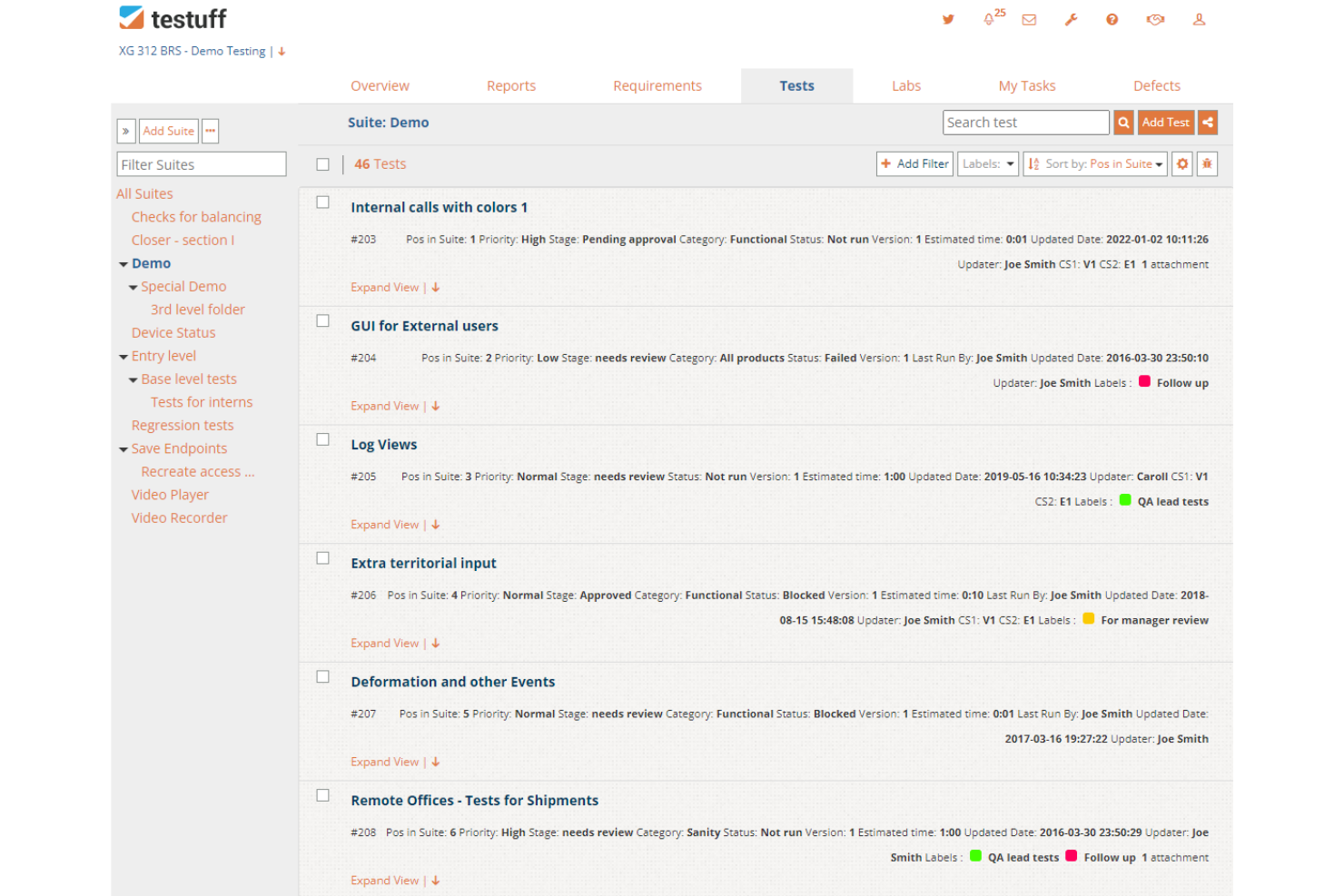
Testuff ist eine voll ausgestattete Software-Testplattform, die eine Vielzahl von Testmethoden bietet, darunter auch exploratives Testen. Mit dem On-Demand-Explorative-Testing-Service können Sie schnell durchstarten. Die gesamte Serverwartung, stündliche Backups und die Sicherheit werden von ihnen übernommen.
Warum ich Testuff gewählt habe: Ich habe dieses Tool aufgrund seiner fortschrittlichen Funktionen für das Test-Lifecycle-Management ausgewählt. Es ermöglicht Teammitgliedern effektive Zusammenarbeit, unabhängig vom Standort. Sie können Tests bestimmten Testern zuweisen, Schritte teilen, Benutzerrechte festlegen und Anforderungen mühelos verwalten. Testuff hilft Ihnen, Testzyklen zu planen, Ihr Team zu organisieren und Aufgaben im Testlabor zu verteilen.
Testuff – Herausragende Funktionen und Integrationen
Herausragende Funktionen: Testuff bietet umfassende Möglichkeiten zur Fehlerberichterstattung mit Integration in Bugtracker, einfaches Erstellen von Screenshots, einen eigenen Video-Recorder, Integration mit Kommunikationskanälen sowie einen eigenen Videoplayer. Die Software übernimmt alles, während Sie sich zurücklehnen und Ihren Testprozess mit detaillierten Berichten überwachen und verbessern können.
Integrationen mit Bugtrackern sind beispielsweise activeCollab, Asana, Assembla, Axosoft, BugTracker.NET, Jira und weitere. Außerdem lassen sich Testautomatisierungstools wie Selenium, TestComplete, Autolt und Rational Robot integrieren.
Pros and Cons
Pros:
- Schneller Einstieg
- Sehr gute Zusammenarbeit möglich
- Testfälle einfach zu verwalten
Cons:
- Benutzeroberfläche benötigt ein Update
- Support-Seite benötigt mehr Inhalte

Xray
Am besten für agile Teams, die Exzellenz beim explorativen Testen anstreben
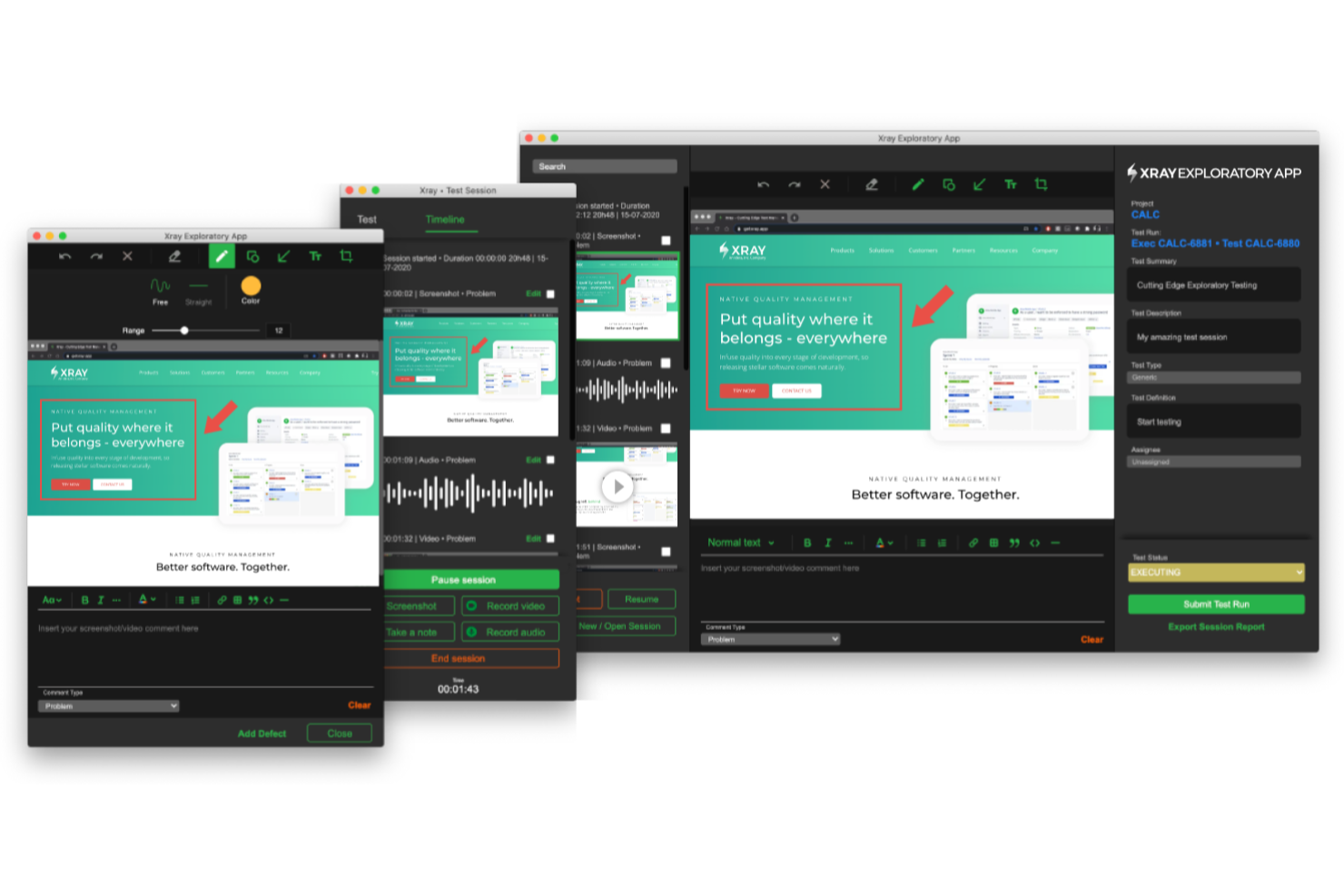
Die Xray Exploratory App ist eine Desktop-Anwendung, die den Prozess des explorativen Testens optimiert, indem sie den Nutzern Werkzeuge zur Verfügung stellt, um Nachweise zu erfassen und Erkenntnisse einfach mit dem Team zu teilen. Sie können Video-, Audio- und Screenshot-Aufnahmen nutzen, um schwer auffindbare Fehler zu erfassen und die Dokumentation zu erleichtern.
Warum ich die Xray Exploratory App gewählt habe: Indem alle Werkzeuge zur Beweiserfassung an einem Ort vereint werden, kann jedes Teammitglied eine explorative Testsitzung starten und einen gut dokumentierten Bericht erstellen, um diesen mit anderen Kollegen – einschließlich Entwicklern und Support-Mitarbeitern – zu teilen. Die Anwendung ist einfach zu bedienen und fördert Best Practices beim explorativen Testen, wie das Verwenden von Charters, das Zeitmanagement in Sessions, das Sammeln von aussagekräftigen Nachweisen und das Anfertigen von relevanten Notizen.
Herausragende Funktionen und Integrationen der Xray Exploratory App
Funktionen sind unter anderem Desktop-Apps für Windows oder Mac, die es ermöglichen, Testnachweise mittels Video- und Audioaufnahmen, Notizen und Anmerkungen zu erfassen. Mit einer zeitlich begrenzten Test-Charter-Funktion lassen sich Testsitzungen leicht verwalten und der Fokus innerhalb des vorgegebenen Zeitrahmens halten. Die Aktivitätszeitleiste bietet einen chronologischen Überblick über die Testaktivitäten und unterstützt Sie dabei, Ihren Testverlauf nachvollziehbar zu gestalten. Nach Abschluss einer Sitzung können Sie einen vollständigen PDF-Bericht Ihrer Ergebnisse generieren.
Integrationen umfassen Xray Test Management für Jira.
Pros and Cons
Pros:
- Tiefgreifende Integration mit Jira
- Anpassbare Testausführungsberichte
- Bietet Rückverfolgbarkeit und Abdeckungsmetriken
Cons:
- Hohe Lernkurve für neue Nutzer
- Begrenzte Unterstützung für Nutzer außerhalb von Jira

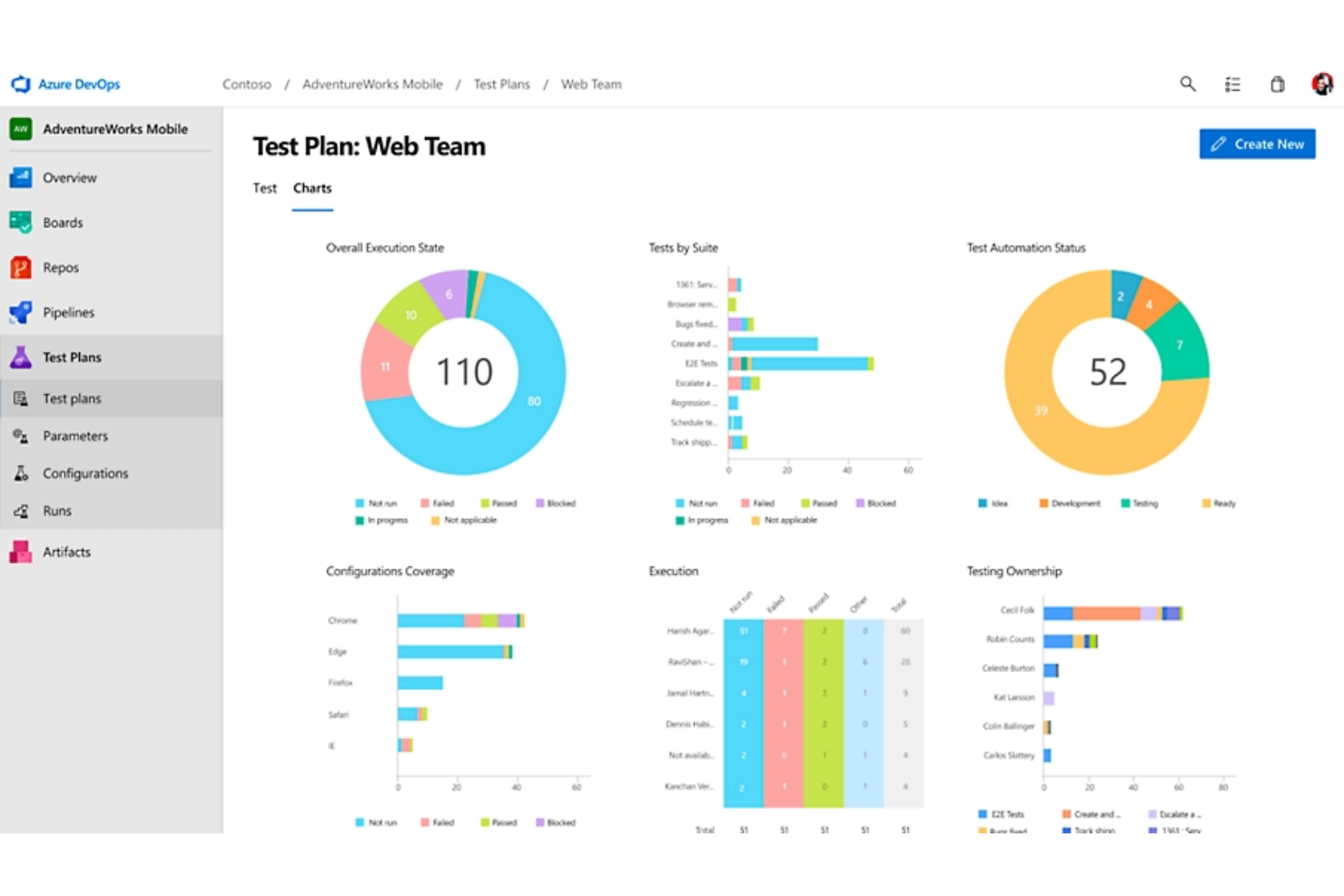
Azure Test Plans bietet explorative und manuelle Testwerkzeuge, die Ihnen helfen, Software mit Zuversicht und Zuverlässigkeit zu testen und auszuliefern.
Warum ich mich für Azure Test Plans entschieden habe: Mit diesem Tool können Sie Desktop- und Webanwendungen testen. Es ermöglicht Ihnen, während des Testens umfangreiche Szenariodaten aufzuzeichnen. Die Erfassung umfassender Daten macht gefundene Fehler oder Bugs nachvollziehbar und handlungsrelevant. Sie erhalten Zugriff auf Testdaten, die aufzeigen, wo die Probleme liegen, und erhalten umsetzbare Hinweise für den Behebungsprozess.
Azure Test Plans: Herausragende Funktionen und Integrationen
Herausragende Funktionen beinhalten durchgehende Rückverfolgbarkeit und das gleichzeitige Ausführen von Tests. Sie können End-to-End-Transparenz und -Qualität nutzen, um Ihre Stories und Features zu verbessern, und ebenfalls eine parallele Testausführung einsetzen, um die Softwarequalität im Entwicklungsprozess mit sitzungsbasiertem Testen zu steigern.
Ein weiteres Alleinstellungsmerkmal dieses Tools ist seine fortschrittliche Sicherheitsarchitektur. Es verfügt über integrierte Sicherheit und Compliance und investiert hohe Summen in die Forschung und Entwicklung im Bereich Cybersicherheit.
Integrationen umfassen Katalon Studio, Testomat, Jira, TestComplete, Microsoft Azure, Slack, Testiny, GitHub, Google Cloud Platform und TestRail.
Pros and Cons
Pros:
- Echtzeit-Dashboards
- Zugriff auf mehrere Testpläne
- Gut strukturiert und einfach zu bedienen
Cons:
- Benötigt mehr Dokumentation
- Mehr Automatisierung von Testfällen erforderlich

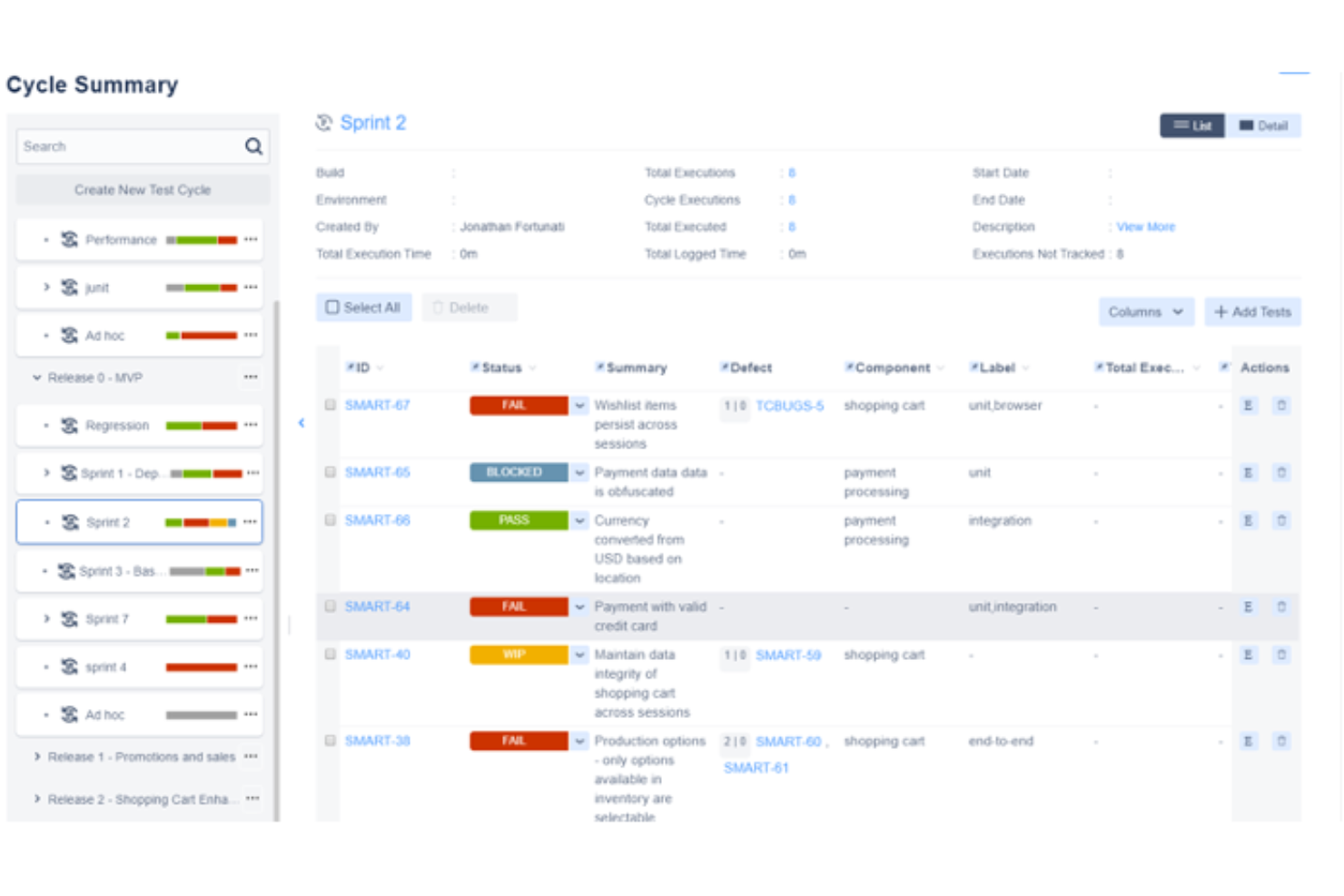
Zephyr ist eine führende Testmanagement-Plattform, die Funktionen für exploratives Testen bietet. Damit sparen Sie Zeit, verbessern die Zusammenarbeit, erhalten vollständige Transparenz und bringen hochwertige Produkte schneller auf den Markt.
Warum ich Zephyr ausgewählt habe: Zephyr steht auf meiner Liste, weil es die Zusammenarbeit zwischen Teammitgliedern fördert. Zusätzlich zu weiteren Standardfunktionen für exploratives Testen verbessert es die Kommunikation im Team. Zephyr vereint Exploratives Testmanagement, Automatisierung und BDD in einem Tool; das ermöglicht einfachen Zugriff auf wichtige Informationen sowie das Teilen von Best Practices unter Ihren Teammitgliedern.
Hervorstechende Funktionen und Integrationen von Zephyr
Hervorstechende Funktionen: Es ermöglicht die Überwachung Ihrer Testsuiten in Echtzeit. Mit Zephyr können Sie die Produktqualität durch vollständige Rückverfolgbarkeit verbessern. Die Software beschleunigt den Qualitätssicherungsprozess, indem sie die Integration mit Automatisierungs-Frameworks wie Selenium, JUnit und Nunit erlaubt.
Integrationen: Zephyr ermöglicht die Integration mit CI-Tools wie Jenkins und Bamboo. Weitere Integrationen umfassen TestComplete, ReadyAPI, Jira, Selenium, Cucumber, CrossBrowserTesting, Tricentis Tosca, Avo Assure und Jira Service Management.
Pros and Cons
Pros:
- Funktionen zur Wiederverwendbarkeit im großen Maßstab
- Projektübergreifendes Reporting
- Flexible Integration mit Drittanbieter-Automatisierungsframeworks
Cons:
- Für neue Nutzer werden detailliertere Anleitungen benötigt
- Einige Konfigurationen sind komplex
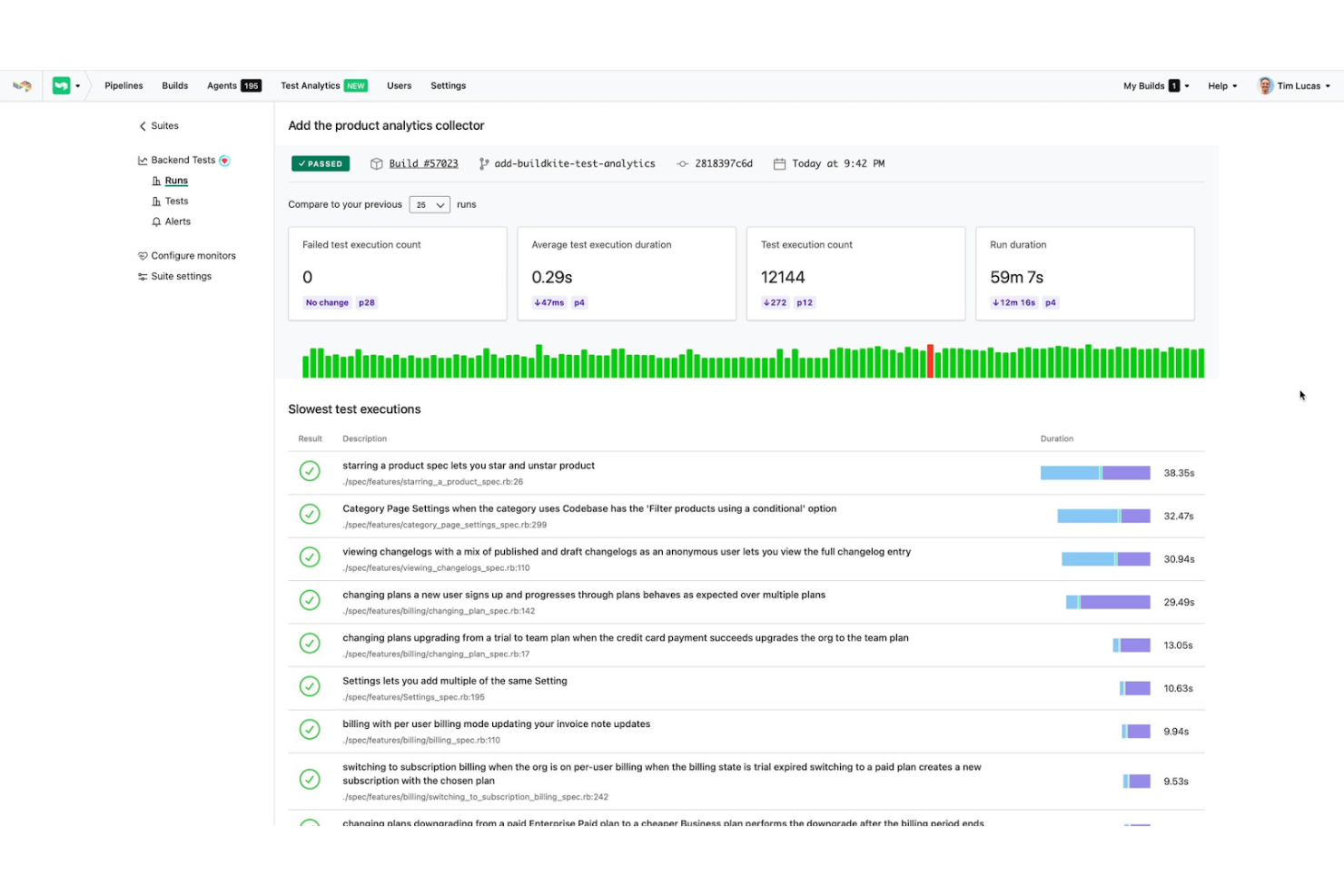
Buildkite ist eine Plattform zum Erstellen individueller CI/CD-Workflows und zur einfachen Durchführung explorativen Testens. Sie hilft Ihnen, Ihre Software schneller zu bewerten und schwer auffindbare Fehler dank ausgezeichneter Testfunktionen aufzudecken.
Warum ich Buildkite gewählt habe: Es bietet eine Überwachungsfunktion für Geschwindigkeit und Zuverlässigkeit, mit der Sie entsprechende Monitore einrichten können, um Probleme sofort zu erkennen, sobald sie auftreten. Mit diesem Tool können Sie Ihre Test-Suiten ganz einfach im Blick behalten und werden benachrichtigt, wenn etwas schief läuft.
Buildkite ermöglicht es Ihnen, Ihre langsamsten Tests zu identifizieren. Diese Erkenntnis hilft Ihnen, Tests zu erkennen, die Builds verlangsamen, sodass Sie Probleme entsprechend ihrer Schwere beheben können. Kurz gesagt bietet dieses Tool die fortschrittlichen Testanalysen, die Sie benötigen, um exploratives Testen zuverlässig und kosteneffizient durchzuführen.
Buildkite – Herausragende Funktionen und Integrationen
Herausragende Funktionen sind unter anderem Echtzeit-Überwachung von Tests und umfassende Leistungsanalysen. Buildkite ermöglicht es Ihnen, Fälle nachzuverfolgen und bietet die notwendigen Testanalysen, um fundierte Entscheidungen zu treffen. Die Leistungsanalyse sorgt für automatisches Tracing in Ihren Test-Suiten.
Zusätzlich ermöglicht Ihnen das Tool, fehleranfällige Tests zu finden und zu beheben. Sie können störende Tests einfach identifizieren und erhalten Unterstützung, um diese zu beheben.
Integrationen umfassen Docker, GitHub, Buildpipe, AWS, Git, Anka, Perforce, Golang, Lambda Deployer und Codecov.
Pros and Cons
Pros:
- Nahtlose Integration mit gängigen Programmiersprachen
- Großartige Benutzeroberfläche
- Einfache Einrichtung
Cons:
- Die Berichtserstellung für abgeschlossene Jobs sollte verbessert werden
- Erfordert mehr Anpassungen

Am besten geeignet zum automatischen Nachverfolgen von Aktionen und nahtlosen Speichern Ihrer Aufzeichnungen
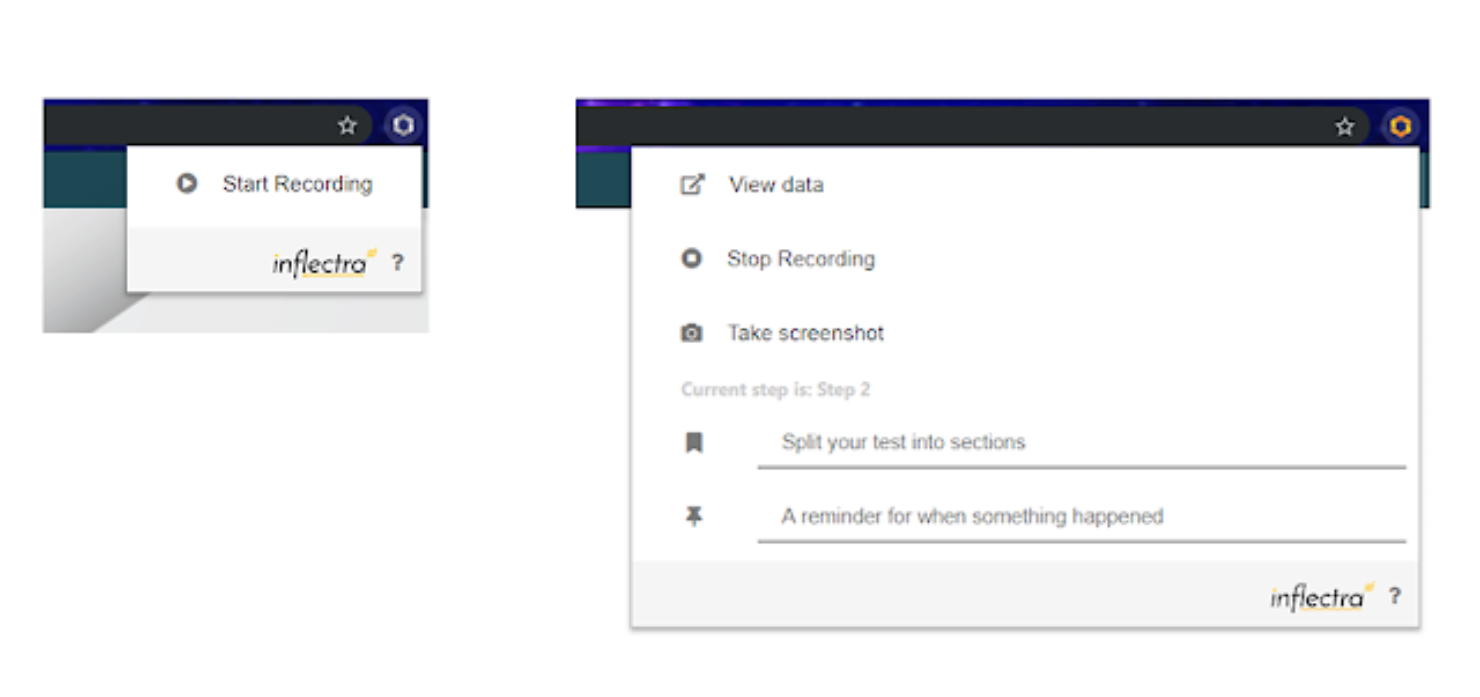
SpiraCapture, eine Browser-Erweiterung, wurde speziell entwickelt, um Ihnen bei der Durchführung von explorativem Testen zu helfen. Das Tool zeichnet Ihre Testsitzungen intelligent auf, organisiert sie und ermöglicht es Ihnen, Ihre Aufzeichnungen mühelos zu speichern.
Warum ich SpiraCapture gewählt habe: Mit diesem Tool profitieren Sie von herausragender Erfassung explorativer Tests und einfacher Notizfunktion. Sie können Testaktivitäten auf beliebigen Tabs in Edge oder Chrome erfassen und Notizen hinzufügen, um festzuhalten, wann ein spezifisches Problem auftritt. SpiraCapture organisiert die erfassten Testdaten so, dass sie leicht lesbar und verständlich sind. Die Aufzeichnungen lassen sich nach getestetem Inhalt und Testzeit kategorisieren.
Schon beim ersten Blick auf die Daten erkennen Sie leicht, was angeklickt wurde oder wo Text eingegeben wurde. Die Software geht über die Möglichkeiten anderer Tools hinaus und erstellt Aufzeichnungen, die jeder Entwickler auf einen Blick interpretieren kann.
Besondere Funktionen und Integrationen von SpiraCapture
Hervorzuhebende Funktionen sind die Erstellung von Bugs in SpiraTest und die integrierte Vorschaufunktion. Sie können Ereignisse in SpiraCapture aufzeichnen und diese als Vorfall in SpiraTest speichern. Während das Tool das Aufzeichnen übernimmt, erleichtert die Vorschau die Kommunikation: Sie zeigt an, welche Daten an SpiraTest gesendet werden – in einem einfach lesbaren Format, als übersichtliches und portables HTML.
Um dieses Tool zu nutzen, benötigen Sie SpiraTest nicht zwingend. Sie können das HTML (Testdaten) einfach kopieren und in die gewünschte Anwendung einfügen.
Integrationen sind möglich mit Jira, Microsoft Visual Studio, Jenkins, TestRail, Axosoft, Rapise, KronoDesk, IQM Studio und SpiraTest.
Pros and Cons
Pros:
- Kostenlos
- Einfach zu bedienen
- Von Nutzern gewünschte Funktionen werden umgesetzt
Cons:
- Das UI muss verbessert werden
- Einige Funktionen sind manchmal langsam

Test.io
Am besten geeignet für Tests auf verschiedenen Geräten, Betriebssystemen und Browsern
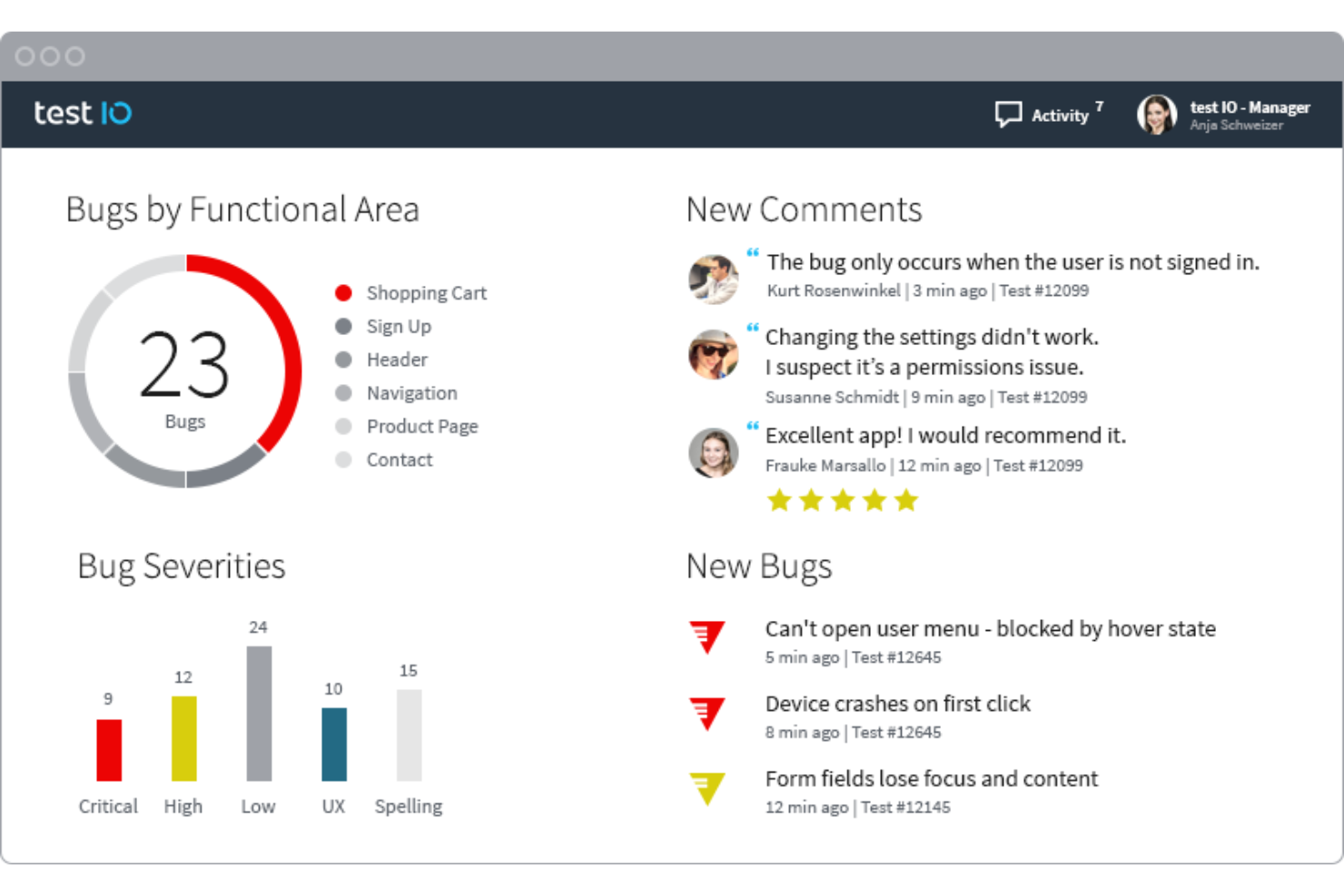
Diese Software hilft Ihnen, hochwertige Produkte zu liefern, indem sie Ihnen die Möglichkeiten bietet, explorative Tests unter realen Bedingungen durchzuführen. Test IO bietet das Testing-as-a-Service (TaaS)-Modell, das die Angebote enthält, die Sie zur Bewältigung Ihrer anspruchsvollen QA-Initiativen benötigen, um bessere Produkte schneller zu liefern.
Warum ich mich für Test IO entschieden habe: Die Software hilft Ihnen, Fehler zu identifizieren, auf die Anwender im echten Leben stoßen könnten, indem sie Sie bedarfsgerecht mit Testern aus aller Welt verbindet. Diese echten Tester unterstützen Sie dabei, vielfältige Nutzer-Test-Szenarien umzusetzen, sodass Sie Defizite vor der Veröffentlichung erkennen und Ihren Kunden das bestmögliche Erlebnis bieten können.
Ein weiterer Grund, warum ich Test IO in meine Liste aufgenommen habe, ist der Zugang zu einem vielfältigen Pool von Crowd-Testern; sie helfen, Ihre Software aus verschiedenen Blickwinkeln und über Geräte, Betriebssysteme und Browser hinweg zu überprüfen.
Test IO Herausragende Funktionen und Integrationen
Herausragende Funktionen sind unter anderem das Testen unter realen Bedingungen und schnelle Ergebnisse. Mit Test IO können Sie die Erfahrung Ihrer Nutzer sehr genau abbilden, da Sie auf eine globale Community von Testern zugreifen können. Sie erhalten eine vollständige Testabdeckung in 24 Stunden und können Ihre Ergebnisse in nur 60 Minuten bekommen.
Integrationen sind verfügbar mit Asana, Azure DevOps, Clubhouse, Git, GitHub, GitLab, Jira Server, Mantis, Redmine und Trello.
Pros and Cons
Pros:
- Einfach einzurichten
- Guter Kundensupport
- Großartige Benutzeroberfläche
Cons:
- Teuer für kleine Teams
- Manchmal treten Fehlalarme auf
Weitere Exploratory Testing Tools
Hier sind weitere Exploratory Testing Tools, die es zwar nicht in meine Topliste geschafft haben, aber dennoch einen Blick wert sind:
- Bug Magnet
E Unterstützung für exploratives Testen in Chrome und Firefox
- Testiny
Am besten geeignet zur Erweiterung und Optimierung von Testfällen mit benutzerdefinierten Feldern
- TestRail
Es Tool, um all Ihre Testdaten in Echtzeit zu visualisieren
- Telerik Test Studio
E Lösung für exploratives Testen mit minimalem Wartungsaufwand der Tests
- Testmo
Es Werkzeug für exploratives Testen mit detaillierter Notizfunktion


Auswahlkriterien für Exploratory Testing Tools
Bei der Auswahl der besten Exploratory Testing Tools für diese Liste habe ich typische Käuferbedürfnisse und Problemfelder wie Integrationsfähigkeit und Benutzerfreundlichkeit berücksichtigt. Außerdem habe ich mich an folgendem Bewertungsschema orientiert, um möglichst objektiv und strukturiert zu vergleichen:
Kernfunktionen (25% der Gesamtbewertung)
Jede Lösung musste folgende Anforderungen erfüllen, um auf die Liste zu kommen:
- Fehler im Code erkennen
- Sitzungsbasiertes Testen unterstützen
- Testdokumentation ermöglichen
- Analyse der Testabdeckung bieten
- Kollaboratives Testen erleichtern
Besondere Zusatzfunktionen (25% der Gesamtbewertung)
Um die Auswahl weiter einzuschränken, habe ich auch nach einzigartigen Features gesucht, wie beispielsweise:
- KI-basierte Testvorschläge
- Echtzeit-Kollaborationsfunktionen
- Anpassbare Dashboards
- Integration in CI/CD-Pipelines
- Erweiterte Analysen und Berichtsfunktionen
Benutzerfreundlichkeit (10% der Gesamtbewertung)
Für die Einschätzung der Usability habe ich auf folgende Kriterien geachtet:
- Intuitive Benutzeroberfläche
- Einfache Navigation
- Anpassungsmöglichkeiten
- Responsives Design
- Klare Bezeichnungen und Anleitungen
Onboarding (10% der Gesamtbewertung)
Zur Bewertung der Einstiegserfahrung pro Plattform habe ich Folgendes betrachtet:
- Verfügbarkeit von Schulungsvideos
- Zugang zu interaktiven Produkt-Touren
- Nutzung von Onboarding-Vorlagen
- Unterstützung durch Chatbots
- Angebot von Webinaren und Workshops
Kundensupport (10% der Gesamtbewertung)
Um die Kundensupport-Dienste jedes Softwareanbieters zu bewerten, habe ich Folgendes berücksichtigt:
- Verfügbarkeit von 24/7-Support
- Zugang zu einer Wissensdatenbank
- Reaktionszeit auf Anfragen
- Qualität des Live-Chat-Supports
- Verfügbarkeit von telefonischem Support
Preis-Leistungs-Verhältnis (10% der Gesamtbewertung)
Um das Preis-Leistungs-Verhältnis jeder Plattform zu bewerten, habe ich Folgendes berücksichtigt:
- Wettbewerbsfähige Preisgestaltung
- Verfügbarkeit von kostenlosen Testversionen
- Enthaltene essenzielle Funktionen
- Flexibilität der Abonnementpläne
- Kosten im Vergleich zu ähnlichen Tools
Kundenbewertungen (10% der Gesamtbewertung)
Um ein Gefühl für die allgemeine Kundenzufriedenheit zu bekommen, habe ich beim Lesen von Kundenbewertungen Folgendes berücksichtigt:
- Allgemeine Benutzerzufriedenheit
- Feedback zur Zuverlässigkeit des Tools
- Kommentare zur Benutzerfreundlichkeit
- Meinungen zum Kundensupport
- Berichte zu Integrationsmöglichkeiten
So wählen Sie Explorative Test-Tools aus
Es ist leicht, sich in langen Funktionslisten und komplexen Preisstrukturen zu verlieren. Damit Sie sich während Ihres individuellen Softwareauswahlprozesses auf das Wesentliche konzentrieren können, finden Sie hier eine Checkliste mit wichtigen Faktoren:
| Faktor | Worauf zu achten ist |
|---|---|
| Skalierbarkeit | Wird das Tool mit Ihrem Team wachsen? Berücksichtigen Sie zukünftige Anforderungen und prüfen Sie, ob das Tool eine größere Auslastung ohne zusätzliche Kosten oder Leistungseinbußen bewältigen kann. |
| Integrationen | Funktioniert es mit Ihren bestehenden Systemen? Prüfen Sie die Kompatibilität zu Ihren aktuellen Tools und ob API-Integrationen unterstützt werden. |
| Anpassungsfähigkeit | Können Sie das Tool an Ihre Arbeitsabläufe anpassen? Suchen Sie nach Tools, die Einstellungen oder Module bieten, damit Sie diese an Ihre spezifischen Bedürfnisse angleichen können. |
| Benutzerfreundlichkeit | Ist es für Ihr Team einfach zu bedienen? Berücksichtigen Sie die Lernkurve und ob Ihr Team das Tool mit minimalem Trainingsaufwand effizient nutzen kann. |
| Implementierung und Onboarding | Wie reibungslos verläuft die Einrichtung? Bewerten Sie den zeitlichen und personellen Aufwand bis zur Inbetriebnahme des Tools, inkl. der vom Anbieter bereitgestellten Unterstützung oder Schulungen. |
| Preis | Entspricht die Preisgestaltung Ihrem Budget? Vergleichen Sie die Gesamtbetriebskosten, einschließlich möglicher versteckter Gebühren, um sicherzustellen, dass diese zu Ihren finanziellen Rahmenbedingungen passen. |
| Sicherheitsvorkehrungen | Sind Ihre Daten und Ihre Privatsphäre geschützt? Prüfen Sie die Sicherheitsmaßnahmen und die Einhaltung von Datenschutzvorschriften seitens des Anbieters, um mögliche Risiken zu minimieren. |
| Support-Verfügbarkeit | Ist Unterstützung jederzeit verfügbar? Prüfen Sie auf 24/7-Supportoptionen und auf die Qualität von Ressourcen wie Dokumentationen, Foren und direkter Hilfe. |
Was sind Explorative Test-Tools?
Explorative Test-Tools sind Softwareanwendungen, die Tester dabei unterstützen, die Funktionalität von Software zu erforschen, um Fehler und Probleme zu identifizieren. Sie werden in der Regel von Qualitätssicherungsfachleuten und Softwaretestern eingesetzt und bieten einen Mehrwert, indem sie den Testprozess durch Flexibilität und Echtzeit-Feedback verbessern.
Sitzungsaufzeichnungen, Testdokumentation und Fehlerberichtsfunktionen helfen dabei, Erkenntnisse zu organisieren, die Zusammenarbeit im Team zu erleichtern und die Softwarequalität zu erhöhen. Insgesamt ermöglichen diese Tools Testern, effizient Schwachstellen und Fehler in Softwareanwendungen aufzudecken und zu dokumentieren.
Funktionen
Bei der Auswahl von explorativen Test-Tools sollten Sie auf die folgenden Schlüsselfunktionen achten:
- Sitzungsverfolgung: Zeichnet Testsitzungen auf, sodass Tester ihre Erkenntnisse dokumentieren und später darauf zurückgreifen können.
- Testdokumentation: Bietet Werkzeuge zum einfachen Schreiben und Verwalten von Testfällen und Ergebnissen, um eine umfassende Abdeckung sicherzustellen.
- Fehlermeldung: Ermöglicht das einfache Erfassen und Melden von Fehlern, inklusive Screenshots und Protokollen, für eine effektive Nachverfolgung.
- Echtzeit-Zusammenarbeit: Erlaubt Teammitgliedern, gleichzeitig zusammenzuarbeiten, wodurch die Kommunikation und Effizienz verbessert wird.
- Integrationsunterstützung: Verbindet sich mit bestehenden Tools und Systemen und sorgt so für eine nahtlose Integration in den Arbeitsablauf sowie Datenaustausch.
- Anpassungsmöglichkeiten: Ermöglicht es Testern, das Tool individuell an spezifische Testanforderungen und Abläufe anzupassen und so die Benutzerfreundlichkeit zu erhöhen.
- Analysen und Berichte: Liefert Einblicke in den Testfortschritt und die Ergebnisse, unterstützt so die Entscheidungsfindung und verbessert Teststrategien.
- Benutzerfreundlichkeit: Stellt sicher, dass das Tool einfach zu bedienen und zugänglich ist und reduziert somit die Einarbeitungszeit der Tester.
- Sicherheitsfunktionen: Schützt sensible Daten und sorgt für die Einhaltung von Datenschutzvorschriften, um Vertrauen und Integrität zu wahren.
- Onboarding-Ressourcen: Stellt Schulungsmaterialien wie Videos und Tutorials zur Verfügung, damit Nutzer schnell und effektiv starten können.
Vorteile
Der Einsatz von Exploratory-Testing-Tools bietet Ihrem Team und Unternehmen zahlreiche Vorteile. Hier sind einige, auf die Sie sich freuen können:
- Verbesserte Fehlererkennung: Erweiterte Funktionen zur Fehlerberichterstattung helfen dabei, Probleme effizienter zu identifizieren und zu dokumentieren.
- Bessere Zusammenarbeit: Tools für die Zusammenarbeit in Echtzeit ermöglichen es Ihrem Team, effektiv zusammenzuarbeiten und so die Kommunikation und Produktivität zu steigern.
- Erhöhte Flexibilität: Anpassungsoptionen erlauben es, das Tool an die individuellen Testanforderungen anzupassen und damit den Nutzen zu erhöhen.
- Zeitersparnis: Die Benutzerfreundlichkeit und intuitive Oberflächen verringern die Einarbeitungszeit, wodurch Tester schnell einsatzbereit sind.
- Datenbasierte Erkenntnisse: Analyse- und Berichtsfunktionen liefern wertvolle Einblicke in die Testergebnisse und unterstützen die strategische Entscheidungsfindung.
- Erhöhte Sicherheit: Sicherheitsfunktionen schützen sensible Daten, gewährleisten die Einhaltung von Datenschutzrichtlinien und erhalten das Vertrauen.
- Schnelles Onboarding: Der Zugang zu Schulungsmaterialien und Ressourcen hilft Ihrem Team, schnell zu starten und den Mehrwert des Tools voll auszuschöpfen.
Kosten & Preise
Die Auswahl von Exploratory-Testing-Tools erfordert ein Verständnis der verschiedenen verfügbaren Preismodelle und -pläne. Die Kosten variieren je nach Funktionen, Teamgröße, Zusatzmodulen und mehr. Die folgende Tabelle fasst gängige Pläne, deren Durchschnittspreise und typische Funktionen von Lösungen für Exploratory-Testing-Tools zusammen:
Vergleichstabelle für Pläne von Exploratory-Testing-Tools
| Plan-Typ | Durchschnittspreis | Häufige Funktionen |
|---|---|---|
| Gratisplan | $0 | Grundlegende Fehlerberichterstattung, begrenzte Sitzungsverfolgung und Community-Support. |
| Persönlicher Plan | $10-$30/user/month | Erweiterte Fehlerberichterstattung, Testdokumentation und grundlegende Integrationen. |
| Business-Plan | $40-$70/user/month | Echtzeit-Zusammenarbeit, Anpassungsmöglichkeiten sowie Analysen und Berichte. |
| Enterprise-Plan | $80-$150/user/month | Vollständige Integrationsunterstützung, erweiterte Sicherheitsfunktionen und dedizierter Support. |
FAQs zu Exploratory-Testing-Tools
Hier finden Sie Antworten auf häufig gestellte Fragen zu Exploratory-Testing-Tools:
Welches ist ein gängiges Tool für Exploratives Testen?
Zu den gängigen Tools gehören Azure Test Plans und Reflect. Diese Tools helfen, Testsitzungen zu organisieren und zu dokumentieren, sodass Ihr Team Ergebnisse leichter nachverfolgen und effektiv zusammenarbeiten kann. Berücksichtigen Sie, welche Integrationen und Funktionen Ihren Testanforderungen entsprechen.
Wie unterstützen Exploratory-Testing-Tools die Zusammenarbeit?
Diese Tools verfügen häufig über Funktionen für die Zusammenarbeit in Echtzeit, sodass Teammitglieder Erkenntnisse und Ergebnisse sofort teilen können. Dies fördert die Kommunikation im Team und sorgt dafür, dass während des Testprozesses alle auf dem gleichen Stand sind.
Können Exploratory-Testing-Tools mit anderer Software integriert werden?
Ja, viele Exploratory-Testing-Tools bieten Integrationen mit u003ca href=u0022https://thectoclub.com/tools/best-help-authoring-tools/u0022u003eHelp-Authoring-Toolsu003c/au003e sowie mit Software für Projektmanagement und Entwicklung wie JIRA und GitHub. Diese Integrationen optimieren den Workflow und stellen sicher, dass Ihr Testprozess gut auf andere Teamaktivitäten abgestimmt ist.
Sind diese Tools browserbasiert oder als Desktop-Anwendungen verfügbar?
Das Bereitstellungsmodell variiert – einige Tools sind vollständig browserbasiert und als Web-App zugänglich. Andere sind Desktop-Clients, die lokal für Offline-Zugriff oder tiefergehende Systemverfolgung laufen. Manche bieten hybride Modelle mit cloudbasierten Dashboards zur zentralen Sitzungsübersicht.
Können diese Tools parallel zu automatisierten Test-Suiten laufen?
Ja, viele sind darauf ausgelegt, automatisiertes Testing zu ergänzen, indem sie sich auf nichtskriptgesteuertes, menschliches Testen konzentrieren. Einige Tools ermöglichen sogar den direkten Vergleich zwischen automatisierten und explorativen Sitzungen. Die Integration in CI/CD-Pipelines ist weniger verbreitet, aber mit individueller Einrichtung möglich.
Integrieren Exploratory-Testing-Tools mit Issue-Trackern?
Viele Tools bieten eingebaute Verbindungen zu Plattformen wie Jira, Trello oder GitHub Issues. Dank dieser Integrationen können Tester Bugs direkt aus der Testsession heraus melden. Einige Tools unterstützen je nach API sogar eine beidseitige Synchronisierung.
Wie geht es weiter:
Wenn Sie sich gerade mit der Recherche zu Exploratory-Testing-Tools beschäftigen, nehmen Sie Kontakt zu einem SoftwareSelect-Berater auf und erhalten Sie kostenlose Empfehlungen.
Sie füllen ein Formular aus und führen ein kurzes Gespräch, in dem Ihre Anforderungen im Detail ermittelt werden. Anschließend erhalten Sie eine Auswahl an Software-Lösungen, die Sie prüfen können. Die Berater begleiten Sie sogar durch den gesamten Kaufprozess, einschließlich Preisverhandlungen.