
19 Beste Cloud-Integrationsplattformen im Test 2026

10 Beste Cloud-Integrationsplattformen: Shortlist
Hier ist meine Auswahl der 10 besten Softwarelösungen aus den insgesamt 20 getesteten Tools.


Cloud-Integrationsplattformen sind wertvolle Ressourcen für jedes Unternehmen. Mit der richtigen Software können Teams die Datenkonnektivität verbessern und die Effizienz der Arbeitsabläufe steigern. Die richtige Cloud-Integrationsplattform zu finden, kann jedoch eine Herausforderung sein – besonders bei der Vielzahl verfügbarer Optionen.
Auf Basis meiner Erfahrungen mit Revenue-Operations-Software habe ich mehrere der führenden Cloud-Integrationsplattformen getestet und verglichen. Die Ergebnisse habe ich in ausführlichen Rezensionen zusammengestellt, um Ihnen die Suche nach der passenden Software zu erleichtern.
Warum Sie unseren Software-Bewertungen vertrauen können
Wir testen und bewerten Revenue-Operations-Software seit 2022. Als Experten im Bereich Revenue Operations wissen wir, wie kritisch und schwierig die Auswahl der richtigen Software ist. Wir investieren viel Zeit in gründliche Recherchen, um unserer Zielgruppe bei besseren Software-Kaufentscheidungen zu helfen.
Wir haben über 2.000 Tools für verschiedene Revenue-Operations-Anwendungsfälle getestet und mehr als 1.000 ausführliche Software-Bewertungen verfasst. Erfahren Sie, wie wir Transparenz sicherstellen und werfen Sie einen Blick auf unsere Software-Bewertungsmethodik.
Table of Contents
- Beste Software Kurzliste
- Warum Sie uns vertrauen können
- Spezifikationen vergleichen
- Bewertungen
- Weitere Cloud-Integrationsplattformen
- Ähnliche Bewertungen
- Auswahlkriterien
- So wählen Sie aus
- Trends bei Cloud-Integrationsplattformen
- Was ist eine Cloud-Integrationsplattform?
- Funktionen
- Vorteile
- Kosten & Preise
- FAQs
Zusammenfassung der besten Cloud-Integrationsplattformen
Diese Vergleichstabelle fasst die Preisinformationen meiner Top-Auswahl an Cloud-Integrationsplattformen zusammen und hilft Ihnen, das beste Tool für Ihr Budget und Ihre geschäftlichen Anforderungen zu finden.
| Tool | Best For | Trial Info | Price | ||
|---|---|---|---|---|---|
| 1 | Best for supply chain orchestration | Free demo available | Pricing upon request | Website | |
| 2 | Best for cloud data integration | Free plan available | From $79/month (billed annually) | Website | |
| 3 | Best for visual integration building | Free trial available | From $1,595/year | Website | |
| 4 | Best for automation simplicity | Free demo available | From $9/10,000 credits/month | Website | |
| 5 | Best for low-code solutions | Free demo available | From $149/month | Website | |
| 6 | Best for complex workflows | 14-day free trial available | From $595/month | Website | |
| 7 | Best for AI-driven integration | Free demo available | Pricing upon request | Website | |
| 8 | Best for API creation | Free trial + free demo available | Pricing upon request | Website | |
| 9 | Best for NetSuite users | 30-day free trial + free demo available | Pricing upon request | Website | |
| 10 | Best for application integration | Free plan available | From $13/month (billed annually) | Website |
-

Site24x7
Visit WebsiteThis is an aggregated rating for this tool including ratings from Crozdesk users and ratings from other sites.4.6 -
Docker
Visit WebsiteThis is an aggregated rating for this tool including ratings from Crozdesk users and ratings from other sites.4.6 -
Pulumi
Visit WebsiteThis is an aggregated rating for this tool including ratings from Crozdesk users and ratings from other sites.4.8





Bewertungen der besten Cloud-Integrationsplattformen
Unten finden Sie meine ausführlichen Zusammenfassungen der besten Cloud-Integrationsplattformen, die es auf meine Shortlist geschafft haben. In meinen Bewertungen erhalten Sie einen umfassenden Einblick in die wichtigsten Funktionen, Vor- und Nachteile, Integrationen und idealen Einsatzbereiche jedes Tools, damit Sie die beste Lösung für sich finden.

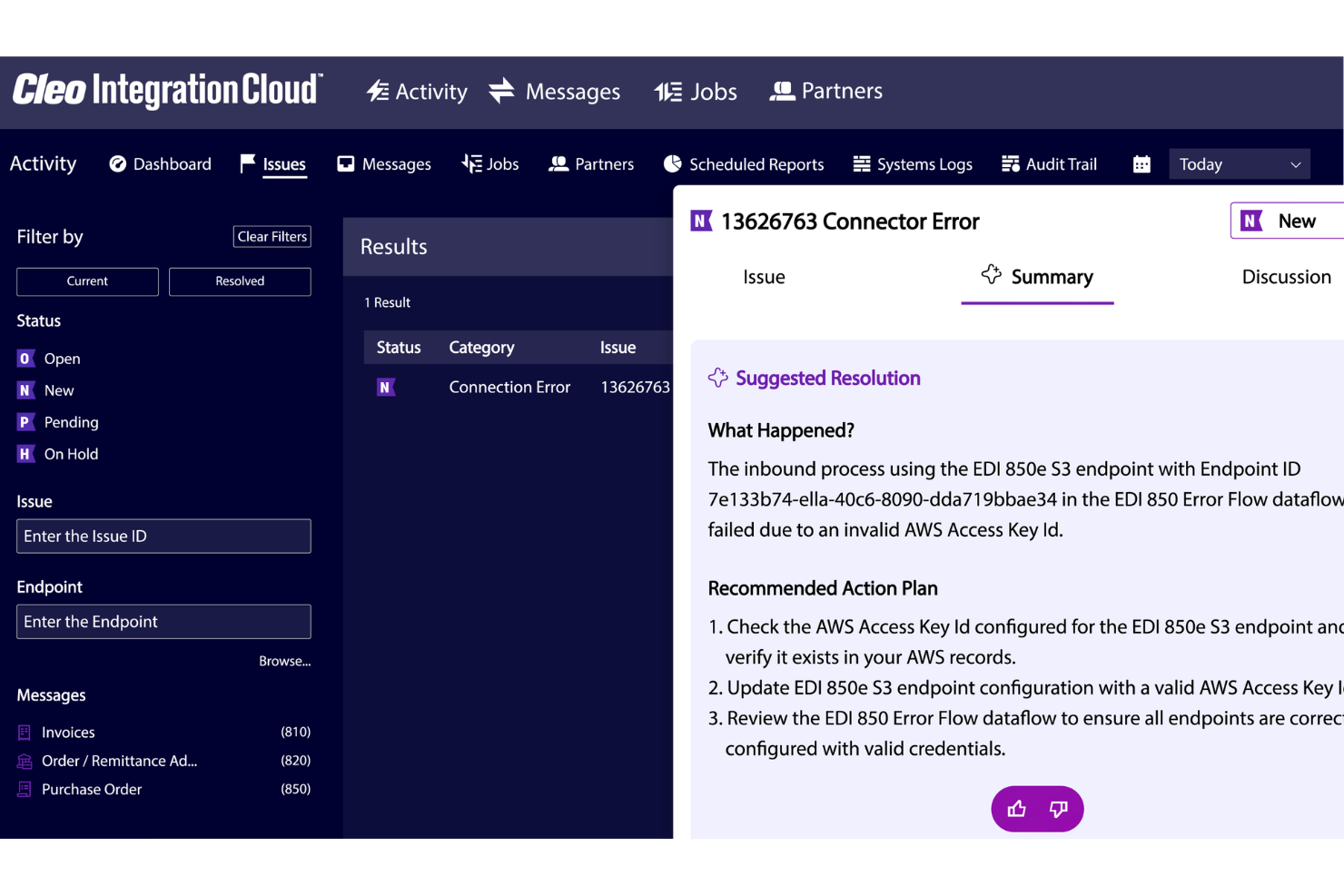
For businesses seeking to optimize their supply chain orchestration, Cleo Integration Cloud offers a compelling solution. It's designed to connect you with thousands of trading partners across various industries, such as logistics, manufacturing, retail, and healthcare. The platform addresses challenges like automated order intake and procurement orchestration, providing the tools needed to enhance operational efficiency and compliance.
Why I Picked Cleo Integration Cloud
I picked Cleo Integration Cloud for its strong focus on supply chain orchestration, which is critical for businesses looking to enhance their cloud integration capabilities. The platform's EDI compliance and API integration enable seamless connections to a vast network of trading partners. Additionally, the real-time visibility feature provides crucial insights to inform decisions and improve overall supply chain efficiency.
Cleo Integration Cloud Key Features
In addition to isupply chain orchestration, Cleo Integration Cloud offers:
- Automated Order Intake: Streamlines the process of receiving and processing orders, reducing manual intervention.
- Procurement Orchestration: Facilitates efficient procurement processes by automating routine tasks and ensuring compliance.
- Chargeback Prevention: Minimizes financial losses by identifying and addressing potential chargebacks before they occur.
- Pre-Built Integrations: Offers ready-to-use connectors for popular applications like Dynamics 365, NetSuite, and SAP, simplifying the integration process.
Cleo Integration Cloud Integrations
Cleo Integration Cloud integrations include Dynamics 365, NetSuite, SAP, FedEx, UPS, and connectors for ecommerce platforms, CRM/ERP systems, TMS/WMS platforms, databases, and cloud storage solutions.
Pros and Cons
Pros:
- Quick setup for EDI mappings compared to traditional integration platforms
- Reduces processing time with automated data transformation and integration flows
- Strong EDI mapping tools support fast integrations across multiple systems
Cons:
- Complex integration features require training and deeper technical understanding
- Some integrations require troubleshooting due to terminology and configuration complexity


Skyvia is a cloud data integration platform designed for businesses that need to connect and manage data across multiple cloud services. It caters to data analysts and IT professionals looking to automate workflows and ensure data connectivity.
Why I picked Skyvia: It provides cloud data integration, allowing your team to connect various cloud services easily. It offers a user-friendly interface that simplifies the integration process. With features like data backup and data import/export, Skyvia ensures your data is accessible and secure. Its ability to handle complex data transformations makes it a reliable choice for data-centric businesses.
Standout features & integrations:
Features include data backup capabilities, allowing your team to secure information. Skyvia provides data import/export options, making data management more straightforward. Its data transformation tools help you modify and adapt data to meet your business needs.
Integrations include Salesforce, QuickBooks Online, Google BigQuery, HubSpot, Dynamics 365, Shopify, MySQL, PostgreSQL, Oracle, and SQL Server.
Pros and Cons
Pros:
- Strong cloud data focus
- Simple data import/export
- Secure data backup options
Cons:
- May require technical skills
- No mobile app support

Cyclr is an embedded integration platform designed for B2B SaaS companies. It offers a low-code solution that simplifies integration processes and enhances operational efficiency. It provides a user-friendly orchestration layer and an extensive library of API connectors, making it ideal for SaaS providers looking to improve their integration capabilities.
Why I picked Cyclr: It offers a low-code approach, allowing your team to create integrations without extensive coding knowledge. Its visual integration builder provides a straightforward way to design and manage workflows. The platform's vast library of over 500 API connectors sets it apart, enabling fast and flexible data connections. Cyclr's embedding options allow you to customize the integration experience, making it versatile for various business needs.
Standout features & integrations:
Features include a user-friendly orchestration layer that simplifies workflow management. The platform supports creating custom connectors, giving your team flexibility in integration. It provides white-labeled embedding options, allowing you to tailor the user experience to match your brand.
Integrations include Salesforce, HubSpot, Shopify, Microsoft Dynamics, QuickBooks, Xero, Slack, Zendesk, Mailchimp, and Stripe.
Pros and Cons
Pros:
- Extensive API connector library
- Flexible embedding options
- Low-code integration builder
Cons:
- Limited to B2B SaaS focus
- Learning curve for advanced features


Make is a cloud-based automation platform designed to help businesses automate workflows and connect different applications. It caters to small and medium-sized teams looking to simplify processes and reduce manual tasks through easy-to-use automation tools.
Why I picked Make: It offers a straightforward approach to automation, making it accessible for teams without deep technical expertise. Its visual builder lets your team design workflows with ease. The platform supports various applications, ensuring flexibility when connecting your tools. Make's automation capabilities are ideal for simplifying routine tasks, allowing your team to focus on more strategic work.
Standout features & integrations:
Features include a visual workflow builder that simplifies creating automation. Make supports conditional logic, helping your team create dynamic workflows. It offers detailed analytics, providing insights into your automated processes.
Integrations include Google Workspace, Slack, Trello, Dropbox, Shopify, Mailchimp, Salesforce, Zendesk, and QuickBooks.
Pros and Cons
Pros:
- Simple automation setup
- Supports conditional logic
- Provides detailed analytics
Cons:
- Not ideal for larger teams
- No offline capabilities


Linx is a low-code development platform for IT professionals and developers who need to quickly automate processes and integrate applications. It also serves businesses looking to enhance their operational efficiency by simplifying the development and deployment of backend applications.
Why I picked Linx: It offers a low-code environment that simplifies the development process for IT teams. Its drag-and-drop interface allows your team to automate processes with minimal coding. The platform's pre-built plugins help accelerate application integration. Linx is designed to be scalable, supporting your organization's growth and changing needs.
Standout features & integrations:
Features include a drag-and-drop designer that lets your team build applications without extensive coding. The platform provides pre-built plugins to speed up the integration process. Linx supports real-time debugging, allowing you to identify and fix issues during development quickly.
Integrations include Amazon S3, Microsoft SQL Server, MySQL, PostgreSQL, Oracle, Microsoft Dynamics 365, Salesforce, Azure, AWS Lambda, and Google Cloud Storage.
Pros and Cons
Pros:
- Low-code development environment
- Supports real-time debugging
- Scalable for growing needs
Cons:
- Requires technical expertise
- Limited to backend applications


Tray.ai is a cloud integration platform for businesses requiring advanced automation and connectivity across applications. It serves enterprises and growing companies looking to automate complex workflows and enhance operational efficiency through integration.
Why I picked Tray.ai: Tray.ai excels in handling complex workflows, offering a flexible platform for your team to create intricate automation processes. Its low-code interface allows you to build workflows without extensive coding knowledge. Tray.ai's ability to connect applications through APIs makes it versatile for various business needs. The platform's scalability ensures it can handle growing business demands efficiently.
Standout features & integrations:
Features include a visual workflow builder that simplifies the creation of complex processes. Tray.io offers real-time data processing, ensuring your team has up-to-date information. Its error-handling capabilities help identify and resolve issues quickly, maintaining smooth operations.
Integrations include Salesforce, Slack, Shopify, Marketo, HubSpot, Zendesk, Google Sheets, Microsoft Dynamics 365, ServiceNow, and QuickBooks.
Pros and Cons
Pros:
- Real-time data processing
- Low-code interface for ease
- Handles complex workflows well
Cons:
- Limited offline support
- Initial setup complexity


SnapLogic is a cloud-based integration platform designed for enterprises that require advanced data integration and application connectivity. It serves businesses looking to enhance digital transformation through intelligent integration and automation solutions.
Why I picked SnapLogic: It incorporates AI-driven integration, offering tools that leverage machine learning to optimize data processes. Its intuitive interface supports quick setup and management of integrations. The platform's scalability is ideal for handling large volumes of data across complex workflows. SnapLogic's analytics capabilities provide valuable insights into integration performance, helping your team make informed decisions.
Standout features & integrations:
Features include AI-driven insights that help optimize integration processes. SnapLogic offers a scalable architecture that supports large data volumes. The platform provides detailed analytics, giving your team a deeper understanding of workflow efficiency.
Integrations include Salesforce, SAP, Oracle, Microsoft Dynamics 365, Amazon Web Services, Google Cloud Platform, Workday, ServiceNow, Marketo, and Slack.
Pros and Cons
Pros:
- Provides detailed analytics
- Supports complex workflows
- Quick setup and management
Cons:
- Primarily enterprise-focused
- Limited offline capabilities


Jitterbit is an integration platform focused on connecting applications and automating workflows for businesses, emphasizing API creation. It serves enterprises looking to enhance digital operations by integrating diverse applications and creating custom APIs for efficient data exchange.
Why I picked Jitterbit: It excels in API creation, offering tools that enable your team to design, test, and manage APIs effectively. Its intuitive interface simplifies the process of connecting applications and automating workflows. Jitterbit supports real-time data processing, ensuring your team can access current data. The platform's scalability ensures it can meet the needs of growing businesses across various industries.
Standout features & integrations:
Features include an intuitive API design interface that makes creating and managing APIs straightforward for your team. Jitterbit offers real-time data processing, which helps keep your operations running smoothly. Its scalability supports business growth, adapting to increased data and user demands.
Integrations include Salesforce, SAP, Oracle, Microsoft Dynamics 365, NetSuite, Workday, ServiceNow, Marketo, Amazon Web Services, and Google Cloud Platform.
Pros and Cons
Pros:
- Strong API design capabilities
- Real-time data processing
- Scalable for growing businesses
Cons:
- Initial setup complexity
- Limited offline functionality


Celigo is an integration platform that simplifies application connectivity and business process automation. It mainly focuses on NetSuite users and serves mid to large-sized companies that aim to enhance operational efficiency through cloud applications and process automation.
Why I picked Celigo: It is tailored for NetSuite users and provides integration with this ERP system. The platform offers intuitive tools that simplify complex integrations and automate workflows. Its pre-built templates make it easy for your team to set up integrations quickly. Celigo's flexibility allows you to customize workflows to meet specific business needs, making it versatile.
Standout features & integrations:
Features include pre-built integration templates, reducing your team's time setting up connections. Celigo offers automation tools that help streamline business processes. The platform provides customization options, allowing your team to tailor workflows to fit unique operational needs.
Integrations include Salesforce, Shopify, Amazon, Zendesk, Google Workspace, Jira, Slack, QuickBooks, HubSpot, and Microsoft Dynamics 365.
Pros and Cons
Pros:
- Pre-built integration templates
- Customizable workflows
- Supports complex automation
Cons:
- Limited to cloud applications
- May need technical expertise


Albato is an integration platform that provides tools for automating workflows and connecting various applications. It serves small to medium-sized businesses looking to improve their operational efficiency through automation and integration.
Why I picked Albato: The platform offers customizable workflows, allowing your team to automate tasks specific to your business needs. Albato also provides extensive support for local applications, making integration more straightforward.
Standout features & integrations:
Features include a user-friendly interface that simplifies the automation process for your team. Albato allows for the creation of customizable workflows, enabling tailor-made automation. The platform supports real-time data updates, ensuring that your team has access to the latest information.
Integrations include Google Sheets, Telegram, Bitrix24, amoCRM, Yandex, VKontakte, WhatsApp, WooCommerce, Facebook, and Slack.
Pros and Cons
Pros:
- Tailored for local businesses
- Customizable workflows
- Real-time data updates
Cons:
- Requires initial setup time
- May need technical expertise
Weitere Cloud-Integrationsplattformen
Hier sind einige weitere Optionen für Cloud-Integrationsplattformen, die es nicht auf meine Shortlist geschafft haben, aber dennoch einen Blick wert sind.
- Frends
For regional compliance
- Alumio
For B2B ecommerce
- Blendr.io
For SaaS integrations
- Boomi
For low-code iPaaS
- Workato
For enterprise automation
- MuleSoft Anypoint Platform
For API management
- Cloud Elements
For unified APIs
- TIBCO Cloud Integration
For hybrid environments
- Informatica Intelligent Cloud Services
For data governance
- SAP Integration Suite
For SAP ecosystem


Kriterien zur Auswahl von Cloud-Integrationsplattformen
Bei der Auswahl der besten Cloud-Integrationsplattformen für diese Liste habe ich auf die typischen Bedürfnisse und Herausforderungen von Käufern geachtet, wie etwa Probleme bei der Datensynchronisierung oder Komplexität der Integration. Darüber hinaus habe ich folgendes Bewertungsraster genutzt, um eine strukturierte und faire Beurteilung sicherzustellen.
Kernfunktionalität (25 % der Gesamtbewertung)
Um in diese Liste aufgenommen zu werden, musste jede Lösung folgende Anwendungsfälle abdecken:
- Datenintegration zwischen verschiedenen Anwendungen
- Automatisierte Workflows
- Echtzeit-Datensynchronisierung
- API-Verwaltung
- Funktionen zur Datenumwandlung
Zusätzliche herausragende Funktionen (25 % der Gesamtbewertung)
Um die Auswahl weiter einzuschränken, habe ich auch auf besondere Funktionen Wert gelegt, wie zum Beispiel:
- KI-gestützte Analysen
- Anpassbare Vorlagen
- Erweiterte Sicherheitsmaßnahmen
- Multi-Cloud-Kompatibilität
- Hohe Skalierbarkeit
Benutzerfreundlichkeit (10 % der Gesamtwertung)
Um einen Eindruck von der Benutzerfreundlichkeit jedes Systems zu gewinnen, habe ich Folgendes berücksichtigt:
- Intuitives Oberflächendesign
- Niedrige Lernkurve
- Effiziente Navigation
- Klare Workflow-Visualisierung
- Reaktionsschnelle Performance
Onboarding (10 % der Gesamtwertung)
Um die Onboarding-Erfahrung der einzelnen Plattformen zu bewerten, habe ich Folgendes berücksichtigt:
- Verfügbarkeit von Schulungsvideos
- Interaktive Produkttouren
- Zugriff auf Vorlagen
- Unterstützende Chatbots
- Umfassende Webinare
Kundensupport (10 % der Gesamtwertung)
Um die Kundensupport-Dienste der Software-Anbieter zu bewerten, habe ich Folgendes einbezogen:
- 24/7 Support-Verfügbarkeit
- Vielfältige Kontaktmöglichkeiten
- Schnelle Antwortzeiten
- Kompetentes Supportpersonal
- Zugang zu einer Support-Community
Preis-Leistungs-Verhältnis (10 % der Gesamtwertung)
Um das Preis-Leistungs-Verhältnis jeder Plattform zu bewerten, habe ich Folgendes berücksichtigt:
- Wettbewerbsfähige Preisgestaltung
- Transparente Kostenstruktur
- Flexible Zahlungsoptionen
- Enthaltene essentielle Funktionen
- Rabatte bei jährlicher Abrechnung
Kundenbewertungen (10 % der Gesamtwertung)
Um ein Gefühl für die allgemeine Kundenzufriedenheit zu bekommen, habe ich beim Lesen von Kundenbewertungen auf Folgendes geachtet:
- Positive Feedback-Trends
- Häufig genannte Probleme
- Berichtete Benutzerfreundlichkeit
- Zufriedenheit mit dem Support
- Wahrnehmung des Mehrwerts
Wie man eine Cloud-Integrationsplattform auswählt
Es ist leicht, sich in langen Funktionslisten und komplexen Preismodellen zu verlieren. Hier ist eine Checkliste mit Faktoren, die Ihnen helfen, beim Auswahlprozess Ihrer individuellen Softwareauswahl fokussiert zu bleiben.
| Faktor | Worauf achten? |
| Skalierbarkeit | Stellen Sie sicher, dass die Plattform mit Ihrem Unternehmen wachsen kann. Achten Sie auf Funktionen, die für ein erhöhtes Datenvolumen und mehr Nutzer ausgelegt sind, ohne die Leistung zu beeinträchtigen. |
| Integrationen | Überprüfen Sie, ob die Plattform mit Ihren bestehenden Tools, wie CRM-, ERP- oder Marketing-Software, kompatibel ist. Nahtlose Verbindungen sparen Ihrem Team Zeit und Aufwand. Abhängig von Unternehmensart und Größe könnten B2B Multi-Cloud-Plattformen die beste Lösung sein. |
| Anpassbarkeit | Die Anforderungen Ihres Teams sind einzigartig. Wählen Sie eine Plattform, die es ermöglicht, Workflows und Prozesse individuell an Ihre spezifischen betrieblichen Anforderungen anzupassen. |
| Benutzerfreundlichkeit | Entscheiden Sie sich für benutzerfreundliche Oberflächen, die keine umfangreichen Schulungen erfordern. So kann Ihr Team schnell starten und Ausfallzeiten werden reduziert. |
| Budget | Vergleichen Sie die Preismodelle, um sicherzugehen, dass die Plattform in Ihr finanzielles Konzept passt. Achten Sie auf versteckte Kosten wie Einrichtungsgebühren oder zusätzliche Kosten für Extra-Features. |
| Sicherheitsvorkehrungen | Datenschutz ist essenziell. Achten Sie auf Plattformen, die Sicherheitsstandards wie Verschlüsselung, Compliance-Zertifizierungen und regelmäßige Audits bieten. |
Trends bei Cloud-Integrationsplattformen
In meinen Recherchen habe ich zahlreiche Produktupdates, Pressemitteilungen und Release-Logs verschiedener Anbieter von Cloud-Integrationsplattformen ausgewertet. Hier sind einige der aufkommenden Trends, die ich besonders beobachte.
- KI-unterstützte Integration: KI optimiert die Datenverarbeitung und automatisiert wiederkehrende Aufgaben, wodurch Integrationen effizienter werden. Einige Anbieter integrieren KI, um Einblicke zu bieten und die Effizienz der Arbeitsabläufe zu steigern.
- Low-Code/No-Code-Entwicklung: Immer mehr Plattformen bieten Low-Code- oder No-Code-Umgebungen, sodass auch Nicht-Entwickler Integrationen erstellen und verwalten können. Dieser Trend macht Integrationstools einer breiteren Nutzergruppe zugänglich.
- Datenschutz und Compliance: Mit zunehmenden Datenschutzvorschriften konzentrieren sich Plattformen auf Funktionen, die die Einhaltung von Gesetzen wie der DSGVO oder CCPA sicherstellen. Diese Funktionen sind entscheidend für Unternehmen, die sensible Daten über Ländergrenzen hinweg verarbeiten.
- Integration von IoT-Geräten: Mit dem wachsenden Einsatz von IoT beginnen Integrationsplattformen, IoT-Datenverarbeitung zu unterstützen. So können Unternehmen Daten verschiedener intelligenter Geräte und Sensoren verbinden und verwalten.
- Echtzeit-Analytik: Die Nachfrage nach Plattformen für Echtzeitdatenanalysen wächst und hilft Unternehmen, schnelle und fundierte Entscheidungen zu treffen. Dies ist besonders relevant für Firmen, die unmittelbare Erkenntnisse aus ihren integrierten Daten benötigen.
Was ist eine Cloud-Integrationsplattform?
Eine Cloud-Integrationsplattform ist ein Tool, das verschiedene Anwendungen und Datenquellen miteinander verbindet, um einen reibungslosen Datenfluss und Prozessautomatisierung zu ermöglichen. IT-Fachkräfte, Datenanalysten und Geschäftsleiter nutzen diese Tools in der Regel, um die betriebliche Effizienz und das Datenmanagement zu verbessern.
Echtzeit-Datensynchronisierung, Low-Code/No-Code-Entwicklung und KI-unterstützte Integration helfen, Arbeitsabläufe zu optimieren und die Einhaltung von Datenschutzvorschriften sicherzustellen. Ähnlich wie SaaS-Integrationsplattformen ermöglichen diese Tools Unternehmen, unterschiedliche Systeme zu verbinden und komplexe Prozesse effizient zu automatisieren.
Funktionen von Cloud-Integrationsplattformen
Beim Auswählen einer Cloud-Integrationsplattform sollten Sie auf die folgenden Schlüsselfunktionen achten.
- Echtzeit-Datensynchronisierung: Aktualisiert Daten sofort über verbundene Systeme hinweg und gewährleistet Zugriff auf die aktuellsten Informationen.
- Low-Code/No-Code-Entwicklung: Ermöglicht nicht-technischen Nutzern die Erstellung und Verwaltung von Integrationen mit minimalem Programmieraufwand.
- KI-unterstützte Integration: Optimiert die Datenverarbeitung und automatisiert wiederkehrende Aufgaben mithilfe künstlicher Intelligenz.
- Datenschutz und Compliance: Stellt sicher, dass Integrationen den Datenschutzbestimmungen entsprechen und sensible Informationen schützen.
- API-Management: Erleichtert die Erstellung, Bereitstellung und Verwaltung von APIs für einen effizienten Datenaustausch.
- Skalierbarkeit: Unterstützt das Unternehmenswachstum, indem sie größere Datenmengen und mehr Nutzer ohne Leistungseinbußen bewältigt.
- IoT-Datenintegration: Verarbeitet und verwaltet Daten aus Internet-of-Things-Geräten für erweiterte Anwendungsfälle.
- Visueller Workflow-Builder: Bietet eine intuitive Oberfläche zur Gestaltung und Verwaltung von Arbeitsabläufen.
- Erweiterte Sicherheitsmaßnahmen: Schützt Daten während Übertragungen und Integrationen durch Verschlüsselung und Sicherheitsprotokolle.
- Detaillierte Analysen: Liefert Einblicke in die Leistung von Integrationen und den Datenfluss zur fundierten Entscheidungsfindung.
- Vorgefertigte Konnektoren und Adapter: Enthält gebrauchsfertige Konnektoren für beliebte Cloud-Anwendungen, um die Einrichtungszeit zu verkürzen.
- Ereignisgesteuerte Architektur: Unterstützt durch reale Ereignisse ausgelöste Integrationsabläufe, um die Automatisierung zu erweitern.
- Dashboards: Zentralisiert die Überwachung von Integrationsabläufen und Leistungskennzahlen.
- EDI (Electronic Data Interchange): Optimiert Kommunikation und Datenaustausch, insbesondere in der Lieferkette und Logistik.
- End-to-End-Integrationslösungen: Verwaltet den gesamten Lebenszyklus von Integrationen und eingebettetem iPaaS, von der Bereitstellung bis zur Überwachung und Optimierung.
- Messaging-Funktionen: Bietet sichere und effiziente Nachrichtenübermittlung zwischen Anwendungen und Systemen.
- Middleware-Integration: Überbrückt Altsysteme mit modernen Anwendungen und sichert so die Kompatibilität sowie einen reibungslosen Datenfluss.
- Supply-Chain-Integration: Verbindet Systeme zur Optimierung der Lieferkettenprozesse und reduziert Ineffizienzen.
- Anwendungsprogrammierschnittstellen (APIs): Unterstützt die Erstellung und Verwaltung von APIs für nahtlose Interaktionen zwischen Systemen.
Vorteile von Cloud-Integrationsplattformen
Die Implementierung einer Cloud-Integrationsplattform bringt Vorteile für Ihr Team und Ihr Unternehmen. Hier sind einige, auf die Sie sich freuen können.
- Verbesserte Datengenauigkeit: Die Synchronisation von Daten in Echtzeit stellt sicher, dass alle auf die aktuellsten Informationen zugreifen und Fehler reduziert werden.
- Gesteigerte Effizienz: Mit Low-Code/No-Code-Entwicklung kann Ihr Team Integrationen schnell einrichten und so Zeit und Ressourcen sparen.
- Verbesserte Compliance: Funktionen wie Datenschutz und Einhaltung von Vorschriften unterstützen Ihr Unternehmen dabei, notwendige Regularien einzuhalten und sensible Daten zu schützen.
- Skalierbarkeit für Wachstum: Die Skalierbarkeit der Plattform unterstützt steigende Daten- und Benutzeranforderungen und passt sich dem Wachstum Ihres Unternehmens an.
- Bessere Entscheidungsfindung: Detaillierte Analysen liefern Einblicke in Datenflüsse und Integrationsleistungen und unterstützen Sie bei fundierten Entscheidungen.
- Kosteneinsparungen: Die Automatisierung von Workflows durch KI-gestützte Integration reduziert den manuellen Aufwand und senkt Betriebskosten.
- Erweiterte Möglichkeiten: Die Integration von IoT-Daten eröffnet neue Chancen für das Management von intelligenten Geräten und Sensoren und erweitert das Potenzial Ihres Unternehmens.
Kosten & Preise von Cloud-Integrationsplattformen
Die Auswahl einer Cloud-Integrationsplattform erfordert ein Verständnis der verschiedenen Preismodelle und Tarife. Die Kosten variieren je nach Funktionen, Teamgröße, Erweiterungen und weiteren Faktoren. Die folgende Tabelle fasst gängige Modelle, deren Durchschnittspreise und typische Funktionen von Cloud-Integrationsplattformen zusammen.
Tarifvergleichstabelle für Cloud-Integrationsplattformen
| Tarifart | Durchschnittlicher Preis | Häufige Funktionen |
| Gratis-Tarif | $0 | Basis-Integrationen, Community-Support und begrenzte Aufgaben. |
| Persönlicher Tarif | $10-$30 /Benutzer /Monat | Mehr Integrationen, Echtzeit-Datensynchronisation und einfache Analysen. |
| Geschäftstarif | $50-$150 /Benutzer /Monat | Erweiterte Integrationen, API-Zugang und erhöhter Schutz. |
| Unternehmenstarif | $200-$500 /Benutzer /Monat | Individuelle Integrationen, dedizierter Support und Compliance-Tools. |
Cloud-Integrationsplattform FAQs
Hier finden Sie Antworten auf häufig gestellte Fragen zu Cloud-Integrationsplattformen:
Was sind die Anforderungen an Cloud-Integrationsplattformen?
Für eine erfolgreiche Cloud-Integration sollten Sie mit einer gründlichen Bewertung und Planung beginnen. Ihr Team sollte Datensicherheit priorisieren und die richtigen API-Integrationstools wählen. Die Standardisierung von Datenformaten und das Design für Skalierbarkeit sind ebenfalls entscheidend. Alles zu dokumentieren stellt sicher, dass Prozesse klar und wiederholbar sind.
Was beinhaltet eine Strategie für Cloud-Integrationsplattformen?
Eine Cloud-Integrationsstrategie umfasst die Verbindung von cloudbasierten und lokalen Anwendungen für einen reibungslosen Datenfluss. Dies erfolgt häufig durch APIs und iPaaS-Software für Anwendungs-, Daten- und Hybridintegration. Die Umsetzung dieser Strategien sorgt dafür, dass Ihr Team eine effiziente Kommunikation zwischen den Systemen gewährleistet.
Wie verbessert eine Cloud-Integrationsplattform die Geschäftsprozesse?
Cloud-Integration optimiert Geschäftsprozesse durch Echtzeit-Datenzugriff und verbesserte Zusammenarbeit. Durch die Vereinfachung des Datenflusses zwischen verschiedenen Anwendungen kann Ihr Team fundierte Entscheidungen schneller treffen und die Effizienz und Produktivität im Unternehmen steigern.
Welche Herausforderungen können bei einer Cloud-Integrationsplattform auftreten?
Typische Herausforderungen sind Datenkompatibilitätsprobleme, Integrationskomplexität und mögliche Sicherheitsrisiken. Auch die Skalierung von Integrationen bei Unternehmenswachstum kann anspruchsvoll sein. Wählen Sie dafür flexible und skalierbare Integrationslösungen, die Ihren Anforderungen entsprechen.
Wie unterstützt eine Cloud-Integrationsplattform die digitale Transformation?
Die Cloud-Integration unterstützt die digitale Transformation, indem sie einen nahtlosen Datenaustausch zwischen Plattformen ermöglicht. Dadurch kann Ihr Team fortschrittliche Analysen und Automatisierungstools nutzen, was Innovation und Effizienz fördert. Die Integration von Cloud-Diensten befähigt Ihr Unternehmen, sich schnell an wechselnde Marktanforderungen anzupassen.
Wie geht es weiter?
Möchten Sie Ihr RevOps-Spiel auf das nächste Level heben?
Abonnieren Sie den Newsletter des CRO Clubs und erhalten Sie Expertenrat, Software-Bewertungen und weitere Ressourcen, die Ihnen helfen, skalierbares und vorhersehbares Wachstum zu erzielen.