


monday service vs. Jira Service Management: Anmeldelse 2026

We review tools independently, and commissions help fund our testing. See our transparency policy, our methodology, or suggest a tool.
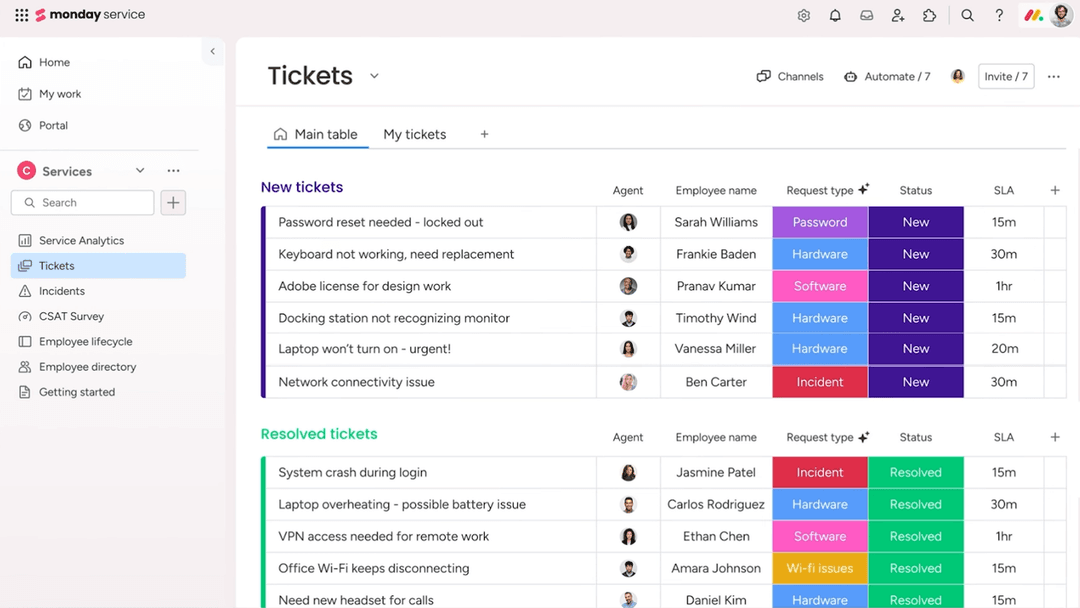
monday service tilbyder en dynamisk platform til styring af arbejdsprocesser og forbedring af teamsamarbejde.
Jira Service Management er derimod skræddersyet til at optimere IT-servicestyring og effektivisere problemløsning.
Selvom begge værktøjer tilbyder robuste løsninger til styring af opgaver og projekter, fokuserer monday service på fleksibilitet og tilpasning, mens Jira Service Management udmærker sig inden for IT- og servicestyring.
Gennem denne artikel dykker vi ned i en detaljeret sammenligning af disse softwareløsninger til arbejdsstyring, hvor vi undersøger deres funktioner, fordele og ulemper samt priser for at hjælpe dig med at træffe et velinformeret valg, der imødekommer dit teams behov.
monday service
4.6/5
- 14-day free trial
- From $9/seat/month (billed annually)
Jira Service Management


4/5
- Free plan + 14-day free trial available
- From $25/user/month
Why Trust Our Software Recommendations
6,700+
Reviews
20
Industry experts
16+
Evaluation factors
14
Years
Our team has been testing and reviewing software since 2012. As tech leaders ourselves, we know how difficult—and important—it is to choose the right software.
For this guide, we evaluated tools using hands-on testing and independent research, scoring tools using our selection criteria.
Our reviews reflect our human editorial judgment, not a sales pitch.
Expert reviewers:
- Paulo Gardini MiguelTech Director
 Tim FisherVP of AI
 Gabriel RosasTech Lead & Software Architect
 Christhian GruhnTech Lead & Platform Architect

| monday service | Jira Service Management | |
|---|---|---|
| Free Trial | 14-day free trial | Free plan + 14-day free trial available |
| Pricing | From $9/seat/month (billed annually) | From $25/user/month |
monday service vs. Jira Service Management – priser og skjulte omkostninger
Prissætningen for monday service følger en abonnementsmodel med flere niveauer, som kan omfatte ekstra omkostninger for premiumfunktioner og integrationer.
Prissætningen for Jira Service Management følger også en model med flere niveauer, men kan medføre ekstra gebyrer for avanceret support og tilføjelser.
Som CTO bør du evaluere hvert værktøjs pris ved at identificere dit teams specifikke behov og potentielle vækst for at sikre, at du vælger en leverandør, der ikke kun passer til dit nuværende budget, men også til dine langsigtede strategiske mål.
\u003cspan style=\u0022font-weight: 400\u0022\u003eMed monday services integrationsmuligheder kan du minimere kontekstskift ved at forbinde forskellige apps, hvilket gør løsningen ideel til styring af forskellige teams arbejdsgange. \u003c/span\u003e
\u003cspan style=\u0022font-weight: 400\u0022\u003eJira Service Managements robuste funktion til køreplaner er fremragende til planlægning og opfølgning på langsigtede projekter, især i IT-servicemiljøer. \u003c/span\u003e
\u003cspan style=\u0022font-weight: 400\u0022\u003eMens monday service udmærker sig ved fleksibilitet og forbindelsesmuligheder, er Jira Service Management uovertruffen inden for struktureret projektplanlægning og -udførelse.\u003c/span\u003e
| monday service | Jira Service Management | |
|---|---|---|
| Analytics | Yes | Yes |
| API | Yes | Yes |
| Call Integration | No | Yes |
| Chat | No | Yes |
| Contact Management | Yes | Yes |
| CRM Integration | No | Yes |
| Customer Management | Yes | Yes |
| Data Export | Yes | Yes |
| Data Import | Yes | Yes |
| Email Integration | No | Yes |
| External Integrations | Yes | Yes |
| Instant Chat Integration | No | Yes |
| Knowledge Base | Yes | Yes |
| Multi-User | No | Yes |
| Notifications | Yes | Yes |
| Real-time Alerts | Yes | Yes |
| Self-service Portal | Yes | Yes |
| Social Media Integration | No | Yes |
| Support Forum | No | Yes |
| Ticket Management | Yes | Yes |
| Workflow Management | Yes | Yes |
| Integration | monday service | Jira Service Management |
| Slack | ✅ | ✅ |
| Microsoft Teams | ✅ | ✅ |
| Google Workspace | ✅ | ✅ |
| Salesforce | ✅ | ✅ |
| Trello | ✅ | ❌ |
| GitHub | ❌ | ✅ |
| Zendesk | ✅ | ✅ |
| ServiceNow | ❌ | ✅ |
| HubSpot | ✅ | ❌ |
| Asana | ✅ | ❌ |
| API | ✅ | ✅ |
| Zapier | ✅ | ✅ |
Med monday services integration med Trello kan du nemt administrere og synkronisere opgaver på tværs af platforme, hvilket gør løsningen perfekt til teams, der håndterer flere værktøjer til projektstyring. Jira Service Managements integration med GitHub er fremragende til udviklingsteams, da den giver mulighed for problemfri sporing af kodeændringer sammen med projektproblemer.
Mens monday service udmærker sig ved at tilbyde fleksibilitet med værktøjer som Trello, tilbyder Jira Service Management en dyb integration med udviklingscentrerede platforme som GitHub.
| Faktor | monday service | Jira Service Management |
| Databeskyttelse | monday service tilbyder overholdelse af GDPR med robuste databeskyttelsesforanstaltninger såsom brugersamtykke og datakryptering. | Jira Service Management sikrer databeskyttelse gennem overholdelse af GDPR og tilpasselige kontroller af dataadgang. |
| Kryptering | monday service bruger SSL/TLS-kryptering til at beskytte data under overførsel og AES-256-kryptering til lagrede data. | Jira Service Management anvender SSL/TLS-kryptering til data under overførsel og i hvile, hvilket sikrer sikker kommunikation. |
| Overholdelse af lovgivning | monday service overholder standarder som ISO 27001 og tilbyder en struktureret tilgang til databeskyttelse. | Jira Service Management opfylder forskellige overholdelsesstandarder, herunder SOC 2 og ISO 27001, for omfattende sikkerhed. |
| Pålidelighed | monday service garanterer oppetid gennem redundante systemer og overvågning i realtid. | Jira Service Management sikrer pålidelighed med en arkitektur med høj tilgængelighed og kontinuerlig overvågning. |
Jira Service Management tilbyder generelt mere omfattende certificeringer for overholdelse af lovgivning sammenlignet med monday service.
Som CTO bør du evaluere hvert værktøj ved at undersøge dets certificeringer for overholdelse af lovgivning og krypteringsstandarder og sikre, at de stemmer overens med din organisations sikkerhedspolitikker og lovgivningsmæssige krav.
| Faktor | monday service | Jira Service Management |
| Brugergrænseflade | monday service tilbyder en visuelt intuitiv grænseflade med tilpasselige dashboards og træk-og-slip-funktionalitet. | Jira Service Management har en mere kompleks grænseflade, der er målrettet IT-fagfolk, med detaljerede konfigurationsmuligheder. |
| Onboardingoplevelse | monday service forenkler onboarding med vejledte selvstudier og en brugervenlig opsætningsproces. | Jira Service Management har en stejlere læringskurve med omfattende dokumentation og træningsressourcer. |
| Opsætning | monday service muliggør hurtig opsætning med færdigbyggede skabeloner til forskellige arbejdsgange. | Jira Service Management kræver en mere omfattende opsætning for at tilpasse arbejdsgange til IT-servicestyring. |
| Support | monday service tilbyder support døgnet rundt med livechat og en omfattende vidensbase. | Jira Service Management tilbyder omfattende support med detaljeret dokumentation og brugerfora. |
monday service er nemmere at navigere i på grund af det intuitive design og den hurtige opsætning, hvilket gør det ideelt for teams, der søger enkelhed. Jira Service Managements detaljerede konfiguration og robuste support gør det dog bedre egnet til IT-teams, der har brug for avanceret tilpasning og kontrol.
monday service
- You can customize workflows to suit your team's specific needs.
- Visual project tracking makes it easy for your team to stay on top of tasks.
- Automation features save your team time on repetitive tasks.
- The initial setup can be overwhelming if your team isn't tech-savvy.
- Advanced features require a learning curve for your team.
- Some users find the mobile app less intuitive than the desktop version.
Jira Service Management
- Highly customizable workflows, automations, forms, and service processes.
- Deep integration with the Atlassian ecosystem and development tools.
- Strong incident management, on-call scheduling, and alerting capabilities.
- Steeper learning curve for administrators and new users.
- Configuration and ongoing administration can become time-consuming.
- Best experience often depends on broader Atlassian adoption.
monday service
- Tech Startupsmonday service's customizable workflows fit perfectly with your agile project management needs.
- Marketing TeamsVisual boards make tracking campaigns easy for your team, enhancing collaboration and oversight.
- Creative AgenciesAutomation features save your team time on repetitive tasks, allowing more focus on creative work.
- Product DevelopmentYou can manage complex product roadmaps with visual tracking and task dependencies.
- Remote TeamsCentralized communication and task management keep your remote team connected and productive.
- HR DepartmentsStreamlined onboarding processes and workflow automation simplify your team's HR tasks.
Jira Service Management
- Large EnterprisesIt provides the scalability and comprehensive tools needed for managing extensive service operations.
- Atlassian Ecosystem UsersIf you're already using tools like Jira Software, Confluence, or Bitbucket, it integrates seamlessly into your existing workflows.
- On-Premise or Data Center EnvironmentsSupports organizations that require on-premise or self-managed deployments for compliance or infrastructure control.
- DevOps and Engineering TeamsNative connections to Jira Software, Bitbucket, and development workflows help bridge IT operations and software delivery.
- Highly Customizable Workflow Needs (JQL Users)Ideal for teams that need granular control and are comfortable using JQL and advanced configurations to tailor the platform.
- IT DepartmentsYour IT team can leverage its robust incident management features to resolve issues swiftly.
Hvem bør bruge monday service, og hvem bør bruge Jira Service Management?
Efter min mening er monday service eller et andet alternativ til Jira Service Management perfekt til kreative teams og virksomheder, der værdsætter fleksibilitet og en visuelt tiltalende grænseflade. Det er fantastisk til dem, der har brug for at administrere forskellige projekter uden at blive begrænset af kompleksitet.
Fra mit perspektiv er Jira Service Management bedst egnet til IT-teams og organisationer, der har brug for robuste servicestyringsfunktioner og detaljeret tilpasning af arbejdsgange. Hvis dit team fokuserer på IT-servicestyring og har brug for avancerede funktioner, er Jira Service Management det rette valg.
| monday service | Jira Service Management | |
|---|---|---|
| Automation | monday service monday service provides simple automation for task management and notifications. | Jira Service Management Jira Service Management offers advanced automation suited for IT operations and incident management. |
| Integrations | monday service monday service excels in integrations with tools like Trello and HubSpot. | Jira Service Management Jira Service Management integrates deeply with development tools like GitHub and ServiceNow. |
| Onboarding | monday service monday service is known for its quick and easy onboarding process with guided tutorials. | Jira Service Management Jira Service Management has a more involved onboarding process with comprehensive documentation. |
| Pricing Model | monday service monday service uses a tiered subscription model with potential additional costs for premium features. | Jira Service Management Jira Service Management also uses a tiered model, but may include extra charges for advanced support. |
| User Interface | monday service monday service offers a visually appealing, intuitive interface with customizable dashboards. | Jira Service Management Jira Service Management provides a more complex interface tailored for detailed IT workflows. |
| Automation | monday service and Jira Service Management both offer automation to streamline repetitive tasks, with monday service providing straightforward task automation and Jira offering more complex automation for IT processes. |
|---|---|
| Collaborative Tools | Both solutions include collaborative features like real-time updates and comments, enhancing team communication, with monday service providing a more visual approach and Jira focusing on IT service collaboration. |
| Customizable Workflows | Both monday service and Jira Service Management allow you to create custom workflows to fit your team's specific needs, with monday service offering visual customization and Jira providing detailed configuration options. |
| Integrations | Both platforms support a wide range of integrations, with monday service focusing on tools like Slack and Google Workspace, while Jira Service Management integrates with IT-focused tools such as Microsoft Teams. |
| Security | monday service and Jira Service Management adhere to high security standards, including data encryption and compliance with international regulations like GDPR, ensuring your data is protected. |