

Mobile asset management software is a mobile platform for tracking equipment, maintenance, assignments, locations, and lifecycle records.
The best mobile asset management software supports field teams with scanning, offline access, inspections, work orders, and synchronized asset data. This guide compares 12 tools across maintenance, IT lifecycle management, check-in and check-out, multi-site visibility, integrations, permissions, and pricing.
Use it to match your operating model, technical environment, and asset tracking requirements.
Why Trust Our Software Recommendations
6,700+
Reviews
20
Industry experts
16+
Evaluation factors
14
Years
Our team has been testing and reviewing software since 2012. As tech leaders ourselves, we know how difficult—and important—it is to choose the right software.
For this guide, we evaluated tools using hands-on testing and independent research, scoring tools using our selection criteria.
Our reviews reflect our human editorial judgment, not a sales pitch.
Expert reviewers:
- Paulo Gardini MiguelTech Director
 Tim FisherVP of AI
 Gabriel RosasTech Lead & Software Architect
 Christhian GruhnTech Lead & Platform Architect

Mobile Asset Management Software Comparison Table
Compare pricing and specs, side by side, for the mobile asset management software that made it onto my shortlist.
| Tool | Best For | Trial Info | Price | ||
|---|---|---|---|---|---|
| 1 | Best for maintenance-driven field asset teams | Free plan available | From $20/user/month (billed annually) | Website | |
| 2 | Best for offline-first PM and condition monitoring | Free demo available | Pricing upon request | Website | |
| 3 | Best for field teams tracking assets by scan | Free plan available and 14-day free trial | From $49/month | Website | |
| 4 | Best for multi-site equipment and lifecycle tracking | Free trial available; free 30-minute guided demo available | From $108/month (billed annually) | Website | |
| 5 | Best for unlimited-user, per-asset lifecycle tracking | 30-day free trial | From $20/month | Website | |
| 6 | Best for QR, RFID, and GPS tracking on one plan | 14-day free trial | From £33.25/month (billed annually) | Website | |
| 7 | Best for IT asset lifecycle and field check-out | 7-day free trial | Pricing upon request | Website | |
| 8 | Best for maintenance-led asset lifecycle tracking | Free trial available | From $24/user/month | Website | |
| 9 | Best for AI-driven predictive maintenance at scale | Free demo available | Pricing upon request | Website | |
| 10 | Best for multi-site check-in/out without per-user fees | 15-day free trial | From $63.55/month | Website |


Mobile Asset Management Software Reviews
Below are my summaries of the best mobile asset management software on my shortlist. My reviews examine each platform’s features, integrations, and pricing to help you find the right option for your team.
 Best for maintenance-driven field asset teams
- Free plan available
- From $20/user/month (billed annually)
Visit WebsiteCustomer Rating:4.8/5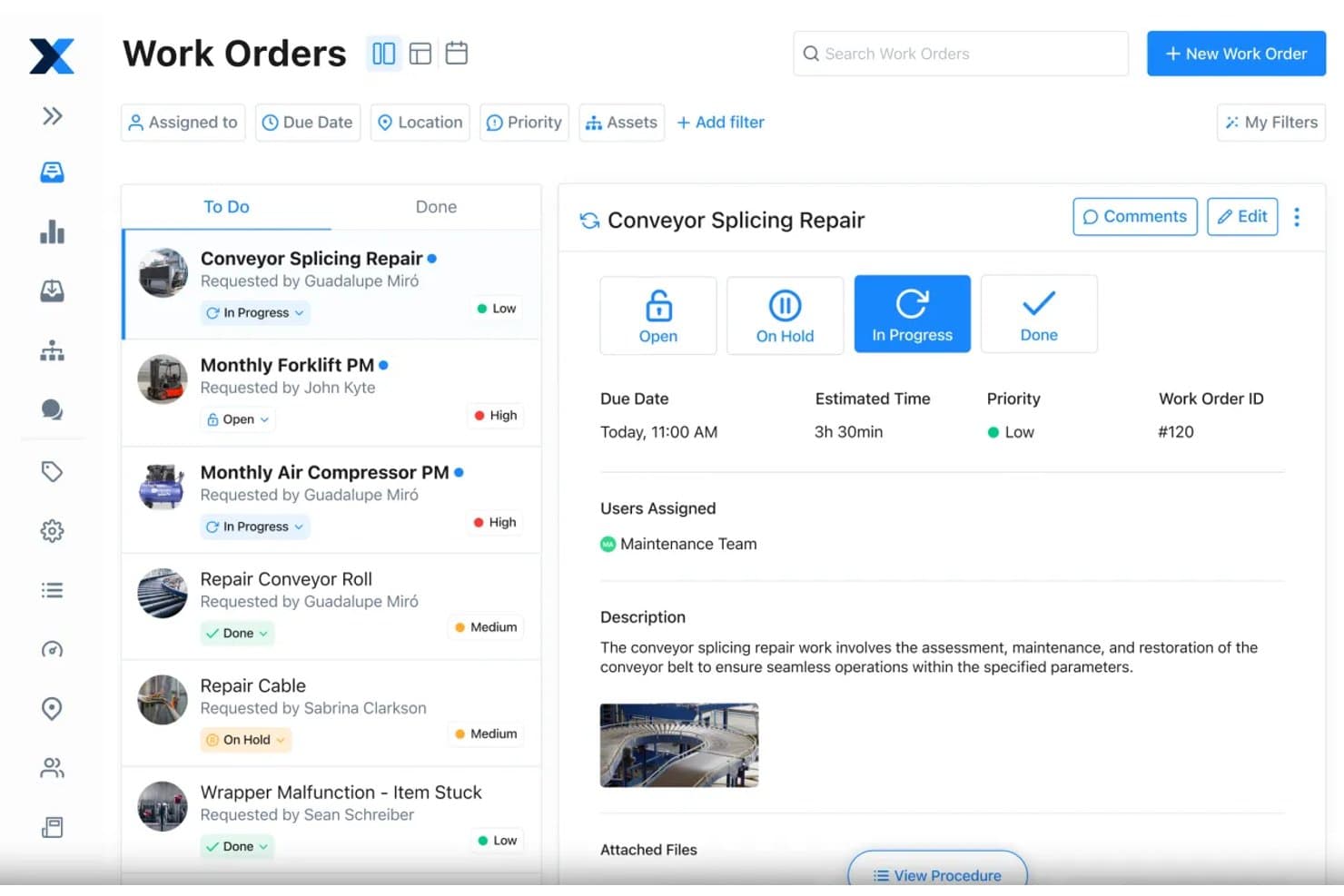
MaintainX lets users manage and track work orders on mobile. MaintainX is a maintenance management platform built around work orders, asset lifecycle tracking, preventive maintenance scheduling, and mobile-first field operations with barcode and QR scanning.
Who Is MaintainX Best For?
MaintainX is a strong fit for facilities and equipment teams that manage asset upkeep through work orders, preventive maintenance schedules, and field technician workflows.
Why I Picked MaintainX
MaintainX earns its spot on my shortlist because it's built from the ground up for maintenance-driven field teams, not adapted for them as an afterthought. I love how preventive maintenance scheduling pairs with meter-based triggers, so a technician's mobile app surfaces the right work order when equipment hits a specific runtime threshold. Offline mode syncs completed work orders automatically when connectivity returns, which means field techs keep working through dead zones without losing inspection data or asset history.
MaintainX Key Features
- Straight-line depreciation tracking: Records asset value over time so you can monitor financial lifecycle data alongside maintenance history.
- Purchase order management: Create, submit, and approve purchase orders directly in the platform, with approval workflows available on Premium plans and up.
- Inspection and procedure builder: Build multi-step procedures with conditional logic, signature capture, and pass/fail inspection checks attached to work orders.
- Requester portal access: Free requester accounts let non-licensed staff submit work orders by scanning a QR code, without needing a paid user seat.
MaintainX Integrations
MaintainX integrates with Samsara, Titan GPS, Oracle NetSuite, Xero, Microsoft Power BI, EBIS, Ignition, Kepware, and MQTT. It offers an open REST API on Premium and higher plans, plus Zapier.
Pros and Cons
Pros:
- Preventive maintenance uses meter-based triggers
- QR scanning updates assets, parts, locations
- Offline work orders sync after reconnection
Cons:
- No dedicated asset check-in workflow
- Native GPS tracking is unavailable
Learn more about MaintainX: Best for offline-first PM and condition monitoring
- Free demo available
- Pricing upon request
Visit WebsiteCustomer Rating:4.5/5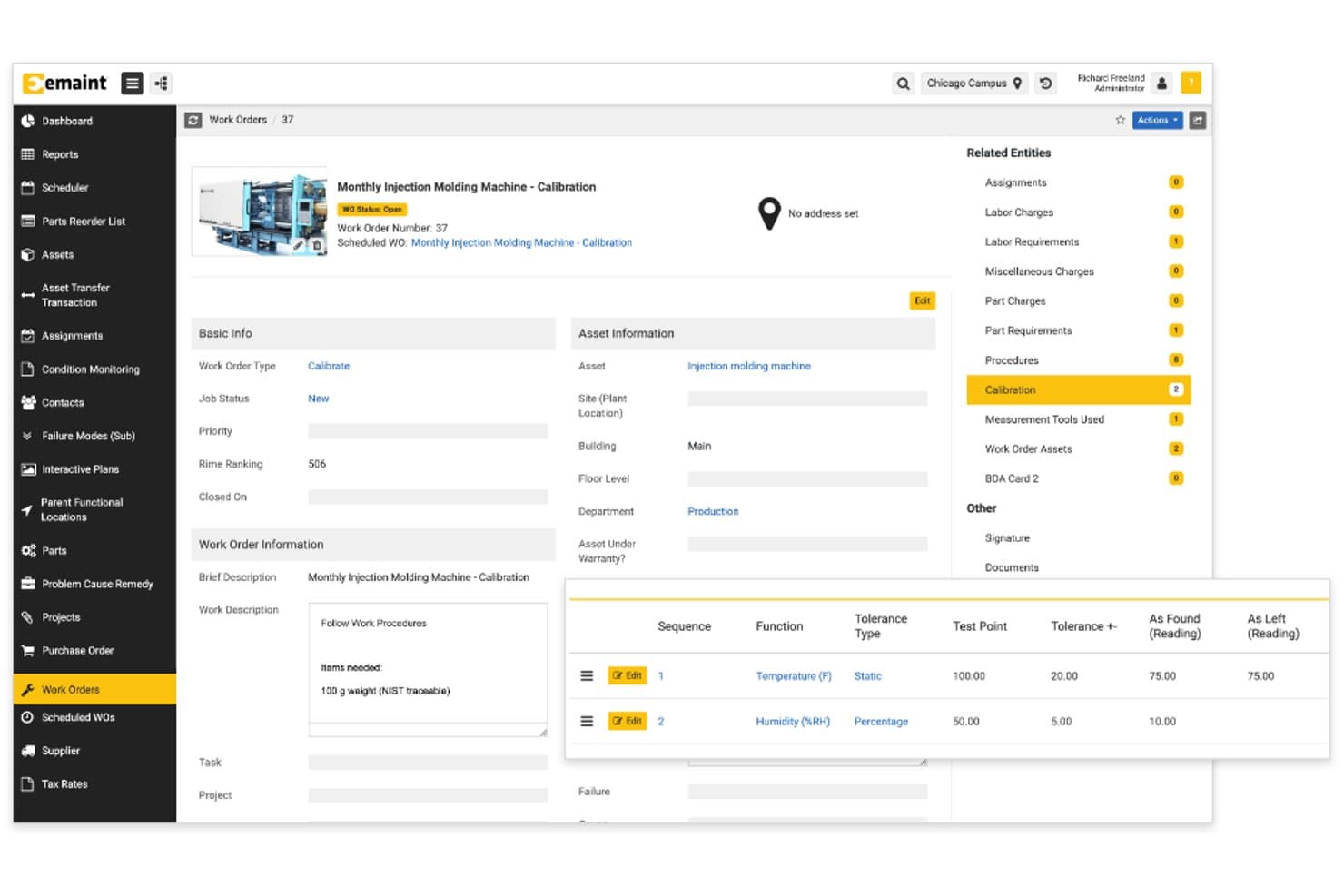
eMaint tracks calibration readings and tolerances within work orders. eMaint is a CMMS platform built on Fluke Reliability's condition monitoring technology, covering preventive maintenance scheduling, offline mobile work order management, asset lifecycle tracking, and inventory management.
Who Is eMaint Best For?
eMaint is a strong fit for facilities and equipment managers in manufacturing, healthcare, or regulated industries who need maintenance scheduling tied to real-time condition monitoring.
Why I Picked eMaint
I picked eMaint as one of the best because of how it handles offline-first PM alongside real-time condition monitoring from Fluke sensors. When my team is working in areas with no connectivity, the app lets us view and update work orders, attach photos, and scan assets, then syncs automatically once we're back online. Condition-based triggers tied directly to Fluke hardware mean PM schedules fire on actual equipment data, not just calendar intervals.
eMaint Key Features
- Asset hierarchy tracking: Build parent-child asset relationships and view full maintenance history and total cost of ownership for each asset.
- PM checklists and meter readings: Attach step-by-step checklists and meter-based triggers to recurring work orders to standardize technician workflows.
- Role-based access and field-level security: Control what each user can view or edit at the field level, with automatic audit trails logged on every action.
- Parts inventory and forecasting: Search and manage spare parts across your inventory, with cycle counts, requisitions, and parts forecasting built into the platform.
eMaint Integrations
eMaint’s named vendor integrations are not clearly documented. Enterprise plans support API integrations with ERP, BI, and SCADA systems, plus prebuilt ERP and third-party connectors; Professional includes limited API access.
Pros and Cons
Pros:
- Custom forms support varied asset workflows
- Condition triggers connect maintenance to sensor data
- Full offline work order access and syncing
Cons:
- Initial setup can require substantial onboarding
- No GPS or geofencing for location tracking
Learn more about eMaint: Best for field teams tracking assets by scan
- Free plan available and 14-day free trial
- From $49/month
Visit WebsiteCustomer Rating:4.4/5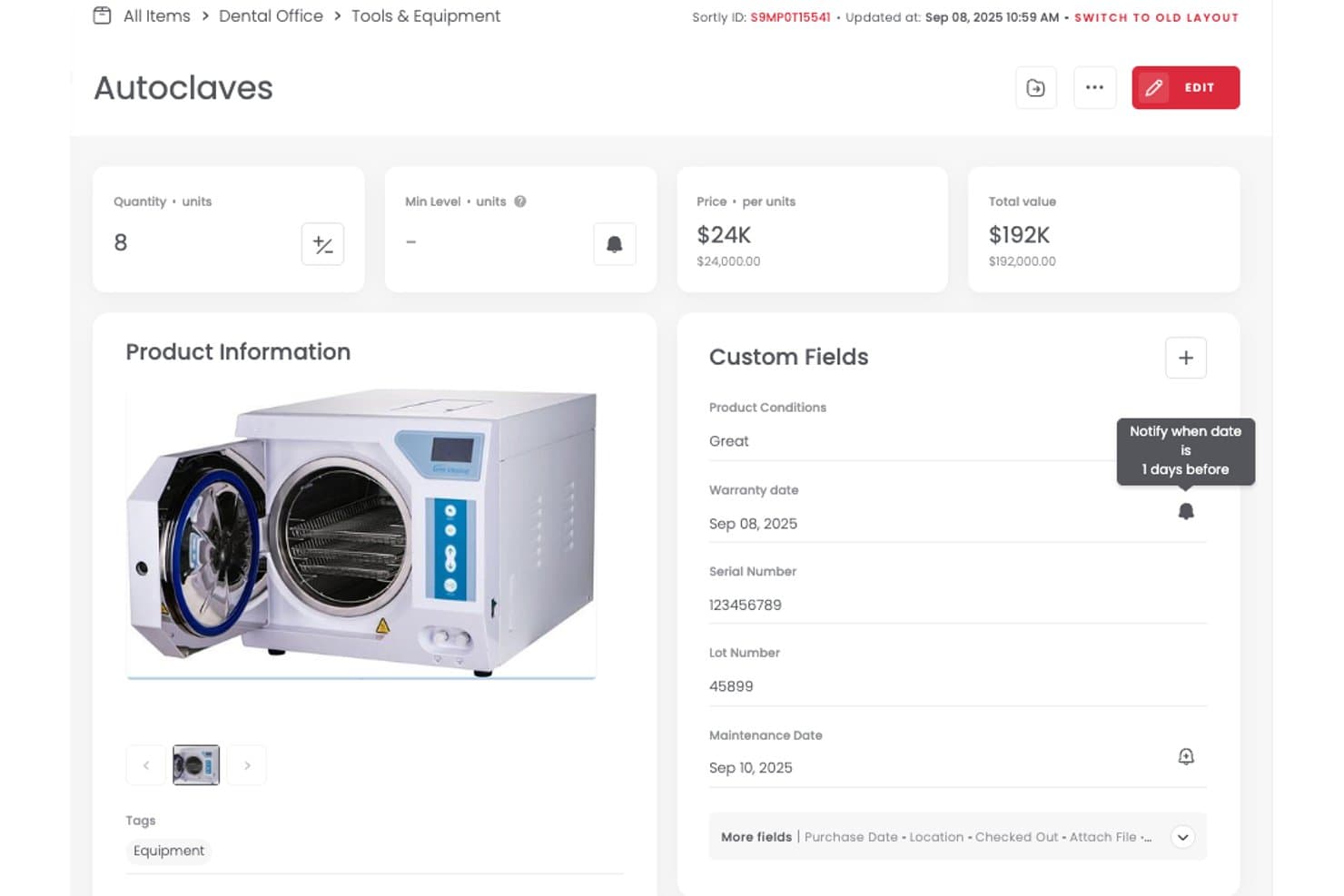
Sortly alerts users before warranty or maintenance dates expire. Sortly is a mobile asset tracking tool for managing equipment, tools, IT assets, and inventory through barcode and QR code scanning, offline mobile updates, and a centralized cloud-synced catalog.
Who Is Sortly Best For?
Sortly is a good fit for facilities and field operations teams that need scan-based asset tracking without technical complexity.
Why I Picked Sortly
I picked Sortly as one of the best because its offline mobile scanning is genuinely built for field conditions. Your team can scan barcodes or QR codes to update asset records, log check-ins and check-outs, and capture condition photos, all without a live connection. Changes sync automatically once they're back online. I also like that move summary reports create a clear trail of who moved what asset and when, which is exactly what distributed field teams need.
Sortly Key Features
- Custom fields and tags: Add custom fields to asset records to capture the specific details your team needs, with tagging to filter and search across your inventory.
- Maintenance date alerts: Set date-based reminders for scheduled maintenance or repairs, delivered via in-app notifications, email, Slack, or Microsoft Teams.
- Move summary reports: Generate reports that log every asset location change, including who moved the item and when, across your entire catalog.
- Spreadsheet import: Bring existing asset data into Sortly by importing spreadsheets directly, reducing manual entry when setting up your inventory.
Sortly Integrations
Sortly offers native integrations with QuickBooks Online, Slack, Microsoft Teams, Amazon Business US, and AppFolio Stack. Enterprise plans add webhooks and an API for custom integrations.
Pros and Cons
Pros:
- Photos make field inventory identification easier
- Move reports record asset location changes
- Offline scanning syncs after reconnection
Cons:
- Large inventories can experience sync delays
- Manual location updates lack GPS tracking
Learn more about Sortly: Best for multi-site equipment and lifecycle tracking
- Free trial available; free 30-minute guided demo available
- From $108/month (billed annually)
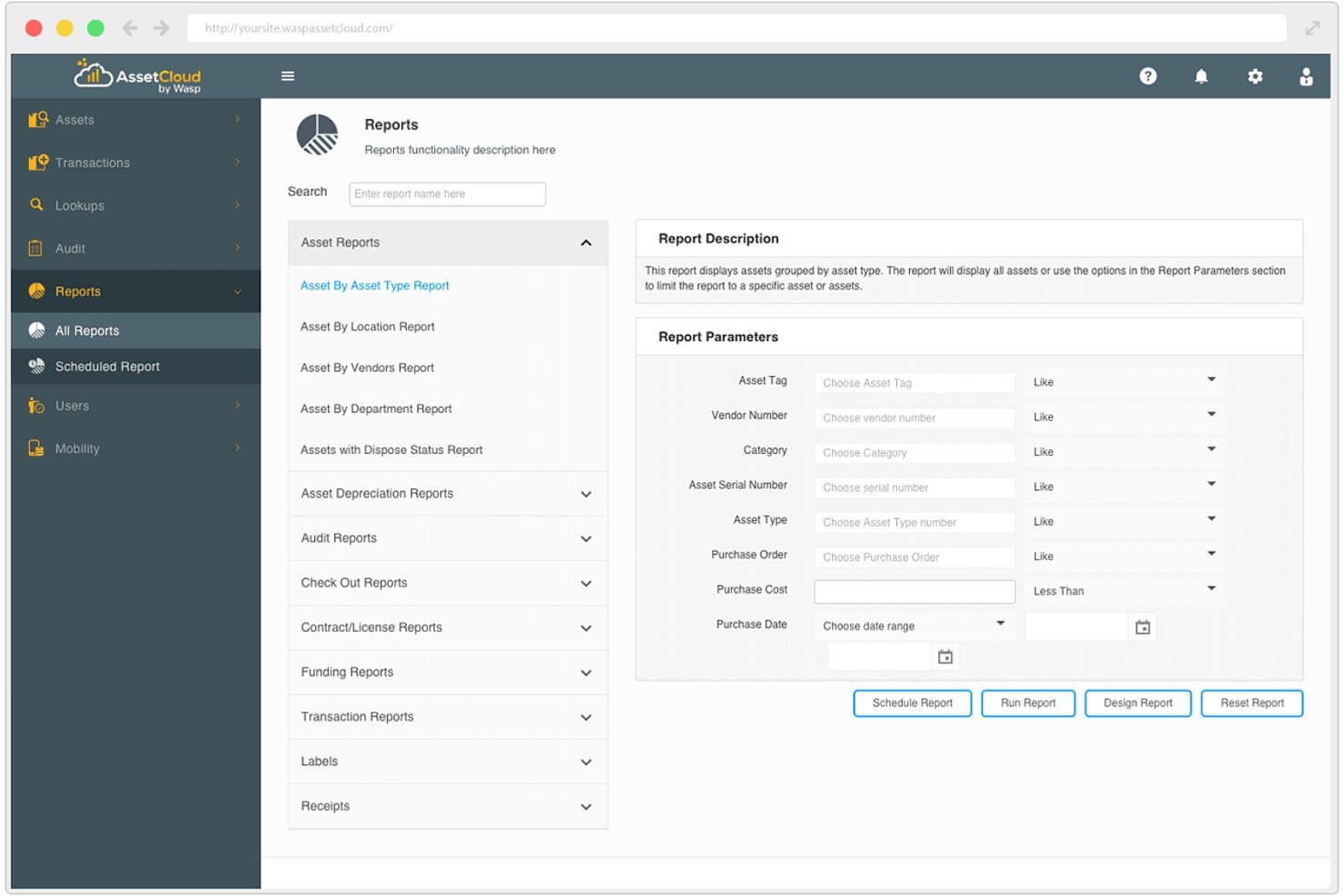
AssetCloud lets users run detailed asset reports with custom filters. AssetCloud is a cloud-based asset tracking platform from Wasp Barcode Technologies that covers barcode scanning, check-in/check-out, multi-site location tracking, depreciation, and lifecycle management across iOS and Android mobile apps.
Who Is AssetCloud Best For?
AssetCloud is a strong fit for facilities and equipment managers who need to track assets across multiple sites with detailed depreciation and lifecycle records.
Why I Picked AssetCloud
AssetCloud earns its spot on my shortlist because of how well it handles asset tracking across multiple sites and throughout the full asset lifecycle. I particularly like that every plan includes five depreciation methods and transaction history out of the box, so you're not piecing together financial records from a spreadsheet. When managing distributed equipment, the ability to define tiered locations and run barcode-based audits from the iOS or Android app keeps records accurate across every site without manual data entry.
AssetCloud Key Features
- Mobile check-in/check-out: Use the iOS or Android app to check assets in and out to employees, customers, or vendors directly from the field.
- Custom smart views: Build searchable saved views with filter conditions and share them across your organization for quick asset lookups.
- Role-based permissions: Assign fine-grained access controls and custom user roles to limit what each person can see or do in the system.
- Scheduled report delivery: Set up automated email delivery of reports from a library of 60+ templates, or build custom reports on Complete and higher plans.
AssetCloud Integrations
AssetCloud doesn't have any native integrations clearly documented. It supports CSV import and export on every plan, while a REST API for custom integrations is available only on Enterprise.
Pros and Cons
Pros:
- Multi-site locations support distributed equipment
- Five depreciation methods support lifecycle records
- Barcode audits update records onsite
Cons:
- Live location tracking isn't documented
- Offline mode lacks sync details
Learn more about AssetCloud: Best for unlimited-user, per-asset lifecycle tracking
- 30-day free trial
- From $20/month
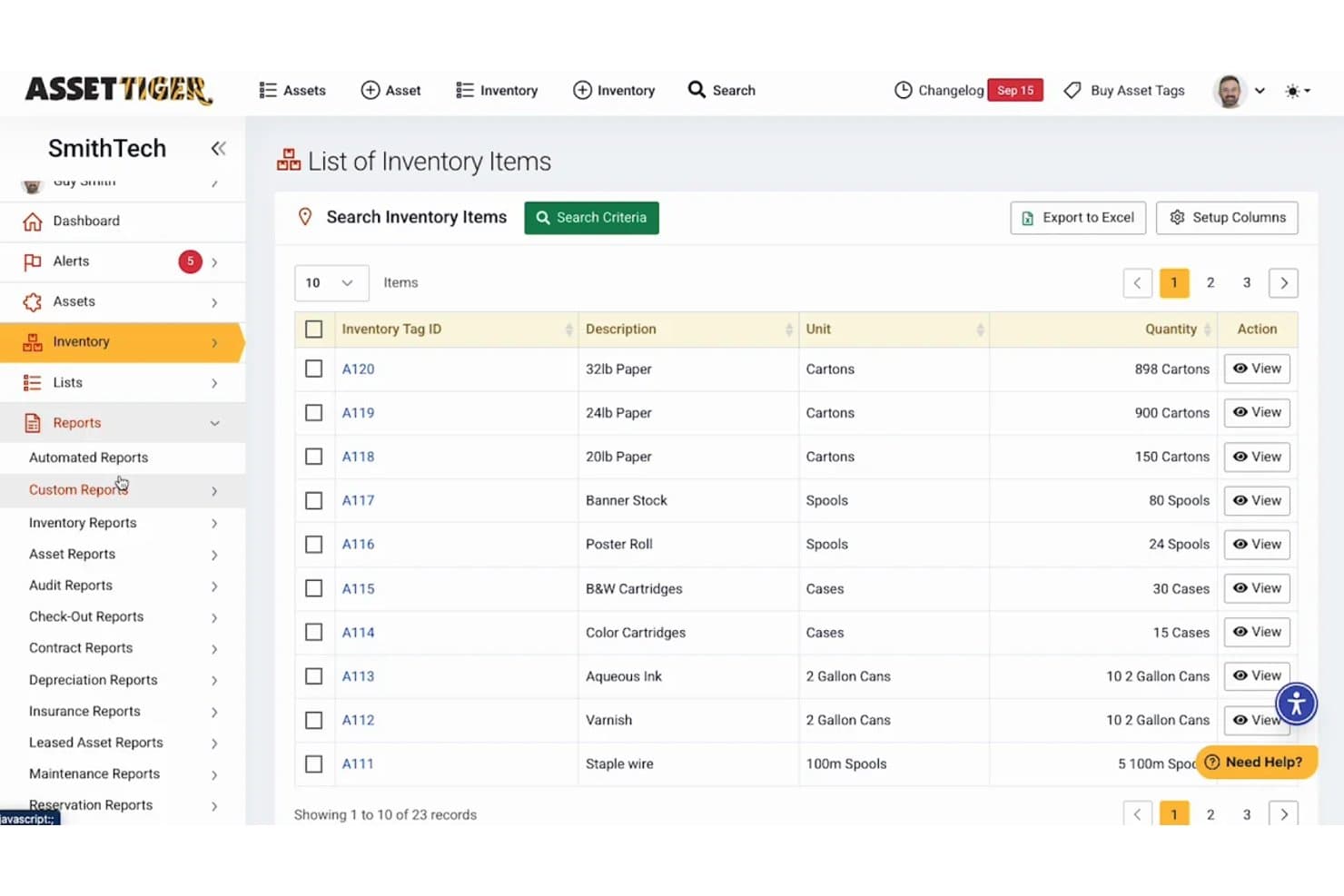
AssetTiger lets users browse and manage inventory items by tag, description, and quantity. AssetTiger is a cloud-based asset management platform that combines barcode and QR scanning, check-in/check-out tracking, lifecycle and depreciation management, maintenance scheduling, and audit reporting across web and mobile apps.
Who Is AssetTiger Best For?
AssetTiger is a strong fit for IT asset managers and facilities teams that need per-asset lifecycle tracking without paying per user.
Why I Picked AssetTiger
AssetTiger earns its spot on my shortlist because of how it handles per-asset lifecycle tracking without charging per user. I like that every paid plan includes unlimited users, so a school or facilities team with 50 staff scanning equipment doesn't face a ballooning user bill. Full custody history, three depreciation methods, and warranty expiry alerts give you a complete picture of each asset from acquisition to disposal, which is exactly what IT asset managers and facilities teams need from a mobile tool.
AssetTiger Key Features
- Barcode and QR label printing: Generate and print asset tags directly from the platform using a standard office or label printer, or order durable tags through MyAssetTag.com.
- 80+ built-in report types: Run depreciation, checkout history, maintenance cost, and audit reconciliation reports, with export options for CSV, PDF, or Excel.
- Role-based permission controls: Configure access across 120+ permission settings to manage what each user can view, edit, or action across your asset database.
- Preventive maintenance scheduling: Set maintenance tasks by date or recurring interval, with email alerts for overdue items and a logged history of technician, date, and cost.
AssetTiger Integrations
AssetTiger has 2 documented native integrations: Google Maps and Google Workspace for location mapping and sign-in. Paid plans include a REST API for custom integrations, plus CSV and Excel import and export.
Pros and Cons
Pros:
- Maintenance alerts include technician and cost logs
- Detailed custody and lifecycle histories
- Scan-driven check-in and audit workflows
Cons:
- Offline mobile behavior remains unclear
- No real-time GPS or geofencing
Learn more about AssetTiger: Best for QR, RFID, and GPS tracking on one plan
- 14-day free trial
- From £33.25/month (billed annually)
Visit WebsiteCustomer Rating:4.8/5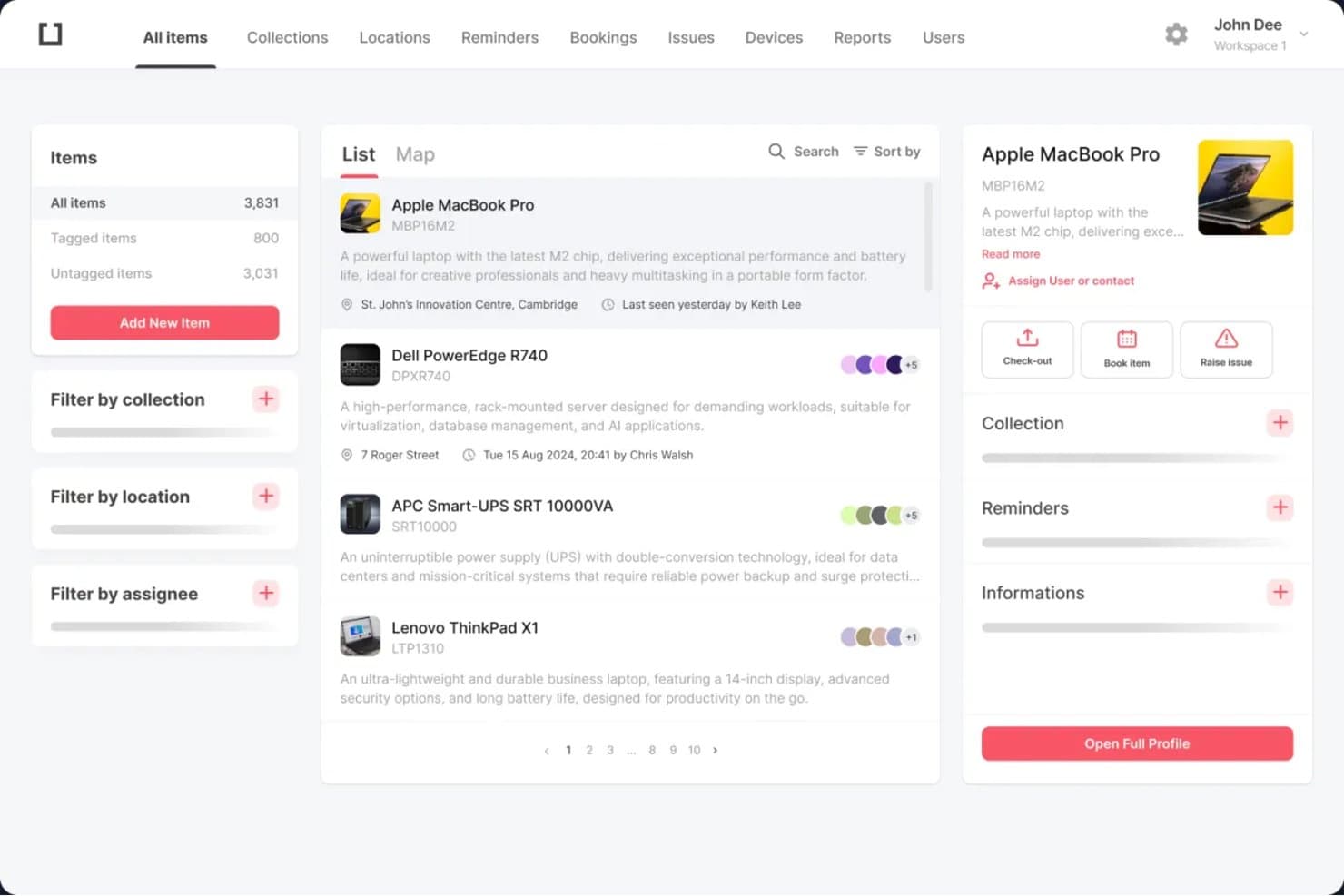
itemit lets users browse, filter, and manage all tracked assets in one place. itemit is a mobile asset management platform that combines QR code, barcode, RFID, and GPS tracking with check-in/check-out, maintenance reminders, audit trails, and depreciation reporting across a web dashboard and iOS/Android apps.
Who Is itemit Best For?
itemit is a good fit for IT asset managers and facilities teams that need QR, RFID, and GPS tracking under one plan without managing multiple tools or vendors.
Why I Picked itemit
itemit earns its spot on my shortlist because it's one of the few tools that puts QR, RFID, and GPS tracking under a single plan rather than treating them as separate products. I particularly like that fixed RFID readers can update asset locations automatically, while GPS trackers show live positions on a map. That combination means my team can track high-value equipment continuously and scan lower-priority assets on demand, all from the same iOS or Android app.
itemit Key Features
- Offline mobile scanning: The iOS and Android apps capture asset data without a connection and sync automatically when you're back online.
- Maintenance and compliance reminders: Set automated alerts for warranty expiry, PAT testing, insurance renewals, and scheduled maintenance.
- Collections and kitting: Group related assets together so your team can check them in or out as a single batch.
- Custom fields and attachments: Add your own data fields to asset records and store manuals, certificates, photos, and receipts directly on each asset.
itemit Integrations
itemit offers integrations with Xero, Slack, and Microsoft Active Directory. Its REST API supports custom integrations.
Pros and Cons
Pros:
- Automatic updates from fixed RFID readers
- Offline scanning syncs after reconnection
- QR, RFID, and GPS share one platform
Cons:
- Mobile app can lag on older devices
- QR assets show only last scan
Learn more about itemit: Best for IT asset lifecycle and field check-out
- 7-day free trial
- Pricing upon request
Visit WebsiteCustomer Rating:4.6/5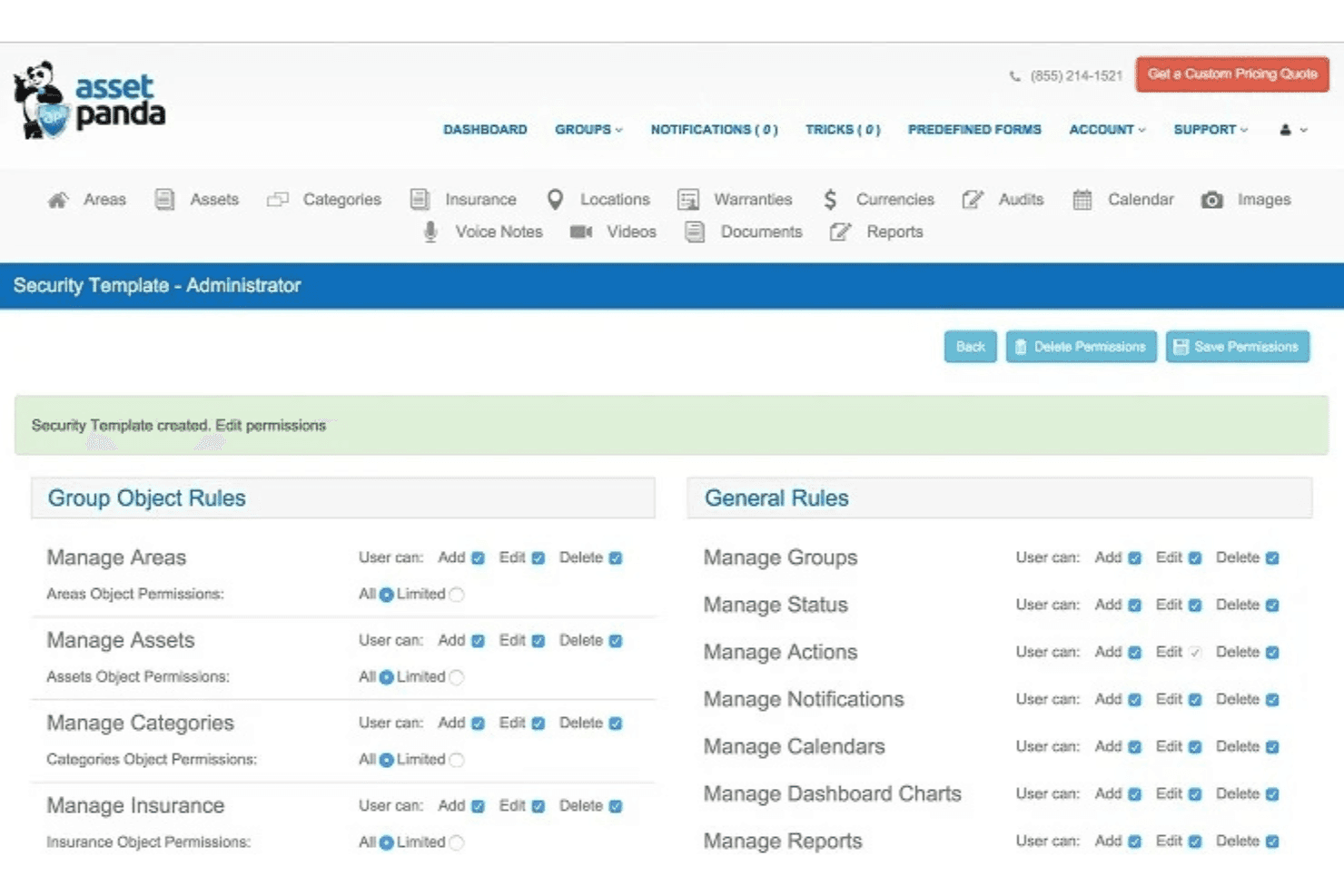
Asset Panda lets admins configure granular user permissions by role. Asset Panda is a cloud-based mobile asset management platform with barcode and QR scanning, asset lifecycle tracking, maintenance scheduling, and field check-in/check-out with signature capture.
Who Is Asset Panda Best For?
Asset Panda is a strong fit for IT teams and field operations managers who need to track asset lifecycles, manage check-in/check-out workflows, and maintain equipment across distributed locations.
Why I Picked Asset Panda
I picked Asset Panda as one of the best because it handles the full IT asset lifecycle without cutting corners on field workflows. When my team checks out equipment, the mobile app captures a signature and a GPS pindrop at scan time, so there's a clear record of who took what and from where. I also rely on the asset lifecycle history and contract expiration alerts to stay ahead of warranty deadlines and renewal windows before they slip past.
Asset Panda Key Features
- Barcode and QR code scanning: The mobile app's built-in scanner updates asset records on-site and supports bulk kitting and reallocation in a single pass.
- Maintenance scheduling: Create custom inspection checklists, track repairs with scheduled tickets, and receive alerts by email, push notification, Slack, or Microsoft Teams.
- Centralized inventory with custom fields: Build a fully searchable asset database with customizable fields, parent-child relationships, sortable views, and CSV/XLS/PDF export.
- Role-based access and multi-tenant setup: Set granular permissions per user and run separate accounts for each department, client, or location within one platform.
Asset Panda Integrations
Asset Panda offers 30+ native integrations, including ServiceNow, Jira ITSM, Freshservice, Microsoft Intune, Jamf Pro, QuickBooks Online, Xero, ArcGIS Online, Slack, and Microsoft Teams. It also supports webhooks, SFTP export, custom ERP integrations, and Zapier.
Pros and Cons
Pros:
- Custom lifecycle histories track asset ownership
- Offline workflows support field equipment handling
- Mobile check-outs capture signatures and GPS
Cons:
- Search can require exact asset names
- Scan-time GPS cannot provide continuous tracking
Learn more about Asset Panda: Best for maintenance-led asset lifecycle tracking
- Free trial available
- From $24/user/month
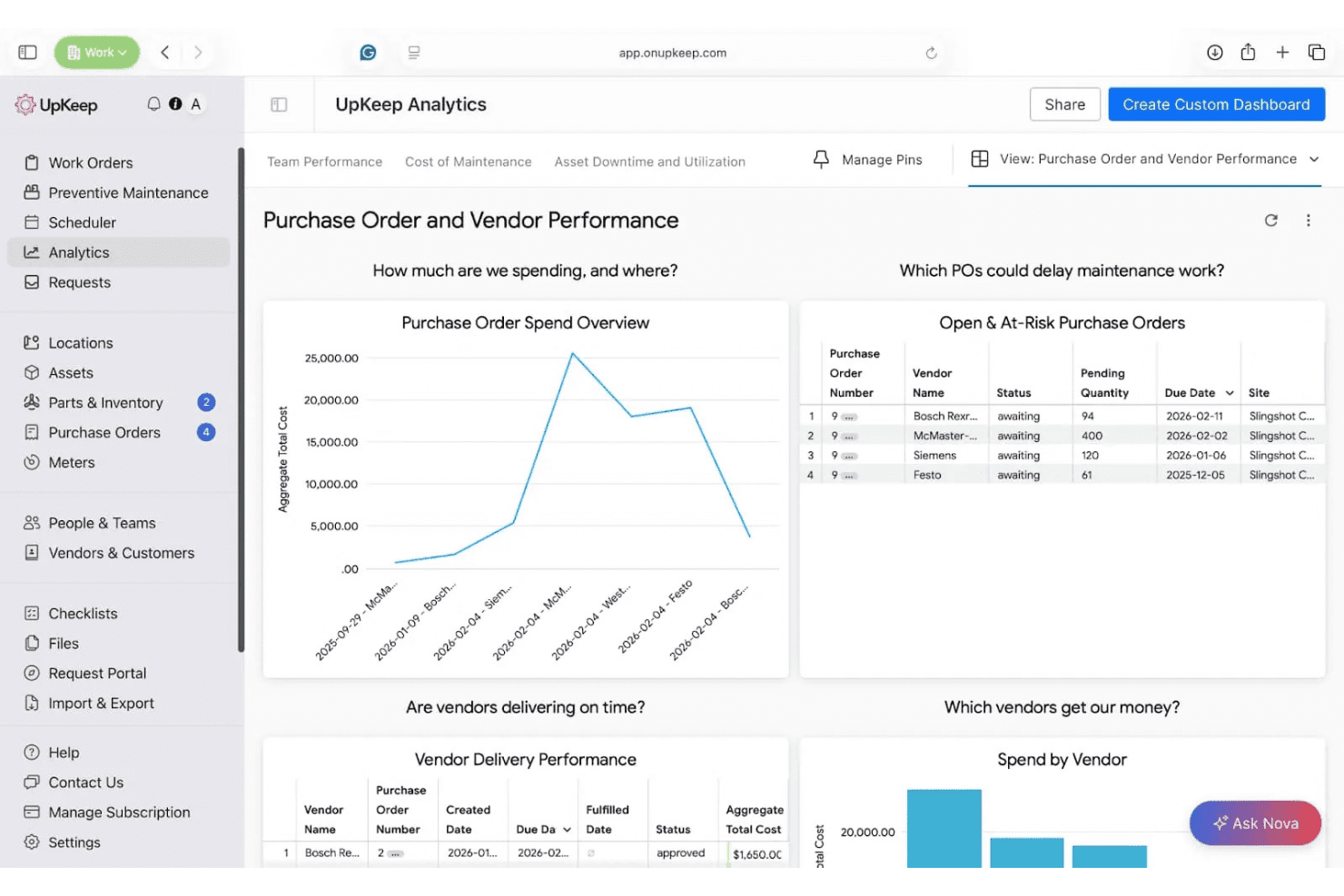
UpKeep tracks purchase orders and vendor performance in one dashboard. UpKeep is an asset operations management platform that combines CMMS-based maintenance scheduling, asset lifecycle tracking, MRO inventory management, and mobile QR scanning for field and facilities teams.
Who Is UpKeep Best For?
UpKeep is a strong fit for facilities and equipment teams that manage physical asset maintenance, parts inventory, and repair history across multiple sites.
Why I Picked UpKeep
UpKeep earns its spot on my shortlist because it builds maintenance history and asset lifecycle tracking directly into the same mobile workflow. I particularly like how replace-vs-repair alerts fire automatically when cumulative repair spend approaches an asset's replacement cost, which removes a genuinely hard judgment call from the field. Pair that with UpKeep Edge sensors triggering work orders the moment vibration or temperature readings go off-spec, and you get condition-based lifecycle decisions grounded in real data rather than guesswork.
UpKeep Key Features
- QR code asset lookup: Scan a QR sticker on any asset to instantly pull up specs, warranty details, repair history, and open work orders from your phone.
- Multi-storeroom inventory management: Track parts across storerooms, warehouses, and service trucks, each with its own stock levels, min/max thresholds, and logged transfers.
- Nova AI analytics: Built into every plan, Nova identifies which assets fail most frequently and why, and runs scheduled automated health audits.
- Automatic purchase order drafting: When parts stock drops below the minimum threshold, UpKeep auto-generates a draft purchase order and routes it through an approval workflow.
UpKeep Integrations
UpKeep supports integrations with SAP, Oracle, and NetSuite, plus Microsoft Dynamics data imports. It connects to 1,000+ systems through native integrations, Zapier, and its API, with API access available on Enterprise.
Pros and Cons
Pros:
- Depreciation and repair costs stay attached
- Sensor alerts trigger maintenance work orders
- Offline asset history supports field technicians
Cons:
- People-based asset checkout isn’t supported
- No GPS or geofencing for assets
Learn more about UpKeep: Best for AI-driven predictive maintenance at scale
- Free demo available
- Pricing upon request
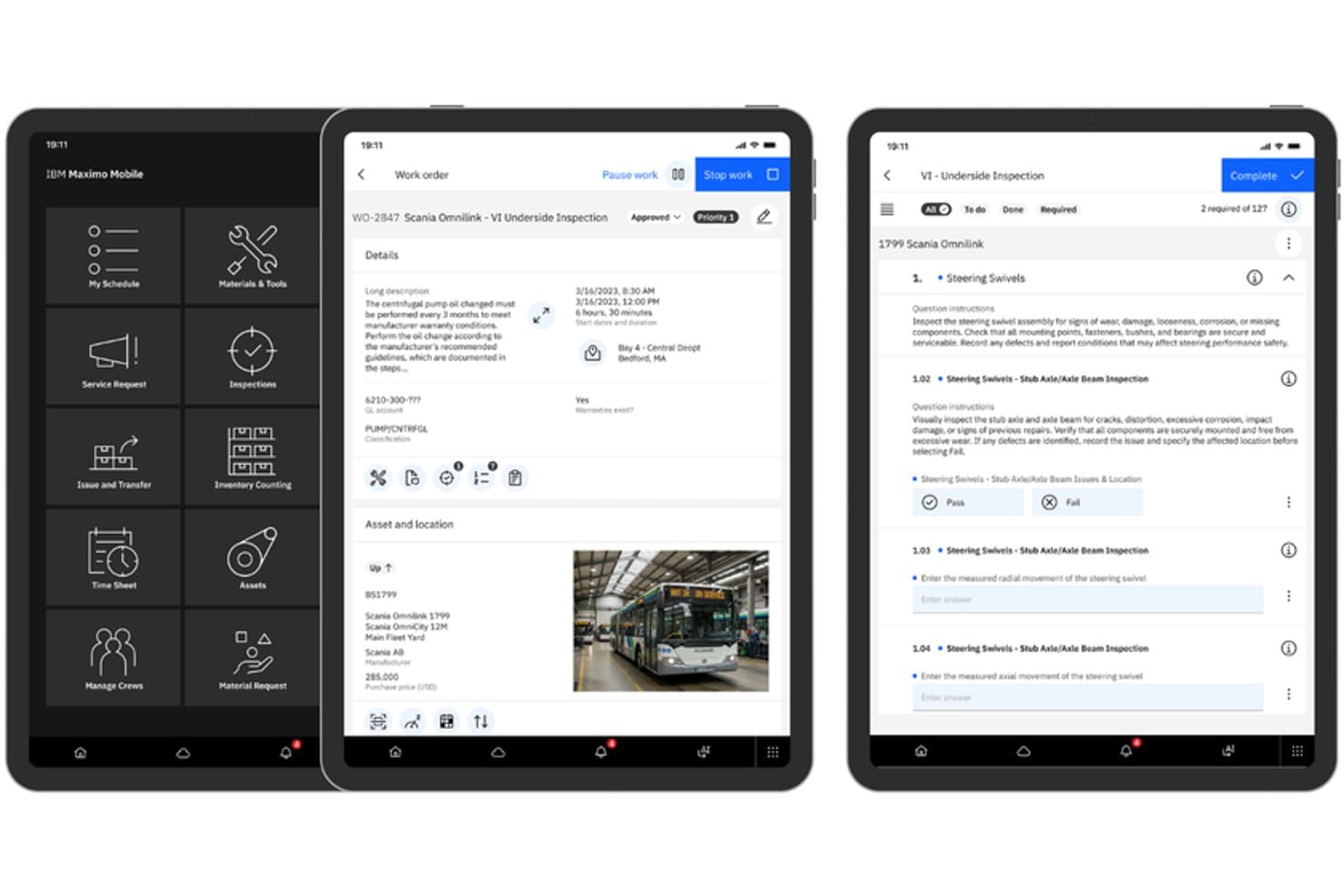
IBM Maximo Mobile lets users manage work orders and inspections on mobile devices. IBM Maximo Application Suite is an enterprise asset management platform that combines EAM, predictive maintenance, mobile work order management, inventory tracking, and AI-driven asset performance monitoring across a single suite.
Who Is IBM Maximo Application Suite Best For?
IBM Maximo Application Suite is a strong fit for large enterprises managing thousands of assets across multiple sites, particularly in energy, utilities, transportation, and facilities-heavy industries.
Why I Picked IBM Maximo Application Suite
IBM Maximo Application Suite earns its spot on my shortlist because of how deeply it integrates AI into predictive maintenance at enterprise scale. Maximo Predict and Maximo Monitor pull in real-time sensor data to flag asset degradation before failures occur, which means a technician can show up with the right parts before a turbine or HVAC unit goes offline. I also like that Maximo Mobile lets field teams record meter readings, complete inspections, and manage work orders across iOS and Android, with offline access for receiving and calibration tasks in disconnected environments.
IBM Maximo Application Suite Key Features
- Inventory counting: Run ad hoc, cycle, or scheduled counts of rotating assets across storerooms, with reconciliation tolerances and the ability to save and resume counts across devices.
- Issues and transfers: Issue reserved or non-reserved stock and transfer inventory between storerooms across sites, with the option to save an unfinished workflow and pick it up on another device.
- Asset lifecycle management: Track assets from acquisition through capital planning and replacement decisions using the Asset Investment Planning module, which links asset condition, risk, and financial impact.
- Multi-platform mobile app: Access work orders, asset records, inspections, and inventory tasks on iOS, Android, or Windows devices through the Maximo Mobile app.
IBM Maximo Application Suite Integrations
Native integrations are not clearly documented. IBM Maximo Application Suite includes IBM Cloud Pak for Data, Db2, Red Hat OpenShift, and WebSphere Application Server Liberty, with deployment options on AWS, Azure, and Google Cloud.
Pros and Cons
Pros:
- Mobile apps cover iOS, Android, Windows
- Cross-site transfers support distributed asset teams
- Predictive alerts connect sensors to maintenance
Cons:
- Mobile workflows can require many clicks
- No documented continuous GPS or geofencing
Learn more about IBM Maximo Application Suite: Best for multi-site check-in/out without per-user fees
- 15-day free trial
- From $63.55/month
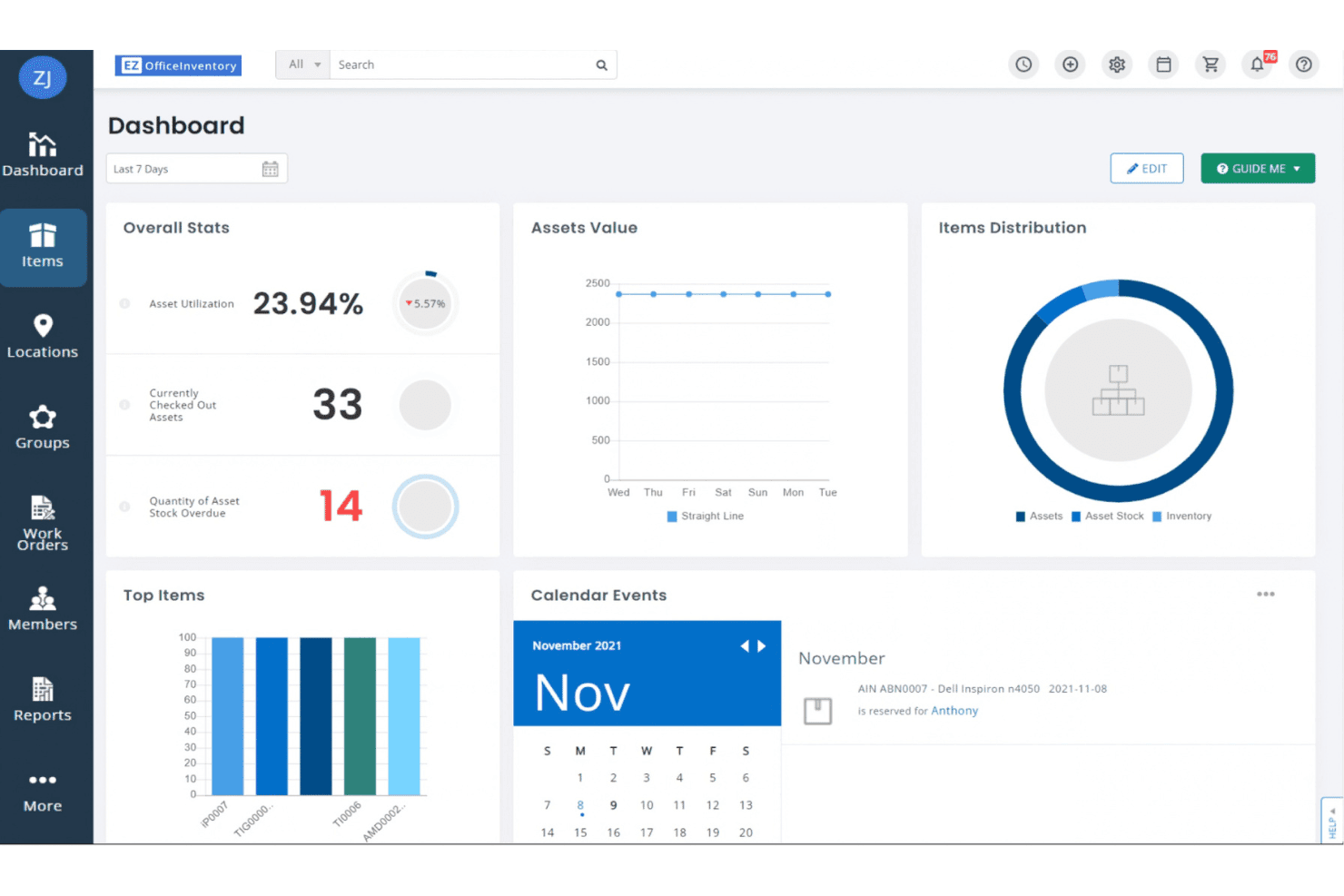
EZOfficeInventory's dashboard gives a real-time overview of asset activity. EZOfficeInventory is a mobile asset management platform that tracks assets across multiple sites with barcode, QR, and RFID scanning, check-in/out workflows, GPS integrations, and role-based access controls.
Who Is EZOfficeInventory Best For?
EZOfficeInventory is a strong fit for facilities and IT asset managers who need to track assets across multiple locations without paying per-seat licensing fees.
Why I Picked EZOfficeInventory
I picked EZOfficeInventory as one of the best because it prices by asset count, not user count, which means your whole team, from warehouse staff to site managers, can check assets in and out without driving up your monthly bill. I love how the mobile app handles multi-site audits: scan a QR code, confirm an item's location, and flag anything found at the wrong site, all from your phone. The role-specific dashboards also let each user see only what's relevant to their site or responsibility.
EZOfficeInventory Key Features
- Asset lifecycle tracking: Log each asset from procurement through disposal, with custody history, depreciation, condition flags, and repair records attached to every item.
- Role-based access controls: Assign user roles by site or responsibility so each team member sees only the assets, actions, and data relevant to their work.
- Automated approval workflows: Route check-out requests, transfers, and overdue check-in escalations through configurable multi-tier approval chains.
- AI co-pilot (Zoe): Use the built-in AI assistant to generate asset records, invoices, and reports directly within the platform.
EZOfficeInventory Integrations
EZOfficeInventory offers integrations with Zendesk, Jira, Okta, OneLogin, Azure AD, OneDrive, Dropbox, Samsara, Trackunit, John Deere, and Hapn. Custom integrations are available on the Enterprise plan.
Pros and Cons
Pros:
- Tracks custody, condition, and lifecycle history
- Mobile audits verify asset locations
- Supports multi-site check-in and checkout
Cons:
- Full maintenance workflows require an add-on
- Offline access is limited by plan
Learn more about EZOfficeInventory:
Other Mobile Asset Management Software
Here are some additional mobile asset management software options that didn’t make it onto my shortlist, but are still worth checking out:
- 11GoCodesBest for field teams scanning assets without an app
- 12Asset EssentialsBest for maintenance-driven mobile field teams
- 13FiixBest for IoT-triggered maintenance on mobile
- 14Fracttal OneBest for maintenance-driven equipment management
- 15ReftabBest for IT asset check-in/out via mobile scan
- 16IFS UltimoBest for maintenance-led field asset teams
- 17SAP Asset ManagerBest for SAP-native field maintenance on mobile
How I Evaluate Mobile Asset Management Software
I split my evaluation into three parts: core functionality (tracking asset location and status from a mobile device, plus scanning barcodes or QR codes to update records in the field) carries the most weight. Then I look for standout features like geofencing alerts or GPS/IoT integration. Finally, I consider onboarding support and pricing value.
Core Functionality (Table Stakes For This List)
When I'm selecting tools for my list, I score each one on a scale from 0 (does not offer the functionality) to 5 (excels in this area) for each core functionality listed below. I then convert the total into a percentage to help assess each tool's overall fit, with extra weight on any functionalities I've deemed essential.
- Mobile Asset Tracking (Essential): I check whether field teams can view and update asset location and status from a phone or tablet, including GPS or geofencing alerts for movement.
- Barcode/QR/RFID Scanning (Essential): I evaluate how well the mobile app handles scan-based check-in, check-out, and bulk updates across formats like QR codes, barcodes, and RFID tags.
- Asset Lifecycle Management: Each tool should track assets from acquisition through depreciation and disposal, so I look for automated stage transitions and end-of-life reporting.
- Maintenance Scheduling and Alerts: Preventive maintenance calendars and condition-based reminders matter here, especially tools that tie alerts to usage data or inspection history.
- Offline Mobile Functionality: Field crews in warehouses or remote sites often lose connectivity, so I look for offline data entry that syncs without conflicts once a connection returns.
- Centralized Asset Inventory: I evaluate whether the platform consolidates all assets into one searchable, filterable view accessible across devices, locations, and user roles.
Once I have a list of tools that meet the criteria, I consider what sets each platform apart.
Differentiating Factors (What Sets Vendors Apart)
Here's how I compare and contrast different vendors:
Standout Features
I look for geofencing and alert capabilities that notify teams when assets leave defined zones—useful for preventing unauthorized removal of equipment across warehouses or job sites. GPS and IoT sensor integration matters too, since platforms like IBM Maximo and itemit can feed continuous location and condition data into maintenance decisions. I also evaluate multi-site role-based access, checking whether field techs only see their location's assets while admins get the full picture. Finally, built-in depreciation and financial reporting saves teams from reconciling asset values manually at audit time.
Beyond Features
I evaluate how each platform's integration ecosystem connects with existing ERP, CMMS, and helpdesk systems—duplicate data entry across ServiceNow and your asset register kills adoption fast. Scalability matters just as much, so I check whether licensing models and data structures hold up as you add sites, asset types, and field users. I also look at onboarding support, especially vendor-assisted migration from spreadsheets or legacy tools, since field crews need to be productive on day one without lengthy training.
How to Choose mobile asset management software.
Choose software by testing whether its field workflows preserve accurate asset records when connectivity, ownership, and site conditions change.
| If your priority is… | Look for… |
|---|---|
| If your priority is…Reliable field records | Look for…A documented offline-sync process with conflict handling |
| If your priority is…Audit-ready asset history | Look for…Immutable change logs and a sample export covering one asset’s lifecycle |
| If your priority is…Accurate custody records | Look for…Configurable approval rules for check-in, check-out, and transfers |
| If your priority is…Predictable rollout | Look for…A migration plan with field mappings, validation steps, and named deliverables |
How to Vet Your Shortlist
- Test offline synchronization: During a 30-minute trial, update five assets without connectivity, reconnect, and compare the resulting records against the vendor’s documented sync behavior.
- Request an audit artifact: Ask for a sample asset history export showing timestamps, user identities, status changes, transfers, and deleted-record handling.
- Validate migration work: Provide 20 representative spreadsheet rows and request a written field-mapping document within five business days.
- Test custody controls: Run a three-person transfer scenario during a one-week pilot, then verify that each handoff records the asset, recipient, timestamp, and approval state.
- Choose your tradeoff: Decide whether your priority is maintenance depth or simpler inventory administration, because broader operational scope often brings more configuration work.
What Is Mobile Asset Management Software?
Mobile asset management software is a platform that lets teams track equipment, locations, assignments, maintenance, and lifecycle records from phones or tablets. It often includes barcode or QR code scanning, offline access, inspections, work orders, and synchronized inventory data. IT and field teams use it to maintain accurate asset records across sites, monitor custody changes, and support maintenance workflows without relying on desktop access.
Features of Mobile Asset Management Software
When selecting mobile asset management software, keep an eye out for the following key features:
Mobile asset tracking: Lets users view and update asset locations, statuses, assignments, and ownership from phones or tablets. GPS data and geofencing can flag equipment that moves beyond approved areas.
Barcode and QR code scanning: Uses a device camera or connected scanner to identify assets and open their records. Teams can complete check-ins, check-outs, transfers, and inventory updates without typing asset numbers manually.
Centralized asset inventory: Stores equipment records in one searchable database across sites, departments, and asset categories. Filters and custom fields help users find records by location, status, owner, serial number, or asset type.
Asset lifecycle management: Tracks each asset from purchase and deployment through maintenance, reassignment, depreciation, and disposal. Lifecycle history gives teams a record of ownership changes, costs, service events, and end-of-life decisions.
Maintenance scheduling: Creates recurring service plans based on dates, usage readings, inspections, or asset conditions. Automatic reminders and linked work orders help technicians record service details against the correct equipment.
Offline mobile access: Allows users to view records, complete inspections, and capture updates without an active connection. The app syncs stored changes after reconnection, so teams can work in warehouses, remote sites, or areas with unreliable coverage.
Inspections and condition reporting: Provides mobile forms for documenting asset condition, checklist results, photos, readings, and defects. Submitted inspections can trigger follow-up tasks or maintenance requests when an asset fails a required check.
Role-based permissions and audit trails: Controls what each user can view, edit, approve, or export. Audit logs record changes with user identities and timestamps, supporting custody checks, internal reviews, and compliance reporting.
Integrations and data export: Connects asset records with systems such as IT service management, enterprise resource planning, maintenance, or accounting platforms. APIs, imports, and exports help keep asset, user, financial, and service data consistent across systems.
Benefits of Mobile Asset Management Software
Implementing mobile asset management software provides several benefits for your team and your business. Here are a few you can look forward to:
- Accurate field records: Mobile updates, GPS data, geofencing alerts, and centralized inventory keep asset locations, statuses, and assignments current.
- Faster inventory updates: Barcode, QR code, and RFID scanning supports mobile check-ins, check-outs, transfers, and bulk record updates.
- Clearer asset lifecycle visibility: Lifecycle records connect acquisition, deployment, maintenance, reassignment, depreciation, and disposal information.
- More consistent maintenance planning: Preventive schedules, usage readings, inspection results, reminders, and linked work orders keep service activities tied to specific assets.
- Continuous work without connectivity: Offline mobile access lets teams capture inspections and asset changes, then synchronize updates after reconnecting.
- Stronger custody and audit controls: Role-based permissions, approval workflows, timestamps, user identities, and audit trails document asset access and ownership changes.
- Better system connectivity: Integrations, imports, exports, and APIs connect asset records with ERP, CMMS, IT service management, and accounting systems.
Costs and Pricing of Mobile Asset Management Software
Selecting mobile asset management software requires understanding the available pricing models and plans. Costs vary based on features, team size, add-ons, and more. The table below summarizes common plans, average prices, and typical features included in mobile asset management software solutions.
Plan Comparison Table for Mobile Asset Management Software
| Plan Type | Average Price | Common Features |
|---|---|---|
| Plan TypeFree Plan | Average Price$0/user/month | Common FeaturesBasic asset records, barcode scanning, limited users, and simple reports. |
| Plan TypePersonal Plan | Average Price$5-$25/user/month | Common FeaturesMobile asset tracking, QR code scanning, assignment records, and basic maintenance reminders. |
| Plan TypeBusiness Plan | Average Price$25-$75/user/month | Common FeaturesCentralized inventory, offline mobile access, lifecycle tracking, role-based permissions, and maintenance scheduling. |
| Plan TypeEnterprise Plan | Average Price$75-$200/user/month | Common FeaturesMulti-site management, advanced integrations, audit trails, GPS or geofencing, custom workflows, and dedicated onboarding support. |
Mobile Asset Management Software FAQs
Here are some answers to common questions about mobile asset management software:
Does mobile asset management software work offline?
Yes, some mobile asset management software supports offline work and later synchronization. Check whether users can view records, scan assets, complete inspections, and save updates without connectivity. Ask vendors how the app handles duplicate edits or conflicting changes after reconnection. Test this workflow with several assets during a trial. Compare the synchronized records with your expected locations, statuses, assignments, and timestamps before selecting a platform.
Can mobile asset management software integrate with IT and business systems?
Yes, many platforms connect with systems such as IT service management, ERP, CMMS, and accounting software. Check the available APIs, imports, exports, and prebuilt connectors. Confirm which system owns each data field, such as asset status, employee details, or purchase cost. Test a representative integration before deployment. This helps you identify duplicate records, missing fields, and synchronization limits that could affect your asset register.
How does mobile asset management software support asset custody?
Mobile asset management software can record check-ins, check-outs, transfers, assignments, and approvals. Look for configurable workflows that capture the asset, recipient, sender, timestamp, and approval state. Role-based permissions should limit who can edit or approve custody changes. Audit logs should preserve user identities and historical changes. Test a multi-person transfer scenario before rollout. Confirm that rejected, cancelled, and overdue transfers remain visible in the history.
What should you test before choosing mobile asset management software?
Test the workflows your field teams will perform most often. Scan representative barcodes or QR codes, update locations, complete an inspection, and transfer an asset between users. Repeat these tasks with weak or unavailable connectivity. Review the resulting records for timestamps, user identities, photos, and status changes. You should also request a sample lifecycle export and a written migration plan for your existing spreadsheet or legacy data.