

Cloud security posture management software assesses cloud configurations, identities, workloads, and related risks so teams can find and prioritize security issues.
This guide compares options that go beyond misconfiguration alerts, connecting findings to attack paths, runtime context, and developer remediation workflows. Use it to assess cloud and hybrid coverage, risk prioritization, and how well each tool fits your team’s existing security and engineering processes.
Why Trust Our Software Recommendations
6,700+
Reviews
20
Industry experts
16+
Evaluation factors
14
Years
Our team has been testing and reviewing software since 2012. As tech leaders ourselves, we know how difficult—and important—it is to choose the right software.
For this guide, we evaluated tools using hands-on testing and independent research, scoring tools using our selection criteria.
Our reviews reflect our human editorial judgment, not a sales pitch.
Expert reviewers:
- Paulo Gardini MiguelTech Director
 Tim FisherVP of AI
 Gabriel RosasTech Lead & Software Architect
 Christhian GruhnTech Lead & Platform Architect

Comparison Table: Cloud Security Posture Management Software
Compare pricing and specs, side by side, for the cloud security posture management software that made it onto my shortlist.
Score legend (out of 5)
- Excellent4.5–5
- Good4–4.4
- Average3–3.9
- Below average2–2.9
- Poor1–1.9
Sorted by: Default
| Tool | Starting Price | Website | |||||||
|---|---|---|---|---|---|---|---|---|---|
Best for tying cloud risks to attack paths | 4.7 out of 5 | 5 | 5 | 5 | 4 | 4 | 5 | Pricing upon request 30-day free trial + free demo available | Website |
Best for turning cloud findings into code fixes | 4.5 out of 5 | 5 | 4 | 4 | 4 | 5 | 5 | Pricing upon request Free trial + free demo available | Website |
Best for tying risk findings to runtime controls | 4.0 out of 5 | 5 | 4 | 2 | 4 | 5 | 4 | Pricing upon request Free trial + free demo available | Website |
Best for agentless multi-cloud security assessments | 4.7 out of 5 | 5 | 5 | 4 | 4 | 5 | 5 | Pricing upon request Free demo available | Website |
Best for prioritizing combined cloud risks | 4.0 out of 5 | 5 | 4 | 3 | 4 | 4 | 4 | Pricing upon request Free demo available | Website |
Best for cloud fixes in developer workflows | 3.7 out of 5 | 4 | 3 | 4 | 4 | 3 | 4 | $300/month Free plan + free demo available | Book Demo |
Best for identity-led attack path triage | 4.2 out of 5 | 5 | 4 | 3 | 4 | 5 | 4 | Pricing upon request Free demo available | Website |
Best for cloud risk triage using live evidence | 4.3 out of 5 | 5 | 5 | 3 | 5 | 4 | 4 | Pricing upon request 15-day free trial + free demo available | Website |
Best for prioritizing risks by exploitability | 4.5 out of 5 | 5 | 5 | 4 | 4 | 5 | 4 | Pricing based on monthly cloud spending; online calculator available Free trial + free demo available | Website |
Best for exploitability-focused risk triage | 4.2 out of 5 | 5 | 5 | 3 | 5 | 3 | 4 | Pricing upon request Free demo available | Website |


Cloud Security Posture Management Software Reviews
Below are my reviews of the best cloud security posture management software that made it onto my shortlist. They cover each platform’s features, risk prioritization, and developer workflows to help you find the right fit.
 Best for tying cloud risks to attack paths
- 30-day free trial + free demo available
- Pricing upon request

TotalCloud surfaces real-time cloud security threats and findings. TotalCloud is a cloud-native application protection platform (CNAPP) from Qualys that covers cloud security posture management, workload vulnerability scanning, cloud infrastructure entitlement management, infrastructure-as-code (IaC) security, container and Kubernetes security, and cloud detection and response.
Who Is TotalCloud Best For?
TotalCloud is best for enterprise security teams managing workloads across multiple cloud providers that need cloud posture monitoring, vulnerability assessment, and attack-path analysis to prioritize security findings.
Why I Picked TotalCloud
I picked TotalCloud because it combines cloud security posture findings with attack-path analysis and identity risk context. Its TruRisk Insights identifies combinations of vulnerabilities, misconfigurations, and resource exposure, while attack-path visualization maps potential routes to affected cloud resources. TotalCloud also includes cloud infrastructure entitlement management (CIEM) to identify excessive permissions and risky identity configurations.
TotalCloud Key Features
- FlexScan workload scanning: Supports cloud workload vulnerability assessments using agent-based, agentless API-based, snapshot-based, and cloud perimeter scanning methods.
- IaC template scanning: Scans Terraform, AWS CloudFormation, and Azure ARM templates for configuration issues before deployment.
- Cloud Detection and Response (CDR): Uses deep-learning AI to identify suspicious network activity, malicious payload transfers, and communications with attacker-controlled domains.
- QFlow remediation workflows: Supports configurable remediation workflows for responding to cloud security findings.
TotalCloud Integrations
TotalCloud integrates with GitHub, GitHub Actions, GitLab, Bitbucket, Azure DevOps, Jenkins, Bamboo, Visual Studio Code, Jira, ServiceNow, and Microsoft Sentinel. It also supports cloud connections for AWS, Microsoft Azure, Google Cloud, and Oracle Cloud Infrastructure (OCI), along with REST APIs for custom integrations.
Pros and Cons
Pros:
- FlexScan spans agentless and agent-based scans
- Continuous checks map findings to benchmarks
- Attack-path context prioritizes exposed risks
Cons:
- Some FlexScan methods require cloud-specific configuration
- IaC scanning requires supported template formats
Learn more about TotalCloud: Best for turning cloud findings into code fixes
- Free trial + free demo available
- Pricing upon request

Prisma Cloud tracks anomaly policies by severity and alert frequency. Prisma Cloud is a cloud-native application protection platform from Palo Alto Networks that offers cloud security posture management, workload protection, application security, data security, and threat detection across multi-cloud environments.
Who Is Prisma Cloud Best For?
Prisma Cloud is best for enterprise security and DevSecOps teams managing multi-cloud environments that require cloud posture monitoring, code security, and runtime threat detection.
Why I Picked Prisma Cloud
I picked Prisma Cloud because it connects cloud security findings with their underlying infrastructure code and provides remediation guidance for addressing misconfigurations. Its Code to Cloud capabilities help teams trace deployed cloud risks to their source, while attack path analysis correlates vulnerabilities, excessive permissions, and public exposures. The evidence graph provides context on how these risks relate to critical cloud assets.
Prisma Cloud Key Features
- Agentless cloud asset inventory: Discovers cloud resources and provides asset details, configuration findings, and security context for investigations.
- Compliance framework monitoring: Assesses cloud configurations against frameworks including PCI DSS, HIPAA, GDPR, SOC 2, NIST, and ISO 27001, with compliance reporting and custom policies.
- IaC template scanning: Scans infrastructure-as-code templates for security misconfigurations and applies policy checks during development and build processes.
- Machine-learning threat detection: Analyzes cloud activity for anomalous behavior and potential security threats using machine-learning-based detection capabilities.
Prisma Cloud Integrations
Prisma Cloud integrates with AWS Security Hub, PagerDuty, ServiceNow, Slack, Jira, and Cortex XSOAR for security alerting and response workflows. It also supports HashiCorp Terraform Cloud, Terraform Enterprise, and Vault, with APIs available for custom integrations.
Pros and Cons
Pros:
- Tracks configuration changes for audit context
- Traces misconfigurations to source code
- Connects cloud exposures to attack paths
Cons:
- Some remediation requires cloud permissions
- Advanced capabilities depend on licensed modules
Learn more about Prisma Cloud: Best for tying risk findings to runtime controls
- Free trial + free demo available
- Pricing upon request

Aqua Security lets users manage assurance policies by type and scope. Aqua Security is a cloud-native security platform with CSPM capabilities that assess cloud resources, Kubernetes clusters, workloads, and security configurations across multi-cloud environments. It combines misconfiguration detection, compliance assessments, and runtime context for risk prioritization.
Who Is Aqua Security Best For?
Aqua Security is a strong fit for cloud security engineers and DevSecOps teams managing containerized workloads and Kubernetes clusters across multiple cloud providers.
Why I Picked Aqua Security
I picked Aqua Security because it combines cloud posture findings with runtime workload context to support risk-based prioritization. Its real-time CSPM capabilities correlate vulnerabilities, misconfigurations, and workload exposure to identify security risks across cloud environments. I also like that its runtime analysis considers vulnerability reachability and evidence of active exploitation, providing additional context for assessing risks in production.
Aqua Security Key Features
- Compliance framework mapping: Assesses cloud security configurations against CIS Benchmarks, NIST, PCI DSS, HIPAA, GDPR, SOC 2, and FedRAMP requirements.
- CIS Kubernetes Benchmark scanning: Checks Kubernetes configurations against CIS security benchmarks and provides findings for compliance assessment.
- Identity and permission assessment: Identifies overprovisioned cloud permissions, roles, and identity-related configuration risks.
- Kubernetes admission control: Applies security policies to restrict the deployment of vulnerable or noncompliant container workloads.
Aqua Security Integrations
Aqua Security integrates with AWS Security Hub, Amazon Security Lake, ServiceNow, Splunk, PagerDuty, Slack, Prometheus, Datadog, Kubernetes, and Terraform.
Pros and Cons
Pros:
- Supports hybrid and multi-cloud security assessments
- Maps findings across major compliance frameworks
- Runtime-informed vulnerability risk prioritization
Cons:
- Advanced scanning requires agent deployment
- Admission controls require policy configuration
Learn more about Aqua Security: Best for agentless multi-cloud security assessments
- Free demo available
- Pricing upon request

Orca's Executive Risk Summary dashboard tracking critical and high alerts and security score benchmarks. Orca Security is a cloud-native application protection platform (CNAPP) that provides agentless cloud risk assessment, vulnerability management, compliance monitoring, and attack-path analysis across multi-cloud environments.
Who Is Orca Security Best For?
Orca Security is best for cloud security engineers and DevSecOps teams that need to assess vulnerabilities, misconfigurations, identity risks, and attack paths across complex cloud environments without installing agents on every workload.
Why I Picked Orca Security
I picked Orca Security because its SideScanning technology examines cloud workloads through read-only access without requiring agents. Its attack-path analysis identifies connections between vulnerabilities, identity permissions, exposed credentials, and sensitive resources to help security teams prioritize risks. Orca also combines cloud posture assessment with workload vulnerability detection and data security analysis.
Orca Security Key Features
- Compliance framework mapping: Checks cloud configurations against 200+ compliance frameworks and benchmarks, including CIS, NIST, and PCI DSS.
- AI asset inventory: Identifies deployed AI models, training datasets, pipelines, and shadow AI resources across cloud environments.
- Code and artifact scanning: Scans source code, dependencies, infrastructure-as-code, and container images for vulnerabilities, exposed secrets, and misconfigurations.
- Runtime threat detection: Uses the optional Orca Sensor to detect suspicious processes, malware execution, and other active threats across workloads and containers.
Orca Security Integrations
Orca Security integrates with Slack and PagerDuty for notifications, Jira Software and ServiceNow for ticketing, Splunk for security monitoring, and Okta for single sign-on. Other listed integrations include GitHub, GitLab, and Snyk.
Pros and Cons
Pros:
- Maps configurations to 150-plus compliance frameworks
- Attack paths connect findings to sensitive data
- Agentless scans expose cross-cloud assets quickly
Cons:
- Not a standalone SIEM solution
- Runtime monitoring requires Orca Sensor
Learn more about Orca Security: Best for prioritizing combined cloud risks
- Free demo available
- Pricing upon request

Tenable Cloud Security admission controller policy editor for blocking privileged Kubernetes pods. Tenable One Cloud Exposure is a cloud-native application protection platform (CNAPP) that provides cloud asset discovery, misconfiguration detection, identity and entitlement analysis, vulnerability management, and compliance monitoring across multi-cloud environments.
Who Is Tenable Container Security Scanner Best For?
Tenable One Cloud Exposure is best for cloud security and DevSecOps teams managing multi-cloud environments that need to assess identity permissions, vulnerabilities, and configuration risks.
Why I Picked Tenable Container Security Scanner
I picked Tenable One Cloud Exposure because it correlates cloud misconfigurations, excessive permissions, and vulnerabilities to identify combinations of security risks. Its toxic-combination analysis maps attack paths involving exposed workloads, overprivileged identities, and vulnerable resources. I also like that its contextual risk analysis considers exposure and asset criticality when prioritizing findings, giving security teams additional information for remediation decisions.
Tenable Container Security Scanner Key Features
- Sensitive-data discovery: Identifies and classifies sensitive cloud data, including personally identifiable information (PII) and regulated information.
- IaC scanning: Checks Terraform, CloudFormation, and Kubernetes manifests for misconfigurations and policy violations.
- Cloud entitlement analysis: Examines identity permissions, excessive privileges, and effective access rights across cloud resources.
- Kubernetes security posture management: Identifies Kubernetes configuration risks and policy violations across supported environments.
Tenable Container Security Scanner Integrations
Tenable One Cloud Exposure supports integrations with AWS, Microsoft Azure, Google Cloud Platform (GCP), Jira, Microsoft Teams, Azure Pipelines, GitHub Actions, Bitbucket, and Datadog. It also provides API access for custom integrations.
Pros and Cons
Pros:
- Scans infrastructure code before deployment
- Maps cloud identities and effective permissions
- Correlates misconfigurations, permissions, and vulnerabilities
Cons:
- Initial setup requires cloud configuration knowledge
- Advanced entitlement analysis requires CNAPP Complete
Learn more about Tenable Container Security Scanner: Best for cloud fixes in developer workflows
- Free plan + free demo available
- From $300/month
Visit WebsiteCustomer Rating:4.3/5
Aikido's AWS Cloud view traces how a critical vulnerability on an EC2 instance is reachable through a load balancer. Aikido Security is a cloud security posture management platform that scans cloud environments for misconfigurations, risky IAM permissions, compliance gaps, and exposed resources. It also provides container image scanning, virtual machine vulnerability scanning, and infrastructure-as-code security checks.
Who Is Aikido Security Best For?
Aikido Security is designed for DevSecOps and cloud security teams that need cloud misconfiguration detection, infrastructure-as-code scanning, and AI-assisted remediation within the same platform.
Why I Picked Aikido Security
I picked Aikido Security because it combines cloud misconfiguration detection with infrastructure-as-code scanning and AI-assisted remediation. Its AI AutoFix feature supports fixes for IaC security issues and can create pull requests for developer review. I also like that its IaC scanning covers Terraform, CloudFormation, and Kubernetes configurations, allowing teams to identify security issues during development and CI/CD workflows.
Aikido Security Key Features
- Agentless cloud scanning: Checks connected cloud environments for misconfigurations, exposed resources, and risky IAM permissions through cloud APIs without installing agents.
- Cloud asset search and alerting: Supports natural-language searches across cloud assets and custom CSPM rules that generate findings and notifications when defined conditions are met.
- Attack path analysis: Correlates cloud misconfigurations and resource relationships to identify potential attack paths involving exposed workloads and permissions.
- Snapshot-based VM scanning: Scans virtual machine disk snapshots for vulnerable packages and outdated runtimes without accessing live instances. AWS EBS snapshots support incremental updates.
Aikido Security Integrations
Aikido Security offers integrations with Amazon Web Services (AWS), Google Cloud, Microsoft Azure, DigitalOcean, Kubernetes, Oracle Cloud, Render, and Supabase.
Pros and Cons
Pros:
- AI AutoFix opens IaC remediation pull requests
- Combines cloud and code security scanning
- Cloud findings include actionable remediation guidance
Cons:
- Agentless VM scans require snapshot permissions
- AI Cloud scans require paid credits
Learn more about Aikido Security: Best for identity-led attack path triage
- Free demo available
- Pricing upon request

Container vulnerabilities view ranking active images by risk score and CVE severity. FortiCNAPP is a cloud-native application protection platform from Fortinet that offers cloud security posture management (CSPM), cloud infrastructure entitlement management (CIEM), Kubernetes security, workload protection, attack path analysis, and data security posture management (DSPM).
Who Is FortiCNAPP Best For?
FortiCNAPP is designed for cloud security teams managing multi-cloud environments that need visibility into identity permissions, workload vulnerabilities, and potential attack paths.
Why I Picked FortiCNAPP
I picked FortiCNAPP because its Attack Path Analysis feature connects cloud vulnerabilities, identity permissions, exposed secrets, and network reachability to identify potential attack paths. Its Exposure Polygraph provides visual context for investigating how security risks relate to affected cloud assets. I also appreciate that FortiCNAPP includes cloud infrastructure entitlement management to assess identity permissions alongside other cloud security findings.
FortiCNAPP Key Features
- Polygraph behavioral analytics: Uses machine learning to establish behavioral baselines and detect anomalous cloud activity.
- Kubernetes admission control: Scans container images for vulnerabilities during deployment and supports configurable admission policies.
- Compliance framework reporting: Assesses cloud configurations against security benchmarks and supports PDF and CSV report exports.
- Agentless workload scanning: Scans cloud hosts and container images for vulnerabilities and exposed secrets without installing agents.
FortiCNAPP Integrations
FortiCNAPP supports cloud security integrations with AWS, Microsoft Azure, Google Cloud, and Oracle Cloud Infrastructure (OCI), along with Kubernetes security capabilities. Its Code Security offering supports GitHub, GitLab, and Bitbucket integrations, with additional CI/CD support for Azure DevOps, Jenkins, and Atlantis. Available integration capabilities vary by provider and connection type.
Pros and Cons
Pros:
- Correlated alerts help prioritize cloud investigations
- Compliance reports map findings to audit frameworks
- Identity attack paths clarify high-risk permissions
Cons:
- API gateway attack paths not supported
- Attack path data refreshes every 24 hours
Learn more about FortiCNAPP: Best for cloud risk triage using live evidence
- 15-day free trial + free demo available
- Pricing upon request

Cloud detections dashboard with severity totals and a MITRE ATT&CK heatmap over the last 30 days. CrowdStrike Falcon Cloud Security is a cloud-native application protection platform (CNAPP) that combines cloud security posture management, cloud detection and response, infrastructure-as-code scanning, cloud infrastructure entitlement management, and workload protection. Its capabilities cover multi-cloud environments, including AWS, Microsoft Azure, Google Cloud, and Oracle Cloud Infrastructure.
Who Is CrowdStrike Falcon Cloud Security Best For?
CrowdStrike Falcon Cloud Security is best for enterprise security teams managing multi-cloud workloads that need cloud posture assessments, runtime threat detection, and identity context for risk prioritization.
Why I Picked CrowdStrike Falcon Cloud Security
I picked CrowdStrike Falcon Cloud Security because its Cloud Risk Agent uses live runtime and identity evidence to assess cloud risk exploitability and potential impact. Its graph-based analysis connects misconfigurations, vulnerabilities, and excessive permissions into potential attack paths, while incorporating adversary intelligence and workload context. This provides security teams with additional evidence for prioritizing remediation across cloud environments.
CrowdStrike Falcon Cloud Security Key Features
- Cloud compliance assessment: Evaluates cloud configurations against security frameworks such as NIST, CIS, FedRAMP, HIPAA, and GDPR, with reports on compliance gaps and remediation status.
- Anomaly detection: Uses machine learning to identify unusual AWS CloudTrail activity, including suspicious identity and API behavior.
- Cloud Infrastructure Entitlement Management (CIEM): Analyzes cloud permissions and generates least-privilege access policies based on observed usage.
- Software supply chain scanning: Scans container images for compromised packages during CI/CD and registry checks, with Kubernetes admission controls to block affected deployments.
CrowdStrike Falcon Cloud Security Integrations
CrowdStrike Falcon Cloud Security supports integrations with Amazon Web Services (AWS), Microsoft Azure, Google Cloud, Oracle Cloud Infrastructure (OCI), and Kubernetes. AWS Control Tower is also available through CrowdStrike Marketplace, while CrowdStrike APIs and SDKs support custom integrations.
Pros and Cons
Pros:
- Posture findings share context with workload detection
- Attack paths connect misconfigurations, vulnerabilities, and permissions
- Runtime evidence prioritizes exploitable cloud risks
Cons:
- Cloud account registration requires configuration
- Container protection requires specific packages
Learn more about CrowdStrike Falcon Cloud Security: Best for prioritizing risks by exploitability
- Free trial + free demo available
- Pricing based on monthly cloud spending; online calculator available
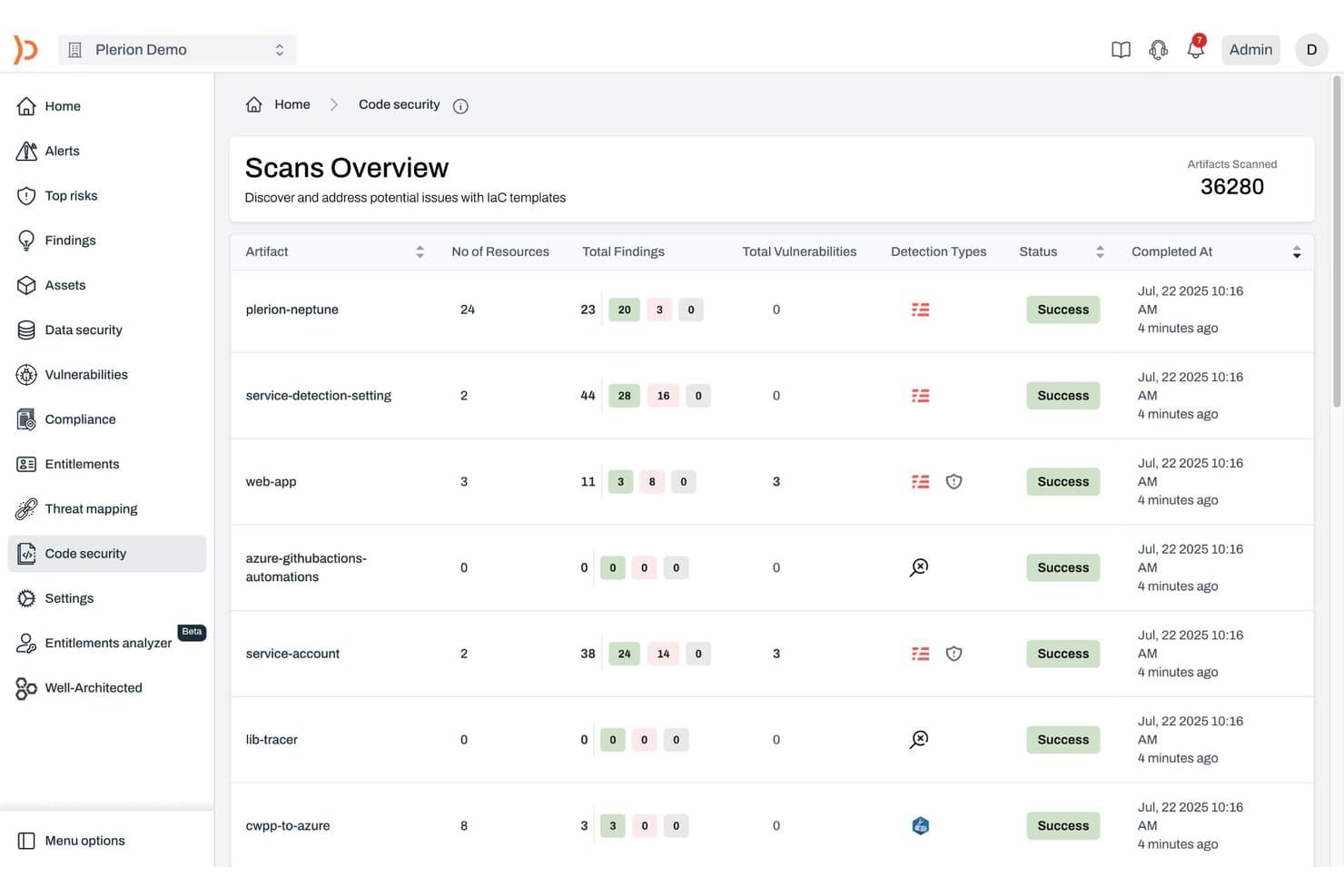
Plerion lists IaC scan findings and severity levels across code artifacts. Plerion is a cloud-native security platform that provides cloud security posture management (CSPM), cloud infrastructure entitlement management (CIEM), workload protection (CWPP), and code security. It uses exploitability scoring and attack-path analysis to assess security risks across cloud resources, identities, workloads, and infrastructure-as-code.
Who Is Plerion Best For?
Plerion is best for cloud security engineers and DevSecOps teams managing multi-cloud environments that need exploitability-based risk prioritization and attack-path analysis.
Why I Picked Plerion
I picked Plerion because its exploitability scoring considers cloud configuration and exposure context alongside vulnerability severity to help teams prioritize findings. Its attack-path analysis identifies potential routes between exposed resources, permissions, and sensitive assets, providing additional context for assessing cloud security risks. I also like how it connects vulnerability, identity, and configuration findings to support remediation decisions.
Plerion Key Features
- Continuous compliance monitoring: Assesses cloud configurations against over 30 compliance frameworks, including CIS Benchmarks and SOC 2, with reporting and compliance trend tracking.
- Code-to-cloud tracing: Connects cloud security findings to related source code and infrastructure configurations to support remediation.
- IaC scanning: Scans infrastructure-as-code configurations for security issues and supports configurable actions within development workflows.
- Data discovery and classification: Identifies and classifies sensitive cloud data to support data security assessments and risk prioritization.
Plerion Integrations
Plerion supports integrations with AWS, Microsoft Azure, Google Cloud Platform, Kubernetes, GitHub, Vanta, Drata, ServiceNow, and PagerDuty. It also provides an API for custom integrations.
Pros and Cons
Pros:
- Remediation guidance for developer workflows
- Attack-path analysis across cloud assets
- Exploitability-based risk prioritization
Cons:
- Some Kubernetes scanning capabilities remain in beta
- Workload scanning requires cloud infrastructure setup
Learn more about Plerion:

Upwind tracks API endpoints exposure, sensitive data, and vulnerabilities. Upwind is a cloud-native application protection platform (CNAPP) that combines agentless scanning, runtime sensors, and attack-path analysis. It offers cloud security posture management (CSPM), cloud infrastructure entitlement management (CIEM), vulnerability management, and API security.
Who Is Upwind Best For?
Upwind is best for cloud security engineers and DevSecOps teams that need runtime-based vulnerability prioritization, workload monitoring, and attack-path analysis across cloud environments.
Why I Picked Upwind
I picked Upwind because it combines runtime security data with vulnerability findings to assess exposure and prioritize remediation. Its runtime sensors provide context about active workloads, network reachability, and vulnerable code in use. I also like its attack-path analysis, which maps relationships between cloud resources and identifies potential paths to sensitive assets. These capabilities give security teams additional context when reviewing vulnerabilities and investigating cloud risks.
Upwind Key Features
- Continuous compliance monitoring: Assesses cloud configurations against security frameworks and benchmarks to identify compliance gaps and policy violations.
- API discovery and runtime schema mapping: Discovers managed, unmanaged, and shadow APIs and maps API schemas using runtime traffic to identify changes and potential risks.
- Cloud relationship mapping: Maps connections between workloads, services, and cloud resources to identify dependencies and potential exposure paths.
- CIEM with identity privilege mapping: Assesses cloud identities, permissions, and access relationships to identify excessive privileges and potential access risks.
Upwind Integrations
Upwind integrates with AWS CloudTrail, GitHub Actions, Jira, Slack, PagerDuty, ServiceNow ITSM, Splunk, and Datadog. Splunk and Datadog connections use outbound webhooks. Upwind also provides a public API and custom webhooks for additional integrations.
Pros and Cons
Pros:
- Attack paths map lateral movement to assets
- Asset inventory spans workloads, identities, and APIs
- Runtime context prioritizes exploitable exposures
Cons:
- Agentless scans lack live process visibility
- Runtime monitoring requires sensor deployment
Learn more about Upwind:
Other Cloud Security Posture Management Software
Here are a few additional options that didn’t make my shortlist but are still worth checking out:
- 11UptycsBest for tracing risk across hybrid assets
- 12InsightCloudSecBest for risk visibility across five clouds
- 13Microsoft Defender for CloudBest for Microsoft security stack users
- 14SentinelOne SingularityBest for prioritizing verified attack paths
- 15CloudSploitBest for open-source cloud configuration scanning
- 16CloudanixBest for contextual, explainable risk ranking
- 17Sysdig SecureBest for runtime-informed risk prioritization
- 18Netskope OneBest for linking cloud risks to data controls
- 19Datadog Cloud SecurityBest for security teams using Datadog telemetry
- 20TrendAI Vision One Best for linking attack paths to business impact
How I Evaluate Cloud Security Posture Management Software
I split my evaluation into three parts. Core functionality carries the most weight: I look for tools that scan cloud environments for misconfigurations and map findings to compliance frameworks. Then I check for standout features like graph-based attack path analysis. Finally, I evaluate support, onboarding, and pricing transparency.
Core Functionality (Table Stakes For This List)
When I'm selecting tools for my list, I score each one on a scale from 0 (does not offer the functionality) to 5 (excels in this area) for each core functionality listed below. I then convert the total into a percentage to help assess each tool's overall fit, with extra weight on any functionalities I've deemed essential.
- Misconfiguration Detection (Essential): I check whether the tool scans AWS, Azure, GCP, and other providers continuously, catching subtle issues like overly permissive storage buckets or exposed management ports.
- Compliance Mapping (Essential): I look for pre-built mappings to frameworks like CIS Benchmarks, SOC 2, and NIST, plus audit-ready reports that don't require heavy manual formatting.
- Risk Prioritization & Scoring: The scoring model matters. I evaluate whether findings factor in exploitability, public exposure, and blast radius rather than just static severity labels.
- Remediation Guidance: I look for specific, actionable fix steps tied to each finding. Tools like Prisma Cloud and Aikido Security offer code-level or automated remediation workflows worth evaluating.
- Continuous Monitoring & Alerting: Alert quality is as important as speed. I check whether the tool surfaces meaningful changes with low noise instead of flooding teams with every minor drift.
- Asset Inventory & Visibility: I evaluate how well the tool maintains a live, unified view of cloud resources across accounts and providers, including context like ownership, tags, and network exposure.
Once I have a list of tools that meet the criteria, I consider what sets each platform apart.
Differentiating Factors (What Sets Vendors Apart)
Here's how I compare and contrast different vendors:
Standout Features
I look for graph-based attack path analysis that maps relationships between assets, identities, and permissions to surface toxic combinations a flat alert list would miss. IaC security scanning is equally important—I check whether a tool catches misconfigurations in Terraform or CloudFormation templates before they hit production. Container and Kubernetes posture checks matter too, since teams running orchestrated workloads need coverage beyond traditional VMs and storage buckets.
Beyond Features
I check whether a tool plugs into CI/CD pipelines, ticketing systems like Jira, and chat platforms so findings actually reach the engineers who fix them. Pricing transparency matters just as much—some vendors bill by workload count, which can spike costs as your cloud footprint grows. I also evaluate onboarding quality, since a platform like Prisma Cloud or Orca Security can take weeks to tune without solid customer success resources.
How to Choose Cloud Security Posture Management Software
Choose a cloud security posture management platform by testing whether its findings support accountable fixes without obscuring coverage, audit evidence, or cost.
| If your priority is… | Look for… |
|---|---|
| If your priority is…Knowing what’s covered | Look for…A documented inventory of supported providers, accounts, and excluded resource types |
| If your priority is…Ranking risks for action | Look for…Written scoring criteria that account for exposure, exploitability, and potential blast radius |
| If your priority is…Audit-ready evidence | Look for…Sample reports mapping findings to CIS Benchmarks, SOC 2, or NIST controls |
| If your priority is…Predictable cost and rollout | Look for…Clear billing units and written onboarding responsibilities |
How to Vet Your Shortlist
- Reconcile coverage: During a 10-day trial, compare the platform’s asset export with a known list of test accounts and record omissions.
- Inspect risk decisions: Request a scoring methodology document and trace three sample findings from severity to recommended priority.
- Test remediation: In a two-week proof of concept, introduce a safe misconfiguration in a test Terraform plan and follow its finding through assignment and resolution.
- Verify audit evidence: Request one sample compliance report and confirm it names the control, affected resource, and evidence needed to close the finding.
- Set the tradeoff: Record whether your decision favors broad cloud and hybrid coverage or deeper attack-path and code-remediation workflows, then use that choice to screen proposals.
What Is Cloud Security Posture Management Software?
Cloud security posture management software finds and prioritizes security risks in cloud environments. It checks configurations, identities, workloads, and resources against security policies and compliance requirements. Teams use it to spot issues such as exposed services or excessive permissions, assess their potential impact, and guide remediation. Coverage and prioritization methods vary, so check that a platform supports your cloud providers and fits your team’s workflows.
Features
Here are the main features I look for in cloud security posture management software:
- Misconfiguration detection: Scans cloud resources against security policies to find issues such as public storage, exposed ports, and overly permissive settings. Teams can use the findings to identify risky configurations across their environments.
- Compliance mapping: Maps cloud configurations to frameworks such as CIS Benchmarks, SOC 2, and NIST. Reports show which controls have gaps and which resources need attention during audits.
- Risk prioritization: Teams can use these scores to prioritize findings based on risk factors beyond severity labels.
- Asset inventory: Builds a searchable view of cloud resources across connected accounts and providers. Context such as ownership, tags, and network exposure helps teams identify affected systems and route findings.
- Continuous monitoring and alerting: Checks for configuration changes and policy violations over time. Alerts notify teams when a new issue appears or an existing risk changes, providing information about new and changed findings.
- Remediation guidance: Provides fix instructions linked to each finding, such as changing a permission or adjusting a resource setting. Some tools also offer code-level suggestions or automated fixes for supported issues.
- Attack path analysis: Maps connections among cloud assets, identities, and permissions to show how separate weaknesses could combine into a route to sensitive resources. Security teams can use these paths to focus on risks with meaningful potential impact.
- Infrastructure-as-code scanning: Checks Terraform, CloudFormation, and other supported templates for policy violations before deployment. Developers can review and fix issues in their code rather than finding them only after resources are live.
- Workload and Kubernetes posture checks: Assesses virtual machines, containers, and Kubernetes configurations for security risks. This extends posture reviews beyond cloud account settings to the workloads running in those environments.
Benefits
Here are a few common benefits you can expect from cloud security posture management software:
- Earlier risk detection: Continuous or scheduled scans identify misconfigurations such as exposed services and overly permissive settings across connected cloud environments.
- Clearer remediation priorities: Risk scoring that considers exposure, exploitability, and blast radius helps your team decide which findings to address first.
- Simpler audit preparation: Compliance mappings and reports identify cloud configuration gaps against frameworks such as CIS Benchmarks, SOC 2, and NIST.
- Better asset visibility: A unified inventory shows resources across accounts and providers, with context such as ownership, tags, and network exposure.
- Fewer issues reaching production: Infrastructure-as-code scanning identifies potential policy violations in supported Terraform or CloudFormation templates before deployment.
- Faster response to configuration drift: Monitoring and alerts notify teams of new or changed policy violations for investigation and remediation.
Pricing
CSPM software prices aren't directly comparable across vendors. Some charge per cloud workload, others calculate fees based on overall cloud spending, and some provide custom enterprise quotes.
The total cost also depends on environment size, included security features, and minimum contract commitments. Compare what each price covers rather than choosing based only on the lowest advertised rate.
Plan Comparison Table for Cloud Security Posture Management Software
| Pricing Model | How It Works | What Buyers Should Check |
|---|---|---|
| Pricing ModelPer workload | How It WorksCharges based on the number of cloud workloads monitored | What Buyers Should CheckWorkload definition, minimum commitments, and included features |
| Pricing ModelCloud-spend-based | How It WorksCalculates subscription fees based on monthly cloud infrastructure spending | What Buyers Should CheckSpending tiers, estimated total cost, and included capabilities |
| Pricing ModelFixed subscription | How It WorksCharges a recurring plan fee, often with resource or account limits | What Buyers Should CheckUsage limits, feature restrictions, and upgrade costs |
| Pricing ModelCustom enterprise quote | How It WorksPricing is determined by the vendor based on environment size and requirements | What Buyers Should CheckCovered resources, security modules, and contract terms |
FAQs
Some answers to common questions about cloud security posture management software:
Is CSPM the same as CNAPP?
No. Cloud security posture management (CSPM) focuses on finding risks in cloud configurations and resources. Cloud-native application protection platforms (CNAPPs) combine CSPM with other capabilities, such as workload protection and cloud infrastructure entitlement management (CIEM). The exact mix varies by vendor, so check which features a product includes rather than relying on its category label. If you need configuration checks and compliance reporting, CSPM may cover your needs. If you also need workload or application security, compare the CNAPP’s specific modules and coverage.
Does CSPM software require agents?
No, many CSPM tools connect to cloud provider APIs and assess configurations without installing agents on each resource. This approach supports cloud account inventory without requiring agents on individual resources, but API-based checks don’t automatically provide every kind of workload or runtime visibility. Some products use agents, sensors, or other data sources for those capabilities. Before a trial, ask what access permissions the integration needs, which resource types it can inspect, and whether any features require additional deployment.
How often should CSPM checks run?
CSPM checks should run often enough to catch configuration changes before they create extended exposure. Many platforms monitor for changes continuously or near real time, while some checks run on a schedule. Ask the vendor which method applies to each cloud provider and policy type. During a trial, make a safe change in a test account and record how long it takes to appear as a finding. Also check whether the tool alerts on resolved issues and repeated changes.
Can CSPM work with a cloud environment that uses multiple providers?
Yes, some CSPM platforms monitor more than one cloud provider, but coverage varies by product and resource type. Confirm that the tool supports each provider, account structure, and service your team relies on. Then compare its asset inventory with a known list of test accounts and resources. Check for gaps in policy coverage, permissions, and compliance mappings across providers. Monitoring multiple providers through one platform doesn’t guarantee consistent policy coverage, so review sample findings from each environment before choosing a platform.