

Recension av DTM Data Generator: Viktiga funktioner, fördelar, nackdelar och priser förklarade
DTM Data Generator utmärker sig genom sin robusta datagenerering och anpassning, vilket gör den idealisk för komplexa databastester, även om gränssnittet kan kännas föråldrat jämfört med nyare verktyg.

We review tools independently, and commissions help fund our testing. See our transparency policy, our methodology, or suggest a tool.
DTM Data Generator is a database testing tool that automatically populates database tables with synthetic test data across ODBC-connected databases. It's worth looking at if your team needs to generate large, realistic datasets for development and QA without writing manual scripts. I'd suggest it over something like Redgate SQL Data Generator if you want a one-time license rather than a subscription-based tool, and don't need the heavier enterprise workflow that comes with it.
DTM Data Generator Evaluation Summary

0/5
- From $149 per license
- Free demo available
Varför du kan lita på våra programvarurekommendationer
6,700+
Reviews
20
Industry experts
16+
Evaluation factors
14
Years
Vårt team har testat och recenserat programvara sedan 2012. Som teknikledare själva vet vi hur svårt — och viktigt — det är att välja rätt programvara.
För den här guiden utvärderade vi verktyg genom praktisk testning och oberoende research, och betygsatte verktygen enligt våra urvalskriterier.
Våra recensioner speglar vårt mänskliga redaktionella omdöme, inte ett säljbudskap.
Expertgranskare:
- Paulo Gardini MiguelTeknikdirektör
 Tim FisherVP för AI
 Gabriel RosasTech Lead & mjukvaruarkitekt
 Christhian GruhnTech Lead & plattformsarkitekt

DTM Data Generator Overview
DTM Data Generator offers extensive data generation options and strong database compatibility, making it a solid choice for teams needing granular control over test data. Its pricing is straightforward, and support is responsive, but the interface feels dated and onboarding can take time. Compared to others, it excels in customization and scripting but lacks modern UI and built-in integrations. It’s best for users who prioritize flexibility and need to simulate complex data scenarios, such as QA engineers or database administrators working in regulated or legacy-heavy environments. For those judging tools on depth over aesthetics, it’s a reliable pick.
Pros
- Supports a wide range of database systems and formats.
- Offers advanced data generation with 70+ built-in functions.
- Handles complex relationships and dependencies automatically.
Cons
- Interface appears outdated compared to modern alternatives.
- Lacks built-in cloud or CI/CD pipeline integrations.
- Onboarding and initial setup can be time-consuming.
Is DTM Data Generator Right For Your Needs?
Who Would be a Good Fit for DTM Data Generator?
DTM Data Generator is best suited for teams and organizations that need precise, customizable test data for complex database environments. Its advanced scripting, support for multiple database types, and ability to handle intricate data relationships make it valuable for regulated industries, technical QA teams, and companies with legacy systems. If your work involves simulating real-world data scenarios or managing large, structured datasets, this tool’s flexibility and depth can help you meet strict testing requirements.
- Financial ServicesRegulatory compliance and complex data structures require advanced data generation.
- Healthcare ITSensitive data simulation and relational integrity are supported by built-in functions.
- Enterprise QA TeamsLarge-scale, repeatable test data creation is handled efficiently.
- Database AdministratorsSupports multiple database types and custom scripting for legacy systems.
- Software VendorsEnables thorough testing of database-driven applications with varied data.
- Academic ResearchFacilitates controlled experiments with customizable, realistic datasets.
Who Would be a Bad Fit for DTM Data Generator?
DTM Data Generator is less suitable for teams that prioritize modern interfaces, built-in cloud integrations, or rapid onboarding. Startups, small businesses, and teams with limited technical resources may find the setup and interface challenging. If your testing needs are simple or you rely on cloud-native workflows, other tools may be a better match.
- Early-Stage StartupsSetup complexity and interface may slow down small, agile teams.
- Marketing DepartmentsLacks features for non-technical users and simple data needs.
- Cloud-First CompaniesNo built-in support for cloud database services or CI/CD pipelines.
- E-Commerce SMBsOverly complex for basic transactional data testing requirements.
- Manual TestersRequires scripting and database knowledge not suited to non-technical roles.
- Mobile App TeamsLimited value for teams focused on non-database-centric testing.
Our Review Methodology
How We Test & Score Tools
We’ve spent years building, refining, and improving our software testing and scoring system. The rubric is designed to capture the nuances of software selection and what makes a tool effective, focusing on critical aspects of the decision-making process.
Below, you can see exactly how our testing and scoring works across seven criteria. It allows us to provide an unbiased evaluation of the software based on core functionality, standout features, ease of use, onboarding, customer support, integrations, customer reviews, and value for money.
Core Functionality (25% of final scoring)
The starting point of our evaluation is always the core functionality of the tool. Does it have the basic features and functions that a user would expect to see? Are any of those core features locked to higher-tiered pricing plans? At its core, we expect a tool to stand up against the baseline capabilities of its competitors.
Standout Features (25% of final scoring)
Next, we evaluate uncommon standout features that go above and beyond the core functionality typically found in tools of its kind. A high score reflects specialized or unique features that make the product faster, more efficient, or offer additional value to the user.
We also evaluate how easy it is to integrate with other tools typically found in the tech stack to expand the functionality and utility of the software. Tools offering plentiful native integrations, 3rd party connections, and API access to build custom integrations score best.
Ease of Use (10% of final scoring)
We consider how quick and easy it is to execute the tasks defined in the core functionality using the tool. High scoring software is well designed, intuitive to use, offers mobile apps, provides templates, and makes relatively complex tasks seem simple.
Onboarding (10% of final scoring)
We know how important rapid team adoption is for a new platform, so we evaluate how easy it is to learn and use a tool with minimal training. We evaluate how quickly a team member can get set up and start using the tool with no experience. High scoring solutions indicate little or no support is required.
Customer Support (10% of final scoring)
We review how quick and easy it is to get unstuck and find help by phone, live chat, or knowledge base. Tools and companies that provide real-time support score best, while chatbots score worst.
Customer Reviews (10% of final scoring)
Beyond our own testing and evaluation, we consider the net promoter score from current and past customers. We review their likelihood, given the option, to choose the tool again for the core functionality. A high scoring software reflects a high net promoter score from current or past customers.
Value for Money (10% of final scoring)
Lastly, in consideration of all the other criteria, we review the average price of entry level plans against the core features and consider the value of the other evaluation criteria. Software that delivers more, for less, will score higher.
Core Features
Multi-Database Support
Generate test data for Oracle, SQL Server, MySQL, PostgreSQL, and more. This flexibility lets you use one tool across different environments.
Custom Data Generation Scripts
Create complex data sets using SQL expressions, templates, and scripts. This allows you to match real-world data patterns and business rules.
Automatic Foreign Key Handling
Preserve referential integrity by automatically generating related records. This is essential for testing applications with complex relational databases.
70+ Built-In Data Generators
Access a wide range of data types, including names, dates, emails, and custom formats. This speeds up the process of creating realistic, varied test data.
Command-Line Automation
Run data generation tasks from the command line for batch processing. This supports automated testing workflows and scheduled data refreshes.
Project and Scenario Management
Save and reuse data generation projects and scenarios for consistency. This feature helps teams standardize test data across multiple test cycles.

Ease of Use
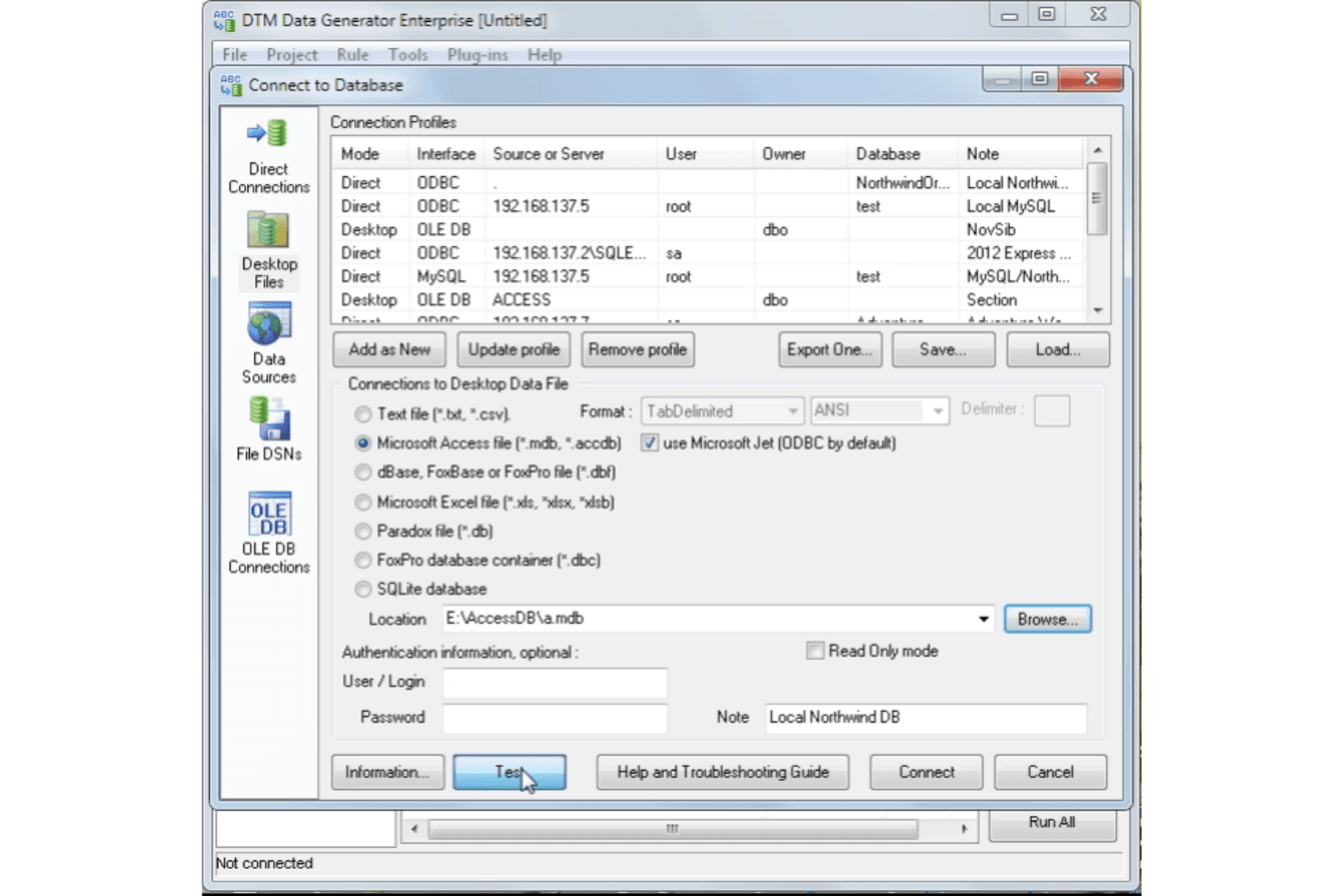
DTM Data Generator’s interface feels dated and can be overwhelming for new users, especially those without strong SQL or scripting experience. While its feature set is deep and highly configurable, the navigation and setup process require patience and technical know-how. Users often mention that once configured, it’s reliable and flexible, but the initial learning curve and lack of modern UI elements make it less approachable than many newer and more user-friendly database testing tools.
Integrations
DTM Data Generator integrates with Oracle, Microsoft SQL Server, MySQL, PostgreSQL, IBM DB2, Azure SQL, SQLite, Interbase, and Sybase, among others.
DTM offers several APIs through their Data Generation SDK for different levels of services.

DTM Data Generator Specs
- A/B Testing: No
- API: Yes
- Automated Testing: No
- Browser Compatibility Testing: No
- Bug Tracking: No
- Calendar Management: No
- CI/CD Integration: No
- Dashboard: Yes
- Data Export: Yes
- Data Import: Yes
- Data Visualization: Yes
- Developer Tools: No
- External Integrations: Yes
- History/Version Control: No
- Manual Testing: Yes
- Multi-User: Yes
- Notifications: No
- Performance Testing: No
- Regression Testing: No
- Scheduling: No
- Status Notifications: No
- Third-Party Plugins/Add-Ons: Yes


