

Cele mai bune platforme de integrare SaaS ajută echipele să conecteze aplicații, să automatizeze fluxurile de date, să reducă munca manuală și să mențină informațiile consecvente în toate sistemele. Aceste instrumente permit organizațiilor să transfere date în mod fiabil între produsele SaaS, astfel încât echipele să poată lucra cu informații actualizate fără să gestioneze scripturi complexe.
Echipele caută adesea o platformă de integrare SaaS atunci când transferurile manuale de date introduc erori, sistemele deconectate încetinesc operațiunile sau configurările greșite creează lacune între instrumente. Aceste probleme duc la raportări inconsecvente, muncă duplicată și dificultăți pentru echipele IT și operaționale care încearcă să mențină alinierea între departamente.
Având peste 20 de ani de experiență în industrie în calitate de director de tehnologie, am testat și evaluat zeci de platforme de integrare SaaS în medii reale pentru a le analiza performanța, profunzimea integrărilor și ușurința în utilizare. Acest ghid evidențiază cele mai bune platforme de integrare SaaS care ajută echipele să mențină un transfer fiabil al datelor. Fiecare recenzie acoperă funcțiile, avantajele și dezavantajele, precum și cazurile de utilizare potrivite, pentru a vă ajuta să alegeți instrumentul potrivit.
Why Trust Our Software Recommendations
6,700+
Reviews
20
Industry experts
16+
Evaluation factors
14
Years
Our team has been testing and reviewing software since 2012. As tech leaders ourselves, we know how difficult—and important—it is to choose the right software.
For this guide, we evaluated tools using hands-on testing and independent research, scoring tools using our selection criteria.
Our reviews reflect our human editorial judgment, not a sales pitch.
Expert reviewers:
- Paulo Gardini MiguelTech Director
 Tim FisherVP of AI
 Gabriel RosasTech Lead & Software Architect
 Christhian GruhnTech Lead & Platform Architect

Tabel comparativ al platformelor de integrare SaaS
Acest tabel comparativ rezumă detaliile de preț pentru selecțiile mele de top în materie de platforme de integrare SaaS:
Sorted by: Default
| Tool | Starting Price | Website | |
|---|---|---|---|
Best for managed ITSM integration ops | 4.5 out of 5 | Pricing upon request Not available | Website |
Best for small business automation | 4.7 out of 5 | $19.99/month Free plan + 14-day trial + demo available | Book Demo |
Best for no-code integration builders | 4.8 out of 5 | $1,495/month Free demo available | Website |
Best for marketing data integration | 4.5 out of 5 | Pricing upon request Free demo available | Website |
Best for scalability in large teams | 4.4 out of 5 | $99/month 30-day free trial | Website |
Best for compliance with regulations | Not rated | Pricing upon request Free demo available | Website |
Best for enterprise-level solutions | Not rated | $2,000/month 30-day free trial + demo available | Website |
Best for API integration agility | Not rated | Pricing upon request Free demo available | Website |
Best for rapid integration deployment | Not rated | Pricing upon request Free demo available | Website |
Best for two-way spreadsheet sync | Not rated | $49/month 30-day free trial | Website |


Cele mai bune platforme de integrare SaaS, analizate
Mai jos sunt prezentate rezumatele mele detaliate ale celor mai bune platforme de integrare SaaS care au ajuns pe lista mea scurtă. Recenziile mele oferă o analiză detaliată a funcțiilor principale, avantajelor și dezavantajelor, integrărilor și cazurilor ideale de utilizare pentru fiecare instrument, pentru a vă ajuta să îl găsiți pe cel mai potrivit pentru dumneavoastră.
 Best for managed ITSM integration ops
- Not available
- Pricing upon request
Visit WebsiteCustomer Rating:4.5/5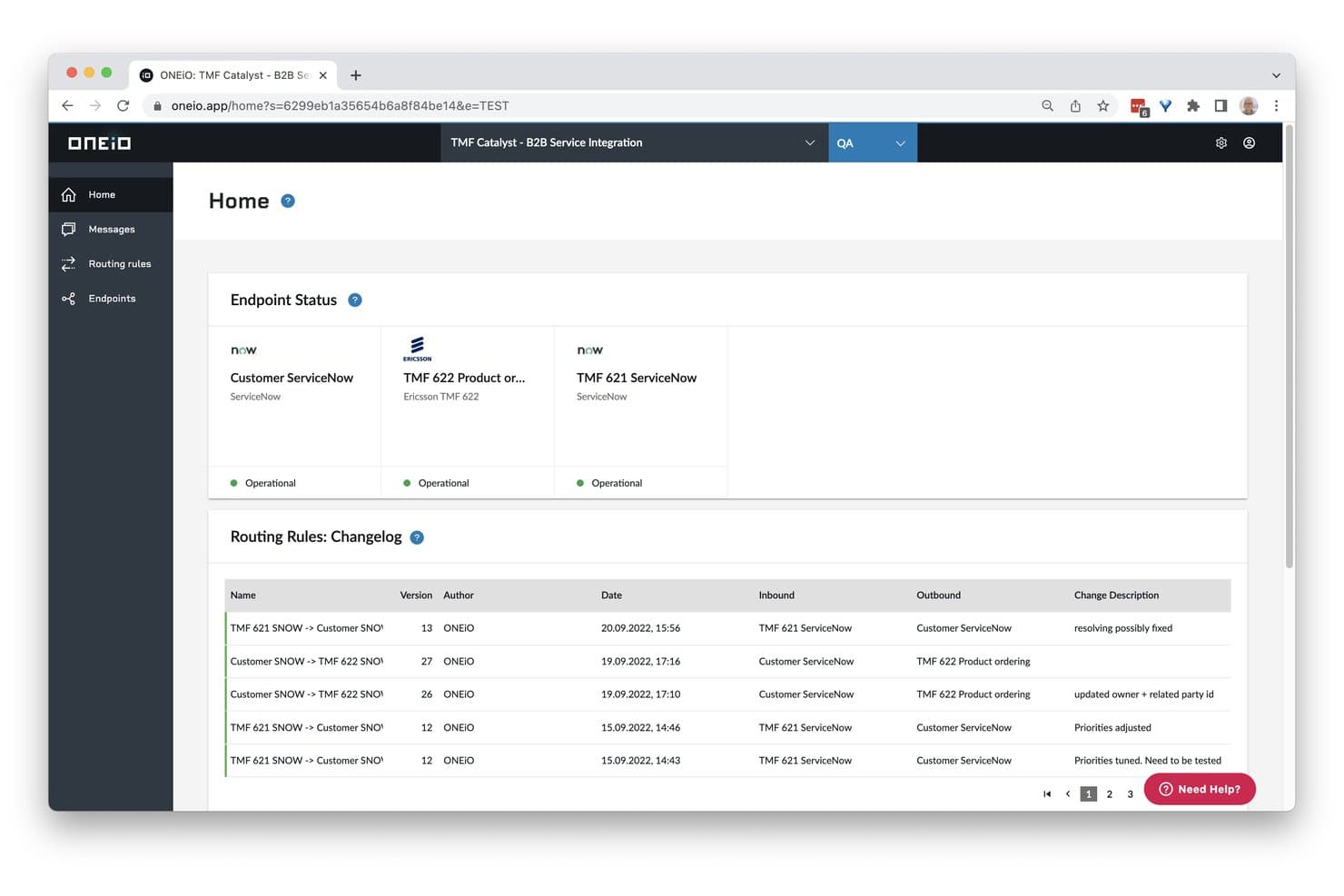
ONEiO gives users real-time endpoint status and routing rule history. ONEiO is a managed iPaaS built around ITSM and enterprise IT ecosystems, offering multi-endpoint integration, AI-driven monitoring, no-code workflow configuration, and cross-protocol data transformation.
Who Is ONEiO Best For?
ONEiO is a strong fit for enterprise IT teams and managed service providers that need to connect ITSM platforms across complex, multi-vendor service delivery chains.
Why I Picked ONEiO
ONEiO earns its spot on my shortlist because it's the only platform here that treats integration as a managed operation, not just a toolset. I picked it specifically for ITSM-heavy environments where uptime accountability matters: the ONEAi® engine monitors integrations around the clock and self-heals before incidents surface, which I find genuinely rare. Its persistent message queuing means no tickets are lost if a connected system like ServiceNow or Freshservice goes down mid-sync.
ONEiO Key Features
- Multi-endpoint hub architecture: Connects multiple systems through a single shared integration layer, eliminating point-to-point sprawl as your tool stack grows.
- Rule Robot: Automatically generates routing rules once an integration is configured, reducing manual setup for standard connection patterns.
- Persistent message queuing: Holds and retries messages across asynchronous inbound, processing, and outbound queues so no data is lost during system outages.
- ISO/IEC 27001:2022 certification with data residency options: Provides EU, UK, and US cluster options alongside certified information security controls to meet regional compliance requirements.
ONEiO Integrations
ONEiO offers 50+ documented integrations, including ServiceNow, Jira, BMC Remedy, Freshservice, Zendesk, Salesforce, Microsoft Dynamics 365, HubSpot, Slack, and Azure DevOps. It also connects to custom systems through REST, SOAP, FTP, email, and other standard APIs.
Pros and Cons
Pros:
- Persistent message queuing prevents data loss
- ONEAi engine provides proactive self-healing
- Managed integration operations with SLA-backed uptime
Cons:
- Limited analytics and reporting capabilities
- No self-service for citizen integrators
Learn more about ONEiO: Best for small business automation
- Free plan + 14-day trial + demo available
- From $19.99/month
Visit WebsiteCustomer Rating:4.7/5
Zapier automates workflows by connecting apps, streamlining tasks for businesses. Zapier is an automation tool designed for small businesses, enabling users to connect different apps and automate workflows. It helps streamline processes by allowing users to automate repetitive tasks without coding knowledge.
Why I picked Zapier: Zapier offers a user-friendly interface that lets you set up automated workflows (called Zaps) quickly. With a vast library of pre-built templates, Zapier simplifies the automation process for those who may not have technical expertise. Its ability to connect multiple apps and trigger actions based on specific events makes it ideal for small businesses looking to save time. Plus, the platform's focus on ease of use and accessibility sets it apart from more complex solutions.
Standout features & integrations:
Features include task automation between apps, a user-friendly interface to set up triggers and actions, and support for thousands of apps, enabling seamless integrations across various platforms.
Integrations include Google Sheets, Slack, Gmail, Trello, HubSpot, Mailchimp, Asana, Shopify, QuickBooks, and Salesforce.
Pros and Cons
Pros:
- Wide range of templates
- No coding needed
- Easy workflow automation
Cons:
- Not ideal for large enterprises
- Limited advanced functionality
Learn more about Zapier: Best for no-code integration builders
- Free demo available
- From $1,495/month
Visit WebsiteCustomer Rating:4.8/5
Cyclr enables no-code integrations for app developers, streamlining workflows. Cyclr is a no-code integration platform designed for SaaS and app developers, enabling them to create and manage integrations effortlessly. It supports essential business functions such as workflow automation and data connectivity, catering to teams that want to deploy integrations without heavy coding.
Why I picked Cyclr: Cyclr’s drag-and-drop interface allows you to build integrations without needing technical skills. It offers pre-built connectors, simplifying the process of linking various applications, while its visual tools make it easy to map data flows, reducing development time. Additionally, the platform's reporting features provide insights into integration performance, which is important for ongoing optimization.
Standout features & integrations:
Features include an extensive library of pre-built connectors, a drag-and-drop workflow builder, and real-time monitoring tools.
Integrations include Salesforce, HubSpot, Shopify, Slack, QuickBooks, Google Sheets, Mailchimp, Zendesk, Xero, and Microsoft Dynamics 365.
Pros and Cons
Pros:
- Quick deployment for developers
- Extensive connector library
- Easy drag-and-drop interface
Cons:
- Limited advanced customization
- High initial cost
Learn more about Cyclr: Best for marketing data integration
- Free demo available
- Pricing upon request
Visit WebsiteCustomer Rating:4.5/5
Adverity offers a wide range of pre-built datastream connectors to unify marketing data from multiple SaaS platforms. Adverity is a marketing data platform that helps teams connect, manage, and share their data. It offers tools to collect data from various sources, transform it, and send it to destinations like dashboards or storage systems.
Why I picked Adverity: I picked Adverity because it offers no-code data transformation and smart automation. You can pull in marketing data from multiple tools, standardize it with built-in functions like column splitting and data mapping, and push it to your preferred analytics or storage platform. It also includes AI-powered data quality monitoring, which is key when you're integrating large amounts of data from various SaaS tools, automatically flagging issues like duplicates or anomalies before they impact your reporting.
Standout features & integrations:
Features include smart naming conventions that use machine learning to prevent errors and improve data governance. Adverity also offers AI integration to help your teams become more data-driven.
Integrations include Google, Meta, TikTok, Google BigQuery, Looker Studio, Facebook Ads, Amazon Advertising, Hubspot, Salesforce, Amazon S3, Snowflake, and Microsoft Azure.
Pros and Cons
Pros:
- Provides the ability to create personalized dashboards
- Can harmonize data from various sources
- Automated data quality monitoring
Cons:
- The initial setup can be time-consuming
- Certain configurations may require technical knowledge
Learn more about Adverity: Best for scalability in large teams
- 30-day free trial
- From $99/month
Visit WebsiteCustomer Rating:4.4/5
Boomi connects enterprise apps, data, and automates workflows seamlessly. Boomi is a cloud-based integration platform that serves large enterprises, providing tools for data integration, API management, and workflow automation. It’s well-suited for businesses looking to connect applications and data across their organizations seamlessly.
Why I picked Boomi: Boomi’s scalable architecture supports extensive data integration needs, making it a strong choice for large teams. Its drag-and-drop interface facilitates easy workflow creation without deep technical skills, while its ability to manage APIs helps your team to connect applications efficiently. Additionally, the platform's real-time data processing enhances decision-making by providing up-to-date information quickly.
Standout features & integrations:
Features include a drag-and-drop interface for building workflows, API management, and real-time data integration. Boomi also offers extensive connectivity with pre-built connectors and supports automation for improved business processes.
Integrations include Salesforce, NetSuite, SAP, Oracle, Workday, Microsoft Dynamics 365, ServiceNow, Dropbox, Google Cloud Platform, and AWS.
Pros and Cons
Pros:
- Efficient API management
- Real-time data processing
- Scalable for large enterprises
Cons:
- High learning curve
- Complex setup process


IBM provides secure, compliant data integration and automation for enterprises. IBM offers an integration platform as a service (iPaaS) that is designed for enterprises needing secure and compliant data management. It serves businesses across industries that require adherence to strict data regulations while performing data integration and automation tasks.
Why I picked IBM: IBM provides a secure environment where your team can integrate applications while meeting regulatory standards. The platform supports complex workflows, offering flexibility for various business needs. Plus, its advanced data governance tools help ensure compliance, which is important for regulated industries. Additionally, its analytics capabilities provide insights into data silos, usage, and performance, allowing for informed decision-making.
Standout features & integrations:
Features include IBM Cloud, which provides scalable infrastructure and platform services, IBM Watson for AI and machine learning applications, and IBM’s blockchain technology for secure, decentralized transactions. IBM also excels in hybrid cloud environments and data management solutions for businesses across industries.
Integrations include Salesforce, SAP, Oracle, Microsoft Dynamics 365, AWS, Google Cloud, ServiceNow, Workday, Slack, and Twilio.
Pros and Cons
Pros:
- Extensive data governance
- Supports complex workflows
- Strong compliance features
Cons:
- Limited offline capabilities
- High resource demands
Learn more about IBM: Best for enterprise-level solutions
- 30-day free trial + demo available
- From $2,000/month (billed annually)

MuleSoft integrates apps and data for enterprise connectivity and efficiency. MuleSoft is an integration platform that caters primarily to large enterprises, providing API management and connectivity solutions. It excels in integrating applications and data across various environments, enhancing operational efficiency.
Why I picked MuleSoft: MuleSoft offers an advanced API management suite that allows you to design, build, and manage APIs efficiently. With its Anypoint Platform, you can connect apps, data, and devices with ease. Additionally, the software’s data integration capabilities make it suitable for complex enterprise ecosystems, which is vital for large-scale operations and troubleshooting processes.
Standout features & integrations:
Features include Anypoint Platform, which allows users to design, build, and manage APIs and integrations, and robust data transformation capabilities for seamless communication across different systems. MuleSoft also provides pre-built connectors, API management, and real-time analytics for monitoring integrations.
Integrations include Salesforce, SAP, ServiceNow, Workday, Microsoft Dynamics 365, Oracle, AWS, Google Cloud, Slack, and Twilio.
Pros and Cons
Pros:
- High-volume data processing
- Suitable for large enterprises
- Extensive API management capabilities
Cons:
- Limited for smaller teams
- Steep learning curve
Learn more about MuleSoft:

Tray enables flexible API integrations and automates complex workflows. Tray is an integration platform that caters to businesses needing flexible API integrations and workflow automation. It’s designed for teams looking to connect a wide range of applications and automate complex business processes efficiently.
Why I picked Tray: Tray offers a flexible platform for creating API integrations that fit your specific business needs. The software’s visual workflow builder allows you to design complex processes without extensive coding. With this focus on API integrations, Tray helps your team connect diverse applications seamlessly. Additionally, its scalability supports growing businesses, aiding in the management of increasing data flows.
Standout features & integrations:
Features include powerful connectors for different apps, a visual workflow builder, and enterprise-grade security and scalability, enabling teams to automate complex processes across systems with ease.
Integrations include Salesforce, Slack, Google Sheets, HubSpot, Zendesk, Shopify, Marketo, Microsoft Dynamics 365, Trello, and NetSuite.
Pros and Cons
Pros:
- Visual workflow builder
- Scalable for growing businesses
- Flexible API integrations
Cons:
- Limited offline functionality
- High setup complexity
Learn more about Tray:

Paragon is ideal for seamless app integration and workflow automation. Paragon is an embedded integration platform as a service (iPaaS) designed for developers, enabling B2B SaaS companies to integrate various applications seamlessly. It supports key business functions like integration management and workflow automation.
Why I picked Paragon: Paragon provides a single SDK for easy integration with third-party applications. Its managed authentication ensures secure connectivity, while its customizable UI options let you tailor integration interfaces. The platform's API monitoring also maintains functionality, making it ideal for rapid deployment. Additionally, the software’s workflow automation further aids in efficient data synchronization and task management.
Standout features & integrations:
Features include managed integration authentication, allowing secure connections without hassle. The platform offers customizable UI components to fit your brand needs. Additionally, API monitoring ensures your integrations remain functional over time.
Integrations include Salesforce, HubSpot, Slack, Zendesk, Intercom, Shopify, QuickBooks, Stripe, Mailchimp, and Google Workspace.
Pros and Cons
Pros:
- Customizable interfaces
- Developer-friendly documentation
- Fast integration deployment
Cons:
- Requires technical expertise
- Limited support for non-developers
Learn more about Paragon:

Manage your data imports, scheduled refreshes, and Slack alerts directly within the Coefficient sidebar in Google Sheets. For businesses seeking a versatile SaaS integration platform, Coefficient offers a compelling solution by connecting Google Sheets and Excel with over 100 data sources. This tool is ideal for teams in finance, marketing, and analytics who need to unify live data and automate processes to make faster, data-driven decisions. Coefficient stands out by allowing users to create applications like commission trackers and marketing dashboards without any coding, addressing the challenge of integrating disparate data systems into cohesive, actionable insights.
Why I Picked Coefficient
I chose Coefficient because it is an effective tool for maintaining a single source of truth within the familiar interface of a spreadsheet. In particular, it addresses the friction of manual data exports by offering two-way sync, allowing you to not only pull live data from CRMs like Salesforce or HubSpot but also push cleaned data back to those systems. As a result, this makes it the best choice for teams that need to perform complex derivative calculations or custom SaaS metrics analysis that native platform reporting can't handle.
Coefficient Key Features
In addition to its impressive integration capabilities, Coefficient offers several other features that cater to diverse business needs.
- AI-driven modeling: Perform advanced data analysis and uncover insights using AI-powered tools.
- Scheduled auto-refresh: Automatically update reports and dashboards on your preferred cadence.
- Dashboard builder: Create interactive web dashboards to visualize and share data across teams.
- Automated alerts: Receive Slack or email notifications when critical data changes occur.
Coefficient Integrations
Integrations include Salesforce, HubSpot, Google Analytics, Google Ads, QuickBooks, Snowflake, BigQuery, Google Sheets, and Excel, with additional connections available through Coefficient’s no-code API integration capabilities.
Pros and Cons
Pros:
- Supports extensive integrations
- Extensive library of pre-built templates
- Automates data collection and reporting tasks
Cons:
- Requires spreadsheet-centric workflow
- Connection limits on lower pricing tiers
Learn more about Coefficient:
Alte platforme de integrare SaaS
Iată câteva opțiuni suplimentare de platforme de integrare SaaS care nu au ajuns pe lista mea scurtă, dar merită totuși analizate:
- 11CeligoBest with universal protocol connectors
- 12WhalesyncBest for syncing Notion and Airtable
- 13HexaSyncBest for ecommerce platforms
- 14DigibeeBest for hybrid cloud environments
- 15SkyviaBest for cloud data synchronization
- 16WorkatoBest for business process automation
- 17SnapLogicBest for big data integration
- 18JitterbitBest for rapid API creation
- 19PrismaticBest for embedded integrations
How I Evaluate SaaS Integration Platforms
I look at every platform in two layers: the baseline capabilities a tool must have to make the list, and the differentiators—like CI/CD support or regional data residency—that reveal real fit.
Core Functionality (Table Stakes For This List)
When I'm selecting tools for my list, I rank each one on a scale from 0 (does not offer the functionality) to 5 (excels in this area) for each core functionality listed below. Then, I calculate the tool's total score into a percentage. Each tool needs to achieve a minimum total score of 75% to be considered for inclusion.
- Pre-Built Connectors Library: I evaluate the breadth and depth of native connectors, paying attention to coverage across categories like CRM, HRIS, ERP, and service desks.
- Workflow Automation Builder: The visual builder matters—I look for branching logic, conditional paths, and loops that handle real scenarios like multi-step employee onboarding flows.
- Data Transformation & Mapping: Field mapping alone isn't enough. I check for formula support, data type conversions, and the ability to reshape nested JSON or XML payloads between systems.
- API & Webhook Support: Custom connector creation is a key differentiator here. I evaluate REST, SOAP, and GraphQL support alongside webhook triggers for real-time event handling.
- Monitoring & Error Handling: Production integrations break. I look at execution logs, alerting options, automated retry policies, and how easy it is to diagnose a failed sync at 2 a.m.
- Security & Governance Controls: I check for OAuth and SSO support, role-based access, encryption standards, and relevant compliance certifications like SOC 2 and ISO 27001.
Once I have a list of tools that meet this criteria, I consider what sets each platform apart.
Differentiating Factors (What Sets Vendors Apart)
Here's how I compare and contrast different vendors:
Standout Features
AI-powered automation is a big differentiator. I look for platforms that suggest field mappings or generate workflows from natural language prompts, which cuts setup time on complex multi-system integrations. Event-driven architecture also matters when teams need real-time data movement via Kafka or pub/sub messaging instead of scheduled batch syncs. For SaaS vendors building integrations into their own products, embedded iPaaS capabilities let them offer native connectivity to customers without maintaining separate infrastructure.
Beyond Features
Developer experience is a major consideration. I check whether platforms offer CLI tools, Git-based version control, and CI/CD pipeline support so DevOps teams can treat integrations as code. Deployment flexibility also weighs heavily—some organizations need private agents running behind firewalls or data residency in specific regions. Pricing transparency rounds out my evaluation. I look at whether billing is based on tasks, connectors, or data volume, and how predictably costs scale as integration usage grows across teams.
Cum să alegeți o platformă de integrare SaaS
Este ușor să vă pierdeți în liste lungi de funcții și structuri complexe de prețuri. Pentru a vă ajuta să rămâneți concentrați în timpul procesului de selecție a unui produs SaaS, iată o listă de factori de care trebuie să țineți cont:
| Factor | Ce trebuie avut în vedere |
| Scalabilitate | Poate platforma să se dezvolte odată cu echipa dumneavoastră? |
| Integrări | Se integrează cu instrumentele dumneavoastră existente? |
| Personalizare | O puteți adapta pentru a răspunde nevoilor dumneavoastră specifice? |
| Ușurință în utilizare | Este platforma ușor de utilizat pentru echipa dumneavoastră? |
| Buget | Se încadrează în planul dumneavoastră financiar? |
| Măsuri de securitate | Există măsuri pentru protejarea datelor dumneavoastră? |
| Asistență | Este disponibilă o asistență de încredere pentru clienți? |
| Conformitate | Respectă reglementările necesare? |
Tendințe în platformele de integrare SaaS
În cadrul cercetării mele, am consultat nenumărate actualizări de produse, comunicate de presă și jurnale de lansări de la diferiți furnizori de platforme de integrare SaaS. Iată câteva dintre tendințele emergente pe care le urmăresc:
- Perspective bazate pe inteligență artificială: Platformele utilizează din ce în ce mai mult inteligența artificială pentru a oferi perspective bazate pe date. Aceste perspective ajută companiile să își optimizeze operațiunile prin anticiparea tendințelor și identificarea ineficiențelor.
- Dezvoltare cu cod redus: Tot mai multe platforme adoptă abordări cu cod redus, permițând utilizatorilor să creeze integrări cu un volum minim de cod. Această tendință le facilitează utilizatorilor care nu sunt dezvoltatori crearea unor fluxuri de lucru complexe.
- Securitate îmbunătățită a datelor: Pe fondul preocupărilor tot mai mari privind confidențialitatea datelor, platformele își consolidează funcțiile de securitate. Criptarea îmbunătățită și instrumentele de conformitate devin standard pentru protejarea informațiilor sensibile.
- Arhitectură scalabilă: Pe măsură ce companiile se dezvoltă, acestea au nevoie de platforme care să țină pasul cu ele. Furnizorii dezvoltă acum soluții capabile să gestioneze volume tot mai mari de date fără a compromite performanța, împreună cu integrări iPaaS încorporate orientate către clienți.
- Colaborare în timp real: Platformele de integrare adaugă funcții care promovează colaborarea în timp real între membrii echipei. Această tendință sprijină echipele distribuite care lucrează din locații diferite, asigurând alinierea tuturor.
Ce este o platformă de integrare SaaS?
Platformele de integrare SaaS conectează diferite aplicații software și servicii pentru a automatiza fluxurile de lucru și a sincroniza datele. Aceste instrumente sunt utilizate în mod obișnuit de profesioniști IT, dezvoltatori și analiști de afaceri care trebuie să integreze diverse sisteme pentru a îmbunătăți eficiența și acuratețea datelor.
Funcții precum instrumentele de integrare API, procesarea datelor în timp real și dezvoltarea cu puțin cod contribuie la crearea unor fluxuri de lucru eficiente și la asigurarea consecvenței datelor. În ansamblu, aceste platforme oferă o valoare semnificativă prin reducerea muncii manuale și îmbunătățirea eficienței operaționale.
Caracteristicile platformelor de integrare SaaS
Atunci când selectați o platformă de integrare SaaS, urmăriți următoarele caracteristici principale:
- Integrarea API: Conectează diferite aplicații, permițând schimbul automatizat de date și comunicarea între sisteme.
- Procesarea datelor în timp real: Asigură actualizarea instantanee a datelor în toate sistemele, menținând informațiile actuale și exacte.
- Dezvoltarea cu puțin cod: Permite utilizatorilor să creeze fluxuri de lucru fără programare extinsă, fiind accesibilă și utilizatorilor fără cunoștințe tehnice.
- Sincronizarea datelor: Menține datele consecvente pe toate platformele conectate, reducând neconcordanțele și asigurând acuratețea.
- Arhitectura scalabilă: Sprijină companiile în creștere prin gestionarea unor volume tot mai mari de date fără a afecta performanța.
- Automatizarea fluxurilor de lucru: Automatizează sarcinile repetitive, economisind timp și reducând posibilitatea erorilor umane.
- Funcții de securitate: Protejează datele sensibile prin criptare și instrumente de conformitate, asigurând confidențialitatea și respectarea reglementărilor.
- Generator vizual de fluxuri de lucru: Oferă o interfață ușor de utilizat pentru proiectarea unor fluxuri de lucru complexe, îmbunătățind ușurința în utilizare și eficiența.
- Informații bazate pe inteligență artificială: Oferă recomandări și predicții bazate pe date, ajutând utilizatorii să optimizeze operațiunile și să ia decizii informate.
Beneficiile platformelor de integrare SaaS
Implementarea unei platforme de integrare SaaS oferă mai multe beneficii echipei și companiei dumneavoastră. Iată câteva dintre acestea:
- Eficiență îmbunătățită: Automatizarea fluxurilor de lucru reduce sarcinile manuale și economisește timp, permițând echipei să se concentreze asupra activităților mai importante.
- Acuratețe sporită a datelor: Procesarea și sincronizarea datelor în timp real asigură faptul că toate sistemele dispun de informații consecvente și actualizate.
- Flexibilitate mai mare: Dezvoltarea cu puțin cod permite utilizatorilor fără cunoștințe tehnice să creeze și să modifice cu ușurință fluxuri de lucru, adaptându-se la nevoile în schimbare ale companiei.
- Scalabilitate: Arhitectura scalabilă sprijină creșterea companiei prin gestionarea unor volume mai mari de date fără a compromite performanța.
- Luarea unor decizii mai bune: Informațiile bazate pe inteligență artificială oferă recomandări bazate pe date, ajutând echipa să ia decizii informate și strategice.
- Securitate sporită: Funcțiile avansate de securitate protejează datele sensibile și asigură conformitatea cu reglementările, reducând riscurile.
- Colaborare simplificată: Capacitățile de integrare facilitează partajarea datelor între platforme, îmbunătățind munca în echipă și colaborarea.
Costurile și prețurile platformelor de integrare SaaS
Selectarea unei platforme de gestionare SaaS necesită înțelegerea diferitelor modele și planuri de preț disponibile. Costurile variază în funcție de caracteristici, dimensiunea echipei, suplimente și alți factori. Tabelul de mai jos rezumă planurile comune, prețurile medii ale acestora și caracteristicile tipice incluse în soluțiile de integrare SaaS:
Tabel comparativ al planurilor pentru platformele de integrare SaaS
| Tipul planului | Preț mediu | Caracteristici comune |
| Plan gratuit | $0 | Integrări de bază, sincronizări limitate ale datelor și asistență din partea comunității. |
| Plan personal | $10-$30/utilizator/lună | Integrări avansate, mai multe sincronizări ale datelor și asistență prin e-mail. |
| Plan de afaceri | $50-$100/utilizator/lună | Fluxuri de lucru personalizate, procesarea datelor în timp real și asistență prioritară. |
| Plan pentru întreprinderi | $150-$300/utilizator/lună | Integrări nelimitate, funcții avansate de securitate și un manager de cont dedicat. |
Întrebări frecvente despre platformele de integrare SaaS
Iată câteva răspunsuri la întrebări frecvente despre platformele de integrare SaaS:
Care dintre următoarele reprezintă o provocare esențială abordată de serviciile de integrare SaaS?
Serviciile de integrare SaaS abordează mai multe provocări, inclusiv scalabilitatea, securitatea și sincronizarea datelor. Aceste servicii simplifică configurațiile complexe, asigurându-se că sistemele dumneavoastră pot ține pasul cu nevoile de dezvoltare ale companiei. Gestionând aceste provocări, puteți menține operațiuni eficiente și sigure.
Cum îmbunătățesc platformele de integrare SaaS securitatea datelor?
Integrările software SaaS și iPaaS îmbunătățesc securitatea datelor prin utilizarea criptării și a măsurilor de conformitate pentru protejarea informațiilor sensibile. Aceste platforme asigură transferul securizat al datelor între aplicații, păstrându-vă informațiile în siguranță. Prin respectarea reglementărilor din industrie, ele vă ajută compania să mențină încrederea și conformitatea.
De ce este importantă procesarea datelor în timp real în integrarea SaaS?
Procesarea datelor în timp real asigură faptul că toate sistemele conectate dispun de informații actualizate, ceea ce este esențial pentru luarea unor decizii corecte. Această capacitate permite echipei dumneavoastră să reacționeze rapid la schimbări și să mențină eficiența operațională. Prin sincronizarea datelor în timp real prin platforma dumneavoastră de integrare în cloud, vă puteți asigura că procesele companiei sunt întotdeauna aliniate cu informațiile actuale.
Cum le este utilă dezvoltarea cu cod redus utilizatorilor integrărilor SaaS?
Dezvoltarea cu cod redus simplifică procesul de creare a integrărilor, permițând utilizatorilor să creeze fluxuri de lucru fără cunoștințe vaste de programare. Această funcție le permite membrilor netehnici ai echipei să dezvolte și să modifice integrări. Reducând nevoia de expertiză tehnică, echipa dumneavoastră se poate adapta rapid la noile cerințe de afaceri.