

Scrierea unui cod Java curat și fiabil este o provocare cu care se confruntă fiecare dezvoltator. Nu este vorba doar despre finalizarea sarcinii, ci și despre realizarea ei eficientă și evitarea problemelor care apar ulterior odată cu depanarea și dificultățile de compatibilitate. Dacă ați petrecut vreodată ore întregi căutând o vulnerabilitate ascunsă sau v-ați străduit să mențineți o calitate constantă a codului în cadrul echipei, știți cât de frustrant poate fi. Aceste provocări încetinesc progresul și introduc riscuri a căror remediere ulterioară poate fi costisitoare.
Aici intervin instrumentele de analiză statică a codului. Aceste instrumente vă ajută să depistați erorile din timp, să asigurați conformitatea cu standardele de codare și să îmbunătățiți calitatea generală a aplicațiilor Java. De-a lungul anilor, am folosit o gamă largă de astfel de instrumente în diferite proiecte, de la dezvoltarea pentru Android până la sisteme de nivel corporativ, și am văzut direct cum pot transforma fluxurile de lucru. În acest ghid, vă voi prezenta alegerile mele principale pentru instrumente de analiză statică a codului pentru Java, împreună cu informații practice care să vă ajute să îl alegeți pe cel mai potrivit pentru nevoile dumneavoastră.
Why Trust Our Software Recommendations
6,700+
Reviews
20
Industry experts
16+
Evaluation factors
14
Years
Our team has been testing and reviewing software since 2012. As tech leaders ourselves, we know how difficult—and important—it is to choose the right software.
For this guide, we evaluated tools using hands-on testing and independent research, scoring tools using our selection criteria.
Our reviews reflect our human editorial judgment, not a sales pitch.
Expert reviewers:
- Paulo Gardini MiguelTech Director
 Tim FisherVP of AI
 Gabriel RosasTech Lead & Software Architect
 Christhian GruhnTech Lead & Platform Architect

Tabel comparativ al instrumentelor de analiză statică a codului pentru Java
Acest tabel comparativ sintetizează detaliile privind prețurile pentru selecția mea de instrumente de analiză statică a codului pentru Java:
Sorted by: Default
| Tool | Starting Price | Website | |
|---|---|---|---|
Best for custom security rules | 4.3 out of 5 | $300/month Free plan + free demo available | Book Demo |
Best for unified SAST and SCA in CI/CD pipelines | 4.7 out of 5 | $1,000/dev/year Free demo available | Website |
Best for identifying malware | Not rated | €3,300/year Free plan + free demo available | Website |
Best for dependency scanning | Not rated | $34/developer/month Free plan available | Book Demo |
Best for context-aware AI analysis | 4.5 out of 5 | $200/month Free plan available | Book Demo |
Best for open-source vulnerability management | 4.6 out of 5 | $25/contributing developer/month Free plan + free demo available | Website |
Best for automated code quality reviews | 4.5 out of 5 | $18/user/month 14-day free trial + free plan + free demo available | Website |
Best for in-depth source code scanning | 4.2 out of 5 | Pricing upon request Free demo available | Website |
Best for quick identification of common coding flaws | Not rated | Open source project and available for free. Free | Website |
Best for cloud-based security assessments | Not rated | Pricing upon request | Website |


Recenzii ale celor mai bune instrumente de analiză statică a codului pentru Java
Mai jos sunt prezentate rezumatele mele detaliate ale celor mai bune instrumente de analiză statică a codului pentru Java care au ajuns pe lista mea scurtă. Recenziile mele oferă o privire detaliată asupra caracteristicilor principale, avantajelor și dezavantajelor, integrărilor și cazurilor de utilizare ideale ale fiecărui instrument, pentru a vă ajuta să îl găsiți pe cel mai potrivit pentru dumneavoastră.
 Best for custom security rules
- Free plan + free demo available
- From $300/month
Visit WebsiteCustomer Rating:4.3/5
Aikido Security provides a unified dashboard to triage and filter issues by type, severity, and scan source. Aikido Security is an application security platform offering comprehensive solutions to protect applications from code to cloud. It encompasses features like cloud posture management, open source dependency scanning, secrets detection, and both static and dynamic application security testing.
Why I Picked Aikido Security:
Aikido lets you create custom security rules that fit your specific needs, giving your team more control over how you protect your Java code. It’s flexible enough to allow tailored configurations, so you don’t have to rely on generic rule sets that might not fit your project. Aikido scans code in real-time, catching vulnerabilities before they escalate. With its ability to enforce these custom rules automatically, your team can easily adapt it to match your code standards and security policies, ensuring more precise security monitoring.
Standout Features and Integrations:
Other features include secrets detection, which is vital for checking code for leaked and exposed API keys, passwords, and encryption keys, and auto-triaging known safe secrets. It also offers DAST for web applications to identify vulnerabilities through simulated attacks.
Integrations include Amazon Web Services (AWS), Google Cloud, Microsoft Azure Cloud, Drata, Vanta, AWS Elastic Container Registry, Docker Hub, Jira, Asana, and GitHub.
Pros and Cons
Pros:
- Scalable for growing teams
- Has a comprehensive dashboard and customizable reports
- Code-to-cloud security
Cons:
- Custom SAST rules must be enabled by Aikido
- Unfixed vulnerabilities excluded by default in ephemeral scans
Learn more about Aikido Security: Best for unified SAST and SCA in CI/CD pipelines
- Free demo available
- Up to $1,000/dev/year (billed annually)
Visit WebsiteCustomer Rating:4.7/5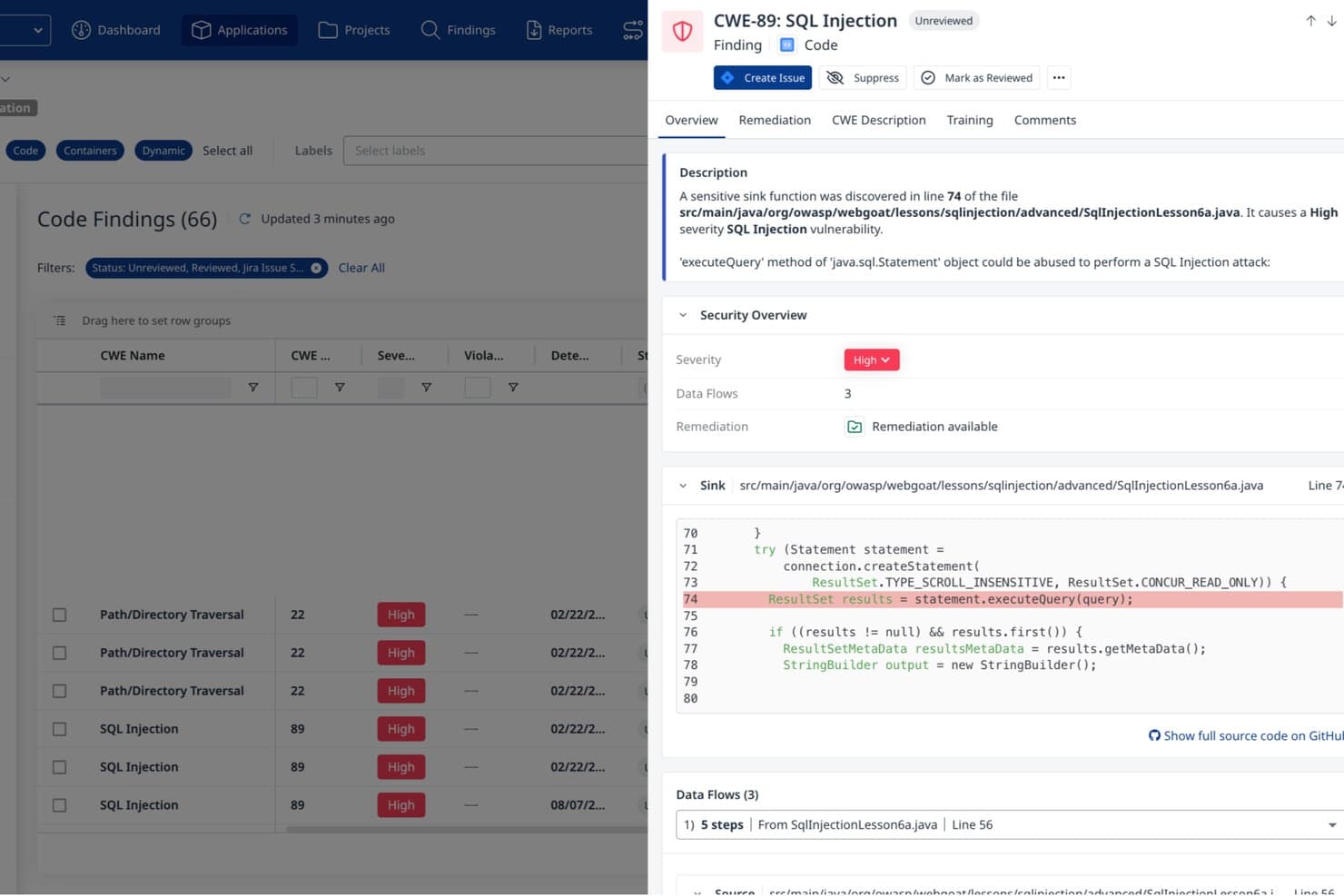
Mend.io surfaces SQL injection vulnerabilities with code context and remediation. Mend AppSec is an application security platform that unifies SAST and SCA with container scanning, covering Java from version 1.2 through the latest, and integrates with major SCMs, CI/CD pipelines, and IDEs to surface security vulnerabilities in developer workflows.
Who Is Mend.io Best For?
Mend.io is a strong fit for enterprise security and DevOps teams that need SAST and SCA coverage woven directly into their existing CI/CD pipelines.
Why I Picked Mend.io
I picked Mend.io as one of the best because it's one of the few tools that genuinely unifies SAST and SCA under a single policy engine, so your Java security findings and dependency vulnerabilities share the same severity thresholds, remediation SLAs, and build-gate rules. I particularly like how its reachability-based prioritization traces whether a vulnerable function in a dependency is actually called by your application, cutting through alert noise on large Java codebases. The taint analysis engine also lets you map custom sources, sinks, and sanitizers specific to your Java frameworks like Spring or Struts.
Mend.io Key Features
- Multi-mode scan depth: Choose between Fast, Balanced, and Deep scan profiles to control the trade-off between analysis speed and finding thoroughness on your Java codebase.
- SBOM generation and ingestion: Export software bills of materials in SPDX and CycloneDX formats, import third-party SBOMs, and consume VEX data for dependency transparency.
- Secrets detection: Scans proprietary Java code for hardcoded credentials, API keys, tokens, and certificates, with the option to trigger policy violations or build failures on detection.
- Compliance report types: Generate CLI reports mapped to OWASP, PCI, PCI 4.0, HIPAA, HITRUST, NIST, SANS, and MISRA directly from scan results.
Mend.io Integrations
Mend.io integrates with GitHub, GitLab, Azure DevOps Repos, Bitbucket Cloud, Jenkins, CircleCI, AWS CodeBuild, Bamboo, and TeamCity for Java scanning across repositories and CI/CD workflows.
Pros and Cons
Pros:
- CWE-mapped Java security coverage spans severities
- Reachability prioritizes vulnerable dependency findings
- Java taint analysis supports framework-specific flows
Cons:
- False positives can require manual triage
- Security-focused analysis omits general code smells
Learn more about Mend.io: Best for identifying malware
- Free plan + free demo available
- From €3,300/year (billed annually)

Xygeni’s dashboard visualizes all detected risks across projects, helping teams prioritize and remediate vulnerabilities based on exploitability and reachability metrics. Xygeni offers a unique approach to static code analysis for Java by providing deep contextual insights and a unified application security strategy. This tool is particularly appealing to DevSecOps teams and developers focused on maintaining code integrity and security throughout the software development lifecycle. By aggregating and deduplicating findings from various scanners, Xygeni ensures that you receive a clean, correlated risk view, addressing the common challenge of alert fatigue and allowing you to focus on genuine threats.
Why I Picked Xygeni
I picked Xygeni because it excels in providing precise vulnerability detection, which is crucial for Java developers aiming to secure their code. The tool's standout feature is its ability to identify malware and supply chain threats, offering a level of security that many other static code analysis tools lack. Additionally, Xygeni's integration with CI/CD pipelines ensures that vulnerability detection is seamlessly incorporated into your existing workflows, making it an efficient choice for development teams.
Xygeni Key Features
In addition to its malware detection capabilities, Xygeni offers several other features that enhance its utility:
- Policy-Driven Rules and Guardrails: These allow you to automate actions based on scan results, ensuring that security policies are consistently enforced.
- AI-Powered AutoFix: This feature provides context-aware code suggestions and automatic fixes, helping your team write secure code faster.
- Supply Chain Security: Xygeni detects malware in open-source components, adding an extra layer of protection to your projects.
- True Positive Rate: With a 100% true positive rate and a low false positive rate of 16.7%, you can trust the alerts you receive are actionable.
Xygeni Integrations
Xygeni integrates seamlessly with popular development tools, including GitHub Actions, Jenkins, GitLab, and Bitbucket. These integrations allow for smooth incorporation into your existing development environment, enhancing workflow efficiency and security.
Pros and Cons
Pros:
- Real-time detection minimizes security risk
- Function-level analysis prioritizes vulnerabilities
- Privacy-first scanning ensures data safety
Cons:
- Limited integrations compared to competitors
- Pricing may be steep for some teams
Learn more about Xygeni:

Corgea flags a high-risk SQL injection issue and suggests a secure, parameterized code fix directly within a pull request. Corgea is a static code analysis tool built for developers and organizations that want to improve application security. It uses AI to identify issues such as business logic flaws and authentication vulnerabilities, helping keep code secure. The tool is especially useful for teams that want to automate how they find and fix insecure code, cutting down on manual review and speeding up security workflows.
Why I Picked Corgea
I picked Corgea for its AI-native approach to static application security testing, which sets it apart from other static code analysis tools for Java. By using large language models, Corgea can detect complex vulnerabilities like business logic flaws and broken authentication that traditional tools often miss. It adapts to the codebase with each scan and significantly reduces false positives, making it a strong option for developers who need accurate and dependable security findings.
Corgea Key Features
In addition to its AI-driven vulnerability detection, Corgea offers several key features that enhance its utility for static code analysis in Java:
- Dependency Scanning: Automatically scans and identifies vulnerabilities within your code dependencies, ensuring comprehensive security coverage.
- Customizable Policies: Allows you to set security policies in natural language, tailoring the tool to fit your specific security needs and workflows.
- SAST Auto-Fix: Provides automated security patches, simplifying the process of addressing vulnerabilities and maintaining secure codebases.
- Multi-Language Support: Supports Java along with other languages like JavaScript, Python, and C#, broadening its applicability across different projects.
Corgea Integrations
Native integrations are not currently listed by Corgea.
Pros and Cons
Pros:
- Business logic flaw detection
- Automatic secure code fixes
- AI-driven vulnerability detection
Cons:
- AppSec-focused, not full stack
- No runtime protection features
Learn more about Corgea: Best for context-aware AI analysis
- Free plan available
- From $200/month
Visit WebsiteCustomer Rating:4.5/5
ZeroPath provides a unified security dashboard that highlights scan activity, vulnerability types, issue severity, and top critical findings at a glance. ZeroPath is built for development teams looking to bring advanced code-security into their Java (and other language) codebases without drowning in alert noise. If you’re operating in a Java-centric environment—whether fintech, healthcare or SaaS—and you want a static code analysis tool that understands business logic, handles complex flows, and offers actionable fixes, ZeroPath is worth a look.
Why I Picked Zeropath
I picked ZeroPath because it leverages AI-native static application security testing (SAST) that goes beyond pattern-matching and works deep into logic and authorization flows—so your Java services won’t silently ship broken auth or business logic holes. It uses context-aware analysis to trace data flows and dependency reachability (for example SCA and dependency-graphing) which helps your team spot real vulnerabilities, not just generic findings. I appreciate how it can generate one-click patches directly in pull requests and integrate into your workflow so that your Java team can keep moving fast while still embedding security checks early.
Zeropath Key Features
In addition to its standout AI-driven analysis, I also found several features that enhance its utility:
- Infrastructure as Code (IaC) Detection: This feature allows you to identify and address security vulnerabilities within your infrastructure code, ensuring comprehensive security coverage.
- Automated Compliance Reporting: Zeropath automatically generates compliance reports, simplifying the process of meeting industry standards and regulations.
- Pull Request (PR) Reviews: Performs automated security reviews on every pull request and places AI-powered feedback and suggested fixes in your code review workflow.
- Custom Code Policies: Lets you define arbitrary rules (in natural language) to catch patterns your organization cares about (for instance: all public endpoints must validate input).
Zeropath Integrations
Integrations include GitHub, GitLab, Jenkins, Bitbucket, Jira, Azure DevOps, Slack, AWS, Google Cloud Platform, and Microsoft Teams.
Pros and Cons
Pros:
- Supports auto-patch generation directly in code review workflow.
- Discovers business-logic and authorization vulnerabilities in Java and other languages.
- Reduces noisy false positives compared to traditional SAST tools
Cons:
- Dependence on AI means that edge-case detection still may vary.
- You may need time to adjust your workflow around its automation.
Learn more about Zeropath: 6Best for open-source vulnerability management
Snyk
- Free plan + free demo available
- From $25/contributing developer/month
Visit WebsiteCustomer Rating:4.6/5
Here's Synk's static analysis scanner, which checks your code for quality and security issues in real time and provides fix advice in your IDE. Snyk stands at the forefront of identifying and rectifying vulnerabilities in open-source projects and dependencies. With its sharp focus on securing open-source software, it offers a much-needed shield against potential security breaches.
Why I Picked Snyk:
In my continuous search for tools that ensure software robustness, Snyk caught my attention due to its dedicated focus on open-source vulnerabilities. When determining and comparing static code analysis tools, Snyk's specialization in tracking and managing open-source project vulnerabilities made it stand out.
I determined that, in the realm of open-source software, Snyk is undoubtedly best for vulnerability management, providing an invaluable service to the development community.
Standout Features and Integrations:
One of Snyk's prime features is its extensive database of open-source vulnerabilities, making it a vital tool for developers leveraging open-source projects. Furthermore, its dashboards offer comprehensive insights, enabling development teams to quickly identify and address potential threats.
When it comes to integrations, Snyk effortlessly ties in with popular repositories like GitHub and Bitbucket. It also smoothly integrates with CI/CD pipelines, including Jenkins, improving the DevOps workflow.
Pros and Cons
Pros:
- Offers insights and actionable solutions through its dashboards.
- Integration with popular repositories and CI/CD tools.
- Comprehensive database catering specifically to open-source vulnerabilities.
Cons:
- Pricing and tiers can be complex for teams with varied needs.
- The granularity of its features might require a learning curve for some users.
- While it specializes in open-source, it might not cover all proprietary software vulnerabilities.
Learn more about Snyk: Best for automated code quality reviews
- 14-day free trial + free plan + free demo available
- From $18/user/month (billed annually)
Visit WebsiteCustomer Rating:4.5/5
Here's the Codacy dashboard, which automatically identifies new static analysis issues, code coverage, code duplication, and code complexity evolution in every commit and pull request. Codacy is a prominent static code analysis tool that focuses on automating code quality reviews. By streamlining the code review process, it ensures that development teams deliver high-quality code consistently.
Why I Picked Codacy:
In the vast domain of static code analysis tools, choosing Codacy was a deliberate decision. When determining which tools to highlight, Codacy stood out due to its potent automated review capabilities. I chose Codacy because I believe its emphasis on automating quality reviews is paramount, positioning it as an essential asset for teams desiring to ensure consistent quality without manual oversight.
Standout Features and Integrations:
Codacy shines with its ability to identify a broad range of issues, from coding errors and code smells to security issues. It offers detailed dashboards that provide a snapshot of the overall code quality, aiding in the rapid identification of problem areas.
As for integrations, Codacy blends perfectly with platforms like GitHub, GitLab, and Bitbucket. This ensures code reviews and quality checks throughout the development process.
Pros and Cons
Pros:
- Automated reviews reduce manual oversight and human errors.
- Strong integrations with popular repositories, improving the development workflow.
- Efficient source code analyzer detecting a wide array of issues.
Cons:
- Annual billing may not cater to all teams or projects.
- Potential for occasional false positives in code reviews.
- Some users might find certain features slightly complex.
Learn more about Codacy: Best for in-depth source code scanning
- Free demo available
- Pricing upon request
Visit WebsiteCustomer Rating:4.2/5
Here's a screenshot of the monitored projects view in Checkmarx Interactive Application Security Testing (CxIAST). Checkmarx is a renowned static application security testing tool, dives deep into the source code to identify vulnerabilities. Its focus on thorough source code scanning ensures that even intricate security issues don't go unnoticed.
Why I Picked Checkmarx:
Selecting the right tools from a plethora of options can be daunting. I picked Checkmarx for this list after judging its unparalleled depth in source code analysis. Compared to other tools, Checkmarx provides an extensive examination, diving deep into programming languages and repositories.
In my opinion, its prowess in in-depth source code scanning solidifies its position as a top choice for teams aiming to fortify their code against potential threats.
Standout Features and Integrations:
Checkmarx excels in identifying a spectrum of security issues, from common vulnerabilities to nuanced threats in the source code. Its dashboards are highly informative, offering development teams a panoramic view of potential risks in the codebase.
For integrations, Checkmarx collaborates with platforms like GitHub, GitLab, and Bitbucket, ensuring a fortified development process that integrates security considerations from the get-go.
Pros and Cons
Pros:
- Mastery in various programming languages, including Java, Python, PHP, and Ruby.
- Strong integration with popular repositories, ensuring security is an integral part of the development workflow.
- Comprehensive source code analyzer adept at spotting an extensive range of vulnerabilities.
Cons:
- Pricing transparency can be improved for easier decision-making.
- Potential for false positives, demanding thorough review.
- May require a learning curve for those new to static application security testing.
Learn more about Checkmarx: 9Best for quick identification of common coding flaws
PMD
- Free
- Open source project and available for free.

Here's a screenshot of the PMD duplicate code detector feature. PMD is a well-regarded static code analysis tool that offers developers the capability to rapidly identify frequent coding flaws across various programming languages. Its forte lies in its proficiency to swiftly pinpoint such issues, making it indispensable for those who prioritize swift code reviews.
Why I Picked PMD:
Navigating through the diverse field of static code analysis tools, choosing PMD became an evident choice after determining its strengths and comparing them with its peers. The tool's inherent capability to swiftly uncover common coding flaws made it stand out, distinguishing it from the vast array of options available.
I picked it because, in my judgment, PMD excels at rapidly identifying coding flaws, ensuring that development teams can make quick rectifications.
Standout Features and Integrations:
PMD is celebrated for its broad support for multiple programming languages, including Java, JavaScript, and Apex, which grants it a versatility not all tools possess. Its source code analysis is robust, and the ability to detect code smells and coding errors promptly is commendable.
As for integrations, PMD incorporates popular platforms like GitHub, GitLab, and Jenkins, aligning itself perfectly with the development process of many teams.
Pros and Cons
Pros:
- Robust integrations with platforms like GitHub and Jenkins.
- Quick and effective detection of common coding flaws.
- Broad support for multiple programming languages.
Cons:
- Being open-source, it might lack some commercial-level support or features.
- The UI might not be as intuitive for beginners.
- Might require some configuration for specific projects.
Learn more about PMD:

Here's the application view in Fortify on Demand. Fortify on Demand is a SaaS solution that facilitates rigorous security analysis of source code, pinpointing vulnerabilities with precision. When considering cloud-based platforms for security evaluations, its dedicated focus ensures it remains unparalleled.
Why I Picked Fortify on Demand:
While curating this list, I delved deep into numerous tools, and my judgment led me to select Fortify on Demand. The tool's cloud-centric architecture and its prowess in static application security testing distinguished it from the rest. Having compared a multitude of platforms, I confidently determine Fortify on Demand to be the prime choice for cloud-based security assessments.
Standout Features and Integrations:
Fortify on Demand excels in its static code analysis for Java, Python, and many other programming languages, ensuring a thorough detection of potential security issues. Its dashboards provide a comprehensive insight into vulnerabilities, coding errors, and technical debt, assisting development teams in remediation.
The tool integrates with popular repositories like GitHub, GitLab, and Bitbucket and also ties well with CI/CD tools like Jenkins for continuous integration.
Pros and Cons
Pros:
- Robust integrations with popular repositories and CI/CD tools.
- Comprehensive dashboards that aid in quick vulnerability assessments and remediations.
- Proficient in static code analysis across various programming languages.
Cons:
- Might be on the pricier side for startups or businesses with tight budgets.
- Potential false positives could require manual validation.
- Might be overwhelming for small development teams due to its breadth of features.
Learn more about Fortify on Demand:
Alte instrumente de analiză statică a codului pentru Java
Mai jos este o listă cu instrumente suplimentare de analiză statică a codului pentru Java pe care le-am inclus pe lista scurtă, dar care nu au ajuns printre primele 10. Merită cu siguranță să le analizați.
- 11CoverityBest for detection of software defects in development
- 12KlocworkBest for real-time security vulnerability detection
- 13Azul Platform CoreBest for Java runtime customization
- 14Parasoft JTestBest for comprehensive Java testing
- 15CodigaBest for code consistency and maintenance
- 16JArchitectBest for detailed code architecture visualization
- 17SonarQubeBest for continuous codebase monitoring
- 18InferGood for mobile app static analysis
- 19Fortify Static Code AnalyzerGood for end-to-end vulnerability management
- 20CodeSonarGood for detecting complex programming errors
- 21CheckstyleGood for Java coding standard adherence
- 22FindBugsGood for bytecode-based Java bug detection
- 23SemmleGood for data-driven code exploration
How I Evaluate Static Code Analysis Tools
I evaluate static code analysis tools across two layers: core requirements any SAST tool must meet—like flagging XSS before a PR merges—and what separates one worth recommending from the rest.
Core Functionality (Table Stakes For This List)
When I'm selecting tools for my list, I rank each one on a scale from 0 (does not offer the functionality) to 5 (excels in this area) for each core functionality listed below. Then, I calculate the tool's total score into a percentage. Each tool needs to achieve a minimum total score of 65% to be considered for inclusion.
- Multi-Language Support: I check which languages each tool supports and whether it can handle the mix you'd realistically see in a stack—like a Java backend alongside a TypeScript frontend.
- Vulnerability & Bug Detection: The engine should catch real issues like SQL injection, null pointer dereferences, and buffer overflows through data flow and control flow analysis, not just pattern matching.
- Coding Standards Enforcement: I evaluate whether you can enforce rulesets like CERT or Google style guides and create custom rules—useful when your team has internal conventions beyond public standards.
- CI/CD & IDE Integration: Tools should plug into the places developers already work, so I look for native support in platforms like GitHub Actions, GitLab CI, Jenkins, and IDEs like VS Code or IntelliJ.
- Actionable Reporting & Remediation: Findings need severity ratings and clear fix guidance so developers can resolve a flagged cross-site scripting issue without switching to a separate reference doc.
- Compliance & Standards Coverage: I look for mapping to frameworks like OWASP Top 10, CWE Top 25, and industry-specific standards such as MISRA for embedded systems or PCI DSS for payment processing.
Once I have a list of tools that meet this criteria, I consider what sets each platform apart.
Differentiating Factors (What Sets Vendors Apart)
Here's how I compare and contrast different vendors:
Standout Features
Incremental scanning makes a real difference—when a tool analyzes only the changed lines in a pull request instead of rescanning the entire codebase, it keeps pipeline times reasonable on large repos. I also evaluate whether a tool offers a custom query language, like CodeQL or Semgrep patterns, which lets security teams write detection rules tailored to internal APIs or proprietary frameworks. AI-powered auto-remediation is increasingly valuable too, especially when it suggests contextual fixes directly in a PR rather than just flagging the issue.
Beyond Features
False positive rates matter more than most buyers realize. A tool that floods developers with noise trains them to ignore findings, so I evaluate how each vendor handles triage workflows and whether it learns from past suppression decisions. Deployment model is another key consideration—teams handling sensitive source code often need self-hosted or air-gapped options rather than SaaS-only offerings. I also look at licensing transparency, since pricing based on contributors versus lines of code can dramatically shift total cost depending on your team structure.
Cum să alegeți un instrument de analiză statică a codului pentru Java
Este ușor să vă pierdeți în liste lungi de caracteristici și structuri complexe de prețuri. Pentru a vă ajuta să rămâneți concentrați în timp ce parcurgeți procesul unic de selectare a software-ului, iată o listă de verificare a factorilor de care trebuie să țineți cont:
| Factor | Ce trebuie avut în vedere |
|---|---|
| FactorScalabilitate | Ce trebuie avut în vederePoate instrumentul să se dezvolte odată cu proiectele dumneavoastră? Verificați dacă poate gestiona baze de cod în creștere și utilizatori suplimentari fără pierderi de performanță. Evitați instrumentele care limitează dezvoltarea. |
| FactorIntegrări | Ce trebuie avut în vedereSe potrivește în fluxul dumneavoastră actual de lucru? Căutați compatibilitate cu instrumentele și platformele CI/CD existente. Asigurați un schimb fluid de date între sisteme. |
| FactorPosibilități de personalizare | Ce trebuie avut în vedereÎl puteți adapta la fluxul dumneavoastră de lucru? Evaluați dacă instrumentul vă permite să ajustați regulile și rapoartele pentru a corespunde standardelor și practicilor de codare ale echipei dumneavoastră. |
| FactorUșurință în utilizare | Ce trebuie avut în vedereÎl va adopta cu ușurință echipa dumneavoastră? Luați în considerare curba de învățare și caracterul intuitiv al interfeței. Un instrument complex poate încetini inițial productivitatea. |
| FactorImplementare și integrare inițială | Ce trebuie avut în vedereCât de repede puteți începe? Evaluați disponibilitatea resurselor precum tutoriale, asistență și documentație, pentru a facilita o tranziție fără probleme. |
| FactorCost | Ce trebuie avut în vedereSe încadrează în bugetul dumneavoastră? Comparați structura de prețuri cu limitele dumneavoastră financiare. Fiți atenți la taxele ascunse sau la suplimentele necesare care cresc costul. |
| FactorMăsuri de securitate | Ce trebuie avut în vedereCum vă protejează codul? Asigurați-vă că instrumentul oferă funcții de securitate solide pentru a detecta vulnerabilitățile și a preveni breșele de date. |
| FactorCerințe de conformitate | Ce trebuie avut în vedereRespectă standardele industriei? Verificați dacă instrumentul respectă reglementările relevante pentru industria dumneavoastră, pentru a evita problemele juridice. |
Ce sunt instrumentele de analiză statică a codului pentru Java?
Instrumentele de analiză statică a codului Java sunt soluții software care analizează codul Java pentru a identifica erori, vulnerabilități și conformitatea cu standardele de programare, fără a executa codul. Aceste instrumente sunt utilizate de obicei de dezvoltatori și echipele de asigurare a calității pentru a garanta calitatea și securitatea codului. Revizuirile automate ale codului, detectarea vulnerabilităților și verificările de conformitate contribuie la menținerea unor standarde ridicate de programare și la identificarea timpurie a problemelor. În general, aceste instrumente economisesc timp și resurse prin detectarea erorilor înainte ca acestea să ajungă în mediul de producție.
Funcții
Iată funcțiile esențiale pe care ar trebui să le aibă orice instrument excelent de analiză statică a codului Java:
- Detectarea vulnerabilităților codului: Identifică potențialele amenințări de securitate din cod, contribuind la prevenirea din timp a breșelor.
- Revizuiri automate ale codului: Oferă feedback instantaneu privind calitatea codului pentru a menține consecvența în cadrul proiectelor.
- Seturi de reguli personalizabile: Vă permit să adaptați analiza codului pentru a respecta standardele și practicile specifice de programare ale echipei.
- Analiză în timp real: Oferă informații imediate pe măsură ce programați, permițând ajustări și îmbunătățiri rapide.
- Capacități de integrare: Asigură funcționarea fără probleme cu instrumentele și platformele existente, sporind eficiența fluxului de lucru.
- Raportare detaliată: Oferă informații cuprinzătoare despre problemele codului, contribuind la stabilirea priorității remedierilor și îmbunătățirilor.
- Verificări de conformitate: Verifică respectarea standardelor din industrie, reducând riscul problemelor juridice.
- Compatibilitate cu mai multe limbaje: Permite echipelor să lucreze la diverse proiecte fără a avea nevoie de instrumente diferite.
- Procesare cu latență redusă: Minimizează întârzierile în timpul analizei codului, asigurând un proces de dezvoltare fluid.
- Monitorizare continuă: Urmărește calitatea codului în timp, contribuind la menținerea unor standarde ridicate și la prevenirea regresiilor.
Beneficii
Implementarea instrumentelor de analiză statică a codului Java oferă mai multe beneficii pentru echipa și afacerea dumneavoastră. Iată câteva dintre acestea:
- Calitate îmbunătățită a codului: Revizuirile automate ale codului și detectarea vulnerabilităților contribuie la menținerea unor standarde ridicate și la reducerea erorilor din baza de cod.
- Securitate sporită: Identificarea timpurie a vulnerabilităților previne potențialele breșe de securitate, protejând aplicațiile și datele.
- Economie de timp: Analiza în timp real și raportarea detaliată permit detectarea și rezolvarea rapidă a problemelor, accelerând procesul de dezvoltare.
- Asigurarea conformității: Verificările de conformitate garantează că respectivul cod îndeplinește standardele din industrie, reducând riscul complicațiilor juridice.
- Eficiența resurselor: Prin detectarea erorilor înainte de lansarea în producție, aceste instrumente economisesc timp și resurse care altfel ar fi consumate pentru depanarea și remedierea problemelor.
- Colaborare facilitată: Capacitățile de integrare permit funcționarea fără probleme cu instrumentele existente, îmbunătățind lucrul în echipă și comunicarea.
- Performanță consecventă: Monitorizarea continuă contribuie la menținerea calității codului în timp, prevenind regresiile și asigurând performanța fiabilă a aplicațiilor.
Costuri și prețuri
Selectarea instrumentelor de analiză statică a codului Java necesită înțelegerea diferitelor modele și planuri de tarifare disponibile. Costurile variază în funcție de funcții, dimensiunea echipei, suplimente și alți factori. Tabelul de mai jos prezintă pe scurt planurile comune, prețurile medii ale acestora și funcțiile incluse de obicei în soluțiile de analiză statică a codului Java:
Tabel comparativ al planurilor pentru instrumentele de analiză statică a codului Java
| Tip de plan | Preț mediu | Funcții comune |
|---|---|---|
| Tip de planPlan gratuit | Preț mediu$0 | Funcții comuneAnaliză de bază a codului, compatibilitate limitată cu limbajele și asistență din partea comunității. |
| Tip de planPlan personal | Preț mediu$5-$25/user/month | Funcții comuneAnaliză standard a codului, seturi de reguli personalizabile și feedback în timp real. |
| Tip de planPlan pentru companii | Preț mediu$25-$50/user/month | Funcții comuneAnaliză avansată a codului, capacități de integrare, raportare detaliată și verificări de conformitate. |
| Tip de planPlan pentru întreprinderi | Preț mediu$50-$100/user/month | Funcții comuneAnaliză cuprinzătoare a codului, asistență dedicată, monitorizare continuă și compatibilitate extinsă cu limbajele. |
Întrebări frecvente
Iată câteva răspunsuri la întrebările frecvente despre instrumentele Java de analiză statică a codului:
Care sunt cele trei tehnici utilizate în instrumentele de analiză statică a codului?
Instrumentele de analiză statică a codului utilizează de obicei analiza sintactică, analiza fluxului de date și a fluxului de control și analiza securității. Analiza sintactică verifică structura corectă a codului, în timp ce analiza fluxului de date și a fluxului de control urmărește modul în care datele se deplasează prin cod. Analiza securității identifică vulnerabilitățile care ar putea fi exploatate.
Care sunt limitările analizei statice a codului?
Instrumentele de analiză statică a codului pot identifica probleme fără a executa codul. Este posibil să nu detecteze problemele de performanță sau de utilizare care apar în timpul execuției. În plus, aceste instrumente pot genera rezultate fals pozitive, ceea ce le impune dezvoltatorilor să verifice manual problemele semnalate.
Cum ajută instrumentele de analiză statică a codului la menținerea calității codului?
Aceste instrumente contribuie la menținerea calității codului verificând automat existența erorilor, a vulnerabilităților și respectarea standardelor de programare. Ele oferă dezvoltatorilor feedback instantaneu, permițând corectări rapide și o calitate constantă a codului în întregul proiect.
Care este scopul principal al instrumentelor de analiză statică a codului?
Scopul principal este de a detecta problemele din timp, de a menține consecvența stilului și de a îmbunătăți calitatea codului. De exemplu, acestea pot semnala probleme precum fișiere neînchise sau variabile denumite incorect înainte ca ele să provoace probleme în aplicație.
Se pot integra instrumentele de analiză statică a codului cu conductele CI/CD?
Da, multe instrumente de analiză statică a codului se integrează cu conductele CI/CD pentru a automatiza procesul de revizuire a codului. Această integrare asigură verificarea continuă a calității și securității codului înainte de implementare, sporind eficiența generală a dezvoltării.
Prin ce diferă instrumentele de analiză statică a codului de instrumentele de analiză dinamică?
Instrumentele de analiză statică a codului analizează codul fără a-l executa, concentrându-se asupra structurii codului și a problemelor potențiale. În schimb, instrumentele de analiză dinamică evaluează codul în timpul execuției, identificând problemele care apar atunci când programul este executat, precum scurgerile de memorie și blocajele de performanță.