

În calitate de utilizator și tester experimentat al soluțiilor CRM, apreciez puterea Freshworks ca soluție software care îmbină automatizarea marketingului, gestionarea clienților potențiali, evaluarea clienților potențiali și procedurile esențiale de urmărire într-o singură platformă. Avantajele sale constau în consolidarea tuturor activităților de gestionare a relațiilor cu clienții, facilitând un flux de vânzări eficient.
Cu toate acestea, unele companii pot dori alternative la Freshworks din cauza nevoii unei integrări mai bune cu ecosisteme existente, precum Microsoft sau iOS, ori a preferinței pentru anumite funcții. Am avut ocazia să evaluez mai multe instrumente CRM și pot confirma că există o varietate bogată de soluții. Piața CRM oferă numeroase opțiuni de încredere pentru a răspunde nevoilor dumneavoastră unice dacă sunteți în căutarea celei mai bune alternative la Freshworks care oferă aceste funcționalități.
Ce este Freshworks?
Freshworks este o suită software pentru interacțiunea cu clienții, care include instrumente pentru asistență pentru clienți, vânzări, marketing și gestionarea serviciilor IT. Este utilizată de obicei de echipele de asistență pentru clienți, reprezentanții de vânzări, specialiștii în marketing și profesioniștii IT care doresc să gestioneze interacțiunile, să automatizeze sarcinile și să urmărească performanța într-un singur loc. Sistemele de gestionare a tichetelor, funcționalitățile CRM și caracteristicile de chat bazate pe inteligență artificială ajută la rezolvarea mai rapidă a problemelor, gestionarea clienților potențiali și îmbunătățirea fluxurilor de lucru pentru servicii. În general, Freshworks oferă echipei dumneavoastră o modalitate de a gestiona mai multe procese care implică interacțiunea cu clienții fără a comuta între diferite instrumente.
Why Trust Our Software Recommendations
6,700+
Reviews
20
Industry experts
16+
Evaluation factors
14
Years
Our team has been testing and reviewing software since 2012. As tech leaders ourselves, we know how difficult—and important—it is to choose the right software.
For this guide, we evaluated tools using hands-on testing and independent research, scoring tools using our selection criteria.
Our reviews reflect our human editorial judgment, not a sales pitch.
Expert reviewers:
- Paulo Gardini MiguelTech Director
 Tim FisherVP of AI
 Gabriel RosasTech Lead & Software Architect
 Christhian GruhnTech Lead & Platform Architect

Tabel comparativ al alternativelor la Freshworks
Acest tabel comparativ sintetizează detaliile privind prețurile pentru principalele mele alternative la Freshworks:
Score legend (out of 5)
- Excellent4.5–5
- Good4–4.4
- Average3–3.9
- Below average2–2.9
- Poor1–1.9
Sorted by: Default
| Tool | Starting Price | Website | |||||||
|---|---|---|---|---|---|---|---|---|---|
Best for streamlining complex service processes | 3.2 out of 5 | 4 | 3 | 3 | 1 | 4 | 4 | Pricing upon request Free demo available | Website |
Best for omnichannel support management | Not rated | 4 | 4 | 5 | Not rated | 5 | 4 | $19/agent/month 14-day free trial + free demo available | Website |
Best for scaling customer service operations | Not rated | 4 | 4 | 4 | Not rated | 4 | 3 | Pricing upon request Free demo available | Website |
Best for knowledge management | 2.8 out of 5 | 3 | 3 | 2 | 2 | 4 | 3 | Pricing upon request Free demo available | Website |
Best for social media customer service | 3.5 out of 5 | 3 | 4 | 5 | 1 | 4 | 4 | Pricing upon request Free demo available | Website |
Best for integrating AI into customer service | Not rated | 4 | 2 | 3 | Not rated | 3 | 3 | Pricing upon request Free demo available | Website |
Best for real-time chat support | 3.3 out of 5 | 4 | 3 | 4 | 1 | 4 | 4 | $15/user/month 30-day free trial | Website |
Best for personalized customer experiences | 3.2 out of 5 | 3 | 3 | 4 | 1 | 4 | 4 | Pricing upon request Free demo available | Website |
Best for visual project management | Not rated | 4 | 3 | 4 | Not rated | Not rated | Not rated | $9/user/month Free plan + 14-day free trial available | Book Demo |
Best for B2B customer support | 2.8 out of 5 | 3 | 3 | 4 | 1 | 3 | 3 | $45/month Free demo available | Book Demo |


Recenzii ale celor mai bune alternative la Freshworks
Mai jos sunt rezumatele mele detaliate ale celor mai bune alternative la Freshworks care au ajuns pe lista mea scurtă. Recenziile mele oferă o analiză detaliată a funcțiilor esențiale, avantajelor și dezavantajelor, integrărilor și cazurilor de utilizare ideale pentru fiecare instrument, pentru a vă ajuta să îl găsiți pe cel mai potrivit pentru dumneavoastră.
 Best for streamlining complex service processes
- Free demo available
- Pricing upon request
Visit WebsiteCustomer Rating:4.4/5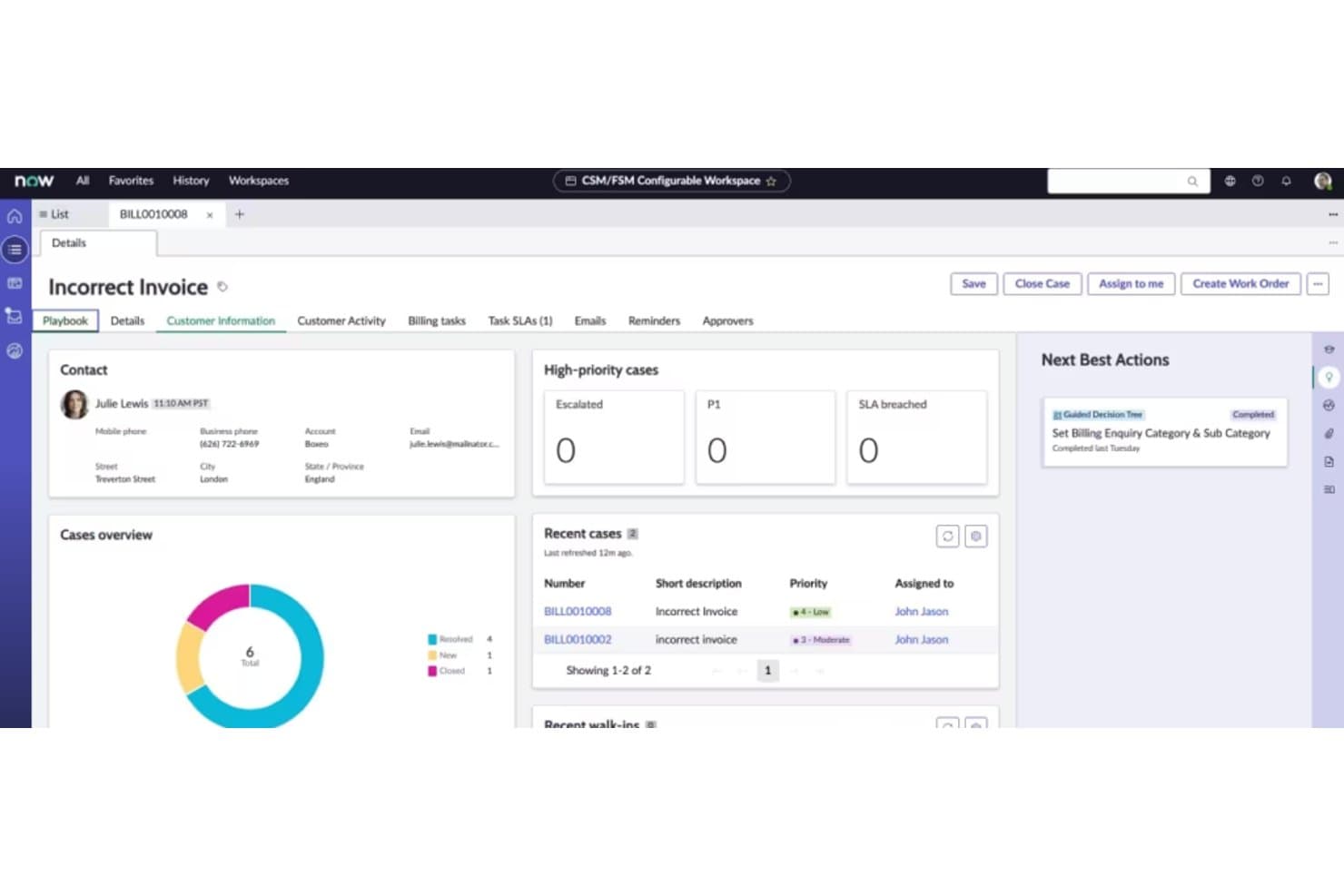
ServiceNow centralizes customer case details, billing, and next best actions. ServiceNow Customer Service Management helps large organizations connect customer support teams with back-office operations to manage cases, coordinate service requests, and resolve issues across channels.
Who Is ServiceNow Best For?
ServiceNow suits enterprise customer service teams that manage high-volume cases and complex, cross-department service workflows.
Why I Picked ServiceNow
I picked ServiceNow for this Guide To Freshworks Alternatives because it’s built for streamlining complex service processes. Its case management and service request workflows connect customer support with back-office teams, so a case that needs billing or technical input can move across departments while support tracks resolution.
ServiceNow Key Features
- Self-service portal: Customers can search for answers, browse catalogs, and take action through a portal.
- AI voice agents: Voice agents can handle customer requests and operate around the clock.
- Knowledge management: AI can create knowledge articles for customers and support agents.
- Agent workspace: Agents can view customer information across channels in a configurable workspace.
ServiceNow Integrations
ServiceNow Customer Service Management documents integrations with ServiceNow Incident, Problem, Change, and Request Management, as well as Microsoft Outlook and Adobe Experience Manager. It also supports computer telephony integration and connections with contact centers.
Pros and Cons
Pros:
- Self-service portals handle routine requests
- Case histories and SLAs improve visibility
- Cross-team case workflows clarify ownership
Cons:
- Reporting and dashboards need extra tailoring
- Complex workflows demand ongoing admin expertise
Learn more about ServiceNow: Best for omnichannel support management
- 14-day free trial + free demo available
- From $19/agent/month (billed annually)
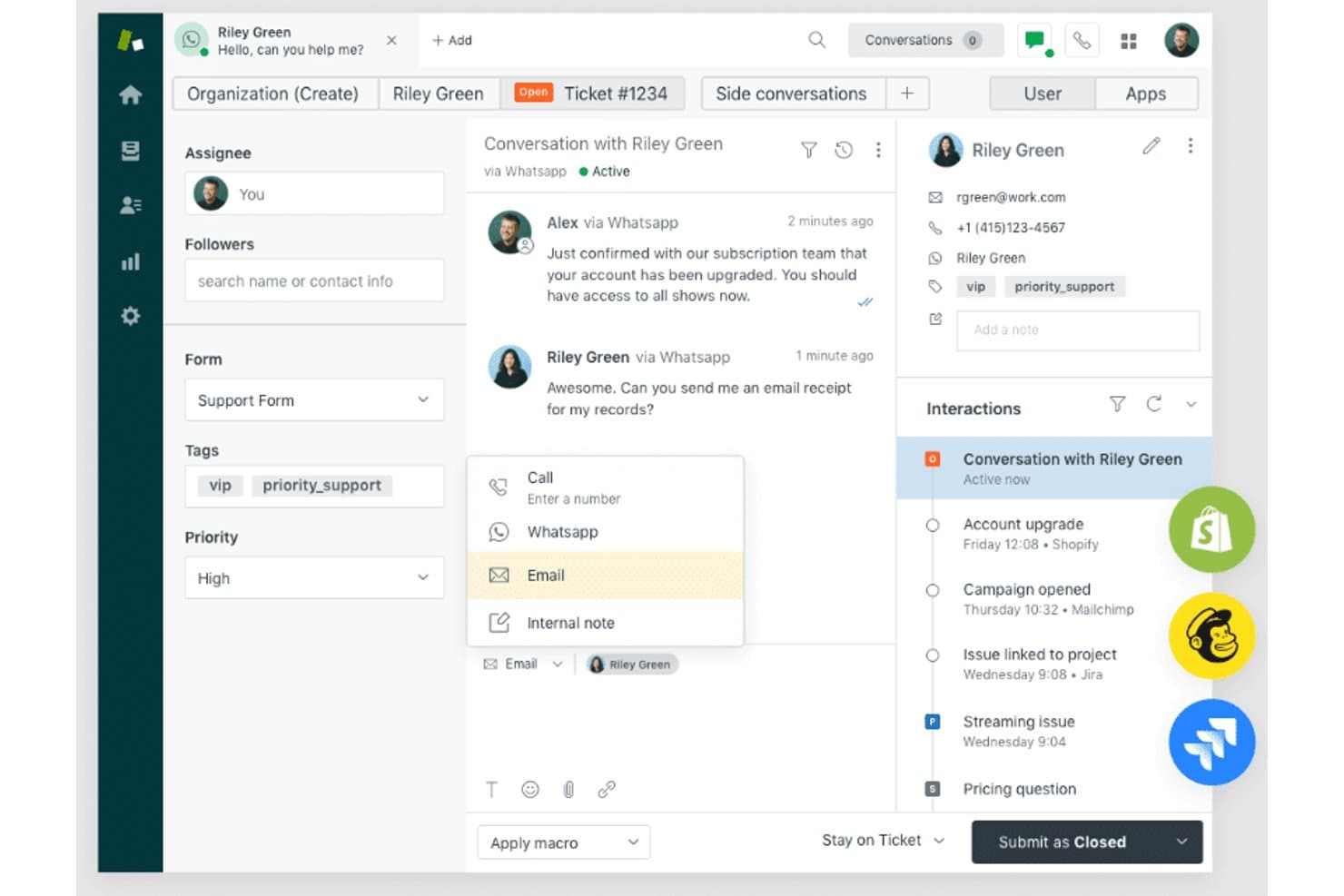
Zendesk Support Suite centralizes multi-channel customer conversations in one workspace. For businesses comparing Freshworks alternatives, Zendesk Support Suite is customer service software that helps support teams organize customer requests and resolve issues across channels.
Who Is Zendesk Support Suite Best For?
Customer service and IT support teams can use Zendesk Support Suite to manage requests from multiple channels in a shared workflow.
Why I Picked Zendesk Support Suite
I picked Zendesk Support Suite for omnichannel support management because its agent workspace brings email, messaging, voice, and social conversations into a shared view. Omnichannel routing directs incoming requests to agents, while conversation history helps an IT support team track a user’s outage report as it moves from email to messaging.
Zendesk Support Suite Key Features
- Ticket management: Track requests with statuses, priorities, assignees, and custom fields.
- Help center: Publish support articles and FAQs for customer self-service.
- Macros: Apply saved replies and actions to recurring ticket requests.
- Reporting and analytics: Monitor ticket volume, response times, and agent activity.
Zendesk Support Suite Integrations
Zendesk Support Suite offers prebuilt integrations with Slack, Asana, Zoom, Salesforce, and Jira, plus apps through the Zendesk Marketplace. It supports custom integrations through its API and connects with Zapier.
Pros and Cons
Pros:
- Self-service knowledge base deflects repeat requests
- Routing and macros reduce repetitive ticket handling
- Unified inbox preserves cross-channel conversation history
Cons:
- Busy interface can obscure ticket controls
- Workflow setup takes sustained administrator attention
Learn more about Zendesk Support Suite: Best for scaling customer service operations
- Free demo available
- Pricing upon request
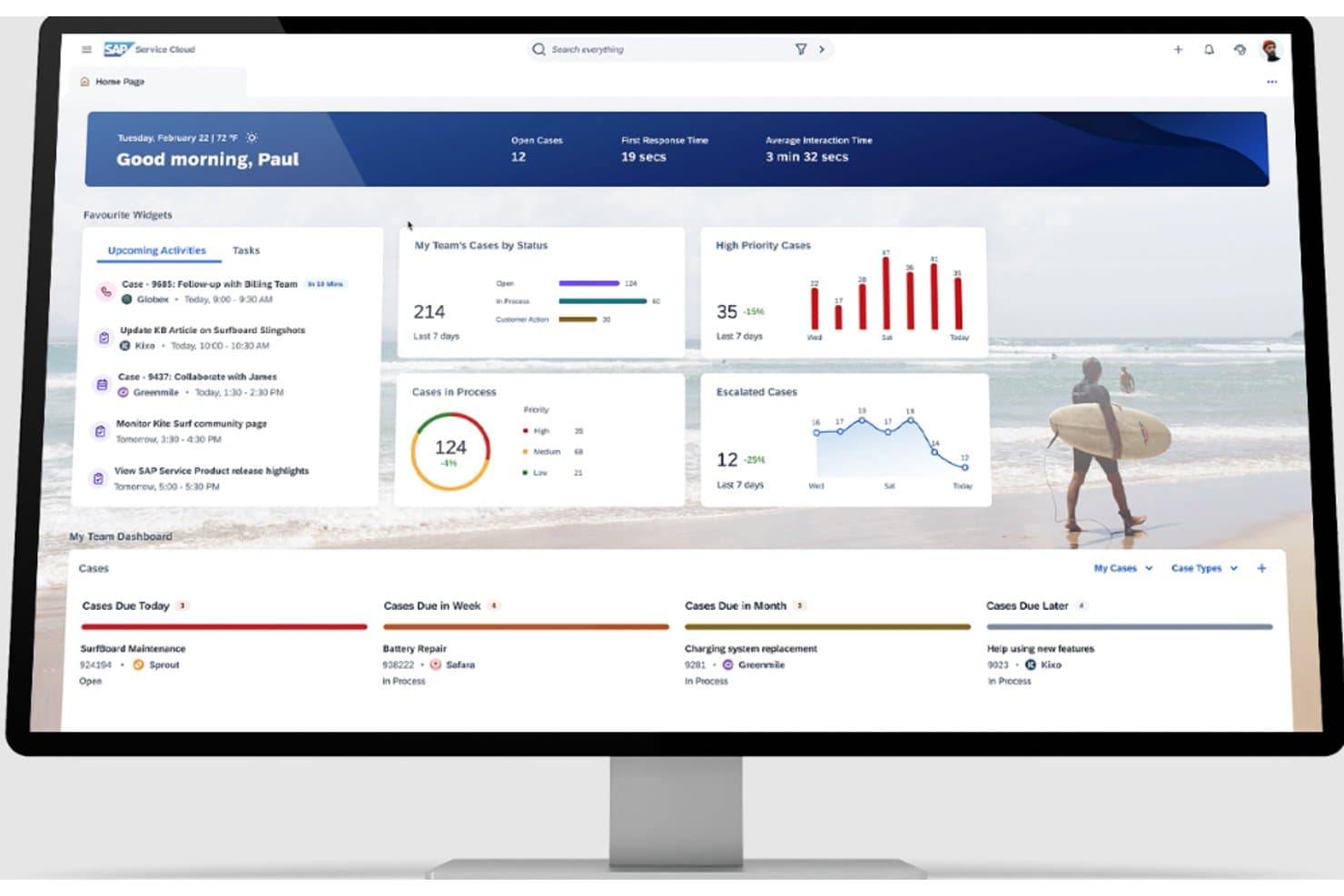
SAP Service Cloud gives agents a personalized dashboard to manage cases. For businesses comparing Freshworks alternatives, SAP Service Cloud helps customer service teams manage inquiries and service workflows, with particular appeal for organizations already working in the SAP ecosystem.
Who Is SAP Service Cloud Best For?
SAP Service Cloud suits customer service leaders at growing organizations who need to coordinate expanding support operations across teams.
Why I Picked SAP Service Cloud
I picked SAP Service Cloud for the “Best for scaling customer service operations” use case because its guided case management helps agents follow consistent resolution steps as support volume grows. Omnichannel service brings requests from multiple channels into service workflows, giving teams a way to coordinate expanding operations.
SAP Service Cloud Key Features
- Agent workspace: Gives agents a shared view of customer details and service interactions.
- AI-assisted email drafting: Creates email drafts and summarizes email and case content.
- Knowledge base: Provides searchable service information for customer inquiries.
- Workflow automation: Automates routine service tasks and process steps.
SAP Service Cloud Integrations
SAP Service Cloud has native integrations with SAP S/4HANA, SAP ERP, SAP Field Service Management, SAP Commerce Cloud, and SAP SuccessFactors. It also supports APIs and SAP integration tools for connecting other applications.
Pros and Cons
Pros:
- Omnichannel intake coordinates growing support teams
- Guided workflows standardize case resolution
- Centralized customer context supports case handling
Cons:
- Workflow customization often needs technical expertise
- Heavy interface can complicate agent onboarding
Learn more about SAP Service Cloud: Best for knowledge management
- Free demo available
- Pricing upon request
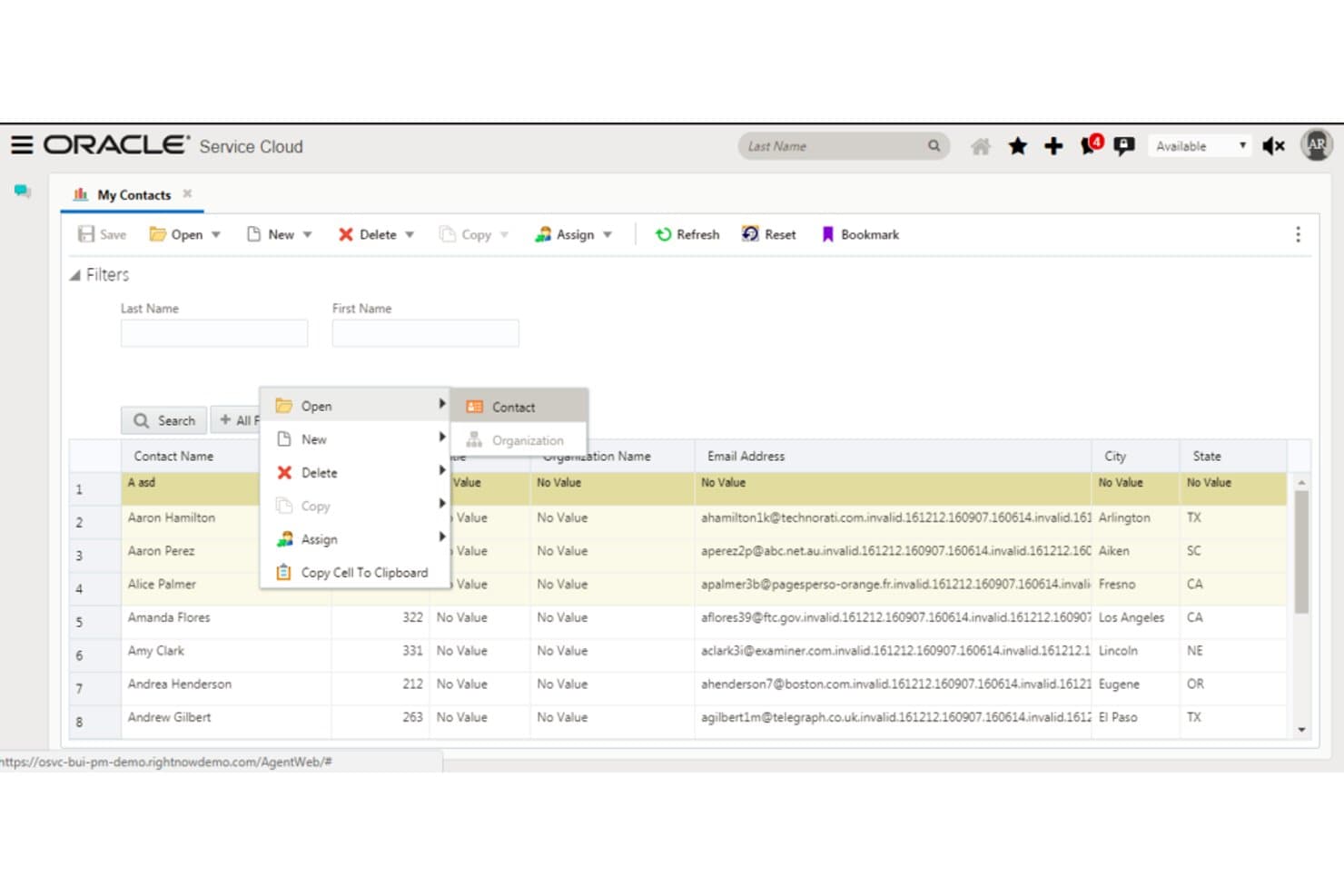
Oracle Service Cloud lets users manage and open contact records directly from a list view. Oracle Service Cloud gives enterprise support teams a customer service platform for managing customer interactions and service requests across digital and contact center channels.
Who Is Oracle Service Cloud Best For?
Oracle Service Cloud suits support leaders at large organizations who need to organize service knowledge for their teams.
Why I Picked Oracle Service Cloud
I picked Oracle Service Cloud as a Freshworks alternative because its knowledge management centers on a shared knowledge base agents can search while handling cases. I like that teams can publish approved answers to customer-facing self-service channels, so one troubleshooting article can help both customers and agents. This supports consistent answers across support channels.
Oracle Service Cloud Key Features
- Case management: Create and track customer cases and grievances.
- Request routing: Triage requests and route them to queues or escalation paths.
- SLA tracking: Track service-level agreements for customer requests.
- Service dashboards: View operational metrics and service analytics.
Oracle Service Cloud Integrations
Oracle Service Cloud supports Microsoft Outlook synchronization for contacts, tasks, and email, plus integration with Oracle Digital Assistant. Oracle Integration Cloud can connect it with Oracle Sales Cloud, and REST and SOAP APIs are available for custom integrations.
Pros and Cons
Pros:
- Reliable handling of high-volume customer records
- Cases route across digital and contact channels
- Shared knowledge supports consistent self-service answers
Cons:
- Custom changes often require specialist expertise
- Reporting can frustrate cross-product analysis
Learn more about Oracle Service Cloud: Best for social media customer service
- Free demo available
- Pricing upon request
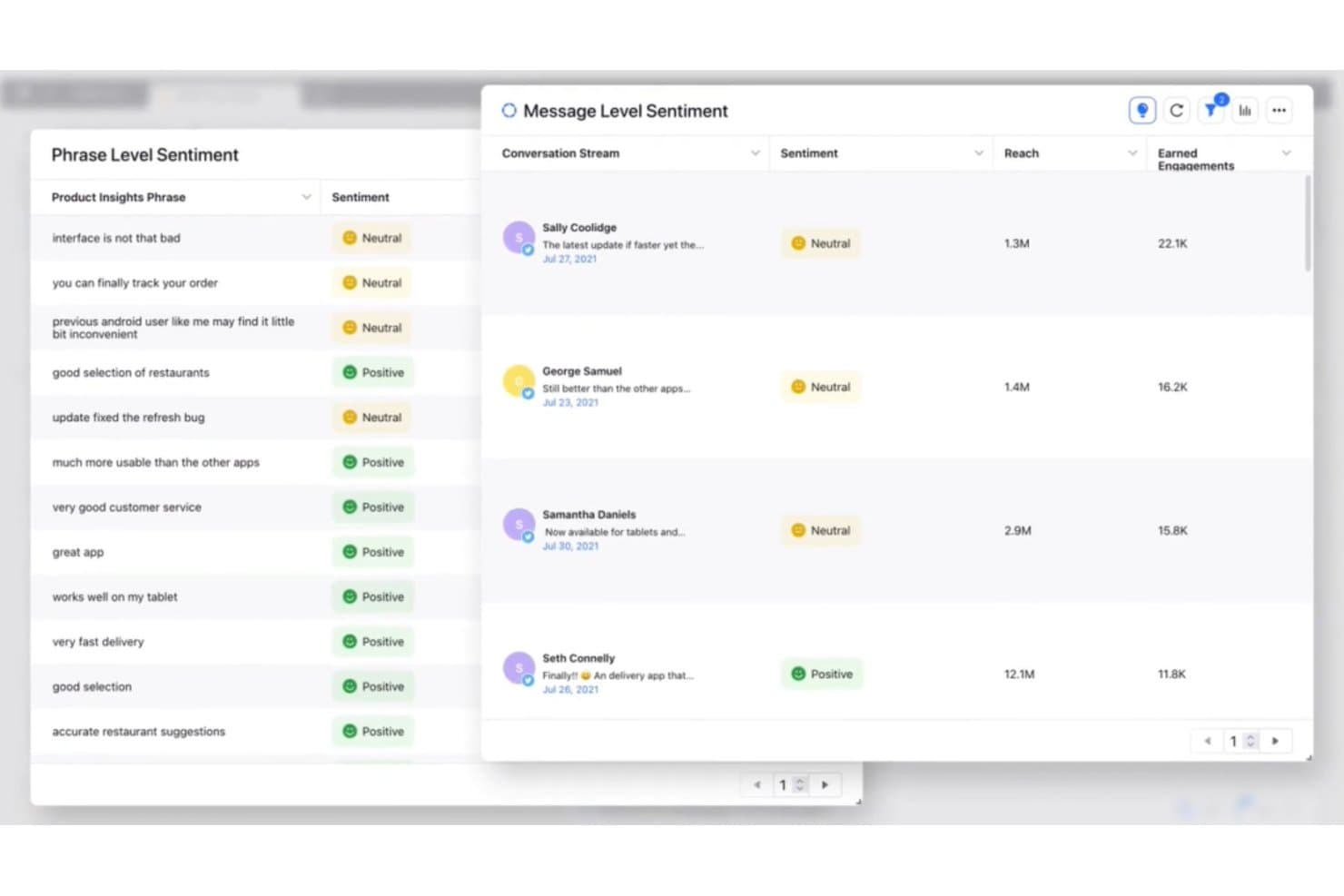
Sprinklr Services analyzes message and phrase-level sentiment across conversations. Sprinklr Services helps large support teams manage customer conversations across digital channels, coordinate service workflows, and handle high inquiry volumes in a customer service platform alternative to Freshworks.
Who Is Sprinklr Services Best For?
Sprinklr Services suits customer care teams that need to manage and respond to customer inquiries across social media channels.
Why I Picked Sprinklr Services
I picked Sprinklr Services as a Freshworks alternative because it’s Best for social media customer service. I like its unified inbox for managing customer messages across social channels, with routing and case workflows to assign inquiries and track responses. That helps support teams handle a public post or direct message without losing it among channel-specific queues.
Sprinklr Services Key Features
- AI conversation classification: Classifies customer messages by intent, urgency, and sentiment.
- Agent Copilot: Provides case summaries, customer insights, and suggested replies.
- Knowledge base: Gives agents knowledge articles to support customer inquiries.
- Service analytics: Tracks SLA performance, customer satisfaction, and agent performance.
Sprinklr Services Integrations
Sprinklr’s integrations catalog lists Salesforce, Zendesk, Freshdesk, Microsoft Dynamics CRM, Oracle B2C Service, and Microsoft Teams; WhatsApp Business is documented as a native integration. Sprinklr also offers RESTful APIs for custom integrations, subject to license terms.
Pros and Cons
Pros:
- Tracks service performance and customer sentiment
- Routes messages by intent and urgency
- Unifies social inquiries and customer case histories
Cons:
- Interface can feel cumbersome to navigate
- Complex workflows require substantial training
Learn more about Sprinklr Services: Best for integrating AI into customer service
- Free demo available
- Pricing upon request
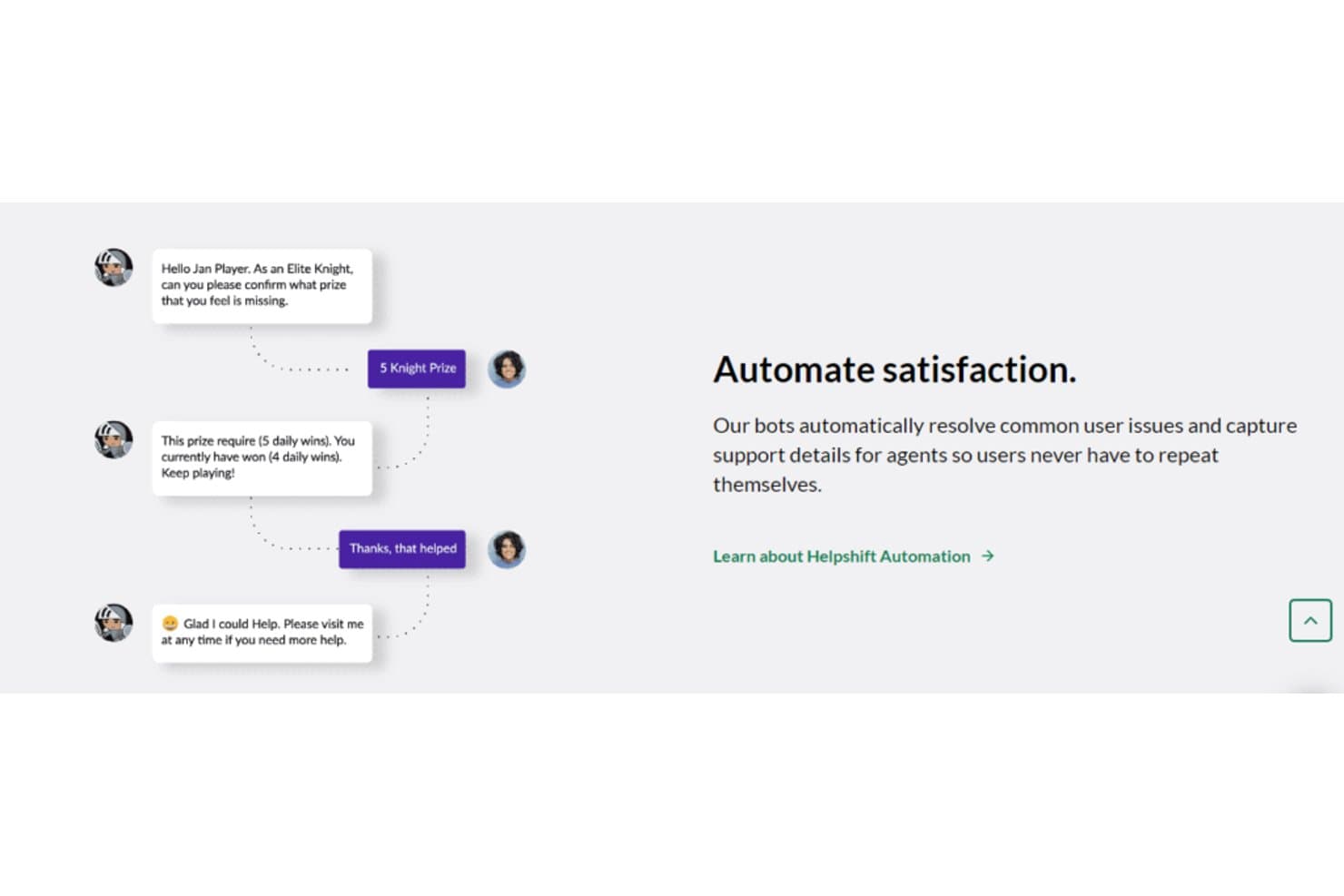
Helpshift automates common support issues without agent intervention. Helpshift is a customer service platform for digital-first businesses that helps support teams manage customer conversations and service requests across channels without splitting work across disconnected tools.
Who Is Helpshift Best For?
Helpshift suits customer service teams at app-based businesses that want AI-powered chat to handle routine support conversations.
Why I Picked Helpshift
I picked Helpshift as Best for integrating AI into customer service in a Guide to Freshworks Alternatives because its chatbot resolves routine player issues with personalized, context-aware replies. Its in-game support SDK carries player context into conversations, while real-time monitoring checks AI and agent exchanges for quality and policy compliance.
Helpshift Key Features
- Self-service FAQs: Publish FAQs in apps and on websites.
- Quick replies: Give agents reusable, templated responses.
- Issue fields: Capture details such as app version, spend, and language.
- Automations: Assign issues to queues, bots, groups, or agents and update fields or tags.
Helpshift Integrations
Helpshift offers a Salesforce package through Salesforce AppExchange, SSO integrations with Okta and OneLogin, and webhook-based connections to Slack; Jira and Trello can be connected through Zapier. Helpshift also provides REST APIs for custom integrations.
Pros and Cons
Pros:
- Macros and queues speed agent triage
- FAQs and bots deflect routine tickets
- In-game SDK preserves player context
Cons:
- SDK upgrades can disrupt app workflows
- Agent-level analytics remain limited
Learn more about Helpshift: Best for real-time chat support
- 30-day free trial
- From $15/user/month (billed annually)
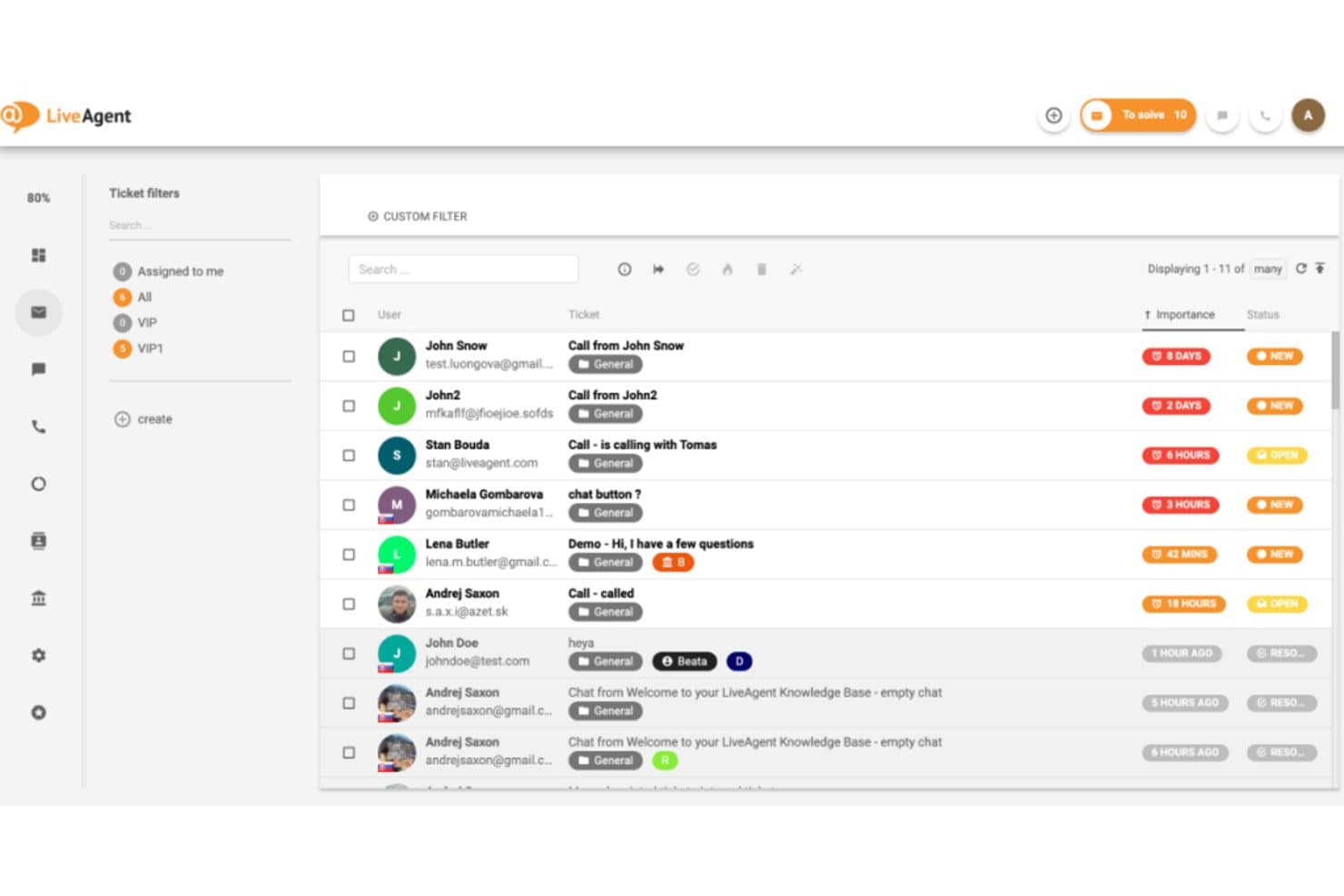
LiveAgent organizes customer tickets by priority and status in one view. For support teams comparing Freshworks alternatives, LiveAgent combines customer service ticketing and communication tools to help businesses manage incoming requests across channels (Best for real-time chat support).
Who Is LiveAgent Best For?
LiveAgent suits growing businesses whose customer service teams need to manage live conversations alongside support tickets.
Why I Picked LiveAgent
I picked LiveAgent because its fit is clear: Best for real-time chat support. Agents can use chat invitations to engage visitors browsing a support page, then manage those conversations alongside tickets in a shared support workflow. That’s useful when customers need a quick answer before opening a case.
LiveAgent Key Features
- Call center: Route and manage customer calls through LiveAgent’s built-in call center.
- Knowledge base: Create searchable help articles and customer-facing FAQ pages.
- SLA rules: Set response and resolution targets for support tickets.
- Automation rules: Trigger actions based on ticket conditions, such as status or priority.
LiveAgent Integrations
LiveAgent lists 213 integrations, plugins, and apps, including Salesforce, Jira, ClickUp, Pipedrive, Slack, and ActiveCampaign. It also supports Zapier and provides an API for custom integrations.
Pros and Cons
Pros:
- SLA rules and automation support ticket routing
- Chat conversations join tickets in one inbox
- Real-time chat invitations engage site visitors
Cons:
- Mobile tools offer fewer capabilities than desktop
- Interface can feel dated and cluttered
Learn more about LiveAgent: Best for personalized customer experiences
- Free demo available
- Pricing upon request
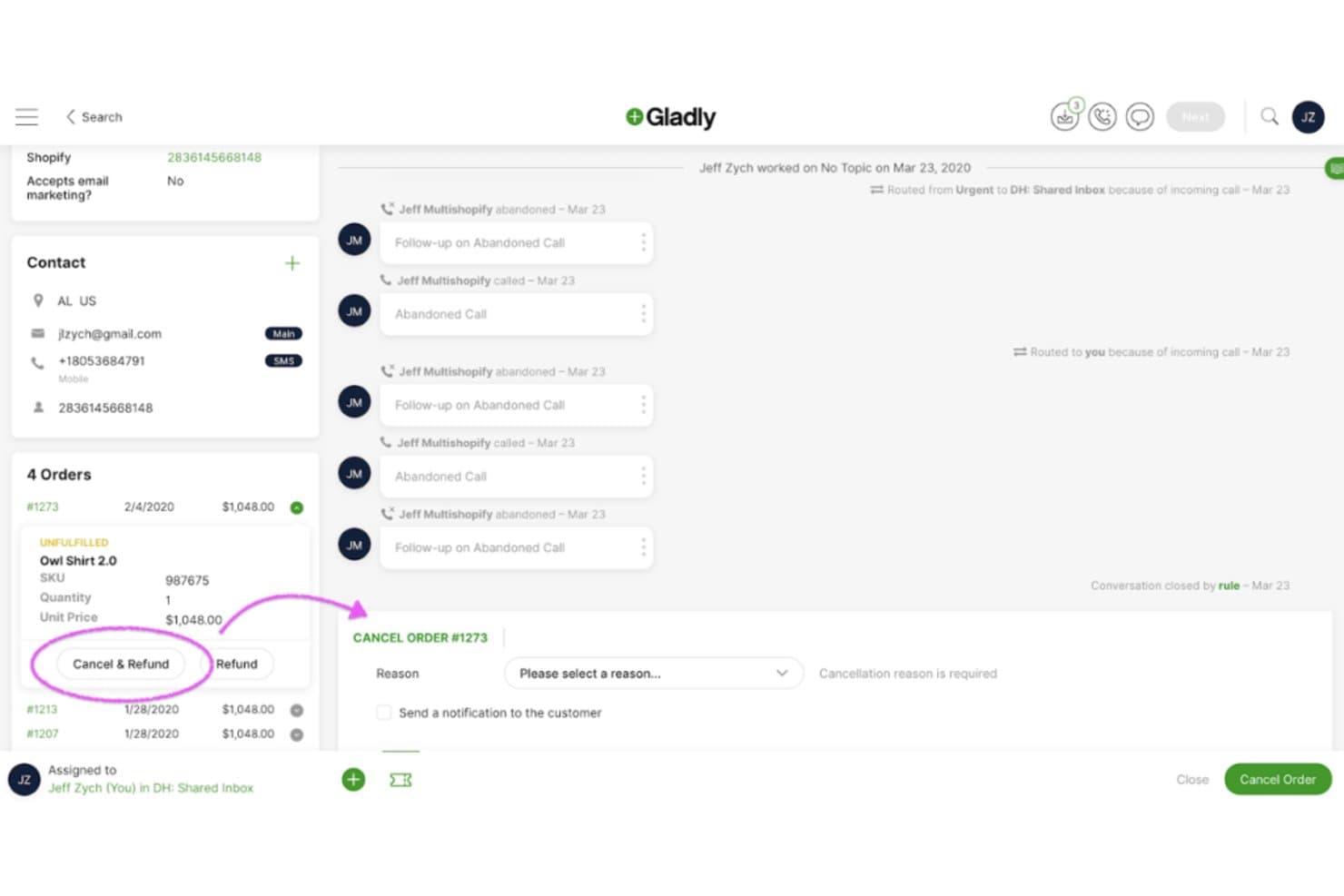
Gladly lets agents cancel and refund orders directly within the customer timeline. For ecommerce and consumer brands comparing Freshworks alternatives, Gladly is a customer service platform that brings conversations across channels into one customer history, helping agents avoid fragmented context and repeated questions.
Who Is Gladly Best For?
Gladly suits customer service teams at consumer brands that want agents to tailor support to each customer’s needs.
Why I Picked Gladly
I picked Gladly for its “Best for personalized customer experiences” focus and its lifelong customer record across channels. When a shopper asks about a delayed order by email after chatting earlier, agents can see the history and past promises without asking them to repeat details. Gladly AI also uses that context to tailor responses.
Gladly Key Features
- Voice AI: Handles customer conversations through voice interactions.
- In-chat checkout: Lets shoppers complete purchases inside a conversation.
- SMS follow-ups: Sends shoppers a text when they leave the site.
- AI controls: Lets teams adjust recommendations and guidance without engineering tickets.
Gladly Integrations
Gladly offers ready-to-install apps through its App Platform, including Shopify, Salesforce, Klaviyo, BigCommerce, Loop, and Slack. It also provides a REST API and Lookup API for custom integrations.
Pros and Cons
Pros:
- In-chat checkout supports ecommerce sales
- AI uses customer context to personalize replies
- Persistent cross-channel customer timelines
Cons:
- Advanced rules can be difficult to configure
- Reporting lacks detailed agent analytics
Learn more about Gladly: Best for visual project management
- Free plan + 14-day free trial available
- From $9/user/month (billed annually)
Visit WebsiteCustomer Rating:4.6/5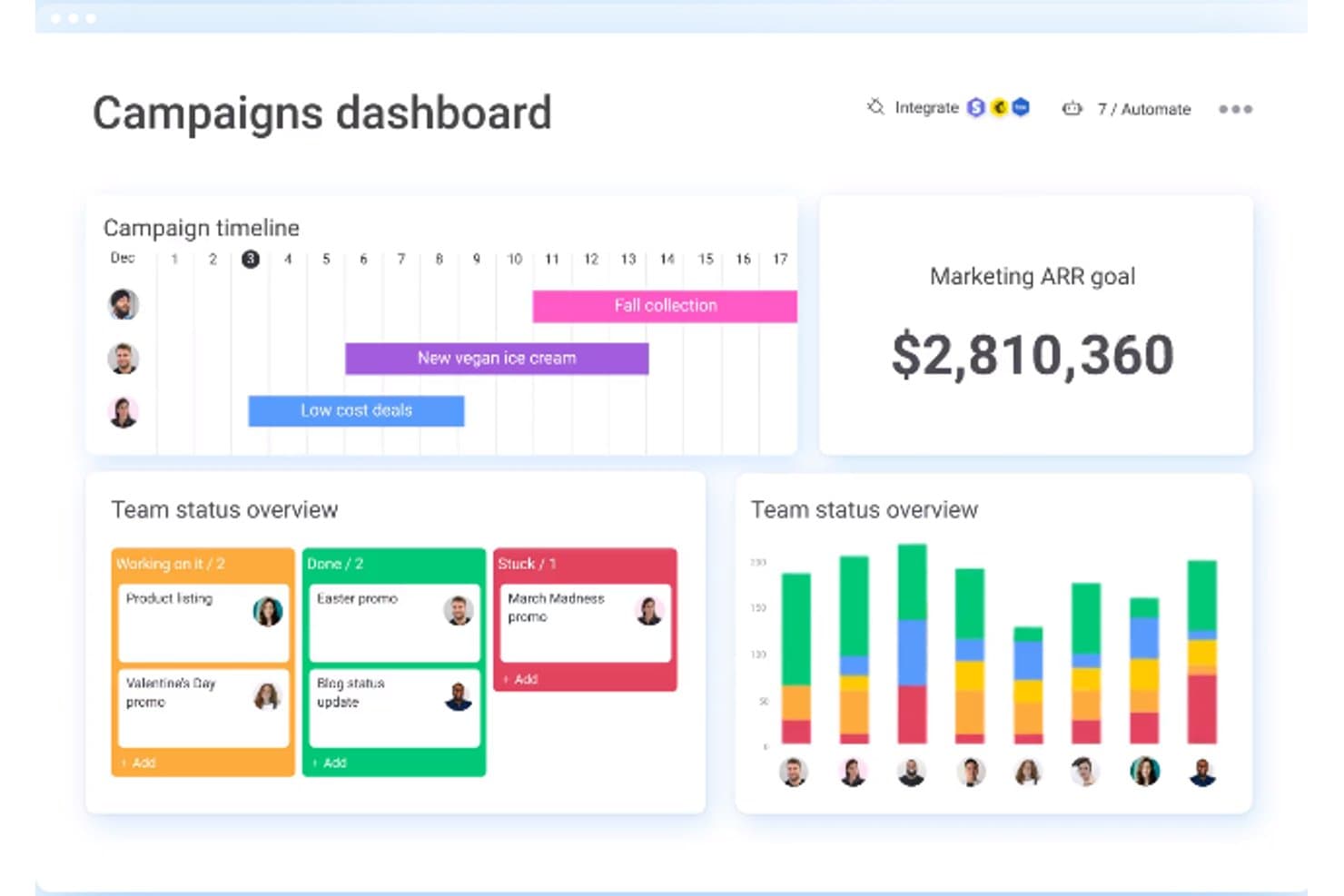
monday.com centralizes campaign timelines, team status, and ARR goals in one dashboard. monday AI Workspace is a configurable work management platform for IT teams coordinating service projects, internal requests, and operational tasks across departments while keeping ownership and progress visible.
Who Is monday AI Workspace Best For?
IT project managers coordinating multi-team initiatives can use monday AI Workspace’s visual boards to make project plans easier to follow.
Why I Picked monday AI Workspace
I picked monday AI Workspace for its stated strength, Best for visual project management. Its boards make owners, statuses, and dependencies visible, while dashboards help track service projects and internal IT requests across teams. When comparing Freshworks alternatives, I value that clear coordination for work that spans support, infrastructure, and business teams.
monday AI Workspace Key Features
- Request forms: Create forms that route internal IT requests into workflows.
- Workflow automations: Set rules to assign work or send notifications when items change.
- App integrations: Connect monday.com with external tools used across IT workflows.
- AI tools: Use AI features to summarize updates and generate content within workflows.
monday AI Workspace Integrations
monday AI Workspace offers access to 850+ integrations and apps, including Slack, Microsoft Teams, GitHub, GitLab, Zendesk, and Active Directory. It also supports Zapier and provides a GraphQL API for custom integrations.
Pros and Cons
Pros:
- Dashboards show project status across boards
- Forms route IT requests into workflows
- Visual boards clarify cross-team project ownership
Cons:
- Less depth for incident and asset management
- Cross-board reporting can require workarounds
Learn more about monday AI Workspace: Best for B2B customer support
- Free demo available
- From $45/month (billed annually)
Visit WebsiteCustomer Rating:4.5/5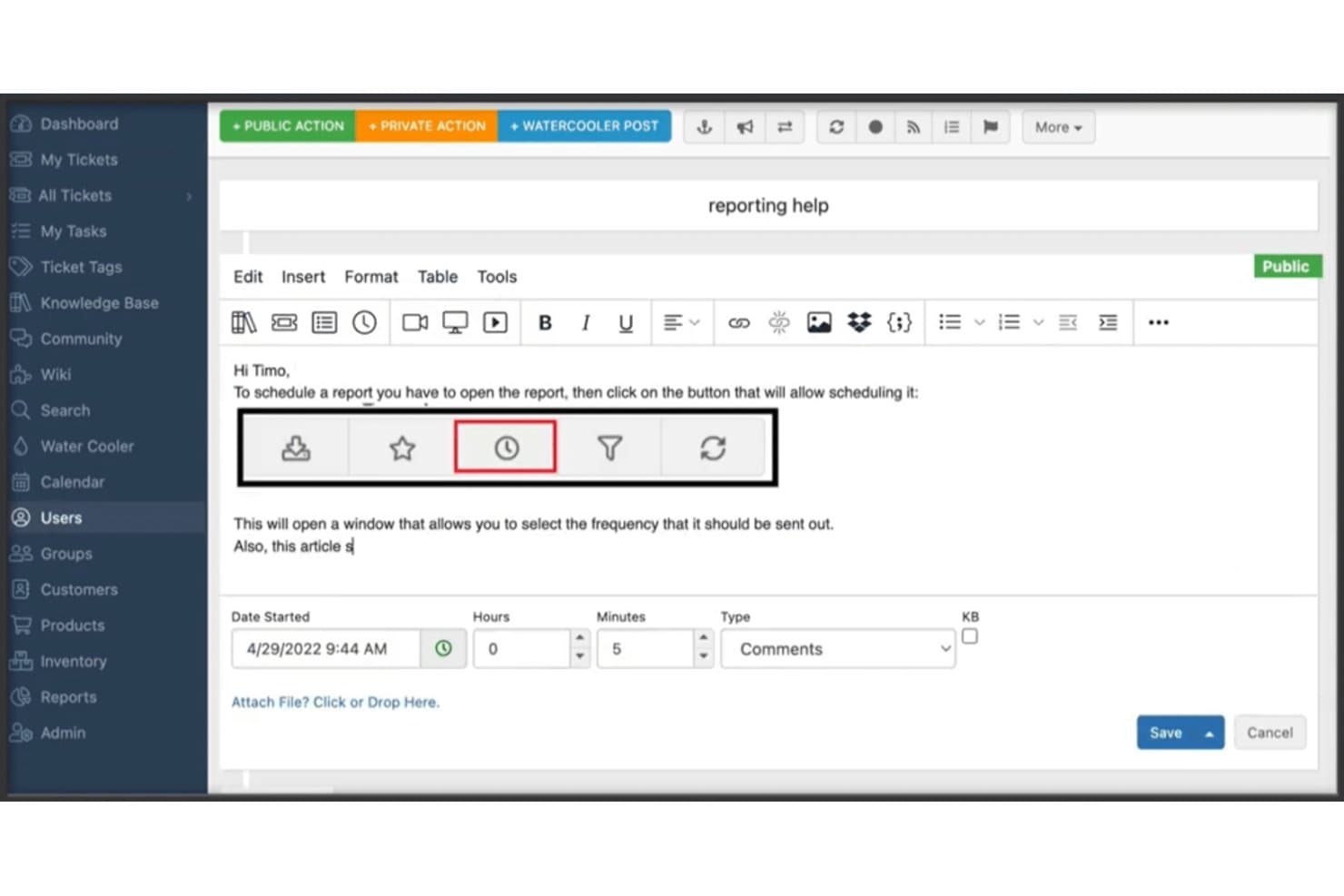
TeamSupport lets users respond to tickets with rich-text formatting tools. TeamSupport is a customer service platform for B2B companies that need to coordinate support across complex accounts, technical issues, and ongoing customer relationships.
Who Is TeamSupport Best For?
TeamSupport suits B2B support teams that need to coordinate technical issue resolution across complex customer accounts.
Why I Picked TeamSupport
I picked TeamSupport for a guide to Freshworks alternatives because it’s a strong fit for Best for B2B customer support. Its account-level view brings multiple contacts and ticket history together, while the Customer Distress Index uses sentiment analysis and AI to flag at-risk accounts. I value that context when prioritizing issues that affect an entire customer organization.
TeamSupport Key Features
- SLA enforcement: Apply service-level rules to tickets.
- Collision detection alerts: Notify agents when teammates are working on the same ticket.
- Rich media ticketing: Embed videos and images in agent responses.
- Knowledge base automation: Convert resolved tickets into self-service articles.
TeamSupport Integrations
TeamSupport offers 30+ native integrations, including HubSpot, Jira Software, Salesforce, Azure DevOps, Microsoft Dynamics, Zoho, Slack, Microsoft Teams, RingCentral, and SAP. It also connects with Zapier and provides a REST API for custom integrations.
Pros and Cons
Pros:
- Private notes support cross-team case handoffs
- Account-level history connects contacts and cases
- Centralizes email, chat, and call tickets
Cons:
- Reports can be limited or slow
- Slow searches delay ticket navigation
Learn more about TeamSupport:
Alte alternative la Freshworks
Iată câteva alternative suplimentare la Freshworks care nu au ajuns pe lista mea scurtă, dar merită totuși analizate:
- 11Agentforce Service (formerly Service Cloud)Best for integrating customer service with CRM
- 12StreakGood for CRM within Gmail
- 13NimbleGood for social sales and marketing
- 14Zendesk SellGood for high-velocity sales teams
- 15TotangoGood for customer success management
- 16ThryvGood for local business management
- 17NutshellGood for sales process automation
- 18InsightlyGood for project management with CRM
- 19Act! CRMGood for comprehensive contact management
Alte recenzii de software
- Software de asistență pentru clienți în cloud
- Software pentru biroul de servicii
- Platforme de comunicare în cloud
How I Evaluate Freshworks Alternatives
I split my evaluation into two layers: the baseline every ITSM tool must clear—ticketing, SLAs, ITIL modules—and the differentiators that separate a true Freshservice replacement from a workaround.
Core Functionality (Table Stakes For This List)
When I'm selecting tools for my list, I rank each one on a scale from 0 (does not offer the functionality) to 5 (excels in this area) for each core functionality listed below. Then, I calculate the tool's total score into a percentage. Each tool needs to achieve a minimum total score of 65% to be considered for inclusion.
- Incident & Ticket Management: I look for multi-channel intake—email, portal, Slack, Teams—plus automated routing and SLA policies that match real escalation paths.
- ITIL-Aligned Service Management: Each tool should cover incident, problem, change, and release modules, not just a basic help desk with a service catalog bolted on.
- IT Asset Management: I check for automated discovery, CMDB relationship mapping, and software license tracking—not just a static spreadsheet import.
- Automation & Workflow Orchestration: Visual workflow builders matter here—I look for multi-step approval chains and cross-system triggers, like auto-creating a Jira issue from a ticket.
- Self-Service Portal & Knowledge Base: A branded portal with searchable KB articles and chatbot deflection should be included, so agents handle complex issues instead of password resets.
- Integrations & API Ecosystem: Prebuilt connectors for monitoring, identity, and communication tools matter most—along with open APIs and webhook support for custom workflows.
Once I have a list of tools that meet this criteria, I consider what sets each platform apart.
Differentiating Factors (What Sets Vendors Apart)
Here's how I compare and contrast different vendors:
Standout Features
AI copilot features are a big differentiator—I look at whether a platform can summarize tickets, draft responses, or predict categories without heavy configuration. Enterprise service management matters too, especially when HR or facilities teams want their own service desk on the same platform your IT team uses. I also evaluate native project and dev collaboration, since tools that link incidents directly to sprints or dev issues save time when outages trace back to a recent deployment.
Beyond Features
Security and compliance posture is one of the first things I check—SOC 2 Type II, SSO/SAML support, and role-based access control matter when your service desk handles sensitive infrastructure data. Implementation and time-to-value also weigh heavily, especially migration tooling and template libraries that get a service desk live in days rather than months. I evaluate total cost of ownership closely too, since add-on fees for AI, ITAM modules, or premium integrations can quietly push a tool well past its listed per-agent price.
De ce să căutați o alternativă la Freshworks?
Deși Freshworks este o alegere bună pentru un instrument de gestionare a serviciilor pentru clienți, există mai multe motive pentru care unii utilizatori caută soluții alternative. Este posibil să căutați o alternativă la Freshworks deoarece…
- Aveți nevoie de o personalizare mai avansată pentru fluxuri de lucru complexe.
- Echipa dumneavoastră consideră că interfața este confuză sau aglomerată.
- Ați depășit funcționalitățile disponibile pe măsură ce echipa de asistență se extinde.
- Doriți instrumente mai bune pentru rapoarte și analize.
- Vă confruntați cu o asistență pentru clienți lentă sau nefolositoare.
- Aveți nevoie de o integrare mai bună cu instrumentele pe care echipa dumneavoastră le utilizează deja.
Dacă vreuna dintre aceste situații vi se potrivește, ați ajuns în locul potrivit. Lista mea conține mai multe opțiuni de instrumente pentru gestionarea serviciilor pentru clienți, mai potrivite pentru echipele care se confruntă cu aceste provocări legate de Freshworks și caută soluții alternative.
Funcțiile esențiale ale Freshworks
Iată câteva dintre funcțiile esențiale ale Freshworks, pentru a vă ajuta să comparați și să evaluați ce oferă soluțiile alternative:
- Sistem de gestionare a tichetelor: Permite echipei să urmărească, să gestioneze și să răspundă la problemele clienților într-un singur loc.
- Asistență bazată pe AI: Folosește AI pentru a ajuta echipa să răspundă mai rapid și pentru a sugera răspunsuri utile.
- Asistență omnicanal: Reunește mesajele din e-mail, chat, telefon și rețelele sociale într-o singură căsuță de mesaje.
- Instrumente de colaborare în echipă: Permit mai multor agenți să lucreze la aceeași problemă fără să se încurce reciproc.
- Fluxuri de lucru personalizate: Te ajută să configurezi reguli și automatizări, astfel încât echipa să nu omită niciun pas.
- Portal de autoservire: Permite clienților să găsească singuri răspunsuri folosind un centru de ajutor sau un chatbot.
- Rapoarte și analize: Îți oferă informații despre aspecte precum volumul tichetelor și performanța echipei.
- Opțiuni de integrare: Se conectează la instrumentele pe care echipa ta le folosește deja, precum Slack, Shopify sau instrumente CRM.
- Sondaje privind feedbackul clienților: Te ajută să colectezi opinii de la utilizatori după închiderea unui tichet.
- Aplicație mobilă: Menține echipa conectată la solicitările clienților chiar și atunci când nu se află la birou.