

Testarea aplicațiilor Android pe un Mac nu este întotdeauna simplă. Este posibil să întâmpinați performanțe lente, compatibilitate limitată cu dispozitivele sau instrumente care pur și simplu nu au fost concepute având dezvoltatorii în minte. Indiferent dacă depanați o aplicație, instalați APK-uri din surse externe sau pur și simplu încercați să reproduceți experiența unui dispozitiv real, emulatorul pe care îl alegeți vă poate afecta semnificativ fluxul de lucru.
În ultimii ani, am testat o gamă largă de emulatoare Android în timp ce lucram la proiecte multiplatformă și colaboram cu echipe de dezvoltare care se bazează pe macOS. Am văzut direct care dintre ele sunt fiabile, potrivite pentru dezvoltatori și își respectă cu adevărat promisiunile.
În acest ghid, voi analiza cele mai bune emulatoare Android pentru Mac — pe baza testării reale, nu doar a specificațiilor sau a listelor de funcții. Indiferent dacă aveți nevoie de ceva ușor pentru testări rapide sau de un dispozitiv virtual cu mai multe funcții, vă voi ajuta să găsiți opțiunea potrivită.
Why Trust Our Software Recommendations
6,700+
Reviews
20
Industry experts
16+
Evaluation factors
14
Years
Our team has been testing and reviewing software since 2012. As tech leaders ourselves, we know how difficult—and important—it is to choose the right software.
For this guide, we evaluated tools using hands-on testing and independent research, scoring tools using our selection criteria.
Our reviews reflect our human editorial judgment, not a sales pitch.
Expert reviewers:
- Paulo Gardini MiguelTech Director
 Tim FisherVP of AI
 Gabriel RosasTech Lead & Software Architect
 Christhian GruhnTech Lead & Platform Architect

Tabel comparativ al emulatoarelor Android pentru Mac
Acest tabel comparativ rezumă detaliile de preț pentru cele mai bune emulatoare Android pentru Mac incluse în selecția mea:
Score legend (out of 5)
- Excellent4.5–5
- Good4–4.4
- Average3–3.9
- Below average2–2.9
- Poor1–1.9
Sorted by: Default
| Tool | Starting Price | Website | |||||||
|---|---|---|---|---|---|---|---|---|---|
Best for CI/CD-scale Android test coverage | 3.5 out of 5 | 1 | 5 | 3 | 2 | 5 | 5 | $39/month 28-day free trial + free demo available | Website |
Best for CI/CD-driven mobile QA teams | 3.5 out of 5 | 2 | 4 | 5 | 1 | 5 | 4 | $83/month Free trial + free demo available | Website |
Best with dedicated private device lab options | 2.8 out of 5 | 1 | 3 | 3 | 1 | 5 | 4 | $250/month Free plan available | Website |
Best for emulating game experience | 2.8 out of 5 | 3 | 3 | 2 | 4 | 2 | 3 | Free plan available Free plan available | Website |
Best for browser-based CI/CD pipeline testing | 3.3 out of 5 | 3 | 3 | 3 | 2 | 5 | 4 | $59/month Free plan + free demo available | Website |
Best for cross-browser testing | 3.7 out of 5 | 3 | 5 | 3 | 1 | 5 | 5 | $17/month Free plan + free demo available | Book Demo |
Best with 150+ third-party tool integrations | 3.8 out of 5 | 3 | 5 | 5 | 2 | 5 | 3 | $29/month Free trial available | Website |
Best for app development | 5.0 out of 5 | 5 | 5 | 5 | 5 | 5 | 5 | Free plan available Free plan available | Website |
Best for cloud-scale Android device fleet testing | 4.5 out of 5 | 4 | 4 | 5 | 4 | 5 | 5 | $239.99/computer/year Free plan available | Website |
Best for Apple Silicon Android gaming on Mac | 3.2 out of 5 | 2 | 3 | 3 | 5 | 3 | 3 | Free plan available Free plan available | Website |


Recenzii ale celor mai bune emulatoare Android pentru Mac
Mai jos sunt rezumatele mele detaliate ale celor mai bune emulatoare Android pentru Mac care au ajuns pe lista mea scurtă. Recenziile mele oferă o analiză detaliată a principalelor funcții, avantaje și dezavantaje, integrări și cazuri de utilizare ideale ale fiecărui instrument, pentru a vă ajuta să îl găsiți pe cel mai potrivit pentru dvs.
 Best for CI/CD-scale Android test coverage
- 28-day free trial + free demo available
- From $39/month (billed annually)
Visit WebsiteCustomer Rating:4.3/5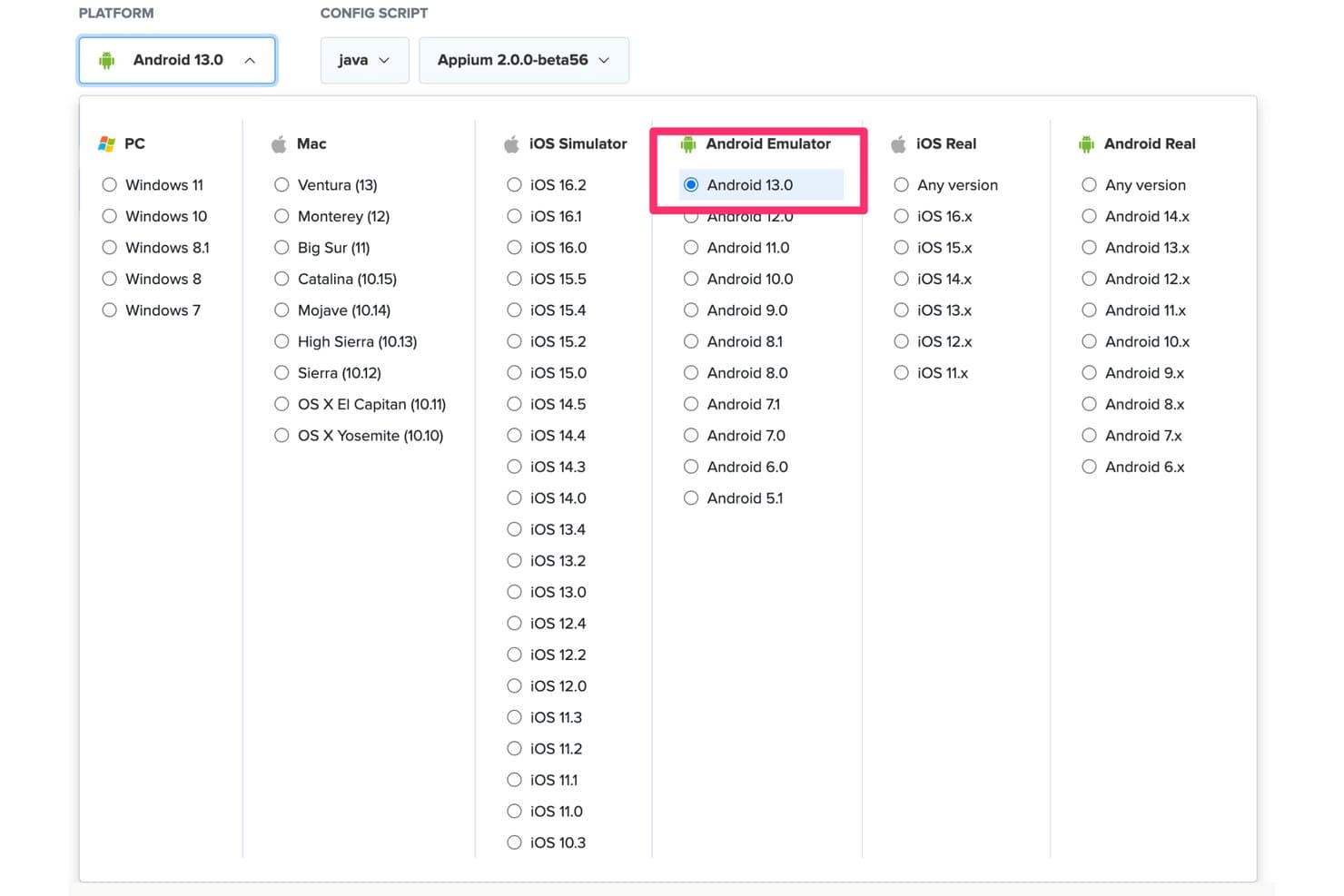
Sauce Labs supports Android Emulator testing on Android 13.0 via Java and Appium. Sauce Labs is a cloud-based Android testing platform that gives you on-demand access to 1,700+ virtual Android emulators spanning Android 5.0 through 16.x, with ARM-native execution, parallel test runs, and deep integration with Appium, Espresso, and major CI/CD pipelines.
Who Is Sauce Labs Best For?
Sauce Labs is a strong fit for QA engineers and DevOps teams that need to run Android tests at CI/CD scale without managing local emulator infrastructure.
Why I Picked Sauce Labs
I picked Sauce Labs as one of the best because it's the only platform I know of that delivers ARM-native Android execution at CI/CD scale, which directly solves the flakiness and slowness that plague x86-based cloud emulators. Session start times drop from ~90 seconds to ~20 seconds on the Android Premium Cloud, and I've seen teams run across 24+ concurrent Android versions without touching a local emulator setup. If your Mac-based QA pipeline is the bottleneck, Sauce Labs removes it entirely.
Sauce Labs Key Features
- ARM-native Android execution: The Android Premium Cloud runs virtual Android devices on ARM hardware, eliminating the x86 binary translation layer that causes test flakiness and slow session starts.
- Parallel test concurrency: Plans support up to 24+ simultaneous Android emulator sessions, letting your team run full device-version matrices in a single pipeline trigger.
- saucectl CLI: A command-line tool that handles APK/AAB uploads and Espresso test execution directly from your terminal, fitting naturally into scripted build workflows.
- Single-use VM sessions: Each emulator session spins up on a fresh virtual machine and is wiped after the session ends, giving every test run a clean, isolated environment.
Sauce Labs Integrations
Sauce Labs offers native plugins for Jenkins, Bitbucket, and TeamCity, plus documented integrations with GitHub Actions, GitLab, CircleCI, and Azure DevOps. Appium, Espresso, the
saucectlCLI, and REST API support custom CI/CD workflows from a Mac.Pros and Cons
Pros:
- Supports massive parallel version concurrency
- Runs ARM-native Android sessions in cloud
- No local Mac setup required for testing
Cons:
- Real-time app interactions limited by network latency
- Does not run natively on macOS
Learn more about Sauce Labs: Best for CI/CD-driven mobile QA teams
- Free trial + free demo available
- From $83/month
Visit WebsiteCustomer Rating:4.3/5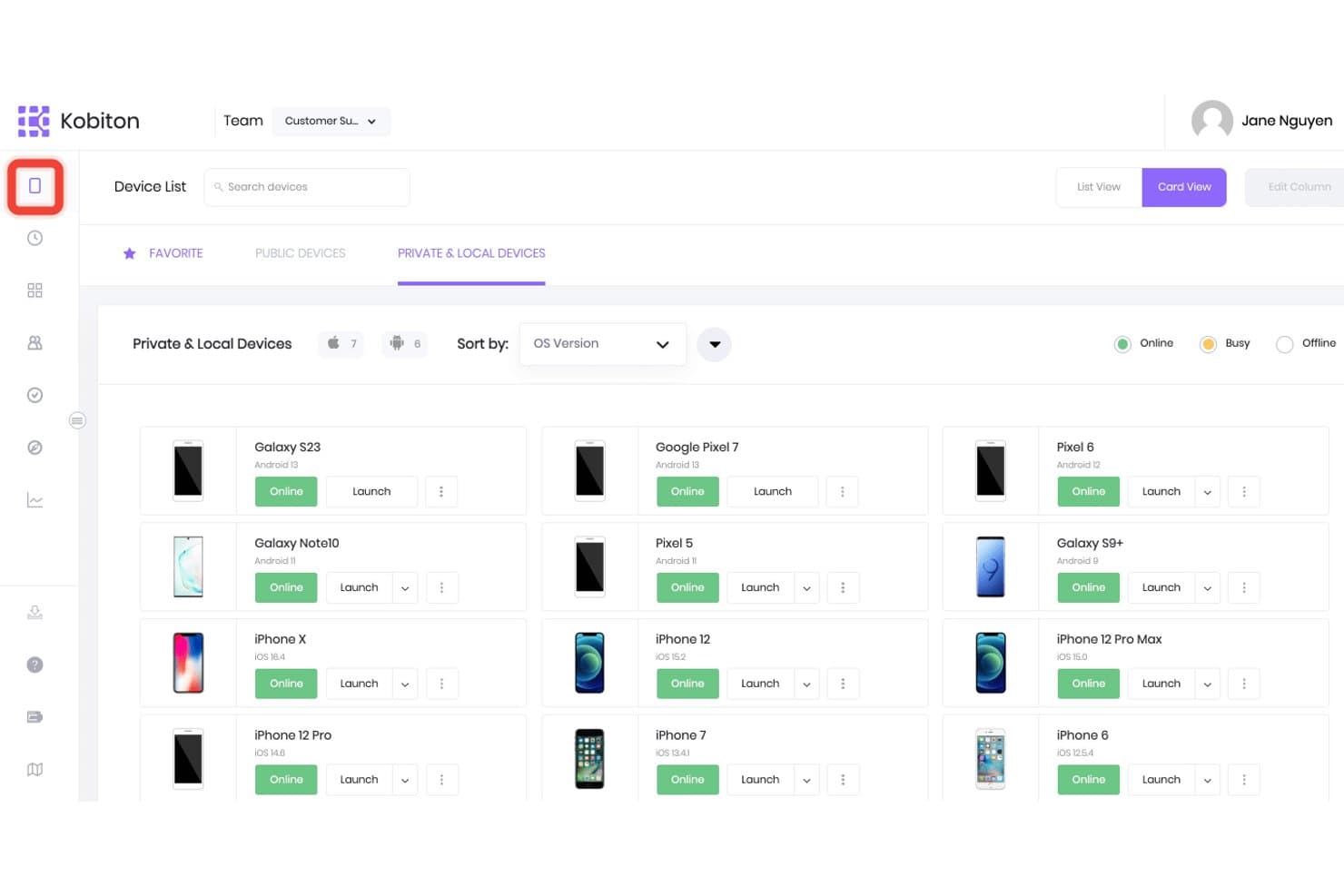
Kobiton lets users browse and launch private and local devices. Kobiton is a cloud-based mobile testing platform that gives teams browser-accessible Android device testing—combining real device access, virtual emulators, and AI-assisted test automation across a wide range of OS versions and manufacturers.
Who Is Kobiton Best For?
Kobiton is a strong fit for QA and DevOps engineers who need cloud-based Android testing woven directly into automated CI/CD pipelines.
Why I Picked Kobiton
I've included Kobiton in my top picks because it's the strongest option for QA and DevOps teams who need Android testing built directly into a CI/CD pipeline. Where local emulators fall short in automation depth, Kobiton fills the gap with scriptless test recording that auto-generates Appium scripts and self-healing script execution that adapts when UI elements change. Its Session Explorer lets you replay test sessions, inspect screen load times, and file bugs to Jira without leaving the platform.
Kobiton Key Features
- Parallel device execution: Run test sessions across multiple Android OS versions and device profiles simultaneously within a single pipeline run.
- Camera image injection: Replace a device's live camera feed with custom images or video to test barcode scanning, OCR, and augmented reality workflows.
- GPS location mocking: Set virtual GPS coordinates on cloud-hosted Android devices to validate geofencing and location-dependent app behavior.
- Air-gapped deployment support: Deploy Kobiton entirely on-premises or in a fully isolated environment for teams with strict data governance or compliance requirements.
Kobiton Integrations
Kobiton integrates with Jenkins, GitHub Actions, CircleCI, Bitrise, Azure DevOps, TeamCity, Buildkite, Jira, Appium, Espresso, and XCUITest. Its API supports custom CI/CD workflows and automated mobile testing.
Pros and Cons
Pros:
- Parallel test execution across multiple devices
- Strong CI/CD pipeline and automation features
- Access to real devices and emulators remotely
Cons:
- Requires stable internet for all device sessions
- No native emulator runs on Mac locally
Learn more about Kobiton: Best with dedicated private device lab options
- Free plan available
- From $250/month
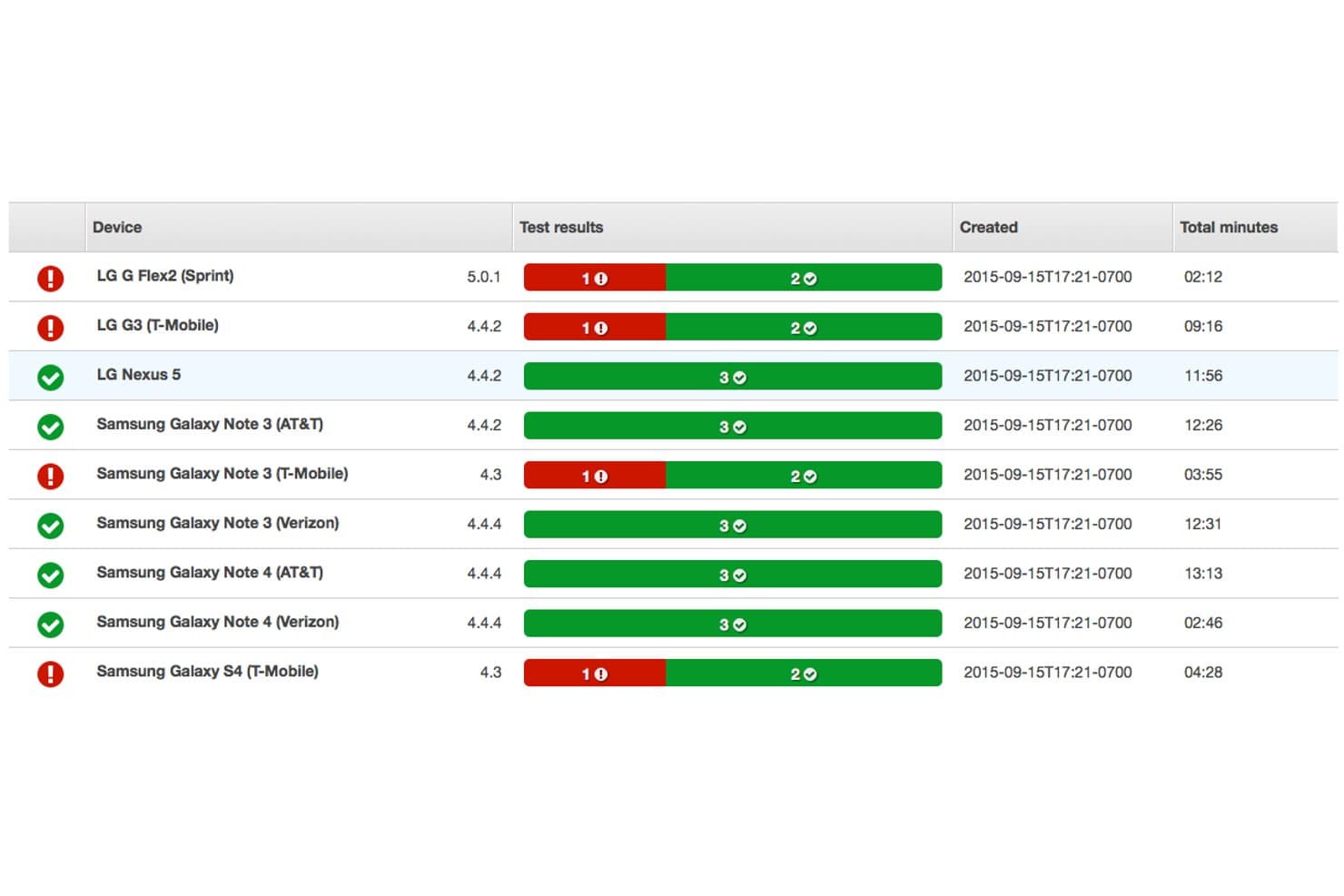
AWS Device Farm displays real Android device test results with pass/fail statuses, OS versions, and total test duration per device. AWS Device Farm is a cloud-based device testing platform designed for developers who need to run Android apps on real devices and browsers from their Mac.
Who Is AWS Device Farm Best For?
Mobile QA teams and developers at technology companies that need access to a wide range of real Android devices for thorough app testing at scale.
Why I Picked AWS Device Farm
I picked AWS Device Farm as one of the best because I can reserve private Android devices in a cloud lab, ensure sensitive apps never share hardware with competitors, and run parallel, automated tests on real hardware from my Mac.
AWS Device Farm Key Features
- Automated test suite support: Run tests using frameworks like Appium, Espresso, Calabash, and XCTest.
- Live device access: Interact with real Android devices for manual testing directly from your Mac.
- Deep diagnostic logs: Capture video, screenshots, and performance data from each test session.
- Device state configuration: Change settings like location, language, or network to simulate real-world conditions.
AWS Device Farm Integrations
AWS Device Farm offers native integrations with Jenkins, Android Studio, and the broader AWS ecosystem, including CodePipeline and S3. An API is available for custom integrations and test automation workflows.
Pros and Cons
Pros:
- Offers device state and environment configuration
- Supports both manual and automated testing
- Access to a wide real device library
Cons:
- Not suitable for offline or local-only testing
- Queues can delay access to popular devices
Learn more about AWS Device Farm:
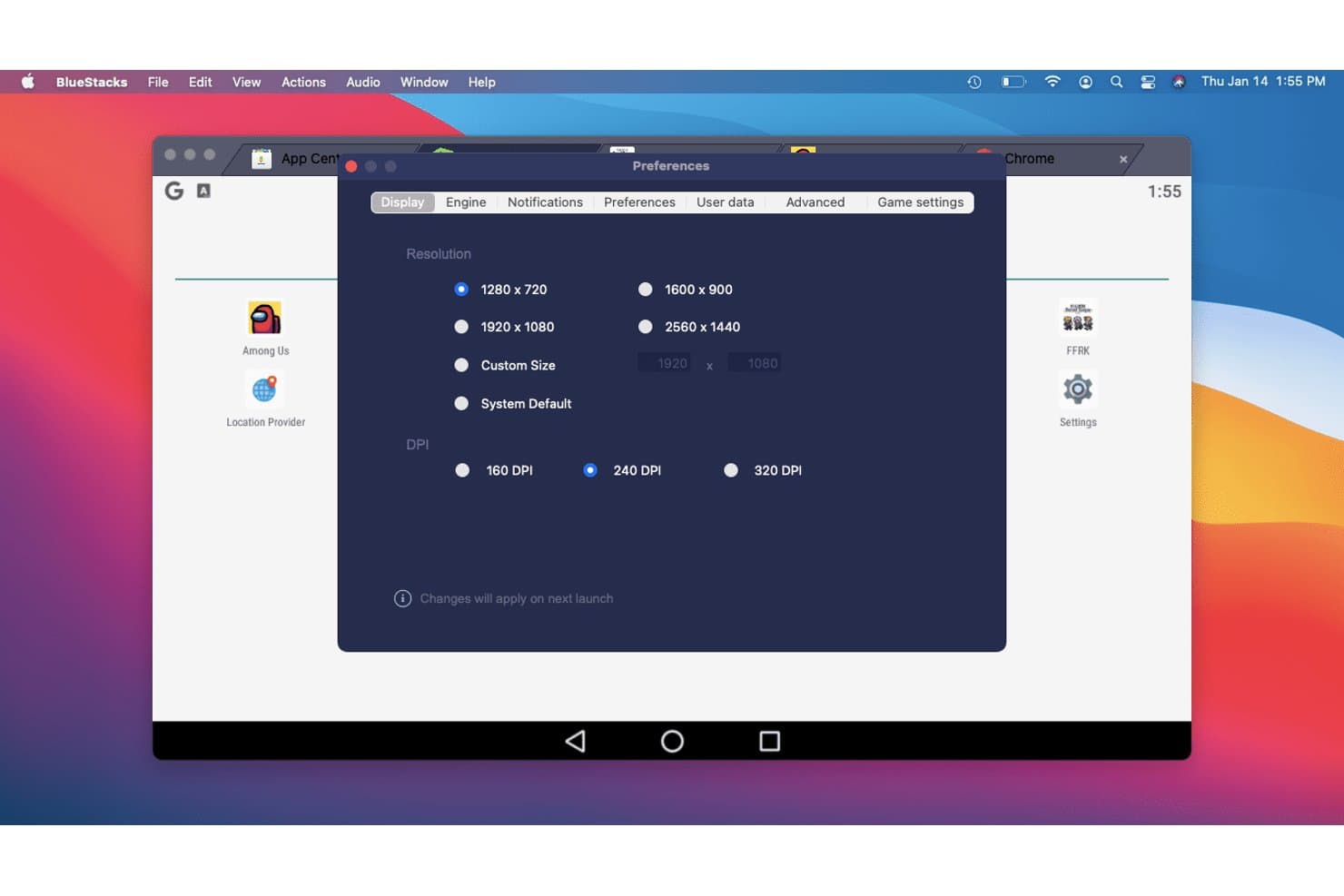
BlueStacks lets users customize display resolution and DPI settings. BlueStacks Air is a native ARM64 Android emulator for Apple Silicon Macs that runs Android 13 apps and games through a fully integrated Google Play Store, multi-instance manager, and Vulkan-accelerated graphics engine.
Who Is BlueStacks Best For?
BlueStacks Air is the go-to pick for casual gamers and mobile gaming enthusiasts who want to play Android games on an Apple Silicon Mac without any technical setup.
Why I Picked BlueStacks
BlueStacks Air earns its spot on my list because no other Mac Android emulator comes close for gaming. It's a native ARM64 build with Vulkan-accelerated graphics and up to 240 FPS support, so titles like Genshin Impact and Call of Duty: Mobile run with real fluidity on Apple Silicon. The Multi-Instance Manager lets you run several game accounts simultaneously, each with its own CPU and RAM allocation.
BlueStacks Key Features
- Google Play Store integration: Access the full Play Store with your Google account, including in-app purchases and cloud sync, without sideloading APKs.
- Multi-Instance Manager: Run multiple independent Android sessions simultaneously, each with its own CPU, RAM, and resolution settings.
- BlueStacks AI (BlueAI): An AI layer that performs in-app actions automatically, with support for third-party LLM providers via your own API key.
- Eco Mode: Reduces CPU and GPU usage for background instances so your Mac stays responsive while multiple sessions run.
BlueStacks Integrations
BlueStacks has native Google Play Store integration and supports ADB connections through port 5555. BlueAI connects with OpenAI and Anthropic through your API key, while macOS integration supports Mission Control, full-screen mode, keyboard shortcuts, and multiple monitors.
Pros and Cons
Pros:
- Multi-instance manager for parallel sessions
- Smooth gameplay with up to 240 FPS
- Native support for Apple Silicon Macs
Cons:
- Only emulates Android 13 version
- No support for Intel-based Macs
Learn more about BlueStacks: Best for browser-based CI/CD pipeline testing
- Free plan + free demo available
- From $59/month (billed annually)
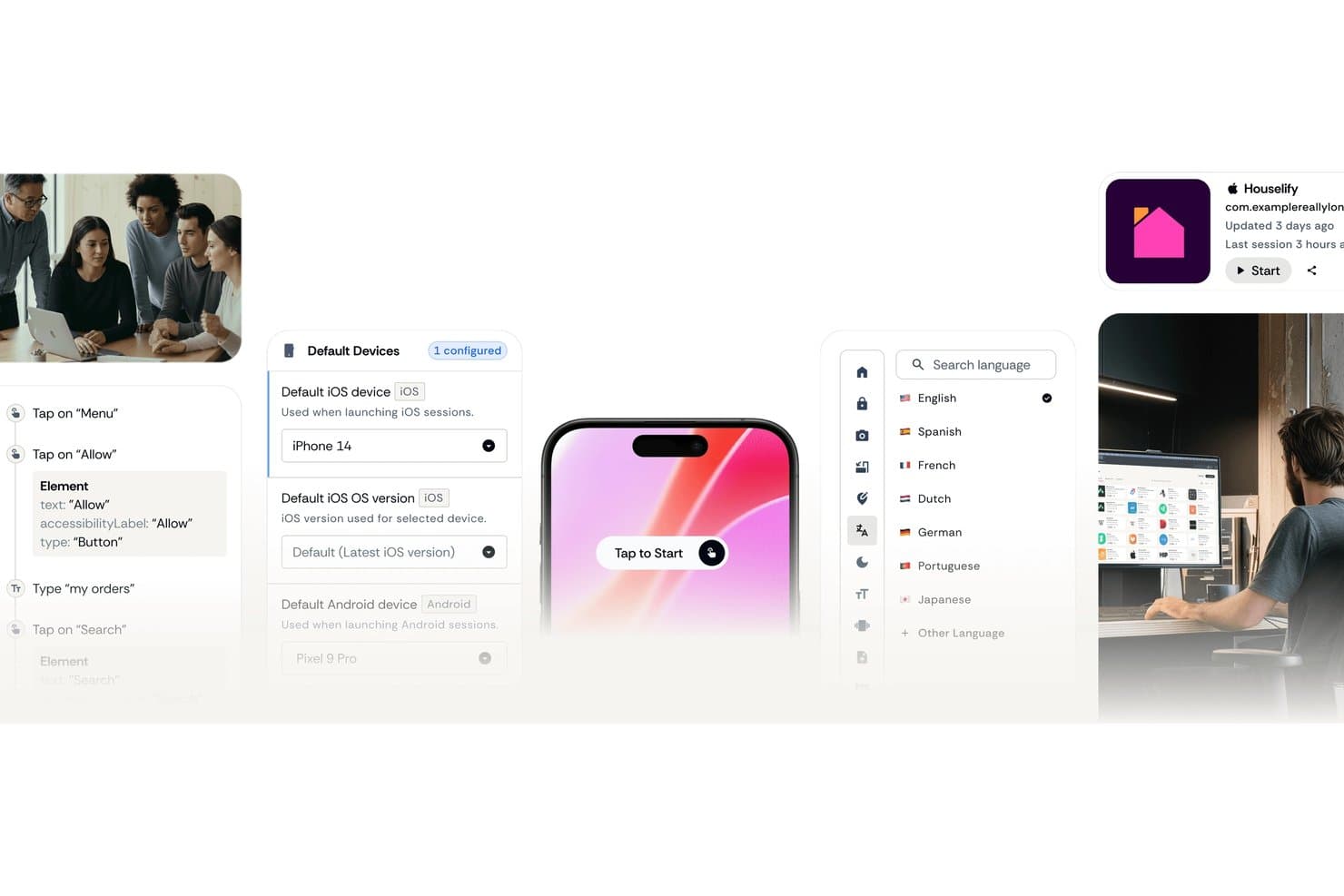
Appetize.io lets users configure default iOS and Android devices for testing. Appetize.io is a cloud-based Android emulator that runs entirely in your browser, offering APK upload and playback, multi-version device profiles spanning Android 8.1 through 16, ADB tunnel access, a JavaScript SDK, and native Playwright integration for automated testing.
Who Is Appetize.io Best For?
Appetize.io is a strong fit for QA engineers and DevOps teams who need scalable, browser-based Android testing wired directly into their CI/CD pipelines.
Why I Picked Appetize.io
I've included Appetize.io in my top picks because it's the only tool on this list that runs entirely in your browser, making Apple Silicon compatibility a non-issue. I particularly like its native Playwright integration with AppRecorder, which lets you record and replay test sessions without writing automation scripts from scratch. Pair that with documented CI/CD support for Bitrise, FastLane, GitHub, and GitLab, and you get a cloud Android environment that slots directly into an existing pipeline.
Appetize.io Key Features
- ADB tunnel access: Creates an SSH tunnel into a live cloud emulator session, letting you connect Android Studio or standard ADB commands directly to a remote device.
- Network traffic monitor: Captures all app network traffic via a built-in intercept proxy, with logs viewable in-session or downloadable as a HAR file.
- Mock location simulation: Sets device GPS coordinates via URL parameters or the JavaScript SDK
setLocation()method to test location-dependent app behaviour. - Media injection: Uploads images or video files (up to 50 MB) directly to a running emulator session for testing camera, OCR, or AR features.
Appetize.io Integrations
Appetize.io offers documented integrations with Bitrise, FastLane, GitHub, GitLab, Playwright, Android Studio via ADB tunnel, and Okta SSO. Its REST API and JavaScript SDK support custom CI/CD orchestration and embedded workflows.
Pros and Cons
Pros:
- Supports Playwright-native test automation workflows
- Connects Android Studio via ADB tunnel
- Runs Android emulation fully in browser
Cons:
- Lacks Google Play Store access
- Requires consistent internet for use
Learn more about Appetize.io: Best for cross-browser testing
- Free plan + free demo available
- From $17/month (billed annually)
Visit WebsiteCustomer Rating:4.9/5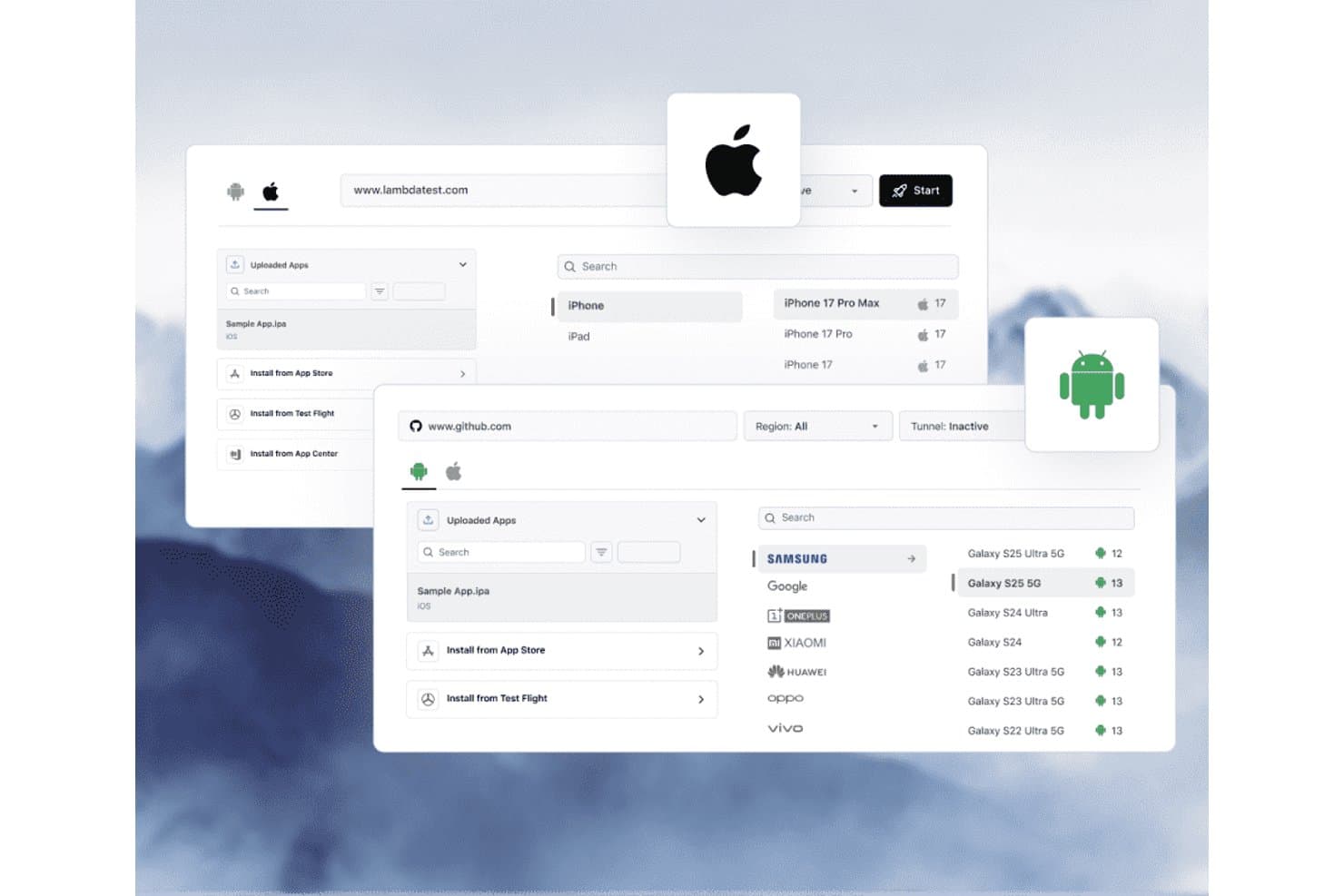
TestMu AI lets users test apps on real iOS and Android devices in the cloud. TestMu AI is a cloud-based Android testing platform that gives you access to 170+ emulator profiles and 10,000+ real devices directly from your browser, with built-in support for Appium, Espresso, Detox, and CI/CD pipeline integrations.
Who Is TestMu AI Best For?
TestMu AI is a strong fit for QA engineers and DevOps teams who need to test Android apps across a wide range of OS versions and real devices without managing local infrastructure.
Why I Picked TestMu AI
I picked TestMu AI as one of the best because it gives you access to 170+ Android emulator profiles and 10,000+ real devices directly from your browser, covering Android 4.1 through 16 without touching your Mac's local setup. Cross-browser testing is where it genuinely shines: you can run the same test session across multiple device and OS configurations simultaneously using HyperExecute, catching rendering and behaviour differences that single-device runs miss. I also like that KaneAI lets you author those tests in plain English, so spinning up a cross-device matrix doesn't require deep Appium scripting every time.
TestMu AI Key Features
- Real device cloud access: Connect to 10,000+ physical Android and iOS devices from your browser, with full hardware fidelity including real sensors and network conditions.
- CI/CD pipeline integrations: Connect directly to Jenkins, GitHub Actions, GitLab, CircleCI, Azure DevOps, and Bitbucket via a native Appium hub endpoint.
- Network condition simulation: Toggle between 3G, 4G, 5G, offline, and custom latency profiles within any test session to validate app behaviour under real-world network constraints.
- Session logging and diagnostics: Capture device logs, app crash reports, and network traffic automatically for every test session, accessible from the cloud dashboard after the run.
TestMu AI Integrations
TestMu AI supports 120+ integrations, including Jenkins, GitHub Actions, GitLab, Azure DevOps, CircleCI, Bitbucket, Appium, Espresso, Detox, and Maestro. Its Appium hub, REST APIs, and KaneAI CLI support custom CI/CD workflows.
Pros and Cons
Pros:
- Simultaneous testing across multiple configurations
- Huge range of Android versions and devices
- Runs on any Mac, no installation needed
Cons:
- Cannot run Android natively on Mac
- Requires constant internet connection to use
Learn more about TestMu AI: Best with 150+ third-party tool integrations
- Free trial available
- From $29/month (billed annually)
Visit WebsiteCustomer Rating:4.5/5
BrowserStack offers parallel testing across four Android devices simultaneously, displaying the Wikipedia app on Google Pixel 9, Samsung Galaxy S25, Google Pixel 9 Pro XL, and Samsung Galaxy S25 Ultra. BrowserStack is a cloud-based testing platform that gives Mac users access to thousands of real Android devices and browsers for both manual and automated app testing.
Who Is BrowserStack Best For?
QA teams and developers at medium to large companies who need real-device Android app testing without maintaining in-house device labs.
Why I Picked BrowserStack
I picked BrowserStack because my team is able to test Android apps on real devices directly from a Mac browser and instantly switch between models, OS versions, and network settings. The 150+ third-party tool integrations let us plug device testing into our CI/CD and reporting tools.
BrowserStack Key Features
- AI-powered test agents: Access automated test authoring, analysis, and failure debugging powered by built-in AI tools.
- Visual regression testing: Run automated screenshots and visual diffs across Android devices to catch layout bugs.
- Accessibility scanning: Test app accessibility on real Android phones with detailed reports on accessibility issues.
- Device geolocation simulator: Simulate different geographic locations for apps to test region-specific features and content.
BrowserStack Integrations
BrowserStack offers over 150 native integrations, including Jenkins, Jira, GitHub, GitLab, Slack, Bitbucket, Azure DevOps, CircleCI, Appium, and Selenium. An API is also available for custom integrations.
Pros and Cons
Pros:
- No local installation required for device testing
- Wide OS and device model coverage
- Real Android devices available instantly on Mac
Cons:
- Advanced device features require higher-tier plans
- Can experience lag during peak hours
Learn more about BrowserStack:
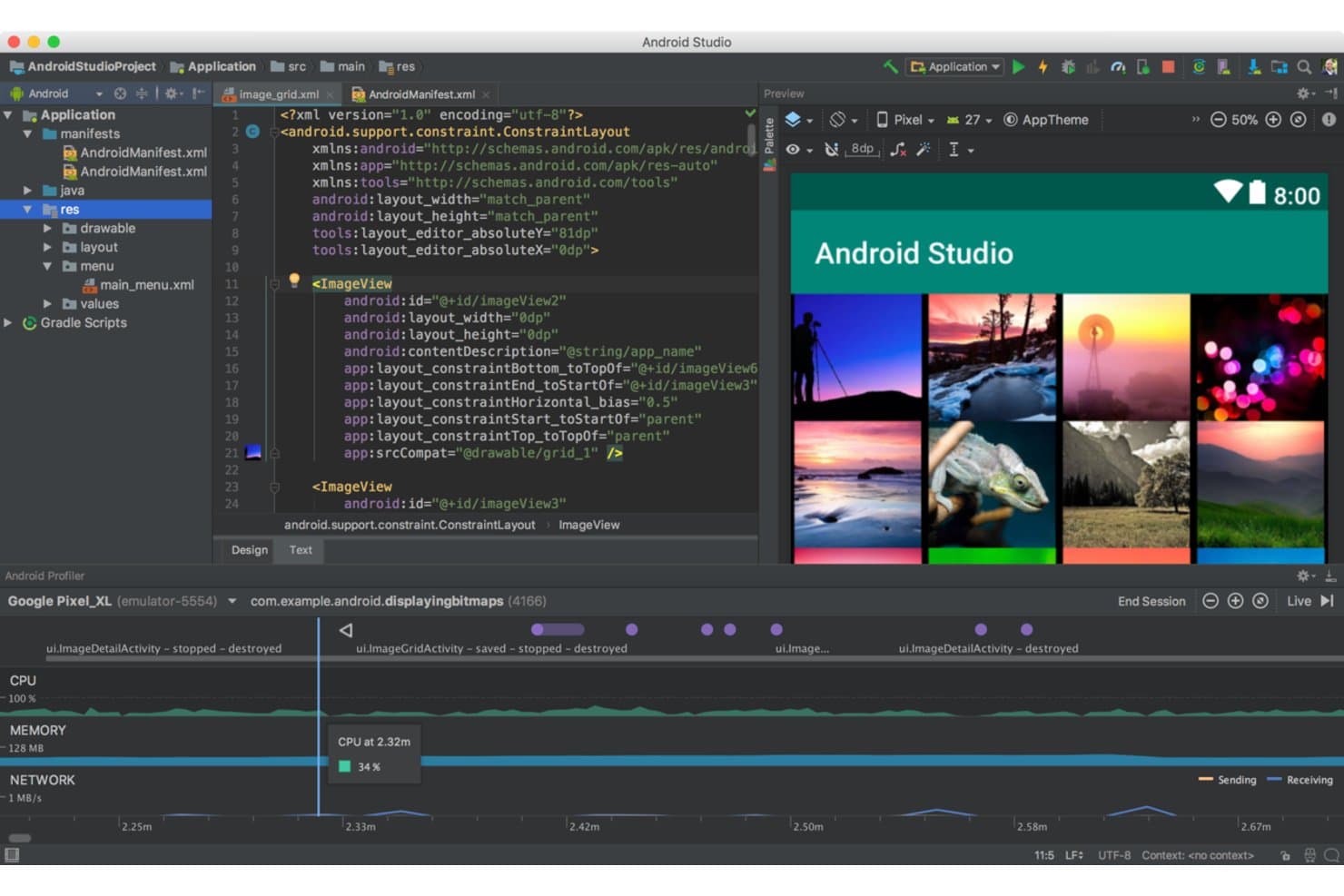
Android Studio lets users build and preview grid layouts with real-time profiling. Android Studio is Google's official Android IDE and emulator, built around the Android Virtual Device (AVD) Manager, with native Apple Silicon support, full sensor simulation, and deep integration with ADB, Gradle, Espresso, and CI/CD pipelines.
Who Is Android Studio Best For?
Android Studio is the go-to choice for Android app developers and QA engineers who need a full-featured, official development environment with deep toolchain integration.
Why I Picked Android Studio
I picked Android Studio as one of the best because it's Google's official Android IDE, which means it gets first-class support for every new Android API and device profile before any other emulator does. The AVD Manager ships with profiles covering Pixel 10 series, foldables, Wear OS, and Android Automotive, and you can swap API levels on the fly. I especially like the Extended Controls panel, which lets you script GPS routes, simulate 5G network conditions, and inject fingerprint events during active test runs.
Android Studio Key Features
- Quick Boot snapshots: Save and reload emulator states instantly, cutting subsequent launch times by up to 10x compared to a cold boot.
- Multi-instance networking: Run multiple AVDs simultaneously with a networking stack that lets emulators communicate directly, without manual port forwarding.
- Headless emulator mode: Launch and control the emulator from the command line without a GUI, making it compatible with automated CI/CD pipelines.
- Telnet and gRPC console: Connect to a running emulator via telnet or gRPC to inject commands, simulate events, and control device behavior programmatically.
Android Studio Integrations
Android Studio integrates with Gradle, Espresso, UI Automator, Firebase Test Lab, GitHub Actions, Jenkins, and Appium through ADB. It also provides gRPC and telnet interfaces for custom emulator automation.
Pros and Cons
Pros:
- Massive device and API version library
- Deep sensor and hardware simulation tools
- Native Apple Silicon and Intel Mac support
Cons:
- Not suitable for gaming or casual use
- High RAM and CPU usage on Mac
Learn more about Android Studio: Best for cloud-scale Android device fleet testing
- Free plan available
- From $239.99/computer/year
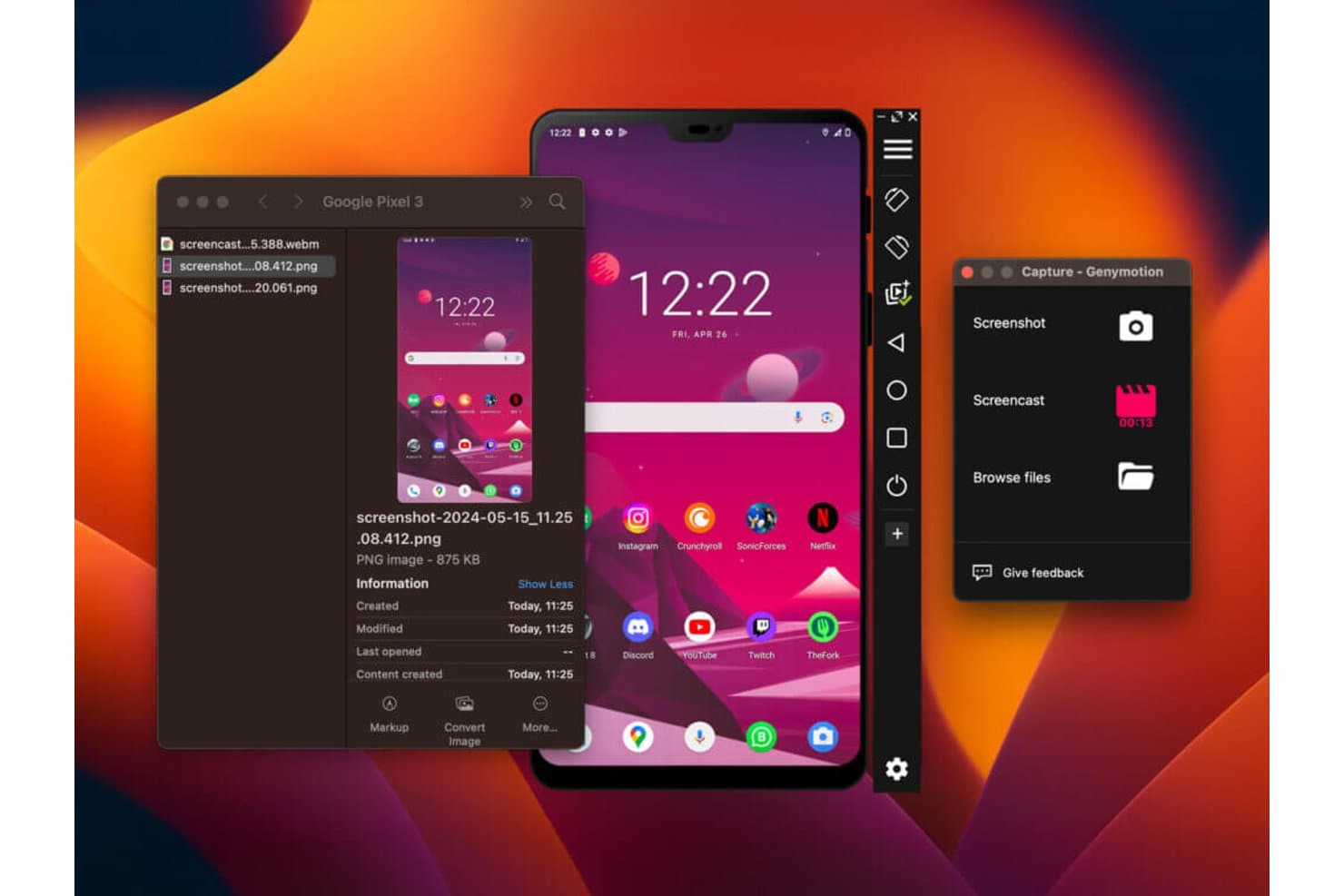
Genymotion lets users capture screenshots and screencasts of emulated Android devices on Mac. Genymotion is an Android emulator for Mac that supports local desktop, cloud-hosted (SaaS), and on-premises deployment, with multi-instance emulation, customizable device profiles, and deep CI/CD pipeline integration across Jenkins, Bitrise, CircleCI, and GitHub Actions.
Who Is Genymotion Best For?
Genymotion is a strong fit for mobile QA and DevOps teams that need to run large-scale, automated Android test suites across cloud-hosted device fleets.
Why I Picked Genymotion
I've included Genymotion in my top picks because it's the only Android emulator on this list that scales from a single local instance to a fleet of cloud-hosted virtual devices across AWS, GCP, and Azure. I like that the
gmsaasCLI lets you spin up, connect, and tear down devices programmatically inside Jenkins or GitHub Actions pipelines without any manual setup. PeerSpot users report running 100 to 200+ parallel instances, cutting test cycle times dramatically.Genymotion Key Features
- Custom device profiles: Configure screen resolution, DPI, CPU cores, RAM, and system fingerprint to replicate specific Android device models.
- Sensor simulation widgets: Simulate GPS routes via KML files, camera/media injection, battery state, biometrics, and network conditions from 2G through 5G.
- Android Studio plugin: Create, start, and deploy apps to Genymotion virtual devices directly from Android Studio via the official JetBrains Marketplace plugin.
- Multi-instance emulation: Run multiple Android virtual device instances simultaneously, with clone functionality available via the
gmtool admin clonecommand.
Genymotion Integrations
Genymotion has documented integrations with Android Studio, Jenkins, Bitrise, CircleCI, and GitHub Actions, plus Espresso, Appium, and Detox support. Its
gmsaasCLI and REST API support custom CI/CD automation across SaaS devices.Pros and Cons
Pros:
- Broad hardware and sensor simulation options
- Multi-instance emulation and quick device cloning
- Scales to large cloud device fleets
Cons:
- Motion sensor simulation unavailable in cloud mode
- No Google Play Services pre-installed
Learn more about Genymotion: Best for Apple Silicon Android gaming on Mac
- Free plan available
- Free plan available
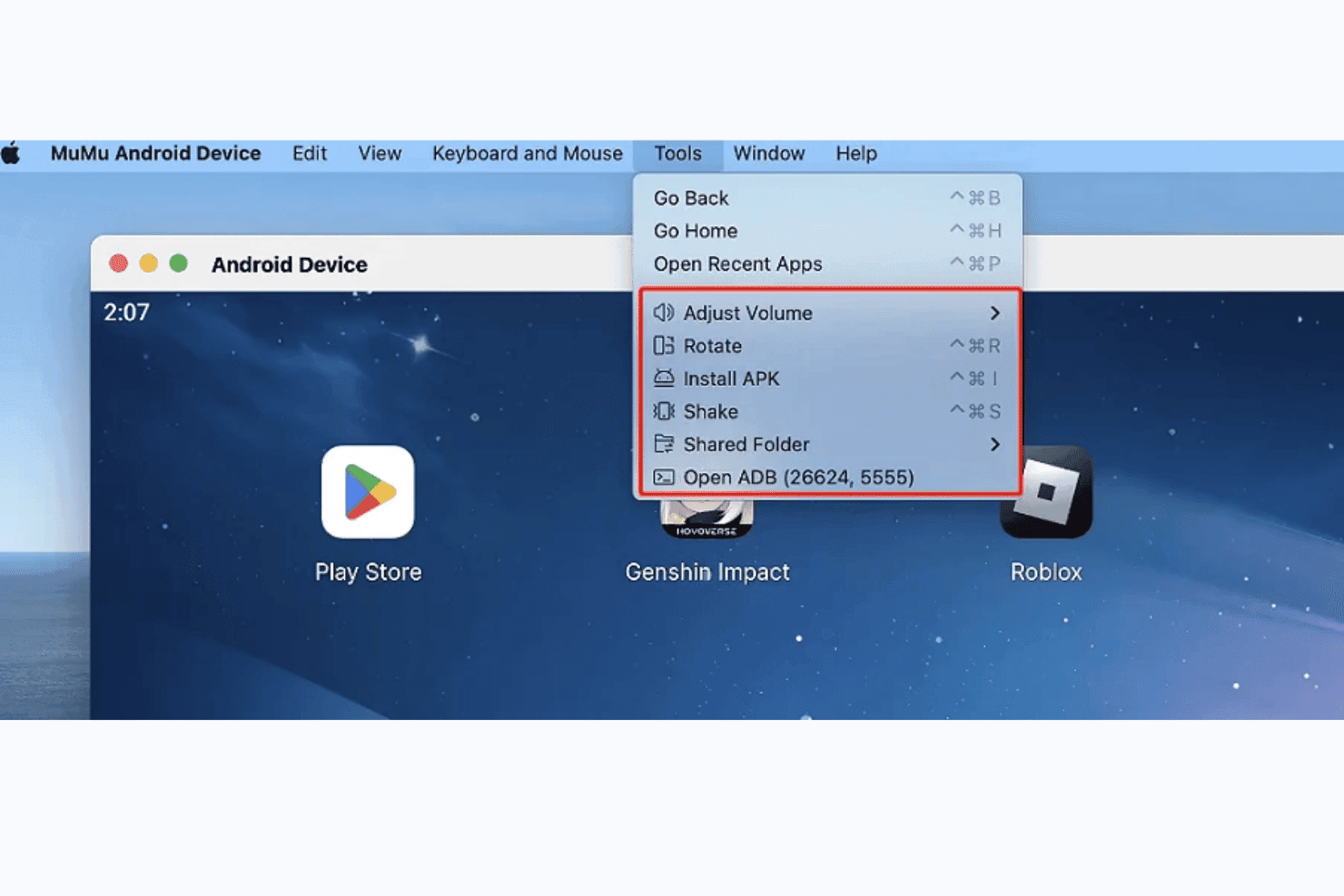
MuMuPlayer lets users access ADB, install APKs, and manage device tools on Mac. MuMuPlayer Pro is a native Apple Silicon Android emulator for Mac that runs Android 12, supports multi-instance device management, and includes ADB connectivity, a proprietary CLI, and customizable device profiles for gaming and app testing.
Who Is MuMuPlayer Best For?
MuMuPlayer Pro is a strong pick for Mac gamers and indie developers on Apple Silicon who want to run Android titles or test apps without a Windows machine.
Why I Picked MuMuPlayer
MuMuPlayer Pro earns its spot on my shortlist because it's one of the only Android emulators built natively for Apple Silicon, running as a true ARM64 app with no Rosetta overhead. I've run Genshin Impact and Honkai: Star Rail on it at high FPS without the stuttering I've seen from Rosetta-dependent alternatives. The
mumutoolCLI also lets me script device creation and APK installs, which saves real time when spinning up multiple test instances across different device profiles.MuMuPlayer Key Features
- Device profile customization: Configure each virtual device's model, resolution, DPI, GPU profile, RAM, CPU cores, and notch type per instance.
mumutoolCLI: A proprietary command-line tool for scripting device creation, APK installs, settings changes, and app lifecycle management.- Multi-instance orchestration: Create, clone, and run multiple virtual Android devices simultaneously, each with independent hardware configurations.
- ADB connectivity: Each running instance exposes a unique ADB port, letting you connect any ADB-compatible tooling or the Android Studio debugger directly.
MuMuPlayer Integrations
MuMuPlayer has native integrations with Android Studio and Android Debug Bridge (ADB), with a unique ADB port for each running device. Its proprietary
mumutoolCLI supports custom device, APK, settings, and app-management scripts; no CI/CD integrations or public API are documented.Pros and Cons
Pros:
- Customizable key mapping for games
- True multi-instance with custom device profiles
- Runs natively on Apple Silicon Macs
Cons:
- Only runs Android 12 on Mac
- No support for Intel-based Macs
Learn more about MuMuPlayer:
How I Evaluate Android Emulators for Mac
I split my evaluation into baseline requirements—like Apple Silicon stability and APK management—and differentiators like CI/CD fit, snapshot handling, and multi-instance support.
Core Functionality (Table Stakes For This List)
When I'm selecting tools for my list, I rank each one on a scale from 0 (does not offer the functionality) to 5 (excels in this area) for each core functionality listed below. I then calculate the tool's total score into a percentage, using 65% as a benchmark to help assess its overall fit for the list.
- macOS Compatibility: I check whether the emulator runs natively on both Intel and Apple Silicon Macs, since M-series chips need ARM64 builds to avoid Rosetta 2 overhead.
- Android OS Emulation: The range of supported Android versions matters. I look for tools that let you install APKs and access Google Play services across multiple OS releases.
- Virtual Device Configuration: I evaluate how much control you get over device profiles, including RAM allocation, screen resolution, DPI, and CPU cores—similar to the AVD manager in Android Studio.
- Input & Peripheral Mapping: Touch-based apps need reliable keyboard and mouse mapping on a desktop. I look for custom keybinding support and gamepad compatibility for game testing.
- Performance & Hardware Acceleration: I check for Hypervisor.framework support and GPU passthrough, because software-only rendering makes even simple apps sluggish on modern hardware.
- File & APK Management: Drag-and-drop APK installs, shared folders, and ADB access are what I evaluate here. These features determine how quickly you can push builds and pull logs during a test cycle.
Once I have a list of tools that meet the criteria, I consider what sets each platform apart.
Differentiating Factors (What Sets Vendors Apart)
Here's how I compare and contrast different vendors:
Standout Features
I look for snapshot and state management first. Being able to save a fully configured device state—apps installed, accounts logged in, sensor values set—and restore it in seconds cuts hours off regression testing. Scriptable automation hooks matter just as much, because headless CLI launches and gRPC control let you drive emulators from CI pipelines without manual intervention. I also evaluate network condition simulation, since throttling bandwidth or injecting latency inside the emulator is the fastest way to catch connectivity bugs before users do.
Beyond Features
Apple Silicon performance is the first thing I check. A native ARM64 build on an M-series Mac boots faster, runs cooler, and avoids the frame drops you get with x86 translation through Rosetta 2. I also evaluate CI/CD ecosystem fit—whether a tool ships Docker images, GitHub Actions workflows, or Jenkins plugins determines how quickly your DevOps team can wire it into existing pipelines. Licensing matters too, since scaling from one developer seat to a parallel test fleet can shift costs dramatically between open-source and commercial options.
Cum să alegeți un emulator Android pentru Mac
Este ușor să vă pierdeți în liste lungi de funcții și structuri complexe de prețuri. Pentru a vă ajuta să rămâneți concentrați pe parcursul procesului personal de selectare a software-ului, iată o listă de factori de care trebuie să țineți cont:
| Factor | Aspecte de luat în considerare |
| Scalabilitate | Asigurați-vă că emulatorul poate face față dezvoltării proiectelor dvs. fără degradarea performanței. Căutați soluții care pot accepta fără efort utilizatori suplimentari sau aplicații mai complexe. |
| Integrări | Verificați dacă emulatorul acceptă integrarea cu instrumentele de dezvoltare existente, precum Android Studio sau IntelliJ IDEA, pentru a vă eficientiza fluxul de lucru. |
| Posibilități de personalizare | Echipa dvs. poate avea nevoie să ajusteze setările emulatorului pentru scenarii de testare specifice. Alegeți un emulator care permite configurarea setărilor pentru a se potrivi proiectelor dvs. |
| Ușurință în utilizare | Optați pentru un emulator cu o interfață intuitivă, care nu necesită instruire extinsă. Astfel, echipa se poate concentra pe dezvoltare, nu pe depanare. |
| Buget | Comparați modelele de preț și asigurați-vă că emulatorul se încadrează în bugetul echipei dvs. Căutați un echilibru între cost și funcțiile oferite pentru a evita cheltuielile excesive. |
| Măsuri de securitate | Evaluați măsurile de securitate existente, precum criptarea datelor și protocoalele de conectare securizată, pentru a vă proteja mediul de dezvoltare și datele sensibile. |
Tendințe în domeniul emulatoarelor Android
În cadrul cercetării mele, am analizat nenumărate actualizări de produse, comunicate de presă și jurnale de lansări de la diferiți furnizori de emulatoare iOS și emulatoare Android. Iată câteva dintre tendințele emergente pe care le urmăresc:
- Compatibilitate multiplatformă: Tot mai multe emulatoare se concentrează pe oferirea compatibilității nu doar cu Mac, ci și cu alte sisteme de operare. Astfel, dezvoltatorilor și utilizatorilor le este mai ușor să treacă de la un mediu la altul fără să piardă funcționalități. De exemplu, Genymotion oferă asistență pentru mai multe platforme.
- Optimizarea performanței: Emulatoarele sunt orientate tot mai mult către îmbunătățirea vitezei și reducerea întârzierilor. Furnizori precum BlueStacks își perfecționează în permanență arhitectura pentru a asigura experiențe de utilizare mai fluide, în special pentru aplicațiile care consumă multe resurse, cum ar fi jocurile.
- Compatibilitate grafică avansată: Redarea grafică îmbunătățită a devenit un punct central, mai ales pentru aplicațiile de jocuri. Emulatoare precum LDPlayer integrează motoare grafice avansate pentru a accepta imagini de înaltă definiție și animații complexe.
- Integrarea cu instrumentele de dezvoltare: Compatibilitatea sporită cu mediile de dezvoltare, precum Android Studio, devine tot mai frecventă. Astfel, dezvoltatorii pot testa și implementa aplicațiile mai eficient, fără a avea nevoie de configurări separate.
- Personalizarea interfeței utilizatorului: Se observă o tendință tot mai accentuată de a le permite utilizatorilor să personalizeze interfața emulatorului pentru a se potrivi mai bine preferințelor și fluxurilor lor de lucru. Furnizorii oferă setări mai flexibile pentru interfață, precum ferestre redimensionabile și comenzi personalizabile.
Ce este un emulator Android pentru Mac?
Un emulator Android pentru Mac este un instrument care le permite utilizatorilor să ruleze aplicații Android pe dispozitive macOS. Dezvoltatorii, jucătorii și testerii folosesc de obicei aceste instrumente pentru a accesa aplicații Android, a testa performanța aplicațiilor sau a juca jocuri mobile pe un ecran mai mare. Comenzile personalizate, suportul pentru instanțe multiple și compatibilitatea cu diverse versiuni de Android îi ajută pe utilizatori să testeze, să se joace și să lucreze mai eficient. În general, aceste instrumente oferă o modalitate convenabilă de a aduce funcționalitatea Android pe macOS.
Caracteristicile emulatoarelor Android pentru Mac
Atunci când alegi un emulator Android pentru Mac, urmărește următoarele caracteristici esențiale:
- Instalare prin glisare și fixare: Această caracteristică le permite utilizatorilor să instaleze cu ușurință aplicații glisând fișierele APK direct în emulator, simplificând procesul de instalare.
- Posibilități de înregistrare a ecranului: Emulatoarele cu această caracteristică le permit utilizatorilor să își înregistreze activitatea de pe ecran, ceea ce este util pentru crearea de tutoriale sau capturarea sesiunilor de joc.
- Simularea configurației hardware: Această caracteristică le permite emulatoarelor să imite diferite configurații hardware, cum ar fi dimensiuni și rezoluții variate ale ecranului, ajutându-i pe dezvoltatori să testeze capacitatea de adaptare a aplicațiilor.
- Suport pentru instanțe multiple: Acesta le permite utilizatorilor să ruleze simultan mai multe instanțe ale emulatorului, ceea ce este util pentru testarea aplicațiilor în condiții diferite sau pentru efectuarea mai multor activități simultan.
- Comenzi personalizabile: Utilizatorii pot asocia comenzile de la tastatură și mouse pentru a emula comenzile tactile, îmbunătățind experiența de joc sau de testare a aplicațiilor.
- Setări de performanță: Emulatoarele oferă adesea opțiuni pentru ajustarea utilizării procesorului și memoriei, permițând utilizatorilor să optimizeze performanța în funcție de capacitățile sistemului lor.
- Compatibilitate cu instrumentele de dezvoltare: Integrarea perfectă cu mediile de dezvoltare Android, precum Android Studio, îi ajută pe dezvoltatori să testeze și să depaneze aplicațiile eficient.
- Suport pentru mai multe platforme: Unele emulatoare oferă posibilitatea de a rula pe diferite sisteme de operare, ceea ce le face versatile pentru utilizatorii care lucrează pe diverse platforme.
- Sincronizare bazată pe cloud: Această caracteristică le permite utilizatorilor să își sincronizeze setările și datele emulatorului între dispozitive, asigurând continuitate și confort.
- Configurare avansată a rețelei: Permite emulatorului să simuleze diferite condiții de rețea, ajutându-i pe dezvoltatori să testeze comportamentul aplicațiilor în scenarii de conectivitate variate.
Beneficiile emulatoarelor Android pentru Mac
Implementarea emulatoarelor Android pentru Mac oferă mai multe beneficii pentru echipa și afacerea ta. Iată câteva dintre acestea:
- Compatibilitate între platforme: Îți permite să rulezi aplicații Android pe dispozitive macOS pentru o accesibilitate mai bună.
- Comenzi personalizate: Îți oferă posibilitatea de a asocia setările tastaturii și mouse-ului pentru a îmbunătăți experiența de joc sau utilizarea aplicațiilor.
- Capacitate de rulare a mai multor instanțe: Îți permite să rulezi simultan mai multe aplicații sau jocuri pentru testare sau efectuarea mai multor activități.
- Flexibilitate în testarea aplicațiilor: Îi ajută pe dezvoltatori și testeri să simuleze diverse dispozitive Android și versiuni ale sistemului de operare.
- Performanță îmbunătățită a aplicațiilor: Oferă opțiuni pentru ajustarea procesorului, memoriei RAM și rezoluției, pentru a optimiza modul în care rulează aplicațiile.
- Confort pentru jocuri: Aduce jocurile mobile pe un ecran mai mare, cu comenzi mai bune și imagini mai fluide.
- Testare eficientă din punct de vedere al costurilor: Reduce necesitatea dispozitivelor Android fizice prin furnizarea unor medii virtuale.
Costurile și prețurile emulatoarelor Android pentru Mac
Alegerea unui emulator Android pentru Mac necesită înțelegerea diferitelor modele de preț și planuri disponibile. Costurile variază în funcție de caracteristici, dimensiunea echipei, suplimente și alți factori. Tabelul de mai jos rezumă planurile comune, prețurile medii ale acestora și caracteristicile incluse de obicei în soluțiile de emulare Android pentru Mac:
Tabel comparativ al planurilor pentru emulatoarele Android
| Tipul planului | Preț mediu | Caracteristici comune |
| Plan gratuit | $0 | Emulare de bază, asistență limitată și performanță restricționată. |
| Plan personal | $5-$20 /utilizator /lună | Emulare standard, asistență moderată, personalizare limitată și acces la comunitate. |
| Plan pentru companii | $25-$50 /utilizator /lună | Performanță îmbunătățită, asistență prioritară, capacitate de rulare a mai multor instanțe și integrări avansate. |
| Plan pentru întreprinderi | $60-$100 /utilizator /lună | Personalizare completă, asistență dedicată, securitate de nivel pentru întreprinderi și analize cuprinzătoare. |
Întrebări frecvente despre emulatorul Android pentru Mac
Iată câteva răspunsuri la întrebările frecvente despre emulatoarele Android pentru Mac:
Cum poți rula un emulator Android pe un Mac?
Pentru a rula un emulator Android pe Mac, poți folosi software precum Android Studio, care include instrumentul de emulare. Începe prin a descărca și instala Android Studio, apoi creează un dispozitiv virtual Android (AVD) prin intermediul managerului AVD. Pornește emulatorul pentru a simula diferite dispozitive Android fără a avea nevoie de hardware fizic.
Este posibil să folosești un emulator Android pe un Mac cu cip M1?
Da, poți folosi un emulator Android pe un Mac cu cip M1. Unele emulatoare, precum Genymotion și cele mai recente versiuni ale emulatorului din Android Studio, sunt optimizate pentru siliciul M1 de la Apple, oferind îmbunătățiri în ceea ce privește compatibilitatea și performanța. Asigură-te că descarci versiunea corectă, compatibilă cu Apple Silicon.
Care sunt pașii pentru a îmbunătăți performanța unui emulator Android pe Mac?
Pentru a îmbunătăți performanța unui emulator Android pe Mac, poți aloca mai multă memorie RAM și mai multe resurse CPU în setările AVD. Activarea accelerării hardware, precum Intel HAXM, poate îmbunătăți, de asemenea, performanța. Ia în considerare rularea emulatorului într-o fereastră mai mică pentru a reduce sarcina asupra sistemului.
Poți testa aplicații Android pe un Mac fără să folosești Android Studio?
Da, poți testa aplicații Android pe un Mac fără să folosești Android Studio utilizând opțiuni de emulatoare independente, precum Genymotion sau BlueStacks. Aceste emulatoare îți permit să rulezi și să testezi aplicații Android în mod independent, deși pot necesita configurări suplimentare pentru a imita setările unor dispozitive specifice.
Cum remediezi problemele frecvente ale emulatoarelor Android pe Mac?
Pentru a remedia problemele emulatorului Android pe Mac, verifică compatibilitatea sistemului cu cerințele emulatorului. Asigură-te că virtualizarea este activată în setările BIOS ale Mac-ului. Actualizarea emulatorului și a instrumentelor SDK poate rezolva erorile, iar consultarea forumurilor online poate oferi soluții pentru problemele specifice cu care te confrunți.