

Cele mai bune platforme AI fără cod ajută echipele să creeze, să testeze și să implementeze aplicații bazate pe inteligență artificială fără a scrie cod personalizat. Aceste instrumente le permit utilizatorilor să transforme datele în modele și fluxuri de lucru mai rapid, reducând dependența de resurse de inginerie specializate.
Echipele apelează adesea la platforme AI fără cod atunci când dezvoltarea manuală a modelelor încetinește proiectele, capacitatea limitată în domeniul științei datelor creează blocaje sau configurările incorecte duc la rezultate nesigure. Probleme precum gestionarea inconsistentă a datelor, comportamentul neclar al modelelor și iterațiile lente îngreunează colaborarea dintre echipele de business, de date și IT.
Cu peste 20 de ani de experiență în industrie în calitate de director de tehnologie, am testat și analizat zeci de platforme AI fără cod în medii reale, pentru a le evalua acuratețea, integrările și ușurința în utilizare. Acest ghid evidențiază cele mai bune platforme AI fără cod, care accelerează dezvoltarea, îmbunătățesc colaborarea și ajută echipele să implementeze soluții AI mai fiabil. Fiecare recenzie prezintă funcțiile, avantajele și dezavantajele, precum și cazurile de utilizare potrivite, pentru a vă ajuta să alegeți instrumentul adecvat.
Why Trust Our Software Recommendations
6,700+
Reviews
20
Industry experts
16+
Evaluation factors
14
Years
Our team has been testing and reviewing software since 2012. As tech leaders ourselves, we know how difficult—and important—it is to choose the right software.
For this guide, we evaluated tools using hands-on testing and independent research, scoring tools using our selection criteria.
Our reviews reflect our human editorial judgment, not a sales pitch.
Expert reviewers:
- Paulo Gardini MiguelTech Director
 Tim FisherVP of AI
 Gabriel RosasTech Lead & Software Architect
 Christhian GruhnTech Lead & Platform Architect

Tabel comparativ al platformelor AI fără cod
Acest tabel comparativ rezumă detaliile privind prețurile pentru selecțiile mele de top de platforme AI fără cod:
Score legend (out of 5)
- Excellent4.5–5
- Good4–4.4
- Average3–3.9
- Below average2–2.9
- Poor1–1.9
Sorted by: Default
| Tool | Starting Price | Website | |||||||
|---|---|---|---|---|---|---|---|---|---|
Best for no-code chatbot deployment | 2.0 out of 5 | 1 | 2 | 3 | 1 | 3 | 2 | $32/month 7-day free trial + demo available | Website |
Best for enterprise agentic AI app delivery | 4.3 out of 5 | 5 | 4 | 5 | 2 | 5 | 5 | Pricing upon request Free plan + free demo available | Website |
Best for no-code apps in the Zoho ecosystem | 4.3 out of 5 | 5 | 4 | 5 | 3 | 4 | 5 | $8/user/month Free plan + free demo + 15-day trial available | Website |
Best for AI-governed citizen app dev at scale | 4.5 out of 5 | 5 | 4 | 5 | 3 | 5 | 5 | Pricing upon request Free demo available | Website |
Best for predictive analytics | 4.3 out of 5 | 4 | 5 | 5 | 5 | 4 | 3 | Pricing upon request Free demo available | Website |
Best for AI agents in regulated enterprise workflows | 4.7 out of 5 | 5 | 5 | 5 | 3 | 5 | 5 | Pricing upon request Free plan + demo available | Website |
Best for embedding ML models in the app runtime | 4.7 out of 5 | 5 | 5 | 5 | 3 | 5 | 5 | $1,090/month Free plan + free demo available | Website |


Recenzii ale celor mai bune platforme AI fără cod
Mai jos sunt rezumatele mele detaliate ale celor mai bune platforme AI fără cod care au ajuns pe lista mea scurtă. Recenziile mele oferă o privire detaliată asupra funcțiilor principale, avantajelor și dezavantajelor, integrărilor și cazurilor de utilizare ideale ale fiecărui instrument, pentru a vă ajuta să îl găsiți pe cel mai potrivit pentru dumneavoastră.
 Best for no-code chatbot deployment
- 7-day free trial + demo available
- From $32/month (billed annually)
Visit WebsiteCustomer Rating:4.4/5
Chatbase allows you to test your bot's responses and refine custom system instructions in real-time. Chatbase is a no-code AI platform that lets businesses and support teams create custom AI chatbots for websites, apps, and internal tools, helping automate customer interactions and streamline information delivery without needing to write code.
Who Is Chatbase Best For?
Chatbase suits IT teams and business operations leaders at midsize to large organizations who want to deploy AI chatbots without coding.
Why I Picked Chatbase
I picked Chatbase because it offers one of the fastest paths from raw data to a functional AI agent. It doesn't require complex logic mapping and is able to crawl a website or ingest a document to immediately generate a bot that understands the nuances of your specific business. Additionally, its focus on accessibility allows teams to establish a specialized support assistant by leveraging existing knowledge bases rather than building workflows from scratch.
Chatbase Key Features
- AI actions: Connect your chatbot to external APIs to perform tasks like checking order statuses or booking appointments directly within the chat.
- Multilingual support: Deploy chatbots that can understand and respond in multiple languages.
- Custom data source ingestion: Upload documents or connect data sources to train chatbots on your own content.
- Conversation analytics: Track user interactions and chatbot performance with built-in analytics dashboards.
Chatbase Integrations
Chatbase offers native integrations with Slack, WhatsApp, Zendesk, Stripe, and Zapier. An API is available for custom integrations.
Pros and Cons
Pros:
- SOC 2 Type II certified
- Offers user feedback collection after chats
- Visual flow builder for conversation design
Cons:
- Free plan has low monthly message limits
- No built-in live chat handoff feature
Learn more about Chatbase: Best for enterprise agentic AI app delivery
- Free plan + free demo available
- Pricing upon request
Visit WebsiteCustomer Rating:4.6/5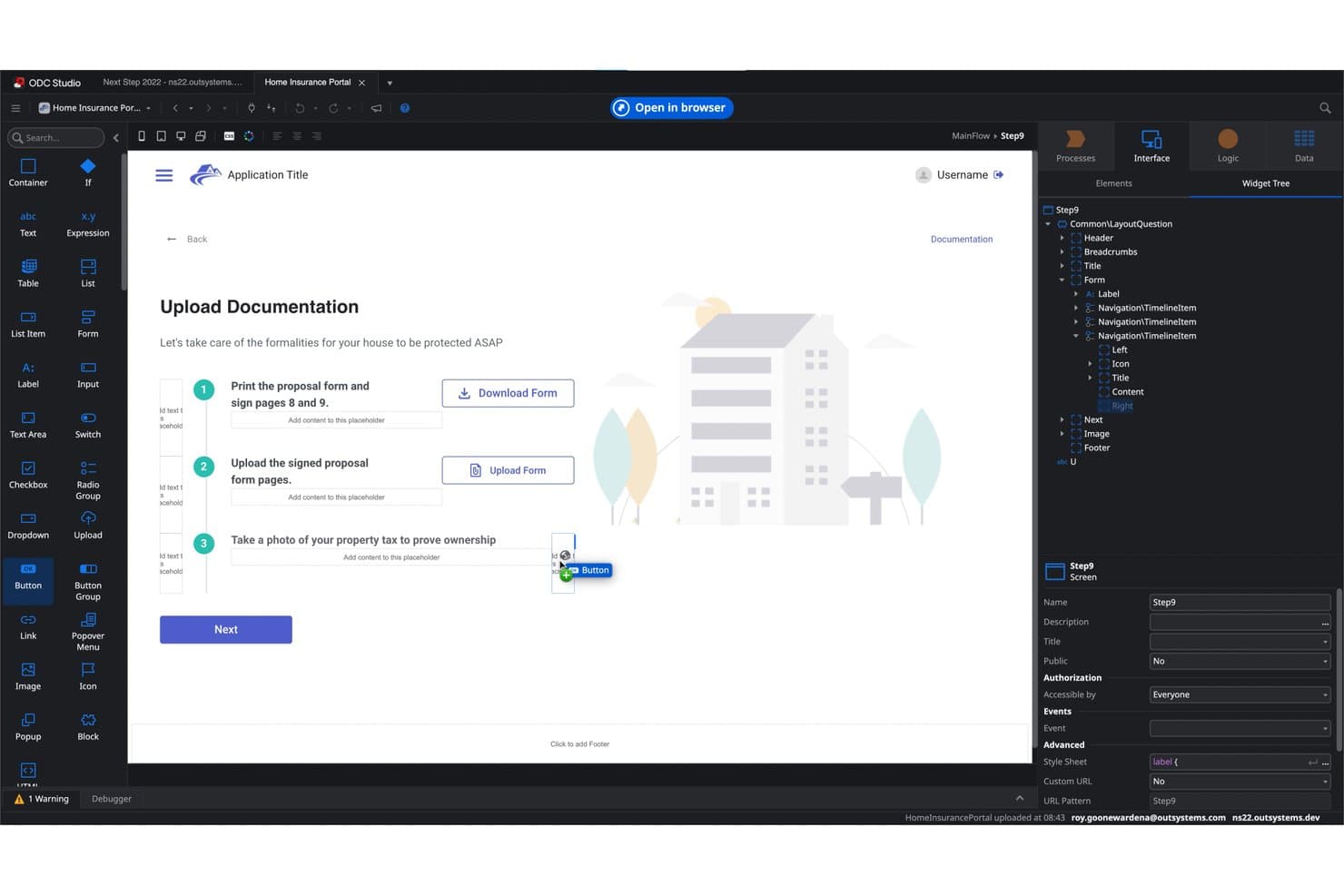
OutSystems lets users build document upload flows visually. OutSystems is a low-code AI platform that lets enterprise teams build, deploy, and govern full-stack web and mobile applications using a visual builder, generative AI app generation, and multi-agent workflow orchestration.
Who Is OutSystems Best For?
OutSystems is a strong fit for enterprise IT and development teams that need to ship AI-powered applications at scale, with the governance and compliance controls regulated industries demand.
Why I Picked OutSystems
OutSystems earns its spot on my shortlist because of how far its agentic AI story goes beyond typical low-code builders. Mentor generates roughly 80% of an MVP from a natural language prompt, and Agent Workbench lets you orchestrate multi-agent workflows with human-in-the-loop controls across dev, QA, and production environments. I find that combination especially compelling for enterprise IT teams shipping AI-powered apps under strict governance requirements.
OutSystems Key Features
- Enterprise Context Graph: A live architectural map that tracks all apps, data, dependencies, and governance policies across your organization to prevent structural drift as teams scale.
- 400+ pre-built connectors: Native integrations with SAP, Salesforce, ServiceNow, Oracle, and more, plus REST/SOAP API support for connecting to custom or legacy systems.
- Multi-environment deployment pipeline: Separate Dev, QA, and production runtimes with one-click promotion between environments, version control, and automated rollback.
- AI agent observability dashboard: Real-time monitoring of agent execution, token usage, workflow outcomes, and performance metrics across deployed AI agents.
OutSystems Integrations
OutSystems offers 400+ pre-built connectors, including SAP, Salesforce, ServiceNow, Oracle, Microsoft Dynamics, and NetSuite. It also supports REST and SOAP APIs, Integration Builder, database connections, and Marketplace integrations for custom connectivity.
Pros and Cons
Pros:
- Full-stack web and mobile app visual builder
- Mentor generates ~80% of MVP apps automatically
- Agent Workbench orchestrates multi-agent AI workflows
Cons:
- Not designed for non-technical business users
- No native AutoML or model training tools
Learn more about OutSystems: Best for no-code apps in the Zoho ecosystem
- Free plan + free demo + 15-day trial available
- From $8/user/month (billed annually)
Visit WebsiteCustomer Rating:4.3/5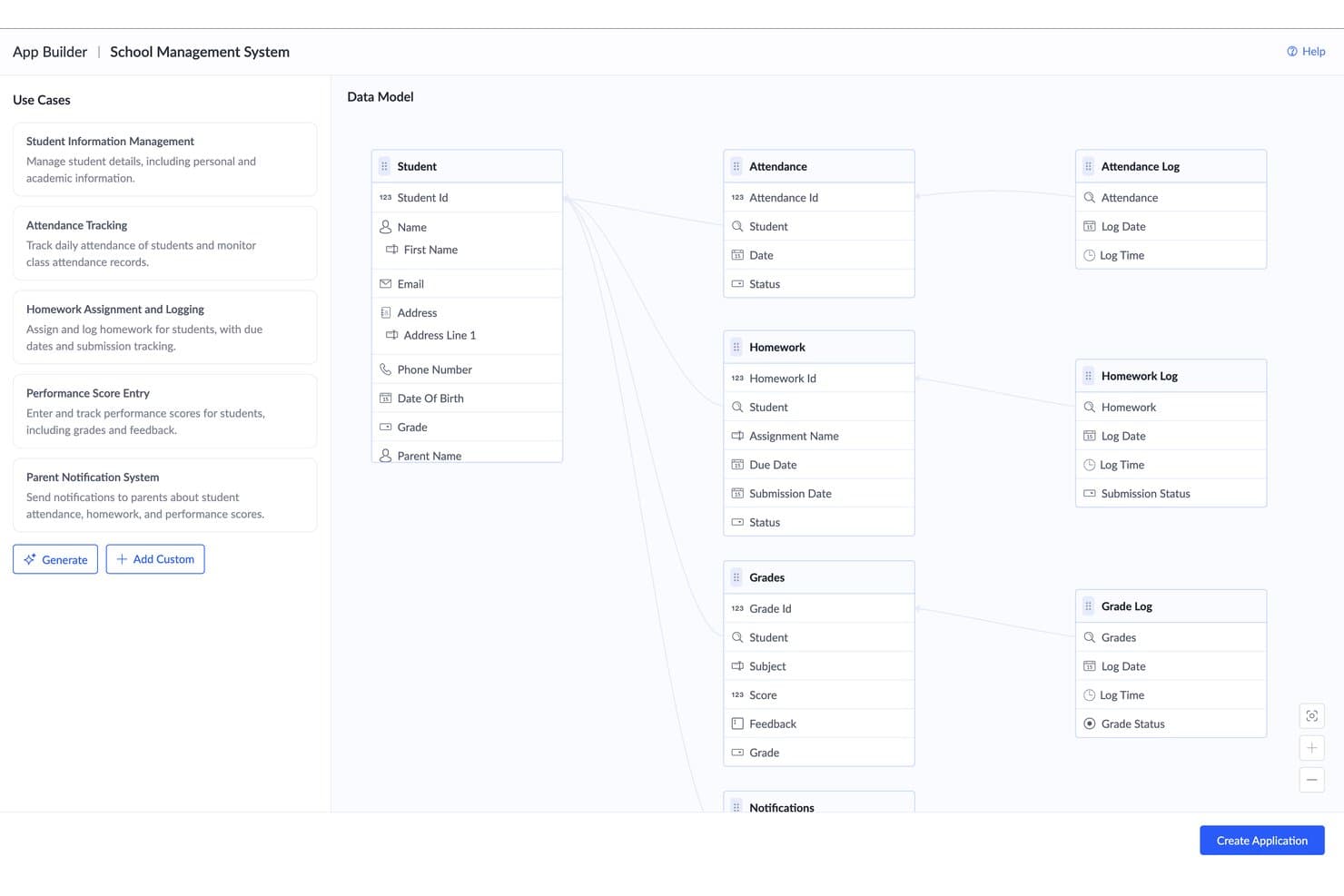
Zoho Creator auto-generates a relational data model from use cases. Zoho Creator is a no-code application development platform that lets you build web and mobile apps using a visual drag-and-drop builder, AI-powered app generation via natural language prompts, no-code ML model training, AI agents, and automated workflow design.
Who Is Zoho Creator Best For?
Zoho Creator is a strong fit for IT teams and business analysts already working within the Zoho ecosystem who need to build and deploy custom apps without relying on dedicated engineering resources.
Why I Picked Zoho Creator
Zoho Creator earns its spot on my shortlist because it's the strongest no-code AI platform for teams already running on Zoho's ecosystem. I particularly like its AI Modeler, which lets you train and deploy custom ML models (think OCR for document processing or sentiment analysis on support tickets) directly as app logic fields, no data science background required. CoCreator's ability to generate full apps from a natural language prompt or a process diagram image means you can go from a workflow sketch to a deployed web and mobile app in one session.
Zoho Creator Key Features
- Blueprints process designer: A visual BPM-style tool for mapping out process stages, transitions, and approval flows directly within your apps.
- Multi-channel auto-deployment: Apps built in Creator automatically generate native iOS and Android versions alongside the web app from a single build.
- Hybrid and on-premise deployment: Creator supports cloud, on-premise, and hybrid hosting options for teams with strict data residency or compliance requirements.
- Role-based portals: Custom-branded portals for external users, such as customers or vendors, with configurable permission sets and access controls.
Zoho Creator Integrations
Zoho Creator offers native integrations across the Zoho ecosystem, including Zoho CRM, Books, Desk, Analytics, WorkDrive, Flow, and RPA. It also connects with Google Drive, Dropbox, Box, OneDrive, Salesforce, and Slack, with REST APIs and custom connectors for additional systems.
Pros and Cons
Pros:
- Supports hybrid and on-premise deployment options
- Offers no-code AI model builder and deployment
- Generates full-featured apps from text prompts
Cons:
- Limited explainability and AI model governance
- Advanced features require Deluge scripting language
Learn more about Zoho Creator: Best for AI-governed citizen app dev at scale
- Free demo available
- Pricing upon request
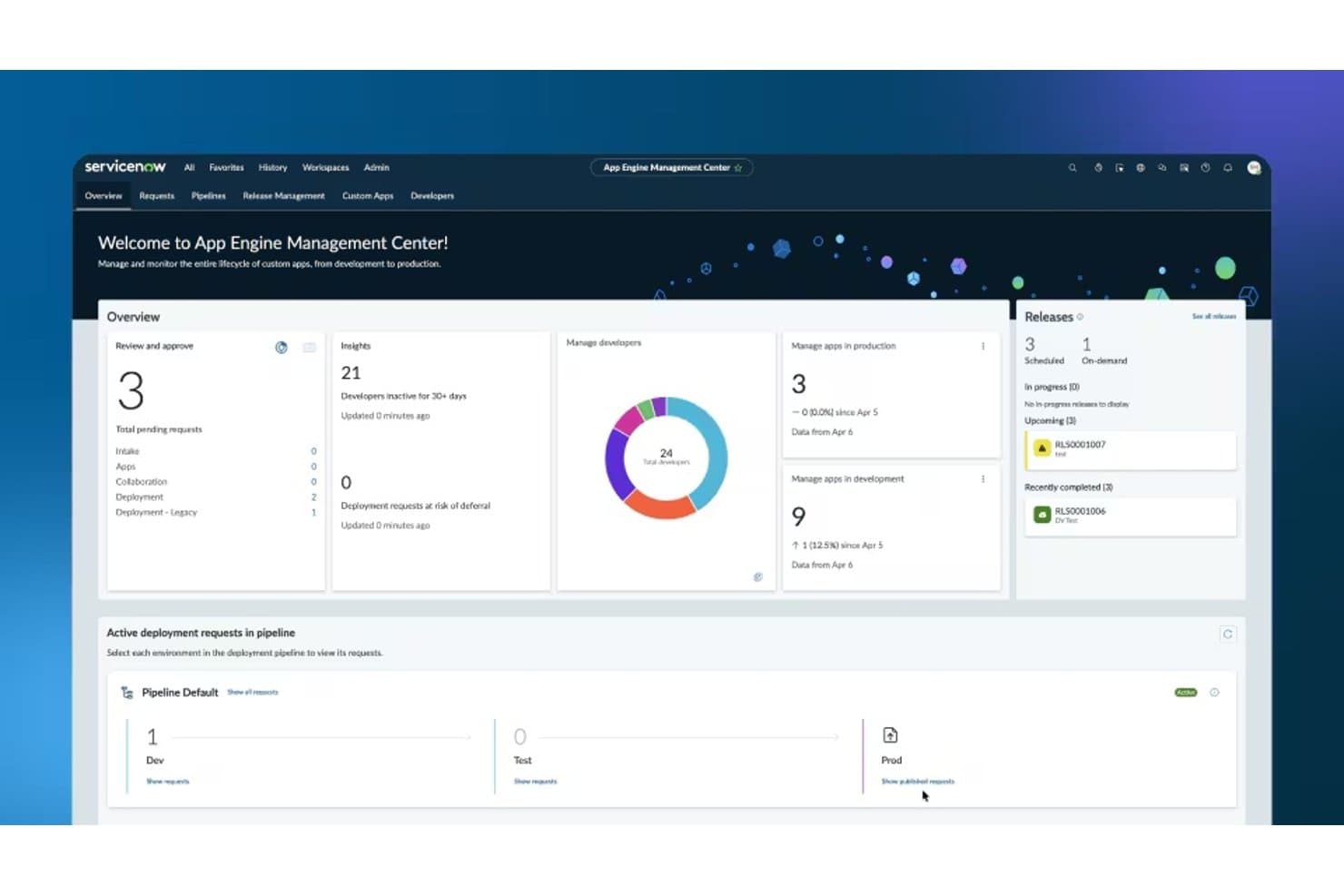
ServiceNow App Engine's dashboard for managing app development, deployments, releases, and developer activity. ServiceNow App Engine is a no-code and low-code application development platform built on the Now Platform that lets citizen developers and professional developers alike build, automate, and deploy AI-powered business apps—governed by enterprise-grade IT controls.
Who Is ServiceNow App Engine Best For?
ServiceNow App Engine is built for enterprises with existing ServiceNow investments that want to scale citizen development across business units without losing IT control.
Why I Picked ServiceNow App Engine
ServiceNow App Engine earns its spot on my shortlist because no other platform I've tested pairs AI-governed citizen development with this level of enterprise-grade IT control. The App Engine Management Center (AEMC) lets business users build apps in App Engine Studio while IT keeps a firm grip on deployment pipelines, approval workflows, and access controls. On top of that, the Build Agent generates complete, production-ready apps from plain-language prompts—with AI agents already embedded.
ServiceNow App Engine Key Features
- Flow Designer: A no-code process automation tool with drag-and-drop logic, branching, triggers, and multi-step approvals—no scripting required for most business workflows.
- Virtual Agent: An AI-powered chatbot builder with a built-in NLU Workbench for defining natural language intents and entities across web, mobile, and portal channels.
- Predictive Intelligence: Template-based ML for classification, similarity, and clustering tasks like ticket routing, major incident detection, and smart recommendations.
- Integration Hub: A library of pre-built connectors (spokes) for 100+ enterprise apps, plus REST, SOAP, and JDBC support for custom integrations.
ServiceNow App Engine Integrations
Integration Hub provides 100+ pre-built spokes, including Jira, GitHub, Slack, Microsoft 365, Salesforce, SAP, Workday, AWS, Azure, and Google Cloud Platform. It also supports REST, SOAP, and JDBC connections for custom integrations.
Pros and Cons
Pros:
- Deep workflow automation for enterprise processes
- Full-stack AI agents embedded by default
- AI-governed app development with IT oversight
Cons:
- Pricing transparency is consistently lacking
- Advanced AI features require extra licensing
Learn more about ServiceNow App Engine:

DataRobot automates model building to support fast, data-driven decisions. DataRobot is a machine learning platform that caters to data scientists and business analysts who need to build predictive models efficiently. It automates the end-to-end process of model building and deployment, helping businesses make data-driven decisions.
Why I picked DataRobot: DataRobot is tailored for predictive analytics with its automated machine learning capabilities, allowing you to quickly develop accurate models. It supports a variety of algorithms, enabling you to choose the best fit for your data.
The platform's scalability ensures that as your data grows, your predictive models remain effective. With DataRobot, you can focus on interpreting results rather than spending time on manual coding.
Standout features & integrations:
Features include automated feature engineering, which simplifies the preparation of data for modeling. The platform offers model insights, providing transparency into how predictions are made. DataRobot also supports time series forecasting, expanding its use cases to include temporal data analysis.
Integrations include AWS, Microsoft Azure, Google Cloud Platform, Snowflake, Databricks, Tableau, Qlik, Looker, SAP, and Salesforce.
Pros and Cons
Pros:
- Supports time series forecasting
- Scalable for large datasets
- Offers model transparency
Cons:
- Limited customization options
- Not ideal for non-technical users
Learn more about DataRobot: Best for AI agents in regulated enterprise workflows
- Free plan + demo available
- Pricing upon request
Visit WebsiteCustomer Rating:4.4/5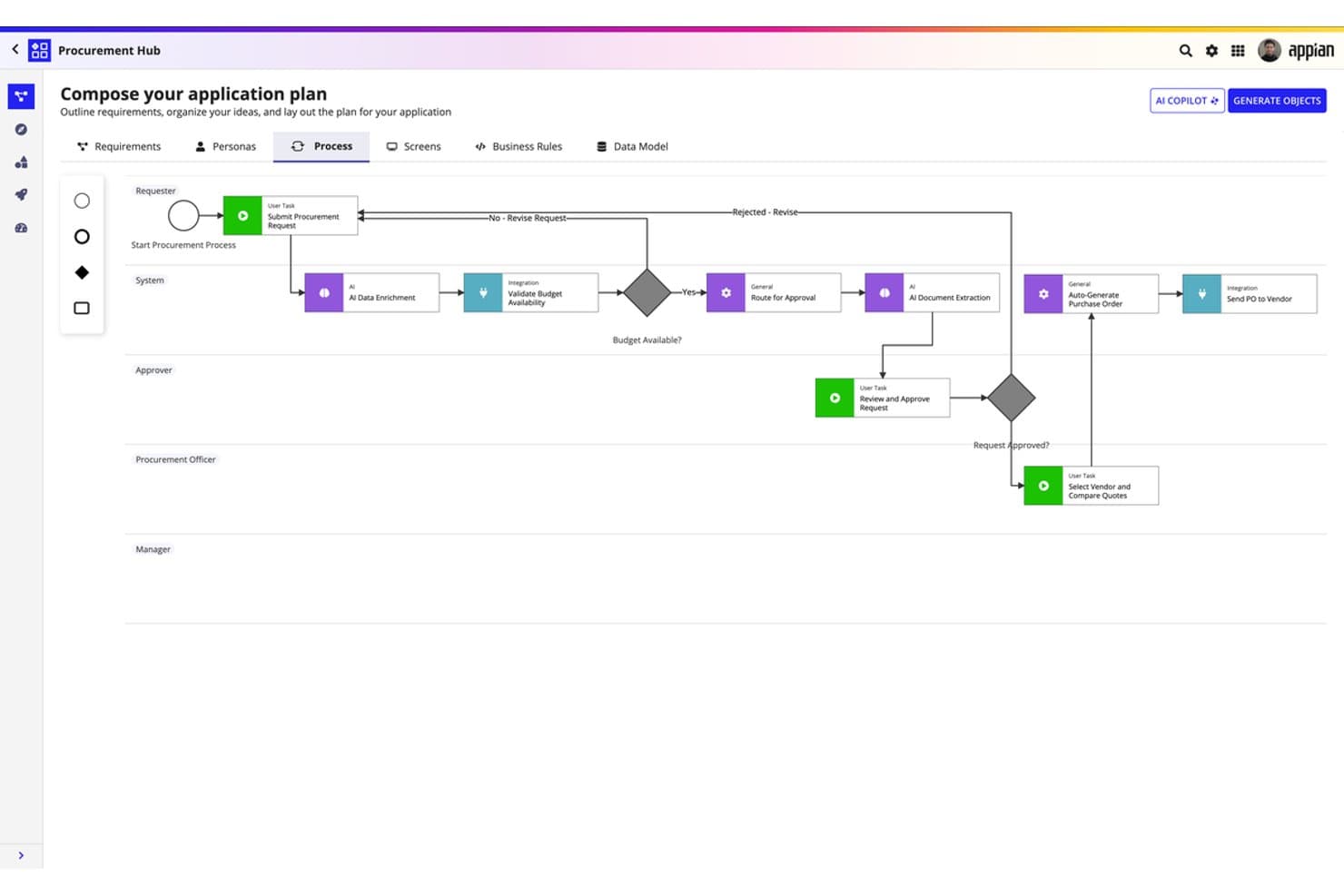
Appian lets users visually compose AI-powered procurement workflows without code. Appian is an enterprise low-code/no-code platform that combines visual app building, AI agents, intelligent document processing, and BPM-grade workflow automation across cloud and self-managed deployments.
Who Is Appian Best For?
Appian is a strong fit for enterprise IT and ops teams in regulated industries—financial services, government, healthcare, and defense—that need governed AI agents embedded in mission-critical workflows.
Why I Picked Appian
Appian earns its spot on my shortlist because of how seriously it handles AI governance inside high-stakes workflows. I'm particularly impressed by Agent Studio, which lets you define autonomous AI agent goals in plain language and embed those agents directly into BPM-grade processes with full audit trails and human escalation built in. Pair that with its Private AI architecture, where no customer data ever trains an external model, and you've got a platform purpose-built for regulated environments like federal agencies or healthcare systems.
Appian Key Features
- Data Fabric federation: Connects and queries data across cloud, on-premises, and legacy systems without requiring data migration, supporting up to 50 million rows.
- Case Management Studio: Provides prebuilt modules—dashboards, routing, and reports—that cover roughly 80% of typical case workflow needs with no coding required.
- Intelligent Document Processing: Extracts and classifies data from complex documents using generative AI, with no-code configuration and human-in-the-loop validation built in.
- Multi-environment deployment: Supports dev, test, and production environment promotion with CI/CD governance across cloud, self-managed Kubernetes, and hybrid configurations.
Appian Integrations
Appian offers 100+ prebuilt connectors, including Salesforce, SAP, Workday, Microsoft SharePoint, DocuSign, AWS, Oracle, and NetSuite. Marketplace integrations include OpenAI and Azure OpenAI, while REST, SOAP, JDBC, and the Integration SDK support custom connections.
Pros and Cons
Pros:
- Real-time process mining and intelligence tools
- Private AI with full audit trails
- Visual agent builder for regulated workflows
Cons:
- Key AI features gated behind higher tiers
- No custom ML model training interface
Learn more about Appian: Best for embedding ML models in the app runtime
- Free plan + free demo available
- From $1,090/month
Visit WebsiteCustomer Rating:4.4/5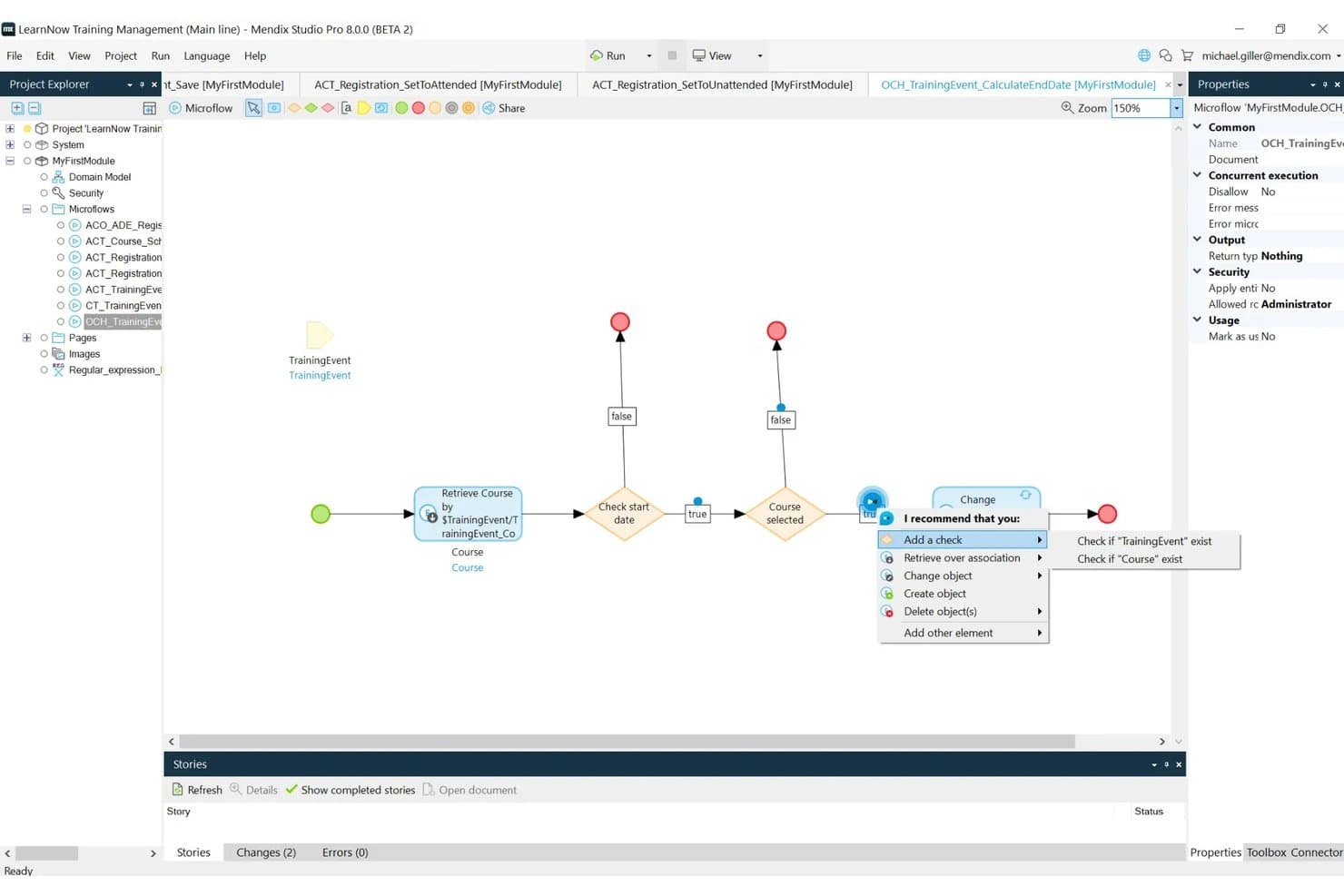
Mendix has a visual workflow editor to configure application logic with low-code components. Mendix is a low-code AI platform built on a model-driven IDE that lets you visually assemble web and mobile applications, embed custom ML models directly into the app runtime, orchestrate AI agents, and automate multi-step workflows.
Who Is Mendix Best For?
Mendix is a strong fit for enterprise IT and application development teams that need to deploy AI-infused apps in regulated, complex environments.
Why I Picked Mendix
Mendix earns its spot on my shortlist because of its ML Kit, which lets you embed custom ML models built in TensorFlow or PyTorch directly into the app runtime via ONNX, with no separate model server required. I love that this isn't just a connector to an external AI service: the model actually runs inside the application, which cuts latency and keeps sensitive data from leaving your environment. The ONNX Model Zoo also gives you pre-trained models for image classification, NLP, and speech without any training work upfront.
Mendix Key Features
- Maia workflow generator: Builds complete workflow diagrams directly from natural language prompts or uploaded images inside Studio Pro.
- AI Agent Builder: A visual starter kit for assembling autonomous, multi-step AI agents that can query knowledge bases, call external APIs, and route to human reviewers.
- Mendix Connect Catalog: A centralized metadata registry that automatically discovers, registers, and governs all APIs, data sources, and services across your organization.
- Multi-environment deployment: Deploy apps to public cloud, private cloud, on-premises, SAP BTP, or FedRAMP-authorized US government cloud from a single platform.
Mendix Integrations
Mendix provides documented connectivity for REST, SOAP, OData, GraphQL, SQL/JDBC, AsyncAPI, and WSDL, plus connectors for SAP, Salesforce, AWS services, Amazon Bedrock, and Kafka. Connect Catalog governs APIs and data sources, while Connector Kit supports custom integrations.
Pros and Cons
Pros:
- Advanced security and compliance certifications included
- Visual agent builder for complex AI workflows
- ML models run in-app for lower latency
Cons:
- Horizontal scalability requires a premium plan
- ML model training must happen externally
Learn more about Mendix:
Alte platforme AI fără cod
Iată câteva opțiuni suplimentare de platforme AI fără cod care nu au ajuns pe lista mea scurtă, dar care merită totuși analizate:
- 8Microsoft Power AppsBest for Microsoft 365-native AI app building
- 9DataikuBest for end-to-end ML governance at scale
- 10CeligoBest with 1,000+ prebuilt connectors
- 11Gemini Enterprise Agent PlatformBest for multi-agent orchestration at enterprise scale
- 12ClarifaiBest for image recognition
- 13KissflowBest for AI-governed citizen app building
- 14RetoolBest for AI agents built on live data
- 15AppSheetBest for building mobile apps
- 16GlideBest for creating simple apps quickly
- 17Appy PieBest for no code app building
- 18IBM watsonx.aiBest for AutoML and generative AI governance
- 19UnqorkBest for enterprise-level solutions
- 20Amazon SageMaker CanvasBest for quick AI model creation
How I Evaluate No-Code AI Platforms
If a platform can't take a non-coder from a business problem to a working, deployed AI model, it hasn't earned a spot on this list. I break my evaluation into two layers: core functionality every tool must deliver to qualify, and differentiating factors that separate one platform from the next.
Core Functionality (Table Stakes For This List)
When I'm selecting tools for my list, I rank each one on a scale from 0 (does not offer the functionality) to 5 (excels in this area) for each core functionality listed below. Then, I calculate the tool's total score into a percentage. Each tool needs to achieve a minimum total score of 75% to be considered for inclusion.
- Visual App Builder: I look for tools that provide drag-and-drop or visual interfaces for designing applications, workflows, and data models without requiring users to write code.
- Built-In AI/ML Capabilities: I only prioritized tools that offer native, pre-built AI functionality such as machine learning model training, generative AI, NLP, computer vision, or predictive analytics accessible without coding.
- Model Training & Deployment: I gave preference to platforms that enable users to train, test, and deploy AI/ML models directly within the platform using guided or automated workflows (e.g., AutoML).
- Data Ingestion & Integration: I evaluated how well the platforms connect to data from multiple sources (databases, APIs, files, SaaS apps) through pre-built connectors or visual configuration.
- Workflow & Process Automation: I looked for platforms with great tooling for designing automated, AI-driven workflows, decision logic, and triggers via a visual editor.
- Deployment & API Publishing: I gave preference to platforms that let you deploy finished apps, models, or automations as usable endpoints, web apps, or embedded components without custom code.
Once I have a list of tools that meet this criteria, I consider what sets each platform apart.
Differentiating Factors (What Sets Vendors Apart)
Here's how I compare and contrast different vendors:
Standout Features
Model monitoring with drift detection is a big one—I want to see automated alerts when a deployed fraud detection or demand forecasting model starts degrading, plus built-in retraining triggers. Explainability tools also matter because IT teams often need to show stakeholders why an AI model made a specific decision. I look for platforms that pair this with bias checks and audit trails. Generative AI support, like prompt engineering and RAG workflows, is increasingly valuable for teams building internal GenAI apps.
Beyond Features
Deployment flexibility is something I evaluate closely—whether a platform supports cloud, hybrid, or on-prem hosting matters when teams handle sensitive data that can't leave their infrastructure. Security and compliance go hand in hand here. I check for SOC 2, ISO 27001, and AI-specific governance frameworks, especially as regulations around AI accountability tighten globally. Scalability also plays a role; a platform that handles a proof of concept well but buckles under enterprise-grade inference loads won't serve teams long-term.
Cum să alegeți platformele AI fără cod
Este ușor să vă pierdeți în liste lungi de funcții și structuri complexe de prețuri. Pentru a vă ajuta să rămâneți concentrat pe parcursul procesului de selecție a software-ului, iată o listă de factori de care trebuie să țineți cont:
| Factor | Ce trebuie luat în considerare |
| Scalabilitate | Poate platforma să se dezvolte odată cu nevoile dumneavoastră? Verificați dacă acceptă volume tot mai mari de date și un număr tot mai mare de utilizatori fără probleme de performanță. |
| Integrări | Se conectează la instrumentele existente? Asigurați-vă că acceptă software-ul pe care îl utilizați deja, pentru a evita întreruperile fluxurilor de lucru. |
| Posibilități de personalizare | O puteți adapta proceselor dumneavoastră? Căutați opțiuni pentru modificarea fluxurilor de lucru și a interfețelor, astfel încât să răspundă nevoilor specifice ale echipei. |
| Ușurință în utilizare | Este ușor de utilizat pentru echipa dumneavoastră? Evaluați curba de învățare și dacă echipa se poate adapta rapid la utilizarea sa fără o instruire extinsă. |
| Implementare și inițiere | Cât de repede puteți începe? Luați în considerare timpul și resursele necesare pentru configurare și instruire, precum și disponibilitatea asistenței în această etapă. |
| Cost | Se încadrează în bugetul dumneavoastră? Comparați planurile tarifare și fiți atenți la taxele ascunse. Luați în considerare costurile pe termen lung și economiile potențiale rezultate din automatizare. |
| Măsuri de securitate | Sunt protejate datele dumneavoastră? Căutați criptare, controale de acces și conformitate cu reglementările privind protecția datelor, pentru a vă asigura că informațiile sunt securizate. |
| Disponibilitatea asistenței | Este disponibil ajutorul atunci când aveți nevoie de el? Verificați dacă asistența este disponibilă non-stop și accesibilă prin mai multe canale, precum chat, e-mail sau telefon. |
Ce sunt platformele AI fără cod?
Platformele AI fără cod le permit utilizatorilor să creeze și să implementeze modele AI fără a scrie cod. Aceste instrumente sunt utilizate în general de analiști de business, specialiști în marketing și alți profesioniști fără pregătire tehnică, care trebuie să folosească inteligența artificială pentru analiza datelor și luarea deciziilor.
Interfețele de tip glisare și plasare, modelele predefinite și capacitățile de integrare contribuie la accesibilitate, ușurința de utilizare și implementarea rapidă. În general, aceste instrumente le permit utilizatorilor să valorifice eficient tehnologia AI, economisind timp și resurse.
Funcțiile platformelor AI fără cod
Atunci când selectați platforme AI fără cod, urmăriți următoarele caracteristici esențiale:
- Interfață de tip glisare și fixare: Simplifică procesul de creare a modelelor AI, permițând utilizatorilor să aranjeze vizual componentele fără programare.
- Modele predefinite: Oferă șabloane gata de utilizare care îi ajută pe utilizatori să implementeze rapid soluții AI fără a începe de la zero.
- Integrarea datelor: Asigură conectarea perfectă la baze de date și instrumente existente, precum software-ul de recunoaștere a imaginilor, facilitând transferul și analiza datelor.
- Fluxuri de lucru personalizabile: Le permit utilizatorilor să adapteze procesele pentru a răspunde unor nevoi specifice ale afacerii, sporind flexibilitatea și eficiența.
- Analiză în timp real: Oferă informații imediate despre date, permițând luarea promptă a deciziilor și efectuarea ajustărilor necesare.
- Procesarea automatizată a datelor: Reduce introducerea manuală prin extragerea și organizarea automată a informațiilor, economisind timp și reducând erorile.
- Scalabilitate: Acceptă volume tot mai mari de date și un număr mai mare de utilizatori, asigurând performanțe constante pe măsură ce nevoile afacerii se extind.
- Măsuri de securitate: Protejează informațiile sensibile prin criptare și controale de acces, menținând integritatea datelor și conformitatea.
- Instrumente de colaborare: Facilitează munca în echipă, permițând mai multor utilizatori să lucreze simultan la proiecte și îmbunătățind productivitatea.
- Inițiere ușoară pentru utilizatori: Oferă resurse de instruire și asistență pentru a facilita tranziția și a-i ajuta pe utilizatori să valorifice rapid la maximum beneficiile instrumentului.
Beneficiile platformelor AI fără cod
Implementarea platformelor AI fără cod oferă mai multe beneficii pentru echipa și afacerea dumneavoastră. Iată câteva dintre cele pe care le puteți aștepta:
- Implementare mai rapidă: Implementați rapid soluții AI folosind modele predefinite și interfețe de tip glisare și fixare, reducând timpul necesar pentru lansarea pe piață.
- Costuri reduse: Economisiți cheltuielile de dezvoltare eliminând nevoia de competențe specializate de programare și de cicluri lungi de dezvoltare.
- Productivitate sporită: Automatizați sarcinile repetitive prin procesarea automatizată a datelor, eliberându-vă echipa pentru a se concentra asupra activităților mai strategice.
- Accesibilitate sporită: Le permiteți utilizatorilor fără cunoștințe tehnice să creeze și să gestioneze modele AI, extinzând participarea și inovarea în cadrul organizației.
- Luarea unor decizii mai bune: Utilizați analiza în timp real pentru a obține informații și a lua prompt decizii bine fundamentate, îmbunătățind rezultatele afacerii.
- Scalabilitate: Adaptați-vă cu ușurință la volume tot mai mari de date și la cerințele utilizatorilor, asigurându-vă că soluțiile AI rămân eficiente pe măsură ce afacerea evoluează.
- Colaborare mai bună: Folosiți instrumentele de colaborare pentru a le permite membrilor echipei să lucreze împreună la proiecte, îmbunătățind comunicarea și eficiența.
Costurile și prețurile platformelor AI fără cod
Selectarea unui software AI fără cod necesită înțelegerea diferitelor modele de preț și planuri disponibile. Costurile variază în funcție de caracteristici, dimensiunea echipei, suplimente și alți factori. Tabelul de mai jos rezumă planurile obișnuite, prețurile medii ale acestora și caracteristicile incluse în mod obișnuit în soluțiile oferite de platformele AI fără cod:
Tabel comparativ al planurilor pentru platformele AI fără cod
| Tipul planului | Preț mediu | Caracteristici comune |
| Plan gratuit | $0 | Acces limitat la caracteristici, procesare de bază a datelor și asistență din partea comunității. |
| Plan personal | $10-$30 /utilizator /lună | Acces la caracteristici standard, integrări de bază și opțiuni limitate de personalizare. |
| Plan pentru companii | $50-$100 /utilizator /lună | Caracteristici avansate, integrări premium, securitate îmbunătățită și asistență prioritară. |
| Plan pentru întreprinderi | $100+ /utilizator /lună | Acces complet la caracteristici, integrări personalizate, gestionarea dedicată a contului și asistență la nivel de întreprindere. |
Întrebări frecvente despre platformele AI fără cod
Iată câteva răspunsuri la întrebările frecvente despre platformele AI fără cod:
Merită AI-ul fără cod?
Platformele AI fără cod pot fi o investiție valoroasă pentru afacerea dvs. Acestea reduc costurile de dezvoltare, eliminând nevoia de cercetători de date sau dezvoltatori specializați. Aceste instrumente permit membrilor fără pregătire tehnică ai echipei să creeze soluții AI, făcând proiectele AI mai accesibile și mai ușor de extins pentru companiile de toate dimensiunile. De asemenea, pot oferi integrări cu cele mai recente tehnologii din domeniu, precum software pentru generarea limbajului natural sau instrumente de recunoaștere vizuală.
Care este cea mai bună platformă fără cod?
Cea mai bună platformă fără cod pentru dvs. depinde de nevoile specifice. Pentru începătorii absoluți, Softr este o alegere excelentă. Dacă aveți nevoie de un echilibru între putere și ușurință în utilizare, Bubble este ideală. Pentru aplicații mobile simple, Glide excelează. Fiecare platformă oferă puncte forte unice, așa că luați în considerare cerințele proiectului dvs.
Pot platformele AI fără cod să gestioneze sarcini complexe?
Deși platformele AI fără cod sunt concepute pentru a fi ușor de utilizat, unele sunt capabile să gestioneze sarcini complexe. Acestea oferă funcții avansate, precum fluxuri de lucru personalizate și integrări care pot gestiona proiecte sofisticate. Cu toate acestea, pentru sarcini foarte complexe, este posibil să aveți în continuare nevoie de anumite cunoștințe tehnice.
Cum aleg platforma AI fără cod potrivită?
Pentru a alege platforma AI fără cod potrivită, evaluați competențele tehnice ale echipei, cerințele proiectului și bugetul. Luați în considerare factori precum scalabilitatea, capacitățile de integrare și ușurința în utilizare. Evaluați versiunile de probă pentru a vedea cât de bine răspunde platforma nevoilor dvs. înainte de a lua o decizie.