

În lumea întreprinderilor mici, este esențial să vă mențineți clienții mulțumiți. Dar poate fi dificil să gestionați asistența pentru clienți împreună cu toate celelalte responsabilități. Aici intervine software-ul de asistență. Acesta vă ajută să gestionați solicitările, să urmăriți problemele și să vă mențineți echipa organizată.
Am petrecut ani de zile testând și evaluând software, așa că înțeleg provocările cu care vă confruntați. Aveți nevoie de instrumente fiabile care să vă ușureze munca, nu să o îngreuneze. În acest articol, vă voi prezenta alegerile mele principale de software de asistență care vă pot ajuta echipa să ofere servicii excelente de asistență.
Fie că sunteți în căutarea unor soluții bazate pe e-mail, fie că aveți nevoie de ceva care să se integreze cu instrumentele pe care le utilizați deja, vă pot ajuta. Haideți să analizăm cele mai bune opțiuni disponibile pentru întreprinderea dumneavoastră mică.
Why Trust Our Software Recommendations
6,700+
Reviews
20
Industry experts
16+
Evaluation factors
14
Years
Our team has been testing and reviewing software since 2012. As tech leaders ourselves, we know how difficult—and important—it is to choose the right software.
For this guide, we evaluated tools using hands-on testing and independent research, scoring tools using our selection criteria.
Our reviews reflect our human editorial judgment, not a sales pitch.
Expert reviewers:
- Paulo Gardini MiguelTech Director
 Tim FisherVP of AI
 Gabriel RosasTech Lead & Software Architect
 Christhian GruhnTech Lead & Platform Architect

Tabel comparativ al programelor de asistență pentru întreprinderi mici
Acest tabel comparativ rezumă detaliile privind prețurile pentru selecțiile mele de top de programe de asistență pentru întreprinderi mici:
Sorted by: Default
| Tool | Starting Price | Website | |
|---|---|---|---|
Best for ecommerce support automation | 4.4 out of 5 | $45/user/month 14-day free trial + free demo available | Website |
Best with integrated AI ticket triage | 4.6 out of 5 | $16/agent/month Free plan + 14-day trial + free demo available | Website |
Best with GPT-powered conversational bots | 4.4 out of 5 | $32/month 7-day free trial + demo available | Website |
Best for customization options | 4.5 out of 5 | $29/user/month 14-day free trial + free demo available | Website |
Best for knowledge base features | 4.7 out of 5 | $29.99/user/month Free plan + Free trial + Free demo available | Website |
Best for budget-conscious users | Not rated | $29.99/month Free plan + free demo available | Website |
Best for Gmail integration | 4.7 out of 5 | $25/user/month 7-day free trial + free demo available | Book Demo |
Best for live chat support | 4.6 out of 5 | $15/user/month Free trial available | Website |
Best for automating customer interactions | 4.7 out of 5 | $24.17/month Free plan available; 7-day free trial | Website |
Best for email-based support | 4.5 out of 5 | $25/user/month Free plan + 15-day free trial + free demo available | Website |


Recenzia celor mai bune programe de asistență pentru întreprinderi mici
Mai jos sunt prezentate rezumatele mele detaliate ale celor mai bune programe de asistență pentru întreprinderi mici care au ajuns pe lista mea scurtă. Recenziile mele oferă o privire detaliată asupra funcțiilor principale, avantajelor & dezavantajelor, integrărilor și cazurilor de utilizare ideale ale fiecărui instrument, pentru a vă ajuta să îl găsiți pe cel mai potrivit pentru dumneavoastră.
 Best for ecommerce support automation
- 14-day free trial + free demo available
- From $45/user/month (billed annually)
Visit WebsiteCustomer Rating:4.4/5
eDesk organizes ecommerce support tickets with AI classification and priorities. eDesk is tailored for small ecommerce businesses, with support for ecommerce support automation to help teams handle routine customer requests more efficiently. It provides a unified platform to manage customer interactions across multiple channels while keeping communication organized. With integrations across common sales and communication tools, eDesk helps teams maintain responsive customer support without adding unnecessary workload.
Why I Picked eDesk
I picked eDesk for its ecommerce support automation, which helps small teams handle routine customer requests more efficiently across sales channels. The unified inbox collects customer messages from marketplaces, helping teams keep inquiries organized and avoid missed responses. Its automation tools reduce manual support work, allowing teams to focus on more complex customer issues and enabling faster, more consistent response handling.
eDesk Key Features
In addition to ecommerce support automation, eDesk offers:
- 24/7 Chatbot: Provides round-the-clock customer engagement, handling inquiries even when your team is offline.
- Real-Time Reporting: Offers insights into support operations, enabling data-driven decision-making to improve service quality.
- Intelligent Ticket Routing: Ensures customer queries are directed to the most appropriate team member, reducing resolution times.
- Knowledge Base: Empowers customers to find answers themselves, reducing the volume of incoming support requests.
eDesk Integrations
Integrations include Amazon, eBay, Walmart, Shopify, Magento, BigCommerce, WooCommerce, Facebook, WhatsApp, and Instagram.
Pros and Cons
Pros:
- Saved reply templates speed up customer responses
- AI-powered automations improve response efficiency
- Seamless order data synchronization with major marketplaces
Cons:
- Reporting and analytics, while present, can be less customizable than more enterprise dashboards
- Primarily built for ecommerce, less flexible for other industries
Learn more about eDesk: Best with integrated AI ticket triage
- Free plan + 14-day trial + free demo available
- From $16/agent/month (billed annually)
Visit WebsiteCustomer Rating:4.6/5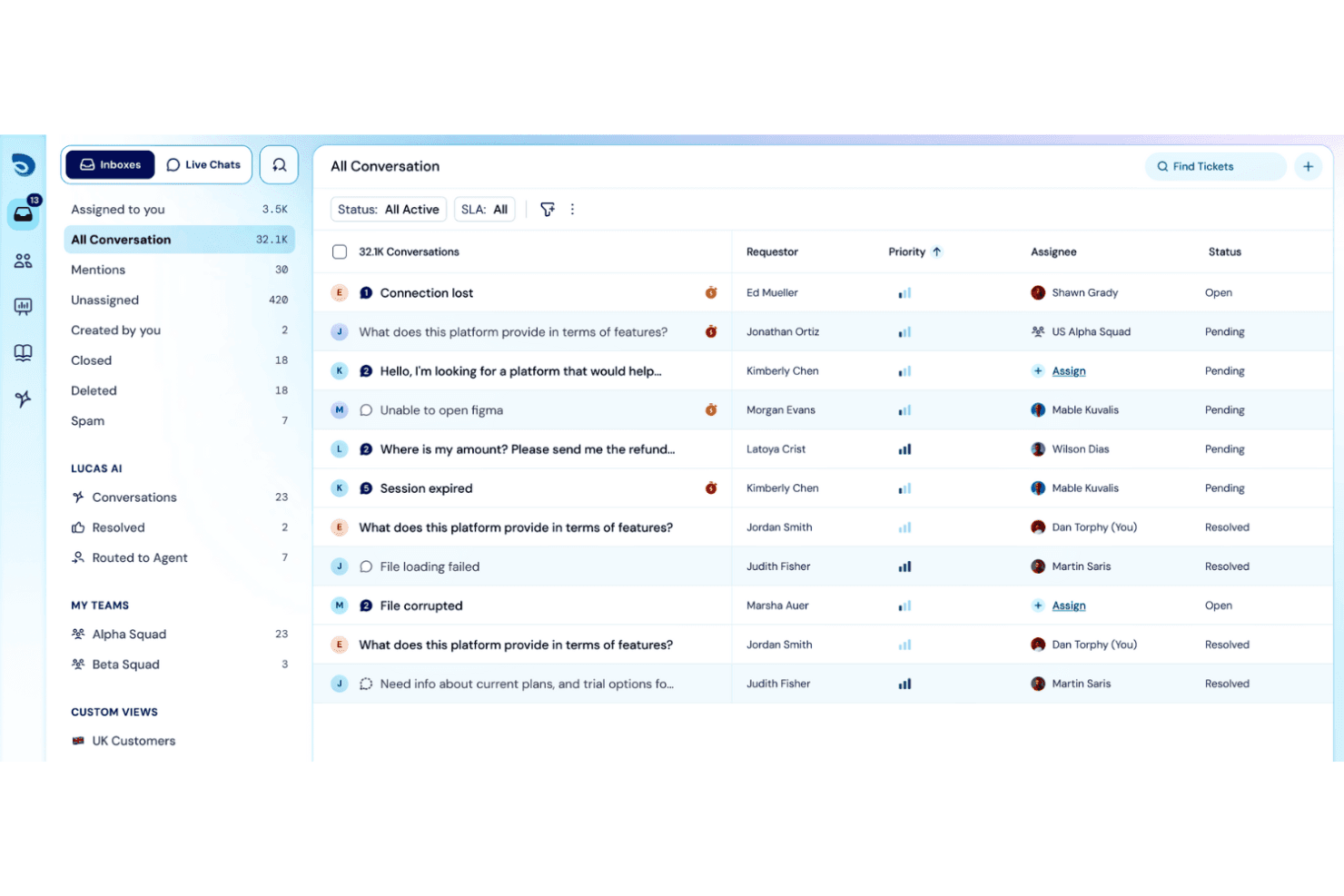
SparrowDesk displays a unified conversation inbox with priority, assignee, and status columns for managing 32.1K support tickets. SparrowDesk is an AI-powered helpdesk platform that combines omnichannel ticket management, a self-service knowledge base, SLA tracking, and workflow automation in a single inbox.
Who Is SparrowDesk Best For?
SparrowDesk is a strong fit for small and growing teams that need structured internal support without the overhead of a full ITSM platform.
Why I Picked SparrowDesk
SparrowDesk earns its spot on my shortlist because of Zoona, its AI Agent that reads incoming tickets and resolves them autonomously, day or night. I like that Zoona trains directly from your existing knowledge base, uploaded PDFs, and website URLs, so there's no custom configuration required to get it handling real requests. The AI Copilot layer then catches what Zoona can't, generating instant ticket summaries and reply drafts so agents spend less time re-reading context and more time closing issues.
SparrowDesk Key Features
- Omnichannel inbox: View and manage tickets from email, live chat, Slack, and WhatsApp in a single queue.
- Self-service help center: Publish a searchable, branded knowledge base that employees or customers can access directly.
- SLA management: Set, track, and enforce response and resolution targets with automated breach notifications.
- Role-based permissions: Assign custom roles and access levels to keep internal data secure and control agent capabilities.
SparrowDesk Integrations
SparrowDesk offers native integrations with Slack, WhatsApp, and Linear. An API is available for custom integrations.
Pros and Cons
Pros:
- Omnichannel inbox unifies email, chat, and Slack
- Zoona trains directly from existing content
- AI agent resolves tickets without human input
Cons:
- Reporting lacks advanced customization options
- Asset tracking features are not built in
Learn more about SparrowDesk: Best with GPT-powered conversational bots
- 7-day free trial + demo available
- From $32/month (billed annually)
Visit WebsiteCustomer Rating:4.4/5
Chatbase offers an AI action feature that can simultaneously update subscriptions and databases, automatically applying plan changes. Chatbase fits into this list as an AI-powered first-response layer that can answer customer questions, guide users, and capture leads directly from your content sources.
Who Is Chatbase Best For?
Chatbase is a good fit for small business owners and lean support teams who want to automate customer conversations without needing a dedicated development team.
Why I Picked Chatbase
Instead of managing tickets or agent workflows, Chatbase focuses on automating inbound conversations via an embeddable chat widget. For small businesses without a formal helpdesk system, it can act as a lightweight support interface; for teams with existing tools, it works alongside them to reduce repetitive inquiries. Chatbase earns its spot on my shortlist because it builds GPT-powered conversational bots that actually handle multi-turn support conversations, not just single-line answers. I like that the bots maintain context across a conversation, so if a customer asks a follow-up question, the bot doesn't lose track of what was already discussed. My team uses the custom instructions feature to fine-tune how the bot responds, which means we can match our support tone and handle edge cases without retraining from scratch.
Chatbase Key Features
- Lead capture forms: Collect visitor information directly within the chat window before or during a support conversation.
- Escalation to human agent: Route conversations to a live team member when the bot reaches the limits of its knowledge base.
- Analytics dashboard: Track chat volume, unanswered questions, and user satisfaction scores to spot support gaps.
- Embeddable chat widget: Add the chatbot to your website with a code snippet, no developer required.
Chatbase Integrations
Chatbase offers native integrations with Zendesk, Notion, Slack, Stripe, Salesforce, Cal.com, Calendly, WhatsApp, Messenger, and Make. It also connects with Zapier and provides an API for custom integrations.
Pros and Cons
Pros:
- Trains chatbot directly from website or docs
- Collision detection minimizes duplicated agent work
- Similar ticket suggestions help resolve repetitive issues
Cons:
- No phone or live chat support available
- Can't automate escalations by ticket type
Learn more about Chatbase: Best for customization options
- 14-day free trial + free demo available
- From $29/user/month
Visit WebsiteCustomer Rating:4.5/5
HappyFox helps teams manage and customize customer support workflows efficiently. HappyFox is a helpdesk software for businesses of various sizes, offering customizable solutions to meet diverse support needs. It provides tools for managing customer inquiries, tickets, and support workflows, making it suitable for teams seeking tailored support solutions.
Why I picked HappyFox: It's perfect for teams that need extensive customization options to align with their specific processes. HappyFox offers features like custom ticket fields and workflows to adapt to your unique needs. Its capabilities let you automate repetitive tasks, improving efficiency. The software's reporting tools provide insights into support performance, helping you make data-driven decisions.
Standout features & integrations:
Features include a self-service portal that empowers customers to find answers independently, ticket automation to reduce manual work, and detailed reporting to analyze support metrics. These features help you provide efficient and proactive customer service.
Integrations include Slack, Salesforce, Shopify, Mailchimp, Microsoft Teams, Jira, and WhatsApp.
Pros and Cons
Pros:
- Flexible workflow management
- Strong automation capabilities
- Highly customizable ticket fields
Cons:
- Not ideal for very small teams
- Limited knowledge base tools
Learn more about HappyFox: Best for knowledge base features
- Free plan + Free trial + Free demo available
- From $29.99/user/month
Visit WebsiteCustomer Rating:4.7/5
ProProfs Help Desk supports ticketing and self-service support for small teams. ProProfs Help Desk is a ticketing software solution for small to medium-sized businesses, focusing on efficient customer support through an extensive knowledge base. It helps teams manage tickets and provide self-service options, enhancing customer satisfaction.
Why I picked ProProfs Help Desk: It offers a strong knowledge base feature, making it perfect for teams that want to empower customers with self-service options. ProProfs Help Desk includes features like ticket prioritization and automation to improve support workflows. The software's reporting capabilities provide insights into team performance, helping you identify areas for improvement. Its simplicity and ease of use ensure that your team can start quickly without extensive training.
Standout features & integrations:
Features include customizable ticket fields that allow you to capture specific customer information, automated ticket assignment to ensure quick response times, and performance reports that help you monitor support efficiency. These features help your team manage customer inquiries effectively.
Integrations include Salesforce, Slack, Shopify, ClickUp, Jira, and Microsoft Dynamics.
Pros and Cons
Pros:
- Automated ticket assignment
- Customizable ticket fields
- Strong knowledge base functionality
Cons:
- Limited third-party integrations
- Limited advanced features
Learn more about ProProfs Help Desk:

Hesk provides budget-friendly ticket management for small business support. Hesk is a helpdesk software solution tailored for small businesses and budget-conscious teams. It offers essential ticket management features and supports effective customer service operations without hefty costs.
Why I picked Hesk: It's great for teams looking to manage support tickets without breaking the bank. Hesk provides core functionalities like ticket submission, categorization, and status tracking, fitting well into tight budgets. Its straightforward interface makes it easy to use without requiring extensive training. The self-hosted option gives you control over your data, adding flexibility.
Standout features & integrations:
Features customizable ticket fields to capture the customer details your team needs, a built-in knowledge base to reduce repeat questions, and canned responses that help support agents reply faster. These tools work together to optimize ticket resolution and improve team productivity, giving your helpdesk software a more organized and efficient customer support process.
Integrations include Slack, Microsoft Teams, Zapier, Google Workspace, Outlook, Freshdesk, Jira, Trello, Asana, and Zoho CRM.
Pros and Cons
Pros:
- Customizable ticket fields
- Lightweight and efficient
- Self-hosted option
Cons:
- Ideal for startups rather than large teams
- Basic reporting tools
Learn more about Hesk: Best for Gmail integration
- 7-day free trial + free demo available
- From $25/user/month (billed annually)
Visit WebsiteCustomer Rating:4.7/5
Hiver lets teams manage customer support directly inside Gmail. Hiver is a helpdesk software built for teams that rely heavily on Gmail for customer support. It allows users to manage customer emails directly from their Gmail interface, making it a natural fit for businesses looking to enhance email-based support.
Why I picked Hiver: It seamlessly integrates with Gmail, providing a familiar environment for your team. Hiver offers features like email delegation, shared inboxes, and collision alerts to prevent duplicate responses. Its email notes and tags help organize communication within the team. You can also track email status and response times, ensuring efficient customer service.
Standout features & integrations:
Features include email templates to save time on repetitive responses, analytics for tracking team performance, and round-robin assignment to distribute emails evenly among team members. These features help streamline your email management process and improve response efficiency.
Integrations include Salesforce, Zapier, HubSpot, Jira, Asana, and NetSuite.
Pros and Cons
Pros:
- Real-time email tracking
- Minimal learning curve
- Easy Gmail integration
Cons:
- Occasional email glitches
- Limited third-party integrations
Learn more about Hiver: Best for live chat support
- Free trial available
- From $15/user/month (billed annually)
Visit WebsiteCustomer Rating:4.6/5
LiveAgent helps businesses manage real-time customer inquiries across multiple channels. LiveAgent is a SaaS helpdesk software solution known for its strong live chat features, giving businesses that rely on real-time customer interactions a reliable way to manage support. It offers a wide set of helpdesk tools that bring inquiries from email, chat, and social media into one system, helping teams respond more quickly.
LiveAgent also supports ticket escalation to ensure urgent issues get routed to the right agents, and it includes options such as customer forums to help organizations build communities and reduce repetitive questions.
Why I picked LiveAgent: It excels in providing live chat support, making it ideal for businesses that need instant customer communication. LiveAgent includes features like real-time chat, ticket management, and a built-in call center. The software's universal inbox allows your team to handle all customer inquiries in one place. Its automation tools help distribute tickets and unblock workflows, enhancing support efficiency.
Standout features & integrations:
Features include a customer portal where users can track their tickets, a knowledge base that helps reduce ticket volume by providing self-service options, and gamification elements to motivate your support team. These features contribute to a more organized and engaging support environment.
Integrations include Slack, WhatsApp, Shopify, WordPress, Mailchimp, Google Analytics, Zapier, Salesforce, HubSpot, Wix, and Trello.
Pros and Cons
Pros:
- Built-in call center
- Advanced live chat options
- Strong multi-channel communication
Cons:
- Limited history search
- Complex setup for custom workflows
Learn more about LiveAgent: Best for automating customer interactions
- Free plan available; 7-day free trial
- From $24.17/month
Visit WebsiteCustomer Rating:4.7/5
Tidio inbox view displaying live conversations, ticket details, and customer data sidebar. Tidio is designed to address the challenges small businesses face in managing customer interactions. By integrating AI-driven solutions with user-friendly tools, it helps streamline customer support processes, making it an appealing choice for businesses looking to enhance their service quality and response times. This tool is particularly beneficial for small businesses seeking to automate routine inquiries, manage multichannel communications, and improve customer satisfaction without extensive resources.
Why I Picked Tidio
I picked Tidio because it offers a unique AI-driven approach that suits small businesses' helpdesk needs. The Lyro AI Agent stands out by automating customer interactions, which directly addresses the need for quick response times and efficient service. Additionally, Tidio's live chat feature allows for real-time engagement, crucial for businesses that prioritize immediate customer support. These features make Tidio a compelling choice for small business owners looking to enhance their customer service capabilities.
Tidio Key Features
In addition to its AI-driven automation, Tidio offers several other features that enhance its utility for small businesses:
- Multichannel Communication: Manage customer interactions across various platforms like email, chat, and social media from a single interface.
- Customizable Chat Widgets: Tailor chat widgets to fit your brand's aesthetics and engage website visitors effectively.
- Visitor Tracking: Monitor and analyze visitor behavior on your website to better understand customer needs and improve service strategies.
- Proactive Engagement: Send automated messages to visitors based on their behavior, encouraging interaction and improving customer experience.
Tidio Integrations
Integrations include Salesforce, Shopify, WordPress, Instagram, Messenger, Zendesk, WhatsApp, Intercom, and Zapier.
Pros and Cons
Pros:
- Multichannel inbox centralizes chat, email, and social
- Supports 120+ integrations including Shopify and HubSpot
- AI chatbot resolves routine inquiries automatically
Cons:
- Pricing may be high for businesses with high conversation volumes
- AI usage limits apply on lower-tier plans
Learn more about Tidio: Best for email-based support
- Free plan + 15-day free trial + free demo available
- From $25/user/month (billed annually)
Visit WebsiteCustomer Rating:4.5/5
Help Scout helps teams manage personalized, efficient email-based customer support. Help Scout is a helpdesk software solution designed for small to medium-sized businesses that prioritize email-based customer support. It offers a clean, organized workspace for managing customer inquiries with clarity and personalization. Help Scout is also widely adopted by ecommerce businesses that rely on quick, friendly communication to assist customers throughout their buying journey.
Why I picked Help Scout: It manages email support, making it a go-to for teams that rely on email interactions. Help Scout includes features like shared inboxes and customer profiles to keep your team informed about customer interactions. Its workflow automation simplifies repetitive tasks, freeing up time for more complex issues. The reporting tools offer insights into team performance, helping you improve service quality.
Standout features & integrations:
Features include a knowledge base to empower customers with self-service options, collision detection to prevent duplicate responses, and tags that help organize and categorize tickets efficiently. These features ensure your team can manage email-based support effectively.
Integrations include Slack, Mailchimp, HubSpot, Salesforce, Shopify, WordPress, Jira, Trello, Asana, and Google Workspace.
Pros and Cons
Pros:
- Detailed customer profiles
- Efficient workflow automation
- Strong email support focus
Cons:
- Few widget customizations
- Chatbot automation could be improved
Learn more about Help Scout:
Alte programe de asistență pentru întreprinderi mici
Iată câteva opțiuni suplimentare de programe de asistență pentru întreprinderi mici care nu au ajuns pe lista mea scurtă, dar merită totuși analizate:
- 11Desk365Best for Microsoft 365 users
- 12TeamSupportBest for B2B support
- 13SuperOpsBest for IT service providers
- 14Agentforce Service (formerly Service Cloud)Best for CRM integration
- 15HelpDeskBest for intelligent workflows
- 16FreshserviceBest for ITIL compliance
- 17SysAidBest for asset management
- 18HaloBest for ITSM
- 19Jira Service ManagementBest for DevOps teams
- 20Zoho DeskBest for multichannel support
- 21ManageEngine ServiceDesk PlusBest for incident management
- 22HubSpot Service HubBest for small business growth
- 23monday serviceBest for task management
- 24ZendeskBest for global support
- 25VivantioBest for flexible pricing
How I Evaluate Helpdesk Software for Small Business
I split my evaluation into baseline criteria—can a two-person IT team route tickets, enforce SLAs, and deflect repetitive requests—and the differentiators that make one tool a better fit than another.
Core Functionality (Table Stakes For This List)
When I'm selecting tools for my list, I rank each one on a scale from 0 (does not offer the functionality) to 5 (excels in this area) for each core functionality listed below. Then, I calculate the tool's total score into a percentage. Each tool needs to achieve a minimum total score of 65% to be considered for inclusion.
- Ticket Management: I evaluate the full ticket lifecycle—creation, categorization, prioritization, assignment, and resolution tracking—including whether agents can merge duplicate tickets or create child tasks for multi-step fixes like a workstation build-out.
- Multi-Channel Intake: Each tool should unify requests from email, a web portal, and live chat into one queue so a small IT team isn't toggling between inboxes to catch a password reset submitted via email and a VPN issue logged through chat.
- Automation & SLA Rules: I look for workflow automations that handle routing, escalation, and SLA timers—things like auto-assigning printer issues to a specific technician or escalating a ticket when it breaches a four-hour response window.
- Self-Service Knowledge Base: A searchable, categorized KB where end users can find answers to common questions (Wi-Fi setup, VPN configuration, software installation steps) before submitting a ticket is something I check for in every tool.
- Reporting & Analytics: Dashboards covering ticket volume, resolution times, SLA compliance, and agent workload help a small IT manager spot recurring issues—like a spike in onboarding tickets every quarter—and plan staffing around them.
- IT-Specific Capabilities: I check whether the tool includes IT-oriented modules such as asset tracking, incident management, or ITIL-aligned workflows rather than only offering a generic customer support ticketing system rebranded for IT use.
Once I have a list of tools that meet this criteria, I consider what sets each platform apart.
Differentiating Factors (What Sets Vendors Apart)
Here's how I compare and contrast different vendors:
Standout Features
AI-powered ticket assistance is a big differentiator—tools that auto-suggest KB articles or draft replies save a solo IT admin real time when the same "how do I reset my password" ticket arrives for the tenth time that week. Remote support integration matters just as much; launching a screen-share session directly from a ticket instead of switching to a separate tool keeps resolution fast. I also look for a full-featured mobile app, since small-team IT staff are often away from their desk handling in-person issues while tickets keep rolling in.
Beyond Features
Pricing transparency matters when you're working with a small IT budget—I check whether a tool offers a free or low-cost entry tier and doesn't lock essential features like SLA management behind expensive plans. Integration coverage is another big factor; a helpdesk that connects natively to Microsoft 365, Google Workspace, and Slack fits the typical small business stack without requiring custom development. I also evaluate time-to-value, looking for pre-built templates and self-serve setup so a two-person IT team can go live in days, not weeks.
Cum să alegeți software-ul de asistență pentru o întreprindere mică
Este ușor să vă pierdeți în liste lungi de funcții și structuri complexe de prețuri. Pentru a vă ajuta să rămâneți concentrat în timp ce parcurgeți procesul unic de selecție a software-ului, iată o listă de verificare cu factorii de care trebuie să țineți cont:
| Factor | Ce trebuie avut în vedere |
|---|---|
| FactorScalabilitate | Ce trebuie avut în vederePoate instrumentul să se dezvolte odată cu întreprinderea dumneavoastră? Căutați planuri de prețuri flexibile și funcții care să permită gestionarea unui număr tot mai mare de tichete și a unor echipe tot mai numeroase. |
| FactorIntegrări | Ce trebuie avut în vedereSe conectează la instrumentele pe care le utilizați deja? Verificați existența integrărilor native cu CRM-ul, e-mailul și alte platforme esențiale pentru a asigura fluxuri de lucru fără întreruperi. |
| FactorPosibilități de personalizare | Ce trebuie avut în vedereÎl puteți adapta nevoilor dumneavoastră? Evaluați posibilitatea de a modifica fluxurile de lucru, tablourile de bord și rapoartele pentru a se potrivi proceselor și preferințelor specifice. |
| FactorUșurință în utilizare | Ce trebuie avut în vedereEste interfața intuitivă? Evitați instrumentele cu o curbă de învățare abruptă și optați pentru cele cu navigare simplă și cerințe minime de instruire. |
| FactorImplementare și integrare inițială | Ce trebuie avut în vedereCât de repede puteți începe? Luați în considerare timpul de configurare, disponibilitatea resurselor de instruire și dacă este oferit sprijin dedicat pentru integrarea inițială. |
| FactorCost | Ce trebuie avut în vedereCât de bine se încadrează în bugetul dumneavoastră? Comparați costul total de proprietate, inclusiv taxele inițiale, costurile abonamentului și eventualele taxe ascunse. |
| FactorMăsuri de securitate | Ce trebuie avut în vedereSunt protejate datele dumneavoastră? Asigurați-vă că software-ul respectă standardele de protecție a datelor și oferă funcții precum criptarea și controalele de acces ale utilizatorilor. |
| FactorDisponibilitatea asistenței | Ce trebuie avut în vedereCe opțiuni de asistență sunt disponibile? Căutați asistență 24/7 și mai multe metode de contact pentru a vă asigura că puteți primi ajutor atunci când aveți nevoie. |
Ce este software-ul de asistență pentru întreprinderile mici?
Software-ul de asistență pentru întreprinderile mici este un instrument conceput pentru a gestiona eficient solicitările clienților și cererile de asistență. Acesta este utilizat în mod obișnuit de echipele de servicii pentru clienți, personalul de asistență IT și managerii de întreprinderi pentru a îmbunătăți timpii de răspuns și a crește satisfacția clienților.
Funcțiile de gestionare a tichetelor, comunicare pe mai multe canale și raportare ajută la organizarea solicitărilor, facilitarea comunicării și analizarea performanței. În general, aceste instrumente oferă valoare asigurând rezolvarea rapidă și eficientă a problemelor clienților, ceea ce duce la clienți mai mulțumiți și echipe mai productive.
Funcțiile software-ului de asistență pentru întreprinderile mici
Atunci când selectați software de asistență pentru o întreprindere mică, urmăriți următoarele funcții esențiale:
- Gestionarea tichetelor: Organizează solicitările clienților în tichete, facilitând urmărirea și soluționarea acestora de către echipa dumneavoastră.
- Asistență multicanal: Permite comunicarea prin diverse platforme, precum e-mailul, chatul și telefonul, asigurându-se că clienții vă pot contacta prin metoda preferată.
- Automatizare: Automatizează sarcinile repetitive, precum atribuirea tichetelor și acțiunile ulterioare, economisind timp și reducând erorile manuale.
- Rapoarte și analize: Oferă informații despre performanța echipei și satisfacția clienților, ajutându-vă să identificați domeniile care necesită îmbunătățiri.
- Fluxuri de lucru personalizabile: Adaptează procesele la nevoile afacerii dumneavoastră, permițând operațiuni mai eficiente.
- Bază de cunoștințe: Oferă clienților opțiuni de autoservire, reducând numărul tichetelor primite și îmbunătățind satisfacția utilizatorilor.
- Integrări: Se conectează cu alte instrumente, precum platformele CRM și de e-mail, facilitând fluxuri de lucru fluide și partajarea datelor.
- Funcții de securitate: Asigură protecția datelor prin criptare și controale de acces, păstrând în siguranță informațiile sensibile.
- Instrumente de colaborare: Permite membrilor echipei să lucreze împreună la tichete, îmbunătățind timpul de soluționare și calitatea serviciilor.
Beneficiile software-ului de asistență pentru întreprinderile mici
Implementarea software-ului de asistență pentru o întreprindere mică oferă mai multe beneficii echipei și afacerii dumneavoastră. Iată câteva dintre acestea:
- Eficiență îmbunătățită: Automatizarea sarcinilor și gestionarea tichetelor ajută echipa dumneavoastră să gestioneze mai multe solicitări într-un timp mai scurt.
- Satisfacție sporită a clienților: Asistența multicanal și timpii rapizi de răspuns asigură faptul că clienții se simt ascultați și apreciați.
- Colaborare mai bună în echipă: Instrumentele de colaborare permit membrilor echipei să lucreze împreună la probleme, ceea ce duce la soluționări mai rapide.
- Informații bazate pe date: Rapoartele și analizele oferă date valoroase despre performanță, ajutându-vă să luați decizii informate.
- Scalabilitate: Fluxurile de lucru personalizabile și integrările sprijină dezvoltarea, permițând sistemului să evolueze odată cu nevoile afacerii dumneavoastră.
- Opțiuni de autoservire sporite: O bază de cunoștințe le permite clienților să găsească singuri răspunsuri, reducând volumul tichetelor.
- Securitate mai bună a datelor: Funcțiile de securitate protejează informațiile sensibile ale clienților, consolidând încrederea și conformitatea.
Costurile și prețurile software-ului de asistență pentru întreprinderile mici
Selectarea software-ului de asistență pentru o întreprindere mică necesită înțelegerea diferitelor modele și planuri de preț disponibile. Costurile variază în funcție de funcții, dimensiunea echipei, suplimente și alți factori. Tabelul de mai jos sintetizează planurile comune, prețurile medii ale acestora și funcțiile tipice incluse în soluțiile software de asistență pentru întreprinderile mici:
Tabel comparativ al planurilor pentru software-ul de asistență destinat întreprinderilor mici
| Tipul planului | Preț mediu | Funcții comune |
|---|---|---|
| Tipul planuluiPlan gratuit | Preț mediu$0 | Funcții comuneGestionarea de bază a tichetelor, asistență prin e-mail și raportare limitată. |
| Tipul planuluiPlan personal | Preț mediu$5-$25/utilizator/lună | Funcții comuneGestionarea tichetelor, asistență prin e-mail și chat și automatizare de bază. |
| Tipul planuluiPlan pentru afaceri | Preț mediu$30-$50/utilizator/ lună | Funcții comuneAsistență multicanal, automatizare avansată și fluxuri de lucru personalizabile. |
| Tipul planuluiPlan pentru întreprinderi | Preț mediu$60-$100/utilizator/ lună | Funcții comuneAsistență prioritară, analize avansate, integrări personalizate și funcții de securitate îmbunătățite. |
Întrebări frecvente despre software-ul de gestionare a solicitărilor pentru întreprinderile mici
Iată câteva răspunsuri la întrebările frecvente despre software-ul de gestionare a solicitărilor pentru întreprinderile mici:
Care sunt cerințele de sistem pentru software-ul de gestionare a solicitărilor?
Da, majoritatea soluțiilor software de gestionare a solicitărilor sunt bazate pe web, ceea ce înseamnă că aveți nevoie doar de o conexiune fiabilă la internet și de un browser web modern pentru a le accesa. Unele instrumente pot oferi aplicații pentru desktop sau dispozitive mobile, așa că verificați compatibilitatea cu dispozitivele dumneavoastră. Asigurați-vă că hardware-ul și software-ul echipei sunt actualizate pentru a evita problemele de performanță.
Se poate integra software-ul de gestionare a solicitărilor cu CRM-ul meu existent?
Da, multe soluții de gestionare a solicitărilor oferă integrări cu sisteme CRM populare, precum Salesforce sau HubSpot. Astfel, echipa dumneavoastră poate accesa informațiile despre clienți dintr-un singur loc, îmbunătățind eficiența și calitatea serviciilor. Înainte de achiziție, verificați dacă software-ul este compatibil cu CRM-ul dumneavoastră pentru a asigura un schimb de date fără întreruperi și continuitatea fluxului de lucru.
Este software-ul de gestionare a solicitărilor sigur pentru gestionarea datelor sensibile ale clienților?
Da, majoritatea furnizorilor de software de gestionare a solicitărilor acordă prioritate securității prin funcții precum criptarea datelor, controale de acces pentru utilizatori și conformitatea cu reglementările privind protecția datelor. Verificați întotdeauna certificatele de securitate și întrebați furnizorii despre măsurile lor de protecție a datelor. Este esențial să vă asigurați că software-ul respectă standardele de securitate din domeniul dumneavoastră.
Cum poate software-ul de gestionare a solicitărilor să sprijine echipele la distanță?
Software-ul de gestionare a solicitărilor este ideal pentru echipele la distanță, deoarece centralizează comunicarea și gestionarea sarcinilor într-o singură platformă. Funcții precum accesul bazat pe cloud, asistența pe mai multe canale și instrumentele de colaborare ajută echipa să lucreze eficient împreună, indiferent de locație. Asigurați-vă că software-ul ales oferă acces mobil și răspunde cerințelor muncii la distanță.