

No mundo das pequenas empresas, manter os clientes satisfeitos é fundamental. Mas conciliar o apoio ao cliente com todas as outras tarefas pode ser difícil. É aqui que entra o software de apoio ao cliente. Este ajuda a gerir pedidos de informação, acompanhar problemas e manter a equipa organizada.
Há anos que testo e analiso software e compreendo os desafios que enfrenta. Precisa de ferramentas fiáveis que facilitem o seu trabalho, em vez de o tornarem mais difícil. Neste artigo, partilho as minhas principais escolhas de software de apoio ao cliente para ajudar a sua equipa a prestar um excelente serviço.
Quer esteja à procura de soluções baseadas em correio eletrónico ou de algo que se integre com as ferramentas que já utiliza, encontrará aqui o que precisa. Vamos conhecer as melhores opções para a sua pequena empresa.
Why Trust Our Software Recommendations
6,700+
Reviews
20
Industry experts
16+
Evaluation factors
14
Years
Our team has been testing and reviewing software since 2012. As tech leaders ourselves, we know how difficult—and important—it is to choose the right software.
For this guide, we evaluated tools using hands-on testing and independent research, scoring tools using our selection criteria.
Our reviews reflect our human editorial judgment, not a sales pitch.
Expert reviewers:
- Paulo Gardini MiguelTech Director
 Tim FisherVP of AI
 Gabriel RosasTech Lead & Software Architect
 Christhian GruhnTech Lead & Platform Architect

Tabela comparativa de software de apoio ao cliente para pequenas empresas
Esta tabela comparativa resume os detalhes de preços das minhas principais escolhas de software de apoio ao cliente para pequenas empresas:
| Tool | Best For | Trial Info | Price | ||
|---|---|---|---|---|---|
| 1 | Best for ecommerce support automation | 14-day free trial + free demo available | From $45/user/month (billed annually) | Website | |
| 2 | Best with integrated AI ticket triage | Free plan + 14-day free trial + free demo available | From $16/user/month (billed annually) | Website | |
| 3 | Best with GPT-powered conversational bots | 7-day free trial + demo available | From $40/month | Website | |
| 4 | Best for customization options | 14-day free trial + free demo available | From $29/user/month | Website | |
| 5 | Best for knowledge base features | Free plan + free demo available | From $39.99/month | Website | |
| 6 | Best for budget-conscious users | Free plan + free demo available | From $29.99/10 users/month (billed annually) | Website | |
| 7 | Best for Gmail integration | Free plan available | From $35/user/month | Website | |
| 8 | Best for live chat support | Free trial available | From $15/user/month (billed annually) | Website | |
| 9 | Best for automating customer interactions | Free plan available; 7-day free trial | From $24.17/month | Website | |
| 10 | Best for email-based support | Free plan + 15-day free trial + free demo available | From $25/user/month (billed annually) | Website |


Análise do melhor software de apoio ao cliente para pequenas empresas
Apresentamos abaixo os meus resumos detalhados do melhor software de apoio ao cliente para pequenas empresas que integrou a minha seleção. As minhas análises oferecem uma visão detalhada das principais funcionalidades, vantagens & desvantagens, integrações e casos de utilização ideais de cada ferramenta, para o ajudar a encontrar a melhor opção para si.
 Best for ecommerce support automation
- 14-day free trial + free demo available
- From $45/user/month (billed annually)
Visit WebsiteCustomer Rating:4.4/5
eDesk organizes ecommerce support tickets with AI classification and priorities. eDesk is tailored for small ecommerce businesses, with support for ecommerce support automation to help teams handle routine customer requests more efficiently. It provides a unified platform to manage customer interactions across multiple channels while keeping communication organized. With integrations across common sales and communication tools, eDesk helps teams maintain responsive customer support without adding unnecessary workload.
Why I Picked eDesk
I picked eDesk for its ecommerce support automation, which helps small teams handle routine customer requests more efficiently across sales channels. The unified inbox collects customer messages from marketplaces, helping teams keep inquiries organized and avoid missed responses. Its automation tools reduce manual support work, allowing teams to focus on more complex customer issues and enabling faster, more consistent response handling.
eDesk Key Features
In addition to ecommerce support automation, eDesk offers:
- 24/7 Chatbot: Provides round-the-clock customer engagement, handling inquiries even when your team is offline.
- Real-Time Reporting: Offers insights into support operations, enabling data-driven decision-making to improve service quality.
- Intelligent Ticket Routing: Ensures customer queries are directed to the most appropriate team member, reducing resolution times.
- Knowledge Base: Empowers customers to find answers themselves, reducing the volume of incoming support requests.
eDesk Integrations
Integrations include Amazon, eBay, Walmart, Shopify, Magento, BigCommerce, WooCommerce, Facebook, WhatsApp, and Instagram.
Pros and Cons
Pros:
- Saved reply templates speed up customer responses
- AI-powered automations improve response efficiency
- Seamless order data synchronization with major marketplaces
Cons:
- Reporting and analytics, while present, can be less customizable than more enterprise dashboards
- Primarily built for ecommerce, less flexible for other industries
Learn more about eDesk: Best with integrated AI ticket triage
- Free plan + 14-day free trial + free demo available
- From $16/user/month (billed annually)
Visit WebsiteCustomer Rating:4.6/5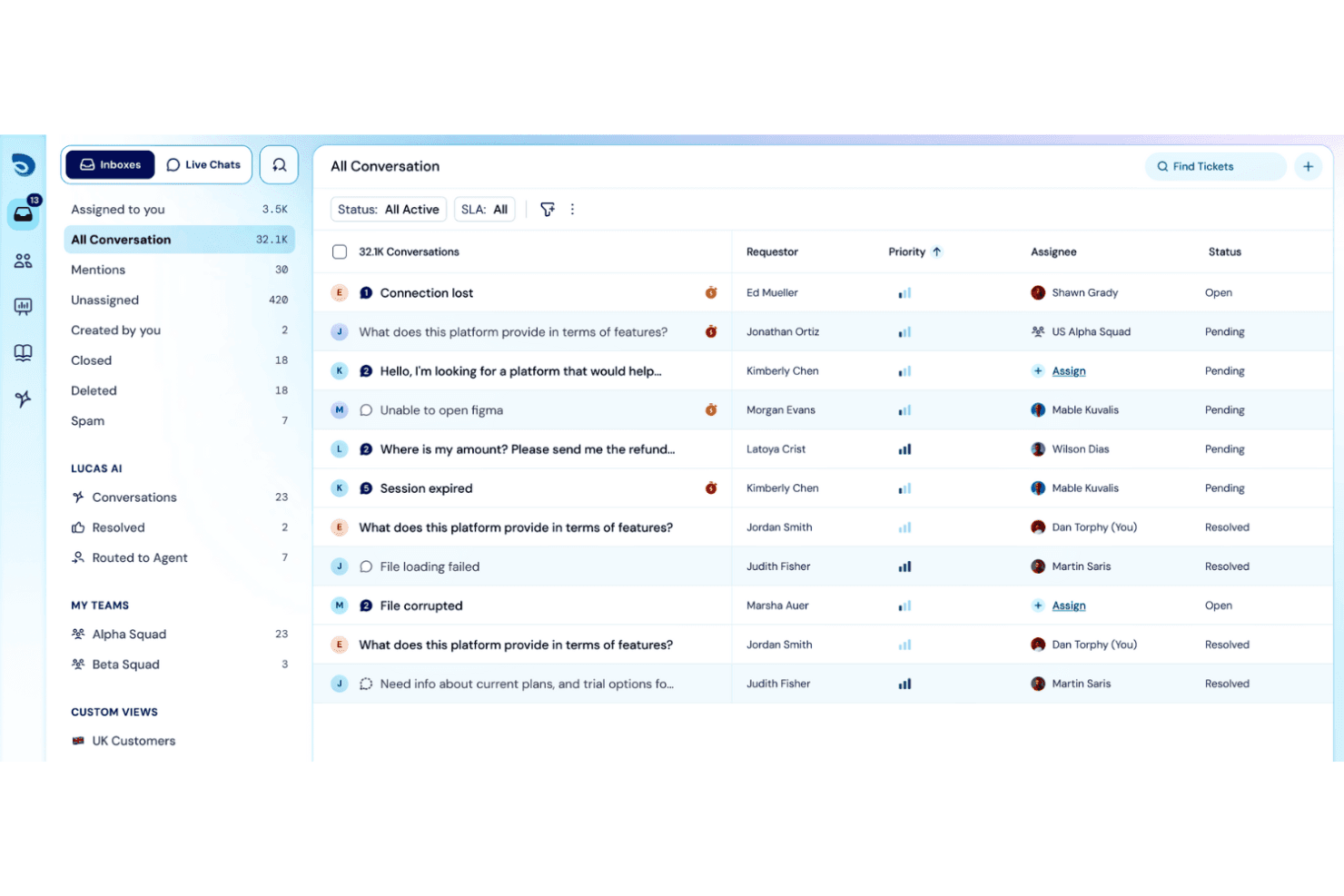
SparrowDesk displays a unified conversation inbox with priority, assignee, and status columns for managing 32.1K support tickets. SparrowDesk is an AI-powered helpdesk platform that combines omnichannel ticket management, a self-service knowledge base, SLA tracking, and workflow automation in a single inbox.
Who Is SparrowDesk Best For?
SparrowDesk is a strong fit for small and growing teams that need structured internal support without the overhead of a full ITSM platform.
Why I Picked SparrowDesk
SparrowDesk earns its spot on my shortlist because of Zoona, its AI Agent that reads incoming tickets and resolves them autonomously, day or night. I like that Zoona trains directly from your existing knowledge base, uploaded PDFs, and website URLs, so there's no custom configuration required to get it handling real requests. The AI Copilot layer then catches what Zoona can't, generating instant ticket summaries and reply drafts so agents spend less time re-reading context and more time closing issues.
SparrowDesk Key Features
- Omnichannel inbox: View and manage tickets from email, live chat, Slack, and WhatsApp in a single queue.
- Self-service help center: Publish a searchable, branded knowledge base that employees or customers can access directly.
- SLA management: Set, track, and enforce response and resolution targets with automated breach notifications.
- Role-based permissions: Assign custom roles and access levels to keep internal data secure and control agent capabilities.
SparrowDesk Integrations
SparrowDesk offers native integrations with Slack, WhatsApp, and Linear. An API is available for custom integrations.
Pros and Cons
Pros:
- Omnichannel inbox unifies email, chat, and Slack
- Zoona trains directly from existing content
- AI agent resolves tickets without human input
Cons:
- Reporting lacks advanced customization options
- Asset tracking features are not built in
Learn more about SparrowDesk: Best with GPT-powered conversational bots
- 7-day free trial + demo available
- From $40/month
Visit WebsiteCustomer Rating:4.4/5
Chatbase offers an AI action feature that can simultaneously update subscriptions and databases, automatically applying plan changes. Chatbase fits into this list as an AI-powered first-response layer that can answer customer questions, guide users, and capture leads directly from your content sources.
Who Is Chatbase Best For?
Chatbase is a good fit for small business owners and lean support teams who want to automate customer conversations without needing a dedicated development team.
Why I Picked Chatbase
Instead of managing tickets or agent workflows, Chatbase focuses on automating inbound conversations via an embeddable chat widget. For small businesses without a formal helpdesk system, it can act as a lightweight support interface; for teams with existing tools, it works alongside them to reduce repetitive inquiries. Chatbase earns its spot on my shortlist because it builds GPT-powered conversational bots that actually handle multi-turn support conversations, not just single-line answers. I like that the bots maintain context across a conversation, so if a customer asks a follow-up question, the bot doesn't lose track of what was already discussed. My team uses the custom instructions feature to fine-tune how the bot responds, which means we can match our support tone and handle edge cases without retraining from scratch.
Chatbase Key Features
- Lead capture forms: Collect visitor information directly within the chat window before or during a support conversation.
- Escalation to human agent: Route conversations to a live team member when the bot reaches the limits of its knowledge base.
- Analytics dashboard: Track chat volume, unanswered questions, and user satisfaction scores to spot support gaps.
- Embeddable chat widget: Add the chatbot to your website with a code snippet, no developer required.
Chatbase Integrations
Chatbase offers native integrations with Zendesk, Notion, Slack, Stripe, Salesforce, Cal.com, Calendly, WhatsApp, Messenger, and Make. It also connects with Zapier and provides an API for custom integrations.
Pros and Cons
Pros:
- Trains chatbot directly from website or docs
- Collision detection minimizes duplicated agent work
- Similar ticket suggestions help resolve repetitive issues
Cons:
- No phone or live chat support available
- Can't automate escalations by ticket type
Learn more about Chatbase: Best for customization options
- 14-day free trial + free demo available
- From $29/user/month
Visit WebsiteCustomer Rating:4.5/5
HappyFox helps teams manage and customize customer support workflows efficiently. HappyFox is a helpdesk software for businesses of various sizes, offering customizable solutions to meet diverse support needs. It provides tools for managing customer inquiries, tickets, and support workflows, making it suitable for teams seeking tailored support solutions.
Why I picked HappyFox: It's perfect for teams that need extensive customization options to align with their specific processes. HappyFox offers features like custom ticket fields and workflows to adapt to your unique needs. Its capabilities let you automate repetitive tasks, improving efficiency. The software's reporting tools provide insights into support performance, helping you make data-driven decisions.
Standout features & integrations:
Features include a self-service portal that empowers customers to find answers independently, ticket automation to reduce manual work, and detailed reporting to analyze support metrics. These features help you provide efficient and proactive customer service.
Integrations include Slack, Salesforce, Shopify, Mailchimp, Microsoft Teams, Jira, and WhatsApp.
Pros and Cons
Pros:
- Flexible workflow management
- Strong automation capabilities
- Highly customizable ticket fields
Cons:
- Not ideal for very small teams
- Limited knowledge base tools
Learn more about HappyFox: Best for knowledge base features
- Free plan + free demo available
- From $39.99/month
Visit WebsiteCustomer Rating:4.7/5
ProProfs Help Desk supports ticketing and self-service support for small teams. ProProfs Help Desk is a ticketing software solution for small to medium-sized businesses, focusing on efficient customer support through an extensive knowledge base. It helps teams manage tickets and provide self-service options, enhancing customer satisfaction.
Why I picked ProProfs Help Desk: It offers a strong knowledge base feature, making it perfect for teams that want to empower customers with self-service options. ProProfs Help Desk includes features like ticket prioritization and automation to improve support workflows. The software's reporting capabilities provide insights into team performance, helping you identify areas for improvement. Its simplicity and ease of use ensure that your team can start quickly without extensive training.
Standout features & integrations:
Features include customizable ticket fields that allow you to capture specific customer information, automated ticket assignment to ensure quick response times, and performance reports that help you monitor support efficiency. These features help your team manage customer inquiries effectively.
Integrations include Salesforce, Slack, Shopify, ClickUp, Jira, and Microsoft Dynamics.
Pros and Cons
Pros:
- Automated ticket assignment
- Customizable ticket fields
- Strong knowledge base functionality
Cons:
- Limited third-party integrations
- Limited advanced features
Learn more about ProProfs Help Desk: 6Best for budget-conscious users
Hesk
- Free plan + free demo available
- From $29.99/10 users/month (billed annually)

Hesk provides budget-friendly ticket management for small business support. Hesk is a helpdesk software solution tailored for small businesses and budget-conscious teams. It offers essential ticket management features and supports effective customer service operations without hefty costs.
Why I picked Hesk: It's great for teams looking to manage support tickets without breaking the bank. Hesk provides core functionalities like ticket submission, categorization, and status tracking, fitting well into tight budgets. Its straightforward interface makes it easy to use without requiring extensive training. The self-hosted option gives you control over your data, adding flexibility.
Standout features & integrations:
Features customizable ticket fields to capture the customer details your team needs, a built-in knowledge base to reduce repeat questions, and canned responses that help support agents reply faster. These tools work together to optimize ticket resolution and improve team productivity, giving your helpdesk software a more organized and efficient customer support process.
Integrations include Slack, Microsoft Teams, Zapier, Google Workspace, Outlook, Freshdesk, Jira, Trello, Asana, and Zoho CRM.
Pros and Cons
Pros:
- Customizable ticket fields
- Lightweight and efficient
- Self-hosted option
Cons:
- Ideal for startups rather than large teams
- Basic reporting tools
Learn more about Hesk:

Hiver lets teams manage customer support directly inside Gmail. Hiver is a helpdesk software built for teams that rely heavily on Gmail for customer support. It allows users to manage customer emails directly from their Gmail interface, making it a natural fit for businesses looking to enhance email-based support.
Why I picked Hiver: It seamlessly integrates with Gmail, providing a familiar environment for your team. Hiver offers features like email delegation, shared inboxes, and collision alerts to prevent duplicate responses. Its email notes and tags help organize communication within the team. You can also track email status and response times, ensuring efficient customer service.
Standout features & integrations:
Features include email templates to save time on repetitive responses, analytics for tracking team performance, and round-robin assignment to distribute emails evenly among team members. These features help streamline your email management process and improve response efficiency.
Integrations include Salesforce, Zapier, HubSpot, Jira, Asana, and NetSuite.
Pros and Cons
Pros:
- Real-time email tracking
- Minimal learning curve
- Easy Gmail integration
Cons:
- Occasional email glitches
- Limited third-party integrations
Learn more about Hiver: Best for live chat support
- Free trial available
- From $15/user/month (billed annually)
Visit WebsiteCustomer Rating:4.6/5
LiveAgent helps businesses manage real-time customer inquiries across multiple channels. LiveAgent is a SaaS helpdesk software solution known for its strong live chat features, giving businesses that rely on real-time customer interactions a reliable way to manage support. It offers a wide set of helpdesk tools that bring inquiries from email, chat, and social media into one system, helping teams respond more quickly.
LiveAgent also supports ticket escalation to ensure urgent issues get routed to the right agents, and it includes options such as customer forums to help organizations build communities and reduce repetitive questions.
Why I picked LiveAgent: It excels in providing live chat support, making it ideal for businesses that need instant customer communication. LiveAgent includes features like real-time chat, ticket management, and a built-in call center. The software's universal inbox allows your team to handle all customer inquiries in one place. Its automation tools help distribute tickets and unblock workflows, enhancing support efficiency.
Standout features & integrations:
Features include a customer portal where users can track their tickets, a knowledge base that helps reduce ticket volume by providing self-service options, and gamification elements to motivate your support team. These features contribute to a more organized and engaging support environment.
Integrations include Slack, WhatsApp, Shopify, WordPress, Mailchimp, Google Analytics, Zapier, Salesforce, HubSpot, Wix, and Trello.
Pros and Cons
Pros:
- Built-in call center
- Advanced live chat options
- Strong multi-channel communication
Cons:
- Limited history search
- Complex setup for custom workflows
Learn more about LiveAgent: Best for automating customer interactions
- Free plan available; 7-day free trial
- From $24.17/month
Visit WebsiteCustomer Rating:4.7/5
Tidio inbox view displaying live conversations, ticket details, and customer data sidebar. Tidio is designed to address the challenges small businesses face in managing customer interactions. By integrating AI-driven solutions with user-friendly tools, it helps streamline customer support processes, making it an appealing choice for businesses looking to enhance their service quality and response times. This tool is particularly beneficial for small businesses seeking to automate routine inquiries, manage multichannel communications, and improve customer satisfaction without extensive resources.
Why I Picked Tidio
I picked Tidio because it offers a unique AI-driven approach that suits small businesses' helpdesk needs. The Lyro AI Agent stands out by automating customer interactions, which directly addresses the need for quick response times and efficient service. Additionally, Tidio's live chat feature allows for real-time engagement, crucial for businesses that prioritize immediate customer support. These features make Tidio a compelling choice for small business owners looking to enhance their customer service capabilities.
Tidio Key Features
In addition to its AI-driven automation, Tidio offers several other features that enhance its utility for small businesses:
- Multichannel Communication: Manage customer interactions across various platforms like email, chat, and social media from a single interface.
- Customizable Chat Widgets: Tailor chat widgets to fit your brand's aesthetics and engage website visitors effectively.
- Visitor Tracking: Monitor and analyze visitor behavior on your website to better understand customer needs and improve service strategies.
- Proactive Engagement: Send automated messages to visitors based on their behavior, encouraging interaction and improving customer experience.
Tidio Integrations
Integrations include Salesforce, Shopify, WordPress, Instagram, Messenger, Zendesk, WhatsApp, Intercom, and Zapier.
Pros and Cons
Pros:
- Multichannel inbox centralizes chat, email, and social
- Supports 120+ integrations including Shopify and HubSpot
- AI chatbot resolves routine inquiries automatically
Cons:
- Pricing may be high for businesses with high conversation volumes
- AI usage limits apply on lower-tier plans
Learn more about Tidio: Best for email-based support
- Free plan + 15-day free trial + free demo available
- From $25/user/month (billed annually)
Visit WebsiteCustomer Rating:4.5/5
Help Scout helps teams manage personalized, efficient email-based customer support. Help Scout is a helpdesk software solution designed for small to medium-sized businesses that prioritize email-based customer support. It offers a clean, organized workspace for managing customer inquiries with clarity and personalization. Help Scout is also widely adopted by ecommerce businesses that rely on quick, friendly communication to assist customers throughout their buying journey.
Why I picked Help Scout: It manages email support, making it a go-to for teams that rely on email interactions. Help Scout includes features like shared inboxes and customer profiles to keep your team informed about customer interactions. Its workflow automation simplifies repetitive tasks, freeing up time for more complex issues. The reporting tools offer insights into team performance, helping you improve service quality.
Standout features & integrations:
Features include a knowledge base to empower customers with self-service options, collision detection to prevent duplicate responses, and tags that help organize and categorize tickets efficiently. These features ensure your team can manage email-based support effectively.
Integrations include Slack, Mailchimp, HubSpot, Salesforce, Shopify, WordPress, Jira, Trello, Asana, and Google Workspace.
Pros and Cons
Pros:
- Detailed customer profiles
- Efficient workflow automation
- Strong email support focus
Cons:
- Few widget customizations
- Chatbot automation could be improved
Learn more about Help Scout:
Outro software de apoio ao cliente para pequenas empresas
Eis algumas opções adicionais de software de apoio ao cliente para pequenas empresas que não integraram a minha seleção, mas que vale a pena conhecer:
- 11Desk365Best for Microsoft 365 users
- 12TeamSupportBest for B2B support
- 13SuperOpsBest for IT service providers
- 14HelpDeskBest for intelligent workflows
- 15Agentforce Service (formerly Service Cloud)Best for CRM integration
- 16FreshserviceBest for ITIL compliance
- 17SysAidBest for asset management
- 18HaloBest for ITSM
- 19Jira Service ManagementBest for DevOps teams
- 20Zoho DeskBest for multichannel support
- 21ManageEngine ServiceDesk PlusBest for incident management
- 22HubSpot Service HubBest for small business growth
- 23monday serviceBest for task management
- 24ZendeskBest for global support
- 25VivantioBest for flexible pricing
How I Evaluate Helpdesk Software for Small Business
I split my evaluation into baseline criteria—can a two-person IT team route tickets, enforce SLAs, and deflect repetitive requests—and the differentiators that make one tool a better fit than another.
Core Functionality (Table Stakes For This List)
When I'm selecting tools for my list, I rank each one on a scale from 0 (does not offer the functionality) to 5 (excels in this area) for each core functionality listed below. Then, I calculate the tool's total score into a percentage. Each tool needs to achieve a minimum total score of 65% to be considered for inclusion.
- Ticket Management: I evaluate the full ticket lifecycle—creation, categorization, prioritization, assignment, and resolution tracking—including whether agents can merge duplicate tickets or create child tasks for multi-step fixes like a workstation build-out.
- Multi-Channel Intake: Each tool should unify requests from email, a web portal, and live chat into one queue so a small IT team isn't toggling between inboxes to catch a password reset submitted via email and a VPN issue logged through chat.
- Automation & SLA Rules: I look for workflow automations that handle routing, escalation, and SLA timers—things like auto-assigning printer issues to a specific technician or escalating a ticket when it breaches a four-hour response window.
- Self-Service Knowledge Base: A searchable, categorized KB where end users can find answers to common questions (Wi-Fi setup, VPN configuration, software installation steps) before submitting a ticket is something I check for in every tool.
- Reporting & Analytics: Dashboards covering ticket volume, resolution times, SLA compliance, and agent workload help a small IT manager spot recurring issues—like a spike in onboarding tickets every quarter—and plan staffing around them.
- IT-Specific Capabilities: I check whether the tool includes IT-oriented modules such as asset tracking, incident management, or ITIL-aligned workflows rather than only offering a generic customer support ticketing system rebranded for IT use.
Once I have a list of tools that meet this criteria, I consider what sets each platform apart.
Differentiating Factors (What Sets Vendors Apart)
Here's how I compare and contrast different vendors:
Standout Features
AI-powered ticket assistance is a big differentiator—tools that auto-suggest KB articles or draft replies save a solo IT admin real time when the same "how do I reset my password" ticket arrives for the tenth time that week. Remote support integration matters just as much; launching a screen-share session directly from a ticket instead of switching to a separate tool keeps resolution fast. I also look for a full-featured mobile app, since small-team IT staff are often away from their desk handling in-person issues while tickets keep rolling in.
Beyond Features
Pricing transparency matters when you're working with a small IT budget—I check whether a tool offers a free or low-cost entry tier and doesn't lock essential features like SLA management behind expensive plans. Integration coverage is another big factor; a helpdesk that connects natively to Microsoft 365, Google Workspace, and Slack fits the typical small business stack without requiring custom development. I also evaluate time-to-value, looking for pre-built templates and self-serve setup so a two-person IT team can go live in days, not weeks.
Como escolher software de apoio ao cliente para uma pequena empresa
É fácil ficar atolado em longas listas de funcionalidades e estruturas de preços complexas. Para o ajudar a manter o foco enquanto conduz o seu processo único de seleção de software, eis uma lista de verificação dos fatores a ter em conta:
| Fator | O que deve considerar |
|---|---|
| FatorEscalabilidade | O que deve considerarA ferramenta pode crescer com a sua empresa? Procure planos de preços flexíveis e funcionalidades que acomodem o aumento do volume de pedidos e do tamanho das equipas. |
| FatorIntegrações | O que deve considerarA ferramenta liga-se às ferramentas que já utiliza? Verifique se existem integrações nativas com o seu CRM, correio eletrónico e outras plataformas essenciais, para garantir fluxos de trabalho eficientes. |
| FatorPossibilidade de personalização | O que deve considerarPode adaptá-la às suas necessidades? Avalie a possibilidade de modificar fluxos de trabalho, painéis e relatórios para que se adequem aos seus processos e preferências específicos. |
| FatorFacilidade de utilização | O que deve considerarA interface é intuitiva? Evite ferramentas com curvas de aprendizagem acentuadas — opte por aquelas com uma navegação simples e requisitos mínimos de formação. |
| FatorImplementação e integração inicial | O que deve considerarCom que rapidez pode começar? Considere o tempo de configuração, a disponibilidade de recursos de formação e se é disponibilizado apoio dedicado à integração inicial. |
| FatorCusto | O que deve considerarComo se enquadra no seu orçamento? Compare o custo total de propriedade, incluindo taxas iniciais, custos de subscrição e possíveis encargos ocultos. |
| FatorMedidas de segurança | O que deve considerarOs seus dados estão protegidos? Certifique-se de que o software cumpre as normas de proteção de dados e oferece funcionalidades como encriptação e controlos de acesso dos utilizadores. |
| FatorDisponibilidade do apoio | O que deve considerarQue opções de apoio estão disponíveis? Procure apoio 24 horas por dia, 7 dias por semana, e vários métodos de contacto, para garantir que obtém ajuda quando precisa. |
O que é o software de apoio ao cliente para pequenas empresas?
O software de apoio ao cliente para pequenas empresas é uma ferramenta concebida para gerir eficazmente as dúvidas dos clientes e os pedidos de assistência. É habitualmente utilizado por equipas de serviço ao cliente, técnicos de apoio informático e gestores de empresas para melhorar os tempos de resposta e aumentar a satisfação dos clientes.
As funcionalidades de gestão de tickets, comunicação multicanal e elaboração de relatórios ajudam a organizar pedidos, facilitar a comunicação e analisar o desempenho. De um modo geral, estas ferramentas proporcionam valor ao garantir que os problemas dos clientes são resolvidos de forma rápida e eficiente, conduzindo a clientes mais satisfeitos e a equipas mais produtivas.
Funcionalidades do software de suporte ao cliente para pequenas empresas
Ao selecionar software de suporte ao cliente para uma pequena empresa, procure as seguintes funcionalidades essenciais:
- Gestão de tickets: Organiza os pedidos dos clientes em tickets, facilitando o acompanhamento e a resolução por parte da sua equipa.
- Suporte multicanal: Permite a comunicação através de várias plataformas, como e-mail, chat e telefone, garantindo que os clientes podem contactá-lo através do método que preferirem.
- Automatização: Automatiza tarefas repetitivas, como a atribuição de tickets e os acompanhamentos, poupando tempo e reduzindo os erros manuais.
- Relatórios e análise: Fornece informações sobre o desempenho da equipa e a satisfação dos clientes, ajudando a identificar áreas de melhoria.
- Fluxos de trabalho personalizáveis: Adapta os processos às necessidades da sua empresa, permitindo operações mais eficientes.
- Base de conhecimento: Disponibiliza opções de autosserviço para os clientes, reduzindo o número de tickets recebidos e melhorando a satisfação dos utilizadores.
- Integrações: Liga-se a outras ferramentas, como plataformas de CRM e de e-mail, facilitando fluxos de trabalho harmoniosos e a partilha de dados.
- Funcionalidades de segurança: Assegura a proteção dos dados através de encriptação e controlos de acesso, mantendo as informações sensíveis em segurança.
- Ferramentas de colaboração: Permite que os membros da equipa trabalhem em conjunto nos tickets, melhorando os tempos de resolução e a qualidade do serviço.
Vantagens do software de suporte ao cliente para pequenas empresas
A implementação de software de suporte ao cliente numa pequena empresa proporciona várias vantagens para a sua equipa e para a sua empresa. Eis algumas das vantagens que pode esperar:
- Maior eficiência: A automatização de tarefas e a gestão de tickets ajudam a sua equipa a tratar mais pedidos em menos tempo.
- Maior satisfação dos clientes: O suporte multicanal e os tempos de resposta rápidos garantem que os clientes se sentem ouvidos e valorizados.
- Melhor colaboração da equipa: As ferramentas de colaboração permitem que os membros da equipa trabalhem em conjunto nos problemas, conduzindo a resoluções mais rápidas.
- Informações baseadas em dados: Os relatórios e a análise fornecem dados valiosos sobre o desempenho, ajudando-o a tomar decisões fundamentadas.
- Escalabilidade: Os fluxos de trabalho personalizáveis e as integrações apoiam o crescimento, permitindo que o sistema evolua de acordo com as necessidades da empresa.
- Mais opções de autosserviço: Uma base de conhecimento permite que os clientes encontrem respostas autonomamente, reduzindo o volume de tickets.
- Maior segurança dos dados: As funcionalidades de segurança protegem as informações sensíveis dos clientes, reforçando a confiança e a conformidade.
Custos e preços do software de suporte ao cliente para pequenas empresas
A seleção de software de suporte ao cliente para uma pequena empresa exige uma compreensão dos vários modelos de preços e planos disponíveis. Os custos variam consoante as funcionalidades, o tamanho da equipa, os complementos, entre outros fatores. A tabela abaixo apresenta um resumo dos planos comuns, dos respetivos preços médios e das funcionalidades normalmente incluídas nas soluções de software de suporte ao cliente para pequenas empresas:
Tabela de comparação de planos de software de suporte ao cliente para pequenas empresas
| Tipo de plano | Preço médio | Funcionalidades comuns |
|---|---|---|
| Tipo de planoPlano gratuito | Preço médio$0 | Funcionalidades comunsGestão básica de tickets, suporte por e-mail e relatórios limitados. |
| Tipo de planoPlano pessoal | Preço médio$5-$25/utilizador/mês | Funcionalidades comunsGestão de tickets, suporte por e-mail e chat e automatização básica. |
| Tipo de planoPlano empresarial | Preço médio$30-$50/utilizador/ mês | Funcionalidades comunsSuporte multicanal, automatização avançada e fluxos de trabalho personalizáveis. |
| Tipo de planoPlano empresarial avançado | Preço médio$60-$100/utilizador/ mês | Funcionalidades comunsSuporte prioritário, análise avançada, integrações personalizadas e funcionalidades de segurança reforçadas. |
Perguntas frequentes sobre software de suporte para pequenas empresas
Aqui encontrará algumas respostas a perguntas comuns sobre software de suporte para pequenas empresas:
Quais são os requisitos do sistema para o software de suporte?
Sim, a maioria das soluções de software de suporte funciona na Web, o que significa que apenas precisa de uma ligação à Internet fiável e de um navegador Web moderno para lhes aceder. Algumas ferramentas podem disponibilizar aplicações para computador ou dispositivos móveis, por isso verifique a compatibilidade com os seus dispositivos. Certifique-se de que o hardware e o software da sua equipa estão atualizados para evitar problemas de desempenho.
O software de suporte pode integrar-se com o meu CRM atual?
Sim, muitas soluções de suporte disponibilizam integrações com sistemas CRM populares, como o Salesforce ou o HubSpot. Isto permite que a sua equipa aceda às informações dos clientes a partir de um único local, melhorando a eficiência e a qualidade do serviço. Antes de efetuar a compra, confirme se o software é compatível com o seu CRM para garantir uma troca de dados e uma continuidade dos fluxos de trabalho sem problemas.
O software de suporte é seguro para tratar dados sensíveis dos clientes?
Sim, a maioria dos fornecedores de software de suporte dá prioridade à segurança, com funcionalidades como encriptação de dados, controlos de acesso dos utilizadores e conformidade com os regulamentos de proteção de dados. Verifique sempre se existem certificações de segurança e pergunte aos fornecedores sobre as respetivas medidas de proteção de dados. É fundamental garantir que o software está alinhado com as normas de segurança do seu setor.
Como pode o software de suporte apoiar equipas remotas?
O software de suporte é ideal para equipas remotas porque centraliza a comunicação e a gestão de tarefas numa única plataforma. Funcionalidades como o acesso baseado na nuvem, o suporte multicanal e as ferramentas de colaboração ajudam a sua equipa a trabalhar em conjunto de forma eficaz, independentemente da localização. Certifique-se de que o software escolhido disponibiliza acesso móvel e suporta os requisitos do trabalho remoto.