

O software de gestão de patches para Linux ajuda a automatizar a deteção, implementação e monitorização de patches nos seus sistemas Linux. Se está à procura destas soluções, provavelmente precisa de uma forma de manter os seus ambientes seguros e em conformidade sem acrescentar uma carga interminável de trabalho manual. Os sistemas sem patches aumentam o risco de segurança e tornam as auditorias num pesadelo, por isso, escolher a ferramenta certa é muito importante. Neste guia, encontrará uma visão geral das melhores opções disponíveis, ficará a saber o que distingue cada uma e obterá informações práticas para ajudar a escolher a ferramenta que melhor se adapta à infraestrutura da sua equipa.
Why Trust Our Software Recommendations
6,700+
Reviews
20
Industry experts
16+
Evaluation factors
14
Years
Our team has been testing and reviewing software since 2012. As tech leaders ourselves, we know how difficult—and important—it is to choose the right software.
For this guide, we evaluated tools using hands-on testing and independent research, scoring tools using our selection criteria.
Our reviews reflect our human editorial judgment, not a sales pitch.
Expert reviewers:
- Paulo Gardini MiguelTech Director
 Tim FisherVP of AI
 Gabriel RosasTech Lead & Software Architect
 Christhian GruhnTech Lead & Platform Architect

Tabela comparativa de software de gestão de patches para Linux
Esta tabela comparativa resume os detalhes de preços das minhas principais escolhas de software de gestão de patches para Linux.
Sorted by: Default
| Tool | Starting Price | Website | |
|---|---|---|---|
Best for cloud-native remote patching | 4.9 out of 5 | Pricing upon request Free plan + free demo available | Website |
Best for policy-based cross-platform updating | 4.7 out of 5 | $1/endpoint/month 15-day free trial + free demo available | Website |
Best for multi-OS patch deployment simplicity | 4.4 out of 5 | Pricing upon request 30-day free trial + free demo | Website |
Best for compliance-driven patch automation | Not rated | Pricing upon request 30-day free trial + free demo | Website |
Best for real-time vulnerability remediation | Not rated | Pricing upon request 30-day free trial | Website |
Best for automated lifecycle management at scale | Not rated | Pricing upon request Free trial | Website |
Best for centralized Ubuntu administration | Not rated | $25/machine/year 30-day free trial | Website |
Best for open-source provisioning workflows | Not rated | Free plan Free plan | Website |
Best for multi-distribution Linux management | Not rated | Pricing upon request Free demo | Website |
Best for open source automation and orchestration | Not rated | Free plan Free plan | Website |


Avaliações do melhor software de gestão de patches para Linux
Abaixo encontram-se os meus resumos detalhados do melhor software de gestão de patches para Linux que entrou na minha seleção. As minhas avaliações apresentam uma análise detalhada das funcionalidades, dos casos de utilização e das integrações de cada plataforma, para ajudar a encontrar a melhor opção para si.
 Best for cloud-native remote patching
- Free plan + free demo available
- Pricing upon request
Visit WebsiteCustomer Rating:4.9/5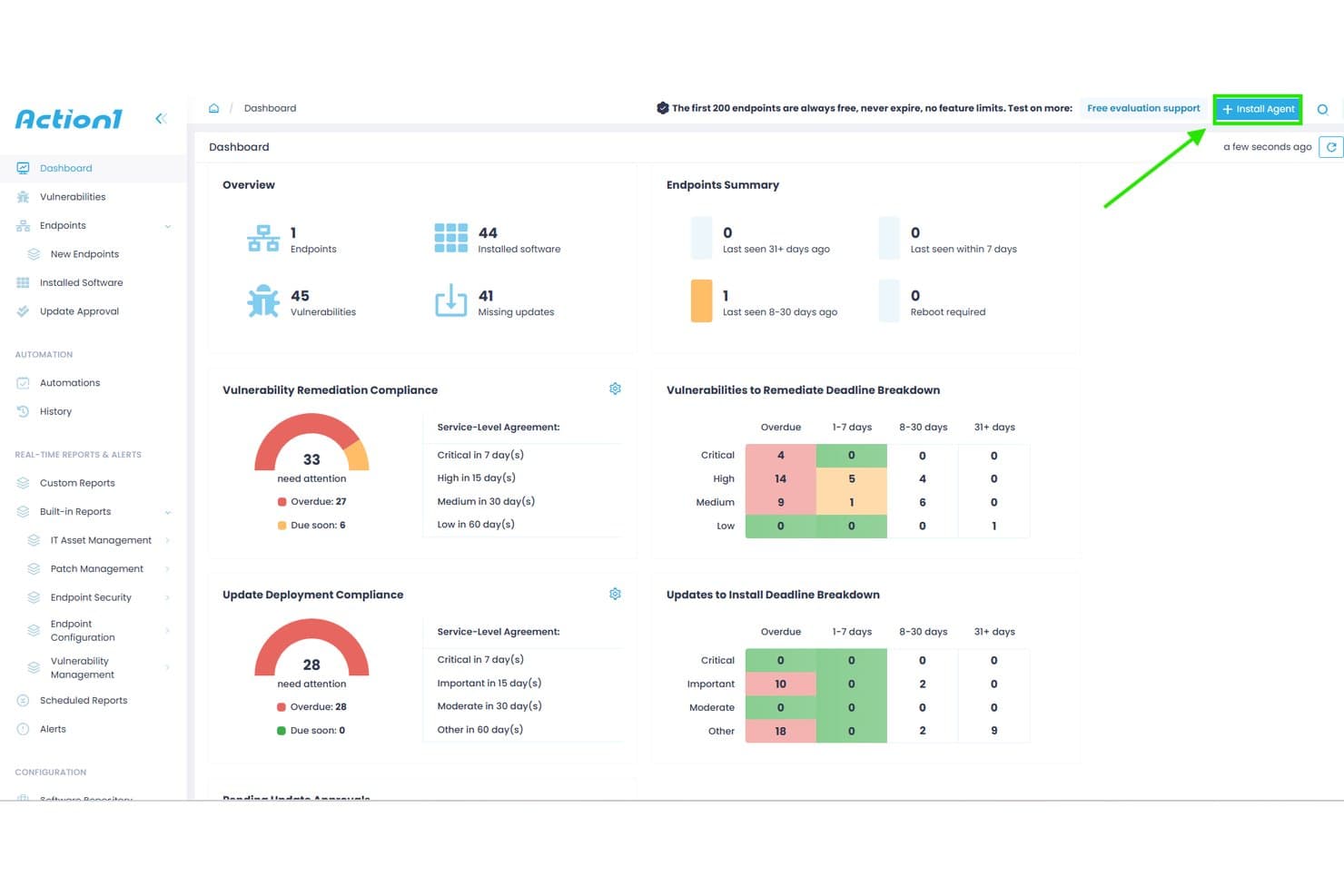
Action1 offers a centralized dashboard displaying vulnerability remediation compliance, update deployment compliance, and endpoint summaries for patch management. Action1 is a cloud-native endpoint management platform that automates OS and third-party patch deployment across Windows, macOS, and Linux systems, with CVE-mapped vulnerability assessment, ring-based staged rollouts, and compliance reporting.
Who Is Action1 Best For?
Action1 is a strong fit for IT teams in small to mid-sized organizations managing mixed-OS environments with distributed or remote endpoints across cloud and on-prem infrastructure.
Why I Picked Action1
I picked Action1 as one of the best because its cloud-native, VPN-less architecture means I can push patches to remote Debian and Ubuntu Linux endpoints without standing up any on-prem infrastructure. What I particularly like is the ring-based staged rollout system, which automatically halts deployment if a patch causes issues mid-rollout. The peer-to-peer patch distribution also handles bandwidth pressure when pushing updates across large, geographically distributed fleets simultaneously.
Action1 Key Features
- Real-time vulnerability assessment: Continuously identifies missing patches and matches vulnerabilities to CVEs on managed Linux endpoints.
- Unified cross-OS console: Manage patching for Linux, Windows, and macOS systems through a single web-based dashboard.
- 100+ audit-ready report templates: Generate compliance and remediation reports exportable in CSV and HTML formats.
- ServiceNow CMDB integration: Enriches ServiceNow CMDB with inventory and operational data from managed Linux endpoints.
Action1 Integrations
Action1 offers native integrations with ServiceNow, Microsoft Entra ID, Okta, Duo, Google, Active Directory, Rapid7, Tenable, CrowdStrike, Microsoft Defender, and provides an API for custom integrations.
Pros and Cons
Pros:
- Automated ring-based patch deployment
- Real-time vulnerability scanning for Linux endpoints
- Cloud-native platform with remote patching
Cons:
- Requires agent installation on every endpoint
- Only supports Debian and Ubuntu Linux
Learn more about Action1: Best for policy-based cross-platform updating
- 15-day free trial + free demo available
- From $1/endpoint/month (billed annually)
Visit WebsiteCustomer Rating:4.7/5
Automox offers a centralized dashboard displaying compliant devices, patch status, outstanding patches by severity, and device troubleshooting insights for Linux and cross-platform patch management. Automox is a cloud-native endpoint management platform that automates OS and third-party patching across Linux, Windows, and macOS systems using policy-driven rules and Bash-scriptable Worklets.
Who Is Automox Best For?
Automox is a strong fit for IT and security teams managing distributed endpoint fleets across mixed operating systems without on-premises patching infrastructure.
Why I Picked Automox
Automox earns its spot on my shortlist because of how its policy engine handles Linux patching across distros at scale. I can build severity-based policies targeting Ubuntu, RHEL, and Debian endpoints separately, so critical patches get prioritized without applying the same blanket rule to every host. When a package falls outside Automox's 580+ natively supported titles, Worklets let me push custom Bash scripts directly from the console without switching tools.
Automox Key Features
- Cross-platform patching console: Manage patching for Linux, Windows, and macOS devices from a single unified dashboard.
- Linux distribution support: Supports a wide range of Linux distros, including RHEL, Ubuntu, Debian, Oracle Linux, Fedora, Rocky, and AlmaLinux.
- Third-party application patching: Offers native patching for hundreds of Linux-compatible third-party software packages.
- Role-based access controls (RBAC): Set granular permissions for users to segment responsibilities and restrict actions within the platform.
Automox Integrations
Automox offers native integrations with Splashtop for remote access and supports vulnerability scanners. An API is available for custom integrations, and custom Bash or PowerShell scripts extend functionality to other tools.
Pros and Cons
Pros:
- Patch scheduling and reboot coordination controls
- Policy-based automation for Linux fleet management
- Wide distro coverage including Rocky and AlmaLinux
Cons:
- Limited out-of-the-box compliance reporting tools
- Reporting options are limited for compliance needs
 Best for multi-OS patch deployment simplicity
- 30-day free trial + free demo
- Pricing upon request
Visit WebsiteCustomer Rating:4.4/5
ManageEngine Patch Manager Plus offers a dedicated Install Linux Patch configuration interface with deployment policy settings and patch listing controls. ManageEngine Patch Manager Plus is a multi-OS patch management platform that automates patch detection, testing, and deployment across Linux, Windows, and macOS endpoints, with dedicated support for eight major Linux distributions.
Who Is ManageEngine Patch Manager Plus Best For?
It's a strong fit for IT administrators and security teams in mid-to-large enterprises that need centralized patch control across heterogeneous server and endpoint fleets.
Why I Picked ManageEngine Patch Manager Plus
ManageEngine Patch Manager Plus earns its spot on my shortlist because it patches eight Linux distros (RHEL, Ubuntu, Debian, SUSE, Oracle Linux, Rocky Linux, CentOS, and Amazon Linux) alongside Windows and macOS from one console. I particularly like the Automated Patch Deployment (APD) feature, which runs the full scan-to-install cycle without per-host intervention. The built-in patch testing and approval workflow also lets my team validate updates before they reach production servers.
ManageEngine Patch Manager Plus Key Features
- Patch rollback: Quickly revert Linux patches if issues arise after deployment.
- Custom deployment templates: Create and reuse specific patch deployment configurations for Linux environments.
- Real-time audit logs: Track every patch event and administrative action for compliance and troubleshooting.
- Bandwidth optimization: Download Linux patches once and distribute them to endpoints using internal servers.
ManageEngine Patch Manager Plus Integrations
ManageEngine Patch Manager Plus offers native integrations with Tenable.io, Tenable.sc, ServiceDesk Plus, and Jira, and provides an API for custom integrations.
Pros and Cons
Pros:
- Automated patch testing and approval workflow
- Centralized console for Linux, Windows, macOS
- Supports eight major Linux distributions
Cons:
- Limited native regulatory compliance mapping
- Initial server configuration is complex
Learn more about ManageEngine Patch Manager Plus: Best for compliance-driven patch automation
- 30-day free trial + free demo
- Pricing upon request

SecPod SanerNow Cyberhygiene Platform offers a Patch Management Status dashboard displaying remediation job details, device host statuses, patch sizes, and overall patch installation results across multiple Windows devices. SecPod SanerNow is a cloud-native cyberhygiene platform that combines patch management, vulnerability detection, and compliance monitoring across 37+ Linux variants, Windows, macOS, and 550+ third-party applications from a single lightweight agent.
Who Is SecPod SanerNow Cyberhygiene Platform Best For?
It's a strong fit for IT security and compliance teams at mid-size to large enterprises operating under regulatory frameworks like HIPAA, PCI, or NIST.
Why I Picked SecPod SanerNow Cyberhygiene Platform
SanerNow earns its spot on my shortlist because of how it maps patch status directly to compliance frameworks like HIPAA, PCI, and NIST in real time. I particularly like that its 190,000+ SCAP-based vulnerability feed auto-maps CVEs to missing Linux patches and layers EPSS exploit probability scores on top of CVSS severity. Pre-tested Linux patches ship within 24 hours of release, so my team isn't waiting on slow vendor cycles when a critical CVE drops.
SecPod SanerNow Cyberhygiene Platform Key Features
- Cloud-native patching console: Manage patch operations from a unified web console for Linux, Windows, macOS, and third-party apps.
- Single lightweight agent: Deploy patches, scan for vulnerabilities, and monitor compliance with one multifunctional agent across all endpoints.
- Policy-driven patch automation: Set custom rules to automate scan frequency, patch approval, and deployment based on business requirements.
- Pre-deployment test area: Isolate and test Linux patches before rolling them out to production systems globally.
SecPod SanerNow Cyberhygiene Platform Integrations
SanerNow offers native integrations with Freshservice, ServiceNow, SymphonyAI Summit, AWS Marketplace, and Azure Marketplace. An API is available for custom integrations.
Pros and Cons
Pros:
- Supports 37+ Linux distributions, including legacy
- Automated Linux patch rollback and staging
- Real-time compliance reporting for Linux endpoints
Cons:
- Public pricing not available on the website
- No native agentless Linux patching option
Learn more about SecPod SanerNow Cyberhygiene Platform: Best for real-time vulnerability remediation
- 30-day free trial
- Pricing upon request
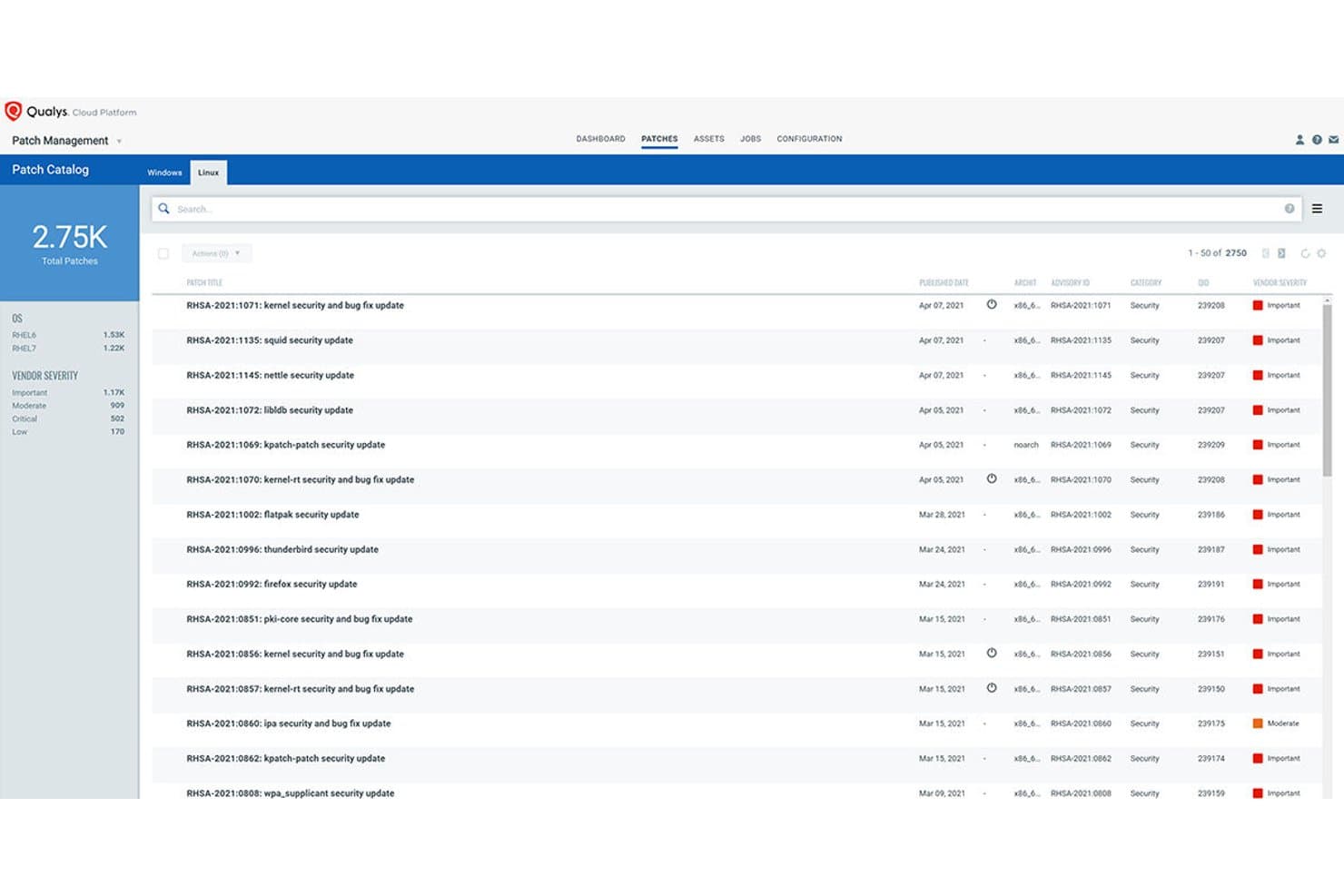
Qualys Patch Management offers a Linux Patch Catalog displaying 2,750 total patches with vendor severity ratings, advisory IDs, and published dates for RHEL systems. Qualys Patch Management is a cloud-native patch management solution that integrates directly with vulnerability detection to identify, prioritize, and deploy patches across Linux and Windows systems through a single lightweight agent.
Who Is Qualys Patch Management Best For?
It's a strong fit for security-focused IT and infrastructure teams in mid-to-large enterprises that need to tie patch deployment directly to vulnerability risk data.
Why I Picked Qualys Patch Management
I picked Qualys Patch Management as one of the best because its VMDR integration is unlike anything else in this category. When a new CVE drops, the platform automatically maps it to the relevant patch, scores it using TruRisk, and flags whether it's tied to active ransomware campaigns. From there, Zero-Touch Patch Jobs can trigger deployment across Linux fleets without manual intervention.
Qualys Patch Management Key Features
- Multi-distro Linux patching: Supports patch deployment for RHEL, CentOS, Ubuntu, Debian, SUSE, Oracle Linux, Rocky Linux, Alma Linux, and Amazon Linux.
- Pre- and post-patch scripting: Lets you configure custom scripts to run automatically before and after patch jobs.
- Yum repository management: Integrates with internal Yum repositories to manage patch staging and dependency handling for Linux systems.
- Patch compliance dashboards: Offers real-time dashboards for tracking patch status and compliance posture across all managed Linux endpoints.
Qualys Patch Management Integrations
Qualys Patch Management offers native integration with the broader Qualys Cloud Platform, including VMDR and Global AssetView. An API is available for custom integrations, and native integrations with Splunk and ServiceNow are also supported.
Pros and Cons
Pros:
- Provides risk-based patch prioritization scoring
- Supports multi-distro Linux patch orchestration
- Maps real-time CVEs directly to patches
Cons:
- Limited air-gapped or agentless deployment options
- Requires installation of Qualys Cloud Agent
Learn more about Qualys Patch Management: Best for automated lifecycle management at scale
- Free trial
- Pricing upon request

Red Hat Satellite offers a Red Hat Repositories interface where admins can browse, filter, and enable recommended RPM repositories for RHEL 8 x86_64 patch management. Red Hat Satellite is an infrastructure management platform built for RHEL environments that centralizes patch deployment, CVE remediation, compliance enforcement, and system provisioning across physical, virtual, and cloud infrastructure.
Who Is Red Hat Satellite Best For?
Red Hat Satellite is a strong fit for large enterprises managing 1,000 or more RHEL systems with dedicated infrastructure staff to maintain the platform.
Why I Picked Red Hat Satellite
Red Hat Satellite earns its spot on my shortlist because of how it structures patching across lifecycle environments. I can curate distinct Content Views for Dev, QA, and Production, promoting a tested patch set through each stage before it touches production servers. The CVE prioritization engine, powered by Red Hat Insights, also ranks vulnerabilities by actual risk to your environment rather than generic severity scores alone.
Red Hat Satellite Key Features
- Centralized security hub: Issue and manage patches from a single interface across large RHEL environments.
- OpenSCAP integration: Scan and remediate servers for compliance using industry-standard security protocols.
- Unified provisioning workflows: Provision bare-metal and virtual hosts with automated integration for DNS, DHCP, and identity.
- Agent-based and agentless execution: Manage endpoints with both lightweight agents and remote SSH-based workflows.
Red Hat Satellite Integrations
Red Hat Satellite offers native integrations with Red Hat Ansible Automation Platform, OpenSCAP, Red Hat Insights, VMware vSphere, and DNS, DHCP, and identity services. An API is available for custom integrations.
Pros and Cons
Pros:
- Offers air-gapped and disconnected mode support
- Granular patch promotion across staged environments
- Tailored for large RHEL and CentOS environments
Cons:
- Limited native support for Debian distributions
- Native support limited to Red Hat-based distros
Learn more about Red Hat Satellite: Best for centralized Ubuntu administration
- 30-day free trial
- From $25/machine/year

Ubuntu Landscape offers a centralized patch management dashboard displaying upgrade statuses, security updates, and instance health across thousands of Linux machines. Canonical Landscape is Ubuntu's native systems management platform, built by Canonical, that centralizes patch deployment, compliance reporting, and repository management across Ubuntu desktops, servers, cloud instances, and airgapped environments.
Who Is Canonical Landscape Best For?
Canonical Landscape suits IT teams that have standardized on Ubuntu across their server and desktop fleets, particularly in regulated industries needing built-in compliance reporting.
Why I Picked Canonical Landscape
I picked Canonical Landscape as one of the best because no other tool patches Ubuntu fleets with the same depth of native integration. I particularly like how policy-based patch rules apply across up to 40,000 machines from a single instance, and Livepatch handles critical kernel CVEs without scheduling a reboot. The built-in compliance reporting maps directly to frameworks like DISA-STIG, PCI-DSS, and CIS Benchmark out of the box.
Canonical Landscape Key Features
- Custom profiles: Manage different Ubuntu machine classes with tailored update and patch policies.
- Scriptable API: Automate patching tasks and integrate systems using a REST API.
- APT repository mirroring: Mirror and manage both internal and external software repositories securely.
- Dynamic search groups: Create real-time asset groups for targeted patching or compliance actions.
Canonical Landscape Integrations
Canonical Landscape offers native integrations with Canonical Livepatch, Ubuntu Pro, Azure Active Directory, Google, Okta, and IBM for identity management, and supports API access for custom integrations.
Pros and Cons
Pros:
- Handles airgapped and public cloud environments
- Automated compliance reports for major standards
- Deep Ubuntu CVE and security patching integration
Cons:
- Lacks granular patch rollback capabilities
- No support for non-Ubuntu distributions
Learn more about Ubuntu Landscape:

Foreman offers a centralized monitoring dashboard displaying host configuration status, run distribution, task status, and a configuration sync chart for Linux patch management. Foreman is an open-source lifecycle management platform that handles provisioning, configuration, and patch management for Linux servers across bare-metal, virtual, and cloud environments through its Katello plugin.
Who Is Foreman Best For?
Foreman suits Linux system administrators and infrastructure teams managing large server fleets who have the in-house sysadmin expertise to configure and maintain an open-source toolchain.
Why I Picked Foreman
I picked Foreman as one of the best because its Katello plugin gives you a structured, promotion-based patching workflow that's rare in the open-source space. I can define content views that freeze a snapshot of packages, then promote them through lifecycle environments (Dev, QA, Production) before anything touches a live server. The remote execution plugin handles the actual patching via SSH across host groups, with scheduling and concurrency controls that prevent a single job from overwhelming production systems.
Foreman Key Features
- OpenSCAP compliance scanning: Integrates with OpenSCAP to automate system compliance and vulnerability assessments.
- Discovery plugin: Automatically detects and registers new hardware on the network for rapid onboarding.
- Multi-distro repository management: Supports hosting and syncing package repositories for RHEL, CentOS, Debian, Ubuntu, and more.
- Role-based access control: Provides granular permissions management with user, role, and organization-level access settings.
Foreman Integrations
Foreman has native integrations with Ansible, Puppet, Chef, Salt, VMware vCenter, oVirt, Amazon EC2, Google Compute Engine, OpenStack, and FreeIPA, and provides a RESTful API for custom integrations.
Pros and Cons
Pros:
- OpenSCAP compliance and CVE reporting
- Supports RHEL, CentOS, Debian, Ubuntu, Fedora
- Lifecycle-based promotion for patch workflows
Cons:
- No native Windows patch management support
- Requires strong Linux sysadmin knowledge
Learn more about Foreman: Best for multi-distribution Linux management
- Free demo
- Pricing upon request
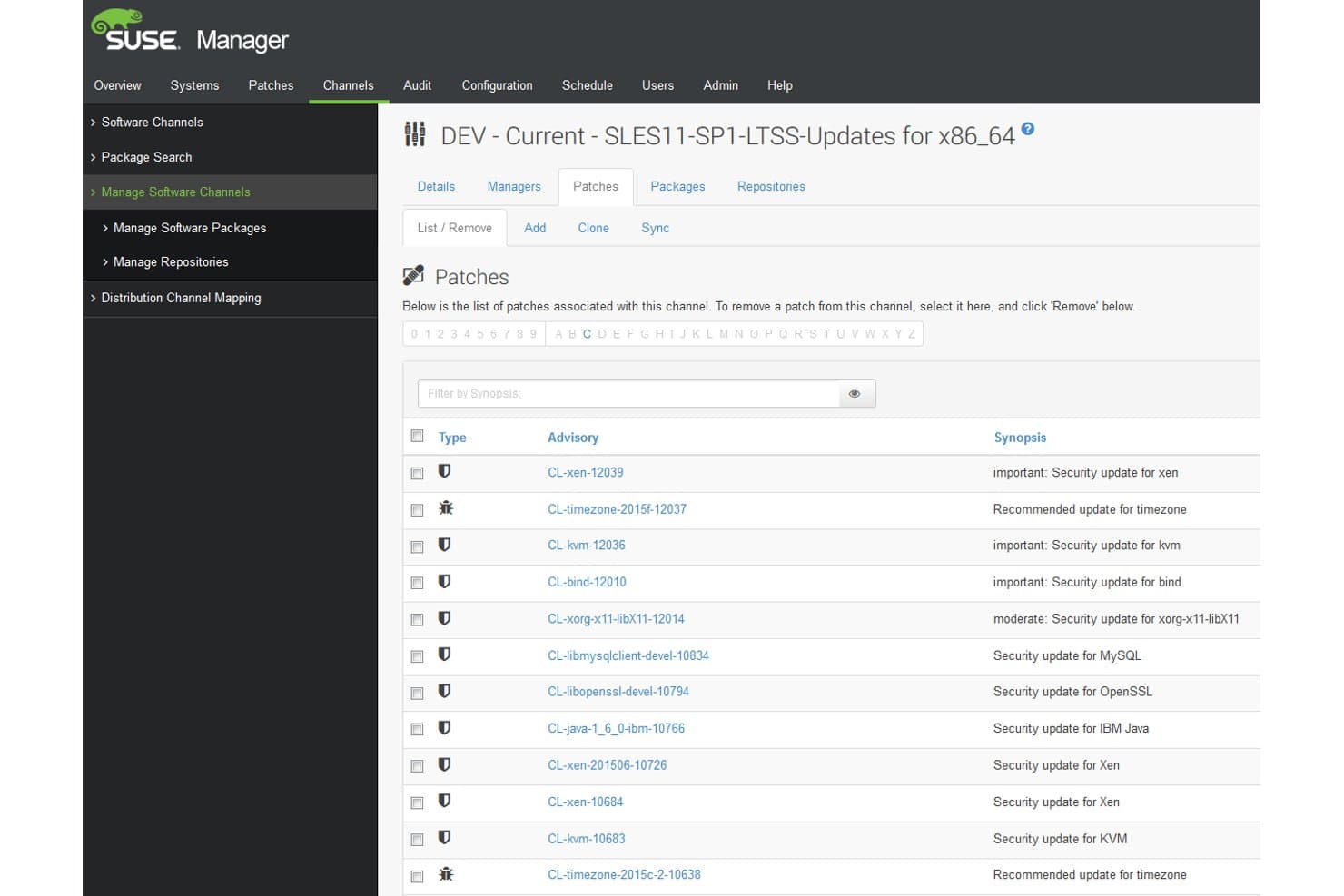
SUSE Multi-Linux Manager offers a detailed patch management interface listing security and recommended updates with advisory codes, types, and synopses for a specific software channel. SUSE Multi-Linux Manager is an open-source Linux patch management platform that centralizes patch deployment, CVE remediation, configuration management, and OpenSCAP-based compliance auditing across 16+ Linux distributions from a single console.
Who Is SUSE Multi-Linux Manager Best For?
It's a strong fit for enterprise IT and infrastructure teams managing large, mixed-distro Linux environments across on-prem, cloud, and hybrid infrastructure.
Why I Picked SUSE Multi-Linux Manager
SUSE Multi-Linux Manager earns its spot on my shortlist because it handles multi-distro patching at a scale I haven't seen matched elsewhere. My team can manage RHEL, Ubuntu, Debian, Oracle Linux, and 12+ other distributions from a single console, without maintaining separate toolchains per distro. I also rely on the Content Lifecycle Management feature to stage patches through dev and test environments before pushing them to production systems.
SUSE Multi-Linux Manager Key Features
- OpenSCAP-based compliance auditing: Run automated security scans using OpenSCAP and apply remediation scripts or Ansible playbooks for compliance standards.
- Salt and Ansible integration: Manage configuration and automation across systems using both SaltStack and native Ansible playbooks.
- Containerized architecture: Deploy the management server and proxies as containers for quick redeployment and reliability.
- Cloud marketplace availability: Access and deploy SUSE Multi-Linux Manager through AWS, Azure, Google Cloud, and Oracle Cloud marketplaces.
SUSE Multi-Linux Manager Integrations
SUSE Multi-Linux Manager offers native integrations with Ansible, SaltStack, OpenSCAP, SCAP Security Guide, and is available in the AWS, Azure, Google Cloud, and Oracle Cloud marketplaces. An API is available for custom integrations.
Pros and Cons
Pros:
- Multi-stage patch lifecycle and approvals
- Automated OpenSCAP compliance auditing available
- Supports 16+ Linux distributions natively
Cons:
- Requires high system resources for deployment
- No native iOS or Android mobile app
Learn more about SUSE Multi-Linux Manager:
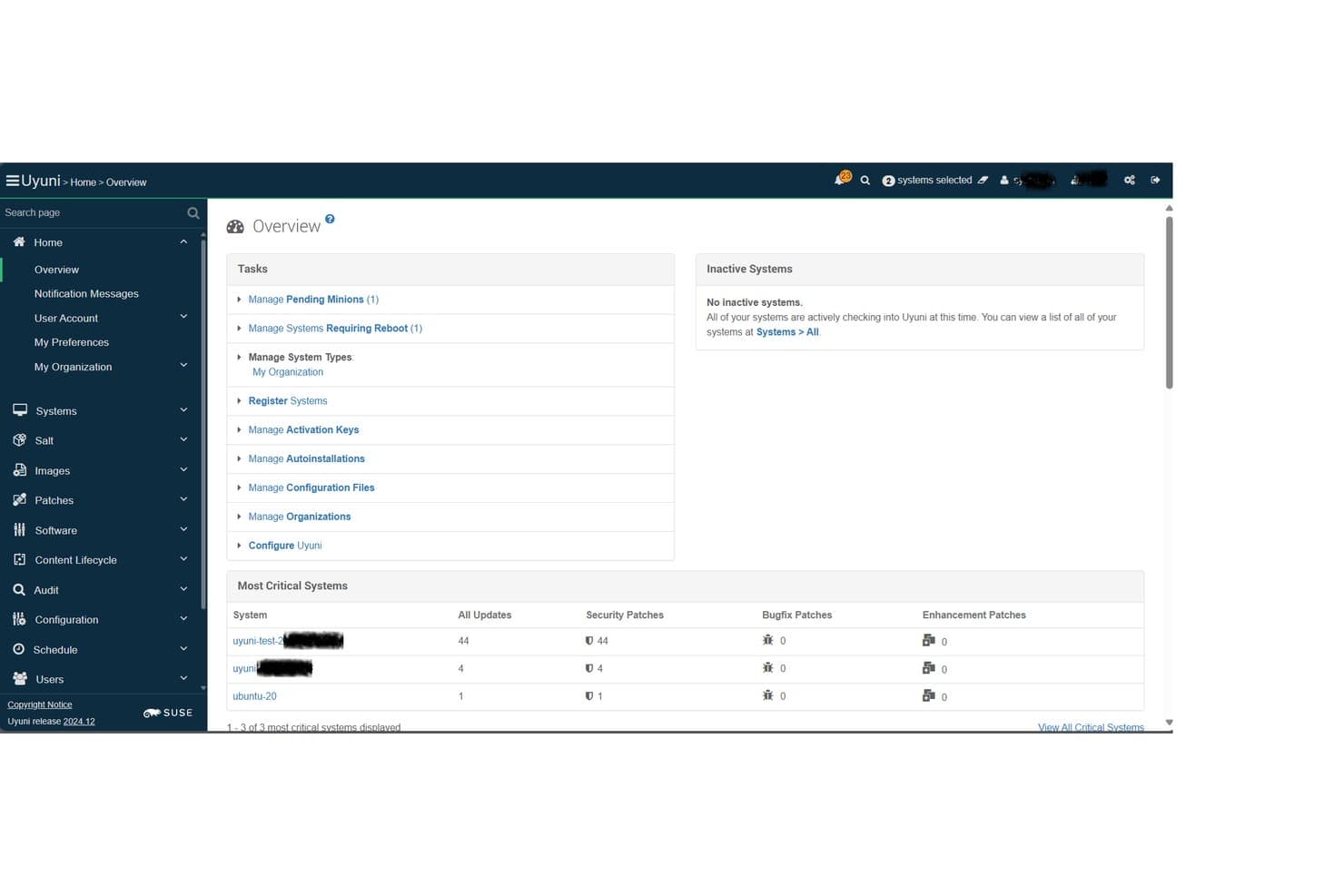
Uyuni offers a centralized Overview dashboard displaying critical system patch counts, pending minions, and security updates across managed Linux systems. Uyuni is an open-source Linux infrastructure management platform built on Salt that combines multi-distro patch management, compliance auditing, provisioning, and configuration management across physical, virtual, cloud, and container environments.
Who Is Uyuni Best For?
Uyuni is a strong fit for Linux system administrators and infrastructure teams managing large, mixed-distro server fleets who need enterprise-grade patch control without a commercial license.
Why I Picked Uyuni
I picked Uyuni as one of the best because its Salt-based orchestration engine sets it apart from every other open-source option in this space. The Uyuni Server runs as a full Salt Master, so my team can execute patch actions across thousands of Linux nodes simultaneously without per-host manual intervention. I also rely on its content lifecycle management to stage patches through dev, test, and production channels before anything reaches live systems.
Uyuni Key Features
- Multi-distro client support: Manage and patch a wide variety of Linux distributions, including SUSE, Red Hat, Ubuntu, Debian, AlmaLinux, Rocky Linux, and more.
- Compliance auditing and reporting: Track hardware and software changes, audit compliance status, and generate detailed reports for your Linux environments.
- Drift detection: Identify and alert on systems that deviate from defined hardened baselines or security templates.
- Visualization and grouping: Organize servers using tags and view their relationships with graphical dashboards for easier system oversight.
Uyuni Integrations
Uyuni offers native integrations with Salt (SaltStack) for configuration management and Cobbler for provisioning. It supports a range of Linux distributions as managed clients and provides an API for custom integrations.
Pros and Cons
Pros:
- Open source with no vendor lock-in
- Salt-based bulk automation for patch tasks
- Supports many enterprise and community Linux distros
Cons:
- No built-in PCI or HIPAA compliance templates
- Steep operational setup for new users
Learn more about Uyuni:
Outro software de gestão de patches para Linux
Eis algumas opções adicionais de software de gestão de patches para Linux que não entraram na minha seleção, mas que ainda vale a pena consultar:
- 11Ivanti Neurons for Patch ManagementBest for predictive patching with risk insights
- 12AWS Systems Manager Patch ManagerBest for managing patching within AWS environments
- 13Red Hat Ansible Automation PlatformBest for playbook-driven update routines
- 14TaniumBest for real-time endpoint patch deployment
- 15Heimdal SecurityBest for integrated threat and update control
- 16Progress ChefBest for infrastructure as code patch automation
- 17Puppet EnterpriseBest for codified patch policy management
- 18NinjaOneBest for intuitive multi-site patch workflows
- 19HCL BigFixBest for scalable enterprise patch enforcement
- 20Jetpatch Patch ManagementBest for agent-based patch orchestration
How I Evaluate Linux Patch Management Software
I split my evaluation into two layers: the baseline requirements a tool must meet—like multi-distro support and CVE mapping—and the differentiators that separate good tools from great ones.
Core Functionality (Table Stakes for This List)
When I'm selecting tools for my list, I rank each one on a scale from 0 (does not offer the functionality) to 5 (excels in this area) for each core functionality listed below. Then, I calculate the tool's total score as a percentage. Each tool needs to achieve a minimum total score of 65% to be considered for inclusion.
- Multi-Distro Support: I check whether a tool can patch across the distributions your fleet actually runs—RHEL, Ubuntu, Debian, SUSE, and Oracle Linux at a minimum.
- Automated Patch Deployment: The tool should handle detection, download, and installation without you SSH-ing into each host manually or stitching together cron jobs and scripts.
- CVE Remediation: I evaluate how well the platform maps missing patches to specific CVEs and whether it lets you prioritize by severity so you fix the urgent ones first.
- Scheduling & Maintenance Windows: Good tools let you define patch windows, stagger rollouts across server groups, and orchestrate reboots so production traffic isn't interrupted.
- Compliance Reporting: I look for audit trails and dashboards that show patch status across your fleet—the kind of evidence auditors ask for during PCI or SOC 2 reviews.
- Agent or Agentless Coverage: Whether a platform uses lightweight agents, agentless SSH connections, or both, it should cover on-prem servers, cloud instances, and hybrid setups.
Once I have a list of tools that meet the criteria, I consider what sets each platform apart.
Differentiating Factors (What Sets Vendors Apart)
Here's how I compare and contrast different vendors:
Standout Features
Live kernel patching is a big differentiator. If a tool supports kpatch or KernelCare, your team can apply kernel updates on production servers without scheduling a reboot. I also evaluate third-party package patching, since most Linux fleets run Apache, NGINX, Docker, or MySQL alongside the OS. Unpatched third-party packages create real gaps. Automated rollback is another separator—snapshot-based or transactional rollbacks let you recover when a patch breaks something in staging or production.
Beyond Features
Deployment model matters a lot. Some teams need air-gapped or disconnected installs for regulated environments, while others want SaaS with zero infrastructure overhead. I evaluate whether a platform fits into existing toolchains—integrations with Jira or ServiceNow for change management, and with scanners like Tenable or Rapid7 for vulnerability context. Scalability across hybrid setups is another factor I check, especially bandwidth-efficient patch distribution for fleets spread across cloud regions and on-prem data centers.
Como escolher software de gestão de patches para Linux
É fácil ficar atolado em longas listas de funcionalidades e estruturas de preços complexas. Para ajudar a manter o foco enquanto analisa o seu processo específico de seleção de software, eis uma lista de verificação dos fatores a ter em conta:
| Fator | O que considerar |
|---|---|
| FatorEscalabilidade | O que considerarO software suportará o número atual e previsto de servidores? Informe-se sobre os limites de crescimento, o agrupamento de nós e a capacidade de aplicar patches em ambientes híbridos. |
| FatorIntegrações | O que considerarA ferramenta funciona com o seu sistema de gestão de tickets, SIEM ou scanners de vulnerabilidades? Verifique a compatibilidade com as principais plataformas da sua pilha de monitorização e operações. |
| FatorPersonalização | O que considerarPode ajustar os fluxos de trabalho de aplicação de patches para se adequarem às suas janelas de manutenção, controlos de alterações ou processos de aprovação? Procure flexibilidade nas políticas, não uma solução que sirva para todos. |
| FatorFacilidade de utilização | O que considerarA interface de utilizador é simples? Os novos administradores conseguem começar rapidamente? Tenha cuidado com fluxos de trabalho complexos que atrasem os ciclos de aplicação de patches ou provoquem erros em produção. |
| FatorImplementação e integração inicial | O que considerarQuanto tempo e conhecimento interno serão necessários para a configuração? Procure documentação disponível, suporte dedicado à integração inicial e ferramentas de migração para grandes frotas. |
| FatorCusto | O que considerarQual é o modelo de preços — por nó, por site ou por subscrição? Considere os custos contínuos das licenças, os compromissos mínimos e o custo total à escala máxima de implementação. |
| FatorMedidas de proteção de segurança | O que considerarQue controlos de autenticação, encriptação e acesso estão integrados? Confirme que a ferramenta está alinhada com os requisitos de segurança e auditoria da sua organização. |
| FatorRequisitos de conformidade | O que considerarO software suporta as suas necessidades de conformidade (PCI, HIPAA, SOC 2)? Informe-se sobre modelos de relatórios de conformidade, registos de auditoria de patches e evidências para auditorias externas. |
O que é o software de gestão de patches para Linux?
O software de gestão de patches para Linux automatiza o processo de identificação, implementação e acompanhamento de atualizações e patches de segurança em sistemas Linux. Estas ferramentas ajudam a sua equipa a manter uma segurança consistente, corrigir vulnerabilidades e gerir requisitos de conformidade em diferentes distribuições Linux a partir de um painel central. O software de gestão de patches foi concebido para se adaptar a diversos ambientes de infraestrutura, suportando desde servidores locais até configurações na nuvem e híbridas.
Funcionalidades do software de gestão de patches para Linux
Ao selecionar software de gestão de patches para Linux, procure as seguintes funcionalidades principais:
- Suporte para várias distribuições: Faça a gestão de atualizações em várias das principais distribuições Linux a partir do mesmo painel, reduzindo a sobrecarga das equipas que trabalham em ambientes mistos.
- Implementação automatizada de patches: Identifique, transfira e instale rapidamente as atualizações sem intervenção manual, garantindo que os sistemas se mantêm atualizados e seguros.
- Priorização de CVE: Associe patches a CVE específicos e dê prioridade à implementação das atualizações com base na gravidade das vulnerabilidades, reforçando a segurança e a conformidade.
- Agendamento de janelas de manutenção: Defina janelas de manutenção personalizáveis para a aplicação de patches e reinícios automatizados, minimizando o impacto nas cargas de trabalho de produção.
- Relatórios de conformidade de patches: Gere painéis e relatórios que apresentam o estado, o histórico e os registos de auditoria dos patches para revisões internas ou verificações de conformidade regulamentar.
- Aplicação de patches a pacotes de terceiros: Atualize pacotes que não fazem parte do sistema operativo, como repositórios NGINX, PostgreSQL ou Docker, juntamente com as atualizações padrão do sistema.
- Capacidade de reversão: Restaure estados anteriores do sistema caso uma atualização cause problemas, utilizando funcionalidades de reversão baseadas em instantâneos ou transações.
- Cobertura baseada em agentes ou sem agentes: Escolha uma implementação baseada em agentes para obter um controlo mais aprofundado ou métodos sem agentes (SSH) para abranger rapidamente hosts distribuídos.
- Integrações através de API: Ligue-se a ferramentas de gestão de serviços de TI, monitorização ou automatização para sincronizar fluxos de trabalho, acionar notificações ou automatizar processos de aprovação de patches.
- Controlo de acesso baseado em funções (RBAC): Defina permissões granulares para os membros da equipa, limitando quem pode agendar, aprovar ou implementar patches nos sistemas.
Benefícios do software de gestão de patches para Linux
A implementação de software de gestão de patches para Linux proporciona vários benefícios à sua equipa e à sua empresa. Eis alguns dos benefícios que pode esperar:
- Melhoria da postura de segurança: A deteção e a aplicação automatizadas de patches de vulnerabilidades ajudam a corrigir rapidamente as falhas antes de os atacantes explorarem CVE conhecidos.
- Conformidade consistente: Os relatórios integrados e os registos de auditoria facilitam a demonstração da conformidade regulamentar com estruturas como PCI, HIPAA ou SOC 2.
- Redução do esforço manual: A automatização e o agendamento eliminam a necessidade de executar tarefas de aplicação de patches morosas e repetitivas em grandes conjuntos de servidores.
- Minimização do tempo de inatividade: Os controlos das janelas de manutenção e as funcionalidades de aplicação de patches ao kernel em tempo real permitem à sua equipa atualizar sistemas críticos com pouca ou nenhuma interrupção operacional.
- Cobertura abrangente de ambientes: Faça a gestão centralizada das atualizações em ambientes na nuvem, locais e híbridos, com suporte para várias distribuições Linux e pontos terminais.
- Resposta mais rápida a incidentes: O mapeamento e a priorização integrados de CVE permitem uma correção mais rápida quando são descobertas novas vulnerabilidades.
- Controlo e visibilidade granulares: O acesso baseado em funções e os painéis detalhados ajudam a gerir permissões, acompanhar o progresso e manter as partes interessadas informadas.
Custos e preços do software de gestão de patches para Linux
A seleção de software de gestão de patches para Linux exige uma compreensão dos vários modelos de preços e planos disponíveis. Os custos variam consoante as funcionalidades, a dimensão da equipa, os complementos e outros fatores. A tabela abaixo resume os planos comuns, os respetivos preços médios e as funcionalidades normalmente incluídas nas soluções de software de gestão de patches para Linux:
Tabela de comparação de planos de software de gestão de patches para Linux
| Tipo de plano | Preço médio | Funcionalidades comuns |
|---|---|---|
| Tipo de planoPlano gratuito | Preço médio$0 | Funcionalidades comunsAplicação básica de patches para um número limitado de hosts, atualizações manuais e suporte da comunidade. |
| Tipo de planoPlano pessoal | Preço médio$5-$15/servidor/mês | Funcionalidades comunsAplicação automatizada de patches, suporte para várias distribuições Linux, relatórios básicos de conformidade e notificações por e-mail. |
| Tipo de planoPlano empresarial | Preço médio$20-$40/servidor/mês | Funcionalidades comunsAgendamento avançado, aplicação de patches a pacotes de terceiros, priorização de CVE, acesso à API e suporte padrão. |
| Tipo de planoPlano empresarial avançado | Preço médio$50-$100/servidor/mês | Funcionalidades comunsControlos de acesso baseados em funções, ferramentas de auditoria de conformidade, aplicação de patches ao kernel em tempo real, suporte premium 24/7 e integrações com ferramentas de gestão de serviços de TI. |
Perguntas frequentes sobre software de gestão de patches para Linux
Eis algumas respostas a perguntas comuns sobre software de gestão de patches para Linux:
Como é que o software de gestão de patches para Linux ajuda na segurança?
O software de gestão de patches para Linux automatiza a identificação e aplicação de patches de segurança em toda a sua infraestrutura de TI, reforçando a segurança geral dos endpoints e a gestão de vulnerabilidades. A substituição da aplicação manual de patches por correções de segurança automatizadas reduz a exposição, protegendo os sistemas contra violações de dados e permitindo à sua equipa implementar atualizações de segurança urgentes e responder rapidamente a novos CVEs.
Posso gerir várias distribuições Linux a partir de uma única ferramenta?
Sim, as plataformas suportam distribuições como Ubuntu, Red Hat Enterprise Linux, Debian, SUSE e Oracle Linux, utilizando gestores de pacotes nativos como dnf ou zypper. Muitas ferramentas funcionam como uma solução RMM ou de gestão unificada de endpoints, permitindo-lhe controlar políticas de implementação, agendar regras de políticas de gestão de patches e gerir atualizações em vários ambientes a partir de um único ecrã.
Que funcionalidades de elaboração de relatórios devo esperar?
Deve esperar painéis de conformidade, registos de auditoria e relatórios personalizáveis que mostrem a conformidade dos patches em todo o seu parque informático. Estas funcionalidades ajudam-no a preparar-se para uma auditoria de segurança, acompanhar a gestão geral dos ativos, cumprir requisitos regulamentares e proporcionar total transparência às equipas de gestão e segurança.
É possível aplicar patches sem agentes com estas ferramentas?
Sim, muitas soluções disponibilizam a aplicação de patches sem agentes através de ligações SSH e acesso remoto, simplificando a implementação e evitando scripts personalizados. No entanto, a instalação de agentes locais pode proporcionar uma visibilidade mais aprofundada do sistema, um melhor alinhamento com a plataforma psa e uma automatização mais flexível em ambientes de rede complexos.
Que tipo de suporte é normalmente disponibilizado pelos fornecedores?
Os fornecedores disponibilizam frequentemente vários níveis de suporte, que vão desde fóruns da comunidade e documentação com planos gratuitos até suporte premium 24 horas por dia, 7 dias por semana, e gestores de sucesso do cliente dedicados para clientes empresariais. Confirme sempre os canais disponíveis e os tempos de resposta antes de assumir um compromisso.