

Gerir o apoio ao cliente pode parecer uma tarefa avassaladora. Pretende soluções rápidas e eficientes para a sua equipa, mas as opções podem ser intimidantes. O software de assistência SaaS ajuda a melhorar a produtividade da sua equipa e a satisfação dos clientes.
Há anos que testo e analiso software de forma independente, para que possa confiar nas minhas opiniões. Comprometo-me a fornecer análises imparciais e bem fundamentadas das melhores opções de assistência SaaS disponíveis.
Neste artigo em formato de lista, encontrará as minhas principais escolhas de software de assistência SaaS, cada uma selecionada pelos seus pontos fortes únicos. Quer tenha uma pequena empresa ou uma grande organização, há aqui uma solução para todas as equipas.
Why Trust Our Software Recommendations
6,700+
Reviews
20
Industry experts
16+
Evaluation factors
14
Years
Our team has been testing and reviewing software since 2012. As tech leaders ourselves, we know how difficult—and important—it is to choose the right software.
For this guide, we evaluated tools using hands-on testing and independent research, scoring tools using our selection criteria.
Our reviews reflect our human editorial judgment, not a sales pitch.
Expert reviewers:
- Paulo Gardini MiguelTech Director
 Tim FisherVP of AI
 Gabriel RosasTech Lead & Software Architect
 Christhian GruhnTech Lead & Platform Architect

Tabela de comparação de software de assistência SaaS
Esta tabela de comparação resume os detalhes de preços das minhas principais escolhas de software de assistência SaaS:
| Tool | Best For | Trial Info | Price | ||
|---|---|---|---|---|---|
| 1 | Best for AI-enhanced IT service management | 14-day free trial | From $19/user/month (billed annually) | Website | |
| 2 | Best for AI-powered helpdesk setup | Free plan + 14-day free trial + free demo available | From $16/user/month (billed annually) | Website | |
| 3 | Best for native marketplace integrations | 14-day free trial + free demo available | From $45/user/month (billed annually) | Website | |
| 4 | Best for maintaining personal customer interactions | Free plan + 15-day free trial + free demo available | From $25/user/month (billed annually) | Website | |
| 5 | Best for PSA and RMM integration | 14-day free trial | Pricing upon request | Website | |
| 6 | Best for omnichannel support | 14-day free trial available | From $29/user/month (billed annually) | Website | |
| 7 | Best for building custom AI chatbots | 7-day free trial + demo available | From $40/month | Website | |
| 8 | Best for user-friendly interface | Free plan + free demo available | From $29/user/month | Website | |
| 9 | Best for e-commerce support | 7-day free trial | From $10/month | Website | |
| 10 | Best for customization | 14-day free trial + free demo available | From $29/user/month | Website |


Análise do melhor software de assistência SaaS
Apresentamos abaixo os meus resumos do melhor software de assistência SaaS que integrou a minha seleção. Estas análises abrangem as principais funcionalidades, vantagens e desvantagens, integrações e casos de utilização ideais para várias soluções de assistência, ajudando-o a encontrar a opção mais adequada.
 Best for AI-enhanced IT service management
- 14-day free trial
- From $19/user/month (billed annually)
Visit WebsiteCustomer Rating:4.6/5
Freshservice uses AI to automate ticket management and speed up IT support. For businesses seeking to enhance their IT service management, Freshservice offers a sophisticated solution that streamlines operations and reduces inefficiencies. Designed for enterprises across sectors, this platform integrates AI capabilities to address challenges such as high operating costs and inefficient ticket management. Freshservice stands out for its ability to unify IT, HR, finance, and operations, making it an ideal choice for organizations looking to optimize their service delivery processes.
Why I Picked Freshservice
I picked Freshservice for its unique ability to integrate AI into IT service management, a crucial capability for businesses aiming to enhance efficiency and reduce operating costs. The platform's incident management feature allows your team to handle and resolve issues swiftly, minimizing downtime. Additionally, its knowledge management system helps in creating a centralized repository of information, making it easier for users to find solutions without external assistance. These features, combined with its adherence to ITIL standards, make Freshservice a compelling choice for organizations focused on optimizing their service management processes.
Freshservice Key Features
In addition to its AI capabilities and ITIL compliance, Freshservice offers:
- Service Catalog: This feature allows your team to easily request and access available services, improving operational efficiency.
- Advanced Analytics: Gain insights into your IT service performance with comprehensive reporting tools, helping you make informed decisions.
- IT Asset Management: Track all your IT assets to ensure they align with your business goals.
- Collaboration Tools: Facilitate communication and collaboration across different departments, enhancing overall service delivery.
Freshservice Integrations
Integrations include Microsoft Teams, Slack, Jira, Google Workspace, Azure AD, Salesforce, Trello, Dropbox, and GitHub.
Pros and Cons
Pros:
- Centralized ticket views improve team coordination
- Strong ITIL-aligned workflows for structured service delivery
- Supports SLA tracking and policy differentiation
Cons:
- Mobile app has limited functionality for some users
- Asset management can get expensive as you scale
Learn more about Freshservice: Best for AI-powered helpdesk setup
- Free plan + 14-day free trial + free demo available
- From $16/user/month (billed annually)
Visit WebsiteCustomer Rating:4.6/5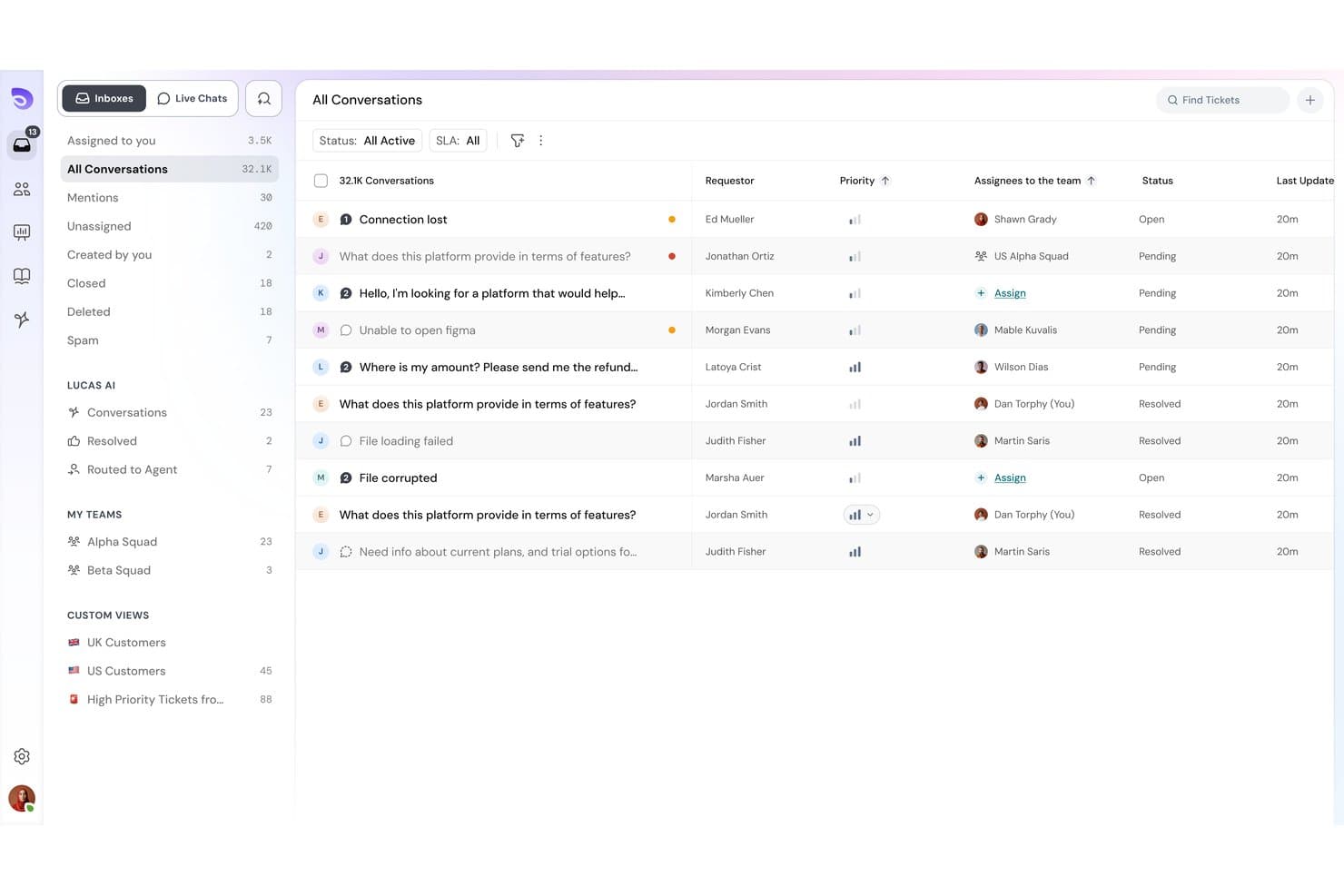
SparrowDesk offers an omnichannel inbox with all conversations, priority levels, assignees, and status tracking in one unified view. SparrowDesk is an AI-powered helpdesk platform that pairs an autonomous AI agent with a human-agent copilot, bringing together omnichannel ticket management, a self-updating knowledge base, and no-code workflow automation in one system.
Who Is SparrowDesk Best For?
SparrowDesk suits growing businesses and mid-sized customer support teams that need to scale ticket handling without adding headcount.
Why I Picked SparrowDesk
SparrowDesk earns its spot on my shortlist because of how fast you can actually go live. I love that Zoona AI trains directly from existing PDFs, policy docs, or website URLs, with no manual knowledge-building required. The self-updating knowledge base is what really sets it apart: Zoona flags gaps it can't answer and updates itself automatically, so my team isn't constantly maintaining it between product updates or policy changes.
SparrowDesk Key Features
- Omnichannel inbox: Manage email, live chat, WhatsApp, and Slack support messages from a single unified queue.
- Custom workflow automation: Build no-code automations to route tickets, set SLAs, and assign tasks based on set rules.
- Service level agreement tracking: Define and track SLA targets with automated breach notifications for response and resolution times.
- Multi-brand and portal support: Host multiple public help centers and manage separate support workflows for different brands or products.
SparrowDesk Integrations
SparrowDesk provides native integrations with Shopify, WhatsApp, Linear, Slack, and Gmail, and offers an API for custom integrations.
Pros and Cons
Pros:
- No-code workflow setup available
- Self-updating knowledge base reduces maintenance
- Zoona AI trains from existing docs instantly
Cons:
- Newer product with a smaller user community
- Limited reporting depth
Learn more about SparrowDesk: Best for native marketplace integrations
- 14-day free trial + free demo available
- From $45/user/month (billed annually)
Visit WebsiteCustomer Rating:4.4/5
eDesk centralizes ecommerce support tickets with AI classification and smart inbox. Are you navigating the complexities of ecommerce customer support and seeking a solution that integrates with your operations? eDesk might be the tool you need, with native marketplace integrations that connect your support directly to platforms like Amazon and eBay. It addresses the challenges of multi-channel customer support with features like a unified inbox and AI automation, helping reduce response times and keep customer communication organized.
Why I Picked eDesk
I picked eDesk for its native marketplace integrations, which connect your support directly with platforms like Amazon and eBay and keep customer and order data in one place. Its unified smart inbox centralizes all messages with full order context, helping your team respond quickly and accurately. In addition, AI-powered automation handles routine customer inquiries, reducing manual workload and improving daily support efficiency.
eDesk Key Features
In addition to native marketplace integrations, eDesk offers:
- 24/7 Chatbot Support: This feature provides real-time assistance to customers, converting website visitors into potential buyers.
- Feedback Management Tools: These tools enable your team to gather and analyze customer reviews and seller ratings, enhancing product and service quality.
- Real-Time Insights and Reporting: With this feature, you can access data-driven insights to optimize your support operations and improve decision-making.
eDesk Integrations
Integrations include Amazon, eBay, Walmart, Etsy, Shopify, WhatsApp, Facebook, Instagram, Magento, and BigCommerce.
Pros and Cons
Pros:
- Designed to handle high volumes of ecommerce inquiries
- AI automations reduce repetitive support tasks
- Integrates rich order data for enhanced customer service
Cons:
- Primarily built for ecommerce, less flexible for other industries
- Reporting customization is limited for complex analysis
Learn more about eDesk: Best for maintaining personal customer interactions
- Free plan + 15-day free trial + free demo available
- From $25/user/month (billed annually)
Visit WebsiteCustomer Rating:4.5/5
Help Scout's collision detection feature prevents duplicate replies Help Scout is a SaaS help desk for support teams that need personalized, human service at scale. It centralizes customer messages and context so agents can respond quickly without losing individual detail. It is ideal for businesses seeking a software solution that combines efficiency with a personal touch. It helps address common challenges such as managing high volumes of customer inquiries and streamlining workflow processes.
Why I Picked Help Scout
I picked Help Scout because its shared inbox pairs customer history with private notes and assignments, giving teams full context on every conversation. That lets teams collaborate without losing the personal tone customers expect. Beacon extends this by embedding help articles and messaging directly on your site, so customers can find answers or contact support without leaving the page. It’s also simple enough that sales and product teams can assist without training.
Help Scout Key Features
In addition to its shared inbox and Beacon, Help Scout many other features that may be useful for customer support teams:
- Knowledge Base: Built-in documentation allows customers to find answers independently, integrated with Beacon for real-time article suggestions.
- AI Tools: Automates support with AI-driven features like AI Summarize for quick conversation summaries and AI Assist for response drafting.
- Customer Management: Provides a sidebar with customer profiles, including past interactions and custom properties, enhancing context for support teams.
- Workflow Automation: Uses rule-based workflows to streamline processes and improve team efficiency.
Help Scout Integrations
Integrations include Salesforce, HubSpot, Jira, Slack, Shopify, Mailchimp, WooCommerce, Stripe, Trello, and Google Apps. Users can also create custom apps and integrations using the Help Scout API.
Pros and Cons
Pros:
- Quick to implement and onboard new agents
- Reporting surfaces response-time trends over time
- Collision detection prevents duplicate replies
Cons:
- Advanced automations require more setup time
- Pricing increases as mailboxes scale
Learn more about Help Scout: Best for PSA and RMM integration
- 14-day free trial
- Pricing upon request
Visit WebsiteCustomer Rating:4.6/5
SuperOps.ai ticket dashboard displaying service requests grouped by priority, including critical, high, medium, and low tickets with real time status updates. SuperOps is designed for Managed Service Providers (MSPs) and IT teams seeking a unified platform to manage IT operations efficiently. With its AI-powered tools, SuperOps streamlines service delivery, automates routine tasks, and enhances endpoint management. This makes it an appealing choice for organizations looking to improve ticket resolution speed and operational efficiency while ensuring robust asset management and security.
Why I Picked SuperOps
I picked SuperOps for its unique ability to integrate Professional Services Automation (PSA) with Remote Monitoring and Management (RMM) tools, which is crucial for SaaS helpdesk solutions. This integration allows your team to automate ticket management and service workflows, reducing the time spent on manual processes. Additionally, SuperOps' AI-driven insights provide proactive support, ensuring that issues are addressed before they escalate. These features collectively enhance service delivery and operational efficiency, making it a valuable tool for IT teams and MSPs.
SuperOps Key Features
In addition to its PSA and RMM integration, I also found the following features valuable for your team:
- Unified Ticketing System: Streamlines the process of managing service requests by centralizing ticket creation, assignment, and resolution.
- Mobile Device Management: Provides tools for managing and securing mobile devices across various platforms, ensuring compliance and security.
- Automated SLA Management: Tracks and manages service level agreements automatically, helping your team meet client expectations and deadlines.
- Security Features: Includes IP whitelisting and two-factor authentication to enhance the security of your IT operations.
SuperOps Integrations
Integrations include Splashtop, Teamviewer, Quickbooks, Microsoft Office 365, Slack, PandaDoc, Dialpad, Google Workspace Admin, Microsoft Outlook, and Airtable.
Pros and Cons
Pros:
- Integrated PSA and RMM platform
- AI powered workflow automation
- Built in patch management
Cons:
- Per technician pricing model
- Limited native integration options
Learn more about SuperOps: Best for omnichannel support
- 14-day free trial available
- From $29/user/month (billed annually)
Visit WebsiteCustomer Rating:4.4/5
Freshdesk allows agents to manage tickets, collaborate internally, and track ticket status from a centralized dashboard. Freshdesk is a cloud-based customer support software designed to help businesses manage tickets, automate workflows, and improve response times across multiple support channels. Built for both small teams and enterprise organizations, it provides a centralized help desk system for handling email, chat, phone, and social media inquiries in one workspace. With features like ticket automation, SLA management, knowledge base tools, and reporting dashboards, Freshdesk helps reduce resolution times, improve agent productivity, and deliver consistent customer service experiences.
Why I Picked Freshdesk
I picked Freshdesk for its standout feature of omnichannel support, which allows your team to manage customer interactions seamlessly across email, chat, phone, and social media from a single platform. This integration simplifies communication and ensures no customer query is missed. Additionally, the platform’s automation capabilities, including AI-driven ticketing and workflow automation, help reduce manual work for your team, allowing them to focus on more complex tasks. These features make Freshdesk a practical solution for those looking to boost customer satisfaction and operational efficiency.
Freshdesk Key Features
In addition to its omnichannel support and automation capabilities, Freshdesk offers several other features that can benefit your team:
- Knowledge Base: Provides a self-service portal for customers, reducing the load on your support staff.
- Team Collaboration Tools: Enables internal communication through comments and tagging, facilitating seamless teamwork.
- Customizable Dashboard: Allows you to tailor the interface to your team's needs, improving navigation and accessibility.
- Analytics and Reporting: Offers insights into team performance and customer satisfaction, helping you make data-driven decisions.
Freshdesk Integrations
Integrations include Slack, Microsoft Teams, Shopify, Google Workspace, Atlassian Jira, Mailchimp, HubSpot, Salesforce, Zapier, and Trello. An API is also available for custom integrations.
Pros and Cons
Pros:
- Built-in knowledge base portal
- Automated ticket dispatch included
- Multi-channel email and social ticketing
Cons:
- Limited customization on lower tiers
- AI capabilities not fully free
Learn more about Freshdesk: Best for building custom AI chatbots
- 7-day free trial + demo available
- From $40/month
Visit WebsiteCustomer Rating:4.4/5
Chatbase dashboard shows chatbot chat logs with filters, conversation history, confidence scores, and an export option for analyzing AI interactions. Chatbase is an AI chatbot builder that lets you create, train, and manage multiple chatbots for website customer support and engagement from a centralized dashboard.
Who Is Chatbase Best For?
Chatbase is a good fit for small to mid-sized businesses and SaaS teams that want to deploy AI-powered chatbots for customer support without heavy development work.
Why I Picked Chatbase
I picked Chatbase as one of the best because of how much control it gives you over the chatbot-building process. You train agents directly on your own business data, whether that's documentation, knowledge base articles, or connected CRM and helpdesk data, so the bot actually answers questions specific to your product and customers. I also like the AI model comparison feature, where you can test different LLM configurations side by side to find the best fit for your support use case. On top of that, natural language guardrails keep responses on-topic, which matters a lot when you're deploying a bot that represents your brand.
Chatbase Key Features
- Smart escalation: Set natural language instructions for when the AI agent should hand off a conversation to a human agent via live chat or a helpdesk ticket.
- Multilingual support: Automatically detects and responds in 80+ languages using generative AI, without any manual configuration.
- Omnichannel deployment: Deploy your chatbot across website chat, WhatsApp, Slack, and email from a single platform.
- Advanced reporting: Track conversation analytics and agent performance data to identify gaps and refine your chatbot over time.
Chatbase Integrations
Chatbase offers native integrations with Make, Zendesk, Notion, Slack, Stripe, Salesforce, and more. An API is also available for custom integrations.
Pros and Cons
Pros:
- Offers full chat transcript search and export
- Supports granular role-based access controls
- Chat widget easily embeds into any website
Cons:
- Custom branding only available on paid tiers
- Lacks built-in human handoff to live agents
Learn more about Chatbase: Best for user-friendly interface
- Free plan + free demo available
- From $29/user/month
Visit WebsiteCustomer Rating:4.6/5
HelpDesk organizes support queues in a clear, structured way for growing teams. HelpDesk is a support software designed for teams that want an easy-to-use interface. It serves businesses of all sizes by providing straightforward ticket management and customer support features.
Why I picked HelpDesk: Its user-friendly interface makes it accessible to teams looking to simplify support workflows. The ticketing system is straightforward, and basic automation features help reduce repetitive tasks. The interface keeps navigation simple for new and growing teams.
Standout features & integrations:
Features include a built-in reporting tool with basic performance metrics, a knowledge base module for self-service content, and ticket collaboration options for sharing context among team members.
Integrations include Slack, Jira, Zapier, Salesforce, Google Workspace, Microsoft Teams, Trello, Mailchimp, and Shopify.
Pros and Cons
Pros:
- Simple canned action setup
- Clear ticket color coding
- Smooth agent collision control
Cons:
- Few conditional rule types
- Narrow SLA tracking
Learn more about HelpDesk:

Gorgias provides tools for e-commerce teams to manage customer interactions across multiple channels. Gorgias is a customer support platform built for e-commerce businesses. It provides tools for managing customer interactions across email, chat, social channels, and storefront integrations.
Why I picked Gorgias: It is designed specifically for e-commerce workflows and centralizes customer communication across storefront and support channels. Integrations with major e-commerce platforms make order and customer data accessible during support interactions. Gorgias also includes automation tools for handling common inquiries.
Standout features & integrations:
Features include a centralized dashboard for viewing customer interactions, macros for creating reusable responses, and analytics for reviewing support activity.
Integrations include Shopify, Adobe Commerce, BigCommerce, WooCommerce, Slack, Mailchimp, Klaviyo, Instagram, Facebook, and Gmail.
Pros and Cons
Pros:
- Good storefront workflows
- Quick store data access
- Strong order context
Cons:
- Limited non-store use
- Limited multi-step workflow logic
Learn more about Gorgias: 10Best for customization
HappyFox
- 14-day free trial + free demo available
- From $29/user/month
Visit WebsiteCustomer Rating:4.5/5
HappyFox offers customizable tools that help teams structure customer support to their needs. HappyFox is a helpdesk software designed for businesses that need customizable workflows and configurations. It serves teams across many industries by providing tools for organizing and managing customer service operations.
Why I picked HappyFox: Its customization options set it apart for teams that need flexible workflows. Custom fields support more detailed ticket data, and customizable dashboards make it easier to surface the metrics a team relies on. It also includes flexible ticket automation for routing and organizing work.
Standout features & integrations:
Features include a self-service knowledge base, an asset management module for tracking IT items, and a built-in community forum for collecting customer questions and discussions.
Integrations include Slack, Salesforce, Shopify, QuickBooks, Jira, Mailchimp, Google Workspace, Microsoft Teams, Zapier, and Trello.
Pros and Cons
Pros:
- Flexible ticket structuring
- Deep configuration options
- Strong workflow shaping
Cons:
- High learning overhead
- Setup can be overwhelming
Learn more about HappyFox:
Outro software de assistência SaaS
Eis algumas opções adicionais de software de assistência SaaS que não integraram a minha seleção, mas que ainda assim poderá ser útil analisar:
- 11PylonBest for real-time collaboration
- 12IntercomBest for customer engagement
- 13KayakoBest for personalization
- 14FrontBest for team collaboration
- 15Salesforce Service CloudBest for CRM integration
- 16Help ScoutBest for small businesses
- 17JitbitBest for simplicity
- 18SAAS FirstBest for startups
- 19LiveAgentBest for live chat features
- 20TidioBest for AI-driven capabilities
- 21ZendeskBest for large teams
- 22Zoho DeskBest for AI integration
- 23GrooveBest for small team support
- 24BroadvoiceBest for call center solutions
- 25ChatwootBest for open-source customization
Related Reviews
How I Evaluate SaaS Helpdesk Software
I split each evaluation into two layers: the baseline every IT helpdesk needs—ticket management, SLA tracking—and the differentiators that set tools apart for DevOps teams or MSPs.
Core Functionality (Table Stakes For This List)
When I'm selecting tools for my list, I rank each one on a scale from 0 (does not offer the functionality) to 5 (excels in this area) for each core functionality listed below. Then, I calculate the tool's total score into a percentage. Each tool needs to achieve a minimum total score of 65% to be considered for inclusion.
- Ticket Management System: I evaluate how each tool handles the full ticket lifecycle—assignment, merging, priority tagging—and whether agents can link related incidents during a major outage.
- Multi-Channel Support: Each platform should unify requests from email, chat, portal, and ideally phone or social into one queue so agents aren't toggling between disconnected inboxes.
- Automation & Workflow Rules: I look for rule-based routing, escalation triggers, and time-based conditions—like auto-assigning hardware requests to a specific team or escalating breached tickets.
- SLA Tracking & Enforcement: The tool should let you define SLA policies by priority or customer tier, send breach alerts, and account for business hours so overnight tickets aren't unfairly flagged.
- Self-Service Knowledge Base: A searchable, categorized KB where end users can resolve common issues—password resets, VPN setup—before submitting a ticket reduces queue volume significantly.
- Reporting & Analytics: Dashboards should cover ticket volume trends, agent workload, SLA compliance rates, and CSAT scores so IT leads can spot bottlenecks and staff accordingly.
Once I have a list of tools that meet this criteria, I consider what sets each platform apart.
Differentiating Factors (What Sets Vendors Apart)
Here's how I compare and contrast different vendors:
Standout Features
I look for AI-powered features like ticket summarization and suggested responses, which help agents handle high-volume queues. DevOps integrations matter too—tools that sync two-way with Jira or GitHub let support teams loop in engineers on bugs without leaving the helpdesk. Asset and configuration management is another differentiator. Linking a ticket to a specific laptop or server gives agents the context to resolve issues faster. ITIL-aligned change and incident management modules also stand out for teams running structured IT operations.
Beyond Features
Security and compliance credentials are a priority—I check for SOC 2 Type II, ISO 27001, SSO/SAML support, and audit logging, especially when teams handle sensitive infrastructure data. The integration ecosystem also matters. A helpdesk that connects natively with Okta, Datadog, Slack, and Teams fits into existing IT stacks without custom development. I evaluate scalability by looking at whether a platform can grow from a small internal IT team to a multi-department deployment without forcing a disruptive migration to a higher-tier product.
Como escolher um software de assistência SaaS
É fácil perder-se em listas extensas de funcionalidades e estruturas de preços complexas. Para o ajudar a manter o foco enquanto percorre o seu processo único de seleção de software, eis uma lista de verificação dos fatores a ter em conta:
| Fator | O que deve considerar |
|---|---|
| FatorEscalabilidade | O que deve considerarO software consegue acompanhar o crescimento da sua empresa? Verifique se suporta um aumento do volume de pedidos e utilizadores adicionais sem aumentos significativos de custos ou degradação do desempenho. |
| FatorIntegrações | O que deve considerarConecta-se às suas ferramentas existentes? Verifique a compatibilidade com o seu CRM, plataformas de correio eletrónico e outro software essencial, para evitar interrupções nos fluxos de trabalho. |
| FatorPersonalização | O que deve considerarPode adaptá-lo às suas necessidades? Procure opções para personalizar fluxos de trabalho, campos de pedidos e painéis de controlo, de modo a corresponder aos processos da sua equipa. |
| FatorFacilidade de utilização | O que deve considerarÉ intuitivo para a sua equipa? Avalie a curva de aprendizagem e a interface de utilizador, para garantir que a sua equipa o consegue adotar rapidamente sem formação extensiva. |
| FatorImplementação e integração inicial | O que deve considerarA transição é simples? Avalie os recursos disponibilizados para a integração inicial, como tutoriais e apoio, para garantir uma configuração rápida e sem complicações. |
| FatorCusto | O que deve considerarDe que forma os preços se alinham com o seu orçamento? Compare os modelos de preços e considere o custo total de propriedade, incluindo eventuais taxas ocultas ou complementos necessários. |
| FatorMedidas de segurança | O que deve considerarOs seus dados e as informações dos clientes estão protegidos? Procure encriptação, conformidade com os regulamentos de proteção de dados e atualizações de segurança regulares. |
| FatorDisponibilidade do apoio | O que deve considerarExiste ajuda quando precisa dela? Considere o horário, os canais e o tempo de resposta do apoio do fornecedor, para garantir que consegue obter assistência rapidamente quando necessário. |
O que é um software de assistência SaaS?
O software de assistência SaaS é uma ferramenta baseada na nuvem que gere pedidos e comunicações de apoio ao cliente. É geralmente utilizado por equipas de serviço ao cliente, pessoal de apoio informático e profissionais de apoio técnico para melhorar os tempos de resposta e a qualidade do serviço. As funcionalidades de gestão de pedidos, apoio multicanal e elaboração de relatórios ajudam a organizar os pedidos, prestar um serviço consistente e analisar o desempenho. De forma geral, estas ferramentas melhoram a satisfação dos clientes e a eficiência das equipas ao centralizar e simplificar os processos de apoio.
Funcionalidades do software de suporte ao cliente SaaS
Ao selecionar um software de suporte ao cliente SaaS, procure as seguintes funcionalidades essenciais:
- Gestão de pedidos: Organiza as questões dos clientes num sistema centralizado, facilitando o acompanhamento e a resolução eficiente dos problemas pela sua equipa.
- Suporte multicanal: Permite gerir as comunicações entre plataformas como o e-mail, o chat e as redes sociais num único local, garantindo um serviço consistente.
- Automatização baseada em IA: Automatiza tarefas e respostas repetitivas, permitindo que a sua equipa se concentre em questões mais complexas dos clientes.
- Fluxos de trabalho personalizáveis: Permitem adaptar os processos e os campos dos pedidos às necessidades específicas da sua equipa.
- Colaboração em tempo real: Permite que os membros da equipa trabalhem em conjunto nas questões dos clientes, melhorando os tempos de resposta e a qualidade do serviço.
- Relatórios e análise: Fornecem informações sobre o desempenho da equipa e a satisfação dos clientes, ajudando-o a tomar decisões baseadas em dados.
- Portal de autosserviço: Permite que os clientes encontrem respostas de forma autónoma, reduzindo a carga de trabalho da sua equipa de suporte.
- Proteções de segurança: Garantem a proteção dos dados dos clientes através de encriptação e do cumprimento dos regulamentos de proteção de dados.
- Capacidades de integração: Ligam-se a ferramentas existentes, como CRM e plataformas de e-mail, para evitar interrupções nos fluxos de trabalho.
- Painéis personalizáveis: Permitem apresentar as principais métricas e informações da forma que melhor se adequa às necessidades da sua equipa.
Vantagens do software de suporte ao cliente SaaS
A implementação de um software de suporte ao cliente SaaS proporciona várias vantagens à sua equipa e à sua empresa. Eis algumas das vantagens que pode esperar:
- Maior eficiência: A automatização de tarefas repetitivas com ferramentas baseadas em IA permite que a sua equipa se concentre na resolução mais rápida de problemas complexos.
- Maior satisfação dos clientes: O suporte multicanal garante respostas consistentes e atempadas, resultando em clientes mais satisfeitos.
- Melhor colaboração: As ferramentas de colaboração em tempo real ajudam os membros da equipa a trabalharem em conjunto de forma eficaz, melhorando a qualidade do serviço.
- Informações baseadas em dados: Os relatórios e a análise fornecem métricas de desempenho valiosas, ajudando-o a tomar decisões informadas.
- Mais opções de autosserviço: Um portal de autosserviço permite que os clientes encontrem soluções de forma autónoma, reduzindo a carga sobre a sua equipa de suporte.
- Maior proteção de dados: As proteções de segurança garantem que os dados dos clientes são mantidos em segurança, reforçando a confiança dos utilizadores.
- Fluxos de trabalho personalizados: A adaptação dos processos às necessidades da sua equipa melhora a eficiência e alinha as operações de suporte com os objetivos da empresa.
Custos e preços do software de suporte ao cliente SaaS
A seleção de um software de suporte ao cliente SaaS requer uma compreensão dos vários modelos de preços e planos disponíveis. Os custos variam consoante as funcionalidades, a dimensão da equipa, os complementos e outros fatores. A tabela abaixo resume os planos padrão, os respetivos preços médios e as funcionalidades normalmente incluídas nas soluções de software de suporte ao cliente SaaS:
Tabela de comparação de planos de software de suporte ao cliente SaaS
| Tipo de plano | Preço médio | Funcionalidades comuns |
|---|---|---|
| Tipo de planoPlano gratuito | Preço médio$0 | Funcionalidades comunsGestão básica de pedidos, suporte por e-mail e relatórios limitados. |
| Tipo de planoPlano pessoal | Preço médio$5-$25/user/month | Funcionalidades comunsGestão de pedidos, suporte multicanal e automatização básica. |
| Tipo de planoPlano empresarial | Preço médio$30-$60/user/month | Funcionalidades comunsAutomatização avançada, fluxos de trabalho personalizáveis e relatórios e análise. |
| Tipo de planoPlano empresarial de grande dimensão | Preço médio$70-$120/user/month | Funcionalidades comunsFuncionalidades baseadas em IA, proteções de segurança avançadas e suporte premium ao cliente. |
Perguntas frequentes sobre software de suporte SaaS
Eis algumas respostas a perguntas comuns sobre software de suporte SaaS:
Que riscos de migração de dados deve prever ao mudar de sistema de suporte?
A mudança de ferramentas pode resultar na perda do histórico de pedidos, em contas de utilizador incompatíveis ou em integrações interrompidas. É essencial verificar como os dados antigos serão transferidos para o novo sistema e se será necessário recriar as automatizações. Pergunte ao fornecedor sobre as ferramentas de importação, os formatos suportados e quaisquer limites relativos aos dados históricos. Uma migração mais lenta e faseada também pode reduzir o risco de problemas inesperados.
Que métricas indicam que o sistema de suporte está a tornar-se um obstáculo ao seu crescimento?
Esteja atento ao aumento da acumulação de pedidos, a respostas mais lentas ou a agentes a gerir demasiadas solicitações. Se a qualidade do suporte diminuir à medida que o volume aumenta, o seu sistema poderá não ter capacidade para acompanhar as suas necessidades. Acompanhe regularmente as tendências para identificar problemas atempadamente. Um sistema de suporte deve adaptar-se ao seu crescimento, não limitar os seus processos.
Que custos ocultos ou condições de licenciamento podem surpreendê-lo após a implementação?
Algumas ferramentas aumentam os preços quando adiciona agentes, canais ou funcionalidades de automatização. Outras exigem atualizações para permitir o acesso a análises ou fluxos de trabalho avançados. Analise atentamente os termos para estar ciente de quaisquer restrições baseadas no escalão. Peça uma lista completa de suplementos antes de assumir um compromisso.
Como avaliar se uma ferramenta de suporte consegue lidar com permissões complexas para equipas?
Alguns sistemas disponibilizam apenas funções básicas, enquanto outros permitem controlos mais detalhados. Se gerir várias equipas ou departamentos, verifique como estão estruturados o acesso aos pedidos, os grupos e as funções. Teste as alterações de permissões durante um período experimental para compreender o que é possível fazer. Controlos de acesso sólidos podem reduzir os erros mais tarde.
Que lacunas nos relatórios deve verificar antes de escolher um software de suporte SaaS?
Os painéis básicos podem não incluir todas as informações necessárias para o planeamento ou a previsão. Verifique se é possível criar relatórios personalizados sem exportar os dados. Procure as métricas de que a sua equipa depende, como as tendências da carga de trabalho ou a origem dos pedidos. Os relatórios devem apoiar a tomada de decisões, não complicá-la.
Como irá o sistema de suporte integrar-se nos meus atuais processos de aprovação ou escalamento?
Algumas ferramentas suportam escalamentos em várias etapas, enquanto outras mantêm os fluxos mais básicos. Se utiliza aprovações por parte de gestores ou análises por especialistas, teste o funcionamento desses processos durante um período experimental. Tente recriar um cenário real de escalamento para verificar se a ferramenta cumpre os seus requisitos.