

As melhores ferramentas de análise estática de código ajudam as equipas a detetar vulnerabilidades numa fase inicial, reduzir defeitos antes de estes chegarem à produção, impor normas de programação e melhorar a qualidade geral do código. Estas ferramentas fornecem feedback imediato aos programadores, permitindo-lhes corrigir rapidamente os problemas e evitar problemas de desempenho ou segurança mais tarde no ciclo de vida.
As equipas procuram frequentemente ferramentas de análise estática de código quando as revisões manuais não detetam erros, as práticas de programação inconsistentes criam dívida técnica ou as falhas de segurança passam despercebidas em grandes bases de código. Estes problemas atrasam os lançamentos, aumentam o trabalho de retrabalho e dificultam a colaboração entre as equipas de desenvolvimento e de segurança.
Com mais de 20 anos de experiência no setor como diretor de tecnologia, testei e analisei dezenas de ferramentas de análise estática de código em ambientes reais para avaliar a precisão da deteção, as opções de integração e a facilidade de utilização. Este guia apresenta as principais ferramentas de análise estática de código que melhoram a qualidade do código, apoiam melhores fluxos de trabalho de desenvolvimento e reduzem o risco. Cada análise aborda as funcionalidades, as vantagens e desvantagens e os casos de utilização mais adequados, para o ajudar a escolher a ferramenta certa.
Why Trust Our Software Recommendations
6,700+
Reviews
20
Industry experts
16+
Evaluation factors
14
Years
Our team has been testing and reviewing software since 2012. As tech leaders ourselves, we know how difficult—and important—it is to choose the right software.
For this guide, we evaluated tools using hands-on testing and independent research, scoring tools using our selection criteria.
Our reviews reflect our human editorial judgment, not a sales pitch.
Expert reviewers:
- Paulo Gardini MiguelTech Director
 Tim FisherVP of AI
 Gabriel RosasTech Lead & Software Architect
 Christhian GruhnTech Lead & Platform Architect

Tabela comparativa: ferramentas de análise estática de código
Esta tabela comparativa resume os detalhes de preços das minhas principais escolhas de ferramentas de análise estática de código.
Sorted by: Default
| Tool | Starting Price | Website | |
|---|---|---|---|
Best for comprehensive code vulnerability scanning | 4.3 out of 5 | $350/month Free plan available | Book Demo |
Best for accurate scanning with AI powered fixes | 4.7 out of 5 | $1,000/dev/year Free demo available | Website |
Best for monitoring supply chain risks | Not rated | $399/month 7-day free trial + free demo available | Website |
Best for context-aware AI analysis | 4.5 out of 5 | $200/month Free plan available | Book Demo |
Best for its robust security-centric static code analysis | 4.2 out of 5 | Pricing upon request Free demo available | Website |
Best for seamless integration with Visual Studio to enhance productivity | Not rated | $14.90/user/month 30-day free trial + free plan available | Website |
Best for its broad language support and early-stage project analysis | Not rated | $5/contributer/month Free trial available | Website |
Best for identifying security breaches in large codebases | Not rated | Website | |
Best for its power to handle complex codebases and detect hard-to-find bugs | Not rated | Pricing upon request | Website |
Best for its sophisticated real-time identification of security vulnerabilities | Not rated | $15/user/month Free trial available | Website |


Análises das melhores ferramentas de análise estática de código
 Best for comprehensive code vulnerability scanning
- Free plan available
- From $350/month
Visit WebsiteCustomer Rating:4.3/5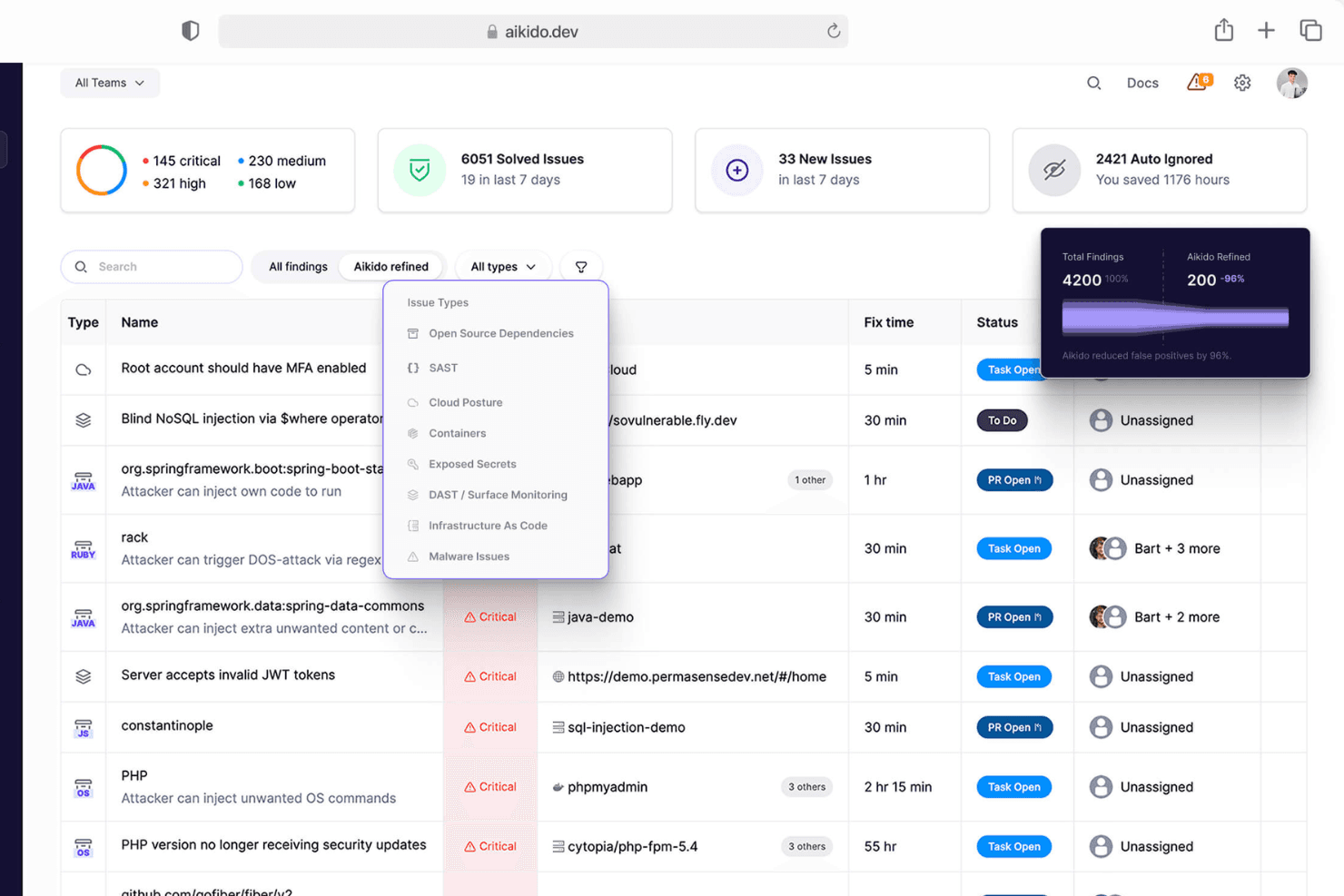
Aikido Security provides a unified dashboard to triage and filter issues by type, severity, and scan source. Aikido Security is a comprehensive DevSecOps platform that provides full coverage from code to cloud, offering vulnerability management and the generation of SBOMs. The tool helps protect applications at runtime by identifying and addressing various security threats such as malware, outdated software, and license risks.
Why I Picked Aikido Security: Its security-focused static application security testing (SAST) offers comprehensive scans of source code for critical code vulnerabilities such as SQL injection, cross-site scripting (XSS), and buffer overflows. Unlike many other SAST tools that generate a plethora of non-security-related issues, Aikido focuses solely on security risks, therefore reducing noise and making it easier for teams to prioritize and address genuine threats.
This targeted approach is further enhanced by custom rule creation, allowing organizations to tailor the scanning process to their specific environment and security policies.
Standout features & integrations:
Aikido Security also offers cloud posture management (CSPM) to detect cloud infrastructure risks across major providers, as well as secrets detection to prevent unauthorized access by checking for leaked and exposed sensitive information like API keys and passwords. Integrations include Amazon Web Services (AWS), Google Cloud, Microsoft Azure Cloud, Drata, Vanta, AWS Elastic Container Registry, Docker Hub, Jira, Asana, and GitHub.
Pros and Cons
Pros:
- User-friendly interface
- Provides actionable insights
- Offers a comprehensive dashboard and customizable reports
Cons:
- Custom SAST rules must be enabled by Aikido
- Unfixed CVEs excluded by default in ephemeral container scans
Learn more about Aikido Security: Best for accurate scanning with AI powered fixes
- Free demo available
- Up to $1,000/dev/year (billed annually)
Visit WebsiteCustomer Rating:4.7/5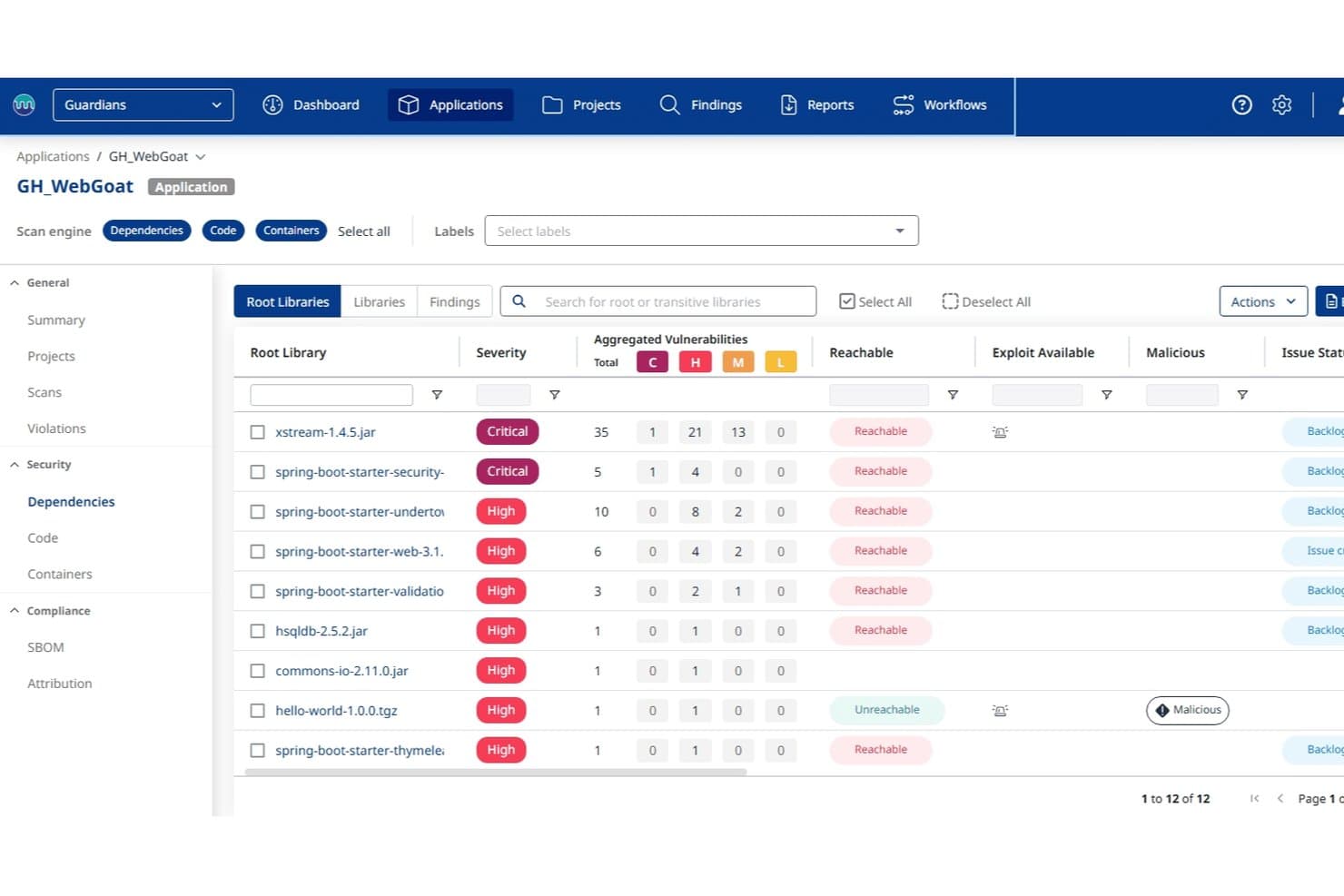
Mend.io surfaces malicious and reachable vulnerable dependencies by severity. Mend.io is a strong fit for application security teams at mid-to-large enterprises that want fewer false positives and faster fixes from SAST, with SCA, container scanning, and compliance reporting in the same workflow.
Who Is Mend.io Best For?
Mend.io is a strong fit for application security teams at mid-to-large enterprises that need unified SAST, SCA, and container scanning with built-in compliance reporting across standards like OWASP, PCI DSS, and HIPAA.
Why I Picked Mend.io
I picked Mend.io as one of the best because it pairs accurate detection with fixes developers can actually apply. Mend SAST is tuned for both precision and recall, so your team spends less time chasing false positives and catches more real vulnerabilities. Its Al powered remediation generates code fixes for findings, which lets developers move from alert to fix without starting from scratch. I also like that compliance sits inside the same scan workflow: policy violations can enforce remediation SLAs and fail pipeline builds automatically, which ties security posture to real shipping decisions.
Mend.io Key Features
- Al powered remediation: Generates code fixes for SAST findings so developers get a suggested fix alongside the issue, not just an alert.
- Taint and data flow analysis: Traces untrusted input from configurable taint sources through sanitizers to sinks, with support for custom source, sink, and sanitizer definitions per project.
- Al coding assistant integration: Feeds vulnerability context directly to tools like Cursor, Windsurf, and GitHub Copilot so developers can fix findings before committing code.
- Secrets detection: Scans source and configuration files for hardcoded credentials, API keys, tokens, and certificates using pattern matching across JSON, XML, YAML, and similar formats.
Mend.io Integrations
Mend AppSec offers documented integrations with GitHub, GitLab, Bitbucket, Azure DevOps, Jenkins, CircleCI, Bitbucket Pipelines, Jira, and ServiceNow for repository scanning, CI/CD workflows, and issue management.
Pros and Cons
Pros:
- Reviewers praise automated vulnerability fixes
- Configurable taint analysis traces sources to sinks
- Compliance reports map findings to major standards
Cons:
- SAST remediation guidance can be too brief
- No complexity, duplication, or maintainability metrics
Learn more about Mend.io: Best for monitoring supply chain risks
- 7-day free trial + free demo available
- From $399/month (billed annually)

Xygeni dashboard showing prioritized application security risks across code, dependencies, CI/CD, secrets, and IaC. Xygeni is an AI-powered application security platform that combines SAST, SCA, secrets detection, CI/CD security, and software supply chain protection into a single end-to-end AppSec solution.
Who Is Xygeni Best For?
Xygeni is a strong fit for security-focused engineering teams at mid-size to enterprise companies running complex, multi-tool software development pipelines.
Why I Picked Xygeni
I've included Xygeni in my top picks because its SCA module goes well beyond standard CVE scanning to cover the full scope of open-source supply chain risk. It analyzes thousands of new and updated packages daily to detect zero-day malware and block suspicious dependencies before they reach production. I also like the context-based risk scoring, which factors in reachability, internet exposure, and exploitability so your team isn't chasing noise. On top of that, one-click SBOM export in SPDX or CycloneDX formats makes compliance reporting much less painful.
Xygeni Key Features
- AI-powered SAST: Scans source code for security vulnerabilities using AI-driven analysis and generates autofixes directly in your IDE or pull request.
- Malicious code detection: Identifies backdoors, trojans, and obfuscated logic in custom code mapped to CWE-506 classifications.
- IaC security scanning: Analyzes infrastructure-as-code files for misconfigurations across cloud and container environments.
- ASPM dashboard: Provides a unified asset inventory and risk posture view across your entire SDLC in one place.
Xygeni Integrations
Xygeni integrates with GitHub, GitLab, Bitbucket, Jenkins, and Azure DevOps for SCM and CI/CD workflows, plus CircleCI and TravisCI. For IDE support, it offers plugins for JetBrains IDEs, Visual Studio Code, Eclipse, Visual Studio, Cursor, and Windsurf. It also connects with Slack for notifications and Jira for ticketing. Xygeni provides a REST API that allows teams to automate scanning, retrieve findings, trigger enforcement workflows, and integrate with internal tools.
Pros and Cons
Pros:
- Real-time vulnerability detection across dependencies
- Covers full software supply chain security
- Filters noise to surface exploitable risks
Cons:
- Fewer niche DevOps tool integrations
- Limited dashboard and report customization
Learn more about Xygeni: Best for context-aware AI analysis
- Free plan available
- From $200/month
Visit WebsiteCustomer Rating:4.5/5
ZeroPath provides a unified security dashboard that highlights scan activity, vulnerability types, issue severity, and top critical findings at a glance. ZeroPath offers an AI-native Static Application Security Testing (SAST) platform designed to cater to security-focused organizations. By identifying and auto-fixing vulnerabilities in code, ZeroPath appeals to businesses that prioritize security and seek to enhance their code integrity.
Why I Picked Zeropath
I picked ZeroPath because it brings a clear upgrade to traditional static application security testing (SAST) by combining a context-aware analysis engine with automated patch suggestions and intelligent vulnerability scoring. Your team gets AI-native SAST that understands data flows and business logic, automated patch generation that turns flagged issues into proposed fixes, and risk-based prioritization that surfaces what matters, not just what’s flagged. These features align with the needs of fast-moving dev teams that want to keep security tight without being bogged down by false positives.
Zeropath Key Features
In addition to its core strengths, I also found these features beneficial for your team:
- Infrastructure as Code (IaC) Misconfigurations: Detects and addresses misconfigurations in IaC, ensuring your infrastructure is secure from the ground up.
- Secrets Detection: Identifies and mitigates the exposure of sensitive information within your codebase, protecting your organization from data breaches.
- Contextual Triage: Prioritizes vulnerabilities based on context, helping your team address the most critical issues first.
- Risk Management Tools: Provides comprehensive tools to assess and manage risks, ensuring compliance and enhancing overall security posture.
Zeropath Integrations
Integrations include GitHub, GitLab, Bitbucket, Azure DevOps, and an API is available for custom integrations.
Pros and Cons
Pros:
- Provides software composition analysis with application-context dependency mapping.
- Generates one-click patch suggestions inside pull requests.
- Detects business logic flaws that conventional SAST tools miss.
Cons:
- Automated patch generation may require manual review before merging in sensitive production code.
- Users unfamiliar with AI-based scanning may need time to trust the results.
Learn more about Zeropath: Best for its robust security-centric static code analysis
- Free demo available
- Pricing upon request
Visit WebsiteCustomer Rating:4.2/5
This is a sample image of Checkmarx reporting where users use simple, user-friendly reporting for all of their analytical needs. Checkmarx is a widely-used tool for static code analysis with a strong emphasis on detecting and mitigating security vulnerabilities.
This tool specializes in identifying potential security breaches within your code before they become an issue in production, making it an indispensable asset for security-conscious organizations.
Why I Picked Checkmarx: I selected Checkmarx for its top-tier security-centric static code analysis. When comparing different tools, Checkmarx stood out due to its rigorous scanning capabilities and its deep focus on security. The tool is not only capable of identifying potential security issues but also provides detailed insight into how to resolve them.
I hold the opinion that Checkmarx is best for organizations that prioritize security as it helps to identify and mitigate potential security breaches early in the development lifecycle.
Standout features & integrations:
Checkmarx provides thorough code scanning capabilities, catching potential security breaches before they become vulnerabilities in production. The tool's ability to provide actionable recommendations to mitigate risks is particularly valuable.
Moreover, Checkmarx offers integrations with popular development tools like JIRA, Jenkins, and GitHub, allowing teams to incorporate security checks seamlessly into their development workflow.
Pros and Cons
Pros:
- Integrates well with popular development tools
- Offers actionable recommendations for risk mitigation
- Exceptional at detecting security vulnerabilities
Cons:
- May generate false positives that require manual review
- Can have a steep learning curve for new users
- Higher cost compared to some alternatives
Learn more about Checkmarx: Best for seamless integration with Visual Studio to enhance productivity
- 30-day free trial + free plan available
- From $14.90/user/month

With the ReSharper tool, users can configure and apply code styles based on their personal preferences or their team standard. ReSharper is a renowned static code analysis tool that works within the Visual Studio environment to boost developer productivity. With ReSharper, code inspection, refactoring, and navigation become more efficient, making it the perfect tool for developers using Visual Studio.
Why I Picked ReSharper: I chose ReSharper because of its deep integration with Visual Studio and its power to significantly improve developer productivity. It stood out due to its capability to analyze code right within the IDE, making it convenient and easy for developers to refactor and navigate their codebases.
I believe ReSharper is best for developers using Visual Studio as it enhances productivity by offering advanced code navigation and on-the-fly code quality analysis.
Standout features & integrations:
ReSharper shines with features like on-the-fly code quality analysis, advanced code navigation, and extensive intelligent refactoring. It also has deep integration with Visual Studio, allowing developers to run analysis without having to leave their coding environment.
Pros and Cons
Pros:
- On-the-fly code quality analysis
- Provides advanced code navigation and intelligent refactoring
- Deep integration with Visual Studio
Cons:
- High learning curve for new users
- Can slow down Visual Studio for large codebases
- Mostly beneficial for developers using Visual Studio
Learn more about ReSharper: Best for its broad language support and early-stage project analysis
- Free trial available
- From $5/contributer/month (billed annually)

Here is a screenshot of Qodana's main dashboard for a project audit tab. Qodana is a multi-language static code analysis tool developed by JetBrains. It offers a comprehensive approach to the analysis of codebases with its broad language support and the capacity to be used early in the project's lifecycle.
These key attributes make Qodana particularly useful for diverse projects and early-stage analysis, helping to identify and mitigate issues before they grow into larger problems.
Why I Picked Qodana: The choice of Qodana is underpinned by its versatility and proactive approach. What sets it apart is its broad language support, allowing for the examination of codebases in various languages, making it versatile for multi-language projects. Furthermore, its ability to conduct early-stage project analysis helps teams identify and resolve potential issues at the initial stages.
These characteristics position Qodana as an excellent tool for teams working on diverse projects and those who want to maintain quality from the start.
Standout features & integrations:
Qodana boasts a set of features that accommodate many languages, including Java, Python, JavaScript, and more, making it applicable to a wide range of projects. Another notable feature is its early-stage project analysis, which helps identify potential issues from the get-go.
Regarding integrations, Qodana smoothly integrates with Docker, which simplifies deployment and execution in various environments.
Pros and Cons
Pros:
- Docker integration eases deployment and execution
- Enables early-stage project analysis, promoting proactive issue resolution
- Broad language support caters to diverse projects
Cons:
- Lacks integration with some common version control systems
- Docker requirement might introduce additional complexities
- Can be less cost-effective for individual developers or small teams
Learn more about Qodana:

This is Fortify on-demand application view. Fortify Static Code Analyzer is a tool developed by Micro Focus that allows developers to analyze code from a security perspective. The tool shines when working with large codebases, as it effectively finds and pinpoints potential security vulnerabilities within vast amounts of code, thereby fitting well with larger enterprises and projects.
Why I Picked Fortify Static Code Analyzer: I picked Fortify Static Code Analyzer based on its ability to handle the analysis of large codebases efficiently. What differentiates it from other tools is its scalability and depth of analysis. I found that when dealing with large projects, this tool's effectiveness in detecting security issues stands out.
Given these characteristics, it fits well with the tool's USP and makes it best for identifying security vulnerabilities in larger codebases.
Standout features & integrations:
The tool's capacity to manage and scan extensive codebases is a standout feature of Fortify Static Code Analyzer. Furthermore, the software's user interface provides a comprehensive view of potential vulnerabilities, categorizes them based on their severity, and suggests possible fixes.
In terms of integrations, Fortify works well with build systems such as Jenkins and version control systems like Git, which can streamline the development process.
Pros and Cons
Pros:
- Integrates well with popular development systems
- Comprehensive vulnerability detection and categorization
- Efficient analysis of large codebases
Cons:
- Might be overkill for smaller projects
- The UI could be complex for beginners
- High cost might be a barrier for small teams
Learn more about Fortify Static Code Analyzer: Best for its power to handle complex codebases and detect hard-to-find bugs
- Pricing upon request

This is a screenshot of Coverity's (Code Sight) for customer viewing. Coverity is a sophisticated static analysis tool adept at dealing with complex codebases and uncovering elusive bugs. It can thoroughly inspect large amounts of code, making it particularly suitable for detecting difficult-to-find bugs in intricate codebases.
Why I Picked Coverity: In selecting Coverity for this list, I appreciated its ability to handle complex codebases and its knack for revealing hard-to-find bugs. Its difference lies in the depth of analysis it offers, making it a great tool for large, sophisticated projects. For its power to effectively detect hidden bugs in intricate codebases, I find Coverity best suited for this task.
Standout features & integrations:
Coverity provides an extensive array of features that include deep code scanning for identifying hidden defects, security vulnerabilities, and concurrency issues. It also provides a unified view of defects and vulnerabilities that helps in streamlining the bug-fixing process.
In terms of integrations, Coverity offers compatibility with major IDEs, CI/CD pipelines, and version control systems, adding to its usability.
Pros and Cons
Pros:
- Strong integration with various development tools
- Exceptional at detecting hard-to-find bugs
- Deep analysis makes it capable of handling complex codebases
Cons:
- Set-up process can be somewhat involved
- The interface might seem complex to beginners
- Lack of transparent pricing could be a drawback for some
Learn more about Coverity: 10Best for its sophisticated real-time identification of security vulnerabilities
Klocwork
- Free trial available
- From $15/user/month (billed annually)

Here is a screenshot of Klocwork's summary dashboard. Klocwork, a product by Perforce, provides extensive static code analysis. It's renowned for its capacity to detect security vulnerabilities in real time, ensuring a high level of code security. This strength in real-time analysis is why I believe Klocwork is best for identifying security issues swiftly and efficiently.
Why I Picked Klocwork: In the realm of static code analysis tools, Klocwork sets itself apart through its impressive capability for real-time analysis. This feature, which I have evaluated and compared with other tools, helps in identifying security issues as they emerge.
This unique and crucial trait led me to select Klocwork as the optimal choice for developers prioritizing immediate security vulnerability detection.
Standout features & integrations:
Klocwork shines with features such as smartRank, which prioritizes and ranks identified issues, and the Code Review Center, which facilitates collaborative code review. It seamlessly integrates with popular IDEs, CI/CD tools, and source control tools, providing a smooth and integrated experience.
Pros and Cons
Pros:
- Facilitates collaborative code review
- Prioritizes and ranks issues, aiding in issue management
- Offers real-time identification of security vulnerabilities
Cons:
- Can have a steep learning curve for new users
- May be overkill for smaller projects or teams
- Pricing information is not readily available
Learn more about Klocwork:
Outras ferramentas de análise estática de código
Segue-se uma lista de ferramentas adicionais de análise estática de código que incluí na minha lista restrita, mas que não chegaram às 10 melhores. Vale definitivamente a pena conhecê-las.
- 11SonarCloudBest for cloud-based analysis of open-source projects
- 12SemgrepBest for custom rule creation and language-agnostic linting
- 13CodigaBest for automating code reviews and improving code quality
- 14CodeSonarBest for deep source code analysis to preempt errors
- 15SonarQubeBest for continuous inspection of code quality and security aspects
- 16DerScannerBest for on-premise deployment
- 17CodacyGood for automated code review and quality analysis
- 18DeepSourceGood for continuous code quality tracking and reporting
- 19CodeScanGood for Salesforce code quality and security analysis
- 20ESLintGood for JavaScript code quality and pattern checking
- 21CheckstyleGood for enforcing coding standards in Java
- 22Clang Static AnalyzerGood for C, C++, and Objective-C code analysis
- 23FusionReactor APMGood for real-time performance monitoring
- 24FindBugsGood for spotting bugs in Java code
- 25HCL AppScan 360ºGood for comprehensive vulnerability management
Mais análises de ferramentas de análise de código
- Ferramentas de análise de código
- Ferramentas de desenvolvimento Web
- Ferramentas de desenvolvimento de software
How I Evaluate Static Code Analysis Tools
I evaluate static code analysis tools across two layers: core requirements any SAST tool must meet—like flagging XSS before a PR merges—and what separates one worth recommending from the rest.
Core Functionality (Table Stakes For This List)
When I'm selecting tools for my list, I rank each one on a scale from 0 (does not offer the functionality) to 5 (excels in this area) for each core functionality listed below. Then, I calculate the tool's total score into a percentage. Each tool needs to achieve a minimum total score of 65% to be considered for inclusion.
- Multi-Language Support: I check which languages each tool supports and whether it can handle the mix you'd realistically see in a stack—like a Java backend alongside a TypeScript frontend.
- Vulnerability & Bug Detection: The engine should catch real issues like SQL injection, null pointer dereferences, and buffer overflows through data flow and control flow analysis, not just pattern matching.
- Coding Standards Enforcement: I evaluate whether you can enforce rulesets like CERT or Google style guides and create custom rules—useful when your team has internal conventions beyond public standards.
- CI/CD & IDE Integration: Tools should plug into the places developers already work, so I look for native support in platforms like GitHub Actions, GitLab CI, Jenkins, and IDEs like VS Code or IntelliJ.
- Actionable Reporting & Remediation: Findings need severity ratings and clear fix guidance so developers can resolve a flagged cross-site scripting issue without switching to a separate reference doc.
- Compliance & Standards Coverage: I look for mapping to frameworks like OWASP Top 10, CWE Top 25, and industry-specific standards such as MISRA for embedded systems or PCI DSS for payment processing.
Once I have a list of tools that meet this criteria, I consider what sets each platform apart.
Differentiating Factors (What Sets Vendors Apart)
Here's how I compare and contrast different vendors:
Standout Features
Incremental scanning makes a real difference—when a tool analyzes only the changed lines in a pull request instead of rescanning the entire codebase, it keeps pipeline times reasonable on large repos. I also evaluate whether a tool offers a custom query language, like CodeQL or Semgrep patterns, which lets security teams write detection rules tailored to internal APIs or proprietary frameworks. AI-powered auto-remediation is increasingly valuable too, especially when it suggests contextual fixes directly in a PR rather than just flagging the issue.
Beyond Features
False positive rates matter more than most buyers realize. A tool that floods developers with noise trains them to ignore findings, so I evaluate how each vendor handles triage workflows and whether it learns from past suppression decisions. Deployment model is another key consideration—teams handling sensitive source code often need self-hosted or air-gapped options rather than SaaS-only offerings. I also look at licensing transparency, since pricing based on contributors versus lines of code can dramatically shift total cost depending on your team structure.
O que é uma ferramenta de análise estática de código?
As ferramentas de análise estática de código analisam o código-fonte sem o executar, de modo a encontrar defeitos, problemas de segurança e erros de programação. Os programadores, engenheiros de QA e equipas de segurança utilizam estas ferramentas para detetar problemas numa fase inicial e facilitar a manutenção das bases de código.
A análise automatizada, as verificações baseadas em regras e as funcionalidades de elaboração de relatórios ajudam a identificar rapidamente os erros, a impor normas de programação e a reduzir a quantidade de retrabalho posterior. Em geral, estas ferramentas ajudam as equipas a escrever código mais limpo e seguro, com menos esforço manual.
Perguntas frequentes
Quais são as vantagens de utilizar ferramentas de análise de código estático?
As ferramentas de análise de código estático oferecem várias vantagens que as tornam uma parte indispensável do processo de desenvolvimento de software. Eis cinco vantagens importantes:
- Deteção de erros: Podem detetar erros, falhas e vulnerabilidades no código que podem não ser imediatamente evidentes para os programadores.
- Melhoria da qualidade do código: Ao identificarem áreas a melhorar, estas ferramentas podem ajudar a elevar a qualidade geral do código.
- Redução do tempo de depuração: Ao encontrarem erros numa fase inicial do ciclo de desenvolvimento, estas ferramentas podem reduzir significativamente o tempo dedicado à depuração mais tarde.
- Melhor compreensão do código: No caso de bases de código de grandes dimensões, estas ferramentas proporcionam uma forma rápida e sistemática de compreender a estrutura do código, as dependências e as potenciais áreas problemáticas.
- Conformidade regulamentar: Algumas ferramentas também podem verificar se o seu código está em conformidade com determinadas normas e regulamentações de programação, o que é essencial em alguns setores.
Quanto custam as ferramentas de análise de código estático?
O preço das ferramentas de análise de código estático pode variar bastante, dependendo da complexidade da ferramenta, do tamanho da sua equipa, do número de bases de código que está a analisar e de outros fatores. A maioria dos fornecedores oferece um modelo de preços por níveis, que começa com um pacote básico com funcionalidades limitadas e inclui pacotes mais avançados com funcionalidades premium, como análises mais aprofundadas, mais integrações, suporte dedicado, entre outras.
Quais são os modelos de preços habituais das ferramentas de análise de código estático?
A maioria das ferramentas de análise de código estático cobra por utilizador ou por linha de código analisada. Algumas também têm um modelo freemium, em que as funcionalidades básicas são disponibilizadas gratuitamente e as funcionalidades mais avançadas têm um custo. Outras oferecem um período de avaliação gratuita, após o qual terá de pagar para continuar a utilizar o serviço.
Qual é o intervalo de preços habitual das ferramentas de análise de código estático?
O preço destas ferramentas pode variar entre alguns dólares por utilizador, por mês, e várias centenas de dólares por utilizador, por mês, no caso de soluções empresariais. Algumas ferramentas oferecem descontos para pagamentos anuais e outras podem cobrar uma taxa única de configuração, além do custo mensal.
Quais são as ferramentas de análise de código estático mais baratas e mais caras?
Entre as ferramentas aqui apresentadas, a opção mais acessível é o ESLint, que é uma ferramenta de código aberto e gratuita. As mais caras são normalmente ferramentas abrangentes, como o SonarQube e o Veracode, que podem custar várias centenas de dólares por mês, dependendo do tamanho da sua equipa e da dimensão dos seus projetos.
Existem opções gratuitas de ferramentas de análise de código estático?
Sim, existem várias opções gratuitas disponíveis. Ferramentas como o ESLint, o FindBugs e o OWASP Dependency-Check são de código aberto e gratuitas. No entanto, é importante notar que estas opções gratuitas podem não oferecer o mesmo nível de análise ou as mesmas funcionalidades que as ferramentas pagas. Além disso, podem exigir mais configuração e parametrização manuais.
Principais conclusões
Selecionar a melhor ferramenta de análise de código estático exige compreender as necessidades específicas da sua equipa de desenvolvimento e alinhá-las com as funcionalidades oferecidas pelas diferentes ferramentas. Algumas ferramentas foram concebidas para proporcionar simplicidade e facilidade de utilização, enquanto outras estão preparadas para lidar com projetos mais complexos e de grande escala, com capacidades analíticas avançadas.
- Defina os seus requisitos: Comece por identificar aquilo de que necessita numa ferramenta de análise de código estático. Tenha em consideração o tamanho da sua base de código, a linguagem em que está escrita e a experiência da sua equipa com ferramentas de análise de código. Para o desenvolvimento baseado em Java, é crucial encontrar a ferramenta de análise de código estático certa para Java. Pense nos seus objetivos, quer estes consistam em melhorar a qualidade do código, reduzir os erros ou cumprir regulamentações específicas do setor.
- Equilibre a funcionalidade com a facilidade de utilização: Cada ferramenta de análise de código estático inclui o seu próprio conjunto de funcionalidades. Embora mais funcionalidades possam parecer melhores, também podem tornar a ferramenta mais complexa. É crucial encontrar uma ferramenta que disponibilize as funcionalidades de que necessita, mantendo-se fácil de utilizar e de integrar no seu processo de desenvolvimento.
- Tenha em consideração o preço: Os preços variam significativamente entre as diferentes ferramentas, pelo que é essencial considerar o seu orçamento. Tenha em conta que os modelos de preços também variam, com algumas ferramentas a cobrarem por utilizador ou por linha de código analisada. Embora existam opções gratuitas, estas podem não oferecer o mesmo nível de análise ou as mesmas funcionalidades que as ferramentas pagas.
A escolha das ferramentas certas de análise estática e de análise da composição de software pode ter um impacto significativo no seu processo de desenvolvimento, na qualidade do código e, em última análise, no sucesso do seu projeto de software.