

As melhores ferramentas de teste de API ajudam as equipas de desenvolvimento e de QA a verificar pontos de acesso, detetar problemas de integração e garantir que as APIs funcionam de forma fiável em diferentes ambientes. Facilitam a automatização dos testes, a validação dos dados enviados e a monitorização dos tempos de resposta, para que as equipas possam detetar problemas antes de estes afetarem os sistemas em produção.
Normalmente, as equipas começam a procurar programas de teste de API melhores quando estão a investigar códigos de resposta pouco claros, a tentar resolver falhas intermitentes ou a gerir vários ambientes sem uma cobertura de testes consistente. Os testes manuais ou uma automatização incompleta conduzem frequentemente a defeitos não detetados e a longos ciclos de retorno entre o desenvolvimento e o QA.
Trabalhei com equipas de engenharia na implementação de estruturas de teste de API em arquiteturas REST e GraphQL, avaliando a forma como diferentes ferramentas lidam com a automatização, os relatórios e a integração CI/CD, tanto em configurações ágeis como empresariais.
Neste guia, ficará a saber quais são as ferramentas de teste de API que realmente ajudam a reduzir o trabalho manual, a melhorar a fiabilidade entre versões e a obter informações mais claras sobre o desempenho da sua API.
Why Trust Our Software Recommendations
6,700+
Reviews
20
Industry experts
16+
Evaluation factors
14
Years
Our team has been testing and reviewing software since 2012. As tech leaders ourselves, we know how difficult—and important—it is to choose the right software.
For this guide, we evaluated tools using hands-on testing and independent research, scoring tools using our selection criteria.
Our reviews reflect our human editorial judgment, not a sales pitch.
Expert reviewers:
- Paulo Gardini MiguelTech Director
 Tim FisherVP of AI
 Gabriel RosasTech Lead & Software Architect
 Christhian GruhnTech Lead & Platform Architect

Tabela comparativa de ferramentas de teste de API
Esta tabela comparativa resume os detalhes de preços das minhas principais seleções de ferramentas de teste de API:
| Tool | Best For | Trial Info | Price | ||
|---|---|---|---|---|---|
| 1 | Best for dynamic application security testing | Free plan available | From $350/month | Website | |
| 2 | Best for enterprise codeless test automation | 14-day free trial | Pricing upon request | Website | |
| 3 | Best with end-to-end testing workflows | Free demo available | Pricing upon request | Website | |
| 4 | Best for continuous security testing | Free demo available | Pricing upon request | Website | |
| 5 | Best for AI-driven test creation | Free trial available + free demo | Pricing upon request | Website | |
| 6 | Best for beginners in testing | Free plan + 30-day free trial + free demo available | From $180/seat/month | Website | |
| 7 | Best for cloud-based testing | 28-day free trial + free demo available | From $39/month (billed annually) | Website | |
| 8 | Best for cross-platform support | Free trial available | Pricing upon request | Website | |
| 9 | Best for detecting vulnerabilities | Free demo available | Pricing upon request | Website | |
| 10 | Best for AI-powered vulnerability scanning | Free demo available | From $99/month | Website |


Avaliações das melhores ferramentas de teste de API
Seguem-se os meus resumos detalhados das melhores ferramentas de teste de API que entraram na minha lista restrita. As minhas avaliações apresentam uma análise detalhada das principais funcionalidades, vantagens e desvantagens, integrações e casos de utilização ideais de cada ferramenta, para o ajudar a encontrar a melhor opção para si.
 Best for dynamic application security testing
- Free plan available
- From $350/month
Visit WebsiteCustomer Rating:4.3/5
Aikido Security provides a unified dashboard to triage and filter issues by type, severity, and scan source. Aikido Security is a platform designed to protect your code, cloud, and runtime environments with its suite of security features. It offers tools for dynamic application security testing (DAST), API scanning, and other measures to safeguard your applications against vulnerabilities.
Why I Picked Aikido Security: I picked Aikido Security for API testing because of its dynamic application security testing, API scanning, and AI-driven AutoFix feature, which automatically generates pull requests to fix vulnerabilities. This automation saves time and keeps security measures up to date. Aikido also supports custom rule creation, allowing you to filter non-essential paths and focus on critical vulnerabilities, helping you prioritize and secure your API endpoints effectively.
Standout features & integrations:
Features include bulk fix, which allows you to create multiple ready-to-merge pull requests with a single action, streamlining the resolution process. TL;DR summaries provide concise overviews and ticket creation options for complex issues, enhancing management efficiency. Aikido also prioritizes data security through read-only access to repositories, short-lived access tokens, and separate Docker containers for each scan.
Integrations include VSCode, Azure Pipelines, BitBucket Pipes, GitHub, GitLab, Jira, Asana, Monday, ClickUp, YouTrack, Drata, and Vanta.
Pros and Cons
Pros:
- User-friendly interface
- Provides actionable insights
- Offers a comprehensive dashboard and customizable reports
Cons:
- Ignores vulnerabilities if no fix is available
- Only supports English
Learn more about Aikido Security: Best for enterprise codeless test automation
- 14-day free trial
- Pricing upon request
Visit WebsiteCustomer Rating:4.8/5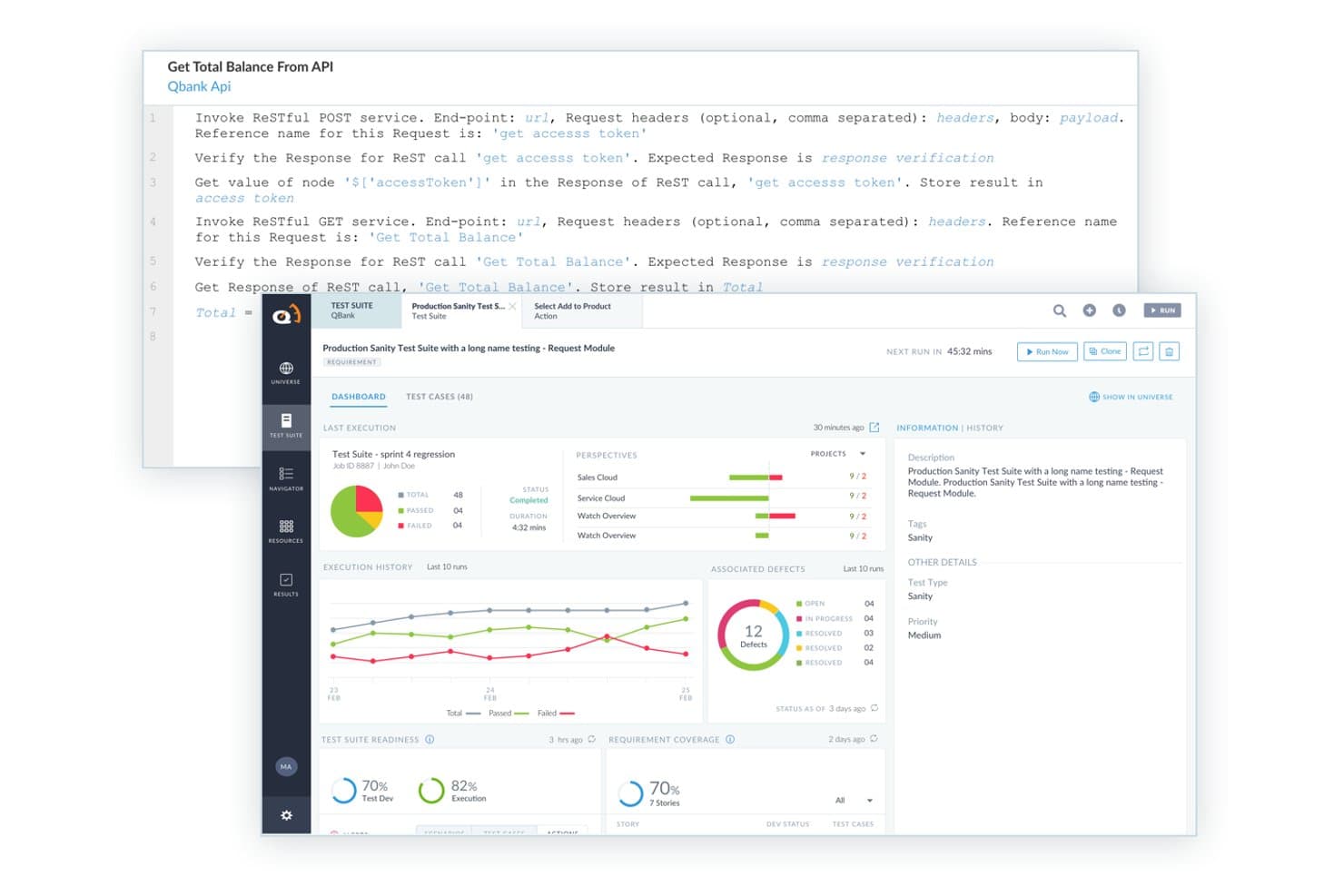
ACCELQ offers a codeless API testing interface with RESTful service invocation, test suite dashboards, execution history, and defect tracking built in. ACCELQ is a cloud-native test automation platform that covers API, web, mobile, and backend testing across REST, SOAP, GraphQL, and messaging protocols using a codeless, AI-assisted authoring environment.
Who Is ACCELQ Best For?
ACCELQ is a strong fit for enterprise QA teams that need to scale test automation across complex application stacks without relying on developer resources.
Why I Picked ACCELQ
I picked ACCELQ as one of the best because its codeless API test authoring genuinely removes the bottleneck of needing developer involvement to build test suites. Using the Business Process Scenario Builder, my team can chain API and UI calls into end-to-end flows without writing a single line of code. I also like the AI-powered self-healing, which automatically updates tests when endpoints change, cutting maintenance time on large regression suites significantly.
ACCELQ Key Features
- Multi-protocol API coverage: Test REST, SOAP, GraphQL, Kafka, MQ, and microservices endpoints from a single interface.
- Environment and variable management: Set up reusable variables, environment-specific configs, and secure authentication for accurate multi-stage testing.
- Service virtualization: Simulate unavailable or evolving APIs with built-in API virtualization for reliable test runs.
- Native CI/CD integrations: Connect directly to Jenkins, Azure DevOps, Bamboo, and TeamCity to automate API tests in every build.
ACCELQ Integrations
ACCELQ offers native integrations with Jenkins, Jira, ClickUp, Bamboo, TeamCity, Slack, and Microsoft Teams, and provides an API for custom integrations.
Pros and Cons
Pros:
- Built-in service virtualization for end-to-end tests
- AI-driven self-healing of test scenarios
- Codeless automation for UI, API, and mobile
Cons:
- Advanced reporting can require additional customization
- No documented support for gRPC or WebSockets
Learn more about ACCELQ: Best with end-to-end testing workflows
- Free demo available
- Pricing upon request

Centralize, connect, and govern your entire API estate with DigitalAPI. DigitalAPI is a flexible platform for teams that need a complete solution for API management and testing. It’s well-suited to industries like healthcare, banking, and insurance, where reliable API operations are essential. With tools for API discovery, governance, and lifecycle management, DigitalAPI supports more consistent workflows and better productivity. Whether the goal is improving API quality or ensuring reliable integrations, the platform is built to address those needs.
Why I Picked DigitalAPI
I chose DigitalAPI for its AI-driven automated test generation, which reduces manual testing work and shortens deployment timelines. The platform offers a solid testing environment that includes load testing and end-to-end testing, helping teams validate API performance under different conditions. Its real-time analytics also allow teams to identify and resolve issues early, making it a strong option for developers and QA teams focused on maintaining API quality.
DigitalAPI Key Features
In addition to its AI-driven test generation, I also found several other features valuable for API testing:
- Load Testing: Simulates peak traffic to identify performance issues and scalability challenges.
- End-to-End Testing: Ensures API functionality within the entire application workflow.
- Security Assessments: Conducts thorough checks to validate API security and data protection.
- Automated Documentation: Streamlines the documentation process, making it easier to maintain and share API specifications.
DigitalAPI Integrations
Native integrations are not currently listed by DigitalAPI.
Pros and Cons
Pros:
- Centralized governance across multiple gateways
- Detailed analytics for API performance
- Helix Gateway supports full lifecycle
Cons:
- No listed native integrations
- Pricing details not publicly available
Learn more about DigitalAPI: Best for continuous security testing
- Free demo available
- Pricing upon request
Visit WebsiteCustomer Rating:4.6/5
Invicti's dashboard shows various metrics and statuses of API tests. Invicti is a comprehensive API security tool tailored for developers and security teams. It automates vulnerability detection and integrates into CI/CD pipelines to enhance security workflows.
Why I picked Invicti: It offers real-time vulnerability detection and zero false positives, which aligns with its USP of continuous security testing. The tool's advanced scanning technology supports REST, SOAP, and GraphQL APIs. Invicti's DAST + IAST approach increases accuracy and identifies more vulnerabilities. It also provides visibility into exposed assets, helping teams manage risks effectively.
Standout features & integrations:
Features include advanced scanning technology for multiple API types, real-time vulnerability detection, and zero false positives. The platform promotes proactive security by helping developers write secure code. Its automation capabilities enhance the software development lifecycle.
Integrations include Jenkins, JIRA, GitHub, Azure DevOps, Bamboo, Bitbucket, GitLab, Slack, ServiceNow, and Microsoft Teams.
Pros and Cons
Pros:
- Automates vulnerability detection
- Supports multiple API types
- Proactive security measures
Cons:
- Pricing not readily available
- May require technical expertise
Learn more about Invicti: Best for AI-driven test creation
- Free trial available + free demo
- Pricing upon request
Visit WebsiteCustomer Rating:4.5/5
Testim validates and protects numerous endpoints to safeguard web services. Tricentis Testim is an AI-powered test automation tool tailored for web, mobile, and Salesforce applications. It's designed for development teams looking to improve testing efficiency and reduce maintenance efforts.
Why I picked Tricentis Testim: This tool focuses on AI-driven test creation with its low-code test authoring and self-healing AI locators. Testim Copilot uses generative AI to speed up test creation and debugging, aligning with its USP of being best for AI-driven test creation. The platform's integrated TestOps feature aids in managing tests effectively, and Testim Mobile provides comprehensive mobile app testing.
Standout features & integrations:
Features include low-code test authoring, self-healing AI locators, and Testim Copilot for faster test creation and debugging. Testim Mobile supports extensive mobile app testing, and Testim Salesforce simplifies testing for Salesforce applications.
Integrations include Jenkins, JIRA, GitHub, Slack, GitLab, Bitbucket, Azure DevOps, CircleCI, Bamboo, and TeamCity.
Pros and Cons
Pros:
- AI-driven test creation
- Low-code authoring
- Self-healing locators
Cons:
- May require technical knowledge
- Steep learning curve
Learn more about Tricentis Testim: Best for beginners in testing
- Free plan + 30-day free trial + free demo available
- From $180/seat/month
Visit WebsiteCustomer Rating:4.4/5
Katalon Studio integrates API test solutions across various test suites and accounts for effective test environments. Katalon Studio is a test automation tool designed for testers and developers. It offers a comprehensive solution for web, API, mobile, and desktop app testing, making it ideal for teams looking to streamline their testing processes.
Why I picked Katalon Studio: It's beginner-friendly, providing an intuitive user interface that simplifies test automation. The tool supports both scriptless and scripting modes, catering to users with varying levels of coding experience. With built-in keywords and templates, it reduces the learning curve for new testers. Additionally, its extensive documentation and community support make it accessible for beginners.
Standout features & integrations:
Features include scriptless test creation, which allows you to build tests without coding. The tool also offers built-in keywords and templates to simplify the process. You can switch between scripting and scriptless modes, giving flexibility to your testing approach.
Integrations include Jenkins, JIRA, Git, TestRail, Slack, qTest, Kobiton, Azure DevOps, Sauce Labs, and BrowserStack.
Pros and Cons
Pros:
- Beginner-friendly interface
- Supports scriptless test creation
- Extensive community support
Cons:
- Limited advanced features
- May require initial setup time
Learn more about Katalon Studio: Best for cloud-based testing
- 28-day free trial + free demo available
- From $39/month (billed annually)
Visit WebsiteCustomer Rating:4.3/5
Use Sauce Labs’s recorder to capture your test efforts. Sauce Labs is a cloud-based testing platform tailored for developers and QA teams. It provides automated testing solutions for web, mobile, and API applications, enabling teams to test across multiple browsers and devices.
Why I picked Sauce Labs: It offers a cloud-based infrastructure, allowing you to run tests without maintaining an in-house setup. This makes it ideal for teams looking to scale testing efforts efficiently. You can perform automated testing across a wide array of devices and browsers, ensuring comprehensive coverage. Sauce Labs real-time analytics and reporting features help your team quickly identify and resolve issues.
Standout features & integrations:
Features include real-time analytics that give you insights into test results. The platform supports a wide variety of browsers and devices, enhancing your testing coverage. Additionally, it offers instant access to a vast infrastructure, eliminating the need for in-house maintenance.
Integrations include Jenkins, JIRA, GitHub, CircleCI, Slack, Bamboo, Travis CI, Bitbucket, TeamCity, and Azure DevOps.
Pros and Cons
Pros:
- Cloud-based infrastructure
- Supports multiple devices
- Real-time analytics
Cons:
- May require advanced technical skills
- Can be costly for small teams
Learn more about Sauce Labs: Best for cross-platform support
- Free trial available
- Pricing upon request
Visit WebsiteCustomer Rating:2/5
Smartbear provides functional, security, and load testing of RESTful, SOAP, and GraphQL web services. SmartBear is a versatile testing tool designed for QA teams and developers. It provides comprehensive testing solutions for web, mobile, and API applications, making it ideal for teams needing cross-platform support.
Why I picked SmartBear: It offers extensive cross-platform compatibility, allowing your team to test on various environments without hassle. The tool supports automated testing for web, mobile, and desktop applications, aligning with its USP of cross-platform support. SmartBear robust reporting features provide insights into your testing efforts. Additionally, SmartBear's flexible scripting options cater to both beginners and experienced testers.
Standout features & integrations:
Features include robust reporting capabilities that offer insights into test results. The tool provides flexible scripting options, catering to testers with different skill levels. Its support for automated testing across web, mobile, and desktop applications enhances your testing coverage.
Integrations include Jenkins, JIRA, GitHub, Azure DevOps, Slack, Bitbucket, TeamCity, Bamboo, qTest, TestRail, and Confluence.
Pros and Cons
Pros:
- Extensive cross-platform compatibility
- Flexible scripting options
- Comprehensive reporting features
Cons:
- Pricing not transparent
- Limited offline support
Learn more about SmartBear: Best for detecting vulnerabilities
- Free demo available
- Pricing upon request
Visit WebsiteCustomer Rating:4.2/5
Acunetix's vulnerability scanner dashboard provides an overview of the scan results and detected vulnerabilities. Acunetix is a web application security scanner designed for security teams and developers. It focuses on detecting vulnerabilities in web applications to enhance your security posture.
Why I picked Acunetix: It excels in vulnerability detection with its ability to identify over 7,000 vulnerabilities, which aligns with its USP of being best for detecting vulnerabilities. The tool integrates dynamic and static analysis to cover a wide range of security issues. Acunetix's scanning engine is fast and accurate, providing comprehensive security assessments. It also supports a wide range of technologies, making it versatile for different environments.
Standout features & integrations:
Features include advanced scanning for over 7,000 vulnerabilities, fast and accurate scanning engine, and comprehensive security assessments. The tool supports various technologies, enhancing its versatility. It also provides detailed reports to help you understand and address security issues.
Integrations include Jenkins, JIRA, GitHub, GitLab, Azure DevOps, TFS, Bugzilla, Mantis, ServiceNow, and Slack.
Pros and Cons
Pros:
- Detects over 7,000 vulnerabilities
- Fast scanning engine
- Supports various technologies
Cons:
- Requires technical expertise
- Initial setup complexity
Learn more about Acunetix: Best for AI-powered vulnerability scanning
- Free demo available
- From $99/month

Astra API Security scans APIs for vulnerabilities using AI-driven security testing. For software development teams and businesses looking to safeguard their digital interactions, Astra API Security provides a solution for identifying and mitigating API vulnerabilities. This platform is particularly appealing to industries like fintech and healthcare, where API security is paramount. By combining AI-driven vulnerability scanning with manual testing, Astra addresses complex security challenges, helping teams protect sensitive data and maintain compliance with industry regulations.
Why I Picked Astra API Security
I picked Astra API Security because it offers a unique combination of AI-driven vulnerability scanning and manual penetration testing, which is crucial for identifying complex attack vectors and business logic vulnerabilities. The platform's ability to perform continuous discovery and risk classification provides a comprehensive view of potential threats, enabling your team to prioritize fixes effectively. With over 15,000 tests available, it ensures that your API security keeps pace with development, significantly reducing the time to address vulnerabilities.
Astra API Security Key Features
In addition to AI-powered vulnerability scanning, Astra API Security offers:
- Rapid API Discovery: The platform can quickly identify all APIs within 30 minutes, ensuring that no endpoint goes unnoticed.
- Continuous DAST Testing: Ongoing dynamic application security testing helps maintain a secure environment by constantly evaluating API vulnerabilities.
- AI-Driven Risk Prioritization: By classifying and scoring risks based on exposure and sensitivity, your team can focus on the most critical vulnerabilities first.
- Manual Pentesting: This feature complements automated scans by detecting complex vulnerabilities that require human insight.
Astra API Security Integrations
Integrations include GitHub, Jira, Slack, Jenkins, Bitbucket, GitLab, Microsoft Teams, AWS, Azure, and Google Cloud.
Pros and Cons
Pros:
- Includes both automated and manual security tests
- Centralized dashboard for vulnerability management with AI-generated remediation
- Helps maintain compliance with ISO 27001, HIPAA, and GDPR
Cons:
- Occasional false positives increase validation work
- Some technical bugs and glitches reported
Learn more about Astra API Security:
Outras ferramentas de teste de API
Eis algumas opções adicionais de ferramentas de teste de API que não entraram na minha lista restrita, mas que vale a pena consultar:
- 11SoapUIBest for open-source testing
- 12Apigee EdgeBest for API management
- 13HoppscotchBest for quick API requests
- 14Subject7Best for codeless automation
- 15QA WolfBest for fast test creation
- 16ReflectBest for no-code test automation
- 17Apache JMeterBest for load testing
- 18Parasoft SOAtestBest for service virtualization
- 19SmartBear ReadyAPIBest for end-to-end testing
- 20PostmanBest for collaboration features
- 21TricentisBest for continuous testing
- 22Karate DSLBest for BDD testing
- 23Rest AssuredBest for Java developers
How I Evaluate API Testing Tools
My evaluation has two layers: the baseline a tool must clear to qualify, and differentiators I look for when teams need contract testing, mock servers, or CI/CD-native automation coverage.
Core Functionality (Table Stakes For This List)
When I'm selecting tools for my list, I rank each one on a scale from 0 (does not offer the functionality) to 5 (excels in this area) for each core functionality listed below. Then, I calculate the tool's total score into a percentage. Each tool needs to achieve a minimum total score of 75% to be considered for inclusion.
- Multi-Protocol API Support: I check whether a tool handles REST, SOAP, GraphQL, and newer protocols like gRPC or WebSockets so teams aren't juggling separate tools per service.
- Automated Test Creation & Execution: Tools should support scripted assertions, parameterized runs, and data-driven test suites—think validating a payments endpoint across hundreds of currency inputs.
- CI/CD Integration: I look for native hooks into pipelines like Jenkins, GitHub Actions, or GitLab CI so API tests run automatically on every commit or deploy.
- Environment & Variable Management: Switching between dev, staging, and production configs with reusable tokens and secrets matters, especially when teams share collections across projects.
- Reporting & Analytics: Clear pass/fail results, response validation details, and exportable reports help QA leads and engineering managers track test coverage without digging through logs.
- Mocking & Virtualization: I evaluate whether the tool offers mock servers or service virtualization so teams can test against dependencies that are unstable, rate-limited, or still in development.
Once I have a list of tools that meet the criteria, I consider what sets each platform apart.
Differentiating Factors (What Sets Vendors Apart)
Here's how I compare and contrast different vendors:
Standout Features
Contract and schema testing is a major differentiator—tools that validate endpoints against OpenAPI or AsyncAPI specs catch breaking changes before they hit production. AI-powered test generation also matters here, since auto-generating assertions from an API spec cuts the time it takes to build coverage across large endpoint sets. I look for integrated security scanning that flags OWASP API Top 10 vulnerabilities within existing test runs rather than requiring a separate tool. Performance and load testing built into the same platform rounds things out for teams who want one place to run functional and scalability checks.
Beyond Features
Ecosystem and integration depth matters a lot—I evaluate whether a tool connects natively with source control, CI/CD platforms, and issue trackers like Jira so test results feed into existing workflows. Pricing models also deserve attention, since per-user costs can spike fast when QA, dev, and DevOps teams all need access. I also consider the learning curve: tools like Postman and Insomnia offer large community libraries and public collections that help new team members ramp up quickly, while code-first platforms like Karate or REST Assured assume stronger developer fluency from day one.
Como escolher ferramentas de teste de API
É fácil ficar perdido entre listas extensas de funcionalidades e estruturas de preços complexas. Para o ajudar a manter o foco enquanto percorre o seu processo específico de seleção de programas, eis uma lista de verificação dos fatores a ter em conta:
| Fator | O que considerar |
| Escalabilidade | Certifique-se de que a ferramenta consegue lidar com maiores exigências de testes à medida que a sua equipa ou o projeto crescem. Procure soluções que suportem vários utilizadores e testes em grande escala sem problemas de desempenho. |
| Integrações | Verifique se a ferramenta se integra com o seu conjunto de software existente, como pipelines de CI/CD, sistemas de controlo de versões e ferramentas de colaboração. Isto pode aumentar a eficiência do fluxo de trabalho e reduzir o esforço manual. |
| Personalização | Procure ferramentas que lhe permitam adaptar os processos de teste às necessidades específicas da sua equipa. Painéis e configurações de testes personalizáveis podem melhorar a produtividade e a relevância. |
| Facilidade de utilização | Avalie a interface do utilizador e a experiência geral. Uma ferramenta fácil de utilizar e que exija formação mínima poupará tempo à sua equipa e ajudá-la-á a concentrar-se nos testes, em vez de aprender a utilizar o software. |
| Orçamento | Considere o custo total de propriedade, incluindo licenciamento, suporte e possíveis complementos. Certifique-se de que a ferramenta se enquadra no seu orçamento e continua a satisfazer as necessidades da sua equipa. |
| Medidas de segurança | Certifique-se de que a ferramenta disponibiliza medidas de segurança adequadas para proteger dados confidenciais e resultados de testes. Funcionalidades como encriptação de dados, controlos de acesso e conformidade com as normas do setor são cruciais. |
| Suporte e recursos | Considere a disponibilidade de suporte ao cliente, documentação e fóruns da comunidade. Um suporte fiável pode ser inestimável durante a implementação e a resolução de problemas. |
| Desempenho | Avalie a velocidade e a fiabilidade da ferramenta na execução dos testes. Uma ferramenta com bom desempenho fornecerá feedback mais rápido e permitir-lhe-á identificar problemas prontamente. |
Tendências nas ferramentas de testes de API
Na minha investigação, recolhi inúmeras atualizações de produtos, comunicados de imprensa e registos de lançamento de diferentes fornecedores de ferramentas de testes de API. Eis algumas das tendências emergentes que estou a acompanhar:
- Testes orientados por IA: A IA está a ser cada vez mais utilizada para criar processos de teste mais inteligentes. As ferramentas estão a recorrer à IA para análises preditivas e geração automatizada de casos de teste, tornando os testes mais eficientes. Alguns fornecedores estão a integrar IA para identificar potenciais erros antes de estes ocorrerem.
- Testes antecipados: Esta tendência consiste em realizar os testes numa fase mais inicial do processo de desenvolvimento. Ao detetarem os problemas mais cedo, as equipas podem reduzir os custos e melhorar a qualidade do software. Os fornecedores estão a aperfeiçoar as suas ferramentas para suportar esta abordagem, integrando-as com ambientes de desenvolvimento para facilitar os testes antecipados.
- Testes de segurança de API: À medida que a segurança se torna mais importante, as ferramentas estão a centrar-se na identificação de vulnerabilidades nas API. Estão a ser integradas funcionalidades avançadas de testes de segurança para proteger os dados e garantir a conformidade com as normas. Esta tendência responde às crescentes preocupações com as violações de dados.
- Suporte para microsserviços: Com o crescimento da arquitetura de microsserviços, as ferramentas estão a adaptar-se para testar eficazmente estes sistemas distribuídos. Isto implica lidar com dependências complexas e garantir que a comunicação entre serviços é fiável. Os fornecedores estão a adaptar as suas ferramentas para suportar estas arquiteturas.
- Foco na experiência do utilizador: Está a verificar-se uma mudança no sentido de melhorar a interface e a experiência do utilizador das ferramentas de teste. Interfaces simplificadas e uma melhor orientação do utilizador tornam as ferramentas mais acessíveis a utilizadores não técnicos. Os fornecedores estão a investir em atualizações de design para tornar os seus produtos mais intuitivos.
O que são ferramentas de testes de API?
As ferramentas de testes de API são aplicações de software que ajudam os programadores e as equipas de QA a testar, validar e monitorizar a funcionalidade e o desempenho das API. São normalmente utilizadas por engenheiros de software, testadores e profissionais de DevOps para garantir que as API funcionam corretamente, lidam com casos extremos e comunicam adequadamente entre sistemas.
Funcionalidades como scripts de teste automatizados, gestão de ambientes e relatórios detalhados ajudam a depurar mais rapidamente, facilitam os testes de integração e melhoram a precisão entre ambientes. De um modo geral, estas ferramentas facilitam a manutenção de API fiáveis e de alta qualidade que suportam uma disponibilização estável de software.
Funcionalidades das ferramentas de testes de API
Ao selecionar ferramentas de monitorização de API, esteja atento às seguintes funcionalidades essenciais:
- Capacidades de automatização: Automatize testes repetitivos para poupar tempo e reduzir o esforço manual, aumentando a eficiência no processo de testes.
- Testes de segurança: Identifique vulnerabilidades nas APIs para proteger os dados e garantir a conformidade com as normas de segurança.
- Escalabilidade: Lide eficazmente com o aumento das necessidades de testes à medida que a sua equipa ou projeto cresce, garantindo que o desempenho se mantém consistente.
- Interface fácil de utilizar: Simplifique a navegação e reduza a curva de aprendizagem, tornando a ferramenta acessível tanto a utilizadores técnicos como não técnicos.
- Personalização: Adapte os processos de testes e os painéis de controlo às necessidades específicas da equipa, melhorando a relevância e a produtividade.
- Análise em tempo real: Obtenha informações sobre o desempenho e a utilização das APIs, permitindo identificar e resolver rapidamente os problemas.
- Suporte para integrações: As ferramentas de integração de API ligam-se às pilhas de software existentes, como pipelines de CI/CD e sistemas de controlo de versões, para melhorar a eficiência dos fluxos de trabalho.
- Suporte para microsserviços: Teste eficazmente sistemas distribuídos, garantindo uma comunicação fiável entre serviços e lidando com dependências complexas.
Vantagens das ferramentas de testes de API
A implementação de ferramentas de testes de API proporciona várias vantagens à sua equipa e à sua empresa. Eis algumas das que pode esperar:
- Maior eficiência: As capacidades de automatização reduzem o esforço dos testes manuais, permitindo que a sua equipa se concentre em tarefas mais complexas e acelerando o processo de desenvolvimento.
- Segurança reforçada: As funcionalidades de testes de segurança ajudam a identificar vulnerabilidades numa fase inicial, protegendo dados sensíveis e garantindo a conformidade com as normas do setor.
- Maior fiabilidade: O suporte para integrações garante que as APIs funcionam corretamente com outros componentes de software, reduzindo o risco de erros e períodos de inatividade.
- Escalabilidade: A capacidade de lidar com o aumento das necessidades de testes significa que pode manter o desempenho à medida que a sua equipa ou projeto cresce.
- Identificação rápida de problemas: A análise em tempo real fornece informações sobre o desempenho das APIs, permitindo que a sua equipa detete e resolva rapidamente os problemas.
- Opções de personalização: Adaptar os processos de testes às necessidades específicas da sua equipa melhora a produtividade e a relevância.
- Experiência de utilização simplificada: Uma interface fácil de utilizar facilita a navegação na ferramenta tanto para utilizadores técnicos como não técnicos, reduzindo a curva de aprendizagem.
Custos e preços das ferramentas de testes de API
A seleção de ferramentas de testes de API requer uma compreensão dos vários modelos de preços e planos disponíveis. Os custos variam consoante as funcionalidades, o tamanho da equipa, os complementos e outros fatores. A tabela abaixo resume os planos comuns, os respetivos preços médios e as funcionalidades normalmente incluídas nas soluções de ferramentas de testes de API:
Tabela de comparação de planos para ferramentas de testes de API
| Tipo de plano | Preço médio | Funcionalidades comuns |
| Plano gratuito | $0 | Capacidades básicas de testes, suporte limitado e acesso à comunidade. |
| Plano pessoal | $10-$30 /user /month | Capacidades de automatização, integrações básicas e suporte por e-mail. |
| Plano empresarial | $50-$100 /user /month | Integrações avançadas, testes de segurança e suporte prioritário. |
| Plano empresarial personalizado | $150-$300/user /month | Funcionalidades personalizáveis, gestor de conta dedicado e análise avançada. |
Perguntas frequentes sobre ferramentas de testes de API
Eis algumas respostas a perguntas comuns sobre ferramentas de API:
Que ferramenta é mais utilizada para testar APIs?
O Postman é uma das ferramentas mais utilizadas para testar APIs. É apreciado pela sua interface intuitiva e pelas suas funcionalidades abrangentes, como os testes automatizados e a colaboração. A sua equipa pode facilmente criar, partilhar e testar APIs, o que faz dele uma escolha popular entre programadores e testadores.
Quais são os principais desafios enfrentados nos testes de APIs?
Um dos principais desafios é garantir a segurança, especialmente ao gerir dados sensíveis. Outro é manter a consistência dos dados entre diferentes versões da API. A sua equipa também poderá enfrentar problemas relacionados com a escalabilidade dos testes e o processamento de formatos de dados complexos. Ultrapassar estes desafios exige um planeamento rigoroso e as ferramentas adequadas.
O que deve ser verificado ao realizar testes de APIs?
Ao realizar testes de APIs, verifique a funcionalidade do endpoint para garantir que funciona conforme esperado. Confirme a exatidão das respostas e as capacidades de tratamento de erros. Também é importante testar o formato dos dados, como JSON ou XML, e garantir que a API tem um bom desempenho sob diferentes cargas.
Quais são os três tipos de testes de APIs?
Os três principais tipos de testes de APIs são os testes funcionais, de desempenho e de segurança. Os testes funcionais garantem que a API se comporta conforme esperado, os testes de desempenho medem a velocidade e a capacidade de lidar com cargas, e os testes de segurança verificam a existência de vulnerabilidades. Cada tipo ajuda a manter a fiabilidade e a segurança da API.
Como posso melhorar a eficiência dos meus testes de APIs?
Para melhorar a eficiência, utilize a automatização para reduzir o esforço dos testes manuais. Concentre-se na reutilização, criando casos de teste modulares que possam ser utilizados em diferentes cenários. Integre também as ferramentas de teste com o seu pipeline de CI/CD para simplificar o processo de testes e obter feedback mais rapidamente.
Porque é importante testar as APIs numa fase inicial do processo de desenvolvimento?
Testar as APIs numa fase inicial ajuda a detetar problemas antes que se agravem, poupando tempo e recursos. Permite à sua equipa corrigir erros quando é menos dispendioso resolvê-los. Os testes iniciais também melhoram a qualidade geral do software, resultando numa aplicação mais fiável e robusta.