

CMDB-software (configuratiebeheerdatabase) houdt configuratie-items (CI's), hun kenmerken en relaties binnen je IT-omgeving bij. De beste CMDB-tools automatiseren ontdekking, afhankelijkheidsmapping, wijzigingstracering en ITSM-integratie om configuratieblinde vlekken en downtime te helpen voorkomen.
In deze gids vergelijk ik de beste CMDB-software voor hybride infrastructuur, cloudomgevingen, compliancevereisten en andere complexe IT-toepassingen.
Waarom u onze softwareaanbevelingen kunt vertrouwen
6,700+
Reviews
20
Industry experts
16+
Evaluation factors
14
Years
Ons team test en beoordeelt software sinds 2012. Als technologieleiders weten we zelf hoe moeilijk — en belangrijk — het is om de juiste software te kiezen.
Voor deze gids hebben we tools geëvalueerd met behulp van praktijktests en onafhankelijk onderzoek, waarbij we tools beoordeeden aan de hand van onze selectiecriteria.
Onze reviews weerspiegelen ons menselijke redactionele oordeel, geen verkooppraatje.
Deskundige beoordelaars:
- Paulo Gardini MiguelTechnisch directeur
 Tim FisherVP AI
 Gabriel RosasTech Lead & software-architect
 Christhian GruhnTech Lead & platformarchitect

Vergelijkingstabel voor CMDB-software
Deze vergelijkingstabel bevat een samenvatting van de prijsgegevens voor mijn beste CMDB-softwarekeuzes:
| Tool | Best For | Trial Info | Price | ||
|---|---|---|---|---|---|
| 1 | Het meest geschikt voor CMDB gekoppeld aan native ITSM-workflows | Gratis demo beschikbaar | Prijs op aanvraag | Website | |
| 2 | Het beste voor wijzigingsbeheer op basis van CMDB | Gratis demo beschikbaar | Prijs op aanvraag | Website | |
| 3 | Beste keuze voor een aanpasbare open-source CMDB | Gratis abonnement beschikbaar | Prijzen op aanvraag | Website | |
| 4 | Het beste voor visuele mapping van wijzigingsimpact | Gratis proefversie beschikbaar | Vanaf $10,000/jaar (jaarlijks gefactureerd) | Website | |
| 5 | Beste voor detectie van assets in meerdere clouds | 30 dagen gratis proefperiode | Vanaf $67/maand | Website | |
| 6 | Het beste voor het in kaart brengen van toepassingsafhankelijkheden | Gratis proefversie beschikbaar | Prijs op aanvraag | Website | |
| 7 | Meest geschikt voor suggesties voor automatische CMDB-koppeling | Gratis proefperiode van 30 dagen | Vanaf $1,499/jaar (jaarlijks gefactureerd) | Website | |
| 8 | Het meest geschikt voor grootschalige hybride IT-detectie | Gratis demo beschikbaar | Prijs op aanvraag | Website | |
| 9 | Beste voor CMDB met servicetoewijzing | Gratis demo beschikbaar | Prijs op aanvraag | Website | |
| 10 | Het beste voor gefedereerde configuratiegegevens | Gratis demo beschikbaar | Prijs op aanvraag | Website |





Beoordelingen van CMDB-software
Hieronder vind je mijn gedetailleerde samenvattingen van de beste CMDB-software die op mijn shortlist is gekomen. In mijn beoordelingen bespreek ik de functies, mogelijkheden en integraties van elk platform uitgebreid, zodat je de beste optie voor jouw situatie kunt vinden.
 Het meest geschikt voor CMDB gekoppeld aan native ITSM-workflows
- Gratis demo beschikbaar
- Prijs op aanvraag
Visit WebsiteCustomer Rating:4.4/5
De CMDB-werkruimte van ServiceNow centraliseert de status van IT-middelen en taakbeheer. ServiceNow CMDB is een database voor configuratiebeheer op ondernemingsniveau, gebouwd op het Now Platform, met detectie van CI's, het in kaart brengen van afhankelijkheden, gegevensafstemming via IRE en native integratie met de volledige ServiceNow ITSM-suite.
Voor wie is ServiceNow het meest geschikt?
ServiceNow CMDB is zeer geschikt voor grote ondernemingen die ServiceNow ITSM al gebruiken — of van plan zijn dit te gaan gebruiken — en hun configuratiegegevens en serviceworkflows op één uniform platform willen beheren.
Waarom ik voor ServiceNow heb gekozen
ServiceNow CMDB staat op mijn shortlist omdat de CMDB niet boven op de ITSM-laag is geplaatst — het is de ITSM-laag. Ik vind het geweldig dat wanneer een incident wordt geopend, de relevante CI-gegevens automatisch verschijnen, zonder API-aanroepen of synchronisatievertragingen. Servicetoewijzing brengt in kaart hoe een bedrijfstoepassing verbinding maakt met de onderliggende infrastructuur, zodat je kunt zien wat de impact van een wijziging is voordat je deze goedkeurt, direct in de workflow voor wijzigingsbeheer.
Belangrijkste functies van ServiceNow
- CMDB-dashboard voor gegevenskwaliteit: Volgt de gegevenskwaliteit op het gebied van volledigheid, juistheid en naleving om hiaten in je CI-records zichtbaar te maken.
- Engine voor identificatie en afstemming (IRE): Past bronrangschikking op basis van prioriteit en regels voor deduplicatie toe om CI-gegevens uit meerdere gelijktijdige gegevensfeeds te normaliseren.
- Service Graph-connectoren: Vooraf gebouwde, gecertificeerde integraties voor AWS, Azure, GCP, Kubernetes, Dynatrace en Datadog halen continu CI-gegevens rechtstreeks op in de CMDB.
- AIOps-gebeurteniscorrelatie: Op machinaal leren gebaseerde groepering van meldingen en anomaliedetectie brengen configuratiegerelateerde incidenten aan het licht voordat ze escaleren tot serviceonderbrekingen.
ServiceNow-integraties
ServiceNow CMDB biedt meer dan 40 gecertificeerde Service Graph-connectoren, waaronder AWS, Microsoft Azure, Google Cloud Platform, Kubernetes, Dynatrace, Datadog, SCCM en VMware, naast native integraties binnen de ServiceNow ITSM-suite (Incident, Probleem, Wijziging, Verzoek). Er zijn een REST API en de ServiceNow Store-marktplaats beschikbaar voor aangepaste en door partners gebouwde integraties.
Pros and Cons
Pros:
- Native ITSM-workflows tonen CI-gegevens direct
- Service Graph-connectoren ondersteunen alle belangrijke clouds
- Engine voor identificatie voorkomt dubbele configuratie-items
Cons:
- Aangepaste prijzen vereisen onderhandelingen met de verkoopafdeling
- Toegewijde beheerders zijn nodig voor voortdurende gegevenskwaliteit


USU houdt softwareherkenning, OS-gebruik en licentiebehoefte bij in één dashboard. USU is een ITSM-platform met een ingebouwde CMDB die het volgen van configuratie-items, geautomatiseerde ontdekking, het in kaart brengen van afhankelijkheden en wijzigingsbeheer samenbrengt binnen één ITIL 4-gecertificeerde suite.
Voor wie is USU het meest geschikt?
USU is zeer geschikt voor IT-teams van grote organisaties die CMDB en ITAM binnen één ITIL 4-gecertificeerd platform willen beheren.
Waarom ik voor USU heb gekozen
USU staat op mijn voorkeurslijst omdat de CMDB rechtstreeks is ingebouwd in een volledige ITIL 4-gecertificeerde ITSM-suite en niet achteraf als losse toevoeging is aangebracht. Wat het platform bijzonder nuttig maakt voor wijzigingsbeheer, is de op AI gebaseerde berekening van wijzigingsrisico's en botsingsdetectie, waarmee conflicterende wijzigingen worden gesignaleerd voordat ze incidenten veroorzaken. Ook de functie voor wijzigingsvalidatie spreekt me aan: deze vergelijkt CMDB-records automatisch met livegegevens van inventarisscanners en start correctieworkflows wanneer er afwijkingen worden gevonden.
Belangrijkste functies van USU
- Gefedereerde gegevensintegratie: Haal gegevens over configuratie-items uit externe bronnen op in de CMDB zonder records in uw omgeving te dupliceren.
- ITIL 4-gecertificeerde wijzigingsworkflows: Voer standaard-, normale en noodwijzigingsprocessen uit die rechtstreeks zijn gekoppeld aan CMDB-records en volledig zijn gecertificeerd voor 19 ITIL 4-praktijken.
- Auditconforme registratie van wijzigingen aan configuratie-items: Houd voor elk configuratie-item een volledig logboek bij van iedere wijziging gedurende de volledige levenscyclus, voor naleving van DORA, NIS-2 en ISO 27001.
- Convergentie van ITAM en CMDB: Hardware- en softwareassetgegevens uit de ITAM-module vullen configuratie-itemrecords in de CMDB automatisch aan en verrijken deze.
Integraties van USU
USU biedt meer dan 50 ingebouwde koppelingen voor CMDB- en assetgegevens, waaronder ServiceNow, Microsoft SCCM, IBM ILMT, AWS, Azure, Google Cloud, Active Directory, Microsoft Exchange, Okta en Oracle, plus meer dan 400 SaaS-appintegraties binnen de module SaaS-beheer. Er zijn open API's beschikbaar voor aangepaste integraties.
Pros and Cons
Pros:
- Rechtstreeks ingebouwd in een volledige ITSM-suite
- ITIL 4-certificering voor 19 praktijken
- AI-gestuurde berekening van wijzigingsrisico's en botsingsdetectie
Cons:
- Configuratie is complex en vergt veel middelen
- Aanpassing van rapportages is beperkt en star
Learn more about USU: 3Beste keuze voor een aanpasbare open-source CMDB
iTop
- Gratis abonnement beschikbaar
- Prijzen op aanvraag
Visit WebsiteCustomer Rating:4.3/5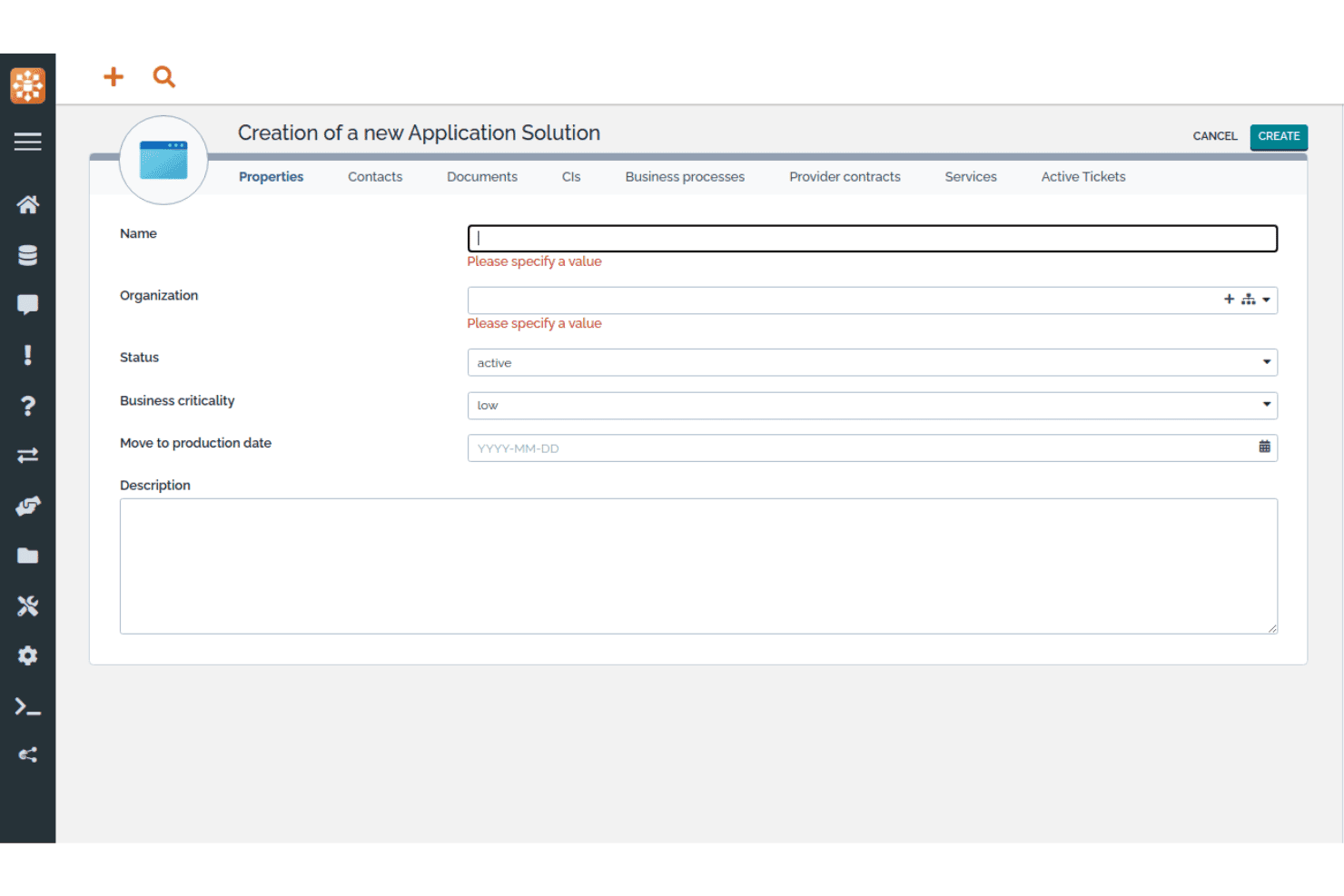
Met iTop kunnen gebruikers nieuwe applicatieoplossingen met belangrijke eigenschappen registreren. iTop is een open-source CMDB- en ITSM-platform dat een aanpasbare CI-opslagplaats, afhankelijkheidsmapping, impactanalyse en ingebouwde IT-servicemanagementprocessen combineert in één zelfgehoste of SaaS-implementatie.
Voor wie is iTop het meest geschikt?
iTop is zeer geschikt voor IT-teams die een volledig aanpasbare, open-source CMDB willen zonder licentiekosten per gebruiker of per CI.
Waarom ik voor iTop heb gekozen
iTop staat op mijn selectie omdat je met iTop Designer volledig nieuwe CI-klassen, aangepaste attributen en relatietypen kunt bouwen zonder onbewerkte code te schrijven, wat zeldzaam is bij open-source CMDB-tools. Ik vind het ook prettig dat impactanalyse rechtstreeks in het kernplatform is ingebouwd: koppel een CI aan een incident en iTop toont onmiddellijk elke afhankelijke service of elk contract dat wordt beïnvloed. De Community-editie biedt dit allemaal zonder limieten op het aantal CI's en zonder licentiekosten.
Belangrijkste functies van iTop
- Engine voor gegevenssynchronisatie: Haal CI-gegevens gelijktijdig uit meerdere externe bronnen op, met configureerbare reconciliatieregels per bron en per CI-klasse.
- Ondersteuning voor meerdere organisaties: Beheer CI's, teams, contactpersonen en servicerelaties voor afzonderlijke organisatie-eenheden binnen één iTop-instantie.
- REST/JSON-API: Voer volledige CRUD-bewerkingen uit op alle objecten, inclusief aangepaste CI-klassen, om iTop te verbinden met externe tools en automatiseringsworkflows.
- Op rollen gebaseerd toegangsbeheer: Definieer gedetailleerde gebruikersprofielen via Designer, met ingebouwde ondersteuning voor SSO (SAML, OAuth, OpenID Connect) en MFA (TOTP, hardwarematige beveiligingssleutels).
Integraties van iTop
iTop biedt ingebouwde integraties met Microsoft Azure, VMware vSphere, Microsoft InTune, Proxmox, OCS Inventory NG, Ansible, LDAP/Active Directory, Slack en Microsoft Teams (via webhooks), plus TeemIP voor IP-adresbeheer. Er is een REST/JSON-API beschikbaar voor aangepaste integraties en Case Exchange ondersteunt ticketsynchronisatie met ITSM-tools van derden in hogere abonnementsniveaus.
Pros and Cons
Pros:
- Onbeperkt aantal CI's in de gratis Community-editie
- Ingebouwde ITSM- en CMDB-integratie in het hele platform
- Interface voor aangepaste CI-klassen met weinig code
Cons:
- Geen ingebouwde ondersteuning voor AWS- of GCP-detectie
- De gebruikersinterface voelt verouderd aan in vergelijking met die van concurrenten
Learn more about iTop: Het beste voor visuele mapping van wijzigingsimpact
- Gratis proefversie beschikbaar
- Vanaf $10,000/jaar (jaarlijks gefactureerd)

Virima biedt een uniform dashboard voor inzicht in de IT-infrastructuur. Virima is een CMDB- en IT-assetmanagementplatform dat geautomatiseerde ontdekking met meerdere methoden, afhankelijkheidskoppeling en bidirectionele ITSM-integraties combineert in één allesomvattende oplossing.
Voor wie is Virima het meest geschikt?
Virima is zeer geschikt voor IT-teams in het middensegment die een complete CMDB met visuele afhankelijkheidskoppeling nodig hebben, zonder afzonderlijk voor elke module te betalen.
Waarom ik voor Virima heb gekozen
Ik heb Virima als een van de beste oplossingen geselecteerd omdat de ViVID™-engine iets doet wat de meeste CMDB's niet kunnen: live, interactieve serviceafhankelijkheidskaarten weergeven met impactanalyse van de reikwijdte voordat een wijziging wordt goedgekeurd, zodat je CAB-beoordelaars precies kunnen zien welke CI's risico lopen. Actieve incidenten, openstaande wijzigingsverzoeken en CVE-markeringen worden allemaal rechtstreeks op dezelfde kaart weergegeven. Ik vind het ook goed dat de CMDB-gezondheidsscore de datakwaliteit per CI bijhoudt op het gebied van volledigheid, actualiteit en consistentie, en wijzigingen op records met een lage betrouwbaarheid kan blokkeren.
Belangrijkste functies van Virima
- Geautomatiseerde ontdekking met meerdere methoden: Voert gelijktijdig agentgebaseerde, agentloze (140+ detectiemodules) en API-gebaseerde ontdekking uit in lokale, AWS-, Azure-, VMware-, Hyper-V- en Kubernetes-omgevingen.
- CMDB-gezondheidsscore: Houdt de datakwaliteit per CI bij op het gebied van volledigheid, actualiteit en consistentie, en kan nieuwe scans starten of wijzigingen op records met een lage betrouwbaarheid blokkeren.
- Bidirectionele ITSM-integraties: Synchroniseert CI-gegevens standaard met ServiceNow, Jira Service Management, Ivanti, HaloITSM, Xurrent, Hornbill en TeamDynamix—inbegrepen in elk abonnement zonder extra kosten.
- Meting van softwaregebruik: Houdt het daadwerkelijke gebruik van applicaties bij via de Windows-ontdekkingsagent om ongebruikte licenties te identificeren en beslissingen over terugwinning te ondersteunen.
Virima-integraties
Virima biedt bidirectionele native integraties met ServiceNow, Jira Service Management, Ivanti, HaloITSM, Xurrent, Hornbill en TeamDynamix voor ITSM-workflows, plus API-gebaseerde connectoren voor AWS, Azure, VMware, Hyper-V, Kubernetes, LogicMonitor, SolarWinds, Okta, Microsoft SCCM en de Nationale kwetsbaarhedendatabase van NIST. Een volledige REST API is inbegrepen in elk abonnement voor aangepaste integraties.
Pros and Cons
Pros:
- Visuele mapping van wijzigingsimpact met live gegevens
- Geautomatiseerde ontdekking van IT-assets met meerdere methoden
- CMDB-gezondheidsscore blokkeert risicovolle wijzigingen
Cons:
- Er is geen connector voor ontdekking in Google Cloud beschikbaar
- De formuliereditor heeft geen interface voor slepen en neerzetten
Learn more about Virima: Beste voor detectie van assets in meerdere clouds
- 30 dagen gratis proefperiode
- Vanaf $67/maand

Met CloudAware kunnen gebruikers alle IT-assets in één inventarisoverzicht filteren en beheren. CloudAware is een native Salesforce-CMDB-platform dat agentloze detectie van bedrijfsmiddelen in meerdere clouds, afhankelijkheidsmapping, IT-assetbeheer, compliance als code en geïntegreerd FinOps- en beveiligingspostuurbeheer combineert voor cloud- en hybride omgevingen.
Voor wie is CloudAware het meest geschikt?
CloudAware is zeer geschikt voor IT- en cloudoperations-teams van grote ondernemingen die bedrijfsmiddelen bij twee of meer cloudproviders beheren en behoefte hebben aan uniform inzicht zonder agents te implementeren.
Waarom ik voor CloudAware heb gekozen
Ik heb CloudAware opgenomen in mijn topkeuzes omdat de agentloze, op API's gebaseerde detectie gelijktijdig AWS, Azure, GCP, Oracle Cloud en Alibaba Cloud omvat. Zo krijg je één uniforme CMDB voor elke cloud die je gebruikt, zonder ook maar één agent te implementeren. Ik vind het vooral prettig dat het binnen een dag een volledige inventaris van bedrijfsmiddelen opbouwt met alleen-lezenreferenties. De taganalysator normaliseert vervolgens tags bij alle providers, zodat je CI-records consistent blijven, ongeacht welk team de resource heeft ingericht.
Belangrijkste functies van CloudAware
- Compliance als code: Stel compliancebeleid op in een aangepaste DSL, beheer het met versiebeheer in Git en voer controles van pullverzoeken en eenheidstests uit voordat je het implementeert.
- Automatisering met de workflowbouwer: Gebruik een interface met slepen en neerzetten, zonder code, om geautomatiseerde workflows voor je cloud- en on-premisesomgevingen te bouwen en te orkestreren.
- FinOps-module: Houd het gebruik van gereserveerde instanties bij, genereer doorbelastingsrapporten en ontvang aanbevelingen voor de juiste dimensionering voor facturatiebronnen in meerdere clouds.
- Kwetsbaarheidsbeheer: Groepeer en prioriteer kwetsbaarheden met behulp van eigenaarschap van CMDB-assets en context over de omgeving, zodat bevindingen op grote schaal kunnen worden gerangschikt en verholpen.
Integraties van CloudAware
CloudAware biedt meer dan 60 ingebouwde integraties, waaronder AWS, Microsoft Azure, Google Cloud Platform, ServiceNow, Jira, PagerDuty, Datadog, CrowdStrike, Splunk en Terraform. Het biedt ook een REST API, Bulk API en CLI voor aangepaste integraties.
Pros and Cons
Pros:
- Uniforme detectie en mapping van assets in meerdere clouds
- Salesforce-native CMDB met gedetailleerde toegangscontroles
- Geautomatiseerde compliance als code voor beleidshandhaving
Cons:
- ITSM-workflows zijn afhankelijk van externe platforms
- De prestaties van de gebruikersinterface kunnen bij grote omgevingen achterblijven
Learn more about CloudAware: Het beste voor het in kaart brengen van toepassingsafhankelijkheden
- Gratis proefversie beschikbaar
- Prijs op aanvraag
Visit WebsiteCustomer Rating:4.8/5
Device42 brengt afhankelijkheden van cloudresources visueel in realtime in kaart. Device42 is een CMDB-platform dat geautomatiseerde agentloze detectie, het in kaart brengen van toepassingsafhankelijkheden, IT-assetbeheer en datanormalisatie combineert voor fysieke, virtuele, cloud- en containeromgevingen.
Voor wie is Device42 het meest geschikt?
Device42 is zeer geschikt voor middelgrote tot grote IT-teams die hybride omgevingen beheren en nauwkeurige kaarten van toepassingsafhankelijkheden nodig hebben ter ondersteuning van cloudmigraties en analyses van de impact van wijzigingen.
Waarom ik voor Device42 heb gekozen
Ik heb Device42 gekozen als een van de beste oplossingen omdat het in kaart brengen van toepassingsafhankelijkheden automatisch visualisaties van afhankelijkheden tussen services genereert zonder agents. Dat is belangrijk wanneer je een cloudmigratie plant en precies moet weten wat er uitvalt als je één component verplaatst. Ik vind het ook prettig dat lijsten met de impact op toepassingen je de mogelijke impact vóór wijzigingen laten beoordelen en dat detectie van affiniteitsgroepen logisch gerelateerde resources zichtbaar maakt die je anders misschien over het hoofd zou zien.
Belangrijkste functies van Device42
- EnrichAI-datanormalisatie: Standaardiseert automatisch namen van besturingssystemen, leveranciersnamen en softwaretitels uit verschillende detectiebronnen en voegt EOL/EOS-levenscyclusgegevens van grote softwareleveranciers toe.
- Agentloze detectie in meerdere clouds: Detecteert assets in AWS, Azure, GCP, Oracle Cloud en Alibaba Cloud met behulp van eigen cloud-API's, zonder dat agents op doelsystemen nodig zijn.
- Softwarelicentiebeheer: Vergelijkt het aantal geïnstalleerde softwarepakketten met aangeschafte licenties, markeert verboden software en houdt de vervaldatums van licentieovereenkomsten bij.
- InsightsAI-query's in natuurlijke taal: Zet vragen in gewone taal om in SQL-query's voor de CI-database en levert aangepaste rapporten zonder dat kennis van query's vereist is.
Integraties van Device42
Device42 biedt meer dan 40 oorspronkelijke integraties, waaronder Freshservice, ServiceNow, Jira Service Management, Zendesk, Ansible, Puppet, Chef, Jenkins, Splunk en PagerDuty. Het biedt ook een RESTful API en webhooks voor aangepaste integraties.
Pros and Cons
Pros:
- Voor het in kaart brengen van afhankelijkheden zijn geen agents nodig
- EnrichAI normaliseert automatisch leveranciers- en besturingssysteemnamen
- Nalevingsdashboards ondersteunen meerdere raamwerken
Cons:
- De initiële installatie voelt overweldigend voor kleine teams
- Detectie kan vertragen bij zware belasting
Learn more about Device42: Meest geschikt voor suggesties voor automatische CMDB-koppeling
- Gratis proefperiode van 30 dagen
- Vanaf $1,499/jaar (jaarlijks gefactureerd)
Visit WebsiteCustomer Rating:4.6/5
InvGate Asset Management brengt CI-relaties in kaart in een visuele diagramweergave. InvGate Asset Management is een CMDB- en IT-assetbeheerplatform dat geautomatiseerde ontdekking uit meerdere bronnen, visuele afhankelijkheidskoppeling, door AI aangedreven relatiesuggesties en native ITSM-integratie combineert.
Voor wie is InvGate Asset Management het meest geschikt?
IT-teams die hybride omgevingen beheren en AI-ondersteunde CMDB-relatiekoppeling willen zonder de complexiteit van platforms voor grote ondernemingen.
Waarom ik voor InvGate Asset Management heb gekozen
Ik heb InvGate Asset Management opgenomen in mijn topkeuzes omdat de functie CMDB Auto-Mapping echt verandert hoe teams relatiegegevens opbouwen en onderhouden. In plaats van afhankelijkheden handmatig te traceren, detecteert de AI-engine kritieke assetrelaties in lokale en cloudomgevingen en zet deze klaar als suggesties die je kunt accepteren of afwijzen. Ik vind het ook prettig dat Atlas CI-records automatisch aanvult met informatie over het einde van de levensduur en versiestatus, zodat je CMDB de werkelijke status van assets weerspiegelt zonder voortdurend handmatige updates.
Belangrijkste functies van InvGate Asset Management
- Geautomatiseerde ontdekking uit meerdere bronnen: Scant lokale, cloud- (AWS, Azure, GCP) en hybride omgevingen met zowel agentgebaseerde als agentloze methoden via meer dan 11 protocollen.
- Gezondheidsregels: Definieer aangepaste voorwaarden om CI's te markeren als gezond, risicovol of kritiek, zodat de kwaliteit van CI-gegevens in je hele CMDB wordt bewaakt.
- Verrijking van assets met Atlas: Vult CI-records automatisch aan met einddatum van de levensduur, versiestatus en levenscycluswaarschuwingen uit een universele IT-database.
- Granulaire RBAC: Bepaal toegangsrechten op basis van locatie, assettype en tags, zodat verschillende teams alleen de CI's kunnen zien en beheren die relevant zijn voor hun rol.
Integraties van InvGate Asset Management
InvGate Asset Management biedt native integraties met InvGate Service Management, ServiceNow CMDB, Jira, Zendesk, Microsoft Intune, Jamf, AWS, Azure, Google Cloud Platform en VMware, plus connectiviteit binnen het Microsoft-ecosysteem, waaronder Microsoft 365 en Entra ID. Er is een REST API beschikbaar voor aangepaste integraties en ondersteuning voor Zapier wordt aangeboden als betaalde add-on via InvGate Service Management.
Pros and Cons
Pros:
- Door AI aangedreven suggesties voor automatische CMDB-koppeling
- Geautomatiseerde ontdekking uit meerdere bronnen, inclusief MDM
- Visuele koppeling van afhankelijkheden en topologie
Cons:
- Functie voor automatische koppeling bevindt zich in vroege toegang
- Aanpassing van rapportages en dashboards is beperkt
Learn more about InvGate Asset Management: Het meest geschikt voor grootschalige hybride IT-detectie
- Gratis demo beschikbaar
- Prijs op aanvraag
Visit WebsiteCustomer Rating:4.2/5
OpenText centraliseert verkoopgegevens, contracten en bestellingen in één dashboard. OpenText Universal Discovery and CMDB is een CMDB-platform van ondernemingsniveau, ontwikkeld voor grootschalige hybride IT-omgevingen. Het omvat geautomatiseerde detectie, afhankelijkheidsmapping, servicemodellering en normalisatie van CI-gegevens voor on-premises-, multicloud- en containerinfrastructuur.
Voor wie is OpenText het meest geschikt?
OpenText Universal Discovery and CMDB is ontwikkeld voor grote ondernemingen met volwassen IT-teams die complexe infrastructuur met meerdere lagen beheren in on-premises-, cloud- en hybride omgevingen.
Waarom ik voor OpenText koos
Ik koos voor OpenText Universal Discovery and CMDB omdat het is ontwikkeld om detectie op een schaal uit te voeren die de meeste tools eenvoudigweg niet kunnen evenaren. Het platform ondersteunt meer dan 3.500 typen netwerkapparaten en meer dan 250 leveranciers. Bovendien bouwt de geautomatiseerde servicemodellering continu actuele afhankelijkheidskaarten opnieuw op wanneer de infrastructuur verandert, zonder handmatige tussenkomst. Ik vind de functie voor detectie van laatste aanmeldingen ook bijzonder nuttig om inactieve accounts op te sporen en licenties terug te winnen in grootschalige omgevingen.
Belangrijkste functies van OpenText
- Dynamische softwaredetectie: Scant uw omgeving aan de hand van een bibliotheek met meer dan 140.000 softwaretitels, inclusief aanduidingen voor het einde van de levensduur, om hiaten op het gebied van naleving en beveiliging aan het licht te brengen.
- Topologievraagtaal (TQL): Hiermee kunt u aangepaste query's schrijven om specifieke CI-relaties en afhankelijkheden rechtstreeks uit het CMDB-gegevensmodel te halen.
- Op rollen gebaseerde toegangscontrole (RBAC): Beperkt de toegang tot CI-gegevens op basis van gebruikersrollen en ondersteunt auditvereisten voor naleving van SOX, HIPAA en ISO 27001.
- Beheer van externe probes: Hiermee kunt u hotfix-updates gelijktijdig vanuit de gebruikersinterface naar alle detectieprobes pushen, zonder dat u rechtstreeks toegang tot elke probe nodig hebt.
Integraties van OpenText
OpenText Universal Discovery and CMDB biedt native integraties met ServiceNow (gecertificeerde app), BMC, Jira Service Management, CrowdStrike Falcon, Infoblox en Oracle LMS, evenals uitgebreide koppelingen binnen het OpenText-ecosysteem, waaronder SMAX, netwerkoperationsbeheer, cloudbeheer, AI-operationsbeheer en assetbeheer. Het ondersteunt ook de Topologievraagtaal (TQL) en een uitbreidbare API voor aangepaste integraties en het extraheren van CI-gegevens.
Pros and Cons
Pros:
- Detecteert meer dan 3.500 typen netwerkapparaten
- Ondersteunt actuele servicetoewijzingen met automatische updates
- Verwerkt omgevingen met 200 miljoen CI's
Cons:
- Vereist gespecialiseerde expertise voor een betrouwbare installatie
- De gebruikersinterface voelt verouderd aan in vergelijking met nieuwere platforms
Learn more about OpenText: Beste voor CMDB met servicetoewijzing
- Gratis demo beschikbaar
- Prijs op aanvraag
Visit WebsiteCustomer Rating:4/5
Ivanti Neurons brengt kwetsbaarheidsrisico's voor eindpunten op alle apparaten in beeld. Ivanti Neurons is een CMDB- en IT-assetbeheerplatform dat continue detectie in meerdere omgevingen, mapping van serviceafhankelijkheden en een uniforme CI-opslagplaats combineert met ingebouwde ITSM-integratie.
Voor wie is Ivanti Neurons het meest geschikt?
Ivanti Neurons is zeer geschikt voor IT-teams van ondernemingen die één platform nodig hebben voor het beheren van zowel assetregistraties als configuratierelaties binnen complexe infrastructuren met meerdere omgevingen.
Waarom ik voor Ivanti Neurons heb gekozen
Ik heb Ivanti Neurons geselecteerd als een van de beste oplossingen, omdat de mogelijkheid voor servicetoewijzing het platform echt onderscheidt van zelfstandige CMDB-tools. Het platform genereert automatisch dynamische afhankelijkheidskaarten rechtstreeks vanuit ontdekkingsgegevens en legt daar vervolgens openstaande incidenten en geplande wijzigingen overheen, zodat je de impactradius kunt zien voordat je iets goedkeurt. Ik vind het ook prettig dat ITAM- en CMDB-records in één uniform model gesynchroniseerd blijven, zodat je CI-gegevens al context over de levenscyclus en het eigenaarschap bevatten zonder handmatige kruisverwijzingen.
Belangrijkste functies van Ivanti Neurons
- Continue detectie in meerdere omgevingen: Scant automatisch on-premises-, cloud- (AWS, Azure), SaaS-, OT/IoT- en legacy-omgevingen met behulp van zowel actieve als passieve methoden om CI-records actueel te houden.
- Detectie van configuratieafwijkingen: Houdt CI's in de gaten op afwijkingen van hun verwachte status en markeert wijzigingen, zodat je per configuratie-item over een voortdurend auditspoor beschikt.
- Afstemmings- en normalisatiemechanisme: Ontdoet assetgegevens uit UEM-, cloudplatform-, kwetsbaarheidsscanner- en ITSM-bronnen automatisch van duplicaten en consolideert ze tot één gezaghebbend record.
- Op rollen gebaseerd toegangsbeheer met SSO en MFA: Beheert gebruikersrechten op gedetailleerd niveau met gecentraliseerde authenticatie, ondersteuning voor eenmalige aanmelding en standaard afgedwongen meervoudige authenticatie.
Integraties van Ivanti Neurons
Ivanti Neurons biedt ingebouwde integraties met ServiceNow, BMC, Jamf, CrowdStrike, Wiz, Tenable, Rapid7, Qualys, Okta en Zscaler, plus ingebouwde connectiviteit binnen het Microsoft-ecosysteem, waaronder Azure, Azure AD en Azure DevOps (via de Ivanti Neurons iPaaS). Het maakt ook verbinding met AWS, Google Chrome Enterprise en Cisco en biedt open REST API's via de Ivanti Developer Hub voor aangepaste integraties, met aanvullende vooraf gebouwde connectoren die beschikbaar zijn op de Ivanti Marketplace.
Pros and Cons
Pros:
- Genereert automatisch dynamische kaarten van serviceafhankelijkheden
- Uniform platform voor ITAM en CMDB
- Impactradiusanalyse voor aanstaande wijzigingen
Cons:
- Geen gratis proefversie voor zelfbediening beschikbaar
- Voor de implementatie kan aanzienlijke configuratie-inspanning nodig zijn
Learn more about Ivanti Neurons: Het beste voor gefedereerde configuratiegegevens
- Gratis demo beschikbaar
- Prijs op aanvraag

BMC Helix CMDB bewaakt de integriteit en volledigheid van gegevens voor IT-assets. BMC Helix CMDB is een configuratiebeheerdatabase voor ondernemingen die een gefedereerde CI-repository, agentloze ontdekking in meerdere clouds, afhankelijkheidsmapping en een ingebouwde engine voor reconciliatie en normalisatie combineert.
Voor wie is BMC Helix het meest geschikt?
BMC Helix CMDB is zeer geschikt voor grote ondernemingen die complexe IT-omgevingen met meerdere gegevensbronnen beheren, waarin gegevensnauwkeurigheid tussen ontdekkingstools, cloudplatforms en ITSM-workflows niet onderhandelbaar is.
Waarom ik voor BMC Helix heb gekozen
BMC Helix CMDB staat op mijn shortlist omdat de gefedereerde gegevensarchitectuur het mogelijk maakt CI-gegevens uit meerdere gezaghebbende bronnen, zoals BMC Helix Discovery, SCCM en cloudconnectors, samen te brengen in één referentiedatabase zonder alles plat te slaan in één voorgeschreven gegevensmodel. Vooral de Reconciliation Engine spreekt mij aan: hiermee kunt u per attribuut regels voor gegevensprioriteit definiëren, zodat bij conflicterende records voor elk veld de juiste bron de doorslag geeft. Combineer dat met de regelgebaseerde deduplicatie van de Normalization Engine in verschillende gegevenssets en CI-klassen, en u krijgt een CMDB die nauwkeurig blijft, zelfs wanneer het aantal ontdekkingsbronnen toeneemt.
Belangrijkste functies van BMC Helix
- Agentloze ontdekking in meerdere clouds: BMC Helix Discovery scant AWS-, Azure-, GCP- en OCI-omgevingen zonder geïnstalleerde agents te vereisen, met behulp van een op Outposts gebaseerde architectuur.
- Generatieve AI-assistent HelixGPT: Een ingebouwde AI-tool die samenvattingen in natuurlijke taal, dashboardbeschrijvingen en workflowautomatisering voor het hele platform genereert.
- Ontdekking van Kubernetes en containers: Het platform brengt verbindingen tussen containers, correlaties tussen pods en implementaties en externe softwareafhankelijkheden in gecontaineriseerde omgevingen in kaart.
- PinkVerify-gecertificeerde ITSM-workflows: CI-gegevens stromen rechtstreeks naar incident-, probleem-, wijzigings- en activabeheerrecords binnen de BMC Helix ITSM-suite, die is gecertificeerd voor 18 ITIL-praktijken.
BMC Helix-integraties
BMC Helix CMDB biedt native integraties binnen het BMC Helix-ecosysteem (Helix ITSM, Helix Discovery, Helix Operations Management en Atrium Integrator), evenals met Microsoft SCCM, Active Directory, Microsoft Teams, ServiceNow CMDB, CyberArk en ARCON PAM, plus cloudconnectors voor AWS, Azure, GCP en OCI. REST-API's zijn beschikbaar voor aangepaste integraties en Kubernetes- en mainframeomgevingen worden ondersteund via speciale ontdekkingsproviders.
Pros and Cons
Pros:
- Verwerkt honderden miljoenen CI's
- Agentloze ontdekking van meerdere clouds en containers
- Geavanceerde engines voor normalisatie en reconciliatie
Cons:
- Impactanalyse kan traag zijn
- Deduplicatie aan de backend biedt weinig granulariteit
Learn more about BMC Helix:
Andere CMDB-software
Hier zijn enkele aanvullende opties voor CMDB-software die mijn shortlist niet hebben gehaald, maar die toch de moeite waard zijn om te bekijken:
- 11Xurrent ITSMHet beste voor verenigde CI- en assetrecords
- 12FreshserviceIdeaal voor ITSM en CMDB voor middelgrote bedrijven in één
- 13LansweeperBeste keuze voor discoverygerichte CMDB-voeding
- 14ServiceDesk PlusIdeaal voor uniforme CMDB- en ITSM-werkstromen
- 15HaloIdeaal voor CI-tracking binnen ITSM
- 16Jira Service ManagementIdeaal voor ITSM-teams die CI's aan elk ticket koppelen
- 17Flexera OneHet beste voor genormaliseerde technologie-informatie
- 18AtomicworkIdeaal voor AI-native CMDB en ITSM in één
- 19AxoniusBeste keuze voor CMDB-datakwaliteit en -verrijking
- 20ServiceNow CMDBHet meest geschikt voor gegevens van servicegrafieken voor ondernemingen
Hoe ik CMDB-software beoordeel
Ik splits mijn beoordeling op in basismogelijkheden waaraan elke tool moet voldoen en onderscheidende factoren die een solide CMDB onderscheiden van een CMDB die standhoudt wanneer een verkeerd geconfigureerde CI leidt tot een P1-incident.
Kernfunctionaliteit (basisvereisten voor deze lijst)
Wanneer ik tools voor mijn lijst selecteer, beoordeel ik elke tool op een schaal van 0 (biedt de functionaliteit niet) tot 5 (blink uit op dit gebied) voor elke hieronder vermelde kernfunctionaliteit. Vervolgens bereken ik de totaalscore van de tool als percentage, waarbij ik 75% als maatstaf gebruik om de algehele geschiktheid voor de lijst te beoordelen.
- CI-opslagplaats & gegevensmodel: Ik beoordeel hoe flexibel het gegevensmodel is: kun je aangepaste CI-klassen, kenmerken en hiërarchieën definiëren, of zit je vast aan een starre, platte lijst?
- Geautomatiseerde detectie: De tool moet IT-middelen detecteren in lokale, cloud- en gecontaineriseerde omgevingen, zonder afhankelijk te zijn van handmatige CSV-imports of agents voor slechts één omgeving.
- Afhankelijkheids- & relatie-inventarisatie: Ik zoek naar dynamische topologieweergaven en impactanalyses, niet alleen naar statische bovenliggende/onderliggende koppelingen: denk aan inzicht in de impactradius voordat je een wijziging doorvoert.
- ITSM-integratie: Bi-directionele CI-context in incident-, probleem- en wijzigingstickets is hier van belang. Tools zoals ServiceNow en BMC Helix bieden dit standaard, terwijl andere tools afhankelijk zijn van connectoren.
- Reconciliatie & normalisatie: Meerdere detectiebronnen leiden tot duplicaten en conflicten. Ik controleer of er op regels gebaseerde reconciliatie-engines zijn die gegevens automatisch ontdubbelen en de gegevenskwaliteit beoordelen.
- Toegangsbeheer & auditlogboek: Granulair RBAC en een volledig auditspoor voor elke CI-wijziging zijn waar ik naar kijk, vooral voor teams die tijdens audits moeten aantonen dat ze aan regelgeving voldoen.
Zodra ik een lijst heb met tools die aan de criteria voldoen, kijk ik naar wat elk platform onderscheidt.
Onderscheidende factoren (wat leveranciers onderscheidt)
Zo vergelijk ik verschillende leveranciers met elkaar:
Opvallende functies
Ik zoek naar visualisatie van servicegrafieken die afhankelijkheden tussen applicaties en infrastructuur in realtime in kaart brengt. Voorafgaand aan een wijzigingsvenster wil ik de impactradius in hybride omgevingen kunnen traceren, in plaats van ernaar te moeten raden. Het in kaart brengen van bedrijfsservices is eveneens belangrijk, omdat hiermee CI's worden gekoppeld aan omzetgenererende applicaties en SLA's, zodat je een P1 kunt prioriteren op basis van bedrijfsimpact. Ik beoordeel ook connectoren voor detectie in meerdere clouds en controleer of een tool AWS, Azure, GCP en Kubernetes standaard ondersteunt, inclusief ingebouwde detectie van afwijkingen.
Meer dan functies alleen
Ik beoordeel eerst de flexibiliteit van de implementatie: of een leverancier SaaS-, zelfgehoste en volledig geïsoleerde opties biedt, is van belang wanneer je beveiligingsbeleid een cloud met meerdere tenants uitsluit. Compliancecertificeringen zoals SOC 2 Type II en ISO 27001 zijn eveneens belangrijk, vooral als je auditbewijsmateriaal voor PCI-DSS of SOX moet genereren zonder handmatig rapporten samen te voegen. Ik controleer ook de totale eigendomskosten: sommige leveranciers bundelen detectie en het in kaart brengen van services in de basisprijs, terwijl andere kosten per module in rekening brengen. Hierdoor kunnen je uitgaven verdubbelen naarmate het aantal CI's groeit.
Een CMDB-softwareoplossing kiezen
De juiste CMDB-software kiezen komt neer op wat je team nodig heeft om configuratiegegevens op grote schaal accuraat, toegankelijk en bruikbaar te houden:
| Als je prioriteit ligt bij... | Zoek dan naar... |
| Ondersteuning van multicloudomgevingen | Ingebouwde connectors voor ontdekking in AWS, Azure, GCP en Kubernetes |
| Het verminderen van handmatige assetupdates | Geautomatiseerde ontdekking van assets en afhankelijkheden in on-premises- en cloudomgevingen |
| Integratie met incidentworkflows | Native of bidirectionele ITSM-integratie met je servicedesk |
| Aantonen dat je klaar bent voor audits | Configureerbare RBAC, audittrails en exporteerbare compliancerapporten |
| Aanpassing aan complexe infrastructuur | Flexibele datamodellen met aangepaste CI-klassen en kenmerken |
Je shortlist beoordelen
- Test automatisering van ontdekking: Voer een proefperiode van vijf dagen uit om cloud-, on-premises- en containerresources te inventariseren zonder CSV-bestanden te importeren.
- Controleer de diepgang van servicemapping: Breng applicatieafhankelijkheden in kaart en controleer of visualisaties in realtime worden bijgewerkt nadat je een wijziging hebt aangebracht.
- Valideer de ITSM-integratie: Open een wijzigingsticket en controleer of CI-details en de impact van de wijziging automatisch met je ITSM-platform worden gesynchroniseerd.
- Controleer nalevingsartefacten: Vraag een voorbeeld van een auditlog op en controleer op gedetailleerde wijzigingen in CI's met tijdstempels en toewijzing aan gebruikers.
- Kies tussen open source en enterprise: Weeg uitbreidbaarheid en kostenbesparingen af tegen beheerde ondersteuning en beveiligingscertificeringen.
Wat is CMDB-software?
CMDB staat voor configuratiemanagementdatabase. CMDB-software is een hulpmiddel dat gegevens over configuratie-items (CI's) in uw IT-omgeving verzamelt, opslaat en beheert. Het brengt relaties tussen bedrijfsmiddelen in kaart, houdt wijzigingen bij en onderhoudt een gedetailleerd overzicht van infrastructuurcomponenten. Met een CMDB kan uw team de nauwkeurigheid van gegevens handhaven, afhankelijkheden traceren en incident- en nalevingsprocessen ondersteunen door ervoor te zorgen dat elk CI en de bijbehorende verbindingen altijd zichtbaar en actueel zijn.
Functies van CMDB-software
Let bij het selecteren van CMDB-software op de volgende belangrijke functies:
- CI-opslagplaats en gegevensmodellering: Maak configuratie-items (CI's) aan, categoriseer en beheer ze, inclusief aangepaste klassen, kenmerken en relaties.
- Geautomatiseerde detectie van bedrijfsmiddelen: Vind en registreer bedrijfsmiddelen in lokale, cloud- en hybride omgevingen met minimale handmatige inspanning.
- Afhankelijkheids- en relatiemapping: Brengt afhankelijkheden tussen applicaties, services, servers en netwerkapparaten dynamisch in kaart. Dit geeft uw team visueel inzicht in de interactie tussen componenten en helpt bij het beoordelen van de impact van wijzigingen en incidenten.
- Wijzigingen en audits bijhouden: Houdt configuratiewijzigingen aan afzonderlijke CI's bij, registreert gebruikersacties en legt momentopnamen vast voor terugdraaiingen. Dit audittraject is waardevol voor probleemoplossing, naleving en inzicht in historische configuratiestatussen.
- Toegangsbeheer en machtigingen: Deze functie biedt rolgebaseerde beheermogelijkheden voor verschillende gebruikersgroepen, zodat alleen geautoriseerde medewerkers specifieke records kunnen bekijken of wijzigen. Zo blijven gevoelige configuratiegegevens beschermd en wordt functiescheiding ondersteund.
- Integratie met ITSM-hulpmiddelen: Verbindt uw CMDB met workflows voor incident-, probleem- en wijzigingsbeheer. Hierdoor beschikken servicedeskmedewerkers over de juiste context en kunnen ze tickets rechtstreeks koppelen aan CI's en hun relaties.
- Reconciliatie en normalisatie: Lost gegevensconflicten uit meerdere detectiebronnen op, verwijdert dubbele bedrijfsmiddelen en standaardiseert recordindelingen. Hierdoor blijft de database schoon en betrouwbaar, vooral in grotere omgevingen.
- Service- en bedrijfsmodellering: Koppelt IT-bedrijfsmiddelen aan bedrijfsservices en -processen, waardoor het eenvoudiger wordt om prioriteit te geven aan problemen op basis van hun mogelijke impact op kernactiviteiten of omzetgenererende applicaties.
- Dashboards en rapportage: Biedt vooraf gebouwde en aanpasbare dashboards om de nauwkeurigheid van de inventaris, recente wijzigingen, de status van bedrijfsmiddelen en de nalevingsstatus te visualiseren. Teams gebruiken deze om de omgeving te bewaken en inzichten met belanghebbenden te delen.
- Nalevings- en exportmogelijkheden: Biedt configureerbare rapportage ter ondersteuning van audits en exporteert logboeken en CI-gegevens wanneer dat nodig is voor wettelijke doeleinden of het delen tussen teams. Dit is vooral belangrijk voor organisaties die onderworpen zijn aan normen zoals SOC 2 of ISO 27001.
Veelvoorkomende AI-functies van CMDB-software
Naast de hierboven genoemde standaardfuncties van CMDB-software integreren veel van deze oplossingen AI met functies zoals:
- Geautomatiseerde anomaliedetectie: Gebruikt AI-algoritmen om configuratiegegevens en wijzigingen aan bedrijfsmiddelen te bewaken en ongebruikelijke patronen of afwijkingen te signaleren die kunnen wijzen op verkeerde configuraties, beveiligingsrisico's of nalevingsproblemen. Zo helpt u uw team problemen vroegtijdig op te sporen, zelfs in complexe omgevingen.
- Voorspellende impactanalyse: Past machinaal leren toe op historische incident- en wijzigingsgegevens om de mogelijke impact van voorgestelde wijzigingen op gerelateerde systemen en services te voorspellen. Hierdoor krijgt u een duidelijker beeld van de risico's voordat u updates uitvoert.
- Intelligente classificatie van bedrijfsmiddelen: Gebruikt AI om nieuwe of onbekende bedrijfsmiddelen automatisch te categoriseren op basis van waargenomen gedrag, metagegevens en netwerkactiviteit. Dit vermindert handmatige gegevensinvoer en houdt uw CMDB georganiseerd naarmate uw omgeving zich ontwikkelt.
- Zoeken en inzichten in natuurlijke taal: Stelt gebruikers in staat om de CMDB in gewone taal te raadplegen, waarbij AI de bedoeling interpreteert en relevante configuratie-items, relaties of auditlogboeken naar voren brengt. Hierdoor kunnen niet-specialisten gemakkelijker de informatie vinden die ze nodig hebben.
- Geautomatiseerde analyse van de hoofdoorzaak: Gebruikt AI om incidenten, wijzigingen en configuratiegegevens met elkaar in verband te brengen, zodat uw team snel de onderliggende oorzaak van storingen of prestatieproblemen kan vaststellen. Dit verkort de onderzoektijd en ondersteunt een snellere oplossing.
Voordelen van CMDB-software
Het implementeren van CMDB-software biedt verschillende voordelen voor uw team en uw bedrijf. Hier zijn enkele voordelen waar u naar kunt uitkijken:
- Nauwkeurige inventaris van bedrijfsmiddelen: Houd een realtime, uniforme database bij van alle configuratie-items (CI's) met behulp van geautomatiseerde detectie en flexibele gegevensmodellering.
- Duidelijke afhankelijkheidskoppeling: Visualiseer relaties en afhankelijkheden tussen infrastructuur, applicaties en bedrijfsdiensten ter ondersteuning van betere wijzigingsbeoordelingen en incidenttriage.
- Ondersteuning voor audits en naleving: Krijg toegang tot gedetailleerde audittrails, aan gebruikers toegeschreven wijzigingslogboeken en exporteerbare nalevingsrapporten om aan wettelijke normen en intern beleid te voldoen.
- Snellere incidentoplossing: Koppel incidenten, problemen en wijzigingen rechtstreeks aan relevante CI's en hun relaties, zodat teams onmiddellijk over de context beschikken om problemen op te lossen.
- Minder handmatig werk: Detecteer, stem af en normaliseer automatisch gegevens over bedrijfsmiddelen uit meerdere bronnen, waardoor handmatige updates van records tot een minimum worden beperkt.
- Op rollen gebaseerde gegevensbeheer: Beperk de toegang tot specifieke CMDB-records met fijnmazige rollen en machtigingen.
- Door AI ondersteunde inzichten: Detecteer afwijkingen, classificeer bedrijfsmiddelen en beoordeel mogelijke gevolgen van wijzigingen met behulp van AI-gestuurde analyse.
Kosten en prijzen
Bij het selecteren van CMDB-software is inzicht in de verschillende beschikbare prijsmodellen en abonnementen vereist. De kosten variëren op basis van functies, teamgrootte, uitbreidingen en meer. De onderstaande tabel geeft een samenvatting van veelvoorkomende abonnementen, hun gemiddelde prijzen en de typische functies die in CMDB-softwareoplossingen zijn inbegrepen:
Vergelijkingstabel voor abonnementen van CMDB-software
| Type abonnement | Gemiddelde prijs | Veelvoorkomende functies |
|---|---|---|
| Type abonnementGratis abonnement | Gemiddelde prijs$0 | Veelvoorkomende functiesBasisrepository voor CI's, beperkte detectie van bedrijfsmiddelen, basisrapportage en communityondersteuning. |
| Type abonnementPersoonlijk abonnement | Gemiddelde prijs$10–$25/gebruiker/maand | Veelvoorkomende functiesAangepaste CI-klassen, geautomatiseerde detectie van bedrijfsmiddelen, essentiële relatiemapping en beperkte integraties. |
| Type abonnementZakelijk abonnement | Gemiddelde prijs$25–$60/gebruiker/maand | Veelvoorkomende functiesGeavanceerde afhankelijkheidskoppeling, ITSM-integraties, afstemming en normalisatie en auditregistratie. |
| Type abonnementEnterprise-abonnement | Gemiddelde prijs$60–$150/gebruiker/maand | Veelvoorkomende functiesDienst- en bedrijfsmapping, API-toegang, geavanceerde RBAC, nalevingsexports en premiumondersteuning. |
Veelgestelde vragen over CMDB-software
Hier vindt u antwoorden op enkele veelgestelde vragen over CMDB-software: