

De beste verktøyene for testing på tvers av nettlesere hjelper utviklingsteam med å identifisere layoutproblemer, ødelagte skript og inkonsekvente brukeropplevelser på tvers av nettlesere og enheter før de når produksjonsmiljøet. Disse verktøyene simulerer forhold fra den virkelige verden, slik at team kan kontrollere ytelse, tilgjengelighet og responsivitet på tvers av miljøer uten å være avhengige av manuell testing.
Mange team begynner å lete etter bedre løsninger når testene blir upålitelige, dekningen av nettlesere er ufullstendig, eller feilsøking av visuelle uoverensstemmelser i Chrome, Safari og Edge bremser lanseringssyklusene. Fragmenterte arbeidsflyter og uklare testresultater fører ofte til at feil ikke oppdages, og til frustrerte kvalitetssikringsteam.
Jeg har jobbet direkte med webutviklere og kvalitetssikringsingeniører for å evaluere verktøy for testing på tvers av nettlesere i aktive CI/CD-pipelines, og målt hvor godt de håndterer skalerbarhet, nøyaktighet i rapporteringen og samarbeid.
I denne veiledningen kan du se hvilke plattformer for testing på tvers av nettlesere som faktisk leverer konsistente resultater, reduserer manuelt merarbeid og gir teamet ditt trygghet i hver lansering.
Why Trust Our Software Recommendations
6,700+
Reviews
20
Industry experts
16+
Evaluation factors
14
Years
Our team has been testing and reviewing software since 2012. As tech leaders ourselves, we know how difficult—and important—it is to choose the right software.
For this guide, we evaluated tools using hands-on testing and independent research, scoring tools using our selection criteria.
Our reviews reflect our human editorial judgment, not a sales pitch.
Expert reviewers:
- Paulo Gardini MiguelTech Director
 Tim FisherVP of AI
 Gabriel RosasTech Lead & Software Architect
 Christhian GruhnTech Lead & Platform Architect

Sammenligningstabell for verktøy for testing på tvers av nettlesere
Denne sammenligningstabellen oppsummerer prisdetaljene for mine beste utvalgte verktøy for testing på tvers av nettlesere:
| Tool | Best For | Trial Info | Price | ||
|---|---|---|---|---|---|
| 1 | Best for automation with advanced modularity | 14-day free trial | Pricing upon request | Website | |
| 2 | Best for mobile app testing | Free trial available | From $199/month/year (minimum of 4 seats) | Website | |
| 3 | Best for live browser testing | Free plan + free demo available | From $15/month (billed annually) | Website | |
| 4 | Best for team collaboration | Free demo available | From 1¢/AI credit | Website | |
| 5 | Best for cloud infrastructure | Free trial available | From $29/user/month (billed annually) | Website | |
| 6 | Best for AI-driven testing | Free trial available + free demo | Pricing upon request | Website | |
| 7 | Best for multi-browser test recording | 14-day free trial + free demo available | Pricing upon request | Website | |
| 8 | Best for real device testing | Free demo available | From $39/month (billed annually) | Website | |
| 9 | Best for self healing tests | 14-day free trial + free demo | From $175/month | Website | |
| 10 | Best for performance monitoring | Free plan + free demo available | Pricing upon request | Website |


Anmeldelser av de beste verktøyene for testing på tvers av nettlesere
Nedenfor finner du mine detaljerte sammendrag av de beste verktøyene for testing på tvers av nettlesere som kom med på kortlisten min. Anmeldelsene mine gir en detaljert gjennomgang av de viktigste funksjonene, fordeler & ulemper, integrasjoner og ideelle bruksområder for hvert verktøy, slik at du kan finne det beste alternativet for deg.
 Best for automation with advanced modularity
- 14-day free trial
- Pricing upon request
Visit WebsiteCustomer Rating:4.8/5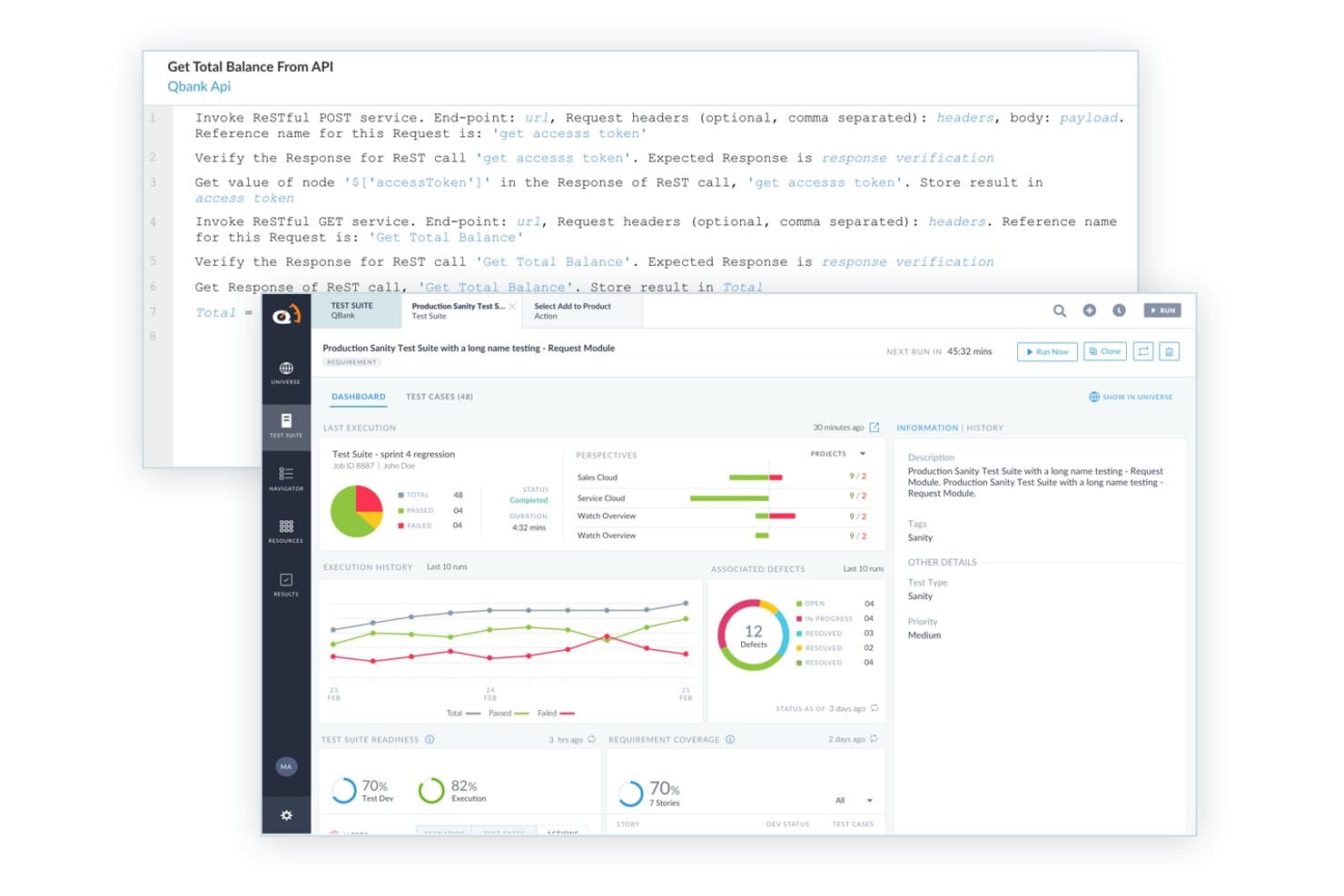
ACCELQ offers a codeless API testing interface with RESTful service invocation, test suite dashboards, execution history, and defect tracking built in. ACCELQ is a codeless, AI-powered test automation platform that supports cross-browser, mobile, API, and desktop testing through natural language-based test design and modular automation workflows.
Who Is ACCELQ Best For?
ACCELQ suits enterprise QA teams and SDETs who need to scale cross-browser automation without writing or maintaining large volumes of test code.
Why I Picked ACCELQ
ACCELQ earns its spot as one of the best on my shortlist because its modular test design genuinely changes how cross-browser coverage scales. I love that a single test flow runs across Chrome, Firefox, Safari, and Edge without touching the underlying test logic, which is ACCELQ's "design once, run anywhere" approach in practice. Combined with locator-free element identification and a self-healing mechanism, I'm not constantly rewriting tests when a UI shifts across browser versions or releases.
ACCELQ Key Features
- In-sprint automation: Author and execute tests within agile sprints while requirements and UI are still evolving.
- Cloud lab execution: Run automated tests on on-demand browser and device labs without maintaining your own grid.
- Impact analysis and alerts: Get automated impact analysis for app changes, notifying you of affected scripts and regression risks.
- API and database test automation: Automate API, backend, and database validation all within the same platform as browser testing.
ACCELQ Integrations
ACCELQ offers native integrations with Jenkins, Azure DevOps, GitHub, CircleCI, Bamboo, TeamCity, Jira, and Slack. An API is available for custom integrations.
Pros and Cons
Pros:
- Modular test design enables reuse across browsers
- Self-healing locators reduce cross-browser maintenance effort
- Codeless test creation without programming knowledge needed
Cons:
- Reporting dashboards lack depth for large suites
- Limited real device cloud vs. dedicated platforms
Learn more about ACCELQ: Best for mobile app testing
- Free trial available
- From $199/month/year (minimum of 4 seats)
Visit WebsiteCustomer Rating:4.9/5
The TestGrid dashboard gives you at-a-glance info about your failed, succeeded, and stopped tests. TestGrid is a cloud-based testing platform designed for mobile and web applications, catering to development teams looking to enhance their testing capabilities. It provides end-to-end testing solutions, focusing on mobile app testing to ensure app quality and functionality.
Why I picked TestGrid: The platform offers real device testing, which is crucial for mobile app developers to ensure compatibility. Its cloud infrastructure allows for scalable testing environments, making it suitable for teams of all sizes. The flexible architecture supports different testing frameworks, offering versatility in testing approaches. TestGrid's mobile-specific features make it a top choice for teams prioritizing mobile app performance.
Standout features & integrations:
Features include real device testing, which provides accurate results by testing on actual mobile devices. The cloud infrastructure supports scalable testing, allowing your team to expand testing environments as needed. Flexible architecture accommodates various testing frameworks, giving your team the versatility to choose the best approach.
Integrations include Jenkins, Jira, Slack, GitHub, Bitbucket, Azure DevOps, CircleCI, TestRail, Selenium, and Appium.
Pros and Cons
Pros:
- Supports various frameworks
- Scalable cloud infrastructure
- Real device testing
Cons:
- May not suit non-mobile projects
- Requires tech expertise
Learn more about TestGrid: Best for live browser testing
- Free plan + free demo available
- From $15/month (billed annually)
Visit WebsiteCustomer Rating:4.9/5
LambdaTest allows users to manually test their web applications in real-time across different browsers and operating systems, enabling them to interact with their application as an end-user would. TestMu AI is an online cross-browser testing platform that provides live and automated testing across a wide range of browsers, devices, and operating systems.
Who Is TestMu AI Best For?
TestMu AI suits QA engineers and development teams who need to test web and mobile applications across multiple browsers and operating systems.
Why I Picked TestMu AI
I picked TestMu AI because its live interactive browser testing stands out. I can spin up a real-time session on any of 3,000+ browser and OS combinations—Chrome, Safari, Firefox, Edge, and more—without setting up local VMs or maintaining infrastructure. Every live session includes native DevTools, so I can inspect elements, debug layout issues, and check console errors directly inside the test environment. I've also used the network throttling feature during live sessions to simulate 3G or unstable connections, which I would otherwise have to configure separately.
TestMu AI Key Features
- Geolocation testing: Run live sessions from different geographic IPs to verify that location-specific content, redirects, and experiences work correctly for users in different regions.
- Multi-device testing: Test on up to six real devices simultaneously, comparing multiple site variations side by side in a single session.
- Visual regression testing: Detect CSS regressions and layout shifts across your full browser matrix using automated visual diffs.
- Screen resolution testing: Adjust screen resolution settings within a live session to check how your site renders at different viewport sizes.
TestMu AI Integrations
TestMu AI offers native integrations with Jenkins, Jira, GitHub, GitLab, Slack, Azure DevOps, Bitbucket, CircleCI, and TeamCity, and provides an API for custom integrations.
Pros and Cons
Pros:
- Automated screenshot testing
- Real-time testing environment
- Extensive browser coverage
Cons:
- May not suit small teams
- Requires stable internet connection
Learn more about TestMu AI:

QA Wolf offers fully managed end-to-end test coverage. QA Wolf is an online cross-browser testing platform that lets teams create, run, and manage automated browser tests in the cloud with built-in tools for test creation, execution, and result sharing.
Who Is QA Wolf Best For?
QA Wolf is a strong fit for engineering and QA teams at mid-size to enterprise companies that need a managed, automated approach to cross-browser testing.
Why I Picked QA Wolf
I included QA Wolf on my shortlist because it keeps distributed engineering and QA teams aligned throughout the testing process. I like that bug reports come with videos, traces, and logs attached, which means my team can share a complete picture of any failure without chasing down extra context. Slack and Microsoft Teams integrations push real-time test results directly into the channels my team already uses, so there's no need to log into a separate dashboard to stay informed. Additionally, human QA engineers are embedded with your team, making collaboration feel less like a handoff and more like a shared workflow.
QA Wolf Key Features
- Parallel test run orchestration: Run your entire test suite concurrently across browsers, with automatic re-runs of failed tests to eliminate flakes caused by network or environmental issues.
- CI/CD pipeline integration: Trigger test runs directly from GitHub, GitLab, or Bitbucket when code is merged, and receive results inline in your CI workflow.
- AI-powered test maintenance: Maintenance agents automatically investigate test failures, diagnose the root cause, and suggest fixes for your QA engineers to review and approve.
- Deployment pipeline gating: Configure QA Wolf as the final quality gate before releasing to production, using integrations with Netlify and Vercel.
QA Wolf Integrations
QA Wolf offers native integrations with Jira, Asana, Linear, GitHub, Slack, Microsoft Teams, GitLab, and Bitbucket. An API is available for custom integrations.
Pros and Cons
Pros:
- Unlimited parallel test runs
- Human-verified bug reports
- Fast test creation
Cons:
- Limited customization options
- Requires initial setup time
Learn more about QA Wolf: Best for cloud infrastructure
- Free trial available
- From $29/user/month (billed annually)
Visit WebsiteCustomer Rating:4.5/5
BrowserStacks lets you run manual & automated cross browser tests on 3000+ real browsers and devices. BrowserStack is an online cross-browser testing platform that gives you access to real browsers and devices for live and automated testing, parallel test execution, and integrations with popular CI/CD tools.
Who Is BrowserStack Best For?
BrowserStack is a good fit for QA engineers and development teams at mid-size to enterprise companies who need scalable, cloud-based browser and device testing across large test suites.
Why I Picked BrowserStack
BrowserStack earns its spot on my shortlist because its cloud infrastructure is genuinely built for scale in a way that in-house grids simply can't match. I like that you can run tests in parallel across 3,500+ real browser and OS combinations without managing a single physical machine or VM. The fully managed cloud means my team isn't spending time on grid maintenance—we're just running tests. The Self-Healing Agent is another feature I find particularly useful: it auto-remediates broken locators at runtime, which cuts down on the flaky test failures that typically slow down CI/CD pipelines.
BrowserStack Key Features
- Live interactive testing: Manually test websites and web apps on real browsers and devices directly from your browser without any setup.
- Automated screenshot testing: Capture screenshots across multiple browser and OS combinations simultaneously to catch visual regressions.
- Accessibility testing: Run automated accessibility checks against WCAG standards to identify and flag compliance issues across browsers.
- Network simulation: Test how your app behaves under different network conditions, including 2G, 3G, and custom latency settings.
BrowserStack Integrations
BrowserStack offers native integrations with Jenkins, GitHub, GitLab, Bitbucket, Jira, Slack, Microsoft Teams, Azure DevOps, CircleCI, and Travis CI, and it connects with Zapier. An API is available for custom integrations.
Pros and Cons
Pros:
- Real user condition simulation
- No local setup needed
- Extensive device coverage
Cons:
- Learning curve for some features
- Limited offline functionality
Learn more about BrowserStack: Best for AI-driven testing
- Free trial available + free demo
- Pricing upon request
Visit WebsiteCustomer Rating:4.5/5
Code your test with the Testim dev kit: record a user flow and then export that test to code Tricentis Testim is a cloud-based test automation platform for web applications that combines AI-powered test creation, cross-browser execution, and integrations with CI/CD pipelines.
Who Is Tricentis Testim Best For?
Tricentis Testim is a good fit for QA engineers and development teams at mid-size to enterprise companies that need to automate and scale web application testing across multiple browsers.
Why I Picked Tricentis Testim
Tricentis Testim earns its spot on my shortlist because of how far its AI capabilities go beyond basic test recording. I particularly like the AI-powered smart locators, which use a combination of AI, ML, and metadata to automatically adapt when your app's UI changes—so tests don't break every time a developer pushes an update. I also use Testim Copilot regularly, where I can describe a complex test step in plain language and get a working JavaScript custom step back without writing it from scratch. For cross-browser coverage, my team can run tests on Testim's own grid or any Selenium-compatible grid, on demand or triggered through CI.
Tricentis Testim Key Features
- Test recording with visual editor: Record user flows and configure them in a low-code visual editor, with AI helping you build clean, reusable test structures.
- Root cause analysis: Diagnose failed tests using highlighted screenshots, console logs, network logs, and failure suggestions to pinpoint bugs quickly.
- TestOps: Manage test changes, organize teams and test suites, and prioritize testing activities as your release cycles scale.
- Visual validation: Test the visual accuracy of your web application at the element or page level across browsers.
Tricentis Testim Integrations
Tricentis Testim offers native integrations with Jira, Trello, GitHub, Slack, and supports CI/CD workflows through integrations with version control systems and Selenium-compatible grids. An API is available for custom integrations.
Pros and Cons
Pros:
- Low-code approach
- Fast test authoring
- AI-driven smart locators
Cons:
- Limited offline support
- Steep learning curve
Learn more about Tricentis Testim: Best for multi-browser test recording
- 14-day free trial + free demo available
- Pricing upon request
Visit WebsiteCustomer Rating:4.8/5
Reflect offers a no-code test automation interface for creating tests. Reflect is a cloud-based cross-browser testing platform that lets you record, automate, and run web application tests across multiple browsers without writing code.
Who Is Reflect Best For?
Reflect is a good fit for QA teams and developers who need to build and maintain cross-browser test suites without relying on dedicated automation engineers.
Why I Picked Reflect
I picked Reflect as one of the best because of how its no-code test recorder handles cross-browser coverage. You record a test once in Reflect's cloud browser, and that same test runs across Chrome, Firefox, Edge, and Safari without modifications. This helps when you need to cover 95%+ of your user base without maintaining separate test scripts for each browser. I also like that Reflect keeps browser versions up to date on its cloud infrastructure, so my team doesn't have to chase browser release cycles. Each test run also produces a full-screen video alongside console and network logs, making it easier to determine whether a failure is browser-specific or indicates a deeper issue.
Reflect Key Features
- AI-powered test maintenance: Reflect's SmartBear HaloAI engine automatically adapts tests when your app's UI changes, reducing the need for manual test updates.
- Visual regression testing: Reflect compares screenshots pixel-by-pixel across browsers and flags differences, with a one-click approval workflow for expected changes.
- API testing support: Run direct API calls alongside UI tests to set up test data or validate results without scripting additional UI steps.
- CI/CD pipeline integration: Reflect includes pre-built integrations with GitHub, CircleCI, and Jenkins so tests trigger automatically on every pull request or deployment.
Reflect Integrations
Reflect offers native integrations with GitHub, GitLab, Slack, Jira, and CircleCI, and provides an API for custom integrations.
Pros and Cons
Pros:
- No-code test creation
- AI-powered test maintenance
- Comprehensive CI/CD integration
Cons:
- Limitations to mobile app testing
- Could offer more customization options for test configurations
Learn more about Reflect: Best for real device testing
- Free demo available
- From $39/month (billed annually)
Visit WebsiteCustomer Rating:4.6/5
A sample of HeadSpin’s cross browser testing dashboard. HeadSpin is an online cross-browser testing platform that gives you access to a global cloud of real devices for browser and app testing, remote debugging, and performance monitoring across multiple operating systems and browsers.
Who Is HeadSpin Best For?
HeadSpin is a strong fit for QA engineers and mobile development teams who need to test across real devices rather than emulators or simulators.
Why I Picked HeadSpin
HeadSpin earns its spot on my shortlist because it's one of the few cross-browser testing platforms built entirely around real devices rather than emulators. I like that when my team runs a test on Chrome for Android or Safari on iOS, we're hitting an actual SIM-enabled device in one of 50+ global locations—not a simulated environment that masks real-world network behavior. The platform tracks 130+ KPIs including page load, CPU performance, and battery usage in a time-series view alongside screen recordings, which makes it much easier to pinpoint exactly where a browser-specific issue is occurring. The Waterfall UI ties all of that session data into a single stream, so correlating a performance dip with a specific network condition or device state doesn't require jumping between tools.
HeadSpin Key Features
- AI-powered analytics: Analyzes data captured during test sessions and generates AI-driven insights with actionable recommendations tied to specific issues.
- Issue cards with root cause analysis: Automatically flags UX and performance problems during sessions and identifies whether the root cause is at the backend, device, OS, or network level.
- Appium and Selenium support: Runs automated cross-browser and mobile tests natively through Appium and Selenium without requiring SDK installation or changes to app code.
- Synthetic monitoring: Continuously monitors apps by automating user journeys to detect bugs and performance regressions between releases.
HeadSpin Integrations
HeadSpin offers native integrations with Appium, Selenium, Jenkins, Jira, and Slack, and provides an API for custom integrations.
Pros and Cons
Pros:
- Supports network condition testing
- Detailed performance analytics
- Real device testing
Cons:
- Limited offline capabilities
- May not suit all budget sizes
Learn more about HeadSpin: Best for self healing tests
- 14-day free trial + free demo
- From $175/month
Visit WebsiteCustomer Rating:4.7/5
The Endtest Chrome extension helps you record human-readable step-by-step sequences of browser actions. Endtest is an online cross-browser testing platform that lets you create, run, and manage automated tests across browsers and devices using a no-code or low-code approach.
Who Is Endtest Best For?
Endtest is a good fit for QA teams and developers who need to build and maintain automated cross-browser tests without relying heavily on coding skills.
Why I Picked Endtest
Endtest earns its spot on my shortlist because of how it handles test maintenance through self-healing. When a developer updates the underlying code of an application, locators in your tests can break instantly. Endtest's machine learning engine stores up to 100 different locators per element, so when a change breaks one locator, the engine automatically falls back to a spare. I also like that the computer vision feature runs a pixel-by-pixel UI comparison alongside this, catching visual regressions that locator-based checks would miss entirely.
Endtest Key Features
- No-code test recorder: Build automated tests by recording interactions in the browser without writing a single line of code.
- Parallel test execution: Run multiple tests simultaneously across different browsers and operating systems to cut down on total test time.
- Cross-browser cloud grid: Execute tests on a cloud-based grid of real browsers, including Chrome, Firefox, Safari, and Edge.
- Video recordings and logs: Review full video playback and detailed logs for every test run to pinpoint exactly where a failure occurred.
Endtest Integrations
Endtest offers native integrations with Jenkins, GitLab, Sauce Labs, BrowserStack, Bamboo Server, Heroku, Bitbucket, TravisCI, CircleCI, TeamCity, Azure DevOps, Mattermost, Microsoft Teams, GitHub, PagerDuty, Slack, and Jira. An API is available for custom integrations.
Pros and Cons
Pros:
- Supports data-driven testing
- User-friendly interface
- Scriptless test creation
Cons:
- May not suit complex test scenarios
- Limited customization options
Learn more about Endtest: Best for performance monitoring
- Free plan + free demo available
- Pricing upon request
Visit WebsiteCustomer Rating:4.3/5
New Relic lets you track and prioritize issues, assign them to team members, and collaborate on their resolution. New Relic is an application performance monitoring platform that provides real-time analytics, distributed tracing, and infrastructure monitoring for web and mobile applications.
Who Is New Relic Best For?
New Relic is a strong fit for DevOps and engineering teams at mid-size to enterprise companies who need deep visibility into application and infrastructure performance.
Why I Picked New Relic
I picked New Relic as one of the best because its browser monitoring and synthetic monitoring capabilities give engineering teams a real-time view of how web applications perform across different environments. I particularly like the browser monitoring feature, which tracks page performance by user system and region—so you can pinpoint exactly which configurations are producing slow load times or elevated error rates. New Relic's synthetic monitoring lets my team simulate full user journeys across URLs and APIs before issues reach production, which is genuinely useful for catching regressions early. The change tracking feature also ties deployment events directly to performance shifts, so when something breaks after a release, I can correlate it immediately rather than digging through logs.
New Relic Key Features
- Session replay: Records and plays back real user sessions in the browser to help you identify exactly where users encounter errors or performance issues.
- Errors inbox: Aggregates errors from across your full stack into a single view so you can triage and prioritize fixes without switching between tools.
- Smart alerts: Uses dynamic thresholds to reduce alert noise and surface only the anomalies that actually need your attention.
- Customizable dashboards: Lets you build and configure dashboards to display the specific telemetry data your team needs in one place.
New Relic Integrations
New Relic offers native integrations with AWS, Azure, Google Cloud Platform, Kubernetes, Jenkins, PagerDuty, Slack, Jira, GitHub, and ServiceNow. An API is available for custom integrations.
Pros and Cons
Pros:
- Customizable dashboards
- Proactive alerting capabilities
- Real-time performance monitoring
Cons:
- Limited offline functionalities
- Requires technical expertise
Learn more about New Relic:
Andre verktøy for testing på tvers av nettlesere
Her er noen flere alternativer for testing på tvers av nettlesere som ikke kom med på kortlisten min, men som likevel er verdt å undersøke:
- 11Sauce LabsBest for enterprise scalability
- 12FunctionizeBest for AI-driven test creation
- 13AutifyBest for Salesforce testing
- 14MablBest for DevOps integration
- 15ExperitestBest for mobile app testing
- 16TestingBotBest for live and automated testing
- 17BrowserlingBest for instant browser access
- 18Telerik Test StudioBest for scriptless test automation
- 19OwlityBest for autonomous test execution
- 20ApplitoolsBest for visual AI testing
- 21Ranorex StudioBest for desktop application testing
- 22SmartBear TestCompleteBest for visual testing
How I Evaluate Cross-Browser Testing Tools
I split my evaluation into two layers: the baseline a tool must clear—real device coverage, Selenium/Playwright support, CI/CD hooks—and the differentiators that actually set vendors apart.
Core Functionality (Table Stakes For This List)
When I'm selecting tools for my list, I rank each one on a scale from 0 (does not offer the functionality) to 5 (excels in this area) for each core functionality listed below. Then, I calculate the tool's total score into a percentage. Each tool needs to achieve a minimum total score of 65% to be considered for inclusion.
- Multi-Browser Coverage: I check which browsers and versions each tool supports—say, testing a checkout flow on Safari 15 vs. Safari 17 or verifying layout in legacy Edge.
- Real Device & Emulator Access: Having both real devices and emulators matters. I look for platforms that let you test on actual iPhones or Android hardware alongside simulated environments.
- Automation Framework Support: I evaluate whether the tool works with the frameworks teams already use, like Selenium, Cypress, Playwright, or Appium, without heavy configuration overhead.
- Parallel Test Execution: Running a full regression suite across 20 browser/OS combos sequentially can take hours. I look at how many concurrent sessions each tool supports and how it scales.
- Live Interactive Testing: Sometimes you need to click through a page yourself to reproduce a rendering bug. I check whether tools offer real-time browser sessions with working dev tools.
- CI/CD Integration & Debugging Tools: I evaluate how each platform connects to pipelines like Jenkins or GitHub Actions, and whether it captures useful artifacts—video replays, console logs, network traces.
Once I have a list of tools that meet the criteria, I consider what sets each platform apart.
Differentiating Factors (What Sets Vendors Apart)
Here's how I compare and contrast different vendors:
Standout Features
Visual regression testing is a big differentiator—I look for tools that automatically flag pixel-level UI differences across browsers after a deploy, saving hours of manual screenshot comparison. Local testing tunnels also matter when your app sits behind a firewall or on a staging server that isn't publicly accessible. I evaluate test analytics dashboards too, especially flaky test detection, since identifying unreliable tests helps QA teams focus on real failures instead of chasing false positives.
Beyond Features
Pricing models vary widely in this space—some vendors charge per parallel session, others per user—so I evaluate which structure fits the team's testing volume without surprise costs at scale. Integration depth matters too, especially native plugins for CI/CD tools like Jenkins or GitHub Actions and connections to Jira for bug tracking. I also check security posture, including SOC 2 compliance, SSO support, and session data retention policies, since test environments often touch sensitive pre-release code and customer data.
Slik velger du et verktøy for testing på tvers av nettlesere
Det er lett å gå seg vill i lange funksjonslister og komplekse prismodeller. For å hjelpe deg med å holde fokus mens du går gjennom den unike prosessen din for valg av programvare, får du her en sjekkliste over faktorer du bør ha i tankene:
| Faktor | Hva du bør vurdere |
| Skalerbarhet | Forsikre deg om at verktøyet kan vokse med teamet ditt. Sjekk om det støtter økende testvolumer og utvidet enhetsdekning etter hvert som prosjektene dine skaleres. |
| Integrasjoner | Se etter kompatibilitet med eksisterende verktøy som CI/CD-pipelines, prosjektstyringsprogramvare og verktøy for testing av nettilgjengelighet for å effektivisere arbeidsflyten. |
| Tilpasningsmuligheter | Vurder om verktøyet lar deg tilpasse testprosesser og rapporter slik at de passer teamets spesifikke behov og preferanser. |
| Brukervennlighet | Evaluer verktøyets grensesnitt og læringskurve. Forsikre deg om at teamet raskt kan ta det i bruk uten omfattende opplæring eller teknisk ekspertise. |
| Budsjett | Tilpass verktøyets priser til budsjettet ditt. Ta hensyn til totale eierkostnader, inkludert eventuelle skjulte gebyrer eller kostnader for tilleggsfunksjoner. |
| Sikkerhetstiltak | Kontroller verktøyets sikkerhetstiltak for å beskytte dataene dine. Se etter funksjoner som kryptering, tilgangskontroller og samsvar med bransjestandarder. |
| Testdekning | Forsikre deg om at verktøyet gir omfattende dekning av nettlesere og enheter for å oppfylle testkravene dine. Sjekk om det støtter både populære og mindre utbredte plattformer. |
| Støttetjenester | Vurder tilgjengeligheten og kvaliteten på kundestøtten, inkludert svartider og tilgang til ressurser som dokumentasjon og brukerfora. |
Trender innen verktøy for testing på tvers av nettlesere
I undersøkelsen min samlet jeg inn utallige produktoppdateringer, pressemeldinger og utgivelseslogger fra ulike leverandører av verktøy for testing på tvers av nettlesere og e-posttesting. Her er noen av trendene som dukker opp, og som jeg følger med på:
- AI-drevet testing: AI brukes til å forbedre testnøyaktigheten og effektiviteten. Verktøy som Functionize bruker AI til å opprette og vedlikeholde tester, noe som reduserer manuelt arbeid og minimerer feil i testprosessene.
- Visuell testing: Denne trenden fokuserer på å sammenligne visuelle aspekter ved nettapplikasjoner på tvers av ulike nettlesere. Applitools bruker visuell AI til å oppdage visuelle feil og sikrer konsistente brukergrensesnitt og brukeropplevelser.
- Ytelsestesting: Det blir stadig større fokus på å teste ikke bare kompatibilitet, men også ytelse under ulike forhold. Verktøy som Sauce Labs tilbyr funksjoner for ytelsestesting som hjelper team med å optimalisere hastighet og pålitelighet.
- Testing på tvers av enheter: Testing på en rekke enheter, ikke bare nettlesere, blir stadig viktigere. Leverandører som BrowserStack tilbyr omfattende enhetsdekning for å sikre at applikasjoner fungerer godt på alle plattformer.
- Skybaserte løsninger: Mange leverandører går over til skybaserte plattformer som tilbyr skalerbare og fleksible testmiljøer. Denne trenden gir enkel tilgang og samarbeid, og verktøy som LambdaTest leder an i overgangen til skyinfrastruktur.
Hva er verktøy for testing på tvers av nettlesere?
Verktøy for testing på tvers av nettlesere er applikasjoner som lar utviklere og kvalitetssikringsteam teste hvordan nettsteder og nettapper fungerer på tvers av ulike nettlesere, enheter og operativsystemer. Disse verktøyene brukes av webutviklere, testere og designere for å sikre at nettsteder ser riktige ut og fungerer korrekt for alle brukere.
Funksjoner som direktetesting, automatiserte nettleserkontroller og visuell sammenligning gjør det enklere å oppdage layoutproblemer, løse kompatibilitetsfeil og forbedre konsistensen. Alt i alt gjør de det enklere å levere et nettsted som fungerer pålitelig på alle plattformer.
Funksjoner
Her er de viktigste funksjonene alle gode verktøy for testing på tvers av nettlesere bør ha:
- Automatisert testing: Automatiserer repeterende tester, sparer tid og reduserer menneskelige feil.
- Testing i sanntid: Lar brukere teste applikasjoner umiddelbart på tvers av flere nettlesere og enheter.
- Visuell testing: Sammenligner visuelle elementer for å sikre konsistente brukergrensesnitt på tvers av plattformer.
- Parallell testing: Gjør det mulig å kjøre tester samtidig, noe som fremskynder testprosessen.
- AI-drevne funksjoner: Bruker AI til å forbedre testnøyaktigheten og vedlikeholde tester etter hvert som applikasjonene utvikler seg.
- Ytelsestesting: Evaluerer applikasjonens hastighet og pålitelighet under ulike forhold.
- Enhetsdekning: Gir tilgang til et bredt utvalg av enheter for å sikre kompatibilitet.
- Skybasert plattform: Tilbyr skalerbare og fleksible testmiljøer som er tilgjengelige hvor som helst.
- Tilpassbare oversikter: Lar brukere tilpasse hvordan de viser og samhandler med testdata.
- Geolokasjonstesting: Simulerer ulike geografiske steder for å sikre global applikasjonsytelse.
Fordeler
Implementering av verktøy for testing på tvers av nettlesere gir flere fordeler for teamet og virksomheten din. Her er noen du kan se frem til:
- Forbedret kompatibilitet: Sikrer at nettapplikasjonene dine fungerer på tvers av alle nettlesere og enheter, og reduserer frustrasjon blant brukerne.
- Tidsbesparelser: Automatiserer repetitive oppgaver og parallell testing, noe som gjør testprosessen raskere og frigjør tid for teamet ditt.
- Forbedret brukeropplevelse: Visuell testing og ytelsestesting bidrar til å opprettholde konsistente og pålitelige brukergrensesnitt.
- Tidlig oppdagelse av feil: Identifiserer problemer tidlig i utviklingen, slik at de kan løses raskt og kostbare problemer etter lansering reduseres.
- Skalerbarhet: Skybaserte plattformer tilbyr fleksible testmiljøer som vokser i takt med prosjektbehovene dine.
- Datadrevet innsikt: Gir detaljert analyse og rapportering som hjelper teamet ditt med å ta informerte beslutninger om forbedringer av applikasjonen.
- Global rekkevidde: Geolokasjonstesting sikrer at applikasjonene dine fungerer godt for brukere over hele verden, slik at markedsrekkevidden utvides.
Kostnader og priser
Valg av verktøy for testing på tvers av nettlesere krever en forståelse av de ulike prismodellene og abonnementene som er tilgjengelige. Kostnadene varierer basert på funksjoner, teamstørrelse, tillegg og mer. Tabellen nedenfor oppsummerer vanlige abonnementer, gjennomsnittsprisene deres og typiske funksjoner som er inkludert i løsninger for testing på tvers av nettlesere:
Sammenligningstabell for abonnementer for verktøy for testing på tvers av nettlesere
| Abonnementstype | Gjennomsnittspris | Vanlige funksjoner |
| Gratisabonnement | $0 | Begrenset nettleserdekning, grunnleggende testfunksjoner og brukerstøtte fra fellesskapet. |
| Personlig abonnement | $10-$25/bruker/måned | Tilgang til flere nettlesere og enheter, verktøy for automatisert testing og begrenset parallell testing. |
| Forretningsabonnement | $50-$100/bruker/måned | Full dekning av nettlesere og enheter, avansert rapportering, parallell testing og prioritert brukerstøtte. |
| Virksomhetsabonnement | $150-$300/bruker/måned | Tilpassbare løsninger, dedikert kontoadministrasjon, omfattende integrasjoner og forbedret sikkerhet. |
Vanlige spørsmål
Her er noen svar på vanlige spørsmål om verktøy for testing på tvers av nettlesere:
Hvordan automatiserer man testing på tvers av nettlesere?
For å automatisere testing på tvers av nettlesere kan du bruke skripter til å laste inn nettstedet ditt automatisk i flere nettlesere. Med denne metoden kan du simulere brukerinteraksjoner og kontrollere ulike brukerforløp på tvers av forskjellige nettlesere. Det hjelper teamet ditt med å identifisere og løse kompatibilitetsproblemer raskt.
Hva er det beste verktøyet for testing på tvers av nettlesere?
Valget av det beste verktøyet avhenger av behovene til teamet ditt, men Selenium er et populært valg på grunn av den brede nettleserstøtten. Andre verktøy som BrowserStack og LambdaTest tilbyr skybaserte løsninger med omfattende enhetsdekning, noe som gjør dem til gode alternativer for omfattende testing.
Er testing på tvers av nettlesere funksjonell eller ikke-funksjonell?
Testing på tvers av nettlesere regnes som ikke-funksjonell testing. Den kontrollerer om nettstedet ditt fungerer som tiltenkt på tvers av ulike nettlesere og operativsystemer. Denne testingen sikrer at brukerne får en konsistent opplevelse, uavhengig av hvilken nettleser de bruker.
Hvorfor er det viktig å teste nettsider på tvers av ulike nettlesere?
Ulike nettlesere tolker nettstedskode på forskjellige måter, noe som kan føre til kompatibilitetsproblemer. Ved å teste på tvers av nettlesere kan du identifisere og løse disse problemene og sikre at nettstedet fungerer korrekt for alle brukere. Denne prosessen bidrar til å opprettholde en god brukeropplevelse.
Hvordan velger man nettlesere for testing?
Velg nettlesere basert på målgruppens preferanser og bruksstatistikk. Fokuser på populære nettlesere som Chrome, Firefox og Safari, og vurder å inkludere eldre versjoner ved behov. Denne tilnærmingen sikrer at nettstedet når ut til et så bredt publikum som mulig.
Hvilke utfordringer kan man møte ved testing på tvers av nettlesere?
Utfordringene omfatter håndtering av det mangfoldige utvalget av nettlesere og enheter, å holde tritt med hyppige oppdateringer og å sikre at testdekningen er omfattende. Automatiserte verktøy kan bidra til å redusere disse utfordringene ved å tilby bred nettleserstøtte og effektive testprosesser.