

De beste verktøyene for penetrasjonstesting av webapplikasjoner hjelper team med å avdekke sårbarheter tidlig, validere sikkerhetskontroller og beskytte sensitive data på tvers av komplekse applikasjoner. Når feilkonfigureringer slipper gjennom gjennomganger, automatiserte skannere overser høyrisiko-problemer eller det oppstår hull mellom manuell testing og CI/CD-pipelines, kan sikkerhetssvakheter forbli uoppdaget og bli kostbare å rette senere.
Den rette plattformen for penetrasjonstesting gir sikkerhetsteam nøyaktige funn, tydelig rapportering og arbeidsflyter som passer naturlig inn i eksisterende utviklingsprosesser. Som Chief Technology Officer med over 20 års erfaring med testing og implementering av sikkerhetsverktøy i aktive webmiljøer har jeg evaluert de beste løsningene basert på nøyaktighet, integrasjonskvalitet og brukervennlighet. Hver gjennomgang dekker funksjoner, fordeler og ulemper samt ideelle bruksområder, slik at teamet ditt kan velge det beste verktøyet for penetrasjonstesting av webapplikasjoner og oppnå sterkere og mer pålitelig applikasjonssikkerhet.
Why Trust Our Software Recommendations
6,700+
Reviews
20
Industry experts
16+
Evaluation factors
14
Years
Our team has been testing and reviewing software since 2012. As tech leaders ourselves, we know how difficult—and important—it is to choose the right software.
For this guide, we evaluated tools using hands-on testing and independent research, scoring tools using our selection criteria.
Our reviews reflect our human editorial judgment, not a sales pitch.
Expert reviewers:
- Paulo Gardini MiguelTech Director
 Tim FisherVP of AI
 Gabriel RosasTech Lead & Software Architect
 Christhian GruhnTech Lead & Platform Architect

Sammenligningstabell for verktøy for penetrasjonstesting av webapplikasjoner
Denne sammenligningstabellen oppsummerer prisdetaljene for mine beste WAPT-verktøy:
| Tool | Best For | Trial Info | Price | ||
|---|---|---|---|---|---|
| 1 | Best for business logic vulnerability detection | Free demo available | Pricing upon request | Website | |
| 2 | Best for hybrid AI + human pentesting | Free plan available | From $200/month | Website | |
| 3 | Best for AI pentests | Free plan available | From $350/month | Website | |
| 4 | Best with daily cloud configuration checks | 14-day free trial + free demo available | From $149/month | Website | |
| 5 | Best for continuous vulnerability scanning | Free demo available | From $69/month | Website | |
| 6 | Best for configuring scan profiles | Free demo available | Pricing upon request | Website | |
| 7 | Best for SPA vulnerability scanning | Free plan available | From $475/user/year | Website | |
| 8 | Best with marketplace add-ons for extended testing | Free plan available | Pricing upon request | Website | |
| 9 | Best for DeepScan in complex web applications | Free demo available | Pricing upon request | Website | |
| 10 | Best for combining automated and manual testing | Free demo available | Pricing upon request | Website |


Anmeldelser av de beste verktøyene for penetrasjonstesting av webapplikasjoner
Nedenfor finner du mine detaljerte sammendrag av de beste verktøyene for penetrasjonstesting av webapplikasjoner som kom med på kortlisten. Anmeldelsene mine gir en detaljert gjennomgang av de viktigste funksjonene, fordelene og ulempene, integrasjonene og de ideelle bruksområdene for hvert verktøy, slik at du kan finne det beste alternativet for deg.
 Best for business logic vulnerability detection
- Free demo available
- Pricing upon request

Escape detects business logic vulnerabilities in web application penetration tests. Escape is a web application penetration testing tool designed for organizations needing to address modern digital security challenges. It specializes in detecting business logic vulnerabilities that traditional scanners often miss, making it particularly suited for industries like finance, healthcare, and technology. By integrating into existing tech stacks, Escape helps ensure continuous security validation, aligning with the fast-paced deployment cycles of contemporary applications.
Why I Picked Escape
I picked Escape because it excels at identifying complex business-logic vulnerabilities through AI-powered Dynamic Application Security Testing (DAST), setting it apart from traditional tools. This focus on business logic security is crucial for organizations facing sophisticated cyber threats. Additionally, Escape’s integration with CI/CD pipelines ensures that security testing keeps pace with rapid development cycles, providing real-time insights and actionable remediation advice. These features make Escape a compelling choice for teams aiming to enhance their security posture without slowing down innovation.
Escape Key Features
In addition to business logic testing capabilities, Escape offers:
- API Discovery: Automatically identifies and documents APIs within your application, ensuring comprehensive security coverage.
- GraphQL Security Testing: Provides specialized testing for GraphQL APIs, addressing unique vulnerabilities associated with this technology.
- Compliance Reporting: Generates detailed reports to help meet industry compliance standards, simplifying the audit process.
- Sensitive Data Leak Detection: Identifies potential data leaks within your applications, helping to safeguard sensitive information.
Escape Integrations
Escape integrates with modern tech stacks, including CI/CD platforms, to provide seamless security validation. Native integrations include GitHub, GitLab, Jenkins, JIRA, Slack, Bitbucket, Azure DevOps, AWS, Docker, and Kubernetes.
Pros and Cons
Pros:
- Strong API vulnerability detection, including coverage for REST and GraphQL endpoints
- Advanced scanning technology that finds a wide range of security issues
- Continuous scanning and verification that support ongoing security monitoring
Cons:
- Requires technical familiarity to use advanced features effectively
- Platform upgrades can take time to apply and adapt to
Learn more about Escape: Best for hybrid AI + human pentesting
- Free plan available
- From $200/month
Visit WebsiteCustomer Rating:4.5/5
ZeroPath provides a unified security dashboard that highlights pentests, scan activity, vulnerability types, issue severity, and top critical findings at a glance. Zeropath is an AI-native application security platform designed to meet the needs of security-conscious companies aiming to enhance their web application security processes. By offering advanced tools like Static Application Security Testing (SAST) and automated vulnerability remediation, Zeropath empowers your team to detect and address vulnerabilities efficiently.
Why I Picked Zeropath
I picked ZeroPath because it brings together continuous AI-driven testing and human-led attack analysis, which is ideal if you’re looking for a web application penetration testing tool that goes beyond surface-level checks. You get automated reconnaissance and vulnerability discovery that runs 24/7, giving your team visibility into security gaps as soon as they emerge. Expert pentesters then validate findings and explore complex attack chains, so you’re not left wondering which issues are real or exploitable. This combination lets your team prioritize meaningful vulnerabilities and act on them with confidence.
Zeropath Key Features
In addition to its continuous AI + human testing approach, your team can also take advantage of:
- Automated Vulnerability Remediation: This feature provides automated fixes for identified vulnerabilities, streamlining the resolution process for your development team.
- Real-Time Feedback: Zeropath delivers immediate insights into security issues as they arise, allowing your team to address them promptly.
- Automatic retesting of fixes: Once your team applies a patch, ZeroPath validates the fix to confirm the issue is resolved.
- SARIF Comparison: This feature allows for detailed analysis and comparison of security reports, enhancing your team's ability to track and manage vulnerabilities.
- Real-time vulnerability detection: The platform alerts you as soon as new weaknesses appear in changing application environments.
Zeropath Integrations
Integrations include GitHub, GitLab, Azure DevOps, and Bitbucket.
Pros and Cons
Pros:
- Proof-of-concept exploits clarify real-world risk for teams
- AI reconnaissance expands coverage of hidden attack surfaces
- Continuous monitoring catches new vulnerabilities around the clock
Cons:
- You may need time to adjust your workflow around its automation
- Not ideal for teams wanting only traditional point-in-time tests
Learn more about Zeropath:
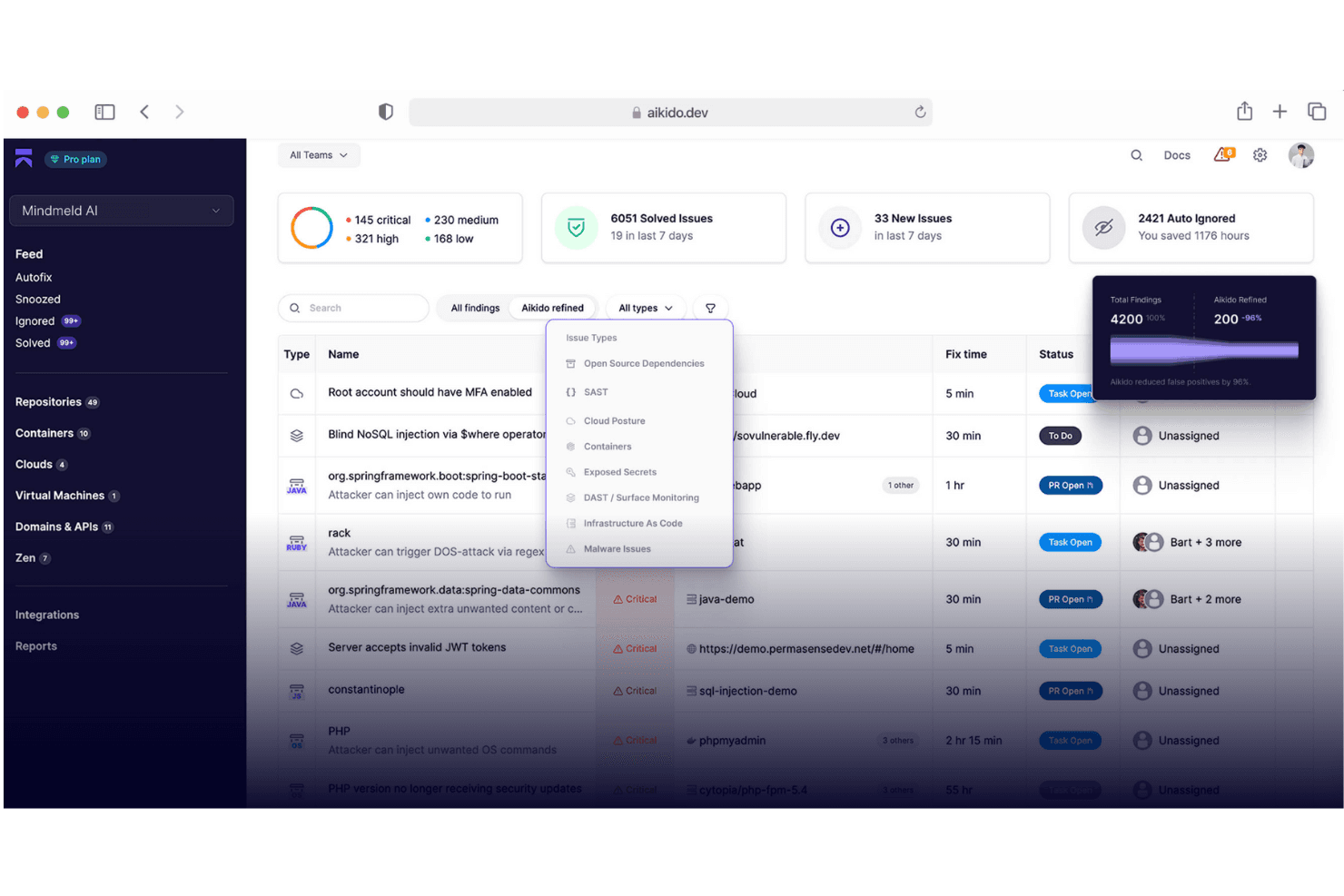
Aikido Security provides a unified dashboard to triage and filter issues by type, severity, and scan source. Aikido Security is an AI-native application security platform that combines automated pentesting, DAST, SAST, SCA, secrets detection, and API scanning across the full software development lifecycle.
Who Is Aikido Security Best For?
Aikido Security is a strong fit for engineering-led teams at growth-stage companies that want automated security coverage without a dedicated AppSec team.
Why I Picked Aikido Security
Aikido Security earns its spot on my shortlist because of how differently it approaches pentesting. I love that it deploys 200+ autonomous agents that confirm exploitability before surfacing a finding, which means every reported vulnerability is a real one. It also catches business logic issues like IDOR and cross-tenant access, which most scanners miss entirely, and produces audit-ready reports structured for SOC 2 and ISO 27001 compliance.
Aikido Security Key Features
- API scanning: Supports comprehensive testing of REST, GraphQL, gRPC, and SOAP endpoints.
- Surface monitoring (DAST): Dynamically analyzes web app frontends and APIs to detect real vulnerabilities.
- Secrets detection: Identifies leaked API keys, credentials, and other sensitive information in code automatically.
- IDE plugin integration: Brings security issue detection directly into supported developer environments.
Aikido Security Integrations
Aikido Security offers native integrations with GitHub, GitLab, Bitbucket, Jira, Jenkins, CircleCI, Docker, Google Cloud, Asana, Monday, DigitalOcean, and Slack. An API is available for custom integrations.
Pros and Cons
Pros:
- Generates audit-ready compliance pentest reports
- Detects business logic flaws missed by most scanners
- Autonomous agents validate every reported vulnerability
Cons:
- Limited manual pentest capabilities compared to traditional tools
- Reporting can be overwhelming for small teams
Learn more about Aikido Security: Best with daily cloud configuration checks
- 14-day free trial + free demo available
- From $149/month
Visit WebsiteCustomer Rating:4.8/5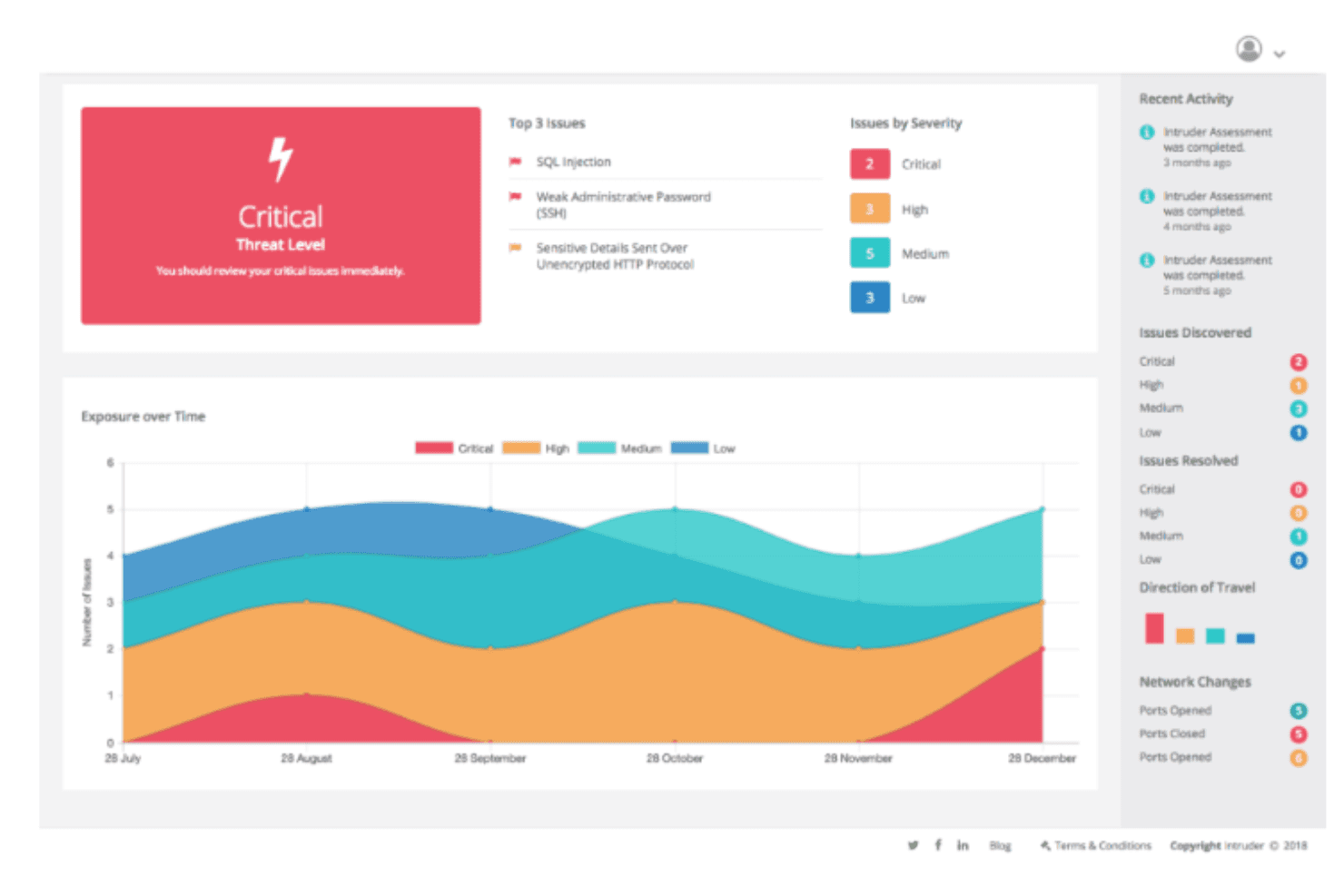
Intruder monitors your systems automatically to detect and notify you of potential threats as they emerge. Intruder is a continuous exposure management platform that combines automated vulnerability scanning, AI-driven penetration testing, attack surface monitoring, and cloud security configuration checks across web apps, APIs, and infrastructure.
Who Is Intruder Best For?
Intruder is a strong fit for security and IT teams at small to mid-sized companies that need continuous vulnerability coverage without a large dedicated security operations team.
Why I Picked Intruder
I picked Intruder as one of the best because its daily cloud configuration checks give my team a near real-time view of security drift across AWS, Azure, and GCP environments. Unlike tools that scan weekly or on-demand, Intruder's CSPM runs daily and flags misconfigurations before they can be exploited. I also rely on its Emerging Threat Scans, where Intruder's security team manually checks for newly disclosed critical vulnerabilities and scans your targets without you having to configure anything.
Intruder Key Features
- AI-driven pentesting: Launches on-demand penetration tests using AI to simulate attacker behavior on your applications.
- GregAI security analyst: Summarizes, verifies, and prioritizes vulnerabilities found across your environment using AI.
- Authenticated web app scanning: Supports scanning for vulnerabilities in password-protected or session-restricted web applications.
- Emerging threat detection: Proactively hunts for and tests against zero-day and high-profile vulnerabilities across your exposure.
Intruder Integrations
Intruder offers native integrations with AWS, Microsoft Azure, Google Cloud, Jira, GitHub, GitLab, ServiceNow, Slack, Microsoft Teams, and Okta. An API is available for custom integrations.
Pros and Cons
Pros:
- Fast onboarding for small IT teams
- AI-driven pentesting and vulnerability summaries
- Daily automated cloud configuration checks
Cons:
- No manual pentesting by human experts
- Notification controls can be limited
Learn more about Intruder: Best for continuous vulnerability scanning
- Free demo available
- From $69/month
Visit WebsiteCustomer Rating:4.5/5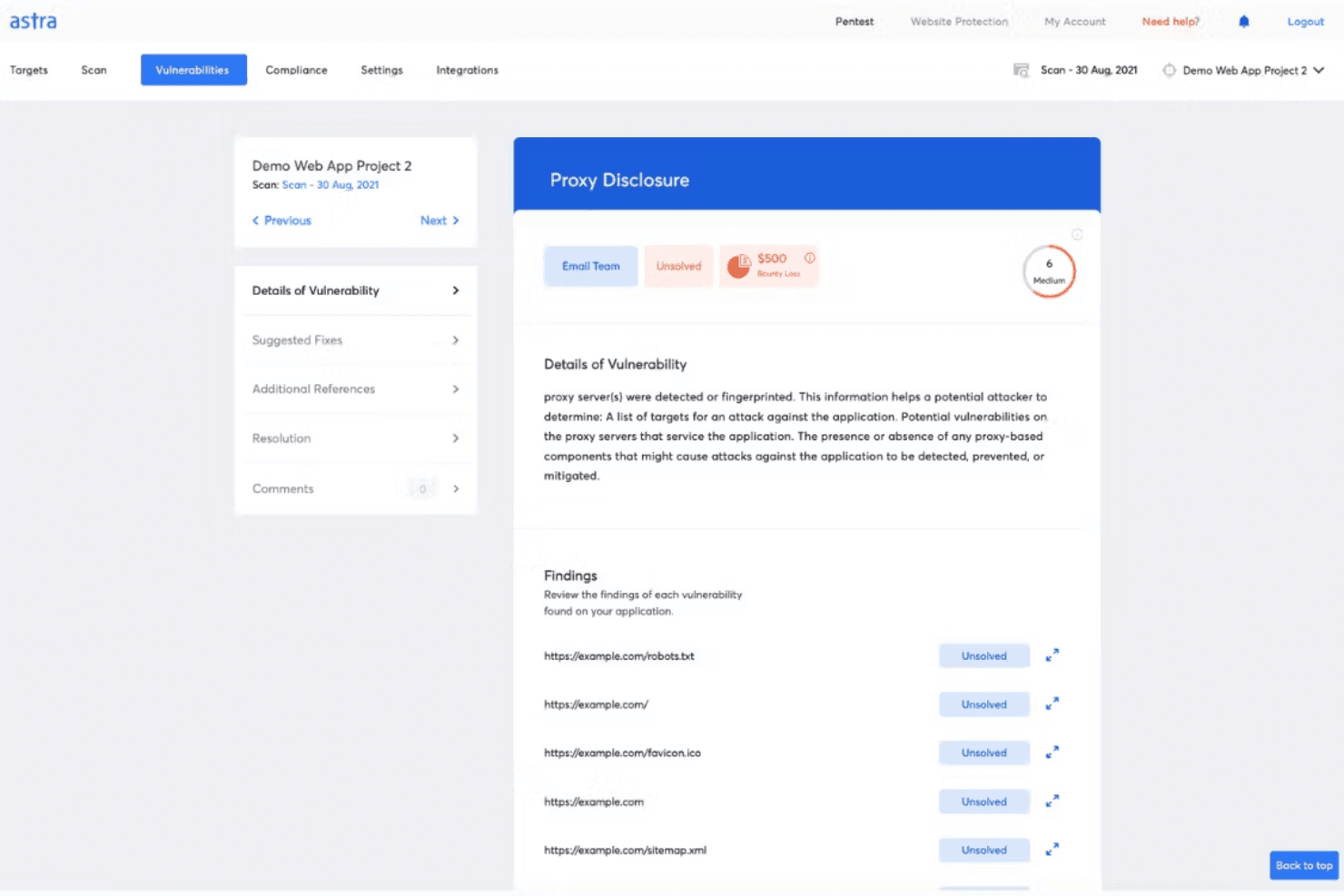
Astra's penetration tests can scan for vulnerabilities and provides detailed findings and recommendations. Astra Pentest is a PTaaS platform that combines automated DAST scanning, manual expert-led pentesting, API security testing, and cloud vulnerability scanning into a single dashboard.
####Who Is Astra Pentest Best For?
It's a strong fit for security-conscious teams at startups and mid-sized companies that need compliance-ready pentest reports alongside ongoing automated scanning.
####Why I Picked Astra Pentest
Astra Pentest earns its spot as one of the best on my shortlist because its continuous DAST scanning runs 10,000+ test cases, including authenticated scans behind login walls, which most scanners skip entirely. I also like how it layers in expert-vetted scan reviews, so my team isn't drowning in raw scanner output but working through validated findings. The AI-assisted false-positive triaging keeps the signal-to-noise ratio manageable, even when scans run on a continuous schedule.
####Astra Pentest Key Features
- Manual pentest by security experts: Certified professionals run offensive tests using OWASP, SANS, CREST, and PTES guidelines.
- API security platform: Scan APIs for OWASP API Top 10 issues and discover shadow or orphan endpoints through live traffic capture.
- Compliance-focused reporting: Generate dedicated reports for SOC2, ISO 27001, PCI-DSS, HIPAA, and GDPR requirements.
- Publicly verifiable pentest certificate: Get a shareable certificate after each successful pentest, confirming remediation and retest completion.
####Astra Pentest Integrations
Astra Pentest offers native integrations with Bitbucket, CircleCI, GitHub, GitLab, Jenkins, Jira, Microsoft Azure, and Slack. It also provides API access for custom integrations and supports live API traffic capture with Postman, Kong, AWS, GCP, and Nginx.
Pros and Cons
Pros:
- Remediation workflow integrated with pentest dashboard
- Compliance-ready reporting for multiple standards
- Automated DAST and manual pentests combined
Cons:
- Scans may generate occasional false positives
- No mobile app vulnerability testing included
Learn more about Astra Pentest: Best for configuring scan profiles
- Free demo available
- Pricing upon request
Visit WebsiteCustomer Rating:4.6/5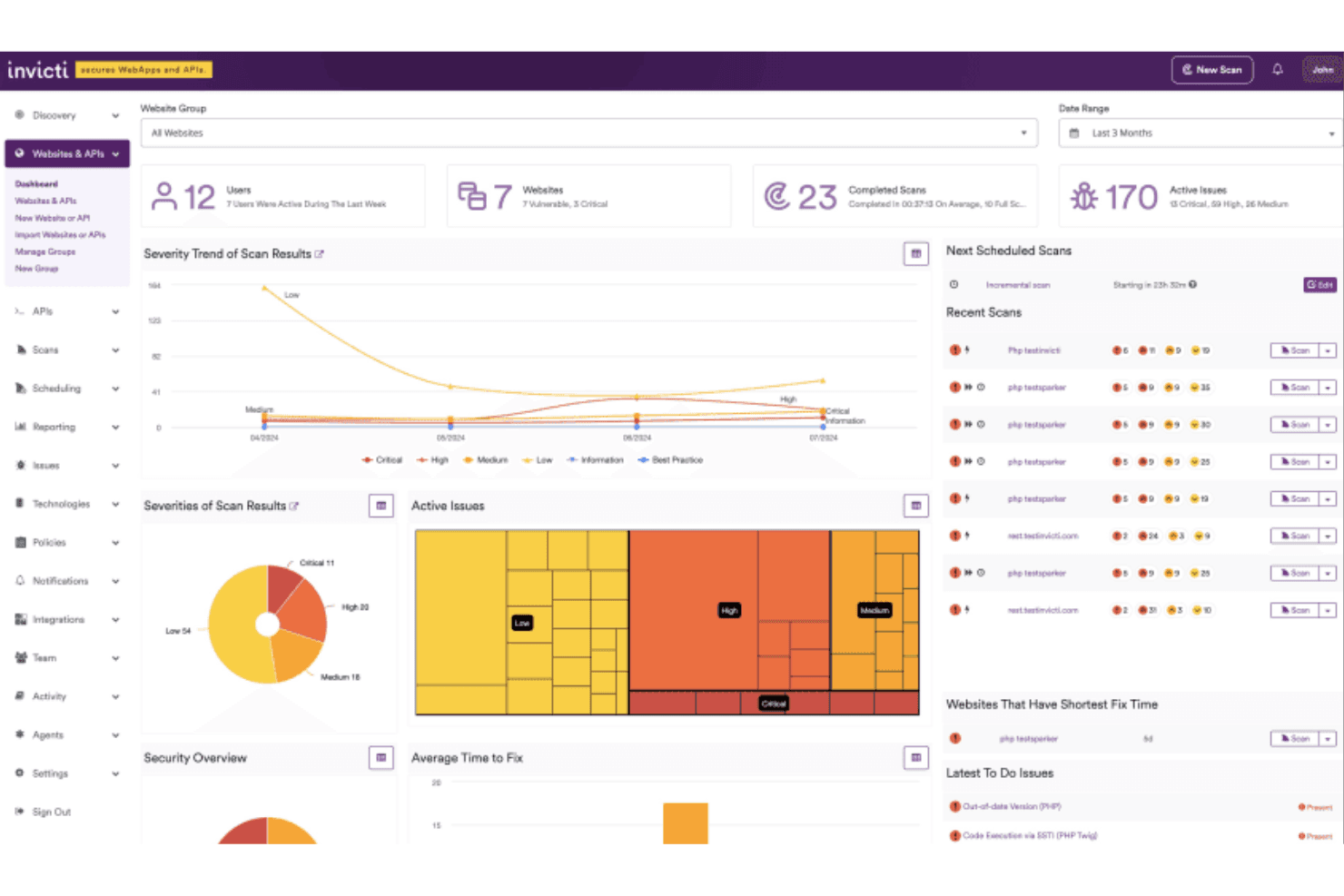
The main dashboard of Invicti provides an overview of recent scans, tests, and their statuses. Invicti is an application security platform that combines DAST, API security testing, SAST, SCA, and vulnerability management in one place, using proof-based scanning to confirm exploitable vulnerabilities in live web applications and APIs.
Who Is Invicti Best For?
Invicti is a strong fit for enterprise security and AppSec teams managing large portfolios of web applications and APIs across complex, multi-team environments.
Why I Picked Invicti
Invicti earns its spot on my shortlist because of how much control it gives over scan configuration. I like that I can build and save custom profiles per target, excluding technologies that aren't relevant to a specific application, which cuts scan time down considerably. When I onboard a new application similar to an existing one, I apply a saved profile rather than configuring from scratch. Proof-based scanning then validates actual exploitability within that defined scope.
Invicti Key Features
- Proof-based scanning: Confirms vulnerabilities by automatically verifying exploitability with safe, real attacks.
- API security testing: Scans REST, SOAP, and GraphQL APIs for OWASP Top Ten issues.
- Compliance and executive reporting: Maps vulnerabilities to regulatory frameworks and provides dashboards for tracking.
- Role-based access control: Lets you assign user permissions for secure, collaborative access and management.
Invicti Integrations
Invicti offers 110+ native integrations, including Jira, GitHub, GitLab, Azure DevOps, Jenkins, ServiceNow, Slack, Microsoft Teams, Okta, HashiCorp Vault, and AWS WAF. An API is available for custom integrations.
Pros and Cons
Pros:
- Handles complex authentication scenarios well
- Proof-based vulnerability confirmation engine
- Scan profiles tailored for different apps
Cons:
- Reporting flexibility could be improved
- No built-in mobile app testing
Learn more about Invicti:
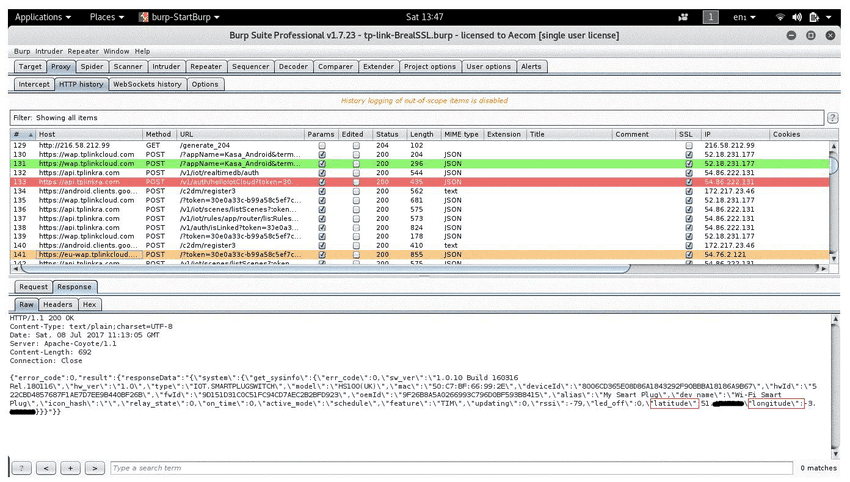
Burp Suite’s detailed interface clearly shows the user’s exact location Burp Suite is a web application penetration testing platform from PortSwigger that combines an intercepting proxy, automated vulnerability scanning, manual testing tools, and an extensible framework for security research across modern web apps and APIs.
Who Is Burp Suite Best For?
Burp Suite is a strong fit for professional penetration testers and application security engineers who need precise, hands-on control over their testing workflows.
Why I Picked Burp Suite
Burp Suite earns its spot as one of the best on my shortlist because of how well its browser-powered scanner handles JavaScript-heavy SPAs. Using an embedded Chromium browser, it renders and interacts with dynamic content the way a real user would, catching vulnerabilities that traditional scanners miss entirely. I also like its native API testing support, which covers OpenAPI, JSON, and GraphQL definitions with automated endpoint discovery built directly into the scanning workflow.
Burp Suite Key Features
- Intercepting proxy: Captures, inspects, and modifies HTTP and HTTPS traffic between the browser and target application.
- Burp Intruder: Automates customized attacks and fuzzing for identifying input handling flaws.
- Repeater tool: Allows manual manipulation and re-sending of individual HTTP requests for deep analysis.
- BApp Store extensions: Expands Burp Suite’s capabilities with hundreds of installable community and official plugins.
Burp Suite Integrations
Burp Suite offers native integrations with Jira, GitLab, and Trello, plus supports CI/CD workflows through its API. An extensive BApp Store provides hundreds of community and official extensions for added testing capabilities.
Pros and Cons
Pros:
- Supports complex automated vulnerability scanning
- Advanced manual testing utilities included
- Handles single-page application security testing
Cons:
- Interface can overwhelm new testers
- High resource usage during large scans
Learn more about Burp Suite: Best with marketplace add-ons for extended testing
- Free plan available
- Pricing upon request
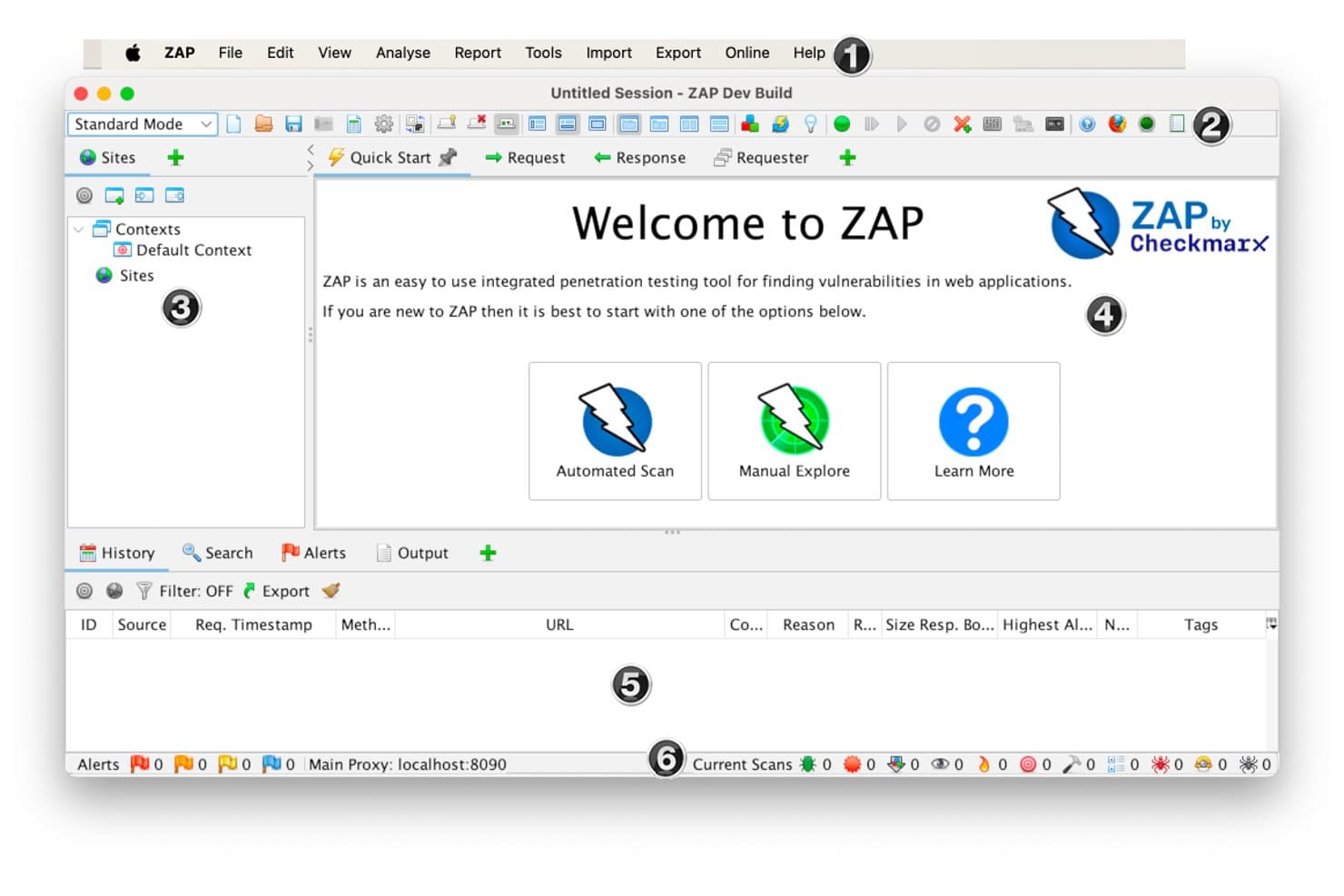
OWASP ZAP (Zed Attack Proxy) offers an intuitive welcome screen with Automated Scan, Manual Explore, and Learn More options for web application penetration testing. ZAP by Checkmarx is a free, open-source web application penetration testing tool that functions as a manipulator-in-the-middle proxy, combining active and passive scanning, spidering, and CI/CD automation in a single platform.
Who Is OWASP ZAP (Zed Attack Proxy) Best For?
ZAP is a strong fit for security engineers and developers who need a zero-cost, open-source DAST tool they can extend and automate within existing pipelines.
Why I Picked OWASP ZAP (Zed Attack Proxy)
ZAP earns its spot as one of the best on my shortlist because its add-on marketplace genuinely extends what a base DAST tool can do. I've added the GraphQL and OpenAPI add-ons to cover modern API endpoints that would otherwise go untested with a standard spider crawl. The Retire.js add-on is another one I use regularly, surfacing outdated JavaScript packages that active scanning alone won't catch.
OWASP ZAP (Zed Attack Proxy) Key Features
- Automated scan and quick start: Launches a full web application scan with both spidering and active vulnerability checks.
- Passive and active scanning: Inspects and attacks HTTP traffic without requiring manual intervention.
- Heads Up Display (HUD): Overlays testing controls and live feedback directly in your browser window.
- Automation framework: Supports scripted testing workflows and integrates with CI/CD through Docker and API options.
OWASP ZAP (Zed Attack Proxy) Integrations
ZAP offers integrations with GitHub Actions, Jenkins, Docker, and supports importing results into tools like DefectDojo, Dradis, and Faraday. An API and automation framework let you connect ZAP with custom pipelines and CI/CD environments.
Pros and Cons
Pros:
- Strong automated and passive scanning capabilities
- Open-source with active community support
- Extendable with add-ons from official marketplace
Cons:
- UI feels outdated compared to alternatives
- Lacks advanced reporting templates
Learn more about OWASP ZAP (Zed Attack Proxy): Best for DeepScan in complex web applications
- Free demo available
- Pricing upon request
Visit WebsiteCustomer Rating:4.2/5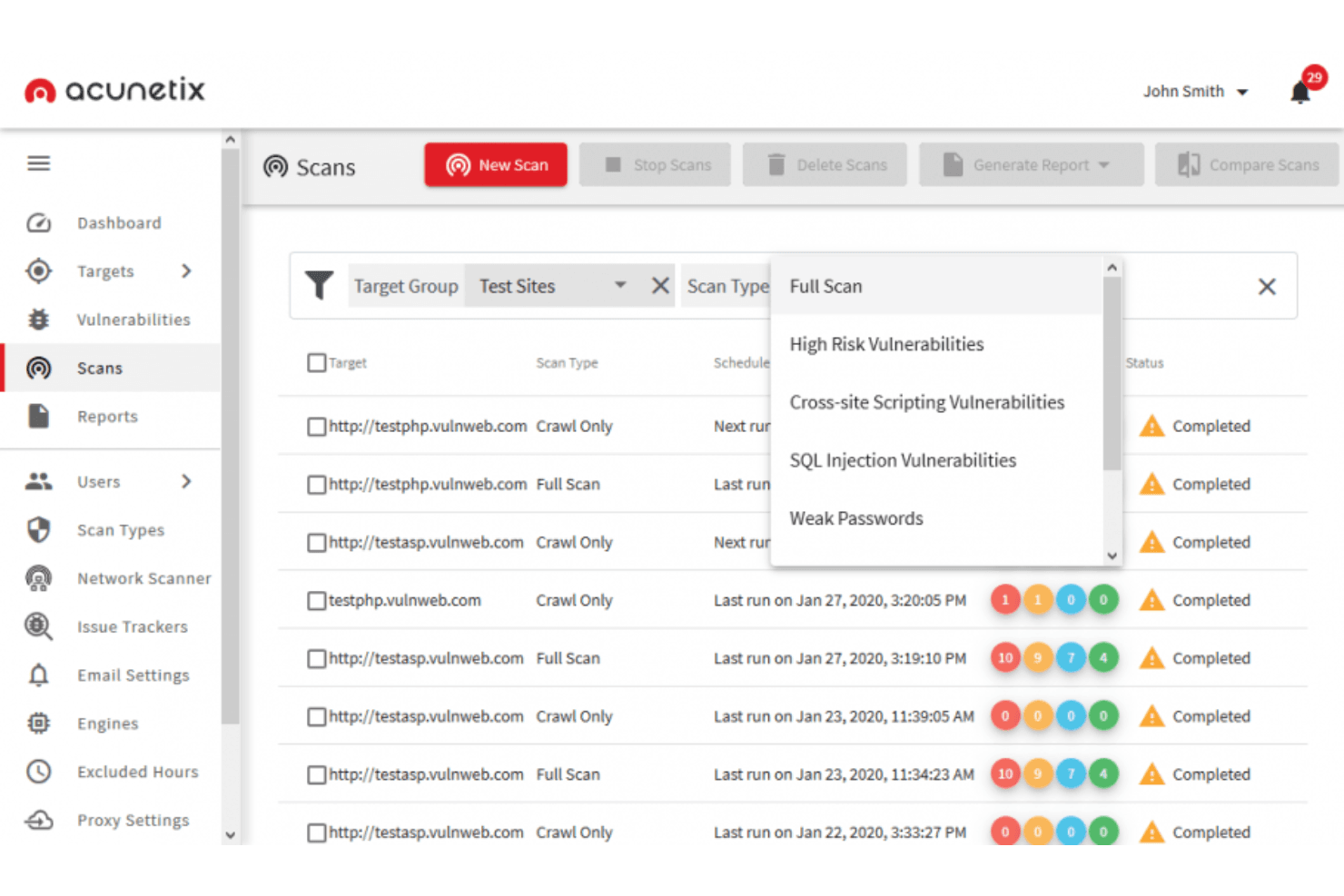
Acuntix can identify a wide range of vulnerabilities, including OWASP Top 10, SQL injections, XSS, misconfigurations, exposed databases, and out-of-band vulnerabilities. Acunetix is a DAST-focused web application security scanner that detects vulnerabilities across web apps, APIs, and LLMs using DeepScan, AcuSensor, and AI-powered analysis to surface exploitable issues across complex, JavaScript-heavy environments.
Who Is Acunetix Best For?
Acunetix suits enterprise security and AppSec teams that need automated vulnerability scanning across large portfolios of web applications and APIs.
Why I Picked Acunetix
Acunetix earns its spot on my shortlist because of how well DeepScan handles JavaScript-heavy single page applications. Most scanners miss vulnerabilities buried behind AJAX calls or client-side rendering, but DeepScan actually executes the JavaScript to crawl what the browser sees. I also rely on AcuSensor, which plants a sensor in the source code to combine black-box scanning with internal feedback, catching vulnerabilities that external-only scanning routinely misses.
Acunetix Key Features
- Predictive risk scoring: Uses machine learning models to estimate vulnerability risk before scanning begins.
- Role-based access controls: Lets you assign user roles and permissions for managing scan and remediation workflows.
- Automated retest and validation: Retests discovered issues after remediation to confirm vulnerabilities are fully resolved.
- API security scanning: Scans REST, GraphQL, and SOAP APIs for security issues alongside web application testing.
Acunetix Integrations
Acunetix offers native integrations with Jira, GitHub, GitLab, Azure DevOps, Bitbucket, Bamboo, Bugzilla, F5 BIG-IP, and Cloudflare. An API is available for custom integrations.
Pros and Cons
Pros:
- Includes network perimeter vulnerability scanning
- Combines DAST with optional interactive scanning
- Scans single page and JavaScript-heavy applications
Cons:
- Reporting customization is minimal
- Limited scan scheduling flexibility
Learn more about Acunetix: 10Best for combining automated and manual testing
Veracode
- Free demo available
- Pricing upon request
Visit WebsiteCustomer Rating:3.8/5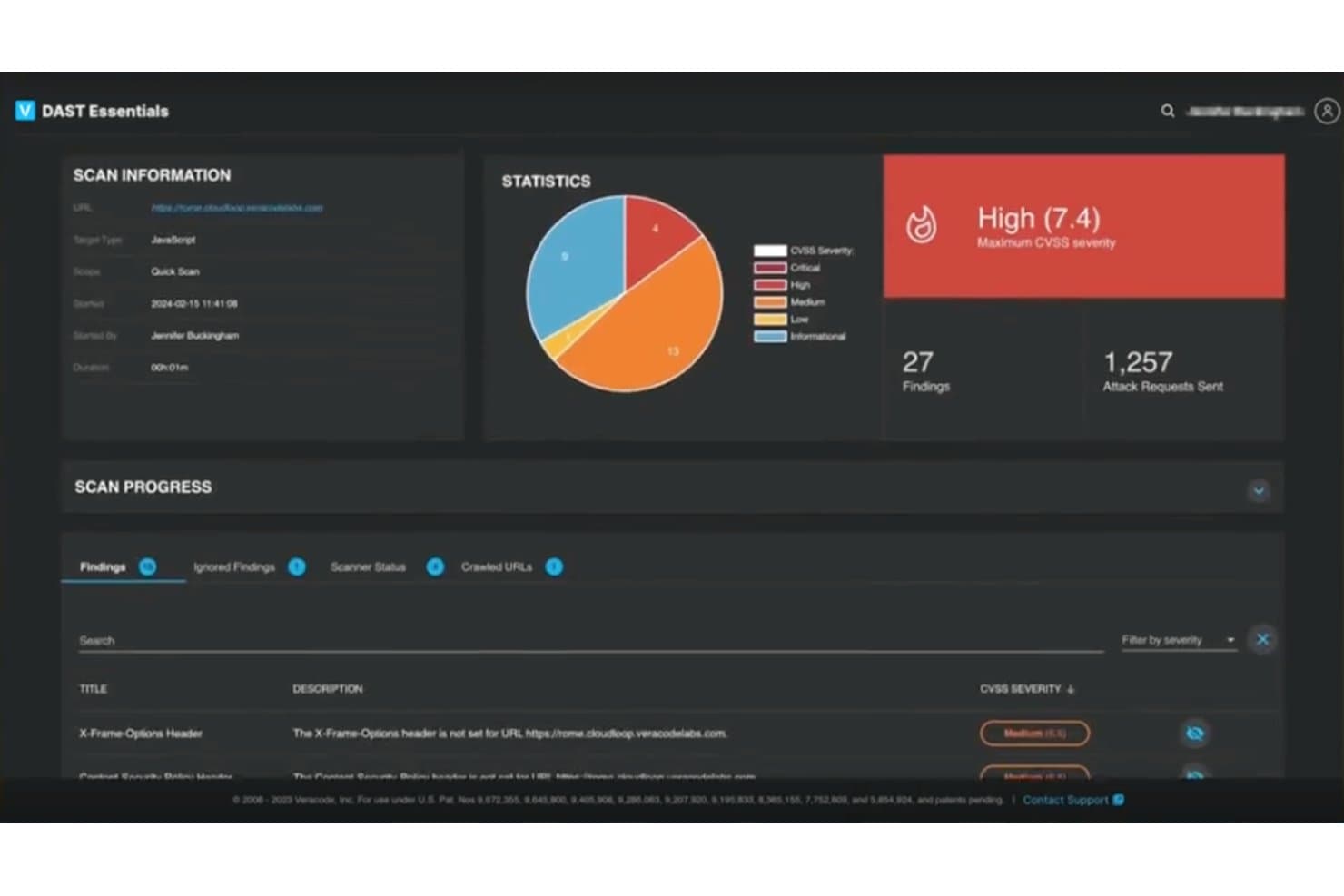
Veracode offers a DAST Essentials dashboard that displays dynamic application scan results, including CVSS severity ratings, findings count, and attack requests sent. Veracode is an application security testing platform that brings together SAST, DAST, SCA, and certified manual penetration testing under one roof, with AI-powered remediation guidance built in.
Who Is Veracode Best For?
Veracode is a strong fit for enterprise security and development teams in regulated industries that need to meet compliance mandates like PCI DSS, HIPAA, or GDPR.
Why I Picked Veracode
Veracode earns its spot on my shortlist because it genuinely bridges automated scanning and certified manual penetration testing within a single platform. I like that DAST findings can feed directly into PTaaS engagements, so certified testers pick up where the scanner left off rather than duplicating work. Veracode Fix then generates AI-powered code patches tied to those findings, cutting the gap between discovery and remediation.
Veracode Key Features
- Risk Manager dashboard: Visualizes application risk posture and policy compliance across assets.
- Container and IaC security: Scans container images and infrastructure as code for vulnerabilities and misconfigurations.
- IDE integrations: Provides real-time vulnerability feedback within development environments like Visual Studio and IntelliJ.
- API security testing: Examines REST and GraphQL endpoints for vulnerabilities and business logic flaws.
Veracode Integrations
Veracode offers native integrations with Jenkins, Azure DevOps, Jira, GitHub, Bitbucket, Eclipse, IntelliJ, Visual Studio, and Imperva. An API is available for custom integrations.
Pros and Cons
Pros:
- Covers SAST, DAST, SCA, and API security
- Delivers certified pentest reports for compliance audits
- Combines manual and automated testing workflows
Cons:
- Custom workflow tuning is limited
- Manual assessments require extra coordination
Learn more about Veracode:
Andre verktøy for penetrasjonstesting av webapplikasjoner
Her er noen flere alternativer for verktøy for penetrasjonstesting av webapplikasjoner som ikke kom med på kortlisten min, men som likevel er verdt å undersøke:
- 11MedusaBest for thread-based parallel testing
- 12AmassBest for external asset discovery
- 13GobusterBest for developers
- 14Rapid7Best for automating vulnerability identification
- 15NessusEasy to use credential and non credential scans
- 16NMapLightweight solution to web application penetration testing
- 17John the RipperBest with extensive hash and cipher support
- 18MetasploitAutomate manual tests and streamline your process
- 19Core ImpactBest for replicating multi-staged attacks
- 20SQLMapBest for SQL injection techniques
- 21ZeroThreatBest with zero-setup automated attack simulation
- 22Terra SecurityBest for customizable vulnerability assessment reports
- 23PcloudyBest for functional experience testing
- 24WfuzzBest for uncovering hidden vulnerabilities
How I Evaluate Web Application Penetration Testing Tools
I evaluate each tool against a baseline—can it handle authenticated scanning, API coverage, and OWASP detection—then weigh differentiators like CI/CD fit and proof-based exploitation.
Core Functionality (Table Stakes For This List)
When I'm selecting tools for my list, I rank each one on a scale from 0 (does not offer the functionality) to 5 (excels in this area) for each core functionality listed below. Then, I calculate the tool's total score into a percentage. Each tool needs to achieve a minimum total score of 65% to be considered for inclusion.
- Automated Vulnerability Scanning: I check whether the scanner reliably catches OWASP Top 10 issues like stored XSS in user profile fields or SQL injection in search parameters without excessive false positives.
- Manual Testing Toolkit: A good proxy, repeater, and payload editor matter here—I look for tools that let you intercept a request, tweak a parameter, and replay it without friction.
- Authentication Handling: I evaluate how each tool manages authenticated scans across login flows like OAuth, SSO, and JWT, since most real-world attack surface sits behind auth walls.
- Reporting & Remediation Guidance: Reports should map findings to severity levels and compliance frameworks like PCI-DSS or SOC 2, with clear fix instructions a developer can act on.
- CI/CD & DevSecOps Integration: I look for native plugins or APIs that connect to tools like Jenkins, GitLab CI, or GitHub Actions so scans run automatically on every pull request or build.
- Modern App & API Coverage: Tools need to handle JavaScript-heavy SPAs, REST endpoints, and GraphQL schemas—I evaluate whether they can import OpenAPI specs and test beyond basic HTML forms.
Once I have a list of tools that meet the criteria, I consider what sets each platform apart.
Differentiating Factors (What Sets Vendors Apart)
Here's how I compare and contrast different vendors:
Standout Features
Proof-based scanning is a big differentiator—I look for tools that automatically confirm a vulnerability is exploitable rather than just flagging a potential match. This cuts triage time on large engagements. Attack surface discovery also matters; tools that map forgotten subdomains or undocumented API endpoints give testers a more complete picture before scanning starts. I also evaluate extensibility, since teams often need custom checks for proprietary frameworks. A scripting engine or plugin marketplace lets you build payloads tailored to your stack.
Beyond Features
Deployment model matters—teams scanning internal apps in regulated industries often need self-hosted or air-gapped options, not just SaaS. I also evaluate licensing structure, since per-target pricing can spiral when you're testing dozens of microservices. Vendor credibility is another factor I weigh; frequent signature updates and active CVE research signal a team that keeps pace with emerging threats. Finally, I consider training resources and community strength, because a tool with labs, certifications, and an active user forum helps newer testers ramp up faster.
Slik velger du et verktøy for penetrasjonstesting av webapplikasjoner
Det er lett å gå seg vill i lange funksjonslister og kompliserte prismodeller. For å hjelpe deg med å holde fokus mens du går gjennom den unike prosessen for valg av programvare, får du her en sjekkliste over faktorer du bør ha i bakhodet:
| Faktor | Hva bør vurderes |
|---|---|
| FaktorSkalerbarhet | Hva bør vurderesVil verktøyet skalere i takt med de økende behovene dine? Vurder hvor mange brukere og applikasjoner det kan håndtere uten ytelsesproblemer. |
| FaktorIntegrasjoner | Hva bør vurderesIntegreres det med de eksisterende systemene dine? Se etter kompatibilitet med andre sikkerhetsverktøy og utviklingsplattformer du allerede bruker. |
| FaktorTilpasningsmuligheter | Hva bør vurderesKan du tilpasse verktøyet til de spesifikke arbeidsflytene dine? Sjekk om det gjør det mulig å tilpasse dashbord og rapporter. |
| FaktorBrukervennlighet | Hva bør vurderesEr verktøyet brukervennlig for teamet ditt? Vurder læringskurven og om det krever omfattende opplæring eller teknisk ekspertise. |
| FaktorImplementering og innføring | Hva bør vurderesHvor lang tid tar det å komme i gang? Vurder hvor komplisert oppsettet er, og om det finnes ressurser som veiledninger og støtte under implementeringen. |
| FaktorKostnad | Hva bør vurderesPasser prisen inn i budsjettet ditt? Sammenlign kostnaden med funksjonene som tilbys, og se etter skjulte gebyrer eller langsiktige avtaler. |
| FaktorSikkerhetstiltak | Hva bør vurderesEr det innført sterke sikkerhetstiltak? Sørg for at verktøyet følger sikkerhetsstandardene dine og tilbyr funksjoner for databeskyttelse. |
| FaktorEtterlevelseskrav | Hva bør vurderesOppfyller det bransjens krav til etterlevelse? Kontroller om verktøyet støtter nødvendige regelverk som GDPR eller PCI-DSS for din sektor. |
Hva er verktøy for penetrasjonstesting av nettapplikasjoner?
Verktøy for penetrasjonstesting av nettapplikasjoner identifiserer sikkerhetssårbarheter i nettapplikasjoner. Sikkerhetseksperter og utviklere bruker vanligvis disse verktøyene til å beskytte sensitive data og sørge for at applikasjonene er sikre.
Automatisert skanning, varsler i sanntid og detaljerte rapporteringsfunksjoner bidrar til å identifisere trusler og opprettholde sikkerhetsstandarder. Alt i alt er disse verktøyene avgjørende for å beskytte nettapplikasjoner mot potensielle angrep.
Funksjoner
Når du velger verktøy for penetrasjonstesting av nettapplikasjoner, bør du se etter følgende viktige funksjoner:
- Omfattende sårbarhetsskanning: Denne funksjonen skanner automatisk nettappene dine for et bredt spekter av sikkerhetssårbarheter, som SQL-injeksjon, skript på tvers av nettsteder og feilkonfigurerte sikkerhetsinnstillinger. Den hjelper deg med å oppdage skjulte trusler tidlig, slik at du slipper å jakte på sikkerhetstrusler hele tiden.
- Autentiseringstesting: Dette kontrollerer om påloggings- og øktadministrasjonsmekanismene i applikasjonen din er sikre. Ved å simulere ulike typer angrep finner du ut om legitimasjon, økter og tillatelser er vanntette eller trenger forbedringer.
- Rapportering og analyse: Klare og detaljerte rapporter oppsummerer funnene fra skanningen på en måte du faktisk kan handle ut fra. Disse verktøyene sorterer sårbarheter etter alvorlighetsgrad, tilbyr trinn for utbedring og lar deg ofte eksportere resultatene for deling med teamet ditt (eller for å vise dem litt frem).
- Tilpassbare testtilfeller: Du kan justere eller opprette egne testscenarioer for å håndtere unike risikoer i miljøet ditt. Dette gir deg kontroll, slik at testingen ikke låses til en løsning som skal passe for alle.
- Integrasjonsmuligheter: Disse verktøyene kobles til andre sikkerhets- eller utviklingsplattformer, for eksempel CI/CD-pipelines, systemer for oppgavehåndtering eller sikkerhetsdashbord. Det bidrar til å holde arbeidsflyten smidig, slik at du slipper å hoppe mellom faner hele tiden.
- Gjennomsøking og kartlegging: Dette utforsker hele nettapplikasjonen din og kartlegger offentlig og skjult innhold. Du overser ikke deler av applikasjonen som trenger sikring, fordi verktøyet synliggjør alt.
- Reduksjon av falske positiver: Ingen ønsker å kaste bort tid på falske trusler. Verktøy med god reduksjon av falske positiver hjelper deg med å fokusere på reelle sikkerhetsproblemer i stedet for å jage spøkelser.
- Etterlevelseskontroller: Mange verktøy kontrollerer om nettapplikasjonene dine følger standarder som OWASP Top 10 eller PCI DSS. Dette hjelper deg med å sørge for at du oppfyller bransjekravene, noe som kan gjøre både revisorer og kunder fornøyde.
Vanlige AI-funksjoner i verktøy for penetrasjonstesting av nettapplikasjoner
I tillegg til standardfunksjonene i verktøy for penetrasjonstesting av nettapplikasjoner som er nevnt ovenfor, tar mange av disse løsningene i bruk AI med funksjoner som:
- Automatisert trusseloppdagelse: Her lærer KI av tidligere skanninger og nye trusseldata for å oppdage sikkerhetsproblemer som kan unnslippe vanlige skanninger. Systemet blir smartere, slik at du ikke trenger å oppdage alle vanskelige sårbarheter selv.
- Intelligent prioritering: KI analyserer skannedata, forutsier sårbarhetenes innvirkning i den virkelige verden og rangerer dem etter risiko. Du får handlingsrettet innsikt i hva som bør håndteres først, ikke bare en lang liste over problemer.
- Adaptiv gjennomsøking: KI-drevne gjennomsøkere lærer strukturen til selv komplekse eller dynamiske nettsteder og oppdager skjulte ruter eller innhold mer effektivt enn tradisjonelle verktøy. Det betyr færre oversette områder under sikkerhetsgjennomgangen.
- Kontekstuell angrepssimulering: Med KI tilpasser disse verktøyene simulerte angrep basert på appens unike funksjoner og brukeratferd, slik at du får et mer nøyaktig bilde av den faktiske eksponeringen.
- Avviksoppdagelse: KI overvåker nettappen din for atferd som ikke er normal – for eksempel uvanlige innloggingsmønstre eller uventede dataforespørsler – og flagger dem for gjennomgang. Du får et tidlig varsel om uvanlige trusler før de utvikler seg til alvorlige problemer.
Fordeler
Implementering av verktøy for penetrasjonstesting av nettapplikasjoner gir flere fordeler for teamet og virksomheten din. Her er noen av fordelene du kan se frem til:
- Forbedret sikkerhet: Ved å identifisere sårbarheter med automatisert skanning kan teamet håndtere trusler før de blir alvorlige problemer.
- Effektiv tidsbruk: Sanntidsvarsler og automatiserte prosesser sparer teamet for tid, slik at de kan fokusere på andre kritiske oppgaver.
- Bedre samsvar: Støtte for samsvar sikrer at virksomheten oppfyller bransjereguleringer og reduserer juridisk risiko.
- Bedre beslutningsgrunnlag: Detaljert rapportering gir innsikt som hjelper deg med å prioritere sikkerhetstiltak og fordele ressurser effektivt.
- Tilpassbar opplevelse: Tilpassbare kontrollpaneler lar brukerne fokusere på relevante data, noe som forbedrer arbeidsflytens effektivitet og brukertilfredsheten.
- Enkel bruk: Et brukervennlig grensesnitt reduserer læringskurven og gjør det enklere for teamet å ta i bruk og anvende verktøyene effektivt.
Kostnader og priser
Valg av verktøy for penetrasjonstesting av nettapplikasjoner krever en forståelse av de ulike prismodellene og abonnementene som er tilgjengelige. Kostnadene varierer basert på funksjoner, teamstørrelse, tillegg og mer. Tabellen nedenfor oppsummerer vanlige abonnementer, gjennomsnittsprisene deres og typiske funksjoner som er inkludert i løsninger for penetrasjonstesting av nettapplikasjoner:
Sammenligningstabell for verktøy for penetrasjonstesting av nettapplikasjoner
| Abonnementstype | Gjennomsnittspris | Vanlige funksjoner |
|---|---|---|
| AbonnementstypeGratis abonnement | Gjennomsnittspris$0 | Vanlige funksjonerGrunnleggende skannefunksjoner, begrenset rapportering og støtte fra fellesskapet. |
| AbonnementstypePersonlig abonnement | Gjennomsnittspris$10-$30/user/month | Vanlige funksjonerAutomatisert skanning, sanntidsvarsler, tilpassbare kontrollpaneler og støtte via e-post. |
| AbonnementstypeBedriftsabonnement | Gjennomsnittspris$50-$100/user/month | Vanlige funksjonerDetaljert rapportering, integrasjonsmuligheter, støtte for samsvar og telefonstøtte. |
| AbonnementstypeStorbedriftsabonnement | Gjennomsnittspris$150-$300/user/month | Vanlige funksjonerAvansert trusselinnsikt, dedikert kundeansvarlig, full tilpasning og støtte døgnet rundt. |
Vanlige spørsmål om verktøy for penetrasjonstesting av nettapplikasjoner
Her er noen svar på vanlige spørsmål om WAPT-verktøy:
Hvor ofte bør du gjennomføre penetrasjonstesting av nettapplikasjoner?
Det anbefales å gjennomføre penetrasjonstesting minst én gang i året, eller hver gang det gjøres betydelige endringer i applikasjonen. Regelmessig testing bidrar til å identifisere nye sårbarheter som kan oppstå som følge av oppdateringer eller endringer i applikasjonens miljø.
Kan verktøy for penetrasjonstesting erstatte manuell testing?
Nei, verktøy for penetrasjonstesting kompletterer manuell testing, men erstatter den ikke. Automatiserte verktøy kan raskt identifisere kjente sårbarheter, men manuell testing er avgjørende for å avdekke komplekse logikkfeil og kontekstuelle sikkerhetsproblemer som krever menneskelig innsikt og ekspertise.
Hvordan sikrer du at funnene fra penetrasjonstestingen blir håndtert?
Etter testingen bør du prioritere håndteringen av sårbarheter basert på risikonivå. Utarbeid en utbedringsplan med tydelige tidsfrister og ansvarsområder. Oppdater sikkerhetsrutinene regelmessig og gjennomfør oppfølgingstester for å bekrefte at problemene er løst.