

De beste verktøyene for sårbarhetshåndtering hjelper team med å identifisere eksponeringer tidlig, redusere sikkerhetsrisikoer og opprettholde sikrere og mer samsvarende systemer i hele infrastrukturen. Når svakheter ikke oppdages, når oppdateringssykluser er avhengige av manuelle oppgaver, eller når varsler skaper mer støy enn nyttig innsikt, kan trusler vokse raskt og skape unødvendige hull i sikkerhetsdriften.
Den rette plattformen for sårbarhetshåndtering gir sikkerhets- og IT-team tydelig oversikt, automatisert skanning og nøyaktig prioritering, slik at de kan forstå hvilke problemer som krever umiddelbar handling og løse dem før de påvirker virksomheten. Som teknologidirektør med over 20 års erfaring med å teste og implementere sikkerhetsverktøy i reelle produksjonsmiljøer har jeg evaluert de beste løsningene basert på nøyaktighet i oppdagelsen, kvaliteten på automatiseringen og brukervennlighet under det løpende sikkerhetsarbeidet.
Hver gjennomgang dekker funksjoner, fordeler og ulemper samt ideelle bruksområder, slik at teamet ditt kan velge det beste verktøyet for sårbarhetshåndtering og oppnå pålitelig og effektiv risikoreduksjon.
Hvorfor du kan stole på våre programvareanbefalinger
6,700+
Reviews
20
Industry experts
16+
Evaluation factors
14
Years
Teamet vårt har testet og anmeldt programvare siden 2012. Vi er selv teknologiledere, så vi vet hvor vanskelig og hvor viktig det er å velge riktig programvare.
I denne guiden har vi vurdert verktøyene gjennom praktisk testing og uavhengig research og gitt dem poeng ut fra våre utvelgelseskriterier.
Anmeldelsene våre bygger på vår egen redaksjonelle vurdering. De er ikke et salgsargument.
Ekspertanmeldere:
- Paulo Gardini MiguelTech Director
 Tim FisherVP of AI
 Gabriel RosasTech Lead & Software Architect
 Christhian GruhnTech Lead & Platform Architect

Sammenligningstabell for verktøy for sårbarhetshåndtering
Denne sammenligningstabellen oppsummerer prisdetaljene for mine utvalgte verktøy for sårbarhetshåndtering.
| Tool | Best For | Trial Info | Price | ||
|---|---|---|---|---|---|
| 1 | Best for endpoint vulnerability & patch management | 30-day free trial + free demo available | Pricing upon request | Website | |
| 2 | Best for third-party vendor risk assessments | Free demo available | Pricing upon request | Website | |
| 3 | Best for comprehensive code-to-cloud security | Free plan available | From $350/month | Website | |
| 4 | Best for real-time external threat monitoring | Pricing upon request | Website | ||
| 5 | Best for continuous vulnerability monitoring | 14-day free trial + free demo available | From $149/month | Website | |
| 6 | Best for comprehensive vulnerability scanning | Free demo available | From $69/month | Website | |
| 7 | Best for zero-configuration security insights | Free plan available | From $10/user/month | Website | |
| 8 | Best for comprehensive threat intelligence | Pricing upon request | Website | ||
| 9 | Best for extensive device and protocol coverage | Free demo | Pricing upon request | Website | |
| 10 | Best for integration with Microsoft ecosystem | From $10/user/month (billed annually) | Website |


Anmeldelser av de beste verktøyene for sårbarhetshåndtering
Nedenfor finner du mine detaljerte sammendrag av de beste verktøyene for sårbarhetshåndtering som kom med på kortlisten min. Anmeldelsene mine gir en detaljert gjennomgang av de viktigste funksjonene, fordelene & ulempene, integrasjonene og de ideelle bruksområdene for hvert verktøy, slik at du kan finne det beste alternativet for deg.
 Best for endpoint vulnerability & patch management
- 30-day free trial + free demo available
- Pricing upon request
Visit WebsiteCustomer Rating:4.5/5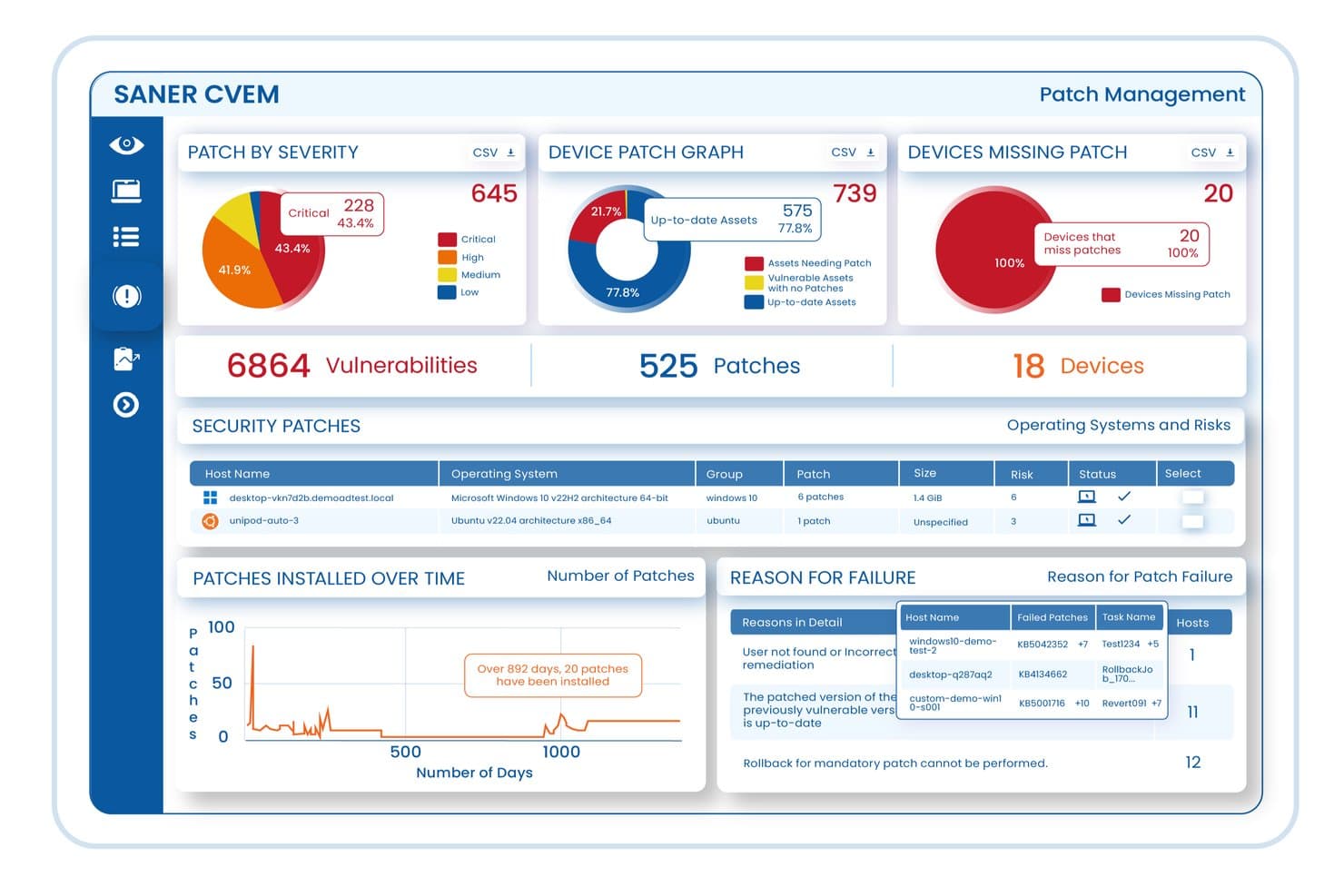
An interactive overview of the SecPod Saner Continuous Vulnerability and Exposure Management (CVEM) Platform, highlighting end-to-end vulnerability tracking, automated patch management, and risk prioritization across enterprise endpoints. SecPod (Saner Platform) is a continuous vulnerability and exposure management platform that combines endpoint scanning, risk-based prioritization, patch remediation, and compliance enforcement across enterprise IT environments in a single console.
Who Is SecPod (Saner Platform) Best For?
SecPod is a good fit for IT security teams in mid-to-large enterprises that need a single platform to manage vulnerability detection, patching, and compliance across distributed endpoint environments.
Why I Picked SecPod (Saner Platform)
I've included SecPod (Saner Platform) in my top picks because its automated endpoint detection goes well beyond basic CVE scanning. The platform runs continuous checks across Windows, macOS, Linux, and IBM AIX endpoints using a library of 160,000+ security checks, covering missing patches, misconfigurations, and exposed assets without requiring manual intervention. I also like that its AI-powered posture anomaly detection monitors 100+ device parameters using ML models, flagging behavioral deviations that signature-based scanners typically miss.
SecPod (Saner Platform) Key Features
- SSVC-based risk prioritization: Ranks vulnerabilities using EPSS exploit likelihood scores, CISA KEV status, and asset criticality to focus remediation on the highest-risk exposures first.
- Closed-loop patch remediation: Tracks vulnerabilities from initial detection through patching to verified resolution, all within the same platform.
- Compliance benchmark enforcement: Continuously audits endpoint configurations against CIS, NIST, HIPAA, PCI DSS, and STIG benchmarks.
- MITRE ATT&CK mapping: Tags vulnerability findings to MITRE ATT&CK techniques and CWE classifications for structured threat context.
SecPod (Saner Platform) Integrations
SecPod's Saner platform integrates with ServiceNow, ELK, IBM QRadar, Wazuh, and Jira, and also supports a native Freshservice integration. Its API-first architecture enables integration with SIEM, SOAR, ITSM, and DevOps pipelines, and a REST API is available for custom integrations.
Pros and Cons
Pros:
- Includes remediation, not just detection
- Lightweight agent with minimal resource consumption
- 200,000+ SCAP vulnerability checks built in
Cons:
- Initial agent setup requires significant configuration
- Reporting and dashboard customization options limited
Learn more about SecPod (Saner Platform): Best for third-party vendor risk assessments
- Free demo available
- Pricing upon request
Visit WebsiteCustomer Rating:4.5/5
Prevalent provides a centralized place to monitor vendor risks, including cyber vulnerabilities. Prevalent is a third-party risk management platform that helps organizations assess and monitor the risks associated with their vendors and suppliers. By automating the collection and analysis of vendor data, Prevalent enables you to focus on reducing risk and ensuring compliance throughout your vendor ecosystem.
Why I Picked Prevalent: As a vulnerability management tool, Prevalent offers cyber intelligence to help you identify and address potential security issues within your vendor network. It monitors over 550,000 companies for cyber incidents by tracking more than 1,500 criminal forums, numerous dark web pages, and various threat feeds. This extensive monitoring allows you to stay informed about vulnerabilities and take proactive measures to protect your organization.
Standout features & integrations:
Features include automated onboarding and offboarding processes, simplifying the management of vendor relationships. The platform also includes a vendor dashboard that centralizes security, performance, and compliance reporting, making it easier for your team to monitor and address risks. Furthermore, Prevalent provides built-in remediation guidance.
Integrations include Active Directory, BitSight, ServiceNow, SecZetta, and Source Defense.
Pros and Cons
Pros:
- Strong security protocols to protect data
- Users can tailor reports according to specific needs
- Extensive functionalities for managing vendor risk
Cons:
- Challenges in migrating data can complicate the initial setup
- The platform is complex and comes with a learning curve
Learn more about Prevalent: Best for comprehensive code-to-cloud security
- Free plan available
- From $350/month
Visit WebsiteCustomer Rating:4.7/5
Aikido Security provides a unified dashboard to triage and filter issues by type, severity, and scan source. Aikido Security is an all-in-one platform that helps you identify and fix vulnerabilities in your code and cloud environments. It offers a range of tools to detect security risks, from static code analysis to cloud posture management.
Why I Picked Aikido Security: Aikido's static code analysis (SAST) scans your source code to spot vulnerabilities like SQL injection and cross-site scripting before they become issues. This proactive approach lets your team address potential threats early, enhancing your application's security. Additionally, Aikido's secret detection feature checks your code for exposed API keys, passwords, and other sensitive information, preventing accidental leaks that could be exploited.
Standout features & integrations:
Features include its cloud posture management (CSPM) capabilities that detect risks in your cloud infrastructure across major providers, helping you maintain a secure cloud environment. Aikido also offers infrastructure as code (IaC) scanning, open-source dependency scanning, container image scanning, surface monitoring, and malware detection in dependencies.
Integrations include Amazon Web Services (AWS), Google Cloud, Microsoft Azure Cloud, Drata, Vanta, AWS Elastic Container Registry, Docker Hub, Jira, Asana, and GitHub.
Pros and Cons
Pros:
- Scalable for growing teams
- Offers actionable insights
- Has a comprehensive dashboard and customizable reports
Cons:
- Only available in English
- Ignores vulnerabilities if no fix is available
Learn more about Aikido Security:

NordStellar dashboard showing real-time data breach insights, including leaked data, risk levels, and key security metrics such as breaches, infections, and stolen credentials. NordStellar is a platform designed to help you manage vulnerabilities with a focus on external threat intelligence and security. It provides tools to identify and mitigate potential security threats in real-time, ensuring your organization stays protected from cyber threats.
Why I Picked NordStellar: I chose NordStellar for its real-time alerts, advanced threat detection, and automated attack surface management that keep you ahead of cyber risks. With instant data breach and dark web monitoring, it alerts your team to compromised data or emerging threats, enabling swift action. By centralizing intelligence from over 36,000 sources and prioritizing risks, NordStellar helps both executives and security teams maintain proactive, comprehensive protection.
Standout features & integrations:
Features include brand protection, which helps in detecting and preventing unauthorized use of your brand online. The platform also offers real-time monitoring, allowing you to keep a constant watch on security threats. Lastly, its integration capabilities with SIEM and SOAR platforms mean you can easily incorporate NordStellar into your existing security infrastructure, enhancing your overall security posture.
Integrations include Splunk, SIEM platforms, SOAR platforms, Email, Slack, Webhooks, and API.
Pros and Cons
Pros:
- Integrates with SIEM and SOAR
- Automated asset discovery and mapping
- Real-time alerts for cyber threats
Cons:
- Limited mobile application support
- Pricing not publicly disclosed
Learn more about NordStellar: Best for continuous vulnerability monitoring
- 14-day free trial + free demo available
- From $149/month
Visit WebsiteCustomer Rating:4.8/5
The attack surface view in Intruder helps identify and manage potential vulnerabilities in your network. Intruder is a cloud-based vulnerability management tool that helps you identify and address security weaknesses in your digital infrastructure.
Why I Picked Intruder: Intruder's continuous vulnerability management ensures your systems are regularly scanned for new threats. This feature automatically initiates scans when changes are detected, helping you stay ahead of potential security risks. Additionally, Intruder's attack surface management discovers unknown assets like subdomains and untracked APIs, providing a comprehensive view of your organization's exposure. It also offers exposure management, which combines multiple scanning engines to identify over a thousand attack surface issues that other scanners might miss.
Standout features & integrations:
Features include prioritization that leverages the latest threat intelligence, such as CISA's Known Exploited Vulnerabilities list and machine learning-driven exploitation predictions. It also offers private bug bounty access, allowing your team to collaborate with elite hackers to uncover vulnerabilities that automated scanners might overlook.
Integrations include AWS, Azure, Google Cloud, Drata, Jira, Azure DevOps, GitHub, GitLab, ServiceNow, Cloudflare, Microsoft Sentinel, and Okta.
Pros and Cons
Pros:
- Compliance reporting capabilities
- Automated scanning and monitoring
- Comprehensive vulnerability detection
Cons:
- Attack surface feature limited to premium plan
- Occasional false positives
Learn more about Intruder: Best for comprehensive vulnerability scanning
- Free demo available
- From $69/month
Visit WebsiteCustomer Rating:4.5/5
The main dashboard of Astra Pentest provides an overview of the security status and detected vulnerabilities. Astra Pentest is a comprehensive security tool designed to perform thorough penetration testing across various platforms, including web applications, cloud environments, mobile apps, APIs, networks, and blockchain systems. It helps users identify vulnerabilities using an intelligent scanner and a user-friendly dashboard, ensuring robust web application security.
Why I Picked Astra Pentest: One of its key features is the vulnerability scanner, which performs over 8000 tests, including checks for known CVEs, OWASP Top 10, and SANS 25. This scanner is designed to cover every possible loophole, ensuring thorough security assessments. Additionally, the scanner can analyze pages behind login screens using a browser extension, which simplifies the process of securing every part of an application.
Standout features & integrations:
Some key features of Astra Pentest include pentests for web apps, cloud security, mobile apps, API, network security, and blockchain. It also offers reporting, compliance, and publically verifiable security certificates.
Integrations include GitLab, GitHub, Bitbucket, Slack, Jira, Microsoft Azure, Jenkins, CircleCI.
Pros and Cons
Pros:
- User-friendly interface
- Comprehensive security checks for compliance
- Centralized dashboard for managing vulnerabilities
Cons:
- Limited customization options
- False positives are possible with the tool
Learn more about Astra Pentest: Best for zero-configuration security insights
- Free plan available
- From $10/user/month
Visit WebsiteCustomer Rating:4.3/5
New Relic's vulnerability dashboard provides detailed metrics on vulnerabilities, severity breakdowns, and prioritized high-risk issues. New Relic is an all-in-one observability platform designed to help you monitor, debug, and improve your entire software stack. It offers a range of tools to ensure your applications run smoothly and securely.
Why I Picked New Relic: I chose New Relic for its ability to provide continuous runtime software composition analysis (SCA) and vulnerability assessment without requiring additional configuration. This means you can instantly detect common vulnerabilities and exposures (CVEs) across your application's dependencies, helping you identify potential security risks early in the development process.
Standout features & integrations:
Features include enhanced prioritization analytics that help you prioritize which risks need immediate attention by incorporating data like the Exploit Prediction Scoring System (EPSS). It is also an open ecosystem that enables easy integration with your existing security assessment tools.
Integrations include AWS, Google Cloud Platform, Microsoft Azure, Slack, Atlassian Jira, AWS EventBridge, Email Notifications, Mobile Push Notifications, Opsgenie, PagerDuty, ServiceNow, and Prometheus.
Pros and Cons
Pros:
- Wide range of integrations with cloud platforms and development tools
- Offers real-time tracking and detailed error logging
- Provides comprehensive monitoring and alerting capabilities
Cons:
- Dashboards may require customization for specific use cases
- Learning curve for new users
Learn more about New Relic:

IBM Security QRadar EDR vulnerability management tool interface The IBM Security QRadar EDR tool is an advanced threat protection platform that provides companies with critical insight into potential security risks. Its capabilities are uniquely designed for comprehensive threat intelligence, providing a holistic view of a firm's threat landscape.
Why I Picked IBM Security QRadar EDR: In the realm of cybersecurity tools, IBM Security QRadar EDR emerged as a top pick for me because of its capability to offer end-to-end threat detection and response. This tool has top-notch threat intelligence that goes beyond others. It gathers and analyzes data from multiple sources for a complete view of security risks.
Standout features & integrations:
IBM Security QRadar EDR shines with features like artificial intelligence (AI) integration, which supports advanced threat detection and automated response actions. Furthermore, it’s User Behavior Analytics (UBA) helps identify insider threats by analyzing patterns.
Notably, QRadar EDR integrates well with other security and IT management platforms, allowing for streamlined threat management.
Pros and Cons
Pros:
- Facilitates robust user behavior analysis
- Provides advanced threat detection with AI
- Offers comprehensive threat intelligence
Cons:
- Advanced features may require dedicated personnel to manage
- May be complex for new users
- Pricing not readily available
Learn more about IBM Security QRadar EDR: Best for extensive device and protocol coverage
- Free demo
- Pricing upon request

Cisco Vulnerability Management tool interface Cisco Vulnerability Management is a robust security solution that offers an expansive range of device and protocol coverage. The tool scans your network to identify and manage vulnerabilities, making it an excellent choice for those seeking to secure diverse device environments and protocols.
Why I Picked Cisco Vulnerability Management: I chose Cisco Vulnerability Management primarily because of its wide device and protocol coverage, which is critical for businesses operating in a mixed environment. I determined this tool to be unique in its capability to cover many devices and protocols, making it best for organizations that utilize the diverse technological infrastructure.
Standout features & integrations:
Key features of Cisco Vulnerability Management include robust scanning capabilities, extensive device and protocol support, and advanced reporting.
Its integrations are also impressive, with connectivity to other Cisco security products and third-party security systems, broadening its utility and effectiveness within your security ecosystem.
Pros and Cons
Pros:
- Integration with Cisco and third-party security systems
- Advanced reporting capabilities
- Extensive device and protocol coverage
Cons:
- Limited customization features for reporting and dashboards
- May have a steep learning curve for new users
- Pricing details are not readily available
Learn more about Cisco Vulnerability Management: Best for integration with Microsoft ecosystem
- From $10/user/month (billed annually)

Microsoft Defender Vulnerability Management tool interface Microsoft Defender Vulnerability Management is a comprehensive security tool designed to identify, assess, and mitigate vulnerabilities. It fits into the Microsoft ecosystem, providing an integrated solution for businesses heavily invested in Microsoft products.
Why I Picked Microsoft Defender Vulnerability Management: I selected Microsoft Defender Vulnerability Management because it integrates with the Microsoft ecosystem. Given its native integration with products like Windows, Office 365, and Azure, it provides a unified security solution that stands apart from many competitors. It also supports macOS, Linux, Android and iOS, and some network devices. Therefore, this tool is best for businesses that have a strong reliance on Microsoft products.
Standout features & integrations:
Microsoft Defender Vulnerability Management offers advanced threat analytics, vulnerability assessment, and threat & vulnerability management.
Its most notable aspect is its integration with the Microsoft ecosystem, including Microsoft 365 Defender, Microsoft Defender for Endpoint, and Azure Security Center, contributing to a more consolidated and effective security posture.
Pros and Cons
Pros:
- Effective vulnerability assessment and management
- Advanced threat analytics feature
- Integration with Microsoft ecosystem
Cons:
- Limited customization options for reports and dashboards
- Pricing can be high for smaller organizations
- Less effective for non-Microsoft systems
Learn more about Microsoft Defender Vulnerability Management:
Andre verktøy for sårbarhetshåndtering
Her er noen flere alternativer for verktøy for sårbarhetshåndtering som ikke kom med på kortlisten min, men som likevel er verdt å undersøke:
- 11Tenable Vulnerability ManagementBest for active directory and infrastructure security
- 12Qualys VMDRBest for comprehensive IT asset management
- 13InsightVM (Nexpose)Best for real-time end-to-end visibility
- 14Wiz Vulnerability ManagementBest for multi-cloud environment security
- 15CyCognitoBest for attack surface management
- 16Arctic WolfBest for managed detection and response services
- 17Frontline Vulnerability ManagerBest for cloud and network security integration
- 18AdluminBest for financial sector-focused security
- 19NucleusBest for multi-framework compliance management
- 20Oligo SecurityBest for runtime open-source library protection
- 21CYRISMABest for intuitive user interface and automated patching
- 22NowSecureBest for mobile app security
- 23ResolverGood for integrating risk management across business operations
- 24SanerNowGood for combined vulnerability management and patch remediation
- 25ManageEngine Vulnerability Manager PlusGood for unified vulnerability management and patching
- 26HostedScanGood for providing quick and easy external vulnerability scans
- 27Aqua SecurityGood for cloud-native application protection
How I Evaluate Vulnerability Management Tools
I split evaluations into two layers: baseline requirements a SecOps team can't work without, and the differentiators—like exploit intelligence and attack path analysis—that set the best tools apart.
Core Functionality (Table Stakes For This List)
When I'm selecting tools for my list, I rank each one on a scale from 0 (does not offer the functionality) to 5 (excels in this area) for each core functionality listed below. Then, I calculate the tool's total score into a percentage. Each tool needs to achieve a minimum total score of 65% to be considered for inclusion.
- Asset Discovery & Inventory: I check whether the tool can automatically map endpoints, cloud workloads, containers, and network devices—especially across hybrid environments where shadow IT tends to hide.
- Vulnerability Scanning: Scan coverage matters, so I evaluate support for authenticated and unauthenticated scans across operating systems, web apps, databases, and cloud configurations.
- Risk-Based Prioritization: Rather than just listing CVSS scores, the tool should layer in exploit availability, threat intelligence, and asset criticality to surface what actually needs attention first.
- Remediation Workflow & Tracking: I look for ticket assignment, SLA tracking, and two-way sync with tools like Jira or ServiceNow so findings don't sit in a dashboard while teams lose track of owners.
- Reporting & Compliance: Audit season reveals which tools pull their weight here—I evaluate built-in templates for PCI-DSS, HIPAA, ISO 27001, and NIST, plus the ability to customize reports for different stakeholders.
- Continuous Monitoring & Integrations: A single scan is a snapshot. I look for scheduled and real-time scanning paired with native connectors for SIEMs, EDR platforms, and CI/CD pipelines.
Once I have a list of tools that meet this criteria, I consider what sets each platform apart.
Differentiating Factors (What Sets Vendors Apart)
Here's how I compare and contrast different vendors:
Standout Features
Attack path analysis is a major differentiator—I look for tools that map how chained vulnerabilities and identity gaps could give an attacker lateral movement toward crown-jewel assets. EPSS and exploit intelligence also matter because a tool that incorporates real-world weaponization data helps teams move past theoretical risk scores. For DevSecOps teams, container and IaC scanning shifts detection into the build pipeline, catching misconfigurations in Terraform or Kubernetes manifests before they reach production.
Beyond Features
Licensing models vary widely in this space—some vendors charge per IP, others per asset or per user—so I evaluate whether the pricing structure aligns with how your environment will grow. Deployment flexibility also matters, especially for teams managing air-gapped networks or strict data residency requirements where a self-hosted option is essential. I also consider ecosystem fit, checking for native connectors to your existing SIEM, SOAR, and ITSM stack so findings flow into established workflows without custom scripting.
Slik velger du et verktøy for sårbarhetshåndtering
Det er lett å gå seg vill i lange funksjonslister og komplekse prismodeller. For å hjelpe deg med å holde fokus mens du arbeider deg gjennom den unike programvareutvelgelsesprosessen din, får du her en sjekkliste over faktorer du bør ha i bakhodet:
| Faktor | Hva du bør vurdere |
| Skalerbarhet | Kontroller at verktøyet kan vokse med virksomheten din. Vurder om det kan håndtere økte datamengder og flere brukere uten at ytelsen svekkes. |
| Integrasjoner | Kontroller om verktøyet integreres med den eksisterende programvaren din, for eksempel SIEM-systemer, saksbehandlingsverktøy og skytjenester, for å effektivisere arbeidsflytene. |
| Tilpasningsmuligheter | Se etter tilpasningsalternativer som lar deg skreddersy oversikter, rapporter og varsler etter teamets spesifikke behov og preferanser. |
| Brukervennlighet | Velg et verktøy med et intuitivt grensesnitt og kort opplæringskurve for å sikre rask innføring i teamet. |
| Budsjett | Vurder kostnaden opp mot funksjonene som tilbys. Se etter fleksible prisplaner som passer de økonomiske rammene dine og gir god valuta for pengene. |
| Sikkerhetstiltak | Vurder verktøyets evne til å beskytte sensitive data og overholde bransjereguleringer, samtidig som du sikrer at robuste sikkerhetstiltak er på plass. |
| Leverandørstøtte | Vurder leverandørens omdømme når det gjelder kundestøtte, inkludert tilgjengelighet, responstid og ressursene de tilbyr for feilsøking. |
| Rapporteringsfunksjoner | Se etter omfattende rapporteringsfunksjoner som gir innsikt i sårbarheter og samsvar, slik at du kan ta informerte sikkerhetsbeslutninger. |
Trender innen verktøy for sårbarhetshåndtering
I undersøkelsen min hentet jeg inn utallige produktoppdateringer, pressemeldinger og lanseringslogger fra ulike leverandører av verktøy for sårbarhetshåndtering. Her er noen av de fremvoksende trendene jeg følger med på:
- AI-drevet trusseldeteksjon: Leverandører bruker kunstig intelligens for å forbedre funksjonene for trusseldeteksjon. AI kan identifisere mønstre og avvik raskere enn tradisjonelle metoder, noe som hjelper team med å reagere raskere på trusler. Enkelte verktøy bruker maskinlæring til å forutsi potensielle sårbarheter.
- Skybasert sikkerhet: Etter hvert som flere virksomheter flytter til skyen, utvikles verktøyene for å tilby bedre skybaserte sikkerhetsfunksjoner. Denne trenden er avgjørende for selskaper som i stor grad er avhengige av skyinfrastruktur, og gir dypere innsikt i skyspesifikke sårbarheter.
- Sikkerhetsmodeller uten tillit: Flere verktøy tar i bruk modeller uten tillit, som krever verifisering av hver bruker og enhet. Denne tilnærmingen styrker sikkerheten ved å anta at trusler kan være interne eller eksterne. Leverandører som Cisco integrerer prinsipper for sikkerhet uten tillit i plattformene sine.
- Forbedrede rapporteringsfunksjoner: Detaljert og tilpassbar rapportering blir stadig viktigere. Brukere trenger innsikt i sårbarheter og samsvarsstatus. Verktøy tilbyr mer avanserte rapporteringsfunksjoner for å møte disse behovene, noe som muliggjør bedre risikohåndtering.
- Analyse av brukeradferd: Enkelte leverandører inkluderer analyse av brukeradferd for å overvåke og identifisere uvanlig aktivitet. Denne trenden bidrar til å oppdage interne trusler og kompromitterte kontoer, og gir virksomheter et ekstra sikkerhetslag.
Hva er verktøy for sårbarhetshåndtering?
Verktøy for sårbarhetshåndtering finner, sporer og bidrar til å utbedre sikkerhetssvakheter i en virksomhets ressurser. De brukes av sikkerhetsteam, IT-administratorer og driftspersonell som trenger å redusere risiko og holde systemene oppdaterte uten å være avhengige av manuelle kontroller.
Funksjoner for automatisert skanning, risikovurdering og rapportering bidrar til å oppdage problemer tidligere, prioritere hva som skal utbedres først og holde teamene informert. Samlet sett hjelper disse verktøyene virksomheter med å opprettholde sikrere og mer pålitelige systemer med mindre manuelt arbeid.
Funksjoner i verktøy for sårbarhetshåndtering
Når du velger verktøy for sårbarhetshåndtering, bør du se etter følgende viktige funksjoner:
- AI-drevet trusseldeteksjon: Bruker kunstig intelligens til raskt å identifisere mønstre og avvik, slik at team kan reagere raskere på trusler.
- Skybasert sikkerhet: Tilbyr spesialiserte sikkerhetsfunksjoner for skymiljøer og gir innsikt i sårbarheter som er spesifikke for skyen.
- Sikkerhetsmodeller uten tillit: Krever verifisering av hver bruker og enhet, noe som styrker sikkerheten ved å anta at all tilgang kan utgjøre en trussel.
- Forbedrede rapporteringsfunksjoner: Tilbyr tilpassbare og detaljerte rapporter som gir innsikt i sårbarheter og samsvarsstatus.
- Analyse av brukeradferd: Overvåker og identifiserer uvanlig brukeraktivitet for å oppdage interne trusler og kompromitterte kontoer.
- Prioritering av risiko: Hjelper team med å fokusere på de mest kritiske sårbarhetene ved å vurdere og rangere potensielle trusler.
- Automatisert oppdateringshåndtering: Effektiviserer prosessen med å installere sikkerhetsoppdateringer, reduserer manuelt arbeid og minimerer sårbarheter.
- Kontinuerlig overvåking: Gir løpende vurdering av nettverket for å oppdage nye sårbarheter etter hvert som de oppstår.
- Samsvarsrapportering: Sikrer at sikkerhetstiltak oppfyller bransjestandarder og forskrifter, og forenkler samsvarsprosessen.
- Tilpassbare kontrollpaneler: Lar brukere tilpasse visningen av data og måltall etter spesifikke behov og preferanser.
Fordeler med verktøy for sårbarhetshåndtering
Implementering av verktøy for sårbarhetshåndtering gir flere fordeler for teamet og virksomheten din. Her er noen av fordelene du kan se frem til:
- Forbedret sikkerhetsnivå: Ved å identifisere og håndtere sårbarheter bidrar disse verktøyene til å beskytte systemene dine mot potensielle trusler og redusere sikkerhetsrisikoer.
- Effektiv risikohåndtering: Funksjoner for risikoprioritering gjør det mulig for teamet ditt å fokusere på de mest kritiske sårbarhetene, slik at ressursene brukes effektivt.
- Forbedret samsvar: Samsvarsrapportering hjelper deg med å oppfylle bransjestandarder og forskrifter, forenkler revisjoner og reduserer stress knyttet til samsvar.
- Tidsbesparelser: Automatisert oppdateringshåndtering og kontinuerlig overvåking reduserer manuelle oppgaver, slik at teamet ditt kan fokusere på andre viktige aktiviteter.
- Bedre beslutningsgrunnlag: Detaljert rapportering og analyse gir innsikt som støtter bedre sikkerhetsbeslutninger og -strategier.
- Økt oversikt: Funksjoner som skybasert sikkerhet og analyse av brukeradferd gir deg et tydeligere bilde av nettverket og potensielle trusler.
- Proaktiv trusseldeteksjon: AI-drevet trusseldeteksjon muliggjør raskere identifisering og håndtering av sårbarheter, slik at systemene dine forblir sikre.
Kostnader og priser for verktøy for sårbarhetshåndtering
Valg av verktøy for sårbarhetshåndtering krever en forståelse av de ulike prismodellene og planene som er tilgjengelige. Kostnadene varierer basert på funksjoner, teamstørrelse, tillegg og mer. Tabellen nedenfor oppsummerer vanlige planer, gjennomsnittsprisene deres og typiske funksjoner som er inkludert i løsninger for verktøy for sårbarhetshåndtering:
Sammenligningstabell for planer for verktøy for sårbarhetshåndtering
| Plantype | Gjennomsnittspris | Vanlige funksjoner |
| Gratisplan | $0 | Grunnleggende sårbarhetsskanning, begrenset rapportering og brukerstøtte fra fellesskapet. |
| Personlig plan | $5-$25/user/month | Standard skannefunksjoner, risikoprioritering og grunnleggende samsvarskontroller. |
| Bedriftsplan | $30-$60/ user/month | Avansert analyse, automatisert oppdateringshåndtering og tilpassbare kontrollpaneler. |
| Foretaksplan | $70-$150/ user/month | Omfattende rapportering, AI-drevet trusseldeteksjon og dedikert brukerstøtte. |
Verktøy for sårbarhetshåndtering (vanlige spørsmål)
Her er noen svar på vanlige spørsmål om verktøy for sårbarhetshåndtering:
Hvordan fungerer verktøy for sårbarhetshåndtering?
Verktøy for sårbarhetshåndtering vurderer nettverket ditt ved hjelp av IP-skannere, nettverks- og portskannere og mer. De prioriterer problemer for å sikre at de mest kritiske svakhetene løses først, og foreslår praktiske tiltak for utbedring. Denne prosessen bidrar til å sikre systemene dine ved å håndtere sårbarheter raskt.
Hva er felles for de fleste verktøy for sårbarhetsvurdering?
En viktig funksjon ved verktøy for sårbarhetsvurdering er evnen til å skanne systemene dine. De kjører automatiserte skanninger på tvers av nettverket ditt og analyserer hver enhet, applikasjon og hvert system for potensielle sårbarheter. Denne automatiseringen sikrer omfattende dekning og effektiv oppdagelse av sårbarheter.
Hva er de vanligste prismodellene for verktøy for sårbarhetshåndtering?
En viktig funksjon ved verktøy for sårbarhetsvurdering er evnen til å skanne systemene dine. De kjører automatiserte skanninger på tvers av nettverket ditt og analyserer hver enhet, applikasjon og hvert system for potensielle sårbarheter. Denne automatiseringen sikrer omfattende dekning og effektiv oppdagelse av sårbarheter.
Hva er ulempen ved en automatisert skanning med et sårbarhetsverktøy?
Automatiserte skanninger med sårbarhetsverktøy har noen ulemper. Det kan hende at de ikke oppdager nylig avdekkede sårbarheter eller komplekse sårbarheter som er vanskelige å automatisere. Denne begrensningen betyr at du kan trenge manuelle kontroller for å sikre omfattende sikkerhetsdekning.
Hvor ofte bør sårbarhetsskanninger utføres?
Hyppigheten av sårbarhetsskanninger avhenger av organisasjonens behov og risikotoleranse. Generelt er det best å utføre skanninger regelmessig, for eksempel ukentlig eller månedlig, for å sikre kontinuerlig beskyttelse mot nye trusler. Regelmessige skanninger bidrar til å opprettholde en sterk sikkerhetsstilling.
Kan verktøy for sårbarhetshåndtering integreres med eksisterende sikkerhetssystemer?
Ja, mange verktøy for sårbarhetshåndtering kan integreres med eksisterende sikkerhetssystemer. Denne integrasjonen muliggjør sømløs datadeling og bedre trusselhåndtering. Ved å fungere sammen med den eksisterende infrastrukturen din forbedrer disse verktøyene den overordnede sikkerhetsstrategien din.