

Det kan føles overveldende å administrere kundestøtte. Du ønsker raske og effektive løsninger for teamet ditt, men alternativene kan virke avskrekkende. SaaS-programvare for kundestøtte bidrar til å forbedre teamets produktivitet og kundetilfredsheten.
Jeg har brukt flere år på å teste og vurdere programvare uavhengig, slik at du kan stole på innsikten min. Jeg er opptatt av å tilby objektive og grundig undersøkte vurderinger av de beste tilgjengelige SaaS-løsningene for kundestøtte.
I denne artikkelen finner du mine beste anbefalinger for SaaS-programvare for kundestøtte, der hver løsning er valgt ut fra sine unike styrker. Enten du driver en liten bedrift eller en stor virksomhet, finnes det noe her for alle team.
Why Trust Our Software Recommendations
6,700+
Reviews
20
Industry experts
16+
Evaluation factors
14
Years
Our team has been testing and reviewing software since 2012. As tech leaders ourselves, we know how difficult—and important—it is to choose the right software.
For this guide, we evaluated tools using hands-on testing and independent research, scoring tools using our selection criteria.
Our reviews reflect our human editorial judgment, not a sales pitch.
Expert reviewers:
- Paulo Gardini MiguelTech Director
 Tim FisherVP of AI
 Gabriel RosasTech Lead & Software Architect
 Christhian GruhnTech Lead & Platform Architect

Sammenligningstabell for SaaS-programvare for kundestøtte
Denne sammenligningstabellen oppsummerer prisdetaljene for mine beste utvalgte SaaS-løsninger for kundestøtte:
| Tool | Best For | Trial Info | Price | ||
|---|---|---|---|---|---|
| 1 | Best for AI-enhanced IT service management | 14-day free trial | From $19/user/month (billed annually) | Website | |
| 2 | Best for AI-powered helpdesk setup | Free plan available; 14-day free trial | From $16/user/month | Website | |
| 3 | Best for native marketplace integrations | 14-day free trial + free demo available | From $39/user/month (billed annually) | Website | |
| 4 | Best for maintaining personal customer interactions | Free plan available | From $25/user/month (billed annually) | Website | |
| 5 | Best for PSA and RMM integration | 21-day free trial + free demo available | From $149/technician/month (billed annually) | Website | |
| 6 | Best for omnichannel support | 14-day free trial | From $19/user/month (billed annually) | Website | |
| 7 | Best for building custom AI chatbots | 7-day free trial + free plan + free demo available | From $32/month (billed annually) | Website | |
| 8 | Best for AI-driven capabilities | Free plan available; 7-day free trial | From $24.17/month (billed annually) | Website | |
| 9 | Best for user-friendly interface | Free plan + free demo available | From $29/user/month | Website | |
| 10 | Best for e-commerce support | Free demo + 30-day free trial available | From $40/month | Website |


Vurdering av den beste SaaS-programvaren for kundestøtte
Nedenfor finner du mine oppsummeringer av den beste SaaS-programvaren for kundestøtte som kom med på kortlisten. Disse vurderingene dekker viktige funksjoner, fordeler og ulemper, integrasjoner og ideelle bruksområder for ulike kundestøtteløsninger, slik at du kan finne det beste alternativet.
 Best for AI-enhanced IT service management
- 14-day free trial
- From $19/user/month (billed annually)
Visit WebsiteCustomer Rating:4.6/5
Freshservice uses AI to automate ticket management and speed up IT support. For businesses seeking to enhance their IT service management, Freshservice offers a sophisticated solution that streamlines operations and reduces inefficiencies. Designed for enterprises across sectors, this platform integrates AI capabilities to address challenges such as high operating costs and inefficient ticket management. Freshservice stands out for its ability to unify IT, HR, finance, and operations, making it an ideal choice for organizations looking to optimize their service delivery processes.
Why I Picked Freshservice
I picked Freshservice for its unique ability to integrate AI into IT service management, a crucial capability for businesses aiming to enhance efficiency and reduce operating costs. The platform's incident management feature allows your team to handle and resolve issues swiftly, minimizing downtime. Additionally, its knowledge management system helps in creating a centralized repository of information, making it easier for users to find solutions without external assistance. These features, combined with its adherence to ITIL standards, make Freshservice a compelling choice for organizations focused on optimizing their service management processes.
Freshservice Key Features
In addition to its AI capabilities and ITIL compliance, Freshservice offers:
- Service Catalog: This feature allows your team to easily request and access available services, improving operational efficiency.
- Advanced Analytics: Gain insights into your IT service performance with comprehensive reporting tools, helping you make informed decisions.
- IT Asset Management: Track all your IT assets to ensure they align with your business goals.
- Collaboration Tools: Facilitate communication and collaboration across different departments, enhancing overall service delivery.
Freshservice Integrations
Integrations include Microsoft Teams, Slack, Jira, Google Workspace, Azure AD, Salesforce, Trello, Dropbox, and GitHub.
Pros and Cons
Pros:
- Centralized ticket views improve team coordination
- Strong ITIL-aligned workflows for structured service delivery
- Supports SLA tracking and policy differentiation
Cons:
- Mobile app has limited functionality for some users
- Asset management can get expensive as you scale
Learn more about Freshservice: Best for AI-powered helpdesk setup
- Free plan available; 14-day free trial
- From $16/user/month
Visit WebsiteCustomer Rating:4.6/5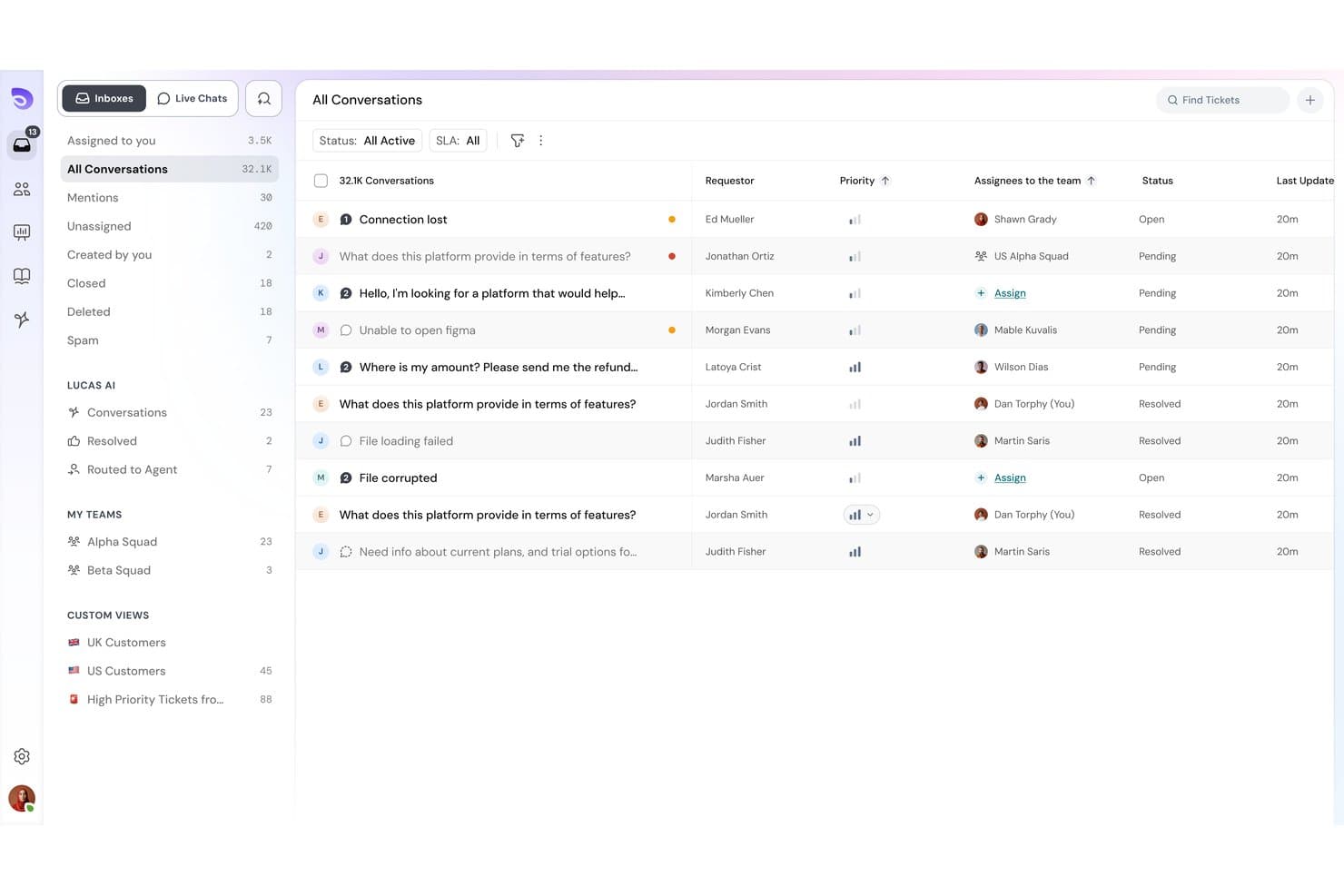
SparrowDesk offers an omnichannel inbox with all conversations, priority levels, assignees, and status tracking in one unified view. SparrowDesk is an AI-powered helpdesk platform that pairs an autonomous AI agent with a human-agent copilot, bringing together omnichannel ticket management, a self-updating knowledge base, and no-code workflow automation in one system.
Who Is SparrowDesk Best For?
SparrowDesk suits growing businesses and mid-sized customer support teams that need to scale ticket handling without adding headcount.
Why I Picked SparrowDesk
SparrowDesk earns its spot on my shortlist because of how fast you can actually go live. I love that Zoona AI trains directly from existing PDFs, policy docs, or website URLs, with no manual knowledge-building required. The self-updating knowledge base is what really sets it apart: Zoona flags gaps it can't answer and updates itself automatically, so my team isn't constantly maintaining it between product updates or policy changes.
SparrowDesk Key Features
- Omnichannel inbox: Manage email, live chat, WhatsApp, and Slack support messages from a single unified queue.
- Custom workflow automation: Build no-code automations to route tickets, set SLAs, and assign tasks based on set rules.
- Service level agreement tracking: Define and track SLA targets with automated breach notifications for response and resolution times.
- Multi-brand and portal support: Host multiple public help centers and manage separate support workflows for different brands or products.
SparrowDesk Integrations
SparrowDesk provides native integrations with Shopify, WhatsApp, Linear, Slack, and Gmail, and offers an API for custom integrations.
Pros and Cons
Pros:
- No-code workflow setup available
- Self-updating knowledge base reduces maintenance
- Zoona AI trains from existing docs instantly
Cons:
- Newer product with a smaller user community
- Limited reporting depth
Learn more about SparrowDesk: Best for native marketplace integrations
- 14-day free trial + free demo available
- From $39/user/month (billed annually)
Visit WebsiteCustomer Rating:4.4/5
eDesk centralizes ecommerce support tickets with AI classification and smart inbox. Are you navigating the complexities of ecommerce customer support and seeking a solution that integrates with your operations? eDesk might be the tool you need, with native marketplace integrations that connect your support directly to platforms like Amazon and eBay. It addresses the challenges of multi-channel customer support with features like a unified inbox and AI automation, helping reduce response times and keep customer communication organized.
Why I Picked eDesk
I picked eDesk for its native marketplace integrations, which connect your support directly with platforms like Amazon and eBay and keep customer and order data in one place. Its unified smart inbox centralizes all messages with full order context, helping your team respond quickly and accurately. In addition, AI-powered automation handles routine customer inquiries, reducing manual workload and improving daily support efficiency.
eDesk Key Features
In addition to native marketplace integrations, eDesk offers:
- 24/7 Chatbot Support: This feature provides real-time assistance to customers, converting website visitors into potential buyers.
- Feedback Management Tools: These tools enable your team to gather and analyze customer reviews and seller ratings, enhancing product and service quality.
- Real-Time Insights and Reporting: With this feature, you can access data-driven insights to optimize your support operations and improve decision-making.
eDesk Integrations
Integrations include Amazon, eBay, Walmart, Etsy, Shopify, WhatsApp, Facebook, Instagram, Magento, and BigCommerce.
Pros and Cons
Pros:
- Designed to handle high volumes of ecommerce inquiries
- AI automations reduce repetitive support tasks
- Integrates rich order data for enhanced customer service
Cons:
- Primarily built for ecommerce, less flexible for other industries
- Reporting customization is limited for complex analysis
Learn more about eDesk: Best for maintaining personal customer interactions
- Free plan available
- From $25/user/month (billed annually)
Visit WebsiteCustomer Rating:4.5/5
Help Scout's collision detection feature prevents duplicate replies Help Scout is a SaaS help desk for support teams that need personalized, human service at scale. It centralizes customer messages and context so agents can respond quickly without losing individual detail. It is ideal for businesses seeking a software solution that combines efficiency with a personal touch. It helps address common challenges such as managing high volumes of customer inquiries and streamlining workflow processes.
Why I Picked Help Scout
I picked Help Scout because its shared inbox pairs customer history with private notes and assignments, giving teams full context on every conversation. That lets teams collaborate without losing the personal tone customers expect. Beacon extends this by embedding help articles and messaging directly on your site, so customers can find answers or contact support without leaving the page. It’s also simple enough that sales and product teams can assist without training.
Help Scout Key Features
In addition to its shared inbox and Beacon, Help Scout many other features that may be useful for customer support teams:
- Knowledge Base: Built-in documentation allows customers to find answers independently, integrated with Beacon for real-time article suggestions.
- AI Tools: Automates support with AI-driven features like AI Summarize for quick conversation summaries and AI Assist for response drafting.
- Customer Management: Provides a sidebar with customer profiles, including past interactions and custom properties, enhancing context for support teams.
- Workflow Automation: Uses rule-based workflows to streamline processes and improve team efficiency.
Help Scout Integrations
Integrations include Salesforce, HubSpot, Jira, Slack, Shopify, Mailchimp, WooCommerce, Stripe, Trello, and Google Apps. Users can also create custom apps and integrations using the Help Scout API.
Pros and Cons
Pros:
- Quick to implement and onboard new agents
- Reporting surfaces response-time trends over time
- Collision detection prevents duplicate replies
Cons:
- Advanced automations require more setup time
- Pricing increases as mailboxes scale
Learn more about Help Scout: Best for PSA and RMM integration
- 21-day free trial + free demo available
- From $149/technician/month (billed annually)
Visit WebsiteCustomer Rating:4.6/5
SuperOps.ai ticket dashboard displaying service requests grouped by priority, including critical, high, medium, and low tickets with real time status updates. SuperOps is designed for Managed Service Providers (MSPs) and IT teams seeking a unified platform to manage IT operations efficiently. With its AI-powered tools, SuperOps streamlines service delivery, automates routine tasks, and enhances endpoint management. This makes it an appealing choice for organizations looking to improve ticket resolution speed and operational efficiency while ensuring robust asset management and security.
Why I Picked SuperOps
I picked SuperOps for its unique ability to integrate Professional Services Automation (PSA) with Remote Monitoring and Management (RMM) tools, which is crucial for SaaS helpdesk solutions. This integration allows your team to automate ticket management and service workflows, reducing the time spent on manual processes. Additionally, SuperOps' AI-driven insights provide proactive support, ensuring that issues are addressed before they escalate. These features collectively enhance service delivery and operational efficiency, making it a valuable tool for IT teams and MSPs.
SuperOps Key Features
In addition to its PSA and RMM integration, I also found the following features valuable for your team:
- Unified Ticketing System: Streamlines the process of managing service requests by centralizing ticket creation, assignment, and resolution.
- Mobile Device Management: Provides tools for managing and securing mobile devices across various platforms, ensuring compliance and security.
- Automated SLA Management: Tracks and manages service level agreements automatically, helping your team meet client expectations and deadlines.
- Security Features: Includes IP whitelisting and two-factor authentication to enhance the security of your IT operations.
SuperOps Integrations
Integrations include Splashtop, Teamviewer, Quickbooks, Microsoft Office 365, Slack, PandaDoc, Dialpad, Google Workspace Admin, Microsoft Outlook, and Airtable.
Pros and Cons
Pros:
- Integrated PSA and RMM platform
- AI powered workflow automation
- Built in patch management
Cons:
- Per technician pricing model
- Limited native integration options
Learn more about SuperOps: Best for omnichannel support
- 14-day free trial
- From $19/user/month (billed annually)
Visit WebsiteCustomer Rating:4.4/5
Freshdesk allows agents to manage tickets, collaborate internally, and track ticket status from a centralized dashboard. Freshdesk is a cloud-based customer support software designed to help businesses manage tickets, automate workflows, and improve response times across multiple support channels. Built for both small teams and enterprise organizations, it provides a centralized help desk system for handling email, chat, phone, and social media inquiries in one workspace. With features like ticket automation, SLA management, knowledge base tools, and reporting dashboards, Freshdesk helps reduce resolution times, improve agent productivity, and deliver consistent customer service experiences.
Why I Picked Freshdesk
I picked Freshdesk for its standout feature of omnichannel support, which allows your team to manage customer interactions seamlessly across email, chat, phone, and social media from a single platform. This integration simplifies communication and ensures no customer query is missed. Additionally, the platform’s automation capabilities, including AI-driven ticketing and workflow automation, help reduce manual work for your team, allowing them to focus on more complex tasks. These features make Freshdesk a practical solution for those looking to boost customer satisfaction and operational efficiency.
Freshdesk Key Features
In addition to its omnichannel support and automation capabilities, Freshdesk offers several other features that can benefit your team:
- Knowledge Base: Provides a self-service portal for customers, reducing the load on your support staff.
- Team Collaboration Tools: Enables internal communication through comments and tagging, facilitating seamless teamwork.
- Customizable Dashboard: Allows you to tailor the interface to your team's needs, improving navigation and accessibility.
- Analytics and Reporting: Offers insights into team performance and customer satisfaction, helping you make data-driven decisions.
Freshdesk Integrations
Integrations include Slack, Microsoft Teams, Shopify, Google Workspace, Atlassian Jira, Mailchimp, HubSpot, Salesforce, Zapier, and Trello. An API is also available for custom integrations.
Pros and Cons
Pros:
- Built-in knowledge base portal
- Automated ticket dispatch included
- Multi-channel email and social ticketing
Cons:
- Limited customization on lower tiers
- AI capabilities not fully free
Learn more about Freshdesk: Best for building custom AI chatbots
- 7-day free trial + free plan + free demo available
- From $32/month (billed annually)
Visit WebsiteCustomer Rating:4.4/5
Chatbase dashboard shows chatbot chat logs with filters, conversation history, confidence scores, and an export option for analyzing AI interactions. Chatbase is an AI chatbot builder that lets you create, train, and manage multiple chatbots for website customer support and engagement from a centralized dashboard.
Who Is Chatbase Best For?
Chatbase is a good fit for small to mid-sized businesses and SaaS teams that want to deploy AI-powered chatbots for customer support without heavy development work.
Why I Picked Chatbase
I picked Chatbase as one of the best because of how much control it gives you over the chatbot-building process. You train agents directly on your own business data, whether that's documentation, knowledge base articles, or connected CRM and helpdesk data, so the bot actually answers questions specific to your product and customers. I also like the AI model comparison feature, where you can test different LLM configurations side by side to find the best fit for your support use case. On top of that, natural language guardrails keep responses on-topic, which matters a lot when you're deploying a bot that represents your brand.
Chatbase Key Features
- Smart escalation: Set natural language instructions for when the AI agent should hand off a conversation to a human agent via live chat or a helpdesk ticket.
- Multilingual support: Automatically detects and responds in 80+ languages using generative AI, without any manual configuration.
- Omnichannel deployment: Deploy your chatbot across website chat, WhatsApp, Slack, and email from a single platform.
- Advanced reporting: Track conversation analytics and agent performance data to identify gaps and refine your chatbot over time.
Chatbase Integrations
Chatbase offers native integrations with Make, Zendesk, Notion, Slack, Stripe, Salesforce, and more. An API is also available for custom integrations.
Pros and Cons
Pros:
- Offers full chat transcript search and export
- Supports granular role-based access controls
- Chat widget easily embeds into any website
Cons:
- Custom branding only available on paid tiers
- Lacks built-in human handoff to live agents
Learn more about Chatbase: Best for AI-driven capabilities
- Free plan available; 7-day free trial
- From $24.17/month (billed annually)
Visit WebsiteCustomer Rating:4.7/5
Tidio inbox view displaying live conversations, ticket details, and customer data sidebar. Tidio is a versatile SaaS helpdesk software solution designed to enhance your customer service experience. It appeals particularly to small and medium-sized businesses aiming to improve response times and customer engagement. With features like AI-powered agents and live chat, Tidio addresses the need for efficient, real-time support, making it an attractive choice for business owners and customer service managers.
Why I Picked Tidio
I picked Tidio because its AI-driven capabilities stand out in the realm of SaaS helpdesk software. The Lyro AI Agent is particularly noteworthy, handling complex inquiries with a human-like touch, which can significantly improve your team's resolution rates. Additionally, Tidio's live chat feature ensures prompt customer interactions, helping to maintain high levels of customer satisfaction. These features align well with the needs of businesses looking to optimize their support operations.
Tidio Key Features
In addition to its AI and live chat capabilities, I also found:
- Multichannel Support: This feature consolidates communications from various platforms into a single inbox, ensuring no customer message goes unanswered.
- Customizable Chat Widgets: You can tailor the appearance of chat widgets to fit your brand's aesthetics, enhancing customer interaction.
- Email Integration: Allows for seamless transition between chat and email, providing a cohesive support experience.
- Visitor Tracking: Offers insights into visitor behavior on your site, enabling proactive engagement with potential customers.
Tidio Integrations
Integrations include Salesforce, Zendesk, Shopify, Intercom, WordPress, Instagram, Messenger, WhatsApp, HubSpot, and Zapier.
Pros and Cons
Pros:
- Multichannel inbox centralizes chat, email, and social
- Supports 120+ integrations including Shopify and HubSpot
- AI chatbot resolves routine inquiries automatically
Cons:
- Pricing may be high for businesses with high conversation volumes
- AI usage limits apply on lower-tier plans
Learn more about Tidio: Best for user-friendly interface
- Free plan + free demo available
- From $29/user/month
Visit WebsiteCustomer Rating:4.6/5
HelpDesk organizes support queues in a clear, structured way for growing teams. HelpDesk is a support software designed for teams that want an easy-to-use interface. It serves businesses of all sizes by providing straightforward ticket management and customer support features.
Why I picked HelpDesk: Its user-friendly interface makes it accessible to teams looking to simplify support workflows. The ticketing system is straightforward, and basic automation features help reduce repetitive tasks. The interface keeps navigation simple for new and growing teams.
Standout features & integrations:
Features include a built-in reporting tool with basic performance metrics, a knowledge base module for self-service content, and ticket collaboration options for sharing context among team members.
Integrations include Slack, Jira, Zapier, Salesforce, Google Workspace, Microsoft Teams, Trello, Mailchimp, and Shopify.
Pros and Cons
Pros:
- Simple canned action setup
- Clear ticket color coding
- Smooth agent collision control
Cons:
- Few conditional rule types
- Narrow SLA tracking
Learn more about HelpDesk: 10Best for e-commerce support
Gorgias
- Free demo + 30-day free trial available
- From $40/month
Visit WebsiteCustomer Rating:4.6/5
Gorgias provides tools for e-commerce teams to manage customer interactions across multiple channels. Gorgias is a customer support platform built for e-commerce businesses. It provides tools for managing customer interactions across email, chat, social channels, and storefront integrations.
Why I picked Gorgias: It is designed specifically for e-commerce workflows and centralizes customer communication across storefront and support channels. Integrations with major e-commerce platforms make order and customer data accessible during support interactions. Gorgias also includes automation tools for handling common inquiries.
Standout features & integrations:
Features include a centralized dashboard for viewing customer interactions, macros for creating reusable responses, and analytics for reviewing support activity.
Integrations include Shopify, Adobe Commerce, BigCommerce, WooCommerce, Slack, Mailchimp, Klaviyo, Instagram, Facebook, and Gmail.
Pros and Cons
Pros:
- Good storefront workflows
- Quick store data access
- Strong order context
Cons:
- Limited non-store use
- Limited multi-step workflow logic
Learn more about Gorgias:
Annen SaaS-programvare for kundestøtte
Her er noen flere alternativer for SaaS-programvare for kundestøtte som ikke kom med på kortlisten, men som likevel kan være verdt å vurdere:
- 11HappyFoxBest for customization
- 12PylonBest for real-time collaboration
- 13IntercomBest for customer engagement
- 14KayakoBest for personalization
- 15FrontBest for team collaboration
- 16Salesforce Service CloudBest for CRM integration
- 17Help ScoutBest for small businesses
- 18JitbitBest for simplicity
- 19SAAS FirstBest for startups
- 20LiveAgentBest for live chat features
- 21ZendeskBest for large teams
- 22Zoho DeskBest for AI integration
- 23GrooveBest for small team support
- 24ChatwootBest for open-source customization
- 25BroadvoiceBest for call center solutions
How I Evaluate SaaS Helpdesk Software
I split each evaluation into two layers: the baseline every IT helpdesk needs—ticket management, SLA tracking—and the differentiators that set tools apart for DevOps teams or MSPs.
Core Functionality (Table Stakes For This List)
When I'm selecting tools for my list, I rank each one on a scale from 0 (does not offer the functionality) to 5 (excels in this area) for each core functionality listed below. Then, I calculate the tool's total score into a percentage. Each tool needs to achieve a minimum total score of 65% to be considered for inclusion.
- Ticket Management System: I evaluate how each tool handles the full ticket lifecycle—assignment, merging, priority tagging—and whether agents can link related incidents during a major outage.
- Multi-Channel Support: Each platform should unify requests from email, chat, portal, and ideally phone or social into one queue so agents aren't toggling between disconnected inboxes.
- Automation & Workflow Rules: I look for rule-based routing, escalation triggers, and time-based conditions—like auto-assigning hardware requests to a specific team or escalating breached tickets.
- SLA Tracking & Enforcement: The tool should let you define SLA policies by priority or customer tier, send breach alerts, and account for business hours so overnight tickets aren't unfairly flagged.
- Self-Service Knowledge Base: A searchable, categorized KB where end users can resolve common issues—password resets, VPN setup—before submitting a ticket reduces queue volume significantly.
- Reporting & Analytics: Dashboards should cover ticket volume trends, agent workload, SLA compliance rates, and CSAT scores so IT leads can spot bottlenecks and staff accordingly.
Once I have a list of tools that meet this criteria, I consider what sets each platform apart.
Differentiating Factors (What Sets Vendors Apart)
Here's how I compare and contrast different vendors:
Standout Features
I look for AI-powered features like ticket summarization and suggested responses, which help agents handle high-volume queues. DevOps integrations matter too—tools that sync two-way with Jira or GitHub let support teams loop in engineers on bugs without leaving the helpdesk. Asset and configuration management is another differentiator. Linking a ticket to a specific laptop or server gives agents the context to resolve issues faster. ITIL-aligned change and incident management modules also stand out for teams running structured IT operations.
Beyond Features
Security and compliance credentials are a priority—I check for SOC 2 Type II, ISO 27001, SSO/SAML support, and audit logging, especially when teams handle sensitive infrastructure data. The integration ecosystem also matters. A helpdesk that connects natively with Okta, Datadog, Slack, and Teams fits into existing IT stacks without custom development. I evaluate scalability by looking at whether a platform can grow from a small internal IT team to a multi-department deployment without forcing a disruptive migration to a higher-tier product.
Slik velger du SaaS-programvare for kundestøtte
Det er lett å gå seg vill i lange funksjonslister og kompliserte prismodeller. For å hjelpe deg med å holde fokus mens du går gjennom den unike prosessen med å velge programvare, får du her en sjekkliste over faktorer du bør ha i bakhodet:
| Faktor | Hva du bør vurdere |
|---|---|
| FaktorSkalerbarhet | Hva du bør vurdereKan programvaren vokse sammen med virksomheten din? Vurder om den støtter økende mengder supportsaker og flere brukere uten betydelige kostnadsøkninger eller redusert ytelse. |
| FaktorIntegrasjoner | Hva du bør vurdereKan den kobles til de eksisterende verktøyene dine? Kontroller kompatibilitet med CRM-systemet, e-postplattformene og annen viktig programvare for å unngå avbrudd i arbeidsflyten. |
| FaktorTilpasningsmuligheter | Hva du bør vurdereKan du tilpasse den etter behovene dine? Se etter muligheter for å tilpasse arbeidsflyter, felt for supportsaker og kontrollpaneler slik at de passer til teamets prosesser. |
| FaktorBrukervennlighet | Hva du bør vurdereEr den intuitiv for teamet ditt? Vurder læringskurven og brukergrensesnittet for å sikre at teamet raskt kan ta den i bruk uten omfattende opplæring. |
| FaktorImplementering og innføring | Hva du bør vurdereHvor smidig er overgangen? Vurder ressursene som tilbys for innføringen, for eksempel veiledninger og brukerstøtte, for å sikre et raskt og problemfritt oppsett. |
| FaktorKostnad | Hva du bør vurdereHvordan samsvarer prisen med budsjettet ditt? Sammenlign prismodeller og vurder de totale eierkostnadene, inkludert eventuelle skjulte gebyrer eller nødvendige tillegg. |
| FaktorSikkerhetstiltak | Hva du bør vurdereEr dataene og kundeinformasjonen din beskyttet? Se etter kryptering, samsvar med personvernregler og regelmessige sikkerhetsoppdateringer. |
| FaktorTilgjengelig brukerstøtte | Hva du bør vurdereEr hjelp tilgjengelig når du trenger det? Vurder leverandørens åpningstider for brukerstøtte, kanaler og responstid for å sikre at du får hjelp raskt når det er nødvendig. |
Hva er SaaS-programvare for kundestøtte?
SaaS-programvare for kundestøtte er et skybasert verktøy som håndterer supportsaker og kommunikasjon med kunder. Den brukes vanligvis av kundeserviceteam, IT-medarbeidere og fagpersoner innen teknisk brukerstøtte for å forbedre responstid og tjenestekvalitet. Funksjoner for håndtering av supportsaker, støtte på flere kanaler og rapportering bidrar til å organisere henvendelser, levere jevn service og analysere resultater. Alt i alt forbedrer disse verktøyene kundetilfredsheten og teamets effektivitet ved å sentralisere og forenkle støtteprosessene.
Funksjoner i SaaS-helpdeskprogramvare
Når du velger SaaS-helpdeskprogramvare, bør du se etter følgende viktige funksjoner:
- Saksbehandling: Organiserer kundehenvendelser i et sentralisert system, slik at teamet ditt enklere kan spore og løse problemer effektivt.
- Støtte på flere kanaler: Lar deg håndtere kommunikasjon på tvers av plattformer som e-post, chat og sosiale medier på ett sted, noe som sikrer en konsekvent tjeneste.
- AI-drevet automatisering: Automatiserer repetitive oppgaver og svar, slik at teamet ditt kan fokusere på mer komplekse kundeproblemer.
- Tilpassbare arbeidsflyter: Lar deg tilpasse prosesser og saksfelt etter teamets spesifikke behov.
- Samarbeid i sanntid: Gjør det mulig for teammedlemmer å samarbeide om kundeproblemer, noe som forbedrer responstid og tjenestekvalitet.
- Rapportering og analyse: Gir innsikt i teamets resultater og kundetilfredshet, slik at du kan ta datadrevne beslutninger.
- Selvbetjeningsportal: Gjør det mulig for kunder å finne svar på egen hånd, noe som reduserer arbeidsmengden for supportteamet ditt.
- Sikkerhetstiltak: Sørger for at kundedata er beskyttet med kryptering og overholdelse av personvernforordninger.
- Integrasjonsmuligheter: Kobler seg til eksisterende verktøy som CRM-systemer og e-postplattformer for å forhindre avbrudd i arbeidsflyten.
- Tilpassbare instrumentpaneler: Lar deg vise nøkkeltall og informasjon på en måte som passer best til teamets behov.
Fordeler med SaaS-helpdeskprogramvare
Implementering av SaaS-helpdeskprogramvare gir flere fordeler for teamet og virksomheten din. Her er noen av fordelene du kan se frem til:
- Forbedret effektivitet: Automatisering av repetitive oppgaver med AI-drevne verktøy gjør at teamet ditt kan fokusere på å løse komplekse problemer raskere.
- Økt kundetilfredshet: Støtte på flere kanaler sikrer konsekvente og raske svar, noe som gir mer fornøyde kunder.
- Bedre samarbeid: Samarbeidsverktøy i sanntid hjelper teammedlemmer med å jobbe effektivt sammen, noe som forbedrer tjenestekvaliteten.
- Datadrevet innsikt: Rapportering og analyse gir verdifulle resultatmålinger, slik at du kan ta velinformerte beslutninger.
- Flere selvbetjeningsmuligheter: En selvbetjeningsportal gjør det mulig for kunder å finne løsninger på egen hånd, noe som reduserer belastningen på supportteamet ditt.
- Bedre databeskyttelse: Sikkerhetstiltak sørger for at kundedata holdes trygge, noe som bygger tillit hos brukerne dine.
- Tilpassede arbeidsflyter: Tilpasning av prosesser etter teamets behov forbedrer effektiviteten og tilpasser supportdriften til virksomhetens mål.
Kostnader og priser for SaaS-helpdeskprogramvare
Valg av SaaS-helpdeskprogramvare krever en forståelse av de ulike prismodellene og abonnementene som er tilgjengelige. Kostnadene varierer basert på funksjoner, teamstørrelse, tillegg og mer. Tabellen nedenfor oppsummerer standardabonnementer, gjennomsnittsprisene deres og typiske funksjoner som er inkludert i SaaS-helpdeskløsninger:
Sammenligningstabell for abonnementer for SaaS-helpdeskprogramvare
| Abonnementstype | Gjennomsnittspris | Vanlige funksjoner |
|---|---|---|
| AbonnementstypeGratisabonnement | Gjennomsnittspris$0 | Vanlige funksjonerGrunnleggende saksbehandling, e-poststøtte og begrenset rapportering. |
| AbonnementstypePersonlig abonnement | Gjennomsnittspris$5-$25/bruker/måned | Vanlige funksjonerSaksbehandling, støtte på flere kanaler og grunnleggende automatisering. |
| AbonnementstypeForretningsabonnement | Gjennomsnittspris$30-$60/bruker/måned | Vanlige funksjonerAvansert automatisering, tilpassbare arbeidsflyter samt rapportering og analyse. |
| AbonnementstypeVirksomhetsabonnement | Gjennomsnittspris$70-$120/bruker/måned | Vanlige funksjonerAI-drevne funksjoner, avanserte sikkerhetstiltak og førsteklasses kundestøtte. |
Vanlige spørsmål om SaaS-programvare for kundestøtte
Her er noen svar på vanlige spørsmål om SaaS-programvare for kundestøtte:
Hvilke risikoer ved datamigrering bør du planlegge for når du bytter kundestøttesystem?
Bytte av verktøy kan føre til tapt sakshistorikk, brukerkontoer som ikke samsvarer, eller integrasjoner som slutter å fungere. Det er viktig å undersøke hvordan gamle data vil tilordnes det nye systemet, og om automatiseringer må bygges opp på nytt. Spør leverandøren om importverktøy, støttede formater og eventuelle begrensninger på historiske data. En langsommere migrering i flere faser kan også redusere risikoen for uventede problemer.
Hvilke måltall viser at kundestøtten blir en flaskehals for veksten?
Se etter en økende sakskø, tregere svar eller medarbeidere som håndterer for mange forespørsler. Hvis kvaliteten på kundestøtten blir dårligere når volumet øker, kan det hende at systemet ikke skalerer etter behovene dine. Følg regelmessig med på utviklingen for å oppdage problemer tidlig. Et kundestøttesystem bør tilpasse seg etter hvert som du vokser, ikke begrense prosessene dine.
Hvilke skjulte kostnader eller lisensutløsere kan overraske deg etter implementeringen?
Noen verktøy øker prisene når du legger til medarbeidere, kanaler eller automatiseringsfunksjoner. Andre krever oppgraderinger for å få tilgang til analyseverktøy eller avanserte arbeidsflyter. Gå nøye gjennom vilkårene, slik at du er klar over eventuelle begrensninger basert på abonnementsnivå. Be om en fullstendig liste over tillegg før du inngår avtale.
Hvordan vurderer du om et kundestøtteverktøy kan håndtere komplekse teamtillatelser?
Noen systemer tilbyr bare grunnleggende roller, mens andre støtter mer detaljerte kontroller. Hvis du administrerer flere team eller avdelinger, bør du undersøke hvordan tilgang til saker, grupper og roller er strukturert. Test endringer i tillatelser i løpet av en prøveperiode for å forstå hva som er mulig. Gode tilgangskontroller kan redusere feil senere.
Hvilke mangler i rapporteringen bør du undersøke før du velger SaaS-programvare for kundestøtte?
Enkle oversikter inneholder kanskje ikke all informasjonen som trengs for planlegging eller prognoser. Undersøk om egendefinerte rapporter kan opprettes uten å eksportere data. Se etter måltall teamet ditt er avhengig av, for eksempel utvikling i arbeidsmengde eller hvor sakene kommer fra. Rapporteringen bør støtte beslutningstaking, ikke gjøre den mer komplisert.
Hvordan vil kundestøttesystemet passe inn i de eksisterende godkjennings- eller eskaleringsrutinene mine?
Noen verktøy støtter eskaleringer i flere trinn, mens andre har enklere arbeidsflyter. Hvis du bruker godkjenninger fra ledere eller vurderinger utført av spesialister, bør du teste hvordan disse prosessene fungerer i løpet av en prøveperiode. Prøv å gjenskape en reell eskaleringssituasjon for å se om verktøyet oppfyller kravene dine.