

Når jeg har navigert i den komplekse verdenen av brukerautentisering, har jeg kommet til å sette pris på programvare for flerfaktorautentisering. Med stadig flere datainnbrudd er det avgjørende å sikre nettkontoer utover bare passord. Dette går lenger enn den tradisjonelle kombinasjonen av brukernavn og passord, og kan inkludere noe brukeren vet, noe brukeren har, eller noe som er iboende i brukeren.
Disse verktøyene sørger ikke bare for at sluttbrukere får sikker tilgang via passkoder og selvbetjent klargjøring, men forbedrer også ekstern tilgang ved å koble sammen nettbaserte brukeridentiteter på en sikrere måte. Hva er utfordringene? Håndtering av flere brukerautentiseringer, identitets- og tilgangsstyring (IAM) og sikring av ekstern tilgang uten at det går på bekostning av sikkerheten. Med riktig programvare kan disse utfordringene håndteres, slik at kontoene dine beskyttes bedre mot datainnbrudd.
Why Trust Our Software Recommendations
6,700+
Reviews
20
Industry experts
16+
Evaluation factors
14
Years
Our team has been testing and reviewing software since 2012. As tech leaders ourselves, we know how difficult—and important—it is to choose the right software.
For this guide, we evaluated tools using hands-on testing and independent research, scoring tools using our selection criteria.
Our reviews reflect our human editorial judgment, not a sales pitch.
Expert reviewers:
- Paulo Gardini MiguelTech Director
 Tim FisherVP of AI
 Gabriel RosasTech Lead & Software Architect
 Christhian GruhnTech Lead & Platform Architect

Sammenligningstabell for programvare for flerfaktorautentisering
Denne sammenligningstabellen oppsummerer prisdetaljene for mine beste utvalgte MFA-programvarer:
| Tool | Best For | Trial Info | Price | ||
|---|---|---|---|---|---|
| 1 | Best for HR-driven MFA policy and device trust | 14-day free trial | From $8/user/month (billed annually) | Website | |
| 2 | Best for adaptive MFA with multiple authentication factors | Free version available (up to 50 domain users) | From $595 (500 domain users) | Website | |
| 3 | Best with just-in-time privileged access controls | 14-day free trial | Pricing upon request | Website | |
| 4 | Best for combining password management and MFA | 30-day free trial + free plan available | From $3/user/month (billed annually) | Website | |
| 5 | Best for SaaS companies needing rapid integration | 30 Days Free Trial | From $99/month for up to 10 multi-user accounts and 1,000 users. | Website | |
| 6 | Best for adaptive multi-factor authentication | 30-day free trial | From $2/user/month | Website | |
| 7 | Best for achieving passwordless authentication | Free 14-Day Trial | From $8/user/month (billed annually) | Website | |
| 8 | Best for SMS and call verification | From $15/user/month | Website | ||
| 9 | Best for scalable enterprise authentication | Free trial available | From $35/month | Website | |
| 10 | Best for those already in the Salesforce environment | Free plan available | From $25/user/month (billed annually) | Website |


Anmeldelser av den beste programvaren for flerfaktorautentisering
Nedenfor finner du mine detaljerte sammendrag av den beste programvaren for flerfaktorautentisering som kom med på kortlisten min. Anmeldelsene mine gir en detaljert gjennomgang av de viktigste funksjonene, fordelene & ulempene, integrasjonene og ideelle bruksområdene for hvert verktøy, slik at du kan finne det beste alternativet for deg.
 Best for HR-driven MFA policy and device trust
- 14-day free trial
- From $8/user/month (billed annually)
Visit WebsiteCustomer Rating:4.8/5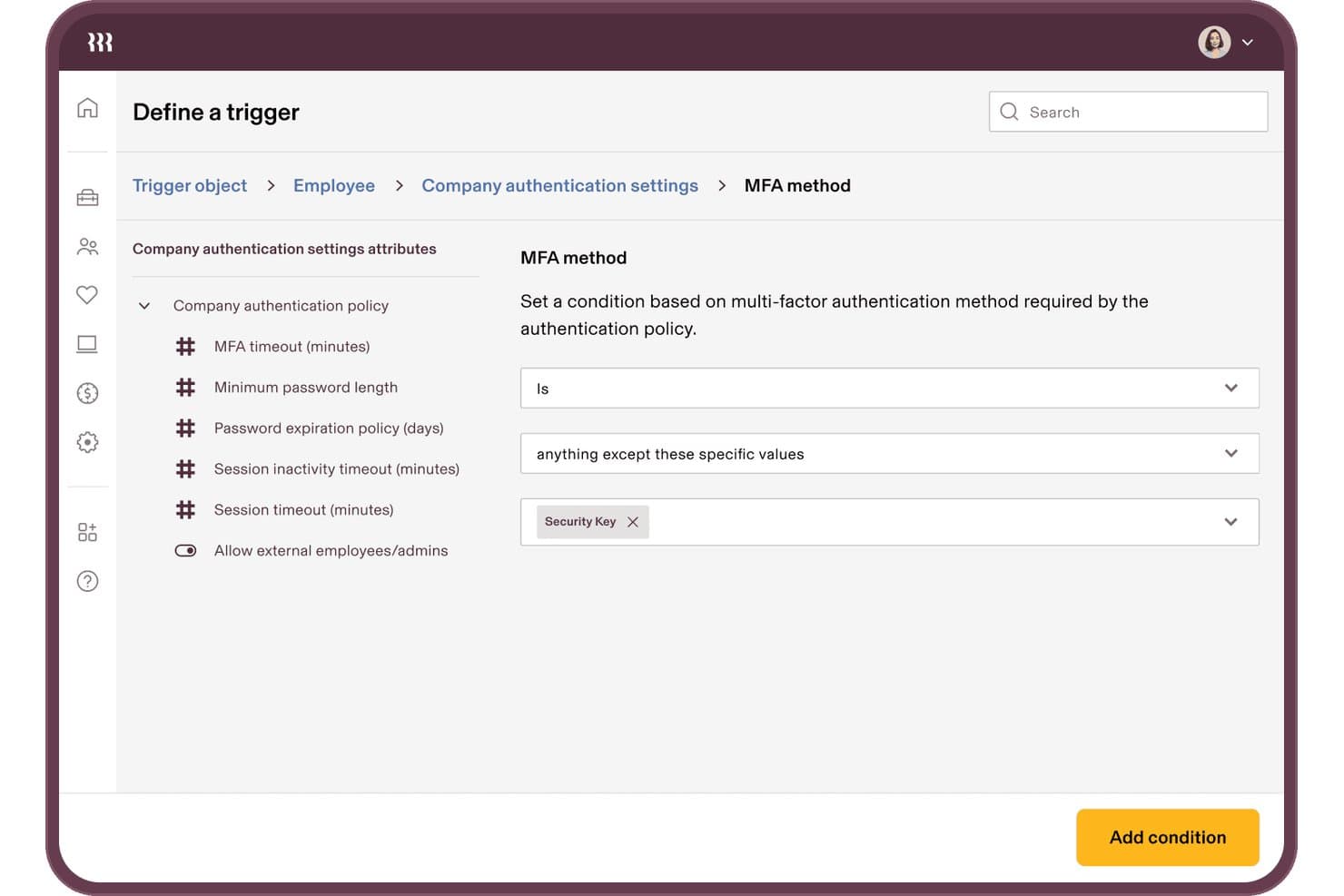
Rippling IT lets users set MFA method conditions for authentication triggers. Rippling IT is an HR-driven identity and access management platform that bundles MFA, SSO, device trust, and lifecycle provisioning into a single system tied directly to your HR data.
Who Is Rippling IT Best For?
Rippling IT fits mid-market companies that want MFA, device trust, and access lifecycle managed from a single HR-connected platform.
Why I Picked Rippling IT
I picked Rippling IT because it's the only MFA solution on this list that ties authentication policy directly to your HR data. When someone changes departments or gets offboarded, their MFA enrollment and access rights update automatically, with no manual intervention needed. I also love that device trust is built in natively: Rippling issues its own device certificates and checks posture at the moment of access, so a laptop missing BitLocker encryption gets blocked before it ever authenticates.
Rippling IT Key Features
- Supergroups policy targeting: Dynamic groups built from HR attributes like department, location, and role let you apply MFA policies to exactly the right users.
- YubiKey ordering and assignment: Order, ship, and assign hardware keys to employees directly from the Rippling console, with automatic alerts if a delivered key goes unused.
- Hosted cloud RADIUS: Employees authenticate to VPN and Wi-Fi using their Rippling credentials through a cloud-hosted RADIUS server.
- Workflow Studio automation: A no-code automation builder lets you monitor MFA enrollment, trigger policy actions, and manage access changes without writing custom scripts.
Rippling IT Integrations
Rippling IT integrates with Active Directory, Microsoft Entra ID, Google Workspace, Okta, and Duo, plus 600–800+ listed SaaS apps. It supports SAML, OIDC, SCIM, LDAP, and RADIUS, with a public API for custom integrations.
Pros and Cons
Pros:
- Supergroups target policies by employee attributes
- Device trust blocks noncompliant endpoints
- HR-driven offboarding updates MFA automatically
Cons:
- Advanced policy configuration takes substantial effort
- MFA depends on adopting Rippling's platform
Learn more about Rippling IT: Best for adaptive MFA with multiple authentication factors
- Free version available (up to 50 domain users)
- From $595 (500 domain users)
Visit WebsiteCustomer Rating:4.4/5
Users have multiple configuration options available for setting up authentication methods in ManageEngine ADSelfService Plus. ManageEngine ADSelfService Plus is a comprehensive self-service password management and single sign-on (SSO) solution designed to streamline IT operations and enhance security. It caters to IT admins and end-users by providing functionalities such as password self-service, multi-factor authentication (MFA), and endpoint security.
Why I Picked ManageEngine ADSelfService Plus: ADSelfService Plus supports various authentication techniques such as biometrics, TOTP codes, push notifications, and security keys, which enhance the security landscape by adding multiple layers of verification beyond the traditional username and password. This adaptability in authentication methods ensures that organizations can tailor their security protocols to meet specific needs and compliance requirements. Furthermore, its adaptive MFA feature dynamically adjusts authentication requirements based on risk factors like user location and device type, providing a nuanced and context-aware security measure.
Standout features & integrations:
Other features include Single Sign-On (SSO), which integrates seamlessly with both on-premises and cloud-based applications, offering a unified and secure login experience across different environments. The tool also has self-service password management capabilities to allow users to reset passwords and unlock accounts independently. Integrations include Zendesk, Freshdesk, Splunk, syslog, and other ManageEngine applications like ManageEngine ADManager Plus and AD360.
Pros and Cons
Pros:
- Extensive reporting features for audits and compliance
- Various MFA options
- Self-service password reset
Cons:
- Free version has limited features
- Can be expensive for smaller organizations
Learn more about ManageEngine ADSelfService Plus: Best with just-in-time privileged access controls
- 14-day free trial
- Pricing upon request
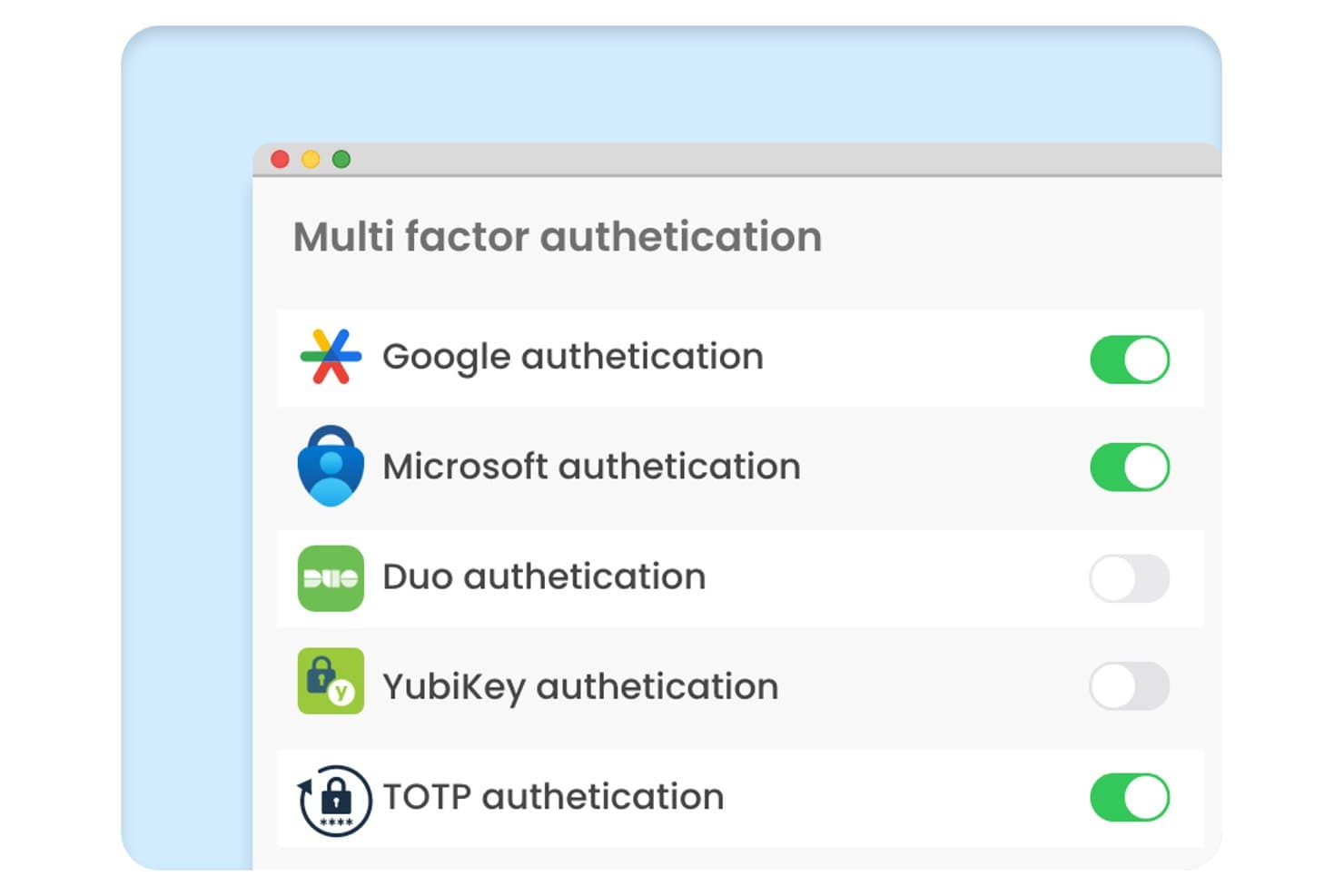
Securden Unified PAM offers a Multi Factor Authentication settings panel with toggle controls for Google, Microsoft, Duo, YubiKey, and TOTP authentication methods. Securden Unified PAM is a privileged access management platform that enforces MFA across privileged accounts, remote sessions, and endpoints through credential vaulting, session recording, and just-in-time access controls.
Who Is Securden Unified PAM Best For?
IT security and IAM teams at mid-to-enterprise organizations that need strict MFA enforcement specifically around privileged accounts, admin credentials, and vendor access.
Why I Picked Securden Unified PAM
I picked Securden Unified PAM because its just-in-time access model ties MFA enforcement directly to the moment a privileged session is requested, not just at login. I also like how adaptive MFA activates based on behavioral anomalies, so a sysadmin connecting to a production server at an unusual hour automatically triggers step-up authentication. On top of that, the platform generates TOTPs for managed accounts directly, closing the MFA gap on shared credentials that typically go unprotected.
Securden Unified PAM Key Features
- Centralized privileged account discovery: Automatically scans your environment to identify unmanaged privileged credentials and accounts.
- Role-based access control: Lets you assign granular permissions using custom user roles and security groups.
- Privileged session recording: Records all privileged sessions for forensic auditing and regulatory compliance.
- SIEM and ITSM integrations: Connects with platforms like Splunk, IBM QRadar, and ServiceNow for unified monitoring and incident response.
Securden Unified PAM Integrations
Securden Unified PAM offers native integrations with Active Directory, Microsoft Entra ID, Okta, OneLogin, Ping Identity, Splunk, IBM QRadar, and ServiceNow. An API is available for custom integrations.
Pros and Cons
Pros:
- Behavioral anomaly detection triggers step-up authentication
- MFA enforced natively on shared admin credentials
- Just-in-time access reduces standing privilege exposure
Cons:
- Reporting dashboards lack visual customization options
- Setup complexity increases for large-scale deployments
Learn more about Securden Unified PAM: Best for combining password management and MFA
- 30-day free trial + free plan available
- From $3/user/month (billed annually)
Visit WebsiteCustomer Rating:4.6/5
Image 10: LastPass passwordless authentication interface LastPass functions as a comprehensive tool designed to both manage passwords securely and offer multi-factor authentication (MFA). It has cleverly combined these two essential features, making it an ideal choice for those who prioritize both password management and improved authentication.
Why I Picked LastPass: During my selection process, LastPass distinctly stood out because of its dual capability: managing passwords while also offering MFA. Comparing it with other tools, its comprehensive approach to security is what I found to be unique. My judgment is that for individuals or businesses that see the value in uniting password management with MFA, LastPass is a fitting choice.
Standout features & integrations:
LastPass provides a secure vault for storing passwords, notes, and other credentials, all of which are encrypted locally on the user's device. Additionally, its MFA functionality is robust, integrating biometric and contextual factors for improved security. Integration-wise, LastPass can be coupled with numerous web browsers, and platforms, and has extensions that ensure its functionality is easily accessible across devices.
Pros and Cons
Pros:
- Wide range of browser and platform integrations
- Local encryption ensures user data remains private
- Combines password management and MFA in one platform
Cons:
- Some advanced features are only available in higher-priced tiers
- The user interface might be challenging for non-tech-savvy individuals
- Annual billing may not appeal to all users
Learn more about LastPass: Best for SaaS companies needing rapid integration
- 30 Days Free Trial
- From $99/month for up to 10 multi-user accounts and 1,000 users.
Visit WebsiteCustomer Rating:4.8/5
Image 6: Frontegg's authentication builder style overview Frontegg is a platform designed to empower SaaS companies with pre-built, fully customizable functionalities to enhance their applications. This approach significantly accelerates integration processes, making it particularly advantageous for SaaS firms aiming for swift incorporation of essential features.
Why I Picked Frontegg: In the process of determining the most valuable tools for this list, Frontegg caught my attention due to its targeted approach to serving SaaS companies. Its capability to provide rapid integration truly differentiates it from other platforms. I judged that Frontegg is indeed the top choice for SaaS entities requiring quick feature integration.
Standout features & integrations:
Frontegg offers a suite of pre-built SaaS functionalities, ranging from user management, and notifications, to security and auditing capabilities. Their approach allows companies to skip lengthy development processes and immediately tap into proven features. Furthermore, Frontegg's integrations with popular platforms like Slack, Azure, and AWS ensure its functionalities can easily complement existing tech stacks.
Pros and Cons
Pros:
- Extensive integration options with major platforms
- Pre-built functionalities eliminate lengthy development times
- Tailored solutions specifically for SaaS companies
Cons:
- Pricing transparency could be improved
- Customizability could come with a learning curve for some
- Might not be suitable for non-SaaS companies
Learn more about Frontegg: Best for adaptive multi-factor authentication
- 30-day free trial
- From $2/user/month
Visit WebsiteCustomer Rating:4.5/5
miniOrange IDP dashboard showing centralized identity management, SSO configuration, and multi-factor authentication setup from a single admin console. For those seeking a multi-factor authentication solution that combines security with ease of use, miniOrange IDP offers a compelling choice. It caters to businesses across various industries looking to enhance their security measures without complicating user access. By integrating additional verification methods, miniOrange IDP helps organizations safeguard sensitive information while maintaining a user-friendly login experience.
Why I Picked miniOrange IDP
I picked miniOrange IDP for its adaptive multi-factor authentication, which intelligently adjusts security measures based on user behaviour and risk levels. This feature ensures that your team remains secure without unnecessary interruptions. Additionally, the platform's extensive integration capabilities with over 6000 applications make it a versatile choice for businesses looking to streamline their access management. miniOrange IDP's centralized dashboard allows administrators to efficiently manage user access and monitor security policies, addressing common concerns around managing diverse user environments.
miniOrange IDP Key Features
In addition to its adaptive multi-factor authentication and integration capabilities, I also found the following useful:
- Multiple MFA Methods: Supports push notifications, OTP via SMS and email, Google Authenticator, hardware tokens, biometrics, and security questions.
- Passwordless Authentication: Enables passwordless login using FIDO2, biometrics, and push-based authentication methods.
- Conditional Access Policies: Applies authentication requirements based on user behaviour, device, location, and risk level.
- Self-Service Options: Allows users to reset passwords and configure their own MFA methods, which can help reduce IT support requests.
- Endpoint & VPN Protection: Secures VPN access as well as Windows, macOS, and Linux logins.
miniOrange IDP Integrations
Integrations include Microsoft 365, Google Workspace, AWS, Salesforce, Slack, Zoom, ServiceNow, Atlassian, GitHub, Dropbox, and WordPress. The platform supports integration with over 6,000 cloud, on-prem, and legacy applications. An API is also available for custom or proprietary application integrations.
Pros and Cons
Pros:
- Supports branded, customizable logins
- Centralized dashboard for user and policy management
- Robust adaptive MFA and security features
Cons:
- Initial setup can be complex, especially for small organizations
- Restrictive refund policies
Learn more about miniOrange: Best for achieving passwordless authentication
- Free 14-Day Trial
- From $8/user/month (billed annually)
Visit WebsiteCustomer Rating:4.4/5
Image 4: Uniqkey dashboard preview Uniqkey is a robust authentication solution designed to offer users the convenience and security of passwordless authentication. Uniqkey stands as a formidable option to bridge this transition, particularly for those who prioritize passwordless solutions.
Why I Picked Uniqkey: In the process of determining the best tools for this list, Uniqkey grabbed my attention because of its dedication to a passwordless environment. Its focus on such a specific and critical area of cybersecurity made it different from many others I compared. I judged it as the best tool for those who are looking to achieve passwordless authentication, given its specialized approach and effectiveness in this domain.
Standout features & integrations:
Uniqkey's primary strength is its adaptive authentication which analyzes risk factors in real-time to determine the necessary level of verification. Moreover, it offers biometric verification options and a secure password vault for users who might still have some passwords to manage. For integrations, Uniqkey is compatible with a range of enterprise systems, ensuring businesses can incorporate it without causing disruptions to existing workflows.
Pros and Cons
Pros:
- Secure vault for residual passwords
- Adaptive authentication based on real-time risks
- Dedicated to a passwordless environment
Cons:
- Relatively new in the market, which might concern some users seeking established brands
- Limited to certain platforms and devices
- Might have a learning curve for those new to passwordless systems
Learn more about Uniqkey:

Image 2: RingCaptcha sample dashboard RingCaptcha stands as a specialized tool geared towards ensuring reliable user verification via SMS and voice calls. As businesses today seek tighter security measures, especially during user onboarding, RingCaptcha emerges as a frontrunner with its focus on mobile verification, aligning it perfectly with the title of being the best in SMS and call verification.
Why I Picked RingCaptcha: In the process of choosing the right tools for this list, RingCaptcha caught my attention due to its sheer specificity and prowess in mobile-based verification. RingCaptcha's specialization in SMS and call verification made it distinct. This dedication to mobile verification is why I determined it's the best for businesses relying heavily on these methods.
Standout features & integrations:
RingCaptcha's core strength lies in its rapid SMS delivery, robust voice call verification, and user-friendly dashboard to track and manage verifications. Regarding integration, RingCaptcha is versatile, integrating smoothly with platforms like Shopify, WordPress, and WooCommerce, ensuring a wider reach and applicability across different business models.
Pros and Cons
Pros:
- User-centric dashboard for tracking
- Rapid SMS delivery mechanism
- Specializes in SMS and voice call verifications
Cons:
- Limited features beyond mobile verification
- Higher price point compared to some competitors
- Might be over-specific for businesses needing varied verification methods
Learn more about RingCaptcha:

Image 1: Auth0 multi factor authentication software Auth0 is a leading identity management platform designed to simplify authentication and authorization for businesses of all sizes. Tailored especially for enterprises, it ensures that as businesses grow, their security measures scale with them, making it a top pick for scalable enterprise authentication.
Why I Picked Auth0: When I was selecting an authentication tool, Auth0 consistently emerged at the forefront of the options. Its reputation for robustness and adaptability in the identity management space set it apart from its peers. In comparing it to other tools, its scalability especially for larger corporations cemented its position as the best for scalable enterprise authentication in my opinion.
Standout features & integrations:
Among its myriad of features, Auth0's Single Sign-On, Adaptive Multifactor Authentication, and user-friendly administration dashboard are particularly noteworthy. When considering integrations, Auth0 shines with its compatibility across a range of platforms such as AWS, Slack, Salesforce, and Zendesk, ensuring businesses have a cohesive and integrated workflow.
Pros and Cons
Pros:
- Comprehensive security tools
- Wide range of third-party integrations
- Adaptable for various business sizes
Cons:
- Starting price might be steep for some budgets
- Some customizations can demand technical know-how
- Potential complexity for smaller businesses
Learn more about Auth0: Best for those already in the Salesforce environment
- Free plan available
- From $25/user/month (billed annually)

Image 5: Salesforce Platform Multi Factor Authentication Assistant The Salesforce Platform provides an extensive suite of tools and services designed to enable businesses to build and scale applications quickly. It is tailored especially for companies and teams that are already immersed in the Salesforce ecosystem.
Why I Picked Salesforce Platform: Selecting tools for this list, I was drawn to the Salesforce Platform because of its deep integration capabilities and the comprehensive solutions it offers. This platform provides the most aligned and synergistic approach. That's why I believe it's best for those already in the Salesforce environment.
Standout features & integrations:
The Salesforce Platform is notable for its low-code development capabilities, allowing businesses to create applications swiftly. It also boasts AI-powered analytics and a robust security model to protect sensitive data. When it comes to integrations, the platform naturally works well with other Salesforce offerings like Sales Cloud, Service Cloud, and Marketing Cloud, ensuring a cohesive experience for users.
Pros and Cons
Pros:
- Strong security features
- Low-code development accelerates application creation
- Deep integration with other Salesforce products
Cons:
- Requires investment in learning and training for optimal use
- Pricing can become high as more features are added
- Might be overwhelming for those new to Salesforce
Learn more about Salesforce Platform:
Annen programvare for flerfaktorautentisering
Nedenfor finner du en liste over ytterligere programvare for flerfaktorautentisering som jeg satte på kortlisten, men som ikke kom med blant de 12 beste. Det er absolutt verdt å ta en titt på dem.
- 11IBM Security VerifyBest for businesses in hybrid cloud scenarios
- 12Microsoft AuthenticatorBest for users within the Microsoft ecosystem
- 13Google AuthenticatorBest for users of Google's suite of services
- 14Twilio Verify APIBest for developers needing customizable verification
- 15WatchGuard AuthPointBest for ensuring mobile-based security
- 16ManageEngine ADManager PlusBest for diverse authentication methods
- 17OneLoginGood for streamlined cloud identity management
- 18Duo SecurityBest for comprehensive endpoint protection
- 19CyberArk IdentityGood for privileged access management integration
- 20YubicoGood for hardware-based authentication keys
- 21Thales SafeNet Trusted AccessGood for cloud and on-premises integrations
- 22ProveGood for phone-centric identity verification
- 23SilverfortGood for adaptive authentication across environments
- 24SecureIDGood for risk-based dynamic access decisions
- 25Azure Multi-Factor AuthenticationGood for Azure users needing native MFA
- 26PingIDGood for mobile biometric verification
- 27AuthN by IDEEGood for passwordless multi-factor authentication
How I Evaluate Multi Factor Authentication Software
I split my evaluation into two layers—the baseline capabilities every tool must offer, like multi-factor support and IdP integration, and the differentiators that matter for specific IT environments and compliance needs.
Core Functionality (Table Stakes For This List)
When I'm selecting tools for my list, I rank each one on a scale from 0 (does not offer the functionality) to 5 (excels in this area) for each core functionality listed below. Then, I calculate the tool's total score into a percentage. Each tool needs to achieve a minimum total score of 75% to be considered for inclusion.
- Multiple Authentication Factors: I check whether a tool supports a broad range of second factors—push notifications, TOTP, FIDO2 keys, biometrics, and SMS—so teams can match factor types to risk levels.
- Directory & IdP Integration: Each tool should connect to identity sources like Active Directory, Entra ID, Okta, and Google Workspace, so enrollment and deprovisioning stay tied to your existing user lifecycle.
- Application & Protocol Coverage: I evaluate how many apps and protocols a tool protects, from SaaS apps via SAML/OIDC to VPNs, RDP, and SSH sessions over RADIUS or native connectors.
- Adaptive & Risk-Based Policies: Context-aware rules matter—I look for tools that adjust authentication prompts based on device posture, network location, or login behavior rather than applying blanket challenges.
- Admin Policy Management: A centralized console where you can scope policies by user group, application, or device type makes day-to-day operations far easier to manage at scale.
- Audit Logging & Reporting: I look for exportable authentication logs and prebuilt compliance reports that map to frameworks like SOC 2, PCI-DSS, or HIPAA, plus SIEM forwarding for real-time visibility.
Once I have a list of tools that meet the criteria, I consider what sets each platform apart.
Differentiating Factors (What Sets Vendors Apart)
Here's how I compare and contrast different vendors:
Standout Features
Passwordless login via FIDO2 or biometrics is a major differentiator—it removes phishing risk and cuts down password reset tickets for your helpdesk. I also evaluate device trust capabilities, where the tool checks endpoint health like encryption status or EDR presence before granting access. For DevOps teams, API and SDK availability matters. Embedding MFA into custom apps or CI/CD pipelines requires well-documented REST endpoints and client libraries that tools like Duo and Okta provide.
Beyond Features
Compliance certifications like SOC 2 Type II and FedRAMP tell me a vendor takes its own security seriously—this matters when the tool itself is the gatekeeper to your environment. Deployment flexibility is another factor I weigh, since teams in regulated industries often need on-premise or air-gapped options alongside cloud hosting. I also look at ecosystem depth, checking for prebuilt integrations with SIEMs like Splunk, MDMs like Jamf, and PAM tools like CyberArk, because MFA rarely lives in isolation from the rest of your security stack.
Slik velger du programvare for flerfaktorautentisering
Det er lett å gå seg vill i lange funksjonslister og kompliserte prismodeller. For å hjelpe deg med å holde fokus mens du arbeider deg gjennom din unike prosess for valg av programvare, får du her en sjekkliste over faktorer du bør ha i tankene:
| Faktor | Hva du bør vurdere |
|---|---|
| FaktorSkalerbarhet | Hva du bør vurdereVil programvaren vokse med teamet ditt? Vurder brukerbegrensninger og utvidelsesmuligheter. Sørg for at den håndterer fremtidig vekst uten behov for en fullstendig overhaling eller kostbare oppgraderinger. |
| FaktorIntegrasjoner | Hva du bør vurdereFungerer den med de eksisterende verktøyene dine? Kontroller kompatibiliteten med dagens systemer, for eksempel CRM, e-postklienter eller skytjenester, for å unngå forstyrrelser i arbeidsflyten. |
| FaktorTilpasningsmuligheter | Hva du bør vurdereKan du tilpasse den til behovene dine? Se etter muligheter for å justere innstillinger, retningslinjer og brukergrensesnitt slik at de passer til de spesifikke kravene dine. Unngå rigide løsninger som tvinger deg til å bruke en standardisert tilnærming. |
| FaktorBrukervennlighet | Hva du bør vurdereVil teamet ditt lære å bruke den raskt? Vurder utformingen av grensesnittet og brukeropplevelsen. Et komplisert system kan forsinke innføringen og frustrere brukerne. |
| FaktorImplementering og innføring | Hva du bør vurdereHvor smidig er overgangen? Undersøk støtten for konfigurering, for eksempel veiledninger, opplæringsressurser og dedikert hjelp med innføringen, for å sikre en smidig overgang fra det nåværende systemet. |
| FaktorKostnad | Hva du bør vurdereEr den innenfor budsjettet ditt? Vurder prismodellen, inkludert skjulte gebyrer, tillegg og langsiktige kostnader. Sammenlign med budsjettbegrensningene dine for å finne riktig balanse mellom kostnad og funksjonalitet. |
| FaktorSikkerhetstiltak | Hva du bør vurdereEr dataene og brukeridentitetene dine beskyttet? Kontroller krypteringsstandarder, praksis for datalagring og samsvar med sikkerhetsprotokoller som GDPR eller HIPAA. |
| FaktorEtterlevelseskrav | Hva du bør vurdereOppfyller den bransjestandardene? Sørg for at programvaren er i tråd med juridiske og regulatoriske krav som gjelder for sektoren din, for eksempel PCI-DSS for betalingsbehandling. |
Hva er programvare for multifaktorautentisering?
Programvare for multifaktorautentisering gir et ekstra sikkerhetslag ved å kreve at brukerne oppgir to eller flere bekreftelsesmetoder før de får tilgang til en konto eller et system. Denne programvaren tilbyr flere autentiseringsfaktorer – fra OTP-er for Windows, Linux og MAC/macOS til biometrisk autentisering for mobilapper på Android og Apple iOS. Med slike verktøy får du push-varsler, autentiseringsapper og programvaretokener som enkelt fungerer med Active Directory.
Organisasjoner og enkeltpersoner bruker disse verktøyene til å styrke sikkerheten, særlig i en tid der cybertrusler er utbredt. Denne tilnærmingen reduserer risikoen for uautorisert tilgang, selv om ondsinnede aktører får tak i brukerens passord, og sørger for at sensitive data og systemer forblir beskyttet.
Funksjoner
Her er de viktigste funksjonene all god MFA-programvare bør ha:
- Tofaktorautentisering: Gir et ekstra sikkerhetslag ved å kreve en ekstra bekreftelsesform, for eksempel en tekstmelding eller e-postkode.
- Integrasjonsmuligheter: Gjør det mulig å koble sømløst til eksisterende systemer som CRM og e-postklienter for å unngå forstyrrelser i arbeidsflyten.
- Biometrisk autentisering: Bruker fingeravtrykk eller ansiktsgjenkjenning til å bekrefte identiteten, og gir en sikrere og mer praktisk brukeropplevelse.
- Risikobasert autentisering: Tilpasser sikkerhetstiltakene basert på brukerens atferd og plassering for å styrke beskyttelsen uten å gå på bekostning av brukervennligheten.
- Passordløs autentisering: Fjerner behovet for passord og reduserer risikoen for datainnbrudd som følge av svake eller stjålne tilgangsopplysninger.
- Tilpassbare brukerretningslinjer: Gjør det mulig å opprette skreddersydde sikkerhetsprotokoller som oppfyller spesifikke organisatoriske behov og etterlevelseskrav.
- Overvåking i sanntid: Gir umiddelbare varsler og innsikt i forsøk på uautorisert tilgang, slik at du raskt kan reagere på potensielle trusler.
- Geolokaliseringssporing: Overvåker brukernes plasseringer for å forhindre tilgang fra mistenkelige eller uautoriserte regioner.
- Brukervennlig grensesnitt: Sikrer enkel bruk med et intuitivt design, reduserer opplæringstiden og forbedrer brukernes innføring.
- Støtte for etterlevelse: Er i tråd med bransjestandarder som GDPR og HIPAA og sikrer overholdelse av juridiske og regulatoriske krav.
Fordeler
Implementering av MFA-programvare gir flere fordeler for teamet og virksomheten din. Her er noen av fordelene du kan se frem til:
- Forbedret sikkerhet: Gir flere beskyttelseslag gjennom funksjoner som totrinns- og biometrisk autentisering for å redusere uautorisert tilgang.
- Redusert risiko for datainnbrudd: Reduserer sannsynligheten for datainnbrudd ved å bruke passordløs autentisering og sanntidsovervåking for å oppdage mistenkelig aktivitet.
- Forbedret samsvar: Bidrar til å oppfylle bransjereguleringer med støtte for samsvar, slik at organisasjonen overholder juridiske standarder.
- Økt brukertillit: Skaper tillit blant brukerne ved å sikre sensitiv informasjon og beskytte personopplysninger.
- Fleksibel tilgangsadministrasjon: Tilbyr tilpassbare brukerpolicyer, slik at du kan skreddersy sikkerhetstiltakene etter dine spesifikke behov.
- Effektiv håndtering av trusler: Muliggjør rask håndtering av potensielle trusler med umiddelbare varsler og sporing av geografisk plassering.
- Forenklet brukeropplevelse: Sikrer brukervennlighet med et brukervennlig grensesnitt, noe som gjør det enklere for teamet å ta i bruk og utnytte programvaren effektivt.
Kostnader og priser
Valg av programvare for flerfaktorautentisering krever en forståelse av de ulike prismodellene og abonnementene som er tilgjengelige. Kostnadene varierer basert på funksjoner, teamstørrelse, tillegg og mer. Tabellen nedenfor oppsummerer vanlige abonnementer, gjennomsnittsprisene deres og typiske funksjoner som inngår i MFA-løsninger:
Sammenligningstabell for abonnementer på programvare for flerfaktorautentisering
| Abonnementstype | Gjennomsnittspris | Vanlige funksjoner |
|---|---|---|
| AbonnementstypeGratisabonnement | Gjennomsnittspris$0 | Vanlige funksjonerGrunnleggende totrinnsautentisering, begrensede integrasjoner og brukerstøtte fra fellesskapet. |
| AbonnementstypePersonlig abonnement | Gjennomsnittspris$5-$10/bruker/måned | Vanlige funksjonerTotrinnsautentisering, e-poststøtte og grunnleggende appintegrasjoner. |
| AbonnementstypeForretningsabonnement | Gjennomsnittspris$15-$25/bruker/måned | Vanlige funksjonerStøtte for flere enheter, avanserte integrasjoner, risikobasert autentisering og prioritert brukerstøtte. |
| AbonnementstypeVirksomhetsabonnement | Gjennomsnittspris$30-$50/bruker/måned | Vanlige funksjonerTilpassbare policyer, biometrisk autentisering, en dedikert kundeansvarlig og støtte for samsvar. |
Vanlige spørsmål
Her er noen svar på vanlige spørsmål om MFA-programvare:
Kan programvare for flerfaktorautentisering brukes med maskinvaretokener?
Ja, mange løsninger for flerfaktorautentisering støtter maskinvaretokener som et ekstra sikkerhetslag. Denne funksjonen er nyttig hvis teamet ditt foretrekker fysiske enheter fremfor digitale metoder. Kontroller at programvaren du vurderer, er kompatibel med tokenene du har tenkt å bruke.
Hva bør jeg gjøre hvis jeg ikke mottar bekreftelseskoder?
Hvis du ikke mottar bekreftelseskoder via tekstmelding, kan det skyldes problemer hos mobiloperatøren eller sikkerhetsapper. Det kan gi bedre pålitelighet å bytte til en autentiseringsapp. Kontroller om programvaren tilbyr alternative bekreftelsesmetoder for å unngå avbrudd i tilgangen.
Lagres brukerdata i skyen?
Håndteringen av brukerdata varierer fra leverandør til leverandør. Noen løsninger lagrer data lokalt, mens andre bruker skyen. Det er viktig å forstå hvor dataene dine lagres, og hvordan de beskyttes. Se etter programvare som tilbyr sikker kommunikasjon for autentiseringsforespørsler.
Hvilke støttealternativer er tilgjengelige for feilsøking?
De fleste leverandører tilbyr en rekke støttealternativer, inkludert feilsøkingstrinn for vanlige problemer og direkte hjelp. Se etter programvare som tilbyr detaljert dokumentasjon, brukerfora og direkte støttekanaler som chat eller telefon for rask hjelp.
Hvilken programvare er kjent for å være rimeligst?
Selv om nøyaktige priser kan endres, har OneLogin og Azure Multi-Factor Authentication historisk sett vært blant de rimeligere alternativene på markedet.
Hvilken programvare pleier å være dyrest?
Premiumløsninger som CyberArk Identity og Thales SafeNet Trusted Access har ofte en høyere pris på grunn av de avanserte funksjonene og egenskapene på bedriftsnivå.