

I dagens digitale tidsalder er det ikke bare smart å sikre nettverket ditt – det er avgjørende. Du møter stadig trusler fra cyberangrep, og det er her brannmurprogramvare kommer inn i bildet. Den fungerer som en barriere, beskytter dataene dine og gir deg ro i sinnet.
Jeg har brukt tid på å teste og vurdere ulike brannmurløsninger, og jeg forstår utfordringene du og teamet ditt møter når dere skal sikre systemene deres. I denne artikkelen deler jeg mine beste anbefalinger, slik at du får et upartisk innblikk i de beste tilgjengelige alternativene.
Du får innsikt i funksjoner, brukervennlighet og hva som skiller hver programvare fra de andre, slik at du kan ta en informert beslutning. La oss dykke ned i brannmurprogramvarens verden og finne den løsningen som passer best til behovene dine.
Hvorfor du kan stole på våre programvareanbefalinger
6,700+
Reviews
20
Industry experts
16+
Evaluation factors
14
Years
Teamet vårt har testet og anmeldt programvare siden 2012. Vi er selv teknologiledere, så vi vet hvor vanskelig og hvor viktig det er å velge riktig programvare.
I denne guiden har vi vurdert verktøyene gjennom praktisk testing og uavhengig research og gitt dem poeng ut fra våre utvelgelseskriterier.
Anmeldelsene våre bygger på vår egen redaksjonelle vurdering. De er ikke et salgsargument.
Ekspertanmeldere:
- Paulo Gardini MiguelTech Director
 Tim FisherVP of AI
 Gabriel RosasTech Lead & Software Architect
 Christhian GruhnTech Lead & Platform Architect

Sammenligningstabell for brannmurprogramvare
Denne sammenligningstabellen oppsummerer prisopplysningene for mine beste utvalgte brannmurprogrammer:
| Tool | Best For | Trial Info | Price | ||
|---|---|---|---|---|---|
| 1 | Best for lowest TCO per protected Mbps | 30-day free trial and free demo available | From $700 | Website | |
| 2 | Best for Talos-backed threat intelligence at scale | Free demo available | Pricing upon request | Website | |
| 3 | Best for branch office SD-WAN firewall coverage | 14-day free trial + free demo | Pricing upon request | Website | |
| 4 | Best for ML-based zero-day memory detection | 90-day free trial OR Free demo available | From $550 (hardware only) | Website | |
| 5 | Best for endpoint-triggered network isolation | Free trial available | From $25/user/month (billed annually) | Website | |
| 6 | Best for secure cloud access via zero trust | Free demo available | Pricing upon request | Website | |
| 7 | Best for multi-layered threat prevention depth | 30-day free trial OR Free demo available | Pricing upon request | Website | |
| 8 | Best for consolidating NGFW, SD-WAN, and ZTNA | 30-day free trial | From $450 (hardware appliance) | Website | |
| 9 | Best for pre-disclosure zero-day threat blocking | 15–30 day free trial OR Free demo available | Pricing upon request | Website | |
| 10 | Best for European cybersecurity standards | Free demo available | Pricing upon request | Website |


Anmeldelser av den beste brannmurprogramvaren
 Best for lowest TCO per protected Mbps
- 30-day free trial and free demo available
- From $700
Visit WebsiteCustomer Rating:4.6/5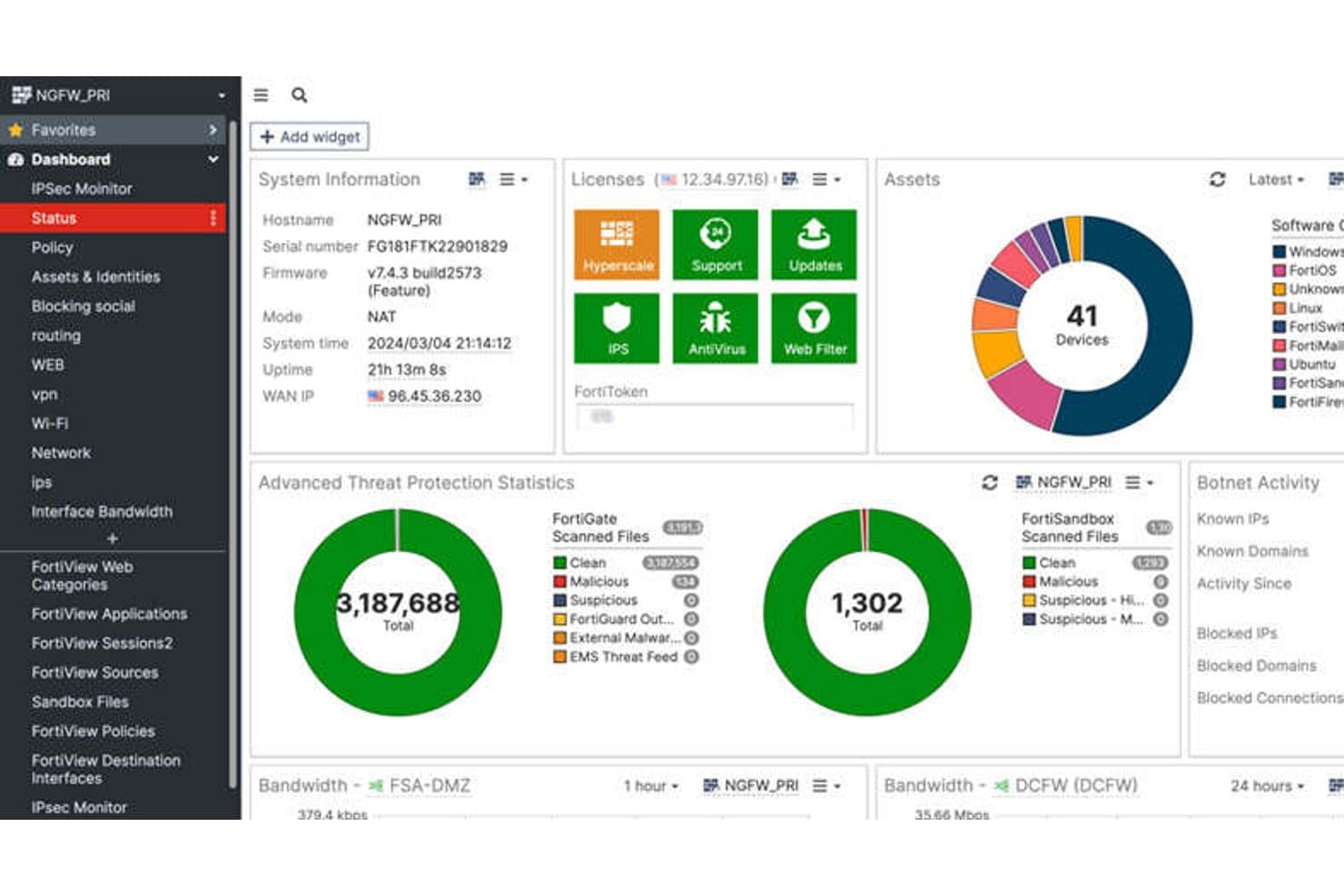
FortiGate NGFW provides a unified dashboard for real-time threat monitoring. FortiGate NGFW is a network firewall platform from Fortinet that combines deep packet inspection, intrusion prevention, application-layer control, SSL/TLS decryption, and built-in SD-WAN across hardware appliances, virtual machines, and cloud-hosted deployments.
Who Is FortiGate NGFW Best For?
FortiGate NGFW is a strong fit for enterprise network security teams that need to protect high-throughput environments across distributed on-prem, cloud, and hybrid infrastructure.
Why I Picked FortiGate NGFW
FortiGate NGFW earns its spot on my shortlist because no other firewall comes close to its raw threat protection throughput at scale. I'm talking about FortiASIC custom processors that push SSL/TLS inspection and IPS at line rate, reaching 520 Gbps on the 3800G without choking performance. I also like that SD-WAN is baked into the license, so my team isn't juggling separate products to secure branch traffic while maintaining that throughput across distributed sites.
FortiGate NGFW Key Features
- Virtual domain (VDOM) segmentation: Divides a single FortiGate appliance into multiple isolated virtual firewall instances, each with its own policies, routing tables, and administrators.
- FortiManager centralized orchestration: Manages policies, configurations, and firmware across distributed FortiGate deployments from a single console, with version control and rollback support.
- Inline CASB for SaaS visibility: Monitors and controls traffic to cloud applications in real time, surfacing shadow IT and blocking data exfiltration from unsanctioned platforms.
- Post-quantum cryptography for IPsec VPNs: Implements NIST-approved post-quantum algorithms in FortiOS 7.6.1 to protect VPN tunnels against quantum computing threats.
FortiGate NGFW Integrations
FortiGate NGFW supports 3,000+ Security Fabric integrations across 400+ partners, including CrowdStrike, ServiceNow, Armis, Splunk, AWS, Microsoft Azure, and Google Cloud Platform. Terraform, Ansible, and REST API support enable custom integrations and infrastructure-as-code workflows.
Pros and Cons
Pros:
- VDOM segmentation enables true multi-tenancy
- Native SD-WAN included without extra cost
- Delivers highest threat protection throughput available
Cons:
- Advanced reporting requires separate FortiAnalyzer license
- Firmware updates can introduce critical bugs
Learn more about FortiGate NGFW: Best for Talos-backed threat intelligence at scale
- Free demo available
- Pricing upon request
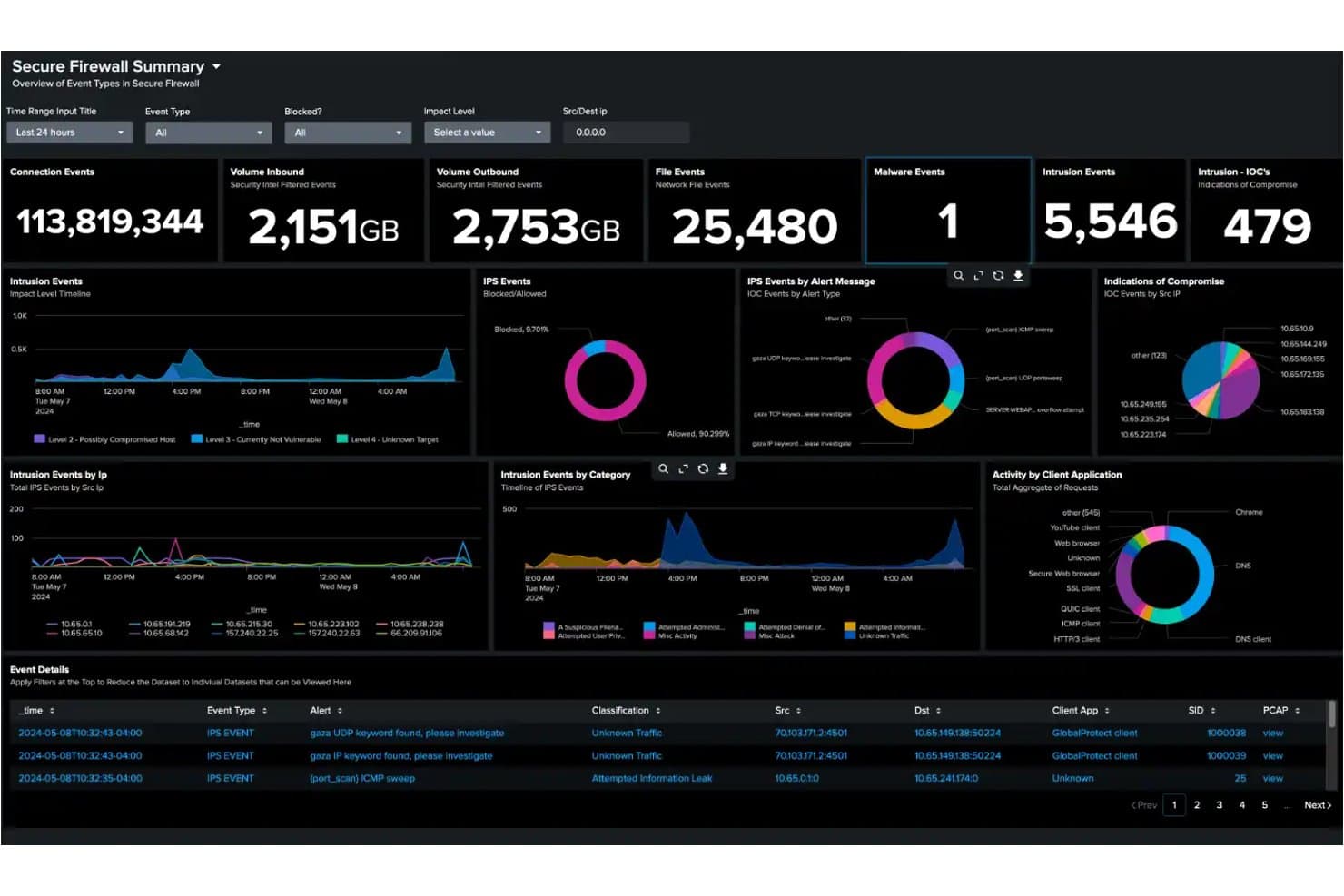
Cisco Secure Firewall centralizes threat monitoring across network events and intrusions. Cisco Secure Firewall is a next-generation firewall platform that delivers stateful traffic inspection, intrusion prevention via the Snort 3 engine, deep packet inspection across 6,500+ applications, and encrypted traffic analysis through its Encrypted Visibility Engine.
Who Is Cisco Secure Firewall Best For?
Cisco Secure Firewall is a strong fit for enterprise security teams that need verified, intelligence-driven threat protection across large, distributed, and hybrid network environments.
Why I Picked Cisco Secure Firewall
Cisco Secure Firewall earns its spot on my list because the threat intelligence backing it is genuinely in a league of its own. Cisco Talos analyzes 900 billion security events daily across 193 countries, feeding real-time detections directly into the firewall's Snort 3 IPS engine. The SnortML behavioral model layers on top of that, catching zero-day exploits without waiting for a signature update. In SE Labs' {{year}} enterprise testing, Cisco blocked 100% of threats including APT29 and Scattered Spider simulations.
Cisco Secure Firewall Key Features
- Encrypted Visibility Engine (EVE): Detects and blocks threats hidden in TLS 1.3 encrypted traffic without requiring decryption.
- Firewall Management Center (FMC): Centralized on-premises management console for configuring and enforcing policies across hardware, virtual, and cloud firewall instances.
- Universal Zero Trust Network Access (UZTNA): Provides identity- and device-posture-based application access, replacing traditional VPN with continuously verified connections.
- Cisco Security Cloud Control: Cloud-native orchestration platform for managing multi-site and multi-tenant firewall deployments from a single interface.
Cisco Secure Firewall Integrations
Cisco Secure Firewall has native integrations with Splunk, Cisco XDR, Cisco ISE, Cisco Secure Workload, Cisco Umbrella, Cisco Secure Access, and Cisco Multicloud Defense. It supports QRadar and Microsoft Sentinel through syslog, plus REST APIs, Terraform, and Ansible for custom and DevSecOps workflows.
Pros and Cons
Pros:
- Supports multi-cloud and containerized deployments
- Inspects TLS 1.3 traffic without decryption
- Blocks zero-days using SnortML behavioral analysis
Cons:
- Management interface complexity frustrates administrators
- Policy deployment can be slow and disruptive
Learn more about Cisco Secure Firewall: Best for branch office SD-WAN firewall coverage
- 14-day free trial + free demo
- Pricing upon request
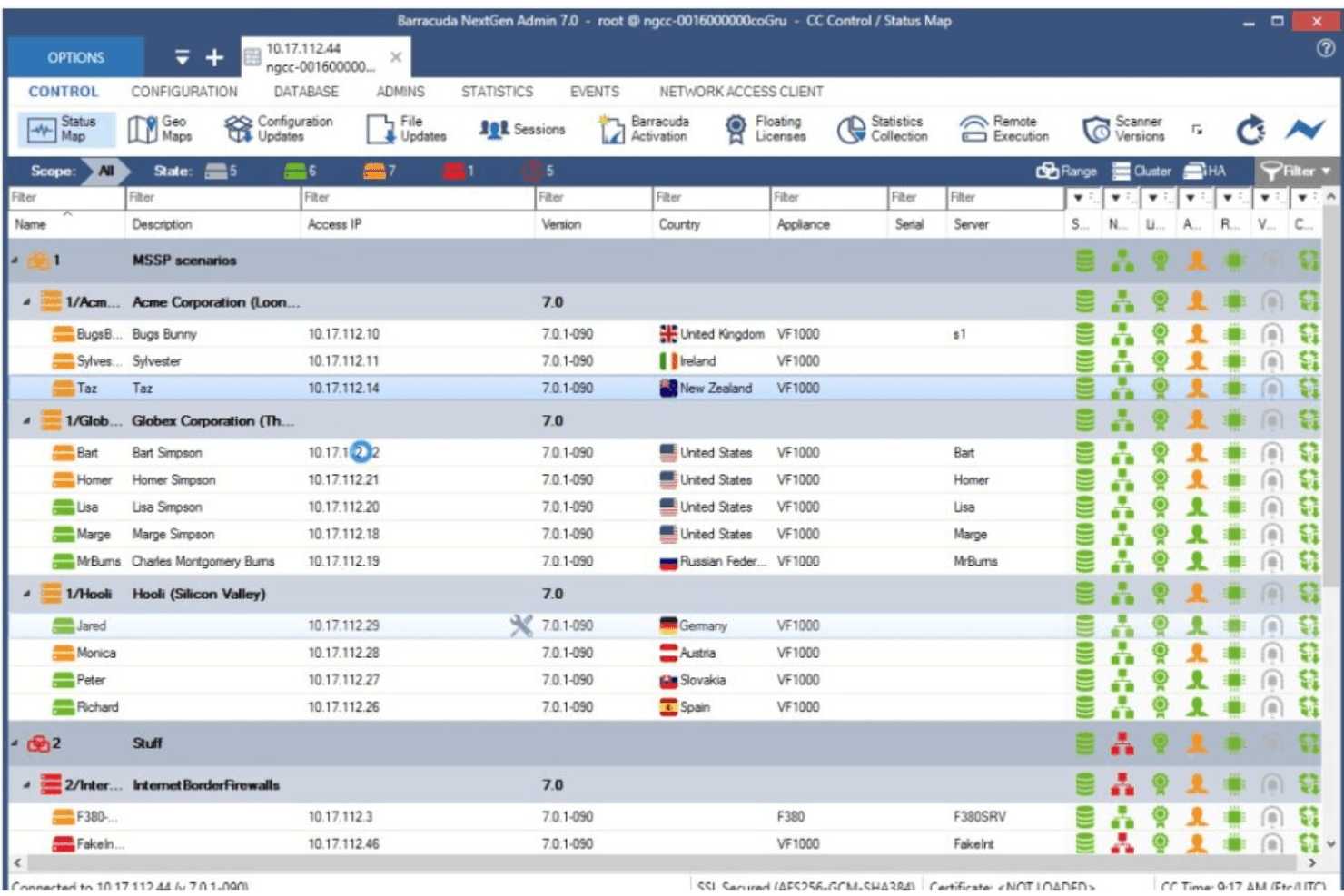
This is an image from Barracuda CloudGen's main control dashboard. Barracuda CloudGen Firewall is a next-generation firewall that combines stateful deep packet inspection, built-in SD-WAN, IDS/IPS, application-layer control, and multi-cloud deployment support across AWS, Azure, and GCP.
Who Is Barracuda CloudGen Firewall Best For?
IT teams managing distributed branch networks or multi-cloud environments will get the most out of Barracuda CloudGen Firewall, especially when built-in SD-WAN and zero-touch deployment matter.
Why I Picked Barracuda CloudGen Firewall
I picked Barracuda CloudGen Firewall as one of the best because it handles multi-cloud security without forcing you to stitch together separate tools. Native deployment across AWS, Azure, and GCP means you enforce consistent firewall policy whether traffic is hitting a branch office or a cloud workload. I also like that built-in SD-WAN with traffic duplication and Forward Error Correction is included, so distributed teams stay connected even over lossy 4G/5G links, with zero-packet-loss failover.
Barracuda CloudGen Firewall Key Features
- Stateful deep packet inspection: Examines packet headers and payloads in a single pass, applying firewall, IPS/IDS, and antivirus scanning simultaneously without stacking latency.
- Firewall Control Center: A centralized management console that supports multi-site deployments with revision control, configuration rollback, and zero-touch remote site provisioning.
- Advanced Threat Protection sandboxing: Uses full system emulation to safely detonate unknown files and detect behavioral threats, automatically pushing new signatures to pre-filtering layers.
- Identity-aware access control policies: Enforces granular rules by user, group, application, time, and location using Active Directory, LDAP, RADIUS, TACACS+, and x.509 certificate integrations.
Barracuda CloudGen Firewall Integrations
Barracuda CloudGen Firewall integrates with Microsoft Azure, Azure Virtual WAN, AWS, Google Cloud Platform, Datadog, and Tufin SecureTrack. It supports syslog exports to Splunk and other SIEM platforms, plus REST APIs for custom automation.
Pros and Cons
Pros:
- Advanced threat protection with sandboxing
- Centralized management for multi-site environments
- Built-in SD-WAN without extra hardware
Cons:
- Key features require extra subscriptions
- Missing WireGuard protocol support
Learn more about Barracuda CloudGen Firewall: Best for ML-based zero-day memory detection
- 90-day free trial OR Free demo available
- From $550 (hardware only)
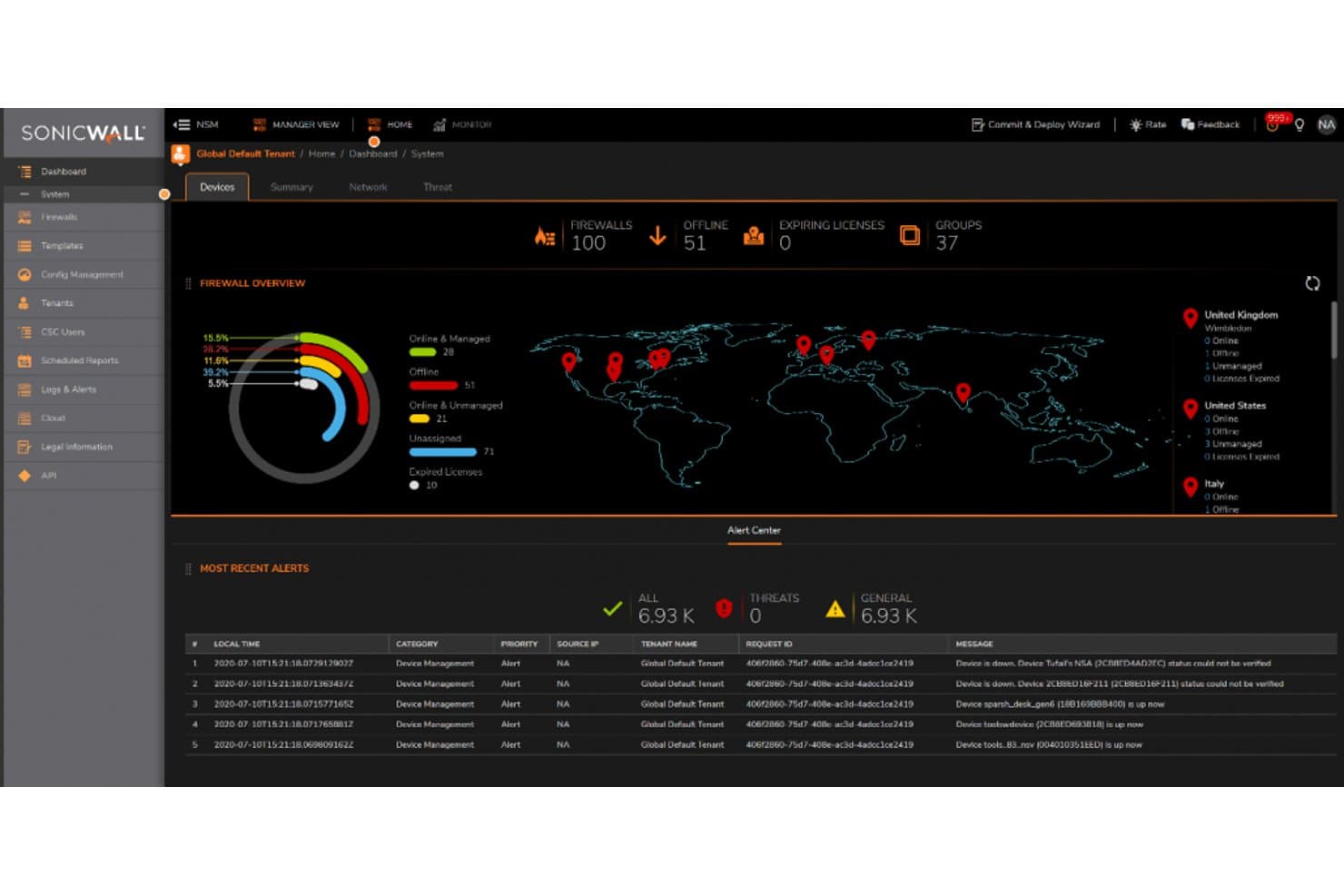
SonicWall centralizes firewall monitoring across 100 devices globally. SonicWall is a next-generation firewall platform that combines deep packet inspection, intrusion prevention, application-layer control, and cloud-based sandboxing across hardware, virtual, and cloud-deployed environments.
Who Is SonicWall Best For?
SonicWall is a strong fit for SMB and mid-market IT teams that need enterprise-grade threat prevention without the enterprise price tag.
Why I Picked SonicWall
I picked SonicWall as one of the best because its real-time breach detection is genuinely hard to replicate. The patented RTDMI engine inspects memory in real time, catching malware that hides behind encryption before it executes. Backed by five consecutive perfect ICSA Labs scores, 100% threat detection with zero false positives isn't a marketing claim here—it's verified. I also rate the Capture ATP sandbox highly, since it runs full system emulation on suspicious files rather than surface-level checks.
SonicWall Key Features
- Zone-based policy architecture: Lets you define granular firewall rules across trusted, untrusted, wireless, and encrypted zones with per-user and per-group enforcement.
- Built-in secure SD-WAN: Provides intelligent failover, load balancing, and application-aware routing across distributed sites without requiring a separate appliance.
- Network Security Manager (NSM): A centralized, cloud-native console for managing policies, configurations, and reporting across multiple firewalls and sites from one interface.
- Embedded ZTNA licensing: Gen 8 firewalls ship with Cloud Secure Edge integration, enabling identity- and device-aware access control as a built-in alternative to SSL-VPN.
SonicWall Integrations
SonicWall offers native syslog integrations with Splunk, IBM QRadar, and Microsoft Sentinel, plus Active Directory and LDAP connectivity. NSM provides a REST API for custom integrations and automation.
Pros and Cons
Pros:
- Real-time memory inspection blocks hidden malware
- Built-in SD-WAN and ZTNA included
- Industry-leading threat detection accuracy
Cons:
- Advanced features require multiple paid subscriptions
- Recurring SSL-VPN vulnerabilities raise concerns
Learn more about SonicWall: Best for endpoint-triggered network isolation
- Free trial available
- From $25/user/month (billed annually)
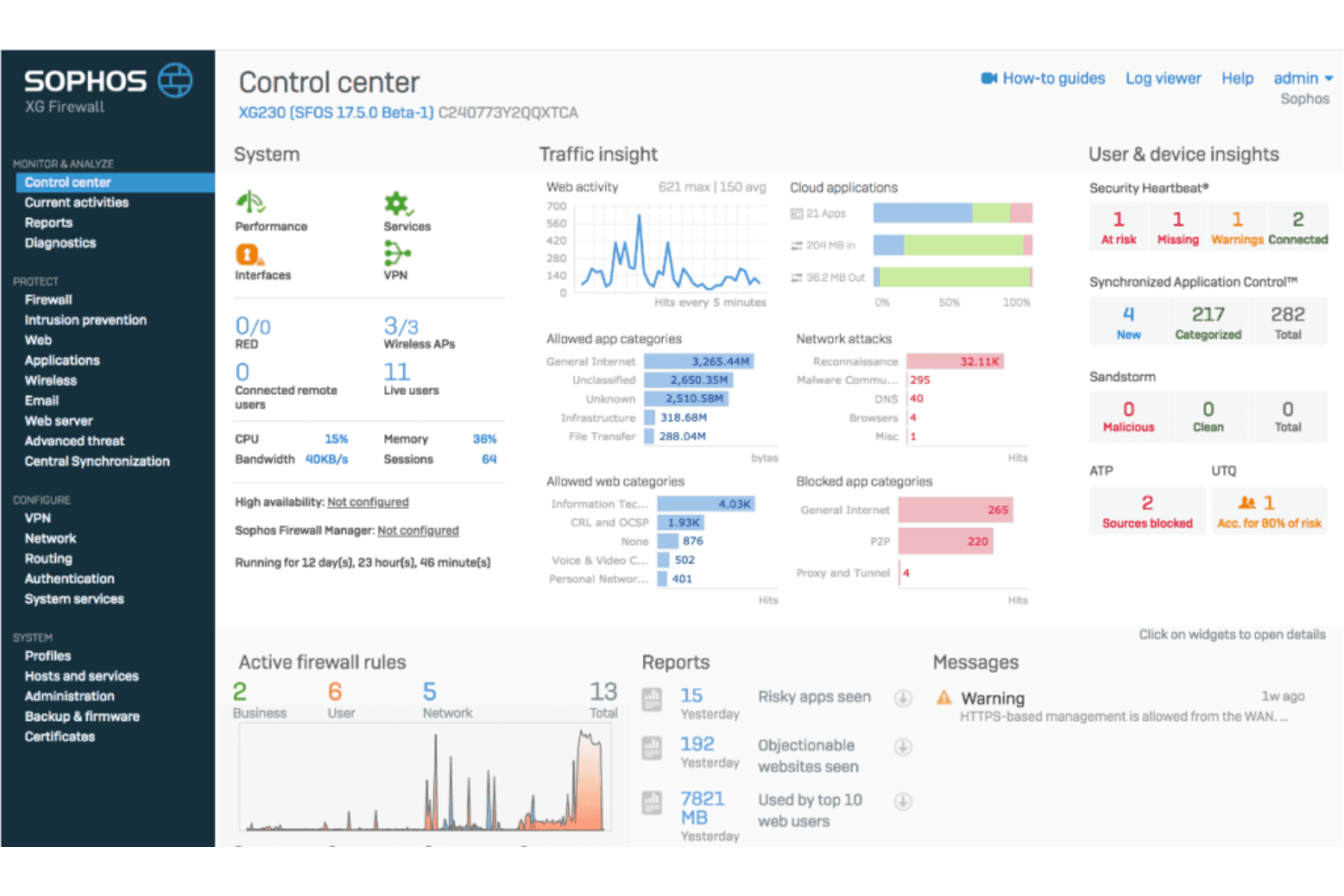
This is a view from Sophos Firewall's main control dashboard. Sophos Firewall is a next-generation firewall platform that combines deep packet inspection, TLS 1.3 decryption, intrusion prevention, application-layer control, and cross-product threat telemetry sharing across endpoints, servers, and network devices.
Who Is Sophos Firewall Best For?
Sophos Firewall is a strong fit for IT and security teams already running—or planning to run—Sophos endpoints, where the Security Heartbeat's automated threat isolation delivers the most value.
Why I Picked Sophos Firewall
I picked Sophos Firewall because its Synchronized Security architecture does something most firewalls can't: it shares real-time health telemetry between the firewall and Sophos endpoints via Security Heartbeat, automatically isolating compromised devices at the network level without any manual intervention. I also like Active Threat Response, which pulls in MDR analyst feeds and NDR Essentials ML detection to contain active adversaries in near real time.
Sophos Firewall Key Features
- TLS 1.3 inspection: The Xstream architecture uses hardware acceleration to decrypt and inspect TLS 1.3 traffic without significant throughput degradation.
- Sandstorm cloud sandboxing: Suspicious files are submitted to a cloud-based sandbox that uses machine learning and behavioral analysis to catch unknown malware before it reaches the network.
- Built-in ZTNA gateway: Every Sophos Firewall appliance includes an integrated zero trust network access gateway, eliminating the need for a separate appliance.
- Central Firewall Reporting: Sophos Central provides cloud-based compliance report templates for HIPAA, PCI-DSS, and GLBA, with up to 30 days of log retention on the Xstream bundle.
Sophos Firewall Integrations
Sophos Firewall integrates with Sophos Central, Sophos Intercept X Endpoint, Sophos MDR/XDR, Active Directory, LDAP, AWS, Azure, and GCP. Its SIEM Integration API supports custom connections, while third-party threat feeds and VMware, Hyper-V, and KVM deployments extend connectivity.
Pros and Cons
Pros:
- Built-in ZTNA gateway on every device
- TLS 1.3 inspection with hardware acceleration
- Automated endpoint isolation via Security Heartbeat
Cons:
- Log retention limited without external SIEM
- Full feature value requires Sophos endpoints
Learn more about Sophos Firewall: Best for secure cloud access via zero trust
- Free demo available
- Pricing upon request
Visit WebsiteCustomer Rating:4.3/5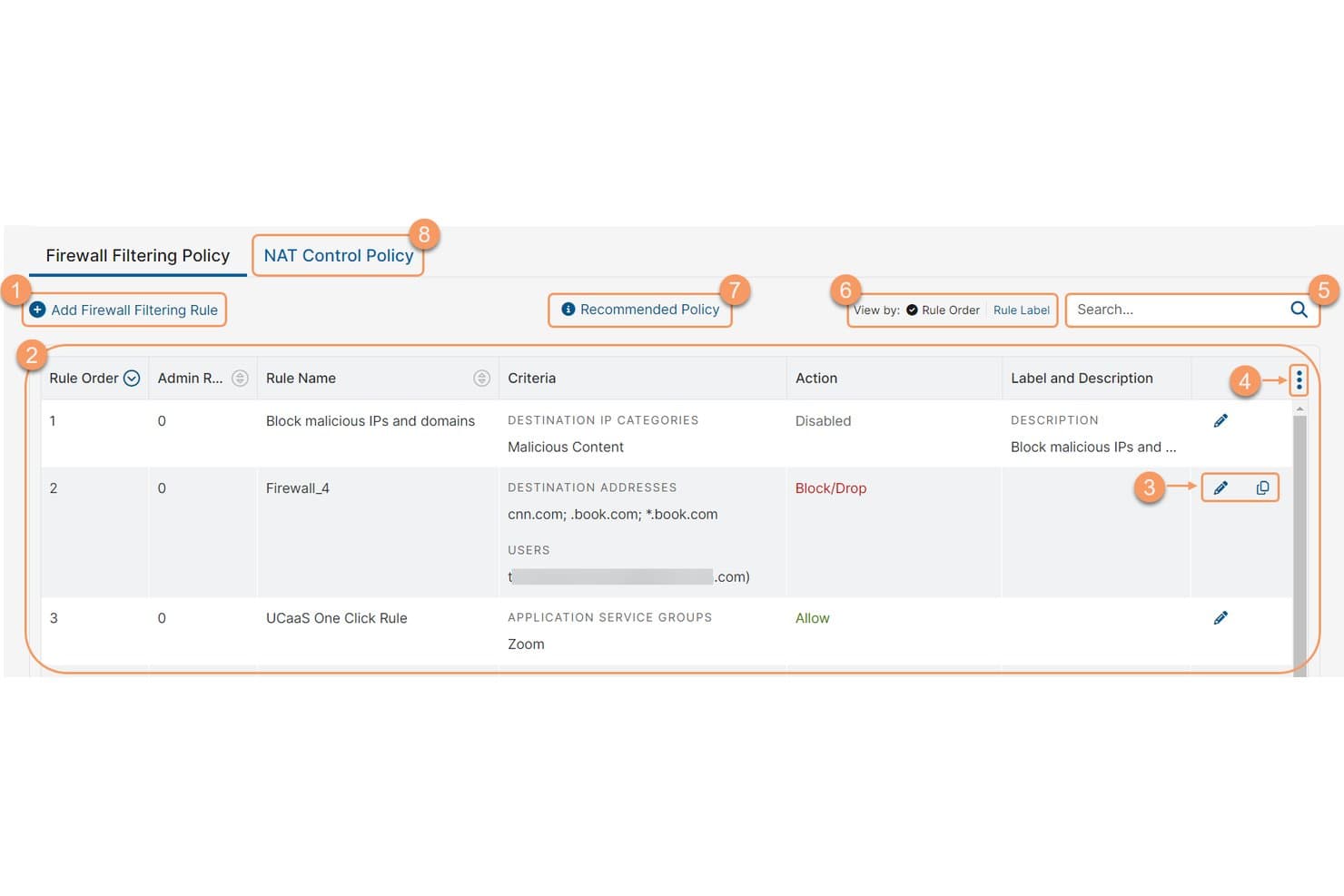
Zscaler Internet Access lets users create and manage firewall filtering rules. Zscaler Internet Access is a cloud-native firewall and security service edge platform that delivers zero trust web gateway, cloud firewall, intrusion prevention, sandboxing, and application-layer control—all without hardware appliances.
Who Is Zscaler Internet Access Best For?
Zscaler Internet Access is a strong fit for enterprise security and network teams replacing hardware-based firewalls with a cloud-delivered zero trust architecture.
Why I Picked Zscaler Internet Access
Zscaler Internet Access earns its spot on my shortlist because it's the clearest example of a cloud-native firewall that actually eliminates the need for physical appliances. I'm drawn to how its Zero Trust Firewall inspects all ports and protocols inline, terminating every connection at one of 150+ global points of presence before clean traffic ever reaches its destination. Its Single Scan, Multi-Action engine runs TLS inspection, IPS, and sandboxing in a single pass, which is something traditional NGFWs can't replicate at scale.
Zscaler Internet Access Key Features
- Identity-aware policy management: Lets you build and enforce firewall rules based on user identity, device posture, application, location, and time from a single cloud console.
- Cloud IPS with three detection methods: Combines signature-based, policy-based, and anomaly/behavioral detection inline across all encrypted traffic, updated continuously without maintenance windows.
- AI-powered cloud sandbox: Isolates and analyzes unknown files to detect zero-day malware, with patient-zero quarantine and API submission support in the Advanced tier.
- SIEM and SOAR log streaming: Streams real-time logs and events via API to platforms like Splunk, Microsoft Sentinel, and IBM QRadar for compliance reporting and incident response workflows.
Zscaler Internet Access Integrations
Zscaler Internet Access offers documented integrations with Splunk, Microsoft Sentinel, IBM QRadar, ServiceNow, Okta, Microsoft Entra ID, CrowdStrike, Terraform, Ansible, and Pulumi. Its API-first architecture supports SIEM and SOAR log streaming plus custom policy automation.
Pros and Cons
Pros:
- Zero trust access on every connection
- Cloud-native with no hardware appliances required
- Inspects 100% of encrypted traffic
Cons:
- Internet speed may suffer during peak times
- Initial policy configuration can be complex
Learn more about Zscaler Internet Access: Best for multi-layered threat prevention depth
- 30-day free trial OR Free demo available
- Pricing upon request
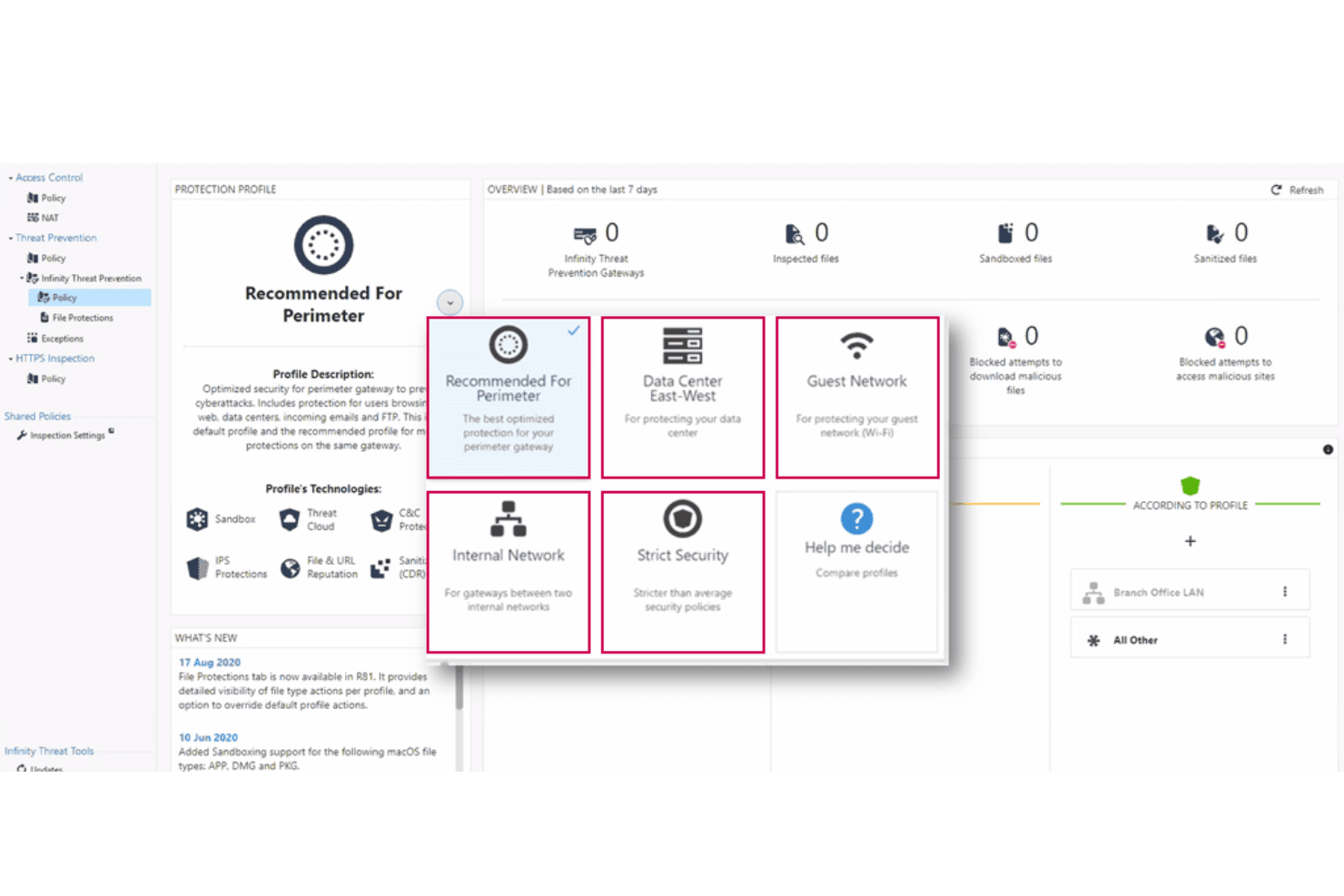
Here is a screenshot of the Check Point software's policy dashboard. Check Point Next Generation Firewalls (NGFWs) is a firewall platform that combines deep packet inspection, AI-driven threat prevention, identity-aware access control, and centralized policy management across on-premises, cloud, and hybrid environments.
Who Is Check Point Next Generation Firewalls (NGFWs) Best For?
Check Point NGFWs are a strong fit for enterprise security teams managing complex, multi-environment infrastructures where threat prevention accuracy is non-negotiable.
Why I Picked Check Point Next Generation Firewalls (NGFWs)
Check Point NGFWs earn their spot on my shortlist because ThreatCloud AI is genuinely in a class of its own, processing over 2 billion security decisions daily to catch threats that signature-based tools miss. I especially like how SandBlast sandboxing and Threat Extraction work together: suspicious files get detonated in an isolated environment while sanitized versions reach users within seconds. Miercom's independent 2025 benchmarks validated a 99.9% malware block rate and 99.7% phishing block rate, numbers I find hard to argue with when evaluating multi-layered threat prevention.
Check Point Next Generation Firewalls (NGFWs) Key Features
- SmartConsole centralized policy management: A single management interface for orchestrating firewall policies across on-premises, virtual, cloud, and SASE deployments from one dashboard.
- Software Blade architecture: A modular licensing model that lets you activate specific security capabilities—IPS, anti-bot, sandboxing, DLP—on your gateway without separate appliances.
- Identity Awareness: Enforces user- and group-based access control policies by integrating with Active Directory, Azure AD, and Okta to tie network rules to specific identities.
- Maestro Hyperscale Firewall Cluster: A hyperscale architecture that scales existing gateway hardware elastically to deliver over 1 Tbps of threat prevention throughput for large data center environments.
Check Point Next Generation Firewalls (NGFWs) Integrations
Check Point NGFWs integrates with Splunk, Microsoft Sentinel, IBM QRadar, Okta, Microsoft Azure, AWS, VMware NSX, ServiceNow, Terraform, and Ansible. Its REST API supports custom integrations and CI/CD workflows.
Pros and Cons
Pros:
- Deep application and user-level visibility
- Best-in-class malware and phishing block rates
- Centralized policy management for all environments
Cons:
- User experience differs across product modules
- Complex licensing model confuses many teams
Learn more about Check Point Next Generation Firewalls (NGFWs): Best for consolidating NGFW, SD-WAN, and ZTNA
- 30-day free trial
- From $450 (hardware appliance)
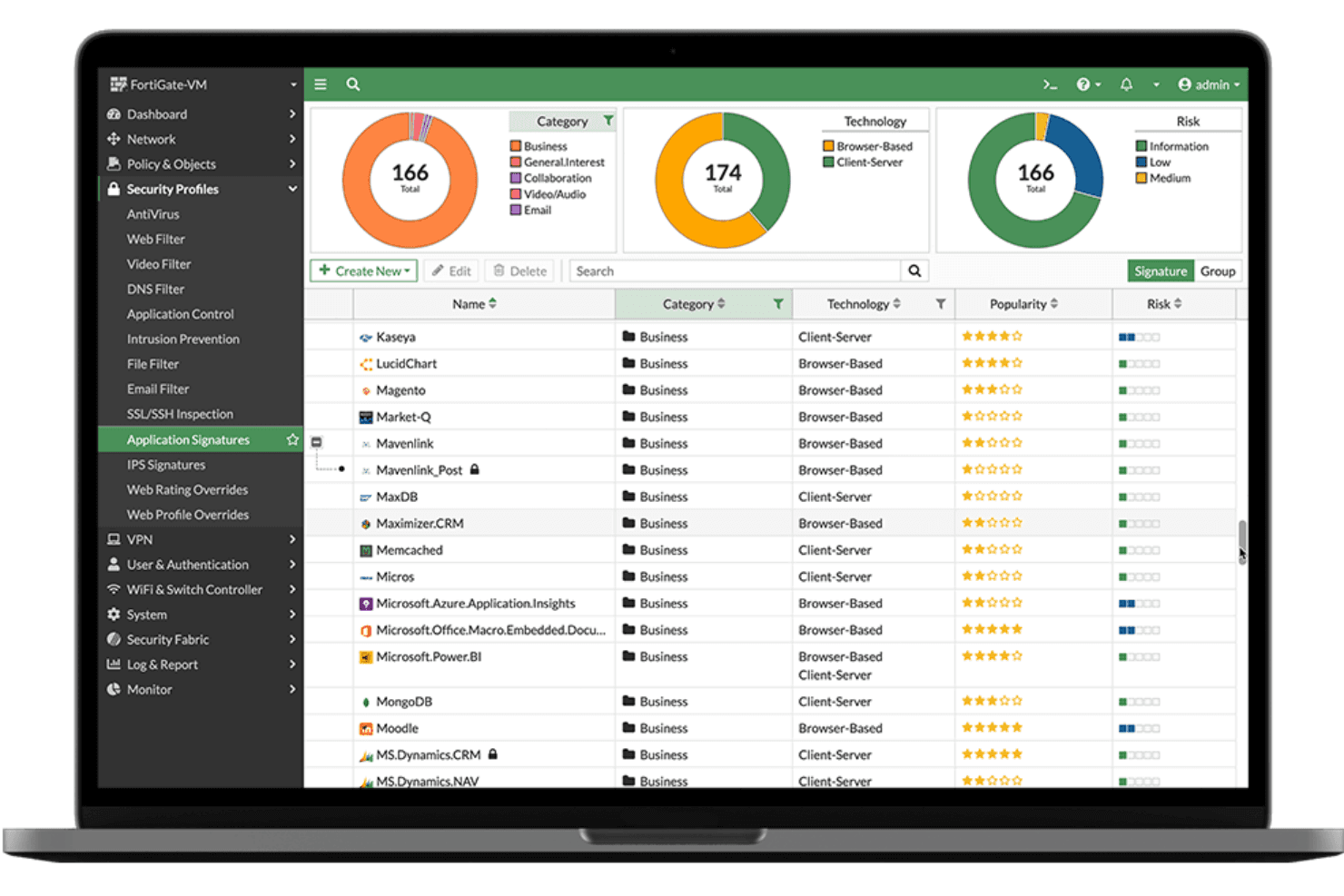
This is a view from Fortinet Next Generation Firewall Software installed on a sample device. Fortinet Next Generation Firewall (NGFW) is a firewall platform built on FortiOS that delivers stateful traffic inspection, deep packet inspection, intrusion prevention, application control, SD-WAN, and Zero Trust Network Access across hardware, virtual, and cloud deployments.
Who Is Fortinet Next Generation Firewall (NGFW) Best For?
Fortinet NGFW is a strong fit for network security teams managing large, distributed environments where security infrastructure needs to grow without adding complexity.
Why I Picked Fortinet Next Generation Firewall (NGFW)
Fortinet NGFW earns its spot on my shortlist because FortiASIC-accelerated hardware lets you scale threat protection throughput up to 520 Gbps without sacrificing inspection depth. I love that Universal ZTNA is built directly into FortiOS at no extra cost, so as your environment grows, per-session access enforcement scales with it. FortiManager then ties everything together, letting you push consistent policies across physical, virtual, and cloud FortiGate deployments from one console.
Fortinet Next Generation Firewall (NGFW) Key Features
- FortiGuard AI-powered threat intelligence: Continuously updated threat feeds from FortiGuard Labs deliver real-time signature updates, DNS security, URL filtering, and anti-botnet protection across all deployments.
- SSL/TLS inspection: Hardware-accelerated decryption via FortiASIC processors enables deep packet inspection of encrypted traffic without degrading network performance.
- Inline CASB: Identifies and controls unsanctioned SaaS application usage across both clear-text and encrypted traffic, giving you visibility into shadow IT.
- FortiAnalyzer centralized logging: Aggregates firewall policy hits, IPS events, VPN activity, and user behavior into a single log management platform with compliance-ready reporting for PCI-DSS, HIPAA, and GDPR.
Fortinet Next Generation Firewall (NGFW) Integrations
Fortinet NGFW integrates with Splunk, Microsoft Sentinel, IBM QRadar, FortiSOAR, AWS, Azure, Google Cloud Platform, and Oracle Cloud Infrastructure. REST API, Terraform, and Ansible support custom integrations and infrastructure-as-code workflows.
Pros and Cons
Pros:
- Centralized multi-site policy management
- Universal ZTNA included at no extra cost
- Hardware-accelerated deep packet inspection performance
Cons:
- Some advanced features require CLI expertise
- Recurring high-severity vulnerabilities in firmware
Learn more about Fortinet Next Generation Firewall (NGFW): Best for pre-disclosure zero-day threat blocking
- 15–30 day free trial OR Free demo available
- Pricing upon request
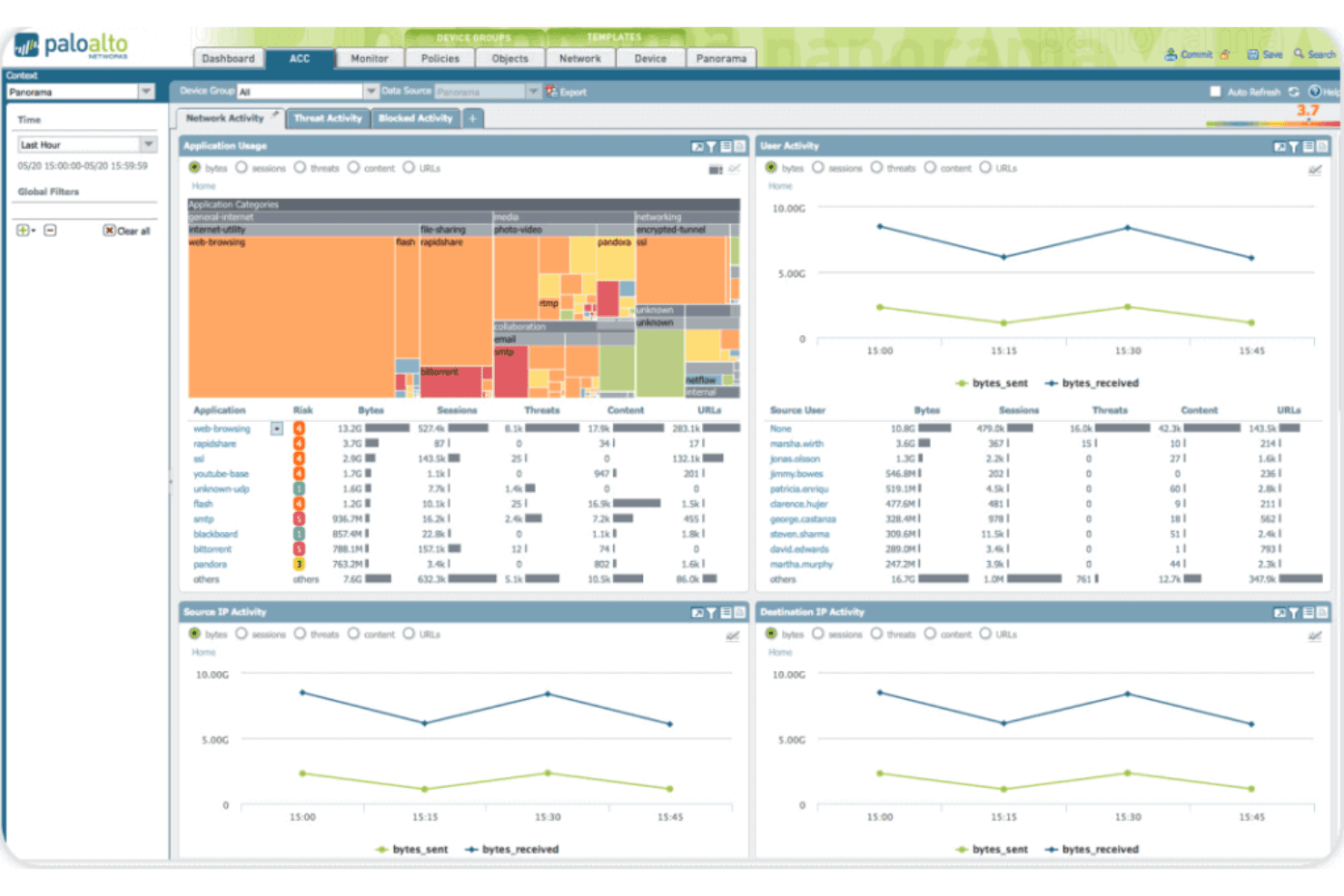
This is a screenshot of the Palo Alto Networks Next-Generation Firewall network activity dashboard. Palo Alto Networks Next-Generation Firewall is a network security platform that delivers stateful traffic inspection, application-layer control via App-ID, intrusion prevention, and threat intelligence across hardware, virtual, container, and cloud-native deployments.
Who Is Palo Alto Networks Next-Generation Firewall Best For?
Security-focused enterprises and large organizations that need AI-driven threat prevention across hybrid, multi-cloud, and on-premises environments will get the most from this platform.
Why I Picked Palo Alto Networks Next-Generation Firewall
I picked Palo Alto Networks NGFW because its Precision AI inline deep learning engine blocks threats before they touch your network, without waiting on signatures or sandbox delays. What I find most impressive is Frontier Virtual Patching, which scans thousands of open-source repositories and delivers same-day patches before vendors even disclose vulnerabilities. On top of that, App-ID identifies applications by actual behavior, not port or protocol, so a policy blocking file uploads in Dropbox actually holds.
Palo Alto Networks Next-Generation Firewall Key Features
- Panorama centralized management: A single management console that controls up to 5,000 hardware, virtual, and container firewalls with role-based access control and policy impact simulation.
- User-ID policy enforcement: Maps network traffic to individual users and groups across Active Directory, LDAP, and cloud identity providers to enforce identity-based security policies.
- Advanced WildFire sandboxing: Analyzes suspicious files using static analysis, dynamic behavior analysis, and machine learning to detect and block known and unknown malware.
- CN-Series container firewall: A Kubernetes-native firewall that inspects east-west container traffic without disrupting developer workflows or pipeline velocity.
Palo Alto Networks Next-Generation Firewall Integrations
Native integrations include Splunk, IBM QRadar, and Microsoft Sentinel. Cortex XSOAR adds more than 900 integrations, while Terraform, Ansible, and PAN-OS REST/XML APIs support custom automation.
Pros and Cons
Pros:
- Manages up to 5,000 firewalls centrally
- Identifies applications by behavior, not port
- Blocks zero-day threats before vendor disclosure
Cons:
- Support response times can be unpredictable
- Advanced security features require separate licenses
Learn more about Palo Alto Networks Next-Generation Firewall: Best for European cybersecurity standards
- Free demo available
- Pricing upon request
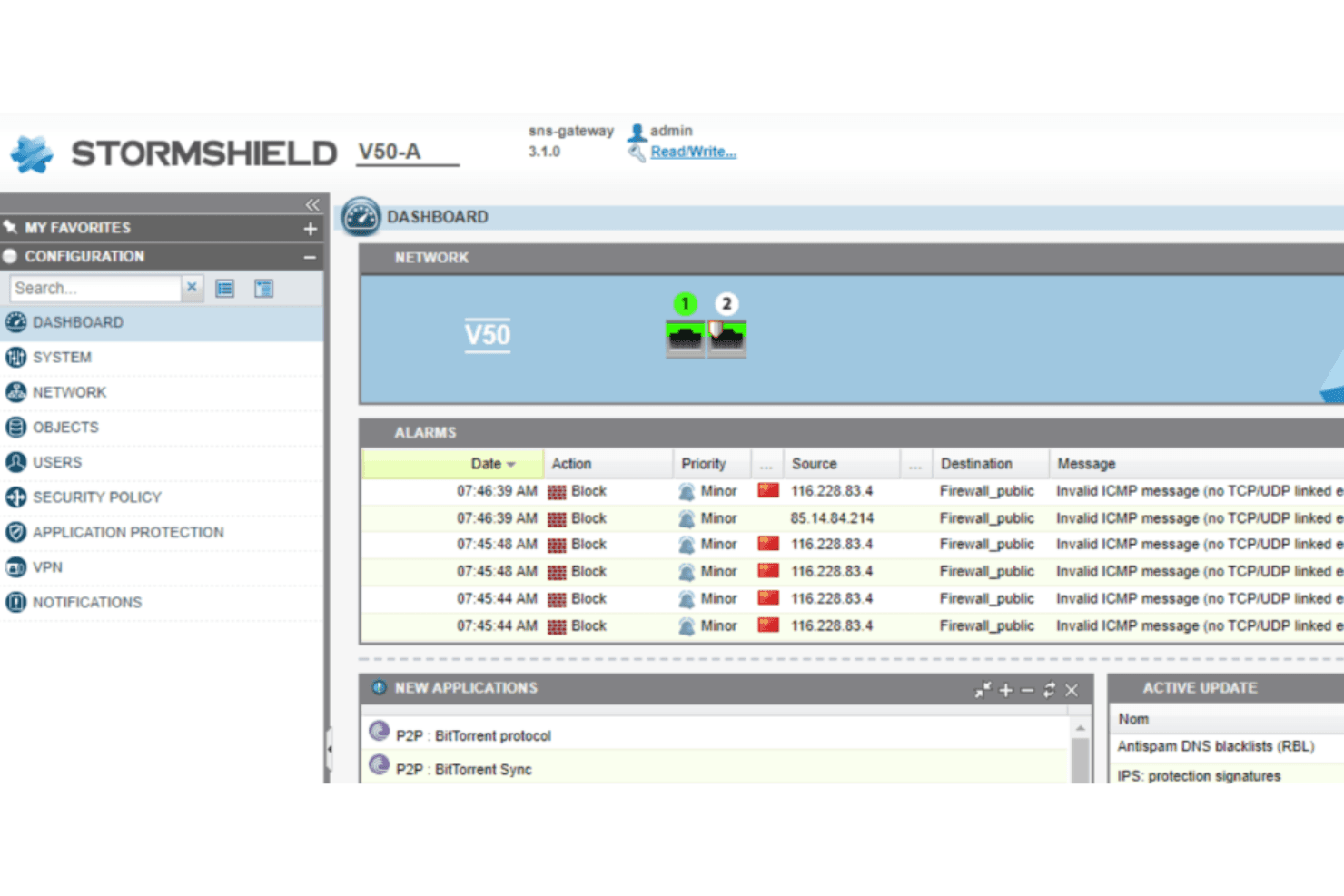
This is a screenshot from Stormshield Network Security's central dashboard. Stormshield Network Security (SNS) is a next-generation firewall platform that combines stateful deep packet inspection, IPS/IDS, application-layer control, SD-WAN, ZTNA, and centralized multi-site policy management in a single integrated suite.
Who Is Stormshield Network Security (SNS) Best For?
SNS is a strong fit for European organizations in government, defense, or critical infrastructure that need a firewall meeting strict sovereignty and compliance mandates like ANSSI, NIS2, and NATO Restricted.
Why I Picked Stormshield Network Security (SNS)
I picked SNS as one of the best because no other firewall on this list matches its European sovereignty credentials: ANSSI Standard Qualification, CC EAL4+, EU Restricted, and NATO Restricted certifications. In practice, that means organizations in government, defense, or critical infrastructure can deploy SNS in classified environments where US-headquartered vendors simply aren't approved. I also rate its native OT/ICS protocol support highly, covering Modbus, OPC UA, S7, and DNP3 for teams securing industrial environments alongside traditional IT networks.
Stormshield Network Security (SNS) Key Features
- Stormshield Management Center (SMC): A centralized console for managing filtering rules, VPN topologies, and SD-WAN policies across multiple SNS firewalls from a single interface.
- Breach Fighter sandbox: A cloud-based sandboxing module that runs suspicious files through a three-layer analysis combining IPS, antivirus scanning, and AI-enhanced behavioral detection.
- Post-quantum VPN encryption: SMC supports KEM and PPK-based post-quantum cryptography for IPSec VPN deployments, protecting communications against future cryptographic threats.
- Industrial protocol inspection: The IPS engine natively analyzes OT/ICS protocols including Modbus, OPC UA, S7, and DNP3 for teams securing operational technology environments.
Stormshield Network Security (SNS) Integrations
Stormshield Network Security (SNS) has documented integrations with Splunk, Elastic, Microsoft Entra ID, and Nozomi Networks Guardian. It also offers an official Ansible collection, REST APIs for custom automation, and deployment options through OVHcloud, 3DS OUTSCALE, and Microsoft Azure Marketplace.
Pros and Cons
Pros:
- Integrated SD-WAN with security by design
- Native OT/ICS protocol inspection included
- Certified for EU, NATO, and ANSSI compliance
Cons:
- Fewer direct integrations with global SIEM platforms
- Limited remote VPN scalability on some models
Learn more about Stormshield Network Security (SNS):
Annen brannmurprogramvare
Nedenfor finner du en liste over ytterligere brannmurprogrammer som jeg valgte ut, men som ikke kom med blant de 10 beste. Det er absolutt verdt å se nærmere på dem.
- 11Check Point QuantumBest for securing AI infrastructure and networks
- 12Zscaler Cloud FirewallBest for zero trust internet traffic enforcement
- 13Google CloudBest for GCP-native hierarchical firewall policy
- 14Imperva WAFBest for WAF across 111,000+ CVEs
- 15Cloudflare WAFBest for Forrester-leading web app threat defense
- 16WatchGuard FireboxBest for SMB and MSP unified security management
How I Evaluate Firewall Software
I split my evaluation into baseline requirements—like stateful inspection and IPS—and differentiators like ZTNA support, cloud-native deployment, and how licensing stacks up across environments.
Core Functionality (Table Stakes For This List)
When I'm selecting tools for my list, I rank each one on a scale from 0 (does not offer the functionality) to 5 (excels in this area) for each core functionality listed below. Then, I calculate the tool's total score into a percentage. Each tool needs to achieve a minimum total score of 75% to be considered for inclusion.
- Traffic Filtering & Inspection: I verify that the tool performs comprehensive stateful inspection across all relevant protocols and can decrypt SSL/TLS traffic without degrading performance.
- Policy & Rule Management: I look for the ability to create granular, identity-aware policies scoped by user, group, zone, and application, with flexible rule management options.
- Intrusion Prevention (IDS/IPS): I assess how effectively the tool detects and prevents threats, ranging from traditional signature matching to advanced behavioral and zero-day threat detection.
- Application-Layer Control (DPI): I expect deep packet inspection that accurately identifies applications based on behavior, enabling precise controls beyond simple port or protocol filtering.
- Threat Intelligence & Malware Protection: I focus on real-time threat intelligence integration, sandboxing for unknown threats, and DNS/URL filtering capabilities to guard against phishing and command-and-control callbacks.
- Logging, Monitoring & Reporting: I evaluate how well logs can be searched and customized, the flexibility of alerting, and whether dashboards support compliance requirements like PCI-DSS and HIPAA natively.
Once I have a list of tools that meet this criteria, I consider what sets each platform apart.
Differentiating Factors (What Sets Vendors Apart)
Here's how I compare and contrast different vendors:
Standout Features
ZTNA support is a big one—I look for firewalls that enforce identity- and context-based access per session, which matters when your workforce is split across offices and remote locations. Cloud-native deployment is another factor I weigh, especially for teams running workloads on AWS, Azure, or GCP who need consistent policy enforcement across providers. I also evaluate whether a platform offers a unified management console for governing on-prem and cloud instances from one place, since managing separate dashboards per environment adds real operational overhead.
Beyond Features
Licensing structure is something I always evaluate closely. Some vendors bundle IPS, sandboxing, and threat feeds into a base license, while others charge per add-on—this dramatically shifts TCO over a multi-year term. Ecosystem compatibility also matters: I check for native integrations with SIEM platforms like Splunk or Sentinel and identity providers like Okta. Finally, I consider whether the vendor maintains an in-house threat research team, since the quality and speed of signature and intelligence updates directly affects how well the firewall holds up against emerging threats.
Slik velger du brannmurprogramvare
Det er lett å gå seg vill i lange funksjonslister og kompliserte prismodeller. For å hjelpe deg med å holde fokus når du arbeider deg gjennom den unike prosessen med å velge programvare, får du her en sjekkliste over faktorer du bør ha i mente:
| Faktor | Hva du bør vurdere |
|---|---|
| FaktorSkalerbarhet | Hva du bør vurdereKan programvaren vokse i takt med virksomheten din? Kontroller om den støtter utvidelse når det gjelder brukere og data, uten at det går ut over ytelsen. |
| FaktorIntegrasjoner | Hva du bør vurdereFungerer den med de eksisterende systemene dine? Sørg for at den er kompatibel med andre verktøy teamet ditt bruker, slik at du unngår avbrudd i arbeidsflyten. |
| FaktorTilpasningsmuligheter | Hva du bør vurdereKan du tilpasse den til behovene dine? Se etter programvare som lar deg justere innstillinger og retningslinjer slik at de passer til virksomhetens prosesser. |
| FaktorBrukervennlighet | Hva du bør vurdereEr den brukervennlig? Vurder hvor intuitivt grensesnittet er, og om teamet ditt kan bruke det uten omfattende opplæring. |
| FaktorImplementering og oppstart | Hva du bør vurdereHvor lang tid tar det å komme i gang? Vurder tiden og ressursene som kreves for oppsett og opplæring. Se etter hurtigstartveiledninger eller støttealternativer. |
| FaktorKostnad | Hva du bør vurdereHolder den seg innenfor budsjettet ditt? Sammenlign prismodeller og se etter skjulte gebyrer. Vurder de langsiktige kostnadene opp mot verdien den gir teamet ditt. |
| FaktorSikkerhetstiltak | Hva du bør vurdereOppfyller den sikkerhetsbehovene dine? Se etter oppdaterte sikkerhetsprotokoller og sertifiseringer for å sikre at dataene dine forblir beskyttet. |
| FaktorEtterlevelseskrav | Hva du bør vurdereEr den i tråd med juridiske standarder? Sørg for at programvaren overholder bransjeregelverk som er relevante for virksomheten din, for eksempel GDPR eller HIPAA, for å unngå juridiske komplikasjoner. |
Hva er brannmurprogramvare?
Brannmurprogramvare er en digital vakt som er utviklet for å overvåke og kontrollere innkommende og utgående nettverkstrafikk basert på forhåndsdefinerte sikkerhetspolicyer. Den fungerer som en barriere mellom et pålitelig internt nettverk og potensielt upålitelige eksterne nettverk, for eksempel Internett, og er et viktig verktøy både for virksomheter og privatpersoner.
Mens virksomheter bruker brannmurer til å beskytte sensitive data, forhindre uautorisert tilgang og sikre overholdelse av regelverk, bruker privatpersoner dem til å beskytte seg mot cybertrusler, skjerme personopplysninger og ivareta personvernet i forbindelse med aktivitetene sine på nettet. Hvor viktig er et slikt verktøy? Det er som å ha en utrettelig vakt som alltid følger med og holder trusler på avstand, samtidig som den optimaliserer båndbredden og sørger for at antivirusprogramvaren kan fungere uten overveldende avbrudd. Regelmessig overvåking med programvare for brannmurrevisjon sikrer optimal ytelse.
Funksjoner
Når du velger brannmurprogramvare, bør du se etter følgende viktige funksjoner:
- Trafikkovervåking: Analyserer kontinuerlig nettverkstrafikken for å oppdage og varsle deg om mistenkelig aktivitet.
- Inntrengingsdeteksjon: Identifiserer potensielle trusler og forsøk på uautorisert tilgang, og gir et ekstra sikkerhetslag.
- Sikre VPN-tilkoblinger: Aktiverer krypterte tilkoblinger for ekstern tilgang og sikrer personvern og databeskyttelse.
- Avansert trusselinnsikt: Bruker sanntidsdata til raskt å identifisere og håndtere nye trusler.
- Automatisert policyadministrasjon: Forenkler prosessen med å opprette og oppdatere sikkerhetspolicyer på tvers av nettverket.
- Tilpassbare kontrollpaneler: Lar deg tilpasse grensesnittet slik at det viser relevant informasjon og relevante målinger for dine behov.
- Integrasjon med skytjenester: Sikrer kompatibilitet med skybaserte applikasjoner og tjenester, samtidig som sikkerheten opprettholdes på tvers av miljøer.
- Sanntidsanalyse: Gir umiddelbar innsikt i nettverksaktiviteten og hjelper deg med å ta informerte sikkerhetsbeslutninger.
- Støtte for samsvar: Hjelper deg med å oppfylle bransjeregler og standarder for å unngå juridiske problemer.
- Brukervennlig grensesnitt: Tilbyr et intuitivt design som gjør det enkelt for teammedlemmer å navigere og bruke løsningen effektivt.
Fordeler
Implementering av brannmurprogramvare eller administrerte brannmurtjenester gir flere fordeler for teamet og virksomheten din. Her er noen av fordelene du kan se frem til:
- Forbedret sikkerhet: Beskytter nettverket ditt mot uautorisert tilgang og cybertrusler med funksjoner som inntrengingsdeteksjon og sikre VPN-tilkoblinger.
- Personvern for data: Sikrer at sensitiv informasjon forblir konfidensiell ved å kryptere data og overvåke trafikk for mistenkelig aktivitet.
- Regelverksetterlevelse: Hjelper deg med å oppfylle bransjestandarder og juridiske krav, og reduserer risikoen for sanksjoner gjennom funksjoner for samsvar.
- Forbedret nettverksytelse: Administrerer og prioriterer nettverkstrafikken effektivt, forhindrer overbelastning og opprettholder en problemfri drift.
- Trusselhåndtering i sanntid: Tilbyr rask identifisering og begrensning av potensielle trusler ved hjelp av avansert trusselinnsikt og sanntidsanalyse.
- Tilpassbare kontroller: Lar deg tilpasse sikkerhetspolicyer og grensesnittinnstillinger etter virksomhetens spesifikke behov, noe som forbedrer brukervennligheten.
- Kostnadsbesparelser: Reduserer de potensielle kostnadene forbundet med datainnbrudd og nedetid i nettverket ved å håndtere sikkerhetsrisikoer proaktivt.
Kostnader og priser
Valg av brannmurprogramvare krever en forståelse av de ulike prismodellene og abonnementene som er tilgjengelige. Kostnadene varierer basert på funksjoner, teamstørrelse, tillegg og mer. Tabellen nedenfor oppsummerer vanlige abonnementer, gjennomsnittsprisene deres og typiske funksjoner som er inkludert i brannmurprogramvareløsninger:
Sammenligningstabell for abonnementer for brannmurprogramvare
| Abonnementstype | Gjennomsnittspris | Vanlige funksjoner |
|---|---|---|
| AbonnementstypeGratisabonnement | Gjennomsnittspris$0 | Vanlige funksjonerGrunnleggende trafikkovervåking, begrenset inntrengingsdeteksjon og brukerstøtte fra fellesskapet. |
| AbonnementstypePersonlig abonnement | Gjennomsnittspris$5-$25/bruker/måned | Vanlige funksjonerAvansert trafikkovervåking, sikre VPN-tilkoblinger og brukerstøtte via e-post. |
| AbonnementstypeBedriftsabonnement | Gjennomsnittspris$30-$100/bruker/måned | Vanlige funksjonerSanntidsanalyse, automatisert policyadministrasjon og brukerstøtte via telefon. |
| AbonnementstypeStorbedriftsabonnement | Gjennomsnittspris$100+/bruker/måned | Vanlige funksjonerTilpassbare kontrollpaneler, støtte for samsvar og dedikert kontoadministrasjon. |
Vanlige spørsmål om brannmurprogramvare
Her er noen svar på vanlige spørsmål om brannmurprogramvare:
Hva er de fire brannmurreglene?
De fire grunnleggende typene brannmurregler er å tillate alt, avvise alt, tillate spesifikk trafikk og avvise spesifikk trafikk. Du bør forstå disse reglene for å konfigurere brannmuren effektivt. Hver regeltype tjener ulike formål, og riktig bruk av dem kan bidra til å administrere nettverkstrafikk og sikkerhet.
Hva er det største problemet med en brannmur?
Et stort problem med brannmurer er at de ikke kan håndtere interne trusler. Brannmurer er gode til å blokkere eksterne risikoer, men kan ha problemer med trusler fra innsiden av organisasjonen. Vurder ytterligere sikkerhetstiltak for å redusere risikoer som interne trusler og kryptert trafikk.
Hvordan fungerer en programvarebrannmur?
En programvarebrannmur er et program som undersøker data som går inn i og ut av en enhet. Den filtrerer data ved å kontrollere om de passer til profilen for skadelig kode. Du kan tilpasse den etter dine spesifikke behov, noe som gir en fleksibel sikkerhetsløsning for systemene dine.
Hvordan konfigurerer jeg en brannmur?
For å konfigurere en brannmur bør du begynne med å definere sikkerhetspolicyene og reglene dine. Finn ut hvilke typer trafikk som skal tillates eller avvises, basert på behovene i nettverket ditt. Oppdater og gjennomgå konfigurasjonene regelmessig for å tilpasse dem til nye sikkerhetstrusler og opprettholde beskyttelsen.
Hva er tilstandsbasert inspeksjon?
Tilstandsbasert inspeksjon er en brannmurfunksjon som overvåker tilstanden til aktive tilkoblinger. Den analyserer pakker basert på konteksten til trafikkflyten, slik at bare legitime data slipper gjennom. Dette gir en mer dynamisk og sikker tilnærming sammenlignet med statisk filtrering.
Når bør jeg bruke en programvarebrannmur?
Bruk en programvarebrannmur når du trenger fleksible sikkerhetsløsninger for individuelle enheter eller små nettverk. Den er spesielt nyttig for fjernarbeidere eller små bedrifter som trenger tilpassbar beskyttelse uten å investere i maskinvare. Vurder dine spesifikke behov for å avgjøre om den passer for deg.