

I småbedriftsverdenen er det avgjørende å holde kundene fornøyde. Men det kan være krevende å kombinere kundestøtte med alt annet. Det er her helpdeskprogramvare kommer inn i bildet. Den hjelper deg med å håndtere henvendelser, følge opp problemer og holde teamet organisert.
Jeg har brukt mange år på å teste og vurdere programvare, og jeg forstår utfordringene du står overfor. Du trenger pålitelige verktøy som gjør jobben enklere, ikke vanskeligere. I denne artikkelen deler jeg mine beste anbefalinger for helpdeskprogramvare som kan hjelpe teamet ditt med å levere førsteklasses kundestøtte.
Enten du ser etter e-postbaserte løsninger eller noe som kan integreres med verktøyene du allerede bruker, har jeg noe for deg. La oss se nærmere på de beste alternativene for småbedriften din.
Why Trust Our Software Recommendations
6,700+
Reviews
20
Industry experts
16+
Evaluation factors
14
Years
Our team has been testing and reviewing software since 2012. As tech leaders ourselves, we know how difficult—and important—it is to choose the right software.
For this guide, we evaluated tools using hands-on testing and independent research, scoring tools using our selection criteria.
Our reviews reflect our human editorial judgment, not a sales pitch.
Expert reviewers:
- Paulo Gardini MiguelTech Director
 Tim FisherVP of AI
 Gabriel RosasTech Lead & Software Architect
 Christhian GruhnTech Lead & Platform Architect

Sammenligningstabell for helpdeskprogramvare for små bedrifter
Denne sammenligningstabellen oppsummerer prisopplysningene for mine beste utvalgte helpdeskprogrammer for små bedrifter:
| Tool | Best For | Trial Info | Price | ||
|---|---|---|---|---|---|
| 1 | Best for ecommerce support automation | 14-day free trial + free demo available | From $39/user/month (billed annually) | Website | |
| 2 | Best with integrated AI ticket triage | Free plan available; 14-day free trial | From $16/user/month | Website | |
| 3 | Best with GPT-powered conversational bots | 7-day free trial + free plan + free demo available | From $32/month (billed annually) | Website | |
| 4 | Best for automating customer interactions | Free plan available; 7-day free trial | From $24.17/month (billed annually) | Website | |
| 5 | Best for customization options | 14-day free trial | From $24/user/month (billed annually) | Website | |
| 6 | Best for knowledge base features | Free plan + free demo available | From $39.99/month | Website | |
| 7 | Best for budget-conscious users | Free plan + free demo available | From $29.99/10 users/month (billed annually) | Website | |
| 8 | Best for Gmail integration | Free plan available | From $35/user/month | Website | |
| 9 | Best for live chat support | 30-day free trial | From $15/user/month (billed annually) | Website | |
| 10 | Best for email-based support | Free plan available | From $25/user/month (billed annually) | Website |


Vurdering av den beste helpdeskprogramvaren for små bedrifter
Nedenfor finner du mine detaljerte sammendrag av den beste helpdeskprogramvaren for små bedrifter som kom med på kortlisten min. Vurderingene mine gir en detaljert gjennomgang av de viktigste funksjonene, fordeler & ulemper, integrasjoner og ideelle bruksområder for hvert verktøy, slik at du kan finne det beste alternativet for deg.
 Best for ecommerce support automation
- 14-day free trial + free demo available
- From $39/user/month (billed annually)
Visit WebsiteCustomer Rating:4.4/5
eDesk organizes ecommerce support tickets with AI classification and priorities. eDesk is tailored for small ecommerce businesses, with support for ecommerce support automation to help teams handle routine customer requests more efficiently. It provides a unified platform to manage customer interactions across multiple channels while keeping communication organized. With integrations across common sales and communication tools, eDesk helps teams maintain responsive customer support without adding unnecessary workload.
Why I Picked eDesk
I picked eDesk for its ecommerce support automation, which helps small teams handle routine customer requests more efficiently across sales channels. The unified inbox collects customer messages from marketplaces, helping teams keep inquiries organized and avoid missed responses. Its automation tools reduce manual support work, allowing teams to focus on more complex customer issues and enabling faster, more consistent response handling.
eDesk Key Features
In addition to ecommerce support automation, eDesk offers:
- 24/7 Chatbot: Provides round-the-clock customer engagement, handling inquiries even when your team is offline.
- Real-Time Reporting: Offers insights into support operations, enabling data-driven decision-making to improve service quality.
- Intelligent Ticket Routing: Ensures customer queries are directed to the most appropriate team member, reducing resolution times.
- Knowledge Base: Empowers customers to find answers themselves, reducing the volume of incoming support requests.
eDesk Integrations
Integrations include Amazon, eBay, Walmart, Shopify, Magento, BigCommerce, WooCommerce, Facebook, WhatsApp, and Instagram.
Pros and Cons
Pros:
- Saved reply templates speed up customer responses
- AI-powered automations improve response efficiency
- Seamless order data synchronization with major marketplaces
Cons:
- Reporting and analytics, while present, can be less customizable than more enterprise dashboards
- Primarily built for ecommerce, less flexible for other industries
Learn more about eDesk: Best with integrated AI ticket triage
- Free plan available; 14-day free trial
- From $16/user/month
Visit WebsiteCustomer Rating:4.6/5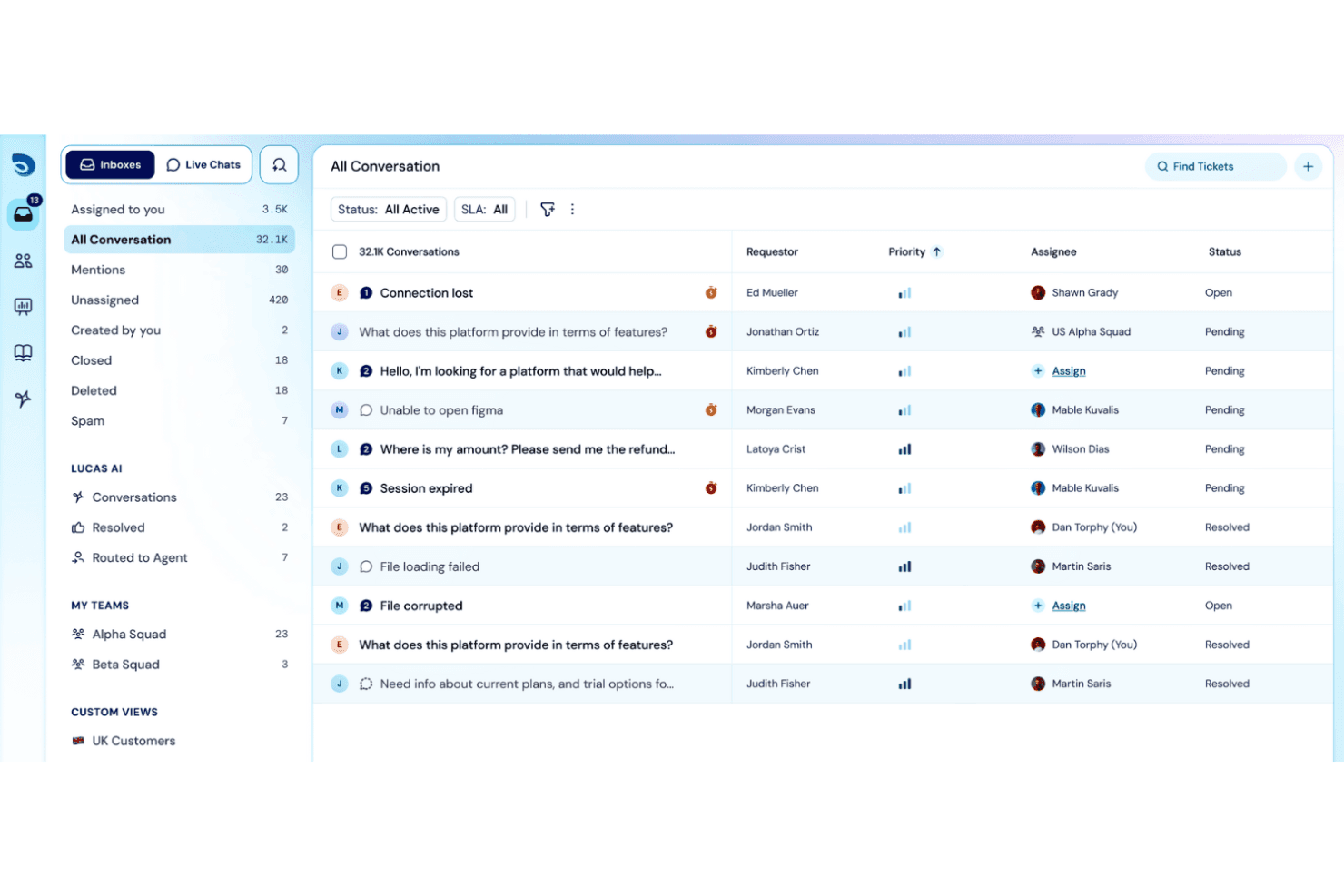
SparrowDesk displays a unified conversation inbox with priority, assignee, and status columns for managing 32.1K support tickets. SparrowDesk is an AI-powered helpdesk platform that combines omnichannel ticket management, a self-service knowledge base, SLA tracking, and workflow automation in a single inbox.
Who Is SparrowDesk Best For?
SparrowDesk is a strong fit for small and growing teams that need structured internal support without the overhead of a full ITSM platform.
Why I Picked SparrowDesk
SparrowDesk earns its spot on my shortlist because of Zoona, its AI Agent that reads incoming tickets and resolves them autonomously, day or night. I like that Zoona trains directly from your existing knowledge base, uploaded PDFs, and website URLs, so there's no custom configuration required to get it handling real requests. The AI Copilot layer then catches what Zoona can't, generating instant ticket summaries and reply drafts so agents spend less time re-reading context and more time closing issues.
SparrowDesk Key Features
- Omnichannel inbox: View and manage tickets from email, live chat, Slack, and WhatsApp in a single queue.
- Self-service help center: Publish a searchable, branded knowledge base that employees or customers can access directly.
- SLA management: Set, track, and enforce response and resolution targets with automated breach notifications.
- Role-based permissions: Assign custom roles and access levels to keep internal data secure and control agent capabilities.
SparrowDesk Integrations
SparrowDesk offers native integrations with Slack, WhatsApp, and Linear. An API is available for custom integrations.
Pros and Cons
Pros:
- Omnichannel inbox unifies email, chat, and Slack
- Zoona trains directly from existing content
- AI agent resolves tickets without human input
Cons:
- Reporting lacks advanced customization options
- Asset tracking features are not built in
Learn more about SparrowDesk: Best with GPT-powered conversational bots
- 7-day free trial + free plan + free demo available
- From $32/month (billed annually)
Visit WebsiteCustomer Rating:4.4/5
Chatbase offers an AI action feature that can simultaneously update subscriptions and databases, automatically applying plan changes. Chatbase fits into this list as an AI-powered first-response layer that can answer customer questions, guide users, and capture leads directly from your content sources.
Who Is Chatbase Best For?
Chatbase is a good fit for small business owners and lean support teams who want to automate customer conversations without needing a dedicated development team.
Why I Picked Chatbase
Instead of managing tickets or agent workflows, Chatbase focuses on automating inbound conversations via an embeddable chat widget. For small businesses without a formal helpdesk system, it can act as a lightweight support interface; for teams with existing tools, it works alongside them to reduce repetitive inquiries. Chatbase earns its spot on my shortlist because it builds GPT-powered conversational bots that actually handle multi-turn support conversations, not just single-line answers. I like that the bots maintain context across a conversation, so if a customer asks a follow-up question, the bot doesn't lose track of what was already discussed. My team uses the custom instructions feature to fine-tune how the bot responds, which means we can match our support tone and handle edge cases without retraining from scratch.
Chatbase Key Features
- Lead capture forms: Collect visitor information directly within the chat window before or during a support conversation.
- Escalation to human agent: Route conversations to a live team member when the bot reaches the limits of its knowledge base.
- Analytics dashboard: Track chat volume, unanswered questions, and user satisfaction scores to spot support gaps.
- Embeddable chat widget: Add the chatbot to your website with a code snippet, no developer required.
Chatbase Integrations
Chatbase offers native integrations with Zendesk, Notion, Slack, Stripe, Salesforce, Cal.com, Calendly, WhatsApp, Messenger, and Make. It also connects with Zapier and provides an API for custom integrations.
Pros and Cons
Pros:
- Trains chatbot directly from website or docs
- Collision detection minimizes duplicated agent work
- Similar ticket suggestions help resolve repetitive issues
Cons:
- No phone or live chat support available
- Can't automate escalations by ticket type
Learn more about Chatbase: Best for automating customer interactions
- Free plan available; 7-day free trial
- From $24.17/month (billed annually)
Visit WebsiteCustomer Rating:4.7/5
Tidio inbox view displaying live conversations, ticket details, and customer data sidebar. Tidio is designed to address the challenges small businesses face in managing customer interactions. By integrating AI-driven solutions with user-friendly tools, it helps streamline customer support processes, making it an appealing choice for businesses looking to enhance their service quality and response times. This tool is particularly beneficial for small businesses seeking to automate routine inquiries, manage multichannel communications, and improve customer satisfaction without extensive resources.
Why I Picked Tidio
I picked Tidio because it offers a unique AI-driven approach that suits small businesses' helpdesk needs. The Lyro AI Agent stands out by automating customer interactions, which directly addresses the need for quick response times and efficient service. Additionally, Tidio's live chat feature allows for real-time engagement, crucial for businesses that prioritize immediate customer support. These features make Tidio a compelling choice for small business owners looking to enhance their customer service capabilities.
Tidio Key Features
In addition to its AI-driven automation, Tidio offers several other features that enhance its utility for small businesses:
- Multichannel Communication: Manage customer interactions across various platforms like email, chat, and social media from a single interface.
- Customizable Chat Widgets: Tailor chat widgets to fit your brand's aesthetics and engage website visitors effectively.
- Visitor Tracking: Monitor and analyze visitor behavior on your website to better understand customer needs and improve service strategies.
- Proactive Engagement: Send automated messages to visitors based on their behavior, encouraging interaction and improving customer experience.
Tidio Integrations
Integrations include Salesforce, Shopify, WordPress, Instagram, Messenger, Zendesk, WhatsApp, Intercom, and Zapier.
Pros and Cons
Pros:
- Multichannel inbox centralizes chat, email, and social
- Supports 120+ integrations including Shopify and HubSpot
- AI chatbot resolves routine inquiries automatically
Cons:
- Pricing may be high for businesses with high conversation volumes
- AI usage limits apply on lower-tier plans
Learn more about Tidio: Best for customization options
- 14-day free trial
- From $24/user/month (billed annually)
Visit WebsiteCustomer Rating:4.5/5
HappyFox helps teams manage and customize customer support workflows efficiently. HappyFox is a helpdesk software for businesses of various sizes, offering customizable solutions to meet diverse support needs. It provides tools for managing customer inquiries, tickets, and support workflows, making it suitable for teams seeking tailored support solutions.
Why I picked HappyFox: It's perfect for teams that need extensive customization options to align with their specific processes. HappyFox offers features like custom ticket fields and workflows to adapt to your unique needs. Its capabilities let you automate repetitive tasks, improving efficiency. The software's reporting tools provide insights into support performance, helping you make data-driven decisions.
Standout features & integrations:
Features include a self-service portal that empowers customers to find answers independently, ticket automation to reduce manual work, and detailed reporting to analyze support metrics. These features help you provide efficient and proactive customer service.
Integrations include Slack, Salesforce, Shopify, Mailchimp, Microsoft Teams, Jira, and WhatsApp.
Pros and Cons
Pros:
- Flexible workflow management
- Strong automation capabilities
- Highly customizable ticket fields
Cons:
- Not ideal for very small teams
- Limited knowledge base tools
Learn more about HappyFox: Best for knowledge base features
- Free plan + free demo available
- From $39.99/month
Visit WebsiteCustomer Rating:4.7/5
ProProfs Help Desk supports ticketing and self-service support for small teams. ProProfs Help Desk is a ticketing software solution for small to medium-sized businesses, focusing on efficient customer support through an extensive knowledge base. It helps teams manage tickets and provide self-service options, enhancing customer satisfaction.
Why I picked ProProfs Help Desk: It offers a strong knowledge base feature, making it perfect for teams that want to empower customers with self-service options. ProProfs Help Desk includes features like ticket prioritization and automation to improve support workflows. The software's reporting capabilities provide insights into team performance, helping you identify areas for improvement. Its simplicity and ease of use ensure that your team can start quickly without extensive training.
Standout features & integrations:
Features include customizable ticket fields that allow you to capture specific customer information, automated ticket assignment to ensure quick response times, and performance reports that help you monitor support efficiency. These features help your team manage customer inquiries effectively.
Integrations include Salesforce, Slack, Shopify, ClickUp, Jira, and Microsoft Dynamics.
Pros and Cons
Pros:
- Automated ticket assignment
- Customizable ticket fields
- Strong knowledge base functionality
Cons:
- Limited third-party integrations
- Limited advanced features
Learn more about ProProfs Help Desk: 7Best for budget-conscious users
Hesk
- Free plan + free demo available
- From $29.99/10 users/month (billed annually)

Hesk provides budget-friendly ticket management for small business support. Hesk is a helpdesk software solution tailored for small businesses and budget-conscious teams. It offers essential ticket management features and supports effective customer service operations without hefty costs.
Why I picked Hesk: It's great for teams looking to manage support tickets without breaking the bank. Hesk provides core functionalities like ticket submission, categorization, and status tracking, fitting well into tight budgets. Its straightforward interface makes it easy to use without requiring extensive training. The self-hosted option gives you control over your data, adding flexibility.
Standout features & integrations:
Features customizable ticket fields to capture the customer details your team needs, a built-in knowledge base to reduce repeat questions, and canned responses that help support agents reply faster. These tools work together to optimize ticket resolution and improve team productivity, giving your helpdesk software a more organized and efficient customer support process.
Integrations include Slack, Microsoft Teams, Zapier, Google Workspace, Outlook, Freshdesk, Jira, Trello, Asana, and Zoho CRM.
Pros and Cons
Pros:
- Customizable ticket fields
- Lightweight and efficient
- Self-hosted option
Cons:
- Ideal for startups rather than large teams
- Basic reporting tools
Learn more about Hesk:

Hiver lets teams manage customer support directly inside Gmail. Hiver is a helpdesk software built for teams that rely heavily on Gmail for customer support. It allows users to manage customer emails directly from their Gmail interface, making it a natural fit for businesses looking to enhance email-based support.
Why I picked Hiver: It seamlessly integrates with Gmail, providing a familiar environment for your team. Hiver offers features like email delegation, shared inboxes, and collision alerts to prevent duplicate responses. Its email notes and tags help organize communication within the team. You can also track email status and response times, ensuring efficient customer service.
Standout features & integrations:
Features include email templates to save time on repetitive responses, analytics for tracking team performance, and round-robin assignment to distribute emails evenly among team members. These features help streamline your email management process and improve response efficiency.
Integrations include Salesforce, Zapier, HubSpot, Jira, Asana, and NetSuite.
Pros and Cons
Pros:
- Real-time email tracking
- Minimal learning curve
- Easy Gmail integration
Cons:
- Occasional email glitches
- Limited third-party integrations
Learn more about Hiver: Best for live chat support
- 30-day free trial
- From $15/user/month (billed annually)
Visit WebsiteCustomer Rating:4.6/5
LiveAgent helps businesses manage real-time customer inquiries across multiple channels. LiveAgent is a SaaS helpdesk software solution known for its strong live chat features, giving businesses that rely on real-time customer interactions a reliable way to manage support. It offers a wide set of helpdesk tools that bring inquiries from email, chat, and social media into one system, helping teams respond more quickly.
LiveAgent also supports ticket escalation to ensure urgent issues get routed to the right agents, and it includes options such as customer forums to help organizations build communities and reduce repetitive questions.
Why I picked LiveAgent: It excels in providing live chat support, making it ideal for businesses that need instant customer communication. LiveAgent includes features like real-time chat, ticket management, and a built-in call center. The software's universal inbox allows your team to handle all customer inquiries in one place. Its automation tools help distribute tickets and unblock workflows, enhancing support efficiency.
Standout features & integrations:
Features include a customer portal where users can track their tickets, a knowledge base that helps reduce ticket volume by providing self-service options, and gamification elements to motivate your support team. These features contribute to a more organized and engaging support environment.
Integrations include Slack, WhatsApp, Shopify, WordPress, Mailchimp, Google Analytics, Zapier, Salesforce, HubSpot, Wix, and Trello.
Pros and Cons
Pros:
- Built-in call center
- Advanced live chat options
- Strong multi-channel communication
Cons:
- Limited history search
- Complex setup for custom workflows
Learn more about LiveAgent: Best for email-based support
- Free plan available
- From $25/user/month (billed annually)
Visit WebsiteCustomer Rating:4.5/5
Help Scout helps teams manage personalized, efficient email-based customer support. Help Scout is a helpdesk software solution designed for small to medium-sized businesses that prioritize email-based customer support. It offers a clean, organized workspace for managing customer inquiries with clarity and personalization. Help Scout is also widely adopted by ecommerce businesses that rely on quick, friendly communication to assist customers throughout their buying journey.
Why I picked Help Scout: It manages email support, making it a go-to for teams that rely on email interactions. Help Scout includes features like shared inboxes and customer profiles to keep your team informed about customer interactions. Its workflow automation simplifies repetitive tasks, freeing up time for more complex issues. The reporting tools offer insights into team performance, helping you improve service quality.
Standout features & integrations:
Features include a knowledge base to empower customers with self-service options, collision detection to prevent duplicate responses, and tags that help organize and categorize tickets efficiently. These features ensure your team can manage email-based support effectively.
Integrations include Slack, Mailchimp, HubSpot, Salesforce, Shopify, WordPress, Jira, Trello, Asana, and Google Workspace.
Pros and Cons
Pros:
- Detailed customer profiles
- Efficient workflow automation
- Strong email support focus
Cons:
- Few widget customizations
- Chatbot automation could be improved
Learn more about Help Scout:
Annen helpdeskprogramvare for små bedrifter
Her er noen flere alternativer for helpdeskprogramvare for små bedrifter som ikke kom med på kortlisten min, men som likevel er verdt å sjekke ut:
- 11Desk365Best for Microsoft 365 users
- 12TeamSupportBest for B2B support
- 13SuperOpsBest for IT service providers
- 14HelpDeskBest for intelligent workflows
- 15Agentforce Service (formerly Service Cloud)Best for CRM integration
- 16FreshserviceBest for ITIL compliance
- 17SysAidBest for asset management
- 18HaloBest for ITSM
- 19Jira Service ManagementBest for DevOps teams
- 20Zoho DeskBest for multichannel support
- 21ManageEngine ServiceDesk PlusBest for incident management
- 22HubSpot Service HubBest for small business growth
- 23monday serviceBest for task management
- 24ZendeskBest for global support
- 25VivantioBest for flexible pricing
How I Evaluate Helpdesk Software for Small Business
I split my evaluation into baseline criteria—can a two-person IT team route tickets, enforce SLAs, and deflect repetitive requests—and the differentiators that make one tool a better fit than another.
Core Functionality (Table Stakes For This List)
When I'm selecting tools for my list, I rank each one on a scale from 0 (does not offer the functionality) to 5 (excels in this area) for each core functionality listed below. Then, I calculate the tool's total score into a percentage. Each tool needs to achieve a minimum total score of 65% to be considered for inclusion.
- Ticket Management: I evaluate the full ticket lifecycle—creation, categorization, prioritization, assignment, and resolution tracking—including whether agents can merge duplicate tickets or create child tasks for multi-step fixes like a workstation build-out.
- Multi-Channel Intake: Each tool should unify requests from email, a web portal, and live chat into one queue so a small IT team isn't toggling between inboxes to catch a password reset submitted via email and a VPN issue logged through chat.
- Automation & SLA Rules: I look for workflow automations that handle routing, escalation, and SLA timers—things like auto-assigning printer issues to a specific technician or escalating a ticket when it breaches a four-hour response window.
- Self-Service Knowledge Base: A searchable, categorized KB where end users can find answers to common questions (Wi-Fi setup, VPN configuration, software installation steps) before submitting a ticket is something I check for in every tool.
- Reporting & Analytics: Dashboards covering ticket volume, resolution times, SLA compliance, and agent workload help a small IT manager spot recurring issues—like a spike in onboarding tickets every quarter—and plan staffing around them.
- IT-Specific Capabilities: I check whether the tool includes IT-oriented modules such as asset tracking, incident management, or ITIL-aligned workflows rather than only offering a generic customer support ticketing system rebranded for IT use.
Once I have a list of tools that meet this criteria, I consider what sets each platform apart.
Differentiating Factors (What Sets Vendors Apart)
Here's how I compare and contrast different vendors:
Standout Features
AI-powered ticket assistance is a big differentiator—tools that auto-suggest KB articles or draft replies save a solo IT admin real time when the same "how do I reset my password" ticket arrives for the tenth time that week. Remote support integration matters just as much; launching a screen-share session directly from a ticket instead of switching to a separate tool keeps resolution fast. I also look for a full-featured mobile app, since small-team IT staff are often away from their desk handling in-person issues while tickets keep rolling in.
Beyond Features
Pricing transparency matters when you're working with a small IT budget—I check whether a tool offers a free or low-cost entry tier and doesn't lock essential features like SLA management behind expensive plans. Integration coverage is another big factor; a helpdesk that connects natively to Microsoft 365, Google Workspace, and Slack fits the typical small business stack without requiring custom development. I also evaluate time-to-value, looking for pre-built templates and self-serve setup so a two-person IT team can go live in days, not weeks.
Slik velger du helpdeskprogramvare for en liten bedrift
Det er lett å gå seg vill i lange funksjonslister og kompliserte prismodeller. For å hjelpe deg med å holde fokus mens du går gjennom den unike prosessen med å velge programvare, får du her en sjekkliste over faktorer du bør ha i bakhodet:
| Faktor | Hva du bør vurdere |
|---|---|
| FaktorSkalerbarhet | Hva du bør vurdereKan verktøyet vokse sammen med bedriften din? Se etter fleksible prisplaner og funksjoner som håndterer økende mengder supportsaker og større team. |
| FaktorIntegrasjoner | Hva du bør vurdereKan det kobles til verktøyene du allerede bruker? Se etter innebygde integrasjoner med CRM-systemet, e-post og andre viktige plattformer for å sikre sømløse arbeidsflyter. |
| FaktorTilpasningsmuligheter | Hva du bør vurdereKan du tilpasse det til behovene dine? Vurder muligheten til å endre arbeidsflyter, dashbord og rapporter slik at de passer til de spesifikke prosessene og preferansene dine. |
| FaktorBrukervennlighet | Hva du bør vurdereEr grensesnittet intuitivt? Unngå verktøy med bratt læringskurve – velg heller løsninger med enkel navigering og minimale opplæringskrav. |
| FaktorImplementering og introduksjon | Hva du bør vurdereHvor raskt kan du komme i gang? Vurder tiden det tar å konfigurere løsningen, tilgjengelige opplæringsressurser og om det tilbys dedikert hjelp med introduksjonen. |
| FaktorKostnad | Hva du bør vurdereHvordan passer det inn i budsjettet ditt? Sammenlign de totale eierkostnadene, inkludert etableringsgebyrer, abonnementskostnader og eventuelle skjulte kostnader. |
| FaktorSikkerhetstiltak | Hva du bør vurdereEr dataene dine beskyttet? Sørg for at programvaren overholder standarder for databeskyttelse og tilbyr funksjoner som kryptering og tilgangskontroller for brukere. |
| FaktorTilgjengelig kundestøtte | Hva du bør vurdereHvilke støttemuligheter er tilgjengelige? Se etter døgnåpen kundestøtte og flere kontaktmetoder for å sikre at du får hjelp når du trenger det. |
Hva er helpdeskprogramvare for små bedrifter?
Helpdeskprogramvare for små bedrifter er et verktøy som er utviklet for å håndtere kundehenvendelser og supportforespørsler på en effektiv måte. Den brukes vanligvis av kundeserviceteam, IT-supportmedarbeidere og bedriftsledere for å forbedre svartidene og øke kundetilfredsheten.
Funksjoner for billettadministrasjon, kommunikasjon på tvers av kanaler og rapportering bidrar til å organisere henvendelser, legge til rette for kommunikasjon og analysere resultater. Samlet sett gir disse verktøyene verdi ved å sikre at kundeproblemer løses raskt og effektivt, noe som fører til mer fornøyde kunder og mer produktive team.
Funksjoner i brukerstøtteprogramvare for små bedrifter
Når du velger brukerstøtteprogramvare for en liten bedrift, bør du se etter følgende viktige funksjoner:
- Billettadministrasjon: Organiserer kundehenvendelser i billetter, noe som gjør det enklere for teamet ditt å spore og løse dem.
- Støtte på tvers av kanaler: Gjør det mulig å kommunisere via ulike plattformer som e-post, chat og telefon, slik at kundene kan kontakte deg gjennom den metoden de foretrekker.
- Automatisering: Automatiserer repetitive oppgaver som tildeling av billetter og oppfølging, noe som sparer tid og reduserer manuelle feil.
- Rapportering og analyse: Gir innsikt i teamets resultater og kundetilfredshet, og hjelper deg med å identifisere områder som kan forbedres.
- Tilpassbare arbeidsflyter: Tilpasser prosesser etter bedriftens behov, slik at driften blir mer effektiv.
- Kunnskapsbase: Tilbyr selvbetjeningsmuligheter for kundene, reduserer antallet innkommende billetter og forbedrer brukertilfredsheten.
- Integrasjoner: Kobler seg til andre verktøy som CRM- og e-postplattformer, noe som legger til rette for smidige arbeidsflyter og datadeling.
- Sikkerhetsfunksjoner: Sikrer databeskyttelse gjennom kryptering og tilgangskontroller, slik at sensitiv informasjon holdes trygg.
- Samarbeidsverktøy: Gjør det mulig for teammedlemmer å samarbeide om billetter, noe som forbedrer løsningstidene og tjenestekvaliteten.
Fordeler med brukerstøtteprogramvare for små bedrifter
Implementering av brukerstøtteprogramvare for en liten bedrift gir flere fordeler for teamet og bedriften din. Her er noen av fordelene du kan se frem til:
- Forbedret effektivitet: Automatisering av oppgaver og billettadministrasjon hjelper teamet ditt med å håndtere flere henvendelser på kortere tid.
- Økt kundetilfredshet: Støtte på tvers av kanaler og raske svartider sørger for at kundene føler seg hørt og verdsatt.
- Bedre teamsamarbeid: Samarbeidsverktøy gjør det mulig for teammedlemmer å jobbe sammen med problemer, noe som fører til raskere løsninger.
- Datadrevet innsikt: Rapportering og analyse gir verdifulle data om resultater og hjelper deg med å ta velinformerte beslutninger.
- Skalerbarhet: Tilpassbare arbeidsflyter og integrasjoner støtter vekst, slik at systemet kan utvikle seg i takt med bedriftens behov.
- Flere selvbetjeningsmuligheter: En kunnskapsbase gjør kundene i stand til å finne svar på egen hånd, noe som reduserer billettmengden.
- Bedre datasikkerhet: Sikkerhetsfunksjoner beskytter sensitiv kundeinformasjon, bygger tillit og bidrar til etterlevelse.
Kostnader og priser for brukerstøtteprogramvare for små bedrifter
Ved valg av brukerstøtteprogramvare for en liten bedrift er det nødvendig å forstå de ulike prismodellene og abonnementene som er tilgjengelige. Kostnadene varierer basert på funksjoner, teamstørrelse, tillegg og mer. Tabellen nedenfor oppsummerer vanlige abonnementer, gjennomsnittsprisene deres og typiske funksjoner som er inkludert i brukerstøtteløsninger for små bedrifter:
Sammenligningstabell for abonnementer på brukerstøtteprogramvare for små bedrifter
| Abonnementstype | Gjennomsnittspris | Vanlige funksjoner |
|---|---|---|
| AbonnementstypeGratisabonnement | Gjennomsnittspris$0 | Vanlige funksjonerGrunnleggende billettadministrasjon, e-poststøtte og begrenset rapportering. |
| AbonnementstypePersonlig abonnement | Gjennomsnittspris$5-$25/user/month | Vanlige funksjonerBillettadministrasjon, støtte via e-post og chat samt grunnleggende automatisering. |
| AbonnementstypeBedriftsabonnement | Gjennomsnittspris$30-$50/user/ month | Vanlige funksjonerStøtte på tvers av kanaler, avansert automatisering og tilpassbare arbeidsflyter. |
| AbonnementstypeEnterprise-abonnement | Gjennomsnittspris$60-$100/user/ month | Vanlige funksjonerPrioritert støtte, avansert analyse, tilpassede integrasjoner og forbedrede sikkerhetsfunksjoner. |
Vanlige spørsmål om programvare for brukerstøtte for små bedrifter
Her er noen svar på vanlige spørsmål om programvare for brukerstøtte for små bedrifter:
Hvilke systemkrav stilles til programvare for brukerstøtte?
Ja, de fleste løsninger for brukerstøtte er nettbaserte, noe som betyr at du bare trenger en pålitelig internettforbindelse og en moderne nettleser for å få tilgang til dem. Noen verktøy kan tilby skrivebords- eller mobilapper, så sjekk kompatibiliteten med enhetene dine. Sørg for at teamets maskin- og programvare er oppdatert for å unngå ytelsesproblemer.
Kan programvare for brukerstøtte integreres med det eksisterende CRM-systemet mitt?
Ja, mange løsninger for brukerstøtte tilbyr integrasjoner med populære CRM-systemer som Salesforce eller HubSpot. Dette gjør det mulig for teamet ditt å få tilgang til kundeinformasjon på ett sted, noe som forbedrer effektiviteten og servicekvaliteten. Før du kjøper, bør du kontrollere at programvaren støtter CRM-systemet ditt for å sikre sømløs datautveksling og kontinuitet i arbeidsflyten.
Er programvare for brukerstøtte sikker for håndtering av sensitive kundedata?
Ja, de fleste leverandører av programvare for brukerstøtte prioriterer sikkerhet med funksjoner som datakryptering, tilgangskontroller for brukere og overholdelse av personvernregler. Sjekk alltid sikkerhetssertifiseringer, og spør leverandørene om tiltakene de har iverksatt for å beskytte data. Det er avgjørende å sikre at programvaren er i tråd med sikkerhetsstandardene i bransjen din.
Hvordan kan programvare for brukerstøtte støtte fjernteam?
Programvare for brukerstøtte er ideell for fjernteam fordi den samler kommunikasjon og oppgavehåndtering på én plattform. Funksjoner som skybasert tilgang, støtte på tvers av flere kanaler og samarbeidsverktøy hjelper teamet ditt med å jobbe effektivt sammen, uavhengig av hvor medlemmene befinner seg. Sørg for at programvaren du velger, tilbyr mobiltilgang og støtter kravene til fjernarbeid.