

Sikkerhetsverktøy for programvareforsyningskjeder hjelper deg med å oppdage, overvåke og forhindre trusler i koden, avhengighetene og utviklingsprosessen. Disse verktøyene fokuserer på applikasjonssikkerhet og sikkerhet for åpen kildekode, og identifiserer kjente sårbarheter før de påvirker produksjonen. De har ofte funksjoner som analyse av programvaresammensetning og automatisert sikkerhetstesting for å beskytte sensitive data og sikre tryggere programvareleveranser. Ved å integrere dem i leveringspipen får teamene oversikt over og kontroll over risikoer i hele forsyningskjeden. Denne listen gir deg en tydelig og oppdatert oversikt over de beste verktøyene IT-team stoler på for å sikre hvert ledd i programvareforsyningskjeden. Du finner alternativer for ulike miljøer, risikoprofiler og arbeidsflyter – slik at du kan velge det som passer best til teamets behov.
Why Trust Our Software Recommendations
6,700+
Reviews
20
Industry experts
16+
Evaluation factors
14
Years
Our team has been testing and reviewing software since 2012. As tech leaders ourselves, we know how difficult—and important—it is to choose the right software.
For this guide, we evaluated tools using hands-on testing and independent research, scoring tools using our selection criteria.
Our reviews reflect our human editorial judgment, not a sales pitch.
Expert reviewers:
- Paulo Gardini MiguelTech Director
 Tim FisherVP of AI
 Gabriel RosasTech Lead & Software Architect
 Christhian GruhnTech Lead & Platform Architect

Sammenligningstabell for sikkerhetsverktøy for programvareforsyningskjeder
Denne sammenligningstabellen oppsummerer prisopplysningene for mine utvalgte sikkerhetsverktøy for programvareforsyningskjeder:
| Tool | Best For | Trial Info | Price | ||
|---|---|---|---|---|---|
| 1 | Best for extensive language and framework coverage | Free plan + 14-day free trial + free demo available | From $34/month | Website | |
| 2 | Best for developer-first vulnerability scanning | Free plan + free demo available | From $25/contributing developer/month | Website | |
| 3 | Best for AI-powered code security | Free demo available | Pricing upon request | Website | |
| 4 | Best for end-to-end supply chain security | 14-day free trial + free plan + free demo available | From $135/user/month + consumption (billed annually) | Website | |
| 5 | Best for customizable security scanning rules | Free plan + free demo available | From $30/contributor/month | Website | |
| 6 | Best for policy-based container security | 14-day free trial + free demo available | Pricing upon request | Website | |
| 7 | Best for risk-based code-to-cloud visibility | Free demo available | Pricing upon request | Website | |
| 8 | Best for advanced supply chain threat detection | 14-day free trial + free plan + free demo available | From $500/month | Website | |
| 9 | Best for continuous binary and container scanning | 14-day free trial + free demo available | From $150/month | Website | |
| 10 | Best for CI/CD supply chain protection | Free plan + free demo available | $350/month | Website |


Anmeldelser av sikkerhetsverktøy for programvareforsyningskjeder
Nedenfor finner du mine detaljerte sammendrag av sikkerhetsverktøyene for programvareforsyningskjeder som kom med på kortlisten. Anmeldelsene mine gir en detaljert oversikt over funksjonene, egenskapene og integrasjonene til hver plattform, slik at du kan finne den beste løsningen for deg.
 Best for extensive language and framework coverage
- Free plan + 14-day free trial + free demo available
- From $34/month
Visit WebsiteCustomer Rating:4.4/5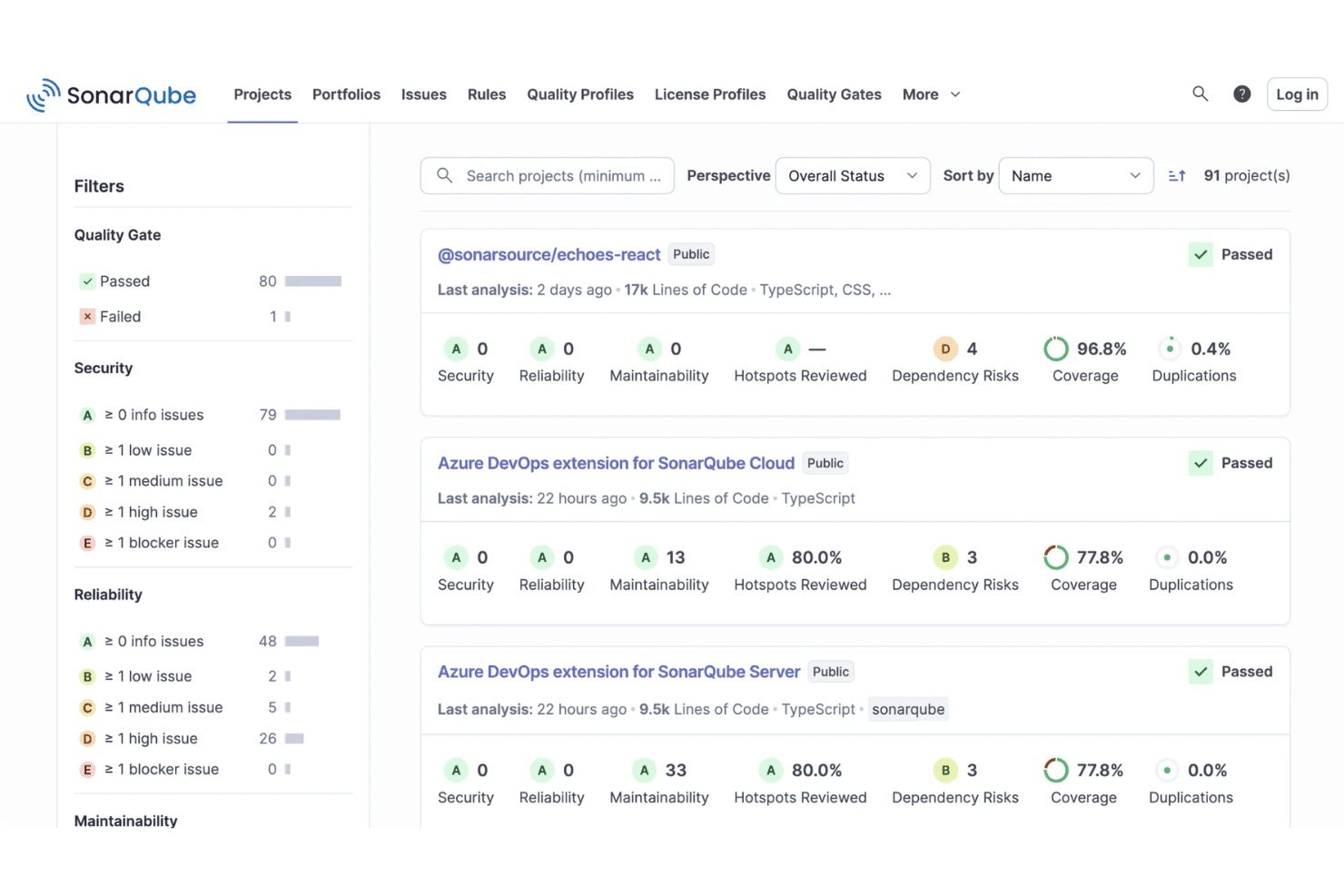
SonarQube displays a project's dashboard with quality gate statuses, security ratings, coverage percentages, and maintainability metrics. SonarQube is a code security and quality analysis platform that combines SAST, SCA, secrets detection, and SBOM generation to scan first-party code, AI-generated code, and open source dependencies.
Who Is SonarQube Best For?
SonarQube is a strong fit for enterprise engineering teams managing large, polyglot codebases across multiple languages, frameworks, and environments.
Why I Picked SonarQube
I picked SonarQube because no other tool on my shortlist covers 40+ languages, frameworks, and IaC technologies in a single platform. I like that it extends to legacy languages like COBOL and ABAP, since supply chain compromises don't discriminate by stack age. Its dependency-aware taint analysis traces data flows from your code into third-party libraries, catching vulnerabilities that a language-siloed scanner would miss.
SonarQube Key Features
- Secrets detection: Finds hard-coded credentials, tokens, and sensitive data before code reaches your repository.
- SBOM generation: Automatically creates and updates a Software Bill of Materials for every project.
- Quality gates: Enforces customized security and quality thresholds in your CI/CD pipeline.
- IDE integration: Delivers instant code insights within popular editors like Visual Studio Code and IntelliJ.
SonarQube Integrations
SonarQube offers native integrations with GitHub, GitLab, Bitbucket, Azure DevOps, Jenkins, Jira, Slack, and supports Visual Studio Code, IntelliJ, and Eclipse. An API is available for custom integrations.
Pros and Cons
Pros:
- Automated SBOM generation and export
- Supports legacy and modern programming languages
- Offers SAST, SCA, and secrets scanning
Cons:
- Secrets scanning sometimes misses encrypted values
- Reports can overwhelm with non-critical findings
Learn more about SonarQube: 2Best for developer-first vulnerability scanning
Snyk
- Free plan + free demo available
- From $25/contributing developer/month
Visit WebsiteCustomer Rating:4.6/5
Snyk asset dashboard displays repository coverage, technology breakdown, and open source risk metrics. Snyk is a software supply chain security platform that provides automated vulnerability detection, code scanning, license compliance, and remediation tools for developers and security teams.
Who Is Snyk Best For?
Development teams and security engineers at technology-driven companies who want automated vulnerability detection and remediation in their software supply chain.
Why I Picked Snyk
I picked Snyk as one of the best because I rely on its developer-first approach to catch vulnerabilities early in the coding process. I like that it scans for malicious code across open source dependencies, container images, and infrastructure as code, helping secure the broader development ecosystem. My team also benefits from insights like dependency metadata and automated remediation suggestions, which make it easier to fix issues quickly without leaving our workflow.
Snyk Key Features
- License compliance management: Tracks and flags open source license issues in dependencies.
- SBOM generation: Automatically creates software bills of materials for every project.
- Custom security policies: Lets you define and enforce organization-specific security rules.
- Integration with CI/CD pipelines: Connects directly to build tools for continuous monitoring.
Snyk Integrations
Snyk offers native integrations with GitHub, GitLab, Bitbucket, Azure DevOps, Jenkins, Jira, Docker Hub, CircleCI, Travis CI, and Slack. An API is available for custom integrations.
Pros and Cons
Pros:
- License compliance tracking for third-party packages
- Automated remediation for detected vulnerabilities
- Real-time scanning of open source dependencies
Cons:
- Advanced features require higher-tier plans
- Limited reporting options for compliance audits
Learn more about Snyk: Best for AI-powered code security
- Free demo available
- Pricing upon request
Visit WebsiteCustomer Rating:4.2/5
Checkmarx dashboard shows project risk levels, policy violations, and dependency-based vulnerability tracking. Checkmarx is a software supply chain security platform that provides automated code scanning, open source risk analysis, and AI-driven threat detection for development teams.
Who Is Checkmarx Best For?
Security and DevOps teams at large enterprises who need automated code and supply chain risk analysis.
Why I Picked Checkmarx
I picked Checkmarx as one of the best because I rely on its AI-driven supply chain risk detection to surface threats that traditional scanners miss. My team uses its automated code analysis and open source risk management to catch vulnerabilities early in our pipelines. I like how it correlates findings across code, dependencies, and infrastructure for a unified risk view.
Checkmarx Key Features
- SBOM generation: Automatically creates software bills of materials for all tracked components.
- Policy management: Lets you define and enforce security policies across projects.
- Dependency graph visualization: Maps relationships and risk across your software supply chain.
- Audit logging: Tracks all user actions and policy enforcement for compliance.
Checkmarx Integrations
Checkmarx offers native integration into the Checkmarx One platform and supports developer workflows with integrations into CI/CD pipelines and source code repositories. An API is available for custom integrations.
Pros and Cons
Pros:
- Supports multi-language and multi-framework projects
- Provides detailed SBOM and dependency mapping
- AI-driven detection of supply chain threats
Cons:
- Reporting customization options are restricted
- False positives can require manual review
Learn more about Checkmarx: Best for end-to-end supply chain security
- 14-day free trial + free plan + free demo available
- From $135/user/month + consumption (billed annually)

Sonatype dashboard shows policy violations, component risk scores, and dependency tracking across applications. Sonatype is a software supply chain security platform that helps organizations identify and reduce security risks across the software development lifecycle. It provides automated policy enforcement, continuous monitoring, vulnerability detection, and license compliance for both open source and proprietary components.
Who Is Sonatype Best For?
Enterprise security and DevOps teams who need automated policy enforcement and monitoring across complex software supply chains.
Why I Picked Sonatype
I picked Sonatype as one of the best because I rely on its automated policy enforcement to keep our software supply chain compliant at every stage. I like that it continuously monitors open source and proprietary components for vulnerabilities and license risks. My team uses its granular policy controls to block risky dependencies before they ever reach production.
Sonatype Key Features
- SBOM generation: Automatically creates software bills of materials for every build.
- Continuous dependency scanning: Monitors third-party libraries for new vulnerabilities.
- Role-based access control: Lets you manage user permissions and restrict sensitive actions.
- Audit logging: Tracks all security events and changes within your CI/CD environment.
Sonatype Integrations
Sonatype offers native integrations with Jenkins, GitHub, GitLab, Bitbucket, Azure DevOps, Bamboo, Nexus Repository, Jira, and Slack. An API is available for custom integrations.
Pros and Cons
Pros:
- License risk detection for third-party libraries
- Detailed SBOM generation for every build
- Automated policy enforcement for open source components
Cons:
- Documentation can be sparse for complex setups
- Limited reporting customization for compliance needs
Learn more about Sonatype: Best for customizable security scanning rules
- Free plan + free demo available
- From $30/contributor/month

Semgrep dashboard displays code findings, secrets detection, and supply chain risk trends over time. Semgrep is a software supply chain security tool that combines code scanning, dependency analysis, and policy enforcement to help teams identify and manage risks across their development workflows.
Who Is Semgrep Best For?
Security engineers and DevSecOps teams at technology-driven companies who need automated code and dependency security across their software supply chain.
Why I Picked Semgrep
I picked Semgrep as one of the best because I rely on its automated code and dependency security to catch vulnerabilities before they reach production. I use its supply chain insights to track open source risks and policy violations across our repositories. My team benefits from its actionable findings, which help us prioritize and remediate issues quickly.
Semgrep Key Features
- Custom rule creation: Lets you write and enforce your own security policies.
- CI/CD pipeline integration: Connects directly with build and deployment workflows.
- SBOM generation: Produces software bills of materials for dependency tracking.
- Third-party package monitoring: Continuously scans for risks in open source libraries.
Semgrep Integrations
Semgrep offers native integrations with GitHub, GitLab, Bitbucket, Azure DevOps, Jenkins, and Jira, and provides an API for custom integrations.
Pros and Cons
Pros:
- Community-driven rule library for rapid updates
- Customizable rules for dependency risk detection
- Fast, code-aware supply chain scanning engine
Cons:
- No native support for binary artifact scanning
- Advanced rule writing requires YAML proficiency
Learn more about Semgrep: Best for policy-based container security
- 14-day free trial + free demo available
- Pricing upon request

Anchore system dashboard displays service health, image scans, and policy enforcement status. Anchore is a software supply chain security platform that provides automated container image scanning, policy enforcement, vulnerability detection, and compliance checks for containerized applications.
Who Is Anchore Best For?
Security and DevOps teams at enterprises running containerized workloads in regulated industries.
Why I Picked Anchore
I picked Anchore as one of the best because I rely on its automated container image scanning and policy enforcement to catch vulnerabilities before deployment. My team uses it alongside SCA tools to analyze open source software and enforce rules that support risk mitigation at every stage of our CI/CD pipeline. I also like that it provides detailed reports on vulnerabilities and policy violations, helping us maintain a secure software supply chain.
Anchore Key Features
- SBOM generation: Automatically creates software bills of materials for container images.
- Multi-registry scanning: Scans images across multiple container registries for vulnerabilities.
- Role-based access control: Lets you manage user permissions and access within the platform.
- REST API: Enables integration with external tools and custom workflows.
Anchore Integrations
Anchore offers native integrations with Jenkins, GitHub, GitLab, Azure DevOps, and Jira, and provides an API for custom integrations. It also supports CI/CD workflows through its API.
Pros and Cons
Pros:
- Supports automated remediation workflows
- Open source engine available for customization
- Strong policy-based container image scanning
Cons:
- Scan speeds can be slow on large images
- Limited support for non-container artifacts
Learn more about Anchore: Best for risk-based code-to-cloud visibility
- Free demo available
- Pricing upon request

Apiiro risk dashboard tracks discovered risks, MTTR metrics, SLA status, and security trends. Apiiro is a software supply chain security platform that provides code risk analysis, CI/CD pipeline monitoring, and automated remediation for development and security teams.
Who Is Apiiro Best For?
Security and engineering teams at large enterprises needing end-to-end risk visibility and remediation across their software supply chain.
Why I Picked Apiiro
I picked Apiiro as one of the best because I rely on its end-to-end risk visibility and remediation across the software supply chain. I use its code risk analysis to identify vulnerabilities early, and its automated remediation workflows help my team address issues before they reach production. I also like how Apiiro maps risks to business context, so we can prioritize what matters most.
Apiiro Key Features
- SBOM management: Lets you generate, track, and manage software bills of materials for all components.
- Policy-driven controls: Enable you to enforce custom security and compliance policies across your pipelines.
- Third-party dependency scanning: Identifies vulnerabilities in open-source and third-party libraries.
- Audit trail and reporting: Provides detailed logs and reports for all risk and remediation activities.
Apiiro Integrations
Apiiro offers native integrations with GitHub, GitLab, Bitbucket, Azure DevOps, Jenkins, Jira, and Slack, and provides an API for custom integrations.
Pros and Cons
Pros:
- Supports SBOM management and export
- Context-aware risk prioritization
- Native integration with major CI/CD tools
- Automated remediation for code and dependencies
- End-to-end risk mapping across pipelines
Cons:
- Scan speeds can be slow on large images
- Limited support for non-container artifacts
Learn more about Apiiro: Best for advanced supply chain threat detection
- 14-day free trial + free plan + free demo available
- From $500/month

ReversingLabs analysis panel shows file risk grading, CVE findings, and extracted component details. ReversingLabs is a software supply chain security platform that delivers advanced threat detection, binary analysis, and continuous monitoring for software artifacts and components.
Who Is ReversingLabs Best For?
Security teams at large enterprises and software vendors who need advanced threat detection and analysis for their software supply chain.
Why I Picked ReversingLabs
I picked ReversingLabs as one of the best because I rely on its advanced threat detection and deep binary analysis to uncover hidden risks across third-party components. My team uses its continuous monitoring to strengthen our cybersecurity posture and catch supply chain threats early, similar to high-profile risks seen in incidents like SolarWinds. I also value its detailed file reputation and malware analysis, which give me confidence in securing both open source and proprietary software.
ReversingLabs Key Features
- Automated policy enforcement: Enforces security policies across the software supply chain.
- SBOM management: Generates and manages software bills of materials for all artifacts.
- Tamper detection: Identifies unauthorized changes in software packages.
- Integration with CI/CD pipelines: Connects directly to build and deployment workflows.
ReversingLabs Integrations
Native integrations are not currently listed. The tool supports integrations via API for custom workflows and can connect to CI/CD pipelines.
Pros and Cons
Pros:
- Tamper detection for software packages
- Automated SBOM generation and management
- Deep binary analysis for software artifacts
Cons:
- Limited open source vulnerability scanning features
- High resource usage for deep analysis
Learn more about ReversingLabs: Best for continuous binary and container scanning
- 14-day free trial + free demo available
- From $150/month

JFrog Xray dashboard shows vulnerability counts, severity breakdown, and policy violations for container images. JFrog Xray is a software supply chain security tool that provides deep binary and container scanning, vulnerability detection, and license compliance analysis across your artifacts and dependencies.
Who Is JFrog Xray Best For?
Enterprise DevOps and security teams in technology, finance, and manufacturing who need deep scanning of binaries and containers for vulnerabilities and license compliance.
Why I Picked JFrog Xray
I picked JFrog Xray as one of the best because I rely on its deep recursive scanning for vulnerability management across binaries and containers. I like that it analyzes dependencies in open-source projects all the way down the chain, not just surface-level packages. My team also benefits from features like authentication controls and its integration with JFrog Artifactory to automate continuous scanning within our CI/CD workflows.
JFrog Xray Key Features
- Policy-based security controls: Set and enforce custom security and compliance policies for artifacts.
- SBOM generation: Automatically creates software bills of materials for tracked components.
- REST API access: Integrate scanning and reporting into external systems and workflows.
- License compliance management: Detects and flags open source license issues in dependencies.
JFrog Xray Integrations
JFrog Xray offers native integrations with JFrog Artifactory, Jenkins, Jira, GitHub, GitLab, Bitbucket, Azure DevOps, and Slack. An API is available for custom integrations, and it supports CI/CD workflows through its API.
Pros and Cons
Pros:
- Supports multi-package and multi-language projects
- Real-time vulnerability database updates
- Deep binary and container scanning capabilities
Cons:
- Complex initial setup for hybrid environments
- Limited support for non-JFrog repository types
Learn more about JFrog Xray:

Aikido dashboard shows active pentesting sessions, attack simulations, and real-time threat monitoring across agents. Aikido is a software supply chain security platform that focuses on automated detection and prevention of threats in CI/CD pipelines, offering real-time monitoring and actionable insights for development teams.
Who Is Aikido Best For?
Security and DevOps teams at tech companies who need automated supply chain protection in their CI/CD workflows.
Why I Picked Aikido
I picked Aikido as one of the best because it actively detects and blocks supply chain attacks right in the CI/CD pipeline. I like that it monitors build processes for suspicious activity and enforces security policies automatically. My team is able to get real-time alerts when threats are detected, so we can respond quickly.
Aikido Key Features
- Dependency scanning: Continuously scans open source and third-party dependencies for vulnerabilities.
- SBOM generation: Automatically creates software bills of materials for every build.
- Role-based access control: Lets you manage user permissions and restrict access to sensitive actions.
- Audit logging: Tracks all security events and changes within your CI/CD environment.
Aikido Integrations
Aikido offers native integrations with GitHub, GitLab, Bitbucket, Jira, Slack, Azure DevOps, AWS, Google Cloud, Docker Hub, and Jenkins. An API is available for custom integrations.
Pros and Cons
Pros:
- SBOM generation for every build
- Real-time monitoring of CI/CD pipelines
- Automated detection of supply chain attacks
Cons:
- Advanced features require higher-tier plans
- No on-premises deployment option
Learn more about Aikido:
Andre sikkerhetsverktøy for programvareforsyningskjeder
Her er noen flere alternativer for sikkerhetsverktøy for programvareforsyningskjeder som ikke kom med på kortlisten min, men som likevel er verdt å se nærmere på:
- 11ChainguardBest for secure container image supply chains
- 12CycodeBest for unified code and pipeline security
- 13KusariBest for open-source supply chain integrity
- 14ZscalerBest for zero-trust cloud security
- 15VeracodeBest for application supply chain security
- 16WizBest for cloud supply chain visibility
- 17BitsightBest for third-party cyber risk management
- 18IntegrityNextBest for supply chain compliance automation
- 19Nudge SecurityBest for SaaS supply chain discovery
- 20ExigerBest for AI supply chain risk analysis
- 21Everstream AnalyticsBest for predictive supply chain risk insights
- 22JitBest for DevSecOps security and compliance
- 23ReflectizBest for web supply chain monitoring
How I Evaluate Software Supply Chain Security Tools
I split evaluation into two layers: baseline requirements—SBOM generation, CVE scanning, artifact signing—and the differentiators that show which tools are actually built for supply chain defense.
Core Functionality (Table Stakes For This List)
When I'm selecting tools for my list, I rank each one on a scale from 0 (does not offer the functionality) to 5 (excels in this area) for each core functionality listed below. Then, I calculate the tool's total score into a percentage. Each tool needs to achieve a minimum total score of 65% to be considered for inclusion.
- SBOM Generation & Management: I check whether a tool can auto-generate SBOMs in SPDX and CycloneDX formats per build, since many procurement and compliance workflows now require them at release time.
- Dependency & Vulnerability Scanning: SCA depth matters here—I evaluate language ecosystem coverage, transitive dependency resolution, and whether the tool maps CVEs with context like reachability or EPSS scores.
- Malicious Package Detection: Beyond CVE feeds, I look for proprietary threat intelligence that catches typosquats and dependency confusion attacks across registries like npm, PyPI, and Maven Central.
- CI/CD Pipeline Security: A tool should cover pipeline misconfigurations, exposed secrets, and build integrity checks across platforms like GitHub Actions, GitLab CI, or Jenkins.
- Artifact Integrity & Provenance: I evaluate whether the tool supports signing workflows (Cosign, Sigstore) and generates provenance attestations aligned with SLSA framework levels.
- Policy Enforcement & Compliance: Customizable policy-as-code with CI/CD gating is what I look for—teams need to block builds that violate license or vulnerability thresholds before anything ships.
Once I have a list of tools that meet the criteria, I consider what sets each platform apart.
Differentiating Factors (What Sets Vendors Apart)
Here's how I compare and contrast different vendors:
Standout Features
Reachability analysis is a major differentiator—I look for tools that can tell you whether a flagged CVE actually touches an execution path in your code, not just that it exists in your dependency tree. A curated package firewall adds another layer by letting teams proxy public registries and block risky packages before developers ever pull them. I also evaluate developer-native remediation, like auto-generated fix PRs, since security findings that sit in dashboards instead of reaching devs tend to go unresolved.
Beyond Features
Integration with the DevSecOps stack is one of the first things I evaluate—tools need native CI/CD plugins for platforms like GitHub Actions or GitLab CI, plus connections to artifact registries and ticketing systems like Jira. Compliance alignment matters just as much, especially for teams shipping to regulated buyers who expect NIST SSDF or SLSA attestation documentation. I also consider threat intelligence depth, checking whether a vendor maintains an in-house research team that publishes original findings on emerging package-level threats.
Slik velger du sikkerhetsverktøy for programvareforsyningskjeder
Det er lett å gå seg vill i lange funksjonslister og komplekse prisstrukturer. For å hjelpe deg med å holde fokus mens du arbeider deg gjennom den unike programvareutvelgelsesprosessen din, får du her en sjekkliste over faktorer du bør ha i tankene:
| Faktor | Hva du bør vurdere |
|---|---|
| FaktorSkalerbarhet | Hva du bør vurdereVil verktøyet håndtere den nåværende og forventede størrelsen på kodebasen, antallet brukere og antallet integrasjoner etter hvert som organisasjonen vokser? |
| FaktorIntegrasjoner | Hva du bør vurdereKan det kobles direkte til CI/CD-systemene, kodelagerne, supportsystemene og varslingssystemene dine? Finnes det API-er for tilpassede arbeidsflyter? |
| FaktorTilpasningsmuligheter | Hva du bør vurdereKan du tilpasse retningslinjer, varsler og rapportering til organisasjonens risikoprofil og krav til samsvar? |
| FaktorBrukervennlighet | Hva du bør vurdereEr grensesnittet intuitivt for både sikkerhets- og utviklingsteam? Vil det kreve omfattende opplæring eller løpende støtte for daglig bruk? |
| FaktorImplementering og oppstart | Hva du bør vurdereHvor lang tid tar oppsettet, og hvilke ressurser kreves? Finnes det migreringsverktøy, veiledninger for oppstart eller dedikert støtte for utrullingen? |
| FaktorKostnad | Hva du bør vurdereEr prisnivåene transparente og forutsigbare? Skalerer kostnaden etter bruk, antall lisenser eller funksjoner? Vær oppmerksom på skjulte gebyrer eller tillegg. |
| FaktorSikkerhetstiltak | Hva du bør vurdereHvilke sertifiseringer, krypteringsstandarder og rutiner for datahåndtering følger leverandøren? Finnes det revisjonslogger og tilgangskontroller? |
| FaktorKrav til samsvar | Hva du bør vurdereStøtter verktøyet bransjens regulatoriske standarder (for eksempel SOC 2, ISO 27001 og GDPR)? Kan det generere rapporter som er klare for samsvarskontroll? |
Hva er sikkerhetsverktøy for programvareforsyningskjeder?
Verktøy for sikkerhet i programvareforsyningskjeden er spesialiserte plattformer som hjelper organisasjoner med å identifisere, overvåke og redusere risikoer i komponentene, avhengighetene og prosessene som brukes til å bygge og levere programvare. Disse verktøyene skanner kode, tredjepartsbiblioteker og infrastruktur for sårbarheter, holder oversikt over programvarelister over materialer og støtter samsvar med sikkerhetsstandarder gjennom hele utviklingslivssyklusen.
Funksjoner i verktøy for sikkerhet i programvareforsyningskjeden
Når du velger verktøy for sikkerhet i programvareforsyningskjeden, bør du se etter følgende viktige funksjoner:
- Sårbarhetsskanning: Skanner kildekode, avhengigheter og containere for kjente og nye sikkerhetssårbarheter gjennom hele utviklingslivssyklusen.
- Generering av SBOM: Oppretter automatisk en programvareliste over materialer for å føre oversikt over alle komponenter og avhengigheter i applikasjonene dine.
- Sporing av avhengigheter: Overvåker tredjepartsbiblioteker og biblioteker med åpen kildekode for oppdateringer, risikoer og problemer knyttet til lisenssamsvar.
- Håndheving av retningslinjer: Lar deg definere og automatisere sikkerhetsretningslinjer for å blokkere risikabel kode eller komponenter fra å komme inn i miljøet ditt.
- Prioritering av risiko: Bruker kontekst og alvorlighetsgrad til å rangere sårbarheter, slik at teamene kan fokusere på de mest presserende truslene først.
- CI/CD-integrasjon: Kobler seg direkte til byggings- og distribusjonsprosessene dine for å automatisere sikkerhetskontroller og utbedringstiltak.
- Revisjonslogging: Registrerer brukerhandlinger, endringer i retningslinjer og sikkerhetshendelser for samsvar og rettsmedisinsk analyse.
- Varsling og rapportering: Varsler team om kritiske problemer og genererer detaljerte rapporter for interessenter og revisorer.
- Veiledning for utbedring: Gir konkrete trinn eller automatiserte løsninger for å løse identifiserte sårbarheter og feilkonfigurasjoner.
Fordeler med verktøy for sikkerhet i programvareforsyningskjeden
Implementering av verktøy for sikkerhet i programvareforsyningskjeden gir flere fordeler for teamet og virksomheten din. Her er noen av fordelene du kan se frem til:
- Redusert sårbarhetsrisiko: Automatisert skanning og overvåking hjelper deg med å oppdage og håndtere sikkerhetsproblemer før de påvirker programvaren eller brukerne dine.
- Bedre samsvar: Innebygd håndheving av retningslinjer og revisjonslogging gjør det enklere å oppfylle regulatoriske krav og bestå sikkerhetsrevisjoner.
- Raskere hendelsesrespons: Sanntidsvarsler og risikoprioritering gjør det mulig for teamet ditt å raskt identifisere og utbedre de mest presserende truslene.
- Større oversikt: Generering av SBOM og sporing av avhengigheter gir deg et tydelig bilde av alle komponentene i programvareforsyningskjeden.
- Forenklede arbeidsflyter: CI/CD-integrasjoner og automatiserte utbedringstiltak reduserer manuelt arbeid og holder sikkerhetskontrollene synkronisert med utviklingen.
- Bedre beslutningstaking: Detaljert rapportering og risikovurdering hjelper interessenter med å forstå sikkerhetsstillingen og fordele ressurser der det er størst behov.
- Bedre samarbeid: Sentraliserte oversikter og varsler holder sikkerhets-, utviklings- og samsvarsteam samkjørte om felles risikoer og tiltak.
Kostnader og priser for verktøy for sikkerhet i programvareforsyningskjeden
Valg av verktøy for sikkerhet i programvareforsyningskjeden krever en forståelse av de ulike prismodellene og abonnementene som er tilgjengelige. Kostnadene varierer basert på funksjoner, teamstørrelse, tillegg og mer. Tabellen nedenfor oppsummerer vanlige abonnementer, gjennomsnittsprisene deres og typiske funksjoner som er inkludert i løsninger for verktøy for sikkerhet i programvareforsyningskjeden:
Sammenligningstabell for abonnementer for verktøy for sikkerhet i programvareforsyningskjeden
| Abonnementstype | Gjennomsnittspris | Vanlige funksjoner |
|---|---|---|
| AbonnementstypeGratisabonnement | Gjennomsnittspris$0 | Vanlige funksjonerGrunnleggende sårbarhetsskanning, begrenset generering av SBOM og brukerstøtte fra fellesskapet. |
| AbonnementstypePersonlig abonnement | Gjennomsnittspris$10-$30/bruker/måned | Vanlige funksjonerAvansert skanning, grunnleggende håndheving av retningslinjer, begrensede integrasjoner og brukerstøtte via e-post. |
| AbonnementstypeBedriftsabonnement | Gjennomsnittspris$40-$80/bruker/måned | Vanlige funksjonerFull CI/CD-integrasjon, risikoprioritering, revisjonslogging, rapportering og standard kundestøtte. |
| AbonnementstypeVirksomhetsabonnement | Gjennomsnittspris$100-$200/bruker/måned | Vanlige funksjonerTilpasset administrasjon av retningslinjer, avanserte samsvarsverktøy, dedikert introduksjon, prioritert brukerstøtte og SLA-er. |
Vanlige spørsmål om verktøy for sikkerhet i programvareforsyningskjeden
Her er noen svar på vanlige spørsmål om verktøy for sikkerhet i programvareforsyningskjeden:
Hvordan bidrar verktøy for sikkerhet i programvareforsyningskjeden til å forhindre angrep på forsyningskjeden?
Disse verktøyene skanner kode, avhengigheter og byggeprosesser for sårbarheter og mistenkelige endringer. Ved å overvåke kjente trusler og håndheve sikkerhetspolicyer hjelper de deg med å oppdage risikoer tidlig og redusere sjansen for at kompromitterte komponenter havner i produksjon.
Kan verktøy for sikkerhet i programvareforsyningskjeden integreres med min eksisterende CI/CD-pipeline?
Ja, de fleste verktøy tilbyr integrasjoner med populære CI/CD-plattformer som Jenkins, GitHub Actions og GitLab CI. Dette lar deg automatisere sikkerhetskontroller som en del av bygge- og distribusjonsarbeidsflytene dine, slik at sårbarheter oppdages før koden lanseres.
Hva er en programvarekomponentliste (SBOM), og hvorfor er den viktig?
En SBOM er en detaljert oversikt over alle komponenter og avhengigheter i programvaren din. Den er viktig fordi den gir deg innsyn i hva kodebasen din inneholder, hjelper med å spore sårbarheter og i stadig større grad kreves for å overholde regelverk.
Støtter disse verktøyene åpen kildekode og proprietær kode?
Ja, de fleste løsninger kan skanne både kodebaser med åpen kildekode og proprietære kodebaser. De støtter vanligvis et bredt utvalg av programmeringsspråk og pakkeadministratorer, slik at du kan overvåke alle programvareressursene dine for risikoer.
Hvor ofte bør jeg kjøre skanninger med disse verktøyene?
Du bør kjøre skanninger kontinuerlig eller ved hver kodeinnsjekking hvis mulig. Hyppig skanning sikrer at nye sårbarheter oppdages raskt, og bidrar til å opprettholde en sterk sikkerhetstilstand etter hvert som kodebasen din utvikler seg.